

PCB manufacturing PCB manufacturing
Home > Blog

Thick PCB Board vs Heavy Copper PCB: Design and Selection Guide

September 10th, 2026

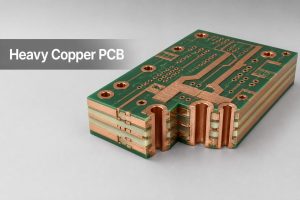
A thick pcb board and a heavy copper PCB solve different engineering problems. The first increases the total finished thickness of the board; the second increases the copper thickness on selected or all conductive layers. A board can be mechanically thick without carrying high current, and a heavy copper design can fit inside a conventional overall thickness.

This distinction affects stackup planning, hole sizes, impedance, thermal behavior, connector fit, manufacturing cost, and the information a fabricator needs before quotation. This guide compares the two constructions so engineers and buyers can specify the right one instead of treating “thick board” and “thick copper” as interchangeable terms.
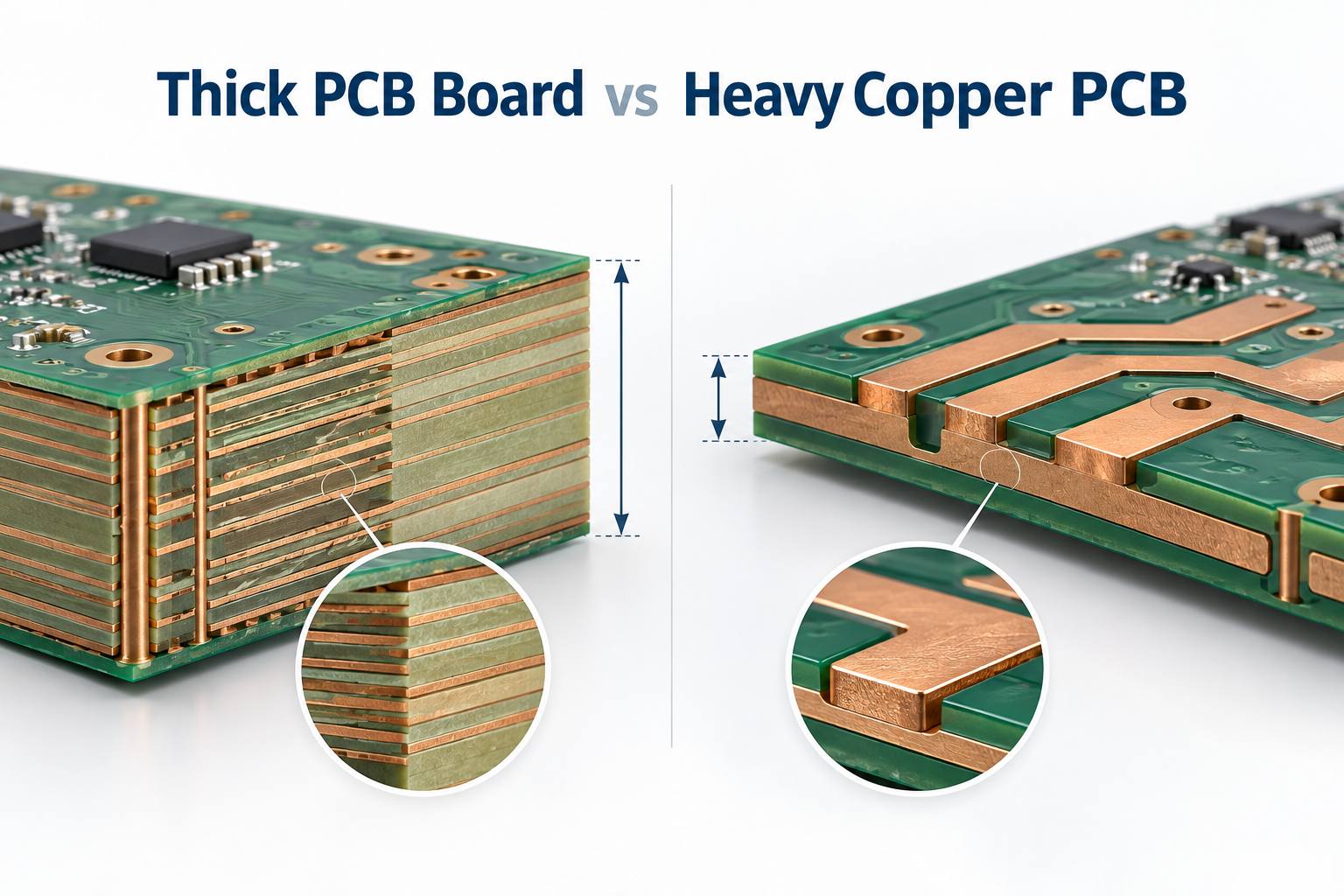
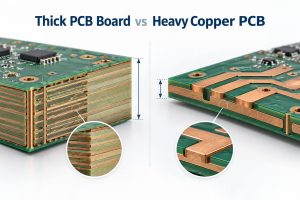
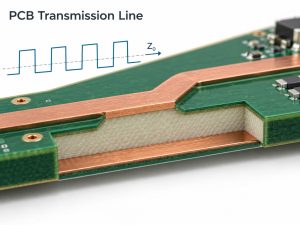
Thick PCB board versus heavy copper PCB engineering comparison

What Is a Thick PCB Board?

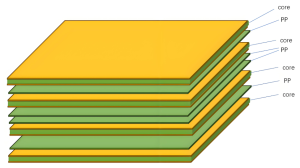
A thick PCB board is a rigid printed circuit board whose total finished thickness is greater than the common construction used for a similar product. The measurement spans the complete board from one outer surface to the other. It includes cores, cured prepregs, copper layers, plating, solder mask, and smaller finish contributions.

The term describes a mechanical dimension, not a specific copper weight. Designers may choose a thicker construction to:

  • Increase stiffness across a large unsupported area.
  • Support transformers, relays, power modules, large connectors, or other heavy components.
  • Meet card-edge, press-fit, guide-rail, enclosure, or mounting requirements.
  • Fit additional routing and reference-plane layers into a multilayer stackup.
  • Provide required dielectric spacing between conductors.
  • Control bending in equipment exposed to vibration or mechanical handling.

A thick board should not be selected only because it appears stronger. Extra thickness can create higher hole aspect ratios, longer routing cycles, different depaneling limits, more material usage, and tighter connector-fit constraints.

How Thick Is a PCB Board?

The practical answer to “how thick is a pcb board” depends on the application and the complete stackup. Many rigid FR-4 boards use a finished thickness near 1.6 mm, while thinner products may use 0.8, 1.0, or 1.2 mm. Mechanically demanding or high-layer-count designs may use 2.0, 2.4, 3.2 mm, or another project-specific value.

These numbers are not automatic manufacturing categories. A 2.4 mm two-layer board with generous holes is usually less demanding than a 2.4 mm multilayer board with small plated holes, controlled impedance, heavy outer copper, and a strict finished-thickness tolerance. The fabricator must review the thickness together with:

  • Layer count and copper distribution.
  • Core and prepreg constructions.
  • Smallest drilled and finished hole sizes.
  • Plated-through, blind, buried, or filled via structures.
  • Controlled-impedance geometries.
  • Board dimensions, panelization, and routing method.
  • Connector, press-fit, and enclosure tolerances.

For a broader dimensional reference, see our guide to standard printed circuit board thickness.

What Is the Standard PCB Thickness?

The question “what is the standard pcb thickness” usually refers to 1.6 mm, approximately 0.062 inch. It is a widely used rigid-board value because common laminate constructions, connectors, housings, fixtures, and assembly processes are often designed around it. However, 1.6 mm is a common default rather than a universal rule.

Finished thickness is built from real laminate and prepreg options. Prepreg does not behave like a fixed spacer: its pressed thickness changes with glass style, resin content, copper pattern density, resin flow, and the lamination cycle. Material suppliers such as Isola publish laminate and prepreg construction data that fabricators use when developing manufacturable stackups.

If a mechanical drawing calls out only an unusual finished thickness but does not define the stackup, the designer should let the PCB manufacturer propose available core and prepreg combinations. This is safer than forcing a theoretical build that depends on unavailable materials or unrealistic pressed thicknesses.
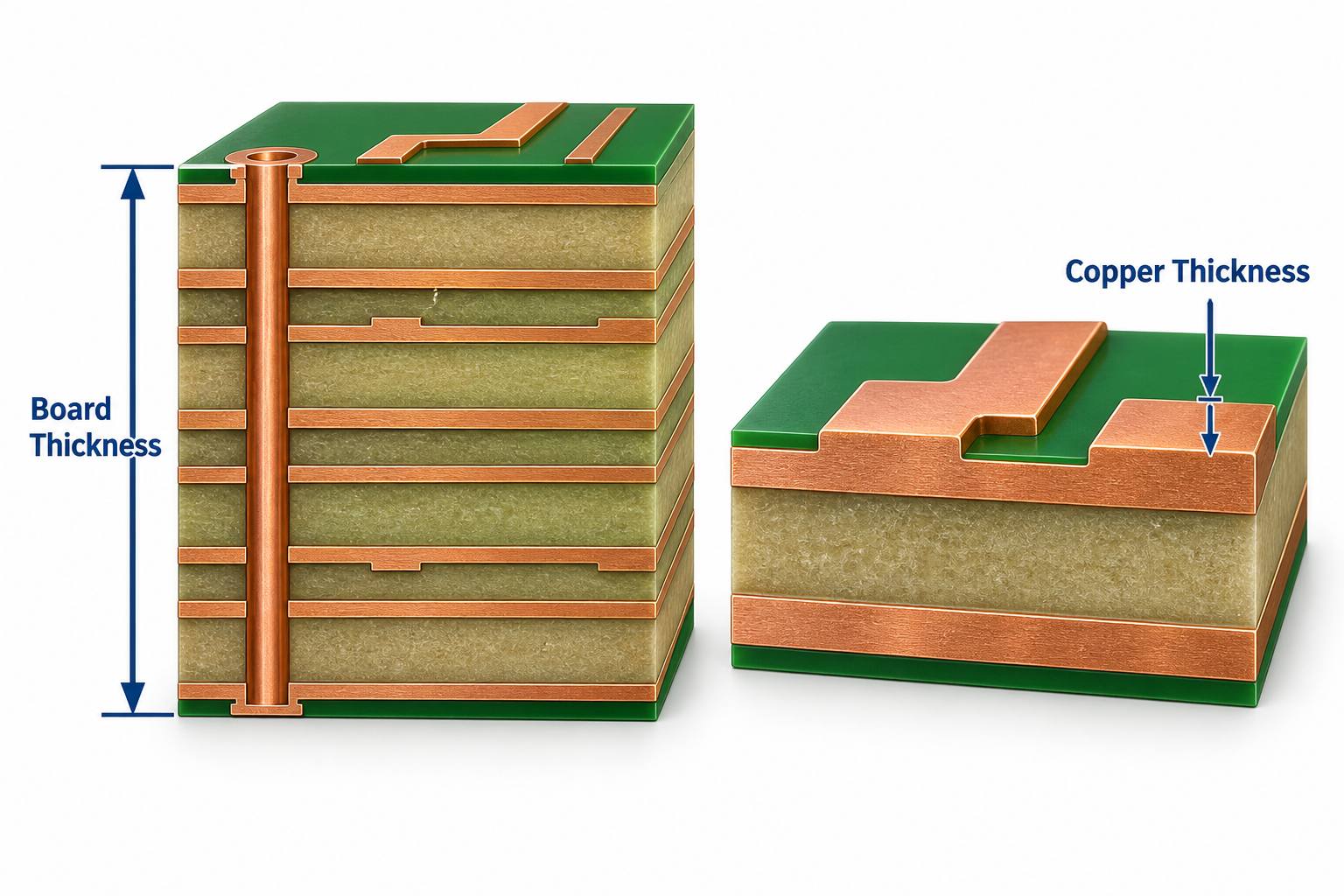
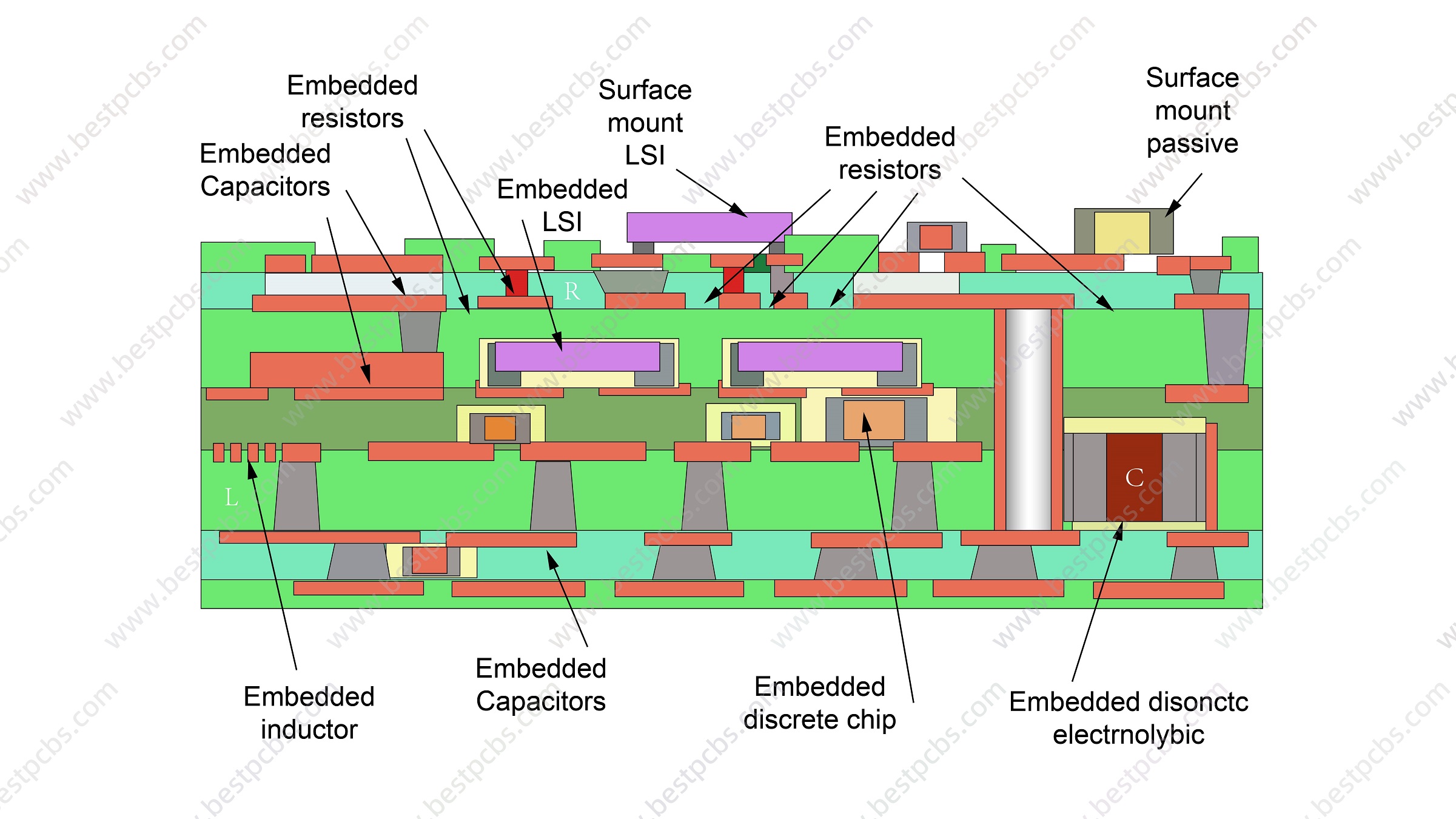
PCB board thickness compared with copper thickness in cross-section

Thick PCB Board vs Heavy Copper PCB: What Is the Difference?

The shortest distinction is simple: board thickness is a mechanical stack dimension, while copper thickness is a conductor dimension. They influence different parts of PCB performance and manufacturing.

Comparison Thick PCB Board Heavy Copper PCB
Primary definition Greater total finished board thickness Greater copper thickness or copper weight on one or more layers
Main purpose Mechanical stiffness, stackup space, connector fit, or dielectric spacing High-current conduction, lower conductor resistance, heat spreading, or robust power connections
Most affected design data Stackup, hole size, aspect ratio, impedance, enclosure, routing, and tolerance Trace width and spacing, pad geometry, etching, resin fill, plating, current rise, and thermal path
Typical manufacturing concern Deep drilling, hole preparation, plating coverage, lamination, routing, and warpage control Etch compensation, copper balance, resin filling around tall conductors, conductor definition, and thermal mass
Can it exist without the other? Yes. A thick board can use standard copper. Yes. A heavy copper board can retain a conventional finished thickness.

For example, a 3.2 mm FR-4 board with 1 oz copper is mechanically thick but is not a heavy copper PCB. A 1.6 mm board with 4 oz copper is a heavy copper design even though its total thickness is conventional. Some power products need both: a thick structure for stiffness and thick copper for electrical and thermal performance.

How Does a Thick Board Change Stackup and Impedance?

Increasing total board thickness changes the dielectric distance available between copper layers. If trace width, copper thickness, and dielectric properties remain unchanged, a larger trace-to-reference-plane distance changes characteristic impedance. Therefore, a designer cannot simply stretch every dielectric layer to reach a new finished thickness and expect the same controlled-impedance result.

A practical thick-board stackup review covers:

  • Reference-plane location: High-speed signals still need a nearby and continuous return plane.
  • Dielectric selection: Core and prepreg choices must match available material constructions and the required pressed thickness.
  • Copper balance: Symmetric copper and dielectric distribution helps reduce lamination stress and bow or twist.
  • Resin filling: Heavy copper or uneven pattern density may require higher-resin prepreg to fill around conductors.
  • Finished tolerance: The stackup must leave a realistic process window for material and lamination variation.

Do not approve the mechanical thickness independently from impedance. Send the impedance table, target values, referenced layers, and any material restrictions with the stackup so the fabricator can model the construction as one system.

How Do Drilling and Plating Limits Change?

As a board becomes thicker, a mechanically drilled hole becomes deeper. If the drill diameter stays small, the hole aspect ratio rises. This makes debris removal, desmear, activation, and copper deposition inside the barrel more demanding. The result can be thin plating in the center of the hole, barrel voids, poor registration margin, or lower thermal-cycling reliability.

Aspect ratio is commonly expressed as board thickness divided by drilled hole diameter. It is a DFM relationship, not a target that should be pushed without considering the material, layer count, plating process, copper requirement, and acceptance class. A thicker finished board may need one or more of the following changes:

  • Increase the mechanically drilled hole diameter.
  • Use staged or controlled drilling conditions.
  • Adjust the via structure instead of using one deep through-hole.
  • Increase annular-ring and registration allowance where required.
  • Specify hole-wall copper and microsection acceptance clearly.
  • Review press-fit hole tolerances and final plating buildup.
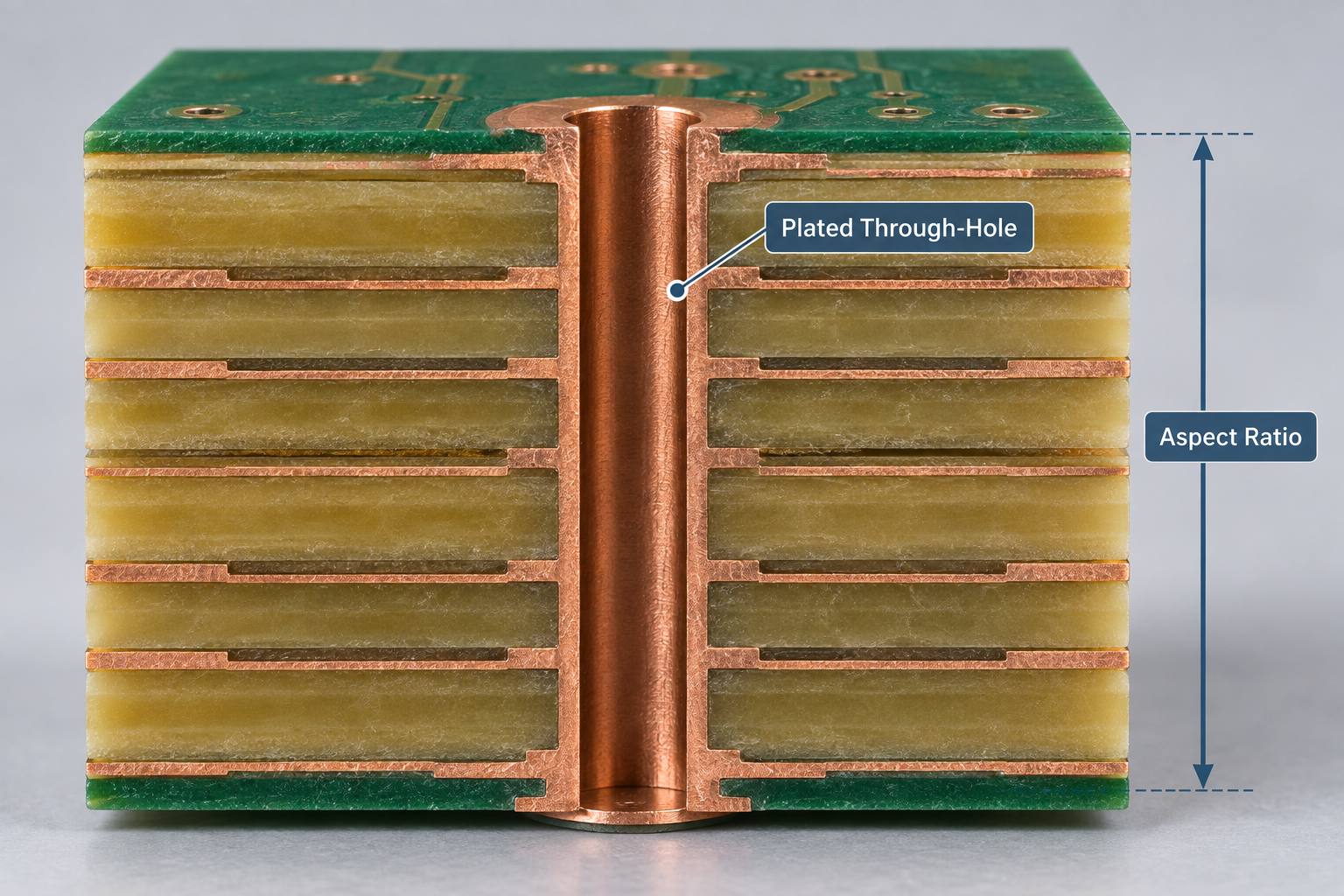
Thick PCB plated through-hole and drilling aspect ratio

IPC-6012F establishes qualification and performance requirements for rigid printed boards, including multilayer constructions with plated-through, blind, buried, and microvia structures. The applicable class, customer drawing, procurement specification, and agreed deviations should be defined before production.

Heavy Copper PCB Design: What Must Be Reviewed?

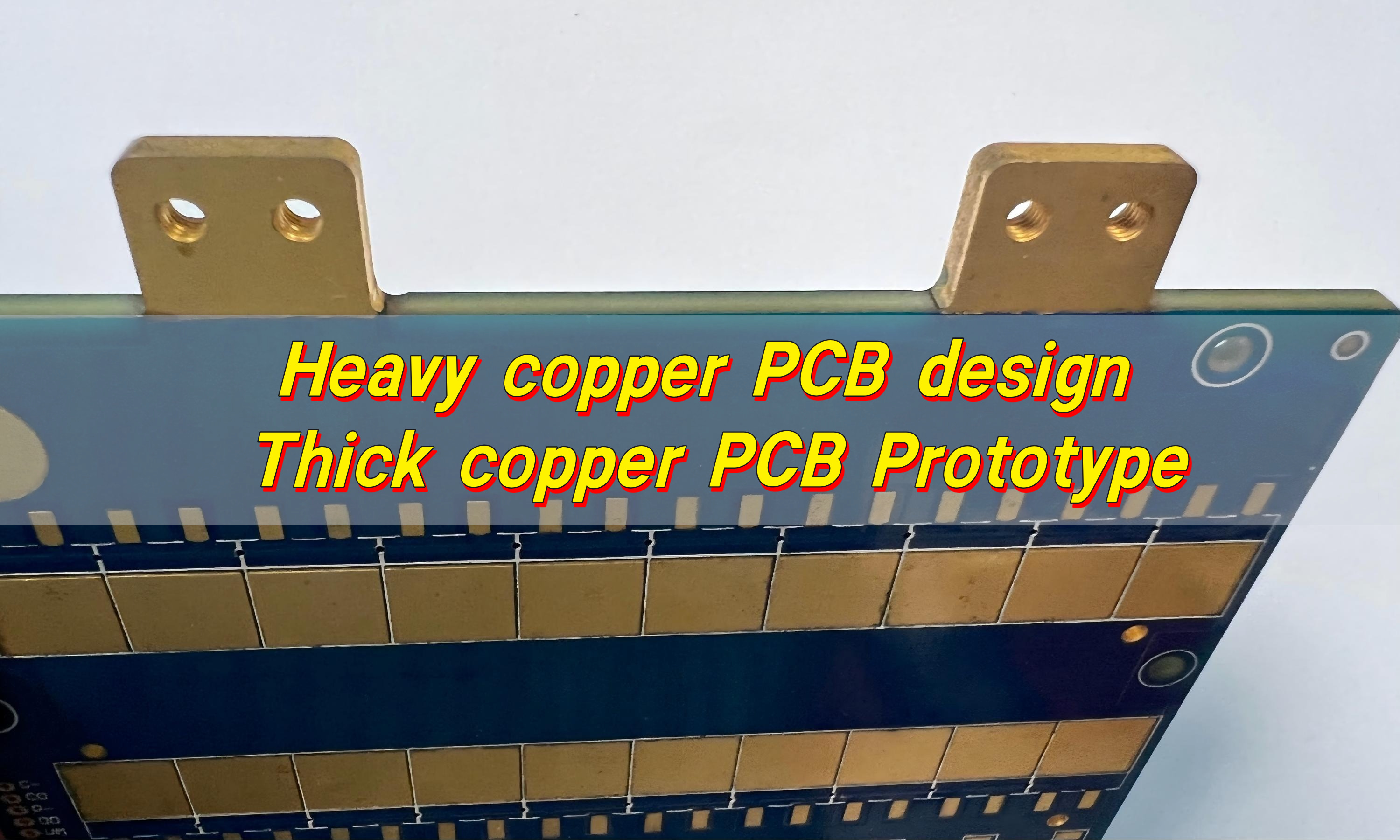
Heavy copper PCB design starts with electrical and thermal requirements, not with a higher copper weight chosen by habit. A thicker conductor can reduce resistance and support more current, but the result also depends on trace width, conductor location, ambient conditions, allowed temperature rise, adjacent copper, airflow, duty cycle, terminal design, and heat-transfer paths.

IPC-2152 provides guidance on the relationship between current, conductor dimensions, and acceptable temperature rise. It is a better basis for conductor sizing than assuming that a mechanically thicker board will automatically carry more current.

Manufacturing review should include:

  • Copper weight required on every inner and outer layer.
  • Minimum line width and spacing after etch compensation.
  • Pad, via, and neck-down geometry at high-current transitions.
  • Resin filling around tall copper features.
  • Copper balance across the panel and stackup.
  • Thermal reliefs, solderability, and assembly heat demand.
  • Finished copper and plated-hole copper acceptance.
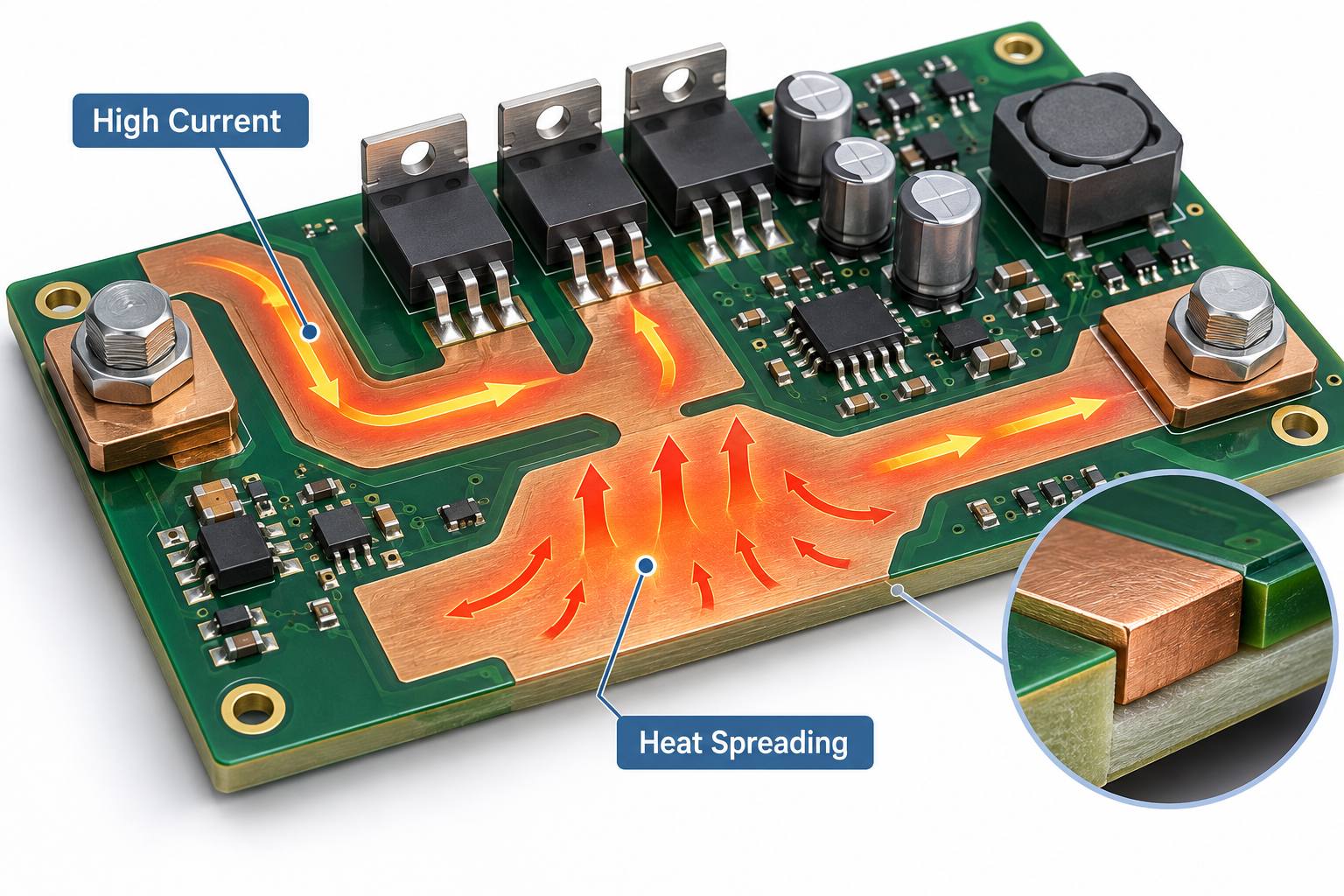
Heavy copper PCB design for high current and heat spreading

EBest Circuit supports heavy copper PCB projects for power distribution, heat spreading, planar transformers, power converters, and related high-current applications. Exact copper, spacing, stackup, and test requirements must be confirmed against the production data.

Which Construction Should You Choose?

Choose the construction from the problem you are trying to solve. Mechanical stiffness does not replace electrical conductor sizing, and additional copper does not guarantee connector fit or board rigidity.

Primary Requirement Review First Likely Direction
Large board or heavy components need more rigidity Board dimensions, mounting points, vibration, and enclosure support Thicker finished board
High current with an acceptable temperature rise Current, trace width, copper weight, duty cycle, and cooling Heavy copper PCB
More routing and reference planes Layer count, impedance, dielectric spacing, and via structure Thicker multilayer stackup, if required
High current plus mechanical stiffness All electrical, thermal, stackup, drilling, and enclosure constraints Combined thick-board and heavy-copper construction
Connector or card-edge fit Specified finished thickness and tolerance at the mating interface Board thickness driven by connector geometry

If the design needs both thickness and heavy copper, review them together before layout release. Thick copper consumes vertical space, changes resin demand, restricts fine features, and can alter the final thickness. A late copper-weight change can therefore invalidate the stackup and controlled-impedance calculations.

What Should You Send for a Manufacturing Review?

A useful DFM package lets the fabricator evaluate the mechanical and conductor requirements separately, then confirm how they interact. Include:

  • Gerber or ODB++ fabrication data and drill files.
  • Layer count and proposed stackup.
  • Target finished board thickness and tolerance.
  • Base material, Tg, CTI, thermal, or high-frequency requirements.
  • Copper weight for every layer and any selective heavy-copper areas.
  • Smallest drilled hole, smallest finished hole, via types, and filled-via requirements.
  • Controlled-impedance values and referenced layer pairs.
  • Board dimensions, panel or delivery format, outline tolerance, and connector requirements.
  • Surface finish, solder mask, legend, electrical test, acceptance class, and required reports.
  • Prototype and production quantities plus the required delivery date.

If the project is already defined as a thick mechanical build, our thick PCB board manufacturing guide explains the detailed stackup and quotation review path.

FAQ About Thick PCB Boards and Heavy Copper PCBs

Is a 2.0 mm PCB considered thick?

It is thicker than the common 1.6 mm construction, but whether it needs special processing depends on its layer count, material, dimensions, holes, copper weight, tolerances, and routing method.

Does a thick PCB carry more current?

Not automatically. Current capacity is primarily determined by conductor geometry, temperature-rise limits, copper environment, cooling, and operating conditions. Overall board thickness is a separate mechanical property.

Can a heavy copper PCB be only 1.6 mm thick?

Yes. A fabricator may build heavy copper into a conventional finished thickness if the layer structure, dielectric spacing, resin fill, feature sizes, and tolerance can be manufactured reliably.

Why are small vias difficult in a thick board?

The deeper hole creates a higher aspect ratio. Hole cleaning and uniform copper deposition become more demanding, especially when the finished hole is small or the specified barrel copper is high.

Should I specify copper in ounces or micrometers?

Either can be used if the procurement documents are consistent, but clearly distinguish base copper from finished copper after plating. State the requirement for each layer rather than using one value for the entire PCB.

Can board thickness be changed after impedance routing is complete?

Only after the impedance geometry is recalculated. Changing the dielectric distance to the reference plane can change impedance, so the fabricator must review the revised stackup, trace width, spacing, copper thickness, and material properties.

How Can EBest Circuit Support Your PCB Project?

EBest Circuit reviews thick-board and heavy-copper requirements as two connected but distinct engineering inputs.

Send your Gerber or ODB++ data, stackup, finished thickness, copper weight by layer, drill table, impedance requirements, material notes, surface finish, test standard, quantity, and delivery target to sales@bestpcbs.com. We will review the manufacturable construction before quotation and prototype release.

You may also like

Cleaning Electronics With Rubbing Alcohol: 70%, 90%, or 99% IPA?

September 10th, 2026

Cleaning electronics with rubbing alcohol can be safe when the device is disconnected from power, the liquid is kept out of openings, and the concentration matches the surface. For exposed PCBs, 90% to 99% electronics-grade isopropyl alcohol (IPA) is usually a better starting point than 70% rubbing alcohol because it contains less water and dries faster.

That does not make IPA a universal electronics cleaner. Display coatings, printed legends, adhesives, unsealed sensors, and some plastics may be damaged. The contamination also matters: IPA can lift oils and many rosin-based flux residues, but it may not remove salts, sugary spills, water-soluble flux, or cured residues.

Technician cleaning a powered-off PCB at an ESD-safe workbench with rubbing alcohol

Can You Clean Electronics With Rubbing Alcohol?

Yes, you can clean selected electronics with rubbing alcohol after removing power and confirming that the device maker permits alcohol on the target surface. A slightly damp lint-free cloth may be suitable for an approved hard exterior, while an exposed PCB normally calls for controlled application of 90% to 99% electronics-grade IPA.

First decide which job you are doing:

  • Exterior wiping: Some manufacturers permit 70% IPA wipes on hard, nonporous surfaces. Apple and Dell publish product-specific examples, but their instructions do not apply automatically to every device.
  • Exposed-board cleaning: Repair guides commonly use at least 90% IPA for localized work on a disconnected logic board or PCB.
  • Disinfection: The concentration and wet contact time needed to disinfect a surface are different from the requirements for removing flux or oil from a circuit board.

Never spray alcohol directly onto a device. Wet the cloth, foam swab, polyester swab, or ESD-safe brush away from the electronics, then apply only enough liquid to loosen the soil.

Is Rubbing Alcohol Safe for Electronics?

Rubbing alcohol is safe only for compatible materials and controlled, unpowered cleaning; it is not safe to pour into an assembled device or use around ignition sources. A 70% IPA wipe may be approved for a laptop shell or keyboard, yet the same liquid can enter a connector, remain beneath a shield, soften adhesive, or mark a coated display.

This is why the answer to whether rubbing alcohol is safe for electronics depends on the exact part, contamination, and application method rather than the device category alone.

The label matters as much as the percentage. A bottle sold as first-aid rubbing alcohol is formulated for topical use, not residue-sensitive PCB production. Many 70% products contain 30% water, and formulations vary by supplier. Before use, check the active ingredients, inactive ingredients, and safety data rather than assuming every clear alcohol product is equivalent.

IPA is also highly flammable. NIOSH lists isopropyl alcohol as a Class IB flammable liquid with a 53°F (12°C) flash point. Keep it away from soldering irons, hot-air rework tools, sparks, smoking, and open flame; cap the container when not in use and provide ventilation.

What Percentage Isopropyl Alcohol for Electronics?

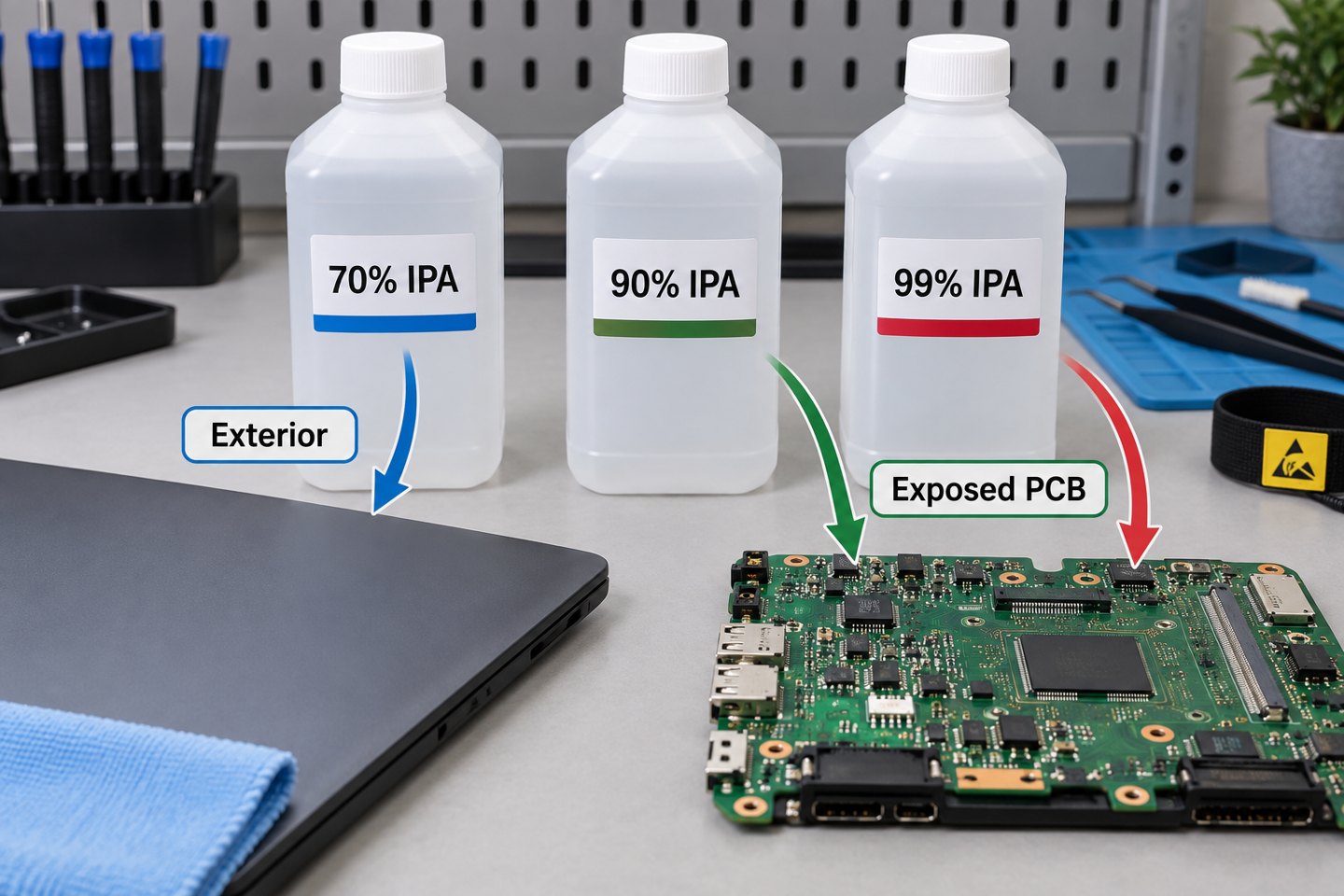
Use the device maker’s approved product for finished equipment; for localized exposed-PCB cleaning, 90% to 99% electronics-grade IPA is the practical starting range because it contains only 1% to 10% water instead of the 30% found in 70% IPA. Higher purity does not override component, coating, or adhesive restrictions.

IPA Concentration Approximate Water Content Suitable Starting Use Main Limitation
70% 30% Approved hard exterior surfaces using a damp wipe Slower drying and more water; not the default for exposed PCBs
90% or 91% 9% to 10% Localized PCB repair and residue removal when compatible Can still affect coatings, plastics, markings, and adhesives
99% or 99.9% 0.1% to 1% Moisture-sensitive, residue-controlled bench cleaning Still flammable and not effective against every contaminant
Comparison of 70 percent, 90 percent, and 99 percent IPA for exterior and exposed PCB cleaning

Do not dilute high-purity IPA with tap water for PCB work. Tap water can add minerals and ions. If an aqueous process is required, it should use chemistry, rinse-water quality, and drying conditions chosen for the assembly.

What Is the Difference Between Rubbing Alcohol and Electronics-Grade IPA?

Household rubbing alcohol is usually sold as a skin antiseptic, whereas electronics-grade IPA is supplied with controlled purity and residue expectations for cleaning components and assemblies. A common 70% first-aid product is 70 mL IPA per 100 mL with water as the inactive ingredient; an electronics cleaner may be 99.9% anhydrous IPA with a technical data sheet and safety data sheet.

Do not judge a cleaner by the front label alone. Check:

  • IPA concentration and water content;
  • listed fragrance, dye, oil, bitterant, or other additive;
  • nonvolatile residue specification, if provided;
  • plastics, elastomer, coating, and adhesive compatibility;
  • storage, ventilation, and personal-protection instructions in the SDS.

For a repeatable manufacturing process, lot-controlled cleaner and documented compatibility are more useful than a generic pharmacy bottle whose intended use is first aid.

Which Parts Should Not Be Cleaned With Rubbing Alcohol?

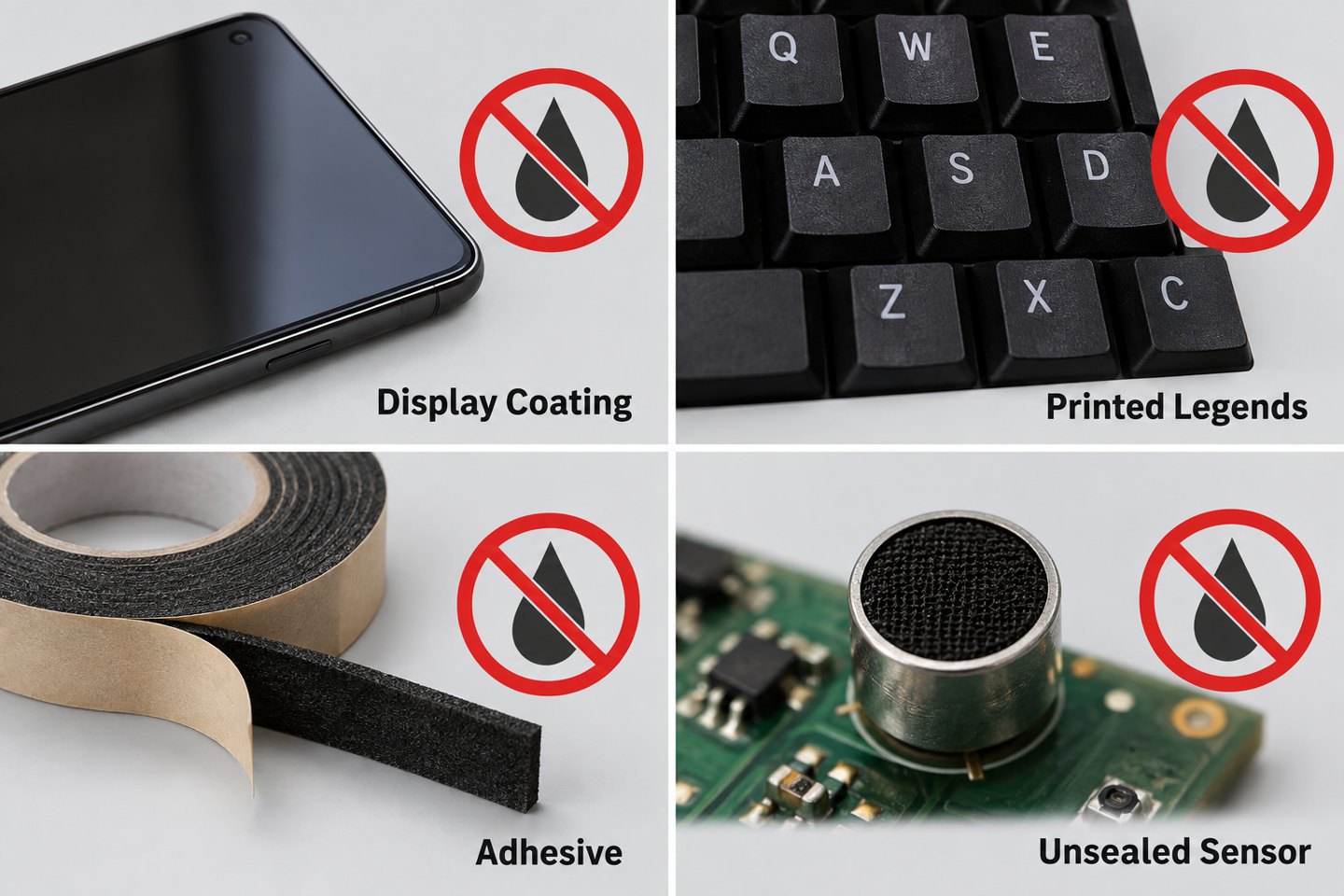
Do not apply rubbing alcohol to an unapproved display coating, printed key legend, foam adhesive, acrylic or polycarbonate part, unsealed microphone, speaker, sensor, relay, or coated PCB area without a material check. Even when the bare laminate and solder mask tolerate IPA, a complete assembly may contain liquid-trapping or solvent-sensitive parts.

Display coating, printed legends, adhesive tape, and an unsealed sensor that require IPA compatibility checks
  • Displays and lenses: Alcohol can affect oleophobic, anti-glare, or other surface treatments unless the manufacturer permits it.
  • Printed markings: Repeated wiping can fade legends on keys, component bodies, labels, and enclosures.
  • Adhesives and foam: IPA is often used to weaken adhesive during repair, which is exactly why it must be controlled near display seals, battery tape, gaskets, and foam pads.
  • Liquid-sensitive devices: Microphones, speakers, MEMS parts, unsealed switches, relays, transformers, and trimmers can trap solvent or suffer mechanical damage.
  • Conformal coating: Cleaning a coated board and intentionally removing coating are different processes. Review the coating chemistry before applying solvent.

How Should You Prepare Electronics Before Cleaning?

Shut the device down, unplug every cable, remove the battery when serviceable, verify stored energy is discharged, and move the work away from sparks, hot tools, and open flame. A power button does not isolate every energy source, and power supplies or large capacitors may retain hazardous voltage after unplugging.

  1. Read the product cleaning or service instructions.
  2. Photograph connectors, cable routing, corrosion, and residue before disassembly.
  3. Disconnect mains power, external supplies, and batteries.
  4. Use an ESD-safe mat, grounded tools, and an ESD-safe brush for sensitive boards.
  5. Remove loose dust first so wet cleaning does not turn it into a paste.
  6. Test the cleaner on a hidden or representative material when compatibility is uncertain.
  7. Use ventilation and keep the IPA container away from ignition sources.

If you cannot safely discharge the equipment, access the board without damaging seals, or identify a swollen battery, stop and use a qualified repair service.

How Do You Clean an Exposed PCB With Isopropyl Alcohol?

Apply a small amount of 90% to 99% electronics-grade IPA to a low-lint swab or ESD-safe brush, loosen the soil, then lift the dissolved residue with clean material instead of letting dirty solvent dry on the board. The goal is removal, not simply spreading a dissolved film across a larger area.

Controlled cleaning of flux residue from an exposed PCB with a low-lint swab
  1. Inspect and classify the soil. Note whether it is dry dust, oil, flux, drink residue, corrosion, or an unknown deposit.
  2. Remove dry particles. Use an ESD-safe soft brush or controlled clean air without forcing debris under packages.
  3. Dampen the tool. Add IPA to the swab or brush away from the PCB; do not pour from the bottle onto the board.
  4. Agitate gently. Work around solder joints and leads without bending parts or snagging fine wires.
  5. Lift the dissolved residue. Blot with a clean low-lint wipe or use fresh solvent as a controlled final rinse.
  6. Replace dirty materials. A brown swab or cloudy solvent is carrying contamination and should not be reused for the final pass.
  7. Dry, inspect, and test. Confirm that connectors, shields, sockets, and package gaps are dry before reconnecting power.

For a broader method covering dust, corrosion, coating, and aqueous cleaning, see our guide to cleaning a PCB board safely.

Which Contaminants Need More Than IPA?

Salt, sugary drinks, water-soluble flux, corrosion products, and unknown deposits may require a qualified aqueous rinse, flux-specific cleaner, or repair process rather than an IPA-only wipe. IPA can evaporate while nonvolatile ionic contamination stays behind.

Contaminant Suitable Starting Method Why IPA Alone May Fail
Finger oil or light grease Compatible high-purity IPA and clean low-lint material Dirty solvent can redeposit an oily film
Rosin-based flux High-purity IPA or matched flux remover after compatibility check Heat-aged or polymerized residue may resist IPA
Water-soluble flux Validated aqueous chemistry and DI-water rinse IPA may not remove the ionic activator system
Sugary or salty spill Controlled aqueous cleaning, DI rinse, and complete drying when parts allow Alcohol can leave conductive nonvolatile material behind
Corrosion Cleaning plus magnified damage assessment and repair Solvent cannot restore missing copper or damaged terminations

Flux chemistry should be identified before selecting the cleaner. Our explanation of flux residue and cleaning methods shows why water-soluble, rosin, and no-clean materials cannot share one blanket instruction.

In our PCBA projects, we treat cleaner selection, rinse quality, drying, and inspection as one process. Changing only the solvent can leave the same ionic residue or hidden moisture problem in a different form.

How Long Should Electronics Dry Before Power-On?

Do not use one universal minute count; restore power only after visible liquid and alcohol odor are gone and no fluid remains trapped under shields, connectors, sockets, switches, or packages. A lightly wiped open surface may appear dry within minutes, while a flooded connector or shielded area can retain solvent much longer.

Use these release checks:

  • no droplets, wet sheen, or cleaner line visible under magnification;
  • no liquid emerging when the board is tilted or gently repositioned;
  • connectors and sockets inspected from more than one angle;
  • no alcohol odor at close range in a ventilated area;
  • no residue film, displaced component, lifted pad, or damaged marking;
  • the device maker’s minimum drying instruction has been met.

Do not use a hot heat gun to accelerate drying. Excessive heat can deform connectors, soften adhesives, damage batteries, or stress solder joints. Use clean dry air or a controlled low-temperature process only when the component limits are known.

What Mistakes Damage Electronics During Alcohol Cleaning?

The highest-risk mistakes are cleaning an energized device, spraying directly into openings, flooding liquid-sensitive parts, using a contaminated swab, and restoring power before trapped solvent has evaporated. Most failures come from uncontrolled application or wrong-material use, not from the word “alcohol” alone.

  • Using 70% as the universal choice: It may be suitable for an approved exterior but adds more water to an exposed assembly.
  • Using a soaked cotton swab: Excess liquid can wick under components, and loose fibers can snag on leads.
  • Letting dirty IPA evaporate: Dissolved flux and oil remain unless they are lifted or rinsed away.
  • Scrubbing harder: Force can remove markings, dislodge 0201/01005 components, bend contacts, or break corroded leads.
  • Ignoring the original fault: Cleaning cannot repair a cracked joint, missing copper, swollen battery, or internally corroded component.
  • Applying conformal coating over residue: Cleanliness and dryness must be verified before coating, or contamination may be sealed onto the assembly.

Production control begins earlier than final cleaning. For example, solder paste inspection in PCB assembly can catch printing defects before placement and reflow, while post-solder cleaning addresses only the residue left by the selected materials and process.

FAQ About Cleaning Electronics With Rubbing Alcohol

These answers cover the most common concentration, surface, flux, and power-on questions about using rubbing alcohol on electronics.

Can I use 70% rubbing alcohol on a circuit board?

Use 70% rubbing alcohol on an exposed circuit board only when the assembly documentation permits it and no better high-purity option is available. Its 30% water content slows drying and raises the chance of liquid remaining in gaps. For localized exposed-PCB cleaning, 90% to 99% electronics-grade IPA is usually the safer starting range.

Is 91% rubbing alcohol good for electronics?

91% IPA is suitable for many localized PCB-repair tasks because it contains about 9% water and evaporates faster than 70%. It can still soften adhesive, affect markings, or enter unsealed parts, so apply a small amount to a low-lint tool and check material compatibility first.

Can I use 99% isopropyl alcohol on a phone screen?

Do not use 99% IPA on a phone screen unless the phone manufacturer explicitly approves it for that model and surface. Screen coatings and display seals vary. Many device makers specify a slightly damp lint-free cloth or a 70% IPA wipe for selected exterior surfaces, not unrestricted use of 99% liquid.

Does isopropyl alcohol remove solder flux?

IPA removes many fresh rosin-based flux residues, especially at 91% to 99%, but it does not remove every no-clean or heat-aged residue. Water-soluble flux normally requires a validated aqueous process. Match the cleaner to the exact flux product and remove the dissolved soil rather than letting it dry on the PCB.

Can cleaning electronics with alcohol cause a short circuit?

Cleaning electronics with alcohol can cause a short circuit if power is present, the liquid contains conductive contamination, or water and dissolved residue remain trapped when the device is energized. Disconnect every power source, control the liquid, dry hidden areas, inspect the board, and only then perform a safe functional test.

Can I pour rubbing alcohol over a motherboard?

Do not pour household rubbing alcohol over an assembled motherboard. Flooding carries dirt beneath packages and into connectors, fans, sockets, microphones, switches, or other liquid-sensitive parts. Board immersion is a specialized repair process that requires disassembly, compatible components, suitable high-purity solvent, ventilation, and controlled drying.

How Can EBest Circuit Support Cleaner, More Reliable PCB Assemblies?

We match the cleaning method to the flux, component set, coating plan, inspection requirement, and end-use risk instead of treating IPA as a universal production solution. At EBest Circuit, we support PCB fabrication, component sourcing, PCB assembly, and inspection within one coordinated project.

For a cleaning-sensitive assembly, send us the Gerber files, BOM, placement data, assembly drawing, target flux or solder-paste specification, coating requirement, quantity, and cleanliness or test criteria. We can review the build information before production and align the inspection plan with the assembly design.

To discuss a PCB or PCBA project, visit our PCB and PCBA manufacturing service page or email sales@bestpcbs.com.

You may also like

What Is a BCM? Inside a Vehicle Body Control Module

September 10th, 2026

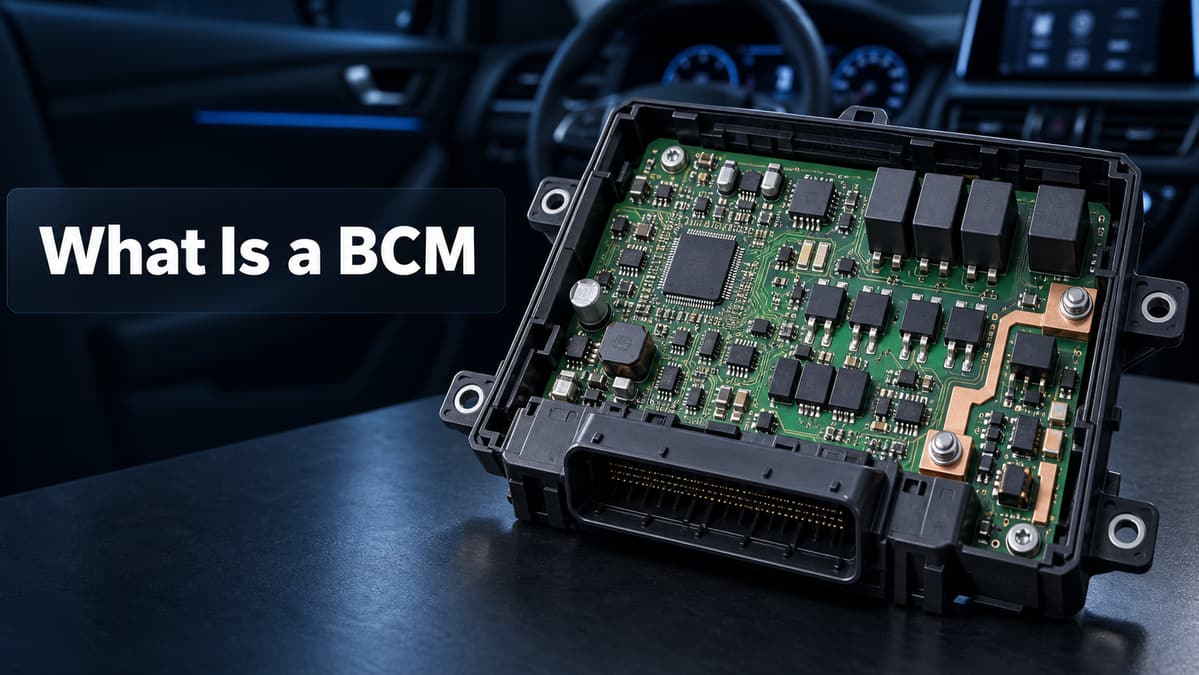
BCM most often means Body Control Module in an automotive context. It is an electronic control unit that reads switches, sensors, and vehicle-network messages, runs body-control logic, and drives loads such as lamps, door locks, windows, mirrors, wipers, and interior convenience systems.

A BCM is not just a processor board. Its PCB must place low-voltage logic, vehicle communications, protected power inputs, and higher-current load drivers in one compact assembly while handling electrical transients, heat, electromagnetic interference, vibration, and long service life. This guide opens the module and follows the signal path from an input to a physical vehicle function.

What Is a BCM hero showing a body control module PCB inside a vehicle

What Is a BCM on a Car?

A BCM on a car is the electronic control unit responsible for body and convenience functions rather than combustion, traction, or transmission control. The exact boundary varies by vehicle: one platform may use a central BCM, while another divides the same work among front, rear, door, or zone controllers.

The search phrase what is a bcm module usually refers to the same device. “Module” describes the complete unit: the populated PCB, connector interface, housing, firmware, and calibration data. Replacing only the circuit board may not restore operation if the vehicle also requires coding, key matching, or configuration.

Module Primary responsibility Typical inputs and outputs
BCM Body, access, lighting, and cabin convenience functions Door switches, locks, lamps, windows, mirrors, wipers, network messages
ECM Engine operation Engine sensors, fuel injection, ignition, emissions actuators
PCM Powertrain control; on some vehicles it combines engine and transmission control Engine and transmission sensors, injectors, ignition, shift control

BCM, ECM, and PCM names are not perfectly standardized across automakers. The vehicle service information and electrical architecture remain the authority for a specific model.

What Does a BCM Control in a Car?

A BCM commonly controls exterior and interior lights, central locking, power windows, mirrors, wipers, washers, retained accessory power, and selected heaters or motors. It also coordinates these functions with door modules, gateways, and other ECUs when the vehicle architecture distributes the load control.

  • Exterior lighting: headlamps, daytime running lamps, turn indicators, brake lamps, and welcome-light sequences.
  • Access: central locking, keyless-entry requests, trunk or tailgate release, and anti-theft status exchange.
  • Doors and glass: window motors, mirror fold or heating, door-ajar inputs, and child-lock functions.
  • Wipers and washers: stalk requests, intermittent timing, rain-sensor messages, and pump or motor control.
  • Cabin functions: interior lamps, retained accessory power, seat or steering-wheel heaters, and wake/sleep coordination.

Not every vehicle assigns every function to the BCM. Some loads are driven by door or zone modules after receiving BCM commands over CAN or LIN; the model-specific wiring diagram identifies the responsible controller and output stage.

How Does a BCM Work?

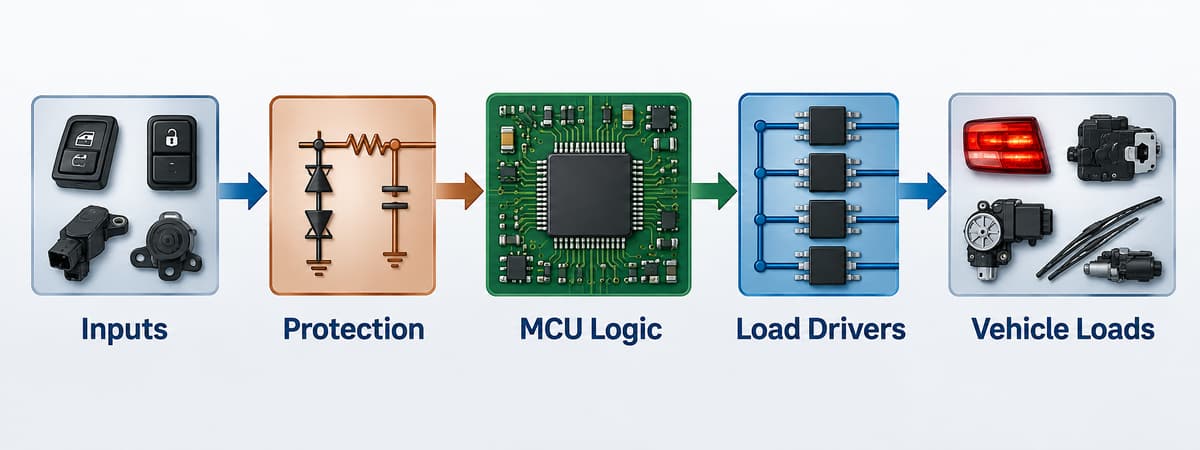
A BCM works through five blocks: it receives an input, protects and conditions the signal, evaluates the request in a microcontroller, commands a driver, and monitors the resulting load. For example, a door-switch transition can be debounced by the input circuit, interpreted by firmware, transmitted to another ECU if required, and used to switch a courtesy lamp through a protected high-side output.

BCM signal flow from inputs through protection and MCU logic to load drivers and vehicle loads

The complete path normally includes:

  1. Input acquisition: switches, Hall sensors, analog sensors, and messages from CAN or LIN nodes.
  2. Protection and conditioning: filtering, voltage clamping, reverse-polarity protection, level shifting, and transient-tolerant interfaces.
  3. Decision logic: an MCU applies timing, state-machine, safety, diagnostic, and energy-management rules.
  4. Load actuation: smart high-side switches, low-side drivers, half bridges, full bridges, or relays operate lamps, heaters, solenoids, and motors.
  5. Feedback: current sense, fault flags, temperature status, position signals, and bus messages confirm whether the command succeeded.

Sleep behavior is another core function. When the vehicle is parked, the BCM must reduce its own current and coordinate network sleep without missing legitimate wake events such as a key request or door opening.

What Is Inside a BCM Module?

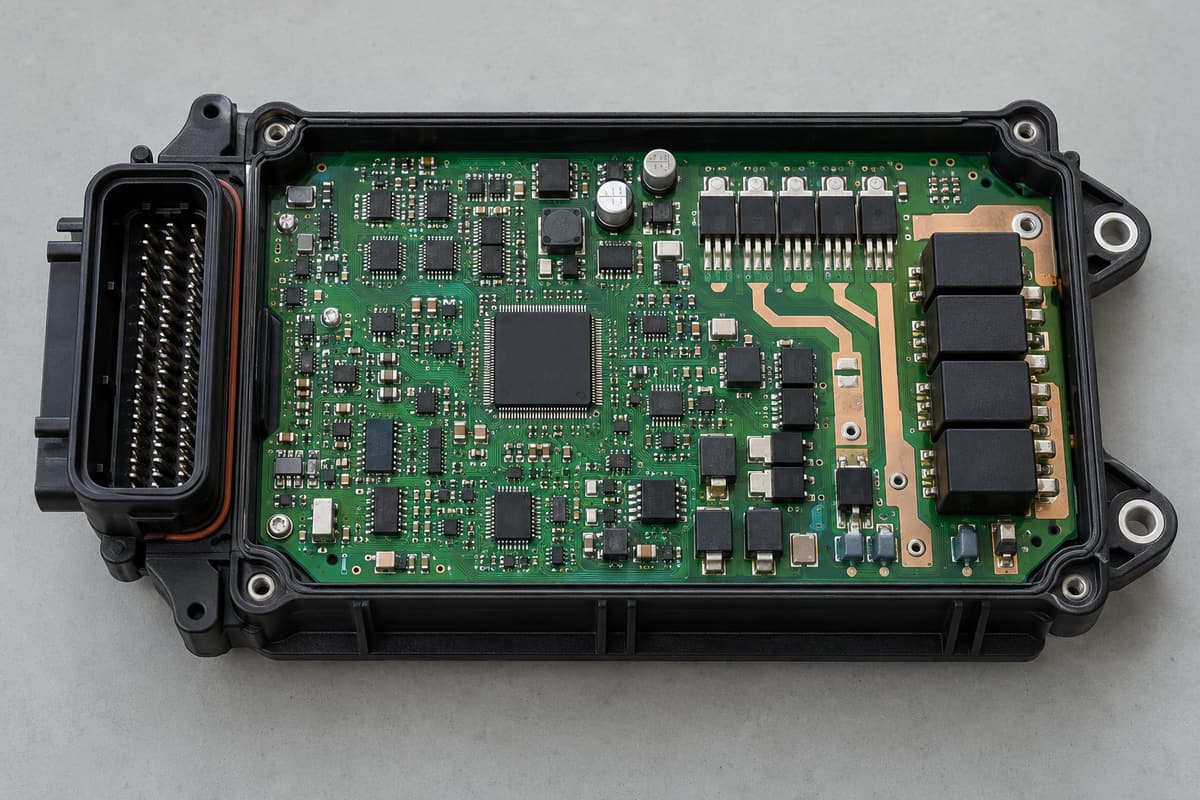
Inside a BCM module are a microcontroller, regulated power rails, CAN or LIN transceivers, protected input circuits, load drivers, nonvolatile memory, clocks, connectors, and thermal paths. Exact parts depend on the vehicle architecture, but real automotive reference designs make the functional split concrete.

Opened automotive body control module showing the internal PCB, connectors, MCU, transceivers, and power drivers
Circuit function Representative automotive device Role in a BCM-class design
Microcontroller TI AM263P4-Q1 Runs control logic, diagnostics, timing, and network software in a recent zone-controller reference design
Power-management IC TI TPS65386x-Q1 family Generates and supervises regulated rails for the processor and peripheral circuits
CAN/CAN FD transceiver TI TCAN1043A-Q1 Converts MCU logic-level data to the differential vehicle bus and supports wake/sleep behavior
LIN transceiver TI TLIN1021A-Q1 Connects lower-cost local nodes such as switches, small actuators, or door electronics
Smart high-side switch TI TPS1HC30-Q1 Switches a protected body load and provides diagnostic feedback
Motor driver TI DRV8245S-Q1 Controls bidirectional DC loads such as selected window, latch, or seat mechanisms

These are examples, not a universal BCM bill of materials. A more integrated approach is also possible: Infineon’s TLE9560-3QX system basis chip combines a 5 V regulator, CAN FD and LIN communication, two half-bridge drivers, high-side outputs, and SPI control in one device. The final choice depends on current, channel count, diagnostic coverage, thermal limits, software architecture, and the automaker’s component requirements.

How Does a BCM Communicate With Other ECUs?

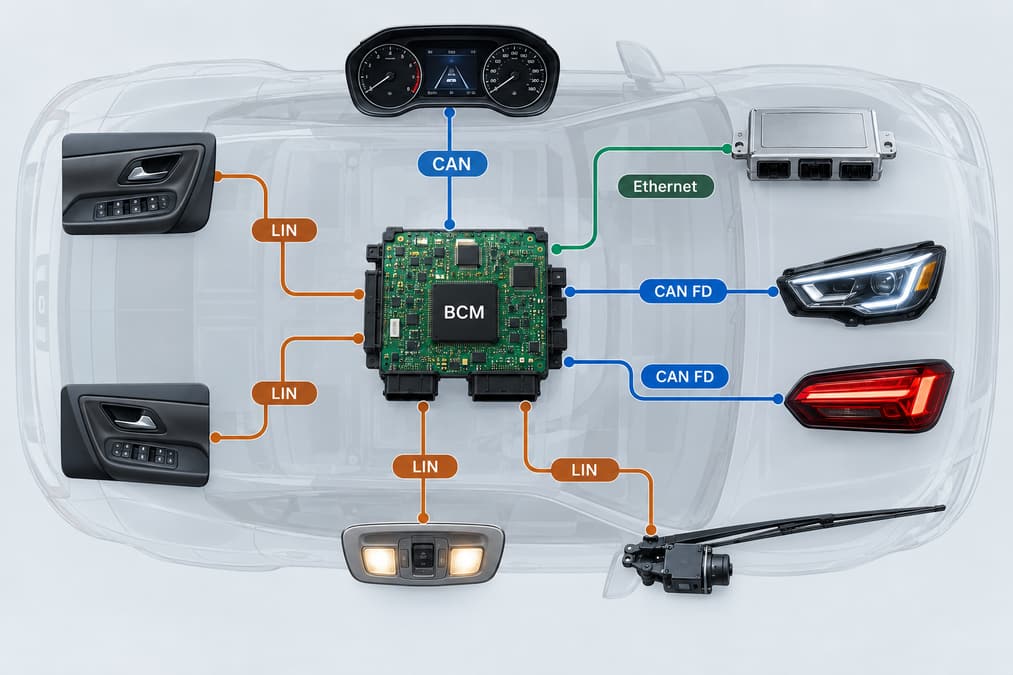
A BCM communicates with other ECUs through vehicle networks, most commonly CAN or CAN FD for coordinated control and LIN for lower-cost local devices. Some newer centralized or zonal architectures also use automotive Ethernet for higher-bandwidth links, but not every BCM includes every interface.

Vehicle network diagram connecting a BCM to body functions through CAN, CAN FD, LIN, and Ethernet
  • CAN: robust multi-node communication for status, commands, diagnostics, and coordination among body, gateway, powertrain, and instrument modules.
  • CAN FD: retains CAN arbitration while allowing a larger payload and faster data phase when the network and transceivers support it.
  • LIN: a lower-cost single-master network suited to local switches, small motors, lighting nodes, and door electronics.
  • Automotive Ethernet: a higher-bandwidth link increasingly associated with gateways and zone controllers rather than a universal requirement for conventional BCMs.

The PCB must keep these communication paths away from noisy switching nodes, preserve their return paths, and implement the termination, common-mode filtering, ESD protection, and connector pinout required by the actual interface design.

What Makes a BCM PCB Different From a General Control Board?

A BCM PCB differs from a general control board because it combines battery-connected power, sensitive digital logic, network interfaces, and multiple switched loads in a harsh electrical and mechanical environment. A circuit that works on a bench can still fail in a vehicle if the layout cannot handle a load dump, inductive switching, reverse battery, ground offset, thermal cycling, or conducted and radiated noise.

  • Power partitioning: battery inputs, regulators, high-current outputs, logic rails, and communication grounds require a deliberate placement and return-path strategy.
  • Current and heat: copper width, copper weight, via arrays, thermal spreading, connector pins, and driver packages must be checked against actual current and ambient temperature.
  • Transient protection: suppressors, filters, reverse-polarity circuits, and protected drivers must be placed so surge current does not flow through the logic-ground path.
  • EMC control: fast driver edges, motor currents, and DC/DC converters must not corrupt CAN, LIN, crystal, reset, or sensor signals.
  • Mechanical reliability: connector insertion force, mounting points, enclosure support, vibration, moisture exposure, and coating keep-outs affect the PCB layout and assembly process.

Standard FR-4 PCB manufacturing may suit many body-control designs, but “FR-4” alone does not define a finished material system. The laminate grade, glass-transition temperature, CAF performance, copper construction, solder mask, coating, and validation plan should be matched to the specified environment rather than chosen from a generic layer-count rule.

Which PCB and PCBA Checks Matter for BCM Hardware?

The most important checks are power-path verification, network-layout review, assembly inspection, programming control, and functional testing under representative loads. They should be agreed before the design is released because a fixture, connector breakout, firmware image, or diagnostic interface may affect both PCB layout and production cost.

  • PCB review: confirm stackup, copper weight, high-current trace temperature rise, thermal vias, creepage and clearance, test-point access, connector support, and coating keep-outs.
  • Signal-integrity and EMC review: examine CAN/CAN FD differential routing, LIN protection, clock and reset nets, switching loops, power-plane discontinuities, and return-current paths.
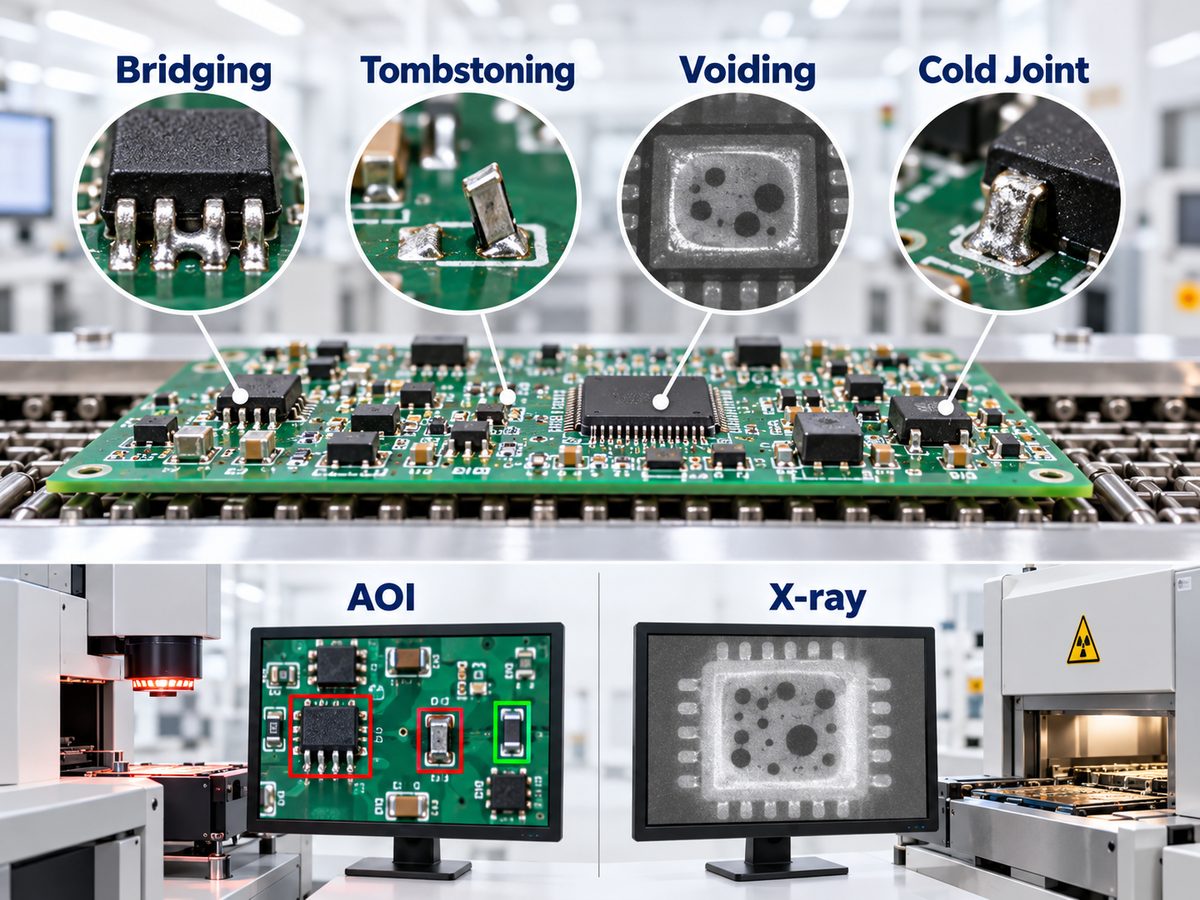
  • Assembly controls: use solder paste inspection where applicable, AOI for visible joints, and X-ray for hidden-pad packages or thermal-pad voiding when required by the design.
  • Programming and traceability: control firmware version, calibration data, serial or lot records, approved component alternatives, and the relationship between each assembly and its test result.
  • Functional testing: exercise wake/sleep behavior, CAN and LIN communication, input thresholds, load outputs, current sensing, fault reporting, and quiescent current with defined limits.

A capable PCB assembly process should connect inspection records to the released BOM, placement data, firmware, and test procedure. Our quality and inspection overview explains the broader controls available for PCB and PCBA projects; the exact automotive test matrix still needs to be defined by the customer’s product requirements.

FAQ About BCM Hardware

Is a BCM the same as an ECU?

A BCM is one type of ECU. “ECU” is the broad category for electronic control units; “BCM” identifies the unit assigned to body and convenience functions.

Can one car have more than one BCM?

Yes. A vehicle can distribute body functions across a central BCM, door modules, a smart junction box, gateway, or front and rear zone controllers. The physical module count depends on the electrical architecture.

Does every BCM use CAN and LIN?

No. CAN is common, and LIN is widely used for local low-cost nodes, but the actual mix can include CAN FD, Ethernet, direct hardwired inputs, or proprietary interfaces.

Can a BCM switch loads without mechanical relays?

Yes. Smart high-side or low-side semiconductor switches can replace some relays and add current sensing, short-circuit protection, and diagnostic feedback. Relays may remain where load, isolation, cost, or fail-safe requirements favor them.

Why does a BCM need low sleep current?

The BCM remains connected to the vehicle battery while parked. Excess quiescent current can discharge the battery, so the design must place the MCU, transceivers, regulators, and output drivers into defined low-power states while preserving valid wake sources.

Where can I find BCM failure and reset information?

For symptoms, test methods, common failure causes, reset considerations, and repair-oriented questions, read our separate guide to Body Control Module testing and failure symptoms. Keeping that troubleshooting topic separate avoids mixing service procedures with this hardware-architecture guide.

How Can We Support Your BCM PCB and PCBA Project?

We can manufacture and assemble customer-released BCM and automotive control-board designs, with engineering review focused on manufacturability, stackup, materials, component availability, assembly, inspection, and test preparation. At EBest Circuit, our listed quality certifications include ISO 9001:2015 and IATF 16949; we confirm the applicable facility, process scope, and project requirements before quotation.

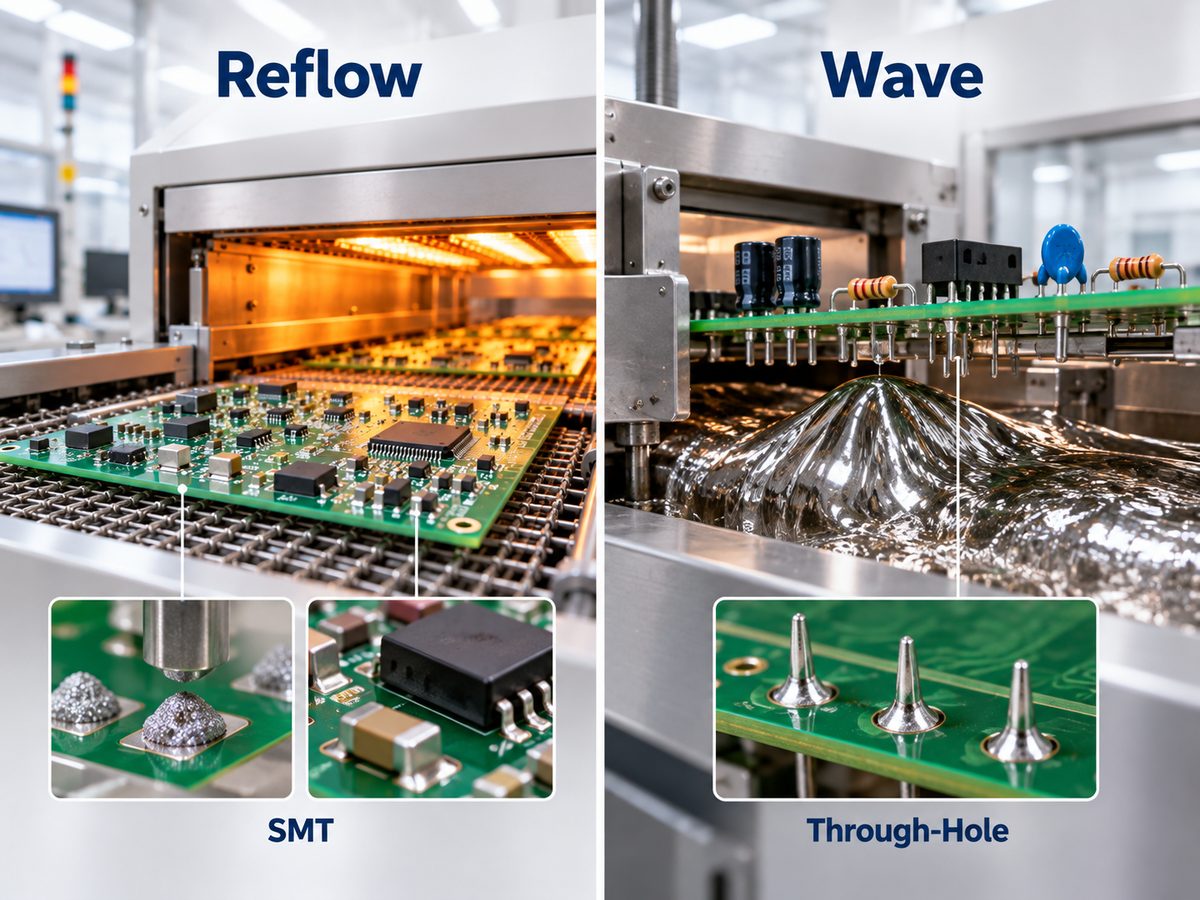
Our support can combine PCB fabrication, component sourcing, SMT and through-hole assembly, AOI, X-ray inspection where applicable, and functional-test coordination. Send your Gerber files, BOM, pick-and-place data, stackup or copper requirements, quantities, coating specification, firmware instructions, and test limits to sales@bestpcbs.com. We will review the package against the required automotive environment instead of treating it as a generic control board.

You may also like

RF Amplifier: How It Works, Types, Circuit Design & Key Specs

September 10th, 2026

An RF amplifier, or radio frequency amplifier, increases the amplitude or power of an RF signal within a specified frequency range. Depending on where it sits in the signal chain, it may amplify a weak received signal, drive another RF stage, or provide enough output power for transmission. Gain, noise figure, bandwidth, linearity, output power, efficiency, and impedance matching are the main parameters that define its performance.

RF amplifiers are used in wireless communication, radar, satellite systems, test equipment, IoT hardware, MRI equipment, and many other RF products. Their real performance depends not only on the amplifier IC or transistor, but also on the matching network, bias circuit, PCB layout, grounding, stackup, and thermal design.

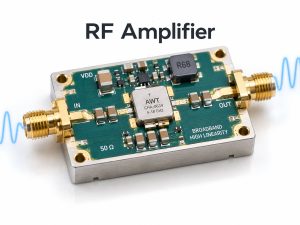
RF amplifier module with RF input and output connections

What Is an RF Amplifier?

An RF amplifier is a circuit that strengthens a radio-frequency signal without changing its intended information content.

The term covers several amplifier functions. A receiver may use a low-noise amplifier to raise a weak antenna signal. A transmitter may use a driver amplifier followed by an RF power amplifier to increase signal power before the antenna.

Typical RF amplifier roles include:

  • Low-noise amplification in receiver front ends
  • Signal gain between RF stages
  • High-linearity amplification for modulated signals
  • Wideband amplification across multiple frequencies
  • Power amplification before transmission
  • Adjustable gain for automatic gain control

An RF amplifier is therefore broader than an RF power amplifier. A power amplifier is only one category within the RF amplifier family.

At radio and microwave frequencies, parasitic capacitance, inductance, trace impedance, return-current paths, and electromagnetic coupling become part of the circuit behavior. That is why RF amplifiers require more careful physical implementation than ordinary low-frequency amplifiers.

How Does an RF Amplifier Work?

An RF amplifier uses energy from a DC power supply to increase the level of an incoming RF signal.

RF amplifier working principle showing input matching, active device, DC bias and output matching

A simplified RF signal path is:

RF input → input matching → active device → output matching → RF output

The active device may be a transistor, MMIC, or integrated RF amplifier IC. The surrounding network allows that device to operate at the required frequency and bias point.

A typical circuit includes:

  • Input matching network to interface the source with the amplifier
  • Active device to provide gain
  • Bias circuit to set the correct DC operating condition
  • Output matching network to transfer power to the next stage
  • Decoupling components to keep RF energy out of the power rail
  • DC blocking capacitors where RF and DC paths must be separated

At low input levels, the amplifier normally operates in its linear region. As input power rises, the output eventually stops increasing proportionally. This is the beginning of gain compression, which is why RF designers check parameters such as P1dB when defining the usable signal range.

What Are the Main Types and Classes of RF Amplifiers?

RF amplifiers are usually classified first by what they do in the RF signal chain.

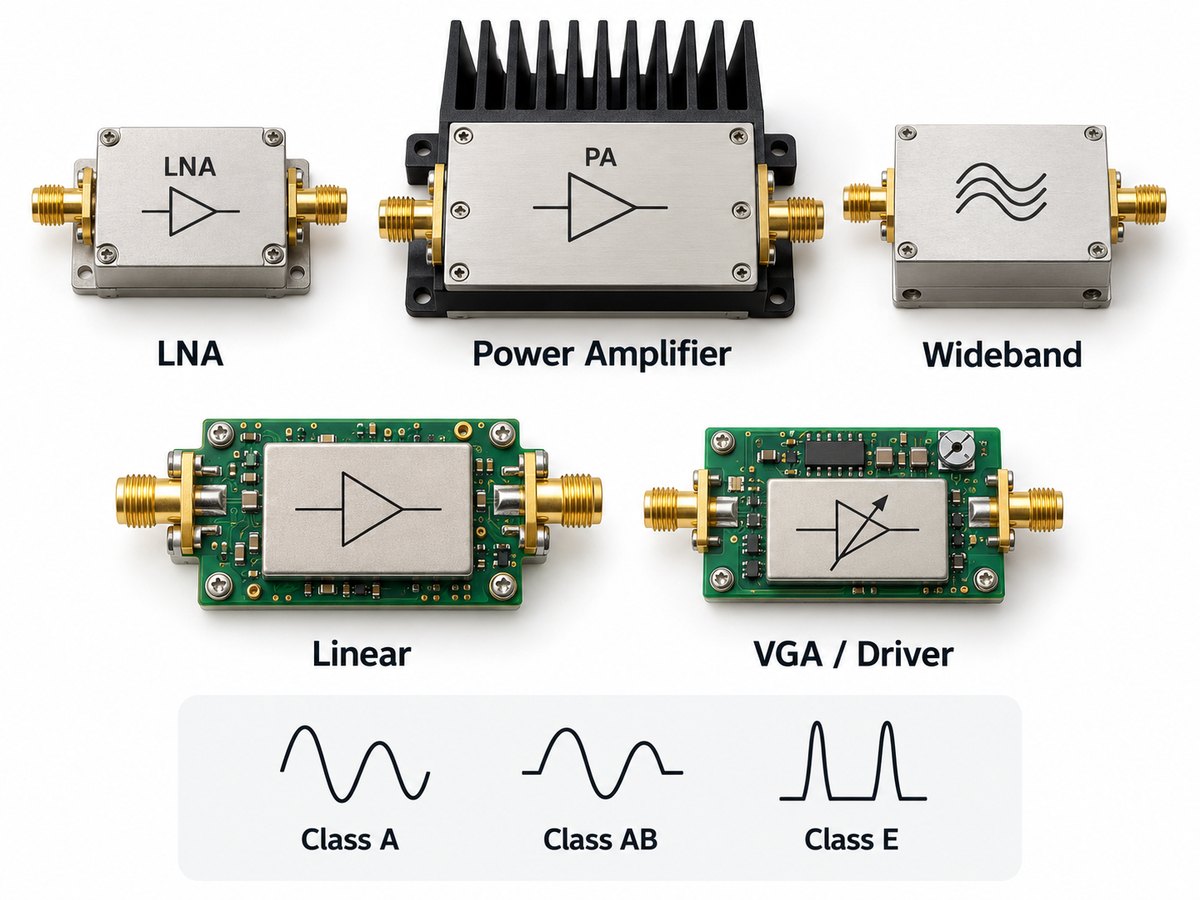
Main RF amplifier types including LNA, power amplifier, wideband, linear and VGA driver amplifiers

Low-noise amplifier

A low-noise RF amplifier, or LNA, is used near the receiver input. Its main job is to amplify weak signals while adding as little noise as possible.

RF power amplifier

An RF power amplifier increases signal power before transmission. Output power, efficiency, linearity, and thermal performance are usually the main concerns.

Wideband RF amplifier

A wideband amplifier provides useful gain across a broad frequency range. It is common in test equipment, broadband communication, radar, and multi-band RF systems.

RF linear amplifier

A linear RF amplifier is designed to preserve the amplitude and phase characteristics of the input waveform. This matters for modulation schemes that are sensitive to distortion.

Variable gain amplifier

A VGA allows gain to be changed electronically. It is often used in automatic gain control and systems with a wide input signal range.

Gain block and driver amplifier

A gain block provides convenient fixed gain. A driver amplifier raises the signal level before another stage, often before the final PA.

RF power amplifiers may also be described as Class A, AB, B, C, D, or E. These classes describe how the active device operates.

In simple terms:

  • Class A favors linearity
  • Class AB balances linearity and efficiency
  • Class B and C increase efficiency but reduce linear operation
  • Class D and E use switching behavior for higher efficiency in suitable RF designs

Function and operating class are different classifications, so a power amplifier can still be described separately as Class AB, Class E, or another class.

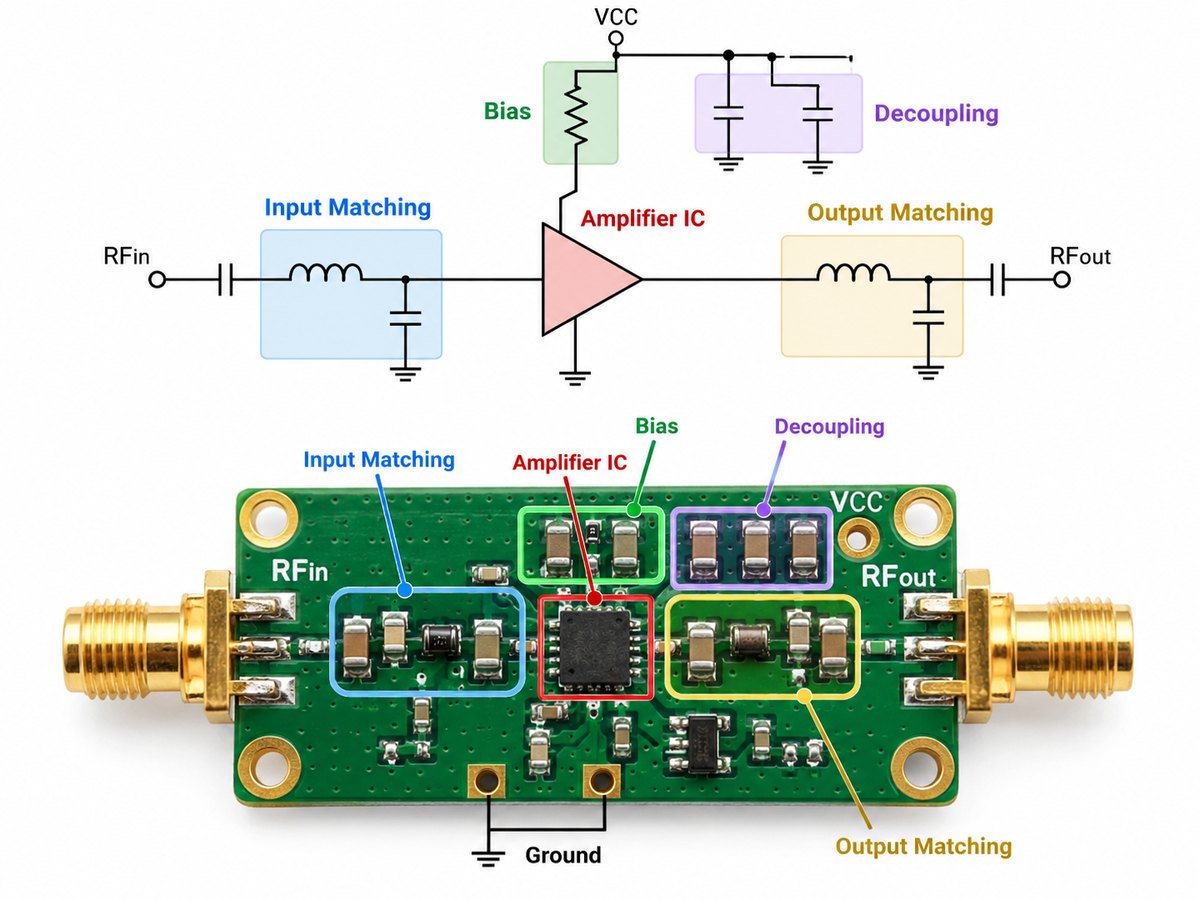
What Does an RF Amplifier Circuit and Schematic Include?

An RF amplifier circuit normally combines an active device with matching, bias, decoupling, and filtering networks.

RF amplifier circuit and schematic showing amplifier IC, bias, decoupling and input and output matching

The main parts shown in an RF amplifier schematic are typically:

  • Transistor, MMIC, or RF amplifier IC
  • Input matching components
  • Output matching components
  • Bias resistors, inductors, or RF chokes
  • DC blocking capacitors
  • Power-supply bypass capacitors
  • Ground connections
  • Optional filtering or stability components

The schematic shows the electrical connections, but the physical PCB implementation strongly affects the final RF behavior.

For example, a capacitor connected directly to ground on the schematic still has pad, trace, and via inductance on the real board. At microwave frequencies, even a short connection can change the response of the matching or decoupling network.

RF amplifier circuits may be implemented in three common forms:

  • Discrete circuit: transistor plus external bias and matching components
  • RF amplifier IC or MMIC: more RF functions integrated into one device
  • RF amplifier module: amplifier plus additional matching, shielding, connectors, filtering, or thermal structure

The best form depends on frequency, power, board area, development effort, and performance requirements.

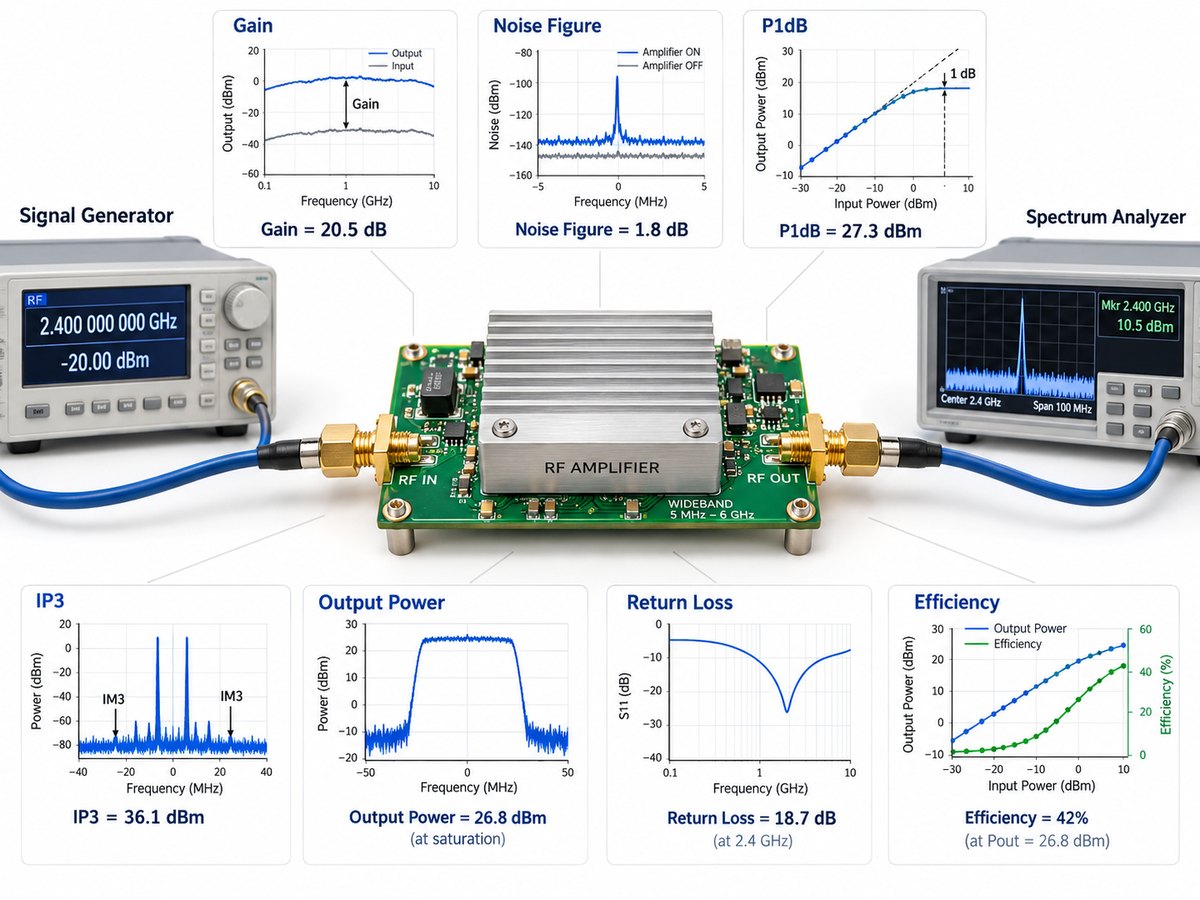
Which RF Amplifier Specifications Matter Most?

The most important RF amplifier specifications are frequency range, gain, noise figure, linearity, output power, matching, and efficiency.

RF amplifier test setup and key specifications including gain, noise figure, P1dB, IP3, return loss and efficiency
Specification What It Indicates Typical Importance
Frequency range Supported RF band All RF amplifiers
Gain Signal amplification All signal chains
Gain flatness Gain variation across bandwidth Wideband systems
Noise figure Noise added by the amplifier Receiver LNAs
P1dB Beginning of meaningful gain compression Large-signal operation
IP3 Intermodulation linearity Multi-signal environments
Output power Available RF power Driver and power amplifiers
Return loss / VSWR Input and output matching RF interfaces
Efficiency DC-to-RF power conversion Power amplifiers
Supply voltage/current Electrical power requirement Power and thermal design

No single specification tells the whole story.

A high-gain amplifier may still be unsuitable if its output compresses too early. A low-noise device may not provide enough linearity in the presence of strong nearby signals. A power amplifier may meet its output-power target but create excessive heat if efficiency is poor.

For wideband designs, these specifications should be checked across the complete operating frequency range rather than only at the center frequency.

How Do Gain, Noise Figure, and Linearity Affect RF Amplifier Performance?

Gain, noise figure, and linearity determine how strongly an RF amplifier boosts the signal, how much noise it adds, and how well it handles larger or multiple signals.

Gain determines how much the signal level rises through the amplifier. Too little gain may leave the next stage with insufficient signal. Too much gain can reduce available headroom.

Noise figure measures how much the amplifier degrades the signal-to-noise ratio. It matters most in the early stages of a receiver, where added noise can directly affect sensitivity.

Linearity describes how well the amplifier avoids distortion as signal level rises. P1dB and IP3 are commonly used to judge this behavior.

These parameters often interact.

For example, increasing front-end gain can reduce the relative noise contribution of later receiver stages. However, the same higher gain may cause the receiver to reach compression sooner when a strong signal enters the system.

The priority depends on amplifier position:

  • LNA: noise figure, gain, linearity
  • Driver amplifier: gain, IP3, P1dB
  • Power amplifier: output power, efficiency, linearity, thermal performance

The correct target is therefore not simply maximum gain or minimum noise, but enough margin for the full signal environment.

How Do You Choose the Right RF Amplifier for an Application?

Choose an RF amplifier by matching its operating limits to the actual frequency, signal level, bandwidth, and system role.

Start with these requirements:

  • Operating frequency or frequency range
  • Required gain
  • Minimum and maximum input level
  • Required output power
  • Bandwidth
  • Noise figure limit
  • P1dB and IP3 targets
  • Modulation and linearity requirements
  • Supply voltage and current
  • Efficiency target
  • Operating temperature
  • Package or module size
  • Input and output impedance

For a receiver front end, noise figure and linearity are usually more important than maximum output power.

For a transmitter, output power, efficiency, linearity, compression, and thermal performance move higher on the list.

For a wideband RF amplifier, check that gain flatness, return loss, noise figure, and output performance stay acceptable across the full band.

It is also useful to check whether the manufacturer provides a validated evaluation-board layout. RF amplifier performance can change noticeably when the matching network or PCB geometry differs from the reference design.

What Causes RF Amplifier Instability and Oscillation?

RF amplifier instability is usually caused by unintended feedback, poor grounding, incorrect matching, or parasitic coupling.

Common causes include:

  • Coupling between RF input and output
  • Long or poorly controlled RF traces
  • Weak ground connections
  • Insufficient power-supply decoupling
  • Bias network problems
  • Incorrect matching components
  • Parasitic capacitance and inductance
  • Coupling through power or ground networks
  • Layout changes from the reference design
  • Poor isolation from digital or switching circuits

Oscillation may occur inside or outside the intended RF band. It can raise current consumption, increase noise, distort gain, or produce unexpected spectral components.

Several layout practices help reduce the risk:

  • Keep input and output networks physically separated
  • Place decoupling components close to the device pins
  • Use short ground paths
  • Add ground vias where needed
  • Keep switching power circuits away from sensitive RF sections
  • Preserve the intended matching-network geometry

For discrete RF amplifier design, stability should also be checked in simulation over a frequency range wider than the required operating band.

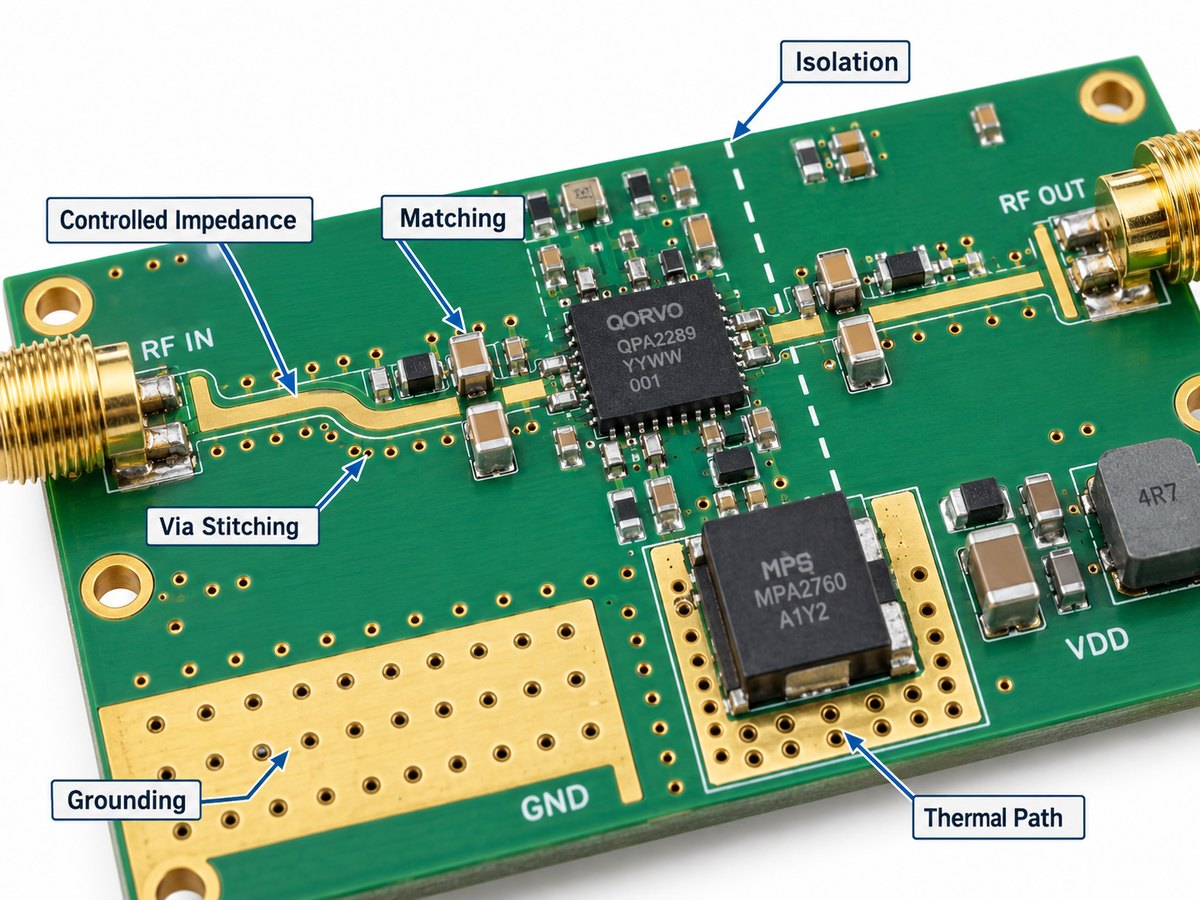
What PCB Design Factors Affect RF Amplifier Performance?

RF amplifier PCB performance depends heavily on controlled impedance, grounding, component placement, isolation, dielectric properties, and thermal design.

RF amplifier PCB design factors including controlled impedance, matching, via stitching, grounding, isolation and thermal path

Controlled impedance

RF traces are commonly designed as microstrip, stripline, or grounded coplanar waveguide. Their impedance depends on trace width, copper thickness, dielectric thickness, Dk, and nearby reference conductors.

RF trace routing

Critical RF paths should remain compact and free from unnecessary bends or discontinuities. The production routing should stay close to the geometry used during simulation or reference-board validation.

Grounding

A continuous ground reference helps maintain a predictable RF return path. Ground-plane gaps or long ground connections add unwanted inductance.

Matching-network placement

Matching capacitors and inductors should be positioned close to the RF device and in the intended order. At higher frequencies, moving these components can alter the matching response.

Via stitching

Ground stitching vias can help maintain plane continuity and reduce field spreading around RF structures.

Isolation

Keep RF inputs away from high-power RF outputs, clocks, DC/DC converters, and fast digital signals to reduce unwanted coupling.

PCB material

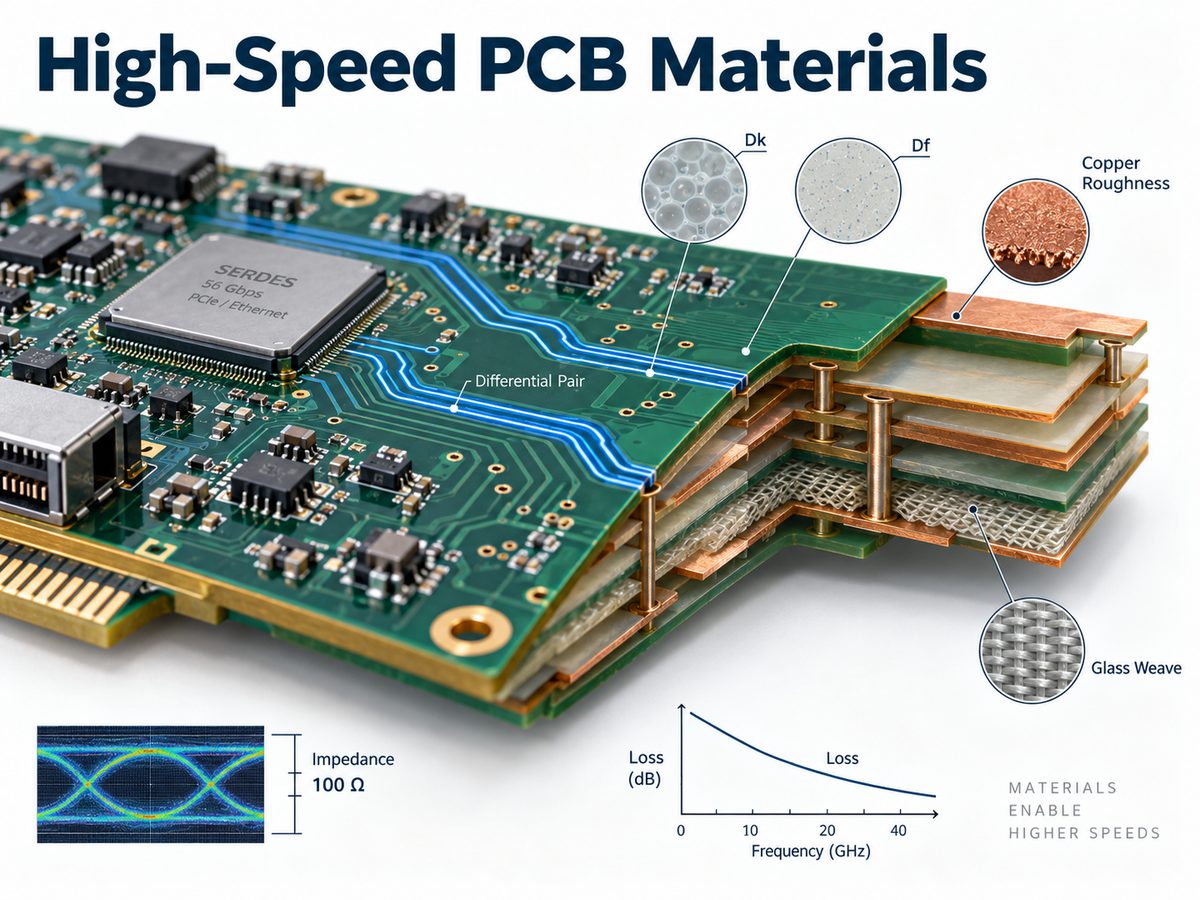
Higher-frequency or lower-loss designs may require RF laminates with more stable Dk and lower dissipation loss than standard FR-4. Material selection should match the loss budget, frequency, stackup, and cost target.

Thermal path

Power amplifiers may require:

  • Exposed thermal pads
  • Thermal vias
  • Heavy local copper
  • Heat spreaders
  • Metal chassis contact
  • Dedicated heatsinks

The fabricated PCB stackup should match the stackup used for impedance calculation and RF simulation. Changes to dielectric thickness, copper weight, or laminate grade can alter the final RF transmission-line geometry.

If your project is already moving from amplifier selection to board layout, our RF amplifier PCB guide explains the PCB-level checks that should be reviewed before fabrication and assembly.

Where Are RF Amplifiers Used?

RF amplifiers are used in receivers, transmitters, measurement equipment, medical systems, radar, wireless hardware, and microwave electronics.

Common applications include:

  • Cellular base stations
  • Wi-Fi and 2.4 GHz wireless devices
  • Bluetooth and IoT products
  • Satellite communication
  • Radar
  • GNSS receivers
  • Software-defined radio
  • RF test instruments
  • Microwave communication links
  • Radio transmitters
  • MRI systems
  • Industrial RF equipment
  • RF distribution systems
  • Aerospace and defense electronics

The amplifier type depends on the position in the system.

A receiver may use an LNA to raise a weak antenna signal. A transmitter may use a driver amplifier followed by a power amplifier. Test equipment may use wideband or variable gain amplifiers to support multiple frequency ranges and signal levels.

A 2.4 GHz RF amplifier, for example, can be used in either the receive or transmit chain. The required gain, noise figure, power, and linearity will differ depending on that role.

FAQ About RF Amplifiers

1. What does RF amplifier stand for?

RF amplifier stands for radio frequency amplifier. It amplifies RF signals used in wireless, radio, radar, satellite, and other high-frequency electronic systems.

2. What is the difference between an RF amplifier and an RF power amplifier?

An RF amplifier is the general category. An RF power amplifier is a specific type designed to deliver higher RF output power, usually near the transmitter output.

3. What is the difference between an LNA and a power amplifier?

An LNA amplifies weak received signals while adding very little noise. A power amplifier increases RF power for transmission or for driving another high-power stage.

4. What does gain mean in an RF amplifier?

Gain is the increase in signal level from the amplifier input to its output. RF power gain is usually expressed in decibels, or dB.

5. Why are RF amplifiers usually designed for 50 ohms?

Many RF cables, connectors, instruments, antennas, and components use 50 Ω interfaces, so 50 Ω has become a common system standard. Matching networks may still be required because the amplifier device itself may not have a native 50 Ω impedance.

6. Can an RF amplifier work at 2.4 GHz?

Yes. Many RF amplifiers are designed for the 2.4 GHz band. The device must support the required frequency while meeting the target gain, noise figure, output power, linearity, and matching requirements.

Ready to Move Your RF Amplifier Design Into PCB Production?

RF amplifier performance can change when the production PCB does not reproduce the intended stackup, impedance, grounding, matching geometry, component placement, or thermal path.

EBest Circuit supports RF and microwave PCB and PCBA projects using controlled impedance, Rogers materials, Rogers/FR-4 hybrid stackups, low-loss multilayer construction, HDI, fine-pitch assembly, impedance verification, and engineering DFM review. Send your Gerber files, stackup, BOM, target impedance, operating frequency, assembly requirements, and quantity to sales@bestpcbs.com for review and quotation.

You may also like

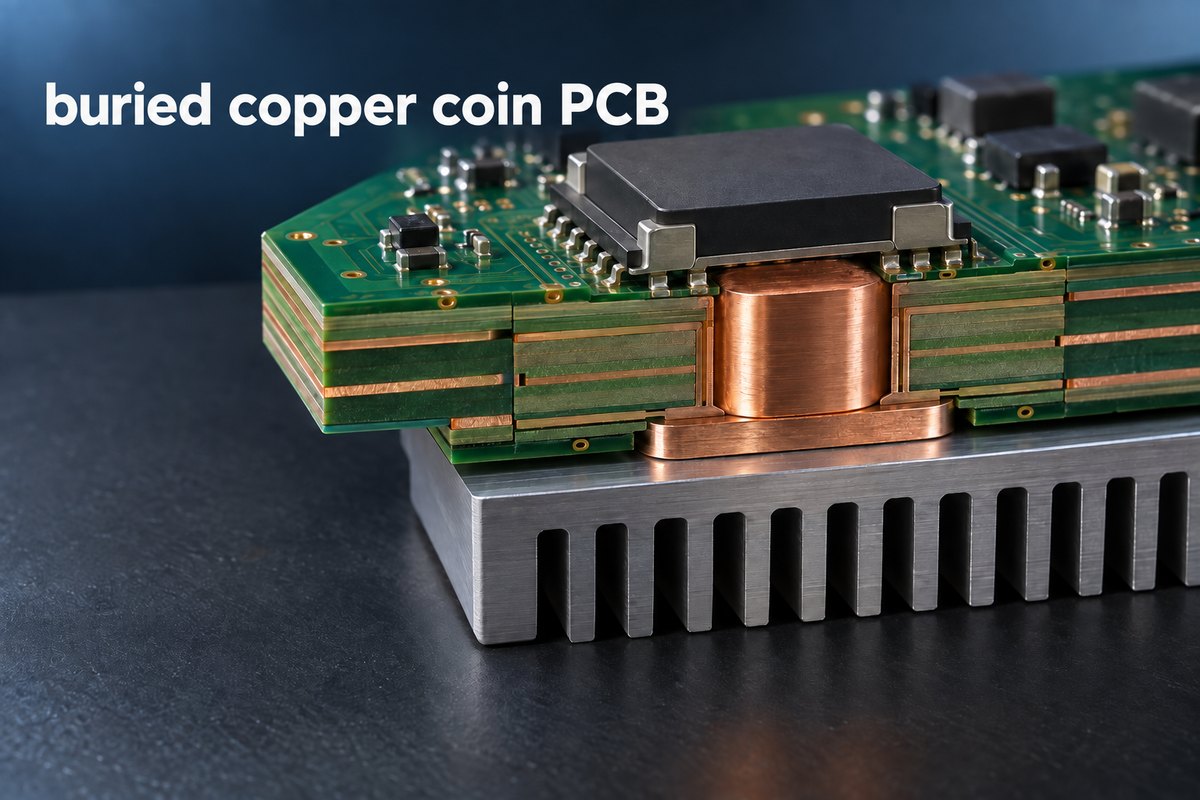
Buried Copper Coin PCB Manufacturer for Thermal Management

September 10th, 2026

A buried copper coin PCB manufacturer helps engineers create a short, solid-metal heat path through a multilayer circuit board. Instead of forcing concentrated heat through FR-4 and a field of small thermal vias, the design places a machined copper insert directly below or near the hot component. The result is localized thermal management without converting the entire assembly to a metal-core construction.

Buried copper coin technology is especially useful when a compact product combines high heat density with multilayer routing, controlled impedance, HDI features, or a backside heatsink interface. EBest Circuit (Best Technology) manufactures custom PCB and PCBA projects and can review whether a buried, embedded, or press-fit copper structure matches the intended board construction. Contact sales@bestpcbs.com to discuss your layer stack, hot component, copper coin geometry, quantity, and assembly requirements.

buried copper coin PCB
A multilayer buried copper coin PCB creates a direct solid-copper path from a heat-generating component to a backside heatsink.

What Is a Buried Copper Coin PCB?

A buried copper coin PCB contains a solid copper insert inside the PCB stackup, normally below a component or thermal pad that produces concentrated heat. Three details define the structure:

  • Position: The coin may sit completely inside the multilayer build or extend toward one or both outer surfaces.
  • Layer connection: It may connect an outer layer to an internal copper plane, join selected internal layers, or remain electrically isolated and serve only as a thermal path.
  • Shape: “Coin” does not mean round. Common forms include rectangular, square, T-shaped, stepped, and custom-machined inserts.

The geometry follows the heat-source area, available routing space, intended layer connection, and mechanical interface on the other side of the PCB.

Manufacturers do not always use “buried,” “embedded,” and “press-fit” in exactly the same way. A cross-sectional drawing is therefore more useful than the name alone because it shows whether the coin is fully enclosed, exposed at one surface, exposed at both surfaces, or inserted into a finished cavity.

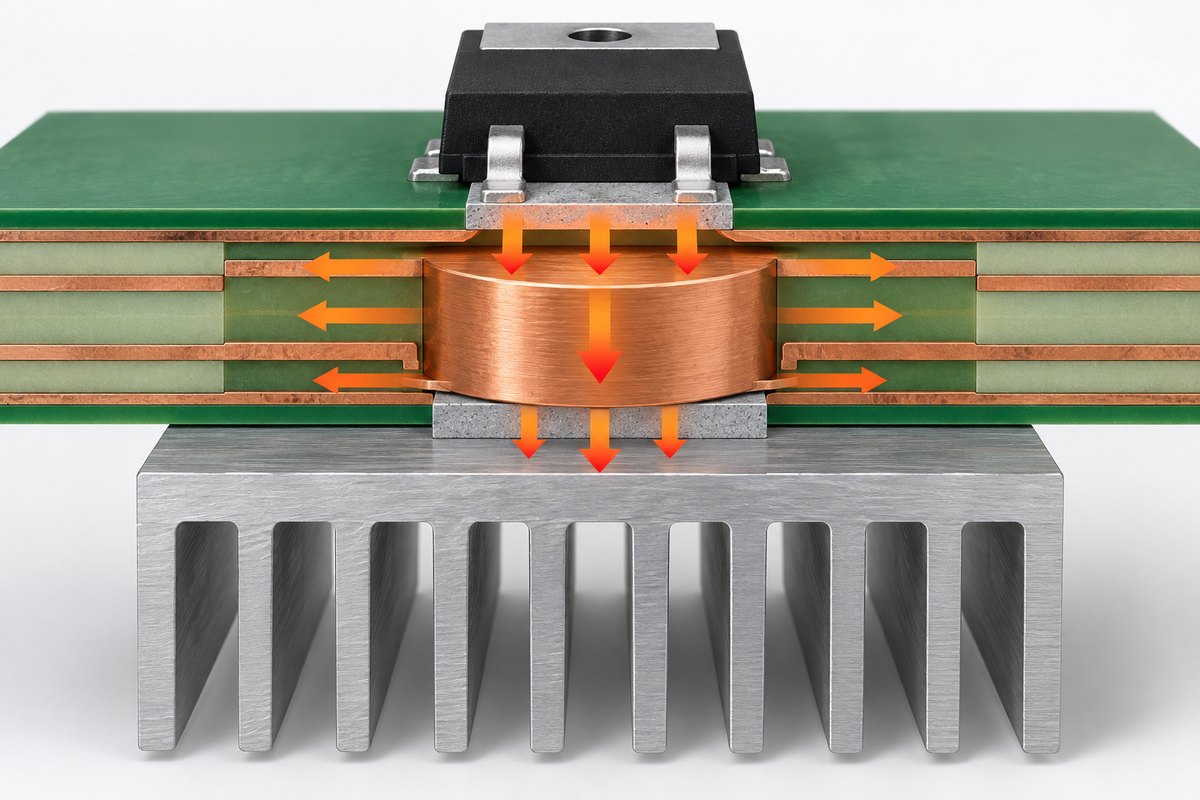
buried copper coin PCB
A copper coin conducts heat vertically toward the heatsink and laterally into connected copper planes.

How the Buried Copper Coin Transfers Heat

Heat follows every available path away from a component. In an ordinary multilayer PCB, heat may travel laterally through the surface copper, downward through thermal vias, and then into inner planes, a backside copper area, or a heatsink. This approach works well for many components, but the path contains interfaces and materials with much lower thermal conductivity than solid copper.

A copper coin replaces part of that path with a continuous copper body. When the component pad, copper coin, thermal interface material, and heatsink are aligned, heat can move through a much larger solid-metal cross-section. The coin can also spread heat into connected copper planes before it reaches the opposite side of the board.

The improvement does not come from copper alone. It comes from the complete path:

  • The component must transfer heat efficiently into the top surface or connected copper layer.
  • The coin must have enough contact area at the heat source.
  • Intended copper layers must connect to the coin without narrow thermal bottlenecks.
  • The opposite side must transfer heat into a chassis, cold plate, heatsink, or other cooling structure.
  • Thermal interface material and mounting pressure must support the intended contact.

For this reason, a large coin does not automatically guarantee a low component temperature. Junction-to-case resistance, solder coverage, contact flatness, interface material, airflow, and heatsink capacity remain part of the thermal system. The PCB coin solves the board-level section of the heat path; it does not replace complete thermal analysis and product testing.

buried copper coin PCB
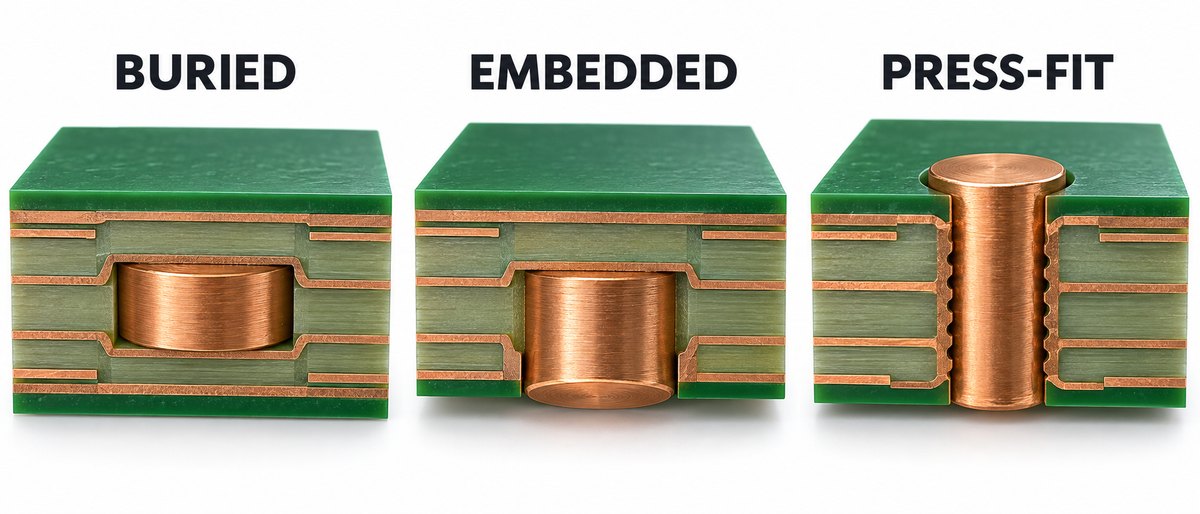
Buried, embedded, and press-fit copper coin structures use different insertion and exposure methods.

Buried, Embedded, and Press-Fit Copper Coin Structures

Copper coin constructions are commonly grouped by when the insert is added and how it sits inside the board.

Buried copper coin: The insert is incorporated within the multilayer build and does not necessarily pass through the complete board thickness. It can connect selected layers while leaving routing space above or below it. This structure is useful when the thermal path must begin at an internal or subsurface layer, or when an outer layer needs to remain available for routing or component features.

Embedded copper coin: The coin is built into the PCB during multilayer fabrication and may be exposed at one or both surfaces. It can form a mounting or thermal contact surface while remaining integrated with the surrounding laminate. Some suppliers also use “embedded” as the general category that includes buried coins.

Press-fit copper coin: A machined copper part is inserted into a prepared PCB opening with controlled interference. This construction can create a direct path through the board without embedding the coin during lamination. Hole geometry, coin tolerance, insertion force, retention, and surface height all influence the finished result.

Conductive adhesive can also be used for certain copper inserts, depending on the structure and factory capability. Each method changes the mechanical interface, achievable layer connections, thermal contact, manufacturing sequence, and cost. The construction drawing should identify the actual cross-section rather than relying only on one of these category names.

Copper Coin Shapes and Layer Connections

The coin shape determines how heat moves between the component, PCB layers, and external cooling surface.

  • Straight rectangular coin: Creates a simple vertical path when the hot pad and backside cooling area have similar dimensions. The upper and lower contact areas remain aligned.
  • T-shaped coin: Connects two differently sized interfaces. A narrow upper section can fit beneath a small component pad, while a wider lower section spreads heat toward a larger heatsink or housing contact area. The orientation can also be reversed.
  • Stepped coin: Stops at a selected depth or creates different contact areas at different layers. It can connect two internal planes without reaching the component side, or connect a top pad to an inner power plane while leaving lower layers available for routing.
  • Connected or isolated coin: Selected layers may connect directly, through plating, or through defined copper features around the insert. Other layers use clearance to remain electrically isolated.
  • Thermal-only or electrical-and-thermal coin: The insert can transfer heat only, or it can also carry current or connect to ground. An electrical function must be reflected in the schematic, netlist, clearance, and test plan.

A wider coin generally provides more contact area and heat spreading but occupies more routing space and may interrupt internal planes. A smaller coin preserves board area but reduces the available heat-flow cross-section. The final shape must balance the thermal interface with routing, stackup, component placement, and mechanical packaging.

Buried Copper Coin PCB Manufacturing Process

The exact sequence depends on whether the coin is buried during lamination, embedded with an exposed surface, bonded, or press-fitted after the PCB structure is formed. A typical buried or embedded process follows five main stages:

  1. Machine the copper coin. The insert is produced to the specified shape and thickness. Its surface may also be prepared for resin bonding, plating, or a defined copper connection.
  2. Create the matching PCB cavity. The relevant core, prepreg, or subassembly is machined so the coin can occupy its intended position in the stackup.
  3. Position and laminate the structure. The coin is placed during layup, and the multilayer panel is pressed under a controlled cycle. Prepreg resin flows around the insert and fills the intended interface.
  4. Establish the finished surface. After lamination, planarization or controlled machining may be used to achieve the specified exposed area and surface height.
  5. Complete PCB fabrication. The panel continues through the applicable drilling, plating, imaging, etching, solder-mask, surface-finish, routing, and inspection operations.

The copper insert and laminate respond differently to heat and pressure, so cavity geometry, resin volume, stack symmetry, and coin restraint influence the laminated result. If the coin forms a solderable pad, its finished surface must match the assembly design. If it contacts a heatsink or chassis, its usable contact area and height must suit that interface.

For a press-fit construction, the PCB opening and copper part are manufactured separately and then joined by controlled insertion. This avoids embedding the coin during lamination but makes opening dimensions, insertion force, retention, and surface height important. In either approach, the product is a combined PCB, copper-part, and assembly structure—not a standard PCB with an unrelated metal piece added later.

Where Buried Copper Coin PCBs Are Used

Buried copper coin PCBs are used where a small number of components create concentrated heat and the product still requires the routing density or layer count of a conventional multilayer board.

RF and telecommunications equipment: Power amplifiers, radio units, base-station electronics, and other RF assemblies may place a copper coin beneath a high-power device while preserving controlled-impedance routing around it.

Power conversion: DC-DC converters, power supplies, inverters, charging equipment, and power-distribution modules can use copper coins beneath switching devices, power packages, or localized high-current areas.

Industrial and motor-control electronics: Servo drives, motor controllers, robotics controllers, and compact industrial modules may need a direct path from a hot device to a chassis or cold plate.

High-output LED systems: Dense LED modules and illumination controllers can use a copper insert where one device or cluster produces a localized hot spot that exceeds the capability of ordinary vias and surface copper.

Automotive and transportation electronics: Compact power and communication modules may combine high heat density, vibration, restricted airflow, and a housing-based cooling path. The complete construction must still be validated for the applicable operating environment.

Aerospace and defense electronics: Space-constrained RF and power assemblies may use localized solid-copper heat paths when weight, routing density, mechanical design, and reliability requirements justify the additional PCB complexity.

Copper coins are less attractive when heat is spread uniformly across the entire board, when ordinary thermal vias already meet the temperature target, or when the product lacks a useful destination for the extracted heat. In those situations, thicker copper, a metal-core PCB, a larger heatsink, improved airflow, or a different component layout may be more economical.

Buried Copper Coin PCB vs. Thermal Vias and Metal-Core PCBs

Thermal vias, copper coins, and metal-core PCBs solve different thermal layouts.

Thermal vias are easy to include beneath many exposed-pad components and fit normal multilayer manufacturing. They transfer heat through multiple plated barrels into internal or backside copper. They are generally the first option when the heat load and available pad area are compatible with a via array.

A buried copper coin concentrates a larger solid-copper cross-section at one hot location. It is useful when a via field would occupy too much pad area, provide insufficient through-thickness conduction, or interfere with the required package and stackup. It also allows the rest of the PCB to remain a conventional multilayer or HDI construction.

A metal-core PCB uses an aluminum or copper base to spread heat across a much larger portion of the board. It is well suited to many LED, power, and high-temperature assemblies, but the dielectric between the circuit copper and metal base remains part of the thermal path. Multilayer routing and plated-through interconnection can also be more constrained than on a conventional FR-4 multilayer board.

The choice is therefore not simply “which material conducts heat best?” Thermal vias favor simplicity and cost; copper coins favor intense localized heat transfer in a complex multilayer board; metal-core PCBs favor broader heat spreading across the assembly. Some products combine these methods with heavy copper, thermal interface materials, heatsinks, cold plates, or enclosure cooling.

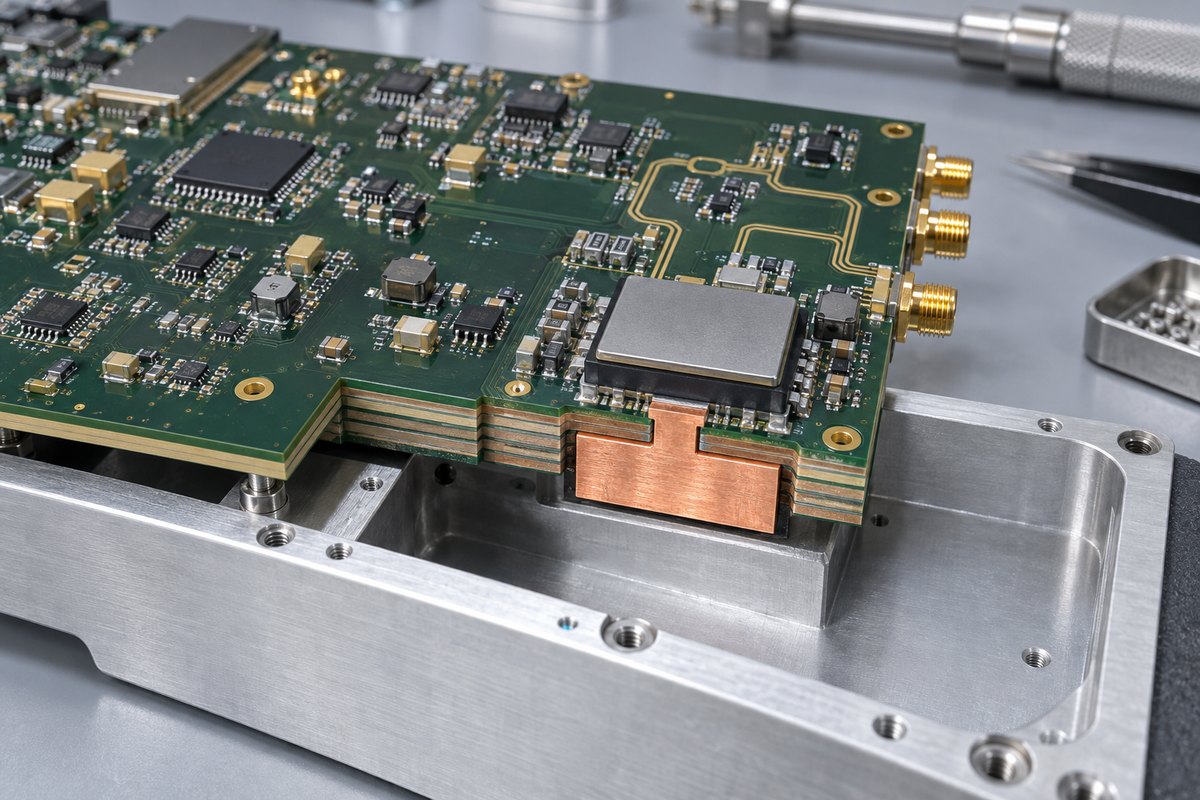
buried copper coin PCB
An eight-layer RF control board can use a T-shaped copper coin beneath a power amplifier to reach the aluminum housing.

A Practical Buried Copper Coin PCB Example

Consider an eight-layer RF control board with a power amplifier near one edge.

  • Board requirements: The amplifier connects to controlled-impedance RF traces on the top layer, while digital control and power routing occupy several inner layers. A machined aluminum housing below the PCB is the main cooling surface.
  • Why not a metal-core PCB: A full metal base would complicate the multilayer routing and interconnection required by the RF and control circuits.
  • Why not thermal vias alone: A large via field would consume much of the exposed-pad area and still rely on multiple plated barrels for vertical heat transfer.
  • Selected structure: One T-shaped copper coin sits beneath the amplifier. Its narrow upper section matches the component’s thermal land, while its wider lower section increases contact area toward the housing.
  • Layer and housing connection: Selected ground layers connect to the coin for lateral heat spreading, while signal layers clear the copper body. A thin thermal interface material connects the finished coin surface to the housing after assembly.

The value of this structure is not simply “more copper.” The T-shape connects a small heat source to a larger cooling surface without sacrificing the multilayer routing required by the circuit.

This example is illustrative rather than universal. Actual coin size, surface height, layer connections, finish, interface material, and cooling performance must follow the component power, package data, thermal simulation, housing design, and prototype results.

Why Choose EBest Circuit for Buried Copper Coin PCB Manufacturing?

A buried copper coin PCB requires the copper insert, PCB cavity, multilayer stackup, layer connections, surface height, and assembly interface to work together. EBest Circuit (Best Technology) supports these projects with coordinated engineering, PCB fabrication, component sourcing, and PCBA services.

  • One coordinator backed by three engineers: Each project is supported by one business coordinator and three engineers, helping customer questions move quickly between PCB, PCBA, component, and process teams.
  • DFM review by experienced engineers: Engineers with up to 20 years of PCB, PCBA, and product-development experience can review the copper coin structure, cavity, stackup, connected and isolated layers, surface finish, and assembly interface. Customers can receive a DFM review and applicable process recommendations before production.
  • Integrated PCB and PCBA services: EBest Circuit combines PCB manufacturing, component sourcing, PCBA assembly, and testing, reducing the need to coordinate the copper coin PCB and subsequent assembly with separate suppliers.
  • Prototype and low-volume support: Prototype and low-volume production can support engineering verification before the design moves to a larger production quantity.
  • Factory and quality-system support: EBest Circuit operates PCB and PCBA manufacturing facilities under quality systems including ISO 9001, ISO 13485, IATF 16949, and AS9100D.

With 20 years of PCBA experience, EBest Circuit has served more than 10,000 engineers and over 1,800 customers. If you are developing an RF amplifier board, power converter, motor controller, LED system, or another high-heat-density product, send your PCB data, stackup, and copper coin drawing to sales@bestpcbs.com. The team will review the manufacturing requirements and prepare a project-specific quotation.

FAQs About Buried Copper Coin PCB

Is a buried copper coin always completely enclosed inside the PCB?

Not necessarily. Terminology varies among manufacturers. Some buried coins are fully enclosed, while others stop at or become exposed on a selected surface. The cross-section and stackup should define the actual structure.

Can a copper coin carry electrical current as well as heat?

Yes, when it is intentionally connected to a circuit net or ground structure. In that case, current capacity, layer connections, clearances, netlist data, and electrical testing must be considered together with thermal performance.

Is a copper coin better than a thermal-via array?

It can provide a more direct solid-copper path for a concentrated heat source, but it is more complex and costly to manufacture. Thermal vias remain suitable for many components. The correct choice depends on heat density, package geometry, routing, stackup, cooling interface, and cost target.

Can buried copper coins be used in HDI or rigid-flex PCBs?

They can be combined with some high-layer-count, HDI, and rigid-flex constructions, but the feasible structure depends on the individual factory, stackup, cavity, via arrangement, flex location, and lamination sequence. The complete build should be reviewed before release.

What information is most important for a copper coin quotation?

The most useful starting information is the PCB data, stackup, coin cross-section and dimensions, intended layer connections, component and heatsink interfaces, material and finish, quantity, and target application. These details allow the manufacturer to identify the appropriate production route and confirm project-specific capability.

Planning a buried copper coin PCB? Send your PCB files, stackup, copper coin drawing, intended layer connections, quantity, and assembly requirements to sales@bestpcbs.com. EBest Circuit will review the manufacturing requirements and prepare a project-specific quotation.

You may also like

Half Duplex vs Full Duplex: Differences, Examples and Uses

September 10th, 2026

Half duplex vs full duplex explains how data moves between two connected devices. Half-duplex communication supports transmission in both directions, but only one device can transmit at a time. Full-duplex communication allows both devices to transmit and receive simultaneously. This difference affects wiring, throughput, latency, transceiver selection and software control.

Half duplex vs full duplex communication appears frequently in Ethernet networks, RS-485 buses, UART connections and SPI interfaces. However, an interface should not be classified by name alone. The physical wiring, transceiver, peripheral configuration and communication protocol all help determine whether the final system operates in half- or full-duplex mode.

Half duplex vs full duplex communication comparison

What Is Half Duplex Communication?

Half duplex is two-way communication in which the connected devices take turns transmitting. When one device sends, the other receives; the direction can reverse only after the active transmitter releases the channel.

Half duplex communication using one shared channel and alternating data direction

A walkie-talkie is the clearest example: both users can speak and listen, but not at the same time. Likewise, nodes on a 2-wire RS-485 network share one differential pair, and only one driver should control it at any moment.

Changing direction creates a short turnaround period. The controller must finish the last byte, disable its driver and release the channel. Poor timing can truncate data or activate two drivers together.

Half duplex is commonly used when:

  • Messages follow a request-and-response pattern.
  • Simultaneous data flow is unnecessary.
  • Several nodes share one physical bus.
  • Fewer wires and connector pins are preferred.
  • The system can tolerate a direction-change delay.

Examples include walkie-talkies, Ethernet hubs, 2-wire RS-485 and many Modbus RTU networks.

What Is Full Duplex Communication?

Full duplex is two-way communication that allows both devices to transmit and receive at the same time. Neither side needs to wait for the other to release the communication channel before sending data.

Full duplex communication with simultaneous transmit and receive paths

A telephone call is a familiar example. In electronics, UART commonly uses separate TX and RX lines, while 4-wire RS-485 uses one differential pair for each direction.

Some interfaces use signal separation or echo cancellation to send and receive over the same medium. The deciding factor is whether useful data can travel both ways simultaneously, not the wire count alone.

Full duplex is usually selected when:

  • Both devices generate data independently.
  • Low response latency is important.
  • Traffic is continuous in both directions.
  • Waiting to reverse the channel would limit performance.
  • The design can support the required signal paths and hardware.

Examples include switched Ethernet, telephone systems, separate-line UART and conventional four-wire SPI.

Half Duplex vs Full Duplex: What Are the Key Differences?

The main difference between half duplex and full duplex is whether simultaneous transmission is possible. Half duplex shares the channel between directions, while full duplex keeps both directions available at once.

Comparison Half Duplex Full Duplex
Data direction Two-way Two-way
Simultaneous send and receive No Yes
Channel access Devices take turns Both directions stay active
Turnaround delay Required Normally unnecessary
Direction control Often required Usually not required on point-to-point links
Bidirectional capacity Shared Available in both directions
Wiring Often fewer conductors May require separate signal paths
Typical use Shared buses and request-response traffic Continuous, low-latency communication

Half duplex suits shared buses and lower wire counts. Full duplex suits continuous two-way traffic but may require additional signal paths or processing resources.

Simplex vs Half Duplex vs Full Duplex: How Does Data Flow?

Simplex carries data in one fixed direction, half duplex carries data in both directions at different times, and full duplex carries data in both directions simultaneously.

Mode Data flow Can roles reverse? Simultaneous transmission? Example
Simplex One direction No No Broadcast receiver
Half duplex Two directions, one at a time Yes No Walkie-talkie
Full duplex Two directions at once Yes Yes Telephone

A sensor that only reports measurements can use simplex communication if it never receives commands. A shared industrial bus often uses half duplex because every node can transmit when given access. A real-time point-to-point link may use full duplex so control data and feedback can move concurrently.

The required data flow decides the mode; the more capable-sounding option is not automatically the better fit.

Half Duplex vs Full Duplex Ethernet: How Do Switches and Auto-Negotiation Work?

Half-duplex Ethernet is associated mainly with shared media and hubs, while modern point-to-point switch connections normally operate in full duplex.

Half duplex and full duplex Ethernet with 10 and 100 Mbps connections

With an Ethernet hub, all devices share one collision domain. Simultaneous transmissions collide and must be resent, so half-duplex Ethernet uses CSMA/CD to control access.

A switch gives each device a dedicated link, allowing simultaneous transmission and reception without normal Ethernet collisions. That is why switched networks normally use full duplex.

Auto-negotiation lets the switch and network interface select a shared speed and duplex mode. If the settings differ, the link may remain active but perform poorly.

Common signs of a duplex mismatch include:

  • Low or inconsistent throughput
  • Late collisions on the half-duplex side
  • Frame errors and retransmissions
  • Intermittent application response
  • Better performance in one direction than the other

For current Ethernet equipment, leaving both ends on auto-negotiation is usually appropriate. When legacy hardware requires manual settings, configure the same speed and duplex mode at both ends.

10/100 Mbps Half Duplex vs Full Duplex: Does Full Duplex Double the Speed?

Full duplex doubles the theoretical bidirectional capacity of a 10 or 100 Mbps link, but it does not double its single-direction speed. A 100 Mbps full-duplex link can send at 100 Mbps and receive at 100 Mbps simultaneously; it cannot send one file at 200 Mbps.

The same rule applies to 10 Mbps Ethernet:

  • 10 Mbps half duplex shares 10 Mbps between both directions.
  • 10 Mbps full duplex provides 10 Mbps in each direction at the same time.
  • 100 Mbps half duplex shares 100 Mbps between sending and receiving.
  • 100 Mbps full duplex provides 100 Mbps in each direction simultaneously.

Full duplex matters most when traffic moves both ways. For mainly one-way transfers, storage speed, protocol overhead and network congestion may have greater impact.

RS-485 Half Duplex vs Full Duplex: What Changes Between 2-Wire and 4-Wire?

For a half duplex vs full duplex RS485 comparison, the main change is whether one pair is shared or separate pairs carry each direction. RS-485 half duplex normally uses one differential pair, while RS-485 full duplex uses two pairs—one for each direction. This changes the transceiver connection, cable, connector and direction-control requirements.

Two-wire half-duplex RS-485 compared with four-wire full-duplex RS-485

2-wire half-duplex RS-485

All drivers and receivers share one pair. The active node enables its driver, sends the message and releases the bus, usually through the transceiver’s DE and /RE controls.

The driver must stay enabled until the final bit leaves the UART and transceiver. Releasing it early cuts off the message; holding it too long delays the reply.

4-wire full-duplex RS-485

One pair carries master transmissions, and the other carries replies. The master can use both simultaneously, although slave drivers sharing the return pair still need controlled access.

Design factor 2-Wire RS-485 4-Wire RS-485
Duplex mode Half duplex Full duplex
Differential pairs One Two
Master send and receive Alternating Simultaneous
Cable and connector size Lower Higher
Direction control Required Depends on node role
Common use Multidrop request-response bus Continuous master communication

Modbus RTU commonly runs over 2-wire half-duplex RS-485. Its request-response sequence already assigns transmission turns, so adding another pair may not shorten the transaction. Modbus defines messaging; RS-485 defines the electrical connection.

SPI Half Duplex vs Full Duplex: How Do Data Lines and Transfers Differ?

Conventional SPI supports full-duplex transfer through separate MOSI and MISO lines, while half-duplex SPI shares one bidirectional data line.

A standard SPI connection usually includes:

  • SCLK for the clock
  • MOSI for controller-to-peripheral data
  • MISO for peripheral-to-controller data
  • CS or SS for peripheral selection

With separate MOSI and MISO paths, the controller transmits and samples one bit per clock cycle. Both streams are not always meaningful: a memory may receive a command first and return data later while the controller sends dummy bytes to generate the clock.

Three-wire SPI combines input and output on one SDIO line. It saves a pin and trace but requires direction switching, turnaround time and compatible devices.

Classify an SPI link from its wiring and transaction format, not from the protocol name alone.

UART Half Duplex vs Full Duplex: How Do TX and RX Connections Differ?

UART is full duplex when separate TX and RX lines operate simultaneously, but it becomes half duplex when transmission and reception share one external path.

In a full-duplex UART link, each device’s TX connects to the other’s RX, with a shared ground reference. Both peripherals can communicate without changing pin direction.

Half-duplex UART can be created in two common ways:

  • A single-wire UART mode shares one bidirectional signal.
  • A UART connects through a 2-wire RS-485 transceiver that combines the external transmit and receive paths.

With RS-485, the MCU may retain separate TX and RX signals while the external bus remains half duplex. Firmware or the transceiver must then control direction.

The UART block defines asynchronous character framing. The schematic and line transceiver determine the external voltage levels, wiring and duplex mode.

How Does Half Duplex vs Full Duplex Affect PCB Interface Design?

Duplex mode affects PCB routing, component count, connectors, protection and firmware control. It should be confirmed before the schematic and layout are released.

SPI MOSI and MISO routing with UART TX and RX connections on a PCB

Review these design areas:

  • Signal count: A shared half-duplex path can save MCU pins, traces and connector contacts. Full-duplex differential communication may require twice as many signal pairs.
  • Transceiver pinout: Half-duplex RS-485 parts often combine driver outputs and receiver inputs. Full-duplex parts expose separate bus connections.
  • Direction control: Shared buses need reliable DE and /RE timing, including the UART shift-register delay after the final byte is written.
  • Routing: Differential pairs need consistent spacing, short stubs and a continuous reference path. Two full-duplex pairs also require more board and connector space.
  • Termination and biasing: Component values and locations should match the cable impedance and topology. RS-485 cabling commonly uses approximately 120 Ω differential termination.
  • Protection: External ports may need ESD, surge or EFT protection. Industrial interfaces may also require galvanic isolation.
  • Production testing: Tests should verify polarity, termination, direction switching, idle-bus state and communication at the specified data rates.

Select half duplex when lower wire count and shared-bus access outweigh turnaround delay. Select full duplex when simultaneous traffic and predictable response time justify the additional signal paths.

FAQs About Half Duplex vs Full Duplex

1. Is full duplex always faster than half duplex?

Not necessarily for every task. Full duplex provides greater bidirectional capacity because sending and receiving can occur simultaneously, but a one-way transfer remains limited by the link’s rated speed and the rest of the system.

2. Can an Ethernet switch operate in half duplex?

Some 10/100 Mbps switch ports support both modes for compatibility with older equipment. Modern switched networks normally use full duplex, while current Gigabit Ethernet connections are generally operated in full duplex.

3. What causes a duplex mismatch?

A duplex mismatch occurs when one end of a link uses half duplex and the other uses full duplex. It is commonly caused by inconsistent manual settings or failed auto-negotiation and can produce low throughput, collisions and frame errors.

4. Is Modbus RTU half duplex or full duplex?

Modbus RTU does not inherently require only one duplex mode, but it is commonly used over 2-wire half-duplex RS-485. Its request-response communication pattern fits naturally with devices taking turns on a shared bus.

5. Is RS-422 half duplex or full duplex?

RS-422 is commonly used with separate transmit and receive differential pairs, creating a full-duplex connection. The precise operating mode still depends on how the channels and transceivers are implemented.

6. Can one interface support both half duplex and full duplex?

Yes, if the controller, transceiver and connector provide the required modes and signal paths. Some configurable UART peripherals and RS-485 transceivers support both, but the PCB must include the necessary routing and control connections.

If you are developing equipment or embedded systems with Ethernet, RS-485, SPI, UART or another wired interface, confirm the duplex mode before finalizing the transceiver, connector and PCB interface design. EBest Circuit can review the Gerber files, BOM, schematic, controlled-impedance requirements and assembly data together before production.

Send your project files and interface requirements to sales@bestpcbs.com for PCB manufacturing, PCBA and engineering review.

You may also like

What Is Co-Packaged Optics (CPO)? Technology, Applications, Challenges, and PCB Design

September 10th, 2026

Co-Packaged Optics (CPO) is an optical interconnect architecture that places optical engines close to high-bandwidth chips such as switch ASICs, processors, and accelerators. By shortening the electrical path between the chip and the optical interface, CPO can reduce high-speed signal loss, lower I/O power, and support much higher bandwidth density than conventional front-panel pluggable optics.

CPO is moving from an emerging concept into real high-capacity networking hardware, driven particularly by AI data centers and hyperscale computing. For hardware engineers, this shift also changes how advanced packaging, thermal management, fiber routing, power delivery, PCB stackups, and system integration are approached.

Co-Packaged Optics CPO architecture with ASIC, optical engines and fiber

What Is Co-Packaged Optics (CPO)?

Co-Packaged Optics integrates optical engines within or immediately beside the package of a high-performance electronic chip, allowing high-speed electrical signals to travel only a short distance before being converted to light.

In a conventional pluggable-optics architecture, signals travel from the ASIC across the PCB to optical transceivers installed at the front panel. CPO moves this electrical-to-optical conversion much closer to the silicon.

ASIC or processor → short electrical connection → optical engine → fiber

The package can contain separate electronic and photonic dies rather than integrating every function onto one chip. CPO is therefore an optical and electronic integration architecture, not a single type of optical component.

How Does Co-Packaged Optics Work?

Co-Packaged Optics works by converting high-speed electrical data into optical signals close to the ASIC or processor and carrying the longer-distance portion of the link over fiber.

Co-Packaged Optics transmit and receive signal flow from ASIC to optical engine and fiber

A typical transmit path is:

  • The ASIC generates high-speed electrical data.
  • A short electrical connection carries it to the optical engine.
  • Driver electronics prepare the signal.
  • A photonic integrated circuit modulates light with the data.
  • Fiber carries the optical signal to another device.

The receive path reverses the process:

  • Fiber delivers the incoming optical signal.
  • A photodetector converts light into an electrical signal.
  • A TIA and related electronics process the signal.
  • The data reaches the ASIC over a short electrical connection.

Many CPO architectures use an external laser source (ELS). Light is generated away from the ASIC and delivered to the optical engine through fiber. OIF has standardized external-laser approaches for co-packaged optical systems through its ELSFP work, including field-replaceable laser modules.

What Technologies Make Co-Packaged Optics Possible?

CPO relies on silicon photonics, photonic integrated circuits, high-speed electronics, precision optical coupling, and heterogeneous integration working together.

Silicon photonics

Silicon photonics enables optical functions such as waveguides, modulators, couplers, and photodetectors to be fabricated in compact semiconductor-based devices.

Photonic integrated circuits

The PIC handles functions such as optical modulation, detection, routing, and coupling. Multiple optical channels can be integrated into one photonic engine to increase aggregate bandwidth.

High-speed electronic ICs

Drivers, TIAs, clocking circuits, and other interface electronics connect the optical section to the main ASIC.

External laser technology

Many architectures separate the laser from the optical engine to improve thermal conditions and serviceability.

Precision optical coupling

Fiber must be accurately aligned with the photonic interface. Small positional errors can increase coupling loss, so optical assembly requires much tighter mechanical control than ordinary board-level connectors.

These technologies provide the functional building blocks. Bringing them into one compact hardware platform is primarily an advanced-packaging task.

Co-Packaged Optics vs Pluggable Optics: What Is the Difference?

The main difference between Co-Packaged Optics and pluggable optics is the location of the optical engine: CPO places it close to the ASIC, while pluggable optics keeps the optical module at the system faceplate.

Comparison of Co-Packaged Optics and pluggable optics showing short versus long electrical paths
Item Pluggable Optics Co-Packaged Optics
Optical engine location Front panel Close to ASIC
High-speed electrical path Relatively long Very short
PCB channel demand Higher Reduced near optical interface
Electrical loss Higher at very high rates Lower
Bandwidth density Limited by faceplate space Potentially much higher
Module replacement Simple More complex
Packaging Mature and modular Highly integrated
Thermal design Module and ASIC more separated Optics and ASIC interact closely
Deployment maturity Widely established Entering broader production

Pluggable optics remains attractive because individual modules can be replaced or upgraded without disturbing the main switch package.

CPO trades some of that modularity for a shorter electrical path. The trade becomes more attractive as SerDes speed, channel loss, power consumption, and faceplate density become harder to scale.

Co-Packaged Optics vs NPO vs LPO: How Do They Compare?

CPO, NPO, and LPO mainly differ in how close the optical engine sits to the ASIC and how much electrical processing remains between the ASIC and optics.

Architecture Optical Location Electrical Reach Serviceability Integration
Traditional pluggable Front panel Longest High Low
LPO Front panel Long High Low
NPO Near ASIC Short Moderate Medium
CPO At or within ASIC package environment Shortest More difficult Highest

Linear Pluggable Optics (LPO) retains a front-panel optical module while simplifying the signal-processing chain to reduce DSP-related power.

Near-Packaged Optics (NPO) places the optical engine near the ASIC without integrating it as tightly into the package.

Co-Packaged Optics (CPO) moves optics closest to the ASIC and has the highest degree of integration.

As the optical engine moves closer to the ASIC, electrical reach generally falls, but package complexity and service requirements increase.

What Are the Main Benefits of Co-Packaged Optics?

The main CPO benefits are lower electrical channel loss, lower I/O power potential, greater bandwidth density, and better scalability at very high data rates.

They result mainly from shortening the ASIC-to-optics electrical path:

  • Lower electrical loss: shorter high-speed connections introduce less attenuation.
  • Lower I/O power potential: short channels can reduce the need for aggressive equalization, retimers, or additional signal conditioning.
  • Higher bandwidth density: optical bandwidth is less dependent on the number of pluggable modules that fit on the front panel.
  • Better bandwidth scaling: increasing ASIC bandwidth does not require every optical lane to traverse a long PCB channel.
  • Less demanding ASIC-to-optics board routing: much of this interface moves toward the package.

These advantages become more valuable as per-lane data rate and total system bandwidth rise.

What Are the Main Challenges of Co-Packaged Optics?

The main CPO challenges are thermal management, optical alignment, package yield, testing, fiber attachment, laser delivery, serviceability, and standardization.

  • Thermal management: high-power ASICs create a difficult environment for nearby optical devices.
  • Optical alignment: fiber-to-photonic interfaces require precise positioning to maintain coupling efficiency.
  • Package yield: one defective electronic or optical component can affect the value of a complex multi-die package.
  • Testability: both electrical and optical functions need to be screened before and after integration.
  • Fiber attachment: fiber arrays require repeatable alignment and adequate mechanical reliability.
  • External laser delivery: optical power must reach the photonic engines with controlled loss.
  • Serviceability: integrated optical engines are more difficult to replace than front-panel transceivers.
  • Standardization: electrical, optical, laser, package, and management interfaces are still developing.

Standardization is already progressing. OIF has published a 3.2 Tb/s co-packaged module implementation agreement as well as external-laser implementation agreements for CPO systems.

Why Is Co-Packaged Optics Important for AI Data Centers?

Co-Packaged Optics is important for AI data centers because large accelerator clusters require rapidly increasing network bandwidth while power and electrical-channel loss become harder to control.

As AI clusters scale, several requirements rise together:

  • GPU/XPU-to-GPU/XPU traffic
  • switch capacity
  • SerDes data rate
  • bandwidth density
  • network power consumption

CPO reduces the board-level electrical distance between the switching silicon and optics before moving the traffic onto fiber.

Commercial hardware now shows the scale involved. NVIDIA’s Spectrum-X Ethernet Photonics uses 200 Gb/s SerDes, and its SN6800 platform reaches 409.6 Tb/s total bandwidth. NVIDIA stated in May 2026 that Spectrum-X Ethernet Photonics CPO switches were in production as part of the Vera Rubin platform.

This makes CPO especially relevant to AI scale-up fabrics, scale-out networks, high-radix Ethernet, and other accelerator-heavy infrastructure.

Where Is Co-Packaged Optics Used Today?

CPO is already entering production in AI and hyperscale networking, while applications such as direct processor optical I/O and broader disaggregated computing remain at earlier stages of adoption.

Co-Packaged Optics applications in AI data centers, hyperscale cloud and HPC optical fabrics

Current co-packaged optics applications include:

  • AI data center networks: CPO connects very high-capacity switching silicon to optical fabrics used between accelerator systems.
  • Hyperscale cloud networks: cloud operators face similar bandwidth-density and electrical-reach constraints as switch capacity increases.
  • High-performance computing: large HPC systems require high-bandwidth communication between compute nodes.
  • High-capacity Ethernet switching: switches are one of the clearest early commercial applications of CPO.
  • Large routing platforms: high-throughput networking equipment can benefit when front-panel density and long electrical channels limit further scaling.

Commercialization is no longer hypothetical. Broadcom announced its 102.4 Tb/s Tomahawk 6–Davisson CPO Ethernet switch in 2025 as its third-generation CPO platform, while NVIDIA reported production of Spectrum-X Ethernet Photonics systems in 2026.

Emerging applications include:

  • processor-to-processor optical I/O
  • GPU and XPU optical interfaces
  • chiplet-to-chiplet optical links
  • disaggregated compute and memory systems
  • future optical connections between separated compute resources

These emerging uses extend the same principle beyond network switching: convert data to light closer to the device when conventional electrical interconnect becomes inefficient in bandwidth, reach, or power.

How Does Advanced Packaging Support Co-Packaged Optics?

Advanced packaging supports CPO by placing electronic and photonic dies close enough to communicate over short, dense electrical connections while maintaining optical alignment and thermal control.

Exploded Co-Packaged Optics package showing ASIC, PIC, EIC, interposer, substrate, thermal interface and fiber array

A CPO assembly may combine:

  • switch or compute ASICs
  • PICs
  • electronic driver and receiver ICs
  • optical engines
  • organic package substrates
  • silicon or organic interposers
  • redistribution structures
  • micro-bumps or other fine-pitch connections
  • fiber coupling interfaces
  • thermal interfaces

The packaging architecture must solve three problems at once:

  • keep high-speed electrical interconnects short;
  • maintain accurate optical coupling;
  • provide an effective thermal path away from high-power silicon.

Depending on the platform, this may involve 2.5D integration, interposers, chiplets, fine-pitch redistribution, micro-bumps, or hybrid bonding.

How Does Co-Packaged Optics Change PCB and System Design?

CPO changes PCB design by moving some of the fastest ASIC-to-optics routing into the package while increasing the importance of board-level power delivery, dense breakout routing, thermal management, and mechanical integration.

The PCB still carries several critical responsibilities:

  • Power delivery: high-power ASICs and supporting electronics require low-impedance power distribution.
  • Remaining high-speed links: PCIe, memory, clocks, control, management, and other interfaces still need controlled signal integrity.
  • BGA escape routing: large advanced packages can require dense multilayer breakout.
  • Fiber-related mechanical layout: fiber exits, bend radius, connectors, cold plates, and heat sinks affect component placement.
  • Thermal integration: package position, PCB copper, airflow, and cooling hardware influence the complete thermal path.
CPO does not eliminate the PCB. It changes which PCB functions become most demanding.

Long ASIC-to-optics board traces can be reduced, while power, remaining high-speed connections, cooling, mechanical clearances, and package breakout remain board-level design concerns.

What PCB Requirements Matter in Co-Packaged Optics Systems?

CPO systems typically need PCBs with controlled impedance, suitable low-loss materials, dense multilayer routing, robust power distribution, accurate dimensions, and support for large advanced packages.

PCB requirements for Co-Packaged Optics including controlled impedance, HDI, BGA breakout, power layers, thermal vias and Rogers FR-4 hybrid stackup

Typical requirements include:

  • Low-loss laminate: for high-speed electrical links that remain on the board.
  • Controlled impedance: for SerDes, PCIe, clocks, and other high-speed channels.
  • HDI structures: microvias and sequential lamination may be needed for dense package breakout.
  • High layer count: signal, power, and ground routing can require complex stackups.
  • Power integrity: high-current ASICs need suitable planes, copper distribution, and via capacity.
  • Fine-pitch BGA routing: large advanced packages can require tight trace and via geometry.
  • Dimensional control: important around package, cooling, fiber, and connector interfaces.
  • Thermal structures: thermal vias, copper planes, copper inlays, or other heat-spreading features may be required.
  • Backdrilling: through-hole via stubs may need removal on sensitive high-speed channels.
  • Surface finish: the finish should match the assembly and reliability requirements.

The PCB specification should come from the actual channel, package, power, and mechanical requirements rather than from a generic “CPO PCB” stackup.

What Should You Consider When Manufacturing PCBs for CPO Hardware?

When manufacturing PCBs for CPO hardware, the main concerns are material selection, impedance control, stackup repeatability, HDI capability, power delivery, dimensional accuracy, thermal requirements, and prototype-to-production consistency.

A useful RFQ package should include:

  • PCB stackup
  • laminate grade or loss target
  • dielectric thickness
  • finished board thickness
  • copper weight
  • controlled-impedance values and tolerance
  • minimum trace and spacing
  • via and microvia structure
  • backdrill requirements
  • BGA pitch
  • dimensional tolerances
  • thermal requirements
  • surface finish
  • assembly drawings
  • prototype and production quantity

For high-speed channels, include the operating data rate and insertion-loss target when available.

At EBest Circuit, we bring more than 20 years of PCB and PCBA manufacturing experience to CPO-related hardware, with production capabilities in both China and Vietnam. We support low-loss multilayer PCBs, HDI, controlled impedance, fine-pitch BGA designs, advanced thermal structures, and complex stackups for high-speed systems where signal integrity, power delivery, and manufacturing consistency all matter.

Our advantage is not limited to board fabrication. For CPO and AI-related high-speed hardware, we have experience with Rogers materials such as RO4350B, RO4003C, RO3003, RO3010, and RT/duroid 5880, as well as Rogers/FR-4 hybrid multilayer constructions. We can combine material selection, controlled-impedance stackups, HDI routing, fine-pitch BGA breakout, thermal design, and PCBA in one manufacturing flow, supporting projects from prototype builds through volume production.

FAQs About Co-Packaged Optics

1. Is co-packaged optics the same as silicon photonics?

No. Silicon photonics is a technology used to create integrated optical components, while CPO is a system and packaging architecture that places optical engines close to high-performance electronic chips. Silicon photonics is one of the technologies that can enable CPO.

2. Will co-packaged optics replace pluggable optics?

Not completely. Pluggable optics offers strong serviceability, an established ecosystem, and simple replacement. CPO is more attractive where bandwidth density, electrical reach, and power become limiting factors. Both architectures are likely to coexist across different applications.

3. What is the difference between CPO and optical I/O?

CPO is a specific integration approach, while optical I/O is a broader concept. CPO commonly refers to optics integrated around switch or compute packages to replace longer electrical links. Optical I/O can also include direct optical interfaces on processors, accelerators, chiplets, and other semiconductor devices.

4. Why does CPO often use external lasers?

CPO often uses external lasers to separate the laser source from the hot ASIC environment. This can improve thermal conditions and simplify laser replacement. The optical engine receives laser light through fiber and uses that light for modulation.

5. Is co-packaged optics only used in AI data centers?

No. AI infrastructure is currently a major driver, but CPO can also support hyperscale cloud networks, HPC systems, high-capacity routers, telecom equipment, disaggregated computing, and emerging processor optical I/O.

6. What are the biggest barriers to CPO adoption?

The biggest barriers are manufacturing and integration complexity. Key issues include thermal management, packaging yield, optical alignment, fiber attach, manufacturing cost, test complexity, serviceability, laser architecture, and standardization.

7. Does CPO still require high-speed PCBs?

Yes. CPO shortens some of the highest-speed electrical paths, but the system still contains board-level high-speed links, power distribution, control interfaces, BGA routing, connectors, and other circuitry. PCB design remains an important part of the platform.

8. Which companies are developing co-packaged optics?

Leading co-packaged optics companies include Broadcom, NVIDIA, Marvell, Intel, Cisco, and Ayar Labs. The broader ecosystem also includes foundries, packaging companies, laser suppliers, fiber manufacturers, and optical-component suppliers working on different parts of the CPO platform.

If you are developing high-speed networking, AI hardware, optical I/O, or other CPO-related electronics, send your Gerber files, stackup, BOM, impedance requirements, and assembly drawings to sales@bestpcbs.com. We can review your PCB manufacturability, material selection, HDI structures, controlled impedance, thermal requirements, and PCBA needs before production.
Selected references

You may also like

What Does Solder Flux Do? How It Works in Electronics Soldering

September 9th, 2026

What does solder flux do? Solder flux removes surface oxides, limits new oxidation during heating, and helps molten solder wet copper pads, component leads, wires, and terminals. Without enough flux activity, solder may bead up or pull away from the metal instead of forming a clean joint.

In electronics soldering, flux may come from flux-core wire, solder paste, liquid flux, or tacky flux used during rework. The chemistry varies by process, but the purpose is the same: keep the soldering surface clean enough for solder to spread and bond while the joint is hot.

What solder flux does during electronics soldering on a PCB

What Does Solder Flux Actually Do?

Solder flux mainly cleans and protects the metal surface so molten solder can wet it properly.

Its main functions are:

  • Remove oxides: Activators react with oxide films on copper pads and component terminals.
  • Limit re-oxidation: Flux temporarily protects hot metal from further exposure to oxygen.
  • Improve wetting: Molten solder can spread across clean metal instead of remaining in rounded beads.
  • Support joint formation: Better wetting helps solder make continuous contact with both surfaces being joined.

This is why adding suitable flux can improve a stubborn solder joint even when the soldering temperature is already high enough.

Flux itself is not an adhesive. It prepares the surface so solder can form the actual electrical and mechanical connection.

How Does Solder Flux Work During Soldering?

Solder flux works by becoming chemically active as the joint heats up, removing surface oxides before molten solder reaches the metal.

Five-step diagram showing how solder flux removes oxide and improves solder wetting

A typical sequence is:

  1. Copper pads or component leads have a thin oxide layer.
  2. Flux is applied or released from solder wire or solder paste.
  3. Heat activates the flux.
  4. Flux chemistry reacts with the oxide layer.
  5. Cleaner metal is exposed.
  6. Molten solder wets and spreads across the surface.
  7. The solder cools and forms the joint.

The most important result is better wetting.

Good wetting produces smooth contact between the solder and the metal surface. Poor wetting can leave:

  • rounded solder beads
  • incomplete pad coverage
  • uneven fillets
  • solder that pulls away from the pad or lead

Increasing iron temperature alone does not fix an oxide problem. Excessive heat can accelerate oxidation while also increasing the risk of pad damage or component stress.

Do You Need Flux to Solder?

Yes, most soldering processes need flux activity, but you do not always need to apply flux separately.

Flux-core wire, solder paste, and extra flux used for PCB rework

Flux may already be present in:

  • flux-core solder wire
  • SMT solder paste
  • some solder preforms
  • certain specialty solder products

Extra flux is more useful when the existing flux is no longer sufficient, such as during:

  • PCB rework
  • repeated heating of an old solder joint
  • soldering oxidized pads or leads
  • drag soldering
  • fine-pitch IC soldering
  • BGA or QFN rework

So, if you are using flux-core solder or solder paste, the process already includes flux. Separate flux is only needed when additional oxide removal or wetting support is required.

In production PCBA, flux choice is more than a soldering consumable decision. It can affect solder wetting, residue control, ionic cleanliness, conformal coating compatibility, inspection results, and long-term reliability. For SMT, wave soldering, selective soldering, or rework projects, EBest Circuit can review flux and soldering process requirements together with the PCB design, BOM, and assembly conditions.

Does Solder Already Have Flux in It?

Some solder contains flux, while other solder products do not.

Comparison of solid solder wire, flux-core solder wire, solder paste, and solder bar
Solder Material Contains Flux? Typical Use
Solid solder wire No Controlled or specialized soldering
Flux-core solder wire Yes Hand soldering and repair
SMT solder paste Yes Reflow assembly
Solder bar Usually no Wave and selective soldering
Solder preform Depends on product Specialized assembly

Flux-core solder wire is common in manual electronics soldering. When the wire melts, the internal flux is released directly into the joint.

Solder paste also contains flux, but in a different form. It combines fine solder alloy powder with a flux system designed for stencil printing and reflow.

Extra flux may still help when:

  • the original flux has already been consumed
  • the joint has been reheated several times
  • the surface is oxidized
  • additional wetting is needed around fine-pitch leads

What Does Solder Flux Contain?

Solder flux usually contains a base material, activators, and a carrier or solvent.

The main ingredients are:

  • Base or resin: Often rosin or synthetic resin. It provides the main flux medium.
  • Activators: React with metal oxides during heating.
  • Solvent or carrier: Helps liquid flux spread and evaporates as the assembly heats.

Depending on the product, manufacturers may also add:

  • wetting agents
  • corrosion inhibitors
  • stabilizers
  • rheology modifiers
  • thixotropic agents

The exact formulation affects flux activity, residue, storage stability, application method, and cleaning requirements.

What Types of Flux Are Used in Electronics Soldering?

The main flux types used in electronics are rosin-based, no-clean, and water-soluble flux.

Rosin RMA, no-clean, and water-soluble flux types used in electronics soldering
Flux Type Activity Cleaning Typical Use
Rosin / RMA Low to medium Depends on formulation Hand soldering, repair
No-clean Low to medium Often not required SMT, reflow, wave soldering
Water-soluble Medium to high Normally required More difficult solderability conditions

Rosin and RMA flux

Rosin flux is widely used in electronics. RMA, or mildly activated rosin, adds more oxide-removal capability while remaining suitable for many PCB applications.

No-clean flux

No-clean flux leaves a relatively small amount of residue after soldering and is common in production assembly.

The term “no-clean” does not mean the board is residue-free. It means the remaining residue is designed to stay on the board when the process and product requirements allow it.

Water-soluble flux

Water-soluble flux offers higher activity and can handle more difficult oxidation. Its residues normally need to be removed after soldering.

For PCB work, plumbing or highly acidic flux should not be used because the residue may be too corrosive for electronic assemblies.

Liquid Flux vs Paste Flux: What Is the Difference?

Liquid flux spreads easily, while paste or tacky flux stays in place more effectively.

Flux Form Main Characteristic Typical Use
Liquid flux Low viscosity, spreads easily Wave soldering, selective soldering, repair
Flux pen Controlled liquid application PCB touch-up
Gel / tacky flux Stays around the joint SMD, BGA and QFN rework
Paste-type flux Thick, localized application Hand soldering and rework

Liquid flux is useful when the material needs to flow into narrow spaces or across multiple leads.

Tacky and gel fluxes are more useful during rework because they remain around the component instead of immediately spreading across the board.

Flux paste is not the same as solder paste. Flux paste contains flux chemistry, while solder paste contains both solder alloy powder and flux.

Which Flux Is Best for Soldering Electronics?

The best flux for soldering electronics depends on the soldering process, surface condition, residue requirement, and cleaning method.

Application Typical Flux Choice
General PCB hand soldering Rosin/RMA or electronics-grade no-clean
Fine-pitch IC soldering Liquid or tacky flux
SMT reflow Flux system already contained in solder paste
Wave soldering Process-specific liquid flux
BGA/QFN rework Tacky or gel flux
Oxidized surfaces Higher-activity flux with suitable cleaning

Also check:

  • solder alloy compatibility
  • PCB surface finish
  • flux activity level
  • residue limits
  • cleaning capability
  • conformal coating requirements
  • product reliability requirements

A more active flux is not automatically better. Higher activity may improve oxide removal, but it can also increase cleaning requirements.

Does Flux Need to Be Cleaned After Soldering?

Flux residue should be cleaned when the chemistry or assembly requirements make residue unacceptable.

PCB flux residue cleaning guide for water-soluble, highly active, and no-clean flux

Typical guidance is:

  • Water-soluble flux: Normally clean after soldering.
  • Highly activated flux: Usually clean unless the product specification states otherwise.
  • No-clean flux: May remain if the process and reliability requirements allow it.

Cleaning deserves extra attention for:

  • high-voltage assemblies
  • high-impedance circuits
  • assemblies receiving conformal coating
  • products exposed to high humidity
  • assemblies with strict ionic cleanliness limits

Using too much flux can also leave unnecessary residue, especially during hand soldering and repair. Applying only the amount needed for proper wetting usually gives a cleaner and more repeatable result.

FAQ About Solder Flux

1. What happens if you solder without flux?

Without enough flux, surface oxides can prevent solder from wetting properly. The solder may bead up, form incomplete fillets, or fail to bond evenly to the pad or component lead.

2. Can you use too much flux when soldering?

Yes. Too much flux can leave heavy residue, spread contamination across the PCB, and increase cleaning or inspection work. Use enough to support wetting without flooding the area.

3. Does flux make solder stick better?

Yes, indirectly. Flux removes oxides and improves wetting, allowing molten solder to bond more effectively with the metal surface. Flux itself is not an adhesive.

4. Can you use plumbing flux for electronics soldering?

No. Plumbing flux can be too aggressive or corrosive for PCB assemblies. Use flux specifically formulated for electronics.

5. Why does solder bead up even when I use flux?

Common causes include severe oxidation, contamination, insufficient heat, weak or expired flux, or poor solderability of the surface finish.

6. Do you need extra flux with flux-core solder?

Not always. Flux-core solder already contains flux. Extra flux is mainly useful for rework, oxidized surfaces, fine-pitch soldering, or joints that have already been heated.

Solder flux plays a simple but important role in electronics assembly: it keeps the soldering surface clean enough for molten solder to wet and form a reliable joint.

If you are preparing a PCB or PCBA project and need support with soldering process requirements, assembly manufacturability, or production planning, send your Gerber files, BOM, and assembly requirements to sales@bestpcbs.com

You may also like

Reflow Process Soldering: SMT Steps, Temperature Profile & Defects

September 9th, 2026

The reflow process soldering method is an SMT assembly process where solder paste is printed on PCB pads, components are placed, and the assembly passes through a controlled oven profile. The main stages are preheat, soak, reflow and cooling. Reliable results depend on paste volume, placement accuracy, peak temperature, time above liquidus, cooling rate and inspection.

The reflow soldering process is simple in principle, but reliable results depend on more than reaching the solder’s melting point. Paste volume, component placement, PCB thermal mass, oven settings, peak temperature, time above liquidus, and cooling rate all influence the final joint. A profile that works for a small two-layer PCB may therefore be unsuitable for a dense multilayer assembly with BGAs, large copper planes, or mixed component sizes.

Reflow process soldering line with a populated PCB moving through a reflow oven

What Is Reflow Process Soldering in Electronics Manufacturing?

Reflow process soldering is the standard method used to attach most surface-mount components to printed circuit boards. Solder paste is first printed onto PCB pads, components are placed into the paste, and the assembly then travels through a reflow oven. Controlled heating activates the flux, melts the solder alloy, forms the joints, and finally cools them into a stable connection.

Before heating, the solder paste holds the components in position. As the board enters the hotter sections of the reflow oven, the flux activates and removes oxides from the surfaces being joined. Once the solder alloy passes its liquidus temperature, it melts and wets the component terminals and PCB pads. Cooling then solidifies the solder into permanent electrical and mechanical joints.

Reflow is especially suitable for modern PCB assembly because hundreds or thousands of SMT joints can be processed during the same oven cycle. It also supports fine-pitch ICs, QFNs, BGAs, chip resistors, capacitors, and other high-density components that would be difficult to solder individually.

The process is commonly used for:

  • Consumer and industrial electronics
  • Automotive control boards
  • Telecom and networking equipment
  • Medical electronics
  • Power electronics
  • IoT devices
  • High-density computing hardware

How Does the Reflow Soldering Process Work Step by Step?

The complete SMT reflow soldering process includes several operations before and after the PCB enters the oven. Treating the oven itself as the entire process overlooks many of the variables that determine solder-joint quality. A PCB reflow soldering process must therefore control printing, placement, heating, cooling, and inspection as one connected workflow.

SMT reflow soldering workflow showing stencil printing, SPI, placement, reflow and AOI

1. PCB and stencil preparation

The PCB surface and stencil must be clean and compatible with the selected solder paste. Stencil thickness and aperture design determine how much paste is transferred onto each pad.

Fine-pitch packages normally need tighter control of aperture geometry than larger passive components.

2. Solder paste printing

A stencil printer pushes solder paste through the stencil apertures and deposits it onto exposed PCB pads.

Paste height, area, volume, alignment, and release consistency matter. Too much paste can encourage bridging or solder balls, while insufficient deposits can cause weak or open joints.

3. Solder Paste Inspection

SPI equipment checks the printed deposits before components are placed. This step can identify:

  • Insufficient paste
  • Excess paste
  • Offset deposits
  • Poor stencil release
  • Inconsistent paste volume

Finding these problems before placement and reflow is generally more efficient than diagnosing solder defects afterward.

4. Component placement

Pick-and-place equipment positions SMT components onto the printed solder paste. Placement accuracy becomes particularly important for fine-pitch ICs, small chip components, BGAs, QFNs, and boards with high component density.

Surface tension during reflow can correct small placement offsets, but it cannot compensate for large errors, incorrect polarity, severe rotation, or inappropriate pad and paste geometry.

5. Reflow soldering

The populated PCB travels through the reflow oven on a conveyor. Multiple heating zones create a controlled temperature profile that gradually heats the assembly, activates the flux, melts the alloy, and then cools the joints.

6. Post-reflow inspection

After cooling, AOI can detect visible defects such as bridging, component shift, polarity errors, and missing components. For BGAs, QFNs, and other packages with hidden joints, X-ray inspection may be required.

What Happens During the Four Reflow Oven Stages?

The reflow oven soldering process is typically divided into preheat, soak, reflow, and cooling. Each stage has a different thermal function.

Four reflow oven stages and temperature profile: preheat, soak, reflow and cooling
Reflow Stage Main Purpose Main Control Point
Preheat Raise PCB temperature gradually Ramp rate
Soak Reduce thermal differences and activate flux Time and temperature
Reflow Melt solder and form the joint Peak temperature and TAL
Cooling Solidify the solder joint Cooling rate

Preheat

During preheating, the PCB temperature rises gradually from ambient temperature. Excessively rapid heating can increase thermal stress, solder spattering, component damage, and temperature differences across the assembly.

For many solder paste systems, an average heating rate around 0.5–2.5°C/s can serve as a practical starting window, although the paste manufacturer’s recommended profile should take priority.

Soak

The soak stage allows different areas of the PCB to approach a more uniform temperature while the flux continues to activate.

This becomes useful on boards containing both high-thermal-mass and low-thermal-mass areas. Large copper planes, connectors, shields, BGAs, and power devices can heat more slowly than small passive components.

The exact soak range is paste-dependent rather than universal.

Reflow

During this stage, the solder passes its liquidus temperature and wets the PCB pads and component terminations.

Two parameters are especially important:

  • Peak temperature
  • Time Above Liquidus (TAL)

Too little thermal energy may result in incomplete wetting. Excessive temperature or excessive TAL can stress components, accelerate intermetallic growth, and degrade flux performance.

Cooling

Once the solder joint has formed, the PCB moves through the cooling zones. Controlled cooling solidifies the alloy and establishes its final microstructure.

Very slow cooling can affect joint structure, while excessively fast cooling may introduce thermal stress. The acceptable range should therefore be treated as part of the verified reflow profile rather than an isolated oven setting.

What Is Reflow Solder Paste Made Of?

Reflow solder paste is a printable mixture of metal alloy powder and flux chemistry. It must remain stable enough for stencil printing, hold components during placement, and then perform correctly as temperature rises.

Typical solder paste contains:

  • Solder alloy powder: Forms the final metallic joint.
  • Flux: Removes surface oxides and assists wetting.
  • Activators: Improve the flux’s ability to clean solderable surfaces.
  • Solvents: Help control paste consistency and processing behavior.
  • Rheology modifiers: Control viscosity, slump, printing, and stencil release.
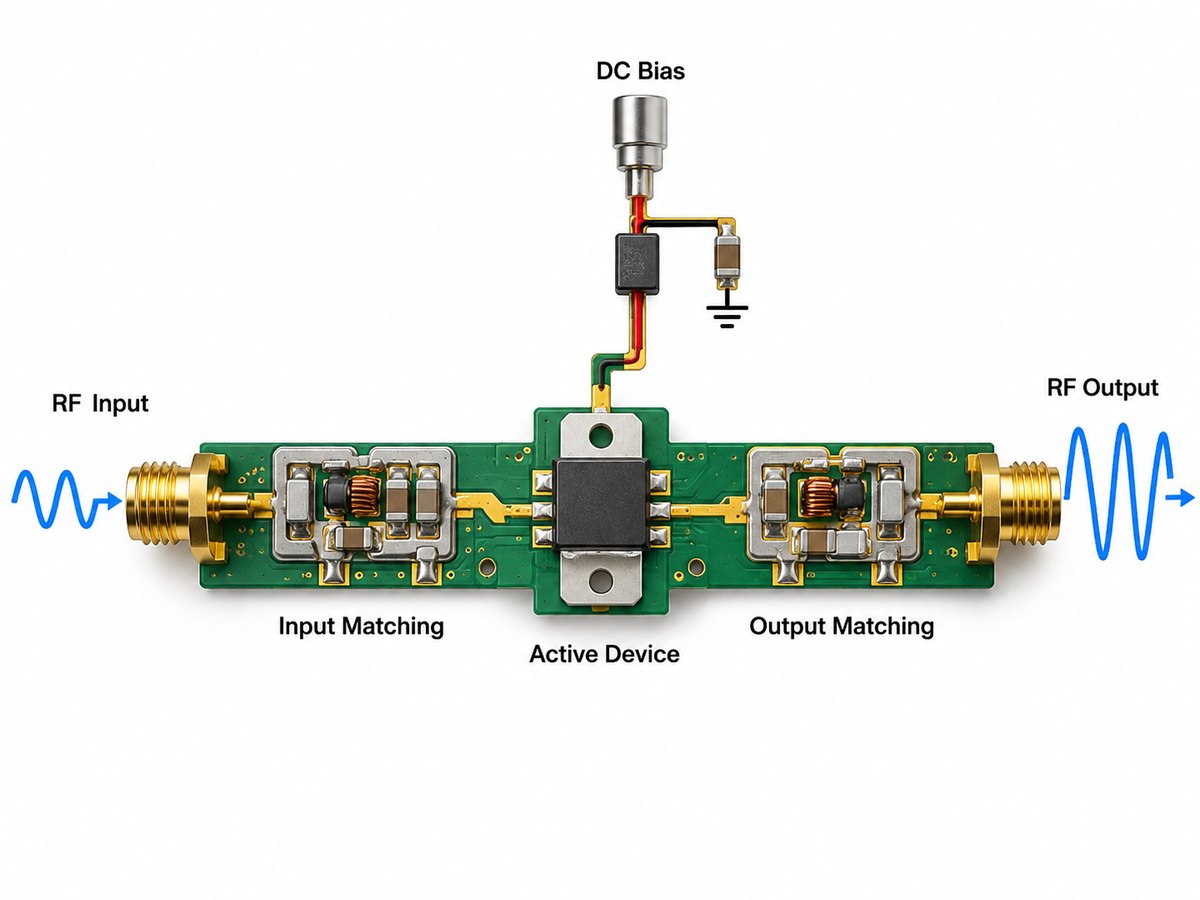
SAC305 is a widely used lead-free alloy containing approximately 96.5% tin, 3.0% silver, and 0.5% copper. Its liquidus temperature is around 217°C.

Sn63/Pb37, still used in some permitted legacy and high-reliability applications, is a eutectic alloy containing 63% tin and 37% lead with a melting point of 183°C.

Alloy selection alone is not enough. Powder size, flux classification, storage condition, stencil design, PCB finish, component termination, cleaning requirements, and process atmosphere can also affect printing and reflow performance.
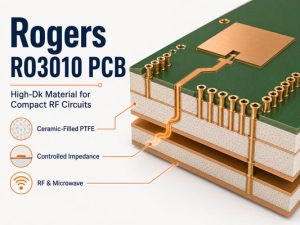
What Temperature Profile Is Used for Reflow Soldering?

There is no single reflow soldering temperature profile that works for every PCB.

For lead-free SAC305 assemblies, peak temperature often falls in roughly the 230–260°C range, while the alloy liquidus is about 217°C. The exact profile must still follow the solder paste specification and the thermal behavior of the actual assembly.

A practical starting reference may look like this:

Parameter Typical SAC305 Starting Window
Average ramp rate About 0.5–2.5°C/s
Soak Paste-dependent; commonly around 140–170°C
Liquidus About 217°C
Time Above Liquidus About 30–100 s
Peak temperature About 230–260°C
Cooling rate Controlled according to paste and assembly requirements

For Sn63/Pb37, the thermal requirement is lower. The alloy melts at 183°C, with common peak reflow temperatures around 205–215°C for applicable solder systems.

These figures are useful starting points, not fixed production settings.

The final oven recipe should account for:

  • Solder paste manufacturer’s TDS
  • PCB thickness and layer count
  • Copper distribution
  • Component density
  • Large thermal-mass components
  • BGA and QFN packages
  • Temperature-sensitive components
  • Conveyor speed
  • Oven zone configuration
  • Air or nitrogen atmosphere

A thermocouple profiling run is therefore more reliable than setting the oven solely from a generic temperature chart. Thermocouples should be placed at representative hot and cold locations so the engineer can confirm that all critical joints remain inside the acceptable process window.

Two profile shapes are commonly encountered: Ramp-Soak-Spike (RSS) and Ramp-to-Spike (RTS). Neither is automatically better. Paste chemistry, board construction, voiding behavior, thermal gradients, and component mix determine which approach is more appropriate.

What Equipment Is Used in the Reflow Soldering Process?

Industrial reflow soldering is part of a complete SMT production line rather than a standalone oven operation.

Typical equipment includes:

  • Stencil printer
  • Solder paste inspection system
  • Pick-and-place machine
  • Multi-zone reflow oven
  • Thermal profiler and thermocouples
  • AOI system
  • X-ray inspection equipment when required

The multi-zone convection reflow oven is the central thermal-processing machine. Independent heating zones allow the line engineer to shape the PCB’s actual temperature curve rather than simply selecting one oven temperature.

Conveyor speed is equally important. A change in belt speed changes how long the PCB remains in each thermal region, which can alter soak duration, TAL, and peak temperature even when individual oven-zone setpoints remain unchanged.

Nitrogen reflow may be used when reduced oxidation or improved wetting is valuable. Vacuum reflow is used in more specialized applications where controlling solder voiding is particularly important. These processes add capability but are not mandatory for every PCBA.

What Are the Most Common Reflow Soldering Defects?

Reflow defects usually come from an interaction between printing, PCB design, component placement, material condition, and the thermal profile. Changing oven temperature alone will not solve every problem.

Common reflow soldering defects including bridging, tombstoning, voiding and cold joints with AOI and X-ray inspection
Defect Common Process Causes Typical Corrective Direction
Tombstoning Uneven heating, unequal paste deposits, pad imbalance Improve thermal balance and paste consistency
Solder bridging Excess paste, poor stencil design, placement offset Adjust aperture, paste volume and placement
Cold or poor joints Insufficient heat or TAL, poor wetting Verify profile and solderability
Voiding Flux outgassing, pad design, paste/profile interaction Optimize paste, aperture and profile
Solder balls Paste slump, rapid heating, contamination Review printing, paste handling and ramp rate
Head-in-pillow BGA warpage, oxidation, insufficient wetting Review component warpage and profile
Component shift Placement error or uneven wetting forces Check placement, pads and paste distribution

Tombstoning is a good example of why root-cause analysis matters. If one termination of a small passive component melts and wets earlier than the other, the resulting unbalanced surface tension can lift the component onto one end.

For BGA and QFN assemblies, visual inspection cannot evaluate hidden solder joints. X-ray inspection can reveal voiding, bridging, missing balls, alignment issues, and other defects underneath the package.

Reflow Soldering vs Wave Soldering: What Is the Difference?

Reflow soldering is primarily associated with SMT components, while wave soldering is mainly used for through-hole components. The two processes also deliver solder in fundamentally different ways.

Comparison of reflow soldering for SMT and wave soldering for through-hole assembly
Factor Reflow Soldering Wave Soldering
Main component type SMT Through-hole
Solder source Printed solder paste Molten solder bath
Heating method Controlled reflow oven PCB passes over solder wave
Fine-pitch SMT Well suited Generally unsuitable
Typical production use SMT assembly THT assembly
Joint formation Paste melts on individual pads Exposed joints contact molten solder

Mixed-technology PCBAs may use both processes. SMT components can be reflowed first, followed by wave or selective soldering for through-hole components that cannot be processed during the SMT reflow stage.

The correct choice therefore depends less on which process is “better” and more on the component technology, PCB layout, heat sensitivity, production volume, and assembly sequence.

FAQs About Reflow Process Soldering

1. Which is the second stage in the reflow soldering process?

If the question refers to the four thermal stages inside a reflow oven, the second stage is the soak stage, following preheat. In a complete SMT manufacturing workflow, however, manufacturers may divide and number printing, SPI, placement, reflow, and inspection differently.

2. What temperature is used for reflow soldering?

For SAC305 lead-free solder, peak temperatures commonly fall within roughly 230–260°C, depending on the solder paste and assembly. Sn63/Pb37 uses a lower thermal profile and may peak around 205–215°C. The solder paste TDS and measured board profile should take priority over a generic peak-temperature value.

3. What is Time Above Liquidus in reflow soldering?

Time Above Liquidus, or TAL, is the period during which the solder joint remains hotter than the alloy’s liquidus temperature. It must be long enough to achieve suitable melting and wetting without subjecting the assembly to unnecessary thermal exposure.

For SAC305 processes, a range around 30–100 seconds may be encountered depending on the solder paste, although the correct value remains paste- and assembly-specific.

4. What solder paste is used for reflow soldering?

Lead-free SAC305 is widely used in current electronics assembly. Other alloys are selected for lower temperature, reliability, cost, regulatory, or application-specific requirements. The flux system and powder size must also match the PCB, stencil, component pitch, storage conditions, and cleaning process.

5. Can through-hole components be reflow soldered?

Some through-hole components can be assembled using pin-in-paste or intrusive reflow, where solder paste is printed around or into plated through-holes before the component is inserted and reflowed.

The component must tolerate the thermal profile, and sufficient solder volume must be provided to achieve acceptable barrel fill. For many conventional through-hole assemblies, wave or selective soldering remains more practical.

6. What is the difference between wave soldering and reflow soldering?

Reflow soldering heats deposited solder paste and is mainly used for SMT assembly. Wave soldering moves the underside of the PCB across a controlled wave of molten solder and is mainly used for through-hole assembly. Mixed PCBAs may use reflow for SMT first and wave or selective soldering afterward.

How Can EBest Circuit Support Your Reflow Soldering Project?

If you are preparing a PCB or PCBA project and need support with soldering process requirements, assembly manufacturability, or production planning, send your Gerber files, BOM, and assembly requirements to sales@bestpcbs.com. Our engineering team can review the project before production and help identify process conditions that may affect solder-joint quality, component reliability, or assembly yield.

You may also like

High-Speed PCB Materials: Dk, Df, FR-4 and Low-Loss Selection Guide

September 8th, 2026

High-speed PCB materials should be selected by insertion-loss budget, Df, Dk stability, copper roughness, dielectric thickness, glass weave, impedance target and manufacturing availability. FR-4 may still work for shorter channels, while low-loss laminates are better for longer or tighter-margin SerDes links.

That does not mean every high-speed PCB needs an ultra-low-loss laminate. Standard or enhanced FR-4 can still work well for shorter channels with enough margin. Low-loss materials become more useful when longer SerDes links, dense routing, multiple vias, or tighter insertion-loss targets leave less room for error.

High-speed PCB materials showing Dk, Df, copper roughness, glass weave, impedance and multilayer PCB stackup

What Are High-Speed PCB Materials?

High-speed PCB materials are laminate and dielectric systems chosen for predictable electrical behavior at higher signal frequencies and edge rates.

They may include:

  • standard FR-4
  • enhanced FR-4
  • mid-loss epoxy laminates
  • low-loss and very-low-loss laminates
  • hydrocarbon ceramic materials
  • PTFE-based materials

A high-speed PCB is not defined only by clock frequency. Fast rise and fall times can make a trace behave like a transmission line even when the nominal clock looks relatively low.

Once trace length becomes electrically significant, the design must account for:

  • controlled impedance
  • reflections
  • dielectric loss
  • conductor loss
  • return-path continuity
  • timing skew

This is why specifying only “FR-4” or “low-loss material” is rarely enough. The laminate grade, dielectric thickness, copper type, and stackup should be reviewed together.

Which PCB Material Properties Matter Most at High Speed?

For most high-speed digital boards, the most useful properties to review are Df, Dk stability, copper roughness, and dielectric construction.

Property Why It Matters
Df Influences dielectric loss and insertion loss
Dk Affects impedance and propagation delay
Dk stability Helps maintain impedance and timing consistency
Copper roughness Increases conductor loss at high frequency
Dielectric thickness Determines controlled-impedance geometry
Glass weave Can contribute to differential skew
Tg / Td Affects thermal reliability
CTE Influences via and plated-hole reliability
Moisture absorption Can change electrical behavior
CAF resistance Matters for dense spacing and long-term reliability

Dissipation factor, or Df, is often one of the first parameters engineers compare. Standard FR-4 may fall roughly in the 0.015–0.025 range, while low-loss laminates can be below 0.010 and very-low-loss systems may fall below 0.005.

Dielectric constant, or Dk, affects impedance and signal velocity. A lower Dk can be useful, but consistency is often more important than simply choosing the lowest available value.

A material change may require new:

  • trace widths
  • differential spacing
  • dielectric thicknesses
  • copper thickness assumptions

That is why impedance calculations should be tied to the actual production stackup.

What Types of PCB Dielectric Materials Are Used for High-Speed Applications?

PCB dielectric materials for high-speed applications usually fall into four practical groups.

A PCB material for RF applications may also suit some high-speed digital channels, but the final choice must match the channel loss, impedance, thermal, and fabrication requirements.

Material Family Typical Use Relative Loss Manufacturing Consideration
Standard / enhanced FR-4 General digital, shorter high-speed links Moderate Widely available and economical
Mid-/low-loss epoxy Multi-gigabit digital systems Low Often processed similarly to FR-4
Hydrocarbon ceramic High-speed digital, RF, mixed-signal Low to very low Requires closer stackup control
PTFE-based material RF, microwave, mmWave, very-low-loss channels Very low Requires more specialized fabrication
Comparison of FR-4, low-loss epoxy, hydrocarbon ceramic and PTFE PCB dielectric materials for high-speed applications

Standard and enhanced FR-4 remain useful because they are economical, widely stocked, and familiar to most PCB manufacturers. Their main limitation in high-speed work is higher loss over long channels.

Low-loss epoxy laminates are a common next step for networking, telecom, data-center, and AI hardware. They reduce dielectric loss without always introducing the fabrication complexity associated with more specialized RF materials.

Hydrocarbon ceramic materials suit designs that need low loss, stable electrical properties, or a mix of high-speed digital and RF functions.

PTFE-based materials offer very low loss, but they usually need tighter process control and are best reserved for applications that genuinely require them.

Material family should be selected first. The exact product grade can then be chosen according to electrical requirements, available constructions, and supplier availability.

How Do FR-4 and Low-Loss PCB Materials Compare?

The biggest difference between FR-4 and low-loss laminates is the amount of channel loss they introduce over distance and frequency.

Comparison Standard FR-4 Low-Loss Laminate
Dielectric loss Higher Lower
Typical Df Often ~0.015–0.025 Commonly below ~0.010
Long high-speed channels More limited Better suited
Material cost Lower Higher
Availability Very broad Grade-dependent
Fabrication familiarity Excellent Usually good
Stackup flexibility High Depends on stocked constructions
Insertion-loss margin Lower Higher
Best fit Shorter, cost-sensitive channels Longer, loss-sensitive channels
FR-4 versus low-loss PCB materials comparison for cost, loss, channel length and signal margin

The laminate is only part of the channel. Copper profile, routing length, vias, and connectors can change the result significantly.

For example, a low-Df laminate paired with rough copper may not perform as well as expected. An enhanced FR-4 system with smoother copper and shorter routes may be perfectly adequate.

So material selection should be based on total channel performance rather than one datasheet value.

When Is FR-4 Still Suitable for a High-Speed PCB?

FR-4 is still suitable when the complete interconnect remains inside the required loss, timing, and impedance limits.

There is no universal point where FR-4 suddenly becomes unusable.

FR-4 is often a reasonable choice when:

  • high-speed traces are relatively short
  • insertion-loss margin is comfortable
  • the channel contains few connectors or via transitions
  • impedance can be achieved with practical trace geometry
  • the selected FR-4 grade has acceptable Df and Dk stability
  • project cost is sensitive to material upgrades

Moving to a lower-loss laminate becomes more attractive when the design has:

  • longer routed channels
  • higher SerDes data rates
  • more connectors
  • more via transitions
  • tight eye-diagram margin
  • backplane routing
  • higher routing density
  • stricter insertion-loss targets

A more expensive laminate will not correct a poor interconnect structure. If the main problem is a long via stub, an interrupted return path, or a badly designed connector transition, the geometry still needs to be fixed.

How Do Dk, Df, Copper Roughness and Glass Weave Affect Signal Integrity?

These factors influence different parts of the channel.

High-speed PCB signal integrity factors including Dk, Df, copper roughness and glass weave

Df affects dielectric loss. Part of the signal energy is dissipated in the dielectric as the signal propagates. Higher Df generally means more attenuation, especially over longer traces and at higher frequencies.

Dk affects impedance and signal velocity. Changes in Dk alter characteristic impedance, propagation delay, and the trace dimensions needed to meet a target such as 50 Ω or 100 Ω differential.

Copper roughness affects conductor loss. At high frequency, current flows close to the conductor surface because of skin effect. Rougher copper increases the effective path length and therefore resistance.

For longer channels, designers often review whether the stackup uses:

  • standard copper
  • reverse-treated copper
  • low-profile copper
  • very-low-profile copper

Glass weave can contribute to skew. Glass bundles and resin-rich areas do not have identical dielectric properties. If the two traces in a differential pair see different local material environments, propagation delay can differ.

Common mitigation methods include:

  • choosing suitable glass styles
  • routing pairs at an angle to the weave
  • using resin-rich constructions where appropriate
  • avoiding unnecessarily long parallel runs aligned with the weave

For demanding links, these details can matter as much as the headline Dk and Df numbers.

How Do You Choose the Right High-Speed PCB Material?

Start with the interface and channel requirement rather than choosing a laminate brand first.

High-speed PCB material selection process based on interface, channel length, loss budget, Dk, Df, copper, stackup and material availability

A practical selection process is:

  1. Identify the interface and data rate. Define whether the board uses PCIe, Ethernet, USB, HDMI, DDR, proprietary SerDes, RF, or a combination.
  2. Estimate the channel length. Include PCB traces, vias, connectors, cables, and backplane sections where applicable.
  3. Define the insertion-loss budget. Determine how much attenuation the transmitter and receiver can tolerate.
  4. Compare Dk and Df at relevant frequencies. Avoid comparing datasheet values measured with different methods without understanding the difference.
  5. Review copper foil type. Smoother copper can reduce conductor loss on long or high-frequency channels.
  6. Check dielectric thickness and glass style. These affect impedance geometry and differential skew.
  7. Confirm the production stackup. Make sure the required cores, prepregs, and copper options are actually available.
  8. Balance margin against cost. Use the material performance the channel requires rather than automatically specifying the lowest-loss laminate available.

For high-layer-count boards, a hybrid stackup may also be worth considering. Low-loss material can be used on critical signal layers while more conventional materials are used elsewhere, provided the laminate systems are compatible and the construction can be manufactured reliably.

Which High Speed PCB Design Guidelines Depend on Material Selection?

Several high-speed PCB design decisions depend directly on the material and stackup.

Controlled impedance is the most obvious example. A 50 Ω trace does not have one standard width. Its geometry depends on:

  • dielectric constant
  • dielectric thickness
  • copper thickness
  • solder mask
  • reference-plane position
  • whether the trace is microstrip or stripline

Material selection also affects differential-pair geometry and routing space under dense BGAs.

Via structures can also change with channel requirements. Long through-hole stubs may add resonances and loss, so designs may use:

  • blind vias
  • buried vias
  • backdrilling
  • controlled-depth drilling

Reference-plane continuity should remain intact. Crossing a split plane or poorly defined return path can create a larger signal-integrity problem than the laminate itself.

Other material-dependent checks include:

  • stackup symmetry
  • dielectric thickness tolerance
  • resin content
  • copper profile
  • impedance tolerance
  • trace-width manufacturability
  • lamination compatibility

High-speed layout and stackup development should therefore happen together rather than as separate steps.

What Should You Confirm With a PCB Manufacturer Before Finalizing the Material?

Before freezing the layout, confirm the actual production construction with the PCB manufacturer.

At minimum, verify:

  • exact laminate grade or approved equivalent
  • core and prepreg construction
  • finished dielectric thickness
  • copper foil type
  • starting and finished copper thickness
  • Dk and Df reference values
  • test frequency and measurement method
  • glass style where relevant
  • target impedance and tolerance
  • permitted material substitutions
  • material availability
  • hybrid-material compatibility
  • prototype and production lead time

For controlled-impedance boards, stackup review before layout release is especially useful. A change in dielectric thickness or copper thickness can require new trace widths or differential spacing.

EBest Circuit supports high-speed PCB fabrication and PCBA projects involving controlled impedance, multilayer stackups, HDI structures, low-loss laminates, RF materials, and mixed-material constructions. Our engineering team can review the proposed stackup, material availability, impedance requirements, via structure, copper specification, and manufacturing data before production.

Frequently Asked Questions About High-Speed PCB Materials

What is the best material for a high-speed PCB?

The best PCB material for high speed applications is the material that meets the channel loss and impedance targets without unnecessary cost or fabrication risk. The correct choice depends on data rate, trace length, insertion-loss budget, stackup, copper profile, operating environment, manufacturing requirements, and cost. Shorter channels may work well with enhanced FR-4, while longer loss-sensitive channels can justify low-loss or very-low-loss laminates.

Is FR-4 suitable for high-speed PCB design?

Yes. FR-4 can still be suitable for high-speed digital designs when channel length and insertion loss remain within the interface budget. The decision should be based on channel simulation or loss analysis rather than a fixed frequency threshold.

What Dk is suitable for a high-speed PCB?

Many high-speed PCB materials have Dk values roughly between 3 and 4.5, but the exact value is less important than predictable electrical behavior and a stackup that supports the required impedance geometry. Dk should also be compared using the same test method and frequency where possible.

Is lower Df always better for high-speed PCBs?

Electrically, lower Df generally reduces dielectric loss, but the lowest-Df material is not automatically the best commercial choice. Material cost, copper profile, availability, fabrication complexity, and actual channel length should also be considered.

When should I use a low-loss PCB laminate?

Low-loss material becomes more valuable when longer traces, higher SerDes rates, multiple connectors or vias, tighter eye margins, or demanding insertion-loss targets make standard FR-4 difficult to use reliably. The transition should be based on channel performance rather than a simple GHz threshold.

What information should I give my PCB manufacturer when selecting a high-speed material?

Provide the proposed stackup, laminate preference, dielectric thickness, copper weight, target impedance, impedance tolerance, interface type, expected data rate, critical trace lengths, via structure, and any insertion-loss requirement. If a specific material grade is mandatory, state whether substitutions are allowed.

If you are preparing a high-speed PCB or PCBA project, send your Gerber files, stackup, BOM, controlled-impedance requirements, and material specifications to sales@bestpcbs.com. EBest Circuit can review the material system, dielectric construction, copper profile, impedance targets, via structure, and manufacturing requirements before production, helping you avoid unnecessary material cost while protecting signal-integrity margin.

You may also like