PCB manufacturing PCB manufacturing
Home > Blog

Circuit Card Assembly Testing: A Complete Guide for Reliable PCBA Quality

April 27th, 2026

Circuit card assembly testing is the process of inspecting and verifying a fully assembled PCB to ensure electrical integrity, functionality, and reliability. This article explains key testing methods, workflows, common defects, and how to choose a reliable PCBA manufacturer.

EBest Circuit (Best Technology) is an experienced PCB and PCBA manufacturer providing one-stop support from PCB fabrication, component sourcing, assembly, inspection, and final testing. With strong engineering support, EBest Circuit helps customers review Gerber files, BOMs, assembly drawings, test points, and manufacturability risks before production. Our testing capability can include AOI, X-ray inspection, flying probe testing, ICT, functional testing, and final quality verification based on project requirements. For high-reliability electronics, we also focus on component traceability, process control, defect analysis, and stable delivery from prototype to volume production. Pls feel free to contact us at sales@bestpcbs.com to discuss your circuit card assembly testing project.
Circuit Card Assembly Testing

What Is Circuit Card Assembly Testing?

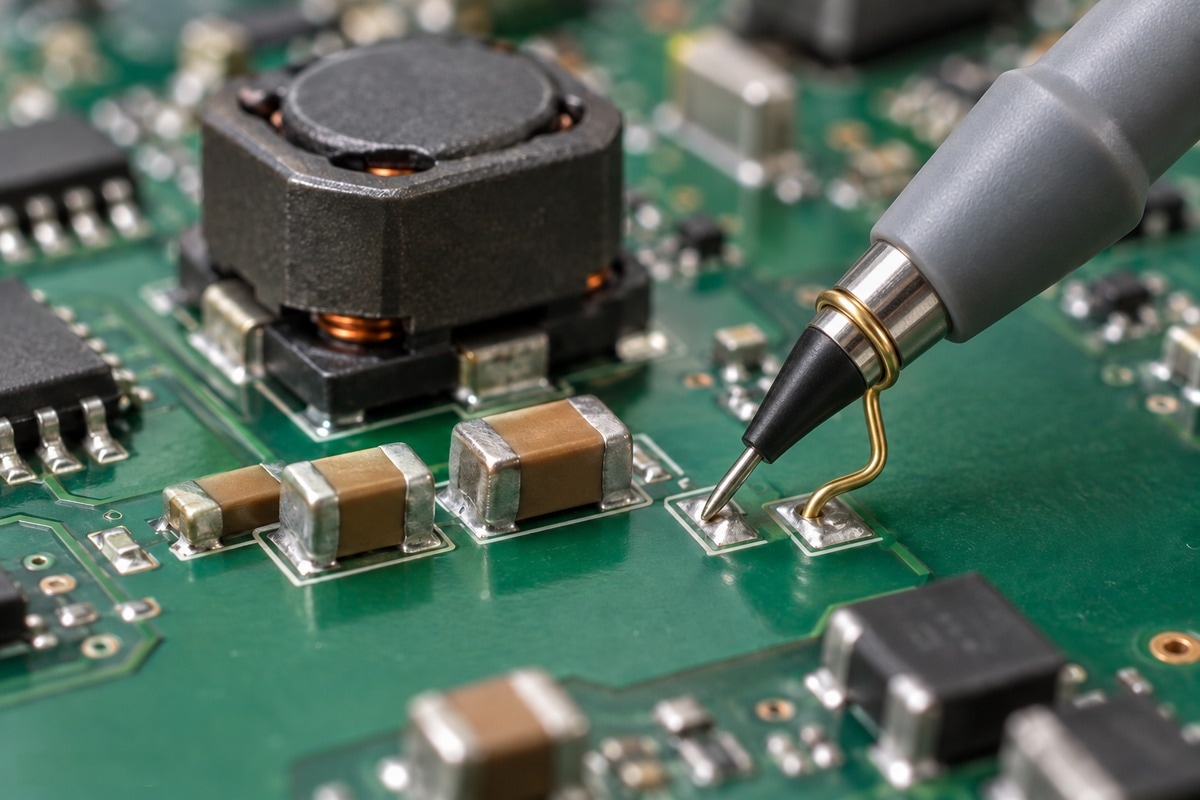
Circuit card assembly testing refers to the systematic inspection and validation process applied to a fully assembled PCB (commonly called a PCBA or CCA) to ensure it performs according to design specifications.

In simple terms, once components are mounted onto the board, testing verifies three critical aspects:

  • Electrical connectivity
  • Functional performance
  • Manufacturing integrity

Unlike bare PCB inspection, circuit card assembly testing focuses on the interaction between components, solder joints, and circuit behavior under real conditions.

For engineers, this stage is not optional. It directly determines whether a product will operate reliably in the field or fail prematurely.

Why Is Circuit Card Assembly Testing Important?

A circuit card assembly without proper testing is essentially an unverified system. Even with precise SMT placement and controlled soldering processes, defects can still occur.

Testing plays several essential roles:

1. Early Defect Detection
Identifies issues such as cold solder joints, missing components, or incorrect polarity before shipment.

2. Cost Reduction
Fixing a defect during production is significantly cheaper than addressing field failures or recalls.

3. Reliability Assurance
Ensures the product meets performance expectations under real operating conditions.

4. Compliance and Certification
Industries such as medical, automotive, and aerospace require documented testing procedures for regulatory approval.

In high-reliability sectors, skipping testing is not just risky—it is unacceptable.

What Are the Main Types of Circuit Card Assembly Testing?

Different testing methods target different failure modes. A robust testing strategy often combines multiple techniques.

Automated Optical Inspection (AOI)

AOI uses high-resolution cameras to inspect the board visually after component placement and soldering.

What it detects:

  • Missing or misplaced components
  • Solder bridging
  • Tombstoning
  • Polarity errors

AOI is fast and ideal for high-volume production, but it cannot evaluate electrical performance.

In-Circuit Testing (ICT)

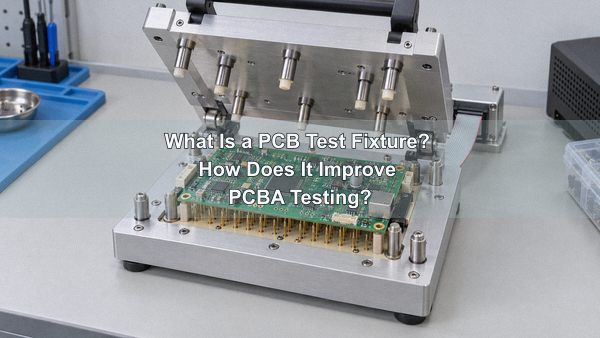
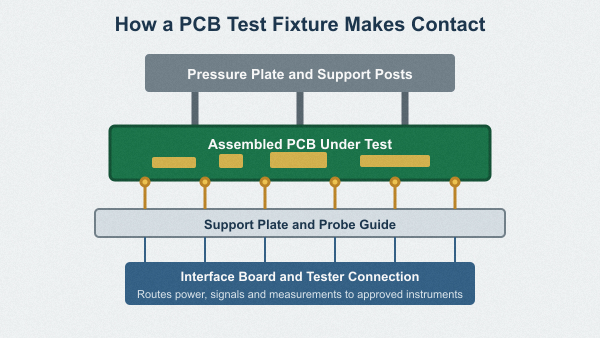
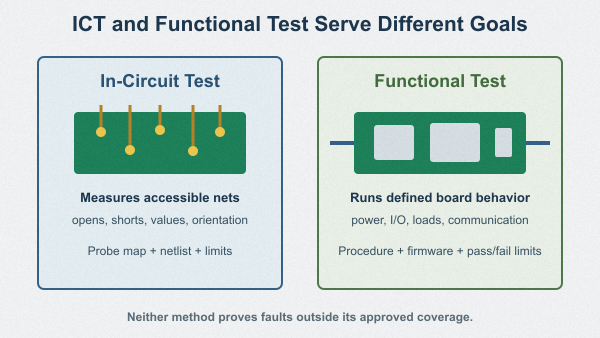
ICT is a fixture-based testing method that probes specific nodes on the board.

Capabilities:

  • Measure resistance, capacitance, and voltage
  • Detect open and short circuits
  • Verify component values

It provides precise electrical validation but requires custom test fixtures, which increase upfront cost.

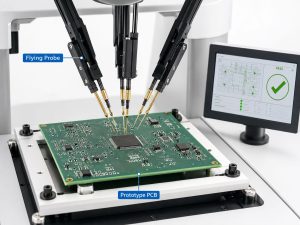
Flying Probe Testing

Flying probe testing performs similar checks as ICT but without dedicated fixtures.

Advantages:

Limitations:

  • Slower than ICT
  • Not ideal for high-volume production

Functional Testing (FCT)

Functional testing evaluates whether the assembled board performs its intended operation.

Example:

  • Power supply output verification
  • Signal processing validation
  • Communication interface testing

This is the closest simulation to real-world usage and is critical for product validation.

X-ray Inspection

X-ray inspection is used to analyze hidden solder joints, especially in:

  • BGA (Ball Grid Array) components
  • QFN packages
  • Multi-layer solder structures

It helps detect voids, insufficient solder, and internal defects that are invisible to AOI.

Burn-in Testing

Burn-in testing exposes the board to elevated stress conditions such as high temperature and voltage.

Purpose:

  • Identify early-life failures
  • Improve long-term reliability

This is commonly used in mission-critical applications like aerospace and medical electronics.

How Does Circuit Card Assembly Testing Work Step by Step?

A typical circuit card assembly with testing follows a structured workflow:

Step 1: Visual Inspection
Initial manual or AOI-based inspection after SMT placement.

Step 2: Electrical Testing (ICT/Flying Probe)
Verification of circuit integrity and component values.

Step 3: Functional Testing
Simulation of actual operating conditions.

Step 4: Environmental or Stress Testing
Optional stage for high-reliability applications.

Step 5: Final Quality Validation
Review and documentation before shipment.

Each step builds on the previous one, creating a layered quality assurance system.

What Defects Can Circuit Card Assembly Testing Detect?

Testing is designed to capture a wide range of manufacturing and design issues:

  • Open circuits and short circuits
  • Solder joint defects
  • Incorrect or missing components
  • Component orientation errors
  • Signal integrity issues
  • Power instability
  • Thermal performance problems

In advanced applications, testing can also reveal marginal defects that only appear under load or temperature variation.

What Is the Difference Between Basic Testing and Advanced Testing?

Not all testing strategies are equal. The depth of testing depends on product requirements.

Testing LevelCoverageTypical Use Case
Basic TestingVisual + AOIConsumer electronics
Standard TestingAOI + ICTIndustrial products
Advanced TestingAOI + ICT + FCT + X-ray + Burn-inMedical, aerospace

For high-value or safety-critical systems, relying on basic testing alone introduces unnecessary risk.

How Does PCB Design Affect Circuit Card Assembly Testing?

Testing effectiveness is heavily influenced by design decisions made early in the PCB layout stage.

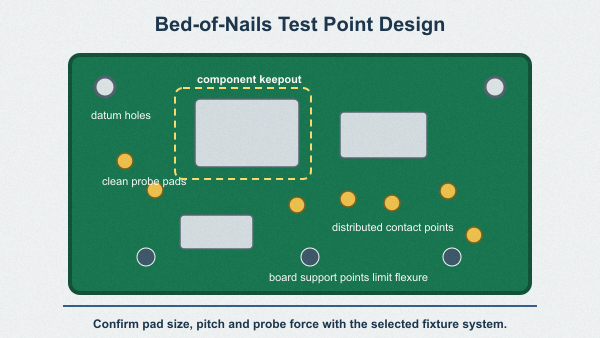
Key design considerations:

  • Test Point Accessibility
    Ensure sufficient test pads for ICT probing.
  • Component Spacing
    Avoid overcrowding that prevents inspection.
  • Signal Routing
    Design for measurable and stable signals.
  • DFM and DFT Integration
    Design for Manufacturability and Design for Testability must be considered together.

A well-designed PCB simplifies testing, reduces cost, and improves yield.

What Are the Challenges in Circuit Card Assembly Testing?

Despite advanced tools, testing still faces practical challenges:

  • High fixture cost for ICT
  • Limited access in high-density designs
  • Increasing complexity of modern electronics
  • Time constraints in mass production
  • Difficulty testing high-speed or RF circuits

Engineers must balance coverage, cost, and production efficiency when defining a testing strategy.

How to Choose a Reliable Circuit Card Assembly Testing Partner?

Selecting the right manufacturing partner is just as important as the testing methods themselves.

Look for:

  • Integrated PCB + PCBA capabilities
  • Multiple testing technologies (AOI, ICT, FCT, X-ray)
  • Strong DFM and DFT engineering support
  • Traceability systems for components and processes
  • Experience in your target industry

A qualified partner does not just execute tests—they help optimize your entire product lifecycle.

Real-World Applications of Circuit Card Assembly Testing

Circuit card assembly testing is used across nearly every electronics sector:

  • Medical Devices – Ensures patient safety and regulatory compliance
  • Automotive Electronics – Validates reliability under vibration and temperature extremes
  • Telecommunications – Maintains signal integrity and uptime
  • Industrial Control Systems – Guarantees stable long-term operation
  • Consumer Electronics – Reduces return rates and improves user experience

The higher the reliability requirement, the more comprehensive the testing approach.

In conclusion, circuit card assembly testing is not just a quality checkpoint—it is a strategic process that directly influences product reliability, cost efficiency, and market success.

From AOI to functional validation and stress testing, each method contributes to building confidence in the final product. Engineers who prioritize testing early in the design and manufacturing process consistently achieve better outcomes.
For companies developing high-performance electronics, investing in a comprehensive circuit card assembly with testing approach is one of the most effective ways to reduce risk and accelerate time to market. Pls feel free to contact us at sales@bestpcbs.com to discuss your circuit card assembly project requirements and get expert support.

FAQs About Circuit Card Assembly Testing

1. What is the difference between PCB testing and circuit card assembly testing?
PCB testing focuses on the bare board, while circuit card assembly testing evaluates the fully assembled product.

2. Is functional testing always required?
For simple products, it may not be mandatory, but for most commercial and industrial applications, it is highly recommended.

3. Can small batch production skip ICT?
Yes, flying probe testing is often used as a cost-effective alternative.

4. How much does circuit card assembly testing cost?
Costs vary depending on complexity, test coverage, and volume. ICT fixtures typically involve higher initial investment.

5. What is the most critical test method?
There is no single answer. Functional testing is often considered the most representative of real-world performance.

You may also like

What is AOI Inspection in PCB Assembly?

April 14th, 2026

AOI inspection plays a critical role in modern PCB assembly by enabling fast, non-contact detection of surface defects before products reach functional testing or final delivery. For high-reliability industries such as automotive, medical, and industrial electronics, AOI is not just a quality checkpoint—it is a yield optimization tool.

In this guide, we will explain how AOI inspection works, what defects it can detect, how it compares with other inspection methods, and how to optimize it for maximum production efficiency.

What Is AOI Inspection in PCB Manufacturing?

AOI inspection (Automated Optical Inspection) is a vision-based inspection method used in PCB assembly to identify defects such as missing components, solder issues, and polarity errors by comparing captured images with a reference design.

It relies on high-resolution cameras, controlled lighting systems, and image processing algorithms. The system scans each PCB and flags deviations from predefined standards. Unlike manual inspection, AOI offers high repeatability and consistent accuracy across large production volumes.

In high-mix, low-volume manufacturing environments, AOI also helps standardize quality control and reduce dependency on operator experience.

What is AOI Inspection in PCB Assembly?

AOI Inspection in PCB Assembly

How Does AOI Inspection Work Step by Step in SMT Lines?

AOI inspection follows a structured process in SMT lines to ensure consistent defect detection across different stages of PCB assembly.

Typical AOI inspection process:

  • Step 1: Image acquisition using multi-angle cameras
  • Step 2: Lighting adjustment for contrast enhancement
  • Step 3: Image comparison with CAD or golden board
  • Step 4: Defect classification using algorithms
  • Step 5: Pass/Fail decision and data logging

AOI can be placed at different stages, including post-solder paste printing, post-placement, and post-reflow, depending on inspection requirements.

What Defects Can AOI Inspection Detect on PCB Assemblies?

AOI inspection is highly effective for detecting visible defects on PCB surfaces. It significantly reduces early-stage defects before costly downstream testing.

Defect TypeDescriptionDetection Capability
Missing ComponentComponent not mountedHigh
Solder BridgeUnintended connection between padsHigh
MisalignmentComponent shifted from correct positionHigh
TombstoningComponent standing verticallyMedium
Insufficient SolderWeak or incomplete solder jointMedium
Polarity ErrorIncorrect component orientationHigh

However, AOI cannot detect internal defects such as voids under BGA packages, which require X-ray inspection.

What Are the Limitations of AOI Inspection?

While AOI is highly efficient, it has inherent limitations that engineers must consider when designing inspection strategies.

  • Cannot inspect hidden solder joints (BGA, QFN)
  • False calls due to lighting or reflection issues
  • Dependent on programming quality
  • Limited ability to detect electrical defects

To overcome these limitations, AOI is often combined with X-ray inspection and ICT testing in high-reliability applications.

AOI Inspection vs X-Ray vs ICT: Which One Should You Choose?

Choosing the right inspection method depends on your product complexity, reliability requirements, and budget constraints.

Inspection MethodHidden Defect DetectionSpeedCostBest Use Case
AOINoFastLowSurface defect detection
X-rayYesMediumHighBGA/QFN inspection
ICTElectrical faultsSlowMediumCircuit verification

In most SMT lines, AOI is used as the first inspection layer, followed by X-ray and ICT for critical applications.

Where Should AOI Be Placed in SMT Process for Best Results?

The placement of AOI inspection in the SMT process directly impacts defect detection efficiency and rework cost.

  • Post-Printing AOI: Detect solder paste issues early
  • Pre-Reflow AOI: Verify component placement
  • Post-Reflow AOI: Final inspection of solder joints

For most applications, post-reflow AOI is essential, while pre-reflow AOI is recommended for high-density PCBs.

What Is the Difference Between 2D AOI and 3D AOI Systems?

2D and 3D AOI systems differ mainly in inspection depth and accuracy.

Feature2D AOI3D AOI
Inspection TypeImage-basedHeight & volume measurement
AccuracyModerateHigh
CostLowerHigher
Use CaseGeneral SMTHigh-reliability industries

3D AOI is increasingly used in automotive and medical applications due to its ability to measure solder volume precisely.

Why Does AOI Inspection Generate False Calls and How to Reduce Them?

False calls are one of the biggest challenges in AOI inspection, often caused by lighting inconsistencies, component variations, and poor programming.

Common causes:

  • Reflective surfaces
  • Component color variation
  • Incorrect threshold settings
  • Poor reference data

Optimization methods:

  • Use multi-angle lighting systems
  • Optimize inspection algorithms
  • Standardize component libraries
  • Continuous program tuning

Reducing false calls can significantly improve production efficiency and reduce manual inspection workload.

Why Does AOI Inspection Generate False Calls and How to Reduce Them?

How to Program and Optimize AOI Inspection for High Yield?

Proper AOI programming is essential to achieving high yield and minimizing defects.

  • Use golden board for reference calibration
  • Define clear inspection criteria based on IPC standards
  • Segment inspection zones for complex PCBs
  • Regularly update programs for new product variants

Experienced engineers can reduce false call rates to below 5% with optimized programming strategies.

How Much Does AOI Inspection Cost in PCB Manufacturing?

The cost of AOI inspection depends on equipment type, production volume, and inspection complexity.

Cost FactorDescription
Equipment Investment$50,000 – $150,000+
Programming CostDepends on PCB complexity
Operational CostLow per unit

Despite the initial investment, AOI significantly reduces defect-related costs and improves ROI over time.

What Standards Are Used in AOI Inspection?

AOI inspection follows international standards to ensure consistent quality and compliance.

  • IPC-A-610 (Acceptability of Electronic Assemblies)
  • ISO 9001 Quality Management
  • IATF 16949 for automotive
  • ISO 13485 for medical devices

For high-reliability applications, IPC Class 3 is commonly applied.

Why Choose EBest Circuit (Best Technology) for AOI Inspection Services?

With nearly 20 years of PCB and PCBA experience, EBest Circuit provides advanced AOI inspection solutions tailored for high-reliability industries.

  • 3D AOI + X-ray integrated inspection capability
  • IPC Class 2 & Class 3 compliance
  • MES traceability system (5-second tracking)
  • Experienced engineering team for AOI optimization
  • Fast turnaround and stable quality

Contact us: sales@bestpcbs.com

FAQs About AOI Inspection

1. What is AOI inspection used for?
AOI inspection is used to detect surface defects in PCB assembly, ensuring product quality before functional testing.

2. Can AOI detect BGA defects?
No, AOI cannot detect hidden defects under BGA packages. X-ray inspection is required.

3. How accurate is AOI inspection?
Accuracy can exceed 95% when properly programmed and optimized.

4. Is AOI inspection expensive?
Initial investment is high, but long-term cost savings are significant.

5. What is the difference between AOI and SPI?
SPI inspects solder paste before placement, while AOI inspects components and solder joints after placement.

You may also like

X-Ray Inspection for PCB Assembly

April 14th, 2026

X-ray inspection is one of the most critical quality control methods in modern PCB assembly, especially for designs involving BGA, QFN, and high-density multilayer boards. As electronic products become smaller and more powerful, hidden defects such as voids, cracks, and insufficient solder joints are increasingly difficult to detect using traditional inspection methods.

In high-reliability industries like automotive, medical, and aerospace, these invisible defects are often the root cause of early product failure. This is why PCB X-ray inspection has become a standard process for manufacturers aiming to ensure long-term performance and minimize field returns.

X-Ray Inspection for PCB Assembly

What is X-Ray Inspection in PCB Manufacturing?

X-ray inspection is a non-destructive testing (NDT) technique used to analyze the internal structure of PCB assemblies without damaging them. It works by passing X-rays through the board and capturing differences in material density to generate a grayscale image.

In PCB assembly, X-ray inspection is commonly used to:

  • Verify solder joint integrity under BGA and QFN packages
  • Detect internal defects such as voids and cracks
  • Analyze multilayer PCB structures and via quality

Compared to AOI, which only inspects visible surfaces, X-ray inspection for PCB assembly provides a complete internal view, making it essential for high-density designs.

What Defects Can X-Ray Inspection Detect in PCBs?

X-ray inspection excels at detecting internal defects that are inaccessible to optical or electrical testing methods. These defects often originate from soldering issues, material inconsistencies, or process variations.

Defect TypeDescriptionImpact
Solder VoidsAir gaps within solder jointsReduced thermal and mechanical strength
Solder BridgesUnintended connections between padsShort circuits
Insufficient SolderIncomplete joint formationWeak electrical connection
Missing SolderNo connection at jointOpen circuit
Head-in-Pillow (HIP)Poor wetting between ball and padIntermittent failure
MisalignmentOffset components or ballsReliability issues
Internal CracksStructural defects in jointsLong-term failure
Via DefectsBarrel cracks or voidsSignal and power integrity issues

Among these, voids in BGA solder joints are one of the most critical concerns. Excessive voiding reduces effective thermal conduction, leading to localized overheating. This is particularly problematic in high-power designs such as LED drivers or automotive control modules.

Which Components Usually Require X-Ray Inspection?

Not all components require X-ray inspection. It is typically used for packages with hidden or partially hidden solder joints.

Common Components Requiring X-Ray Inspection

  • BGA (Ball Grid Array)
  • Micro BGA
  • QFN (Quad Flat No-Lead)
  • LGA (Land Grid Array)
  • CSP (Chip Scale Package)
  • Flip-chip devices
Which Components Usually Require X-Ray Inspection?

These components are widely used in high-performance electronics. Their solder joints are located underneath the package, making external inspection ineffective. For these cases, X-ray inspection is the only reliable way to validate solder joint integrity.

When Should You Use X-Ray Inspection Instead of AOI?

AOI (Automated Optical Inspection) is widely used due to its speed and cost-effectiveness, but it is inherently limited to surface-level analysis. X-ray inspection in PCB assembly complements AOI by providing internal visibility.

Inspection Method Comparison

ParameterAOIX-rayICT
Inspection TypeVisualInternalElectrical
Defect CoverageSurface defectsHidden defectsFunctional issues
CostLowMediumHigh
SpeedFastModerateSlow
Typical UsePlacement, polarityBGA/QFN inspectionCircuit validation

In practice, X-ray inspection should be used when:

  • The design includes hidden solder joints (BGA, QFN, LGA)
  • The product requires high reliability (automotive, medical)
  • There is a history of intermittent failures
  • AOI results are inconclusive

How Does X-ray Inspection Work in PCB Assembly?

The X-ray inspection system consists of an X-ray source, a detector, and an imaging system. The PCB is placed between the source and detector, and radiation passes through the assembly.

Key technical mechanisms include:

  • Differential absorption: Materials with higher atomic numbers absorb more X-rays
  • Magnification control: Enables micro-scale inspection of solder joints
  • Digital image processing: Converts signals into high-resolution images

Advanced systems also incorporate:

  • Automated defect recognition (ADR)
  • Real-time measurement tools
  • Image comparison algorithms

What Are the Main Types of X-Ray Inspection Systems?

Different applications require different levels of inspection capability. X-ray systems are generally categorized into several types.

Types of X-Ray Systems

TypeDescriptionApplication
2D X-RayFlat image inspectionGeneral inspection
2.5D X-RayAngled viewsImproved defect visibility
3D CT (Computed Tomography)Layer-by-layer imagingAdvanced failure analysis
AXI (Automated X-Ray Inspection)Automated inline inspectionHigh-volume production

In conclusion:

  • 2D systems are cost-effective and widely used
  • 3D CT systems provide the highest accuracy but are slower and more expensive
  • AXI systems are ideal for automated production lines

What is the Difference Between 2D X-Ray and 3D CT Inspection?

Choosing the right X-ray technology depends on inspection objectives and budget considerations.

2D vs 3D CT Comparison

Feature2D X-ray3D CT
Imaging TypeProjectionVolumetric
Inspection SpeedFastSlow
CostLowerHigher
Defect DetectionGeneralDetailed internal
ApplicationProduction lineFailure analysis

2D X-ray is commonly used for inline inspection due to its speed and efficiency. In contrast, 3D CT provides cross-sectional views, enabling detailed analysis of complex defects such as internal cracks or multilayer misalignment.

How Much Does X-Ray Inspection Cost in PCB Manufacturing?

Cost is a critical consideration, especially for high-volume production. X-ray inspection pricing varies depending on inspection complexity, equipment type, and throughput requirements.

Typical Cost Breakdown

Production StageCost per BoardNotes
Prototype$5–$20Manual inspection, low volume
Small batch$2–$8Semi-automated
Mass production<$1Inline automated systems

Although it introduces additional cost, X-ray inspection significantly reduces:

  • Field failure rates
  • Warranty claims
  • Rework and scrap costs

What Standards Define Acceptable X-ray Inspection Results?

Industry standards play a crucial role in defining acceptable defect thresholds. The most commonly referenced standards include:

  • IPC-A-610: Acceptability of electronic assemblies
  • IPC-7095: Design and assembly process for BGAs

Typical Acceptance Criteria Example

Application ClassVoid LimitReliability Requirement
Class 1Up to 30%Consumer electronics
Class 2<25%Industrial
Class 3<20%Aerospace, medical

What Are the Limitations of X-Ray Inspection?

Despite its advantages, X-ray inspection is not a complete solution. Understanding its limitations is essential for building an effective inspection strategy.

Key limitations include:

  • Limited detection of surface contamination
  • Overlapping structures in dense assemblies
  • Requirement for skilled interpretation
  • Higher equipment investment

For optimal results, X-ray inspection should be combined with AOI, ICT, and functional testing.

How to Interpret X-Ray Inspection Images Correctly?

Accurate interpretation is critical for effective defect detection. Engineers typically evaluate:

  • Void distribution and percentage
  • Solder joint symmetry
  • Presence of cracks or gaps
  • Alignment of components

Consistency is achieved through:

  • Reference images
  • Standardized criteria
  • Software-assisted analysis

Misinterpretation can lead to false positives or missed defects, so training and experience are essential.

FAQs About X-Ray Inspection

1. What is X-ray inspection used for in PCB assembly?

X-ray inspection in PCB assembly is used to detect hidden internal defects that cannot be seen by visual inspection or AOI. It is commonly used to check solder joints under BGA, QFN, LGA, and other bottom-terminated components. It also helps verify solder quality, voiding, bridging, and internal connection integrity before products move to shipment or reliability testing.

2. Can X-ray inspection detect BGA defects?

Yes, X-ray inspection can detect BGA defects accurately because BGA solder joints are hidden beneath the component body. It is widely used to find solder voids, bridges, missing balls, insufficient solder, head-in-pillow defects, and ball misalignment. For BGA assembly, X-ray inspection is one of the most reliable quality control methods.

3. What defects can X-ray inspection find that AOI cannot?

X-ray inspection can find hidden solder defects that AOI cannot see. These include internal voids, solder bridging under bottom-terminated packages, missing solder joints, incomplete wetting, and internal cracks in some assemblies. AOI is useful for visible surface defects, while X-ray inspection is necessary for hidden joint analysis.

4. Is X-ray inspection destructive?

No, X-ray inspection is a non-destructive inspection method. It allows engineers to inspect the inside of a PCB assembly without cutting, breaking, or damaging the board. This makes it suitable for prototype verification, production inspection, and failure analysis.

5. When should 3D CT X-ray inspection be used?

3D CT X-ray inspection should be used when a standard 2D X-ray image does not provide enough detail. It is useful for complex assemblies, multilayer structures, internal failure analysis, and precise root-cause investigation. Compared with 2D X-ray, 3D CT gives a clearer view of internal structures layer by layer.

6. Is X-ray inspection required for every PCB assembly?

No, X-ray inspection is not required for every PCB assembly. It is usually recommended for boards with hidden solder joints, high-density packaging, high-power devices, or strict reliability requirements. For simple boards with fully visible joints, AOI and visual inspection may be enough.

You may also like

What is Design Rule Check (DRC) in PCB? Types of Deisgn Rule Checking

April 13th, 2026

What Is Design Rule Check (DRC)?

Design Rule Check (DRC) is a software-driven process that verifies PCB layout parameters (trace width, spacing, clearance, pad size, via dimensions, etc.) against pre-defined manufacturing rules. It acts as a “safety net” to catch geometric defects—like shorts, open circuits, or undersized features—before you send Gerber files to production. DRC matters because even a small violation (e.g., 2mil insufficient clearance) can render an entire batch of PCBs unusable, leading to rework costs that are 3–10× higher than fixing issues during design.

For mass production, DRC is non-negotiable: it ensures consistency across your design, aligns with your manufacturer’s capabilities, and reduces the risk of failed prototypes or field failures. In short, DRC saves time, money, and frustration by catching problems early, when they’re cheapest to fix.

What Is Design Rule Check (DRC)?

Design Rule Check (DRC)

Types of Design Rule Checking

The core check items in DRC are the geometric parameters that directly impact PCB manufacturability and performance. As an experienced PCB manufacturer, we prioritize these 7 key check categories—they cover 95% of common DRC violations and align with industry standards (IPC-2221, IPC-6012). Each check ensures your layout is compatible with your manufacturer’s equipment and materials, avoiding costly rework. Below are the core DRC check items, with brief explanations of why they matter:

  • Trace Width & Spacing: Ensures traces can carry current without overheating and prevents short circuits between adjacent traces. Minimum values depend on current load and manufacturing process.
  • Clearance: The minimum distance between conductive features (traces, pads, vias) to prevent arcing, especially in high-voltage designs. Clearance requirements increase with voltage.
  • Pad Size & Annular Ring: Ensures pads are large enough for soldering and vias have sufficient copper around the drill hole (annular ring) to avoid delamination or breakage.
  • Via Dimensions: Checks drill size, annular ring, and via placement to ensure compatibility with drilling equipment and signal integrity.
  • Component Placement: Verifies components are not overlapping, are placed within keepout zones, and have enough space for soldering and assembly.
  • Silk Screen Overlap: Prevents silk screen ink from covering pads or vias, which would interfere with soldering.
  • Copper Pour & Thermal Relief: Ensures copper pours are properly connected (no unconnected copper) and thermal reliefs are sized to balance heat dissipation and solderability.
What Is Design Rule Check (DRC)?

How to Set Up DRC Rules Matching PCB Manufacturer Capabilities?

Setting up DRC rules that match your PCB manufacturer’s capabilities is critical—rules that are too strict will slow down your design, while rules that are too loose will lead to fabrication failures. Below is a step-by-step guide to setting up DRC rules correctly, based on our experience working with 20+ PCB manufacturers:

1. Request the Manufacturer’s Rule Sheet: Every reputable PCB manufacturer provides a DRC rule sheet with their minimum capabilities (e.g., min trace/space, via size). This is your starting point—never guess or use generic rules.

2. Input Core Parameters into Your PCB Design Software: In tools like Altium, KiCad, or Eagle, navigate to the DRC settings and input the manufacturer’s min trace width, spacing, clearance, pad size, and via dimensions. Use the table below as a reference for standard capabilities.

3. Adjust for Design Specifics: If your design includes high voltage (≄2kV), high frequency (≄1GHz), or high current (≄2A), increase relevant rules (e.g., wider traces for high current, larger clearance for high voltage).

4. Set Up Zone Rules: For mixed-signal or high-voltage designs, create zone rules (e.g., a high-voltage zone with 20mil clearance) to apply different rules to specific areas of the PCB.

5. Enable Real-Time & Batch Checks: Turn on real-time DRC to catch violations as you route, and set up batch DRC to run a full check before finalizing your design.

6. Test with a Sample Layout: Run a small test layout (e.g., a simple power supply circuit) through DRC to ensure rules are working correctly—this avoids costly mistakes in your main design.

PCB ProcessMin Trace/SpaceMin Via (Drill/Ring)Min Clearance
Standard FR-4 (1–6L)6/6mil0.3mm/8mil8mil
High-TG Thin Core4/4mil0.25mm/7mil6mil
High-Voltage (≄2kV)8/8mil0.3mm/10mil20–30mil

What Are the Most Common DRC Violations in PCB Design?

Even experienced PCB engineers encounter DRC violations—but the same 5 violations account for 80% of all issues. Knowing these common violations, their root causes, and quick fixes will save you hours of troubleshooting. From our experience, the most frequent DRC violations are related to clearance, trace width, pad size, via dimensions, and component placement. Below is a detailed breakdown of each, including why they happen and how to fix them fast:

DRC Violation TypeRoot CauseQuick FixPreventive Measure
Insufficient ClearanceUsing generic clearance rules instead of manufacturer specs; high-voltage areas not marked; accidental trace overlapWiden spacing to match manufacturer’s min (8mil for standard PCBs); apply zone rules for high-voltage areas (20–30mil); move overlapping traces apartSet up zone rules early; use real-time DRC during routing
Trace Too NarrowBelow manufacturer’s min trace width; undersizing for current load; tight routing in dense areasWiden trace to ≄4–6mil (standard) or ≄8–12mil (high current); reroute dense areas to avoid narrow tracesCalculate trace width based on current load (use online calculators); leave extra space in dense areas
Pad Annular Ring Too SmallPad diameter undersized for via drill; incorrect pad-via alignmentEnlarge pad to ≄18–22mil for 0.3–0.4mm drill; realign pad and via to ensure full annular ringUse manufacturer-provided pad-via templates; double-check pad dimensions before routing
Via Too SmallDrill/annular ring below manufacturer’s process limits; using microvias without confirming capabilityUse ≄0.2mm drill + ≄8mil ring for standard PCBs; switch to larger vias if microvias are not supportedConfirm via capabilities with your manufacturer; avoid microvias for low-cost PCBs
Component CollisionPoor component placement; ignoring keepout zones; using incorrect component footprintsMove colliding components apart; adjust keepout zones; replace incorrect footprints with manufacturer-approved onesUse 3D view to check placement; follow component datasheet footprint guidelines

How to Quickly Fix DRC Errors Step by Step?

Fixing DRC errors doesn’t have to be a tedious process—with a systematic approach, you can resolve even complex violations in minutes. The key is to prioritize critical errors first (e.g., shorts, open circuits) and use your design software’s built-in tools to speed up troubleshooting.

1. Run a Full Batch DRC: First, run a complete batch DRC to generate a detailed error report. Most PCB software (Altium, KiCad) will list errors by type, location, and severity—this helps you prioritize.

2. Prioritize Critical Errors: Focus on critical errors first: shorts (between traces/pads), open circuits (unconnected copper), and violations that will prevent fabrication (e.g., undersized vias). Non-critical errors (e.g., minor silk overlap) can wait.

3. Use Jump-to-Error Tools: Use your software’s “jump to error” feature to navigate directly to the violation—this saves time vs. searching manually. For example, in Altium, right-click an error and select “Jump to.”

4. Apply Quick Fixes for Common Violations: Use the fixes from the table above for common errors (e.g., widen traces, adjust clearance). For multiple identical errors (e.g., 10 instances of insufficient clearance), use batch edit tools to fix them all at once.

5. Verify Fixes in Real-Time: After fixing an error, enable real-time DRC to confirm it’s resolved. This prevents “fixing” one error and creating another (e.g., widening a trace and causing a new clearance violation).

6. Run a Final Batch DRC: Once all errors are fixed, run another full batch DRC to ensure no violations were missed. If errors remain, repeat the process—focus on root causes (e.g., incorrect rules) instead of band-aid fixes.

Online DRC vs Batch DRC: Which Is Better for Your Design?

Online DRC and Batch DRC are two common check modes, each with pros and cons—choosing the right one depends on your design stage and goals. Online DRC runs in real-time as you route, catching errors immediately, while Batch DRC runs a full check on your entire layout, ideal for final verification. Below is a detailed comparison to help you decide when to use each:

Check ModeSpeedAccuracyBest Use CaseProsCons
Online DRCReal-time (instant)Medium (catches most common errors)Routing, component placement, and initial design stagesCatches errors early; saves time on later troubleshooting; easy to fix mistakes immediatelyMay miss rare or complex violations; can slow down software on large designs
Batch DRCSlower (depends on design size; 1–5 minutes for most PCBs)Full (catches all violations, including rare ones)Final sign-off before generating Gerber/ODB++ files; post-routing verificationComprehensive; generates detailed error reports; ensures no violations are missedTakes time to run; errors may be harder to fix if left until the end

Pro Tip: Use online DRC during routing to catch mistakes as you go, then run a batch DRC every 2–3 hours to ensure no errors slip through. For final verification, run batch DRC twice—once after fixing errors, and once before sending files to your manufacturer.

High-Voltage PCB DRC Rules

High-voltage PCBs require larger clearances to prevent arcing and insulation breakdown. The IPC-2221 standard provides guidelines, but you should also consult your manufacturer’s capabilities. Key parameters:

  • Clearance: 20–30mil for 2–5kV; 50–100mil for 5–10kV. Increase by 10mil for every additional 1kV above 10kV.
  • Trace Width: ≄8–12mil to handle current and reduce resistance. For currents ≄5A, use ≄15mil traces.
  • Via Dimensions: ≄0.3mm drill + ≄10mil annular ring. Avoid microvias—use through-hole vias for better insulation.
  • Insulation Layer: Use high-TG FR-4 (≄170°C) or polyimide for better insulation. Ensure insulation thickness is ≄0.2mm per kV.
High-Voltage PCB DRC Rules

High-Frequency PCB DRC Rules

High-frequency PCBs require tight control over trace geometry to minimize signal loss and crosstalk. Key parameters are based on impedance matching (50Ω, 75Ω) and signal integrity:

  • Trace Width & Spacing: Match trace width to impedance (e.g., 50Ω impedance = 5–7mil trace on 0.062” FR-4). Spacing between high-frequency traces should be ≄2× trace width to reduce crosstalk.
  • Clearance to Ground Planes: Ensure high-frequency traces are 0.020–0.030” above ground planes to maintain impedance.
  • Via Placement: Minimize via count—each via adds parasitic capacitance and inductance. Use blind/buried vias for dense designs, and keep vias at least 50mil apart from high-frequency traces.
  • Component Placement: Place high-frequency components (e.g., oscillators, amplifiers) close together to minimize trace length. Avoid placing them near power components to reduce interference.

How to Generate & Read DRC Reports Effectively?

DRC reports are critical for troubleshooting and documentation—they provide a detailed overview of all violations, their locations, and severity. Generating a clear, actionable DRC report saves time and ensures you don’t miss errors, while reading the report effectively helps you prioritize fixes. At EBest Circuit, we use these steps to generate and read DRC reports like a pro:

How to Generate a DRC Report?

1. Run a Full Batch DRC: In your PCB design software, run a complete batch DRC (e.g., Altium: Tools → Design Rule Check; KiCad: Tools → DRC).

2. Customize Report Settings: Select the information to include: error type, location (X/Y coordinates), severity, and description. Most software allows you to filter by error type (e.g., only clearance violations).

3. Export the Report: Export the report to a format that’s easy to share (PDF, CSV, or HTML). PDF is best for documentation, while CSV is useful for sorting and filtering errors.

How to Read a DRC Report Effectively?

1. Sort by Severity: Most reports allow you to sort errors by severity (critical, warning, info). Focus on critical errors first—these are the ones that will prevent fabrication or cause failures.

2. Filter by Error Type: Group errors by type (e.g., clearance, trace width) to fix similar errors in batches. This saves time vs. fixing errors one by one.

3. Use Location Data: Use the X/Y coordinates in the report to jump directly to the violation in your design software. This eliminates manual searching.

4. Document Fixes: Keep a log of which errors were fixed, how they were fixed, and who fixed them. This is useful for future designs and quality control.

Pro Tip: For large designs, generate a “before and after” DRC report—one before fixing errors, and one after. This confirms all violations were resolved and provides documentation for your manufacturer.

DRC vs ERC vs LVS: What’s the Difference?

DRC, ERC (Electrical Rule Check), and LVS (Layout vs Schematic) are three critical verification processes in PCB design—but they serve different purposes. Many engineers confuse them, leading to incomplete verification and costly mistakes. Below is a clear comparison of DRC, ERC, and LVS, including their purpose, what they check, and when to use each:

Verification TypePurposeWhat It ChecksWhen to UseKey Benefit
Design Rule Check (DRC)Ensure PCB layout is manufacturableGeometric parameters: trace width, spacing, clearance, pad size, via dimensions, component placementDuring routing, post-routing, and before Gerber generationPrevents fabrication defects and rework
Electrical Rule Check (ERC)Ensure PCB has no electrical errorsElectrical connections: unconnected nets, short circuits, incorrect pin connections, missing pull-up/down resistorsAfter schematic design and before layoutCatches electrical mistakes that DRC misses (e.g., unconnected power nets)
Layout vs Schematic (LVS)Ensure layout matches the schematicNet connections: verify that every trace in the layout connects to the correct component pins as per the schematicAfter layout and DRC, before final sign-offPrevents functional failures (e.g., a trace connected to the wrong pin)

Critical Note: DRC alone is not enough—always run ERC before layout and LVS after layout to ensure your PCB is both manufacturable and functional. We’ve seen designs pass DRC but fail LVS, leading to non-functional prototypes and costly rework.

FAQs

Q: What is Design Rule Check in PCB?

A: Design Rule Check (DRC) is a software-driven verification process that validates PCB layout parameters (trace width, spacing, clearance, pad size, via dimensions, etc.) against pre-defined manufacturing rules. It catches geometric defects early, ensuring your PCB is fabricable and free of costly errors.

Q: What happens if you ignore DRC violations?

A: Ignoring DRC violations leads to fabrication failures (e.g., shorts, open circuits), failed prototypes, and rework costs that are 3–10× higher than fixing issues during design. In worst cases, it can lead to field failures, product recalls, and safety hazards (especially for high-voltage PCBs).

Q: How to set up DRC rules for PCB design?

A: Start with your manufacturer’s DRC rule sheet (min trace/space, via size, etc.), input these parameters into your PCB design software, adjust for your design’s specific needs (e.g., high voltage, high frequency), set up zone rules for mixed-signal designs, and test with a sample layout.

Q: What are typical DRC errors?

A: The most common DRC errors are insufficient clearance, trace too narrow, pad annular ring too small, via too small, component collision, silk screen overlap, and unconnected copper. These errors account for 80% of all DRC violations.

Q: Can DRC find all PCB manufacturing issues?

A: No—DRC only catches geometric violations. It does not find schematic-layout mismatch (that’s LVS) or electrical issues (that’s ERC). To ensure a fully manufacturable, functional PCB, you need to run DRC, ERC, and LVS.

Q: How often should I run DRC in PCB design?

A: Run real-time DRC during routing to catch errors as you go, and run a full batch DRC every 2–3 hours to ensure no errors slip through. For final verification, run batch DRC twice—once after fixing errors, and once before sending files to your manufacturer.

Q: How to fix DRC errors in dense PCB layouts?

A: For dense layouts, use smaller vias (if your manufacturer supports them), reroute traces to use available space, apply zone rules to prioritize critical traces, and use batch edit tools to fix multiple identical errors. If necessary, consider a multi-layer PCB to increase routing space.

You may also like

Automated Optical Inspection AOI Inspection for PCB & PCB Assembly

April 10th, 2026

What Is AOI Inspection?

AOI inspection, short for Automated Optical Inspection, is a quality control method used in PCB and PCBA manufacturing to automatically detect visual defects on circuit boards. It relies on high-resolution cameras, controlled lighting systems, and image processing algorithms to evaluate whether a board meets predefined standards.

In modern electronics manufacturing, AOI is not just an optional inspection step. It is a core process that ensures assembly accuracy, especially in high-density SMT production environments where manual inspection becomes inefficient and inconsistent.

Unlike traditional visual inspection performed by operators, AOI systems provide repeatable and objective results. They compare the inspected PCB against a reference, such as a “golden board” or CAD data, to identify deviations.

AOI Inspection

How Does AOI Inspection Work in PCB Assembly?

AOI inspection follows a structured process that combines imaging technology with intelligent comparison algorithms.

Step 1: Image Capture

High-speed cameras scan the PCB using multiple light sources. These include white light, RGB, and angled lighting to highlight solder joints and component edges.

Step 2: Reference Matching

The system compares captured images with:

  • Golden board samples
  • CAD / Gerber data
  • Component libraries

Step 3: Defect Detection

Software identifies deviations such as placement errors or solder defects.

Step 4: Classification & Output

Detected issues are categorized and displayed for operator review or automatically logged into MES systems.

Why Is AOI Inspection Important in SMT Production?

In modern SMT environments, defect tolerance is extremely low due to miniaturization and high-density layouts.

AOI inspection directly improves:

  • First Pass Yield (FPY) by detecting issues early
  • Process stability through continuous feedback
  • Cost control by reducing rework and scrap
  • Production efficiency with high-speed inspection

From an engineering standpoint, AOI is not just an inspection tool. It is a process optimization system that helps identify root causes such as stencil wear, placement deviation, or reflow inconsistencies.

What Defects Can AOI Inspection Detect?

AOI inspection is designed to identify visible defects related to component placement and solder quality. These defects typically include:

  • Missing components
  • Incorrect components
  • Misaligned or shifted components
  • Wrong polarity (especially for diodes and ICs)
  • Tombstoning (one side lifted)
  • Solder bridging
  • Insufficient solder
  • Excess solder
  • Open solder joints
  • Lifted leads
  • Surface contamination or scratches
What Defects Can AOI Inspection Detect?

These defects are common in SMT assembly and can significantly affect product performance.

However, AOI focuses on surface-level inspection. It is most effective for defects that can be visually detected. For hidden defects, additional inspection methods are required.

Where Is AOI Inspection Used in the Manufacturing Process?

AOI inspection can be deployed at multiple stages of PCB assembly. Each stage serves a different purpose.

Post-reflow AOI

This is the most common AOI stage. It inspects solder joints and component positions after reflow. Most solder-related defects are identified here.

Wave solder AOI

For through-hole components, AOI can be used after wave soldering to inspect solder quality and component insertion.

Final AOI inspection

Some manufacturers include a final AOI step to ensure no defects were missed earlier.

In practice, many high-end SMT lines use multiple AOI checkpoints to maximize defect coverage and process control.

What Are the Main Benefits of AOI Inspection?

AOI inspection delivers measurable benefits across production efficiency and product quality.

  • Unlike manual inspection, AOI provides consistent results regardless of operator fatigue or experience.
  • AOI systems can inspect thousands of components per second, supporting high-volume production.
  • By using AOI inspection, defects are identified immediately, reducing downstream failures.
  • Fewer operators are required for inspection tasks
  • Inspection data can be analyzed to improve process parameters and prevent recurring issues.

For manufacturers aiming to scale production while maintaining quality, AOI is a fundamental investment.

What Is the Difference Between 2D AOI and 3D AOI Inspection?

AOI systems are typically categorized into 2D and 3D technologies.

Feature2D AOI3D AOI
Inspection methodImage-basedHeight + image analysis
Solder evaluationLimitedAccurate volume measurement
AccuracyModerateHigh
CostLowerHigher
ApplicationStandard SMTHigh-density / complex boards

2D AOI relies on color and contrast to detect defects. It is suitable for most standard applications.

3D AOI adds height measurement using techniques such as structured light or laser scanning. This allows it to evaluate solder volume and detect defects that 2D systems may miss.

For advanced applications such as fine-pitch components or reflective surfaces, 3D AOI provides better reliability.

AOI Inspection vs AXI vs Manual Visual Inspection

Different inspection methods serve different purposes in PCB assembly.

AOI vs AXI (Automated X-ray Inspection)

AOI inspects visible surfaces, while AXI is used for hidden structures such as BGA solder joints. AXI can detect voids and internal defects that AOI cannot see.

AOI vs manual inspection

Manual inspection depends on human judgment and is prone to inconsistency. AOI offers higher speed and repeatability.

In practice, these methods are complementary. A typical high-reliability production line may use:

  • SPI (Solder Paste Inspection)
  • AOI
  • X-ray inspection
  • Functional testing

This layered approach ensures comprehensive quality control.

What Are the Limitations of AOI Inspection?

While AOI is powerful, it has certain limitations. It cannot effectively inspect hidden solder joints, such as those under BGA components. It also depends heavily on programming quality. Poorly optimized programs can result in false calls or missed defects.

Reflective surfaces and complex geometries can sometimes challenge the system. In addition, AOI requires proper lighting and calibration to maintain accuracy.

Why Choose EBest Circuit (Best Technology) for AOI Inspection and PCBA Quality Control?

At EBest Circuit, AOI inspection is fully integrated into the PCB assembly workflow to ensure consistent quality at every stage.

Key advantages include:

  • Advanced AOI systems supporting both prototype and mass production
  • Multi-stage inspection strategy (pre-reflow and post-reflow)
  • Integration with MES for full traceability
  • Experienced engineering team for AOI programming optimization
  • Combined inspection capabilities including X-ray, SPI, ICT, and functional testing
  • Fast feedback loop to improve yield and reduce defects

With nearly 20 years of PCBA experience, EBest supports industries requiring high reliability, including automotive, medical, and industrial electronics.

FAQs About AOI Inspection

1. What is AOI inspection in PCB assembly?

AOI inspection is an automated method that uses cameras and software to detect visual defects on PCBs. It helps ensure component placement accuracy and solder quality.

2. What is AOI inspection used for?

AOI inspection is used to automatically detect visible defects in PCB assembly, including component placement errors and soldering issues, ensuring product quality and consistency.

3. Can AOI detect all PCB defects?

No, AOI detects only visible defects. Hidden issues such as BGA solder joints require X-ray inspection.

4. Is AOI better than manual inspection?

Yes, AOI is faster, more consistent, and less dependent on human factors, making it more suitable for high-volume production.

5. Where should AOI be placed in SMT lines?

AOI is typically used both before reflow (placement check) and after reflow (solder inspection) for optimal results.

6. What is the difference between 2D and 3D AOI?

2D AOI uses image comparison, while 3D AOI measures height and volume, providing more accurate solder inspection.

Ready to Improve Your PCB Assembly Quality?

If you are facing challenges such as inconsistent quality, high rework rates, or hidden defects in SMT production, integrating AOI inspection is a proven solution.

EBest Circuit offers one-stop PCB and PCBA services, combining advanced AOI inspection with full-process quality control.

Get started today:

  • Send your Gerber & BOM for review
  • Receive fast DFM + inspection feedback
  • Support from prototype to mass production

Contact: sales@bestpcbs.com

You may also like