PCB manufacturing PCB manufacturing
Home > Blog

Common Resistor Values: Charts, E-Series, and Selection

July 23rd, 2026

common resistor values are standardized resistance numbers arranged in preferred E-series. Common examples include 10 Ω, 22 Ω, 47 Ω, 100 Ω, 220 Ω, 470 Ω, 1 kΩ, 4.7 kΩ, 10 kΩ, and 100 kΩ. The correct choice still depends on circuit function, tolerance, power, voltage, temperature, and package availability.

This guide provides a practical lookup chart and explains how to move from a calculated resistance to a part that can be specified, purchased, assembled, and tested on a PCB.

Common Resistor Values shown with axial and SMD resistors on a PCB

What Are Common Resistor Values?

Common resistor values are preferred numbers repeated across resistance decades. Instead of manufacturing every possible value, suppliers offer structured series such as E6, E12, E24, and E96.

The number after the letter E indicates how many nominal values appear in one decade. For example, E12 has 12 values between 10 and 100. Those values repeat by multiplying or dividing by powers of ten, so 47 becomes 4.7 Ω, 47 Ω, 470 Ω, 4.7 kΩ, and 47 kΩ.

  • E6: six broad steps per decade, often associated with wide-tolerance parts.
  • E12: twelve steps per decade and a familiar general-purpose set.
  • E24: twenty-four steps per decade, widely used for 5% parts.
  • E48 and E96: finer spacing for tighter-value selection, commonly used with 2% and 1% parts.

Why Do Resistor Values Follow E-Series Numbers?

E-series numbers create approximately even percentage steps across each decade. This spacing gives designers enough choices to match a tolerance class without filling catalogs with nearly indistinguishable nominal values.

IEC 60063 defines preferred number series for resistors and capacitors. The system also supports consistent marking, inventory, schematic review, BOM preparation, and alternate-part sourcing. However, the series alone does not guarantee that a value exists in every package, power rating, technology, or tolerance.

E6 E12 and E24 resistor series repeating from ohms to kilohms

Common Resistor Values Chart

The following common resistor values chart lists the base values within one decade. Multiply each number by 0.1, 1, 10, 100, 1,000, or another power of ten to obtain the required range.

Series Base values in one decade Common tolerance association
E6 10, 15, 22, 33, 47, 68 20%
E12 10, 12, 15, 18, 22, 27, 33, 39, 47, 56, 68, 82 10%
E24 10, 11, 12, 13, 15, 16, 18, 20, 22, 24, 27, 30, 33, 36, 39, 43, 47, 51, 56, 62, 68, 75, 82, 91 5%
E48 48 preferred values per decade 2%
E96 96 preferred values per decade 1%

These tolerance relationships are common design conventions, not a promise about every product family. Always verify the manufacturer’s series, resistance range, tolerance, and package options before releasing a BOM.

How Do E6, E12, E24, and E96 Resistor Values Differ?

The series differ mainly in the number of available nominal values per decade. A denser series lets the selected nominal resistance sit closer to the calculated target.

  • E6 is suitable when the circuit can tolerate coarse steps.
  • E12 resistor values cover familiar general-purpose choices such as 1 kΩ, 1.2 kΩ, 1.5 kΩ, and 1.8 kΩ.
  • Common resistor values E24 add intermediate choices such as 1.1 kΩ, 1.3 kΩ, 1.6 kΩ, and 2.0 kΩ.
  • E96 resistor values provide much finer spacing, including 1.00 kΩ, 1.02 kΩ, 1.05 kΩ, and 1.07 kΩ.

A tighter E-series does not automatically make a circuit more accurate. Reference tolerance, temperature coefficient, source variation, leakage, input impedance, and layout can dominate the error budget.

How Do You Scale Preferred Values Across Ohm Decades?

Scale a preferred base number by a power of ten, then write the result with an unambiguous unit. The base value 47, for example, produces 4.7 Ω, 47 Ω, 470 Ω, 4.7 kΩ, 47 kΩ, and 470 kΩ.

Base value Examples across decades
10 1 Ω, 10 Ω, 100 Ω, 1 kΩ, 10 kΩ, 100 kΩ
22 2.2 Ω, 22 Ω, 220 Ω, 2.2 kΩ, 22 kΩ, 220 kΩ
47 4.7 Ω, 47 Ω, 470 Ω, 4.7 kΩ, 47 kΩ, 470 kΩ
68 6.8 Ω, 68 Ω, 680 Ω, 6.8 kΩ, 68 kΩ, 680 kΩ

When a BOM is shared internationally, use Ω, kΩ, and MΩ consistently. In compact markings, the unit letter may replace the decimal point: 4R7 means 4.7 Ω, while 4K7 means 4.7 kΩ.

What Are Common Resistor Values for LED Circuits?

Common resistor values for LED circuits often fall between 100 Ω and 1 kΩ, but the value must be calculated from supply voltage, LED forward voltage, and target current. Use R = (Vsupply − Vforward) / I, then select the next suitable preferred value and verify brightness.

For a 5 V supply, a red LED with a 2.0 V forward drop, and a 10 mA target current, the calculation gives 300 Ω. A 330 Ω preferred value lowers current slightly and provides margin. The resistor dissipates about 0.03 W in this example, but transient conditions and ambient temperature still need review.

  • Use the LED datasheet’s forward-voltage range, not color alone.
  • Calculate the worst case at maximum supply voltage and minimum forward voltage.
  • Confirm resistor power with P = I²R or P = VI.
  • Prototype brightness before freezing the production BOM.

For a more focused calculation workflow, see how to choose a current-limiting resistor for an LED.

What Are Common Pull Up Resistor Values?

Common pull up resistor values are 1 kΩ, 2.2 kΩ, 4.7 kΩ, 10 kΩ, 47 kΩ, and 100 kΩ. Values around 4.7 kΩ or 10 kΩ are frequent starting points for ordinary digital inputs, but bus speed, capacitance, leakage, supply voltage, and sink-current limits determine the final value.

A lower resistance creates a faster rising edge and stronger logic-high bias, while drawing more current when the node is low. A higher resistance reduces static current but makes the node more sensitive to leakage and noise and increases the RC rise time.

  • For open-drain buses, calculate rise time from pull-up resistance and total bus capacitance.
  • For buttons and configuration pins, check input leakage and the internal pull-up specification.
  • For noisy or long connections, verify the level on real hardware rather than relying on a generic value.
LED pull-up and voltage divider resistor applications on a PCB

What Are Standard SMD Resistor Values?

Standard SMD resistor values normally follow the same preferred E-series as through-hole parts. Package style changes the mounting method and electrical limits; it does not create a different basic sequence of nominal resistance values.

Three-digit and four-digit markings may identify resistance on parts large enough to carry a code. Very small 0402 and 0603 parts may be unmarked, so the reel label, BOM, feeder setup, and traceability records become essential.

For package dimensions and code examples, use the SMD resistor package sizes chart alongside the selected manufacturer datasheet.

Through-hole resistors and several SMD resistor package sizes beside a PCB

How Do 0402 and 0603 Package Sizes Affect Selection?

0402 and 0603 package sizes affect assembly yield, power dissipation, working voltage, pulse capability, pad geometry, and inspection. They do not determine the nominal resistance by themselves.

Common 0402 resistor values and common resistor values 0603 can overlap widely, yet the available range changes by manufacturer and resistor technology. A value that exists as a general-purpose 0603 thick-film part may not exist with the same tolerance, voltage rating, or pulse rating in 0402.

  • Use 0402 where density matters and the assembly process supports its placement tolerances.
  • Use 0603 when extra handling margin, readability, or dissipation is useful.
  • Check land patterns against the selected component datasheet.
  • Avoid substituting package sizes without reviewing pad geometry and ratings.

How Do Tolerance, Power, and Voltage Change the Choice?

Tolerance sets the permitted initial resistance deviation, power rating limits steady dissipation under stated conditions, and working voltage limits the voltage that may be applied across the body. All three must pass; a correct nominal value alone is insufficient.

  • Tolerance: use the circuit error budget to decide whether 5%, 1%, or a tighter part is justified.
  • Power: calculate worst-case dissipation and apply the manufacturer’s temperature derating curve.
  • Voltage: verify maximum working voltage even when calculated wattage is low.
  • Temperature coefficient: include resistance drift when the operating range is wide.
  • Pulse or surge load: check dedicated pulse curves for inrush, discharge, or switching events.

Do not treat a package’s headline wattage as an unconditional PCB-level capability. Copper area, ambient temperature, neighboring heat sources, airflow, and enclosure conditions affect the real margin.

How Should You Select Values for Dividers, Bias, and Current Sensing?

Select resistance ratios for dividers and bias networks first, then choose the absolute impedance level that meets current, noise, leakage, bandwidth, and source-loading limits. For current sensing, begin with the required sense voltage and allowable power loss.

A divider may use 10 kΩ and 10 kΩ for a one-half ratio, or 100 kΩ and 100 kΩ for the same ideal ratio. The higher pair draws less current but is more affected by leakage and input impedance. The lower pair loads the source more heavily.

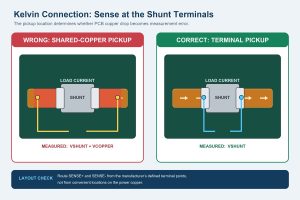
Where matched ratios matter, a resistor network may improve tracking and simplify placement. Current-sense resistors require separate checks for Kelvin routing, TCR, power, and pulse energy.

Which Resistor Values Should You Stock for Prototyping?

A practical prototype stock should cover each decade with common E12 or E24 values and include extra quantities of values used repeatedly in digital, analog, LED, and interface circuits.

A compact starting set might include 10 Ω, 22 Ω, 47 Ω, 100 Ω, 220 Ω, 330 Ω, 470 Ω, 1 kΩ, 2.2 kΩ, 4.7 kΩ, 10 kΩ, 22 kΩ, 47 kΩ, 100 kΩ, 220 kΩ, 470 kΩ, and 1 MΩ. Add 0 Ω jumpers, low-ohm current-sense parts, and precision values only when the project requires them.

  • Separate 1% and 5% stock to prevent silent substitutions.
  • Label package, resistance, tolerance, and power clearly.
  • Keep SMD reels or cut tape traceable to the manufacturer part number.
  • Measure loose or uncertain parts before installation.

If 10 kΩ appears frequently in your designs, the 10K ohm resistor identification guide explains its color bands and verification steps.

How Do You Convert a Calculated Resistance to an Available Part?

Convert a calculated resistance by choosing the nearest preferred value that keeps the full circuit within its permitted limits. Do not automatically round up or down; the safe direction depends on the function.

  1. Calculate the ideal resistance using worst-case circuit conditions.
  2. Identify the acceptable minimum and maximum resistance.
  3. Choose an E-series value inside that window.
  4. Apply tolerance to the candidate value and repeat the worst-case check.
  5. Verify power, voltage, TCR, package, and supplier availability.
  6. Update the schematic, BOM, footprint, and assembly notes with one exact orderable part.

For an LED limiter, rounding to a higher resistance usually lowers current. In a feedback divider or timing network, either direction may shift the target beyond specification. The calculation must follow the circuit’s real failure mode.

What Mistakes Cause Resistor Value Problems on a PCB?

Most resistor-value problems come from unit errors, unreviewed substitutions, incorrect markings, or missing worst-case checks rather than from the E-series itself.

  • Confusing 4.7 Ω, 4.7 kΩ, and 4.7 MΩ
  • Entering 100 instead of 100 kΩ in the BOM
  • Treating an E96 code as a simple three-digit marking
  • Using typical LED forward voltage instead of the datasheet range
  • Ignoring working voltage because calculated power is low
  • Changing 0402 to 0603 without updating the footprint
  • Allowing a substitute with the right resistance but the wrong pulse or TCR rating

These errors are easier to prevent when the schematic, BOM, pick-and-place data, and assembly drawing use consistent units and manufacturer part numbers. Use this common resistor values reference as a starting point, then validate the exact component datasheet.

FAQ About Common Resistor Values

What are the most common resistor values?

Frequently used values include 100 Ω, 220 Ω, 330 Ω, 470 Ω, 1 kΩ, 2.2 kΩ, 4.7 kΩ, 10 kΩ, 47 kΩ, and 100 kΩ. Their popularity does not make them correct for every circuit.

What are some common resistor values in ohms?

Common resistor values ohms lists often begin with 1 Ω, 2.2 Ω, 4.7 Ω, 10 Ω, 22 Ω, 47 Ω, 100 Ω, 220 Ω, 330 Ω, 470 Ω, and 680 Ω before continuing into kilohms.

Is 100 ohms a standard resistor value?

Yes. 100 Ω is a preferred value in the major E-series and is widely available in many tolerances, packages, and technologies.

Is 330 ohms a common resistor value?

Yes. 330 Ω is a common E12/E24 value and is often used for indication LEDs and general current limiting when calculations support it.

Why is 4.7 kΩ more common than 5 kΩ?

4.7 kΩ belongs to widely used preferred series. Exactly 5.0 kΩ is available in finer series and precision families, but 4.7 kΩ is more common in general-purpose assortments.

Should I always choose the nearest resistor value?

No. Choose a value that keeps worst-case current, voltage, timing, gain, or bias within limits after tolerance and temperature effects are included.

Are through-hole and SMD resistor values the same?

They use the same preferred-value concept. Actual availability differs by package, technology, tolerance, power, voltage, and manufacturer.

Does a 0603 resistor have a fixed power rating?

No. 0603 is a package size, not one universal wattage. The manufacturer datasheet and derating curve define the rating for a specific part.

Can I replace a 1% resistor with a 5% resistor?

Only if worst-case circuit analysis shows that the wider tolerance is acceptable. The substitution may also change TCR, voltage, noise, and pulse performance.

How should resistor values appear in a PCB BOM?

Use an unambiguous value and unit, then specify tolerance, power, package, technology when relevant, and an approved manufacturer part number.

How Can EBest Circuit Support Resistor-Heavy PCB Assemblies?

Preferred values simplify selection, but reliable assembly depends on a controlled schematic, BOM, footprint library, placement file, and approved substitutions. EBest Circuit can review PCB and PCBA production data for manufacturability and assemble through-hole or SMD resistor designs within the confirmed project requirements.

Ready to move your design into production? Email your Gerber files, BOM with manufacturer part numbers, pick-and-place data, assembly drawings, quantity, and test requirements to sales@bestpcbs.com. EBest Circuit will review the package for PCB fabrication and assembly quotation.

You may also like

Common Resistor Values: E12, E24, and E96 Tables

July 23rd, 2026

Resistors are available in thousands of values, but circuit designers repeatedly use a much smaller group. Values such as 100Ω, 220Ω, 1kΩ, 4.7kΩ, 10kΩ, and 100kΩ appear frequently because they belong to standardized preferred-number series and suit many practical circuit functions.

Understanding common resistor values is useful for schematic design, prototyping, component sourcing, and PCBA quotation. It helps engineers replace calculated values with parts that are readily available without creating unacceptable electrical error.

This guide explains the E12, E24, and E96 series, shows how standard values scale across ohms, kilohms, and megohms, and provides practical selection guidance for LEDs, pull-up circuits, Arduino projects, SMD assemblies, and production electronics.

Common resistor values guide with through-hole and SMD resistors and E12, E24, and E96 tables

What Are Common Resistor Values?

Common resistor values are standardized resistance values that manufacturers produce in large volumes. Frequently used examples include 10Ω, 22Ω, 47Ω, 100Ω, 220Ω, 330Ω, 470Ω, 1kΩ, 2.2kΩ, 4.7kΩ, 10kΩ, 47kΩ, 100kΩ, and 1MΩ.

These values cover many recurring functions:

  • LED current limiting
  • Signal pull-up and pull-down
  • Transistor biasing
  • Operational-amplifier feedback
  • Voltage division and RC timing
  • Input protection and current sensing

A value is not automatically suitable just because it is common. The selected resistor must still meet the circuit’s resistance accuracy, power dissipation, voltage rating, temperature coefficient, pulse tolerance, and package requirements.

For example, 10kΩ is widely used as a pull-up resistor because it provides low static current in many low-speed digital circuits. It may be too high for a fast communication bus with significant capacitance, where 2.2kΩ or 4.7kΩ could produce a faster rise time.

Why Do Resistors Use Standard Values?

Manufacturers use preferred-number series to cover a resistance range without producing every possible integer value. The values in each series are approximately distributed on a logarithmic scale, keeping the percentage difference between neighboring values relatively consistent.

Standardization gives designers predictable ranges, reduces distributor inventory, simplifies manufacturing and testing, and makes it easier for purchasing teams and PCBA factories to qualify equivalent parts.

Suppose a calculation produces 4.86kΩ. A designer may choose 4.7kΩ from the E12 or E24 series, or 4.87kΩ from the E96 series. The correct choice depends on the acceptable circuit error, not simply which number is closest.

What Do E12, E24, and E96 Resistor Values Mean?

The number following the letter E indicates how many standard values are included within each decade. A decade is any resistance range with a 10:1 ratio, such as 10Ω to 100Ω or 1kΩ to 10kΩ.

Series Values per Decade Common Tolerance Typical Use
E12 12 ±10% Basic circuits, repair, and educational projects
E24 24 ±5% Commercial electronics and general PCBA
E96 96 ±1% Precision analog, feedback, sensing, and control
E192 192 ±0.5% or tighter Instrumentation and precision measurement

A 1% resistor is often selected from the E96 series, but the two terms are not interchangeable. Tolerance describes manufacturing accuracy. The E series describes the spacing between nominal values.

Comparison of E12, E24, and E96 resistor value series and common tolerances

Standard Resistor Values Table

A standard resistor table normally lists the base values for one decade. The same numbers are then multiplied or divided by powers of 10.

Base Value ×1 ×10 ×100 ×1,000
10 10Ω 100Ω 1kΩ 10kΩ
22 22Ω 220Ω 2.2kΩ 22kΩ
47 47Ω 470Ω 4.7kΩ 47kΩ
68 68Ω 680Ω 6.8kΩ 68kΩ
82 82Ω 820Ω 8.2kΩ 82kΩ

The same pattern continues into megohms. For example, the base number 47 can represent 4.7Ω, 47Ω, 470Ω, 4.7kΩ, 47kΩ, 470kΩ, or 4.7MΩ. This decade method is more useful than memorizing a separate list for every resistance range.

Standard resistor values chart showing decade scaling from ohms to kilohms

E12 Resistor Values

The E12 series contains 12 base values per decade:

10 12 15 18 22 27
33 39 47 56 68 82

Common E12 values between 100Ω and 1kΩ are 100Ω, 120Ω, 150Ω, 180Ω, 220Ω, 270Ω, 330Ω, 390Ω, 470Ω, 560Ω, 680Ω, and 820Ω.

E12 is suitable where modest resistance variation does not materially affect performance, including indicator LEDs, non-critical bias networks, basic switching circuits, and hobby electronics. It is less appropriate for precision voltage dividers, sensor conditioning, current measurement, or amplifier gain networks where resistor ratio accuracy directly affects output performance.

E24 Resistor Values

The E24 series provides 24 values per decade:

10 11 12 13 15 16 18 20
22 24 27 30 33 36 39 43
47 51 56 62 68 75 82 91

E24 is one of the most commonly used series in general electronics. It offers enough selection for power supplies, transistor circuits, digital interfaces, LED products, consumer devices, and industrial control boards without creating excessive BOM variety.

Values such as 110Ω, 200Ω, 240Ω, 360Ω, 510Ω, 750Ω, 1.3kΩ, 3.6kΩ, and 9.1kΩ are available in E24 but not in E12. For cost-sensitive PCBA production, E24 values with ±5% tolerance are often sufficient unless a circuit function requires more precise control.

E96 Resistor Values

The E96 series contains 96 base values per decade and is commonly associated with ±1% resistors.

100 102 105 107 110 113 115 118
121 124 127 130 133 137 140 143
147 150 154 158 162 165 169 174
178 182 187 191 196 200 205 210
215 221 226 232 237 243 249 255
261 267 274 280 287 294 301 309
316 324 332 340 348 357 365 374
383 392 402 412 422 432 442 453
464 475 487 499 511 523 536 549
562 576 590 604 619 634 649 665
681 698 715 732 750 768 787 806
825 845 866 887 909 931 953 976

The table uses 3-digit base numbers, and the decimal position changes with the resistance range. For example, 487 may represent 48.7Ω, 487Ω, 4.87kΩ, or 48.7kΩ.

E96 values are useful in precision voltage dividers, filter networks, amplifier feedback loops, ADC input circuits, current regulation, and sensor interfaces.

How to Find the Nearest Standard Resistor Value

A common resistor values calculator performs four basic steps:

  1. Calculate the theoretical resistance.
  2. Select the preferred E series.
  3. Identify the nearest lower and higher standard values.
  4. Recalculate the actual circuit result for both options.

Assume an LED calculation produces 193Ω. The nearest common options may be 180Ω in E12 or E24, 200Ω in E24, and 191Ω or 196Ω in E96.

The nearest numerical value is not always the safest choice. For current limiting, selecting the next higher resistor generally reduces current. For a timing or feedback circuit, the lower or higher choice may shift frequency, gain, or threshold in different directions.

Error = (Rselected − Rcalculated) ÷ Rcalculated × 100%

After selecting a nominal value, include resistor tolerance and the tolerances of other components in the worst-case calculation.

Example of selecting the nearest standard resistor value for a calculated 193 ohm target

Common Resistor Values for LEDs

An LED resistor should be calculated from the supply voltage, LED forward voltage, and required current:

R = (VS − VF) ÷ I

For a 5V supply, a red LED with a 2V forward voltage, and a target current of 10mA:

R = (5V − 2V) ÷ 0.01A = 300Ω

A 300Ω resistor exists in the E24 series. A designer could also use 330Ω to reduce the current slightly:

I = (5V − 2V) ÷ 330Ω = 9.1mA

Common LED resistor values include 100Ω, 150Ω, 220Ω, 330Ω, 470Ω, 680Ω, and 1kΩ. They are common because they suit many low-voltage indicator circuits, not because they are universally correct.

Also verify resistor power with P = I²R. At 9.1mA through 330Ω, power dissipation is about 27mW. A standard 0.1W or 0.125W SMD resistor provides comfortable margin under normal ambient conditions.

LED resistor selection example using a 5 volt supply and a 330 ohm practical resistor value

Common Pull-Up and Pull-Down Resistor Values

Typical pull-up and pull-down values include 1kΩ, 2.2kΩ, 4.7kΩ, 10kΩ, 47kΩ, and 100kΩ.

Lower resistance provides a stronger logic state and faster charging of parasitic capacitance, but it draws more current when the signal is pulled to the opposite level. Higher resistance reduces static current but becomes more sensitive to leakage, interference, and slow signal transitions.

Selection should consider input leakage current, logic thresholds, supply voltage, trace and input capacitance, required rise time, switching frequency, noise environment, and open-drain current capability.

For a slow push-button input, 10kΩ is often practical. For an I²C bus, 2.2kΩ to 4.7kΩ may be more appropriate, but the correct value should be calculated from bus capacitance, operating voltage, rise-time requirements, and device sink-current limits.

Pull-up resistor examples and comparison of 0402, 0603, 0805, and 1206 SMD resistor packages

Common Resistor Values for Arduino and General Electronics

Arduino projects often use common resistor values because they are easy to source and cover standard interface functions.

Application Typical Starting Value Selection Note
LED current limiting 220Ω–1kΩ Calculate from voltage and LED current
Push-button pull-up/down 10kΩ Internal pull-up may remove the external part
Transistor base resistor 1kΩ–10kΩ Calculate from load current and transistor gain
MOSFET gate resistor 22Ω–220Ω Controls ringing and switching speed
Analog voltage divider 1kΩ–100kΩ Check ADC input impedance and source resistance
Sensor biasing 4.7kΩ–100kΩ Follow sensor datasheet requirements

These values are starting points, not fixed design rules. A 10kΩ/10kΩ divider, for example, halves the input voltage but may be unsuitable when the ADC requires a low source impedance or when the circuit must minimize standby current.

Are SMD Resistor Values Different from Through-Hole Values?

SMD and through-hole resistors generally use the same E-series values. A 10kΩ resistor can be supplied as an axial through-hole component or in 0402, 0603, 0805, 1206, and larger SMD packages.

The package affects physical and electrical capability rather than the nominal value system.

Package Typical General-Purpose Power Rating Practical Consideration
0402 Around 0.063W Compact but harder to assemble and rework
0603 Around 0.1W Common for compact commercial PCBAs
0805 Around 0.125W More thermal margin and easier inspection
1206 Around 0.25W Suitable for higher dissipation and voltage

These ratings vary by resistor series and manufacturer. High-power, pulse-rated, high-voltage, and current-sense versions may differ substantially.

Extreme resistance values may also be unavailable in very small packages. Low-ohmic shunt resistors need suitable terminal construction and current capacity, while high-megohm values require control of leakage and surface contamination.

How to Choose Resistor Tolerance and Power Rating

Tolerance should be selected according to the sensitivity of the circuit function. A ±5% resistor may be adequate for LED current limiting or a non-critical pull-up. A ±1% resistor is more suitable for amplifier gain, regulated feedback, and matched dividers. Precision measurement circuits may require ±0.1% tolerance and a low temperature coefficient.

Power can be calculated using P = VI, P = I²R, or P = V²/R.

Do not operate a resistor continuously at its absolute power limit. Ambient temperature, copper area, enclosure temperature, airflow, nearby heat sources, and pulse conditions can reduce usable capacity.

For a PCBA quotation, the BOM should specify:

  • Nominal resistance and tolerance
  • Package and power rating
  • Temperature coefficient when important
  • Voltage or pulse requirement
  • Preferred manufacturer or approved alternatives

EBest Circuit can review these details during BOM and DFM checking. Clear specifications reduce sourcing questions and prevent an apparently equivalent resistor from introducing a tolerance, voltage, or reliability issue.

Downloadable Standard Resistor Values PDF

Download this printable reference for the E12, E24, and E96 preferred resistor values, decade scaling, selection formulas, and SMD package guidance.

FAQ

1. What are the most common resistor values?

Frequently used values include 100Ω, 220Ω, 330Ω, 470Ω, 1kΩ, 2.2kΩ, 4.7kΩ, 10kΩ, 47kΩ, 100kΩ, and 1MΩ. Their popularity comes from standard E-series spacing and broad usefulness in common circuit functions.

2. Why are 220-ohm resistors so common?

A 220Ω resistor is part of the E12, E24, and higher series. It is widely used for LED current limiting, transistor interfaces, signal damping, and protection in low-voltage circuits. Its suitability must still be confirmed by calculation.

3. Why is 4.7kΩ a common resistor value?

4.7kΩ belongs to the E12 series and provides a practical balance between current consumption and signal strength. It is frequently used in pull-up circuits, transistor bias networks, feedback paths, and sensor interfaces.

4. What is the difference between E12, E24, and E96 resistor values?

E12 contains 12 values per decade, E24 contains 24, and E96 contains 96. A larger series gives designers more values and allows closer matching to a calculated resistance.

5. Are 1% resistors always E96 values?

No. E96 is commonly associated with 1% resistors, but tolerance and nominal-value series are separate specifications. Manufacturers may offer E24 values with 1% tolerance or E96 values in other tolerances.

6. Do 0402 and 0603 resistors have different standard values?

They generally use the same E-series values. The difference is package size, which affects power, voltage, thermal performance, assembly difficulty, and available resistance range.

7. How do I choose the nearest standard resistor value?

Choose the required E series, identify the nearest higher and lower values, and calculate circuit performance with both. The best option is the one that keeps current, voltage, timing, or gain within the permitted range.

8. What resistor value should I use for an LED?

Calculate it using R = (VS − VF)/I. Select the next suitable standard value and confirm resistor power. Values such as 220Ω, 330Ω, and 470Ω are common, but they are not correct for every LED circuit.

9. Is 4.7kΩ or 10kΩ better for a pull-up resistor?

4.7kΩ provides a stronger pull-up and faster rise time, while 10kΩ uses less current. The correct choice depends on leakage, capacitance, switching speed, supply voltage, and noise exposure.

10. Can I replace a resistor with the next higher standard value?

Sometimes. A higher value may reduce current, alter gain, change a timing constant, or shift a voltage-divider output. Recalculate the affected function and include tolerance before approving the substitution.

Conclusion

Common resistor values follow standardized E-series rather than an arbitrary list. E12 and E24 cover most general-purpose circuits, while E96 provides finer selection for precision designs. The nearest numerical value is not always the best engineering choice; tolerance, power, voltage, temperature behavior, package size, and sourcing availability must also be checked.

For PCB or PCBA quotation, provide the complete BOM with resistor values, tolerances, packages, power requirements, and approved alternatives. EBest Circuit can support component review, PCB fabrication, prototype assembly, and production PCBA. Send your project files to sales@bestpcbs.com for engineering review and quotation.

You may also like

Best Manufacturers for High-Density PCB Prototypes in USA Projects

July 23rd, 2026

High-density PCB prototypes are different from standard FR4 prototype boards. A simple board may only need basic fabrication checks, but a high-density prototype can involve HDI structures, fine line/space, microvias, buried vias, controlled impedance, BGA via-in-pad, heavy copper, thin dielectric layers, or tight assembly requirements. For buyers comparing the best manufacturers high-density PCB prototypes USA projects may require, the real question is whether the supplier can review these risks before production starts.

For USA engineering teams, choosing a manufacturer is not only about price or location. As a quick turn HDI PCB prototype manufacturer, EBest Circuit (Best Technology) supports custom PCB fabrication, HDI PCB manufacturing, stackup review, DFM checking, component sourcing, SMT assembly, testing, and small-batch production. If your project includes HDI structure, impedance notes, BGA areas, special material, or urgent prototype validation, send your Gerber files, stackup drawing, BOM, assembly notes, or questions to sales@bestpcbs.com for engineering review.

best manufacturers high-density pcb prototypes usa

How to Compare Manufacturers for High-Density PCB Prototypes in the USA?

When engineers search for the best manufacturers for high-density PCB prototypes in the USA, the useful question is not “Which company is the biggest?” It is “Which supplier can handle this prototype without creating hidden risk?”

For simple 2-layer or 4-layer boards, many online prototype platforms may be enough. For high-density PCB prototypes, compare manufacturers by practical project fit:

  • HDI capability, not only standard through-hole multi-layer PCB
  • Blind via, buried via, laser via, and via-in-pad review
  • Stackup review before production
  • Controlled impedance support and test reports
  • BGA routing and soldering risk control
  • Resin-filled and plated-over via capability
  • Prototype-to-small-batch production support
  • PCB fabrication plus PCBA assembly if SMT is required
  • Clear communication before EQ, production files, or stackup changes

A USA buyer may choose a domestic manufacturer for local communication, special compliance needs, or extremely short domestic logistics. Many USA engineering teams also work with overseas manufacturers when the project needs HDI capability, cost control, flexible small-batch production, and one-stop PCB plus PCBA support.

Best Manufacturers High-Density PCB Prototypes USA

When buyers search for the best manufacturers high-density PCB prototypes USA, they are usually comparing more than company names. The real decision is which supplier fits the board complexity, delivery pressure, quality requirement, and next-stage production plan.

Sierra Circuits (California, USA)

  • Main Business: Quick-turn PCB prototypes, HDI boards, PCB assembly.
  • Strength: Strong for U.S.-based prototype builds, DFM support, HDI, microvias, via-in-pad, and controlled impedance projects.
  • Best Fit: Engineering teams that need fast domestic prototype fabrication and assembly.
  • Check Before Ordering: Confirm HDI stackup, microvia structure, impedance report, IPC class, and assembly scope.

AdvancedPCB (USA)

  • Main Business: Quick-turn PCB fabrication, HDI, UHDI, flex, rigid-flex, and assembly.
  • Strength: Good for engineers who need fast U.S. prototype support with CAM review and flexible turnaround options.
  • Best Fit: R&D teams working on HDI prototypes, multilayer boards, or urgent design validation.
  • Check Before Ordering: Confirm whether the job is standard technology, HDI, or advanced technology, because lead time and cost can change quickly.

Summit Interconnect (USA)

  • Main Business: Complex rigid PCBs, HDI PCBs, rigid-flex, RF/microwave boards, and prototype assembly.
  • Strength: Strong in high-density rigid boards, blind vias, buried vias, via fill, microvias, and controlled manufacturing for demanding projects.
  • Best Fit: Customers who need U.S.-based support for complex HDI prototypes and production transition.
  • Check Before Ordering: Confirm layer count, sequential lamination, via fill type, panel size, and inspection documentation.

TTM Technologies (USA / Global)

  • Main Business: Advanced multilayer PCBs, HDI, RF, high-speed, high-layer-count, and heavy copper boards.
  • Strength: Very strong capability base for complex, high-reliability PCB programs.
  • Best Fit: Larger programs that need advanced engineering, repeatability, and production scale.
  • Check Before Ordering: For small prototype quantities, confirm whether the project fits their business model, lead time, and minimum order expectations.

Sanmina (USA / Global)

  • Main Business: Advanced PCBs, high-speed backplanes, HDI, flex circuits, prototyping, and volume production.
  • Strength: Strong for high-speed, high-layer-count, and complex electronic systems.
  • Best Fit: Customers moving from advanced prototype validation toward larger production programs.
  • Check Before Ordering: Confirm whether you need only PCB fabrication or broader system-level manufacturing support.

Benchmark Electronics (USA / Global)

  • Main Business: PCBA, SMT assembly, BGA assembly, inspection, testing, and system-level manufacturing.
  • Strength: Strong assembly and quality control support for regulated and complex electronics.
  • Best Fit: Projects where the high-density PCB prototype also needs assembly, inspection, testing, and traceability.
  • Check Before Ordering: If the need is only bare PCB fabrication, confirm whether Benchmark is the right fit or whether a PCB-focused supplier is better.

EBest Circuit (Best Technology) (China Serving USA Projects)

  • Main Business: Custom PCB fabrication, HDI PCB, rigid-flex PCB, flex PCB, ceramic PCB, metal core PCB, component sourcing, SMT assembly, and PCBA testing.
  • Strength: Suitable for USA customers who need engineering review, competitive prototype cost, small-batch support, and one-stop PCB + PCBA service.
  • Best Fit: HDI prototype projects involving stackup review, microvias, buried vias, impedance control, BGA via-in-pad, ENIG, DFM review, SMT, and testing.
  • Check Before Ordering: Share Gerber files, stackup drawing, BOM, impedance notes, assembly requirements, and inspection requirements before production, so the engineering team can review manufacturability early.

Practical takeaway:
If the project must be manufactured domestically in the USA, companies such as Sierra Circuits, AdvancedPCB, Summit Interconnect, TTM, or Sanmina may be stronger fits. If the project needs HDI prototype manufacturing, PCBA assembly, sourcing support, and cost-controlled small-batch production for a USA customer, EBest Circuit can be a practical option to compare.

High-Density PCB Prototype Requirements Before Quotation

A high-density PCB prototype should not be quoted only by layer count and board size. The key risks are often hidden inside the files.

Before quotation, the manufacturer should review:

  • Layer count and finished board thickness
  • FR4 Tg requirement or special laminate requirement
  • Inner and outer copper thickness
  • Minimum trace and spacing
  • Minimum mechanical drill and laser via size
  • Blind via and buried via structure
  • BGA pitch and via-in-pad requirement
  • Controlled impedance lines
  • Solder mask bridge risk
  • Surface finish, such as ENIG or ENEPIG
  • Panelization and SMT fiducial requirements
  • Required reports, such as impedance, electrical test, COC, or inspection reports

For EBest Circuit projects, quotation review often includes checking whether the customer’s Gerber or ODB++ files, drawings, stackup notes, readme files, and technical specifications are complete enough for production. If information is unclear, the engineering team raises EQ before manufacturing instead of guessing during production.

EBest Circuit HDI PCB Prototype Manufacturing Capabilities

For HDI PCB prototype manufacturing, capability data is more useful than a general statement such as “we can make advanced PCBs.”

EBest Circuit supports high-density PCB prototypes with options such as:

  • Layer count: Standard high-Tg FR4 can support 1-10 layers, with special processes extending to 10-32 layers.
  • High-Tg materials: FR4 Tg 170-180 is available. Special material options can include Isola 370HR, FR408HR, Rogers, Taconic, PTFE, and other advanced laminates when required.
  • Laser vias: Laser blind/buried vias can reach 0.10mm.
  • Mechanical holes: Special process minimum finished hole diameter can reach 0.15mm.
  • Aspect ratio: Standard through-hole aspect ratio is 8:1, with special process support up to 10:1.
  • Fine line/space: Special process support can reach 3/3mil for 1/2oz or 1oz copper.
  • Surface finish: ENIG, ENEPIG, OSP, HASL, immersion silver, immersion tin, and hard gold fingers are available depending on the project.

These numbers are not just technical decoration. They help engineers judge whether the prototype is inside a stable manufacturing window or already close to a process limit.

Microvias, Blind Vias, and Buried Vias in High-Density PCB Prototypes

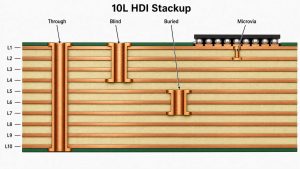
High-density interconnect PCB projects often depend on via structure. A standard through via connects from the top layer to the bottom layer. Blind vias connect an outer layer to one or more inner layers. Buried vias connect only internal layers. Microvias are usually laser-drilled small vias used for dense routing, especially around BGA areas.

For HDI boards, the structure is often described as 1+N+1, 2+N+2, or 3+N+3. The number outside the core structure shows build-up layers. More build-up layers usually mean more lamination steps, higher process complexity, and more production control points.

A manufacturer should check:

  • Whether stacked or staggered microvias are used
  • Whether the via structure matches lamination capability
  • Whether laser via size and pad size are manufacturable
  • Whether resin filling or via plating is needed
  • Whether the via structure affects impedance, reliability, or yield

This is where high-density PCB prototypes require engineering review, not only price comparison.

best manufacturers high-density pcb prototypes usa

Stackup and Material Review for High-Density PCB Prototypes

Stackup review is one of the most important steps in high-density PCB prototype manufacturing. The stackup affects impedance, drilling, lamination, warpage, copper balance, thickness tolerance, and assembly stability.

A practical stackup review should check:

  • Total finished thickness
  • Core and prepreg selection
  • Copper thickness
  • Signal, power, and ground layer arrangement
  • Impedance reference layers
  • Material availability
  • Copper balance between layers
  • Lamination risk
  • Final surface finish

For HDI prototypes, stackup review is especially important when the board uses thin dielectrics, high-Tg material, heavy copper, buried vias, laser vias, or controlled impedance. If a material is not commonly stocked, it should be discussed before production because material lead time can directly affect delivery.

EBest Circuit has supported PCB and PCBA projects since 2006, and many engineering and production team members have worked with complex stackup, material, and process questions for more than 10 years. That experience matters most when a prototype file looks manufacturable at first glance but still contains hidden process risk.

Controlled Impedance and BGA Via-in-Pad Risks in HDI Prototypes

Controlled impedance is common in high-density PCB prototypes used for imaging products, communication modules, embedded systems, industrial controllers, and high-speed data boards. The manufacturer should not wait until the end of production to think about impedance. Trace width, dielectric thickness, copper thickness, reference layer, and tolerance must be reviewed before production.

BGA via-in-pad is another major risk. If a via is placed inside or near a BGA pad, solder can flow into the via during reflow. This may cause insufficient solder volume, weak joints, hidden opens, or X-Ray inspection difficulty.

Common manufacturing controls include:

  • Resin-filled vias
  • Plated-over vias
  • Planarization
  • Proper solder mask opening
  • ENIG surface finish
  • BGA pad and via review before fabrication

If the prototype will be assembled after PCB fabrication, these details should be reviewed as PCB plus PCBA requirements, not as two separate jobs.

Quick-Turn High-Density PCB Prototypes and Lead Time Factors

For high-density PCB prototypes, lead time depends on more than the order quantity. Even if the customer only needs 5 or 10 pcs, the board still goes through engineering review, stackup confirmation, drilling, plating, imaging, solder mask, surface finish, electrical testing, and final inspection.

For standard FR4 prototype boards under 1 square meter, EBest Circuit can usually support the following reference lead times:

PCB TypeNormal Lead TimeFastest Lead Time
1-layer FR4 prototype7 days24 hours
2-layer FR4 prototype8 days24 hours
4-layer FR4 prototype10 days48 hours
6-layer FR4 prototype10 days72 hours
8-layer FR4 prototype12 days72 hours
10-layer or aboveTo be confirmedTo be confirmed

For high-density PCB prototypes, the final lead time should be confirmed after file review because the following requirements may add process time:

  • HDI stackup or sequential lamination
  • Blind vias, buried vias, or microvias
  • Via-in-pad, resin filling, or copper paste filling
  • Controlled impedance and test coupons
  • Heavy copper or high-Tg material
  • ENIG or other special surface finishes
  • Tight line/space or small finished holes
  • 100% electrical testing, inspection reports, or PCBA assembly

For projects that also need assembly, EBest Circuit can support PCB fabrication, component sourcing, SMT assembly, testing, and packing under one workflow. PCBA prototype lead time can be as fast as 2 days for urgent assembly projects, while normal PCBA service is usually about 1 week after PCB and components are ready.

The safest way to confirm lead time is to send the Gerber files, stackup drawing, BOM, assembly notes, impedance requirements, and delivery target before production. This helps the engineering team check whether the prototype can follow a fast-turn schedule or needs a more controlled manufacturing plan.

USA PCB Prototype Manufacturers vs Overseas HDI PCB Suppliers

USA PCB prototype manufacturers are useful when a project needs domestic production, local communication, or local compliance. Many USA suppliers also have strong experience in aerospace, medical, RF, and high-reliability PCB work.

Overseas HDI PCB suppliers can be useful when the buyer needs:

  • Competitive prototype and small-batch cost
  • Flexible engineering communication
  • PCB fabrication plus component sourcing
  • SMT assembly and testing
  • Broader PCB options under one supplier
  • Production scalability after prototype validation

For USA engineering teams, the decision does not have to be “USA supplier or overseas supplier” in a simple way. A practical sourcing strategy is to match the supplier to the project risk.

Choose domestic manufacturing when local control is mandatory. Choose a qualified overseas partner when the project needs HDI capability, PCBA support, cost control, and responsive engineering review.

High-Density PCB Prototype Case Study for a USA Project

A USA customer needed a small-batch high-density PCB prototype for an industrial power control module. The order quantity was only a few pieces, but the board structure and reliability requirements were closer to a demanding production project than a simple prototype.

Project requirements

  • Customer region: USA
  • Application: Industrial power control module
  • Quantity: 5 pcs prototype build
  • PCB type: 14-layer high-density PCB
  • Material: High-Tg FR4, Tg170
  • Copper thickness: 3oz inner and outer layers
  • Finished thickness: 3.2mm +/-10%
  • Surface finish: ENIG 2u”
  • Via structure: L2-L13 buried vias
  • Via process: Copper paste filled vias
  • Quality level: IPC Class 3 requirement
  • Testing: 100% electrical test before shipment
  • Production control: Production stackup and files confirmed with the customer before fabrication

Manufacturing challenges

  • The 14-layer structure required stackup review before production.
  • 3oz copper increased lamination and resin filling risk.
  • Buried vias and copper paste filled vias had to be planned before final build.
  • The prototype quantity was small, but the inspection requirement was strict.
  • Board thickness, heavy copper, and buried via structure had to be controlled together.

EBest Circuit solution

  • Reviewed the customer files and prepared a production-ready stackup.
  • Confirmed production files and stackup with the customer before manufacturing.
  • Planned buried via and copper paste filling requirements before lamination.
  • Controlled heavy copper and board thickness to reduce warpage and lamination risk.
  • Used ENIG surface finish for stable solderability and surface protection.
  • Performed 100% electrical testing before shipment.
  • Followed IPC Class 3 quality requirements for the build.

Result

The customer received a high-density prototype that matched the required layer structure, heavy copper design, buried via process, surface finish, and inspection standard. For this project, the value was not only producing five boards. The value was turning a complex prototype into a controlled manufacturing path before functional validation and possible next-stage production.

best manufacturers high-density pcb prototypes usa

Why Work with EBest Circuit for High-Density PCB Prototype Projects?

EBest Circuit is suitable for high-density PCB prototype projects when the customer needs engineering support, not only bare PCB fabrication.

The company provides PCB fabrication, HDI PCB manufacturing, component sourcing, SMT assembly, testing, DFM review, BOM review, and production communication. This helps keep important details visible from file review to final delivery.

What this means for prototype projects

  • Stackup, material, and copper thickness are reviewed before production.
  • HDI via structures are checked before lamination.
  • BGA via-in-pad risks are reviewed before SMT.
  • Impedance requirements can be planned with coupons and reports.
  • Production files can be confirmed before fabrication starts.
  • PCB and PCBA requirements stay under one workflow when assembly is needed.
  • Quality inspection, electrical testing, and shipment documents can be prepared according to project needs.

EBest Circuit has served engineers across more than 40 countries and supports quality systems including ISO9001, ISO13485, IATF16949, AS9100D, REACH, RoHS, and UL-related requirements. For high-density prototypes, that background helps when the project needs both fast response and controlled production discipline.

FAQs about High-Density PCB Prototypes and Manufacturers

1. What makes a PCB prototype “high-density”?
A high-density PCB prototype usually has tighter routing, smaller vias, finer line/space, BGA components, blind or buried vias, microvias, or controlled impedance requirements. HDI PCB is one common type of high-density PCB.

2. What is the difference between HDI PCB and standard multilayer PCB?
A standard multilayer PCB often uses through holes for interconnection. An HDI PCB may use laser microvias, blind vias, buried vias, sequential lamination, and finer routing to support compact and high-performance electronics.

3. Can high-density PCB prototypes be made quickly?
Yes, but the lead time depends on material, layer count, via structure, lamination steps, surface finish, impedance testing, and assembly requirements. A realistic lead time should be confirmed after file review.

4. Why is BGA via-in-pad risky in HDI prototypes?
If via-in-pad is not treated correctly, solder may flow into the via during reflow. This can cause weak BGA joints, insufficient solder, hidden opens, or difficult X-Ray inspection. Resin filling and plated-over vias are common controls.

5. What files should I send for a high-density PCB prototype quote?
Please send Gerber or ODB++ files, stackup drawing, drill files, impedance notes, BOM, placement file, assembly notes, surface finish requirements, panel requirements, and any inspection or report requirements.

If you are comparing manufacturers for a high-density PCB prototype, you do not have to make the sourcing decision from a price sheet alone. Send your Gerber files, stackup drawing, BOM, impedance notes, or assembly requirements to sales@bestpcbs.com. EBest Circuit’s engineering team can review the manufacturing path before production, so your prototype starts with clearer risks, clearer process control, and a supplier team that understands both PCB fabrication and PCBA delivery.

You may also like

What Is an Electrical Meter? Types, Working Principle, and Reading Guide

July 23rd, 2026

In household and commercial billing, an electrical meter usually means an electricity meter that records energy consumption in kilowatt-hours, or kWh.

Older meters use mechanical dials or rotating discs. Newer models use sensing circuits, digital displays, memory, and communication modules. They should not be confused with electrical test meters, such as multimeters or clamp meters, which technicians use for spot measurements.

For utilities and equipment manufacturers, meter accuracy depends on current sensing, voltage measurement, firmware, PCB layout, component stability, calibration, and environmental protection.

Electrical meter hero illustration showing a smart electricity meter, grid connectivity, and renewable energy

What Is an Electrical Meter?

A billing meter measures the electrical energy passing through a connection over time. It may be installed in a home, factory, office, EV charger, solar system, or utility cabinet.

A basic meter records imported energy in kWh. More advanced models may also record:

  • Maximum demand
  • Exported energy
  • Peak and off-peak consumption
  • Voltage events
  • Power factor
  • Reverse energy flow

“Electricity meter” is the clearest term for a billing device. “Energy meter” is common in industrial products, while “electrical meter” may also describe test equipment.

For a PCB or PCBA quotation, state whether the product is a residential meter, DIN-rail monitor, industrial power meter, prepaid meter, smart meter, or test instrument.

What Does an Electricity Meter Measure?

The main measurement is active energy in kWh. One kWh is the energy used by a 1 kW load operating for one hour. Modern meters may also record:

Measurement Unit Practical Purpose
Active energy kWh Standard electricity billing
Instantaneous power W or kW Shows the present load
Voltage V Identifies supply variation
Current A Indicates load demand
Maximum demand kW or kVA Used in many commercial tariffs
Reactive energy kvarh Relevant to motors and transformers
Power factor Ratio Indicates load efficiency
Exported energy kWh Records solar or battery export
Time-of-use energy kWh by period Separates peak and off-peak use

Power is the consumption rate at a given moment; energy is the accumulated total. A 2 kW heater running for 3 hours uses about 6 kWh.


How Does an Electricity Meter Work?

An electronic electricity meter calculates energy by monitoring voltage and current.

The measurement process is usually:

  1. A voltage divider or isolated sensing network samples the supply voltage.
  2. A shunt resistor, current transformer, Rogowski coil, or Hall sensor measures current.
  3. A metering IC or MCU samples both signals.
  4. The circuit calculates instantaneous power.
  5. Power is integrated over time to determine energy.
  6. The result is stored in non-volatile memory and shown on the display.
  7. A smart meter transmits the data to a utility or energy platform.

Mechanical meters use magnetic fields to rotate an aluminum disc. A gear mechanism converts its rotations into a cumulative reading.

Electronic meter accuracy can be affected by resistor tolerance, sensor linearity, PCB leakage, temperature drift, supply noise, and electromagnetic interference.

What Are the Main Types of Electricity Meters?

The main types of electricity meter include analog, digital, smart, prepaid, single-rate, dual-rate, single-phase, 3-phase, CT-operated, and bidirectional models. Selection depends on supply type, tariff structure, current range, communication needs, and accuracy class.

Comparison of analog, digital, and smart electrical meter types
Meter Type Main Characteristic Typical Application Main Consideration
Analog meter Rotating disc and mechanical dials Older residential systems Manual reading
Digital meter Electronic measurement and LCD Homes and commercial sites May not support communication
Smart meter Stores and transmits usage data Utilities and smart buildings Security and network compatibility
Prepaid meter Uses purchased credit Rental and controlled-use systems Payment platform support
Single-rate meter One tariff for all consumption Standard residential billing Simple but no off-peak benefit
Dual-rate meter Separate tariff registers Time-of-use billing Both readings may be required
Single-phase meter Measures a single-phase supply Homes and small businesses Correct voltage and current rating
3-phase meter Measures all three phases Factories and large buildings Phase sequence and load balance
CT-operated meter Uses external current transformers High-current systems Correct CT ratio
Bidirectional meter Measures import and export Solar and battery systems Clear register identification

A basic digital meter suits local kWh measurement. Smart functions are worthwhile when the project needs interval data, automated billing, remote monitoring, demand management, or platform integration.

Analog vs Digital vs Smart Electric Meter

The screen is not the deciding factor. A digital meter may be offline; a smart meter adds communication, interval storage, or remote functions.

Feature Analog Meter Digital Meter Smart Meter
Measurement Electromechanical Electronic Electronic
Display Dials or counters LCD or LED LCD plus connected interface
Manual reading Usually required Usually required Often automatic
Interval data No Limited Common
Remote communication No Optional Yes
Time-of-use support Limited Possible Common
Export measurement Limited Model-dependent Often supported
Development complexity Low Medium High

Smart meters require more firmware, cybersecurity work, EMC control, communication testing, and validation.

How Do You Read an Electricity Meter?

Before taking a reading, confirm that the meter serial number matches the bill.

Illustration showing how to read analog and digital electricity meters

How to Read an Analog Dial Meter

Read the dials from left to right; adjacent dials often rotate in opposite directions.

  • When a pointer sits between two numbers, record the lower number.
  • When the pointer is between 9 and 0, record 9.
  • If a pointer appears to sit directly on a number, check the dial to its right.
  • If the right-hand dial has not passed 0, record the lower number.
  • Ignore small test dials unless the supplier requests them.

Photograph the display when a pointer position is unclear.

How to Read a Digital Electricity Meter

Record the main digits from left to right. Ignore decimal or red digits unless the supplier asks for them.

Digital displays may rotate through several screens, including:

  • Total active energy
  • Import energy
  • Export energy
  • Rate 1 and Rate 2
  • Present voltage or current
  • Meter serial number

Do not assume the largest number is the billing register. Check the screen code or label.

How to Read a Dual-Rate Meter

A dual-rate meter uses two registers, often labeled Rate 1 and Rate 2, Day and Night, or Peak and Off-Peak.

Press the display button to locate both values, then record them separately. Do not add the readings before submission. The supplier applies a different tariff to each register.

Rate 1 is not always the daytime reading. Confirm the register names on the bill or meter instructions.

How to Read a Smart Electricity Meter

A smart electric meter normally sends readings automatically, but it can still be checked manually.

Use the display button to find the total import register. A solar installation may also show a separate export register. Import is electricity taken from the grid; export is energy sent back.

An in-home display is not the utility meter. For an official reading, use the installed meter unless the supplier states otherwise.

How Do You Calculate Electricity Use from Meter Readings?

Subtract the previous reading from the current reading:

Electricity used = Current reading − Previous reading

For example:

  • Previous reading: 38,460 kWh
  • Current reading: 38,735 kWh
  • Energy used: 275 kWh

At $0.18 per kWh, the energy charge is $49.50, excluding service charges, taxes, or demand charges.

For a dual-rate meter, calculate each register separately. For a CT-operated meter, confirm whether the displayed value already includes the transformer ratio. Some systems show actual energy directly; others require a multiplier.

How Can Smart Meter Data Help Reduce Electricity Use?

Smart electric meter benefits come from exposing avoidable loads; the meter does not save energy by itself.

Smart electrical meter data dashboard connected to home energy loads, solar panels, and EV charging

Interval data can reveal:

  • High overnight baseload
  • HVAC systems running outside scheduled hours
  • Compressors or heaters cycling too often
  • Equipment left in standby mode
  • Unexpected weekend consumption
  • High peak-period demand
  • Changes after an equipment upgrade

Establish a baseline, change one operating condition, and compare the same period afterward. A workshop, for example, can move battery charging to off-peak hours and compare kWh use and cost.

A sudden increase does not automatically indicate meter failure. Check weather, occupancy, production volume, electric heating, EV charging, and tariff changes first.

What Components Are Inside a Smart Electrical Meter?

A smart meter combines measurement, control, storage, and communication through its PCB components:

Cutaway illustration of smart electrical meter internal PCB and electronic components
  • Metering IC: Calculates voltage, current, power, energy, frequency, and power factor.
  • Current sensor: Uses a shunt, current transformer, Hall sensor, or Rogowski coil.
  • Voltage sensing network: Scales the mains voltage for measurement.
  • MCU: Controls data processing, display, communication, and event logging.
  • Memory: Stores calibration values, energy registers, and firmware data.
  • Real-time clock: Supports tariffs and timestamped records.
  • LCD and driver: Displays readings and status information.
  • Communication module: May use RF, cellular, PLC, Wi-Fi, RS-485, or Modbus.
  • Power supply: Converts the mains input to stable low-voltage rails.
  • Security device: Protects firmware, keys, and communication.
  • Protection circuit: Handles surge, ESD, overvoltage, and transients.

The functions may share one PCB or use separate metering and communication boards. Modular designs simplify regional variants but add connector, EMC, and reliability concerns.

What PCB Requirements Matter in Smart Electricity Meter Design?

Smart meter PCBs handle mains voltage beside low-level analog signals, so safety spacing, accuracy, EMC, and long-term drift must be controlled together.

Smart electrical meter PCB design, SMT assembly, inspection, calibration, and functional testing

Creepage and Clearance

Required distances depend on working voltage, insulation category, pollution degree, material group, altitude, coating, and the applicable standard. Slots can extend creepage in compact layouts but must not weaken the board.

Precision Analog Layout

Keep sensing paths short and away from switching nodes. Low-value shunts often need Kelvin connections. Route differential traces symmetrically and separate them from antennas, relays, display drivers, and DC-DC converters.

High-value resistor networks are sensitive to contamination and PCB leakage. Clean processing, adequate spacing, and suitable coating improve stability.

Component Selection

Important parameters include:

  • Initial tolerance
  • Temperature coefficient
  • Voltage coefficient
  • Long-term drift
  • Pulse rating
  • Humidity performance

The current sensor must avoid excessive heating or saturation, while power components must withstand line transients and operating temperature.

EMC and Surge Protection

Place MOVs, TVS diodes, fuses, chokes, and RC filters close to the power entry. Long traces before protection let transient energy spread through the board.

Manufacturing and Calibration

Fabrication tolerances, residue, substitutions, and rework can affect accuracy. Production should include:

  • Controlled programming
  • Traceable calibration
  • Functional testing
  • Serial-number management
  • Documented acceptance criteria

For smart meter PCBA projects, EBest Circuit can review Gerber files, BOMs, programming, test specifications, and calibration fixture needs before prototyping. This is particularly useful when high-voltage spacing, precision analog circuits, and wireless communication share one assembly.

Can an Electricity Meter Give an Incorrect Reading?

Meters can fail, but many apparent errors come from billing, tariff, or installation issues.

Check the following first:

  • Meter serial number
  • Current reading against a dated photograph
  • Estimated versus actual billing
  • Rate 1 and Rate 2 assignment
  • Import versus export register
  • Recent changes in heating, cooling, EV charging, or occupancy
  • CT ratio or meter multiplier

Technical causes include display damage, wiring errors, communication failure, sensor damage, calibration drift, or incorrect firmware settings.

Do not open, bypass, move, reverse, or modify a utility-owned meter. If the reading remains inconsistent, document the issue and contact the electricity supplier or a qualified electrician.

Formal validation requires a reference energy standard, controlled source, calibrated load, and defined test points.

How Do You Choose the Right Electricity Meter?

Selection starts with the electrical system and use case, not the display.

A buyer should define:

  • Single-phase or 3-phase supply
  • Nominal voltage and frequency
  • Maximum and minimum current
  • Direct or CT-operated measurement
  • Required accuracy class
  • Import-only or bidirectional measurement
  • Tariff and time-of-use functions
  • Communication protocol
  • Data storage interval
  • Indoor or outdoor installation
  • Operating temperature and humidity
  • Enclosure and mounting method
  • Regulatory market
  • Firmware and cybersecurity requirements

For PCB or PCBA quotation, provide:

  • Gerber or ODB++ files
  • Drill files and stack-up
  • Complete BOM with approved alternatives
  • Pick-and-place file
  • Assembly drawing
  • Programming files
  • Calibration procedure
  • Functional test specification
  • Required standards
  • Prototype and production quantities
  • Enclosure constraints
  • Packaging and traceability rules

For wireless modules, also specify the frequency band, antenna, target region, certification status, and RF test requirements.

Complete documentation exposes cost drivers early, including high-voltage spacing, precision parts, isolation, coating, programming, calibration, traceability, and custom fixtures.

FAQ

1. Is an electrical meter the same as an electricity meter?

Not always. “Electrical meter” is a broad term that may include energy meters, multimeters, clamp meters, and voltage meters. An electricity meter specifically records electrical energy consumption, usually in kWh.

2. Is an electrical meter the same as a multimeter?

No. An electricity meter records accumulated energy use. A multimeter is a portable test instrument used to measure quantities such as voltage, current, resistance, continuity, and frequency.

3. What unit does an electricity meter measure?

The main billing unit is the kilowatt-hour, or kWh. Advanced meters may also display voltage, current, power, demand, power factor, and reactive energy.

4. How do you read an analog electricity meter?

Read the dials from left to right. When a pointer is between two numbers, record the lower number. Check the dial to the right when a pointer appears to sit directly on a number.

5. Do smart electric meters need to be read manually?

Usually not. Smart meters normally send readings automatically. Manual access is still useful for verification, troubleshooting, or checking import and export registers.

6. What is the difference between a digital meter and a smart meter?

A digital meter uses electronic measurement and a digital display. A smart meter also includes communication, data storage, interval measurement, or remote utility functions.

7. How do you calculate kWh from two meter readings?

Subtract the previous reading from the current reading. If the readings are 9,850 kWh and 10,125 kWh, the consumption is 275 kWh.

8. Can an electricity meter record solar power exported to the grid?

A bidirectional meter can record both imported and exported energy. The two values are normally stored in separate registers.

9. Why is my electricity meter reading higher than expected?

Common causes include heating or cooling demand, EV charging, additional occupants, equipment running longer, estimated previous bills, tariff-register confusion, or an unnoticed continuous load.

10. Can I move or open an electricity meter myself?

No. Utility meters contain hazardous voltages and may be owned or controlled by the electricity provider. Contact the supplier or a licensed professional when relocation, inspection, or replacement is required.

Conclusion

An electrical meter records energy use; a smart meter adds interval data, communication, tariff functions, and bidirectional measurement. A reliable design starts with defined ratings, accuracy, certification, and test requirements.

For an electricity meter PCB or PCBA quotation, send the design files, BOM, calibration requirements, and expected quantities to EBest Circuit at sales@bestpcbs.com.

You may also like

Schematics Meaning: Diagram Symbols and PCB Reading

July 23rd, 2026

schematics meaning refers to simplified technical drawings that show components and their electrical connections with symbols rather than realistic pictures. In electronics, a schematic explains how a circuit is intended to work. It does not show the physical size or exact board position of every part.

A useful schematic lets a designer follow power, signals, control paths, and component relationships before those connections become copper traces on a PCB. This guide explains the notation, the reading sequence, and the checks that matter when a design moves toward fabrication and assembly.

Schematics Meaning shown beside an electronic circuit diagram and populated PCB

What Does a Schematic Show?

A schematic shows electrical relationships: which pins connect, how power reaches each circuit block, and how signals move between components. Its basic elements are symbols, wires, junctions, net labels, power symbols, and notes.

The drawing is logical rather than physical. A resistor shown beside an IC may sit several centimeters away on the finished board. Conversely, two symbols placed far apart on a schematic may connect through a shared net label without a long line between them.

  • Symbols identify component functions.
  • Wires and junctions show direct electrical connections.
  • Net labels connect points that share the same named signal.
  • Power and ground symbols identify supply networks and reference nodes.
  • Reference designators link each schematic symbol to a specific component.

What Is the Schematic Diagram Meaning in Electronics?

The schematic diagram meaning in electronics is a functional map of a circuit. It tells the reader what connects to what and why each component is present, but it usually leaves mechanical placement and routing to the PCB layout.

For example, a power-supply section may show an input connector, protection device, regulator, input and output capacitors, and a ground return. The schematic makes the intended electrical sequence clear even though the actual components may be arranged differently to control heat, noise, and trace length.

Readers who want another practical walkthrough can also review how to understand circuit diagrams.

What Does Electrical Schematics Meaning Cover?

Electrical schematics meaning covers the symbolic representation of electrical circuits, power distribution, controls, and interconnections. In an electronics project, it normally includes component symbols, pin numbers, signal names, supply rails, ground references, and notes about values or part choices.

The same principle applies from a small sensor board to a larger control system. The drawing reduces a complex assembly to relationships that can be reviewed, simulated, tested, and transferred into PCB design software.

A schematic can also support several downstream tasks:

  • Electrical rule checking before layout
  • Component annotation and BOM generation
  • Footprint assignment for PCB layout
  • Signal tracing during bring-up and repair
  • Design review between hardware, layout, firmware, and production teams

What Do Common Schematic Symbols Mean?

Schematic symbols represent component functions with standardized graphical forms. The exact artwork can vary between IEC and ANSI conventions, but the electrical role remains recognizable when the drawing is prepared correctly.

Common schematic symbols for resistor, capacitor, diode, LED, transistor, and ground
Symbol Typical function Common designator
Resistor Limits current, divides voltage, or sets bias R
Capacitor Stores charge, filters noise, or couples signals C
Diode Controls current direction or protects a circuit D
Transistor Switches or amplifies an electrical signal Q
Integrated circuit Combines a defined electronic function in one package U
Connector Provides an electrical interface to another board or cable J or CN

The search phrase schematics symbols meaning usually reflects a need to identify both the graphic and its function. Do not rely on shape alone. Confirm the designator, component value, pin names, polarity marks, and the symbol library standard used in the project.

How Do Reference Designators and Values Work?

Reference designators give every component a unique identity. The letter identifies the component class, while the number distinguishes one instance from another. R12 is a particular resistor; C7 is a particular capacitor; U3 is a particular integrated circuit.

The text near a symbol may contain several different fields:

  • Reference: the unique identifier, such as R12 or U3
  • Value: the resistance, capacitance, part number, or functional value
  • Pin name or number: the electrical terminal used by the connection
  • Footprint: the PCB land pattern assigned to the component
  • Part data: manufacturer number, tolerance, voltage rating, or other controlled fields

Designators must stay consistent across the schematic, BOM, PCB layout, assembly drawing, and inspection records. A mismatch can place the correct part at the wrong location or make troubleshooting unnecessarily difficult.

How Do Nets, Junctions, and Signal Flow Work?

Nets are electrically connected groups of pins and conductors. A drawn wire creates a visible connection, while identical net labels can connect distant points without drawing a continuous line across the page.

A junction dot normally confirms that crossing wires connect. Lines that cross without a junction may remain electrically separate, depending on the drafting convention and software. This is one reason a visual glance is not enough; the design should also pass an electrical rules check.

Read signal flow by blocks rather than by every line at once:

  1. Locate the power input and ground reference.
  2. Identify connectors, sensors, switches, or other input sources.
  3. Follow named nets into processing, control, or amplification blocks.
  4. Trace outputs to loads, connectors, indicators, or communication interfaces.
  5. Check feedback, enable, reset, and protection paths separately.

How Is a Schematic Different from a Wiring Diagram?

A schematic emphasizes circuit logic, while a wiring diagram emphasizes physical connections, terminals, wire colors, cable paths, or installation details. The two documents may describe the same system, but they answer different questions.

The phrase wiring schematics meaning is often used loosely. A wiring schematic may combine logical symbols with connector and wire information, while a detailed harness drawing can add wire gauge, color, length, crimp terminal, and pin-location data.

Document Primary purpose Shows physical placement?
Schematic Explains electrical logic and connectivity Usually no
Wiring diagram Guides point-to-point connection or installation Sometimes
PCB layout Defines footprints, copper, holes, and board geometry Yes
Assembly drawing Shows component locations and orientation Yes

How Is a Schematic Different from a PCB Layout?

A schematic defines logical connectivity; a PCB layout defines the physical implementation of that connectivity. Layout adds board outline, component footprints, placement, copper routing, vias, planes, clearances, and mechanical constraints.

Comparison between an electronic schematic and the corresponding PCB layout

The netlist transfers electrical connections from the schematic into the board environment. The layout designer then decides where parts sit and how traces reach them while managing return paths, noise, heat, manufacturability, and assembly access.

If you are moving from circuit concept to a board, this guide on how to design a PCB board explains the broader workflow.

How Should You Read an Electronic Schematic Step by Step?

Start with the circuit purpose, then read one functional block at a time. Trying to follow every wire from the upper-left corner often hides the design intent.

  1. Read the title block and notes. Confirm document revision, sheet count, design variant, and stated assumptions.
  2. Find power entry and regulation. Identify input protection, voltage rails, decoupling, and ground domains.
  3. Divide the drawing into blocks. Mark input, processing, memory, communication, driver, and output sections.
  4. Trace one important signal. Follow its net labels and pin connections across sheets.
  5. Check component context. Read values, polarity, ratings, and the relationship to nearby parts.
  6. Match designators to the PCB. Use the placement or assembly view when physical location matters.
  7. Check abnormal paths. Review reset, enable, feedback, fault, protection, and programming connections.

For a board-level example, see how to read circuit boards and schematics together.

Which Schematic Errors Can Become PCB Problems?

Schematic errors become PCB problems when incorrect connectivity or incomplete component data transfers into layout. Some mistakes stop a board from operating; others create intermittent faults that appear only under load, temperature, or electromagnetic stress.

  • Unconnected or incorrectly labeled power pins
  • Missing pull-up, pull-down, bias, or decoupling components
  • Reversed diode, LED, capacitor, or connector polarity
  • Swapped connector pin numbers
  • Duplicate reference designators
  • Wrong component value, rating, or footprint assignment
  • Net labels that differ by a character, space, or hierarchy level
  • Hidden power connections that mask the intended current path
  • Functional blocks copied without updating addresses or control pins

Electrical rule checking can catch many connection and pin-type conflicts, but it cannot judge every design decision. A human review still needs to confirm operating conditions, datasheet requirements, interface assumptions, and failure behavior.

How Can a Schematic Help with PCB Troubleshooting?

A schematic gives troubleshooting a logical starting point. Instead of probing components at random, a technician can identify the expected power rail, signal source, protection device, control node, and load, then test the circuit in that sequence.

Engineer using a schematic diagram and multimeter to troubleshoot an assembled PCB

Use reference designators to match a schematic component to the board. Then compare measured voltages or waveforms with the expected function of that block. When the symptom is a short or an open connection, this article on how to test for an open or short circuit on a PCB provides a related diagnostic path.

What Documents Are Needed After the Schematic Is Complete?

A schematic alone is not normally enough to manufacture and assemble a PCB. Fabrication needs board-production data, while assembly needs accurate component and placement information.

  • Gerber or ODB++ data: copper, solder mask, silkscreen, and board outline
  • Drill data: plated and non-plated hole definitions
  • BOM: designators, quantities, values, packages, and approved part numbers
  • Pick-and-place file: component coordinates, rotation, and board side
  • Assembly drawing: orientation and special placement instructions
  • Test requirements: test points, programming steps, limits, and acceptance criteria

The schematic remains important because it explains intent when a file conflict or technical question appears. However, the manufacturer builds the physical board from production data such as PCB Gerber files, not from a schematic screenshot.

FAQ About Schematics Meaning

What is the simple definition of a schematic?

A schematic is a simplified technical drawing that uses symbols and lines to show how parts of a system connect or interact. In electronics, it represents components, pins, nets, power, and signal relationships.

What is a schematic example?

A basic LED circuit is a schematic example. It can show a power source, current-limiting resistor, LED, switch, and ground connected in the intended electrical order.

What are schematics used for?

Schematics are used to design circuits, review connectivity, run electrical checks, assign footprints, support PCB layout, generate a BOM, and troubleshoot assembled hardware.

Is a schematic the same as a blueprint?

No. A schematic focuses on functional relationships and may ignore physical scale. A blueprint or production drawing generally provides dimensions, placement, construction, or manufacturing details.

Is a schematic the same as a circuit diagram?

In electronics, the terms are often used interchangeably. Both normally describe a symbolic drawing of circuit components and electrical connections.

Does a schematic show component locations?

Usually not. A schematic groups components to explain circuit function. The PCB layout and assembly drawing show the physical positions and orientations.

What do letters and numbers mean on a schematic?

Letters and numbers form reference designators. R indicates a resistor, C a capacitor, D a diode, Q a transistor, U an integrated circuit, and J or CN a connector. The number identifies the individual component.

Why do identical net labels appear in different places?

Matching net labels create the same logical electrical connection without drawing a long wire across the page. Their scope may be local, global, or hierarchical, depending on the design software and project structure.

Do all schematic symbols look the same?

No. Symbol shapes can vary between standards, libraries, regions, and software. The component function, pin names, designator, and surrounding circuit help confirm the intended meaning.

Can a PCB manufacturer build a board from only a schematic?

Not usually. The schematic explains the electrical design, but PCB fabrication requires board-production files. Assembly also needs a BOM and placement data. Missing files must be completed before reliable production can begin.

How Can EBest Circuit Move a Schematic Toward Production?

EBest Circuit can review a schematic together with the PCB production package to clarify connectivity, component data, and manufacturing requirements before fabrication or assembly. A complete package should include the schematic, Gerber or ODB++ data, drill files, BOM, pick-and-place data, quantities, and any test instructions.

Use this schematics meaning guide as a pre-handoff reference, then submit the controlled design files for an engineering review and quotation.

You may also like

Top HDI PCB Manufacturers Serving USA Buyers

July 22nd, 2026
HDI PCB manufacturers USA RFQ shortlist

If you are comparing high-density interconnect PCB manufacturers in the USA, the useful shortlist is not just a list of factory names. You need to know which supplier can review HDI stackup, microvias, materials, fabrication limits, BOM/CPL, PCBA, inspection and delivery planning before the quote is approved.

EBest Circuit directly serves USA buyers that need HDI PCB fabrication, PCBA service, BOM/CPL review, DFM review, component sourcing, inspection and production planning in one RFQ path.

Before choosing an HDI PCB manufacturer, check whether the supplier can catch the problems that make a compact board expensive to build.

USA buyers often compare suppliers after the layout is already dense, the BGA escape is tight, and the first quote looks simple. The real risk is that the quote may not include the manufacturing checks that decide whether the board can be built repeatedly.

  • The supplier quotes the board, but does not confirm microvia structure, blind or buried vias, stackup, copper, dielectric thickness or via-in-pad assumptions.
  • The prototype can be fabricated once, but the supplier does not explain what will change before low-volume or repeat production.
  • The bare-board price looks acceptable, but PCBA, BGA assembly, X-ray inspection, component sourcing, stencil, testing and rework are handled later.
  • The design uses dense routing, controlled impedance or fine-pitch packages, but the supplier response does not mention DFM review or assembly clearance.
  • The delivery date is shown as one number, without separating fabrication, component sourcing, assembly, inspection, packing and shipping.

EBest Circuit helps USA buyers turn HDI files into a build-ready PCB and PCBA plan before quote approval.

  • We review Gerber or ODB++ files, stackup notes, drill files, material, copper, finish, quantity, testing needs and delivery goals before quoting.
  • We connect HDI bare-board fabrication with BOM/CPL review, component sourcing, PCBA planning and inspection requirements.
  • We help catch microvia, via-in-pad, BGA escape, solder mask, panelization, assembly clearance and test access questions before production starts.
  • We review sourcing risk before assembly, especially where substitutes, MOQ, package availability or long-lead components can change the schedule.
  • We help buyers compare prototype, low-volume and production routes with cost, quality and delivery assumptions visible before the purchase order.

Top 12 HDI PCB Manufacturer Options for USA RFQs

Use this shortlist as a buyer reference, then ask every supplier the same HDI, PCBA, certificate, service and delivery questions. EBest Circuit is listed first because USA buyers can include us in the first RFQ round when they want HDI fabrication and assembly planning checked together.

1. EBest Circuit

Main Products / PCB or PCBA Type: HDI PCB, multilayer PCB, rigid PCB, flex PCB, rigid-flex PCB, PCBA, DFM and BOM/CPL review

Certifications: IATF 16949, ISO 9001, ISO 13485, UL, RoHS, REACH

Service Type: Prototype, low volume, production, PCB fabrication and PCBA

Location / Service Region: Directly serves USA buyers

2. Cirexx International

Main Products / PCB or PCBA Type: HDI PCB fabrication, microvia boards, rigid PCB and advanced PCB manufacturing

Certifications: Confirm ISO / AS9100 scope before RFQ

Service Type: Prototype and production HDI PCB fabrication

Location / Service Region: California, USA

3. Sierra Assembly

Main Products / PCB or PCBA Type: HDI PCB fabrication, HDI PCB assembly and complex PCB builds

Certifications: AS9100 Rev-D, ISO 9001:2015

Service Type: Prototype to production, fabrication and assembly

Location / Service Region: USA service option

4. Sierra Circuits

Main Products / PCB or PCBA Type: HDI PCB, rigid PCB, flex PCB, rigid-flex PCB and PCB assembly

Certifications: ISO 9001:2015, ISO 13485:2016, UL, RoHS / REACH

Service Type: Quick-turn PCB, HDI fabrication and assembly

Location / Service Region: California, USA

5. Summit Interconnect

Main Products / PCB or PCBA Type: HDI rigid PCB, microvias, blind/buried vias, via fill and complex circuits

Certifications: Confirm certificate scope before RFQ

Service Type: Complex PCB fabrication and production support

Location / Service Region: North America manufacturing network

6. AdvancedPCB

Main Products / PCB or PCBA Type: HDI PCB, prototype PCB, production PCB and advanced PCB fabrication

Certifications: Confirm ISO / UL / quality scope before RFQ

Service Type: Prototype and production PCB fabrication

Location / Service Region: USA supplier option

7. PCB Unlimited

Main Products / PCB or PCBA Type: High density interconnect PCBs, printed circuit boards and engineering support

Certifications: Confirm listed certificate scope before RFQ

Service Type: PCB fabrication and engineering support

Location / Service Region: USA supplier option

8. Rush PCB

Main Products / PCB or PCBA Type: HDI PCB, quick-turn PCB, prototype PCB and PCB assembly support

Certifications: Confirm ISO / UL scope before RFQ

Service Type: Quick-turn prototype, fabrication and assembly

Location / Service Region: USA supplier option

9. Technotronix

Main Products / PCB or PCBA Type: PCB manufacturing, PCB assembly, HDI-related manufacturing and box-build support

Certifications: Confirm certificate and facility scope before RFQ

Service Type: PCB fabrication, PCBA and electronics manufacturing

Location / Service Region: USA supplier option

10. NextPCB

Main Products / PCB or PCBA Type: HDI PCB, multilayer PCB, prototype PCB and PCB assembly

Certifications: Confirm certificate scope before RFQ

Service Type: Prototype, small batch and production PCB services

Location / Service Region: Global supplier option

11. JHYPCB

Main Products / PCB or PCBA Type: HDI PCB, prototype PCB, quick-turn fabrication and mass production

Certifications: Confirm listed certificate scope before RFQ

Service Type: Prototype and production HDI PCB fabrication

Location / Service Region: Global supplier option

12. OurPCB

Main Products / PCB or PCBA Type: HDI PCB, PCB fabrication, PCB suppliers and assembly support

Certifications: Confirm certificate scope before RFQ

Service Type: PCB fabrication, sourcing and assembly support

Location / Service Region: Global supplier option

How USA Buyers Should Choose an HDI PCB Supplier

Choose the supplier that explains the build risk before you place the order. With HDI boards, a cheap or fast reply is not enough if the supplier has not checked the details that control yield.

Step 1: Separate bare-board needs from assembled-board needs. A fabricated HDI PCB quote and a finished PCBA quote are different jobs.

Step 2: Ask each supplier to confirm stackup, microvia type, blind or buried vias, via fill, copper, material, finish, impedance, inspection and test assumptions.

Step 3: Compare response quality, not only unit price. A useful supplier tells you what can go wrong and what must be confirmed.

Step 4: Choose the supplier that can connect DFM review, fabrication, component sourcing, PCBA, inspection and delivery planning.

What Makes HDI Different From Standard PCB Fabrication?

HDI is harder because the routing density, via structure and stackup leave less room for manufacturing mistakes. Standard PCB fabrication can often tolerate wider spacing and simpler drilling. HDI projects may involve microvias, blind vias, buried vias, via-in-pad, sequential lamination, tighter registration and more sensitive assembly clearances.

HDI Item Why It Matters What the Buyer Should Ask
Microvias They affect drilling, plating, reliability and stackup planning. Ask the supplier to confirm microvia structure and build sequence.
BGA escape Dense packages can force fine routing and special via strategy. Ask whether the supplier checked escape routing and assembly clearance.
Via-in-pad It can improve routing but may need filling, plating and solder control. Ask whether via fill and cap requirements are included.
Stackup Thickness, dielectric, copper and impedance affect cost and yield. Ask for stackup review before quote approval.

HDI Stackup and Microvia Details to Confirm Before Quoting

The stackup should be reviewed before price comparison because it controls manufacturability and reliability. If the supplier does not understand the HDI build sequence, the quote can look fine but fail when fabrication engineering starts.

  • Layer count and build-up structure: Confirm whether the design needs simple multilayer routing or an HDI build with laser microvias and sequential lamination.
  • Via strategy: Confirm microvias, blind vias, buried vias, stacked vias, staggered vias and via-in-pad requirements.
  • Material and dielectric: Confirm whether the stackup supports impedance, thermal needs and signal performance.
  • Copper and finish: Confirm copper weight and surface finish because they affect plating, soldering and cost.
  • Panel and assembly clearance: Confirm whether the board can be fabricated and assembled without edge, tooling or component-clearance problems.

PCB + PCBA Scope for Dense BGA and High-Density Boards

For dense HDI projects, PCBA planning should start before bare-board manufacturing is approved. The board may pass fabrication review but still create assembly problems if BGA pitch, component availability, stencil, soldering, inspection or test access are not checked early.

PCBA Check What Can Go Wrong How EBest Circuit Helps
BOM review Wrong packages, obsolete parts or unclear alternatives can delay assembly. We review BOM/CPL data before component purchase.
CPL and polarity Placement or rotation errors can create first-article failures. We check placement files against assembly notes.
BGA and fine pitch Hidden solder joints may require special inspection planning. We review whether AOI, X-ray or functional test should be used.
Test access Dense routing can leave too little room for useful test points. We flag test-access questions before production starts.

HDI Certificates and Quality Documents Buyers Should Ask For

Certificates matter when the project requires a controlled quality path, but buyers should still ask what the certificate covers. The certificate should match the facility, service scope, board type, assembly work and documentation expected for the order.

  • Ask whether ISO, UL, RoHS, REACH or industry-specific certificates apply to the quoted facility and process.
  • Ask whether the supplier can provide inspection records, electrical test records, material notes or first-article documentation when needed.
  • Ask whether PCBA inspection is included or quoted separately.
  • Ask whether quality documents cover only bare PCBs or the full PCB + PCBA project.

HDI Prototype vs Production Risk Checks

A prototype proves that one build can be made; production requires repeatability. Buyers should ask what will change when order quantity, component sourcing, inspection depth and delivery planning move beyond the first sample.

Stage Main Risk Buyer Check
Prototype Files may still change after the first DFM review. Ask for fast, specific feedback before fabrication.
Low volume Setup, sourcing and inspection costs become more visible. Ask for PCBA and testing assumptions separated in the quote.
Production Yield, documentation and schedule stability matter more. Ask how the supplier will control repeat builds.

USA Local Supplier vs EBest Circuit RFQ Comparison

The right comparison is not local address versus overseas address; it is project control versus weak quote control. USA buyers should compare which supplier can explain DFM, HDI fabrication, PCBA, sourcing, inspection, testing and delivery before the order starts.

Comparison Point Typical USA Supplier Question EBest Circuit RFQ Advantage
Engineering response Will they review the design before quoting or only price the files? We review HDI stackup, DFM, BOM/CPL, PCBA and test assumptions together.
Total cost visibility Does the first quote include assembly, sourcing and inspection? We help separate fabrication, PCBA, components, testing and shipping assumptions.
Production planning Can the supplier explain what changes after prototype? We plan prototype, low-volume and production routes with delivery and quality checks visible.
Buyer action Can they give clear next steps from files to PO? USA buyers can send Gerber/ODB++, BOM, CPL, quantity and target date for a checked RFQ path.

Common HDI RFQ Gaps That Change Price or Lead Time

Most quote surprises come from missing assumptions, not from one supplier being careless. HDI projects have many small decisions that change fabrication steps, assembly method, inspection and schedule.

  • Missing stackup: The supplier must guess material, dielectric and copper assumptions.
  • Unclear via structure: Microvia, blind via, buried via or via-in-pad details may change the build sequence.
  • No BOM/CPL review: Assembly risk is discovered after the bare board has already been ordered.
  • No inspection plan: Dense BGA or fine-pitch areas may need AOI, X-ray or first-article checks.
  • No delivery breakdown: Fabrication, sourcing, assembly, test and freight are mixed into one unclear date.

Why EBest Circuit Should Be on the First HDI RFQ Shortlist

EBest Circuit belongs in the first RFQ round because HDI buyers need a supplier that can review the whole build before the quote is treated as final. We help USA buyers connect HDI fabrication with DFM, BOM/CPL, component sourcing, PCBA, inspection, testing and delivery planning, so the buyer can see the real project risk early.

  • For engineering teams: We check whether the design assumptions are clear enough for fabrication and assembly.
  • For purchasing teams: We help separate bare PCB price from PCBA, component sourcing, inspection, testing and shipping.
  • For project managers: We help plan prototype, low-volume and production stages before the schedule becomes locked.
  • For product teams: We help reduce late surprises that can force design changes, re-quote, rework or delayed shipment.

HDI PCB RFQ Review Path

A useful HDI RFQ should move from files to engineering review, then to supplier comparison, quote review and production planning. That path gives buyers a better way to compare suppliers because every company is answering the same manufacturing questions.

HDI PCB RFQ review path

Files to Send for an Accurate HDI PCB Quote

Send a complete manufacturing package, not only a Gerber zip. A complete package helps the supplier quote the real build instead of guessing at HDI, assembly and inspection assumptions.

  • Gerber or ODB++ files and NC drill files.
  • Stackup, material, board thickness, copper weight and surface finish notes.
  • Microvia, blind via, buried via, via-in-pad, impedance or controlled-depth requirements.
  • Quantity, panel needs, target lead time and delivery destination.
  • BOM, CPL, assembly drawing, polarity notes and component sourcing preference if PCBA is required.
  • AOI, X-ray, electrical test, functional test or first-article inspection requirements.

Frequently Asked Questions About HDI PCB Manufacturers USA

What should I ask an HDI PCB manufacturer before sending an RFQ?

Ask whether they can review stackup, microvias, via-in-pad, materials, PCBA and inspection before quoting. These details decide whether the quote represents the real build or only a rough bare-board price.

Is HDI PCB more expensive than standard PCB fabrication?

Usually yes, because HDI can require microvias, tighter registration, special stackup planning and more inspection. The exact cost depends on layer count, via structure, material, finish, quantity and assembly scope.

Can EBest Circuit support USA HDI PCB buyers?

Yes. EBest Circuit directly serves USA buyers with HDI PCB fabrication review, PCBA planning, BOM/CPL review, component sourcing, inspection and delivery planning. Buyers can send files early for a checked RFQ path.

Should I choose a USA local HDI supplier or EBest Circuit?

Compare the build control, not only the address. A local supplier may be useful for domestic coordination, while EBest Circuit should be compared early when DFM, PCBA, sourcing, cost control and production planning matter.

What files are required for an HDI PCB quote?

Send Gerber or ODB++, NC drill, stackup, material, copper, finish, quantity, BOM, CPL and test requirements. If PCBA is needed, also send assembly drawings, polarity notes and component sourcing instructions.

Why do HDI PCB quotes vary so much?

Quotes vary because suppliers may include different assumptions. One quote may include only bare PCB fabrication, while another includes DFM review, via fill, PCBA, component sourcing, inspection, testing and delivery.

Do HDI PCBs need special inspection?

They often need more careful inspection than simple boards. Dense routing, fine-pitch components, BGA packages and hidden joints may require electrical testing, AOI, X-ray, first-article review or functional testing.

Can one supplier handle HDI PCB fabrication and assembly?

Yes, if the supplier reviews both processes together. The buyer should confirm whether the supplier can manage bare-board fabrication, BOM/CPL review, sourcing, SMT assembly, inspection and testing under one plan.

How early should I request DFM review for an HDI project?

Request DFM review before the quote is approved. It is easier to fix stackup, microvia, via-in-pad, solder mask, BGA clearance or panel questions before the order enters production.

What makes an HDI supplier response trustworthy?

A trustworthy response names the risks clearly. It should explain what is manufacturable, what is unclear, what can change cost, and what must be confirmed before fabrication or assembly begins.

Final RFQ Recommendation

Do not choose an HDI PCB supplier from a name list alone. Send the same file package to each candidate, compare the quality of the engineering response, and put EBest Circuit in the first RFQ batch when you need HDI fabrication, PCBA, DFM, BOM/CPL, component sourcing, inspection and delivery planning checked together. Email Gerber/ODB++, BOM, CPL, quantity, material, finish, test requirements and target delivery date to sales@bestpcbs.com.

You may also like

1000 Watts to Amps: Formula, Voltage Chart and 1500W Examples

July 22nd, 2026

1000 watts to amps is not one fixed value because current depends on voltage and circuit type. At 120 V with a power factor of 1, 1000 W equals 8.33 A; at 240 V it equals 4.17 A; and at 12 V DC it equals 83.33 A. This guide gives the corresponding 1500 W results, the correct formulas for DC and AC systems, and the limits that must be checked before using a calculated current for a breaker, conductor, connector, or PCB trace.

1000 watts to amps conversion with power supply, multimeter and PCB

How Many Amps Is 1000 Watts?

At 120 V, 1000 watts is 8.33 amps when the load is DC or a purely resistive single-phase AC load. The same 1000 W equals 83.33 A at 12 V, 41.67 A at 24 V, 9.09 A at 110 V, 4.55 A at 220 V, 4.35 A at 230 V, and 4.17 A at 240 V.

The simple calculation is current = power / voltage, or I = P / V. For an AC motor, transformer, or switching power supply, divide by power factor as well. A lower power factor produces a higher current for the same real power.

How Many Amps Is 1500 Watts?

At 120 V and power factor 1, 1500 watts equals 12.5 amps. It equals 125 A at 12 V DC, 62.5 A at 24 V DC, 13.64 A at 110 V, 6.82 A at 220 V, 6.52 A at 230 V, and 6.25 A at 240 V.

These values describe the current associated with 1500 W under the stated electrical conditions. The device nameplate may show a different input current if the advertised wattage is output power, if conversion efficiency is below 100%, or if an AC load has a power factor below 1.

Why Can’t Watts Be Converted to Amps Without Voltage?

Watts measure power, while amps measure current, so voltage is required to connect the two quantities. One thousand watts can be delivered as high current at low voltage or lower current at high voltage. For example, 1000 W requires 83.33 A at 12 V but only 4.17 A at 240 V when no other correction factor applies.

This distinction matters because current, rather than wattage alone, drives conductor heating, connector contact loss, fuse selection, voltage drop, and PCB copper requirements. Always identify the operating voltage at the same point in the system where the current will be evaluated.

How to Convert Watts to Amps?

Identify the real power in watts, the operating voltage, and whether the circuit is DC, single-phase AC, or three-phase AC. For AC loads, obtain the power factor from the nameplate or datasheet. Then select the matching formula and keep all values in watts, volts, and amperes.

  1. Confirm whether the listed wattage is input power or output power.
  2. Use the actual operating voltage, not only the nominal system label.
  3. Select the DC, single-phase AC, or three-phase AC equation.
  4. Include power factor and efficiency when the rating requires them.
  5. Compare the result with the equipment nameplate and measured current.
1000 watts to amps formula for common voltage values

What Is the Watts-to-Amps Formula for DC Circuits?

For a DC load whose input power is known, use I = P / V. A 1000 W load on a 24 V DC bus therefore draws 41.67 A in the ideal calculation: 1000 / 24 = 41.67.

If 1000 W is the converter’s output power rather than its input power, include efficiency. At 24 V and 90% efficiency, the estimated input current is I = Pout / (V x efficiency), so 1000 / (24 x 0.90) = 46.30 A. Battery voltage also changes with state of charge and load, so minimum operating voltage is often the more demanding design point.

What Is the Watts-to-Amps Formula for Single-Phase AC?

For single-phase AC real power, use I = P / (V x PF), where PF is power factor. A 1000 W resistive heater at 120 V and PF 1 draws 8.33 A. A 1000 W load at 120 V and PF 0.80 draws 10.42 A.

Do not substitute efficiency for power factor. Power factor describes the relationship between real power and apparent power, while efficiency describes losses between input and useful output. A motor or power converter calculation may require both, depending on which power rating is supplied.

What Is the Watts-to-Amps Formula for Three-Phase AC?

For a balanced three-phase load using line-to-line voltage, use I = P / (sqrt(3) x VLL x PF). For 1500 W at 400 V and PF 0.85, the line current is 1500 / (1.732 x 400 x 0.85) = 2.55 A.

This equation assumes a balanced system and uses line-to-line voltage. If the available specification uses phase voltage, or if the load is unbalanced, calculate the phases according to the actual connection and verify each conductor rather than applying the balanced shortcut.

DC single-phase AC and three-phase watts to amps formulas

What Is the 1000 Watts to Amps Chart at Common Voltages?

The table below uses I = 1000 / V. It is exact for DC input power and for a single-phase resistive AC load with PF 1; other AC loads require a power-factor correction.

Voltage Calculation Current at 1000 W Typical context
12 V 1000 / 12 83.33 A Battery, automotive, low-voltage inverter input
24 V 1000 / 24 41.67 A Battery bank, control or mobile power system
48 V 1000 / 48 20.83 A Telecom, battery storage, DC distribution
110 V 1000 / 110 9.09 A Nominal AC supply
120 V 1000 / 120 8.33 A North American single-phase supply
220 V 1000 / 220 4.55 A Nominal AC supply
230 V 1000 / 230 4.35 A Common international single-phase supply
240 V 1000 / 240 4.17 A Single-phase appliance or equipment circuit

What Is the 1500 Watts to Amps Chart at Common Voltages?

The same calculation applied to 1500 watts to amps produces the following ideal values. Use the AC formulas above when power factor is not 1.

Voltage Calculation Current at 1500 W
12 V 1500 / 12 125.00 A
24 V 1500 / 24 62.50 A
48 V 1500 / 48 31.25 A
110 V 1500 / 110 13.64 A
120 V 1500 / 120 12.50 A
220 V 1500 / 220 6.82 A
230 V 1500 / 230 6.52 A
240 V 1500 / 240 6.25 A

How Does Power Factor Change the Amp Calculation?

A lower power factor increases RMS current for the same real power and voltage. At 120 V, a 1000 W load draws 8.33 A at PF 1, 9.26 A at PF 0.90, and 10.42 A at PF 0.80. The additional current affects conductor loss, connector heating, protective-device loading, and upstream component ratings.

Use the power factor specified for the operating condition. Motors can have different values at startup and partial load, while electronic power supplies may use power-factor correction. If only apparent power in volt-amperes is provided, current is VA divided by voltage; do not treat VA and W as interchangeable.

Power factor effect on watts to amps current calculation

Can 15 Amps Handle 1000 Watts?

At 120 V, a 1000 W resistive load draws about 8.33 A, so it is below a 15 A circuit’s nominal current rating. At 110 V it draws about 9.09 A. The complete circuit load still matters: other devices on the branch circuit, continuous-operation rules, wiring method, ambient temperature, connector ratings, and local electrical code can reduce the usable margin.

For a continuous load, some codes apply an 80% loading rule, which corresponds to 12 A on a 15 A circuit. That is not a universal permission to select a breaker from wattage alone. Verify the equipment nameplate and use the requirements of the governing code and a qualified electrical professional.

What Size Breaker Do I Need for 1500 Watts?

A 1500 W resistive load draws 12.5 A at 120 V, 13.64 A at 110 V, and 6.25 A at 240 V. On a 120 V system, 12.5 A exceeds the 12 A continuous-load level associated with an 80% limit on a 15 A circuit, so a properly designed 20 A branch circuit is commonly considered for continuous operation.

The breaker must protect the installed conductors and must match the equipment, receptacle, load duration, startup current, and local code. Do not replace a breaker with a higher rating unless the entire circuit is designed for that rating. For heaters and other high-duty loads, the nameplate and installation instructions take priority over a generic conversion.

How Do Watts-to-Amps Calculations Affect PCB Design?

The calculated current is an input to PCB conductor and interconnect design, but it is not the finished trace-width specification. Copper thickness, external or internal layer placement, allowable temperature rise, trace length, ambient temperature, airflow, terminal resistance, via arrays, duty cycle, and current sharing all change the result.

High-current PCB copper paths and thermal inspection for a 1000 watt power design

A 1000 W converter can present very different board challenges on its low-voltage and high-voltage sides. A 12 V, 1000 W path may exceed 80 A before efficiency losses, while a 240 V path carries only a few amperes but requires greater clearance and insulation coordination. Review high-current PCB construction, heavy copper PCB for power electronics, and custom PCB power supply layout as separate but connected design decisions.

Before release, validate current paths with the appropriate trace-current method, copper build, thermal model, connector data, fuse behavior, and temperature testing. EBest Circuit (Best Technology) can review PCB fabrication and assembly details against the actual stackup and current path rather than treating the wattage conversion as a complete design rule.

What Common Watts-to-Amps Mistakes Cause Wrong Results?

Most wrong answers come from using the correct arithmetic with the wrong electrical inputs. Check the rating context before trusting the result.

  • Missing voltage: watts alone cannot determine current.
  • Wrong circuit formula: DC, single-phase AC, and three-phase AC are not interchangeable.
  • Assuming PF 1: inductive and many electronic loads draw more current than the resistive calculation.
  • Confusing input and output power: conversion losses increase upstream input current.
  • Using nominal voltage only: battery and supply voltage can vary under load.
  • Ignoring startup or surge current: motors, transformers, heaters, and capacitive inputs can briefly draw more than steady-state current.
  • Mixing W and kW: convert 1 kW to 1000 W before applying the formula.
  • Treating the result as a component rating: breakers, wire, connectors, fuses, and PCB traces require additional design checks.

FAQ About 1000 and 1500 Watts to Amps

1. How many amps does it take to run a 1500 watt electric heater?

A 1500 W resistive heater draws 12.5 A at 120 V, 13.64 A at 110 V, 6.52 A at 230 V, or 6.25 A at 240 V. Confirm the heater nameplate because controls, fans, and nominal voltage can change the listed input current.

2. How many amps is 1500 watts DC?

Divide 1500 W by the DC voltage. The result is 125 A at 12 V, 62.5 A at 24 V, and 31.25 A at 48 V. If 1500 W is output power, divide by efficiency as well when estimating source current.

3. How many watts can a 20 amp breaker handle?

The arithmetic maximum is voltage multiplied by current: 2400 W at 120 V or 4800 W at 240 V. Usable continuous power may be lower under applicable code, and the breaker must match the conductor, receptacle, equipment, and installation.

4. How many watts is a 15-amp load?

At PF 1, 15 A corresponds to 1800 W at 120 V and 3600 W at 240 V. A continuous-load limit, other loads on the circuit, and power factor can reduce the permitted real power.

5. Is 1 amp always the same number of watts?

No. One amp equals 12 W at 12 V, 120 W at 120 V, and 240 W at 240 V when PF is 1. Watts always depend on both current and voltage, plus power factor for applicable AC calculations.

Conclusion

The correct 1000 watts to amps result is 8.33 A at 120 V, 4.17 A at 240 V, or 83.33 A at 12 V under the simple PF 1 calculation. For 1500 W, the corresponding values are 12.5 A, 6.25 A, and 125 A. Always confirm voltage, circuit phase, power factor, efficiency, and whether the wattage is an input or output rating before selecting electrical or PCB hardware. For PCB fabrication and PCBA support around power and high-current designs, contact EBest Circuit (Best Technology) at sales@bestpcbs.com.

You may also like

PCB Traces: Types, Design Rules, Width, Current & Repair

July 22nd, 2026

pcb traces are the copper paths that connect component pads, vias, connectors and test points. A useful trace design must satisfy fabrication limits, electrical clearance, current capacity and signal requirements.

This guide shows how to recognize a trace, select practical design rules and check a damaged route. It also includes our complete FR4 line width and spacing table for different copper weights.

PCB Traces shown as copper paths connecting pads and vias on a multilayer circuit board

What Are Traces on a PCB?

A PCB trace is a patterned copper conductor that carries a signal or supply current between two electrical nodes. On an outer layer, the trace usually appears as a narrow path beneath the solder mask. Its exposed ends become pads for soldering, probing or connection.

Four dimensions define the physical conductor:

  • Trace width is the horizontal width of one copper path.
  • Trace spacing is the copper-to-copper gap between neighboring features.
  • Copper thickness is the vertical thickness of the conductor.
  • Trace length is the routed distance between its endpoints.

Width and thickness determine the copper cross-section. Length then affects resistance, voltage drop and signal delay. This is why two traces that look similar may perform differently.

PCB Trace Material and Copper Thickness

PCB trace material is normally electrodeposited or rolled copper. The following table converts the most common nominal copper weights into thickness.

Copper Weight Nominal Thickness
0.5 oz Approximately 17 µm
1 oz Approximately 35 µm
2 oz Approximately 70 µm
3 oz Approximately 105 µm

These figures describe nominal foil thickness, not a guaranteed finished measurement at every point. Outer-layer plating adds copper, while etching changes the sidewalls and finished width. The fabrication drawing should therefore state the required finished copper when that value controls current or impedance.

For FR4 boards, our standard range is 0.5–5 oz for inner copper and 1–5 oz for outer copper. Special processes extend both inner and outer copper to 20 oz. Heavier copper needs wider spacing because deeper etching makes fine conductors harder to hold.

Types of PCB Traces

Types of PCB traces are separated by electrical function, because each function creates a different design priority. The same minimum fabrication rule should not be used blindly for every net.

Trace Type Design Priority Primary Check
Ordinary signal trace Reliable connection and practical routing Width, spacing and continuity
Power trace Low resistance and controlled heating Current, voltage drop and neck-down width
Differential pair Matched propagation and coupling Pair width, gap and length mismatch
Controlled-impedance trace Target transmission impedance Stackup, width and reference plane
RF trace Low discontinuity and predictable return current Geometry, transitions and ground reference

A route can belong to more than one group. A high-speed differential pair is also a controlled-impedance structure, so changing its width or pair gap after routing changes the electrical result.

Types of PCB Traces including signal, power, differential pair and controlled-impedance routes

How Are PCB Traces Made?

PCB traces are made by transferring the circuit image to copper-clad laminate and etching away the unwanted copper. The finished geometry comes from the artwork, copper thickness and process compensation used by the fabricator.

  1. Clean and coat the copper. A photosensitive resist is applied to the copper surface.
  2. Image the circuit. Film exposure or laser direct imaging defines the tracks, pads and clearances.
  3. Develop and etch. The process protects wanted copper and removes the open areas.
  4. Inspect the pattern. AOI compares the etched conductors with the production data and finds opens, shorts or damaged features.
  5. Build and test the board. Inner layers are laminated, outer layers are processed, and electrical testing verifies continuity and isolation.

Etching does not produce perfectly vertical copper walls. Thick copper needs more lateral etch compensation, which explains why the minimum line and space increase as copper weight rises.

What Are the Differences Between PCB Traces and Vias?

PCB traces carry a connection across one copper layer, while vias carry it vertically between layers. A trace is an etched horizontal conductor; a via is a plated hole with pads on the layers it connects.

The two features work together when a net changes layers. We support 0.10 mm laser blind or buried vias. Our minimum finished mechanical hole is 0.20 mm for standard processing and 0.15 mm for special processing. The maximum through-hole aspect ratio is 8:1 standard and 10:1 special.

One small via should not become the narrowest point in a high-current path. Use enough via copper for the required current and place return vias near high-speed layer transitions. A signal via without a nearby return path forces return current to take a longer route, increasing loop area and discontinuity.

How to Read PCB Traces?

To read PCB traces, begin at a known pad and follow the same copper path until it reaches another pad, a via or a plane. Work on an unpowered board and use the schematic or PCB files whenever they are available.

  1. Identify the component reference and pin number.
  2. Follow the visible route under good lighting or magnification.
  3. Mark every via where the route may change layers.
  4. Use continuity mode to confirm suspected endpoints.
  5. Compare the result with the schematic net instead of relying only on appearance.

Ground pours and internal planes can make many points appear connected. Zero-ohm resistors can also look like ordinary components while acting as routing links. Recording each confirmed point prevents repeated probing and accidental pad damage.

PCB Trace Design Rules

PCB trace design rules should convert the stackup and fabrication capability into constraints that the layout software can check. A useful rule set separates ordinary signals, power nets, controlled-impedance routes and high-voltage circuits.

Set these values before detailed routing:

  • Minimum trace width and copper spacing for each layer and copper weight.
  • Electrical clearance based on working voltage and the applicable safety requirement.
  • Via diameter, finished hole, annular ring and allowed via structures.
  • Differential-pair width, gap and permitted length mismatch.
  • Controlled-impedance geometry from the confirmed production stackup.
  • Wider neck-down limits for pads, connectors and high-current transitions.

A PCB design rule check finds violations of the entered constraints. It cannot correct a wrong rule value, so DRC should follow stackup and capability confirmation rather than replace it.

How Wide Should PCB Traces Be?

PCB trace width should stay at or above the line/space value for the selected copper weight, then increase where current, voltage drop or impedance requires it. A 4/4 mil capability means a minimum 4 mil line beside a minimum 4 mil copper gap.

The table below shows our complete FR4 line width and spacing data. Standard values are the preferred production limits. Special values require stackup and engineering review before release.

Layer Copper Weight Standard Line/Space Special Line/Space
Inner 0.5 oz 4/4 mil 3/3 mil
Inner 1 oz 4/4 mil 3/3 mil
Inner 2 oz 6/6 mil 5/5 mil
Inner 3 oz 10/12 mil 8/8 mil
Inner 4 oz 12/16 mil 10/10 mil
Inner 5 oz 16/20 mil 10/14 mil
Inner 6 oz 22/26 mil 14/16 mil
Inner 10 oz 36/40 mil 28/34 mil
Inner 20 oz 74/90 mil 60/80 mil
Outer 1 oz 4/4 mil 3/3 mil
Outer 1.5 oz 6/6 mil 4/4 mil
Outer 2 oz 8/8 mil 6/6 mil
Outer 3 oz 12/12 mil 9/9 mil
Outer 4 oz 16/16 mil 12/12 mil
Outer 5 oz 20/20 mil 15/15 mil
Outer 6 oz 26/26 mil 20/20 mil
Outer 10 oz 40/40 mil 32/32 mil
Outer 20 oz 90/90 mil 70/70 mil

Do not choose 3/3 mil merely because it appears in the special column. Wider spacing improves process margin, especially on heavy copper. Use the smallest value only where routing density makes it necessary.

PCB trace width, spacing and copper thickness used to size a current-carrying path

How to Calculate Current Capacity of PCB Traces?

The current capacity of PCB traces is set by allowable temperature rise, not by a single current-per-mil rule. Use the actual copper thickness, layer position and available cooling when selecting the width.

Start with IPC-2152 conductor-sizing data, then check resistance with R = ρL/(w × t). For example, an ideal 100 mm long, 10 mil wide trace in 35 µm copper is about 0.19 Ω at room temperature. At 1 A, that creates about 0.19 V drop and 0.19 W of heat before temperature and process effects are considered.

A complete sizing check follows this order:

  1. Define continuous current, peak current and duty cycle.
  2. Select the allowed trace temperature rise.
  3. Choose width from the correct internal or external conductor condition.
  4. Calculate voltage drop along the complete path.
  5. Verify the prototype at the narrowest and hottest locations.

High current PCB traces should use the shortest practical route and enough copper cross-section to control both heat and voltage drop. Increasing width is usually the first step; heavier copper or parallel layers may be needed when board space is limited.

Inspect the entire current path rather than its widest area. The effective bottleneck may be:

  • A narrow connection entering a component pad.
  • A thermal relief with thin spokes.
  • A single via between large copper pours.
  • A connector pin or fuse footprint with limited copper.

The relationship between copper thickness and circuit width also changes manufacturability. Confirm heavy-copper spacing before final routing, not after the layout is crowded.

Why Are PCB Traces 45 Degrees?

PCB traces commonly use 45-degree bends because they produce compact routes without the sharp inside corner of a square turn. They are easy to route consistently and work well for most ordinary digital and analog layouts.

45-degree PCB trace bend identified with a magnified inset, angle arc, yellow circle and red arrow

A 90-degree bend does not automatically cause an EMI failure. High-speed performance depends more on impedance continuity and the return path than on the visual angle alone. RF routes may use arcs or mitered bends after calculation, while low-speed traces rarely need that extra geometry.

How to Repair PCB Traces?

To repair PCB traces, remove the failed copper from the load path and bridge the break between two sound conductor points. The board must remain unpowered until continuity and isolation checks are complete.

  1. Find the original fault before repairing the visible damage.
  2. Remove loose or carbonized material and clean the area.
  3. Expose a short section of clean copper on both sides of the break.
  4. Tin the copper and install a conductor sized for the circuit current.
  5. Anchor the conductor so vibration cannot pull on the repaired pads.
  6. Measure continuity to the endpoints and isolation from adjacent nets.

Stop the repair when damage enters a plated hole, internal layer or controlled-impedance route that cannot be verified. Burned laminate must also be removed or professionally evaluated because carbonized material can remain electrically conductive.

PCB trace repair showing damaged copper exposed, bridged, anchored and tested

FAQ About PCB Traces

Are PCB traces copper or gold?

PCB traces are copper. ENIG or another finish may cover exposed pads, but the thin surface finish protects the underlying copper rather than replacing it.

Can PCB traces cross?

Two unrelated traces cannot cross on the same copper layer. One route must change layers through vias, use a jumper or take a different path.

What is the difference between a PCB trace and a track?

Trace and track normally describe the same copper conductor. The preferred word depends on the region, company or PCB design software.

Can a PCB trace run under a component?

Yes, if the trace maintains the required clearance and does not interfere with pads or exposed metal. Sensitive analog and RF layouts may need additional restrictions.

What happens when a PCB trace is too narrow?

A narrow power trace has more resistance, voltage drop and heating. A narrow controlled-impedance trace also changes impedance, so the result depends on the net function.

How do you measure PCB trace width?

Read the nominal width from the PCB data and inspect the finished conductor with calibrated optical equipment. Manufacturing acceptance must use the agreed tolerance and inspection method.

What causes a PCB trace to burn?

Overcurrent, a short circuit or a high-resistance connection can overheat a trace. The fault must be corrected before replacing the damaged conductor.

Can a repaired trace carry the original current?

Only when the repair restores enough conductor cross-section and secure attachment. A continuity reading alone does not prove that the repair can carry the original load.

How Can EBest Circuit Support Your PCB Trace Requirements?

At EBest Circuit, we review FR4 trace geometry against the selected copper weight, layer structure, via requirements and production process. We keep standard and special limits separate so each project is evaluated against the correct manufacturing route.

Send your Gerber or ODB++ files, stackup, finished copper requirements, current information and impedance targets to sales@bestpcbs.com. Our engineering team will review the data and provide manufacturing feedback with the quotation.

You may also like

Electrical Symbols & Electronic Symbols: Complete Circuit Chart

July 22nd, 2026

Electrical symbols & electronic symbols are the graphic language used to show components, connections, power rails, control functions, and signal flow in a schematic. This guide explains the most common electrical symbols and electronic symbols, how they are grouped, how IEC and ANSI/IEEE conventions can differ, and how a schematic symbol relates to a physical PCB footprint and board marking.

Electrical symbols and electronic symbols shown with a PCB schematic

What Are the Basic Electrical Symbols?

Basic electrical symbols represent conductors, connection points, power sources, grounds, switches, protective devices, loads, and measuring instruments. Basic electronic symbols extend that vocabulary to resistors, capacitors, inductors, diodes, transistors, integrated circuits, sensors, and signal-processing blocks.

A symbol communicates function, not physical appearance. A resistor may be drawn as a rectangle or a zigzag line, but neither shape predicts whether the installed part is an axial lead resistor, a 0402 chip, or a power resistor. The schematic must therefore be read together with its reference designators, values, net labels, and component library data.

  • Graphic symbol: identifies the electrical function of a component or connection.
  • Reference designator: gives each instance a unique identifier, such as R12, C7, D3, Q2, or U5.
  • Value or part field: states a resistance, capacitance, device type, or manufacturer part number.
  • Net label: names a connection such as 3V3, GND, USB_D+, or RESET.
  • Pin number: links each schematic terminal to a package pad or connector contact.

What Is the Difference Between Electrical Symbols and Electronic Symbols?

Electrical symbols often describe power distribution, electromechanical control, protection, wiring, motors, transformers, switches, and grounding. Electronic symbols more often describe low-voltage signal circuits, semiconductor devices, logic functions, sensors, and integrated circuits. The categories overlap because a PCB schematic can contain power inputs, fuses, relays, resistors, processors, and connectors on the same sheet.

The drawing type matters more than the label. A wiring diagram emphasizes physical terminals, harnesses, wire colors, and installation routes. A schematic emphasizes functional connectivity and signal flow. A PCB layout then converts that logical network into pads, copper traces, vias, planes, and component placement. Readers who need a broader method for following sheets and functional blocks can use this guide to understand circuit diagrams.

Electrical Symbols Chart: Common Circuit Symbols and Meanings

This electrical symbols chart groups common circuit diagram symbols and electrical diagram symbols by function. The table focuses on what each symbol tells the reader and what additional data must be checked before treating it as a physical component.

Common circuit symbol categories on an engineering schematic
Category Common examples Typical designators What the symbol does not define
Conductors Wire, bus, junction, no-connect Net names Trace width, layer, copper weight, or cable gauge
Power and reference Battery, DC source, AC source, earth, chassis, signal ground BT, V, GND, PE Current capacity, isolation, or return-path implementation
Passive components Resistor, capacitor, inductor, transformer R, C, L, T Package, tolerance, voltage rating, or power rating
Semiconductors Diode, LED, transistor, MOSFET, optocoupler D, LED, Q, U Pinout, package orientation, or thermal pad geometry
Control and protection Switch, relay, fuse, circuit breaker SW, K, F, CB Contact rating, actuation force, or fault interrupt rating
Integrated circuits Op-amp, logic gate, MCU, regulator, memory U, IC Exact package, exposed pad, or unused-pin treatment
Interfaces Connector, test point, terminal, antenna J, P, TP, AE Mating part, keying, contact plating, or mechanical keep-out
Measurement and output Ammeter, voltmeter, lamp, speaker, buzzer M, DS, LS, BZ Range, drive circuit, acoustic output, or mounting method

Reference-designator prefixes vary between companies and standards. The component library, project convention, and approved parts list remain authoritative for a specific design.

What Is the Symbol for Electric Wire?

An electric wire or schematic connection is normally shown as a line between terminals. A filled junction dot indicates that conductors are electrically connected. Crossing lines without a junction dot are commonly interpreted as not connected, although older drawings may use a small bridge or crossover. Because conventions vary, ambiguous crossings should be replaced with explicit junctions or net labels.

A schematic line does not automatically mean a single physical wire or one PCB trace. It may represent a copper trace, a plane connection, a harness conductor, a cable shield, a differential pair, or a named net repeated across several sheets. Bus lines collect related signals, while off-page connectors and hierarchical ports carry nets between sheets. Net names and pin numbers are therefore as important as the line itself.

What Do Power, Ground, and Source Symbols Mean?

Power-source symbols identify batteries, DC rails, AC sources, and controlled sources. A battery is conventionally represented by paired long and short plates, while a single-cell symbol uses one plate pair. In electronic schematics, named power ports such as VCC, VDD, 5V, or 3V3 often replace a drawn source on every sheet.

Ground symbols require careful interpretation. Protective earth is associated with safety bonding. Chassis ground refers to the equipment enclosure or shield structure. Signal ground is a circuit reference and may be separated into analog, digital, power, or isolated domains. Using one generic ground symbol everywhere can hide intentional isolation or create an unintended return path when the design is transferred to the PCB.

What Do Resistor, Capacitor, and Inductor Symbols Mean?

Resistors are shown with a rectangular or zigzag convention, and a diagonal arrow identifies an adjustable element such as a variable resistor or potentiometer. Capacitors use two electrodes; polarized versions include polarity information or a differentiated plate. Inductors use a coil convention, while coupled coils indicate a transformer or common-mode choke.

Passive component symbols compared with PCB components

The symbol alone is insufficient for component selection. R47 still needs a resistance, tolerance, power rating, voltage rating, temperature coefficient, and package. C18 may need capacitance, dielectric, working voltage, polarity, ESR, and bias behavior. L3 may require inductance, saturation current, DC resistance, shielding, and self-resonant frequency. For a focused explanation of coil notation and variants, see the inductor symbol guide.

What Do Diode, LED, Transistor, and IC Symbols Mean?

Semiconductor symbols communicate polarity, control terminals, or internal function. Diodes identify anode and cathode orientation; LED symbols add outward light arrows, while photodiodes reverse the arrow direction to indicate incident light. Zener, Schottky, TVS, and varactor symbols add distinguishing features that must match the intended device family.

Transistor symbols distinguish BJT, JFET, and MOSFET structures and show the terminals needed to interpret bias and current paths. Do not infer a package pinout from the symbol position. A gate drawn on the left does not guarantee that pad 1 is the gate, and two transistors with the same function may use different package pin numbering. The transistor symbol and pinout guide explains this distinction in more detail.

Integrated circuits are commonly drawn as functional blocks with named pins. A multi-unit op-amp may place amplifier sections and power pins in separate schematic units. Microcontrollers and FPGAs may split hundreds of pins across several blocks. Designers must confirm that every unit is present, power pins are connected, unused inputs have a defined state, and hidden pins have not created accidental nets.

For LED-specific polarity and board checks, use the LED symbol guide. These device-level pages carry details that would otherwise make a general symbol chart repetitive.

What Do Switch, Relay, Fuse, and Connector Symbols Mean?

Switch symbols show contact count, pole and throw arrangement, and normal state. SPST, SPDT, DPST, and DPDT describe how many circuits are controlled and how many output paths each pole can select. Momentary pushbuttons are also marked as normally open or normally closed. The schematic normal state is usually the unactuated, de-energized state unless the drawing states otherwise.

A relay symbol separates the coil from its contacts, and matching designators show that they belong to the same device. Fuse and circuit-breaker symbols indicate protection but not the current-time curve, breaking capacity, or voltage rating. Connector symbols show contacts and numbering; the mating face, cable side, board side, and view direction must be defined to prevent mirrored pin assignments.

How to Interpret Electrical Symbols?

Read a schematic in layers instead of decoding every mark in isolation. First identify the power inputs, ground domains, major functional blocks, and connectors. Then follow named nets from input to output. Within each block, combine the symbol, reference designator, value, pin names, and surrounding components to infer function.

  1. Read the title block, revision, sheet hierarchy, and symbol legend.
  2. Locate power rails, ground domains, isolation barriers, and protection devices.
  3. Identify functional blocks such as power conversion, sensing, processing, memory, and communication.
  4. Follow net labels and off-page references instead of relying only on line proximity.
  5. Check component values, polarity marks, pin names, and reference designators.
  6. Compare the symbol-to-footprint pin mapping before using the drawing for PCB layout or assembly review.

Do not assume signal direction solely from left-to-right placement. Bidirectional buses, feedback loops, power returns, and open-drain nets may flow differently. The symbol tells you the device type; the surrounding network tells you how it is being used.

How Do IEC and ANSI/IEEE Symbols Differ?

IEC 60617 is the international database for graphical symbols used in electrotechnical diagrams. It organizes symbols for conductors, passive components, semiconductors, power conversion, switchgear, measurement, telecommunications, logic, and related areas. The database is the appropriate reference when a project specifies IEC conventions.

Engineer comparing IEC and ANSI schematic symbol conventions

ANSI/IEEE drawings may use different graphical traditions, including the familiar zigzag resistor convention, while IEC drawings commonly use a rectangular resistor. IEEE/ANSI 315 is still encountered in legacy documentation, but IEEE marks the 1975 standard as inactive-reserved. A current project should state its governing standard and library convention rather than assuming every drawing uses one universal shape set.

Differences are not limited to appearance. Contact states, terminal markings, logic notation, ground types, and reference designations can also vary by industry or company practice. A legend is especially useful when a drawing combines imported libraries or older subsystems.

How Do Schematic Symbols Map to PCB Footprints and Board Markings?

A schematic symbol is a logical object. A PCB footprint is a physical land pattern with pads, courtyard, assembly outline, and often a 3D model. The symbol pins map to footprint pads by number or name. That mapping must match the component datasheet; otherwise a perfectly routed PCB can still connect the wrong physical leads.

Schematic symbol mapped to a PCB footprint and board markings

Reference designators such as R12 and U3 identify component instances. They are not symbols and do not specify values. PCB silkscreen markings may include the designator, pin-1 mark, polarity mark, connector orientation, or test label, but limited board space often means only a subset is printed. The circuit board markings guide explains how these physical markings differ from schematic notation.

Physical identification also depends on package codes and placement context. The PCB components identification guide and the overview of surface mount electronic components help connect schematic intent to real components on an assembled board.

What Symbol Errors Cause Schematic and PCB Problems?

The most damaging errors usually occur at the boundaries between the symbol, library data, and physical implementation.

  • Wrong pin-to-pad mapping: the symbol looks correct, but gate, source, drain, collector, emitter, or connector pins map to the wrong pads.
  • Polarity ambiguity: diode, LED, electrolytic capacitor, battery, or IC pin-1 orientation is not carried consistently into the footprint and silkscreen.
  • Incorrect normal state: relay or switch contacts are interpreted as energized instead of de-energized.
  • Hidden power pins: a library connects power pins implicitly to a global net that is inappropriate for the design.
  • Duplicate or missing designators: the BOM and placement data cannot uniquely identify every component.
  • Unit or prefix errors: 1 mF, 1 uF, and 1 nF are confused, or decimal separators are misread.
  • Ambiguous wire crossings: junction dots are missing or a bridge convention is interpreted incorrectly.
  • Outdated library revisions: the schematic symbol, footprint, and approved part no longer describe the same package revision.

A practical review checks the symbol and footprint as a pair, compares pad numbering against the component datasheet, runs electrical-rule and design-rule checks, and confirms critical polarity and connector orientation in the assembly drawing. EBest Circuit (Best Technology) can support PCB design, fabrication, component sourcing, and PCBA when a project needs the schematic, layout, and production data reviewed as one connected dataset.

FAQ About Electrical and Electronic Symbols

What Are the Main Circuit Symbols?

The main groups are wires and junctions, power and ground, resistors, capacitors, inductors, diodes, transistors, integrated circuits, switches, relays, protection devices, connectors, sensors, and output devices. The exact symbol set depends on the drawing standard and circuit type.

What Is the Electricity Symbol?

There is no single schematic symbol that represents all electricity. Voltage, current, AC, DC, power, earth, and electrical hazards use different notations or equipment symbols. The drawing context determines which one is correct.

What Is the Symbol of a Resistor?

A fixed resistor is commonly shown as a rectangle under IEC practice or as a zigzag line in many ANSI-style and legacy drawings. The reference designator is normally R followed by a number.

What Are the On and Off Symbols?

On and off contact states are shown by the switch or relay contact position in its defined normal state. Equipment controls may also use the IEC power symbols I for on and O for off, but those equipment markings are not substitutes for a full schematic contact symbol.

What Is a Circuit Diagram?

A circuit diagram is a graphical representation of components and their electrical connections. A schematic prioritizes logical function, while a wiring or layout diagram emphasizes physical implementation.

What Is Circuit Notation?

Circuit notation is the combined system of graphic symbols, reference designators, values, net names, pin labels, and annotations used to describe a circuit consistently.

Can One Schematic Symbol Use Different PCB Footprints?

Yes. The same logical device may be available in several packages, but each footprint must have the correct pad geometry and pin mapping for the selected manufacturer part number. Footprints are not interchangeable merely because the schematic symbol is the same.

Conclusion

Accurate use of electrical symbols & electronic symbols makes a schematic readable, but production accuracy depends on more than recognizing shapes. Reference designators, net names, pin numbers, footprint mapping, polarity, and library revisions must remain consistent from schematic capture through PCB layout and assembly.

For support with PCB design, fabrication, component sourcing, or PCBA, contact EBest Circuit (Best Technology) at sales@bestpcbs.com.

You may also like

EMS Circuit Board Manufacturing for PCB and PCBA Projects

July 22nd, 2026

An EMS circuit board project usually means more than buying a bare PCB. In electronics manufacturing services, the circuit board may need PCB fabrication, component sourcing, SMT assembly, through-hole assembly, inspection, testing, packing, and delivery under one coordinated workflow.

For OEM engineers, this matters because many circuit board problems do not appear in only one step. A PCB stackup issue may affect impedance. A BOM issue may delay SMT. A connector note may affect assembly strength. A packing requirement may affect final delivery. As one of the superb quality China EMS PCBA factories, EBest Circuit (Best Technology) supports custom PCB fabrication, BOM review, component sourcing, PCBA assembly, inspection, testing coordination, and small-batch to production support. If you are preparing an EMS PCBA project, please send your Gerber files, BOM, drawings, assembly notes, or testing requirements to sales@bestpcbs.com for engineering review before production.

ems circuit board

What Is an EMS Circuit Board in Electronics Manufacturing?

An EMS circuit board refers to a PCB or PCBA project handled through an Electronics Manufacturing Services workflow. In this context, EMS does not mean a replacement control board, RV board, or muscle stimulation device board. It means a manufacturing service model where one supplier helps manage the production path from circuit board files to assembled electronics.

An EMS circuit board project may include:

  • Bare PCB fabrication
  • Component sourcing
  • BOM review
  • SMT assembly
  • Through-hole assembly
  • Connector assembly
  • Cleaning and inspection
  • Functional test support
  • Firmware loading if files and instructions are provided
  • Packing and delivery

For simple bare boards, standard PCB fabrication may be enough. For products that need assembly, components, testing, documentation, and repeat delivery, an EMS model is usually more practical.

ems circuit board

EMS Circuit Board vs PCB Assembly and PCBA

The terms EMS circuit board, PCB assembly, and PCBA are related, but they are not exactly the same.

TermMeaning
PCBBare printed circuit board
PCB assemblyComponents mounted on the PCB
PCBAFinished printed circuit board assembly
EMS circuit boardPCB or PCBA handled through an EMS workflow

PCB assembly mainly describes the mounting process. EMS circuit board manufacturing describes the broader production support around the board.

That broader support may include:

  • Checking whether PCB files match assembly needs
  • Reviewing BOM availability before production
  • Confirming surface finish and soldering process
  • Planning SMT, through-hole, or mixed assembly
  • Preparing inspection and testing steps
  • Managing packaging and shipping notes

This is why a turnkey EMS PCB manufacturer should understand both PCB fabrication and assembly. If the bare board and PCBA are handled separately, small details can be missed between suppliers.

When Do OEM Customers Need EMS Circuit Board Manufacturing?

OEM customers usually need EMS printed circuit boards​ manufacturing when the project has more than one production risk.

Typical situations include:

  • The product needs PCB fabrication and SMT assembly together
  • The BOM has supply risk or approved alternatives
  • The board uses BGA, QFN, fine-pitch ICs, or dense connectors
  • The project needs prototype validation before small-batch production
  • The customer needs test reports, impedance reports, or inspection records
  • The product needs individual packing, labels, or special delivery notes
  • The assembly includes both SMT and through-hole components
  • The project will later move from sample build to repeat production

For engineers, the value of EMS support is not only convenience. It is risk control. One team keeps the PCB files, BOM, assembly notes, testing needs, and delivery requirements visible throughout the project.

EMS Circuit Board Manufacturing Process from PCB to PCBA

A practical 94V0 printed circuit board EMS PCBA process should connect the board and assembly steps clearly.

At EBest Circuit, a typical PCB and PCBA workflow may include:

StageMain Check
File reviewGerber, stackup, drawing, notes
BOM reviewPart numbers, alternates, risk items
PCB fabricationMaterial, copper, finish, testing
SMT preparationPanel, stencil, placement data
SMT assemblyPrinting, placement, reflow
InspectionSPI, AOI, X-Ray when needed
Through-holeManual or selective soldering
TestingElectrical or functional support
PackingESD, labels, unit packing

This process helps avoid a common problem: the PCB is made correctly as a bare board, but the assembly team later finds missing notes, unsuitable panel design, unclear polarity marks, or hard-to-source components.

For circuit board EMS projects, manufacturing review should happen before production starts, not after SMT problems appear.

BOM Sourcing and Component Control for EMS Circuit Board Projects

BOM control is one of the most important parts of circuit board EMS manufacturing. A board cannot be assembled correctly if the component data is incomplete or unstable.

A useful BOM should include:

  • Manufacturer part number
  • Designator
  • Quantity
  • Package
  • Value
  • Tolerance
  • Voltage or power rating
  • Approved substitutes if allowed
  • Customer-supplied or supplier-sourced note

EBest Circuit can help review the BOM and provide a BOM optimization list when needed. This is useful when parts are obsolete, long-lead, high-risk, or not suitable for the assembly process.

For EMS projects, BOM review is not only a purchasing task. It affects:

  • Lead time
  • Assembly yield
  • Cost control
  • Replacement approval
  • Testing stability
  • Future repeat orders

If a customer supplies all materials, the incoming material process still matters. If EBest Circuit sources components, the team can coordinate PCB fabrication and SMT preparation based on material readiness.

SMT, Through-Hole, and Mixed Assembly for EMS Circuit Boards

Many EMS PCB assembly projects are not pure SMT. Some include connectors, switches, terminals, headers, transformers, relays, or other through-hole parts.

A typical SMT process may include:

  • Incoming PCB and component check
  • Baking when required
  • Solder paste printing
  • SPI inspection
  • Pick and place
  • Reflow soldering
  • Post-reflow inspection
  • AOI
  • X-Ray for BGA or hidden joints when needed
  • Cleaning if required
  • Programming or testing if files are provided
  • Conformal coating or potting if specified
  • Labeling, separation, and packing

Mixed assembly needs extra attention because mechanical parts often create real-use stress. A connector may pass electrical testing but fail later if solder joints or board support are weak. A terminal block may need enough copper width, solder volume, and mechanical clearance. A relay or power component may need heat and current review.

For EMS circuit board production, the assembly notes should clearly state:

  • Polarity direction
  • Connector orientation
  • Customer-supplied parts
  • Cleaning requirements
  • Test method
  • Packing method
  • Labeling rules
  • Special handling requirements

Clear notes reduce unnecessary back-and-forth before production.

ems circuit board

Quality Checks for EMS Circuit Board Production

Quality control for EMS circuit board projects should cover both the bare PCB and the assembled PCBA.

Bare PCB checks may include:

  • Material and thickness review
  • Copper thickness confirmation
  • Solder mask inspection
  • Surface finish inspection
  • Electrical test
  • Impedance control when required
  • Visual inspection against IPC requirements

Assembly checks may include:

  • First article inspection
  • Solder paste inspection
  • AOI after reflow
  • X-Ray for BGA or hidden solder joints
  • Polarity and component placement check
  • Connector and through-hole solder inspection
  • Cleaning check
  • Functional test coordination when required

EBest Circuit also supports traceability through production tracking. For projects that need stable repeat orders, traceability helps connect materials, production process, inspection records, and delivery status.

The goal is simple: defects should be found at the right checkpoint, before they become more expensive to fix.

ems circuit board

EMS Circuit Board Case Study for Small-Batch PCBA Delivery

A European industrial electronics customer needed a small-batch rigid EMS PCBA build for product validation. The project was not only a bare PCB order. It required PCB fabrication, component sourcing, SMT assembly, inspection, and single-unit delivery after assembly.

Project focus:

  • FR4 PCB fabrication
  • SMT assembly
  • Supplier-managed component sourcing
  • Clean board surface after assembly
  • Individual unit delivery
  • Production files confirmed before build

Main risks:

  • BOM lead time could delay SMT
  • Incorrect panel planning could affect assembly efficiency
  • Connector and component placement needed stable inspection
  • The customer needed finished boards ready for validation, not only bare PCBs

EBest Circuit’s support:

  • Reviewed Gerber, BOM, placement file, and assembly notes
  • Checked component sourcing risk before SMT
  • Coordinated PCB fabrication and assembly schedule together
  • Used inspection steps after SMT to reduce visible solder and placement defects
  • Packed the assembled boards according to delivery requirements

For the customer, the value was not just receiving assembled boards. The value was having one team manage the details between PCB, BOM, SMT, inspection, and delivery. That reduced the chance of delays and helped the customer move the project into validation faster.

Why Choose EBest Circuit for EMS Circuit Board Manufacturing?

EBest Circuit is suitable for printed circuit boards EMS projects where the customer needs more than bare PCB fabrication.

What we support:

  • PCB fabrication
  • Component sourcing
  • BOM review
  • SMT assembly
  • Through-hole assembly
  • PCBA testing coordination
  • Prototype and small-batch support
  • Production communication and delivery follow-up

PCB types we support:

  • FR4 PCB
  • Multilayer PCB
  • HDI PCB
  • Flexible PCB
  • Rigid-flex PCB
  • Metal core PCB
  • Ceramic PCB
  • High Tg PCB
  • Heavy copper PCB
  • Impedance-controlled PCB

Engineering and quality support:

  • DFM review before production
  • BOM optimization support
  • 20-year PCB and PCBA engineering experience
  • ISO9001, ISO13485, IATF16949, AS9100D
  • RoHS and REACH awareness
  • Digital production traceability
  • Prototype to production support

EBest Circuit has more than 20 years of PCBA experience and supports engineers who need PCB manufacturing, sourcing, assembly, testing, and delivery under one workflow. For custom EMS printed circuit board projects, this helps keep technical notes visible from file review to final shipment.

ems circuit board

FAQs about EMS Circuit Board Manufacturing

1. What does EMS circuit board mean?
An EMS circuit board is a PCB or PCBA project handled through Electronics Manufacturing Services. It may include PCB fabrication, component sourcing, assembly, testing, and delivery support.

2. Is EMS circuit board the same as PCBA?
Not exactly. PCBA means the assembled circuit board. EMS circuit board manufacturing covers the wider production workflow around the board, including sourcing, assembly, inspection, testing, and logistics.

3. What files are needed for an EMS circuit board quote?
Useful files include Gerber or ODB++ data, BOM, pick-and-place file, assembly drawing, PCB drawing, test requirements, special process notes, and packing requirements.

4. Can EBest Circuit source components for EMS circuit board projects?
Yes. EBest Circuit can support component sourcing based on the approved BOM. If substitutes are needed, customer approval should be confirmed before production.

5. Does EBest Circuit support prototype and small-batch EMS circuit board production?
Yes. EBest Circuit supports prototype, small-batch, and production projects, including PCB fabrication, PCBA assembly, testing coordination, and delivery support.

If your EMS circuit board project needs PCB fabrication, BOM sourcing, SMT assembly, inspection, testing, or small-batch production support, please contact sales@bestpcbs.com. Send us your files and project notes, and our engineering team will help review the manufacturing path before production starts.

You may also like