Electronic schematics rely on standardized symbols to represent components. Among them, the capacitor symbol is one of the most frequently used in circuit diagrams. Whether you are designing a PCB, troubleshooting electronics, or studying circuit theory, understanding capacitor symbols is essential.
A capacitor symbol may look simple, but it carries useful information about the component type, polarity, and function in the circuit. Engineers use different capacitor symbols to represent ceramic capacitors, electrolytic capacitors, variable capacitors, and other types.
This guide explains the capacitor symbol meaning, explores different symbol types, and shows how to interpret them correctly in schematic diagrams.
Capacitor Symbol: Meaning, Types, and How to Read It in Circuit Diagrams
What Is a Capacitor Symbol in Electronics?
A capacitor symbol is a graphic used in circuit schematics to show the presence of a capacitor. Instead of drawing the actual part, engineers use a standard symbol to represent the capacitor’s electrical behavior.
A capacitor is an electronic component that stores and releases electrical energy in an electric field. It is built with two conductive plates separated by an insulating material called a dielectric.
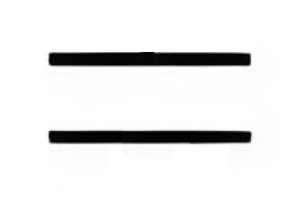
In circuit diagrams, the capacitor symbol usually appears as two parallel lines that represent the two conductive plates.
The main functions of capacitors include:
Energy storage
Noise filtering in power supplies
Signal coupling and decoupling
Timing control in RC circuits
Voltage stabilization
Because capacitors are used in power, analog, digital, and RF designs, the capacitor symbol is one of the most important schematic symbols to understand.
What Does the Capacitor Symbol Mean in a Circuit Diagram?
The capacitor symbol meaning is not limited to showing that a capacitor is present. It also helps indicate how the part behaves in the circuit and, in some cases, what kind of capacitor it is.
In a schematic, the capacitor symbol often suggests:
The component can store electrical charge.
It may filter ripple, spikes, or signal noise.
It can block DC while allowing AC to pass.
It may work with a resistor to create a timing function.
Engineers read the capacitor symbol together with nearby components. For example, in a power supply, a capacitor often handles smoothing or decoupling. In an audio or analog path, it may be used for coupling. In RF circuits, it may support matching or filtering.
What Does the Standard Capacitor Symbol Look Like?
The standard capacitor symbol is simple and easy to recognize. It is usually drawn as two parallel plates separated by a small gap.
It may also appear in a horizontal connection style:
This standard symbol usually means:
Two identical conductive plates
No polarity requirement
Use for non-polarized capacitors
Typical parts shown with this symbol include:
Ceramic capacitors
Film capacitors
Mica capacitors
Other non-polarized capacitors
Because these parts can be installed in either direction, the symbol is symmetrical.
Why Are There Different Capacitor Symbols?
Different capacitor symbols exist because capacitors are not all the same. Some are non-polarized. Some are polarized. Some are adjustable. The symbol helps the designer, assembler, and technician identify the right type quickly.
A standard non-polarized capacitor can be connected in either direction. A polarized capacitor must be connected with the correct positive and negative terminals. A variable capacitor allows the capacitance value to be adjusted.
Common symbol differences are shown below:
Capacitor Type
Symbol Feature
Typical Use
Ceramic Capacitor
Two straight plates
High-frequency filtering and decoupling
Electrolytic Capacitor
Polarity marking or curved plate
Power supply smoothing
Variable Capacitor
Arrow across the plates
Tuning and calibration circuits
Polarized Capacitor
Positive or negative indication
DC circuits and bulk capacitance
What Is the Polarized Capacitor Symbol?
A polarized capacitor symbol shows that the capacitor must be connected in the correct direction. This is common for electrolytic capacitors and tantalum capacitors.
The symbol often includes one straight plate, one curved plate, and a polarity mark near the positive terminal.
In many schematics:
The straight plate is associated with the positive side.
The curved plate is associated with the negative side.
Polarized capacitors are often used in:
Power supply filtering
Bulk energy storage
Amplifier circuits
Voltage regulation sections
This is why the keyword capacitor symbol positive negative matters so much in practical circuit work. Correct polarity prevents installation mistakes and improves reliability.
What Is the Variable Capacitor Symbol?
A variable capacitor symbol represents a capacitor whose capacitance can be adjusted. It usually looks like a normal capacitor symbol with an arrow crossing it.
The arrow indicates that the capacitance value can change.
Variable capacitors are commonly used in:
RF tuning circuits
Radio receivers
Oscillators
Matching networks
In practical designs, the variable capacitor symbol tells the reader that tuning or calibration is part of the circuit function.
What Is the Difference Between IEC and ANSI Capacitor Symbols?
The two most common symbol standards are IEC and ANSI. Both are widely recognized, but there can be small visual differences depending on the documentation source.
Standard
Full Name
Common Use Region
IEC
International Electrotechnical Commission
Europe and many international documents
ANSI
American National Standards Institute
United States
In many cases, IEC uses clean, simple parallel-plate symbols, while ANSI drawings may show more style variation for polarized parts. Modern EDA software often supports both, so engineers should be familiar with each style.
How Do You Read a Capacitor Symbol in a Schematic?
Reading a capacitor symbol in a schematic involves more than identifying the drawing. You also need to read the reference designator, capacitance value, polarity, and circuit position.
Here is what to look for:
Reference designator: Capacitors are usually labeled with the letter C, such as C1, C12, or C205.
Capacitance value: Common values include 10uF, 100nF, and 1pF.
Polarity marking: Look for a plus sign, curved plate, or other polarity notation.
Placement in the circuit: A capacitor across power rails usually works as a decoupling capacitor. A capacitor in series with a signal path often works as a coupling capacitor.
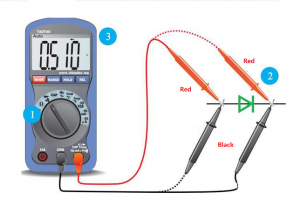
Type clues: A symmetrical symbol often suggests a ceramic capacitor symbol or other non-polarized part. An arrow suggests a variable type.
When all of these details are read together, the circuit function becomes much clearer.
What Are the Most Common Capacitor Symbols Used in Electronics?
Several capacitor symbols appear regularly in electronic schematics. Each one represents a specific capacitor family or function.
Non-Polarized Capacitor Symbol
This is the most common form. It is widely used for ceramic, film, and general-purpose capacitors.
Ceramic Capacitor Symbol
The ceramic capacitor symbol usually uses the same basic two-plate form as the standard non-polarized symbol. It is common in decoupling, bypass, and high-frequency designs.
Polarized Capacitor Symbol
The polarized capacitor symbol is used for electrolytic and tantalum capacitors where direction matters.
Variable Capacitor Symbol
The variable capacitor symbol includes an arrow and is common in tunable analog and RF circuits.
Trimmer Capacitor Symbol
This symbol is similar to a variable capacitor but is generally used for calibration rather than frequent adjustment.
Capacitor Symbol vs Resistor Symbol: What Is the Difference?
The capacitor symbol and resistor symbol are both basic schematic elements, but they represent very different electrical functions.
Component
Common Symbol Style
Main Function
Capacitor
Two parallel plates
Stores electrical energy
Resistor
Zigzag line or rectangle
Limits current flow
A capacitor affects voltage and time behavior. A resistor controls current and voltage drop. When used together, they form common building blocks such as RC filters, delay networks, and timing circuits.
Conclusion
The capacitor symbol is a small mark with a big role in electronics. It helps engineers identify capacitor types, understand polarity, and interpret circuit function quickly.
Once you understand the difference between the standard capacitor symbol, the ceramic capacitor symbol, the polarized capacitor symbol, and the variable capacitor symbol, reading schematics becomes much easier.
Whether you are working on circuit design, PCB layout design, electronics repair, or engineering education, understanding capacitor symbols is a basic but valuable skill.
EBest Circuit (Best Technology) provides professional PCB fabrication and PCBA assembly services for engineers who need reliable support from prototype to production.
Contract manufacturing electronic assembly is a strategic manufacturing model that helps OEMs turn PCB designs into finished, tested, and scalable electronic products with better speed, process control, and supply chain coordination. This article explains the engineering workflow, thermal calculations, sourcing integration, capability evaluation, production scaling, design support, electro-mechanical assembly, quality control, and global market landscape behind expedited electronic assembly services.
Common Customer Pain Points Often Look Like This:
DFM issues are found too late and delay launch.
PCB fabrication, sourcing, and assembly are split across too many vendors.
Thermal and current limits are not verified early enough.
Prototype success does not transfer smoothly into volume production.
Supplier communication is slow when urgent changes happen.
How A Manufacturer Responds To Those Pain Points:
Review Gerber, BOM, and assembly risks before release.
Combine PCB fabrication, sourcing, and PCBA under one workflow.
Validate thermal paths and current carrying capacity during engineering review.
Build processes that support both low-volume and mass production.
Use responsive project management for expedited service execution.
EBest Circuit (Best Technology) is a professional PCB and PCBA manufacturer focused on prototype, low-volume, and medium-batch electronic products that require fast turnaround and dependable engineering support. We provide PCB fabrication, component sourcing, SMT, DIP, testing, and box-build integration with a practical engineering mindset, helping customers shorten development cycles while improving manufacturability and delivery reliability. For project support, pls feel free to contact us via sales@bestpcbs.com.
What Engineering Processes Are Included In Contract Manufacturing Electronic Assembly From DFM To Final Testing?
A strong contract manufacturing electronic assembly process is not just about placing parts on a PCB. It is a controlled engineering chain that starts with design review and ends with validated product output. For expedited service, each step must be linked clearly to the next.
Typical Engineering Flow
Stage
Main Task
Core Output
DFM Review
Check manufacturability risk
DFM comments
BOM Review
Verify parts, alternates, lifecycle
BOM optimization
PCB Fabrication Prep
Confirm stack-up, finish, panelization
Fabrication release
SMT/DIP Process Setup
Define stencil, fixture, profile
Process package
Assembly Execution
Mount, solder, inspect
Assembled PCBA
Testing
AOI, X-Ray, ICT, FCT
Test records
Final Inspection
Verify workmanship and labeling
Shipment approval
Key Engineering Elements
DFM Review: pad design, spacing, via structure, solder mask clearance, fiducials, panel strategy.
In practical terms, electronics assembly contract manufacturing works best when engineering, purchasing, production, and QA are aligned from day one. That alignment is what turns a rush order into a controlled build rather than a reactive one.
How To Calculate Thermal Dissipation And Current Carrying Capacity In Contract Manufacturing Electronic Assembly Designs?
For expedited builds, thermal and electrical validation cannot be treated as a late-stage check. In contract manufacturing electronic assembly projects, overheating, trace overload, and poor heat spreading can quickly undermine reliability even if assembly quality looks fine.
1) Thermal Resistance Calculation
A simple thermal model begins with:
Where:
(R_{\theta}) = thermal resistance (°C/W)
(T_j) = junction temperature
(T_a) = ambient temperature
(P) = power dissipation (W)
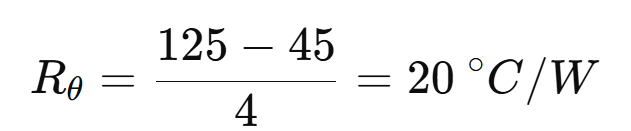
Example: If a device has a junction limit of 125°C, ambient is 45°C, and power is 4 W:
That means the full thermal path from junction to air must stay at or below 20°C/W.
2) PCB Trace Current Carrying Capacity
A widely used engineering expression based on IPC practice is:
Where:
(I) = allowable current
(\Delta T) = temperature rise
(A) = conductor cross-sectional area
(k) = layer constant
Quick Design Factors
Factor
Higher Value Effect
Engineering Impact
Copper Thickness
Increases current capacity
Better for power lines
Trace Width
Lowers resistance
Reduces temperature rise
Copper Plane Area
Improves heat spread
Better thermal stability
Thermal Vias
Moves heat vertically
Helps hot components
Airflow
Improves cooling
Lowers junction temp
What Engineers Should Check
Power components near thermal bottlenecks
Copper thickness on high-current nets
Internal vs external trace conditions
Via-in-pad or thermal via arrays under power packages
Safe margin between actual and allowable temperature rise
An experienced electronic assembly contract manufacturer does not only assemble what is drawn. It also flags thermal imbalance, copper weakness, and layout risks before they become field failures. That is especially important in power supplies, motor control boards, LED drivers, telecom modules, and industrial control systems.
In short, thermal dissipation and current capacity calculations help convert a fast build into a reliable one. Speed without thermal validation is fragile. Speed with engineering discipline is scalable.
How Do Electronic Assembly Contract Manufacturers Handle PCB Fabrication, Component Sourcing, And PCBA Integration?
Customers often struggle when PCB fabrication, procurement, and assembly are managed by separate vendors. A mature electronic assembly contract manufacturer reduces that friction by integrating the full chain into one coordinated workflow.
Logistics Coordination: incoming material control, line kitting, build scheduling, traceable shipment release.
What Good Integration Looks Like
Area
Poor Coordination Result
Integrated Result
PCB + BOM Timing
Idle assembly line
Synchronized material arrival
Shortage Handling
Last-minute delay
Approved alternates ready
Engineering Change
Document mismatch
Controlled ECO execution
Build Planning
Mixed priorities
Clear production scheduling
Practical Benefits
Fewer handoff errors.
Faster feedback between sourcing and engineering.
Shorter turnaround for prototypes.
Better traceability from bare board to final assembly.
Easier root-cause analysis when issues appear.
This is where electronic assembly contract manufacturing becomes more than a purchasing model. It becomes an execution model. For expedited service, that execution discipline is often the difference between an on-time build and a delayed launch.
What Manufacturing Capabilities Should You Evaluate In Electronic Assembly Contract Manufacturing Partners?
Not all partners that offer electronic assembly contract manufacturing have the same engineering depth or production fit. A useful evaluation should go beyond brochure language and focus on capability that affects yield, lead time, and product consistency.
Production Flexibility: prototype, NPI, low-volume, repeat batch, mass production.
Traceability System: lot control, barcode tracking, process records, test history.
Engineering Support: DFM, DFA, BOM review, alternate recommendation, process optimization.
Fast Screening Table
Capability
Why It Matters
Fine-Pitch SMT
Supports dense modern designs
BGA/X-Ray
Controls hidden solder joints
Prototype + Volume
Enables growth path
Material Sourcing Team
Reduces shortage risk
Test Engineering
Improves outgoing reliability
Process Traceability
Supports regulated industries
Questions Worth Asking
Can the supplier support both quick-turn NPI and stable repeat production?
Can it manage difficult packages and mixed assembly processes?
Does it provide engineering feedback before production starts?
How does it respond to shortages and urgent ECOs?
What evidence does it provide for quality control?
A reliable partner in electronics assembly contract manufacturing should make your product easier to launch, easier to scale, and easier to control. If it only offers placement capacity without engineering support, the risk remains with the customer.
How Does Electronics Contract Manufacturing Assembly Support Low Volume Prototyping And Mass Production?
One of the biggest challenges in electronics contract manufacturing assembly is moving smoothly from prototype to scale. A rushed prototype may prove function, but it does not automatically prove manufacturability. Good contract assembly service bridges both stages with process continuity.
Low-Volume Prototype Priorities
Fast engineering review
Manual or semi-automated flexibility
Rapid material substitution handling
Frequent revision support
Quick debug feedback
Mass Production Priorities
Stable approved BOM
Standardized work instructions
Line balancing and fixture planning
Yield monitoring
Controlled logistics and replenishment
Comparison Table
Build Type
Main Goal
Typical Focus
Prototype
Verify design
Speed and flexibility
Pilot Run
Validate process
Repeatability
Mass Production
Deliver volume
Stability and cost control
How A Good Manufacturer Supports Both
Keeps the same engineering data structure from NPI to production.
Records process settings that can be reused later.
Captures defects early and feeds them back to design.
Builds scalable sourcing plans around real demand.
Aligns inspection depth with product risk and stage.
This is why contract manufacturing electronics assembly is valuable for OEMs that expect growth. It is not just about assembling today’s boards. It is about building a repeatable path from first article to mature production.
What Engineering Services Are Provided In Contract Design And Manufacturing Electronic Assembly Projects?
In contract design and manufacturing electronic assembly projects, the supplier may contribute far more than assembly labor. The right engineering service can reduce redesign cycles, improve reliability, and speed up qualification.
Common Engineering Services
DFM and DFA review
BOM optimization
Alternate component evaluation
PCB stack-up suggestion
Thermal and current path review
Panelization support
Test point planning
Fixture and stencil design
Process profile development
Service Breakdown
Service
Value To Customer
DFM Review
Prevents fabrication and assembly defects
BOM Optimization
Improves availability and cost stability
Thermal Review
Reduces overheating risk
Test Planning
Makes debugging and validation easier
Process Setup
Improves yield on first build
Where This Helps Most
New product introduction
Mixed-technology boards
Dense PCBs with thermal load
Long-lead or shortage-prone BOMs
Products needing fast release
A supplier that supports contract design and manufacturing electronic assembly well is acting as an engineering extension of the customer, not just a production stop. For expedited service, that shared engineering effort saves time where it matters most: before material is committed and before defects multiply.
What Is Electro-Mechanical Assembly For Electronics Contract Manufacturing And Where Is It Used?
Electro-mechanical assembly for electronics contract manufacturing refers to the integration of electronic assemblies with mechanical elements such as enclosures, harnesses, connectors, switches, fans, brackets, displays, and power modules. It takes the product from board level toward system level.
Typical Scope
PCB + enclosure integration
Cable and wire harness assembly
Connector installation
Mechanical fastening
Display and HMI integration
Fan, sensor, and power module mounting
Final box-build and system test
Common Applications
Industrial control units
Medical devices
Telecom equipment
EV charging modules
Security systems
Consumer electronics
Embedded control products
Typical System-Level Benefits
Fewer assembly handoffs.
Better fit between PCB and housing.
Lower shipping and handling damage risk.
Simpler final product logistics.
More complete outgoing testing.
When OEMs need more than bare PCBA, this service becomes highly practical. It is especially useful when cable routing, connector access, thermal layout, or final mechanical packaging affects field performance.
How Does Contract Manufacturing Electronics Assembly Ensure Quality And Supply Chain Stability?
For expedited orders, quality and supply chain stability must move together. A fast build with weak sourcing control creates shortage risk. A well-sourced build with weak process control creates field risk. Strong contract manufacturing electronics assembly addresses both.
Quality Control Structure
Incoming material inspection
SPI for solder paste consistency
AOI after SMT
X-Ray for BGA and hidden joints
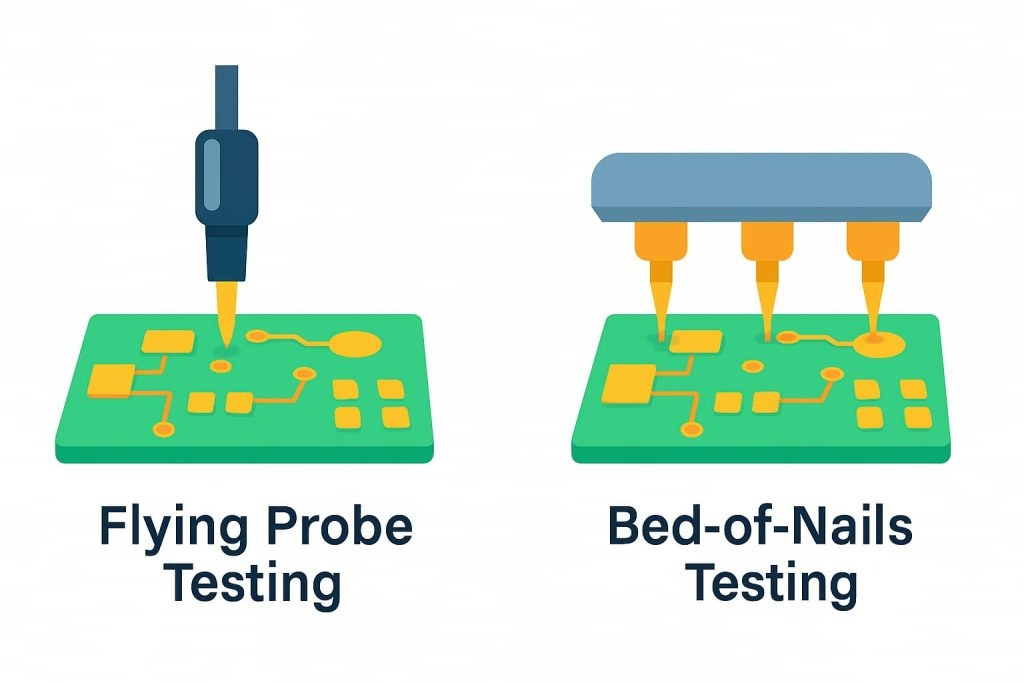
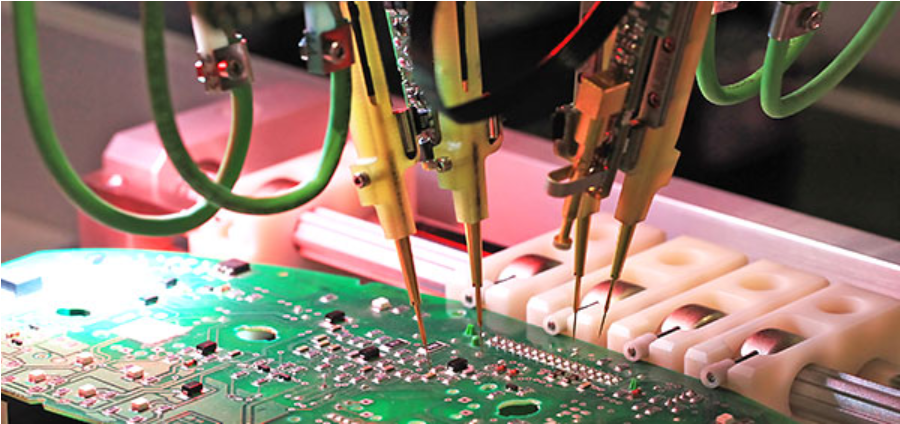
ICT or flying probe for electrical checks
Functional test for product behavior
Final visual and packaging inspection
Supply Chain Stability Methods
Approved vendor lists
Alternate part strategy
Lifecycle monitoring
Safety stock for repeat projects
Lot traceability
Shortage escalation process
Condensed Control Table
Control Area
Stabilizing Method
Material Quality
Incoming IQC
Solder Process
SPI + profile control
Hidden Joints
X-Ray inspection
Functional Confidence
ICT/FCT
Part Shortages
AVL + alternates
Traceability
Barcode and batch records
What Customers Should Expect
Transparent shortage communication.
Evidence-based quality records.
Controlled handling of substitutions.
Repeatable build documentation.
Fast response when corrective action is needed.
This is where electronics assembly contract manufacturing shows its real value. It protects both the schedule and the shipment quality. In expedited service work, those two goals must be managed together, not separately.
Who Are The Largest Electronic Contract Manufacturers For PC Board Assembly In The Global Market?
The largest electronic contract manufacturers for pc board assembly usually operate at massive global scale, serving consumer electronics, automotive, telecom, industrial, and computing markets. They are important benchmarks, but they are not always the best fit for every OEM.
Large Global EMS Players Are Known For
Very high production capacity
Broad regional manufacturing footprint
Mature supply chain influence
System-level integration capability
Strong process standardization
But Size Is Not The Only Buying Criterion
Large Global EMS
Agile Mid-Sized Specialist
Best for huge volume
Best for responsive support
Strong purchasing power
Faster engineering feedback
More layered communication
More direct project contact
High process maturity
Better fit for NPI and mixed batch
What Many OEMs Actually Need
Faster response than a mega-EMS can offer
Better support for prototypes and low-volume orders
Stronger engineering discussion during DFM and BOM review
Easier customization for mixed products
A more practical expedited service path
For many PCB-centered projects, the ideal partner is not necessarily the biggest. It is the supplier with the right mix of engineering support, assembly control, sourcing agility, and communication speed.
Ultimately, contract manufacturing electronic assembly is a high-value manufacturing approach that helps OEMs transform PCB designs into reliable products through coordinated engineering review, sourcing control, assembly execution, testing, and scalable production support. This article covered the core workflow from DFM to final testing, thermal and current calculations, integration of PCB fabrication and sourcing, partner evaluation, prototype-to-volume transition, design support, electro-mechanical assembly, quality assurance, and the global EMS landscape.
EBest Circuit (Best Technology) combines PCB fabrication, component sourcing, PCBA assembly, testing, and responsive engineering service to support expedited electronic manufacturing projects with stronger control and better communication. For RF boards, industrial controls, power electronics, medical devices, and other demanding applications, we help customers move faster with practical manufacturing support and dependable execution. If you have any electronics assembly contract manufacturing needs, pls feel free to contact us at sales@bestpcbs.com.
FAQs About Contract Manufacturing Electronic Assembly
What PCB Thickness Is Typically Used In Contract Manufacturing Electronic Assembly Projects? Most PCB assemblies use board thickness between 1.0 mm and 1.6 mm, with 1.6 mm being the most common standard for industrial electronics. However, compact devices such as IoT modules may use 0.8 mm or thinner boards, while high-power or connector-heavy designs may require 2.0 mm–3.2 mm thickness to improve mechanical rigidity and thermal performance. PCB thickness must also match connector specifications, enclosure tolerance, and impedance requirements.
What Copper Thickness Is Recommended For High-Current PCB Assemblies? Copper thickness determines how much current a trace can safely carry. In most electronics assembly contract manufacturing projects, standard copper weight is 1 oz (35 μm). For power electronics or motor control boards, engineers may choose 2 oz (70 μm) or 3 oz (105 μm) copper. Heavy-copper PCBs above 4 oz are sometimes used in power converters, LED drivers, and industrial equipment where current paths exceed 10–20 A.
What Is The Typical Reflow Soldering Temperature Profile For SMT Assembly? In electronic assembly contract manufacturing, the SMT reflow profile depends on the solder alloy used. For common lead-free SAC305 solder, the typical parameters are:
Stage
Typical Temperature
Duration
Preheat
150–180°C
60–120 s
Soak
180–200°C
60–90 s
Reflow Peak
235–250°C
20–40 s
Cooling
−3°C/sec typical
Controlled
The peak temperature must remain below most component limits, which are usually 260°C maximum.
What Is The Typical Placement Accuracy In Modern SMT Assembly Lines? Modern SMT production equipment used in electronics contract manufacturing assembly can achieve placement accuracy between ±30 μm and ±50 μm depending on machine class and component size. High-precision machines used for fine-pitch QFN, CSP, and 0201 components may achieve ±25 μm accuracy. Accurate placement is critical for preventing solder bridging, improving yield, and ensuring consistent assembly quality in high-density PCB designs.
Solder is the invisible backbone of modern electronics. Every smartphone, industrial controller, and medical device depends on thousands of tiny solder joints to create electrical connections. For decades, engineers relied on traditional tin-lead solder. Today, however, most electronics manufacturing uses lead-free alloys.
This shift created an ongoing discussion among engineers and manufacturers: leaded vs lead free solder — which one actually performs better in PCB assembly?
What Is the Difference Between Leaded vs Lead Free Solder?
The main difference between leaded vs lead free solder lies in the alloy composition. Leaded solder contains lead, while lead-free solder replaces it with other metals such as silver or copper.
Traditional solder used in electronics for decades is a tin-lead alloy, often written as Sn63/Pb37. Lead-free solder removes lead due to environmental regulations. Below is a simple comparison:
Property
Leaded Solder
Lead Free Solder
Typical Alloy
Sn63/Pb37
SAC305 (Sn96.5/Ag3/Cu0.5)
Melting Temperature
~183°C
~217-221°C
Wettability
Excellent
Moderate
Mechanical Strength
Good
Higher strength but more brittle
Environmental Impact
Contains toxic lead
Environmentally safer
Industry Compliance
Not RoHS compliant
RoHS compliant
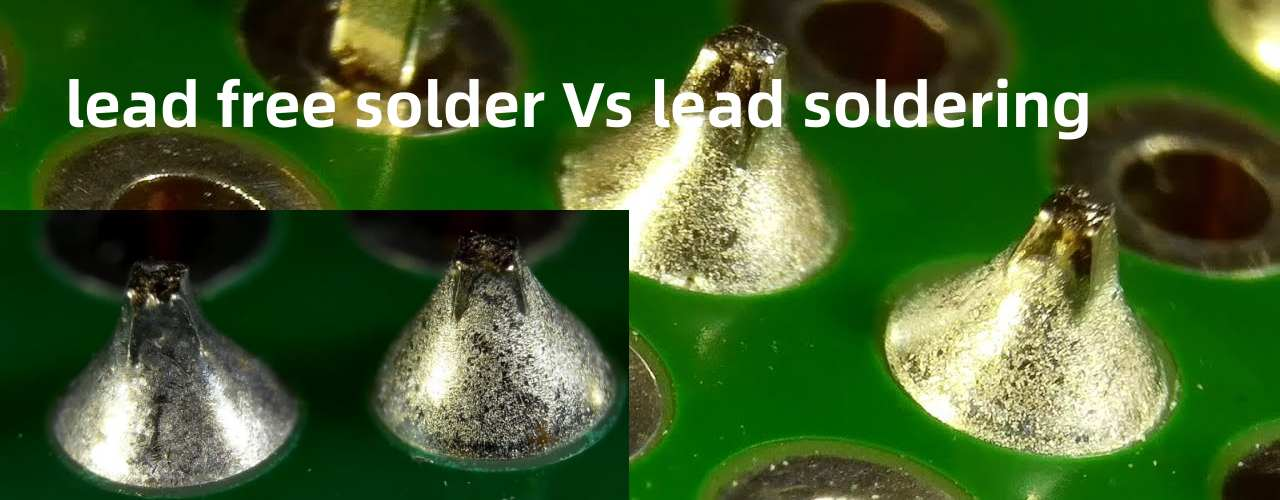
Leaded solder forms smooth and shiny joints. It flows easily during reflow. Many engineers still appreciate its process stability.
Lead-free solder focuses on environmental safety. It reduces heavy metal contamination and supports global electronics regulations.
Today, most commercial electronics rely on lead-free alloys, though leaded solder remains common in specialized sectors.
Why Did the Electronics Industry Move from Leaded to Lead Free Solder?
The transition from leaded to lead-free solder was driven mainly by environmental regulations.
Lead is a heavy metal. If discarded electronics enter landfills, lead may contaminate soil and water. Governments began addressing this concern in the early 2000s.
One of the most important regulations is the RoHS directive (Restriction of Hazardous Substances) introduced in the European Union.
RoHS restricts several materials in electronics, including:
Lead (Pb)
Mercury (Hg)
Cadmium (Cd)
Hexavalent chromium
Certain flame retardants
Under RoHS rules, most consumer electronics must avoid lead. Because of this regulation, global manufacturers shifted their production processes. Lead-free solder became the industry standard.
The move required major adjustments:
Higher reflow temperatures
New solder alloys
Improved PCB materials
More precise process control
Modern PCBA factories now design equipment and processes around lead-free assembly.
Is Leaded Solder Better Than Lead Free Solder?
The answer depends on the application. In terms of process behavior, many engineers find leaded solder easier to use. It melts at lower temperature and wets copper pads quickly.
However, lead-free solder offers strong environmental benefits and better long-term compliance.
Factor
Leaded Solder
Lead Free Solder
Process stability
Very stable
Requires tighter process control
Reflow temperature
Lower
Higher
Environmental safety
Lower
Higher
Compliance
Limited
Global standard
Mechanical strength
Flexible
Strong but harder
Leaded solder is still preferred in some specialized industries such as:
aerospace electronics
military equipment
high-reliability legacy systems
Lead-free solder dominates consumer electronics, automotive electronics, and industrial equipment. Most new electronic products today are designed around lead-free assembly processes.
What Is the Melting Point of Leaded vs Lead Free Solder?
Melting temperature is one of the most critical differences between leaded vs lead free solder.
The widely used Sn63/Pb37 alloy melts at 183°C. It has a eutectic composition. This means it transitions directly from solid to liquid without a plastic phase.
Lead-free alloys melt at higher temperatures, common lead-free alloys include:
Alloy
Composition
Melting Range
SAC305
Sn96.5 Ag3 Cu0.5
217-221°C
SAC405
Sn95.5 Ag4 Cu0.5
~217-219°C
SnCu
Tin-Copper
~227°C
Because of the higher melting point, lead-free solder requires:
higher reflow oven temperatures
more heat-resistant components
PCB laminates with higher Tg
Typical peak reflow temperatures for lead-free solder reach 240-250°C.
Why Is Lead Free Solder Harder to Work With?
Many engineers report that lead-free solder is more difficult to work with compared to leaded solder. There are several reasons for this:
1. Higher melting temperature
Lead-free alloys require higher soldering temperatures, which can increase thermal stress on components and PCB materials.
2. Reduced wetting performance
Lead-free solder tends to spread less easily across metal surfaces, making it harder to form smooth solder joints.
3. Oxidation sensitivity
Lead-free alloys oxidize more quickly at high temperatures, which can affect solder joint quality.
4. Different joint appearance
Unlike the shiny joints produced by leaded solder, lead-free joints often appear dull or grainy, which can confuse technicians during inspection.
For these reasons, PCB manufacturers must carefully control:
Reflow temperature profiles
Flux chemistry
Surface finishes such as ENIG or OSP
Lead Free vs Lead Solder: Reliability Comparison
Reliability is a major factor when evaluating lead free vs lead solder. Leaded solder has long been known for its excellent fatigue resistance and mechanical flexibility. Lead-free solder, while environmentally friendly, can be more brittle due to its alloy structure.
Reliability Factor
Leaded Solder
Lead Free Solder
Thermal fatigue resistance
High
Moderate
Mechanical flexibility
Good
Lower
Operating temperature tolerance
Moderate
Higher
Long-term reliability
Proven
Improving
Despite these concerns, improvements in lead-free alloy formulations and process control have significantly improved reliability in recent years.
What Temperature Should Be Used for Lead Free Solder?
In PCB assembly, lead-free solder requires a carefully controlled reflow temperature profile. For the commonly used SAC305 alloy, the typical reflow profile includes:
Reflow Stage
Temperature Range
Purpose
Preheat
150–180°C
Gradually warm the PCB
Soak
180–200°C
Activate flux and equalize temperature
Reflow
Above 217°C
Melt solder and form joints
Peak
240–250°C
Ensure complete solder wetting
Cooling
Controlled drop
Solidify solder joints
Maintaining the correct temperature profile ensures strong, reliable solder joints without damaging components.
Can You Mix Leaded and Lead Free Solder?
Mixing leaded and lead-free solder is generally not recommended in production environments. When the two alloys mix, they form unpredictable metallurgical structures that can affect reliability and melting behavior.
Potential problems include:
Irregular melting temperatures
Weak solder joints
Poor wetting performance
In repair or rework situations, technicians may sometimes mix alloys, but it is best practice to fully remove the old solder before applying a different alloy type.
Typical processes that use lead-free solder include:
SMT reflow soldering
Wave soldering
Selective soldering
However, certain high-reliability electronics still prefer leaded solder due to its proven long-term reliability. Examples include:
aerospace avionics
defense electronics
specialized medical equipment
These applications often operate under strict reliability requirements, where long-term performance is critical.
How to Choose Between Leaded and Lead Free Solder?
Choosing between leaded vs lead free solder depends on several factors related to your product design, regulatory requirements, and reliability needs. Consider the following points:
Choose lead-free solder if:
Your product must comply with RoHS regulations
You manufacture consumer electronics
Environmental compliance is required
Choose leaded solder if:
Your product falls under RoHS exemptions
Maximum reliability is required
The system operates in harsh environments
Most modern PCB manufacturers support both soldering technologies, depending on customer requirements.
If you are developing a new electronics product or planning PCB assembly, working with an experienced manufacturing partner can make a significant difference.
EBest Circuit (Best Technology) provides complete PCB fabrication and PCBA services, supporting prototypes, small-volume production, and complex electronics projects.
For technical consultation or manufacturing inquiries, feel free to contact: sales@bestpcbs.com
FAQs
1. Is lead free solder better than leaded solder?
Lead-free solder is better for environmental compliance and regulatory requirements. However, leaded solder is often easier to work with and historically offers excellent reliability.
2. Why is lead free solder required?
Lead-free solder is required mainly because of environmental regulations such as RoHS, which restrict the use of hazardous substances like lead in electronic products.
3. What temperature melts lead free solder?
Most lead-free solder alloys melt between 217°C and 221°C, depending on the specific alloy composition.
4. Can lead free solder cause reliability issues?
Early lead-free solder alloys had reliability concerns, but modern alloys such as SAC305 have significantly improved performance and are widely used in commercial electronics.
5. Is lead free solder required for RoHS compliance?
Yes. Products that must comply with RoHS regulations generally require lead-free solder unless the product qualifies for a specific exemption.
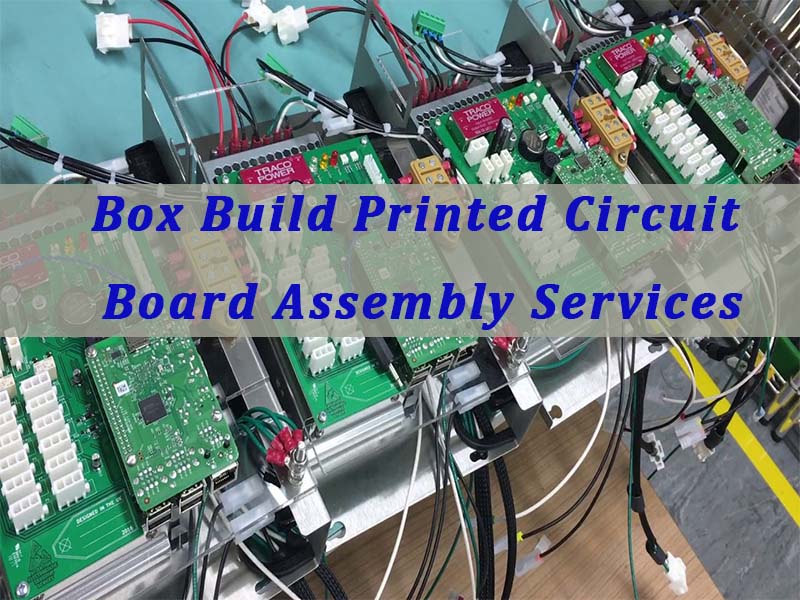
Box build printed circuit board assembly services play a critical role in modern electronics manufacturing by integrating PCB fabrication, component assembly, mechanical enclosure installation, wiring harnesses, and system testing into a single streamlined production process. This article explains how box build PCBA works, what technologies and engineering parameters are involved, and how to choose a reliable manufacturing partner for complete electronic product integration.
EBest Circuit (Best Technology) is an experienced provider of box build printed circuit board assembly services, offering a one-stop solution that covers PCB fabrication, component sourcing, PCBA manufacturing, wiring harness assembly, and full product integration. With more than 20 years of industry mileage, and certifications including ISO9001, ISO13485, IATF16949, and AS9100D, EBest supports demanding projects from industries such as medical devices, industrial control, and aerospace. If you are looking for reliable box buildprinted circuit board assembly services to support your next electronics project, feel free to contact our engineering team at sales@bestpcbs.com for professional assistance and a fast quotation.
What Are Box Build Printed Circuit Board Assembly Services?
Box build printed circuit board assembly services refer to a complete manufacturing process that integrates PCB fabrication, component assembly, wiring, enclosure installation, and final product testing.
Unlike standard printed circuit board assembly services, which only assemble electronic components onto a PCB, box build services deliver a fully integrated electronic system.
Typical processes involved in box build manufacturing include the following stages.
Manufacturing Stage
Key Function
PCB Fabrication
Bare PCB manufacturing
Component Procurement
Authorized component sourcing
SMT Assembly
Automated surface-mount placement
Through-Hole Assembly
Power and connector soldering
Cable Harness Assembly
Wiring and cable integration
Mechanical Assembly
Mounting PCBA into enclosure
System Integration
Installing modules and subsystems
Functional Testing
Electrical and system verification
Final Packaging
Labeling and shipment preparation
This comprehensive workflow allows printed circuit board pcb assembly services to evolve from simple board assembly to complete electronic product integration.
What Processes Are Included in Printed Circuit Board Assembly Services?
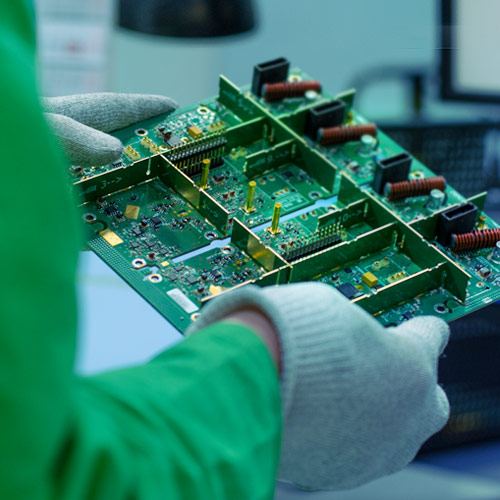
At the core of box build printed circuit board assembly services lies professional PCBA manufacturing. Reliable circuit board assembly services typically include several key production technologies.
Surface Mount Technology (SMT)
SMT is the primary assembly method used in modern electronics manufacturing. In this process, miniature electronic components are mounted directly onto PCB pads using automated placement machines.
The typical SMT workflow includes:
Solder paste printing
High-speed component placement
Reflow soldering
Automated optical inspection (AOI)
Advanced SMT production lines can place more than 50,000 components per hour, ensuring high productivity and precision.
Typical SMT assembly capabilities are shown below.
Parameter
Typical Capability
Minimum component size
01005
BGA pitch
0.3 mm
Placement accuracy
±30 μm
Maximum PCB size
600 × 500 mm
Minimum PCB thickness
0.4 mm
These capabilities are commonly required in quick turn printed circuit board assembly services for prototypes and small batch production.
Through-Hole Technology (THT)
Although SMT dominates modern electronics manufacturing, many components still require through-hole mounting for mechanical strength or high current handling.
Examples include:
Power connectors
transformers
large electrolytic capacitors
mechanical switches
These components are soldered using:
wave soldering
selective soldering
manual soldering for complex assemblies
Combining SMT and THT ensures both electrical performance and mechanical reliability in printed circuit board assembly service operations.
PCBA Testing and Inspection
Testing is critical to ensure the quality and reliability of printed circuit board assembly services.
Common inspection and testing technologies include:
Test Method
Function
AOI
Detects solder bridges, polarity errors, and missing components
X-Ray Inspection
Verifies hidden solder joints such as BGA connections
ICT (In-Circuit Test)
Checks electrical continuity and component values
Flying Probe Test
Used for prototypes without test fixtures
Functional Test
Simulates real operating conditions
Advanced printed circuit board assembly services USA providers often integrate MES systems to maintain full production traceability.
What Technical Parameters Define High-Quality Box Build PCBA?
Beyond assembly processes, several engineering parameters determine the quality and reliability of box build printed circuit board assembly services.
PCB Current Carrying Capacity
The current capacity of a PCB trace depends on copper thickness, trace width, and temperature rise.
A simplified formula derived from IPC-2152 is:
Where:
Symbol
Meaning
I
Current capacity (Amps)
ΔT
Temperature rise
A
Cross-section area of copper
k
Constant depending on layer type
For example, a 1 oz copper trace with a width of 20 mil typically carries around 2–3 A depending on cooling conditions.
This parameter becomes particularly important in industrial control box build systems where power modules are integrated.
Signal Integrity and Impedance Control
High-speed digital signals require controlled impedance traces to avoid signal reflection and distortion.
Typical impedance targets include:
Interface Type
Typical Impedance
USB differential pair
90 Ω
Ethernet
100 Ω
RF signal lines
50 Ω
LVDS
100 Ω
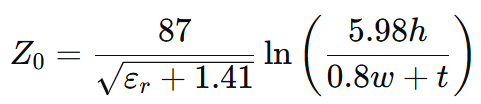
A simplified microstrip impedance equation is:
Where:
(ε_r) is dielectric constant
(h) is dielectric thickness
(w) is trace width
(t) is copper thickness
Professional printed circuit board pcb assembly services verify impedance using TDR testing.
Thermal Resistance of Electronic Components
Thermal performance is another critical engineering parameter.
The junction temperature of a semiconductor can be estimated using:
Where:
Symbol
Meaning
Tj
Junction temperature
Ta
Ambient temperature
P
Power dissipation
RθJA
Thermal resistance
Example:
If a device dissipates 5W, with thermal resistance 20°C/W, and ambient temperature 40°C, then:
Such temperature levels require improved thermal management solutions.
How Does Box Build Assembly Work in Electronics Manufacturing?
While printed circuit board assembly services focus on electronic boards, box build integrates the entire product.
A typical workflow includes:
Step
Process
1
PCB fabrication
2
PCBA assembly
3
wiring harness preparation
4
enclosure installation
5
power module integration
6
system wiring
7
functional testing
8
final packaging
A typical box build structure may include the following subsystems.
Subsystem
Example Components
Control board
MCU PCBA
Power module
DC-DC converters
Interface board
Ethernet or USB modules
Mechanical enclosure
Aluminum chassis
Cooling system
Heat sink or fan
Wiring harness
Signal and power cables
This integrated approach allows assembly services for circuit boards to deliver complete electronic products.
Thermal Management Design in Box Build Electronics
Thermal management is a key engineering challenge in box build printed circuit board assembly services, particularly when electronics operate in enclosed environments.
Aluminum PCB for Heat Dissipation
Different PCB materials provide different thermal conductivity.
Material
Thermal Conductivity
FR-4
0.3 – 0.4 W/mK
Aluminum PCB
2 – 3 W/mK
Copper base PCB
5 – 8 W/mK
Aluminum PCBs are widely used in:
LED lighting systems
power electronics
automotive electronics
Heat Sink Design
Heat dissipation through convection can be estimated using:
Where:
Symbol
Meaning
Q
Heat transfer
h
Heat transfer coefficient
A
Surface area
Ts
Surface temperature
Ta
Ambient temperature
This formula helps engineers design efficient cooling structures for high-power electronic systems.
Forced Air Cooling
When power density exceeds 10 W per PCB, passive cooling may be insufficient.
In such cases, engineers may integrate:
cooling fans
ventilation openings
heat pipes
These solutions are common in industrial and telecom box build systems.
What Industries Need Box Build Printed Circuit Board Assembly Services?
Many industries rely on box build printed circuit board assembly services for complete product integration.
A supplier capable of providing quick turn circuit board assembly services USA or Asia-based rapid manufacturing can significantly shorten product development cycles.
Why Work With a Professional Box Build PCBA Manufacturer?
A professional partner offering box build printed circuit board assembly services should provide both manufacturing capability and engineering expertise.
For example, EBest Circuit (Best Technology) provides:
over 20 years of PCB and PCBA manufacturing experience
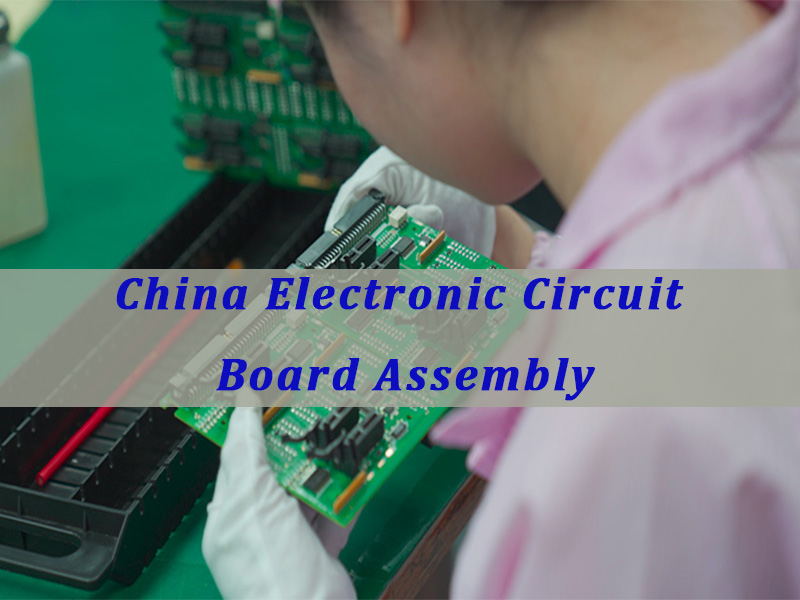
China electronic circuit board assembly plays a central role in turning electronic designs into manufacturable, testable, and scalable products for global OEMs. This article explains how a strong supply chain, sound engineering practice, and disciplined PCBA execution help buyers reduce risk, improve reliability, and move from prototype to production.
What usually makes sourcing and manufacturing difficult for customers?
Parts are available on paper, but actual lead times shift too often.
DFM issues are found too late, causing rework and delay.
PCB, sourcing, assembly, and testing are handled by different vendors.
Prototype builds go fast, but volume quality becomes unstable.
Traceability is weak, making root-cause analysis slow and costly.
A strong manufacturer solves these problems with a system, not with promises.
Review files early and issue DFM feedback before release.
Optimize BOM risk with alternative parts and sourcing strategy.
Integrate PCB fabrication, component sourcing, PCBA, and testing.
Build stable processes for both prototypes and repeat production.
Use digital traceability to track material lots, process status, and product history.
EBest Circuit (Best Technology) is a professional PCB and PCBA manufacturer focused on helping engineers and OEM teams bring products to market with less friction. With in-house PCB and PCBA factories, DFM pre-check, BOM optimization support, 20 years of manufacturing experience, and a digital workshop with fast traceability, EBest supports prototype, low-volume, and ongoing production projects with stronger execution. For project discussion or quotation, pls feel free to contact us via sales@bestpcbs.com.
Why Do Global Brands Choose A China Electronic Circuit Board Assembly Factory?
Global brands choose a China electronic circuit board assembly factory for one reason above all: the right supplier can combine engineering support, cost control, production scale, and supply chain depth in one place. In electronics, that combination matters more than low unit price alone.
A capable China factory is rarely just an assembly shop. The stronger ones operate as manufacturing partners. They support file review, material selection, procurement control, process planning, SMT and THT assembly, testing, and delivery management. This matters because most project failures happen between these steps, not inside one step.
Here are the main reasons global brands keep sourcing from China:
Dense component ecosystem China has a deep electronics supply base, which improves access to circuit board electronic components and reduces sourcing friction.
Integrated manufacturing flow PCB fabrication, stencil making, SMT, DIP, box build, and testing can be coordinated faster.
Better prototype-to-production transition The same team can often support NPI, pilot run, and repeat orders.
Engineering responsiveness Strong suppliers do not simply build to print. They flag layout, pad, thermal, and assembly risks early.
Cost-to-capability balance Buyers often get a better mix of technical support, lead time, and manufacturing value.
A quick comparison makes this clearer:
Factor
Strong China Supplier
Fragmented Multi-Vendor Model
PCB + PCBA coordination
Fast
Slow
BOM sourcing visibility
High
Low
Engineering feedback
Early
Delayed
Prototype response
Flexible
Often rigid
Supply chain leverage
Strong
Limited
For buyers, the real attraction is not geography by itself. It is operational concentration. When sourcing, engineering, and manufacturing are aligned, project risk drops. That is why a strong China electronic circuit board assembly factory remains a practical choice for global OEMs.
How To Choose A Reliable China Electronic Circuit Board Assembly Manufacturer For OEM Projects?
Choosing a reliable China electronic circuit board assembly manufacturer is a technical and commercial decision at the same time. A good website or a low quote is not enough. Buyers need evidence that the supplier can support the product, not just produce the board.
Start by checking whether the manufacturer understands your project type. Industrial control, medical electronics, UPS power boards, communication devices, and automotive electronics do not share the same process priorities. The supplier should know what matters for your application, whether that is thermal control, creepage distance, conformal coating, functional test, or long-life solder joint reliability.
Use the following evaluation points:
Engineering review capability Ask whether they provide DFM, DFA, and BOM risk review before production.
Factory ownership and control In-house PCB and PCBA resources usually mean better schedule control and clearer accountability.
Certification fit ISO9001 is baseline. ISO13485, IATF16949, and AS9100D matter for regulated sectors.
Supply chain strength A strong sourcing network reduces risk for shortages, alternates, and counterfeit screening.
Testing capability AOI, X-ray, flying probe, ICT, and functional test planning all matter.
Traceability level Good traceability supports corrective action and quality consistency.
Production flexibility The supplier should handle prototype, low-volume, and repeat orders without losing process discipline.
A useful screening table is below:
Evaluation Point
What To Ask
Why It Matters
DFM support
Do you issue a pre-production DFM report?
Prevents avoidable defects
BOM review
Can you suggest alternates?
Reduces sourcing risk
Process fit
Have you built similar products?
Improves yield
Quality system
Which certifications do you hold?
Confirms process maturity
Traceability
Can you trace lots and process records?
Speeds root-cause analysis
Delivery model
Can you support prototype and volume?
Avoids supplier switching
If a manufacturer only talks about price, be careful. A reliable OEM partner talks about manufacturability, part risk, process windows, test coverage, and long-term consistency. That is the more meaningful sign of a dependable China electronic circuit board assembly manufacturer.
What Processes Are Involved In Electronic Circuit Board Assembly?
Electronic circuit board assembly is a structured manufacturing chain, not a single workstation task. Each stage affects solder quality, electrical reliability, and delivery stability. When buyers understand the process, they can better evaluate suppliers and avoid unrealistic expectations.
A standard electronic circuit board assembly flow usually includes the following steps:
File Review And Process Preparation Gerber, BOM, centroid, assembly drawing, and special notes are checked. This stage confirms package data, polarity, panelization, stencil design, and process route.
Material Procurement And Incoming Inspection PCB, ICs, passives, connectors, and mechanical parts are sourced and verified. Part number control is critical here, especially for electronic circuit board components with multiple approved variants.
SMT Placement Pick-and-place machines mount SMD parts according to the programmed coordinates.
Reflow Soldering The assembly passes through a controlled temperature profile to form solder joints.
THT / DIP Assembly Through-hole parts are inserted and soldered by wave, selective, or hand soldering, depending on design.
Inspection And Testing AOI, X-ray, flying probe, ICT, or functional checks verify product quality.
Cleaning, Coating, Final Assembly, And Packaging Depending on product needs, waterproofing electronic circuit boards, conformal coating, or box-build steps may follow.
A simplified process map looks like this:
Stage
Main Objective
DFM + process planning
Prevent build risk
Sourcing + IQC
Control material quality
Solder paste printing
Ensure joint consistency
SMT + reflow
Build core connections
THT soldering
Complete mixed assembly
Inspection + test
Catch defects
Final assembly
Prepare for delivery
Some buyers still think soldering electronic circuit boards is the main difficulty. In reality, success depends on how well the full chain is managed. The strongest suppliers treat assembly as a controlled system, not an isolated operation. That is what keeps quality stable in China electronic circuit board assembly projects.
How To Calculate Current Capacity And Trace Width For Electronic Circuit Boards?
Current capacity and trace width are basic engineering questions, but they directly affect safety, temperature rise, voltage drop, and long-term reliability in electronic circuit boards. If the trace is too narrow, resistive heating increases. If the trace is overdesigned, routing space is wasted.
In practice, engineers often estimate width based on IPC guidance, copper thickness, allowable temperature rise, and whether the trace is on an outer or inner layer. Outer layers dissipate heat better, so they usually carry more current at the same width.
A practical design relationship starts with resistance:
Where:
R = trace resistance
ρ = resistivity of copper
L = trace length
A = cross-sectional area
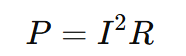
Power loss follows:
This is why a narrow high-current trace heats up quickly. Higher current and higher resistance both increase dissipation.
Here is a simple engineering reference for outer-layer traces at moderate temperature rise:
Copper Weight
Current
Typical Minimum Trace Width
1 oz
1 A
0.25 mm
1 oz
3 A
0.80 mm
1 oz
5 A
1.50 mm
2 oz
5 A
0.80 mm
2 oz
10 A
2.00 mm
These are not universal values. Final design still depends on:
Ambient temperature
Trace length
Copper thickness
Allowed temperature rise
Airflow
Internal vs outer layer
Safety margin
For power products such as china oem ups inverter electronic circuit board assembly, this topic is especially important because DC bus traces, battery paths, and switching nodes often carry high current. Engineers may use wider copper pours, heavier copper, parallel traces, or bus-bar support instead of relying on standard routing rules alone.
A sound rule is simple: calculate first, then validate thermally. Current design for electronic circuit boards should never be based on guesswork if the board handles power.
How To Calculate Power Loss And Thermal Dissipation In Electronic Circuit Board Design?
Power loss and thermal dissipation are among the most practical parts of electronic circuit board design. If heat is not managed well, even a board that passes initial test may fail in the field. Thermal design is therefore not a cosmetic improvement. It is a reliability requirement.
The first step is to identify the main heat sources:
Power MOSFETs
IGBTs
Linear regulators
DC-DC converters
Shunt resistors
Transformers
Diodes
High-current copper paths
Basic conduction loss can be estimated by:
For a MOSFET:
For switching devices, total loss also includes switching loss:
Thermal rise can then be estimated from thermal resistance:
Where:
ΔT = temperature rise
P = power dissipation
θ = thermal resistance from device to ambient
Example:
If a device dissipates 2 W and the effective thermal resistance is 25°C/W, then:
If ambient is 40°C, the device junction region may approach 90°C or higher depending on stack-up and cooling conditions.
Useful thermal control methods include:
Wider copper pours for heat spreading
Thermal vias under hot packages
Thicker copper for high-current sections
Metal-core or IMS structures when heat density is high
Heatsinks or chassis coupling
Spacing optimization around hot parts
Airflow path planning
A compact design summary is below:
Thermal Issue
Design Action
High copper loss
Increase width or copper weight
Hot power device
Add thermal vias and copper area
High local temperature
Improve spacing and airflow
Repeated overload risk
Add margin in component rating
Uneven heat spread
Use plane balancing
For UPS, inverter, and industrial control boards, thermal design must be addressed early. That is especially true for china oem ups pcba inverter electronic circuit board assembly, where switching loss, magnetic heating, and current density all interact. Good thermal design protects not only components, but also solder joints, laminate life, and overall product stability.
What Are The Key Electronic Circuit Board Components Inside Modern PCBA?
Modern PCBA is made from far more than a bare electronic printed circuit board. The final assembly is a complete electrical and mechanical system built from many functional blocks. Understanding these blocks helps buyers evaluate both design complexity and sourcing difficulty.
The key electronic circuit board components usually include the following categories:
Integrated Circuits (ICs) MCUs, processors, memory, drivers, interface chips, and power controllers.
Passive Components Resistors, capacitors, inductors, ferrite beads, and filters.
Power Devices MOSFETs, IGBTs, rectifiers, regulators, and protection parts.
Connectors Board-to-board, wire-to-board, RF, power, and I/O connectors.
Electromechanical Parts Relays, switches, fans, and transformers.
Protection Components TVS diodes, fuses, MOVs, current sensors, and isolation devices.
Support Materials Solder paste, flux, underfill, conformal coating, and thermal interface materials.
A quick component-level view:
Component Group
Typical Function
MCU / control IC
Logic and system control
Resistor / capacitor
Bias, filter, timing, energy storage
Inductor / transformer
Energy conversion
MOSFET / IGBT
Power switching
Connector
Signal or power interface
TVS / fuse
Protection
In sourcing terms, not all components behave the same. Some are stable catalog parts. Others are allocation-sensitive, lifecycle-sensitive, or region-dependent. That is why a strong supply chain matters. A manufacturer with BOM optimization ability can identify risk early and suggest approved alternatives before production is blocked.
For buyers, this is a practical point. The performance of electronics circuit boards depends not only on design, but also on whether the right parts are sourced, verified, stored, assembled, and tested correctly. In that sense, component control is one of the foundations of successful China electronic circuit board assembly.
What Is China OEM UPS Inverter Electronic Circuit Board Assembly Used For?
China OEM UPS inverter electronic circuit board assembly is mainly used in power conversion systems where stable backup power and controlled AC output are required. This includes not only classic UPS products, but also many adjacent applications in energy storage, industrial backup, and power conditioning.
An inverter PCBA inside a UPS typically handles control, switching, sensing, protection, and power conversion tasks. It may include gate-drive circuits, MCU control, voltage feedback, current sensing, communication interfaces, and protection logic. In more advanced designs, the board also supports battery management, remote monitoring, and fault diagnosis.
Common application fields include:
Data Centers UPS systems protect servers and storage from power interruption.
Telecom Infrastructure Backup power keeps communication networks active during grid loss.
Medical Equipment Critical systems need continuous and controlled power.
Industrial Automation PLC cabinets, control systems, and factory equipment often require backup support.
Security And Monitoring Surveillance and access systems benefit from stable emergency power.
Energy Storage And Hybrid Power Some inverter platforms share architecture with UPS power stages.
A simple application table:
Application
Why Inverter PCBA Matters
Data center UPS
Stable backup AC output
Telecom power
Network continuity
Medical support equipment
High reliability requirement
Industrial control
Reduced shutdown risk
Security system
Power continuity
From a manufacturing viewpoint, china oem ups inverter electronic circuit board assembly service usually requires closer control than standard consumer boards. These products often involve:
Higher voltage spacing
Thermal management needs
Power-device solder quality
Protective coating
Burn-in or functional loading
Stronger traceability
This is why buyers in the UPS sector often prefer suppliers with both power-electronics experience and a stronger component network. For this category, manufacturing discipline is as important as assembly capacity.
How To Test Electronic Circuit Board Reliability Before Product Delivery?
Testing electronic circuit boards before delivery is not about checking whether the board powers on once. It is about reducing the chance of hidden defects, intermittent failure, and field return. Reliability testing should be layered, with each method targeting a different risk.
The right test plan depends on the product, but a solid approach often includes the following methods:
X-Ray Inspection Useful for BGAs, QFNs, hidden solder joints, and void analysis.
Flying Probe Or ICT Verifies continuity, isolation, and certain component-level conditions.
Functional Test Confirms the board operates under defined input and output conditions.
Burn-In Or Aging Test Exposes early-life weaknesses under stress or continuous operation.
Environmental Or Special Tests Depending on the project, this may include vibration, humidity, thermal cycling, or waterproofing electronic circuit boards through coating validation.
A simple test matrix is below:
Test Method
Main Purpose
AOI
Visible assembly defect screening
X-Ray
Hidden solder verification
Flying probe / ICT
Electrical continuity check
Functional test
Product behavior verification
Burn-in
Early failure screening
Coating inspection
Surface protection validation
For engineers asking how to test electronic circuit board assemblies effectively, the answer is to combine process inspection with electrical and functional verification. No single test catches every risk. For example, AOI will not reveal all internal solder voids, and functional test may not reveal latent process weakness if coverage is too narrow.
That is why testing electronic circuit boards should be planned at design stage whenever possible. Test points, fixture logic, firmware states, and pass/fail thresholds should be prepared early. Good testing is not added at the end. It is built into the product strategy.
Why Is Contract Manufacturing For Electronic Printed Circuit Board Important For OEM Electronics?
Contract manufacturing for electronic printed circuit board projects is important because most OEMs do not want to build an internal factory for every product line. They want to focus on design, market access, software, system integration, or brand growth, while relying on specialized manufacturers for execution.
The value of contract manufacturing goes beyond labor. A strong manufacturing partner provides:
Process engineering
Procurement control
Quality management
Capacity flexibility
Compliance support
Delivery planning
Cost structure improvement
This is especially important when products move through multiple phases. The needs of EVT, DVT, PVT, pilot run, and recurring production are not identical. A contract manufacturing partner can help bridge those phases without forcing the OEM to rebuild the supply chain every time.
Here is why the model works well for OEM electronics:
OEM Need
Contract Manufacturing Advantage
Faster market launch
Existing process and factory setup
Lower fixed cost
No in-house line investment
Better sourcing reach
Stronger supplier network
Flexible production volume
Prototype to mass support
Quality discipline
Established control plans
For products involving electronic circuit board assembly, OEM buyers also benefit from process knowledge they may not fully maintain in-house. This includes soldering electronic circuit boards, fixture design, traceability systems, thermal process windows, and yield improvement methods.
The strongest contract manufacturers do more than build. They help prevent risk. That is why contract manufacturing remains important for OEM electronics, especially when reliability, speed, and supply-chain resilience all matter at the same time.
Why Choose EBest Circuit (Best Technology) For China Electronic Circuit Board Assembly Services?
Choosing a PCBA partner should come down to whether the supplier can help your team make better manufacturing decisions, not just whether they can place parts on a board. EBest Circuit (Best Technology) is built around that idea.
For China electronic circuit board assembly services, EBest combines engineering support, in-house manufacturing control, sourcing capability, and practical execution for prototype and low-volume OEM projects. The goal is simple: help engineers move faster while lowering avoidable manufacturing risk.
Key strengths include:
One-Stop Integration PCB fabrication, parts sourcing, PCBA assembly, and testing are coordinated in one system.
Prototype And Low-Volume Flexibility This is valuable for product validation, engineering change, and faster design iteration.
Complete Certifications ISO9001, ISO13485, IATF16949, and AS9100D support multi-industry requirements.
In-House Factory + Supplier Network Our PCB and PCBA factories work with 1000+ supply-chain partners to strengthen quality and lead-time control.
20 Years Of Experience We have supported 10,000+ engineers and served 1,800+ customers across different industries.
Fast PCBA Delivery Many projects can be supported with about 1.5-week rapid turnaround, depending on product complexity and material readiness.
For OEMs looking for electronic circuit board manufacturers that understand both engineering and delivery, EBest offers a more complete model than a simple assembly vendor. For quotation, file review, or project discussion, contact sales@bestpcbs.com.
In closing, China electronic circuit board assembly is far more than a sourcing phrase; it represents the full path from engineering files and component strategy to manufacturing control, testing discipline, and final product reliability. This article has shown how a strong supply chain supports better OEM outcomes through factory selection, assembly process control, current and thermal calculation, component management, UPS inverter applications, and pre-delivery testing.
EBest Circuit (Best Technology) stands out with DFM and BOM optimization capability, in-house PCB and PCBA factories, 1000+ supply-chain partners, digital traceability, 20 years of manufacturing experience, and rapid PCBA turnaround for prototype and low-volume projects. To discuss your next China electronic circuit board assembly project, pls contact us via sales@bestpcbs.com.
FAQs About China Electronic Circuit Board Assembly
1. How do I choose a reliable China PCBA manufacturer?
When selecting a China electronic circuit board assembly partner, engineers usually evaluate several criteria: manufacturing capability, quality control system, engineering support, and communication efficiency. Reliable manufacturers typically provide DFM review, component sourcing assistance, automated inspection processes such as AOI or X-ray, and international certifications like ISO9001 or IATF16949.
2. What files are required for China electronic circuit board assembly?
To start a PCB assembly project, manufacturers normally require a set of engineering documents. These usually include Gerber files for PCB fabrication, a Bill of Materials (BOM) listing all components, pick-and-place files for SMT machines, and assembly drawings. Providing complete documentation helps avoid manufacturing errors and ensures faster production scheduling.
3. What should engineers check before sending PCB designs to China for assembly?
Before submitting a PCB design for assembly, engineers should review manufacturability and testability. Important checks include component spacing, solder mask clearance, footprint accuracy, and thermal management for high-power components. Many professional PCBA suppliers also provide Design for Manufacturing (DFM) feedback to optimize the design before mass production.
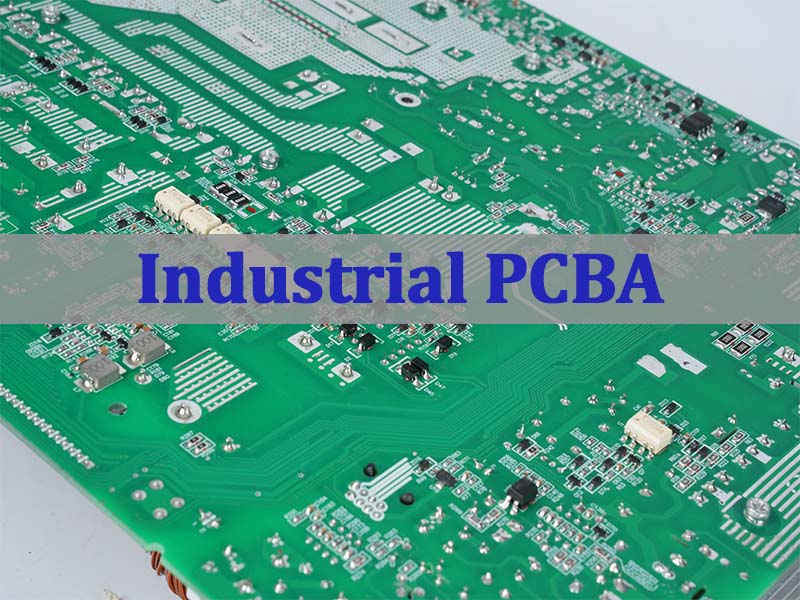
Industrial Control PCBA is critical for automation systems, providing stable signal control, high reliability, and long lifecycle performance. In this article, we will explore how industrial control PCBA works, what engineering requirements define reliable industrial controllers, and how manufacturers ensure stable long-term production for automation systems.
EBest Circuit (Best Technology) is a credible PCB and PCBA manufacturer with extensive industry mileage gained through 20 years of supporting demanding engineering projects across multiple industries. We work with many name-brand customers located in the United States, Germany, and Israel, delivering reliable manufacturing solutions tailored to their technical standards. By combining experienced engineering support, stable supply chains, and efficient production systems, EBest provides cost-effective PCB and PCBA services that help customers move from prototype to volume production.
What Makes Industrial Control PCBA Essential For Modern Automation Systems?
An industrial control PCBA is a printed circuit board assembly designed to manage and control industrial equipment. It integrates electronic components that perform signal processing, data communication, system monitoring, and device control.
Industrial control boards are widely used in:
PLC controllers
Robotics systems
Motor drives
CNC machines
Industrial IoT gateways
Power management equipment
These boards process sensor signals and control actuators such as motors, valves, or relays. They often communicate with upper-level systems like SCADA platforms or industrial networks.
A typical industrial controller PCBA includes:
Microcontrollers or industrial processors
Analog and digital signal circuits
Communication interfaces (RS485, CAN, Ethernet)
Power conversion circuits
Protection components and isolation circuits
Because industrial systems operate continuously, reliability becomes the most critical design goal. Even a small failure can interrupt production and cause significant economic losses.
What Performance Requirements Define Industrial Control Equipment PCBA In Harsh Environments?
Industrial environments place strict requirements on industrial control equipment PCBA. Unlike consumer electronics, these systems must maintain stable performance under difficult operating conditions.
Common environmental challenges include:
High temperature operation
Electrical noise from motors
Mechanical vibration
Dust and humidity
Unstable industrial power systems
To meet these requirements, engineers often design industrial PCBA with enhanced reliability features.
Key Performance Requirements
Requirement
Engineering Solution
Temperature tolerance
High Tg PCB materials and thermal design
Electromagnetic compatibility
Ground planes and EMI shielding
Electrical isolation
Optocouplers or digital isolators
Vibration resistance
Reinforced connectors and mechanical support
Power stability
Industrial grade voltage regulators
Many industrial boards operate in temperature ranges from -40°C to 85°C, and some specialized equipment must support even wider ranges.
Additionally, electromagnetic interference (EMI) from motors and inverters is common in factories. Engineers often use multi-layer PCB designs with dedicated ground planes to reduce noise and maintain signal integrity.
How Does Industrial Control Board PCBA Prototype Assembly Validate Hardware Before Mass Production?
Before large-scale manufacturing begins, engineers usually create a industrial control board PCBA prototype assembly. This prototype stage is critical for validating hardware design and ensuring system stability.
Prototype assembly allows engineers to evaluate several important aspects:
Hardware functionality
Signal integrity
Thermal performance
EMI compatibility
Firmware interaction
During this phase, engineers perform tests such as:
Functional testing of control algorithms
Communication interface verification
Thermal stress testing
Noise and EMI evaluation
If design issues are discovered, engineers can adjust PCB layout, component selection, or firmware configuration before mass production.
Prototype PCBA also helps verify manufacturability. Assembly engineers analyze solder joint quality, component placement accuracy, and potential production risks.
This early validation stage significantly reduces the risk of production defects and costly design changes later.
What Design Principles Ensure Reliable PCBA For Industrial Controller Systems?
Designing PCBA for industrial controller applications requires careful engineering decisions. Industrial controllers must remain stable during long operation cycles and under varying environmental conditions.
Several design principles are widely used in industrial PCBA development.
1. Robust Power Design
Industrial equipment often operates with fluctuating power sources. Engineers design multi-stage power regulation circuits to stabilize voltage supply.
Typical power architectures include:
DC-DC conversion modules
Over-voltage protection circuits
Reverse polarity protection
These circuits protect sensitive components from power disturbances.
2. Strong EMI And Noise Protection
Factories contain many electrical noise sources. Motors, inverters, and switching power supplies generate electromagnetic interference.
Engineers reduce EMI using several methods:
Multi-layer PCB grounding structure
Differential signal routing
Shielding and filtering circuits
Ferrite beads and common mode chokes
These design strategies ensure stable signal transmission.
3. Thermal Management
Industrial electronics often operate continuously. Heat accumulation can affect component reliability.
Thermal design techniques include:
Large copper planes
Thermal vias under power devices
Heat sinks and airflow design
Proper thermal design helps maintain long operating lifetimes.
4. Long Lifecycle Component Selection
Industrial systems often remain in service for more than ten years. Engineers choose components with long lifecycle availability to avoid redesign.
Industrial grade components also provide higher reliability compared with consumer parts.
How Is PCBA Industrial Controller Manufacturing Optimized For Long Lifecycle Products?
Manufacturing PCBA industrial controller boards requires strict process control. Industrial products demand consistent quality across many production cycles.
These structures improve electrical stability and thermal performance.
Precision SMT Assembly
Surface mount technology ensures accurate component placement. Automated equipment such as SPI, AOI, and X-ray inspection helps detect assembly defects early.
These tools ensure consistent manufacturing quality.
Supply Chain Management
Industrial control systems often require many electronic components. Professional manufacturers maintain strong supply chain networks to secure reliable component sourcing.
This reduces component shortages and production delays.
How To Evaluate A Professional Industrial Control PCBA Supplier For Stable Production?
Selecting the right industrial control PCBA supplier directly affects product reliability and long-term production stability.
Several key factors should be evaluated.
Manufacturing Experience
Industrial control electronics require specialized knowledge. Manufacturers with long industry experience better understand automation system requirements.
Quality Certifications
Reliable PCBA suppliers often maintain certifications such as:
These standards demonstrate structured quality management.
Engineering Support
Professional suppliers usually provide technical support including:
DFM review
PCB stackup recommendations
Assembly optimization
This collaboration improves overall product reliability.
Production Capacity
Industrial products may require both prototype and mass production. A strong PCBA partner should support flexible production volumes.
What Capabilities Should A PCBA Supplier For Industrial Control Provide To OEM Manufacturers?
A qualified PCBA supplier for industrial control should provide more than simple assembly services. Industrial systems require complete manufacturing support.
Important capabilities include:
Capability
Why It Matters
PCB fabrication
Integrated manufacturing improves quality control
Component sourcing
Reliable supply chain reduces production risk
SMT assembly
High precision assembly ensures stability
Functional testing
Ensures controller operation before shipment
Traceability systems
Supports long lifecycle product management
Manufacturers with integrated PCB and PCBA services can often provide faster production cycles and better process control.
In a nutshell, industrial automation continues to expand across manufacturing industries. Reliable electronics are essential for maintaining stable production systems. Industrial control PCBA plays a central role in controlling machines, processing signals, and managing industrial communication networks.
Designing and manufacturing these boards requires strong engineering expertise. Factors such as thermal design, EMI protection, robust power management, and strict testing procedures all contribute to long-term reliability.
Working with an experienced PCBA manufacturer helps automation companies reduce development risk and achieve stable product performance.
If you are looking for professional support for industrial controller electronics, feel free to contact our engineering team via sales@bestpcbs.com. Our team will be happy to assist with your industrial control PCB and assembly projects.
FAQs About Industrial Control PCBA
What Is Industrial Control PCBA?
Industrial control PCBA is a printed circuit board assembly designed for automation systems such as PLC controllers, robotics equipment, and industrial communication devices.
What Is The Difference Between Industrial PCBA And Consumer Electronics PCBA?
Industrial PCBA focuses on reliability and long-term operation. Consumer electronics prioritize cost and compact design.
Industrial boards often include stronger protection circuits and higher grade components.
How Long Does Industrial Controller PCBA Typically Last?
Many industrial controllers operate for 10 to 15 years when properly designed and maintained.
Long lifecycle components and robust PCB design help achieve this durability.
What PCB Materials Are Common For Industrial Control Boards?
Most industrial boards use high Tg FR-4 materials, while some power control systems may require thicker copper layers or specialized laminates.
These materials improve thermal stability and electrical performance.
How Important Is Testing In Industrial PCBA Manufacturing?
Testing is extremely important. Industrial controller boards often undergo AOI inspection, electrical testing, and functional testing to ensure stable operation.
These tests help detect manufacturing defects early.
A 4 layer PCB assembly manufacturer is a specialized provider that manages the entire process, from fabricating the 4-layer printed circuit board to populating it with components, ensuring a functional, ready-to-use electronic assembly. This article comprehensively explores the 4-layer PCB ecosystem, covering the manufacturing process, cost drivers, the strategic advantage of Chinese suppliers, critical design and assembly considerations, and how to select a reliable partner for your project.
Choosing the right SMT partner for your 4-layer PCB project can be daunting. What are the most common pitfalls that derail projects, increase costs, and compromise quality?
Signal Integrity Issues – Poor stackup design can cause EMI, crosstalk, and signal instability in sensitive circuits.
DFM Errors Causing Delays – Designs that exceed manufacturing capability often require redesign and multiple revisions.
Complex BOM and Component Sourcing – Managing component supply can delay production, especially during shortages.
Insufficient Testing – Without proper testing, defective boards may reach the final product stage.
High Costs for Prototypes or Small Batches – Many manufacturers focus mainly on high-volume production.
Partnering with an expert 4 layer PCB assembly manufacturer directly addresses these pain points through integrated services and deep expertise.
Optimized Stackup & SI Analysis – Ensure signal integrity during the 4 layer pcb design for manufacturability stage.
Free DFM Review – Identify fabrication and assembly risks before production begins.
Integrated Component Sourcing – Manage the full BOM through stable global supply networks.
Comprehensive Testing – Electrical and functional testing verify board performance before shipment.
Flexible Production – Support both prototypes and volume manufacturing as a reliable 4 layer pcb assembly manufacturer.
At EBest Circuit (Best Technology), a professional 4 layer pcb and assembly manufacturer. Our vertically integrated services, from advanced 4 layer pcb manufacturing to precision assembly and rigorous testing, ensure quality, reliability, and on-time delivery. We empower your designs with expert engineering support, including a crucial Free DFM Review, to de-risk your project lifecycle. Pls feel free to contact our team anytime to start your 4 Layer PCB prototype and assembly project via sales@bestpcbs.com.
How Does The 4 Layer PCB Manufacturing Process Work From Fabrication To Assembly?
The journey from design files to a functional 4-layer PCB assembly is a meticulous, multi-stage process. It seamlessly integrates board fabrication (PCBA) with component assembly (PCBA) to produce a complete electronic module.
Fabrication (The Bare Board):
This process creates the physical 4-layer laminated board.
Inner Layer Imaging: The core layers (L2 & L3) are coated with photoresist, exposed to UV light through the circuit pattern film, and developed to etch away unwanted copper.
Oxidation & Lamination: The etched inner layers are oxidized to improve adhesion. They are then stacked with prepreg (insulating layers) and outer copper foils (L1 & L4) and laminated under high heat and pressure into a single board.
Drilling & Plating: Holes for vias and through-hole components are drilled. The entire panel undergoes electroless and then electrolytic copper plating to metallize the hole walls, creating electrical connections between layers.
Outer Layer Patterning: A process similar to Step 1 is applied to define the circuitry on the outer layers (L1 & L4).
Solder Mask & Surface Finish: A protective epoxy layer (solder mask) is applied, leaving only pads exposed. A surface finish (e.g., ENIG, HASL) is then applied to the exposed copper to prevent oxidation and aid solderability.
Silkscreen & Electrical Test: Component designators and logos are printed. Each board undergoes electrical testing (e.g., Flying Probe) to verify continuity and isolation.
Assembly (PCBA – Populating the Board):
Solder Paste Application: Solder paste is precisely deposited onto the component pads via a stencil.
Component Placement: Surface Mount Devices (SMDs) are accurately placed onto the pasted pads by a pick-and-place machine.
Reflow Soldering: The board passes through a reflow oven where the solder paste melts, creating permanent electrical and mechanical connections.
Through-Hole & Mixed-Technology: Any Through-Hole (THT) components are inserted, often by hand or automated, and soldered, typically via wave soldering or selective soldering.
Cleaning & Conformal Coating (Optional): Flux residues are cleaned. A protective conformal coating may be applied for harsh environments.
Final Assembly & Testing: The assembled board undergoes final inspection, programming, and functional testing.
In summary, the 4 layer pcb manufacturing process is a symphony of precise chemical, mechanical, and thermal steps, culminating in assembly to transform a design into a reliable electronic heart.
What Factors Affect Cost, Lead Time, And Quality In 4 Layer PCB Manufacturing?
Understanding the drivers behind cost, lead time, and quality helps engineers plan projects and choose the right manufacturing partner. These factors are closely connected.
Key Factors Influencing 4 Layer PCB Manufacturing
Factor
Impact on Cost
Impact on Lead Time
Impact on Quality
Board Complexity
High
Medium
Critical
Material Selection
High
Low–Medium
Fundamental
Board Quantity
Lower at volume
Low
Stable
Layer Count
Medium
Low
Improves SI
Surface Finish
Medium
Low
Important
Testing Rigor
Medium
Medium
Essential
Geographical Location
Lower in Asia
Variable
Process dependent
Quick Explanation of These Factors
Board Complexity Dense routing, fine traces, HDI structures, and tight tolerances increase fabrication difficulty and production cost.
Material Selection Standard FR-4 is economical, while high-Tg, RF, or specialty laminates raise material cost but improve performance.
Board Quantity Higher production volumes reduce unit price due to economies of scale and optimized manufacturing runs.
Layer Count A 4 layer PCB is considered a standard configuration. Additional layers increase processing steps and cost.
Surface Finish Options such as HASL, ENIG, Immersion Silver, or ENEPIG influence solderability, shelf life, and component compatibility.
Testing Rigor Additional inspection methods such as AOI, X-ray, and functional testing increase reliability but also add processing time.
Geographical Location Working with an experienced China 4 layer pcb manufacturer often reduces cost while maintaining reliable manufacturing standards.
In general:
Cost is mainly driven by board complexity, materials, and production volume.
Lead time depends on process steps, testing requirements, and logistics.
Quality comes from controlled materials, precise fabrication, and rigorous verification.
Working with a reliable 4 layer pcb assembly manufacturer ensures these factors are balanced to achieve stable quality, competitive pricing, and predictable delivery.
Why Is A China 4 Layer PCB Manufacturer Often Preferred For Global PCB Supply Chains?
China 4 layer pcb manufacturers have become a cornerstone of global electronics due to a powerful combination of scale, expertise, and integrated supply chains that deliver unparalleled value.
Unmatched Economies of Scale & Cost Efficiency: Massive, centralized production volumes drive down the unit cost of everything from raw materials (copper-clad laminates, chemicals) to consumables. This allows them to offer highly competitive pricing on standard and advanced 4 layer pcb manufacturing.
Complete Vertical Integration & Supply Chain Dominance: The entire PCB ecosystem—from laminate producers, chemical suppliers, and copper foil mills to component distributors—is concentrated regionally. This minimizes logistics delays, reduces material costs, and provides resilience against shortages, ensuring stable production schedules.
Rapid Technological Adoption and Advanced Capabilities: Fierce competition drives continuous investment in the latest equipment (laser direct imaging, high-precision drilling, automated optical inspection) and process expertise. Many leading China 4 layer pcb manufacturers are at the forefront of HDI, high-frequency, and rigid-flex technology.
Scalability and Manufacturing Flexibility: Large factories are equipped to handle orders ranging from 10 prototypes to 100,000+ production units without significant cost or lead time penalties, seamlessly supporting a product from NPI to mass production.
Established and Efficient International Logistics: Decades of exporting have refined shipping, customs, and logistics channels, making reliable and predictable delivery to North America, Europe, and elsewhere a routine, managed service.
Therefore, the preference stems from a strategic value proposition: accessing high-quality, technologically advanced manufacturing at a significantly lower total cost, backed by a robust and scalable supply chain, making them indispensable for global 4 layer pcb assembly manufacturer sourcing.
How Does A 4 Layer PCB Assembly Manufacturer Optimize Stackup Design For Signal Integrity?
A professional 4 layer pcb assembly manufacturer doesn’t just assemble; it advises on optimal stackup design—the arrangement of copper and insulating layers—which is foundational for signal integrity (SI), EMI control, and power integrity in a 4-layer board.
Optimal 4-Layer Stackup Configuration:
The industry-standard, SI-optimized stackup is: Top Layer (L1 – Signals) / Ground Plane (L2) / Power Plane (L3) / Bottom Layer (L4 – Signals).
L2 & L3 as Solid Planes: These continuous copper planes provide:
Low-Inductance Return Paths: High-speed signals on L1/L4 reference the adjacent plane (GND or PWR), minimizing loop area and radiated EMI.
Decoupling: The thin dielectric between L2 and L3 creates inherent interplane capacitance, helping to suppress high-frequency power rail noise.
Shielding: The planes act as shields, reducing crosstalk between signal layers on L1 and L4.
Key Optimization Strategies During DFM:
Symmetry is Mandatory: The stackup must be symmetrical around the central core (L2/L3) to prevent warping (bow and twist) during lamination and reflow soldering, which is a core 4 layer pcb design for manufacturability guideline.
Minimize Dielectric Thickness: Use the thiest feasible dielectric (e.g., ~5-8 mil prepreg) between the outer signal layer (L1/L4) and its adjacent reference plane (L2/L3). This tight coupling reduces impedance discontinuities and improves signal quality. The formula for characteristic impedance (Z₀) highlights this relationship: it is inversely proportional to the square root of the effective dielectric constant and directly influenced by the trace’s geometry and distance to the plane.
Define Controlled Impedance Early: Specify required impedance values (e.g., 50Ω for single-ended, 100Ω for differential) to your manufacturer during the free DFM review. They will calculate the precise trace width and dielectric spacing needed based on their specific materials (e.g., FR-4 with Dk ~4.2-4.5).
Plan Power Distribution Network (PDN): While L3 is a main power plane, split it carefully for multiple voltages. Use wide traces or additional copper pours on signal layers for minor power rails, ensuring adequate current capacity and minimizing voltage drop.
In summary, optimization involves enforcing a symmetrical stackup with closely coupled signal/plane pairs, precisely calculating impedance, and strategically managing power distribution—all areas where an experienced manufacturer’s input during design review is invaluable.
What Assembly Challenges Do Engineers Face When Working With 4 Layer PCB Designs?
While 4-layer PCBs solve many design challenges, they introduce specific complexities during the assembly phase that engineers and 4 layer pcb assembly manufacturers must collaboratively manage.
Thermal Management and Warpage: The multilayer lamination can trap heat and, if the stackup is not symmetrical, lead to warping during the high-temperature reflow process. This can cause poor solder paste deposition, component misalignment (tombstoning), and open solder joints.
Via Treatment and Reliability: Vias connecting layers must be properly plated and protected. Tentative vias under solder mask can trap chemicals causing later corrosion. Improperly filled or capped vias for via-in-pad designs can lead to solder wicking away from the component pad, creating voids and weak joints.
Mixed-Technology Component Placement: Designs often combine fine-pitch BGAs or QFNs (on the outer layers) with through-hole connectors. This requires a mixed assembly process (reflow + wave/selective soldering), increasing complexity. The shadowing effect of taller components during wave soldering must be planned for.
Test Point Access and Fixturing: Denser routing on 4 layers can make it difficult to place adequate test points for in-circuit testing (ICT). Designing for testability is crucial, as creating a reliable bed-of-nails test fixture for a dense, multilayer board is more challenging and expensive.
Rework and Repair Difficulty: Replacing a component on an inner layer is impossible, and reworking a BGA on a board with internal power/ground planes requires careful control of heat to avoid delaminating the board or damaging nearby components.
Proactively addressing these challenges through design choices (symmetrical stackup, adequate test points) and clear communication with your assembly partner is key to a smooth and successful production run.
Why Is DFM Review Critical When Working With A 4 Layer PCB Assembly Manufacturer?
A Design for Manufacturability (DFM) review is a non-negotiable gatekeeper between a theoretically functional design and a reliably, cost-effectively producible product. It is the process where the 4 layer pcb assembly manufacturer’s practical expertise is applied to the designer’s intent.
Prevents Costly Late-Stage Redesigns: Catching errors in the design files beforefabrication starts avoids the extreme cost and weeks-long delays of scrapping production panels or revising tooling (e.g., solder stencils, test fixtures).
Optimizes for the Specific Manufacturing Process: A DFM review aligns the design with the manufacturer’s exact capabilities—minimum annular ring size, solder mask sliver tolerances, drill aspect ratios, and panelization preferences—ensuring the design can be built successfully on their line.
Enhances Yield and Reliability: It identifies potential failure points like acid traps in copper, thermal imbalances that cause warping, or insufficient spacing for solder mask, which directly translates to higher production yield and more reliable end products.
Validates Assembly Feasibility: The review checks component footprints, pad sizes, and spacing against the assembly equipment’s capabilities, ensuring parts can be placed and soldered correctly, preventing tombstoning, bridging, or misalignment.
Facilitates Efficient Testing: It verifies that adequate, accessible test points are included for Automated Optical Inspection (AOI) and In-Circuit Test (ICT), which is essential for guaranteeing the quality of the final assembled board.
Therefore, a thorough DFM review, especially one offered as a free DFM review, is a critical risk-mitigation and value-engineering step. It transforms a design from a set of instructions into a recipe for manufacturable success, saving time, money, and ensuring quality from the first article onwards.
What Testing Methods Ensure Quality From A Professional 4 Layer PCBA Manufacturer?
Quality assurance in PCB assembly relies on multiple inspection layers. A professional 4 layer PCBA manufacturer combines several complementary testing methods to detect defects early and ensure reliable board performance.
Common Testing Methods Used In 4 Layer PCB Assembly
Test Method
Stage Applied
What It Checks
Key Benefit
Automated Optical Inspection (AOI)
Post-Reflow
Component placement, solder joints
Fast defect detection
X-Ray Inspection (AXI)
Post-Reflow / BGA
Hidden solder joints, voids
Inspect hidden connections
In-Circuit Test (ICT)
Post-Assembly
Shorts, opens, component values
Accurate electrical test
Flying Probe Test
Post-Assembly
Continuity, isolation
No fixture required
Functional Test (FCT)
Final Stage
Board functionality
Real-world validation
Quick Explanation Of Each Test
Automated Optical Inspection (AOI) AOI systems use high-resolution cameras to inspect component placement and solder joints after reflow soldering. It quickly detects common defects such as solder bridges, missing components, or incorrect polarity.
X-Ray Inspection (AXI) AXI is essential for inspecting hidden solder joints under packages such as BGA or QFN. It reveals internal alignment issues and solder voids that optical inspection cannot detect.
In-Circuit Test (ICT) ICT verifies electrical connectivity and basic component values on the assembled board. It is highly effective at detecting manufacturing defects such as opens, shorts, and wrong components.
Flying Probe Test Flying probe testing uses movable probes to check electrical continuity without a dedicated fixture. This method is widely used for prototypes and low-volume production.
Functional Test (FCT) Functional testing simulates the real operating environment of the board. It verifies that the entire system performs correctly, including firmware, signal processing, and power behavior.
In summary, an effective quality strategy combines multiple inspection layers:
AOI and AXI detect soldering and placement defects.
ICT and Flying Probe verify electrical connectivity.
FCT confirms full system functionality.
This layered testing approach is especially important for complex 4 layer PCB assembly, ensuring that only boards meeting all specifications proceed to shipment.
How To Choose A Professional 4 Layer PCB Assembly Manufacturer For Reliable Production?
Selecting the right manufacturer is a strategic decision that impacts your product’s quality, cost, and time-to-market. Look beyond just quoted price and evaluate their holistic capability.
Technical Competency and Explicit Capabilities:
Verify their experience with 4 layer pcb manufacturing and assembly, including your specific technologies (e.g., impedance control, BGA, QFN).
Review their official capabilities document, noting minimum trace/space, hole size, and layer count.
Assess their 4 layer pcb design for manufacturability support—do they offer a formal, free DFM review?
Quality Certifications and Process Control:
Require fundamental certifications like ISO 9001 (Quality Management) and ISO 14001 (Environmental). For automotive or medical, IATF 16949 or ISO 13485 are strong indicators.
Inquire about their internal quality control processes, testing equipment (AOI, X-Ray, ICT), and their standard quality metrics (e.g., DPPM rates).
Transparent Communication and Responsiveness:
Gauge their communication during the quoting process. Are they asking insightful DFM questions?
Identify your primary point of contact (a Project Manager or Engineer) and their availability.
Ensure they provide clear documentation (test reports, assembly drawings) and proactive order updates.
Supply Chain Strength and Sourcing Ability:
For a 4 layer pcb assembly manufacturer, component sourcing is half the battle. Evaluate their component procurement network, especially for long-lead or obsolete parts.
Understand how they manage supply chain disruptions and communicate component issues.
Scalability, Logistics, and Total Value:
Ensure they can support your needs from NPI/prototype through to high-volume production without changing partners.
Evaluate their packaging standards and logistics partnerships for reliable, damage-free shipping to your location.
Make a decision based on total value (quality + service + support + cost) rather than unit price alone. A slightly higher cost from a more capable partner often results in lower total cost by avoiding delays, rework, and field failures.
In a nutshell, a 4 layer PCB assembly manufacturer is a pivotal partner that transforms complex circuit designs into reliable, high-performance electronic assemblies. This guide has detailed the integrated process from fabrication to testing, the critical factors affecting your project, and the strategic value of leveraging global expertise.
For your next 4-layer PCB project, partner with a manufacturer that provides not just manufacturing, but engineering partnership. EBest Circuit (Best Technology) combines advanced multi-layer pcb manufacturing capabilities with expert assembly services, underscored by a commitment to quality and a proactive Free DFM Review to ensure your design’s success from the start. Pls feel free to contact us anytime for a consultation and quote via sales@bestpcbs.com.
FAQsAbout 4 Layer PCB Assembly Manufacturer
1. What is the dielectric constant (Dk) of standard thin-core FR-4 material in the 0.1mm-0.25mm thickness range?
For standard FR-4 laminates, the dielectric constant is frequency-dependent. Typical values are:
At 1MHz frequency: Dk approximately 4.0 – 4.6
At 1GHz frequency: Dk approximately 3.5 – 4.3
2. What is the maximum size for thin-core boards?
For standard production, the board dimensions (length and width) cannot both exceed 500mm (e.g., 500 * 500mm). For designs with simpler structures, the maximum size can be up to 480 * 1200mm. For any special or panel sizes, please consult us for a feasibility assessment.
3. What is the smallest component you can assemble?
We can assemble components as small as the 1005 package (Imperial code, equivalent to 0402 metric: 1.0mm x 0.5mm).
4. What is the board size range your AOI equipment can scan?
Our Automated Optical Inspection (AOI) system has an effective scanning area with the following range:
Automated optical inspection PCB solutions provide fast, accurate defect detection for PCBs, ensuring high quality and reliability in electronic manufacturing.
Automated optical inspection, commonly known as AOI, is a powerful inspection method that uses cameras, lighting systems, and software to check PCBs quickly and accurately. It plays a critical role in modern PCB assembly lines where thousands of boards are produced every day. With advanced imaging and intelligent analysis, AOI systems help detect defects early and improve production efficiency.
What is automated optical inspection PCB?
Automated optical inspection PCB refers to a computer-controlled inspection method used to evaluate printed circuit boards during manufacturing and assembly. The system uses high-resolution cameras and special lighting to capture images of a PCB and then compares those images with a predefined reference.
Instead of relying on manual inspection, AOI systems analyze each board automatically. The software checks component placement, solder joints, polarity, and other details to ensure every board matches the design requirements.
In modern electronics manufacturing, PCB automated optical inspection systems are widely used after solder paste printing, after component placement, and after soldering. Each inspection stage focuses on different aspects of board quality.
The inspection process usually involves several core elements:
High-resolution cameras for image capture
Precision lighting systems for contrast and clarity
Image processing software to analyze patterns
A comparison database containing the reference design
Automatic defect classification tools
These systems allow factories to inspect thousands of boards every hour. The process is fast, consistent, and reliable. Because inspection results are stored digitally, engineers can also trace production issues and improve process control.
How does automated optical inspection work for PCBs?
The automated optical inspection working principle is based on advanced imaging and pattern comparison. The system captures images of the PCB and analyzes them with specialized software to detect differences from the expected design.
The inspection begins when a PCB enters the AOI machine on a conveyor. Cameras scan the entire board while controlled lighting highlights components and solder joints. The captured images are then processed by inspection software. The system compares the captured images with reference data generated from PCB design files or a known good board. When differences appear, the system flags them as potential defects.
The basic working stages include:
Image capture using multiple high-resolution cameras
Illumination control to highlight solder joints and components
Image processing and pattern recognition
Comparison with the reference design
Defect detection and classification
Modern AOI systems also use multiple viewing angles. Some machines include 2D inspection cameras, while advanced models use 3D imaging to measure solder volume and component height. Because the inspection process is automated, the system maintains consistent accuracy across every board. Human inspection can vary depending on fatigue or experience, but automated optical inspection systems maintain stable performance throughout production.
Another advantage is data collection. Every inspection generates information about defects, process variation, and yield. Engineers can review this data to improve manufacturing processes and reduce recurring issues.
What is the process of AOI in PCB?
The PCB automated optical inspection process follows several stages during manufacturing. Each stage helps ensure that potential defects are detected as early as possible.
AOI inspection usually occurs at different points in the assembly process:
Solder paste inspection stage
After solder paste is printed on the PCB pads, the board passes through an AOI system. The inspection checks paste alignment, volume, and coverage. Correct solder paste placement is important because it affects the quality of the solder joints.
Component placement inspection
After components are placed on the board, AOI systems verify that each component is present and correctly positioned. The system checks orientation, polarity, and alignment.
Post-reflow inspection
After the reflow soldering process, AOI performs a detailed inspection of solder joints and component connections. This stage identifies solder bridges, insufficient solder, and other assembly defects.
A typical AOI inspection flow includes:
Board enters the automated optical inspection machine
Cameras scan the PCB surface
Software analyzes images in real time
Detected issues are flagged for operator review
Defective boards are removed for repair
This structured inspection process allows manufacturers to identify problems early. When defects appear in large quantities, engineers can quickly adjust the production parameters to solve the issue. Companies offering rigid-flex PCB fabrication services with automated optical inspection often integrate AOI into both fabrication and assembly stages. This ensures high reliability for complex PCB structures.
Why use automated optical inspection for PCB production?
Modern electronics manufacturing demands high precision and reliability. Even a small defect in a circuit board can cause device failure. Automated inspection helps manufacturers maintain strict quality standards while producing large volumes of boards.
Using automated optical inspection for PCB production provides several advantages compared with manual inspection.
First, AOI systems operate much faster than human inspectors. A modern automated optical inspection machine can scan hundreds of boards every hour with consistent accuracy.
Second, automated systems reduce the risk of human error. Visual inspection performed manually can miss small defects, especially during long production shifts.
Third, AOI systems improve traceability. Inspection results are stored digitally, allowing manufacturers to analyze trends and identify root causes of defects.
Some key reasons manufacturers rely on AOI include:
High inspection speed for mass production
Stable and repeatable inspection accuracy
Early detection of manufacturing defects
Reduced labor costs for inspection tasks
Improved production data and process monitoring
AOI technology is particularly important for high-density PCB designs. Modern circuit boards contain many small components such as QFNs, BGAs, and chip resistors. These components require precise placement and soldering. Without automated inspection, verifying these tiny connections would be extremely difficult. AOI systems allow manufacturers to inspect them quickly and efficiently.
What defects can automated optical inspection PCB detect?
One of the strongest advantages of automated optical inspection PCB technology is its ability to detect many types of manufacturing defects. These defects can appear during solder paste printing, component placement, or soldering.
AOI systems identify visual differences between the manufactured board and the reference design. This allows the system to detect defects related to components, solder joints, and PCB structure.
Common defects detected by PCB optical inspection include:
Missing components
Misaligned components
Incorrect component polarity
Tombstoning of chip components
Solder bridges between pads
Insufficient solder joints
Excess solder on pads
Bent or damaged leads
Incorrect component types
PCB surface contamination
Because automated optical inspection systems analyze images at high resolution, they can detect even very small defects that are difficult to see manually. Some advanced AOI machines also support 3D inspection. This allows them to measure solder height and volume, which improves defect detection accuracy.
The following table shows common PCB defects and how AOI identifies them.
Defect Type
Description
How AOI Detects It
Missing component
Component not placed on PCB
System compares component presence with reference design
Misalignment
Component placed off position
Image analysis checks placement accuracy
Polarity error
Component orientation reversed
Software compares orientation markers
Solder bridge
Solder connecting adjacent pads
Image contrast detects abnormal solder connection
Insufficient solder
Weak or incomplete joint
Inspection highlights low solder coverage
Tombstoning
One side of chip lifted
AOI identifies component angle differences
What are the benefits of automated optical inspection PCB?
Using automated optical inspection PCB systems provides several operational and quality advantages. These benefits help manufacturers produce reliable circuit boards while maintaining efficient production.
One of the most important benefits is improved defect detection. AOI systems inspect every board in the production line, ensuring that issues are identified before products move forward. Another major advantage is production efficiency. Because automated inspection is fast, it keeps up with high-speed assembly lines without slowing the process.
Key benefits of AOI include:
Higher product quality and reliability
Faster inspection compared with manual methods
Early detection of production defects
Reduced repair costs
Improved process control
Consistent inspection accuracy
Another valuable benefit is process optimization. AOI data allows engineers to identify recurring problems in solder printing or component placement. Once these problems are identified, adjustments can be made to prevent future defects.
Many PCB manufacturers also integrate AOI results into their manufacturing execution systems. This allows real-time monitoring of production quality. For companies producing high-reliability electronics such as medical devices, automotive systems, and industrial equipment, automated inspection provides essential quality assurance.
How to choose automated optical inspection for PCBs?
Selecting the right automated optical inspection systems is important for achieving reliable inspection results. Different PCB products require different inspection capabilities.
Several factors should be considered when choosing an AOI solution.
First, the system resolution must match the complexity of the PCB design. Boards with small components require higher camera resolution.
Second, inspection speed should match the production line capacity. A slow inspection machine can create bottlenecks in manufacturing.
Third, the software capabilities must support accurate defect detection and classification.
Important selection factors include:
Camera resolution and image quality
Inspection speed and throughput
Lighting technology for accurate contrast
Software analysis and defect classification
Compatibility with SMT production lines
Support for 2D or 3D inspection
The table below compares two common AOI system types.
Feature
2D AOI System
3D AOI System
Inspection method
Flat image analysis
Height and volume measurement
Detection ability
Good for placement defects
Better for solder inspection
Equipment cost
Lower
Higher
Application
Standard PCB assembly
High-density or complex boards
Manufacturers should choose the system type that matches their product complexity and production goals. Companies providing rigid-flex PCB fabrication services automated optical inspection often combine advanced AOI with other inspection technologies to achieve higher reliability.
Where is automated optical inspection PCB used?
Automated optical inspection plays an essential role in many electronics industries. Because PCBs appear in almost every electronic device, AOI systems are widely used across manufacturing sectors.
Industries that rely heavily on PCB automated optical inspection include consumer electronics, telecommunications, automotive electronics, and industrial equipment.
Common application areas include:
Smartphone and tablet manufacturing
Automotive control modules
Medical device electronics
Communication equipment
Industrial automation systems
Aerospace electronic systems
AOI technology is also widely used in factories that produce rigid, flexible, and rigid-flex PCBs. These complex boards often require strict quality inspection due to their mechanical and electrical requirements. Manufacturers that provide rigid-flex PCB fabrication services with automated optical inspection ensure that flexible circuits and multilayer boards meet strict reliability standards.
In high-volume electronics production, AOI systems are often integrated with other inspection technologies such as X-ray inspection and electrical testing. Together, these methods provide comprehensive quality assurance.
How to optimize automated optical inspection for PCB quality?
Optimizing automated optical inspection for PCB quality requires careful setup and continuous improvement. Even advanced inspection machines perform best when properly configured and maintained.
One of the first optimization steps is creating accurate inspection programs. Engineers must define inspection parameters that match the PCB design and component specifications. Lighting configuration is another important factor. Proper lighting improves image contrast and allows the system to detect defects more clearly.
Best practices for optimizing AOI performance include:
Creating accurate reference images
Adjusting lighting angles for clear inspection
Fine-tuning defect detection thresholds
Regularly updating inspection programs
Training operators to interpret inspection results
Analyzing inspection data to improve production
Another important optimization strategy is integrating AOI data with manufacturing process control systems. This allows engineers to track defect trends and identify process changes that improve product quality.
At EBest Circuit (Best Technology), advanced inspection equipment and strict quality procedures ensure reliable PCB manufacturing. AOI systems are integrated into production lines to maintain high inspection accuracy and consistent product quality.
Summary:
Automated optical inspection has become an essential technology in modern PCB manufacturing. By combining high-resolution cameras, intelligent software, and fast inspection speeds, AOI systems help manufacturers detect defects early and maintain high production quality.
From solder paste inspection to final assembly verification, automated optical inspection PCB technology ensures that circuit boards meet strict performance standards. It improves production efficiency, reduces defect rates, and provides valuable manufacturing data.
Companies like EBest Circuit (Best Technology) integrate advanced inspection systems into PCB manufacturing and assembly services, ensuring high quality and consistent reliability for customers worldwide. If you would like to learn more about PCB manufacturing, automated inspection, or high-quality PCB solutions, feel free to contact our team. Email:sales@bestpcbs.com
Electronic PCB assembly manufacturer selection directly influences product reliability, scalability, and time-to-market in modern electronics development. This article provides a structured engineering perspective on how to evaluate, compare, and select the right partner for your next project.
EBest Circuit (Best Technology) is an experienced electronic PCB assembly manufacturer serving customers across the United States, Germany, Israel, and Canada markets where competition is intense and expectations continue to rise. With two decades of industry expertise, we provide pertinent engineering support, from detailed DFM analysis to full turnkey PCB and PCBA solutions. We operate vertically integrated PCB fabrication and assembly facilities, enabling consistent quality control, fast turnaround, and scalable production from prototype to volume manufacturing. By aligning technical depth with responsive service, partnering with us is an investment that truly pays off in long-term reliability and cost efficiency. For project inquiries or engineering support, please feel free to contact us via sales@bestpcbs.com.
What Does An Electronic PCB Assembly Manufacturer Actually Provide?
An electronic PCB assembly manufacturer delivers integrated services that convert PCB design data into functional electronic hardware. At minimum, this includes surface mount assembly (SMT), through-hole insertion (THT), soldering, inspection, and electrical testing. However, advanced providers extend beyond assembly into fabrication coordination, supply chain management, DFM analysis, and system integration.
SMT assembly using high-speed pick-and-place systems
THT insertion and selective wave soldering
Component procurement and BOM management
AOI, X-ray, ICT, FCT, and burn-in testing
Box build and final system integration
From an engineering standpoint, the real differentiator lies in process depth. A capable manufacturer understands impedance control, thermal expansion behavior, solder joint reliability, and high-density layout constraints—not just assembly throughput.
How Does Electronic Manufacturing Services For PCB Assembly Work?
Electronic manufacturing services (EMS) represent a structured production framework that combines design validation, procurement, assembly, and quality assurance under unified process control.
The typical EMS workflow includes:
Design Review & DFM Analysis Gerber, ODB++, BOM, and pick-and-place files are reviewed for manufacturability. Issues such as pad geometry, stencil aperture ratios, component spacing, and via-in-pad structures are evaluated early.
Supply Chain Preparation Approved vendor lists, component lifecycle status, and alternates are verified. Strategic sourcing reduces lead time variability.
Production Planning Stencil design, feeder setup optimization, and panelization strategy are defined.
SMT Assembly Execution Automated placement machines populate components with micron-level accuracy. Nitrogen reflow may be applied for high-reliability applications.
Inspection & Testing Solder paste inspection (SPI), automated optical inspection (AOI), X-ray for BGA validation, followed by in-circuit or functional testing.
A mature EMS provider offers traceability systems that track every board by barcode or laser marking, enabling rapid root-cause analysis if field issues arise.
SMT And THT PCB Automatic Assembly Electronic Manufacturing Service Explained
Surface Mount Technology (SMT) and Through-Hole Technology (THT) serve different structural and electrical purposes.
SMT Characteristics:
Compact footprint
High placement speed
Suitable for high-density and high-frequency designs
Essential for consumer electronics and HDI boards
THT Characteristics:
Strong mechanical anchoring
Better for high-current components
Common in power supplies and industrial control systems
Many industrial products require mixed-technology boards, combining SMT precision with THT robustness. Selective wave soldering and robotic insertion improve consistency in hybrid assemblies.
For power electronics, THT connectors and transformers demand precise thermal profiling to avoid cold joints or void formation. Process control in this stage directly affects long-term reliability.
OEM PCB Manufacturer For High Quality Electronics Circuit Board Assembly
When working with an OEM-focused manufacturer, customization capability becomes critical.
Unlike standard contract assembly, OEM projects often involve:
Beyond certifications, engineering collaboration is decisive. Manufacturers who provide structured DFM reports, thermal simulations, and stack-up optimization reduce redesign cycles and field failure risk.
How To Evaluate An Electronic PCB Assembly Manufacturer Before Mass Production?
Selecting a manufacturing partner requires objective technical assessment rather than marketing claims. Engineers should evaluate the following:
1. DFM Capability
Does the supplier provide structured feedback on solder mask clearance, annular ring tolerance, and stencil thickness optimization?
2. Equipment Transparency
Are SMT lines modern and capable of handling 01005 components or fine-pitch BGAs?
3. Quality Control System
Is inspection layered (SPI → AOI → AXI → ICT)?
4. Traceability Infrastructure
Can the supplier track components and boards to lot level?
5. Engineering Support
Is there a dedicated technical team for troubleshooting and process refinement?
Prototype builds serve as practical validation. A manufacturer’s responsiveness during small-batch production often predicts performance during mass manufacturing.
Competitive Electronic PCB Assembly Manufacturer In China Vs USA Which Is Better?
There is no universal answer. The decision depends on project requirements.
China-Based Manufacturing Strengths:
Cost efficiency in medium to high volume
Strong vertical integration
Broad component sourcing network
Flexible prototype turnaround
USA-Based Manufacturing Strengths:
Short domestic logistics cycle
Simplified communication for local teams
Government or defense compliance alignment
Lower geopolitical supply risk
For small engineering teams building early prototypes, proximity can improve iteration speed. For volume production, cost structure and supply chain density often favor integrated Asian manufacturing ecosystems.
Hybrid models are increasingly common: prototype locally, scale internationally.
High Quality HDI PCB Manufacturer For Electronics Assembly
High Density Interconnect (HDI) structures enable compact multilayer designs with microvias and fine traces.
Key technical parameters include:
1+N+1 or 2+N+2 stack configurations
Laser-drilled microvias
Sequential lamination cycles
Via-in-pad filling and planarization
Tight registration tolerance
HDI boards are common in smartphones, automotive ADAS systems, and medical imaging equipment. Assembly requires precise stencil design and controlled reflow to avoid voiding under fine-pitch BGAs.
A qualified HDI assembly partner understands resin flow behavior during lamination and copper thickness variation across stacked microvia layers.
Bluetooth Wireless Consumer Electronics PCB Assembly Manufacturer Requirements
Wireless consumer electronics introduce additional constraints beyond standard PCB assembly.
Critical factors include:
Controlled impedance routing for RF traces
Ground plane continuity
Antenna tuning considerations
EMI shielding integration
Compact component spacing
Bluetooth and IoT modules often integrate RF chips, crystal oscillators, and matching networks within minimal board space. Even slight variations in solder joint height or dielectric thickness can affect signal integrity.
Manufacturers experienced in RF assembly maintain strict reflow profiles and use X-ray inspection for BGA and QFN packages.
What Makes A PCB Electronic Assembly Manufacturer Suitable For Small Runs?
Small batch production requires operational flexibility.
Essential characteristics include:
Low or no minimum order quantity
Rapid stencil fabrication
Agile production scheduling
Flexible feeder setup
Engineering-centric communication
Unlike mass production lines optimized for scale, high-mix low-volume facilities prioritize setup efficiency and process adaptability.
For startups or R&D teams, this responsiveness significantly reduces development cycle duration.
Electronic PCB Assembly Manufacturers And Quality Control Standards
Quality management defines long-term reliability.
Typical layered inspection process:
SPI (Solder Paste Inspection) – Verifies paste volume and alignment.
FCT (Functional Testing) – Simulates real operating conditions.
Burn-In Testing – Identifies early-life failures.
Process documentation, statistical process control (SPC), and failure mode analysis (FMEA) enhance predictability.
Manufacturers with structured quality gates deliver consistent yields across production lots.
PCB Assembly And Electronics Manufacturing In Key U.S. Regions
Regional manufacturing clusters across the United States serve different industry verticals.
California – Aerospace, semiconductor, and advanced electronics
Texas – Industrial control and energy systems
Ohio – Automotive and automation
North Carolina – Telecom and medical devices
Local EMS providers often emphasize rapid prototyping and regulatory alignment. However, cost structures vary significantly depending on labor rates and facility overhead.
For global product launches, engineers frequently compare regional production to integrated international manufacturing networks.
To conclude, choosing the right electronic PCB assembly manufacturer requires structured evaluation of engineering depth, quality discipline, and supply chain maturity. Modern electronics production is not simply about placement speed or labor cost. It is about integrated process control—from DFM validation to final functional testing.
Whether you are developing a high-density HDI platform, a Bluetooth consumer device, or an industrial power controller, alignment between design intent and manufacturing capability determines long-term reliability.
By prioritizing technical collaboration, traceability, and scalable production infrastructure, engineering teams can significantly reduce risk while accelerating product commercialization. For project evaluation, DFM review, or turnkey PCB+PCBA support, please feel free to reach out to our engineering team at sales@bestpcbs.com. We would be glad to assist you with your upcoming project.
FAQs About Electronic PCB Assembly Manufacturer
What is the difference between PCB fabrication and PCB assembly? Fabrication produces the bare board structure. Assembly mounts components onto that structure.
How long does electronic PCB assembly take? Prototype assembly typically ranges from 3–10 days depending on component availability and complexity.
What certifications should a manufacturer have? ISO 9001 is baseline. Automotive, medical, and aerospace projects require specialized compliance certifications.
Can small batch assembly meet industrial standards? Yes. Quality standards apply regardless of volume if process controls are maintained.
What files are required for turnkey PCB assembly? Gerber or ODB++, BOM, pick-and-place data, assembly drawings, and testing requirements.
Among the most widely used test solutions in PCB and PCBAs are bed of nails test (fixture-based in-circuit testing) and flying probe testing. Although both serve the same core purpose—validating electrical integrity—their cost models, speed, scalability, and production suitability differ significantly. Tolday, we will introduce the main differences between them, their cost and functions.
What Is Bed of Nails Testing?
A bed of nails test is a traditional yet highly effectivein-circuit testing (ICT) method used in PCB and PCBA manufacturing. It employs a dedicated mechanical fixture populated with hundreds or even thousands of spring-loaded contact probes—commonly called pogo pins—that simultaneously touch predefined test pads on a circuit board.
The objective is straightforward: validate electrical integrity at the component level. This includes verifying:
Open and short circuits
Component presence and polarity
Resistance, capacitance, and diode values
Basic functional parameters
Unlike functional testing, which evaluates system behavior, a bed of nails pcb test fixture focuses on granular electrical correctness. It is widely adopted in high-volume production where repeatability, speed, and per-unit cost efficiency are critical.
What Is the Nail Bed Test a Way of Checking For?
A nail bed test primarily checks manufacturing defects introduced during PCB fabrication or SMT assembly. It is not meant to validate firmware or full system functionality. Instead, it answers one practical question:
“Is the board electrically assembled exactly as designed?”
Typical defect categories detected by a bed of nails test include:
Defect Type
Example
Detection Capability
Open circuits
Broken trace, unsoldered lead
Excellent
Shorts
Solder bridge between pads
Excellent
Wrong component value
10kΩ installed instead of 1kΩ
Excellent
Missing component
Unplaced resistor/capacitor
Excellent
Reversed polarity
Electrolytic capacitor, diode
Excellent
Functional logic errors
MCU firmware bug
Not covered
In high-reliability sectors—industrial control, automotive electronics, medical equipment—ICT remains a cornerstone quality gate before burn-in or functional testing.
How Does a Bed of Nails Tester Work?
The operating principle is mechanical precision combined with electrical measurement.
1. Fixture Alignment
The PCB is positioned onto a custom-machined fixture base.
2. Compression Contact
A pneumatic or mechanical press lowers the PCB onto an array of spring-loaded probes.
3. Electrical Interface
Each probe makes contact with a designated test pad, creating a temporary conductive path.
4. Measurement Execution
The ICT system injects small currents or voltages and measures electrical responses.
5. Data Evaluation
The system compares readings against tolerance windows defined by test programming.
Because all nodes are accessed simultaneously, test time is extremely short—often under 30 seconds for complex boards. This speed makes the bed of nails test fixture ideal for medium-to-high volume manufacturing where throughput matters.
Bed of Nails Test Pins Overview
The reliability of a bed of nails test heavily depends on the quality of its test probes. Core Characteristics of Bed of Nails Test Pins:
Spring-loaded mechanism for consistent pressure
Gold-plated tips for low contact resistance
Various tip geometries: crown, spear, flat, concave
Rated lifecycle: typically 100,000–1,000,000 cycles
Pin selection depends on:
Pad surface finish (ENIG, HASL, OSP)
Test pad diameter
Required current rating
Board thickness and rigidity
Proper probe force calibration is essential. Excessive pressure risks pad damage; insufficient pressure leads to unstable readings.
What Is the Difference Between Flying Probe and Bed of Nails?
In PCB testing, fixture testing (commonly referring to bed of nails testing or dedicated ICT fixtures) and flying probe testing are two mainstream electrical inspection methods. They differ significantly in working principle, cost structure, efficiency, flexibility, and suitable production scenarios.
Below is the translated comparison based directly on the existing table structure:
Feature
Bed of Nails Testing (Fixture Testing)
Flying Probe Testing
Working Principle
Uses a custom dedicated fixture populated with spring-loaded probes (pogo pins). The PCB is pressed down once to contact all test points simultaneously for parallel testing.
Uses 4–8 movable precision probes that contact PCB test points sequentially according to programmed paths. No dedicated fixture is required.
Testing Speed
Extremely fast, suitable for mass production. A single test cycle typically takes only a few seconds.
Slower, because probes must move point-by-point. Test time increases significantly as the number of test points grows.
Initial Cost
High. Each PCB design requires a dedicated fixture. Typical fixture cost ranges from $5,000 to $20,000 or more. Development cycle is longer.
Low. No custom fixture is required. Equipment programming is flexible. Ideal for new product development and small-batch trial production.
Per-Unit Testing Cost
Very low in mass production. Per-board test cost can drop to around $0.1 when volumes are high.
Relatively higher. Typical per-board cost ranges from $2 to $5. Cost advantage is mainly reflected in small-batch production.
Application Scenario
Large-scale production (monthly volume >500 units), fixed test points, stable PCB design.
Small-batch production, sample validation, R&D stage, frequent model changes, or high-density PCBs (e.g., 0.05 mm pitch) with limited test access.
Flexibility
Low. One fixture is dedicated to one PCB design. A new fixture must be built for each revision.
High. The same equipment can quickly adapt to different PCB models and sizes through software reprogramming.
Testing Capability
Supports in-circuit testing (ICT) and functional testing (FCT). Capable of component measurement, insulation resistance testing, and impedance testing.
Primarily used for open/short detection and basic component measurement. Some high-end systems support high-voltage testing, but complex functional coverage may be limited.
Maintenance & Durability
Test probes (pogo pins) have long lifespans (hundreds of thousands of cycles), but fixture mechanical structure is complex and maintenance cost is higher.
Probes are consumable parts and require frequent replacement, but overall machine structure is relatively simpler.
For 10,000+ unit production runs, bed of nails test becomes cost-effective. For prototypes or high-mix low-volume, flying probe offers flexibility.
Many factories use both methods depending on product lifecycle stage.
How Accurate Is a Nail Bed Test for PCBs?
Accuracy in a bed of nails test environment is typically very high for electrical continuity and component validation.
Key factors influencing accuracy:
Probe contact resistance stability
Fixture mechanical alignment tolerance
Test programming margin calibration
Environmental factors (humidity, contamination)
Modern ICT systems achieve measurement precision in the milliohm and picofarad range.
However, limitations exist:
Cannot detect intermittent faults caused by mechanical stress
Limited functional verification capability
Complex BGA nodes may require boundary scan integration
Therefore, bed of nails testing is often combined with:
AOI
X-ray inspection
Functional test (FCT)
Burn-in test
How to Design Bed of Nails Test Fixture?
Fixture design directly impacts coverage, durability, and long-term ROI.
1. DFT (Design for Testability)
Before fixture development, PCB layout must incorporate:
Dedicated test pads (≥0.8mm preferred)
Adequate pad spacing
Clear probe access areas
Ground reference points
Early DFT collaboration reduces fixture complexity.
2. Mechanical Structure
Typical fixture components:
FR-4 or aluminum base plate
Probe plate
Guide pins
Top pressure plate
Vacuum or pneumatic press mechanism
For multilayer or flex boards, support tooling is necessary to prevent warpage.
3. Electrical Interface
Fixture wiring routes each probe to:
ICT system connector
Switching matrix
Signal conditioning modules
High-density boards may require double-sided probing.
4. Maintenance Planning
Good fixture design considers:
Replaceable probe modules
Easy cleaning access
Wear part lifecycle tracking
A well-designed bed of nails pcb test fixture can support years of high-volume production.
How Much Does a PCB Bed of Nails Test Fixture Cost?
Cost varies significantly depending on complexity.
This website uses cookies to enhance your experience, remember your preferences, and help us understand how visitors use our site. You can accept all cookies, reject non-essential cookies, or manage your settings.
This website uses cookies to improve your experience while you navigate through the website. Out of these cookies, the cookies that are categorized as necessary are stored on your browser as they are essential for the working of basic functionalities of the website. We also use third-party cookies that help us analyze and understand how you use this website. These cookies will be stored in your browser only with your consent. You also have the option to opt-out of these cookies. But opting out of some of these cookies may have an effect on your browsing experience.
Necessary cookies are absolutely essential for the website to function properly. These cookies ensure basic functionalities and security features of the website, anonymously.
Cookie
Duration
Description
cookielawinfo-checkbox-analytics
11 months
This cookie is set by GDPR Cookie Consent plugin. The cookie is used to store the user consent for the cookies in the category "Analytics".
cookielawinfo-checkbox-functional
11 months
The cookie is set by GDPR cookie consent to record the user consent for the cookies in the category "Functional".
cookielawinfo-checkbox-necessary
11 months
This cookie is set by GDPR Cookie Consent plugin. The cookies is used to store the user consent for the cookies in the category "Necessary".
cookielawinfo-checkbox-others
11 months
This cookie is set by GDPR Cookie Consent plugin. The cookie is used to store the user consent for the cookies in the category "Other.
cookielawinfo-checkbox-performance
11 months
This cookie is set by GDPR Cookie Consent plugin. The cookie is used to store the user consent for the cookies in the category "Performance".
viewed_cookie_policy
11 months
The cookie is set by the GDPR Cookie Consent plugin and is used to store whether or not user has consented to the use of cookies. It does not store any personal data.
Functional cookies help to perform certain functionalities like sharing the content of the website on social media platforms, collect feedbacks, and other third-party features.
Performance cookies are used to understand and analyze the key performance indexes of the website which helps in delivering a better user experience for the visitors.
Analytical cookies are used to understand how visitors interact with the website. These cookies help provide information on metrics the number of visitors, bounce rate, traffic source, etc.
Advertisement cookies are used to provide visitors with relevant ads and marketing campaigns. These cookies track visitors across websites and collect information to provide customized ads.