PCB manufacturing PCB manufacturing
Home > Blog

What is a USB Pinout? USB Pinout Diagrams

September 9th, 2025

USB pinouts are an essential component of USB technology, enabling accurate data and power transfer between devices using the USB standard. Familiarizing yourself with USB pinout diagrams and troubleshooting USB pinout issues can help you diagnose and resolve USB connectivity, data transfer, and power delivery issues. Whether you’re developing and building USB devices or connecting and charging devices using USB technology, understanding USB pinouts is crucial to maximizing the potential of USB technology.

USB Type-C (2025 Standard)

8-Pin Simplified Versionā€Œ (Charging + Basic Data Transfer)
ā€ŒSymmetrical Pinsā€Œ: GND, VBUS, D+/D-, CC1/CC2

Supports reversible insertion, using CC1/CC2 to detect insertion orientation and negotiate power protocols. ā€Œ

ā€ŒFull 24-pin Versionā€Œ (Supports High-Speed ​​Data Transfer)
Includes TX/RX differential pairs (USB 3.2/4 compatible), SBU sideband signals, and more, supporting 100W fast charging and 40Gbps data transfer. ā€Œ

Type-A/B (Legacy Interface)

ā€ŒType-Aā€Œ (Commonly Used on Computers)
4-pin: GND, VBUS, D+, D-, supports USB 2.0 data transfer. ā€Œ

ā€ŒType-Bā€Œ (Used for Printers and Other Devices)
5-pin: Adds a ground pin for compatibility with more devices. ā€Œ

Mini/Micro USB
Typically uses a 4-pin design: GND, VBUS, D+, and D-, suitable for low-power devices. ā€Œ

Key Pin Functions

ā€ŒVBUSā€Œ: Main power pin (adjustable from 5V to 20V).
ā€ŒD+/D-ā€Œ: USB 2.0 data transmission.
ā€ŒCC1/CC2ā€Œ: Detect insertion direction and negotiate the fast charging protocol.

USB Pinout

What is a USB Pinout?

The USB pinout is the pin configuration of a connector and how it transfers data and power. Each USB connector has a unique pinout and function. Depending on the connector, USB has four or five pins. Type A, Type B, Mini-USB, and Micro-USB connectors are the most popular.

The most popular USB connector, Type A, contains four pins: two data pins (D+ and D-) and two power pins (VCC and GND). The power pins power the device, while the data pins transfer data.

Printers, scanners, and other power-consuming devices use a Type B connector. It contains five pins: two data, two power, and one ground. Like Type A connectors, Type B connectors contain a ground pin as well as data and power pins.

Cameras, mobile devices, and tablets often use Mini-USB or Micro-USB connections for charging and data transfer. Two power pins, two data pins, and one ground pin form the standard configuration for these ports. Mini-USB and Micro-USB connectors have fewer data and power pins than Type A and Type B connectors.

USB connector data pins transmit digital signals. The D+ and D- pins encode and decode data during transmission. DC voltage is provided through the power pins to power connected devices.

The USB pinout defines the connector’s pin layout and how it transmits data and power. Understanding USB connector types and pinouts is essential for troubleshooting and connecting devices.

USB Data Transfer

USB data transfer is the process of exchanging information between two USB-enabled devices. Digitally stored information can take many forms, from still images to moving images. The USB protocol defines the rules for data transfer between devices connected via USB.

USB Data Transfer

The multi-layered architecture of the USB protocol includes the physical layer, the data link layer, and the application layer.
These layers work together to ensure error-free information exchange between devices. USB cables and connectors are part of the physical layer, which also specifies the electrical characteristics of the signals. The application layer specifies the nature of the data exchanged, while the data link layer controls how data moves between devices.

Bulk, interrupt, isochronous, and control transfers are the various types of data transfers available on USB. Interrupt transfers are used for keyboard and mouse input, while bulk transfers are used for larger data transfers, such as file transfers. Real-time data transfers, such as audio and video streaming, use isochronous transfers, while device configuration and status updates use control transfers.

USB speeds vary by version. USB 2.0 has a data transfer speed of 480 Mbps, while USB 1.1 has a data transfer speed of 12 Mbps.

USB 3.2 allows for data transfer speeds of 20 Gbps. USB data transfer speed and reliability depend on the quality of the USB cable. Type-A, Type-B, Mini-USB, Micro-USB, and USB-C cables are available in various lengths and types.

USB Power Delivery

USB Power Delivery (USB-PD) allows devices to charge faster over USB cables. USB-PD uses the USB Type-C connector and cable and extends the USB standard. The USB-PD protocol allows the host and device to negotiate power, delivering up to 100W of power over the USB cable. This is a significant increase from the 2.5W of USB 1.0 and 2.0 and the 7.5W of USB 3.0.

USB-PD can charge multiple devices, laptops, and other high-power devices simultaneously and faster. USB-PD allows devices to negotiate power for optimal charging.

USB-PD supports the USB Type-C connector, which is a major advantage. The reversible USB Type-C connector is easier to use. With its higher data transfer speeds and 100W power delivery, it can charge laptops and other high-power devices.

USB Power Delivery can also power monitors and connect peripherals. USB-PD powers monitors without a power cable. USB-PD also powers and connects docking stations and external hard drives.

USB Power Delivery allows devices to charge faster using a USB cable. USB Power Delivery uses the USB Type-C connector and cable and extends the USB standard. USB-PD can simultaneously charge multiple devices, laptops, and other high-power devices at a faster rate. USB-PD can also power monitors and connect devices.

USB Pinout Diagrams

USB cable wiring and connections can be visualized with the help of pinout diagrams. Type-A, Type-B, Mini-USB, Micro-USB, and USB-C are just a few of the available USB connector types. Pinout diagrams showing the connector configuration and functionality are available for each type.

USB Pinout Diagrams

USB Pinout: USB Type-A

The most commonly used USB connector is the USB Type-A connector, which is used to connect peripheral devices to a computer. The USB Type-A pinout consists of four pins, labeled VBUS (power), D+ (data), D- (data), and GND (ground). Data is transferred between the device and the computer via the D+ and D- connections, while the VBUS pin provides power to the device. The GND pin provides electrical ground. If you are experiencing issues with USB connectivity, data transfer, or power, a USB Type-A pinout diagram may be helpful.

USB Pinout: USB Type-A

USB Pinout: USB Type-B

USB Type-B connectors are commonly used for devices such as printers and scanners that connect to a computer. The USB Type-B pinout diagram includes five pins: VBUS (power), D+ (data), D- (data), GND (ground), and ID (identification).

USB Pinout: USB Type-B

USB Pinout: Mini-USB

The Mini-USB connector is a more compact version of the USB Type-B connector. This connector is commonly found in mobile phones and other portable electronic devices. VBUS (power), D+ (data), D- (data), GND (ground), and ID are the five pins included in the Mini-USB (identification) pinout diagram.

USB Pinout: Mini-USB

Micro-USB Pinouts

The USB connector is a smaller variant of the USB connector and is commonly used in small devices such as smartphones. Its pinout diagram has five pins: VBUS (power), D+ (data), D- (data), GND (ground), and ID (identification).

Micro-USB Pinouts

USB-C Pinouts

Newer devices have a USB-C connector. It provides faster data transfer and charging and can be inserted in either direction. USB-C has 24 power, data, and other pins.

In summary, USB pinout diagrams provide a visual representation of USB cable wiring and connectors. There are several types of USB connectors, each with its own pinout diagram. Understanding these diagrams may be helpful when debugging USB connection issues or developing and building USB devices.

USB-C Pinouts

USB Connection Troubleshooting

Connection, data transfer, and charging issues are just some of the problems that can arise from incorrect USB pinouts. To troubleshoot USB pinout issues, use the following troubleshooting steps:

Step 1 – Check the Cable Condition
Make sure the USB cable you’re using is undamaged and in good working order. Aggravating connection and data transfer challenges are bent or broken pins or cables. If the problem persists after trying a different USB cable, you may need to call your IT department.

Step 2 – Check the USB Port You’re Connecting To
The next step in troubleshooting USB pinout issues is to check the USB port you’re connecting to. Verify that the USB port is undamaged and working properly; a damaged USB port can disrupt the connection and prevent data transfer. Try changing the USB port on your computer or gadget to see if that helps.Make sure the gadget you’re trying to connect to is configured to use the correct USB settings by checking its settings. USB connectivity and data exchange can be affected by the various configurations available on various devices. Verify that the device is configured correctly by consulting the manual or settings.

Step 3 – Check the USB Port’s Power Supply
Verifying the device’s power supply is crucial when troubleshooting USB pinout issues. If a USB device isn’t charging or is low on power, check the power supply. Verify that the gadget is set up to receive power via USB and that the power supply is providing sufficient power. Charging or power supply issues may occur if the USB device’s power requirements exceed the available power supply. These issues can be resolved by checking the power supply and making any necessary changes.

Step 4 – Check Your Device Drivers Are Up-to-Date
If you’re experiencing USB port issues, the best approach is to see if updated drivers are available. Verify that the latest USB drivers are installed on your PC or other device. Using outdated drivers can cause connection and data transfer issues. Check the manufacturer’s website for updated drivers and apply them if available. If your computer or device isn’t fully compatible with the USB device you’re trying to connect, this should help resolve the issue and allow the device to communicate.

Step 5 – Final Check with a Different Device
When dealing with USB pinout difficulties, testing the USB device on a different computer or device is a helpful troubleshooting step. One possible solution is to see if the problem persists after connecting the USB device to another device. If the USB device works with another computer or device, the problem may be with the drivers or settings on your computer or device.

You may also like

High Frequency Inverter Board Assembly | EBest Circuit (Best Technology)

September 8th, 2025

What is high frequency inverter board? This guide covers its basics, how it works, function and application and differences from low-frequency ones through this blog.

Are you troubled with these questions?

  • Is EMC interference crashing your inverter system?
  • Does poor heat dissipation jack up costs and lower yields?
  • Is supply chain chaos delaying deliveries?

As a professional PCBA service supplier, EBest Circuit (Best Technology) can provide you service and solution:

  • DFM Design—Cut costs and boost yields upfront.
  • Copper Block Cooling—Keep high-frequency operations stable.
  • 1K+ Capacity & Agile Supply—On-time delivery, guaranteed.

Welcome to contact us if you have any inquiry for inverter board PCBA service: sales@bestpcbs.com.

What Is High Frequency Inverter Board?

A high-frequency inverter board is a power electronic device that converts direct current (DC) into alternating current (AC). Its core feature is the use of high-frequency switching technology (typically above 20kHz), which rapidly switches power devices (such as MOSFETs and IGBTs) on and off to achieve power conversion. Compared to traditional low-frequency inverters (50/60Hz), high-frequency inverter boards significantly reduce device size and improve efficiency by utilizing high-frequency transformers and pulse-width modulation (PWM) technology.

What Is High Frequency Inverter Board?

How Does a High Frequency Inverter PCB Board Work?

  • DC input: DC power from batteries or solar panels enters the inverter board.
  • High-frequency inversion: Power devices (such as IGBTs) switch rapidly under the control of high-frequency PWM signals, converting DC power into high-frequency AC pulses (typically 20kHz-1MHz).
  • High-frequency transformation: High-frequency AC power is converted (stepped up or down) by a small high-frequency transformer.
  • Rectification and filtering: The high-frequency AC power output from the transformer is converted to DC power by a rectifier bridge, and then smoothed to a stable DC voltage by a filter circuit.
  • Power frequency inversion: The filtered DC power is converted to 50/60Hz AC power by an inverter circuit (such as a full-bridge or half-bridge configuration) and output to the load.
  • Feedback control: A sampling circuit monitors the output voltage and current in real time and adjusts the PWM duty cycle to maintain a stable output.
How Does a High Frequency Inverter PCB Board Work?

What Does a High Frequency Inverter Board Do?

Functions of high frequency inverter PCB board:

  • DC-AC Conversion: Converts DC power from batteries, solar panels, or other sources into 220V/50Hz or 110V/60Hz AC power for use in industrial equipment.
  • Voltage/Frequency Regulation: Utilizing PWM control technology, the output voltage and frequency are adjustable to meet varying load requirements.
  • Waveform Optimization: Utilizes sinusoidal or modified sine wave output to reduce harmonic interference and improve power quality.
  • Protection Function: Integrated overvoltage, overcurrent, short-circuit, and overheating protection mechanisms ensure safe operation.
  • Lightweight Design: The high-frequency transformer’s compact size reduces overall weight, making it easier to integrate and move.

What Is a High Frequency Inverter Circuit Board Used for?

Application of high frequency inverter circuit board:

  • New Energy – Photovoltaic micro-inverters, energy storage converters.
  • Industrial Automation – Servo drives, UPS (uninterruptible power supplies).
  • Consumer Electronics – Automotive inverters, LED driver power supplies.
  • Medical Equipment – Portable X-ray machines, laser therapy device power supplies.
What Is a High Frequency Inverter Circuit Board Used for?

Difference between Low Frequency and High Frequency Inverter Board

Comparison DimensionHigh-Frequency Inverter BoardLow-Frequency Inverter Board
Operating Frequency>20kHz50/60Hz
Transformer SizeSmallLarge
Efficiency90%-95%80%-90%
Size/WeightLightweight, 1/3-1/2 the volume of low-frequency modelsBulky, requires large installation space
Load CapacityLight loadsHeavy loads
Impact ResistanceWeakStrong
Noise Level<30dB (quiet)40-50dB (noisy)
CostHigh initial cost, long-term energy savingsLow initial cost, high energy consumption
Lifespan5-8 years10-15 years
Application Scenariossolar energy storage      industrial heavy-duty use

Why Choose EBest Circuit (Best Technology) as Invert Board Assembly Manufacturer?

Reasons why choose us as high frequency invert board assembly manufacturer:

  • High-Precision Automated Assembly – We use SMT for ±0.02mm placement accuracy, reducing manual errors by 90% and boosting first-pass yield to 99.8% to lower your repair costs.
  • Flexible Modular Production – Switch from small batches (MOQ 50pcs) to mass production, converting prototypes to volume in 24-72 hours to speed up your product launch.
  • Eco- friendly & Lead-Free Compliance – Fully RoHS/REACH-compliant with halogen-free solder and nitrogen reflow ovens, ensuring faster time to market.
  • Dual X-Ray + AOI Inspection: Real-time checks on solder voids (<5%) and component polarity, covering 100% of hidden joints (BGA/QFN) to catch 95% of defects early.
  • IP67 Protective Coating: Optional silicone/acrylic/polyurethane layers withstand -40°C~150°C, cutting salt/moisture/dust failures by 70% to extend outdoor product life.
  • Extreme Stress Testing: 72-hour full-load testing under -20°C~85°C cycles ensures <0.1% field failure rates for rock-solid reliability.
  • Component Traceability: QR codes track every supplier, date, and test result from wafer batch to assembly for instant failure analysis and quality control.
  • Free DFM Optimization: Our free report suggests 20+ cost-saving design tweaks (e.g., pad spacing, layout) to cut your assembly expenses by an average of 15%.

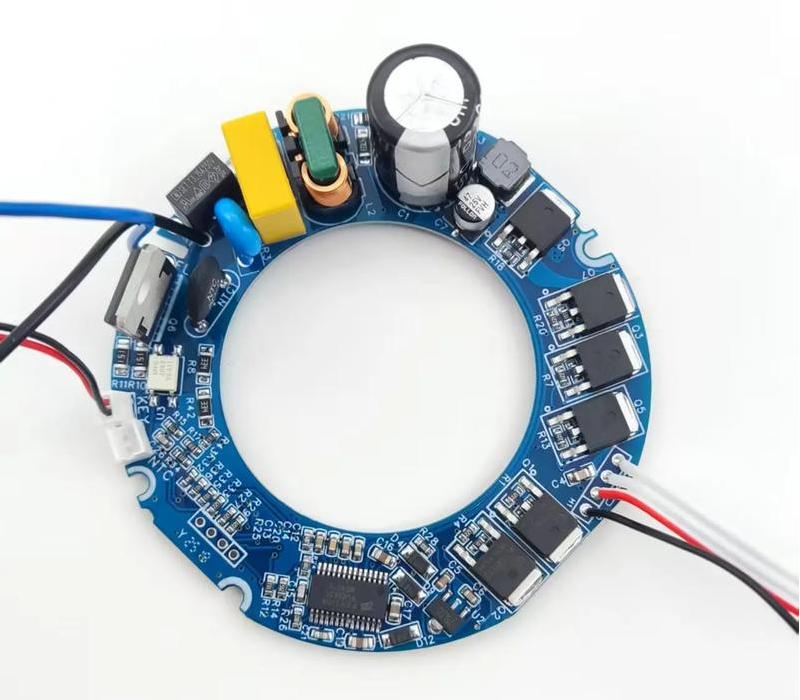
Below is a photo of inverter board we assembled:

Why Choose EBest Circuit (Best Technology) as Invert Board Assembly Manufacturer?

Our PCB Assembly Capabilities

ItemCapabilities
Placer Speed13,200,000 chips/day
Bare Board Size0.2 Ɨ 0.2 inches – 20 Ɨ 20 inches / 22 Ɨ 47.5 inches
Minimum SMD Component01005
Minimum BGA Pitch0.25mm
Maximum Components50 Ɨ 150mm
Assembly TypeSMT, THT, Mixed assembly
Component PackageReels, Cut Tape, Tube, Tray, Loose Parts
Lead Time1 – 5 days

How to Get a Quote for Invert Board Assembly Service?

1. Core Design Documents

  • PCB Production Files: Gerber files (including drill drawings); Impedance control requirements.
  • BOM List: Full component list (model, package, manufacturer PN); Alternative part options clearly marked.
  • Assembly Drawing: Component polarity markings; Heat sink mounting positions; Glue/potting points.

2. Process Specifications

  • Soldering Method: Reflow / Wave / Selective soldering.
  • Special Processes: Conformal coating areas; Potting thickness requirements; X-ray inspection points.
  • ESD Protection: Compliance standard (e.g., ANSI/ESD S20.20).

3. Material Supply Options

  • Customer-provided all materials.
  • Assembler provides common parts (resistors/caps, etc.).
  • Key component sourcing requirements (e.g., TI-authorized distributors).

4. Testing & Acceptance Criteria

  • ICT/FCT Testing: Test program files (.pcf format)
  • Burn-In Testing: Temperature cycle parameters (e.g., 85ā„ƒ full load, 4 hours)
  • Visual Inspection: IPC-A-610 Class 2/3 standard

5. Order Basics

  • Batch Quantity: Initial order + estimated monthly demand.
  • Delivery Address (for logistics cost calculation).
  • Packaging: ESD bags / Blister trays / Vacuum sealing.

Welcome to contact us if you have any request for high frequency inverter board assembly service: sales@bestpcbs.com.

You may also like

Why Your PCB Needs Conformal Coating? When It Is Required?

September 5th, 2025

What Is PCB Conformal Coating?

    Conformal coating is a protective transparent layer applied to the surface of a printed circuit board (PCB). It effectively shields electronic components and traces from moisture, dust, and chemical corrosion. The coating conforms precisely to the PCB’s shape—hence the name—forming a thin, flexible “invisible armor.”

    What Is PCB Conformal Coating?

    Why Do You Need Conformal Coating?

    1. Prevent Moisture-Induced Short Circuits & Leakage

    In high-humidity environments, moisture condensation on the PCB can cause leakage current or electrolytic corrosion, leading to system malfunctions or failure.

    2. Resist Dust & Contaminants

    In industrial, automotive, or kitchen environments, dust, oil, and metal particles can accumulate on the board, creating conductive paths.

    3. Enhance Resistance to Salt Spray & Chemicals

    Marine and offshore electronics are exposed to salt spray, which can rapidly oxidize solder joints and copper traces

    4. Improve Mechanical Stability

    Some coatings (e.g., silicone) are elastic, reducing stress on solder joints from vibration.

    5. Meet Industry Standards

    Sectors like automotive, medical, and military often require compliance with IPC, AEC-Q100, or MIL-STD—conformal coating is a key process.

    When Is PCB Conformal Coating Required?

    Not every PCB needs a conformal coating, but it becomes crucial when the board faces tough conditions. Think moisture, dust, chemicals, or big temperature swings—these can cause corrosion, short circuits, or signal issues. Electronics in cars, airplanes, industrial machines, or outdoor lighting often need this extra layer of protection.

    Miniaturized or high-density PCBs also benefit from conformal coating. Tiny spaces between components increase the chance of shorts or solder joint problems. A thin protective layer helps keep the circuits safe and reliable.

    Boards that go through frequent heating, cooling, or vibration also get an advantage. The coating helps absorb stress, reducing cracks and extending the board’s lifespan. In short, if your PCB works in a challenging environment, conformal coating is usually a smart choice. Here is a table of what applications require PCB conformal coating.

    ApplicationEnvironment ChallengeRecommended Coating Type
    Automotive ECUsMoisture, vibration, temperature changesPolyurethane (PU)
    Aerospace electronicsExtreme temperature swings, humiditySilicone (SR)
    Industrial machineryChemicals, dust, mechanical stressAcrylic (AR)
    Outdoor lightingUV exposure, rain, dustParylene or UV-cured coatings
    High-density PCBsMiniaturized components, tight spacingConformal coating layer (thin PU or acrylic)

    Risks of Skipping Conformal Coating

    → Product early failure: Damaged within warranty, increasing after-sales cost

    → Customer complaints & brand damage: Poor reliability harms reputation

    → Mass recall risk: May require full batch rework

    → Fail certification: May not pass IP, CE, or UL tests

    Bottom line: Saving on coating cost could cost ten times more in repairs

    Common Misconceptions

    Myth 1: Only outdoor devices need coating

    → Humid climates, kitchen grease, and industrial dust are also threats.

    Myth 2: Potting can replace conformal coating

    → Potting is for structural protection—higher cost, harder to repair. Coating is lighter and more flexible.

    Myth 3: Coating guarantees protection

    → Uneven application, bubbles, or missed areas reduce effectiveness. Process control is critical.

    How to Choose the Right Coating?

    TypeProsConsApplications
    AcrylicEasy to apply & repair, low costModerate chemical resistanceGeneral industrial, consumer
    PolyurethaneGood chemical & moisture resistanceHard to repairAutomotive, outdoor
    SiliconeHigh temp resistance, flexibleHigher costHigh-temp, LED lighting
    UV-CurableFast cure, precise coverageRequires UV lamp, shadow areas hard to coatPrecision modules, selective coating

    Conclusion

    PCB conformal coating is not optional—it’s essential for improving product reliability, lifespan, and market competitiveness.

    Recommendation: Evaluate coating needs early in design. Reserve keep-out zones and protect test points to avoid rework.

    You may also like

    How to Clean Electrical Copper Busbar?

    August 29th, 2025

    How to clean electrical copper busbar? Let’s explore cleaning methods, selection guide, specification, benefits, applications, recommend supplier for electric copper busbar.

    Are you troubled with these issues?

    • Delivery delays risking production halts?
    • Copper purity fluctuations compromising thermal performance?
    • Slow customization response losing competitive orders?

    EBest Circuit (Best Technology) can provide service and solution:

    • 48-Hour Rapid Delivery – Strategic stockpile ensures uninterrupted supply.
    • 99.99% Electrolytic Copper – Batch-specific third-party certification.
    • 8-Hour Prototyping – 0.5mm precision non-standard customization supported.

    Welcome to contact us if you have any request for electric copper busbar: sales@bestpcbs.com.

    What Is Electrical Copper Busbar?

    An electrical copper busbar is a flat or tubular conductive bar manufactured from high-purity copper (resistivity: 1.68Ɨ10⁻⁸ Ω·m), designed for centralized distribution of high currents in power systems. It serves as a critical component for interconnecting equipment such as generators, transformers, and circuit breakers.

    What Is Electrical Copper Busbar?

    How to Clean Copper Busbar Electrical?

    A Guide to Electrical Copper Busbar Cleaning:

    1. Power Disconnection

    • Cut off power supply and verify voltage absence using a voltage tester before operation.
    • Ground the busbar to ensure safety.

    2. Basic Cleaning

    • Dust Removal: Use dry soft cloth or anti-static brush to clear surface dust, focusing on gaps and insulator areas.
    • Stubborn Stains: Wipe with anhydrous ethanol (≄99.7% purity). Avoid chlorine-containing solvents.
    • Light oil Contamination: Clean with neutral detergent and rinse with water.
    • Heavy oil Contamination: Use copper wire brush (brush diameter ≤0.1mm) with neutral detergent. Professional copper cleaning agents (e.g., KL-303) may be required for immersion.

    3. Oxide Layer Treatment

    Minor Oxidation:

    • Wipe with vinegar + salt solution (3:1 ratio), then rinse with water.
    • Use copper brightening agent (e.g., HQ-131S) for immersion and light brushing.

    Severe Oxidation:

    • Local treatment with 5%-10% oxalic acid solution (operation time <3 minutes). Rinse and apply stearic acid or organic protective film.
    • Professional solutions: KL-303 copper cleaner or CJX5-4 dedicated cleaning agent.

    4. Deep Maintenance

    • Connection Tightening: Use torque wrench to retighten bolts (80%-120% of standard torque). Ensure smooth contact surfaces.
    • Humid Environment: Dry with hot air gun (temperature ≤60°C) to prevent moisture-related issues.
    • Silver-Plated Contacts: Wipe unidirectionally with chamois leather. Avoid hard tools or abrasive cloths.

    5. Safety Precautions

    • Personal Protection: Wear insulating gloves (≄500V), goggles, and helmet. Avoid direct contact with chemicals.
    • Solvent Restrictions: Prohibit hydrochloric acid or chlorine-containing agents to prevent corrosion.
    • Environment Control: Humidity <60% during operation; Avoid spray cleaners near live equipment.

    6. Quality Inspection

    • Contact Resistance Test: Post-cleaning deviation ≤15% of initial value.
    • Infrared Thermography: Confirm no local overheating (temperature rise ≤40°C).

    7. Tools and Materials Selection

    Tools:

    • Preferred: Dense copper wire brush (brush diameter 0.1mm), explosion-proof vacuum cleaner (≄1200W).
    • Alternatives: Nylon brush + soft cloth, compressed air blow.

    Cleaning Agents:

    • Preferred: Professional copper oxide removal solutions (e.g., KL-303).
    • Alternatives: Anhydrous ethanol (analytical grade).

    Protective Gear:

    • Preferred: Nitrile insulating gloves (≄500V).
    • Alternatives: Latex gloves + insulating mat.

    8. Special Notes

    • Copper-Clad Aluminum Busbars: Avoid alkaline cleaners to prevent material corrosion.
    • Pure Copper Busbars: Prohibit steel wool or hard tools to prevent surface scratching.
    How to Clean Copper Busbar Electrical?

    How to Choose Electrical Copper Busbar?

    1. Material and Plating Selection

        • Prioritize T2 or higher purity copper (conductivity ≄58 MS/m); avoid copper-clad aluminum or recycled copper.
        • Plating options: Silver plating (30% conductivity improvement) for high-frequency applications; tin plating for humidity/corrosion resistance.

        2. Dimensions and Current-Carrying Capacity

          • Cross-sectional area formula: S=I/(JƗK) (I=load current; J=2-3A/mm²; K=0.8 for temperatures >40°C).
          • Thickness standards: Tubular busbar wall thickness ≄2mm; flat busbar thickness ≄6mm (GB/T 5585.1-2005).
          • Current-carrying reference: Single busbar ā‰ˆ cross-sectional area (mm²) Ɨ3.5 (e.g., 100mm² ā‰ˆ350A); derate for multiple bars (0.8 for 2 bars, 0.7 for 3 bars).

          3. Structure and Connection Methods

            • Shape selection: Flat busbar for compact panel installation; tubular busbar for long-distance transmission (40% higher bending resistance).
            • Bolted Connection: Use 8.8-grade or higher bolts; torque at 80% of standard for silver-plated contacts.
            • Welded Connection: TIG welding recommended for plated busbars; NDT (PT/UT) required for welds.

            4. Environmental and Standard Compliance

              Special environment adaptation:

              • High temperature (>40°C): Use heat-resistant copper (e.g., C11000); upsize cross-section by 1-2 grades.
              • High vibration: Tubular busbar + damping brackets; lock washers for bolted joints.
              • High altitude (>1000m): Derate current-carrying capacity by 2% per 300m elevation.

              Standards: Must comply with GB/T 5585.2-2018 or IEC 60582; certifications: 3C (China), UL (North America), CE (EU).

              5. Cost and Maintenance

                • Initial cost: Silver-plated busbars cost 20% more than tin-plated but reduce conductive losses by 5-8%.
                • Maintenance: Inspect plating thickness every 2 years (tin ≄8μm; silver ≄5μm).

                Electric Copper Busbar Specification

                Parameter Categoryā€ŒSpecification Detailsā€Œ
                Standard DimensionsThickness: 2–100 mm
                Width: 10–400 mm (GB/T 5585.1-2005)
                Surface Treatmentā€ŒTin-plated / Embossed / Insulating paint (optional)
                Current Carrying Capacity(70°C ambient)30Ɨ4 mm: 365 A (vertical)
                40Ɨ4 mm: 480 A (vertical)
                50Ɨ5 mm: 625 A (vertical)
                Electrical Propertiesā€ŒResistivity: 0.0185 Ω·mm²/m (20°C)
                Conductivity: ≄58 MS/m (100% IACS)
                Mechanical Propertiesā€ŒOperating temperature: ≤70°C (max. 75°C)
                Tensile strength: ≄200 MPa (typical)
                International Standardsā€Œ IEC 439 (equivalent to GB7251)
                ASTM B152/B152M (oxygen-free copper)

                Why Choose Electrical Copper Busbar?

                Advantages of electrical copper busbar:

                • Superior Conductivity: Pure copper conductivity ≄58 MS/m (IACS standard), resistivity as low as 1.68Ɨ10⁻⁸Ω·m, minimizing transmission losses.
                • High Current-Carrying Capacity: Supports up to 3.5A/mm² (at 25°C), 3x higher than aluminum, ideal for high-current applications.
                • Mechanical Robustness: Tensile strength ≄200MPa, 40% more bend-resistant than aluminum, suitable for vibration-prone environments.
                • Corrosion Resistance: Tin-plated busbars withstand >500h salt spray tests; silver-plated options resist oxidation up to 200°C.
                • Efficient Heat Dissipation: Thermal conductivity 401 W/(mĀ·K), 1.8x better than aluminum, ensuring temperature rise ≤40°C under load.
                • Easy Installation & Maintenance: Modular design enables quick bolted/welded connections; maintenance intervals exceed 10 years with plating checks every 2 years.
                • Cost-Effective Lifecycle: Higher initial cost offset by 5-8% lower energy loss; 90%+ recyclability reduces long-term expenses.
                Why Choose Electrical Copper Busbar?

                When to Use Copper Busbar Electrical?

                Applications of electrical copper busbar:

                Power Systems:

                • 35kV/below substation main conductors.
                • Solar/wind farm DC-side inverter connections.
                • ±800kV UHV converter station valve hall links.

                Industrial Use

                • 50-150kA current carriers in metal smelters.
                • EV battery module laser-welded interconnections.
                • Semiconductor fab oxygen-free copper conductors.

                Infrastructure

                • High-rise building cable replacements (space-saving).
                • Data center 12V/48V DC power distribution.
                • Hospital ICU double-insulated power lines.

                Special Environments

                • Offshore platform corrosion-resistant busbars.
                • Arctic region low-temperature conductive alloys.
                • Naval vessel non-magnetic power conductors.

                Copper Busbar for Automotive Electrical System Market​

                1. Market Growth & Size

                • 2025 Valuation: Global market estimated atĀ 2.5B–5.5B, reflecting rapid electrification of vehicles.
                • CAGR: ProjectedĀ 5.4%–7.6% growthĀ (2025–2030/2033), driven by EV adoption and technological advancements.

                2. Primary Drivers

                • EV/HEV Proliferation: Rising demand for high-performance electrical systems in electric vehicles.
                • High-Voltage Systems: Adoption of 800V+ architectures requiring copper busbars for efficient power transmission.
                • Material Superiority: Copper’s conductivity (59.6Ɨ10⁶ S/m) and thermal efficiency make it irreplaceable for high-current applications.
                • Regulatory Push: Government incentives for EVs and emissions reduction accelerate market penetration.

                3. Technological Advancements

                • Copper-Aluminum Composites: Reduce costs by 30–50% while maintaining conductivity (e.g., automotive lightweighting).
                • Flexible & Laminated Designs: Multi-layer busbars (3–7 layers) improve vibration resistance and space efficiency.
                • High-Temperature Insulation: PET/PI films enable operation in -40°C to +125°C environments.

                4. Regional Dynamics

                • Asia-Pacific Dominance: China leads (45% global share) due to massive EV production and government subsidies.
                • European Growth: Stricter emissions regulations drive demand for copper busbars in hybrid and electric vehicles.
                • North American Market: Steady adoption linked to Tesla and legacy automakers’ EV transitions.

                5. Competitive Landscape

                • Top Players: Shenzhen Everwin Technology, Zhejiang RHI Electric, Schneider Electric (40% combined market share).
                • Regional Suppliers: Numerous small-to-mid-sized firms cater to niche automotive segments.
                • Innovation Focus: Laser-welded interconnections and modular designs enhance installation efficiency.

                6.Ā Advantages vs. Alternatives

                • Efficiency: 70% shorter than cables, reducing power loss by 15–20%.
                • Durability: Superior heat management and corrosion resistance extend lifespan.
                • Cost Savings: Aluminum-based composites lower material costs without compromising performance.

                7. Future Outlook

                • Vehicle-to-Grid (V2G) Integration: Custom busbars enable bidirectional energy flow (e.g., Nissan Leaf).
                • ADAS & Connectivity: Rising demand for reliable power distribution in automated driving systems.
                • Sustainability: Recyclability of copper aligns with circular economy goals in automotive manufacturing.
                Copper Busbar for Automotive Electrical System Market​

                Why Choose EBest Circuit (Best Technology) as Electric Copper Busbar Supplier?

                Certifications & Compliance

                • ISO 9001:2015, UL, and RoHS certified.
                • Third-party lab reports for critical parameters (e.g., tensile strength).

                Competitive Pricing Model

                • Direct factory pricing reduces costs by 10-15% vs. distributors.
                • Volume-based discounts (e.g., 5% off for orders >5,000 pcs) and loyalty programs.

                Premium Material Selection

                • Oxygen-free copper (≄99.99% purity) minimizes resistance and oxidation.
                • Compliant with GB/T 5585.1-2005 and IEC 60317 standards.

                Rigorous Quality Assurance

                • Full-Cycle Inspection: IQC for Raw material purity tests. IPQC for Automated Optical Inspection (AOI) during production. OQC for 100% electrical performance validation.
                • Advanced Testing: Salt spray resistance (48h), thermal cycling (-40°C to +125°C), and conductivity ≄58.5Ɨ10⁶ S/m.

                Fast Lead Times

                • 7-10 day production for standard orders.
                • 98% on-time delivery rate with emergency order support.

                Integrated PCBA Services

                • End-to-end solutions from busbar design to PCB assembly (PCBA).
                • Supports small-batch prototyping (MOQ 100 pcs) and rapid tooling adjustments.

                Technical Expertise

                • In-house engineers optimize thermal management and EMI reduction.
                • Customizes layouts for high-current/high-voltage systems.

                Client-Centric Flexibility

                • Customizes plating thickness, insulation materials, and dimensions.
                • Provides free samples for testing and design validation.

                Welcome to contact us if you have any request for electric copper busbar: sales@bestpcbs.com.

                You may also like

                Tinned Copper Busbar Supplier | EBest Circuit (Best Technology)

                August 29th, 2025

                What is tinned copper busbar? Let’s discover its definition, specification, benefits, applications, HS code, tinning process, price and recommend supplier.

                Are you worried about these problems?

                • Low conductivity causing high electricity costs.
                • Rapid oxidation/corrosion leading to equipment instability.
                • Long customization cycles delaying project progress.

                EBest Circuit (Best Technology) can provide service and solutions:

                • High-Conductivity Design: 15% lower resistance for measurable energy savings.
                • Corrosion-Resistant Coating: 1000-hour salt spray resistance ensuring extended lifespan.
                • Rapid Customization: 48-hour delivery with ±0.1mm precision for accelerated project timelines.

                Welcome to contact us if you have any request for tinned copper busbar: sales@bestpcbs.com.

                What is Tinned Copper Busbar?

                Tinned copper busbar is a conductive connector made of copper with a tin-plated surface. It is widely used in power transmission, electrical equipment, and new energy systems. Its core function is to achieve efficient current distribution through the high conductivity of high-purity copper.

                The tin coating provides oxidation and corrosion resistance, extending the busbar’s service life in humid or corrosive environments while improving welding performance and contact reliability. This material is commonly used in distribution cabinets, switchgear, battery modules, and other applications, and is a key component for ensuring the stable operation of electrical systems.

                What is Tinned Copper Busbar?

                Tinned Copper Busbar Specification

                Parameter CategorySpecifications
                Material StandardsHigh-purity copper (≄99.90%), compliant with ASTM/JIS/GB standards
                Dimensions RangeThickness: 1~60mm
                Width: 5~350mm
                Length: ≤6400mm (customizable)
                Plating CharacteristicsTin-plated surface, corrosion-resistant & abrasion-resistant
                Electrical PerformanceResistivity: Graded control (0.460~0.290 in: 896.15 Ω·lb/mile²)
                Current capacity examples: 5Ɨ30mm: 400A
                Mechanical PropertiesTensile strength ≄ 500N
                Bending test: 15° radius bend for 10,000 cycles without fracture
                Temperature RangeOperating temperature: -55°C ~ +150°C
                Storage temperature: -40°C ~ +40°C

                Advantages of Tin Plated Copper Busbar

                • Superior Corrosion Resistanceā€Œ: Tin layer isolates copper from air/moisture, preventing oxidation in harsh environments (such as offshore wind farms, chemical plants).
                • ā€ŒStable Conductivityā€Œ: Copper substrate ensures low resistivity (≤0.01724 Ω·mm²/m); tin prevents surface oxidation-induced impedance rise, avoiding overheating.
                • ā€ŒEnhanced Solderabilityā€Œ: Tin reduces soldering temperature (180-220°C vs. 300°C+ for bare copper), minimizing thermal damage risks.
                • ā€ŒMechanical Protectionā€Œ: Tin hardness (HV 10-12) exceeds pure copper (HV 40-45), improving scratch resistance for handling/installation.
                • ā€ŒBroad Compatibilityā€Œ: Tin exhibits weaker galvanic corrosion with aluminum/nickel, ideal for hybrid systems (e.g., battery pack connections).
                • ā€ŒCost Efficiencyā€Œ: 50%+ savings over silver plating, with abundant tin supply and stable sourcing.
                • ā€ŒEco-Complianceā€Œ: Lead-free tin plating (RoHS-certified) meets EU/China regulations for green industries (PV, EVs).
                Advantages of Tin Plated Copper Busbar

                Applications of Tinning Copper Busbar

                • Power transmission systems
                • High-voltage harnesses for new energy vehicles
                • Renewable energy storage systems
                • Conductive connections for industrial automation equipment
                • Conductive components for rail transportation
                • Data center power distribution systems
                • Marine power transmission components
                • Aerospace cables and wires
                • Electromagnetic shielding layers for electronic equipment

                Copper Busbar Tinning Process

                1. Process Selection

                Electroplating Tin

                • Application: Precision electronic components (e.g., busbars, connectors).
                • Features: Thin coating (3-5μm), bright finish, strong adhesion. Requires wastewater treatment systems.
                • Equipment: Continuous plating lines.

                Hot-Dip Tinning

                • Application: Thick-coating requirements (e.g., food cans, relay contacts).
                • Features: Thick coating (10-200μm), metallurgical bonding. Variable surface uniformity; requires tin residue removal.
                • Equipment: Molten tin furnace with adjustable conveyor speed for thickness control.

                2. Pre-Treatment Steps

                • Surface Cleaning: Alkaline degreasing followed by ultrasonic cleaning to remove oils and contaminants.
                • Acid Pickling: Sulfuric or hydrochloric acid solution to eliminate oxides and rust.
                • Activation: Palladium chloride solution to create active surface sites for adhesion enhancement.
                • Pre-Fluxing: Zincate-based solution to align tin atoms uniformly and prevent oxidation.

                3. Tinning Process

                Electroplating Tin

                • Bath Composition: Methylsulfonate tin or sulfate tin (Sn²⁺) as primary salt, with additives (brighteners, buffers).
                • Parameters: Current density 1-3 A/dm², temperature 20-30°C, duration 3-10 minutes.
                • Operation: Cathodic deposition with multi-stage counterflow rinsing using deionized water.

                Hot-Dip Tinning

                • Annealing: 400-550°C to improve ductility; water quenching for structural stabilization.
                • Flux Coating: Industrial soft water-based flux (1:3 dilution ratio) to inhibit surface oxidation.
                • Dipping: Immersion in 250°C molten tin; coating thickness adjusted via conveyor speed (10-200μm range).
                • Cooling: Forced air or water quenching to solidify coating structure.

                4. Post-Treatment Steps

                • Cleaning & Neutralization: Multi-stage rinsing followed by sodium phosphate (Naā‚‚HPOā‚„/Naā‚ƒPOā‚„) neutralization.
                • Passivation: Sodium dichromate solution for corrosion resistance enhancement.
                • Drying & Coating: Hot-air drying combined with stearic acid or organic film application for oxidation protection.

                5. Quality Control

                • Thickness Testing: X-ray fluorescence (XRF) per IPC-4554 standards.
                • Visual Inspection: Smooth surface free of pits, blisters, or delamination.
                • Performance Testing: Solderability assessment via wetting balance method; salt spray/accelerated corrosion tests.

                6. Environmental & Safety

                • Wastewater Management: Chemical treatment for electroplating effluent; tin slag recycling programs.
                • Waste Segregation: Hazardous waste (spent baths) vs. recyclable materials (tin residues) classification.
                • Safety Protocols: Personal protective equipment (goggles, gloves), ventilation systems, and furnace maintenance schedules.

                7. Common Issues & Solutions

                • Uneven Coating: Optimize current density distribution; recalibrate bath chemistry.
                • Blisters/Tin Lumps: Reduce bath temperature; install advanced filtration systems.
                • Oxidation Defects: Strengthen pre-activation steps; apply protective coatings immediately post-processing.
                Copper Busbar Tinning Process

                Tinned Copper Busbar HS Code

                The HS Code for Tinned Copper Busbar (non-insulated) is 7413000000, classified under “Non-insulated copper stranded wires, cables, plaited bands, and similar articles” in the Harmonized System. This applies to bare copper busbars with tin plating, typically used in electrical power distribution and equipment connections, excluding insulated variants (which fall under HS 8544).

                Tinned Copper Busbar HS Code

                How Much Does Tinned Copper Cost?

                Products:

                • Busbar (30Ɨ3mm): $25-30/meter (+15% vs bare copper).
                • Wire (4mm²): $0.83-1.24/meter; (+0.04/meter per 1μm tin thickness).
                • Plate (2mm): $48-55/m².

                Cost Drivers:

                • Copper base: $9,450/ton (LME, ā‰ˆ80% of cost).
                • Tin plating: $1.10-2.10/kg.

                Volume Discount:

                • ≄1 ton: 12-18% discount.

                Why Choose EBest Circuit (Best Technology) as Tinned Copper Busbar Supplier?

                Reasons to Choose EBest Circuit (Best Technology) for Tinned Copper Busbar Supplier:

                • Global Compliance: IATF 16949/UL/ROHS certified, meeting automotive and aerospace standards.
                • Cost Efficiency: Bulk material sourcing and automated production deliver top-tier pricing (top 10% in the industry).
                • Transparent Pricing: Full cost breakdown (materials, processing, testing) with no hidden fees.
                • Tiered Pricing: 3-5% off for orders exceeding 500kg per batch.
                • Premium Materials: A-grade electrolytic copper (99.95% purity) with batch-specific 3rd-party lab reports.
                • Rigorous QC: 100% XRF thickness testing + 500-hour salt spray certification.
                • 24/7 Technical Support: Multilingual team resolves urgencies within 4 hours.
                • Customization: Supports complex geometries (L/Z-shapes) and multi-layer coatings (tin+nickel).
                • On-Time Delivery: 98.5% punctuality rate; 72-hour expedited shipping for urgent orders.
                • PCBA Integration: Pre-assembled busbars with insulation sleeves/connectors + free functional testing (3000V AC withstand).

                Welcome to contact us if you have any request for tinned copper busbar: sales@bestpcbs.com.

                You may also like

                Splitter PCB Design & Assembly, PCBA Service Supplier

                August 19th, 2025

                What is splitter PCB? Let’s explore its function, types, applications, technical parameter, design guide, assembly processes through this blog.

                Customer Pain Points and Difficulties:

                • Severe signal attenuation and short transmission distance? (Splitter PCB uses high-precision impedance matching to ensure lossless signal distribution and extend transmission distance.)
                • Multi-path signal interference and poor stability? (Splitter PCB’s optimized isolation design effectively suppresses EMI/EMC and ensures signal purity.)
                • Complex assembly process and low yield? (Splitter PCB’s standardized production process and automated SMT placement improve consistency.)

                EBest Circuit (Best Technology) can provide services and solutions:

                Customized Design Support: Provide impedance simulation and stack up optimization to ensure Splitter PCB meets your signal distribution needs.
                Efficient Production and Delivery: 7-day proofing and 15-day mass production, quickly responding to your project schedule.
                Full-Process Quality Assurance
                ISO 9001 control throughout the entire process, from PCB manufacturing to assembly and testing, ensures reliability.

                Let EBest Circuit (Best Technology) be your splitter PCB expert and solve your signal distribution challenges! Contact us now if you have any request for splitter PCB design and assembly: sales@bestpcbs.com.

                What is Splitter PCB?

                A splitter PCB is a printed circuit board (PCB) specifically designed for signal or power distribution. It distributes input signals/currents to multiple output ports in equal or unequal proportions, enabling system signal synchronization or power isolation.

                What is Splitter PCB?

                What is the Purpose of Splitter PCB?

                • RF Signal Distribution: Used in communications equipment (such as base stations and routers), it splits RF signals into multiple channels.
                • Mixed Signal Isolation: Isolates noise interference from analog and digital circuits.
                • Power Management: Distributes different voltage rails in multi-voltage systems (such as automotive BMS).
                • High-Speed Interface Optimization: Improves the transmission stability of high-speed signals such as PCIe/USB4.
                • Test Support: Facilitates device debugging and performance monitoring.
                • Flexible Electronics Integration: Adapts to the compact space requirements of wearable devices and foldable displays.

                What Are Types of Splitter PCB?

                • POE Splitter PCB: Separates Power over Ethernet (PoE) into data and power, adapting to non-PoE devices.
                • Audio Splitter PCB: Distributes audio signals to multiple output channels (such as 3.5mm/RCA jacks), supporting parallel connection of speakers or headphones.
                • Fan Splitter PCB: Connects multiple fans (12/24V) in parallel, simplifying wiring for cooling systems (such as 3D printers or chassis fans).
                • HDMI Splitter PCB: Duplicates a single HDMI signal to multiple displays, supporting 4K/8K video transmission (such as conference presentations or advertising screens).
                • USB Splitter PCB: Expands a single USB port into multiple ports, supporting peripheral connection or charging (such as keyboards, mice, and mobile phones).
                What Are Types of Splitter PCB?

                What Are Applications of PCB Splitter?

                • Communications and RF Systems – Signal distribution (such as 1-to-2 splitters), frequency band division (broadband equal power division), and RF test equipment (connecting signal sources and measuring instruments).
                • Audio Equipment – Speaker crossover (high/mid/low frequency band distribution), electronic crossovers (weak signal division before amplifiers).
                • Automotive Electronics – Power control (motor controllers, battery management systems), intelligent driving (millimeter-wave radar high-frequency PCBs), new energy battery data acquisition cables (FPC flexible monitoring).
                • Consumer Electronics – Smartphones/tablets (HDI boards, flexible PCBs), wearable devices (lightweight and heat-resistant designs).
                • Industrial and Aerospace – Extreme environments (high temperature/high pressure/strong electromagnetic interference), high-precision control (multilayer boards, ceramic substrates).
                • Data Centers and Cloud Computing – High-speed signal transmission (servers, data center multilayer boards), low-latency data processing.
                • Smart Home and IoT: Wireless device integration (sensors, communication modules), low-power flexible PCB design.

                HDMI Splitter PCB Design Technical Parameter

                Parameter CategoryTechnical Specifications
                Input/Output Interface1ƗHDMI input, 2Ɨ/4Ɨ/8ƗHDMI outputs (configurable)
                HDMI Version SupportHDMI 2.0b/2.1 (supports 4K@60Hz, HDR, HDCP 2.2/2.3)
                Resolution SupportMaximum 4K@60Hz (4:4:4), compatible with 1080P/720P and below
                Signal Bandwidth18Gbps (HDMI 2.0) / 48Gbps (HDMI 2.1)
                Operating VoltageDC 5V (typical)
                Power Consumption≤5W (static), ≤10W (dynamic)
                PCB Layers4-6 layer board (impedance-controlled layers)
                PCB MaterialFR-4 (Tg≄170ā„ƒ), optional high-frequency material (e.g., Rogers 4350B)
                Differential Impedance100Ω±10% (HDMI differential signal lines)
                Signal IntegrityInsertion loss ≤-3dB@6GHz, return loss ≤-10dB@6GHz
                EDID SupportDynamic/Static EDID storage (EEPROM capacity ≄256Byte)
                HDCP SupportHDCP 1.4/2.2/2.3 compliant
                Connector TypeHDMI Type A female socket (gold-plated contacts, thickness ≄15μm)
                ESD ProtectionHuman Body Model ±8kV, Machine Model ±200V (IEC 61000-4-2)
                Operating Temperature0ā„ƒ~70ā„ƒ (commercial grade), optional -40ā„ƒ~85ā„ƒ (industrial grade)
                Certification StandardsCE, FCC, RoHS, HDMI Adopter Certification

                How to Design a HDMI Splitter PCB?

                HDMI splitter PCB design guide:

                1. Basic Layout and Stackup Design

                Shortening the signal path:

                • Minimize the distance between the HDMI connector and the processing chip (such as the TMDS341A) to reduce signal attenuation and EMI.

                Stackup Structure:

                • Use at least a 4-layer PCB (6 layers recommended), including a complete power and ground layer.
                • High-speed signal layers should be placed adjacent to the ground layer to enhance magnetic field coupling and suppress EMI.

                2. Differential Signal Impedance Control (100Ī©)

                Trace Rules:

                • A 1:1 differential pair width/space ratio is recommended, with intra-pair error ≤ 5 mil and inter-pair error ≤ 10 mil.
                • Trace spacing (s) must meet the following requirements: s < h (dielectric thickness), s < W (line width), and d > 2s (distance from other traces).
                • Use a 2D field solver to accurately calculate impedance, avoiding reliance on empirical values.

                Via Design:

                • Use small vias (8 mil/16 mil recommended) to reduce capacitance effects and impedance drop.
                • Avoid switching high-speed signals across different layers; otherwise, additional return vias will be required.

                3. Power Supply and Decoupling Capacitor Design

                • Power Inlet: Place a 10μF tantalum capacitor for voltage regulation.
                • Chip Power Supply: Place a 0.1μF or 0.01μF ceramic capacitor next to each high-speed chip, and connect the capacitor pins with double vias to reduce inductance.
                • Decoupling Capacitors: Configure at least one 4.7μF capacitor and five 0.1μF capacitors, connecting them directly to the power plane (minimizing the path).
                • Power Plane: Avoid signal lines crossing split planes to ensure a continuous return path.

                4. EDID Management Strategy

                • EDID Compose Mode: Automatically analyzes the resolutions of all displays and selects the lowest compatible value (e.g., 1080P) to ensure compatibility.
                • Fixed Mode: Forces the output to a specific resolution (e.g., 4K@60Hz) to accommodate high-end devices.
                • Priority Setting: Supports port priority (for example, when Output 1 is disconnected, Output 2 defaults to 1080P)

                5. Design for Manufacturability (DFM)

                Trace Equal Length:

                • Length deviation within a differential pair should be ≤ 5 mil to prevent EMI caused by phase shift.
                • Use curved or serpentine traces to correct for length differences.

                Pad and Spacing:

                • HDMI pads should be minimized to prevent impedance mismatch.
                • The copper pad to board margin distance should be ≄ 75 mil to meet production process requirements.

                6. Expandable Functionality and Compatibility

                Output Port Planning:

                • Select the number of ports based on requirements (e.g., 1Ɨ2/1Ɨ4), and reserve one or two spare ports for upgrades.

                Supported Protocols:

                • Ensure support for HDCP 1.4+/HDMI 2.0, 4K@60Hz, and 3D formats.
                • Integrate CEC commands (e.g., one-button standby and remote control passthrough) to enhance the user experience.

                External Power Supply:

                • Multiple ports (≄4 outputs) require a separate 12V/5A power supply to avoid power shortages.

                7. Design Considerations

                • Avoid Cross-Splits: A complete reference plane is required beneath the differential lines, otherwise impedance jumps and noise will occur.
                • Capacitor Selection: Use low-ESL ceramic capacitors for high-frequency ranges (>100MHz) and tantalum capacitors for voltage stabilization in low-frequency ranges.
                • Connector Quality: Use connectors that meet HDMI impedance standards to avoid signal reflections.
                How to Design a HDMI Splitter PCB?

                How to Assemble a Splitter PCB?

                Below are splitter PCB assembly processes:

                1. Prepare Materials & Tools

                • Gather Splitter PCB (pre-etched), component kit (resistors, capacitors, transmission lines), solder wire, flux, soldering iron, tweezers, multimeter.
                • Inspect PCB for cleanliness and shorts; verify components match BOM (e.g., resistor values).

                2. Component Placement

                Align components with PCB silkscreen:

                • Insert resistors/capacitors into pads; press gently.
                • Embed transmission lines (e.g., quarter-wavelength microstrip) into slots, ensuring contact with pads.
                • High-frequency parts (e.g., Wilkinson resistors) must follow polarity marks.

                3. Soldering

                • Set iron to 280–320°C (use lower temp for PTFE to avoid warping).
                • Steps:
                  a. Apply flux to pad/lead.
                  b. Feed solder until melted; remove iron for smooth joints.
                  c. Use ā€œdrag solderingā€ for SMD parts.
                • Focus: Transmission line joints and isolation resistors (avoid cold joints/bridges).

                4. Quality Inspection

                • Visual check: Conical, shiny solder joints with no cracks.
                • Electrical test: Measure resistance (e.g., isolation resistors) with multimeter (≤5% deviation).
                • Continuity test: Short input to one output; others should show no connection.

                5. Functional Verification

                • Connect signal generator and spectrum analyzer:
                  a. Input signal to PCB; measure output power (e.g., 1-to-2 divider: ≤0.5dB difference).
                  b. Test port isolation (e.g., ≤-20dB).
                • Debug: Re-solder components if power imbalance or poor isolation persists.

                6. Cleaning & Protection

                • Wipe flux residue with alcohol to prevent corrosion.
                • Apply conductive adhesive on edges for RF applications to reduce EMI.
                • Package in anti-static bags with specs/test results labeled.

                7. Notes:

                • Use automated soldering for high-frequency PCBs (e.g., 77GHz automotive radar) to avoid parameter shifts.
                • Prioritize network analyzers for testing; multimeters suit low-frequency checks only.
                How to Assemble a Splitter PCB?

                Why Choose EBest Circuit (Best Technology) as PCBA Service Supplier?

                Reasons why choose us as splitter PCB assembly service supplier:

                • 19 Years of Industry Experience: Proven expertise in RF/high-speed splitter PCB assembly for 5G, automotive, and IoT applications.
                • Full Certification Compliance: ISO 9001, IATF 16949, ISO 13485 and RoHS, UL certified, and ensures global market compliance and reliability.
                • Cost-Effective Solutions: Competitive pricing and optimized material sourcing help reduce your production costs by 15-30%.
                • Free DFM & Design Support: Expert impedance matching (e.g., 50Ī© RF traces) and signal integrity analysis ensure optimal splitter PCB performance.
                • Reliable Quality Control: Strict process control with AOI/SPI/X-Ray inspection ensures 99.5% assembly yield and minimal defects.
                • Fast Turnkey Assembly: 7-day prototype delivery and 15-day mass production for splitter PCB orders (100pcs–10Kpcs).
                • Advanced SMT Capabilities: Supports 01005-size components and 0.3mm BGA assembly for high-density splitter PCB designs.
                • Effective Signal Isolation: Dedicated EMI/EMC control measures prevent crosstalk in mixed-signal splitter boards.
                • Flexible Scalability: Seamless transition from prototypes to large-scale production (1M+ units) with consistent quality.
                • 24/7 Technical Support: Dedicated engineers provide real-time DFM feedback and troubleshooting support.

                Welcome to contact us if you have any request for PCBA service: sales@bestpcbs.com.

                You may also like

                RF Module Manufacturers, Custom RF Module Manufacturing

                August 12th, 2025

                What is RF module? Let’s discover definition, working principles, TV connectivity, usage guides, 433MHz testing for RF module.

                Are you worried about these issues?

                • Has your product design been repeatedly revised due to RF module protocol incompatibilities?
                • Is the difficulty in balancing transmission distance and power consumption leading to constant complaints from end users?
                • Do delays in small-batch orders frequently cause your supply chain plans to spiral out of control?

                EBest Circuit (Best Technology) can provide service and solutions:

                • Full-protocol compatibility matrix: Plug-and-play support for six major protocols, including Bluetooth, and Zigbee, reduces adaptation and debugging time by 80%.
                • Intelligent power management: Dynamically adjusts transmit power to achieve a 40% reduction in power consumption at long-range transmission distances up to 200 meters.
                • Flexible delivery system: Establish a dedicated “small order, fast response” line, with 7-day delivery for orders of 100 units and transparent inventory traceability.

                Welcome to contact us if you have any request for RF module: sales@bestpcbs.com.

                What Is RF Module?

                An RF module is an electronic component that integrates RF transceiver circuitry, an antenna, and a control unit, specifically for wireless signal transmission and reception. It uses modulation and demodulation technologies to efficiently transmit data over the air and is widely used in the Internet of Things (such as smart homes), wireless communications (4G/5G base stations), and industrial automation (remote sensors). Its core advantage lies in simplifying wireless system design, allowing users to quickly deploy stable connections without in-depth RF circuit development.

                What Is RF Module?

                How RF Module Works?

                1. Core Components

                • The RF module consists of a transmitter and a receiver, enabling wireless data transmission via radio frequencies (e.g., 433 MHz).

                2. Modulation and Demodulation

                • Modulation (ASK/OOK): Data is embedded in a digital signal by varying the carrier amplitude (e.g., ASK modulation). The carrier is transmitted when a logic “1” is present, and suppressed when a logic “0” is present to save power.
                • Demodulation: The receiver uses a frequency-matched crystal oscillator (e.g., a 433 MHz SAW resonator) to restore the original signal.

                3. Workflow

                • Transmitter: An encoder (e.g., the HT12E) converts parallel data into a serial signal. The crystal oscillator generates a carrier, which is then ASK-modulated and transmitted through the antenna.
                • Receiver: The antenna captures the signal, and a decoder (e.g., the HT12D) converts the serial data into parallel outputs.

                4. Key Parameters

                • Frequency: 433 MHz or 315 MHz are commonly used, requiring strict matching between the transmitter and receiver. Power Consumption: 9-40mA when transmitting (3-12V power supply), approximately 5.5mA when receiving (5V power supply).
                • Transmission Range: Up to 1000 meters in open environments, significantly affected by obstacles and interference.

                5. Typical Applications

                • Remote control (such as smart home, car key).
                • Industrial sensing (wireless data acquisition, security systems).
                How RF Module Works?

                How to Connect RF Modulator to TV?

                1. Confirming Interface Compatibility

                • Check if your TV has an RF input (usually labeled “ANT IN” or “RF IN”). Some older TVs only support this interface for signal reception.
                • If your TV doesn’t have an RF input, you’ll need to connect indirectly via HDMI or an AV converter (this requires additional equipment).

                2. Connection Steps

                • Coaxial Cable Connection: Use a 75Ī© coaxial cable to connect the RF modulator’s output (RF OUT) to the TV’s ANT IN port.
                • Antenna Matching: If the modulator requires an external antenna, ensure the antenna impedance matches (usually 50Ī© or 75Ī©) to prevent signal reflections.

                3. Signal Debugging

                • Channel Search: Use the TV’s settings to perform an automatic channel scan to lock onto the modulator’s signal (usually in the UHF band, 470-862MHz).
                • Optimizing Signal Strength: If the picture is blurry or lost, adjust the antenna angle or check for loose connections in the cable.

                4. Troubleshooting

                • No Signal: Verify that the modulator has a proper power supply (5V-12V) and that the transmitting frequency matches the TV’s tuning range.
                • Interference Streaks: Stay away from other wireless devices (such as Wi-Fi routers) to avoid frequency conflicts.

                5. Key Parameters

                • Modulator Output Level: Recommended ≄ 60dBμV (to ensure stable transmission over long distances).
                • TV RF Sensitivity: Typically ≄ 30dBμV is required (inadequate sensitivity may result in reception failure).

                Tip: Modern smart TVs may disable RF input by default; you must manually switch to RF mode in the “Signal Source Settings.”

                How to Use RF Module?

                1. Hardware Preparation and Connection

                • Choose the appropriate module: Select the frequency band (e.g., 433MHz, 2.4GHz) and protocol (e.g., LoRa, Bluetooth) based on the application scenario (e.g., IoT, remote control).
                • Connect the antenna: Ensure the antenna matches the module (e.g., SMA connector) to avoid signal attenuation; keep the antenna away from metal obstructions.
                • Power Supply Configuration: Provide a stable voltage (usually 3.3V-5V) and add a filter capacitor (10μF + 0.1μF) to reduce power supply noise.

                2. Software and Protocol Configuration

                • Choose the communication protocol: Select transparent transmission mode (direct data transmission and reception) or a custom protocol (e.g., adding a parity bit or retransmission mechanism) based on your needs.
                • Set the baud rate and frequency band: The transmitter and receiver must maintain the same baud rate (e.g., 9600bps), with a frequency band deviation of no more than ±10kHz.
                • Initialize the module: Configure the module using AT commands or registers (e.g., setting transmit power and operating mode). Refer to the module manual for parameter settings.

                3. Data Transmission and Reception Test

                Transmitter Operation:

                • Add a preamble (e.g., 0xAA) and a checksum (CRC16) before sending data to ensure data integrity.
                • The recommended single data transmission length is ≤ 255 bytes to avoid timeouts and packet loss.

                Receiver Operation:

                • Enable automatic receive mode or use an interrupt trigger to read data.
                • Monitor the signal using an oscilloscope or serial port debugging tool to confirm there is no garbled code or packet loss.

                4. Anti-interference and Optimization Measures

                • Antenna Layout: Maintain a straight-line distance of 1 meter or more between the transmitting and receiving antennas to avoid co-channel interference. For multi-module deployments, use staggered frequencies.
                • Signal Filtering: Install an LC filter circuit (e.g., 10nH inductor + 10pF capacitor) at the module input to suppress high-frequency noise.
                • Power Management: Switch to sleep mode (e.g., timed wakeup) when idle to reduce overall power consumption (typical sleep current ≤ 1μA).

                5. Troubleshooting and Debugging

                • No signal: Check the antenna connection and power supply stability. Use a spectrum analyzer to confirm if the transmit frequency is offset. High packet loss rate: Reduce the transmission rate (e.g., from 9600bps to 4800bps) or add a retransmission mechanism (e.g., repeat each packet three times).
                • Short communication range: Replace the antenna with a higher gain (e.g., from 5dBi to 9dBi) or adjust the transmit power (the maximum value must comply with local regulations).

                How to Test 433mhz RF Module?

                1. Power and basic communication checks

                • Confirm that the VCC voltage is between 4.5V and 5.5V and that the antenna is securely connected.
                • Send a test command (such as AT+TEST) via the serial port to verify that the receiver returns an acknowledgment signal.

                2. Signal strength and range test

                • Use a walkie-talkie or the “RF Signal Tracker” app to monitor the signal and test the critical distance (50-100 meters) in an open environment.
                • Repeat the test behind obstacles to assess penetration attenuation (approximately 20-30dB through a concrete wall).

                3. Interference and compatibility troubleshooting

                • Use a spectrum analyzer to scan the 433MHz band, avoiding co-frequency devices (such as WiFi routers).
                • Test multi-device coexistence, optimizing the protocol (adding parity bits) or implementing frequency hopping.

                4. Advanced debugging and troubleshooting

                • Adjust the antenna matching network (using a VNA to observe the S11 parameter) to ensure an impedance of 50Ī©.
                • Check crystal oscillator startup (using an oscilloscope) and LNA power supply. Verify standby current in low-power mode (<1μA).

                Our RF Module and RF Board Case Studies

                At EBest Circuit (Best Technology), we offer one-stop services for RF module components and customized RF board, from design to assembly. Whether you require a 2.4GHz wireless module or other frequency bands, we can optimize cost and performance to meet your specifications. Feel free to contact us for a quote and we’ll provide you with a cost-effective, reliable solution! Below is a photo of our RF board case.

                Our RF Module and RF Board Case Studies

                Attached is a datasheet and photo of 2.4GHz RF module:

                Parameterā€ŒSpecificationsā€Œ
                ā€ŒProduct Nameā€Œā€Œ2.4GHz Wireless Video Transmission Moduleā€Œ
                ā€ŒCore Functionalityā€ŒBuilt-in 2.4GHz ISM band RF IC, supports NTSC/PAL video formats, integrates FM-FM modulation/demodulation scheme.
                ā€ŒPhysical Designā€ŒCompact size, no external audio circuit required, simplifies system integration.
                ā€ŒRegulatory Complianceā€ŒCE/FCC EMC certified, meets global deployment requirements.
                ā€ŒChannel Configurationā€ŒTypically supports 4 channels via PLL synthesizer, enabling parallel device transmission.
                ā€ŒTypical Applicationsā€ŒWireless video transmission, security monitoring, industrial remote control, and low-latency applications.
                Our RF Module and RF Board Case Studies

                Why Choose EBest Circuit (Best Technology) as RF Module Manufacturers?

                Reasons why choose us as RF module manufacturers:

                • Ultra-Fast Delivery: Prototype production and basic testing are completed within 48 hours for urgent orders, supporting the rapid iteration requirements of scenarios like 5G and satellite communications, reducing cycle times by over 60%.
                • Strict High-Frequency Verification: Three-temperature storage cycle verification (temperature drift coefficient <0.3ppm), electromagnetic exposure level testing (scattering rate difference 160dB), and high-voltage breakdown testing (isolation voltage exceeds the specified limit by 30%) ensure stable millimeter-wave performance.
                • Leading Millimeter-Wave Technology: Supports a wide frequency band from 24GHz to 77GHz, improves GaN/SiC semiconductor efficiency by 40%, and reduces 5G base station module size by 50%, with standing wave parameter degradation controlled to <1.5dB.
                • Enhanced Environmental Adaptability: Four-quadrant clutter interference simulation (maintaining a 0.45dB signal-to-noise ratio) and a temperature and humidity fluctuation model automatically trigger anti-condensation parameters, adapting to extreme scenarios such as tropical rainforests and polar regions.
                • RF Design Collaboration: An open API architecture supports secondary development, with pre-set parameter packages for subway tunnels and urban buildings. An intelligent diagnostic system locates high-temperature areas and S-parameter anomalies.
                • Global Certification Guarantee: Compliant with FCC/CE/SRRC regulations, IPC-Class 3 standard production process, and hard gold plating that passes ASTM B488 salt spray testing, making it suitable for medical and aviation applications.
                • Cost and Energy Efficiency Optimization: Prefabricated chip models reduce the cost of unpopular models. AI-optimized power amplifier parameters reduce base station energy consumption to 0.2kW/Mbps. Modular design reduces network construction costs by 30%.
                • Technical Accuracy and Support: 19 years of RF experience have solved over 200 high-frequency design challenges (such as phase noise suppression). A 24/7 expert team provides real-time response to issues such as electromagnetic interference and thermal management.
                • Flexible Measurement Range and Accuracy: Supports small-batch customization of 1-50 units to large-scale production of 10,000+ units. Available in QFN/BGA/ceramic packaging, with line width and line spacing error ≤ 2μm and phase consistency deviation < 3°.

                Please feel free to contact us if you have any inquiry for RF module: sales@bestpcbs.com.

                You may also like

                LED PCB Assembly Manufacturer & Supplier |EBest Circuit (Best Technology)

                August 11th, 2025

                What is LED PCB assembly? Let’s explore its definition, types, applications, assembly steps, how to choose LED PCB assembly service.

                Are you troubled with these problems?

                • Heat Dissipation Challenges: How can high-power LED PCB assemblies effectively dissipate heat to prevent light decay and shortened lifespan?
                • Cost Pressures: How can we reduce material and production costs while ensuring LED PCB assembly quality?
                • Design Limitations: How can traditional PCB assemblies achieve flexible adaptation and innovative design in complex lighting scenarios?

                EBest Circuit (Best Technology) can provide service and solutions:

                • Efficient Heat Dissipation Solutions: Utilizing highly thermally conductive metal substrates (such as aluminum substrates) and optimized heat dissipation structure design ensures long-term stable operation of LED PCB assemblies, reducing temperatures by over 20%.
                • Cost-Optimized Processes: Through refined production management and material selection strategies, we provide customers with cost-effective LED PCB assembly solutions, saving 15%-30%.
                • Customized Design Services: Supporting specialized designs such as custom-shaped boards to meet diverse lighting needs and help customers create differentiated products.

                Welcome to contact us if you have any request for LED PCB assembly: sales@bestpcbs.com.

                What Is LED PCB Assembly?

                LED PCB assembly refers to the complete manufacturing process of soldering light-emitting diodes (LEDs) and other electronic components onto printed circuit boards (PCBs) using surface mount technology (SMT) or through-hole (DIP) technology. This process includes key steps such as solder paste printing, component placement, reflow soldering, optical inspection, and functional testing. Ultimately, the LED lighting or display module is completed with both electrical connections and physical support. This process requires strict control of soldering quality, heat dissipation, and optical consistency to ensure the reliability and lifespan of the LED product.

                What Is LED PCB Assembly?

                Types of LED Lighting PCB Assembly

                Surface Mount Technology (SMT):

                • Definition: LED components are soldered directly onto the PCB surface using a placement machine, suitable for small, high-density designs.
                • Advantages: High efficiency, low cost, and support for ultra-thin lighting fixtures (such as light strips and panel lights).
                • Applications: Indoor consumer lighting (downlights and spotlights).

                Through-Hole Technology (THT):

                • Definition: LED pins penetrate PCB holes and are secured by wave soldering. Traditional yet reliable.
                • Advantages: High mechanical strength and vibration resistance, suitable for high-power modules (such as street lights and mining lamps).
                • Applications: Outdoor and industrial lighting.

                Hybrid Assembly (SMT + THT)

                • Definition: SMT control chip and THT high-power LED, balancing performance and reliability.
                • Advantages: Supports driver circuit integration (such as constant current source), suitable for smart lighting.
                • Applications: Smart bulbs, adjustable color temperature lamps.
                Types of LED Lighting PCB Assembly

                Applications of LED PCB Assembly

                • Commercial/Residential Lighting: High-brightness LED panels (such as downlights and panel lights) with dimming and color adjustment capabilities.
                • Stage and Entertainment Lighting: Concert and theater lighting systems (DMX512 protocol control).
                • Automotive Lighting: Headlight modules (daytime running lights, turn signals), instrument panel backlight units.
                • Outdoor Displays: Billboards, traffic lights, and stadium display backlight units.
                • Medical Equipment: Surgical shadowless lamps, diagnostic instrument indicators, and UV disinfection equipment.
                • Industrial Control: Machine vision light sources, safety indicator systems, and automated equipment status displays.
                • Consumer Electronics: TV/monitor backlight units, mobile phone flashlights, and wearable device indicators.
                • Special Environment Lighting: Explosion-proof lamps for mining, low-temperature lighting for cold storage, and waterproof light panels for ships.

                LED PCB Assembly Process Steps

                1. Material Preparation

                • Cut the substrate (aluminum substrate/flexible board) to size and clean the surface.
                • Sort the LED components, resistors, driver chips, etc. according to the bill of materials (BOM).

                2. Component Placement

                • SMT/COB: SMT machine places LED components (accuracy ±0.1mm). COB bonding chips are then coated with phosphor adhesive and cured.
                • THT: Insert LED pins into PCB holes using a plug-in machine or manually.
                3. Soldering

                • SMT/COB: Reflow soldering (220–250°C) ensures full solder joints.
                • THT: Wave soldering (260–280°C) ensures a solder fill rate of ≄75% for through-holes.

                4. Cleaning and Curing

                • Ultrasonic cleaning removes flux, followed by drying (80°C/10 minutes).
                • Flexible PCB secondary curing (120°C/2 hours) enhances adhesive adhesion.

                5. Electrical Testing

                • A multimeter/ICT is used to check LED voltage, resistance, and short/open circuits.
                • Drive Circuit Testing: Constant current source accuracy of ±3%, dimming function verification.

                6. Optical and Thermal Testing

                • An integrating sphere is used to measure luminous efficacy (lm/W), color temperature (±100K), and color rendering index (Ra ≄ 80).
                • A thermal imager is used to monitor LED junction temperature rise (≤ 85°C).

                7. Aging Quality Inspection

                • 72 hours of continuous aging (rated power/60°C), eliminating modules with a lumen decay of ≄ 5% or faults.
                • Appearance Inspection: Smooth solder joints and no deformation of the substrate.

                8. Packaging:

                • Packaged in an anti-static bag, with parameters (power, color temperature) and safety certifications marked.
                • A test report (luminous efficacy, temperature rise, aging data) and installation instructions are included.
                LED PCB Assembly Process Steps

                What Should You Look for When Choosing LED PCB Assembly Service?

                Process Compatibility & Technical Expertise

                • Support for SMT, COB, THT, flexible PCB, and hybrid assembly processes to accommodate diverse LED products (e.g., high-density light strips, high-power streetlights).
                • Precision equipment: placement accuracy ≄ ±0.05mm, reflow soldering temperature control (220–250°C), wave soldering (260–280°C) for reliable joints.
                • Thermal simulation (ANSYS/FloTHERM), DFM optimization, and BOM standardization to preempt design flaws (e.g., pad orientation aligned with panelization to prevent wire bonding damage).

                Quality Control & Inspection Protocols

                • Adherence to IPC-A-610 standards, with AOI, X-ray inspection (solder joint void rate ≤5%), and ICT for electrical performance verification.
                • Environmental testing: thermal shock (-40°C~125°C/1000 cycles), 85°C/85%RH humidity resistance (1000 hours), and aging tests (72-hour continuous operation, ≤5% lumen degradation).
                • Full material traceability, ensuring RoHS/halogen-free compliance and waste management practices.

                Certifications & Regulatory Compliance

                • ISO 9001 certification for quality management; IATF 16949 (automotive) or ISO 13485 (medical) for industry-specific compliance.
                • Use of lead-free solder, eco-friendly substrates, and third-party environmental reports.

                Production Capacity & Delivery Efficiency

                • 24-hour prototype turnaround, small-batch production (48-hour lead time), and monthly output ≄100,000 sq.ft.
                • Multi-modal logistics (air/ground freight) with ≄95% on-time delivery; BOM sourcing and consignment stock support.

                Industry Experience & Client References

                • Proven expertise in automotive, medical, and smart home sectors with tailored solutions (e.g., modular designs, thermal management optimization).
                • Partnerships with Tier 1 suppliers or automotive OEMs (e.g., Ford, Toyota); case studies demonstrating defect resolution (e.g., solder paste curing issues, low-temperature solder cracking).

                Cost Optimization & After-Sales Support

                • Transparent pricing with BOM cost breakdowns and customizable quotation structures.
                • Cost-saving strategies: material substitution (e.g., embedded heat pipes vs. thick copper) and process improvements (e.g., hybrid assembly for labor reduction).
                • 24/7 failure analysis, rapid replacement, and NDA-backed design confidentiality.
                What Should You Look for When Choosing LED PCB Assembly Service?

                Why Choose EBest Circuit (Best Technology) as LED PCB Assembly Manufacturer?

                Reasons why choose us as LED PCB assembly manufacturer:

                • Competitive Pricing: Our direct supply model eliminates middlemen, reducing bulk order costs by 15%-20% with no hidden fees.
                • Environmentally Friendly Materials and Processes: Utilizing 25% recycled aluminum and lead-free processes, we comply with RoHS/REACH standards and reduce raw material costs.
                • 24-Hour Rapid Prototyping: LED PCB samples are delivered within 24 hours, shortening the development cycle for a stage lighting project by 50%.
                • Quality Certification: ISO 9001/IATF 16949/ISO 13485 certified, making us suitable for demanding applications such as medical and automotive.
                • Strict Quality Control: 100% automated inspection with Automated Optical Inspection (AOI) ensures a solder joint defect rate of <0.01%, extending the LED board lifespan to over 50,000 hours.
                • Free Design for Function (DFM) Optimization: Pre-review design files to identify issues such as insufficient thermal vias and close copper spacing, reducing design revisions and development costs by 30%.
                • Turnkey Solution: This one-stop service covers the entire process, including PCB layout (compatible with Altium/PADS), thermal simulation (ANSYS Icepak), and SMT assembly.
                • 24/7 engineering response: Thermal runaway and EMC interference issues are resolved within an average of 4 hours, ensuring zero downtime for on-site projects.

                Our LED PCB Assembly Capabilities

                Item Capabilities
                Placer Speed 13,200,000 chips/day
                Bare Board Size 0.2 x 0.2 inches – 20 x 20 inches/ 22*47.5 inches
                Minimum SMD Component 01005
                Minimum BGA Pitch 0.25mm
                Maximum Components 50*150mm
                Assembly Type SMT, THT, Mixed assembly
                Component Package Reels, Cut Tape, Tube, Tray, Loose Parts
                Lead Time 1 – 5 days

                How to Get a Quote for LED PCB Assembly Service?

                LED PCB Assembly Quote Required Documents

                1. Design Files:

                • Gerber Format PCB Layout File + Bill of Materials (BOM) (including component specifications)

                2. Technical Specifications:

                • PCB Layer Count, Dimensions, and Copper Thickness Requirements
                • Surface Finish (HASL/ENIG/OSP)
                • Special Requirements (e.g., thermal via design, impedance control)

                3. Order Information:

                • Estimated Quantity (Sample/Small Batch/Mass Production)

                4. Delivery Time Requirements

                • Certification Requirements (if applicable): RoHS/REACH, ISO, IATF 16949, etc.

                Why Choose EBest Circuit (Best Technology)?

                • Free DFM: Identify design risks early and reduce development costs
                • Transparent Quotation System: No hidden fees, 15%-20% cost savings for bulk orders
                • Full Process Control: From PCB manufacturing to SMT assembly, one-stop service

                Get Started Now! Welcome to contact us if you have any inquiry for LED PCB assembly: sales@bestpcbs.com.

                You may also like

                FPGA PCB Design & Assembly, One Stop Solution

                July 18th, 2025

                How to design A FPGA PCB?ā€Œ Discover its specification, benefits, application, and design guideline for FPGA PCB.

                • Can BGA welding withstand high temperature aging?
                • Why is my high-speed signal running slower and slower?
                • Will multiple power supplies fight with each other?

                EBest Circuit (Best Technology) Can Provide You:

                • Welding perspective: Each board is X-rayed, and solder joint defects are nowhere to be hidden.
                • Signal highway: From drawing board to assembly, the signal is fully escorted.
                • Power traffic light: Intelligently adjust the power-on timing to prevent power supply chaos.

                Welcome to contact us if you have any request for FPGA PCBA service: sales@bestpcbs.com.

                What Is FPGA PCB?

                A FPGA PCB is a specially engineered printed circuit board that physically mounts and electrically integrates a field-programmable gate array semiconductor device with supporting hardware components, such as power regulators, memory units, clock sources, and input/output connectors.

                This substrate features precisely routed copper traces to establish reliable electrical pathways, incorporating design elements for signal integrity in high-speed interfaces, stable multi-voltage power delivery, and efficient thermal dissipation to manage operational heat.

                Once assembled, the board serves as a reconfigurable platform capable of implementing custom digital logic functions through post-manufacturing programming of the FPGA, enabling versatile applications like real-time data processing or communication bridging.

                What Is FPGA PCB?

                Components of FPGA PCB

                1. Central Processing Unit

                  • Programmable logic blocks (CLBs, DSP slices).
                  • Configuration memory cells.
                  • Clock management circuits (PLLs/DCMs).

                  2. Power Delivery Network

                    • Multi-voltage regulators (1.0V core, 2.5V/3.3V I/O).
                    • Decoupling capacitors (0.1μF ceramic arrays).
                    • Power sequencing controllers.

                    3. Memory Subsystem

                      • Volatile storage (DDR3/DDR4 controllers).
                      • Non-volatile configuration memory (NOR Flash).
                      • Cache memory blocks.

                      4. Signal Interface Units

                        • High-speed serial transceivers.
                        • General-purpose I/O banks.
                        • Differential pair routing channels.

                        5. Support Circuits

                          • JTAG programming interface.
                          • Thermal monitoring sensors.
                          • Reset generation circuitry.

                          6. Mechanical Features
                            • Ball grid array (BGA) footprint
                            • Thermal relief patterns
                            • Board stiffeners (for large packages)

                            Why Use FPGA PCB?

                            • Flexible Hardware Reconfiguration: FPGAs enable post-production logic updates, allowing adaptive designs without physical hardware changes.
                            • Parallel Processing Capability: Customizable logic blocks execute multiple operations simultaneously, ideal for real-time signal processing.
                            • Low Latency for Time-Sensitive Tasks: Hardware-level processing achieves nanosecond response times, critical for industrial control systems.
                            • Energy Efficiency in Specialized Workloads: Dedicated circuits reduce power waste compared to general-purpose processors.
                            • Legacy System Modernization: Bridges outdated protocols with modern standards, extending equipment lifespan.
                            • Security Through Hardware Customization: Unique circuit layouts resist standardized attacks, enhancing tamper resistance.
                            • Rapid Iteration During Development: Immediate testing accelerates debugging versus semiconductor fabrication delays.
                            Why Use FPGA PCB?

                            What Are Applications of FPGA PCB?

                            • Telecommunications – 5G baseband processing; Optical network conversion.
                            • Industrial Automation – Robotic arm control; Predictive maintenance systems.
                            • Medical Technology – Medical imaging acceleration; Portable diagnostic devices.
                            • Financial Technology – Low-latency trading systems; Real-time risk analysis.
                            • Aerospace & Defense – Satellite data processing; Radar systems.
                            • Automotive – Autonomous vehicle sensors; Vehicle network gateways.
                            • Consumer Electronics – Video transcoding; VR motion tracking.
                            • Energy Systems – Smart grid monitoring; Solar power optimization.
                            • Scientific Research – Physics experiments; Genomic sequencing
                            • IoT Infrastructure – Edge computing nodes; LPWAN base stations.
                            What Are Applications of FPGA PCB?

                            FPGA PCB Design Guidelines

                            Below are FPGA PCB design guidelines:

                            1. Layer Stack Management

                            • Use symmetrical stackup with adjacent power-ground plane pairs.
                            • Assign dedicated layers for high-speed signals with reference planes.

                            2. Power Delivery System

                            • Implement separate power islands for core, I/O and auxiliary voltages.
                            • Place decoupling capacitors in descending values (10μF to 100nF) near power pins.

                            3. Signal Routing Principles

                            • Maintain consistent impedance for differential pairs (+/- 10% tolerance).
                            • Route clock signals first with maximum ground shielding.

                            4. Thermal Considerations

                            • Use thermal vias under high-power components.
                            • Implement copper balancing for even heat distribution.

                            5. Manufacturing Compliance

                            • Follow 3W spacing rule for high-speed traces.
                            • Verify BGA escape routing meets fabrication capabilities.

                            6. Grounding Strategy

                            • Maintain continuous ground planes beneath sensitive circuits.
                            • Implement star grounding for mixed-signal systems.

                            7. Design Verification

                            • Perform post-layout SI/PI simulations.
                            • Validate timing margins with board-level models.
                            FPGA PCB Design Guidelines

                            FPGA PCB Assembly Service – EBest Circuit (Best Technology)

                            • Full Turnkey Solutionsā€Œ – From PCB fabrication to final assembly and testing.
                            • ā€ŒHigh-Mix, Low-Volume Expertiseā€Œ – Optimized for FPGA prototyping & small-batch production.
                            • ā€ŒDFM Optimizationā€Œ – Early design feedback to minimize re-spins.
                            • ā€ŒFlexible Packagingā€Œ – Support for advanced ICs (BGA, QFN, 01005).
                            • Free DFM (Design for Manufacturability) Analysis: Optimizes PCB layouts to reduce material waste, lower production costs, and avoid late-stage design revisions.
                            • Turnkey Solutions – Full-service PCB manufacturing from design to delivery, accelerating your product’s time-to-market.
                            • Superior Quality – 100% inspection on bulk orders, ensuring reliability and consistency.
                            • Fast Turnaround – 24-hour rapid prototyping and industry-leading production lead times.
                            • Stable Supply Chain – Guaranteed material availability with minimal risk of delays.
                            • Competitive & Transparent Pricing – No hidden costs, offering the best value without compromising quality.

                            Our PCBA Capabilities

                            ItemCapabilities
                            Placer Speed13,200,000 chips/day
                            Bare Board Size0.2 x 0.2 inches – 20 x 20 inches/ 22*47.5 inches
                            Minimum SMD Component01005
                            Minimum BGA Pitch0.25mm
                            Maximum Components50*150mm
                            Assembly TypeSMT, THT, Mixed assembly
                            Component PackageReels, Cut Tape, Tube, Tray, Loose Parts
                            Lead Time1 – 5 days

                            FAQs

                            Q1: Why does my FPGA PCB fail to boot consistently after assembly?
                            A1: Check solder joint integrity – BGA voids exceeding 25% cause intermittent connections. Use X-ray inspection to verify void percentage. Ensure power sequencing matches FPGA datasheet requirements (typically core voltage before I/O banks).

                            Q2: How to resolve signal integrity issues in 10Gbps+ transceiver channels?
                            A2: Route differential pairs with <5mil length mismatch and insert ground-stitching vias every 150mil near SerDes lanes. Simulate with IBIS-AMI models to validate eye diagram margins pre-production.

                            Q3: Why do we encounter timing closure failures despite meeting constraints?
                            A3: Clock skew often originates from unequal via counts in global clock trees. Balance H-tree routing with matched via transitions (typically 8 vias per branch). Add programmable delay buffers for ±50ps fine-tuning.

                            Q4: What causes thermal runaway in high-density FPGA designs?
                            A4: Inadequate copper thickness in power planes (recommend 2oz for >15A currents). Implement thermal relief patterns under BGA with 0.3mm diameter voids. Monitor junction temperature using on-die sensors via I2C.

                            Q5: How to mitigate EMI from high-speed memory interfaces?
                            A5: Apply π-type EMI filters to DDR4 DQ lines (22Ω resistors + 100pF caps). Stagger memory chip placement to break resonant cavity effects. Use shielded flex cables for off-board connections exceeding 3Gbps.

                            You may also like

                            How to Choose the Right Copper Heat Sink for Your Project?

                            July 18th, 2025

                            How to choose the right copper heat sink? This guide covers selection criteria, working principles, maintenance, and application scenarios for optimal performance.

                            • Is the radiator too heavy to affect the portability of the product?
                            • Is the customization cycle delaying the project progress?
                            • Is it difficult to match the SMT process?

                            EBest Circuit (Best Technology) Can Provide You:

                            • Lightweight copper-aluminum composite solution: copper core + aluminum shell combination, 35% weight reduction; maintain 380W/mĀ·K thermal conductivity.
                            • 72-hour fast proofing: direct selection from the existing 200+ standard parts library; support 48-hour feedback on 3D drawings.
                            • Full process compatible design: pre-nickel plating (can be reflow soldered); provide steel mesh opening solution.

                            Welcome to contact us if you have any request for PCBA service: sales@bestpcbs.com.

                            What Is A Copper Heat Sink?

                            A copper heat sink is a thermal management component that utilizes copper’s high conductivity (≄350W/mĀ·K) to absorb and disperse heat from electronic devices. Its solid metal base directly contacts heat sources like CPUs, while extended fins or pins increase surface area for efficient convection cooling. This passive design prevents overheating without moving parts, making it ideal for computers, LED systems, and power electronics where reliability and rapid heat transfer are essential.

                            What Is A Copper Heat Sink?

                            How to Choose the Right Copper Heat Sink?

                            Methods about how to choose the right copper heat sinks for your project:

                            Thermal Performance Evaluation

                            • Calculate required heat dissipation capacity based on component’s max TDP (Thermal Design Power).
                            • Ensure copper’s thermal conductivity (≄350 W/mĀ·K) matches your heat transfer needs.
                            • For high-power applications (>100W), consider vapor chamber integration.

                            Design Optimization

                            • Select fin density (4-8 fins/cm) balancing surface area and airflow resistance.
                            • Prefer pin-fin designs for omnidirectional airflow, straight fins for directional cooling.
                            • Optimal base thickness: 6-10mm for effective heat spreading.

                            Compatibility Checklist

                            • Verify mounting mechanism matches your socket type (LGA/AM).
                            • Measure clearance: ≄5mm from RAM slots, ≄15mm from case side panel.
                            • Check weight limits (<500g for vertical motherboard mounting).

                            Cooling Method Selection

                            • Passive cooling: Suitable for TDP <65W in well-ventilated cases.
                            • Active cooling: Required for TDP >95W or restricted airflow environments.
                            • Hybrid solutions: Combine copper base with heat pipes for balanced performance.

                            Quality Indicators

                            • Look for oxygen-free copper (C10100/C10200) for best thermal performance.
                            • Verify nickel plating thickness (≄5μm) for corrosion resistance.
                            • Check flatness tolerance (<0.1mm) for optimal contact with heat source.

                            Performance Validation

                            • Request thermal resistance data (ā„ƒ/W) from manufacturer.
                            • Compare with independent test results when available.
                            • Ensure temperature delta (component-to-ambient) stays within safe limits.
                            How to Choose the Right Copper Heat Sink?

                            What Are Functions of Copper Heat Sinks?

                            • High-Efficiency Heat Absorptionā€Œ: Copper’s thermal conductivity (385 W/mĀ·K) rapidly draws heat from hot components (e.g., CPU/GPU dies), reducing localized hotspots.
                            • ā€ŒUniform Heat Distributionā€Œ: Evenly spreads thermal energy across fins/base due to copper’s isotropic conductivity, preventing thermal throttling.
                            • ā€ŒOptimized Heat Dissipationā€Œ: Finned/pin designs maximize surface area (up to 30% more effective than flat designs) for faster convection cooling.
                            • ā€ŒCompatibility with High-TDP Componentsā€Œ: Supports 150W+ TDP loads (e.g., overclocked CPUs) without phase-change materials, unlike aluminum alternatives.
                            • ā€ŒLong-Term Stabilityā€Œ: Oxidation-resistant coatings (e.g., nickel plating) maintain >95% thermal performance over 5+ years.
                            • ā€ŒSpace-Efficient Cooling: ā€ŒAchieves equivalent cooling performance with 20-30% smaller volume vs. aluminum, critical for compact builds.
                            • ā€ŒHybrid Cooling Readinessā€Œ: Seamlessly integrates with heat pipes/vapor chambers for extreme heat loads (e.g., data center GPUs).
                            • ā€ŒEMI Shielding Bonusā€Œ: Copper’s inherent electromagnetic interference reduction protects sensitive electronics (unlike aluminum).

                            How Copper Heat Sinks Work?

                            • Thermal Conduction Initiationā€Œ: Copper’s crystalline structure enables rapid electron movement, transferring heat at 401 W/mĀ·K (25°C) from component contact surfaces within 0.5ms latency.
                            • Lateral Heat Spreadingā€Œ: Baseplate thickness (6-10mm standard) ensures 92-96% heat distribution uniformity, reducing hotspot differentials to <3°C across 100mm² areas.
                            • Fin-Assisted Convectionā€Œ: Extruded fins (12-25 fins/inch) increase effective surface area by 5-8x, achieving 18-22°C temperature drop at 2.5m/s airflow velocity.
                            • Thermal Interface Optimizationā€Œ: Micro-smooth surfaces (Ra<0.1μm) combined with thermal paste fill microscopic gaps, achieving <0.15°C/W interface resistance.
                            • Dynamic Load Responseā€Œ: Copper’s 60% faster thermal response than aluminum stabilizes component temperatures within ±2°C during 100W load fluctuations.
                            • Structural Heat Storageā€Œ: High volumetric heat capacity (3.45 J/cm³·K) temporarily absorbs sudden thermal spikes (e.g., GPU boost clocks).
                            • Oxidation Mitigationā€Œ: Nickel-plated surfaces maintain >90% original conductivity after 10,000 hours in 85°C/85%RH environments.

                            What Are Applications of Copper Heat Sink?

                            • ā€ŒThermal Conduction Initiationā€Œ: Copper’s crystalline structure enables rapid electron movement, transferring heat at 401 W/mĀ·K (25°C) from component contact surfaces within 0.5ms latency.
                            • Lateral Heat Spreadingā€Œ: Baseplate thickness (6-10mm standard) ensures 92-96% heat distribution uniformity, reducing hotspot differentials to <3°C across 100mm² areas.
                            • ā€ŒFin-Assisted Convectionā€Œ: Extruded fins (12-25 fins/inch) increase effective surface area by 5-8x, achieving 18-22°C temperature drop at 2.5m/s airflow velocity.
                            • ā€ŒThermal Interface Optimizationā€Œ: Micro-smooth surfaces (Ra<0.1μm) combined with thermal paste fill microscopic gaps, achieving <0.15°C/W interface resistance.
                            • Dynamic Load Responseā€Œ: Copper’s 60% faster thermal response than aluminum stabilizes component temperatures within ±2°C during 100W load fluctuations.
                            • Structural Heat Storageā€Œ: High volumetric heat capacity (3.45 J/cm³·K) temporarily absorbs sudden thermal spikes (e.g., GPU boost clocks).
                            • Oxidation Mitigationā€Œ: Nickel-plated surfaces maintain >90% original conductivity after 10,000 hours in 85°C/85%RH environments.
                            What Are Applications of Copper Heat Sink?

                            How to Clean Copper Heat Sink?

                            Tools Needed: Compressed air, soft-bristle brush, lint-free cloths, 91%+ isopropyl alcohol (IPA), distilled white vinegar, baking soda, cotton swabs, plastic tweezers.

                            1. Disconnect & Disassemble

                            • Power off device; remove heat sink from component.
                            • Detach fans/liquid cooling tubes to access fins and baseplate.

                            2. Dry Dust Removal

                            • Blow compressed air (30+ PSI) perpendicular to fins to eject loose debris.
                            • Gently brush fins with soft nylon brush (>15mm bristle length) in fin direction—avoid bending fins.

                            3. Dissolve Oxidation (if present)

                            • Mix 1:1 distilled white vinegar and distilled water.
                            • Dip lint-free cloth, wring until damp (not dripping). Wipe oxidized areas for ≤30 seconds.
                            • Immediately neutralize with baking soda paste (1 tbsp soda : 3 tbsp water). Rinse under distilled water within 20 seconds.

                            4. Remove Thermal Paste Residue

                            • Apply 91%+ IPA to cotton swab. Rub old paste in circular motions until residue lifts.
                            • For stubborn paste, place IPA-soaked cloth on residue for 60 seconds before wiping.
                            • Do not scrape, copper scratches at 3+ Mohs hardness.

                            5. Final Rinse & Dry

                            • Rinse entire sink under distilled water (tap water causes mineral spots).
                            • Air-dry vertically for ≄10 minutes. Accelerate drying with low-pressure compressed air.

                            Difference: Aluminum vs Copper Heat Sink

                            ā€ŒPropertyCopper Heat SinksAluminum Heat SinksUser Impact
                            Thermal Conductivity385-412 W/m·K (25°C)205-250 W/m·K (25°C)Copper transfers heat 55-65% faster for high-TDP components (>150W)
                            Density8.96 g/cm³2.70 g/cm³Aluminum units weigh 70% less – better for portable devices
                            Material Cost8.50āˆ’12/kg (2025 prices)2.20āˆ’3.80/kg (2025 prices)Aluminum saves 60-75% on raw material costs
                            Machining DifficultyHarder (3.0 Mohs)         Easier (2.75 Mohs)Aluminum allows thinner fins (0.8-1.2mm) vs copper (1.5-2.0mm minimum)
                            Oxidation ResistanceRequires nickel plating (≄5μm)Naturally forms protective Alā‚‚Oā‚ƒ layerAluminum needs less maintenance in humid environments
                            Thermal Capacity3.45 J/cm³·K         2.42 J/cm³·KCopper better handles sudden heat spikes (e.g., GPU boost clocks)
                            CompatibilityMay cause galvanic corrosion with aluminumNon-reactive with most metalsCopper requires anti-corrosion measures in mixed-metal systems
                            Typical ApplicationsHigh-end CPUs/GPUs, overclocking rigsConsumer electronics, LED lightingCopper for performance-critical systems, aluminum for cost-sensitive builds
                            Difference: Aluminum vs Copper Heat Sink

                            Should I Buy a Copper Heat Sink for CPU?

                            Yes, if your CPU is high-TDP (95W+), overclocked, or requires extreme thermal performance; otherwise, no aluminum or hybrid (copper-base + aluminum-fin) coolers offer better cost-efficiency for mainstream use.

                            Copper’s superior thermal conductivity (~400 W/mĀ·K) makes it ideal for demanding scenarios, but its higher cost, weight, and potential compatibility risks (e.g., motherboard strain) justify alternatives for lower-TDP CPUs. Hybrid designs balance performance and affordability, while pure aluminum suffices for low/mid-tier chips. Always pair the cooler with quality thermal interface material (TIM) and verify physical fitment (size/weight) for your build.

                            Copper Heat Sink Supplier & PCBA Service- EBest Circuit (Best Technology)

                            High-Efficiency Copper Heat Sinks

                            • Customized designs reduce hotspot temperatures by 18-25°C.
                            • 99.9% oxygen-free copper with optional nickel plating.

                            Agile Supply Chain

                            • 48 hours quotation turnaround with 98% on-time delivery record.
                            • Buffer stock for 50+ common PCB footprints.

                            Cost-Optimized Manufacturing

                            • 15% cost reduction via in-house stamping & CNC machining.
                            • MOQ flexibility (from 100pcs prototype batches).

                            End-to-End PCBA Service

                            • SMT-compatible designs save 2 assembly steps.
                            • Full traceability with IPC-A-610 Class 2/3 options.

                            Thermal Solution Consulting

                            • Free CFD simulation identifies optimal airflow paths.
                            • On-site thermal testing with report documentation.

                            Rapid Prototyping

                            • 5-day sample lead time with DFM feedback.
                            • Compatible with Altium/Mentor design files.

                            Global Logistics Support

                            • Pre-shipment thermal validation testing.
                            • OEM/ODM packaging with barcode tracking.

                            Welcome to contact EBest Circuit (Best Technology) if you need our PCBA service: sales@bestpcbs.com.

                            You may also like