

PCB manufacturing PCB manufacturing
Home > Blog

via in pad

Thermal Via Solder Wicking: Protect the QFN Pad Joint
Monday, November 9th, 2026

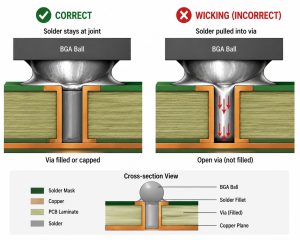
Thermal via solder wicking happens when molten solder enters a via opening connected to a package’s exposed land. On a power QFN, that can reduce solder remaining under the package or leave solder on the opposite side. Prevent it by deciding together which vias remain open, where paste is printed and what the assembly inspection must confirm.

Do not remove thermal vias just to make the solder process easier. Compare the via treatment and stencil pattern against the package guidance, electrical connection, thermal target and fabrication capability, then verify the assembled joint on representative hardware.
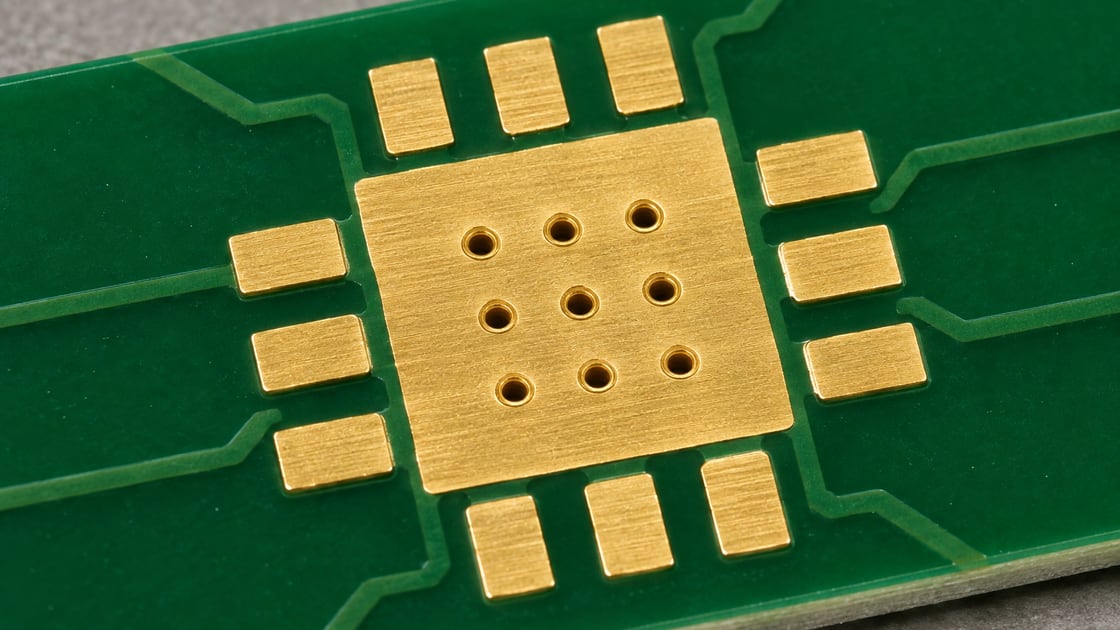
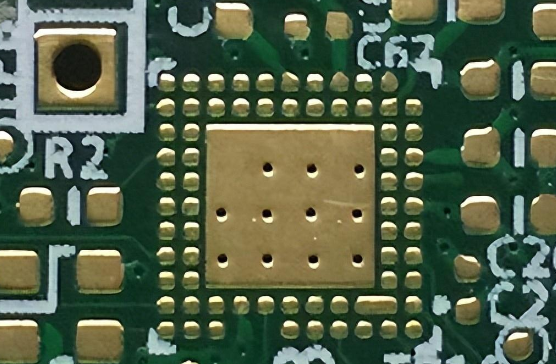
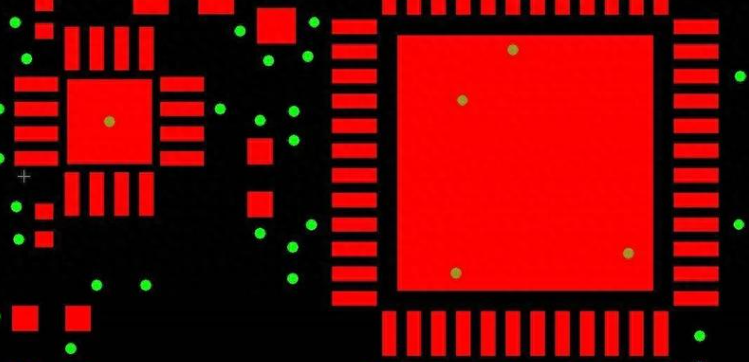
Unpopulated PCB land with several plated via openings
Via positions under a stencil aperture change how exposed openings interact with the paste. AI-generated illustration; not a production or test record.

thermal via solder wicking

An open, wettable via inside the pasted land creates a path for solder during reflow. The amount that enters depends on the opening, plating and wetting, available solder and process conditions. It is not enough to count vias or compute their empty volume. TI’s PowerPAD application report discusses controlling hole size and stencil placement for the packages it covers.

Check the actual joint for loss of solder and the reverse side for protrusion or deposits. Do not label every exposed-pad void as wicking; outgassing and paste or reflow behavior can also contribute.

thermal pad via design

Design the thermal and assembly paths as one set of requirements. The exposed pad may have an electrical connection as well as a thermal role; check its required net in the device datasheet. Draw the via array, finished hole openings, paste windows and mask openings on the same coordinate basis so both suppliers can review them.

Parameter Specify or verify
Finished hole Diameter and location
Via treatment Open, tented or capped
Paste windows Size and alignment
Thermal path Net, planes and copper
Evidence X-ray and thermal check

thermal vias size and spacing

Use the exact package recommendation and fabricator capability, not a universal hole diameter or pitch. Smaller openings may limit the solder available to flow into a barrel, but hole size, plating and pitch also affect the heat path and manufacturing yield. In a solder-risk review, ask where each opening lands relative to the stencil windows and what registration margin remains.

The thermal via design overview covers the separate heat-flow and resistance question. This article focuses on deciding which openings can safely remain beneath the soldered land.

should thermal vias be tented

Tenting is an option only if the selected side and mask process are suitable for the package and assembly route. A mask film spanning an opening is not a metal cap. Top-side tenting can affect the wettable pad area; reverse-side tenting leaves a top-side opening unless the stack or process specifies otherwise.

Ask whether the supplier can maintain the requested tent through fabrication and reflow at the finished hole size. Compare this with paste windows that avoid open vias, rather than treating tenting as a universal remedy.

thermal via filling

Specify what “filled” means before comparing quotes. A resin-filled via with a metal cap presents a different top surface from an open plated hole; a tented or merely plugged hole is not automatically planar or capped. A nonconductive fill does not remove the existing plated copper path, but it should not be modeled as a solid copper cylinder.

Option Top surface Check before release
Open plated via Opening exposed Paste clearance
Mask tent Mask film, if intact Side and coverage
Filled and capped Plated surface Flatness and cap integrity
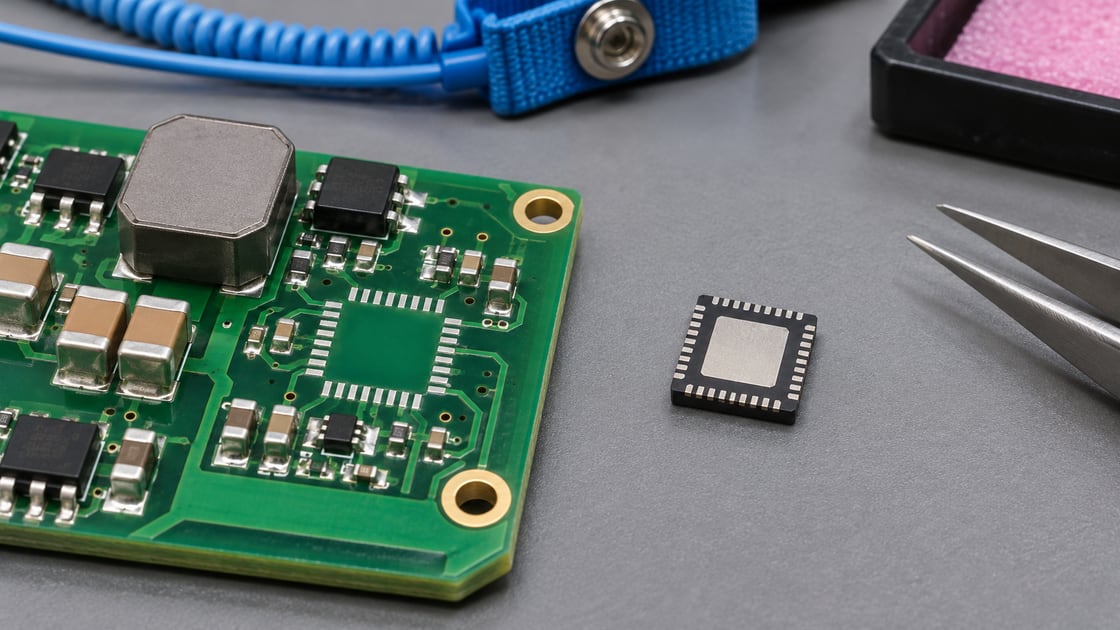
QFN-style component underside and a power PCB sample
Use the exact package drawing when setting the land and stencil geometry. AI-generated illustration; not a production or test record.

via in pad plated over

Filled and plated-over via-in-pad can be useful when an uninterrupted solderable land is needed. Confirm the fill, cap plating, finished planarity and inspection evidence rather than approving a quote based only on “VIPPO.” See the via-in-pad plated-over process guide for manufacturing details.

Compare the extra process requirements with an open-hole approach that positions stencil windows away from the vias. Both options need assembly verification. Capping addresses the open-hole path but does not remove every possible cause of voiding.

qfn ground pad stencil design

Segmenting the paste area can help the assembler control deposit distribution and avoid some open holes. Use the package and assembly process recommendations; the stencil thickness and pattern must also suit the peripheral joints. TI’s QFN and SON attachment guidance discusses exposed-pad stencil options and X-ray evaluation.

For a drawing check only, four 1.2 mm square windows on a 3.0 mm square exposed land occupy 5.76 mm² of the 9.00 mm² land, or 64% area. With a 0.10 mm stencil, their theoretical aperture volume is 0.576 mm³. Neither value is a recommended target or a prediction of deposited solder; transfer efficiency and reflow change the result. Inspect the actual printed pattern before treating the layout as qualified.

qfn solder void

Look at the void pattern, remaining joint coverage and any solder on the reverse side together. A two-dimensional X-ray can help locate voids, but it does not by itself prove how a void formed or how much solder entered a specific via. Compare the image with the via locations, stencil layout and process records.

Before approving the design, agree the package-specific acceptance criteria with the assembly team. If the cause is still unclear, choose targeted cross-sections or another agreed inspection. Check the assembled board’s temperature under representative power and ambient conditions; a neat-looking X-ray is not a thermal qualification.

FAQ

Does every open thermal via wick solder?

No. The via and land must interact with molten solder under the actual process conditions. The risk depends on wetting, hole geometry, paste placement and reflow. Inspect both sides of representative assemblies and check the joint before treating a given arrangement as safe.

Is tenting on the bottom the same as a filled and capped via?

No. A mask tent can cover one opening but does not create a plated, planar top land. A filled and capped via uses a different fabrication sequence. Ask for the treatment and inspection details in the fabrication drawing instead of relying on an abbreviated label.

Can I simply reduce the amount of paste to stop wicking?

Reducing paste everywhere can leave an insufficient joint even if less solder travels down the hole. First review where paste overlaps the openings and what the package guidance calls for. Use measured paste deposits and assembled-joint evidence rather than adjusting total paste area alone.

Why are there solder deposits on the opposite side of the board?

An open via connected to the land can be a route for solder during reflow, but other solder processes can also leave deposits. Correlate their locations with the via map and record the assembly sequence. Inspect the top joint rather than assuming the reverse deposit is harmless.

Can a large void prove the exposed pad is not soldered?

A single X-ray view can show a projected void, not the full thickness or shape of a joint. Compare the image with the agreed criteria and inspect the location relative to the pad and vias. Use a suitable follow-up method if the diagnosis affects acceptance.

Will resin-filled vias provide the same thermal result as copper-filled vias?

Do not assume that they will. The barrel, fill, cap and connected planes contribute differently to heat flow. Use the actual cross-section and material properties in a thermal model, then confirm the assembled board when the temperature margin is small.

What must I tell the fabricator before selecting a via treatment?

Provide the package drawing, exposed land and via locations, finished hole sizes, affected sides and required surface condition. Also identify which features must be inspected and whether the assembler expects a flat solderable land. Get the treatment description accepted before releasing the files.

Should I compare a modified stencil using the same assembly process?

Yes, when practical. Keep the package, board, paste and reflow conditions comparable so changes are attributable to the stencil trial. Record print results, joint images and thermal checks together. If several inputs change at once, do not attribute the result to one adjustment alone.

Discuss Your Project

Send Best Technology the device drawing, pad and via layout, finished hole sizes and preferred treatment. Include the stencil and inspection requirements if they are already agreed. Contact sales@bestpcbs.com.

You may also like

What is Via in Pad? Via-in Pad Design Rules
Monday, April 20th, 2026

If you’ve worked on PCB design, especially high-density layouts, you’ve probably wondered: what exactly is via in pad, and when should you use this technology instead of traditional routing methods? Via in pad is a critical technique for modern electronics, but it’s often misunderstood, leading to costly mistakes or missed opportunities to optimize your board. This guide breaks down everything you need to know about via in pad, from its definition and benefits to design rules and common pitfalls, all in simple, actionable terms.

Via in Pad, https://www.bestpcbs.com/blog/2026/04/via-in-pad/

What is Via in Pad?

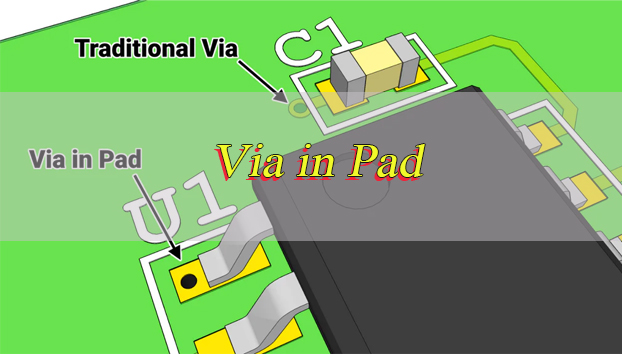
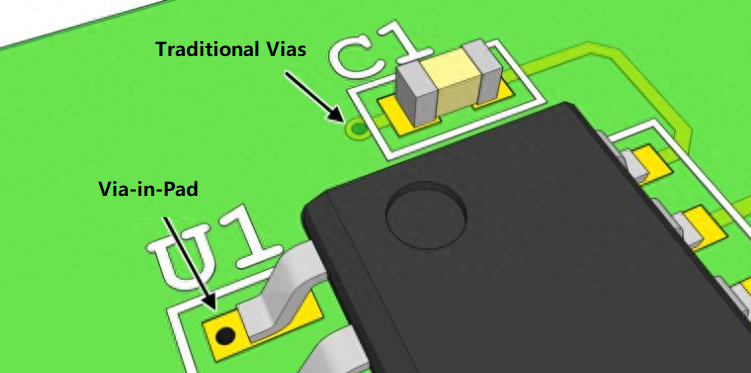
Via in pad is a PCB design technique where a via is placed directly within the copper landing pad of a surface mount component, rather than routing a trace away from the pad to a separate via location. Unlike traditional vias that sit adjacent to pads, via in pad integrates the via and pad into a single structure, eliminating the small trace stub that typically connects a pad to a nearby via.

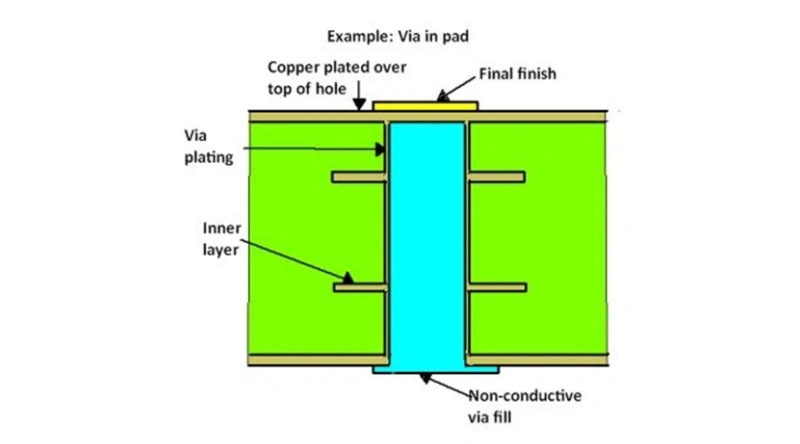
To function properly, via in pad requires specialized manufacturing steps: the via is drilled directly into the component pad, plated with copper to establish a conductive path, filled with epoxy resin or copper paste to stabilize the hole, and then planarized or capped with copper to create a smooth, solderable surface.

This process ensures the pad remains flat for component mounting and prevents solder from wicking into the via during assembly. We will also touch on related terms like in pad via and pad in via, which refer to the same core concept but with slight phrasing variations, as well as pcb via in pad which specifies the application on printed circuit boards.

Why Use Via in Pad Technology?

The primary reason to use via in pad is to solve space and performance challenges in high-density PCB designs. Here are the key benefits, explained clearly:

Space Optimization: Modern electronic devices like smartphones, wearables, and medical implants demand smaller PCBs with more components. Via in pad eliminates the need for fanout traces (the small lines connecting pads to adjacent vias), reclaiming valuable board space. This is critical for high density interconnect PCBs where every square millimeter counts.

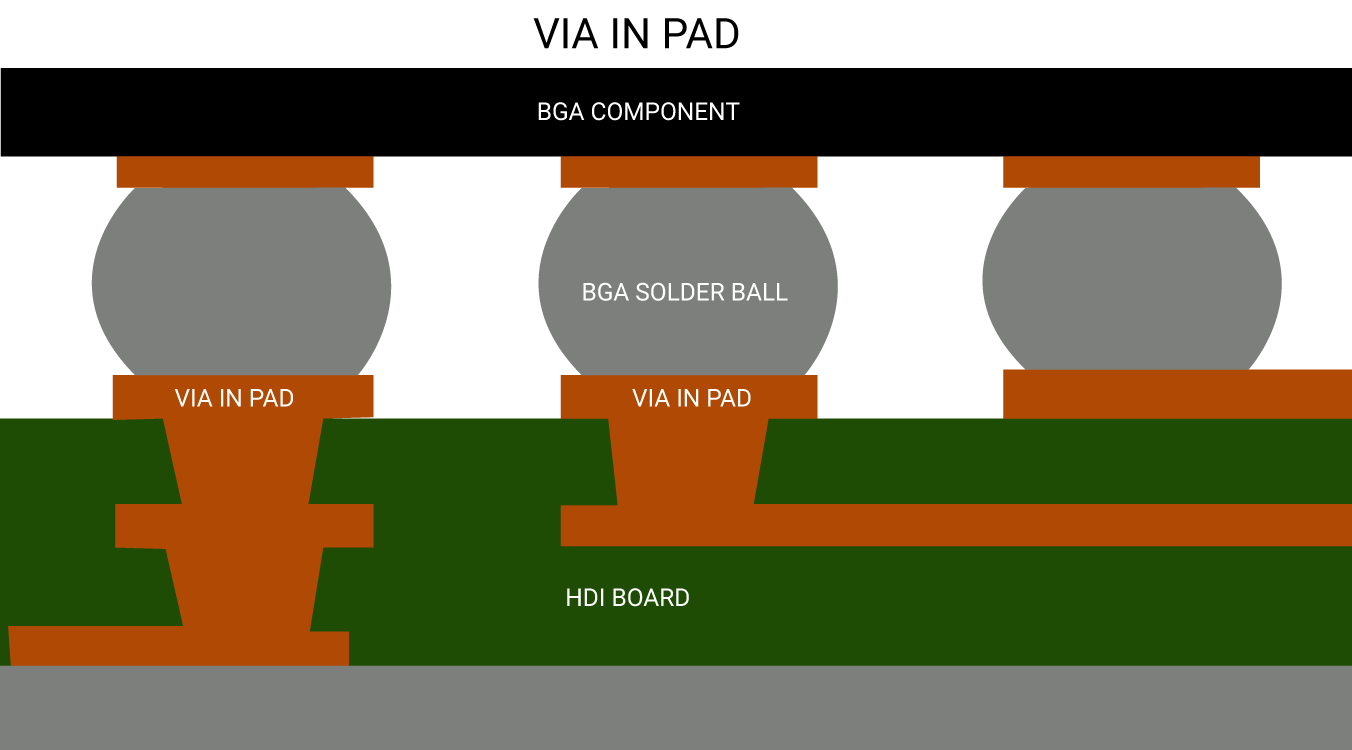
Improved Signal Integrity: Via in pad shortens the signal path, reducing parasitic inductance and capacitance that degrade signal quality. This is essential for high-speed signals (32 Gbps and beyond), as it minimizes impedance mismatches, reflections, and crosstalk. For example, via in pad bga designs (where vias are placed in BGA component pads) significantly improve signal performance for fine-pitch BGA packages.

Enhanced Thermal Management: Vias in pads act as heat conductors, transferring heat from high-power components (like power ICs or RF modules) to inner or bottom PCB layers. This prevents overheating and improves component reliability, especially in compact devices with limited airflow.

Support for Fine-Pitch Components: When BGA ball pitch drops below 0.5 mm, there is not enough space between pads for traditional dog bone routing. Via in pad is the only practical solution for these tight-pitch packages, allowing for proper fanout without sacrificing space or performance.

Via in Pad Technology, https://www.bestpcbs.com/blog/2026/04/via-in-pad/

Does Via in Pad Make a Pad Stronger?

No, via in pad does not make a pad stronger. In fact, the drilled hole within the pad slightly reduces the pad’s structural integrity. The via creates a small opening in the copper pad, which can act as a stress concentration point during thermal cycling or mechanical stress (like component insertion or board flexing).

However, the filling and planarization process used in via in pad manufacturing helps mitigate this weakness. Epoxy or copper filling reinforces the via, preventing the pad from cracking around the hole.

When done correctly, via in pad maintains adequate mechanical strength for most applications, but it should never be considered a way to strengthen padsits benefits are focused on space and performance, not structural rigidity.

Why not Via in Pad?

While via in pad offers significant advantages, it is not suitable for every design. Here are the main reasons to avoid via in pad:

Assembly Risks (Without Proper Processing): Unfilled or improperly capped vias in pads cause solder wicking molten solder flows into the via during reflow, leaving insufficient solder on the pad. This leads to cold joints, poor solder connections, or solder voids, all of which compromise connection reliability. Even small gaps in the via cap can trap air or flux, creating bubbles in the solder joint.

Manufacturing Complexity: Via in pad requires additional steps compared to traditional vias, including precise drilling, filling, planarization, and capping. These steps increase the risk of manufacturing errors, especially if your PCB manufacturer lacks experience with the technology.

Overkill for Simple Designs: If your PCB has large component pitches (0.8 mm or larger) and ample routing space, via in pad is unnecessary. Traditional dog bone routing is simpler, cheaper, and more reliable for low-density or low-speed designs.

Repair Difficulties: Components soldered to via in pad are harder to rework. The filled via can absorb heat during desoldering, making it harder to remove the component without damaging the pad or PCB.

Why is Via in Pad Expensive?

Via in pad is more expensive than traditional via routing because of its complex manufacturing process. Here’s a breakdown of the cost drivers:

Additional Manufacturing Steps: Unlike traditional vias, which only require drilling and plating, via in pad needs filling (with epoxy or copper), planarization (to smooth the pad surface), and cap plating (to create a solderable finish). Each of these steps adds labor, time, and material costs.

Precision Requirements: Via in pad requires tighter tolerances for drilling and placement. The via must be centered in the pad to avoid reducing the pad’s effective area, and the filling must be uniform to prevent surface irregularities. This precision increases manufacturing costs.

Specialized Materials: The epoxy or copper used to fill vias must meet strict electrical and thermal requirements. These materials are more expensive than the standard materials used for traditional vias.

Quality Control: Extra inspection steps are needed to ensure via filling, planarization, and capping are done correctly. This adds to the overall cost, as manufacturers must invest in additional testing equipment and labor.

Via in Pad, https://www.bestpcbs.com/blog/2026/04/via-in-pad/

How Much Does Via in Pad Cost?

The cost of via in pad varies based on several factors, including PCB size, layer count, via quantity, filling material, and manufacturer capabilities. As a general guideline, via in pad adds 15 to 25 percent to the total PCB manufacturing cost compared to traditional via routing.

For example, a 4-layer HDI PCB with 100 via in pad features might cost $1.50 to $2.50 per via in addition to the base PCB cost. Copper-filled vias are more expensive than epoxy-filled ones, adding an extra 5 to 10 percent per via. The cost per via decreases slightly for high-volume orders, but it still remains higher than traditional vias.

When budgeting for via in pad, factor in not just the direct manufacturing costs but also potential savings from reduced PCB size, improved performance, and fewer design iterations.

What is the Difference between Via-in-Pad and Dog Bone?

Via-in-pad and dog bone (traditional via routing) are two methods for connecting component pads to inner PCB layers. The key differences are outlined in the table below, with clear comparisons to help you choose the right method for your design:

FeatureVia-in-PadDog Bone
Via LocationDirectly within the component padAdjacent to the pad, connected by a fanout trace
Space RequirementMinimalno space needed for fanout tracesRequires space for fanout trace plus via
Manufacturing ProcessRequires filling, planarization, and cap platingStandard drilling and plating (no extra steps)
Cost15–25% higher than dog boneLower, more cost-effective
Signal IntegritySuperiorshorter signal path, less parasitic interferenceInferiorlonger signal path, more parasitic inductance/capacitance
Best ForFine-pitch BGA (≤0.5 mm), HDI PCBs, high-speed signalsLarge-pitch components (≥0.8 mm), low-density designs, low-speed signals
Thermal PerformanceEnhancedvias transfer heat directly from the padLimitedheat transfer depends on trace width

Is Via in Pad Allowed?

Yes, via in pad is allowed in most PCB designs, but it is subject to specific manufacturing and design constraints. The key factor is whether your PCB manufacturer can support the technologysome smaller manufacturers may lack the equipment or expertise for filling, planarization, and cap plating.

Additionally, certain industry standards (like IPC-6012 for rigid PCBs) outline requirements for via in pad, including filling material, planarization tolerance, and pad integrity. As long as your design meets these standards and your manufacturer can comply, via in pad is fully allowed.

For military, aerospace, or medical applications, via in pad may require additional testing and documentation to ensure reliability. Always confirm with your manufacturer and review relevant standards before incorporating via in pad into critical designs.

What are the Via in Pad Design Rules?

Following proper design rules is critical to ensure via in pad works reliably. Below are the key rules, organized for clarity and ease of implementation:

1. Via Size and Placement: The via should be centered in the pad to maximize the remaining copper area. A good rule of thumb is to keep the via diameter 50 to 70 percent of the pad diameter. For example, a 0.8 mm pad should use a 0.4 to 0.56 mm via. Avoid placing vias too close to the pad edgemaintain a minimum distance of 0.1 mm between the via and pad edge to prevent cracking.

2. Filling Requirements: All vias in pads must be fully filled (epoxy or copper) and capped with copper. Unfilled vias will cause solder wicking and reliability issues. Copper filling is recommended for power or ground pads, as it improves thermal and electrical conductivity; epoxy filling is suitable for signal vias.

3. Pad Size Adjustment: Increase the pad size slightly to compensate for the via. If you use a standard pad size with a via in pad, the effective copper area decreases, weakening the solder joint. A 0.1 to 0.2 mm increase in pad diameter is typically sufficient.

4. Annular Ring: Maintain a minimum annular ring (the copper around the via) of 0.1 mm. This ensures proper electrical connection and mechanical stability. If space is limited, you can reduce the annular ring to 0.05 mm, but this increases manufacturing risk.

5. Clearance: Ensure adequate clearance between via in pad and adjacent components or traces. A minimum clearance of 0.2 mm is recommended to prevent short circuits and ensure proper assembly.

6. BGA-Specific Rules: For via in pad bga designs, match the via size to the BGA ball pitch. For 0.5 mm pitch BGA, use 0.2 to 0.3 mm vias; for 0.4 mm pitch, use 0.15 to 0.25 mm vias. Avoid placing vias under BGA balls that carry high-current signals, as this can cause thermal issues.

Via in Pad Design, https://www.bestpcbs.com/blog/2026/04/via-in-pad/

How to Change Via Pad Size in Eagle?

Changing via pad size in Eagle is a straightforward process, but it requires adjusting both the via definition and design rules to ensure compatibility. Follow these step-by-step instructions:

1. Open the Via Library: Launch Eagle and open your PCB design. Go to the “Library” menu and select “Open Library Manager.” Find the via library you are using (typically “via.lbr”) and open it.

2. Edit the Via: In the library editor, select the via you want to modify (e.g., “VIA1”). Right-click and choose “Edit.” A new window will open showing the via’s properties, including pad diameter and hole size.

3. Adjust Pad and Hole Size: Change the “Pad Diameter” to your desired size (e.g., from 0.6 mm to 0.7 mm). Adjust the “Hole Size” accordinglyremember to maintain a proper annular ring (minimum 0.1 mm). For example, if you set the pad diameter to 0.7 mm, the hole size should not exceed 0.5 mm.

4. Save the Changes: Click “OK” to save the modified via. Close the library editor and return to your PCB design.

5. Update the Design Rules: Go to the “Design” menu and select “Design Rules.” Navigate to the “Routing” tab and find the “Via Size” rule. Update the rule to match your new via pad and hole size. This ensures Eagle checks for proper clearance and annular ring during design rule checks (DRC).

6. Run DRC: After making changes, run a DRC to identify any issues (e.g., insufficient clearance, incorrect annular ring). Fix any errors before finalizing your design.

FAQs About Via-in-PCB

Q1: Can via in pad be used for power and ground pads?

A1: Yes, via in pad is ideal for power and ground pads. Copper-filled vias in these pads improve thermal conductivity, helping to dissipate heat from high-power components. They also provide a direct, low-resistance path between layers, reducing voltage drop.

Q2: Do all PCB manufacturers support via in pad?

A2: No, not all manufacturers support via in pad. Smaller manufacturers may lack the equipment for filling, planarization, and cap plating. Always confirm with your manufacturer before designing with via in pad, and ask for samples of their previous via in pad work to verify quality.

Q3: Is via in pad necessary for HDI PCBs?

A3: While not always necessary, via in pad is highly recommended for HDI PCBs. HDI designs require high component density and small form factors, and via in pad eliminates the need for fanout traces, maximizing board space and improving signal performance.

Q4: Can I use via in pad with 0201 or 01005 components?

A4: It is possible, but not recommended. These ultra-small components have very small pads, and placing a via in the pad will significantly reduce the effective copper area, weakening the solder joint. Use traditional dog bone routing for ultra-small components unless space is extremely limited.

Q5: How do I prevent solder wicking with via in pad?

A5: Solder wicking is prevented by fully filling and capping the via. Ensure your manufacturer uses high-quality filling material (epoxy or copper) and properly planarizes the pad surface. Avoid using unfilled or partially filled vias in pads, as these will almost always cause solder wicking.

Q6: Does via in pad affect signal impedance?

A6: Yes, but when designed correctly, it improves impedance control. Via in pad shortens the signal path, reducing parasitic inductance and capacitance, which helps maintain consistent impedance. Use impedance calculation tools to ensure the via and pad size match your signal requirements.

You may also like

Via in Pad Design Guideline & FAQs
Tuesday, November 26th, 2024

What is Via in Pad?

With the improvement of the integration of electronic products, the package of components is getting smaller and smaller, and the pin spacing is also getting smaller and smaller. In complex PCB design, the signal cannot be fanned out without punching the disc hole, and the signal must be drawn from the next layer through the disc hole. Especially in the miniaturization applications of ‌BGA (Ball Grid Array) and ‌SMD (Surface Mount Device) chips, the process of disc holes has been widely used.

Via in pad is a design methodology in PCB manufacturing where vias are directly embedded in the pads of surface-mount devices (SMDs). Traditional vias are placed near the components with traces connecting them to the pads. However, in via-in-pad designs, the vias and pads are combined, which saves space and shortens trace lengths. This approach is particularly useful in HDI PCBs, where board real estate is limited, and signal integrity is critical.

Via in Pad Design Guideline & FAQs

What is Via-in-Pad Plating?

Via-in-pad plating refers to a specialized manufacturing process where vias embedded in pads are filled and plated over to form a smooth, conductive surface. This process involves:

  1. Via Filling: The via hole is filled with a material, often epoxy or a conductive paste, to eliminate voids and provide structural stability.
  2. Copper Plating: The filled via is then plated with copper to create a uniform and conductive layer.
  3. Surface Finish: A finish such as ENIG (Electroless Nickel Immersion Gold) or HASL (Hot Air Solder Leveling) is applied to ensure solderability.

Proper via-in-pad plating prevents solder wicking, a phenomenon where solder flows into the via during reflow, causing insufficient solder on the component leads.

Is Via-in-Pad Expensive?

Via-in-pad designs are undeniably more expensive than traditional vias. The additional manufacturing steps, such as via filling, plating, and the need for precise alignment, contribute to the higher costs. Moreover, the advanced equipment and materials required for this process add to the overall expense.

However, for designs that demand high performance, such as smartphones, medical devices, and aerospace electronics, the benefits of via in pad often outweigh the cost. It allows for compact layouts, improved performance, and better thermal management, making it indispensable for cutting-edge applications.

What Size is a Via-in-Pad?

The size of a via-in-pad is influenced by the PCB’s application, layer count, and the size of the components used. In HDI PCBs, via sizes typically range from 0.15 mm to 0.4 mm in diameter. Microvias, often used in via-in-pad designs, can be as small as 0.1 mm.

The diameter must align with the pad size to avoid compromising the pad’s mechanical and electrical integrity. Designers also need to consider the PCB manufacturer’s capabilities when selecting via sizes, as extremely small vias may require advanced fabrication techniques.

What are the Drawbacks of Via in Pad?

While via in pad offers several advantages, it also comes with notable challenges:

  • Higher cost
  • Soldering defects
  • Complex manufacturing
  • Thermal stress risks
  • Complex manufacturing process

Can You Put Vias Under Components?

Yes, placing vias under components is common in advanced PCB designs, particularly with via in pad. This technique is often used for BGAs, QFNs, and other fine-pitch components.

However, proper design and manufacturing practices must be followed to prevent defects. Filling and plating the vias ensure they do not interfere with soldering. Additionally, simulations and testing are essential to validate the design and ensure reliability.

Traditional Vias vs. Via-in-Pad Design

Traditional vias are placed outside the component pad, with traces connecting them to the pads. While this approach is cost-effective, it consumes more space and may result in longer trace lengths, increasing parasitic effects.

Via in Pad Design Guideline & FAQs

Via-in-pad designs embed the vias directly within the component pads, reducing trace lengths and optimizing space. They enhance signal integrity, thermal performance, and overall board aesthetics but at a higher cost and complexity.

When to Use Via-in-Pad Design?

Via-in-pad designs are not always necessary, but they are indispensable in specific scenarios where performance, space optimization, and thermal management are critical. Below are the situations where via-in-pad designs are most appropriate:

1. High-Density Interconnect (HDI) PCBs

When designing HDI PCBs with compact layouts and high layer counts, via-in-pad is essential. This design technique optimizes the limited space available, allowing for more components and connections on the board. It is particularly useful for devices like smartphones, wearables, and IoT devices where miniaturization is key.

2. Fine-Pitch Components

Via-in-pad designs are commonly used for components with fine pitches, such as:

  • BGA chips: BGAs have numerous pins closely spaced, leaving minimal room for traditional routing. Via in pad provides a clean solution to connect signals directly.
  • QFNs: QFNs require vias under the pads for effective routing and thermal management.
Via in Pad Design Guideline & FAQs

3. High-Speed and RF Applications

In high-speed and RF circuits, signal integrity is paramount. Via-in-pad designs minimize trace lengths, reducing parasitic inductance and impedance mismatches. This makes them ideal for applications like:

  • 5G communication systems
  • High-frequency radar systems
  • Advanced networking equipment

4. Improved Thermal Management Needs

For power components or heat-sensitive devices, via in pad aids in efficient thermal dissipation. By directly connecting the pads to thermal vias leading to internal or external layers, heat is transferred away from the components. This is critical for:

  • High-power LEDs
  • Voltage regulators
  • Power amplifiers

5. Limited PCB Real Estate

In designs with severe space constraints, via in pad maximizes usable board area. This allows for additional routing space and supports high component density without sacrificing performance. Applications like medical implants and aerospace electronics greatly benefit from this approach.

6. Double-Sided Component Placement

When components are placed on both sides of the PCB, traditional vias can interfere with the routing on the opposite side. Via in pad eliminates this issue by embedding the vias within the pads, simplifying double-sided designs.

7. High-Performance Computing Systems

For processors, GPUs, and other high-speed ICs, via in pad ensures reliable power delivery and signal integrity. It is frequently used in:

  • Data centers
  • High-performance workstations
  • AI hardware

Guidelines for Via-in-Pad Design

Via-in-pad designs require meticulous attention to detail to ensure reliability and performance.

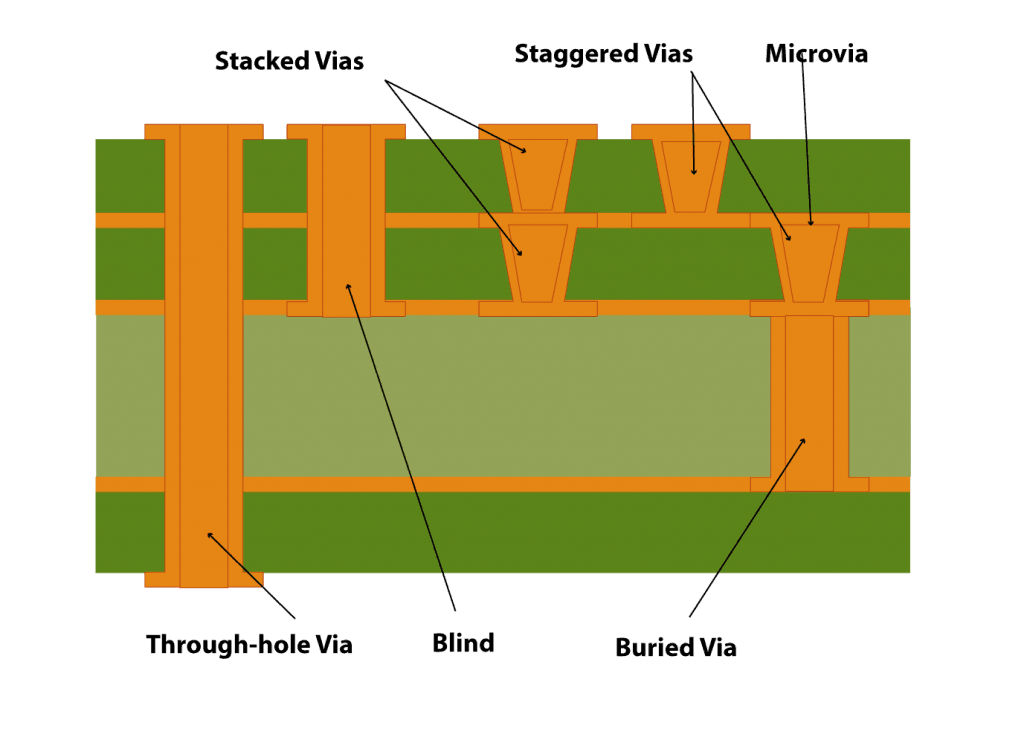
1. Decide on the most suitable via type based on your design requirements:

  • Microvias: Ideal for high-density designs due to their small size.
  • Blind/Buried Vias: Useful for connecting internal layers without penetrating through the entire board.
  • Through-Hole Vias: Less common in via-in-pad but may be necessary for specific designs.

2. Fill the vias with appropriate materials to ensure mechanical stability and prevent solder wicking:

  • Non-Conductive Epoxy Fill: Provides a reliable, flat surface for soldering.
  • Conductive Fill: Used when electrical connectivity through the via is needed.

3. The plating over the filled vias should be smooth and flat to avoid soldering issues. Use a high-quality copper plating process to enhance electrical and thermal conductivity.

4. Collaborate with your PCB manufacturer early in the design process to align on their capabilities. This includes:

  • Minimum via diameter and pad size.
  • Spacing requirements between vias and traces.
  • Maximum number of vias that can be placed in pads.
Via in Pad Design Guideline & FAQs

5. Ensure the via size is proportionate to the pad size. A via that is too large can compromise the pad’s structural and electrical integrity, while a too-small via may not provide the necessary connectivity or thermal performance.

6. For high-power applications, incorporate thermal relief patterns or thermal vias.

7. Maintain sufficient spacing between vias and other components or traces to prevent electrical interference or thermal stress.

8. To avoid solder flowing into the via during reflow soldering:

  • Use filled and capped vias.
  • Employ surface finishes like ENIG (Electroless Nickel Immersion Gold) or OSP (Organic Solderability Preservative) for enhanced soldering reliability.

9. When using via in pad for power components or ground connections, thermal relief patterns help prevent excessive heat buildup. These are especially important in high-current designs.

Need assistance in designing via-in-pads in your PCB design? Leave your comments on below, our design experts will help to solve them.

You may also like