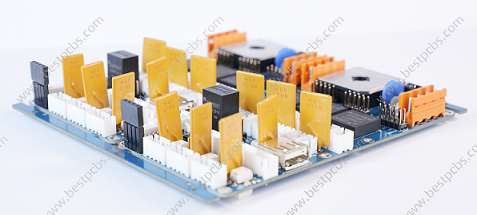
Component lead forming bends and trims a component's terminals to fit the PCB footprint without transferring damaging loads into the package. A usable form has more than the right spacing: it also needs the correct bend location, radius, body clearance and lead length. For through-hole assemblies, we need the exact component part number and assembly drawing to resolve those dimensions before insertion, rather than forcing a mismatched component into the board.

What Is Component Lead Forming?
Electronic component lead forming is the controlled preparation of lead geometry before assembly. It can produce a simple right-angle bend, a specified offset or an approved stand-off shape. Trimming controls lead length; forming controls the path and position of the lead. They are related operations, but one does not automatically establish the requirements for the other.
The component body is not a handle for bending its leads. A part may still fit the holes after rough handling while its lead-to-body interface has been damaged. Fit, package condition and electrical performance therefore answer different acceptance questions. An acceptable shape also has to survive handling between the forming station and PCB insertion.
Which Dimensions Should a Lead Forming Drawing Specify?
The drawing should define the finished shape using identifiable reference points, not just a distance dialed into a tool. Include the component outline, lead cross-section and tolerances alongside the PCB footprint. A center-to-center pitch and an outside-to-outside measurement are not interchangeable.
| Drawing input | What needs to be defined | What it prevents |
|---|---|---|
| Component identity | Manufacturer, exact part number, package and drawing revision | Applying another package's forming limits |
| Lead size | Round-wire diameter or rectangular-lead width and thickness | Selecting a die or hole for the wrong cross-section |
| Body-to-bend clearance | The body reference and the start of the permitted bend | Bending into a seal, coating or molded exit |
| Bend geometry | Inside radius, angle, direction and any approved offset | A sharp crease or an uncontrolled twist |
| Finished lead pitch | Center-to-center spacing, measurement height and tolerance | Accepting a tool setting instead of the released part |
| Body position | Orientation, polarity and required stand-off | Reversed parts or contact with nearby features |
| Trimmed length | Lead-tip position relative to the board and soldering requirement | Insufficient protrusion or interference below the PCB |
For a multi-lead package, one total span is insufficient: individual terminal positions must match the footprint. When a supplier changes the package outline or lead dimensions, the previous forming setup needs review even if the electrical description is unchanged.
How Do You Choose the Lead Bend Radius?
Choose the bend radius from the exact component's approved forming instructions. Lead diameter alone is not enough when package construction, lead material, plating and bend direction differ. A radius measured at the inside of the curve must not be confused with the centerline radius.
For example, onsemi's axial plastic-package guidance AND8390/D specifies a radius no smaller than the lead diameter, limits the angle to 90 degrees and calls for a single forming operation. Its body-to-bend minimum is 1.5 times the typical lead diameter, with at least twice the diameter preferred. These are conditions for the packages covered by that guidance, not a universal rule for resistors, LEDs, capacitors or all transistor packages.
The drawing must also leave enough straight lead for the support tool. If the required footprint forces the bend into a prohibited region, changing the footprint or using an approved preformed component is preferable to tightening the bend until the part fits. Do not resolve a clearance conflict by silently replacing the manufacturer's radius requirement.
How Can You Prevent Stress at the Component Body?
Support the lead between the package and the forming point so that the tool takes the reaction load. Pulling the free end while holding the body allows that load to reach the lead exit. The support must restrain the lead without cutting it, stripping the finish or crushing the package.
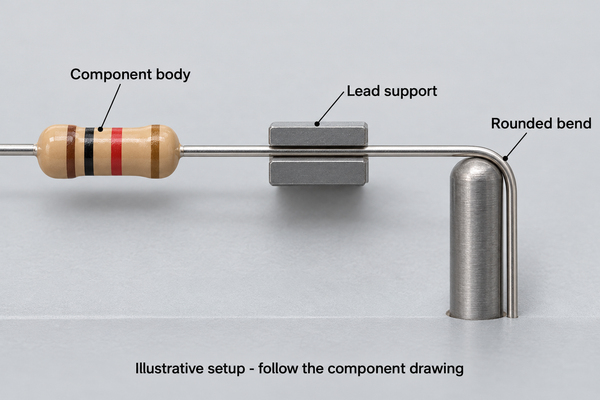
Glass packages require particular care. For the Vishay SOD-57, SOD-64, DO-35 and DO-41 glass diodes covered by document 86158, the body-to-bending-position distance is greater than 1.5 mm. The specified fixture grips the lead wires and keeps mechanical load off the glass body. This is a package-specific requirement, not permission to grip the glass itself.
That document includes a minimum clamping-force instruction expressed as 2.5 kg. It must be interpreted with the original fixture arrangement and applicable device documentation; it is not a general hand-pliers setting. A controlled setup must distinguish sufficient restraint from excessive lead deformation. Unexpected tool marks or package movement require a setup review, not simply more force.
How Do Axial and Radial Lead Forming Differ?
Axial component lead forming positions leads that leave opposite ends of the body. The finished geometry must accommodate the body length, clearances on both sides and the two bends. An axial component lead former therefore needs space for the actual body and suitable support for both wires, not merely a groove labeled with the target pitch.
Radial lead forming deals with leads leaving the same side of the body. Changing their spacing can load the nearby lead exits, especially when the available straight length is short. Radial component lead forming also needs to preserve polarity, lead order and the component's intended seating height. Do not treat every two-lead radial part as mechanically equivalent to an axial resistor.
Flat transistor leads introduce another issue: bending through the thin dimension is mechanically different from sideways bending across the width. A TO-92 lead forming tool must match the particular pin arrangement and approved bend location. The package name alone does not establish a permitted offset or bending direction.
How Do You Select a Component Lead Forming Tool?
Select a component lead forming tool by lead shape, supported diameter or thickness, bend profile and finished spacing. An electronic component lead former should hold the part consistently without using its body as a reaction stop. Accessibility matters too: the tool must leave room for the required straight section near the package.
| Tool approach | Useful role | Check before use |
|---|---|---|
| Fixed or adjustable lead bending and component forming tool | Repeatable simple axial bends | Groove geometry, body clearance and released pitch |
| Component lead forming pliers | Local offsets or specified lead shapes | Jaw profile, contact marks and operator repeatability |
| Component lead forming machine | Repeated parts with controlled feed and setup | Package compatibility, tooling condition and first-piece results |
A component lead forming kit can help with prototype work, but its available shapes do not override component requirements. The same applies to a lead forming tool for resistors and capacitors: sharing a tool is reasonable only where the two devices' permitted geometry and support conditions actually match.
For larger runs, an electronic component lead forming machine needs a verified setup rather than a copied setting from a different package. A component lead former with multiple stations should maintain the same reference orientation through feeding, forming and cutting. Before releasing a batch, compare the first formed parts with the approved drawing and check that feeding has not reversed the component orientation.
How Should Component Leads Be Trimmed?
Trim to the specified finished length while preventing the cutting action from pulling on the lead-to-body interface. Support and cutting sequence depend on the package and tooling. Keep cut fragments away from parts and PCB assemblies, and inspect the cut end for a burr that could obstruct insertion.
For the glass-diode packages in Vishay document 86158, simultaneous cutting of both leads is not permitted in the illustrated arrangement. Separate cutting steps or a staggered cutting arrangement are shown instead. The document allows simultaneous bending with its specified support conditions. Cutting and bending are therefore not interchangeable when deciding which operations can be performed together.
Where trimming occurs after insertion, support must also protect the board, pads and any existing solder connection. For a through-hole component fitted to a multilayer PCB, use the finished board thickness and seating height to establish the required lead length, not the layer count. The finished protrusion should come from the applicable assembly requirement, not an arbitrary universal length. A shorter lead is not automatically a better assembly if it compromises soldering or inspection access.
How Do You Check Lead Pitch After Forming?
Check pitch after removing the forming load, at the drawing's specified measurement location. Elastic recovery can make the released part differ from the tool's nominal setting. A measurement made while the part is still constrained can hide that difference.
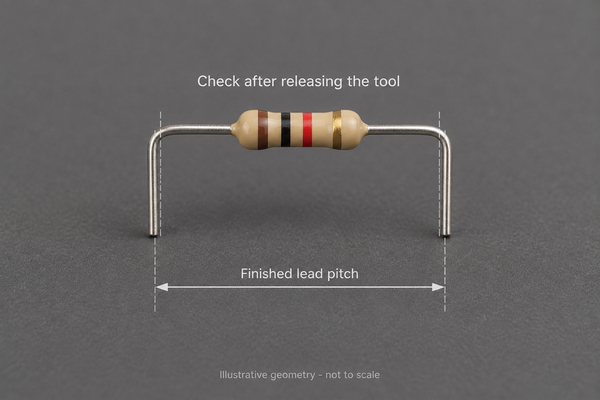
For two equal round leads measured across their outside surfaces, subtract one lead diameter to obtain the center-to-center distance. As a dimensional example, a 10.60 mm outside span with two 0.60 mm leads gives a 10.00 mm center pitch. This calculation assumes parallel leads of equal diameter at that measurement height; it is not a forming tolerance recommendation.
Check lead parallelism and seating height as well as pitch. For our FR4 PCB manufacturing, the drawing's finished-hole size and position must be considered with the actual lead envelope. A nominal drill diameter is not the finished plated-hole diameter. Do not spread or squeeze the component against the board to conceal a mismatch.
What Should You Inspect After Lead Forming?
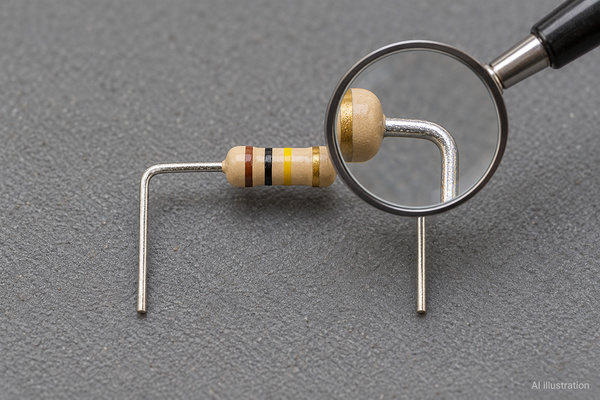
Inspect the component body, lead exits, bends, finish and final dimensions before accepting the formed parts. Compare with the incoming condition where a mark or crack may already have existed. Appearance alone cannot establish whether a hidden connection or seal remains intact.
| Inspection area | Look for | Follow-up when it does not match the requirement |
|---|---|---|
| Body and lead exit | Cracks, chipped coating, displacement or a changed lead exit | Segregate the part and assess package damage |
| Bend | Creasing, twisting, inconsistent radius or repeated rework | Check the profile and support arrangement |
| Lead surface | Deep jaw marks, exposed base metal or damaged finish | Compare with the device's permitted tooling marks |
| Dimensions | Pitch, parallelism, angle, length and stand-off | Measure in the released state against the drawing |
| Insertion fit | Leads aligned with holes without forced reshaping | Review both formed geometry and PCB footprint |
| Electrical condition | Results required by the device and test plan | Record failures without treating continuity alone as full qualification |
An inspection record is most useful when it identifies the part number, lot, drawing revision, setup, sampled quantity and measured dimensions. A photograph can document a visible condition, but cannot prove a numerical radius or hidden seal integrity by itself. Abnormal parts need disposition before insertion, when access to the lead exits is still clear.
How Can You Keep Lead Forming Consistent Across a Batch?
Use an approved first piece, defined setup controls and checks at meaningful change points. Tool wear, a new component lot or a changed package can alter the output even when the operator uses the same setting. Record the released dimensions rather than treating a machine setting as the acceptance result.
Separate unformed, accepted and held parts so rejected pieces cannot re-enter production. Packaging between operations should protect the formed leads from being compressed or tangled. If a component needs repeated straightening to pass the insertion check, stop and resolve the mismatch rather than cycling the lead through additional bends.
For a new footprint, our PCB prototype manufacturing can provide the actual board for a fit review before the design moves to volume assembly. The useful result is a checked component-and-board combination, not a nominal pitch verified on only one side of that interface.
What Information Do We Need for Through-Hole Assembly?
We need the BOM with exact manufacturer part numbers, PCB fabrication data, assembly drawing, orientation requirements and any approved lead-form dimensions. Include the original component instructions when a bend, stand-off or trimming sequence is critical. State whether parts arrive unformed, factory-preformed or customer-prepared.
At EBest Circuit (Best Technology), our PCB assembly service includes through-hole and mixed assembly, incoming inspection, DFA review, insertion and wave soldering. We support tube, tray and loose-part supply as well as other listed packaging formats. The suitable preparation route depends on the component and build requirements; we do not apply one bend specification to every package.
For component lead forming services within a PCBA project, send the drawing, quantity and required inspection records to sales@bestpcbs.com. We can review those inputs with your assembly requirements before quotation. If the package instructions and footprint conflict, that conflict needs an agreed resolution before production.
Component Lead Forming FAQs
How to Clean and Form Component Leads Before Soldering?
Check incoming finish condition before forming. Use only a cleaning method compatible with the component, plating and approved process; abrasive removal of finish or an unapproved chemical treatment can create a solderability problem. Suspect corrosion requires assessment rather than polishing the part until it looks clean. Confirm acceptable surface condition before releasing the part for forming and soldering.
When Shall Sleeving Be Placed on a Component Lead Before Forming?
Where the approved assembly requires insulation sleeving and the finished bend would prevent it from sliding into place, fit the sleeve before that bend. Confirm its final position, temperature suitability and clearance from the solder joint. Do not assume every formed lead needs sleeving or trap a sleeve in a tooling contact area.
Can Through-Hole Forming Rules Be Used for SMT Leads?
Not automatically. SMT component lead forming also involves seating-plane and coplanarity requirements, plus the specific package's permitted reshaping method. A through-hole bend or spacing instruction does not establish an acceptable gull-wing lead profile. Use the component's approved surface-mount geometry rather than adapting the axial-wire examples without verification.
Can a 3D-Printed Lead Forming Jig Replace Metal Tooling?
A resistor lead forming tool made by 3D printing may be useful for a checked prototype geometry. It still needs adequate stiffness, smooth contact surfaces and appropriate ESD controls for the parts being handled. Wear or deflection can change the finished dimensions. It should not be treated as a qualified production fixture merely because one component fits.