PCB manufacturing PCB manufacturing
Home > Blog

PCB Missing Silk Screen

PCB Missing Silk Screen: Causes, Troubleshooting & DFM Prevention
Wednesday, June 24th, 2026

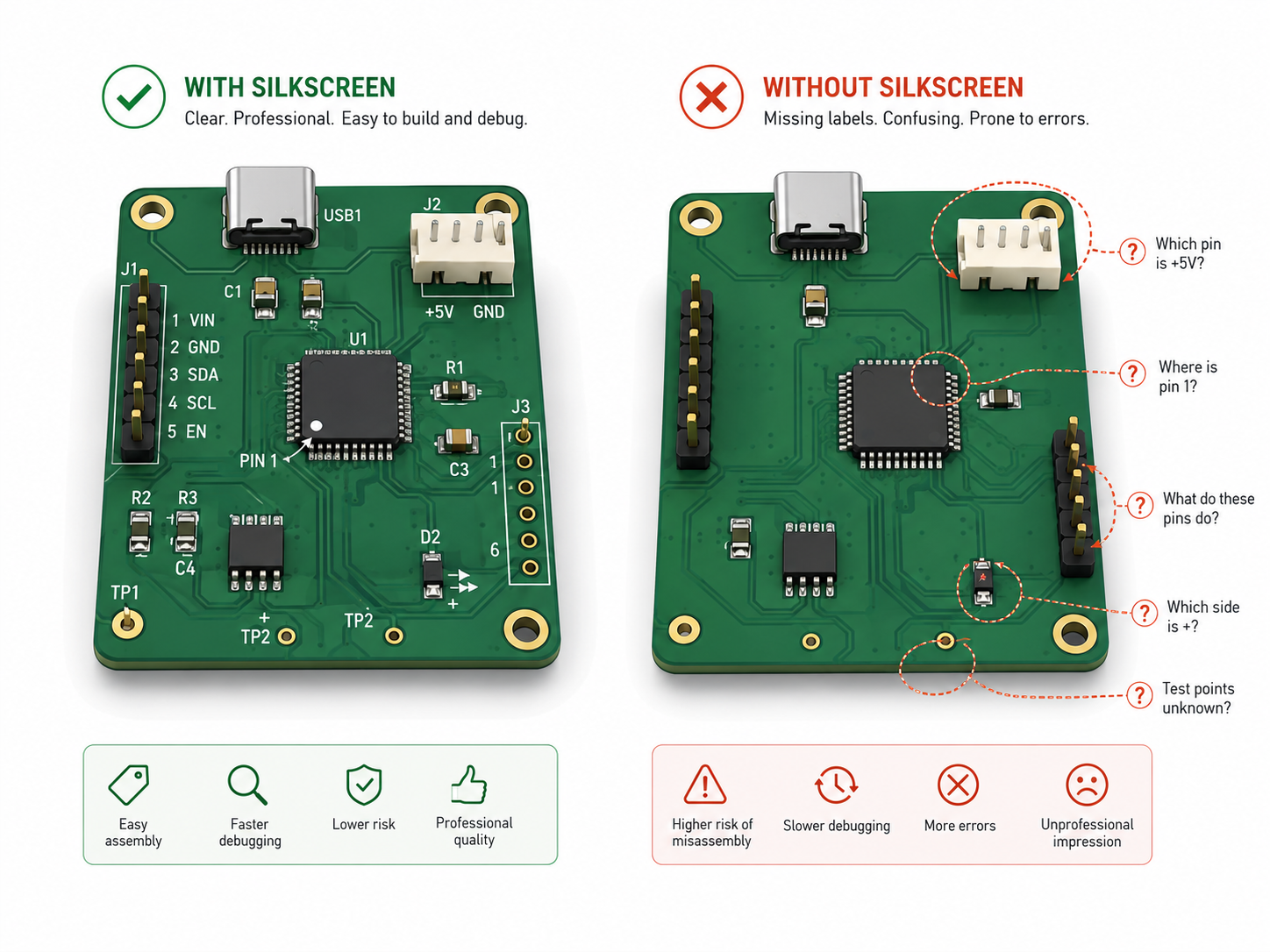
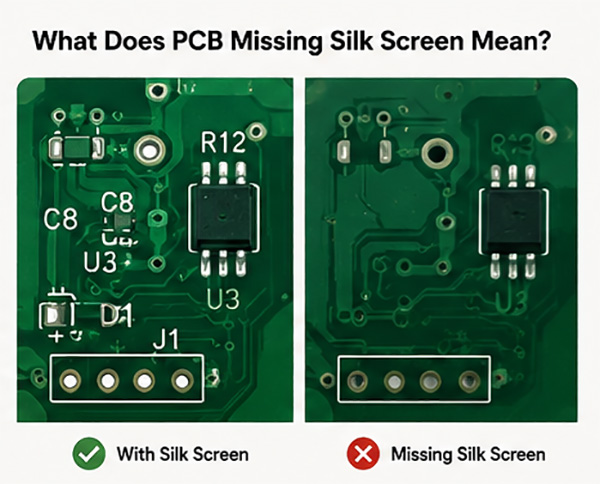
PCB missing silk screen means the printed text, reference designators, polarity marks, connector labels or board identification marks are absent, incomplete or unreadable on the finished PCB. The board may still pass electrical testing, but missing markings can create real risks during assembly, inspection, repair and batch traceability.

This guide explains why PCB missing silk screen happens, how Gerber files and EDA settings cause missing legend layers, how to check the problem before production, and how DFM review helps prevent repeated manufacturing defects. It is written for PCB designers, purchasing teams, quality inspectors and companies preparing prototype or batch PCB production.
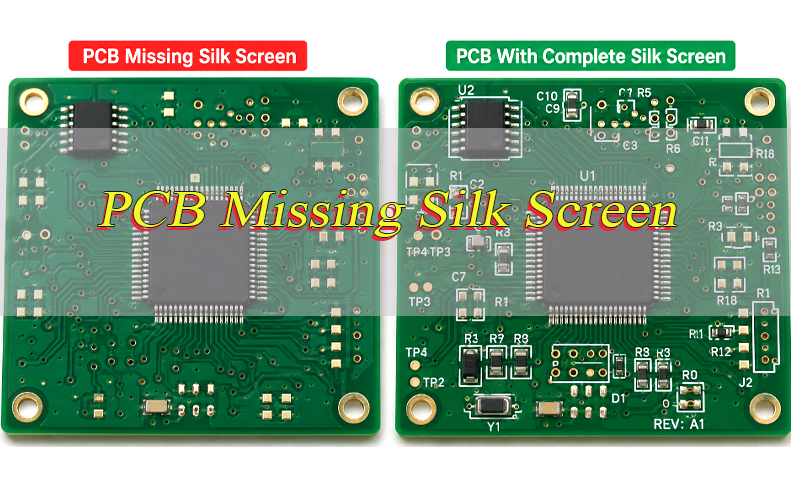
PCB Missing Silk Screen, https://www.bestpcbs.com/blog/2026/06/pcb-missing-silk-screen-2/

What Is PCB Missing Silk Screen?

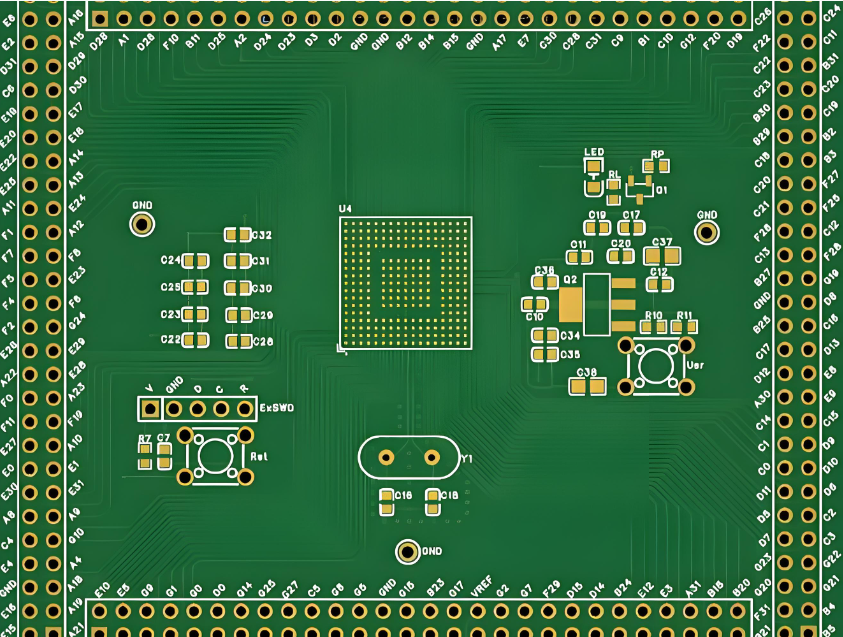
PCB missing silk screen is a PCB marking defect where expected text, symbols, outlines or reference labels are not visible on the final board. These markings are normally printed on the solder mask surface and help identify components, test points, polarity, connectors, revision codes and warning labels.

In PCB manufacturing, silkscreen is also called the legend layer or overlay layer. It does not normally carry electrical current, but it provides important production information. When the top or bottom legend layer is missing, the PCB can become harder to assemble and inspect.

PCB missing silk screen may appear as a completely blank board, missing reference designators, broken text, shifted labels, faint ink or removed markings near solder pads. The cause may come from CAD settings, Gerber export, CAM processing, printing control or quality inspection failure.

Common missing items include:

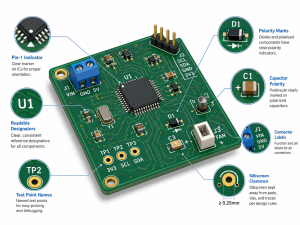
  • Reference designators: R1, C5, U3, D2 and other component IDs.
  • Polarity marks: diode, LED, capacitor, IC pin 1 and connector orientation.
  • Test labels: TP1, GND, VCC, UART, SWD or programming port labels.
  • Board information: part number, revision, date code, logo and batch mark.
  • Warning marks: high voltage, fuse rating, connector direction or safety notes.

Can a PCB Function Without Silkscreen?

Yes, a PCB can function without silkscreen if the copper traces, vias, solder mask, plating, components and solder joints are correct. Silkscreen is not part of the electrical circuit, so its absence does not automatically make the PCB electrically defective.

However, PCB missing silk screen can still create production and maintenance risks. Operators may install polarized parts in the wrong direction, confuse connectors, misread test points or spend extra time checking assembly drawings. For one-off prototypes, this may be manageable. For batch production, it can increase rework and inspection pressure.

A PCB without silkscreen is more acceptable when the board is very simple, the component count is low and the assembly file is clear. For dense SMT boards, industrial controllers, power modules, communication boards or medical-related PCB assemblies, readable silkscreen is strongly recommended.

Why Does PCB Silkscreen Matter for Assembly, Testing and Repair?

PCB silkscreen matters because it links the physical board to the BOM, assembly drawing, test procedure and repair process. It helps people quickly understand what each component, connector and test point does.

During assembly, reference designators help operators match components with the BOM and pick-and-place file. Polarity marks reduce the risk of reversed LEDs, diodes, electrolytic capacitors and ICs. Connector labels help avoid cable direction mistakes during box build or system integration.

During testing and repair, clear labels help technicians find failed circuits faster. They do not need to check PCB layout files repeatedly just to locate one test point or component. For global supply projects, silkscreen also supports communication between the PCB factory, PCBA team, buyer and after-sales repair team.

Key value includes:

  • Faster assembly: operators identify components more quickly.
  • Lower polarity risk: direction-sensitive parts are easier to place correctly.
  • Simpler testing: test points and programming pins are easier to locate.
  • Better repair: technicians can trace failures with less file checking.
  • Cleaner traceability: revisions, date codes and batch marks are easier to manage.

What Are the Common Causes of Missing Silkscreen on Printed Circuit Boards?

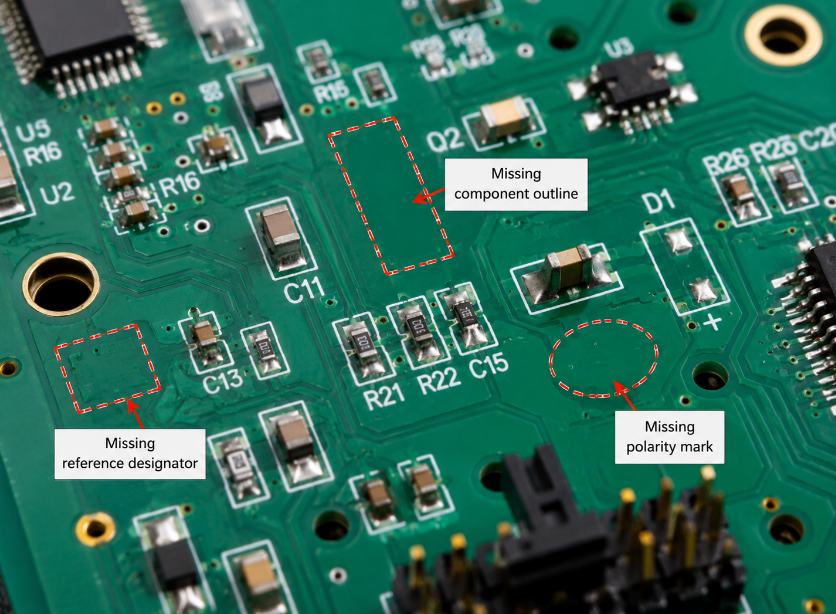
The most common causes of PCB missing silk screen are missing Gerber legend layers, hidden CAD text, wrong layer mapping, silkscreen over pads, small text size and CAM cleanup. The issue often starts before the PCB enters production.

On the design side, reference designators may be hidden in the PCB editor, placed on a fabrication layer instead of a silkscreen layer, or removed during footprint cleanup. Some designers also move text outside the board outline or forget to enable bottom-side markings before export.

On the manufacturing side, the factory may clip markings that overlap solder pads, exposed copper, vias or solder mask openings. This is done to prevent ink contamination on solderable surfaces. If the text is too small, too thin or too close to copper, it may become broken, faint or removed during CAM review.

Common causes include:

  • Missing legend file: top or bottom silkscreen Gerber was not exported.
  • Hidden reference designators: text is visible in CAD settings but not plotted.
  • Wrong layer assignment: labels are placed on assembly or fabrication layers.
  • Pad overlap: markings touch solder mask openings or exposed copper.
  • Small text size: characters are below factory printing capability.
  • CAM clipping: software removes text near pads, vias or board edges.
  • Printing issue: ink, screen, alignment or curing control is unstable.
Missing Silkscreen on Printed Circuit Boards, https://www.bestpcbs.com/blog/2026/06/pcb-missing-silk-screen-2/

How Do Gerber Files Cause Missing Silkscreen Top or Bottom Layers?

Gerber files cause missing silkscreen top or bottom layers when the required overlay files are absent, empty, misnamed, mirrored or excluded from the export package. The final Gerber package is what the PCB factory uses for production.

For many PCB designs, the top silkscreen file is named GTO or top overlay, while the bottom silkscreen file is named GBO or bottom overlay. If either file is missing, the factory cannot print that side unless the customer provides corrected data. This is a common reason for PCB missing silk screen after export.

Gerber files missing silkscreen top layers are especially risky because most component reference designators and polarity marks are placed on the top side. Bottom legend errors may affect connector labels, test points, revision marks or assembly notes on double-sided boards.

CheckGood ResultWarning Sign
Top legendGTO or top overlay existsFile missing or empty
Bottom legendGBO or bottom overlay existsLayer not exported
Board outlineAligned with all layersLegend shifted or mirrored
Text contentRefdes visibleCAD shows text, Gerber does not
PolarityClear marks in GerberMarks only in assembly drawing
CAM previewNo critical clippingLabels removed near pads

Before release, always open the full Gerber package in an independent viewer. The PCB editor view is not enough because it may show design objects that were not exported.

Why Are PCB Reference Designators Missing After Export?

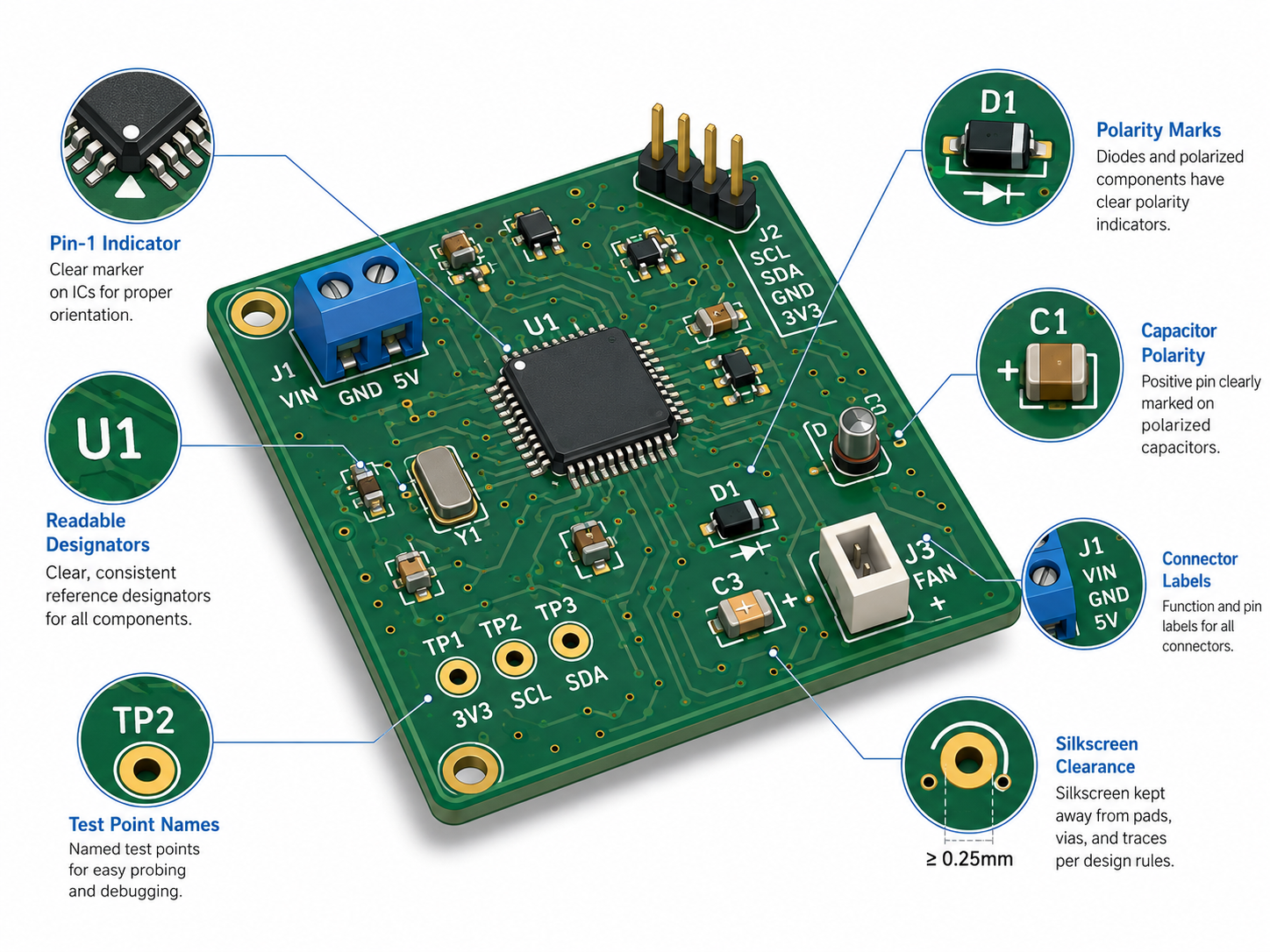
PCB reference designators are usually missing after export because the text fields are hidden, placed on the wrong layer, excluded from plotting or filtered by output settings. This problem is common in both prototype and batch PCB projects.

A reference designator may appear on the design screen but fail to appear in Gerber output. This happens when the footprint field is not assigned to the silkscreen layer, the plot option excludes component text, or the design uses assembly-layer labels instead of board legend labels.

PCB missing reference designators can also happen when text overlaps pads or vias. During CAM cleanup, the factory may remove or clip these markings to keep ink away from solderable areas. This protects solderability, but it may leave the board with missing component identification.

To avoid this problem:

  • Check visibility: make sure reference designators are not hidden.
  • Check layer: place refdes on top or bottom silkscreen, not only assembly layers.
  • Check export settings: include component text in Gerber output.
  • Check clearance: keep text away from pads, vias and exposed copper.
  • Check Gerber viewer: confirm refdes appears in the final manufacturing files.

How to Identify PCB Missing Silk Screen Before Manufacturing?

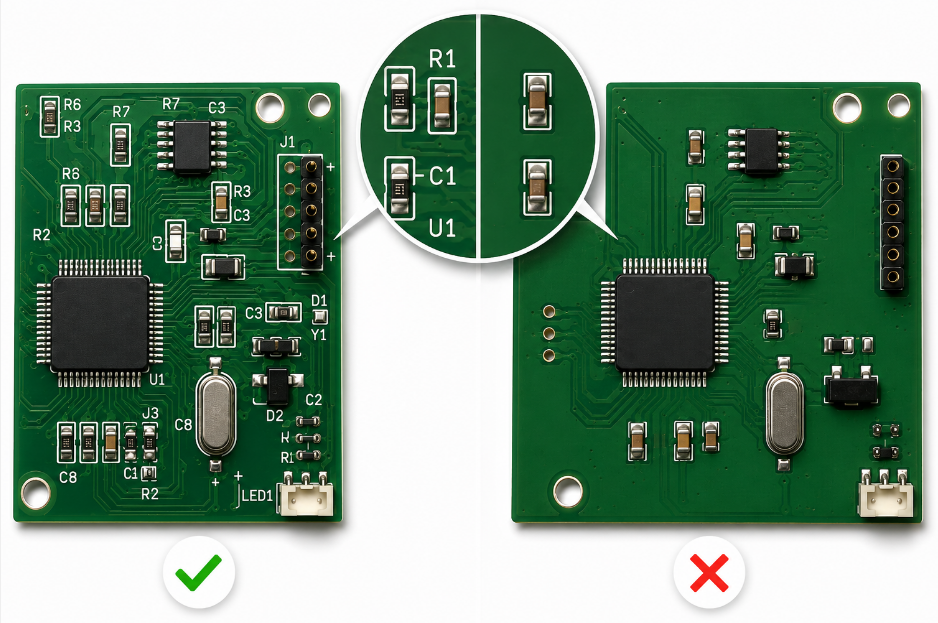
The best way to identify missing PCB silkscreen before manufacturing is to inspect the exported Gerber files, not only the PCB design screen. The Gerber package is the real manufacturing data.

Open all copper, solder mask, drill, board outline and silkscreen layers in a Gerber viewer. Confirm that the top and bottom legend layers appear on the correct side. Then zoom into dense areas around ICs, connectors, diodes, LEDs, capacitors, test points and programming ports.

Next, compare the Gerber view with the BOM, assembly drawing and pick-and-place file. Check whether each critical component has a readable reference designator and whether polarity marks are still visible. For PCB missing silk screen prevention, this review should be completed before requesting a production quotation.

Important inspection points include:

  • Layer completeness: top and bottom legend files are included.
  • Side accuracy: top and bottom markings are not reversed.
  • Text readability: letters remain clear after zooming out.
  • Critical marks: polarity, pin 1 and connector labels are visible.
  • Clearance: no text overlaps solder mask openings.
  • Revision: board name, version and date code are correct.
  • File consistency: Gerber, BOM and assembly drawing match each other.
PCB Missing Silk Screen, https://www.bestpcbs.com/blog/2026/06/pcb-missing-silk-screen-2/

How to Troubleshoot PCB Silk Screen Printing Problems?

PCB silk screen printing troubleshooting should start from Gerber data, then move to CAM editing, printing process and final inspection. This order avoids blaming production before confirming whether the marking existed in the manufacturing files.

  • Check the final Gerber files
    Open the exported Gerber package in an independent viewer. If the missing text does not appear in the silkscreen layer, the problem comes from CAD settings, hidden text or export configuration, not printing.
  • Confirm top and bottom legend layers
    Check whether the top overlay and bottom overlay files are included. A missing GTO or GBO file can directly cause PCB missing silk screen on one side of the board.
  • Review CAM clipping records
    If the text appears in Gerber but disappears on the PCB, check whether CAM removed markings near pads, vias, exposed copper or board edges. This is often done to protect solderability.
  • Inspect text size and stroke width
    Very small characters may break during printing. Text that is too thin can become faint after curing, especially on dark solder mask or dense SMT areas.
  • Check ink, screen and alignment
    Broken or blurred markings may come from blocked mesh, unstable ink viscosity, poor registration or weak printing pressure. These are process issues, not design issues.
  • Verify curing and adhesion
    If markings fade after reflow, cleaning or handling, check ink curing, solder mask surface condition and cleaning chemistry. Poor adhesion can make silkscreen peel or disappear.
  • Compare with the approved sample
    For repeat orders, compare the failed PCB with the golden sample. Repeated defects in the same location usually point to data or CAM rules. Random defects usually point to process control.

How to Fix KiCad Silkscreen Not Showing on PCB?

KiCad silkscreen not showing on PCB is usually caused by hidden fields, wrong layer placement or incomplete Gerber plot settings. The fix should be confirmed in the exported Gerber files, not only in the PCB editor view.

  • Check reference designator visibility
    Open the footprint properties and confirm that reference designators are visible. If the fields are hidden, they may not be plotted and can cause missing component markings.
  • Confirm the correct silkscreen layer
    Printed top-side text should be on F.SilkS. Printed bottom-side text should be on B.SilkS. Text placed on Fab, Courtyard, User or Assembly layers will not automatically print on the PCB.
  • Move critical markings away from pads
    Place polarity marks, pin 1 indicators and connector labels away from solder pads and exposed copper. If the markings overlap solder mask openings, the factory may remove them during CAM cleanup.
  • Enable silkscreen layers during plotting
    In the Gerber plot settings, make sure front silkscreen and back silkscreen are selected. Missing plot selection is a common reason for PCB missing silk screen after export.
  • Check text size before export
    Avoid extremely small text. Use readable character height and stroke width so the factory can print clear markings after solder mask and curing.
  • Open the plotted Gerber files
    Use KiCad’s Gerber viewer or another independent viewer to confirm that F.SilkS and B.SilkS are visible. If the Gerber viewer does not show the text, the PCB factory will not print it.
  • Regenerate files after every correction
    After moving text or changing visibility, export the Gerber package again. Old files may still contain missing silkscreen errors if they are not replaced.

How to Fix Altium Missing Silkscreen Layer Errors?

Altium missing silkscreen layer errors are commonly caused by disabled overlay layers, hidden designators, output job mistakes or incorrect layer mapping. The final check should always be done in Gerber or CAM preview.

  • Enable Top Overlay and Bottom Overlay
    In Gerber or Gerber X2 output settings, select Top Overlay and Bottom Overlay. If these layers are not enabled, the silkscreen files may be missing from the manufacturing package.
  • Check component designator visibility
    Make sure reference designators are not hidden, locked or suppressed by component settings. If designators are invisible in the PCB document, they may not export correctly.
  • Confirm text is on overlay layers
    Printable silkscreen should be on overlay layers. Text placed on mechanical, assembly or documentation layers may look useful in design files but will not print unless mapped correctly.
  • Review the Output Job file
    If an Output Job is used, confirm that it points to the correct PCB document and includes the required overlay layers. A wrong output configuration can export copper and solder mask correctly while omitting silkscreen.
  • Check clearance around pads and vias
    Move important labels away from solderable areas. If silkscreen crosses pads or exposed copper, CAM software may clip the text to avoid ink contamination.
  • Generate and inspect Gerber files
    Open the exported files in CAMtastic or an independent Gerber viewer. Confirm that reference designators, polarity marks, connector labels and revision codes are visible.
  • Send corrected files with clear notes
    If the first package had PCB missing silk screen, send the corrected Gerber set with a short note explaining that overlay layers were updated. This helps the factory avoid using old files.

What Assembly Problems Can Missing Silkscreen Markings Cause?

Missing silkscreen markings can cause wrong placement, polarity errors, slower inspection, test confusion and higher rework cost. These problems can be reduced by keeping critical marks visible in Gerber files, assembly drawings and first article inspection.

  • Wrong component placement
    Missing reference designators make it harder to match the PCB with the BOM and pick-and-place file. This can slow down SMT setup and manual assembly.
    Solution: keep key reference designators visible for ICs, connectors, polarized parts, jumpers and test-related components.
  • Reversed polarity parts
    LEDs, diodes, electrolytic capacitors, optocouplers and ICs may be installed in the wrong direction if polarity marks or pin 1 indicators are missing. This can cause functional failure after power-on.
    Solution: protect polarity marks first during layout and CAM review, especially near D1, LED1, C polarity marks and U1 pin 1.
  • Connector assembly mistakes
    Missing connector labels can cause cable direction errors, wrong port connection or incorrect harness assembly. This is common in control boards, power modules and box-build PCBA projects.
    Solution: label power input, signal output, communication ports and connector orientation clearly on the silkscreen or assembly drawing.
  • Slower manual inspection
    Inspectors need more time to compare the physical PCB with drawings when component markings are absent. This increases inspection workload and may delay batch release.
    Solution: confirm that top and bottom silkscreen markings are readable in the final Gerber viewer before production.
  • Test point confusion
    Missing TP, GND, VCC, UART, SWD or programming labels can lead to wrong probing during ICT, FCT or debugging. Incorrect test contact may damage the board or produce false failure results.
    Solution: mark key test points clearly and keep test labels outside component shadow areas after assembly.
  • Higher rework risk
    Repair teams may remove or replace the wrong component when reference labels are missing. This increases rework time and may damage pads, traces or nearby components.
    Solution: keep service-related labels visible and provide a matching repair drawing for dense PCBA boards.
  • Traceability gaps
    Missing revision codes, date marks, customer part numbers or batch labels can cause confusion during incoming inspection, warranty analysis or repeat orders.
    Solution: define required revision, batch and customer identification marks in the purchase file before fabrication.

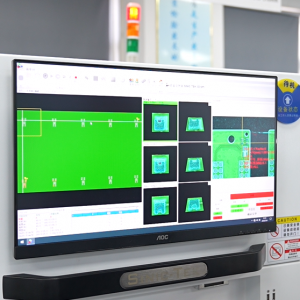
How Does AOI Detect Missing Silkscreen Text and Markings?

AOI detects missing silkscreen text and markings by comparing board images with approved Gerber data, inspection programs or golden samples. It can identify missing text, broken characters, shifted labels and poor contrast.

Automated optical inspection uses controlled lighting and cameras to capture the PCB surface. The system then checks whether expected shapes, text blocks and symbols appear in the correct position. For small markings, image resolution and solder mask contrast are important because weak contrast may look like missing text.

PCB quality inspection missing text markings should also include manual review for critical areas. AOI is useful for repeatable checks, but human confirmation is still valuable for board revision codes, customer logos, warning labels and special compliance marks.

Quality control should check:

  • Presence: required marks appear on the correct side.
  • Position: text is not shifted into pads or components.
  • Legibility: markings are readable after printing and curing.
  • Contrast: ink color is clear against solder mask color.
  • Completeness: characters are not broken, clipped or blocked.
  • Traceability: revision, batch and customer marks are correct.

For bare PCB inspection, visual acceptability is often controlled by IPC-A-600 requirements. For assembled boards, visual workmanship is commonly checked with IPC-A-610 requirements. Customer drawings and approved samples should define the final acceptance rule.

How to Prevent PCB Missing Silk Screen With DFM Checks?

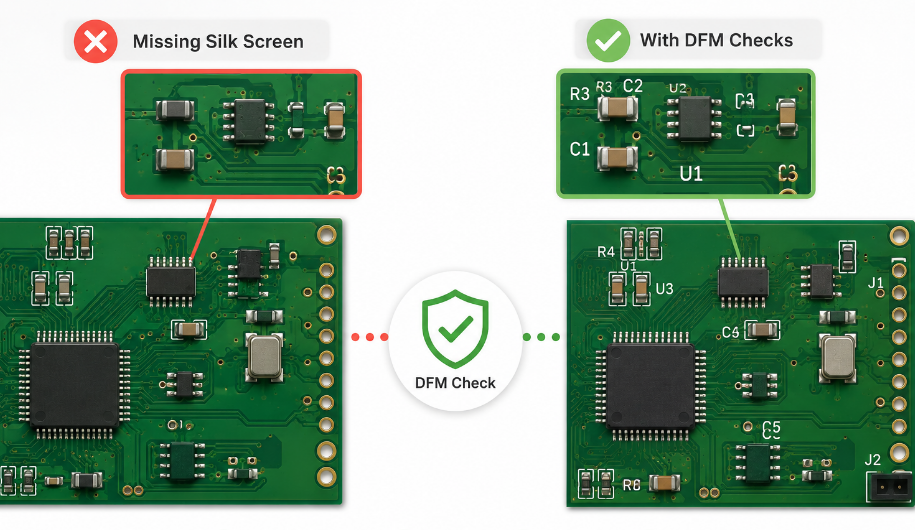
PCB missing silk screen can be prevented when DFM checks review layer completeness, text clearance, readability and production risk before fabrication. The goal is to catch missing markings before the PCB enters manufacturing.

  • Check silkscreen layer completeness
    Confirm that top and bottom legend layers are included in the Gerber package. Missing overlay files are one of the most direct causes of blank or incomplete silkscreen.
  • Verify reference designators in Gerber view
    Reference designators should be checked in the final Gerber files, not only in CAD software. This prevents hidden fields or non-print layers from reaching production.
  • Keep markings away from solderable areas
    Silkscreen should not overlap pads, exposed copper or solder mask openings. Factories often remove overlapping ink to protect solder wetting and assembly reliability.
  • Prioritize critical orientation marks
    Pin 1 marks, diode polarity, LED direction, capacitor polarity and connector labels should be protected first. These markings directly affect assembly accuracy.
  • Use readable text size and stroke width
    Very small or thin text can become broken, faint or unreadable after printing. Readable markings reduce inspection errors and repair time.
  • Check both PCB sides separately
    Top and bottom silkscreen should be reviewed side by side. Bottom-side labels are easy to miss during export, especially on double-sided SMT boards.
  • Review CAM clipping before production
    If the factory must remove text near pads or board edges, the customer should approve the change before fabrication. This avoids unexpected missing markings after delivery.
  • Match silkscreen with BOM and assembly drawings
    Component labels, polarity marks and connector names should match the BOM and assembly files. Mismatched documents can cause assembly confusion even when the silkscreen prints correctly.
  • Approve a first article sample
    For batch production, the first article should confirm legibility, position, contrast and required marks. This prevents repeated PCB missing silk screen defects in mass production.
  • Define inspection requirements in the purchase file
    Buyers should state required silkscreen color, revision mark, customer logo, UL mark, date code and acceptance criteria. Clear requirements reduce supplier misunderstanding and incoming QC disputes.
PCB Missing Silk Screen, https://www.bestpcbs.com/blog/2026/06/pcb-missing-silk-screen-2/

PCB Missing Silk Screen Project Case: From Gerber Error to Corrected Batch Production

A customer sent a four-layer industrial controller PCB for prototype and small batch production, but the original Gerber package had an empty top silkscreen layer. The PCB editor still showed reference designators, so the design team did not notice the export problem.

During incoming file review, the copper layers, solder mask, drill data and board outline were complete. However, the top overlay file had no useful text. Several LED polarity marks, connector labels and IC orientation marks were only visible in the assembly drawing, not in the Gerber data.

EBest Circuit reported the PCB missing silk screen risk before manufacturing. The customer regenerated the Gerber files with the correct top overlay settings. Our CAM team then checked pad clearance, removed only non-critical overlapping text and protected the polarity and connector markings.

After the corrected first article sample was approved, the batch moved into production. The final boards had readable reference designators, clear polarity marks and correct revision labels. Assembly questions decreased, and the customer avoided a batch of boards that would have been electrically correct but difficult to assemble.

FAQs About PCB Missing Silk Screen

Q1: Does missing silkscreen mean the PCB must be scrapped?
A1: Not always. If the copper circuit, solder mask, drill holes and solderability are correct, the PCB may still be usable. However, if missing markings affect polarity, testing, traceability or customer inspection, the batch may need rework, remarking or rejection. For production orders, the decision should follow the approved drawing and quality agreement.

Q2: Which components are most risky when silkscreen markings are missing?
A2: The highest-risk parts are direction-sensitive components, including LEDs, diodes, electrolytic capacitors, ICs, optocouplers and connectors. If polarity or pin 1 marks are missing, one wrong placement can cause functional failure. These markings should be treated as critical assembly information, not decorative text.

Q3: Can missing silkscreen be repaired after PCB fabrication?
A3: It can sometimes be repaired with manual labels, ink marking or controlled reprinting, but this is not ideal for batch production. Manual repair may look inconsistent and may not meet customer inspection requirements. The better solution is to correct the Gerber or CAD file and confirm the next batch before production.

Q4: What should buyers check before approving PCB production files?
A4: Buyers should open the final Gerber files and check top silkscreen, bottom silkscreen, reference labels, polarity marks, connector names, revision codes and customer logos. The BOM and assembly drawing should also match the board markings. This review can prevent avoidable batch defects before the order enters fabrication.

Q5: Does silkscreen affect solderability?
A5: Correctly placed silkscreen should not affect solderability. Problems happen when ink overlaps solder pads, exposed copper or solder mask openings. In that case, the factory may remove or clip the marking during CAM review. This is why clearance around pads is important for both clean printing and reliable solder joints.

Q6: Why do some PCB factories remove part of the silkscreen automatically?
A6: Factories often remove silkscreen that crosses pads, vias, exposed copper or board edges. The purpose is to avoid ink contamination, soldering defects and unreadable markings. If the removed text is important, the layout should be adjusted before fabrication so critical labels remain clear and printable.

Q7: Is white silkscreen always the best option?
A7: White silkscreen is common because it has good contrast on green solder mask, but it is not always the best choice. Black, yellow or gray ink may be better for special solder mask colors. The key requirement is clear contrast, stable adhesion and readability after soldering.

Q8: Should every component have a reference designator printed on the PCB?
A8: Not every component must be marked if the board is very dense, but critical parts should be identifiable. Priority should go to polarized components, ICs, connectors, test points, jumpers and service-related parts. For small passive components, the assembly drawing can support placement when space is limited.

Q9: How can silkscreen problems affect PCB assembly cost?
A9: Missing or unclear markings can increase manual checking, slow down inspection and raise rework risk. The cost impact may be small for one prototype, but significant in batch production. If operators must repeatedly compare the PCB with drawings, assembly time and quality control workload both increase.

Q10: Can silkscreen be hidden after components are assembled?
A10: Yes. Large components, connectors, shields, heat sinks or modules can cover silkscreen after assembly. Important markings should be placed where they remain visible during testing, repair and final inspection. If space is limited, critical labels can be moved near the component instead of directly under it.

Q11: What is the difference between silkscreen and assembly drawing information?
A11: Silkscreen provides quick visual guidance directly on the PCB, while the assembly drawing provides complete placement, orientation and process instructions. They should support each other. For dense PCB assembly, silkscreen improves speed, but the assembly drawing remains the full production reference document.

Q12: How should a supplier report silkscreen changes during CAM review?
A12: The supplier should clearly report any removed, clipped, shifted or simplified markings before fabrication. The report should include the affected area, reason for adjustment and updated preview. This allows the customer to approve the change or revise the layout before production begins.

Q13: Can PCB missing silk screen affect product traceability?
A13: Yes. If board revision, date code, batch number, customer part number or compliance mark is missing, traceability becomes weaker. This can create problems during incoming inspection, field repair or warranty analysis. For industrial and regulated products, traceability marks should be checked before production release.

Q14: What should be included in a silkscreen requirement for suppliers?
A14: A clear requirement should include silkscreen color, required side, minimum text size, revision mark, logo, polarity marks, connector labels and acceptance criteria. For batch orders, buyers should also request a first article photo. This helps avoid misunderstanding between design, purchasing and manufacturing teams.

Q15: When should a PCB batch be held because of silkscreen issues?
A15: A batch should be held when missing markings affect polarity, safety, testing, traceability or customer-approved artwork. Minor cosmetic differences may be acceptable only if they do not affect use or inspection. The final decision should follow the drawing, purchase order and agreed quality standard.

Conclusion

PCB missing silk screen is usually not an electrical circuit failure, but it can become a serious production risk when reference designators, polarity marks, connector labels, test points or revision codes are missing. The best solution is to catch the problem before fabrication by checking Gerber layers, CAD visibility, text clearance, CAM changes and first article samples.

For design teams, keep critical markings readable and protect orientation labels before export. For buyers, choose a PCB manufacturer that performs DFM review, checks missing legend layers, reports CAM adjustments and confirms marking quality before shipment. If you need custom PCB fabrication, PCBA assembly or batch production support, send your Gerber files, BOM and assembly requirements to EBest Circuit via sales@bestpcbs.com for a fast quotation.


You may also like

What Happens When a PCB Missing Silk Screen?
Tuesday, June 9th, 2026

A PCB missing silk screen usually does not stop the bare circuit board from conducting electricity, but it can create real problems during assembly, inspection, testing, repair, traceability, and field maintenance. The silkscreen, also called the legend layer or overlay layer, carries human-readable information such as reference designators, polarity marks, pin-1 indicators, connector labels, warning symbols, part numbers, revision codes, date codes, and compliance marks.

When this information is missing, operators may need to rely only on drawings, pick-and-place data, BOM files, and test fixtures. This increases handling time and raises the risk of assembly mistakes, especially in high-mix, low-volume PCB assembly or custom OEM production.

What Is PCB Silkscreen?

PCB silkscreen is the printed marking layer on the top side, bottom side, or both sides of a printed circuit board. It is not a conductive copper layer. Its main role is to show readable information for engineers, assemblers, inspectors, test technicians, and repair teams.

Typical PCB silkscreen content includes component reference designators such as R12, C8, U3, Q1, and J2. It also includes pin-1 marks for ICs, BGAs, connectors, and modules, as well as polarity marks for diodes, LEDs, tantalum capacitors, and electrolytic capacitors.

Silkscreen can also show connector names, test point labels, switch positions, jumper instructions, board names, version numbers, date codes, lot codes, QR codes, logos, warning marks, and compliance symbols.

What Happens When a PCB Missing Silk Screen?

Why Is Silkscreen Important on a PCB?

Silkscreen is important because it connects digital design data with real production handling. A PCB file may contain perfect information, but once the board reaches SMT, DIP assembly, inspection, testing, or field repair, technicians need fast visual confirmation.

A good silkscreen helps people answer simple but critical questions:

  • Where is U1?
  • Which side is pin 1?
  • Which connector is power input?
  • Which LED direction is correct?
  • Which test point should be used for voltage measurement?
  • Which board revision is this?
  • Is this product compliant with the required marking plan?

PCB silkscreen is a low-cost layer that improves production clarity. In dense PCB layouts, not every marking can be printed, so the most important information should be prioritized.

What Happens When a PCB Is Missing Silk Screen?

When a PCB is missing silk screen, the electrical circuit may still work if the copper, solder mask, drilling, plating, surface finish, and assembly are all correct. The main risk is not usually immediate electrical failure. The main risk is human error.

A missing silkscreen can cause:

  • Slower SMT line setup and first article inspection
  • Higher chance of wrong component orientation
  • More difficult manual soldering and rework
  • More time spent checking assembly drawings
  • Confusion during functional testing
  • Harder field troubleshooting
  • Weak traceability when part numbers, revision marks, date codes, or UL-related markings are required
  • More communication between the customer, PCB manufacturer, and assembly factory

For prototypes, this may only delay engineering review. For batch production, especially OEM and ODM projects, the cost can be much higher because one small orientation mistake may affect hundreds or thousands of boards.

What Happens When a PCB Is Missing Silk Screen?

Does Missing Silkscreen Affect PCB Function?

In most cases, missing silkscreen does not directly affect electrical performance. The silkscreen ink does not carry current, define impedance, create insulation between copper layers, or control solder joint formation when it is correctly kept away from pads.

However, it can indirectly affect product function if it leads to assembly mistakes. For example, if a diode polarity mark is missing and the assembly team installs the diode in the wrong direction, the circuit may fail. If a connector pinout is missing, cable installation may become confusing. If test point labels are absent, technicians may probe the wrong point during debugging.

How Does PCB Silkscreen Work in Manufacturing?

PCB silkscreen is generated from the top overlay and bottom overlay layers in PCB design software. During CAM engineering, the PCB manufacturer checks whether the silkscreen overlaps exposed copper pads, solder mask openings, vias, fiducials, or other features where ink should not be printed.

Silkscreen can be applied by several methods:

MethodCommon UseMain BenefitMain Limitation
Screen printingStandard PCB productionCost-effective for volumeLess suitable for very fine text
Liquid photo imagingHigher precision legend workBetter definitionHigher process requirement
Direct legend printingDigital printing and flexible data markingGood for variable data, QR codes, and serial numbersEquipment and process control matter
Inkjet printingModern production, short runs, custom dataFast changeoverInk adhesion and readability must be verified

The printing method influences the minimum text height, line width, clearance, registration tolerance, and final readability. This is why a design that looks clear in CAD may become unreadable or partially deleted after CAM cleanup if it violates factory capability.

Main Types of PCB Silkscreen Information

Not all silkscreen information has equal value. In a compact PCB, engineers should rank the markings by production and service importance.

Silkscreen TypeExamplesPriority LevelWhy It Matters
Polarity marks+, -, cathode band, anode markVery highPrevents reversed components
Pin-1 indicatorsDot, triangle, chamfer, notchVery highHelps IC and connector orientation
Reference designatorsR1, C2, U5, J3HighSupports inspection and rework
Test point labelsTP1, GND, 3V3, VBATHighSpeeds up debugging and FCT
Connector labelsVIN, OUT, UART, CAN, USBHighReduces cable installation errors
Warning marksHV, HOT, ESD, polarity warningHighImproves operational safety
Revision and date codesRev A, date code, lot codeMedium to highSupports traceability
LogosBrand or customer logoLow to mediumUseful for identification, not usually functional
Decorative marksIcons or non-critical graphicsLowShould not replace technical marks
Main Types of PCB Silkscreen Information

For production boards, the most valuable silkscreen content is the information that prevents assembly errors, wiring mistakes, test confusion, and traceability gaps.

Common Reasons Why PCB Silkscreen Is Missing

A PCB missing silk screen can come from design files, CAM processing, manufacturing limitations, or production control issues. The root cause must be identified before deciding whether the boards can be accepted, reworked, or remade. The most common reasons that causes PCB silkscreen missing including:

CauseWhat Usually HappensHow to Prevent It
Silkscreen Gerber layer not exportedEntire legend layer is absentCheck Gerber output before release
Top and bottom overlay layers confusedMarkings appear on the wrong side or disappearReview layer mapping in CAM
Silkscreen placed over padsCAM removes the text automaticallyKeep sufficient clearance from exposed pads
Text too smallCharacters become unreadable or brokenFollow factory minimum text height and line width
Wrong polarity in Gerber dataWhite or clear areas are invertedUse Gerber viewer and confirm polarity
Solder mask color conflictLow contrast makes markings look missingChoose suitable ink color
Ink adhesion issueText fades, peels, or becomes patchyControl curing, cleaning, and ink quality
Registration shiftText moves away from target areaCalibrate printing process
Dense layout without cleanupLabels overlap or become clippedClean silkscreen during DFM review

A common engineering mistake is treating silkscreen as the last cosmetic step. In reality, silkscreen should be reviewed during layout, DFM, and first article inspection.

Missing Silkscreen vs. Poor Silkscreen vs. Wrong Silkscreen

These three problems are different and should not be handled the same way.

IssueMeaningTypical RiskSeverity
Missing silkscreenMarking is absentSlower assembly, unclear orientation, traceability gapMedium to high
Poor silkscreenMarking exists but is blurred, faded, or clippedMisreading and inspection delayMedium
Wrong silkscreenMarking is printed but incorrectWrong assembly, wrong repair, serious quality escapeHigh

Wrong silkscreen can be more dangerous than no silkscreen. If a diode polarity mark is absent, an operator may stop and verify the drawing. If the polarity mark is printed incorrectly, the operator may trust the board and assemble the component in the wrong direction. This is why silkscreen verification should be part of engineering release, not only final appearance inspection.

PCB Silkscreen Materials and Printing Colors

Most PCB silkscreen is printed with epoxy-based or UV-curable ink. White is the most common color because it provides strong contrast on green, blue, red, black, and purple solder mask. Black silkscreen is common on white solder mask and some aluminum PCB LED boards.

Solder Mask ColorCommon Silkscreen ColorReadability
GreenWhiteExcellent
BlueWhiteVery good
RedWhiteVery good
BlackWhiteGood, but glare should be checked
WhiteBlackExcellent
YellowBlackGood
Matte blackWhite or light grayGood if ink thickness is stable

For high-end industrial boards, the ink must remain readable after reflow soldering, cleaning, conformal coating, handling, and long-term service. If the PCB will pass through harsh cleaning, coating, potting, or thermal cycling, the manufacturer should confirm ink adhesion and marking durability before mass production.

Design Rules to Prevent Missing Silkscreen

Good silkscreen design starts before Gerber export. Engineers should not wait until CAM asks for confirmation.

A practical design checklist includes:

  • Keep silkscreen away from pads, exposed copper, fiducials, tooling holes, and solder mask openings.
  • Use readable text size and line width based on the PCB factory’s capability.
  • Place reference designators close to the correct component.
  • Avoid placing important labels under components.
  • Mark pin 1 clearly for ICs, connectors, modules, and BGAs.
  • Mark polarity for diodes, LEDs, tantalum capacitors, electrolytic capacitors, and polarized connectors.
  • Use consistent text orientation, preferably one or two reading directions.
  • Remove duplicate or non-critical labels on very dense boards.
  • Add assembly drawings when the physical board cannot carry all markings.
  • Review top and bottom silkscreen separately in a Gerber viewer.

For compact boards, especially HDI PCB, RF modules, wearable electronics, and high-density SMT designs, full reference designators may not fit. In that case, engineers should keep critical polarity and pin-1 marks on the board, then provide a clean assembly drawing for the rest.

Manufacturing Controls for PCB Missing Silkscreen

A reliable PCB manufacturer should check silkscreen during CAM review and production inspection. The goal is not just to print what the customer sent, but to identify conflicts before they become production defects.

Key manufacturing controls include:

  • CAM check for missing top or bottom overlay files
  • Automatic clearance check between silkscreen and solder mask openings
  • Review of minimum character height and line width
  • Confirmation of ink color against solder mask color
  • First article inspection after printing
  • AOI or visual inspection for missing, broken, shifted, or unreadable text
  • Ink curing control
  • Adhesion and rub resistance checks when required
  • Final outgoing quality inspection against Gerber and customer drawing

For OEM and ODM batch production, these checks should be included in the quality plan. If the product requires traceability, revision control, UL marking, QR code, serial code, or customer logo, the approved artwork should be controlled as part of engineering documentation.

Quality Standards and Compliance Considerations

PCB silkscreen is connected to several design, acceptability, and traceability expectations. IPC-A-600 is widely used as an acceptability reference for bare printed boards, while IPC classes help define the quality level expected for the end product.

IPC-2221 is also relevant because it establishes generic design requirements for organic printed boards and is used together with sectional standards for detailed PCB design. For assembly acceptability, manufacturers often refer to related standards such as IPC-A-610 and IPC J-STD-001 according to project requirements.

For commercial products, regulatory and safety markings may also matter. RoHS, FCC, CE, E-waste, and UL-related markings are commonly found on market-ready PCB designs. UL marking may be associated with fabrication and assembly requirements under relevant UL standards.

How Missing Silkscreen Creates Real Production Problems?

A missing silkscreen defect should be analyzed by risk, not only by appearance. The following failure paths are common in real PCB and PCBA production.

Failure PathExampleResultPrevention
Wrong orientationMissing diode cathode markLED, diode, or protection circuit failsAdd clear polarity mark and assembly drawing
Wrong IC placementMissing pin-1 indicatorMCU, driver IC, or memory assembled incorrectlyUse footprint pin-1 mark and package orientation note
Wrong connector wiringMissing connector labelsCable connected to wrong portAdd connector name and pinout marks
Slow debuggingMissing test point labelsEngineers spend extra time probingMark key test points such as GND, VCC, RESET, TX, and RX
Traceability gapMissing revision or date codeMixed board versions in stockAdd revision and lot code
Repair errorMissing reference designatorsWrong component replacedUse clear reference designators or service drawing
Inspection delayMissing labels near high-density partsFAI takes longerProvide assembly drawing and centroid file

This is why a missing silkscreen issue should be reviewed together with BOM, assembly drawing, polarity report, pick-and-place file, test plan, and product application.

How to Decide Whether a PCB Missing Silk Screen Can Be Accepted?

A PCB missing silk screen should not be accepted or rejected automatically. The decision depends on product class, assembly method, application risk, customer requirement, and missing content.

Missing ContentPrototype RiskMass Production RiskTypical Decision
Decorative logo onlyLowLowUsually acceptable
Non-critical reference designatorsLow to mediumMediumAccept with assembly drawing if approved
Polarity markMediumHighCorrect or formally approve with controls
Pin-1 indicatorMediumHighCorrect before mass production
Connector labelMediumMedium to highCorrect if installation depends on it
Test point labelLow to mediumMediumAdd if FCT or repair needs it
Revision or date codeMediumHighCorrect if traceability is required
UL or compliance markHighHighDo not ignore; confirm requirement
Safety warningHighHighCorrect before shipment

For samples, customers may accept missing non-critical silkscreen to save time. For batch production, the safer decision is to correct the artwork before release.

Cost Factors Related to PCB Silkscreen

Silkscreen is usually a small part of PCB fabrication cost, but it can still affect total project cost when it causes rework, delays, scrap, or repeated engineering communication.

Cost factors include:

  • Single-side or double-side silkscreen
  • Standard white or custom color ink
  • Board size and panel quantity
  • Printing method
  • Fine text and dense layout requirements
  • QR code, serial number, or variable data printing
  • Special durability requirements
  • Rework or remake caused by missing or incorrect markings
  • Engineering time spent on DFM correction

The lowest-cost approach is not to remove silkscreen blindly. The better approach is to keep essential markings, remove non-critical clutter, and confirm manufacturability before production.

Supplier Selection Tips for Preventing Silkscreen Problems

When choosing a PCB or PCBA supplier, do not only ask whether they can print silkscreen. Ask how they control silkscreen quality.

A good supplier should be able to answer:

  • What is your minimum silkscreen text height and line width?
  • What clearance do you require from pads and vias?
  • Do you check silkscreen-to-solder-mask conflict during CAM?
  • Can you support double-sided silkscreen?
  • Can you print QR codes, date codes, or serial numbers?
  • How do you inspect missing, blurred, shifted, or broken legend?
  • Can you provide DFM feedback before fabrication?
  • Can you support both PCB fabrication and PCBA assembly review?
  • How do you control revision changes for repeat orders?

For turnkey PCBA projects, the supplier should review silkscreen together with BOM, pick-and-place file, Gerber, assembly drawing, test plan, and quality requirement. This gives better protection than checking each file separately.

PCB Silkscreen Checklist Before Ordering

Before sending files for PCB fabrication or turnkey PCBA, review the silkscreen with this checklist:

Check ItemWhy It Matters
Top and bottom silkscreen layers exportedPrevents missing entire legend layer
Gerber viewer review completedConfirms what the factory will see
Pin-1 marks visibleReduces IC orientation errors
Polarity marks clearProtects diodes, LEDs, and capacitors
Reference designators readableHelps inspection and repair
Connector labels includedReduces wiring and installation mistakes
Test points labeledSpeeds up debugging and FCT
Revision and date code includedSupports traceability
Text not placed on padsPrevents CAM deletion or soldering issues
Text size meets factory capabilityPrevents broken or unreadable marks
Assembly drawing matches silkscreenPrevents conflicting instructions
Customer logo and compliance marks approvedAvoids artwork disputes
Final PDF or image proof reviewedGives purchasing and engineering teams shared confirmation

This checklist is especially useful for prototypes that will later move into batch production. It reduces avoidable artwork changes and improves the chance of a smooth production ramp.

FAQs About PCB Missing Silk Screen

1. Is a PCB missing silk screen still usable?

Yes, a PCB missing silk screen may still be usable if the copper circuit, solder mask, drilling, plating, surface finish, and dimensions are correct. The main issue is not electrical conductivity but production usability. Without markings, assembly, inspection, repair, and traceability become harder. For prototypes, it may be accepted with documentation. For mass production, it should be reviewed carefully.

2. Can missing silkscreen cause a PCB to fail?

Missing silkscreen does not usually cause direct electrical failure because it is not part of the circuit. However, it can cause indirect failure if assemblers install polarized components in the wrong direction, connect cables incorrectly, or test the wrong point. For LEDs, diodes, electrolytic capacitors, connectors, ICs, and power input areas, missing markings can create real PCBA failure risk.

3. Why did my PCB manufacturer remove some silkscreen text?

Manufacturers often remove or clip silkscreen when it overlaps exposed pads, solder mask openings, fiducials, or other areas where ink should not be printed. Text may also disappear if it is too small for the process. This is not always a production mistake. Sometimes CAM cleanup protects solderability. The best prevention is reviewing the Gerber output and following the factory’s silkscreen capability rules.

4. Is silkscreen required for all PCBs?

No, not every PCB requires full silkscreen. Very small boards, dense HDI boards, RF modules, and some fully automated assemblies may use minimal markings. However, critical information such as pin-1 marks, polarity marks, connector identification, revision codes, and safety warnings should not be removed without review. The decision should depend on assembly process, product class, traceability needs, and service requirements.

5. What is the difference between PCB silkscreen and solder mask?

Solder mask is the protective coating that covers copper and helps control soldering areas. Silkscreen is the printed legend layer that shows text, symbols, component labels, and other readable information. Solder mask affects insulation and solderability. Silkscreen mainly supports assembly, inspection, testing, and maintenance. They are separate layers in PCB manufacturing files.

6. What information should never be missing from PCB silkscreen?

The most important markings are pin-1 indicators, polarity marks, connector labels, key test point labels, revision identification, and safety warnings. For regulated or controlled products, compliance and traceability marks may also be required. Decorative logos are less important. If board space is limited, prioritize markings that prevent wrong assembly, wrong wiring, wrong testing, or traceability confusion.

7. What is the best silkscreen color for PCB readability?

White silkscreen is the most common choice for green, red, blue, black, and purple solder mask. Black silkscreen is often used on white solder mask. The best color depends on contrast, surface finish, lighting, coating, and customer appearance requirements. For industrial boards, readability is more important than decoration. Always confirm the solder mask and ink combination before production.

8. Should reference designators be printed for every component?

Not always. On dense SMT boards, printing every reference designator can make the silkscreen crowded and unreadable. It is better to prioritize critical parts, connectors, ICs, test points, and polarized components. For very compact boards, reference designators can be moved to an assembly drawing. The goal is not to print more text. The goal is to provide useful production guidance.

9. What should I do if I receive PCBs with missing silkscreen?

Compare the received boards with the approved Gerber files, fabrication drawing, and purchase order requirements. Identify whether the missing information is cosmetic, assembly-related, traceability-related, or compliance-related. If it affects polarity, pin 1, safety, revision control, or required marking, contact the supplier immediately. For urgent prototypes, you may accept with added documentation. For production, request corrective action.

You may also like

PCB Missing Silk Screen: Causes, Impact, Inspection, and Fixes
Wednesday, June 3rd, 2026

PCB missing silk screen means part or all of the printed legend layer is absent, unclear, clipped, misaligned, or unreadable on the finished circuit board. It may not always affect electrical function, but it can influence PCB assembly, polarity identification, inspection, traceability, and field maintenance.

What Does PCB Missing Silk Screen Mean?

PCB missing silk screen means that the printed marking layer on the board is incomplete or not visible. This may include missing component reference designators, polarity marks, logos, pin-1 indicators, connector labels, test point names, warning marks, or revision codes.

What Does PCB Missing Silk Screen Mean

In PCB manufacturing, the silk screen layer is also called the legend layer or nomenclature layer. It is usually printed in white, black, yellow, or another readable ink color on top of the solder mask. Its main role is not electrical conduction. Instead, it supports assembly, inspection, repair, traceability, and product identification.

A missing silkscreen on PCB does not always mean the circuit board is electrically defective. Many boards can still function normally without printed legend. However, for assembly, testing, field maintenance, regulated products, and high-mix production, missing silk screen can create practical risks.

Why Is Silk Screen Important on a PCB?

Silk screen is important because it turns a bare PCB into a readable manufacturing and service reference. It helps operators, inspectors, engineers, and end users understand the board layout quickly.

In PCB assembly, reference designators such as R12, C8, U3, D5, J1, and TP6 help operators match components to the correct locations. Polarity marks help identify the orientation of diodes, electrolytic capacitors, LEDs, ICs, connectors, and batteries. Test point names help engineers debug signals during functional testing.

Silk Screen InformationPractical Use
Component reference designatorsHelps assembly, inspection, and troubleshooting
Polarity marksPrevents orientation errors for polarized parts
Pin-1 marksSupports correct IC and connector placement
Test point labelsSpeeds up electrical testing and repair
Revision codeHelps distinguish PCB versions
Logo and part numberSupports product identification
Warning marksImproves safety for high-voltage or power boards
Connector labelsHelps cable installation and field maintenance

Common Types of PCB Missing Silk Screen Problems

PCB missing silk screen can appear in several forms. Each type usually points to a different design, CAM, or manufacturing issue.

Problem TypeWhat It Looks LikeCommon Meaning
Entire silk screen missingNo text, logo, or marking on the boardLegend Gerber layer missing or not selected
Partial silk screen missingSome labels visible, some absentCAM clipping, solder mask conflict, or design issue
Text too faintLegend exists but is hard to readInk thickness, curing, contrast, or surface issue
Misaligned silk screenText shifted from the correct positionRegistration error during printing
Silk screen covered by componentsLabels hidden after assemblyLayout placement issue
Silk screen printed on padsInk appears on exposed copper or solderable areaPoor DFM control or missing clearance
Broken charactersText appears incomplete or fragmentedLine width too small or resolution limit
Missing polarity marksDiode, LED, capacitor, or IC marks absentLibrary or Gerber export error

What Causes Missing Silk Screen on PCB?

PCB missing silk screen usually comes from design file issues, CAM processing, manufacturing capability limits, or production process control. The exact cause should be checked from Gerber data, fabrication notes, production records, and finished board inspection.

CauseExplanationPrevention
Legend layer not includedThe top or bottom silk screen file was not exportedCheck the Gerber package before release
Wrong layer nameCAM may not identify the legend layer correctlyUse clear layer naming such as GTO and GBO
Silk screen overlaps padsManufacturer removes markings from solderable areasKeep proper clearance from pads
Text line width too smallFine text may disappear during printingFollow minimum legend width rules
Text height too smallTiny characters become unreadableUse practical text size for production
Poor ink contrastInk color and solder mask color are too similarChoose readable color combinations
Solder mask expansion issueLegend is clipped by mask opening rulesRun DFM before fabrication
Printing registration errorLegend shifts during productionControl alignment and process tolerance
File conversion issueDXF, ODB++, Gerber, or CAD export causes missing dataReview generated manufacturing files
Customer intentionally removed itSome high-density or cosmetic boards omit silk screenConfirm drawing and acceptance criteria

Is Missing Silk Screen a Functional Defect?

Missing silk screen is usually not an electrical defect by itself. The copper circuits, solder mask, drilling, plating, impedance, and surface finish decide electrical performance. However, missing silk screen can become a manufacturing or quality risk when it affects assembly, inspection, test, traceability, or product use.

Application SituationRisk LevelRecommended Action
Simple prototype boardLow to mediumConfirm with engineer before use
Dense SMT assemblyMediumCheck assembly drawings and polarity marks
Power electronicsMedium to highVerify warning marks and polarity
Medical electronicsHighConfirm traceability and documentation needs
Automotive electronicsHighCheck revision control and inspection records
Aerospace or UAV boardsHighReview all markings and quality documents
Field-serviceable equipmentHighEnsure connectors and test points are readable

How to Check PCB Missing Silk Screen Before Manufacturing

The best time to find missing silk screen is before PCB fabrication. Once boards are manufactured, correction becomes slower and more expensive.

Before releasing files, engineers should check the PCB legend layer in a Gerber viewer, not only in the PCB design software. CAD view and manufacturing output are not always identical.

Check ItemWhat to Confirm
Top silk screen layerGTO or top legend file is included
Bottom silk screen layerGBO or bottom legend file is included if needed
Text visibilityReference designators and marks are readable
Text height and widthCharacters meet manufacturer capability
Pad clearanceInk does not touch solder pads or exposed copper
Polarity marksDiodes, LEDs, ICs, capacitors, and connectors are marked
Revision and part numberCorrect PCB version is printed
Logo or customer markingIncluded only if approved
Board outline relationText is not outside the final board edge
Assembly readabilityMarkings are still useful after components are mounted

How Manufacturers Handle Silk Screen During PCB Fabrication

During PCB fabrication, the manufacturer reviews the legend layer during CAM processing. If silk screen overlaps pads, vias, solder mask openings, castellated holes, gold fingers, edge contacts, or test points, the CAM team may clip or remove those parts to protect solderability.

This is why some customers see missing silk screen even though the original design file included it. The legend may have been removed because it violated production rules.

Manufacturing StepSilk Screen Control Point
CAM reviewConfirms legend layer, clearance, readability, and conflicts
Solder mask processDefines openings where ink should not be printed
Legend printingApplies ink by screen printing or inkjet printing
CuringHardens legend ink for adhesion and durability
Visual inspectionChecks readability, alignment, and missing areas
Final QCCompares finished board with approved Gerber or drawing

Can Missing Silk Screen Be Reworked?

Missing silk screen can sometimes be reworked, but feasibility depends on board type, quantity, required appearance, and acceptance standard.

For a small prototype batch, manual marking, label stickers, or controlled reprinting may be acceptable. For mass production or customer-facing products, rework must be handled carefully because uneven marking can affect appearance, traceability, and process consistency.

Rework MethodSuitable ForLimitation
Manual markingEngineering samples or internal prototypesNot ideal for mass production
Adhesive labelsBox-build or internal identificationMay not survive heat, solvents, or cleaning
Local reprintPartial correction on selected areasRequires process control and alignment
Full remakeCritical production boardsHigher cost but best consistency
Accept as-isNon-critical missing legendRequires written customer approval

Design Rules to Prevent PCB Missing Silk Screen

Good legend design starts in the PCB layout stage. The goal is not to print every possible label. The goal is to print the right information in a readable and manufacturable way.

Design RulePractical Recommendation
Keep text readableAvoid extremely small characters
Use enough line widthPrevent broken or faint letters
Avoid pads and exposed copperKeep legend away from solderable areas
Prioritize key marksKeep polarity, pin-1, connector, and test point marks
Use clear orientation symbolsMark diodes, LEDs, ICs, and electrolytic capacitors clearly
Avoid component body overlapPlace text where it remains visible after assembly
Confirm board sideDo not confuse top and bottom legend layers
Use consistent namingMatch BOM, assembly drawing, and PCB layout
Add revision markingSupport version control in production
Review final GerberCheck output files, not only CAD layout

How Missing Silk Screen Affects PCB Assembly

Missing silk screen can slow down PCB assembly because operators and inspectors need additional documents to confirm component placement. Automated SMT machines use centroid files, BOM, and programming data, so they do not rely only on legend. However, human inspection, first article inspection, repair, and debugging still benefit from clear markings.

Assembly StagePossible Impact
Incoming board checkHarder to confirm board version
First article inspectionSlower component location verification
Manual component placementHigher chance of orientation confusion
Through-hole assemblyConnector and polarity checks become slower
AOI reviewInspector may need more document cross-checking
Functional testingTest point identification takes longer
Debug and repairEngineers spend more time tracing circuits

Industry Applications Where Silk Screen Quality Matters More

Some PCB applications can tolerate limited legend. Others need clear and stable board marking because production, maintenance, and compliance demands are higher.

IndustryWhy Silk Screen Matters
Industrial controlHelps identify terminals, relays, switches, and test points
Medical electronicsSupports traceability, inspection, and controlled production
Automotive electronicsHelps revision control and assembly verification
Aerospace and UAVSupports documentation, reliability review, and maintenance
Communication equipmentHelps identify RF sections, connectors, and test points
LED lightingMarks polarity, input/output direction, and thermal zones
Power electronicsSupports high-voltage warnings and connector identification
Consumer electronicsImproves product consistency and assembly communication

Case Study: Solving Missing Silk Screen Before Batch PCB Production

In one production review scenario, a customer submitted a multilayer PCB design for industrial control equipment. The electrical data was complete, but the top legend layer had several clipped reference designators and missing polarity marks near small SMD diodes and connectors.

The problem came from two sources. First, several text labels were placed too close to solder mask openings. Second, some polarity marks used very fine line width, which was below the practical printing capability for stable production.

Before fabrication, the engineering review team corrected the issue by moving critical marks away from pads, enlarging polarity symbols, and keeping connector labels visible after assembly. Non-critical crowded reference designators were left to the assembly drawing instead of forcing unreadable text onto the PCB.

The result was a cleaner board layout, easier first article inspection, and lower risk during assembly. This kind of pre-production correction is often faster than discovering missing silk screen after boards arrive.

What Should Buyers Confirm Before Ordering PCBs?

Buyers should not treat silk screen as a small cosmetic detail only. For prototype and mass production orders, it is better to confirm legend requirements clearly before fabrication.

Buyer CheckpointWhy It Matters
Confirm whether silk screen is requiredSome boards intentionally omit legend
Send complete Gerber filesPrevents missing top or bottom legend layers
Provide assembly drawingHelps verify key markings
Specify ink color if neededImproves readability and appearance
Confirm logo and part numberAvoids wrong branding or revision marking
Ask for DFM reviewFinds pad overlap and unreadable text early
Request first article photosHelps verify legend before full production
Define acceptance criteriaAvoids disputes over partial missing marks
Confirm controlled changesPrevents CAM edits without approval
Keep revision recordsSupports future repeat orders

How to Choose a PCB Manufacturer for Better Silk Screen Control

A good PCB manufacturer should not only produce copper circuits correctly. It should also review practical manufacturing details such as legend readability, pad clearance, solder mask opening, version marking, and assembly support.

Supplier CapabilityWhy It Helps
CAM engineering reviewCatches missing or conflicting legend layers
DFM feedbackHelps fix issues before production
Prototype and mass production supportKeeps early samples and batch boards consistent
Visual inspection processFinds faint, missing, or shifted markings
PCB and PCBA experienceUnderstands how legend affects assembly
Quality certificationsSupports controlled production systems
Engineering communicationReduces file interpretation mistakes
Global delivery experienceHelps overseas buyers manage production schedules

EBest Circuit (Best Technology) supports PCB design, PCB prototype, mass production, component sourcing, PCB assembly, and box-build assembly. With experience in FR4 PCB, multilayer PCB, MCPCB, ceramic PCB, flexible PCB, rigid-flex PCB, and high-frequency PCB production, the engineering team can help customers review silk screen risks before fabrication and assembly.

For projects requiring controlled documentation, EBest Circuit (Best Technology) can support quality-oriented production under systems such as ISO 9001, ISO 13485, IATF 16949, AS9100D, UL, RoHS, and REACH-related requirements, based on project scope and customer specifications.

FAQs About PCB Missing Silk Screen

What is PCB missing silk screen?

PCB missing silk screen means the printed legend layer is absent, incomplete, unreadable, or removed from the finished board. It may involve missing reference designators, polarity marks, connector labels, logos, test point names, or revision codes. The board may still work electrically, but assembly and inspection can become harder.

Is missing silk screen on PCB acceptable?

It depends on the project requirement. If the missing marking is cosmetic and the customer approves it, the board may be accepted. If polarity marks, safety labels, test point names, or revision codes are missing, the risk is higher. Production boards should be reviewed before acceptance.

Does silk screen affect PCB electrical performance?

Silk screen normally does not affect circuit conductivity because it is not part of the copper circuit. However, if legend ink is printed on pads or solderable surfaces, it may affect soldering quality. Missing silk screen can also affect assembly accuracy and troubleshooting efficiency.

Why did my PCB manufacturer remove part of the silk screen?

Manufacturers often remove or clip silk screen when it overlaps solder pads, vias, exposed copper, gold fingers, edge connectors, or solder mask openings. This is usually done to protect solderability. A proper DFM review should identify these conflicts before production starts.

Can silk screen be printed over solder pads?

Silk screen should not be printed over solder pads. Ink on pads may interfere with solder wetting and create assembly defects. Good PCB design keeps legend away from solderable areas, especially around fine-pitch ICs, connectors, test points, and small passive components.

What is the difference between silk screen and solder mask?

Solder mask is the protective coating that covers copper areas and helps prevent solder bridging. Silk screen is the printed text, symbols, and markings placed on top of the solder mask. Solder mask supports electrical insulation and soldering control, while silk screen supports identification and assembly.

What files control the PCB silk screen layer?

In Gerber data, the top silk screen layer is often named GTO, and the bottom silk screen layer is often named GBO. File naming may vary by CAD software. Buyers should check the final Gerber output in a viewer before sending files to the manufacturer.

Why is only part of my silk screen missing?

Partial missing silk screen is often caused by pad overlap, small text size, thin line width, CAM clipping, solder mask clearance rules, or printing registration limits. The best way to identify the cause is to compare the original Gerber layer with the manufacturer’s CAM output and finished board photos.

Can missing silk screen be fixed after PCB fabrication?

Sometimes it can be fixed through manual marking, labels, local reprinting, or remake. The right method depends on board quantity, product requirement, appearance standard, and risk level. For critical polarity, safety, or traceability markings, a controlled correction is usually needed.

How small can PCB silk screen text be?

The practical minimum text size depends on the manufacturer’s process, ink type, printing method, solder mask color, and inspection standard. Very small text may break, blur, or disappear. For reliable production, engineers should confirm minimum text height and line width with the PCB supplier before fabrication.

What color is best for PCB silk screen?

White silk screen on green solder mask is the most common choice. White also works on black, blue, red, and purple solder mask, but process control affects readability. For white solder mask, black legend is often preferred because it gives better contrast.

Should all components have silk screen reference designators?

Not always. On dense boards, printing every reference designator may create clutter or unreadable text. Critical information should be prioritized, including polarity marks, pin-1 indicators, connector labels, test points, warning labels, and board revision codes. The full reference designators can also be shown in the assembly drawing.

How can I prevent missing silk screen in mass production?

Check the Gerber files, confirm the legend layer, keep proper clearance from pads, use readable text size, review polarity marks, and request DFM feedback before production. For important projects, ask for first article photos or sample approval before full batch manufacturing.

Is silk screen needed for PCB assembly?

SMT machines use placement data, BOM, and machine programs, so silk screen is not the only source for assembly. Still, it helps operators, inspectors, and engineers during first article inspection, manual insertion, debugging, repair, and test point identification. It is especially useful for mixed SMT and through-hole assemblies.

What should I do if I receive PCBs with missing silk screen?

First, compare the finished board with the approved Gerber files and fabrication drawing. Then check whether the missing marks affect assembly, polarity, safety, inspection, or traceability. If the risk is low, written acceptance may be possible. If the risk is high, request correction, remake, or engineering review.

Conclusion

PCB missing silk screen is often a small-looking issue with real manufacturing consequences. It may not damage electrical performance directly, but it can affect assembly accuracy, inspection speed, test efficiency, product identification, and long-term maintenance. The best solution is early prevention: review Gerber files, confirm legend layers, keep markings away from pads, and ask for DFM feedback before production.

For engineers, the main selection advice is clear: prioritize readable polarity marks, connector labels, test point names, safety markings, and revision control over crowded cosmetic labeling. For buyers, the most practical procurement step is to work with a PCB manufacturer that checks both fabrication quality and assembly usability.

If you need support for PCB missing silk screen review, custom PCB fabrication, PCB prototype, mass production, OEM manufacturing, ODM production, sample development, or custom engineering solutions, EBest Circuit (Best Technology) can help review your files and provide practical manufacturing advice.

If you’re sourcing reliable PCB/PCBA manufacturing — OEM, ODM, prototyping, mass production, or custom engineering solutions — reach out to our engineering team for technical support and a quote at sales@bestpcbs.com.

You may also like