PCB manufacturing PCB manufacturing
Home > Blog

How to Test a Diode with a Multimeter?

April 29th, 2026

Do you struggle to accurately test a diode and determine if it’s functioning properly, or wonder why your diode test results are inconsistent even when using a multimeter?

Testing a diode is a fundamental skill for anyone working with electronic circuits, as a faulty diode can cause signal distortion, energy loss, or complete circuit failure.

This guide breaks down every step of diode testing with a multimeter, addresses common pain points, and provides clear, actionable instructions to ensure reliable results every time.

Whether using a digital or analog multimeter, or even testing without a dedicated diode tester function, you’ll learn the exact techniques to verify diode performance, identify damage, and avoid costly mistakes.

How to Test a Diode with a Multimeter, https://www.bestpcbs.com/blog/2026/04/how-to-test-a-diode-with-a-multimeter/

What Tool is Used to Test a Diode?

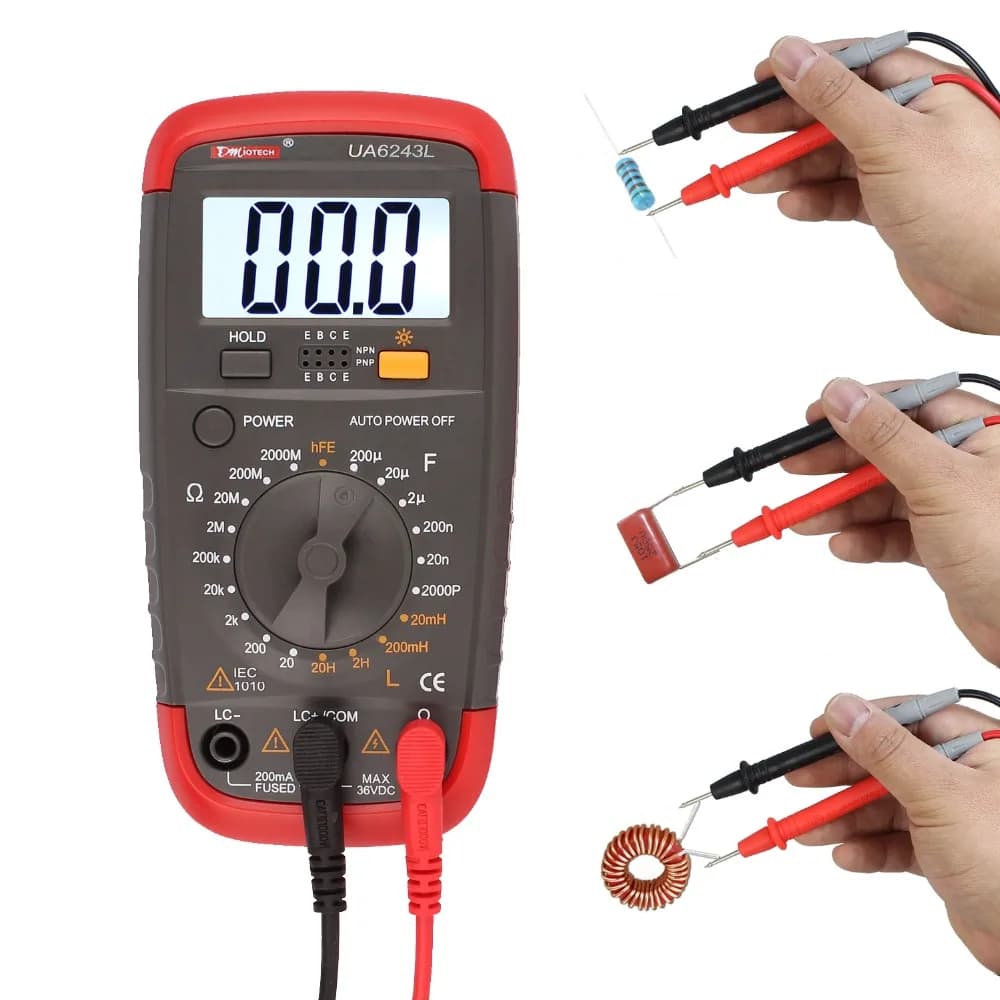
The primary tool for testing a diode is a multimeter, available in two main types. Both digital and analog multimeters can perform a diode test, though digital models often have a dedicated function for greater accuracy. Below are the two types of multimeters used for diode testing, along with their key features and typical use cases:

  • Digital Multimeter: It comes with a dedicated diode test mode, a digital display for precise voltage and resistance readings, auto-ranging options, and a low battery indicator. It is the most common tool for diode testing, ideal for quick and accurate results with minimal interpretation.
  • Analog Multimeter: It features a needle display, manual range selection, and uses an internal battery for resistance measurements. It does not have a dedicated diode mode and instead uses the resistance mode for testing. It is suitable for basic diode testing when a digital multimeter is unavailable, though it requires more interpretation of readings.

What is the Symbol for Diode Test on Multimeter?

The diode test symbol on a multimeter is standardized across most models, making it easy to identify once you know what to look for. The symbol varies slightly between digital and analog multimeters but follows the same core design.

  • Digital Multimeter: The diode test symbol is typically a triangle pointing to a vertical line. This symbol directly represents the diode’s structure, where the triangle is the anode and the vertical line is the cathode. It is often labeled ā€œDIODEā€ or ā€œDIā€ next to the symbol for clarity. On some models, this symbol shares a position with the continuity test (represented by a sound wave icon), so you may need to press a function button to switch between continuity and diode test modes.
  • Analog Multimeter: Analog models rarely have a dedicated diode test symbol because they use the resistance mode for diode testing. Instead, look for the resistance symbol (Ī©) to select the appropriate range for testing. The resistance symbol is a horseshoe-shaped icon, and you will need to choose a low resistance range (typically RƗ10 or RƗ100) for accurate diode readings.

How to Prepare a Multimeter Before You Test a Diode?

Proper preparation of a multimeter is critical to ensure accurate diode test results and avoid damage to the multimeter or the diode. Follow these steps to prepare your multimeter before starting any diode test.

  • Check the multimeter battery: Ensure the multimeter has a fully charged battery. A low battery can cause inaccurate readings, especially in resistance or diode test modes. For analog multimeters, a weak battery may prevent the needle from reaching full scale during zero adjustment, leading to false readings. Replace the battery if the low battery indicator lights up (digital models) or if the needle fails to respond properly (analog models).
  • Inspect test leads: Examine the multimeter test leads for any damage, such as frayed wires or cracked insulation. Damaged leads can cause poor contact, leading to inconsistent or incorrect readings. Ensure the leads are securely connected to the multimeter’s input jacks, red lead to the positive (+) jack and black lead to the negative (-) or common (COM) jack.
  • Set the multimeter to the correct mode: For digital multimeters, turn the dial to the diode test mode (marked with the diode symbol). For analog multimeters, set the dial to the resistance mode (Ī©) and select a low range (RƗ10 or RƗ100). Avoid using high resistance ranges, as they may not provide enough current to forward-bias the diode.
  • Zero the analog multimeter (if applicable): For analog models, short the two test leads together (touch the metal tips) and turn the zero adjustment knob until the needle points to 0Ī© on the resistance scale. This step calibrates the multimeter for accurate resistance readings and is essential for reliable diode testing. Digital multimeters do not require manual zeroing.
  • Disconnect power from the circuit: If testing a diode that is still in a circuit, turn off all power sources connected to the circuit. This includes batteries, power supplies, and any other voltage sources. Even low voltage can interfere with the diode test and pose a safety hazard. Additionally, discharge any capacitors in the circuit, as they can hold a charge and cause false readings or damage the multimeter.

How to Identify the Anode and Cathode When Testing a Diode With a Multimeter?

Identifying the anode (positive terminal) and cathode (negative terminal) of a diode is essential for accurate testing, as diodes only conduct current in one direction. A diode test will only yield meaningful results if the multimeter leads are connected correctly to the anode and cathode. Use these methods to identify the terminals.

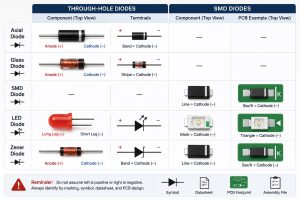
  • Check the diode’s physical markings: Most diodes have a visible band or line near one end, this band indicates the cathode. The end with the band is the cathode, and the opposite end is the anode. This marking is universal and applies to most diode types, including rectifier diodes, zener diodes, and Schottky diodes. For small signal diodes, the band may be small but still visible with a magnifying glass if needed.
  • Use the multimeter’s diode test mode (digital models): Set the digital multimeter to diode test mode, then touch the red lead to one end of the diode and the black lead to the other. If the multimeter displays a voltage drop (typically 0.5–0.8V for silicon diodes), the red lead is connected to the anode and the black lead to the cathode. If the display shows ā€œOLā€ (overload), reverse the leads, the red lead will now be on the cathode and the black lead on the anode.
  • Use resistance mode (analog or digital multimeters): Set the multimeter to a low resistance range. Touch the red lead to one end of the diode and the black lead to the other. A low resistance reading (100Ω–10kĪ©) indicates the diode is forward-biased, meaning the red lead is on the anode and the black lead on the cathode. A high resistance reading (infinite or ā€œOLā€) indicates reverse bias, meaning the leads are connected to the cathode and anode respectively.
  • Refer to the diode’s datasheet: If the physical markings are unclear or missing, consult the diode’s datasheet. The datasheet will include a diagram of the diode’s pinout, clearly labeling the anode and cathode. This is especially useful for specialized diodes, such as LEDs or zener diodes, which may have unique packaging.

How to Test a Diode With a Digital Multimeter?

Testing a diode with a digital multimeter is straightforward, thanks to the dedicated diode test mode that provides precise readings. Follow these steps to perform a accurate diode test with a digital multimeter.

  • Prepare the multimeter: Follow the preparation steps outlined earlier—check the battery, inspect test leads, set the dial to the diode test mode, and ensure the circuit (if applicable) is powered off and capacitors are discharged.
  • Identify the diode’s anode and cathode: Use the physical markings or multimeter method to determine which end is the anode and which is the cathode.
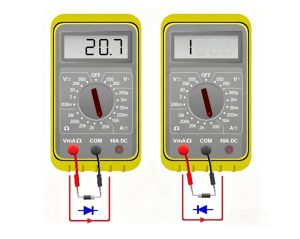
  • Connect the test leads: Touch the red multimeter lead to the diode’s anode and the black lead to the diode’s cathode. This forward-biases the diode, allowing current to flow if the diode is functional.
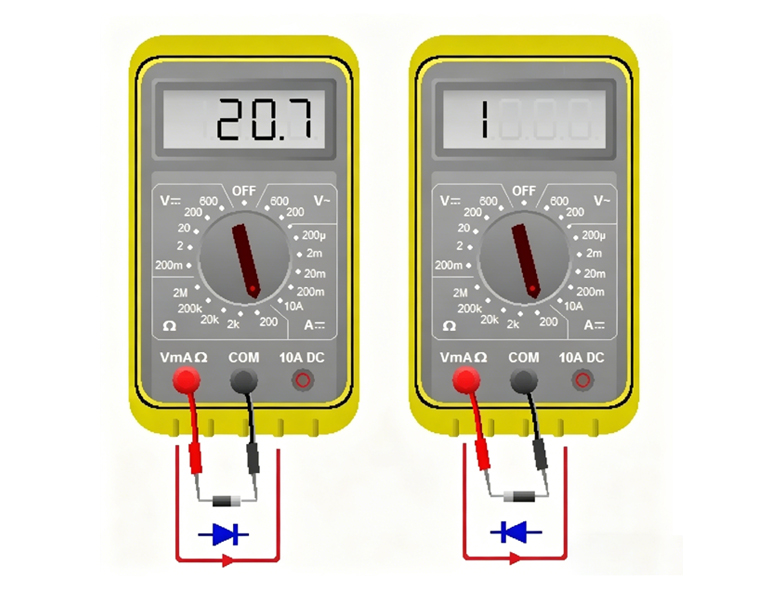
  • Record the reading: A functional silicon diode will display a voltage drop between 0.5V and 0.8V. Germanium diodes will display a lower voltage drop, between 0.2V and 0.3V. This voltage drop is a key indicator of a healthy diode, as it confirms the diode is conducting current in the forward direction.
  • Reverse the test leads: Touch the red lead to the cathode and the black lead to the anode. This reverse-biases the diode, which should block current flow.
  • Record the second reading: A healthy diode will display ā€œOLā€ (overload) or a very high resistance value (infinite) when reverse-biased. This indicates the diode is blocking current in the reverse direction, as it should.
  • Interpret the results: Compare the two readings to determine if the diode is functional. A good diode will show a voltage drop in forward bias and ā€œOLā€ in reverse bias. Any deviation from this pattern indicates a faulty diode.
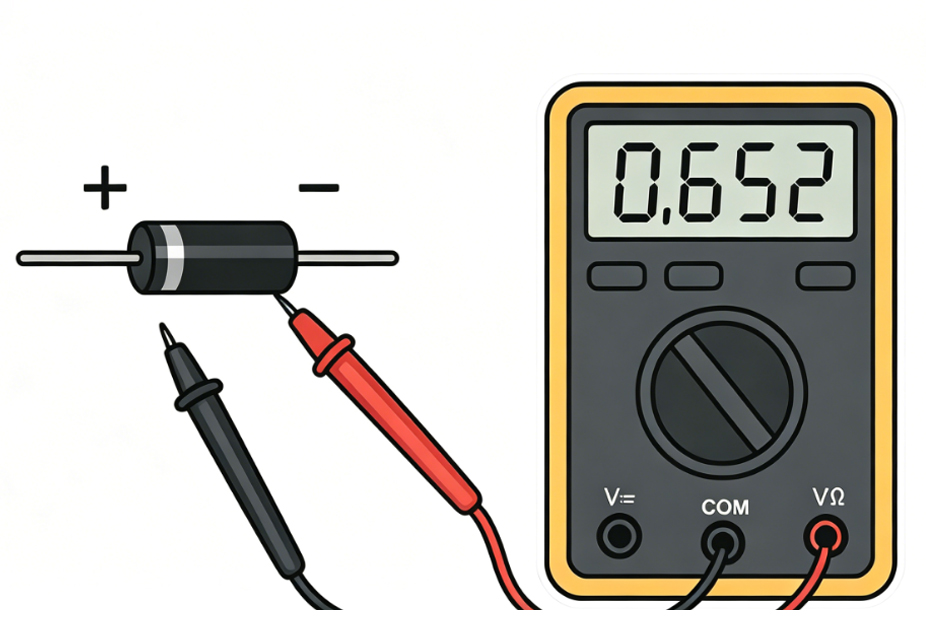
How to Test a Diode With a Digital Multimeter, https://www.bestpcbs.com/blog/2026/04/how-to-test-a-diode-with-a-multimeter/

How to Test a Diode With an Analog Multimeter Correctly?

Analog multimeters do not have a dedicated diode test mode, so they use the resistance mode to test diodes. This requires careful range selection and interpretation of the needle position. Follow these steps to correctly test a diode with an analog multimeter.

  • Prepare the multimeter: Check the battery, inspect test leads, set the dial to the resistance mode (Ī©), and select a low range (RƗ10 or RƗ100). Short the test leads together and adjust the zero adjustment knob until the needle points to 0Ī© on the resistance scale.
  • Identify the diode’s anode and cathode: Use the physical markings or resistance test method to determine the diode’s terminals.
  • Connect the test leads (forward bias): Touch the black lead to the diode’s anode and the red lead to the cathode. Note that analog multimeters have reverse polarity in resistance mode, the black lead is connected to the internal battery’s positive terminal, while the red lead is connected to the negative terminal. This is opposite to digital multimeters, so correct lead placement is critical.
  • Record the needle position: A healthy diode will show a low resistance reading, with the needle deflecting significantly toward the 0Ī© end of the scale. The exact resistance value will vary by diode type and multimeter range, but it should be consistent with the diode’s specifications (typically 100Ω–10kĪ© for silicon diodes on RƗ10 range).
  • Reverse the test leads (reverse bias): Touch the black lead to the cathode and the red lead to the anode. This reverse-biases the diode.
  • Record the second needle position: A healthy diode will show a very high resistance reading, with the needle remaining near the infinite (āˆž) end of the scale. This indicates the diode is blocking current in the reverse direction.
  • Interpret the results: A functional diode will have a low resistance in forward bias and high resistance in reverse bias. If the needle shows the same reading in both directions, or no deflection at all, the diode is faulty. Note that analog multimeter readings are less precise than digital ones, so focus on the relative difference between forward and reverse resistance.

How to Test a Diode Without a Diode Tester Using a Multimeter?

Many multimeters, especially older analog models or basic digital models, do not have a dedicated diode tester function. However, you can still test a diode using the multimeter’s resistance mode. This method is reliable and works for all diode types, as long as you follow the correct steps.

  • Prepare the multimeter: Set the multimeter to the resistance mode (Ī©) and select a low range (RƗ10 or RƗ100 for analog models; 200Ī© or 2kĪ© for digital models). For analog multimeters, zero the device by shorting the test leads and adjusting the zero knob.
  • Disconnect the diode from the circuit: If the diode is in a circuit, remove one end to avoid interference from other components. This ensures the reading reflects only the diode’s resistance, not the entire circuit.
  • Test forward bias resistance: Connect the test leads to the diode’s anode and cathode (follow polarity rules for your multimeter type). For digital multimeters, red lead to anode and black lead to cathode; for analog multimeters, black lead to anode and red lead to cathode. A healthy diode will show a low resistance reading (100Ω–10kĪ©).
  • Test reverse bias resistance: Reverse the test leads so the diode is reverse-biased. A healthy diode will show a very high resistance reading (infinite or ā€œOLā€ on digital models).
  • Verify with voltage drop (digital multimeters only): If your digital multimeter has a voltage mode, you can verify the diode’s functionality by measuring the forward voltage drop. Set the multimeter to DC voltage mode (2V range), connect the red lead to the anode and black lead to the cathode, and apply a small forward current (using a battery if needed). A reading of 0.5–0.8V (silicon) or 0.2–0.3V (germanium) confirms the diode is functional.
  • Interpret the results: The key is to compare the forward and reverse resistance readings. A functional diode will have a significant difference between the two—low forward resistance and high reverse resistance. If the readings are similar or both are high/low, the diode is faulty.

How Many Ohms Should a Diode Read When Testing With a Multimeter?

The resistance reading of a diode when tested with a multimeter depends on whether the diode is forward-biased or reverse-biased, as well as the type of diode (silicon, germanium) and the multimeter’s range. There is no single ā€œcorrectā€ ohm value, but there are standard ranges that indicate a healthy diode.

For forward-biased diodes, the resistance reading varies by diode type.Silicon diodes, the most common type, typically read between100Ī© and 10kĪ© when tested on a low resistance range (RƗ10 or RƗ100 for analog multimeters, 200Ī© or 2kĪ© for digital multimeters). This range is due to the diode’s forward voltage drop of 0.5–0.8V, which limits the current flow and results in a moderate resistance reading.

Germanium diodes have a lower forward voltage drop (0.2–0.3V), so their forward resistance reading is lower, typically between 50Ī© and 5kĪ©. This is because the lower voltage drop allows more current to flow, reducing the measured resistance.

For reverse-biased diodes, the resistance reading should be very high—effectively infinite. On digital multimeters, this is displayed as ā€œOLā€ (overload). On analog multimeters, the needle will remain near theinfinite (āˆž) end of the scale. A reverse resistance reading that is low or close to the forward resistance reading indicates a faulty diode, as it is not blocking current in the reverse direction.

It is important to note that the exact resistance reading can vary based on the multimeter’s range. Using a higher resistance range (e.g., RƗ1k for analog multimeters) will result in a higher forward resistance reading, while a lower range will result in a lower reading. The key is not the exact value, but the difference between forward and reverse resistance, a healthy diode will have a large difference between the two.

How to Check If a Diode Is Damaged With a Multimeter?

Checking if a diode is damaged with a multimeter follows a step-by-step process, focusing on verifying the diode’s one-way conductivity (the core feature of a functional diode). Below are the clear, actionable steps to detect damage, with key details and fault types highlighted for easy reading (no H3 titles, directly listed):

  • Prepare the Multimeter and Diode: Before testing, ensure accurate results by completing these preparations: Set the multimeter to the correct mode (digital: diode test mode; analog: resistance mode (Ī©), low range RƗ10 or RƗ100); for analog multimeters, zero the device (short test leads and adjust zero knob to 0Ī©, digital does not need this); isolate the diode (disconnect one end from circuit if applicable, turn off power and discharge capacitors); inspect test leads for damage and ensure secure connection to correct jacks (red to positive (+), black to common (COM)).
  • Identify the Diode’s Anode and Cathode: Correct lead placement is critical (diodes conduct only one way). Use one of these methods: Check physical markings (most diodes have avisible band/line near the cathode, opposite end is anode); use a digital multimeter (diode test mode: touch red to one end, black to the other—0.5–0.8V for silicon means red is anode, black is cathode; ā€œOLā€ means reverse leads).
  • Test Forward Bias (Conduction Check): Test if the diode conducts current correctly (anode to cathode). Connect test leads properly: Digital multimeter – Red lead to anode, black lead to cathode; Analog multimeter – Black lead to anode, red lead to cathode (reverse polarity in resistance mode). Record the reading: Digital – healthy silicon diode shows 0.5–0.8V (germanium: 0.2–0.3V); Analog – needle deflects significantly toward 0Ī© (100Ω–10kĪ© for silicon on RƗ10 range).
  • Test Reverse Bias (Blockage Check): Test if the diode blocks current (one-way valve function). Reverse the test leads: Digital – red to cathode, black to anode; Analog – black to cathode, red to anode. Record the second reading: Digital – healthy diode shows ā€œOLā€ (overload) (infinite resistance); Analog – needle remains near infinite (āˆž) end of the scale.
  • Interpret Results to Identify Damage: Compare forward and reverse readings—deviations indicate damage. Common damage types: • Open Circuit Damage: Reading is ā€œOLā€ (digital) or infinite resistance (analog) in both forward and reverse bias; means the diode cannot conduct current at all (caused by excessive voltage/current burning the semiconductor). • Short Circuit Damage: Reading is low resistance (or voltage drop near 0V on digital diode mode) in both forward and reverse bias; means the diode acts like a wire (caused by voltage spikes or physical damage, risks damaging other components). • Leakage Damage (Partial Damage): Reverse resistance is lower than normal (e.g., 100kĪ© instead of infinite), forward reading is normal; means the diode allows some reverse current (causes signal distortion/power loss, due to age, overheating, or manufacturing defects).
  • Confirm Damage (Optional Verification): For extra certainty: Repeat forward and reverse tests 2–3 times (inconsistent readings = poor contact or partial damage); for digital multimeters, use voltage mode (2V range) to measure forward voltage drop (readings outside 0.5–0.8V silicon/0.2–0.3V germanium = damage); for zener diodes, reverse bias should show zener voltage (not ā€œOLā€)—if not, zener is damaged.
  • Key Takeaway: A healthy diode has a clear difference between forward (low resistance/voltage drop) and reverse (high resistance/OL) readings. Any deviation means the diode is damaged and should be replaced.
How to Check If a Diode Is Damaged With a Multimeter, https://www.bestpcbs.com/blog/2026/04/how-to-test-a-diode-with-a-multimeter/

Can You Test a Diode in Circuit When Using a Multimeter?

Testing a diode in circuit is possible, but it isnot always reliable. The presence of other components in the circuit, such as resistors, capacitors, or other diodes, can interfere with the multimeter’s readings, leading to false results. In most cases, it is best to remove the diode from the circuit for accurate testing.

If testing in circuit is necessary, follow these precautions to minimize interference. First, turn off all power to the circuit and discharge any capacitors. Capacitors can hold a charge and cause false readings or damage the multimeter. Next, identify the diode’s terminals and ensure no other components are connected directly across the diode—parallel resistors or other diodes can bypass the diode being tested, leading to incorrect resistance or voltage drop readings.

When testing in circuit with a digital multimeter in diode test mode, a healthy diode will still show a voltage drop of 0.5–0.8V (silicon) in forward bias and ā€œOLā€ in reverse bias, provided no other components are interfering. If the reading is inconsistent or does not match the expected values, the interference from other components is likely the cause.

Analog multimeters are more prone to interference when testing in circuit, as their resistance readings are affected by parallel components. A resistor in parallel with the diode will lower the measured resistance, making a healthy diode appear faulty. For this reason, analog multimeters are not recommended for in-circuit diode testing unless the diode is isolated from other components.

In summary, while in-circuit testing is possible for quick checks,removing the diode from the circuit is the only way to ensure accurate results. This is especially important when diagnosing a faulty circuit, as false readings can lead to incorrect component replacement and further issues.

What Are the Common Mistakes When Testing a Diode With a Multimeter?

Even experienced technicians make mistakes when testing diodes, leading to incorrect results and wasted time. Avoid these common mistakes to ensure accurate diode test results every time.

  • Incorrect lead polarity: Connecting the multimeter leads to the wrong diode terminals (anode and cathode) will result in reverse bias when forward bias is intended, and vice versa. This leads to false readings, such as ā€œOLā€ in forward bias or a low resistance in reverse bias. Always double-check the diode’s terminals before connecting the leads.
  • Testing a diode in a powered circuit: Forgetting to turn off power to the circuit or discharge capacitors can cause interference with the multimeter reading and pose a safety hazard. Even low voltage can affect the diode test, leading to false results. Always ensure the circuit is powered off and capacitors are discharged before testing.
  • Using the wrong multimeter mode or range: For digital multimeters, using resistance mode instead of diode test mode can lead to inaccurate voltage drop readings. For analog multimeters, using a high resistance range (e.g., RƗ1k) can result in no visible needle deflection, making it impossible to interpret the reading. Always use the correct mode and range for diode testing.
  • Not zeroing the analog multimeter: Failing to zero the analog multimeter before testing leads to inaccurate resistance readings. This is a common mistake that can make a healthy diode appear faulty or vice versa. Always short the test leads and adjust the zero knob before starting resistance-based diode tests.
  • Ignoring diode type differences: Silicon and germanium diodes have different forward voltage drops and resistance readings. Assuming all diodes have the same specifications can lead to incorrect interpretations. Always consider the diode type when evaluating test results.
  • Testing a diode in circuit without isolating it: As discussed earlier, other components in the circuit can interfere with the multimeter reading. Testing a diode without removing it from the circuit can lead to false results, especially if there are parallel resistors or capacitors.
  • Using damaged test leads: Frayed or damaged test leads can cause poor contact, leading to inconsistent or incorrect readings. Always inspect the test leads before use and replace them if they are damaged.
Testing a Diode With a Multimeter, https://www.bestpcbs.com/blog/2026/04/how-to-test-a-diode-with-a-multimeter/

FAQs About Diode Testing

Q1: Can a multimeter test all types of diodes, including LEDs and zener diodes?

A1: Yes, a multimeter can test all types of diodes, including LEDs, zener diodes, Schottky diodes, and rectifier diodes. The testing process is similar for all types, but there are minor differences. For LEDs, a forward voltage drop of 1.8–2.2V is normal (higher than silicon diodes). For zener diodes, reverse bias testing will show a voltage drop equal to the zener voltage (e.g., 5V for a 5V zener diode) instead of ā€œOL.ā€

Q2: Why does my multimeter show different resistance readings for the same diode when using different ranges?

A2: Diodes are nonlinear components, meaning their resistance changes with the voltage and current applied. When using different multimeter ranges, the internal voltage and current of the multimeter change, leading to different resistance readings. This is normal—focus on the difference between forward and reverse resistance, not the exact value.

Q3: What if my digital multimeter does not have a diode test mode?

A3: If your digital multimeter does not have a dedicated diode test mode, use the resistance mode (200Ī© or 2kĪ© range) to test the diode. Follow the same steps as testing without a diode tester—check forward and reverse resistance. You can also use the voltage mode to measure the forward voltage drop, which is a more accurate indicator of diode functionality.

Q4: How do I know if a diode is a silicon or germanium type?

A4: The easiest way to distinguish between silicon and germanium diodes is by their forward voltage drop. Silicon diodes have a forward voltage drop of 0.5–0.8V, while germanium diodes have a drop of 0.2–0.3V. Use a digital multimeter in diode test mode to measure the forward voltage drop and identify the diode type.

Q5: Can a diode be partially damaged, or is it either good or bad?

A5: Diodes can be partially damaged, most commonly as leaky diodes. A leaky diode allows some reverse current to flow but not enough to be considered a short circuit. This can cause subtle issues in the circuit, such as signal distortion or power loss. Testing both forward and reverse bias will reveal leakage, as the reverse resistance will be lower than normal.

You may also like

IPC-TM-650 PCB Test Methods Manual

April 29th, 2026

What Is the IPC-TM-650 Test Methods Manual?

IPC-TM-650 test methods manual is a collection of standardized test procedures used to evaluate printed circuit boards, PCB materials, assemblies, and connectors. It helps PCB manufacturers, quality engineers, and buyers use the same technical language when discussing cleanliness, plating quality, solder mask reliability, electrical insulation, environmental stress, and mechanical stability.

In simple words, IPC-TM-650 tells people how to test a PCB-related item. It does not always tell people whether the result is acceptable for every project. The pass/fail requirement often comes from customer specifications, IPC product standards, procurement documents, or industry-specific quality requirements.

For PCB production, IPC-TM-650 is often used for:

  • PCB cleanliness verification
  • Bow and twist measurement
  • Solder mask reliability testing
  • Microsection analysis
  • Surface insulation resistance testing
  • CAF resistance evaluation
  • Thermal stress and thermal shock testing
  • Material electrical and mechanical property checks
IPC-TM-650 PCB Test Methods Manual

Why Is IPC-TM-650 Important for PCB Manufacturing Quality?

IPC-TM-650 is important because it gives PCB manufacturers and customers a consistent way to verify quality. Without a shared test method, one supplier may test cleanliness in one way, another may use a different extraction method, and a customer may struggle to compare results fairly.

It supports quality control in several practical areas:

  • Process control: checking whether manufacturing steps remain stable from batch to batch
  • Failure analysis: identifying the possible cause of leakage, corrosion, delamination, or solder mask failure
  • Supplier qualification: checking whether a PCB supplier can meet reliability expectations
  • Design verification: confirming that stack-up, materials, hole structure, and solder mask choices fit the application
  • High-reliability production: supporting medical, automotive, aerospace, telecom, power electronics, and industrial control projects

A PCB factory that understands these testing methods can usually communicate better during DFM review, material selection, production validation, and quality troubleshooting.

What Test Categories Are Included in IPC-TM-650?

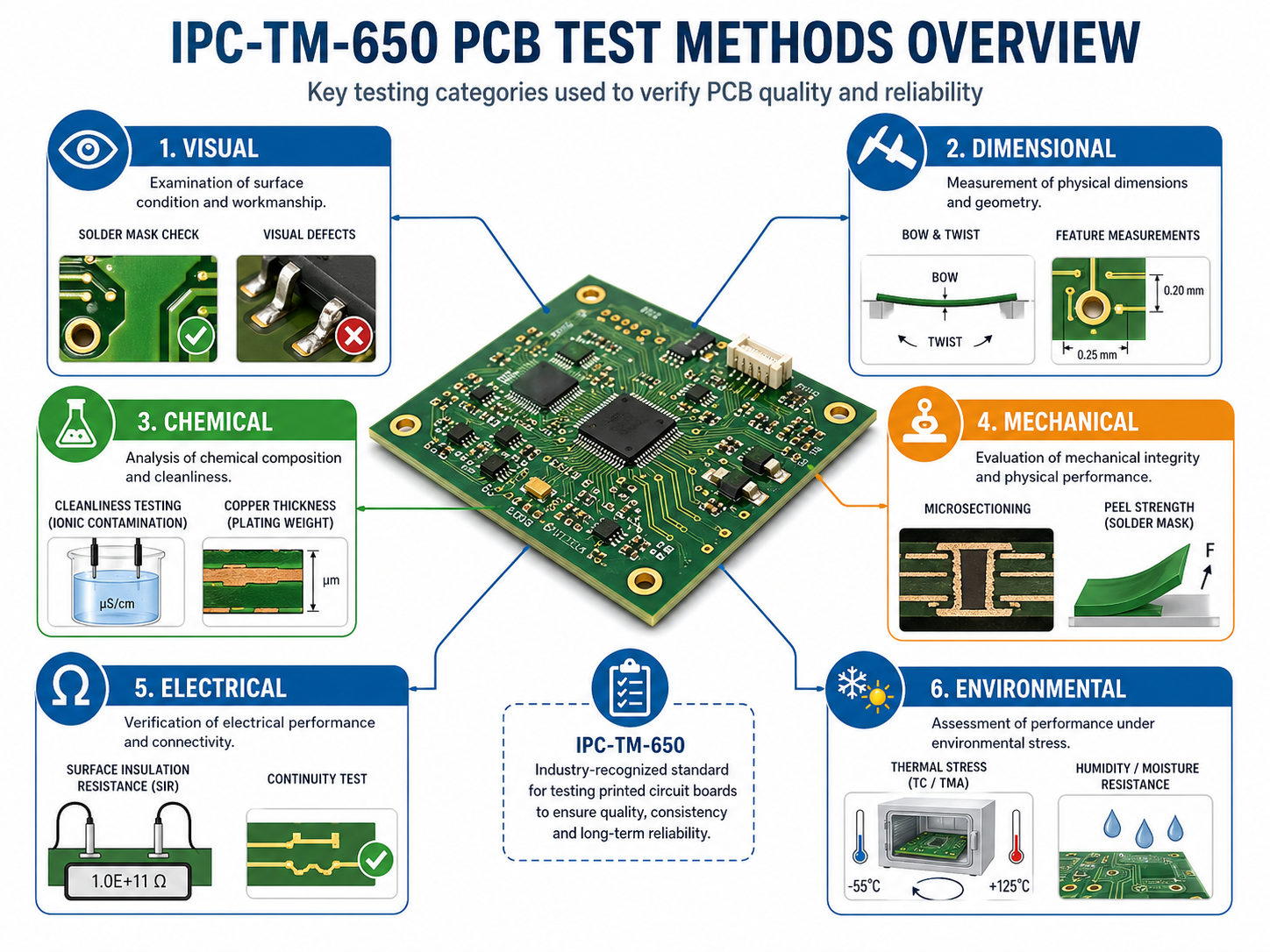
IPC-TM-650 covers multiple test categories, including visual, dimensional, chemical, mechanical, electrical, environmental, and connector-related test methods. These categories help users quickly find the right method for a specific quality concern.

IPC-TM-650 CategoryMain Test FocusPCB Manufacturing RelevanceTypical Examples
Visual Test MethodsInternal and external observationHelps inspect plating, holes, laminate structure, and visible defectsMicrosectioning, plated-through hole evaluation
Dimensional Test MethodsSize, thickness, flatness, hole positionHelps control board geometry and assembly fitBow and twist, thickness, hole location
Chemical Test MethodsResidues, contamination, chemical propertiesHelps evaluate cleanliness and process residuesROSE, ion chromatography, organic contamination
Mechanical Test MethodsStrength, adhesion, peel, material behaviorHelps validate copper adhesion, solder mask durability, and flexible material strengthPeel strength, adhesion, abrasion
Electrical Test MethodsResistance, dielectric strength, signal performanceHelps evaluate insulation, high-voltage behavior, and RF propertiesSIR, dielectric strength, impedance-related tests
Environmental Test MethodsHumidity, heat, thermal cycling, agingHelps predict long-term reliability under service conditionsThermal shock, CAF, moisture resistance
Connector Test MethodsConnector durability and electrical behaviorHelps validate connector-level reliabilityContact resistance, vibration, humidity

What Is IPC-TM-650 Cleanliness Testing?

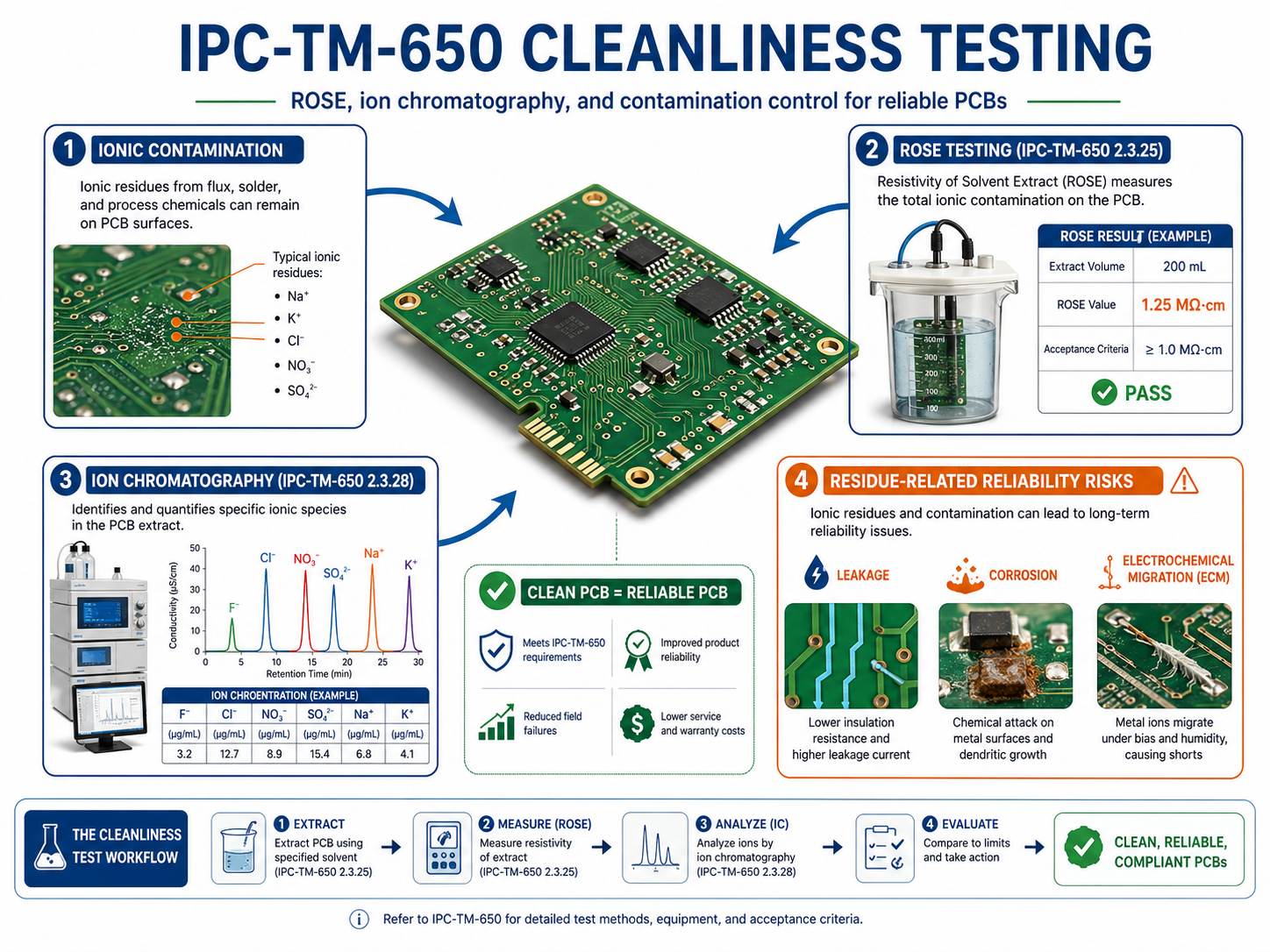
IPC-TM-650 cleanliness testing evaluates contamination, ionic residues, flux residues, process chemicals, and other materials that may remain on a PCB or PCBA surface. In PCB manufacturing, cleanliness is closely linked to insulation resistance, corrosion resistance, electrochemical migration, and field reliability.

Cleanliness is especially important when a board works in:

  • High humidity
  • High voltage
  • High impedance circuits
  • Medical monitoring equipment
  • Automotive control modules
  • Industrial sensors
  • Telecom infrastructure
  • Aerospace or defense electronics

A small amount of ionic residue may not create an immediate failure during final electrical testing. However, when moisture, voltage bias, and time are added, residues can support leakage paths, dendritic growth, corrosion, and unstable electrical behavior.

What Is IPC-TM-650 Cleanliness Testing?

IPC-TM-650 includes methods related to cleanliness and insulation performance, including surface insulation resistance and bare board cleanliness by SIR in the approved environmental test method list.

Cleanliness-Related TestWhat It ChecksBest Used ForPractical Value
ROSE TestOverall ionizable surface contaminationRoutine process controlFast cleanliness screening
Ion ChromatographySpecific ionic species and concentrationFailure analysis and high-reliability projectsFinds contamination source more precisely
SIR TestInsulation behavior under humidity and electrical biasCleanliness validation under stressShows reliability impact of residues
Visual InspectionVisible residue, staining, white marks, process contaminationInitial quality screeningSimple but not enough alone
Process AuditCleaning chemistry, rinse quality, drying, handlingManufacturing controlHelps prevent repeat issues

What Is IPC-TM-650 2.3.25 ROSE Testing for PCB Cleanliness?

IPC-TM-650 2.3.25 ROSE testing is commonly used to evaluate ionizable surface contaminants on PCB or PCBA surfaces. ROSE stands for Resistivity of Solvent Extract. It gives a fast cleanliness indicator, often reported as sodium chloride equivalent per unit area.

ROSE testing is useful because it is fast, repeatable, and suitable for production monitoring. If a PCB factory needs to compare different batches, check a cleaning process, or monitor contamination trends, ROSE can provide a practical baseline.

However, ROSE testing has a limitation. It measures total ionizable contamination, but it does not identify every individual ion. For example, a high ROSE reading may suggest contamination, but it may not tell whether the issue comes from chloride, bromide, weak organic acids, sodium, plating chemistry, flux residue, or handling contamination.

That is why ROSE is often used as a process control tool, while ion chromatography is used when a more detailed contamination profile is needed.

Good use cases for ROSE testing include:

  • Routine PCB cleanliness monitoring
  • PCBA cleaning process validation
  • Supplier quality comparison
  • Batch-to-batch contamination trend review
  • Quick screening before deeper analysis

For high-reliability products, ROSE alone may not be enough. It should be combined with ion chromatography, SIR, process traceability, and application-specific acceptance criteria.

What Is IPC-TM-650 2.3.28 Ion Chromatography Testing?

Ion chromatography is a more detailed cleanliness analysis method because it can identify and quantify specific ionic species. While ROSE gives an overall contamination value, ion chromatography helps show what type of contamination is present.

This matters in real PCB failure analysis. A board may show leakage current, corrosion, or dendritic growth after field use. A general contamination number may confirm that residue exists, but it may not explain the source. Ion chromatography can help identify whether the residue is related to process chemistry, flux activators, handling, water quality, or environmental exposure.

Typical ions that may be evaluated include:

  • Chloride
  • Bromide
  • Sulfate
  • Nitrate
  • Sodium
  • Potassium
  • Weak organic acids
  • Other process-related ionic species

Ion chromatography is especially valuable for medical electronics, automotive electronics, aerospace electronics, high-voltage PCB, and precision sensor circuits. In these products, contamination is not only a cosmetic concern. It can become a long-term electrical reliability risk.

What Is IPC-TM-650 2.6.3.7 Surface Insulation Resistance Testing?

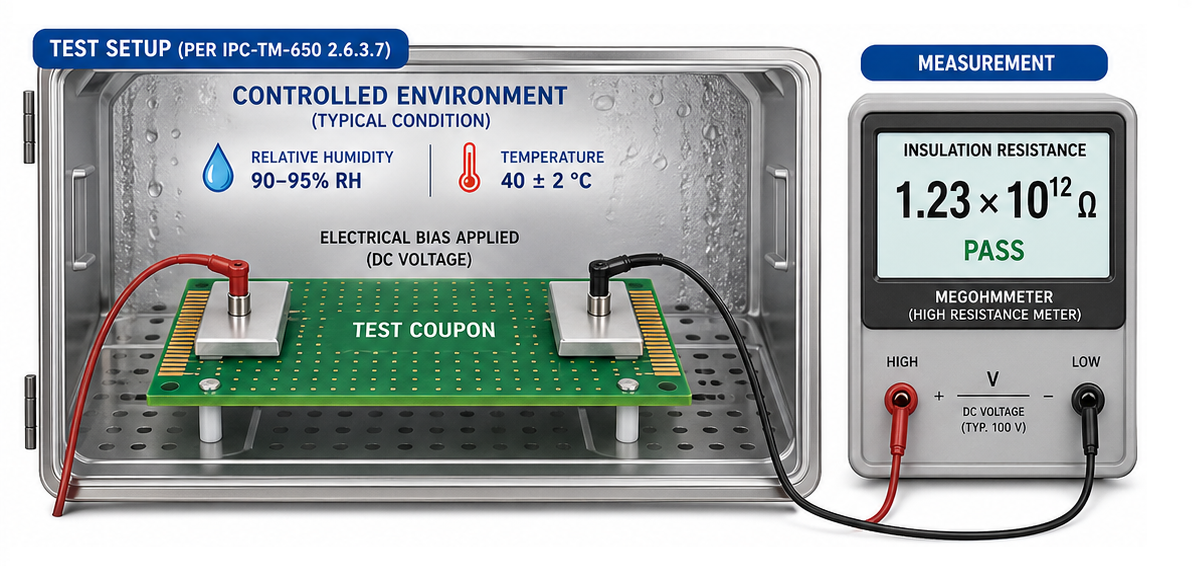
IPC-TM-650 2.6.3.7 surface insulation resistance (SIR) testing evaluates how well a PCB surface maintains electrical insulation under humidity, temperature, and electrical bias.

SIR testing is important because many contamination problems do not appear during normal room-temperature inspection. A board may pass final electrical testing immediately after production. But after exposure to moisture and voltage bias, residues may become conductive enough to reduce insulation resistance.

The official IPC TM-650 method list includes TM 2.6.3.7 as ā€œSurface Insulation Resistance.ā€

IPC-TM-650 2.6.3.7 Surface Insulation Resistance Testing

In practical PCB production, SIR testing can help evaluate:

  • Whether a cleaning process is reliable
  • Whether solder mask materials maintain insulation under humidity
  • Whether residues create leakage paths
  • Whether no-clean flux residues are acceptable for the application
  • Whether high-impedance circuits will remain stable over time
  • Whether bare boards or assemblies are suitable for harsh environments

SIR should be considered when a PCB uses dense spacing, fine-pitch components, high voltage, no-clean processes, or sensitive analog circuits. It is also useful when qualifying a new solder mask, flux, cleaning process, or assembly supplier.

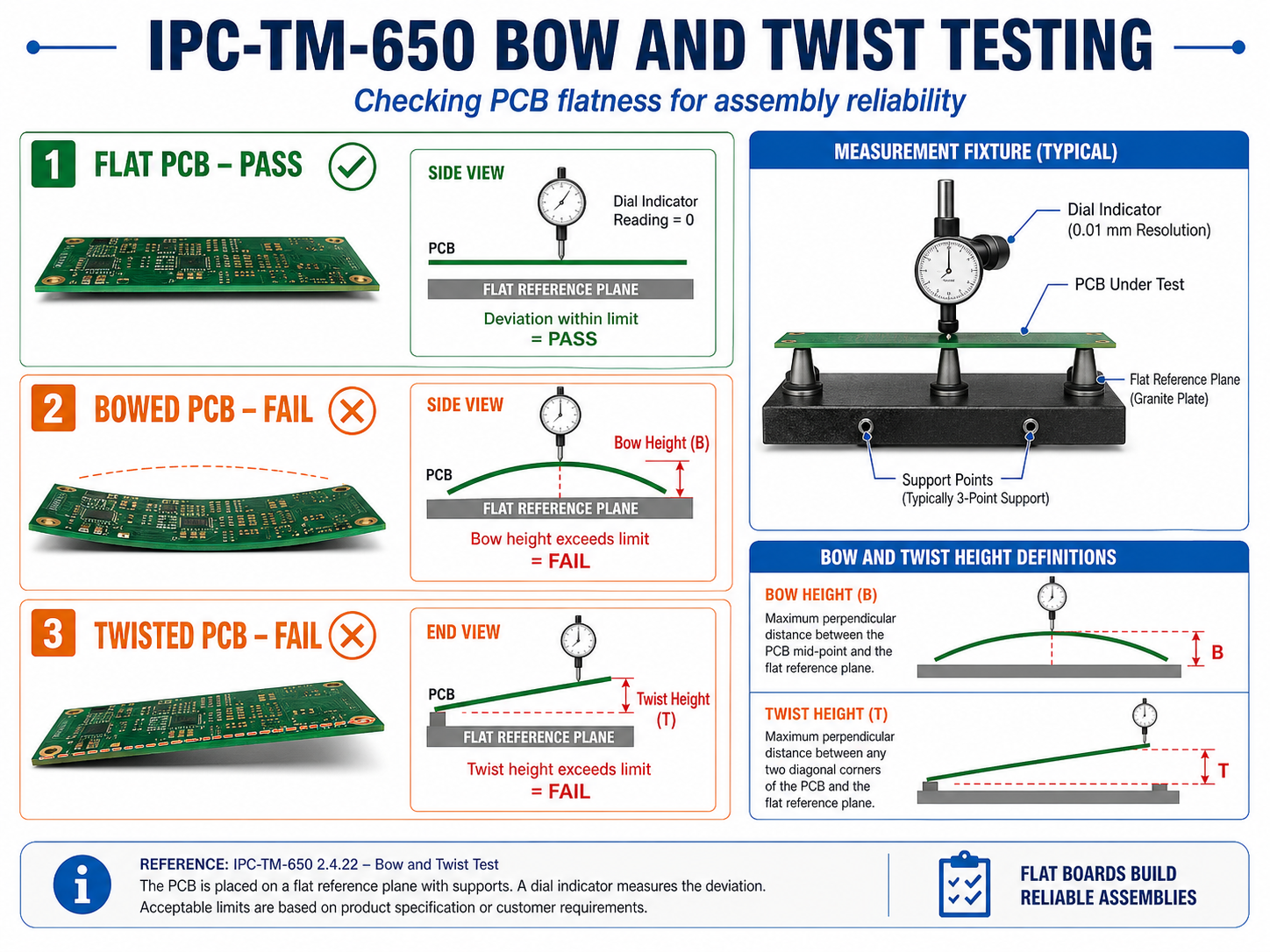
What Is IPC-TM-650 Bow and Twist Testing?

IPC-TM-650 bow and twist testing is used to evaluate PCB flatness. Bow refers to a board bending in a smooth curved shape, while twist refers to diagonal warpage where the corners are not on the same plane.

Flatness IssueWhat It Looks LikeMain Assembly RiskCommon Design or Process Cause
BowBoard bends like a shallow arcUneven solder paste transfer, placement offsetThin board, large panel, unbalanced copper
TwistBoard corners lift diagonallyConnector misalignment, BGA open jointsAsymmetric stack-up, laminate stress
Local WarpageOne area lifts or deformsFine-pitch soldering defectLocal copper imbalance or heat concentration
Panel WarpageFull production panel bendsRouting, depaneling, and handling issuesPanel size, material stress, thermal exposure

Bow and twist control is especially important for:

  • Thin PCB
  • Large-size PCB
  • HDI board
  • BGA assembly
  • Fine-pitch QFN and LGA packages
  • Press-fit connector boards
  • Automotive control boards
  • LED panels
  • Rigid-flex boards
  • Boards with uneven copper distribution
IPC-TM-650 Bow and Twist Testing

How Does Bow and Twist Affect PCB Assembly Reliability?

Excessive bow and twist can reduce assembly yield and long-term solder joint reliability. A PCB may still pass bare board electrical testing, but poor flatness can create serious problems during SMT assembly.

During solder paste printing, a warped board may not contact the stencil evenly. This can create insufficient solder paste in some areas and excess paste in others. During placement, small chip components may sit at different heights. During reflow, BGA or QFN packages may not maintain uniform contact with solder deposits.

The risks become more serious as component pitch becomes smaller. Common reliability problems caused by poor flatness include:

  • Open solder joints
  • Insufficient solder fillet
  • BGA non-wet open defects
  • Connector seating failure
  • Uneven mechanical stress after assembly
  • Housing fit problems
  • Local solder cracking during field vibration
  • Lower first-pass assembly yield

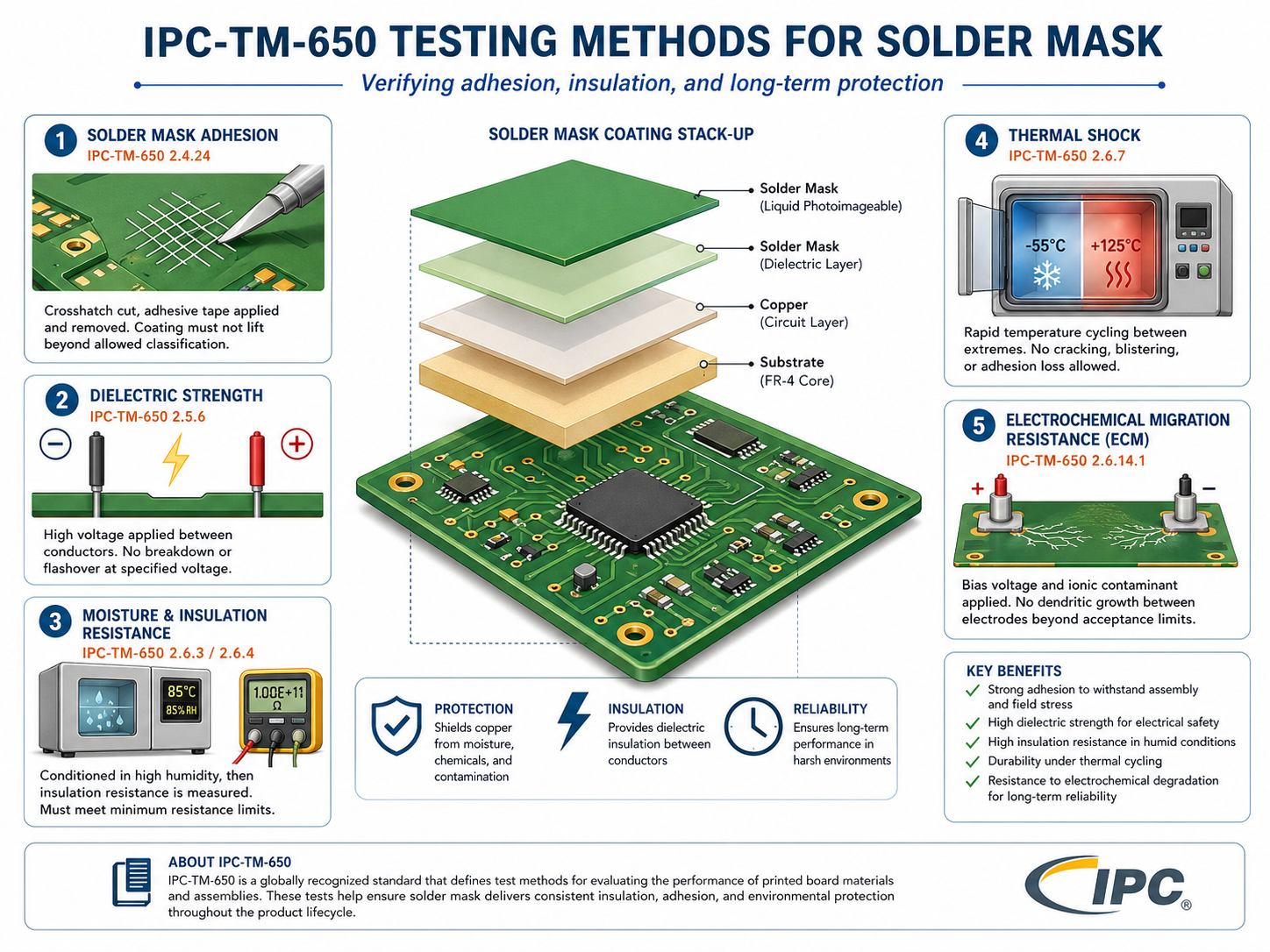
What Are IPC-TM-650 Testing Methods for Solder Mask?

IPC-TM-650 testing methods for solder mask help evaluate whether the solder mask can protect copper, maintain insulation, resist humidity, withstand thermal stress, and support long-term PCB reliability.

Solder mask is more than the green, blue, black, white, or red coating seen on a finished PCB. It protects copper traces, defines solderable areas, reduces solder bridging, and supports electrical insulation between conductors.

Poor solder mask performance can cause:

  • Solder bridging
  • Copper exposure
  • Mask peeling
  • Blistering
  • Cracking after reflow
  • Chemical attack from cleaning agents
  • Leakage under humidity
  • Electrochemical migration risk

The IPC TM-650 method list includes solder-mask-related methods such as solder mask dielectric strength, solder mask moisture and insulation resistance, solder mask thermal shock, solder mask hydrolytic stability, and solder mask resistance to electrochemical migration.

What Are IPC-TM-650 Testing Methods for Solder Mask?

How Is IPC-TM-650 Different from IPC-A-600, IPC-6012, and IPC-A-610?

IPC-TM-650 explains how to test, while other IPC documents often define what is acceptable. This difference is important because many buyers ask for ā€œIPC standardā€ without knowing which document applies to the problem.

DocumentMain PurposeSimple ExplanationCommon Use
IPC-TM-650Test methods manualExplains how to perform testsCleanliness, SIR, bow and twist, solder mask tests
IPC-A-600Acceptability of printed boardsShows acceptable and non-acceptable bare board conditionsVisual inspection of bare PCBs
IPC-6012Performance specification for rigid PCBsDefines rigid PCB performance requirementsRigid board procurement and quality control
IPC-A-610Acceptability of electronic assembliesDefines PCBA workmanship acceptanceSMT assembly and solder joint inspection
Customer SpecificationProject-specific acceptance requirementDefines what the customer expectsSpecial reliability, materials, and reporting needs

Which IPC-TM-650 Test Methods Should You Choose for Your PCB Project?

The right IPC-TM-650 test depends on the product application, failure risk, PCB structure, operating environment, and customer requirement. A simple consumer board does not always need the same test plan as a medical, automotive, aerospace, or power electronics PCB.

The goal is not to order every possible test. The goal is to choose the tests that reduce the most relevant risk.

PCB Project TypeRecommended IPC-TM-650 Related Tests
HDI PCBMicrosectioning, CAF, SIR, thermal stress
Automotive PCBBow and twist, CAF, thermal cycling, SIR
Medical PCBCleanliness, ion chromatography, SIR, traceability report
RF PCBDk/Df, signal loss, dimensional stability
Power PCBDielectric strength, thermal stress, CAF, solder mask insulation
Rigid-Flex PCBPeel strength, bend reliability, microsectioning
Fine-Pitch SMT PCBBow and twist, solder mask registration, cleanliness
Solder Mask Critical PCBSolder mask dielectric strength, moisture resistance, thermal shock

For early-stage prototypes, microsectioning and basic dimensional checks may be enough. For mass production, the test plan should be more structured.

How Should You Read an IPC-TM-650 Test Report?

A useful IPC-TM-650 test report should show more than a pass/fail result. It should tell the reader which method was used, how the sample was prepared, what condition was applied, what result was measured, and how that result connects to the project requirement.

A weak report says, ā€œPassed.ā€ While a strong report explains the evidence.

When reviewing an IPC-TM-650 test report, check the following items:

  • Test method number
  • Test method revision
  • Sample name and part number
  • Production lot number
  • Material type and stack-up
  • Surface finish
  • Sample quantity
  • Test condition
  • Test duration
  • Equipment used
  • Calibration status
  • Measurement result
  • Acceptance criteria source
  • Photos, charts, or microsection images
  • Technician or engineer review
  • Final conclusion
  • Traceability information

For high-value PCB projects, test reports should be stored as part of the quality record. They may become important during customer audits, field failure review, design changes, and supplier qualification.

How to Choose a PCB Manufacturer with IPC-TM-650 Testing Capability?

A capable PCB manufacturer should understand IPC-TM-650 as a practical quality tool, not just a document name. The supplier should know which test applies, when it should be used, what result format is expected, and how the result affects manufacturing decisions.

When selecting a PCB supplier, ask specific questions. Do not only ask, ā€œCan you make IPC-quality boards?ā€

Ask:

  • Can you provide IPC-TM-650 cleanliness testing support?
  • Can you measure bow and twist for thin or large-size boards?
  • Can you support solder-mask-related reliability testing when needed?
  • Can you provide microsection images for plated holes and microvias?
  • Can you support SIR or CAF testing for high-reliability products?
  • Can you link test results to production lots and material batches?
  • Can your engineering team review stack-up, copper balance, and process risks before production?
  • Can you explain whether a test result meets our project-specific requirement?

A strong supplier will not recommend unnecessary testing just to increase cost. Instead, the supplier should help match the test plan to the project risk.

For example, a simple 2-layer prototype may need only basic electrical test and visual inspection. A 12-layer automotive control board may need microsectioning, thermal stress, CAF review, cleanliness control, and bow and twist monitoring. A medical sensing PCB may require cleanliness testing, SIR validation, and strict traceability.

Testing capability is part of reliability. Engineering judgment is the other part.

FAQs About IPC-TM-650 Test Methods

1. What is the IPC-TM-650 test methods manual?

IPC-TM-650 test methods manual is a collection of standardized testing procedures for printed circuit boards, materials, assemblies, and connectors. It covers visual, dimensional, chemical, mechanical, electrical, environmental, and connector-related testing. It helps PCB manufacturers and customers evaluate quality using consistent methods.

2. Is IPC-TM-650 the same as IPC-A-600?

No. IPC-TM-650 explains how to perform PCB-related tests. IPC-A-600 focuses on the acceptability of printed boards. In simple words, IPC-TM-650 is about testing procedures, while IPC-A-600 is about inspection and acceptance of bare PCB conditions.

3. When should I request IPC-TM-650 testing from a PCB supplier?

You should request IPC-TM-650 testing when your PCB has reliability-sensitive requirements, such as high voltage, fine spacing, high impedance, medical use, automotive use, harsh environment exposure, strict cleanliness needs, or complex multilayer construction. It is also useful during supplier qualification and failure analysis.

4. Does every PCB project need IPC-TM-650 testing?

Not every PCB project needs the full range of IPC-TM-650 testing. A simple prototype may only need basic inspection and electrical test. High-reliability boards, dense HDI boards, medical electronics, automotive electronics, power boards, and RF boards often need a more complete test plan.

You may also like

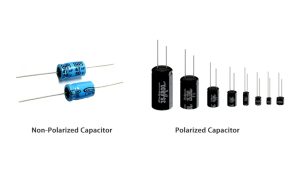
Which Is Good, Polarized vs Non-Polarized Capacitor?

April 29th, 2026

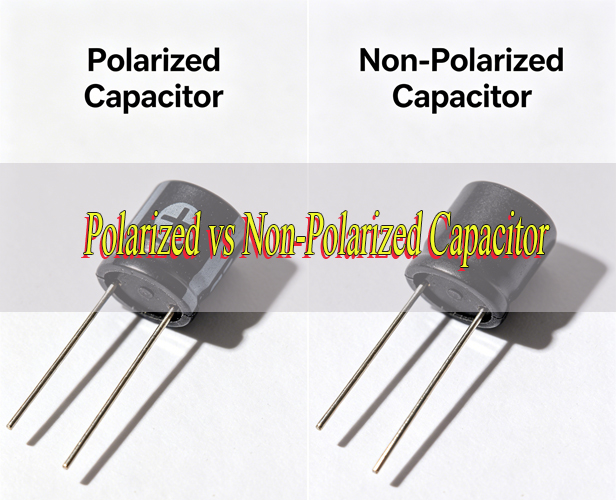
When designing circuits or selecting components for a project, many people wonder which is good, polarized vs non-polarized capacitor. Choosing the wrong type can lead to circuit failure, component damage, or even safety hazards.

This article breaks down the core differences, uses, symbols, and selection criteria for polarized and non-polarized capacitors, providing clear, actionable information to help you make the right choice every time.

Whether you’re working on a power supply circuit, audio equipment, or high-frequency applications, understanding polarized vs non-polarized capacitor is critical to ensuring circuit reliability and performance.

Polarized vs Non-Polarized Capacitor, https://www.bestpcbs.com/blog/2026/04/polarized-vs-non-polarized-capacitor/

What Is a Polarized and Non-Polarized Capacitor?

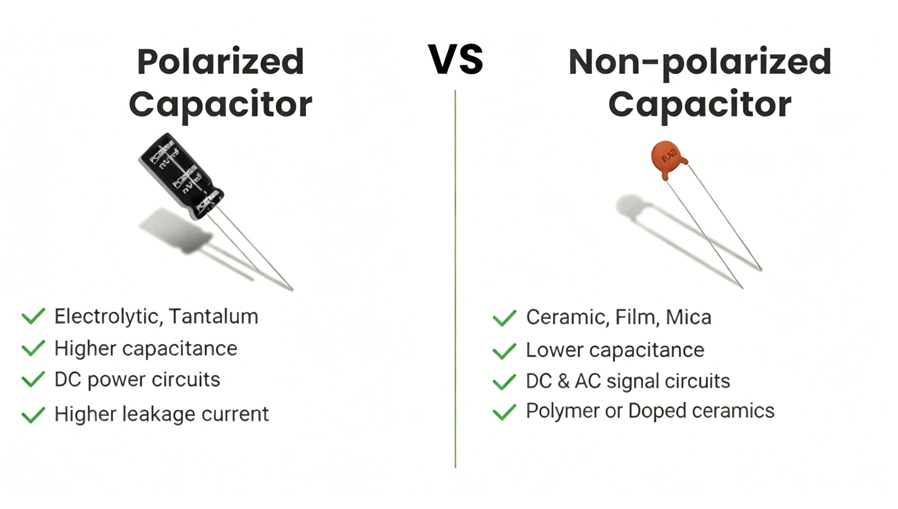
A polarized capacitor is a type of capacitor with distinct positive and negative terminals that must be connected in a specific orientation to function properly. Its internal structure is asymmetric, typically using an electrochemically grown oxide layer as the dielectric.

Common types include aluminum electrolytic and tantalum capacitors. The dielectric layer forms only under a specific voltage polarity during manufacturing, so reversing the connection causes the dielectric to break down, leading to overheating, leakage, or even component failure.

A non-polarized capacitor, also known as a bipolar capacitor, has no fixed positive or negative terminals and can be connected in any direction in a circuit. Its internal structure is symmetric, with identical electrodes and dielectric materials on both sides.

This design allows it to handle bidirectional current flow, making it suitable for circuits where voltage polarity changes regularly. Common types include ceramic, film, and mica capacitors, which are valued for their stability across different frequencies and temperatures.

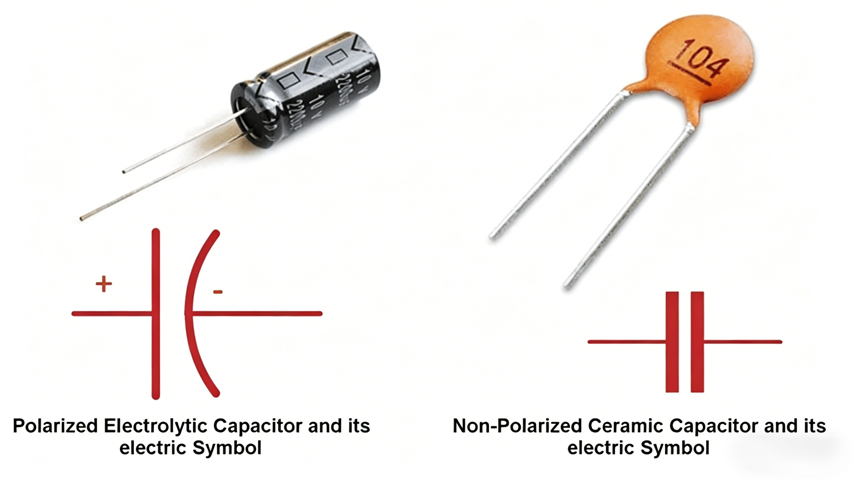
What Is the Symbol of a Polarized and Non-Polarized Capacitor?

The symbols of polarized and non-polarized capacitors are clearly distinguishable, reflecting their polarity differences. Here is a detailed comparison:

Polarized Capacitor Symbol: Its symbol has clear positive and negative markings. It has two parallel lines representing capacitor plates, with one shorter line marked with a minus sign for the negative terminal and the longer line for the positive terminal.

Electrolytic and tantalum capacitors may have a curved line on the negative side to highlight polarity. This design ensures correct installation in DC circuits, as their dielectric layer only stabilizes under specific voltage polarity.

Non-Polarized Capacitor Symbol: It has no polarity markings and consists of two equal-length parallel lines with no distinction between positive and negative terminals. Its symmetric design matches its symmetric internal structure, allowing bidirectional current flow.

Ceramic, film and mica capacitors all use this standard symbol, making them easy to identify in circuit schematics, especially in AC or high-frequency circuits.

Polarized vs Non-Polarized Capacitor, https://www.bestpcbs.com/blog/2026/04/polarized-vs-non-polarized-capacitor/

What Are Polarized and Non-Polarized Capacitors Used for?

Capacitors are essential for storing charge, filtering signals, and coupling circuits, but polarized and non-polarized capacitors are tailored to different application scenarios based on their structural differences. Their uses are distinct and closely tied to their polarity characteristics and performance advantages.

Polarized capacitorsare mainly used in DC circuits, leveraging their high capacitance advantage to store large amounts of electrical energy efficiently. They are widely applied in power supply filtering to smooth voltage fluctuations and reduce ripple, bulk energy storage for circuits needing sudden power bursts, and low-frequency signal coupling in audio amplifiers. Tantalum polarized capacitors, with their compact size, are also commonly used in small electronic devices like mobile phones and laptops.

Non-polarized capacitors, by contrast, are suitable for both AC and DC circuits, especially scenarios where voltage polarity changes regularly. Their excellent frequency stability and low equivalent series resistance make them ideal for high-frequency filtering, signal coupling (to separate AC and DC signals), oscillation circuits, and audio crossovers. Ceramic non-polarized capacitors are preferred for high-frequency applications, while film non-polarized capacitors are favored in audio circuits for low distortion.

What Is the Difference Between a Polarized and Non-Polarized Capacitor?

Comparison PointPolarized CapacitorNon-Polarized Capacitor
Polarity RequirementMust be connected with correct positive and negative orientation; reverse connection causes failureNo polarity requirement; can be connected in any direction
Capacitance RangeHigher capacitance (typically µF to thousands of µF) for bulk energy storageLower capacitance (typically pF to µF) for signal and high-frequency tasks
Voltage RatingLower voltage ratings (usually up to ~100V) due to delicate dielectric layerHigher voltage ratings (up to several kV) for AC and high-voltage circuits
Equivalent Series Resistance (ESR)Higher ESR, which can cause heat generation in high-current circuitsLower ESR, making them more efficient in high-frequency applications
Temperature StabilityLess stable; performance degrades with temperature changes and agingBetter stability; consistent performance across a wide temperature range
Physical SizeLarger for similar capacitance due to internal structureSmaller for lower capacitance; compact design for high-frequency use
Failure ModeReverse connection, overvoltage, or aging can cause leakage, overheating, or ruptureRare failure; typically only fails due to extreme overvoltage or physical damage
Polarized vs Non-Polarized Capacitor, https://www.bestpcbs.com/blog/2026/04/polarized-vs-non-polarized-capacitor/

Which Is Safer to Use, Polarized vs Non-Polarized Capacitor?

Non-polarized capacitors are generally safer to use than polarized capacitors. Non-polarized capacitors have no polarity requirement, so there is no risk of reverse connection.

Their symmetric structure and stable dielectric materials make them less likely to fail catastrophically. Even if exposed to moderate overvoltage, they typically break down without causing fire, leakage, or explosion.

Polarized capacitors pose greater safety risks if not used correctly. Reverse connection causes the dielectric layer to dissolve, leading to high current flow, heat buildup, and potential component rupture.

Aluminum electrolytic capacitors may leak electrolyte when damaged, while tantalum polarized capacitors can catch fire if reverse-biased or exposed to excessive voltage. Proper installation with correct polarity and adherence to voltage ratings are essential to ensure safety when using polarized capacitors.

Are Non-Polarized Capacitors More Reliable Than Polarized Ones?

Non-polarized capacitors are generally more reliable than polarized capacitors in most circuit applications. Their symmetric design and lack of polarity requirement eliminate the risk of reverse connection failure, one of the most common causes of capacitor damage.

They also have better temperature stability and lower ESR, which reduces wear and tear over time.

Polarized capacitors are less reliable due to their internal structure. Aluminum electrolytic capacitors use liquid or gel electrolytes that evaporate over time, leading to reduced capacitance, increased ESR, and eventual failure.

Tantalum polarized capacitors are sensitive to surge currents and reverse voltage, which can cause permanent short circuits. Both types degrade faster in high-temperature environments, further reducing their reliability.

However, polarized capacitors are still reliable when used within their specifications and in circuits with stable DC voltage.

Which Has Higher Capacitance, Polarized vs Non-Polarized Capacitor?

Polarized capacitors have significantly higher capacitance than non-polarized capacitors. Polarized capacitors achieve high capacitance by using an extremely thin electrochemically grown oxide layer as the dielectric.

This thin dielectric allows for more charge storage in a compact space, with capacitance values ranging from microfarads to thousands of microfarads.

Non-polarized capacitors have lower capacitance due to their symmetric structure and thicker dielectric materials. Most non-polarized capacitors have capacitance values in the picofarad to microfarad range.

Achieving high capacitance with non-polarized capacitors would require a much larger physical size, making them impractical for applications that need bulk energy storage. For example, a 1000 µF polarized capacitor is compact, while a non-polarized capacitor with the same capacitance would be significantly larger and more expensive.

Which Is Cheaper, Polarized vs Non-Polarized Capacitor?

Polarized capacitors are generally cheaper than non-polarized capacitors, especially for high capacitance values. Aluminum electrolytic polarized capacitors are mass-produced and use low-cost materials, making them the most affordable option for bulk energy storage.

A 1000 µF aluminum electrolytic capacitor typically costs a few cents, making it ideal for cost-sensitive projects.

Non-polarized capacitors are more expensive, especially for higher capacitance or specialized applications. Ceramic non-polarized capacitors are affordable for low capacitance values, but film and mica non-polarized capacitors cost more due to their higher quality materials and manufacturing processes.

A non-polarized capacitor with the same capacitance as a polarized one can cost 10 to 20 times more. For example, a 1000 µF film non-polarized capacitor may cost $5 to $20, compared to $0.10 to $0.50 for an equivalent aluminum electrolytic polarized capacitor.

Which Is Good, Polarized vs Non-Polarized Capacitor?

There is no universal answer to which is good, polarized vs non-polarized capacitor, the right choice depends on the circuit requirements. Polarized capacitors are better for DC circuits that require high capacitance and bulk energy storage.

They are ideal for power supply filtering, low-frequency signal coupling, and applications where space is limited but high capacitance is needed. They are also cheaper, making them suitable for cost-sensitive projects.

Non-polarized capacitors are better for AC circuits, high-frequency applications, and circuits where voltage polarity changes. They are safer, more reliable, and have better temperature stability, making them ideal for signal coupling, high-frequency filtering, and oscillation circuits.

They are the best choice when polarity cannot be guaranteed or when circuit stability is a top priority. Understanding the specific needs of your circuit, such as voltage type, capacitance requirements, and environmental conditions is key to choosing between polarized vs non-polarized capacitor.

Polarized vs Non-Polarized Capacitor, https://www.bestpcbs.com/blog/2026/04/polarized-vs-non-polarized-capacitor/

How to Tell if a Capacitor Is Polarized or Non-Polarized?

Identifying whether a capacitor is polarized or non-polarized is critical to avoid circuit damage and ensure proper performance. Below are simple, non-repetitive methods to distinguish the two types:

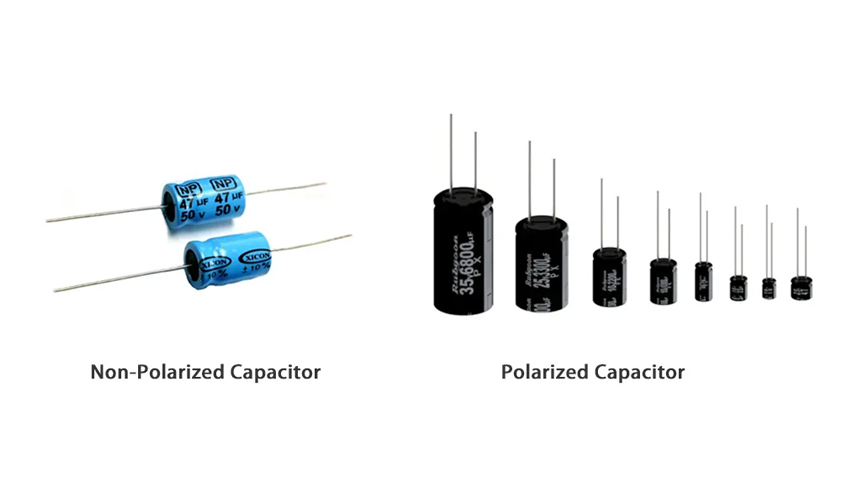
  • Check polarity markings: Polarized capacitors have clear positive and negative indicators, such as a minus sign on the body, a longer lead for the positive terminal, an arrow pointing to the negative terminal (film types), or a plus sign (supercapacitors). Non-polarized capacitors have no such markings.
  • Examine component shape: Aluminum electrolytic polarized capacitors are cylindrical with a ribbed negative side and an explosion-proof slot. Tantalum polarized capacitors are small and rectangular with polarity markings. Non-polarized capacitors are usually small, flat, and uniform with no terminal distinction.
  • Review capacitor type: Aluminum electrolytic, tantalum, and conductive polymer capacitors are almost always polarized. Ceramic, film, and mica capacitors are nearly always non-polarized, with rare high-frequency ceramic exceptions needing datasheet confirmation.
  • Inspect circuit schematic: Polarized capacitors have a symbol with a minus sign on one side. Non-polarized capacitors have two equal-length parallel lines with no polarity indicators.
  • Check pin length and color: Through-hole polarized capacitors traditionally have a longer positive pin and shorter negative pin. Some film polarized capacitors use red pins for positive and black for negative.
  • Use a multimeter: Measure resistance in both directions. Polarized capacitors show significantly different resistance values forward and reverse. Non-polarized capacitors show nearly the same resistance (usually infinite) in both directions.
  • Refer to the capacitor model: Search the model number in manufacturer manuals or online databases, which clearly indicate polarity and terminal positions, useful for capacitors with unclear markings.
  • Observe circuit application: Capacitors for DC circuit filtering, bulk energy storage, or low-frequency coupling are usually polarized. Those for AC circuits, high-frequency filtering, or oscillation are usually non-polarized.

Can You Use a Non-Polarized Capacitor Instead of a Polarized One?

Yes, you can use a non-polarized capacitor instead of a polarized one, but only if you meet specific requirements. The non-polarized capacitor must have the same or higher capacitance value and voltage rating as the polarized capacitor it is replacing.

This ensures it can handle the same amount of charge and voltage as the original component.

However, there are practical limitations to consider. Non-polarized capacitors with high capacitance are larger and more expensive than polarized capacitors, making them impractical for many projects.

For example, replacing a 1000 µF polarized capacitor with a non-polarized one would require a much larger component, which may not fit in the circuit layout. Additionally, non-polarized capacitors have lower capacitance density, so they may not be suitable for applications that require high capacitance in a compact space.

When replacing a polarized capacitor with a non-polarized one, always check the datasheet to ensure compatibility with the circuit’s requirements.

FAQs About Polarized vs Non-Polarized Capacitor

Q1: Can Polarized Capacitors Be Used in AC Circuits?

A1: No, polarized capacitors cannot be used in AC circuits. Their dielectric layer is designed for DC voltage only; alternating polarity will break down the dielectric, causing overheating, leakage, and component failure. Non-polarized capacitors are designed for AC circuits and should be used instead.

Q2: What Happens if You Reverse a Polarized Capacitor?

A2: Reversing a polarized capacitor dissolves its dielectric layer, leading to high current flow and heat buildup. This can cause electrolyte leakage, component rupture, or even fire (especially with tantalum capacitors). Always check polarity markings before installation to avoid this issue.

Q3: Are Non-Polarized Capacitors Suitable for DC Circuits?

A3: Yes, non-polarized capacitors can be used in DC circuits for filtering, decoupling, and signal coupling. However, their lower capacitance makes them unsuitable for bulk energy storage, where polarized capacitors are more practical.
Q4: How Long Do Polarized vs Non-Polarized Capacitors Last?

A4: Non-polarized capacitors have a longer lifespan (10–20 years) due to their stable structure. Polarized capacitors last 2–10 years, as their liquid/gel electrolytes evaporate over time. High temperatures accelerate aging for both types, so proper heat management is key.

Q5: Which Type of Capacitor Is Better for High-Frequency Circuits?

A5: Non-polarized capacitors are better for high-frequency circuits. Their low equivalent series resistance (ESR) and strong temperature stability ensure reliable performance, with ceramic non-polarized capacitors being the top choice for minimal signal loss.

Q6: How to Verify Polarized Capacitor Polarity When Markings Are Blurred?

A6: For aluminum electrolytic capacitors, use the diode mode on a multimeter: connect the red test lead to one terminal and the black test lead to the other. If it shows 0.5–1V (gradually increasing to OL), the red test lead is connected to the positive terminal; swapping the test leads shows OL or a higher voltage. This is an auxiliary method, replace old capacitors with unclear markings for safety.

Q7: Are All Ceramic and Film Capacitors Non-Polarized?

A7: Almost all ceramic and film capacitors (such as polyester capacitors and polypropylene capacitors) are non-polarized and can be connected in any direction. Only a few high-frequency ceramic capacitors may have directional requirements, which need confirmation via datasheets.

You may also like

Mouse Bites PCB Guide: Dimensions, V-Cut Comparison, and Design Tips

April 29th, 2026

What Are Mouse Bites in PCB?

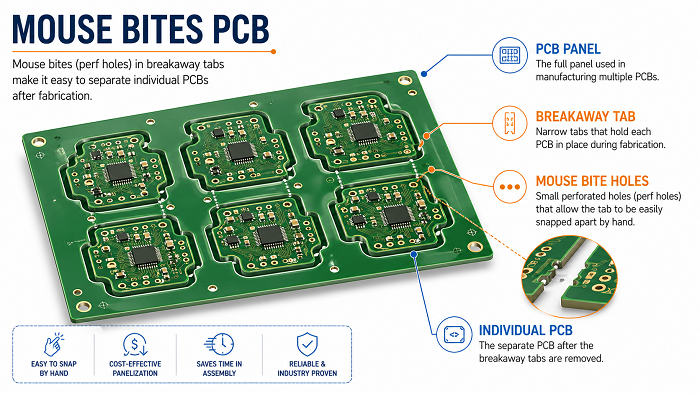
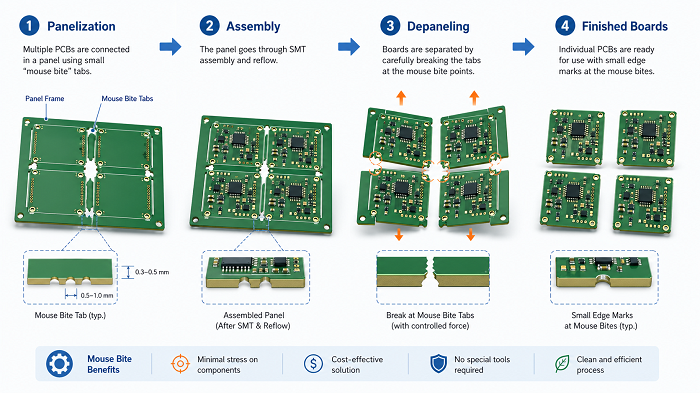
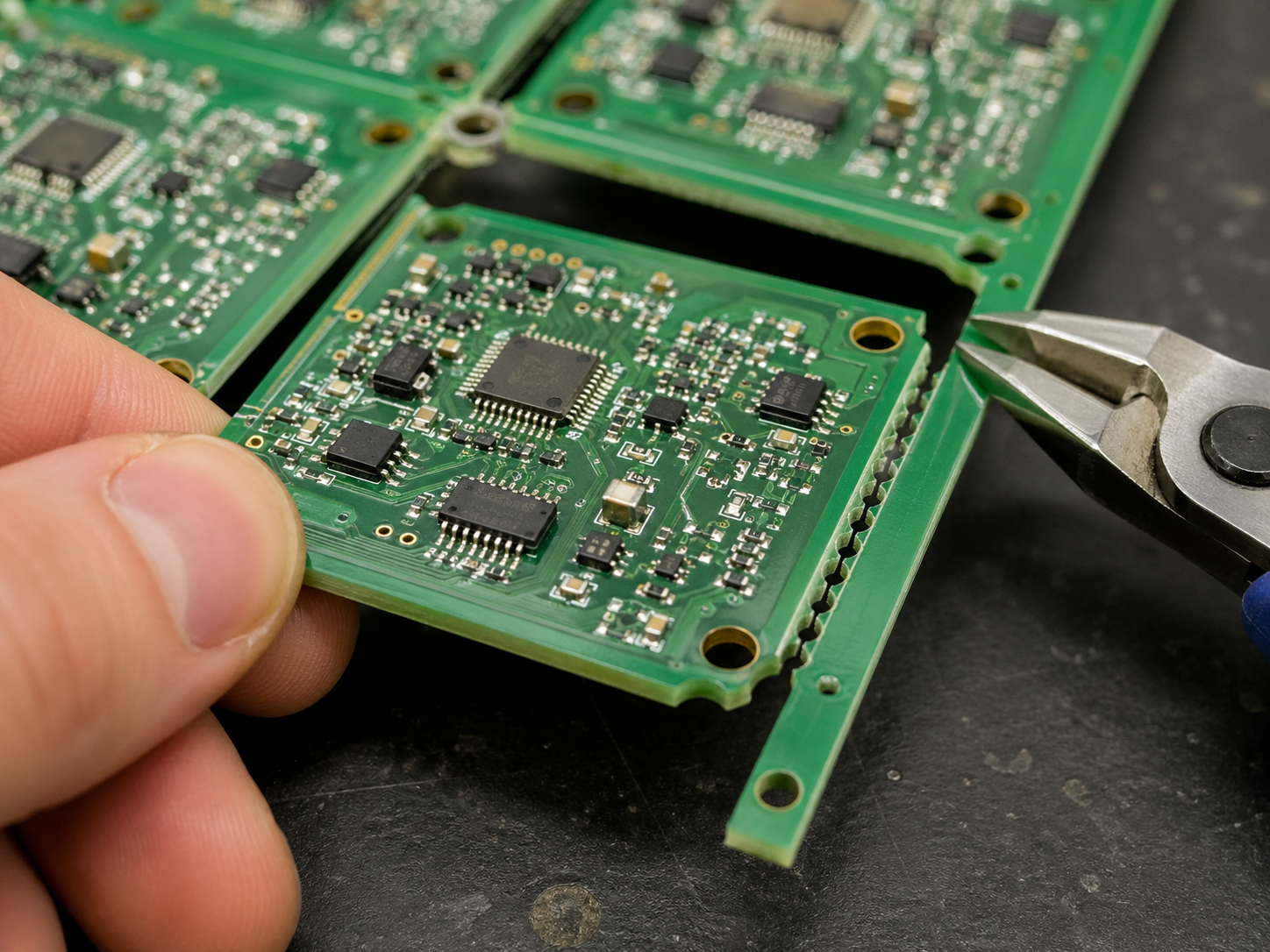
Mouse bites PCB refers to a PCB panelization method that uses small drilled holes on breakaway tabs to connect individual circuit boards inside a larger production panel. These small holes weaken the tab area, so the board can be separated more easily after fabrication, SMT assembly, inspection, or testing.

They are also called stamp holes, perforated tabs, breakaway holes, or PCB mouse bites. The name comes from the small semicircular marks left on the board edge after depaneling, which look similar to tiny bite marks.

In PCB manufacturing, most small boards are not always produced one by one. They are often placed into a larger panel to improve handling, assembly efficiency, and production stability. Mouse bites help keep each board connected during manufacturing while still allowing easy separation at the end.

This method is especially useful for:

  • Small PCB boards
  • Irregular-shaped PCBs
  • Round or curved PCB outlines
  • Boards with complex routing profiles
  • PCBs that cannot use straight V-cut lines
  • PCB panels that need strong temporary support during SMT assembly

For many projects, mouse bites are not just a small mechanical detail. They affect panel strength, edge quality, assembly stability, final appearance, and even product fit inside an enclosure.

Mouse Bites PCB Guide: Dimensions, V-Cut Comparison, and Design Tips

Why Are Mouse Bites Used in PCB Panelization?

Mouse bites are used because they allow several individual PCBs to stay connected in one larger panel during manufacturing and assembly. This improves production efficiency, protects small boards from handling damage, and makes SMT assembly more stable.

Main reasons to use mouse bites include:

  • They support small boards during automated assembly.
  • They allow irregular PCB shapes to be panelized.
  • They provide controlled breakaway points.
  • They help reduce manual handling during production.
  • They allow panel rails to be added for SMT machines.
  • They are suitable when V-cut is not possible.

For example, if a PCB has a round shape, a curved edge, or a special mechanical outline, V-cut may not work because V-cut requires straight lines. In this case, tab routing with mouse bites is often a better choice.

How Do PCB Mouse Bites Work?

PCB mouse bites work by placing a row of small drilled holes through a breakaway tab. The tab holds the board in the production panel, while the holes reduce the mechanical strength of that tab. After assembly, the board can be snapped out along the weakened perforated area.

The process usually works like this:

How Do PCB Mouse Bites Work?

It looks easy, but it should pay much attention during the drilling process. If the holes are too large, the panel may become weak. If the holes are too small or too few, depaneling may become difficult. If the tab is placed near a connector, enclosure edge, or fragile component, separation stress may affect the final product.

A good mouse bite design balances three things:

  • Panel strength during manufacturing
  • Easy separation after assembly
  • Acceptable board edge quality after depaneling

What Are the Standard Mouse Bites PCB Dimensions?

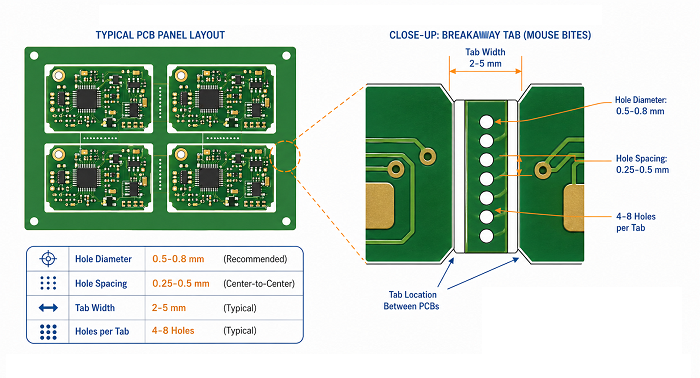
There is no single universal mouse bites PCB standard, because the best dimensions depend on board thickness, material, outline shape, component placement, panel size, and depaneling method. However, many PCB projects use small holes around 0.5 mm to 0.8 mm in diameter, with controlled spacing between holes.

What Are the Standard Mouse Bites PCB Dimensions?

The table below gives practical reference values commonly used in PCB panelization.

Design ItemCommon Reference RangePractical Design Note
Mouse bite hole diameter0.5–0.8 mmSmaller holes usually leave finer edge marks, but may require more holes
Hole spacing0.25–0.5 mm edge-to-edgeToo close may weaken the tab too much
Holes per tab4–8 holesDepends on tab width and board size
Tab width2–5 mmWider tabs improve panel strength but may need more cleanup
Tab quantity per board2–6 tabsLarger or heavier boards need more balanced support
Distance from componentsPreferably 2–3 mm or moreKeep away from brittle parts and solder joints
Board thickness consideration0.8–2.0 mm common rangeThicker boards may need adjusted tab design

A practical example:
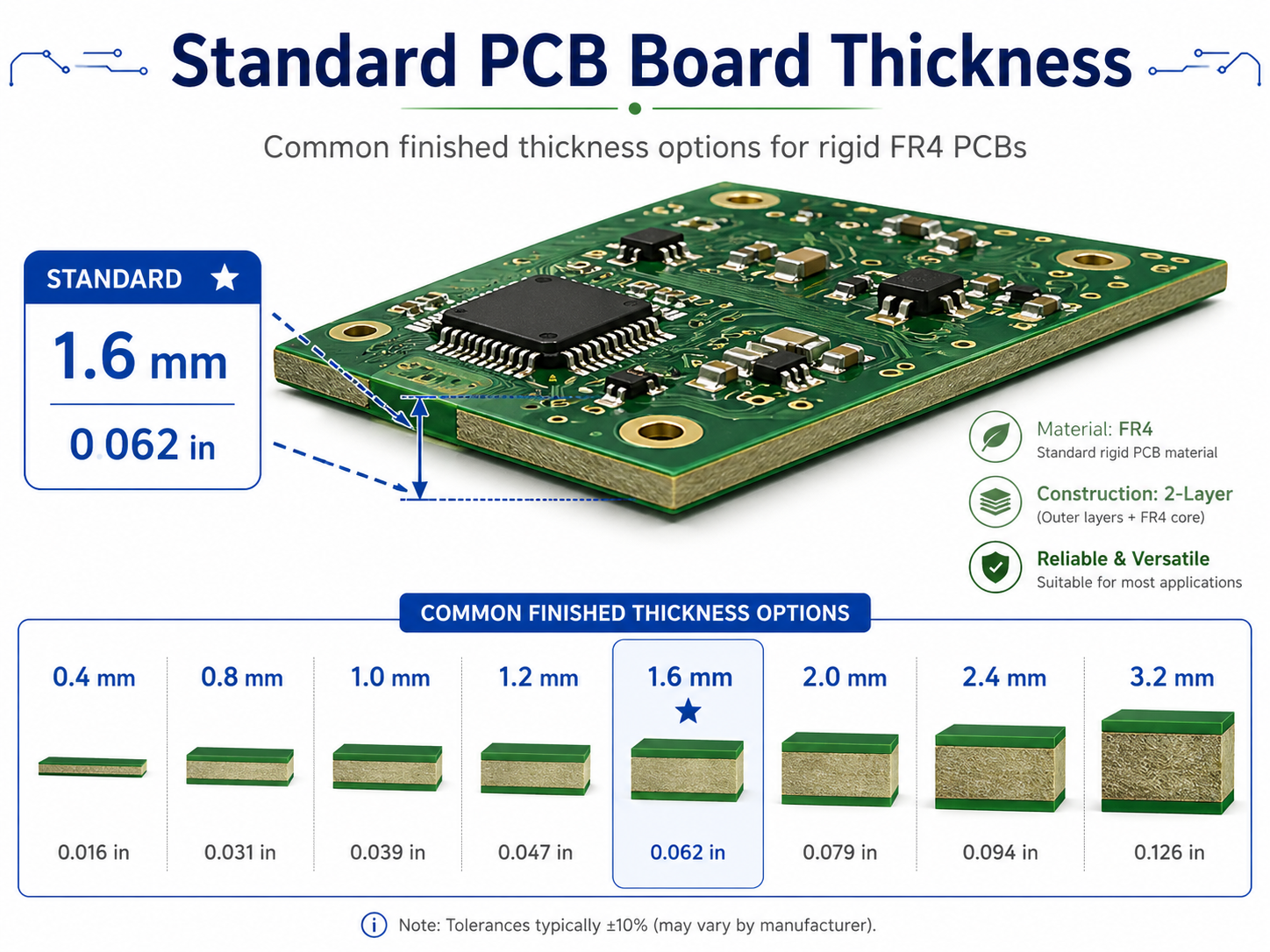
For a small 1.6 mm FR4 PCB, a designer may use 0.5 mm mouse bite holes, 5 or 6 holes per tab, and 2 to 4 tabs around the board. If the board has connectors on one side, the tabs should be placed away from that connector edge to protect the mechanical fit.

The safest approach is to provide the PCB supplier with the mechanical requirements, especially if the board edge must fit into a plastic housing, guide rail, slot, or metal enclosure.

Mouse Bites vs V-Cut: Which PCB Depaneling Method Is Better?

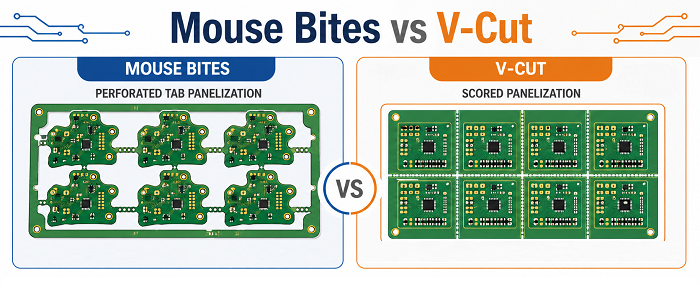
Mouse bites are better for irregular-shaped, small, or routed PCB designs, while V-cut is usually better for rectangular boards with straight separation lines. The best choice depends on board shape, edge quality requirement, assembly method, and production volume.

V-cut, also called V-score, creates a straight groove on both sides of the PCB panel. The board is later separated along that scored line. It is efficient and clean for simple rectangular arrays. However, it does not work well for curved outlines or complex board shapes.

Mouse bites use routed outlines and perforated tabs, so they are much more flexible for non-rectangular PCB designs.

When Should You Choose Mouse Bites for PCB Panels?

You should choose mouse bites when the PCB shape is not suitable for V-cut, when the board is small and needs support during assembly, or when the panel requires routed outlines with controlled breakaway tabs.

Mouse bites are commonly used when the PCB has:

  • Irregular board outline
  • Round or curved edges
  • Small individual unit size
  • Complex mechanical profile
  • Nonlinear separation path
  • Panel rails for SMT assembly
  • Areas where V-cut cannot pass through
  • Connectors or shapes that break a straight-line panel layout

For example, many wearable devices, sensor modules, LED control boards, communication modules, and compact IoT products use non-standard board outlines. These designs often benefit from mouse bite panelization.

However, mouse bites should be used carefully if the PCB edge is part of the final product appearance. If the board will be visible to the user, inserted into a tight enclosure, or mounted along a precise mechanical edge, the tab position should be reviewed early.

If the product requires a very smooth edge, mouse bites can still be used, but the board may need sanding, trimming, or secondary routing after separation.

Where Should Mouse Bites Be Placed on a PCB?

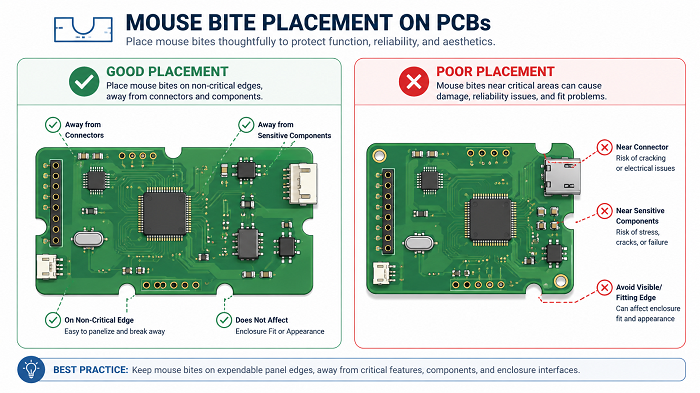
Mouse bites should be placed on non-critical board edges, away from connectors, mounting features, fragile components, test points, and enclosure-fitting surfaces. Their position should support the panel during assembly while reducing stress during depaneling.

Placement is often more important than hole size. A technically correct mouse bite pattern can still cause problems if it is placed in the wrong area.

Where Should Mouse Bites Be Placed on a PCB?

Better locations include:

  • Non-visible edges
  • Non-mating edges
  • Areas without tight mechanical tolerance
  • Edges away from connectors
  • Areas with enough clearance from components
  • Symmetrical positions around the board

Avoid placing mouse bites near:

  • USB connectors
  • Board-to-board connectors
  • RF connectors
  • Mounting holes
  • Snap-fit housing edges
  • Gold fingers
  • Antenna keep-out areas
  • Ceramic capacitors close to the edge
  • BGA or fine-pitch ICs near the tab area
  • Test pads or fixture contact points

If a board has only one suitable edge for tabs, the panel design may need extra support rails. For larger boards, tabs should be distributed evenly to avoid twisting during reflow or depaneling.

What Problems Can Poor Mouse Bite Design Cause?

Poor mouse bite design can cause rough board edges, difficult depaneling, cracked corners, damaged solder joints, weak panels, SMT instability, and mechanical interference during final assembly.

Most mouse bite problems are preventable. They usually come from poor tab position, incorrect hole size, too few tabs, too many holes, or lack of communication between PCB design and manufacturing.

ProblemPossible CauseBetter Design Practice
Rough edge after separationHoles too large or tab placed on visible edgeMove tabs to non-critical edges or use cleanup routing
Board crackingTab too strong or too close to board cornerAdjust tab width and add clearance
Difficult depanelingToo few holes or holes too smallIncrease hole count or optimize spacing
Weak panel during SMTToo many holes or narrow tabsStrengthen tabs or add support rails
Component damageTab placed near fragile componentsMove tabs away from sensitive parts
Housing interferenceMouse bite burrs on fitting edgeAvoid tabs on enclosure-contact surfaces
Poor cosmetic appearanceTabs placed on visible edgePlace tabs on hidden or internal edges
Test fixture conflictTab blocks test accessReview test point and fixture layout early

The most common issue is edge roughness. Mouse bites naturally leave small marks because the board breaks along drilled perforations. This does not always affect electrical performance, but it can affect appearance, handling, and mechanical fit.

For consumer-facing products, medical device housings, handheld electronics, or precision-mounted assemblies, the edge requirement should be defined clearly before fabrication.

How Do Mouse Bites Affect PCB Assembly and Testing?

Mouse bites affect PCB assembly by controlling panel strength, board stability, depaneling stress, and handling efficiency. A good mouse bite layout helps the panel move smoothly through solder paste printing, pick-and-place, reflow soldering, AOI, X-ray inspection, ICT, and functional testing.

During SMT assembly, the PCB panel must stay flat and stable. If the tabs are too weak, the board may vibrate or move during handling. If the tabs are too strong, separation after assembly may require excessive force.

This is especially important for boards with:

  • Fine-pitch ICs
  • BGA packages
  • Ceramic capacitors
  • Tall connectors
  • Heavy components
  • Thin PCB materials
  • Edge-mounted components
  • High-density layouts

For assembled PCBs, depaneling should be done carefully. Snapping boards by hand may work for simple prototypes, but it can create mechanical stress on solder joints and components. For higher-value assemblies, controlled depaneling tools are safer.

How Do Mouse Bites Affect PCB Assembly and Testing?

How Can You Reduce Burrs After PCB Mouse Bite Depaneling?

You can reduce burrs after mouse bite depaneling by optimizing hole diameter, hole spacing, tab width, tab location, and post-processing method. The best strategy is to place mouse bites on non-critical edges and avoid using them on surfaces that require a smooth mechanical fit.

Mouse bite marks cannot always be completely avoided, but they can be controlled.

Practical ways to reduce burrs include:

  • Use smaller mouse bite holes when suitable.
  • Keep hole spacing consistent.
  • Avoid placing tabs on visible product edges.
  • Place the hole row closer to the waste side when possible.
  • Use proper depaneling tools instead of twisting the board by hand.
  • Add sanding or trimming after separation.
  • Use secondary routing for high-precision edges.
  • Choose V-cut if the board is rectangular and needs cleaner straight edges.

For boards that fit into housings, the safest approach is to mark the critical edges in the fabrication notes. A simple note such as ā€œNo mouse bites on enclosure-fitting edgesā€ can prevent many mechanical problems.

How to Prepare Mouse Bites PCB Files for Manufacturing?

To prepare mouse bites PCB files for manufacturing, provide complete panelization details, board outline data, tab locations, hole sizes, rail requirements, tooling holes, fiducial marks, and any special edge-quality requirements.

Many PCB issues come from incomplete fabrication notes. A manufacturer can create panelization based on standard rules, but they may not know which edge is cosmetic, which edge fits into a housing, or which area must avoid mechanical stress.

Recommended file information includes:

  • Gerber files or ODB++ files
  • Board outline layer
  • Mechanical drawing or DXF file
  • PCB thickness
  • Surface finish requirement
  • Single board size
  • Finished panel size if required
  • Mouse bite tab locations
  • Hole diameter and hole spacing if specified
  • SMT rail width
  • Tooling holes
  • Fiducial mark positions
  • V-cut or routing instructions
  • Critical edge notes
  • Component keep-out areas near tabs
  • Test fixture requirements

For PCB assembly projects, panel design should be confirmed before SMT production. Once components are mounted, changing tab positions becomes much more difficult.

How to Choose the Right PCB Supplier for Mouse Bite Panelization?

Choose a PCB supplier that can review your panelization design, check mouse bite placement, understand SMT assembly requirements, and provide practical DFM feedback before production. Mouse bites look simple, but they affect both fabrication and assembly quality.

A reliable supplier should not only drill the holes. They should help confirm whether the tab locations are safe, whether the panel is strong enough, and whether the edge quality matches the final product requirement.

EBest PCB supports PCB fabrication, PCB panelization review, PCBA assembly, component sourcing, testing, and engineering support for prototype and production projects. If your design uses mouse bites, V-cut, routing, or special panel rails, sharing the mechanical requirements early can help improve manufacturing stability and final board quality.

FAQs About Mouse Bites PCB

1. What are mouse bites in PCB?

Mouse bites in PCB are small drilled holes placed on breakaway tabs in a PCB panel. They are commonly used in tab-routing panelization, especially for small or irregular-shaped PCBs. After depaneling, the remaining edge may show small rough marks where the tab was broken away.

2. Are mouse bites the same as stamp holes?

Yes. In many PCB manufacturing discussions, mouse bites are also called stamp holes, perforated holes, breakaway holes, or tab holes.

3. Do mouse bites leave rough PCB edges?

Yes, mouse bites can leave small burrs or serrated marks after the PCB is separated from the panel. This is normal because the board breaks along the perforated tab area.

4. What is the typical mouse bite hole size?

A common mouse bite hole size is around 0.5 mm to 0.8 mm in diameter. The exact size depends on PCB thickness, material, tab width, panel strength, and the supplier’s process capability.

5. Is mouse bite better than V-cut?

Mouse bite is better for irregular-shaped, round, small, or routed PCBs. V-cut is usually better for rectangular boards that can be separated along straight lines.

6. Can mouse bites be used for assembled PCBs?

Yes. Mouse bites are widely used for PCBs that go through SMT assembly in panel form. They help keep the boards connected and stable during production.

However, the tabs should be placed away from fragile components, connectors, test points, and precision mechanical edges. After assembly, controlled depaneling is preferred to reduce stress on solder joints and components.

7. How many mouse bite tabs does a PCB need?

The number of tabs depends on board size, shape, thickness, and assembly requirements. Small boards may use two to four tabs, while larger or heavier boards may need more support points.

Can mouse bites affect PCB cost?

Yes, mouse bites can affect PCB cost slightly because they usually require routing, drilled perforations, and more detailed panelization work. However, they can also improve assembly efficiency for small or irregular boards.

For simple rectangular boards, V-cut may be more cost-efficient. For complex shapes, mouse bites often provide better manufacturability and handling stability.

Conclusion

Mouse bites PCB is a practical panelization method for small, irregular, and routed circuit boards. It uses small drilled holes on breakaway tabs to hold PCBs in a manufacturing panel and make separation easier after fabrication or assembly.

The key to good mouse bite design is balance. The panel must be strong enough for SMT assembly, but the tabs must also be easy to remove without damaging the board. Hole size, hole spacing, tab width, tab quantity, and tab location all influence the final result.

For most projects, mouse bites are a strong choice when V-cut is not suitable. They offer flexibility, support complex PCB outlines, and help improve production handling. Still, designers should pay attention to edge quality, component clearance, enclosure fit, and depaneling stress.

If your PCB requires mouse bites, V-cut, routing, special panel rails, or PCBA assembly support, EBest PCB can help review the design before production and provide practical manufacturing suggestions.

For PCB fabrication and assembly inquiries, contact: sales@bestpcbs.com.

You may also like

How to Choose Current Limiting Resistor for LED?

April 28th, 2026

When designing LED circuits, many professionals struggle with selecting the right current limiting resistor to protect LEDs and ensure stable performance, but what exactly is a current limiting resistor and how do you choose the correct one for your LED application? This blog breaks down every critical detail, from definitions and working principles to calculation methods and practical selection tips, addressing common pain points and providing actionable guidance to help you avoid costly mistakes and build reliable circuits.

Current Limiting Resistor, https://www.bestpcbs.com/blog/2026/04/current-limiting-resistor/

What is a Current Limiting Resistor?

A current limiting resistor is a passive two-terminal electronic component designed to control the amount of electric current flowing through a circuit. It restricts current to a safe, predetermined level by introducing a specific amount of electrical resistance, preventing excessive current that could damage sensitive components like LEDs.

Also known as a limiting resistor, it operates based on Ohm’s Law, converting excess electrical energy into heat that dissipates safely into the surrounding environment. Unlike other resistors, its primary function is not just to adjust signal levels or divide voltage but to act as a protective barrier.

It is available in various forms, including carbon film, metal film, and wire wound, each suited to different current and power requirements. The key distinction lies in its application: it is specifically sized to limit current rather than serve general circuit tuning purposes.

What is the Symbol of Current Limiting Resistors?

Current limiting resistors use the same standard symbols as all fixed resistors, as their function is a specific application of general resistor technology. Two primary symbols are used globally, aligned with international standards.

The ANSI style symbol features a rectangular box with two leads extending from either side, representing the resistor’s body and connection points.

The IEC symbol, more commonly used in European and global circuits, is a simple zigzag line with leads on both ends, visually depicting the resistance path that restricts current flow.

These symbols are identical for all fixed resistors because the current limiting function is determined by the resistor’s value and placement in the circuit, not its physical design or symbol. When reading schematics, look for either symbol in series with an LED to identify the component responsible for current control.

What is the Purpose of a Current Limiting Resistor?

The core purpose of a current limiting resistor is to restrict electrical current to a safe level for the components in a circuit. It prevents overcurrent conditions that can cause overheating, component failure, or permanent damage.

For sensitive components like LEDs, this protection is critical, as they have strict current tolerances that, when exceeded, lead to immediate burnout. Beyond protection, it stabilizes circuit performance.

It ensures consistent current flow even when there are minor fluctuations in input voltage, maintaining uniform brightness in LEDs and preventing erratic behavior. It also absorbs excess voltage in circuits where the power supply voltage exceeds the component’s required operating voltage, converting the excess into heat to keep the circuit within safe parameters.

Additionally, it acts as a simple, cost-effective short circuit protection mechanism. In the event of a component short, the limiting resistor restricts the maximum current in the circuit, protecting the power supply and other components from damage.

How Does a Current Limiting Resistor Work?

A current limiting resistor works by leveraging Ohm’s Law, which states that current (I) is equal to voltage (V) divided by resistance (R), or I = V/R. When connected in series with an LED or other component, it increases the total resistance of the circuit, thereby reducing the total current flowing through the loop.

In a typical LED circuit, the power supply provides a fixed voltage, while the LED has a specific forward voltage drop, the voltage required to turn it on. The current limiting resistor is sized to absorb the difference between the supply voltage and the LED’s forward voltage, restricting the current to the LED’s safe operating level.

For example, if a 5V power supply is used with an LED that has a 2V forward voltage drop, the resistor absorbs the remaining 3V. By selecting the correct resistance value, the current is limited to the LED’s rated level, typically 10 to 20mA for standard LEDs. The resistor dissipates the excess energy as heat, which is why power rating is a critical consideration when selecting the component.

When to Use a Current Limiting Resistor?

A current limiting resistor is essential in specific circuit scenarios where components are at risk of overcurrent damage or performance instability. Below are the key scenarios where you should use a current limiting resistor, organized into clear, actionable points:

  • When connecting components with strict current tolerances to a high-current power supply – Use a current limiting resistor whenever the power supply can provide more current than the component can safely handle. The most common application is with LEDs, but it also applies to other sensitive components like diodes, transistors, and some integrated circuits (ICs) that have fixed maximum current ratings.
  • When the power supply voltage exceeds the component’s forward or operating voltage – This is a mandatory use case. If the power supply voltage is higher than the component’s required operating voltage (e.g., a 5V supply connected to an LED with a 2V forward voltage drop), the resistor absorbs the excess voltage and restricts current, preventing the component from drawing too much current and burning out.
  • When circuit voltage is prone to fluctuations – If the input voltage of your circuit is not stable (e.g., battery-powered circuits where voltage drops over time, or AC-powered circuits with minor voltage spikes), a current limiting resistor stabilizes current flow. Even small voltage changes can cause significant current spikes in sensitive components, and the resistor mitigates this risk to ensure consistent performance.
  • When short circuit protection is needed – Incorporate a current limiting resistor in circuits where short circuits could occur (e.g., loose connections, component failure). The resistor restricts the maximum current in the circuit during fault conditions, protecting the power supply and other components from damage, overheating, or permanent failure.
  • When using low-voltage components with standard power supplies – Low-voltage components (e.g., small signal diodes, microcontrollers’ input pins) connected to standard power supplies (5V, 12V, 24V) require a current limiting resistor. These components cannot handle the full current from the power supply, so the resistor ensures current stays within their safe operating range.
Current Limiting Resistor, https://www.bestpcbs.com/blog/2026/04/current-limiting-resistor/

Why LED Needs Current Limiting Resistor?

LEDs need a current limiting resistor because they have very low internal resistance and an exponential current-voltage relationship. Unlike incandescent bulbs, which have variable resistance that increases with temperature, LEDs have a fixed forward voltage drop.

They will draw excessive current if connected directly to a power supply, even if the supply voltage is only slightly higher than the LED’s forward voltage. LEDs have strict maximum current ratings, typically 10 to 30mA for standard 5mm LEDs and higher for high-power variants.

Exceeding this current causes the LED to overheat, degrade rapidly, and eventually burn out. The current limiting resistor ensures the current stays within this safe range, protecting the LED and extending its lifespan.

Additionally, LEDs have consistent forward voltage drops that vary by color and type. A current limiting resistor compensates for these variations and differences in power supply voltage, ensuring uniform current flow and consistent brightness across multiple LEDs in a circuit.

What Happens without Current Limiting Resistor LED?

Without a current limiting resistor, an LED will immediately draw excessive current when connected to a power supply with a voltage higher than its forward voltage drop. This leads to rapid overheating of the LED’s semiconductor junction, causing the LED to burn out within seconds or minutes, depending on the voltage and current levels.

In most cases, the LED will emit a bright flash before dimming and failing completely. The excessive current can also damage the power supply, especially in low-current power supplies that are not designed to handle short circuit or overcurrent conditions.

It may cause the power supply to shut down, overheat, or fail permanently. Even if the LED does not fail immediately, operating without a current limiting resistor significantly reduces its lifespan.

The LED will degrade faster, with brightness decreasing over time, and may develop internal damage that leads to inconsistent performance or sudden failure. In circuits with multiple LEDs, the lack of limiting resistors can cause uneven current distribution, resulting in some LEDs being brighter than others or failing at different rates.

How to Calculate Current Limiting Resistor for LED?

Calculating a current limiting resistor for an LED is straightforward using a simple formula derived from Ohm’s Law. The formula is R = (Vsource – Vf) / If, where:

– R is the resistance in ohms – Vsource is the power supply voltage – Vf is the LED’s forward voltage drop – If is the desired forward current in amps

Follow these steps to calculate the correct resistance value:

Step 1: Identify key parameters – Determine the power supply voltage (Vsource), which is typically 5V, 3.3V, or 12V. Find the LED’s forward voltage drop (Vf) and maximum forward current (If) from the LED’s datasheet.

Typical Vf values are 1.8–2.2V for red LEDs, 2.0–3.5V for green LEDs, and 3.0–3.6V for blue or white LEDs. Standard If values range from 10 to 20mA (0.01 to 0.02A) for most LEDs.

Step 2: Plug values into the formula – Subtract the LED’s Vf from the Vsource to get the voltage across the resistor. Divide this value by the desired If to get the required resistance.

For example, if Vsource is 5V, Vf is 2.1V (green LED), and If is 10mA (0.01A), the calculation is R = (5 – 2.1) / 0.01 = 290 ohms.

Step 3: Select a standard resistor value – Resistors are manufactured in standard values (E24 series). Choose the nearest standard value that is equal to or slightly higher than the calculated resistance to ensure current does not exceed the LED’s rating.

For the example above, 290 ohms is closest to the standard 300 ohm resistor.

Step 4: Calculate power rating – Ensure the resistor can handle the power it will dissipate. Use the formula P = I²R or P = (Vsource – Vf) Ɨ If.

For the example, P = (0.01)² Ɨ 300 = 0.03W. Select a resistor with a power rating at least twice the calculated value, typically 1/8W or 1/4W for standard LED circuits.

Current Limiting Resistor, https://www.bestpcbs.com/blog/2026/04/current-limiting-resistor/

What Current Limiting Resistor Does a Green LED Need?

The current limiting resistor required for a green LED depends on three key factors: the power supply voltage, the green LED’s forward voltage drop, and the desired forward current.

Green LEDs have a typical forward voltage drop (Vf) of 2.0 to 3.5V, with most standard 5mm green LEDs having a Vf of 2.1 to 2.5V.

For a common 5V power supply and a standard green LED with a Vf of 2.1V and desired current (If) of 10mA (0.01A), the required resistance is calculated as R = (5 – 2.1) / 0.01 = 290 ohms. The nearest standard resistor value is 300 ohms, which is ideal for this application.

If using a 3.3V power supply with the same green LED (Vf = 2.1V, If = 10mA), the calculation becomes R = (3.3 – 2.1) / 0.01 = 120 ohms, which is a standard value.

For higher current requirements (e.g., 20mA), the resistance would be R = (5 – 2.1) / 0.02 = 145 ohms, with the nearest standard value being 150 ohms.

Always check the green LED’s datasheet for exact Vf and maximum If values, as these can vary by manufacturer and LED type. High-power green LEDs may require lower resistance values but higher power resistors to handle increased current and heat dissipation.

How to Choose Current Limiting Resistor for LED?

Choosing the right current limiting resistor for an LED is a systematic process that ensures the resistor effectively protects the LED and maintains stable circuit performance. Below are clear, actionable points to guide your selection:

1. Calculate the required resistance value first – Start with the core formula derived from Ohm’s Law: R = (Vsource – Vf) / If. Here, Vsource is your power supply voltage, Vf is the LED’s forward voltage drop, and If is the desired forward current (in amps). You can find the exact Vf and If values from the LED’s datasheet, as these parameters vary by LED color and type.

2. Select a standard resistor value – Resistors are manufactured in standard values (E24 series), so you won’t always find the exact calculated resistance. Choose the nearest standard value that is equal to or slightly higher than the calculated resistance. This ensures the current flowing through the LED does not exceed its safe rating, and it also extends the LED’s lifespan.

3. Verify the resistor’s power rating – The resistor dissipates excess energy as heat, so its power rating must be sufficient to handle this heat. Calculate the power dissipation using P = I²R or P = (Vsource – Vf) Ɨ If. For long-term reliability, select a resistor with a power rating at least twice the calculated value. For most standard LED circuits, 1/8W or 1/4W resistors are sufficient; high-power LEDs may require 1/2W or higher.

4. Consider the LED circuit configuration – If you’re using multiple LEDs in series, add all their Vf values together when calculating the required resistance. If LEDs are in parallel, each LED must have its own current limiting resistor to ensure even current distribution and prevent some LEDs from drawing more current than others.

5. Account for voltage fluctuations – If your circuit’s input voltage is prone to fluctuations, select a resistor with a tolerance of 5% or better. This helps maintain consistent current flow through the LED, avoiding brightness variations or potential damage caused by sudden current spikes.

6. Choose the appropriate resistor type – For most standard LED applications, affordable carbon film resistors (5% tolerance) work well. If you need more precise current control (e.g., in high-precision circuits), opt for metal film resistors, which offer better tolerance (1% or 2%). For high-power LED circuits, use wire wound resistors, which can dissipate more heat effectively.

How to Determine Resistor Size for Current Limiting?

Determining the resistor size for current limiting is a systematic process that ensures the resistor functions safely and effectively. The “size” here refers to two key aspects: resistance value (ohms) and power rating (watts), both of which are critical to avoid resistor failure and protect LED circuits. Follow these step-by-step instructions to determine the correct resistor size:

Step 1: Calculate the required resistance value – First, determine the resistance value needed to limit the current to the LED’s safe operating level. Use the formula R = (Vsource – Vf) / If, where Vsource is the power supply voltage, Vf is the LED’s forward voltage drop, and If is the desired forward current (in amps). This formula is derived from Ohm’s Law and ensures the resistor restricts current to a safe range, which is the core function of a current limiting resistor. You can find Vf and If values from the LED’s datasheet.

Step 2: Understand the relationship between resistance value and physical size – Note that the resistance value (ohms) does not directly determine the resistor’s physical dimensions. However, for standard through-hole resistors of the same power rating, lower resistance values (e.g., 100 ohms) are typically slightly smaller than higher resistance values (e.g., 10k ohms). This is a general observation and may vary by resistor type (e.g., carbon film vs. metal film).

Step 3: Calculate the required power rating – The power rating (watts) is the primary factor determining the resistor’s physical size, as it dictates how much heat the resistor can safely dissipate. Use the formula P = I²R or P = (Vsource – Vf) Ɨ If to calculate the power the resistor will dissipate. To ensure long-term reliability, select a resistor with a power rating at least twice the calculated value—this prevents overheating and premature failure.

Step 4: Match power rating to physical size – Choose a resistor physical size that matches the calculated power rating. Higher power ratings require larger resistors to dissipate more heat. For reference: a 1/8W resistor is small (ideal for low-power LED circuits), a 1/4W resistor is slightly larger, a 1/2W resistor is larger still, and 1W+ resistors are significantly bigger and better suited for high-power applications.

Step 5: Select the appropriate resistor type – Choose a resistor type based on the circuit’s power requirements and performance needs. Carbon film resistors are affordable and suitable for low-power LED circuits. Metal film resistors offer better tolerance and stability, making them ideal for circuits where current consistency is important. Wire wound resistors are designed for high-power applications, as they can dissipate more heat effectively.

Step 6: Ensure physical size fits the circuit layout – Finally, confirm that the selected resistor’s physical size fits your circuit design. Surface mount resistors are smaller and ideal for compact circuits, while through-hole resistors are larger but easier to prototype with and solder to breadboards or circuit boards.

How to Use a Current Limiting Resistor?

Using a current limiting resistor is simple, but proper placement and wiring are critical to ensure it protects the LED and functions correctly, this is because the resistor needs to effectively restrict current flow to the LED, as it is connected in series to limit the current in the circuit. Below are clear, step-by-step instructions to use a current limiting resistor correctly:

Step 1: Confirm the selected resistor parameters – Before wiring, double-check that the current limiting resistor matches the calculated specifications (resistance value and power rating). Ensure the resistor’s resistance is the standard value selected (equal to or slightly higher than the calculated value) and its power rating is at least twice the calculated power dissipation, to avoid overheating and failure.

Step 2: Connect the resistor in series with the LED – Always wire the current limiting resistor in series with the LED. This ensures the same current flows through both the resistor and the LED, allowing the resistor to effectively restrict the current to a safe level, which is the core function of a current limiting resistor. The resistor can be placed either before or after the LED in the circuit, as series connections have uniform current throughout.

Step 3: Check and confirm LED polarity – LEDs are polarized components, so correct wiring polarity is essential for them to light up and avoid damage. Connect the anode (positive terminal) of the LED to the positive side of the power supply, with the current limiting resistor in line between the power supply and the LED’s anode. Then connect the cathode (negative terminal) of the LED to the negative side of the power supply.

Step 4: Secure all circuit connections – Ensure all wire connections (between the power supply, resistor, and LED) are tight and secure. For through-hole resistors, solder the leads firmly to the circuit board or breadboard to prevent loose contacts, which can cause current fluctuations or open circuits. For surface mount resistors, use proper soldering techniques to avoid damaging the resistor or circuit board.

Step 5: Test the circuit and adjust if needed – After completing the wiring, turn on the power supply and check the LED’s brightness. If the LED is too dim, the resistor value may be too high (restricting too much current); if the LED is overly bright or burns out immediately, the resistor value is too low (allowing excessive current). Adjust the resistor to the correct standard value to achieve stable brightness and safe current flow.

Current Limiting Diode vs Resistor: Which is Better for Current Control?

For most LED circuits, a current limiting resistor is better than a current limiting diode due to its simplicity, cost-effectiveness, and flexibility. Below is a point-by-point comparison of the two components for current control, highlighting their key differences, advantages, and limitations:

1. Complexity & Ease of Use

Current Limiting Resistor: Simple to select and use, requiring no specialized knowledge. It only needs basic calculation (using the formula R = (Vsource – Vf) / If) to determine the correct resistance value, making it accessible for beginners and professionals alike.

Current Limiting Diode: More complex to apply, as it requires matching its fixed current rating to the circuit’s requirements. It also has specific voltage range limitations that must be strictly followed to avoid failure.

2. Flexibility

Current Limiting Resistor: Highly flexible, with a wide range of resistance and power ratings available. It can be easily replaced or adjusted if circuit parameters (e.g., power supply voltage, LED current requirements) change.

Current Limiting Diode: Inflexible, as it has a fixed current rating. If the circuit’s current requirements change, the diode must be replaced with a different model, which increases design and maintenance effort.

3. Current Stability (Under Voltage Fluctuations)

Current Limiting Resistor: Current stability is dependent on input voltage. Minor voltage fluctuations can cause small changes in current, which is acceptable for most standard LED circuits but not ideal for applications requiring strict consistency.

Current Limiting Diode: Maintains a fixed current regardless of input voltage fluctuations (within its operating range). This makes it superior for applications where voltage varies significantly and strict current stability is required.

4. Cost

Current Limiting Resistor: Extremely cost-effective, with standard 1/4W carbon film resistors costing as little as $0.01–$0.10 each (depending on quantity). It is one of the most affordable electronic components.

Current Limiting Diode: More expensive than resistors, often costing several times more per unit. This higher cost makes it less ideal for low-cost, high-volume LED applications.

5. Application Suitability

Current Limiting Resistor: Ideal for low-complexity, low-cost circuits with stable power supplies (e.g., 5V or 12V), such as hobby projects, consumer electronics, and standard LED lighting. It is also suitable for circuits where current adjustments may be needed.

Current Limiting Diode: Better for industrial or high-precision applications with variable input voltage or strict current stability requirements (e.g., industrial LED lighting, medical devices). It is not suitable for all voltage ranges and adds complexity to the circuit.

6. Heat Dissipation & Size

Current Limiting Resistor: Heat dissipation depends on power rating; standard 1/4W or 1/8W resistors are small and suitable for most compact LED circuits. Higher power variants (1W+) are larger but still widely available.

Current Limiting Diode: Typically has similar size to small resistors but may generate more heat if operated near its maximum voltage range, requiring additional heat sinking in some cases.

Current Limiting Resistor vs Voltage Limiting Resistor: What’s the Difference?

Comparison AspectCurrent Limiting ResistorVoltage Limiting Resistor
Primary FunctionRestrict the amount of electric current flowing through a circuitRestrict the voltage across a specific component in a circuit
Connection MethodConnected in series with the load (e.g., LED)Typically connected in parallel with the load or in a voltage divider circuit
Working PrincipleIncreases total circuit resistance to reduce current to a safe levelEnsures the voltage across the component does not exceed a safe level via voltage division or parallel connection
Calculation BasisBased on the desired current and the voltage difference across the resistorBased on the desired voltage and the current flowing through the voltage divider
Main ApplicationProtect components sensitive to overcurrent (e.g., LEDs, diodes)Protect components sensitive to overvoltage (e.g., integrated circuits, transistors)

How Much Does a Current Limiting Resistor Cost?

Current limiting resistors are among the most affordable electronic components, with costs varying based on type, power rating, tolerance, and quantity. Standard through-hole resistors suitable for most LED circuits are extremely inexpensive, making them a cost-effective solution for current control.

For small quantities (1 to 10 units), standard 1/8W or 1/4W carbon film resistors cost between $0.05 and $0.10 each. Metal film resistors, which offer better tolerance (1% or 2% vs. 5% for carbon film), cost slightly more, between $0.10 and $0.20 each.

In bulk quantities (100 or more), the cost drops significantly. Carbon film resistors can cost as little as $0.01 to $0.03 each, while metal film resistors cost $0.02 to $0.05 each.

High-power resistors (1W or more) are more expensive, ranging from $0.50 to $2.00 each for small quantities and $0.10 to $0.50 each in bulk.

Specialized resistors, such as wire wound or surface mount high-power variants, may cost more, but for standard LED applications, the most cost-effective option is a 1/4W carbon film resistor with 5% tolerance.

These are widely available from electronic suppliers and offer reliable performance at minimal cost.

Current Limiting Resistor, https://www.bestpcbs.com/blog/2026/04/current-limiting-resistor/

FAQs About Current Limiting Resistors

Q1: Why do LEDs need a current limiting resistor?

A1: LEDs need a current limiting resistor because they have low internal resistance and an exponential current-voltage relationship. Without it, LEDs draw excessive current when connected to a power supply with voltage higher than their forward voltage drop, leading to overheating, rapid degradation, and burnout. It ensures current stays within the LED’s safe rating.

Q2: How do you calculate a current limiting resistor for an LED?

A2: Calculate a current limiting resistor using the formula R = (Vsource – Vf) / If, where R is resistance in ohms, Vsource is power supply voltage, Vf is LED forward voltage drop, and If is desired forward current in amps. Identify parameters from the LED datasheet, plug into the formula, select the nearest standard resistor value, and verify the power rating.

Q3: What current limiting resistor does a green LED need?

A3: The current limiting resistor for a green LED depends on power supply voltage, LED forward voltage (Vf = 2.0–3.5V typical), and desired current (10–20mA typical). For a 5V supply, 2.1V Vf, and 10mA current, the calculated resistance is 290 ohms, with the nearest standard value being 300 ohms. Check the LED datasheet for exact parameters.

Q4: What happens if an LED is used without a current limiting resistor?

A4: Without a current limiting resistor, an LED draws excessive current from the power supply, leading to rapid overheating of its semiconductor junction. This causes the LED to burn out within seconds or minutes, often after a bright flash. It may also damage the power supply, cause uneven performance in multiple LED circuits, or reduce LED lifespan significantly.

Q5: How much does a current limiting resistor cost?

A5: Current limiting resistors are affordable, with standard 1/8W or 1/4W carbon film resistors costing $0.05 to $0.10 each in small quantities. In bulk, they cost as little as $0.01 to $0.03 each. Metal film resistors cost slightly more ($0.10–$0.20 each small quantity), while high-power resistors (1W+) range from $0.50 to $2.00 each.

You may also like

What is IPC-J-STD-001? IPC-J-STD-001 vs IPC-A-610

April 28th, 2026

If you work with soldered electrical and electronic assemblies, you’ve likely heard of IPC-J-STD-001, but do you truly understand what it entails, why it matters, and how it differs from other key standards like IPC-A-610? This guide breaks down everything you need to know about IPC-J-STD-001, from its definition and latest version to its requirements, certification process, and common FAQs. Whether you’re looking to ensure compliance, prepare for certification, or resolve common pain points with soldering standards, this resource delivers clear, actionable information designed to simplify complex technical concepts.

IPC-J-STD-001, https://www.bestpcbs.com/blog/2026/04/ipc-j-std-001/

What Is IPC-J-STD-001?

IPC-J-STD-001 is the global industry standard for soldered electrical and electronic assemblies, developed and maintained by the IPC formerly known as the Institute of Printed Circuits. It establishes uniform requirements for soldering processes, materials, and acceptable practices across all electronic manufacturing sectors, from consumer electronics to aerospace and medical devices.

The standard is widely recognized as the benchmark for ensuring soldering quality, reliability, and consistency, helping manufacturers avoid defects such as cold joints, bridging, and insufficient solder coverage that can lead to product failure.

Unlike standards that focus on inspection alone, IPC-J-STD-001 emphasizes process control and preventive measures. It provides detailed guidelines for every stage of the soldering process, including material selection, equipment setup, temperature profiles, and operator training.

By following IPC-J-STD-001, manufacturers can reduce rework costs, improve product durability, and ensure compatibility with global market requirements. The standard is regularly updated to keep pace with technological advancements, such as the shift to lead free soldering and the miniaturization of electronic components.

What Does IPC J-STD-001 Stand For?

IPC J-STD-001 is an acronym that breaks down into clear, industry-specific terms, each with a distinct purpose in the electronic manufacturing landscape.

  • IPC: Stands for the IPC, the global association that develops standards for the electronic interconnection industry.
  • J-STD: Refers to a joint standard, meaning it is collaboratively developed by industry experts, manufacturers, and stakeholders to ensure broad applicability and consensus.
  • 001: Designates it as the first standard in the J-STD series, which focuses specifically on soldering requirements.

Together, IPC J-STD-001 translates to the IPC Joint Standard 001, the foundational document for soldered electrical and electronic assemblies. This naming convention aligns with other IPC standards, creating a consistent framework for electronic manufacturing professionals to reference and follow.

What Is The Latest Version of IPC J-STD-001?

The latest version of IPC J-STD-001 is Revision H, commonly referred to as IPC-J-STD-001H. Released to address emerging technologies and industry needs, this version incorporates several key updates from previous revisions, including the integration of IPC-J-STD-001G-AM1 into the main document.

Revision H was developed with input from representatives from 27 countries, expanding its global relevance and ensuring it reflects current manufacturing practices.

Key Updates in IPC-J-STD-001H

  • A new chapter on cleaning and residue requirements, replacing outdated guidance on solvent extractor resistivity testing.
  • An appendix on using X ray for welding connection acceptance, addressing the need for non-destructive inspection of complex assemblies.
  • Removal of references to international space station symbols to avoid confusion in general manufacturing applications.
  • New standards for coil wound terminals, aligning with advancements in component design.
  • A new automotive application appendix, providing tailored guidance for the automotive electronics sector’s unique reliability requirements.

Staying current with the latest version is critical for compliance, as older revisions may not address modern technologies like miniaturized components or lead free soldering processes. Manufacturers and professionals should always reference IPC-J-STD-001H to ensure their processes meet current industry standards.

IPC-J-STD-001, https://www.bestpcbs.com/blog/2026/04/ipc-j-std-001/

What Are The IPC J-STD-001 Requirements For Soldered Electrical And Electronic Assemblies?

IPC J-STD-001 outlines comprehensive requirements for soldered assemblies, covering three main areas. These requirements are structured to ensure consistency, reliability, and performance across all soldered connections, regardless of the application or component type.

1. Material Requirements

The standard specifies strict criteria for all materials used in soldering, with clear guidelines for each material type:

  • Solder Alloys: Must meet specific chemical composition and mechanical property requirements, with separate guidelines for lead containing and lead free options.
  • Flux: Classified by activity level and halide content, with recommendations tailored to different soldering processes.
  • Cleaning Agents: Must be compatible with assembly materials and effective at removing flux residues without damaging components.

IPC-J-STD-001H updates the cleaning requirements to align with modern environmental regulations, restricting harmful substances and providing clear guidelines for residue limits.

2. Process Requirements

Process requirements cover every step of the soldering process, from pre-solder preparation to post-solder inspection. Key process guidelines include:

  • Pre-solder Preparation: Components and PCBs must be cleaned and dried to remove contaminants that could affect solder adhesion. Oxidation on component leads and PCB pads must be removed using appropriate methods.
  • Temperature Profiles: Soldering temperatures must be carefully controlled based on the solder alloy and component type. For example, lead containing solder typically requires a temperature range of 350-400°C for hand soldering, while lead free solder requires higher temperatures (380-420°C).
  • Soldering Methods: The standard provides guidelines for hand soldering, wave soldering, and reflow soldering. For wave soldering, contact time with the solder wave must be 3-5 seconds, and wave height should be 1.0-1.5mm to prevent bridging.
  • Post-solder Cleaning: Residue removal is required unless the flux is designated as no-clean and meets residue limits specified in the standard. Ion contamination testing must be performed to ensure residue levels are below 6.45μg/cm² (per IPC-TM-650 2.3.26).

3. Quality Requirements

Quality requirements focus on acceptable solder joint characteristics, with clear criteria for compliance:

  • Wetting Angle: Solder joints must have a wetting angle between 15° and 45°.
  • Solder Fillet Shape: Solder fillets must fully cover the component lead and PCB pad.
  • Defect Prevention: Defects such as cold joints, voids, bridging, and insufficient solder are not permitted, with stricter requirements for high reliability applications (Class 3).

What Is The Minimum Electrical Clearance For IPC J-STD-001?

IPC J-STD-001 does not specify a single minimum electrical clearance value. Clearance requirements vary based on the application voltage, component type, and environmental conditions. Instead, the standard references other IPC standards, such as IPC-2221, which provides detailed electrical clearance guidelines based on voltage levels and insulation type.

Common Minimum Electrical Clearance Values

  • For most consumer and industrial applications operating at 50-250V:1.7mm for circuits before the fuse and 1.0mm after the fuse (air gap between conductors).
  • For higher voltage applications (250-500V): 3.0mm before the fuse and 2.0mm after the fuse.

These values prevent electrical arcing and ensure safe operation. Note that electrical clearance (air gap) differs from creepage (surface path along insulation) — both must be considered for IPC J-STD-001 compliance, with additional clearance needed for high-reliability applications like aerospace and medical devices.

What Is The Difference Between J-STD-001 and IPC-A-610?

J-STD-001 and IPC-A-610 are complementary standards but address distinct stages of the electronic manufacturing process. The key differences are clearly outlined in the table below:

CriteriaJ-STD-001IPC-A-610
Core FocusGoverns the soldering process and materials, outlining how to perform soldering correctly.Defines the acceptability of the finished electronic assembly, focusing on inspection criteria.
PurposePrevent defects by establishing consistent, repeatable soldering processes.Verify that the finished assembly meets acceptable quality levels.
Application StageUsed during the manufacturing phase to guide soldering steps.Used during the inspection phase to evaluate finished assemblies.
Key GuidelinesMaterial selection, equipment setup, temperature control, operator training.Visual criteria for solder joints, component placement, and overall assembly quality.
ClassificationsNo specific classes; requirements align with application reliability needs.Three classes (1: consumer, 2: industrial, 3: high reliability) for acceptability.

Recent updates to both standards (IPC-J-STD-001H and IPC-A-610H) have aligned their requirements, with both adding new guidelines for coil wound terminals and removing outdated content. This alignment makes it easier for manufacturers to comply with both standards simultaneously.

Where Can I Get IPC J-STD-001 PDF?

The official IPC J-STD-001 PDF, including the latest Revision H, is available for purchase directly from the IPC website. The standard is not available for free download, as it is a copyrighted document developed through extensive industry collaboration and research.

Purchasing the official PDF ensures you have access to the most accurate, up-to-date content, including all updates and appendices.

Supplementary Resources

  • IPC-J-STD-001H Redline document: Highlights changes between Revision H and the previous version (Revision G), useful for understanding specific updates.
  • Authorized training providers: Some may include a digital copy of the standard as part of their training programs.

It is important to ensure any PDF obtained is an official, unaltered version to avoid relying on incorrect or outdated information. Unauthorized copies of the standard may contain errors or missing content, which can lead to non-compliance.

 IPC J-STD-001 PDF, https://www.bestpcbs.com/blog/2026/04/ipc-j-std-001/

How To Prepare For IPC J-STD-001?

Preparing for IPC J-STD-001 compliance or certification requires a structured approach that covers training, process review, and documentation. Follow these steps to ensure full preparation:

1. Review the Latest Standard: Obtain the official IPC-J-STD-001H document and review all chapters. Pay special attention to updates related to cleaning requirements, X ray inspection, and automotive applications. Focus on sections relevant to your specific manufacturing processes (e.g., wave soldering, reflow soldering).

2. Train Personnel: Ensure all personnel involved in soldering, setup, and inspection receive formal IPC training. Training programs should cover the requirements of IPC J-STD-001, proper soldering techniques, and defect identification. Many authorized training providers offer courses specifically focused on IPC J-STD-001 compliance.

3. Review and Update Processes: Evaluate your current soldering processes against IPC J-STD-001 requirements. Check temperature profiles, material selection, cleaning procedures, and equipment maintenance. Make adjustments as needed—for example, updating flux selection to meet new residue limits or adjusting wave soldering parameters to prevent bridging.

4. Implement Quality Control Measures: Establish regular testing and inspection procedures to ensure ongoing compliance. This includes ion contamination testing, solder joint inspection, and process validation. Maintain detailed records of all tests and adjustments.

5. Prepare Documentation: Document all processes, materials, and training records to demonstrate compliance. This includes solder alloy specifications, flux data sheets, temperature profiles, and operator training certificates. Proper documentation is critical for certification and audits.

    How Long Does It Take To Acquire IPC-J-STD-001?

    The time required to acquire IPC-J-STD-001 certification varies based on several factors, including the size of the organization, the current state of existing processes, and the type of certification sought.

    Individual Certification

    • Typically takes 2-3 days of training followed by an exam.
    • Most training programs are 2-3 days long, with the exam administered on the final day.

    Organizational Certification

    • Timeline is longer, typically 4-8 weeks.
    • Includes reviewing and updating processes, training personnel, conducting internal audits, and scheduling an external audit by an authorized IPC certification body.
    • The external audit itself usually takes 1-3 days, depending on the size of the facility and the scope of the certification.

    Organizations with existing soldering processes that are already close to IPC J-STD-001 requirements may be able to complete the certification process in 4 weeks or less. Those with outdated processes or limited training may need 8 weeks or more to make necessary adjustments and prepare for the audit.

    How Much Is IPC J-STD-001 Certification?

    The cost of J-STD-001 certification varies based on the type of certification (individual vs. organizational) and the certification body. Below are typical cost ranges:

    Individual Certification

    • Costs typically range from $500 to $1,500 per person.
    • Includes training materials, instruction, and the certification exam.
    • Group discounts may be available for organizations training multiple personnel.

    Organizational Certification

    • Costs are higher, ranging from $3,000 to $10,000 or more.
    • Includes application fees, audit fees, and any necessary process adjustments.
    • Audit fees are typically calculated based on the number of audit days required, with each day costing$1,000 to $3,000.

    Additional Costs

    • Purchasing the official IPC J-STD-001 document ($150-$300).
    • Training materials and equipment upgrades needed to meet the standard’s requirements.
    • Ongoing costs: Recertification (required every 2-3 years) and training updates for new employees.

    How To Get IPC J-STD-001 Certification?

    Obtaining IPC J-STD-001 certification involves a structured process that varies slightly for individuals and organizations. Follow the step-by-step guides below:

    Individual Certification

    1. Choose an authorized IPC training provider: Select a training provider certified by the IPC to offer IPC J-STD-001 training. Ensure the provider offers courses for the latest version (Revision H).

    2. Enroll in a training course: Complete a 2-3 day training course that covers all requirements of IPC J-STD-001. The course includes both classroom instruction and hands-on practice.

    3. Pass the certification exam: At the end of the course, take the IPC J-STD-001 exam. The exam consists of multiple choice questions and practical assessments of soldering skills. A passing score of 70% or higher is typically required.

    4. Receive certification: Upon passing the exam, you will receive an IPC J-STD-001 certification certificate, which is valid for 2-3 years. Recertification is required to maintain active status.

      Organizational Certification

      1. Prepare processes and documentation: Review and update all soldering processes to meet IPC J-STD-001H requirements. Prepare all necessary documentation, including process records, material specifications, and training records.

      2. Conduct an internal audit: Perform an internal audit to identify any gaps in compliance. Address any issues found before proceeding to the external audit.

      3. Select an authorized certification body: Choose an IPC authorized certification body to conduct the external audit. Ensure the body has experience with IPC J-STD-001 certification.

      4. Schedule and complete the external audit: The certification body will conduct an on-site audit to verify compliance with IPC J-STD-001. The audit includes a review of processes, documentation, and personnel training.

      5. Address non-conformities: If any non-conformities are identified during the audit, address them within the specified timeframe and provide evidence of correction.

      6. Receive certification: Upon successful completion of the audit, the organization will receive an IPC J-STD-001 certification certificate, valid for 3 years. Regular surveillance audits are required to maintain certification.

      IPC J-STD-001 Certification, https://www.bestpcbs.com/blog/2026/04/ipc-j-std-001/

        FAQs About IPC-J-STD-001

        Q1: Does IPC J-STD-001 require lead free soldering?

        A1: IPC J-STD-001 does not mandate lead free soldering, but it provides detailed guidelines for both lead containing and lead free solder alloys. Many industries, such as automotive and consumer electronics, require lead free soldering due to environmental regulations, and IPC J-STD-001H includes specific requirements for lead free processes, including higher soldering temperatures and different flux requirements.

        Q2: Is IPC J-STD-001 certification mandatory for electronic manufacturers?

        A2: IPC J-STD-001 certification is not universally mandatory, but it is often required by customers, especially in industries like aerospace, medical devices, and automotive. Compliance with IPC J-STD-001 is also necessary to meet global market requirements and ensure product reliability. Many manufacturers pursue certification voluntarily to demonstrate their commitment to quality.

        Q3: Can I use IPC J-STD-001 for both through hole and surface mount assemblies?

        A3: Yes, IPC J-STD-001 applies to both through hole and surface mount soldered assemblies. The standard provides specific guidelines for each type of assembly, including solder joint requirements, temperature profiles, and material selection. It also includes guidance for mixed technology assemblies that combine both through hole and surface mount components.

        Q4: How often is IPC J-STD-001 updated?

        A4: IPC J-STD-001 is updated periodically to keep pace with technological advancements and industry needs. The average update cycle is 5-7 years, with minor amendments (addenda) sometimes released between major revisions. The latest major revision, H, was released in 2020, following the previous revision G released in 2014.

        Q5: What is the difference between IPC J-STD-001 and IPC J-STD-003?

        A5: IPC J-STD-001 focuses on soldering processes and requirements for electrical and electronic assemblies, while IPC J-STD-003 focuses on PCB solderability testing methods. IPC J-STD-003 provides guidelines for testing the solderability of PCB pads and component leads, including methods like board edge dipping and wave soldering simulation. The two standards work together to ensure both the process (J-STD-001) and the materials (J-STD-003) meet industry standards.

        Q6: How does IPC J-STD-001 address component miniaturization?

        A6: IPC J-STD-001H includes updated guidelines to address component miniaturization, such as 01005 components (0.4Ɨ0.2mm). The standard provides specific solder joint requirements for small components, including proper solder fillet formation and wetting requirements. It also includes guidance for using X ray inspection to verify solder joints on miniaturized components that are not visible to the naked eye.

        Q7: What happens if my assembly fails to meet IPC J-STD-001 requirements?

        A7: If an assembly fails to meet IPC J-STD-001 requirements, it must be reworked or scrapped. Rework must be performed according to IPC J-STD-001 guidelines, with proper documentation of the rework process. Failure to address non-compliant assemblies can lead to product failure, customer complaints, and loss of certification. Regular process monitoring and inspection can help prevent non-compliance.

        You may also like

        Standard PCB Board Thickness: Complete Guide for 2-Layer, 4-Layer and 6-Layer PCBs

        April 28th, 2026

        Standard PCB board thickness is commonly 1.6mm, also written as 1.57mm or 0.062 inch. This thickness is widely used for 2-layer, 4-layer, and many 6-layer FR4 PCBs because it provides a practical balance of mechanical strength, assembly compatibility, cost, and manufacturability.

        However, PCB thickness can also range from 0.2mm to 3.2mm or more depending on product size, layer count, copper weight, impedance control, connector fit, and application requirements. For example, a wearable device may use a 0.6mm PCB, while an industrial power control board may use 2.0mm or 2.4mm for better rigidity.

        Standard PCB Board Thickness: Complete Guide for 2-Layer, 4-Layer and 6-Layer PCBs

        What Is the Standard PCB Board Thickness?

        The standard PCB board thickness is usually 1.6mm, or about 0.062 inch. This is the most common finished thickness for rigid FR4 printed circuit boards used in industrial electronics, consumer products, control boards, communication devices, and general electronic assemblies.

        In PCB manufacturing, ā€œstandardā€ does not mean every PCB must use this thickness. It means this value is widely available, easy to produce, compatible with many assembly processes, and accepted by most enclosure and connector designs.

        Common PCB thickness options include:

        PCB ThicknessInch EquivalentCommon Use
        0.2mm0.008 inchUltra-thin rigid PCB, special compact devices
        0.4mm0.016 inchThin electronics, compact modules
        0.6mm0.024 inchSmall consumer devices, handheld products
        0.8mm0.031 inchCompact control boards, plug-in modules
        1.0mm0.039 inchSpace-limited electronics
        1.2mm0.047 inchMedium-thin boards with better rigidity
        1.6mm0.062 inchMost common standard PCB thickness
        2.0mm0.079 inchIndustrial control, stronger mechanical demand
        2.4mm0.094 inchHigh-strength PCB, larger boards
        3.2mm0.126 inchHeavy-duty power boards, backplanes

        For most standard FR4 boards, 1.6mm is a safe starting point. It is thick enough to resist bending in normal use, yet not so thick that it increases cost unnecessarily. It also works well with standard SMT assembly, through-hole components, mechanical supports, and many types of connectors.

        Still, the best thickness should always match the product structure. A PCB for a small sensor cannot be selected the same way as a PCB for an inverter, a battery charger, or an automotive control module.

        Why Is 1.6mm Considered the Standard PCB Thickness?

        1.6mm became the most common PCB thickness because it offers a strong balance between strength, cost, and manufacturing convenience. It is thick enough for stable handling during fabrication and assembly, while still being economical for mass production.

        For many engineers, 1.6mm is the default thickness unless there is a clear reason to change it.

        You may keep 1.6mm when:

        • The PCB is a normal 2-layer or 4-layer FR4 board.
        • There is no strict enclosure height limit.
        • The board needs general mechanical strength.
        • The design uses common connectors or terminals.
        • The project is cost-sensitive.
        • There is no unusual impedance, bending, or thermal requirement.

        You may choose another thickness when:

        • The product must be very thin.
        • The board must fit a special card-edge connector.
        • The enclosure has tight mechanical limits.
        • The PCB is large and needs more rigidity.
        • The circuit carries higher current.
        • The design needs a special impedance stackup.
        • The PCB is used in automotive, aerospace, medical, or harsh industrial environments.

        So, 1.6mm is not a rule. It is a practical default.

        How Thick Is a PCB Board in Common Applications?

        A PCB board can be as thin as 0.2mm or thicker than 3.2mm, depending on its application. The most common thickness for a general rigid PCB is 1.6mm, but thinner boards are popular in compact electronics, and thicker boards are used where strength, current capacity, or mechanical stability is important.

        ApplicationCommon PCB ThicknessEngineering Reason
        Wearable electronics0.4–0.8mmLightweight structure and thin product profile
        Mobile accessories0.6–1.0mmCompact enclosure and lower weight
        IoT sensor boards0.8–1.2mmSmall size with moderate rigidity
        Consumer electronics1.0–1.6mmCost, strength, and assembly balance
        Standard FR4 control board1.6mmMost common and economical option
        LED control PCB1.0–1.6mmDepends on housing and current demand
        Industrial control PCB1.6–2.0mmBetter strength and connector support
        Power supply PCB1.6–2.4mmHigher current, larger components, better stability
        Automotive electronics1.6–2.0mmVibration resistance and long-term durability
        Backplane PCB2.4mm or thickerConnector force and structural support

        For most projects, thickness selection starts with the mechanical design. The engineer should check the enclosure height, screw position, connector slot, component height, and assembly method first. After that, the electrical and thermal requirements should be reviewed.

        A thin PCB can save space, but it may warp more easily during assembly. A thicker PCB improves rigidity, but it may increase cost and may not fit some connectors. A good PCB thickness decision balances both sides.

        How Thick Is a PCB Board in Common Applications?

        Standard PCB Thickness for 2-Layer Boards

        The standard PCB thickness for a 2-layer board is usually 1.6mm. This is the most common choice for general FR4 double-sided PCBs used in control circuits, LED products, power adapters, small instruments, test boards, and electronic modules.

        A 2-layer PCB has copper on the top and bottom layers. The base material between them is usually FR4 core. Because the structure is simpler than a multilayer PCB, 2-layer boards are easier to manufacture and usually offer more flexible thickness choices.

        Common 2-layer PCB thickness options include:

        2-Layer PCB ThicknessTypical Use
        0.4mmVery thin electronics, compact module boards
        0.6mmSmall devices with limited space
        0.8mmPlug-in modules, small control boards
        1.0mmCompact products with better rigidity
        1.2mmMedium-thin boards
        1.6mmStandard 2-layer PCB thickness
        2.0mmStronger industrial or power boards
        2.4mm+Special mechanical or high-strength designs

        For most 2-layer PCB designs, 1.6mm works well. It gives enough stiffness for manual handling, soldering, connector insertion, and screw mounting. It also helps reduce bending during wave soldering or reflow soldering.

        However, if the board is part of a small product, such as a handheld sensor, remote controller, or compact communication module, 0.8mm or 1.0mm may be more suitable. If the board carries large terminals, relays, or heavy components, 2.0mm may be a stronger option.

        The main point is simple: 2-layer does not automatically mean 1.6mm. The product structure decides the best thickness.

        Standard PCB Thickness for 4-Layer Boards

        The standard PCB thickness for a 4-layer board is also commonly 1.6mm. Many 4-layer FR4 PCBs use 1.6mm because it supports a stable stackup, good mechanical strength, and practical cost control.

        A 4-layer PCB usually has two outer copper layers and two inner copper layers. A common stackup may include:

        • Top signal layer
        • Inner ground layer
        • Inner power layer
        • Bottom signal layer

        This structure improves routing density, EMI control, power distribution, and signal return path compared with a 2-layer board.

        For 4-layer PCB thickness, the final value depends on:

        • Core thickness
        • Prepreg thickness
        • Copper weight
        • Inner layer copper
        • Outer layer copper plating
        • Solder mask thickness
        • Surface finish
        • Lamination pressure
        • Impedance requirements

        This is why 4-layer PCB thickness should not be selected only by habit. If the board has USB, Ethernet, RF, DDR, LVDS, HDMI, or other high-speed signals, the stackup should be checked before production. In these cases, dielectric thickness between signal and reference plane may be more important than the total board thickness.

        4-Layer PCB ThicknessSuitable Situation
        0.8mmCompact electronics with controlled stackup
        1.0mmThin multilayer modules
        1.2mmSmaller boards with moderate rigidity
        1.6mmMost common standard 4-layer PCB
        2.0mmStronger board or special structure
        2.4mmLarger PCB, connector-heavy design

        For standard digital control boards, 1.6mm is usually practical. For compact devices, 1.0mm or 1.2mm may be better. For high-speed boards, the manufacturer should provide a stackup before fabrication.

        Standard PCB Thickness for 6-Layer Boards

        The standard PCB thickness for a 6-layer board is often 1.6mm, but 1.2mm, 2.0mm, and other custom thicknesses are also common depending on the design. A 6-layer PCB has more internal copper layers, so stackup planning becomes more important.

        A 6-layer PCB may include signal layers, ground planes, power planes, and controlled impedance routing layers. Because more layers must fit into the same finished thickness, the manufacturer needs to carefully select core and prepreg materials.

        A typical 6-layer board may use:

        • Top signal layer
        • Ground plane
        • Inner signal layer
        • Inner signal or power layer
        • Power or ground plane
        • Bottom signal layer

        In many designs, the board can still be manufactured at 1.6mm. But the dielectric spacing, copper distribution, and lamination balance must be reviewed carefully. Poor layer balance may increase the risk of warpage, especially on larger boards.

        What Is the Standard PCB Thickness for 6-Layer Boards?

        What Is the Standard Thickness and Weight of a Copper Layer on a PCB?

        The standard copper thickness on a PCB is often 1 oz copper, which is about 35μm or 1.37 mil thick. Copper weight describes the copper thickness, not the total PCB thickness.

        This is a common area of confusion. A 1.6mm PCB with 1 oz copper does not mean the whole board has 1 oz thickness. It means each specified copper layer uses copper foil with a weight of one ounce per square foot, which corresponds to around 35μm thickness before considering final plating effects.

        What Is the Standard Thickness and Weight of a Copper Layer on a PCB?

        Common PCB copper weights include:

        Copper WeightApprox. Copper ThicknessTypical Application
        0.5 oz17–18μmFine traces, compact signal boards
        1 oz35μm / 1.37 milStandard PCB copper thickness
        2 oz70μm / 2.8 milPower circuits, higher current paths
        3 oz105μmHeavy copper PCB, motor control
        4 oz+140μm+High-current and thermal applications

        Copper weight affects current capacity, trace width, etching accuracy, thermal behavior, and cost. A board with thicker copper can carry more current, but it also requires wider spacing and more careful manufacturing control.

        For example, a power supply PCB may use 2 oz copper to handle higher current. A fine-pitch signal board may use 0.5 oz or 1 oz copper to support narrow traces and small spacing. A heavy copper PCB may use 3 oz or more for power conversion, battery systems, industrial equipment, and motor drives.

        For multilayer PCBs, inner copper and outer copper may also be different. Outer layers usually gain additional copper thickness during plating, while inner layers remain closer to the original copper foil thickness. This should be considered when calculating current capacity and impedance.

        How Does PCB Thickness Tolerance Affect Your Design?

        PCB thickness tolerance is the allowed difference between the specified board thickness and the actual finished thickness. For example, a PCB ordered as 1.6mm may not measure exactly 1.600mm after fabrication. A reasonable manufacturing tolerance must be expected.

        Thickness tolerance matters because PCB fabrication includes lamination, copper plating, solder mask coating, surface finish, and final routing. These processes all introduce small variations.

        For ordinary control boards, standard tolerance is often acceptable. For card-edge products, backplanes, connectors, press-fit assemblies, or controlled-impedance boards, the tolerance should be defined clearly in the drawing or fabrication notes.

        For example:

        Finished PCB thickness: 1.6mm ±10%, FR4, 1 oz outer copper, ENIG surface finish, impedance control required.

        How Do You Choose the Right PCB Thickness for Your Project?

        To choose the right PCB thickness, start with mechanical requirements first, then review electrical, thermal, and manufacturing needs. A good PCB thickness should fit the product, support the components, meet electrical performance, and remain manufacturable at a reasonable cost.

        Here is a practical selection guide:

        Design RequirementRecommended Direction
        General FR4 control boardUse 1.6mm
        Cost-sensitive prototypeUse standard 1.6mm when possible
        Compact enclosureConsider 0.8mm, 1.0mm, or 1.2mm
        Wearable or lightweight productConsider 0.4mm to 0.8mm
        Large PCB areaUse 1.6mm or thicker to reduce bending
        Heavy componentsConsider 2.0mm or stronger mechanical support
        High-current circuitFocus on copper weight and trace width
        High-speed signal designConfirm impedance stackup before fabrication
        Card-edge connectorMatch the connector thickness requirement
        Industrial environmentConsider 1.6mm, 2.0mm, or thicker
        Automotive applicationCheck vibration, thermal, and reliability needs
        Backplane PCBConsider 2.4mm or thicker

        A simple rule can help:

        • Use 1.6mm for standard designs.
        • Use 0.8mm–1.2mm for compact electronics.
        • Use 2.0mm or thicker for high-strength or heavy-component boards.
        • Use a custom stackup when impedance, RF, thermal, or mechanical requirements are strict.

        Thickness should also be discussed early with the PCB manufacturer. If the design uses special materials, controlled impedance, buried vias, blind vias, heavy copper, or HDI structures, the stackup should be confirmed before layout is finalized.

        How Do You Choose the Right PCB Thickness for Your Project?

        Can a PCB Thickness Calculator Give the Final Board Thickness?

        A PCB thickness calculator can provide a useful estimate, but it cannot always give the final finished PCB thickness. Final thickness depends on actual laminate materials, prepreg flow, copper thickness, lamination pressure, solder mask, plating, surface finish, and manufacturing tolerance.

        A calculator is helpful when you need early-stage estimation. For example, it can help you understand how core thickness, prepreg thickness, and copper layers may build up into the final board thickness. It can also support early stackup planning for 4-layer or 6-layer PCBs.

        However, a calculator should not replace the manufacturer’s stackup confirmation.

        This is especially true for:

        • Impedance-controlled PCB
        • High-speed digital PCB
        • RF PCB
        • HDI PCB
        • Heavy copper PCB
        • Rigid-flex PCB
        • Automotive PCB
        • Medical electronics PCB
        • Aerospace PCB

        For standard 2-layer FR4 boards, the thickness is usually easier to predict. For multilayer boards, the actual lamination result is more complex. Prepreg may compress during lamination, resin may flow into copper gaps, and copper distribution may influence final thickness.

        The safest process is:

        1. Choose a target finished thickness.
        2. Define copper weight.
        3. Define layer count.
        4. Share impedance requirements if any.
        5. Ask the PCB manufacturer to provide a stackup.
        6. Review the stackup before final layout.
        7. Confirm tolerance before mass production.

        A PCB thickness calculator is a planning tool. The approved manufacturing stackup is the production reference.

        What PCB Board Sizes and Thicknesses Are Commonly Available?

        Standard PCB board sizes do not mean every PCB has one fixed size. In PCB manufacturing, board size is usually customized according to the customer’s Gerber files. What manufacturers often standardize are material panel sizes, laminate thicknesses, copper weights, and production capability ranges.

        For most FR4 PCBs, common finished thicknesses include:

        Common Finished ThicknessTypical Availability
        0.4mmAvailable for thin rigid PCB
        0.6mmCommon for compact products
        0.8mmCommon for small modules
        1.0mmCommon for thin electronic products
        1.2mmCommon for medium-thin PCB
        1.6mmMost standard PCB board thickness
        2.0mmCommon for industrial boards
        2.4mmAvailable for stronger structures
        3.2mmUsed for special heavy-duty boards

        Board size also affects thickness choice. A small PCB can use thinner material more easily because it has less bending area. A large PCB may need 1.6mm or thicker material to reduce flexing during assembly and field use.

        For example, a 30mm Ɨ 50mm sensor PCB can often use 0.8mm without major mechanical concerns. A 250mm Ɨ 180mm industrial control PCB may need 1.6mm or 2.0mm to remain stable. A backplane with multiple connectors may need even greater thickness.

        How Does PCB Thickness Affect Cost and Lead Time?

        PCB thickness affects cost and lead time mainly through material availability, lamination complexity, copper weight, and special processing requirements. Standard 1.6mm FR4 boards are usually easier to manufacture quickly because materials are widely available and production processes are mature.

        Cost usually increases when:

        • Thickness is non-standard.
        • Material is not commonly stocked.
        • Copper weight is heavy.
        • Layer count is high.
        • Impedance control is required.
        • Tolerance is very tight.
        • The board is very thin and large.
        • The board is thick with small drilled holes.

        For cost-sensitive designs, use common FR4 thickness and standard copper weight whenever possible. For performance-critical products, choose thickness based on engineering needs first, then optimize cost with the manufacturer.

        How Should You Specify PCB Thickness in Fabrication Files?

        You should specify PCB thickness as a finished board thickness, not only as a material preference. The fabrication drawing should include finished thickness, tolerance, copper weight, layer count, material type, surface finish, and any controlled impedance requirement.

        A clear fabrication note helps prevent misunderstanding between the designer, buyer, and PCB manufacturer.

        A basic example:

        Material: FR4, finished thickness 1.6mm ±10%, 2 layers, 1 oz finished copper, green solder mask, white silkscreen, HASL lead-free finish.

        A more advanced example:

        Material: High Tg FR4, 4-layer PCB, finished thickness 1.6mm ±0.16mm, outer copper 1 oz finished, inner copper 0.5 oz, ENIG surface finish, controlled impedance required according to approved stackup.

        For a high-speed PCB, the stackup document should be treated as part of the design. It should define each copper layer, dielectric layer, material type, dielectric thickness, copper weight, and target impedance.

        Good communication at this stage can greatly reduce sample issues and improves production consistency.

        FAQs About Standard PCB Board Thickness

        1. What is the most common standard PCB board thickness?
        The most common standard PCB board thickness is 1.6mm, also written as 1.57mm or 0.062 inch. It is widely used for FR4 2-layer, 4-layer, and many 6-layer PCB designs because it offers good strength, stable manufacturing, and broad assembly compatibility.

        2. Is 1.6mm PCB thickness required for all PCB designs?
        No, 1.6mm is common but not required for all designs. Thin products may use 0.4mm, 0.6mm, 0.8mm, or 1.0mm, while industrial control boards, power electronics, and backplanes may use 2.0mm, 2.4mm, or thicker boards.

        3. What is the standard PCB thickness for a 2-layer board?
        The standard PCB thickness for a 2-layer board is usually 1.6mm. However, 0.8mm and 1.0mm are also common for compact electronics, while 2.0mm may be used when the board needs stronger mechanical support.

        4. Can I use a PCB thickness calculator for final production?
        A PCB thickness calculator is useful for early estimation, but it should not be the only reference for final production. The final board thickness should be confirmed by the PCB manufacturer through an approved stackup and fabrication specification.

        If your PCB project requires controlled thickness, special copper weight, impedance stackup, or manufacturability review, you can send your Gerber files, BOM, and technical requirements to EBest PCB for engineering support.

        Contact: sales@bestpcbs.com

        You may also like

        Wire Bonding Pad Design Guideline: Rules, Sizes & Parameter

        April 28th, 2026

        What critical factors determine the reliability and performance of wire bonding pad design, and how can designers avoid common pitfalls that lead to poor bonding quality and reduced yield? Wire bonding pad design is a foundational element of semiconductor and PCB manufacturing, directly impacting the mechanical strength, electrical conductivity, and long-term stability of interconnects.

        This guideline breaks down the essential rules, materials, size specifications, and practical parameters needed to create robust, manufacturable wire bonding pad designs, addressing the most pressing questions and challenges faced during the design process.

        Wire Bonding Pad Design, https://www.bestpcbs.com/blog/2026/04/wire-bonding-pad-design/

        What Are the Rules of Wire Bonding Pad Design in the Guideline?

        Wire bonding pad design rules are non-negotiable standards that ensure compatibility with bonding processes, prevent structural failures, and maintain electrical performance. Key rules are as follows:

        • Adhere to Manufacturer Design Rules: Strictly follow manufacturer-specific design rule documents, which outline minimum dimensions, spacing, and layout requirements tailored to their equipment and processes. This is the most critical rule to avoid compatibility issues.
        • Maintain Uniform Pad Layout: Arrange pads in straight lines or circular patterns for easier alignment during bonding. Avoid irregular shapes or misaligned pads, as these increase the risk of bonding errors and wire misplacement.
        • Ensure Precise Solder Mask Openings: All pads must be fully exposed with solder mask openings slightly larger than the pad itself. This prevents solder mask contamination while avoiding excessive exposure that weakens the PCB structure.
        • Keep Pad Surfaces Clean and Flat: Do not place vias or traces on the pad surface, as these create unevenness that disrupts bond formation and reduces mechanical strength.
        • Align Pads with Chip Bond Pads: Ensure pads are aligned with the chip’s bond pads to minimize wire length and loop height, which reduces parasitic inductance and improves signal integrity.
        • Verify Pad Count and Position: Cross-check pad count and position against the chip’s specifications to ensure one-to-one correspondence, avoiding mismatches that lead to bonding failures.

        What Material Is Used for Wire Bonding Pads?

        Wire bonding pad materials are selected based on bonding process compatibility, electrical conductivity, and resistance to oxidation and metal diffusion. Key materials and their characteristics are as follows:

        • Aluminum: The most widely used base material for wire bonding pads, valued for its excellent bondability with both gold and aluminum bonding wires. It features low cost and good compatibility with mainstream bonding processes, making it suitable for most general-purpose semiconductor and PCB applications.
        • Aluminum-Copper Alloys: An upgraded version of pure aluminum, typically containing 1-2% copper. It enhances mechanical strength and electromigration resistance compared to pure aluminum, making it ideal for high-power, high-reliability scenarios such as automotive electronics and industrial control devices.
        • Copper: Preferred for high-frequency and advanced process designs, thanks to its superior electrical conductivity and thermal performance. It enables better signal transmission and heat dissipation, but requires additional surface treatment (such as ENIG) to prevent oxidation, which would otherwise compromise bond quality.
        • Titanium-Tungsten (TiW): A common barrier layer material, used to prevent metal diffusion between the pad and internal circuitry. It avoids the formation of brittle intermetallic compounds that can cause bond failure, ensuring long-term structural stability of the pad.
        • Titanium Nitride (TiN) / Tantalum Nitride (TaN): Alternative barrier layer materials, offering excellent corrosion resistance and diffusion barrier performance. They are often used in high-reliability and high-frequency designs to further enhance pad durability.
        • Titanium / Chromium: Mainly used as adhesion layers, ensuring strong bonding between the wire bonding pad and the PCB’s passivation layer or semiconductor substrate. They eliminate the risk of pad detachment, improving the overall reliability of the interconnect structure.

        What Is the Appropriate Size of Wire Bonding Pad Design for Different Bonding Processes?

        Wire bonding pad size varies by bonding process, wire diameter, and equipment capabilities, with standardized dimensions to ensure consistent bond formation. For ball bonding, the most common process for high-volume manufacturing, pad size is determined by the wire diameter and ball size, which is in line with IPC standards that recommend pad sizes proportional to wire/ball dimensions.

        Gold wire ball bonding (most widely used for general-purpose bonding):

        • 0.8-1.0 mil wire diameter: Recommended pad size: 60-100 μm (diameter or square), ensuring the bond ball can fully adhere to the pad surface without overflow or insufficient contact.
        • 1.2-1.5 mil wire diameter: Pad size increases to 100-150 μm to accommodate the larger bond ball, following the principle that pad size should be 1.5-2 times the wire diameter for reliable bonding.

        Copper wire ball bonding (for high-conductivity, high-reliability scenarios):

        Requires slightly larger pads than gold wire bonding, typically 70-120 μm for 0.8-1.0 mil wires, due to copper’s higher hardness and different bond formation characteristics, which demand a larger contact area for stable bonding.

        Wedge bonding (commonly used for aluminum wires and fine-pitch scenarios, critical for tight-spacing designs):

        • 1.0 mil aluminum wedge bonding: Minimum pad size: 60 μm (wide) Ɨ 90 μm (tall); suggested size: 120 μm Ɨ 120 μm for improved manufacturability, ensuring alignment accuracy and reducing bonding defects during SMT processing.
        • Fine-pitch wedge bonding (≤50 μm pitch): Usessmaller pads, down to 40 μm in width, but requires tighter tolerance control to maintain reliability, which is essential for HDI boards and fine-pitch ICs with narrow pad spacing.
        Wire Bonding Pad Design, https://www.bestpcbs.com/blog/2026/04/wire-bonding-pad-design/

        How to Determine the Spacing of Wire Bonding Pad Design to Ensure Reliability?

        Key determinants of wire bonding pad spacing: wire diameter, bond ball size, loop height, and wire-to-wire shorting risk. Minimum spacing must prevent wire contact, accounting for loop height variations and manufacturing tolerances.

        Ball bonding spacing:

        • Minimum center-to-center spacing: Typically 1.5 times the pad size; at least 50 μm for fine-pitch designs. Example: 100 μm pads require 150 μm minimum spacing to avoid wire crossover/shorting.

        Wedge bonding spacing:

        • Critical due to directional bonding: 50 μm minimum for standard scenarios; 30-40 μm for fine-pitch (smaller wires).
        • Loop height consideration: Ranges 150-250 μm for most scenarios; overly close pads increase loop contact risk, especially under thermal cycling/mechanical stress.

        Key requirement: Consult bonding equipment specifications for minimum spacing; add 10-20% buffer to offset manufacturing variations and alignment errors.

        What Are the Considerations for Wire Bonding Pad Design in High-Frequency Scenarios?

        Wire bonding pad design for high-frequency scenarios focuses on minimizing parasitic inductance and capacitance, maintaining impedance matching, and reducing signal loss. Key considerations are as follows:

        • Optimize Pad Size and Shape: Use smaller, compact pads tailored to the wire diameter and bonding process to reduce parasitic capacitance (larger pads act as capacitors, degrading high-frequency performance). Ensure pad edges are smooth to avoid signal scattering and reflections caused by irregular shapes.
        • Minimize Wire Length: Place pads as close as possible to the signal source to reduce wire length, which directly lowers parasitic inductance, it is critical for preserving signal integrity at high frequencies.
        • Select High-Performance Materials: Prioritize copper pads over aluminum, as copper offers lower resistance and better thermal conductivity, facilitating efficient signal transmission and heat dissipation (high-frequency signals generate more heat).
        • Adopt Suitable Surface Treatments: Use surface treatments that reduce contact resistance (e.g., thin gold plating) to improve signal transmission, ensuring stable electrical contact even at high frequencies.
        • Maintain Consistent Pad Spacing: Ensure uniform pad spacing to preserve uniform impedance across all interconnects, preventing signal distortion and maintaining consistent high-frequency performance.

        How to Avoid Common Mistakes in Wire Bonding Pad Design?

        Avoiding common mistakes in wire bonding pad design requires strict adherence to process rules, thorough validation, and attention to detail. The most frequent mistake is ignoring manufacturer design rules, which leads to pads that are too small, spaced too closely, or improperly aligned with bonding equipment.

        • Never use non-standard pad sizes or shapes without verifying compatibility with the bonding process. Always reference the equipment’s design rule document for minimum dimensions and spacing.
        • Avoid placing vias, traces, or solder mask over the pad surface, as these create unevenness and disrupt bond formation. Solder mask openings must be precise, neither too small (which covers part of the pad) nor too large (which weakens the PCB).
        • Do not misalign pads with the chip’s bond pads, as this increases wire length and loop height, leading to higher inductance and reduced reliability. Always cross-verify pad positions against the chip’s datasheet.
        • Avoid inconsistent pad spacing or layout, which complicates bonding alignment and increases the risk of wire crossover. Maintain uniform spacing and arrange pads in regular patterns.
        • Do not skip surface treatment or use improper materials, as this leads to poor bond adhesion, oxidation, and premature failure. Select surface treatments compatible with the bonding wire and process.
        Wire Bonding Pad Design, https://www.bestpcbs.com/blog/2026/04/wire-bonding-pad-design/

        What Surface Treatment Is Required for Wire Bonding Pad Design?

        Wire bonding pad surface treatment is essential to improve bond adhesion, prevent oxidation, and ensure consistent electrical contact. The choice of treatment depends on the pad material, bonding wire type, and scenario requirements, with specific treatments detailed below:

        • Aluminum Pads (General Scenarios): The most common surface treatment is chemical nickel gold (ENIG), which provides a thin, uniform gold layer (0.05-0.1 μm) over a nickel barrier. ENIG prevents aluminum oxidation, improves bondability with gold and copper wires, and offers excellent corrosion resistance.
        • Aluminum Pads (High-Reliability Scenarios): Use ENIG with a thicker gold layer (0.2-0.3 μm) to enhance bond strength, suitable for high-power, high-reliability applications like automotive electronics.
        • Copper Pads (Standard Treatment): Adopt ENIG, where the nickel layer acts as a barrier between copper and gold, effectively preventing copper oxidation and ensuring stable bond adhesion.
        • Copper Pads (Low-Cost Scenarios): Use immersion gold (IG) as an alternative. It is more cost-effective than ENIG but offers thinner gold layers and lower corrosion resistance, suitable for non-critical applications.
        • Aluminum Pads for Aluminum Wire Bonding: No additional surface treatment is needed, but the pad surface must be clean and free of oxides, contaminants, or scratches. A thin oxide layer can be removed via plasma cleaning before bonding to improve adhesion.

        How Does Wire Bonding Pad Design Affect Bonding Quality and Yield?

        Wire bonding pad design directly impacts bonding quality and yield by influencing bond strength, alignment accuracy, and resistance to environmental stress. Poorly designed pads lead to frequent bond failures, misaligned wires, and increased manufacturing defects, reducing yield and increasing costs.

        Key impacts of pad design:

        • Pad size too small: Results in weak bonds that fail during pull testing.
        • Oversized pads: Increases material costs and parasitic capacitance.
        • Improper spacing: Causes wire-to-wire shorting or crossover, leading to electrical failures.
        • Uneven pad surfaces: Results in inconsistent bond formation and reduced mechanical strength.
        • Surface treatment issues: Leads to poor bond adhesion and premature failure under thermal cycling or humidity.

        Properly designed pads, with correct size, spacing, surface treatment, and layout, ensure consistent bond formation, reduce defects, and improve yield. Well-designed pads also enhance long-term reliability, reducing field failures and warranty costs.

        What Are the Differences in Wire Bonding Pad Design for Ball Bonding and Wedge Bonding?

        Design CharacteristicsBall BondingWedge Bonding
        Pad ShapeRound or square, to accommodate the spherical bondRectangular, to match the wedge tool’s shape
        Pad SizeLarger relative to wire diameter (typical ratio 1.5:1)Minimum 60 μm wide by 90 μm tall (standard); 40×80 μm (fine-pitch)
        Pad ArrangementAny pattern, less direction-sensitiveStraight line with consistent spacing, more direction-sensitive
        Surface TreatmentCommonly ENIG, to improve bondability with gold/copper wiresNo additional treatment for aluminum pads (only cleaning required)
        Fine-Pitch CompatibilityMinimum pitch 50 μmBetter for fine-pitch (down to 30 μm), requires tighter spacing control
        Solder Mask OpeningsStandard openings, no special requirementsSlightly larger openings to accommodate directional bond formation

        Wire Bonding Pad Design Parameter Table: Standard Specifications and Reference Values

        Bonding ProcessWire Diameter (mil)Pad Size (μm)Minimum Pad Spacing (μm)Surface TreatmentRecommended Pad Shape
        Gold Ball Bonding0.8-1.060-100100ENIG (0.05-0.1 μm gold)Square/Circular
        Gold Ball Bonding1.2-1.5100-150150ENIG (0.1-0.2 μm gold)Square/Circular
        Copper Ball Bonding0.8-1.070-120120ENIG/IGSquare
        Aluminum Wedge Bonding1.060×90 (min), 120×120 (suggested)50None (clean aluminum)Rectangular
        Fine-Pitch Wedge Bonding0.5-0.840×8030-40ENIG (for copper pads)Rectangular

        How to Optimize Wire Bonding Pad Design for Cost and Performance Balance

        Optimizing wire bonding pad design for cost and performance balance focuses on avoiding over-engineering, matching design to actual scenario requirements, and reducing unnecessary costs while ensuring basic reliability and performance. Specific optimization measures are detailed below:

        • Adopt Standard Pad Sizes and Shapes: Prioritize standard sizes and shapes (e.g., square/circular for ball bonding, rectangular for wedge bonding) instead of custom designs. Custom pad sizes require specialized manufacturing processes and additional tooling, which significantly increase production costs. Standard designs also improve compatibility with mainstream bonding equipment.
        • Select Materials Based on Scenario Requirements: For low-power, non-critical applications (e.g., general consumer electronics), use aluminum pads with no additional surface treatment. They are low-cost and meet basic bonding needs. Reserve copper pads (with higher cost and better performance) for high-frequency, high-power, or high-reliability scenarios (e.g., automotive electronics, industrial controls).
        • Optimize Pad Size to Reduce Material Waste: Minimize pad size to the minimum requirement specified by the bonding process and wire diameter. Avoid oversized pads, as they waste conductive materials (aluminum/copper) and increase material costs. Ensure the reduced size still meets bond strength and alignment requirements to avoid performance issues.
        • Choose Cost-Effective Surface Treatments: For non-critical, low-humidity scenarios where corrosion resistance is not a priority, use immersion gold (IG) instead of the more expensive chemical nickel gold (ENIG). IG reduces costs while still providing basic bond adhesion, and ENIG should be reserved for high-reliability or harsh-environment applications.
        • Collaborate with Manufacturers Early: Engage with bonding equipment manufacturers and PCB fabricators in the early design stage. They can provide professional advice on cost-saving opportunities (e.g., compatible standard parameters, material alternatives) without compromising pad reliability and performance, which helps avoid costly design modifications later.
        Wire Bonding Pad Design, https://www.bestpcbs.com/blog/2026/04/wire-bonding-pad-design/

        What Testing Methods Are Used to Verify the Rationality of Wire Bonding Pad Design

        Several testing methods verify the rationality of wire bonding pad design, ensuring it meets mechanical, electrical, and reliability requirements. These tests validate bond strength, electrical performance, and resistance to environmental stress. Below are common testing methods:

        • Wire pull testing: Measures the force required to pull a bonded wire from the pad. Evaluates bond strength and identifies weak bonds caused by improper pad size, surface treatment, or layout. Follows international standards with minimum pull force requirements based on wire diameter and pad material.
        • Shear testing: Measures the force required to shear the bond from the pad surface. Evaluates the bond’s mechanical integrity, particularly useful for verifying wedge bond quality and pad surface flatness.
        • Electrical testing: Includes resistance measurement to ensure low contact resistance, and signal integrity testing to verify impedance matching and parasitic effects (critical for high-frequency designs).
        • Thermal cycling testing: Exposes pads to extreme temperature changes to evaluate resistance to thermal stress, identifying failures from material mismatches or poor design.
        • Microscopic inspection: Examines pad surface quality, bond alignment, and intermetallic compound formation, ensuring no defects that could impact performance.

        FAQs About Wire Bonding Pad Design

        Q1: What happens if wire bonding pad size is smaller than the recommended minimum?

        A1: Pads smaller than the recommended minimum lead to weak bonds that fail during pull or shear testing. The bond ball or wedge cannot fully adhere to the pad, reducing mechanical strength and increasing the risk of bond separation under thermal cycling or mechanical stress. This also increases manufacturing defects and reduces yield, as bonds are more likely to misalign or fail during the bonding process.

        Q2: Can the same wire bonding pad design be used for both gold and aluminum wires?

        A2: No, the same design cannot be used for both gold and aluminum wires. Gold wires require pads with surface treatments like ENIG to prevent oxidation and improve bond adhesion, while aluminum wires can bond directly to clean aluminum pads without additional treatment. Pad size also differs slightly, with gold wire ball bonding requiring larger pads relative to wire diameter compared to aluminum wire wedge bonding.

        Q3: How does pad surface roughness affect wire bonding pad design performance?

        A3: Excessive surface roughness disrupts bond formation, leading to inconsistent bond strength and poor electrical contact. Rough surfaces create gaps between the wire and pad, reducing adhesion and increasing contact resistance. Pad surfaces must be smooth and free of scratches, dents, or contaminants to ensure uniform bond formation and reliable electrical connectivity.

        Q4: What is the minimum solder mask opening size for wire bonding pads?

        A4: The minimum solder mask opening size is typically 10-20 μm larger than the pad size on all sides. This ensures the pad is fully exposed without solder mask contamination, while preventing excessive exposure that weakens the PCB structure. For example, a 100 μm pad requires a solder mask opening of 120-140 μm to ensure proper exposure.

        Q5: How to adjust wire bonding pad design for fine-pitch bonding processes?

        A5: For fine-pitch bonding, reduce pad size and spacing while maintaining strict tolerance control. Use rectangular pads for wedge bonding or small square pads for ball bonding, with minimum pad sizes down to 40 μm. Increase alignment precision to ensure pads are properly positioned relative to the chip’s bond pads, and use surface treatments that improve bondability with smaller wires. Consult the bonding equipment’s design rules for specific fine-pitch requirements.

        Q6: Does wire bonding pad design affect thermal performance?

        A6: Yes, wire bonding pad design impacts thermal performance. Larger pads with higher thermal conductivity materials such as copper dissipate heat more effectively, reducing thermal stress on the bond and improving long-term reliability. Proper pad spacing also allows for better heat distribution, preventing hotspots that can degrade bond quality. For high-power scenarios, larger pads and thermal vias near the pad can enhance heat dissipation.

        You may also like

        What is the Ideal Soldering Temperature for Circuit Boards?

        April 27th, 2026

        What is the ideal soldering temperature for circuit boards, and why does this value vary across projects? The ideal soldering temperature is not a fixed number but a calibrated range that balances solder melting, component safety, and joint reliability.

        For most standard circuit boards, the ideal soldering temperature falls between 250°C and 300°C for manual soldering, while reflow processes use 210°C to 260°C based on solder type. This range ensures proper wetting of copper pads, activates flux effectively, and avoids thermal damage to sensitive components. Understanding this core range is critical for engineers to produce consistent, high-quality solder joints and avoid common defects like cold joints or lifted pads.

        Ideal Soldering Temperature, https://www.bestpcbs.com/blog/2026/04/ideal-soldering-temperature/

        Is There a Universal Ideal Soldering Temperature for All Circuit Boards?

        No, there is no universal ideal soldering temperature that works for all circuit boards, as the optimal range depends on three core variables: solder alloy type, assembly method, and component thermal tolerance. A one-size-fits-all temperature setting will either fail to melt solder fully or damage delicate parts, making tailored settings mandatory for every project. Even identical board designs can require adjustments if components or solder types change, confirming the need for project-specific temperature calibration.

        Key Variables That Eliminate a Universal Temperature:

        • Solder Alloy Composition: Leaded and lead-free solders have distinct melting points, creating separate ideal temperature ranges.
        • Assembly Method: SMT, through-hole, manual, and reflow soldering each demand unique temperature profiles.
        • Component Sensitivity: Delicate parts like LEDs and fine-pitch ICs require lower temperatures than robust components like connectors.
        • PCB Material: FR-4 and flexible boards have different thermal limits, altering safe temperature ranges.

        What is the Ideal Soldering Temperature for Leaded Solder on Circuit Boards?

        The ideal soldering temperature for leaded solder (typically Sn63/Pb37 eutectic alloy) on circuit boards is 300°C to 350°C for manual soldering and 210°C to 230°C for reflow soldering. Leaded solder melts at 183°C, so the ideal soldering temperature is set 120°C to 170°C above the melting point to ensure full wetting and flux activation without overheating. This range is forgiving, with a wide process window that tolerates minor temperature fluctuations, making it ideal for prototyping and low-volume production.

        Leaded Solder Temperature Guidelines

        • Manual Soldering Iron: 300°C–350°C (tip temperature), with 2–3 second contact time per joint.
        • Reflow Soldering: Peak temperature 210°C–230°C, with 60–90 seconds above melting point.
        • Wave Soldering: 230°C–250°C, ideal for through-hole components on mass-production boards.

        What is the Ideal Soldering Temperature for Lead-free Solder on Circuit Boards?

        The ideal soldering temperature for lead-free solder (commonly SAC305: Sn96.5/Ag3/Cu0.5) on circuit boards is 350°C to 400°C for manual soldering and 240°C to 250°C for reflow soldering. Lead-free solder melts at 217°C–227°C, requiring a higher ideal soldering temperature than leaded solder to overcome poorer wetting properties. This range has a narrower process window (only 15°C–20°C between success and failure), demanding precise temperature control to avoid component damage or incomplete joints.

        Lead-Free Solder Temperature Guidelines

        • Manual Soldering Iron: 350°C–380°C (tip temperature), with 3–4 second contact time per joint.
        • Reflow Soldering: Peak temperature 240°C–250°C, with 50–70 seconds above melting point.
        • Wave Soldering: 250°C–260°C, with titanium-lined pots to resist tin scavenging.
        Ideal Soldering Temperature, https://www.bestpcbs.com/blog/2026/04/ideal-soldering-temperature/

        Does the Ideal Soldering Temperature Differ for SMT and Through-Hole Circuit Boards?

        Yes, the ideal soldering temperature differs significantly for SMT and through-hole circuit boards due to differences in component size, pad design, and heat distribution. SMT components have small, low-mass pads that heat quickly, requiring lower ideal temperatures to avoid damage. Through-hole components have large leads and high-mass pads that act as heat sinks, demanding higher ideal temperatures to ensure solder flows through plated holes and forms strong joints.

        SMT vs. Through-Hole Temperature Comparison

        Assembly TypeIdeal Manual TemperatureIdeal Reflow/Wave TemperatureKey Reason
        SMT280°C–320°C220°C–240°C (reflow)Small pads, delicate components
        Through-Hole320°C–380°C250°C–280°C (wave)Large leads, heat-sink pads

        SMT soldering relies on precise reflow profiles with slow ramp rates (1–3°C/s) to prevent component warping. Through-hole soldering uses higher temperatures to penetrate holes, with longer dwell times to ensure full solder coverage.

        What Factors Affect the Ideal Soldering Temperature for Circuit Boards?

        The ideal soldering temperature for circuit boards is shaped by six critical factors, each requiring careful evaluation to avoid defects. Ignoring any factor leads to poor joint quality or component damage, making systematic assessment essential for every project.

        1. Solder Alloy Type

        Leaded solders (183°C melting point) need lower ideal temperatures than lead-free solders (217°C–227°C melting point). Alloy variations like bismuth-doped lead-free solders lower melting points, adjusting the ideal range by 20°C–30°C.

        2. PCB Material and Thickness

        • FR-4: Most common, Tg 130°C–140°C; ideal peak temperature ≤250°C to avoid warping.
        • Flexible Boards: Polyimide-based, lower thermal resistance; ideal temperature reduced by 30°C–50°C.
        • Thickness: Boards >2mm or with 2oz+ copper layers need 10°C–20°C higher temperature to compensate for heat sinking.

        3. Component Thermal Sensitivity

        • Delicate Parts: LEDs, MLCCs, fine-pitch ICs (e.g., QFN, BGA) require 280°C–320°C ideal temperature.
        • Robust Parts: Connectors, transformers, through-hole resistors tolerate 350°C–400°C.
        • Critical Rule: Never exceed the component’s maximum rated temperature (typically 260°C for 10 seconds).

        4. Soldering Method

        • Manual: Iron tip temperature 300°C–400°C, adjusted by joint size.
        • Reflow: Controlled profile with preheat (150°C–180°C), soak, and peak zones.
        • Wave: Solder pot temperature 230°C–260°C, with board preheating to 100°C–150°C.

        5. Flux Type and Activation

        Flux activates at specific temperatures: no-clean flux at 150°C–180°C, water-soluble flux at 180°C–200°C. The ideal soldering temperature must align with flux activation to remove oxides and improve wetting.

        6. Joint Size and Thermal Mass

        Large joints (e.g., ground pads, power connectors) need higher ideal temperatures due to greater heat loss. Small joints (01005 SMDs) require lower temperatures to avoid overheating adjacent components.

        What is the Ideal Soldering Temperature for Delicate Circuit Board Components?

        The ideal soldering temperature for delicate circuit board components (including LEDs, MLCC capacitors, fine-pitch ICs, and small SMDs) is 280°C to 320°C for manual soldering and 220°C to 235°C for reflow soldering. This lower ideal soldering temperature prevents thermal shock, component cracking, or internal damage while still melting solder and activating flux. Delicate components have tight thermal margins, even 30 seconds at 350°C can cause permanent failure.

        Critical Guidelines for Delicate Components

        • Use Lead-Free Solder with Low Melting Point: SAC0307 or bismuth alloys (melting point 200°C–210°C) reduce required temperature.
        • Short contact time: ≤2 seconds per joint to minimize heat exposure.
        • Preheat the PCB: 100°C–120°C for 60 seconds to reduce thermal gradient.
        • Use Fine-Tipped Irons: 0.5mm–1mm tips for precise heat application, avoiding adjacent components.
        Ideal Soldering Temperature, https://www.bestpcbs.com/blog/2026/04/ideal-soldering-temperature/

        How to Determine the Ideal Soldering Temperature for Your Circuit Board Project?

        Determining the ideal soldering temperature for your circuit board project requires a systematic, step-by-step process that balances all critical factors. This method ensures you select a temperature range that maximizes joint reliability while minimizing component risk.

        Step 1: Identify Solder Alloy Specifications

        Check the solder wire or paste datasheet for melting point and recommended temperature range. Note if it is leaded (183°C) or lead-free (217°C–227°C) as this sets the baseline ideal soldering temperature.

        Step 2: Review PCB Material and Stackup

        • Confirm substrate type (FR-4, polyimide, aluminum).
        • Check thickness and copper weight (1oz, 2oz).
        • Calculate thermal mass: thicker boards or heavy copper require +10°C to +20°C.

        Step 3: Audit Component Thermal Ratings

        • List all components and their maximum soldering temperature (from datasheets).
        • The lowest component rating sets the upper limit for your ideal temperature.
        • Flag delicate parts (LEDs, fine-pitch ICs) for reduced temperature settings.

        Step 4: Select Assembly Method and Adjust

        • Manual: Start at 320°C for leaded, 360°C for lead-free; adjust ±20°C based on joint size.
        • Reflow: Program peak temperature 30°C–50°C above solder melting point; set ramp rate ≤2°C/s.
        • Wave: Set pot temperature 240°C–250°C; preheat board to 120°C–150°C.

        Step 5: Test and Validate with a Trial Run

        Use a spare PCB with identical components for a test solder.

        Inspect joints for:

        • Good: Shiny, smooth, full wetting (ideal temperature achieved).
        • Cold Joints: Dull, grainy (temperature too low).
        • Bridging/Lifted Pads: Excess heat (temperature too high).

        Adjust temperature by 10°C increments until optimal results are achieved.

        What Happens If You Exceed the Ideal Soldering Temperature for Circuit Boards?

        Exceeding the ideal soldering temperature for circuit boards causes severe, often irreversible damage to components, PCBs, and solder joints. The risks increase exponentially with temperature and exposure time, making strict adherence to the ideal range critical.

        Key Consequences of Excessive Temperature

        1. Component Damage:

        • Delicate ICs suffer internal circuit damage or package cracking.
        • Electrolytic capacitors bulge or leak due to electrolyte breakdown.
        • LEDs experience brightness reduction or permanent failure from thermal stress.

        2. PCB Degradation:

        • FR-4 substrates warp or delaminate when Tg (130°C–140°C) is exceeded.
        • Copper pads lift from the board, destroying electrical connections.
        • Solder mask peels or discolors, exposing copper to oxidation.

        3. Solder Joint Defects:

        • Excessive intermetallic compound (IMC) growth (Cu6Sn5 → Cu3Sn) weakens joints, causing premature failure.
        • Solder oxidizes rapidly, forming brittle, non-conductive joints.
        • Solder balling occurs, creating short circuits between adjacent pads.

        4. Reliability Issues:

        • Overheated joints have reduced mechanical strength, failing under vibration or thermal cycling.
        • Oxidized joints develop high resistance, leading to electrical failures over time.

        What if the Soldering Temperature is Lower Than the Ideal Soldering Temperature for Circuit Boards?

        Using a soldering temperature lower than the ideal soldering temperature results in incomplete solder melting, poor wetting, and weak, unreliable joints. While less immediately destructive than excessive heat, low temperature causes latent defects that lead to field failures and increased rework costs.

        Key Consequences of Insufficient Temperature

        Cold Solder Joints:

        • Dull, grainy appearance with poor adhesion to pads and leads.
        • Brittle joints that break easily under minor stress or vibration.
        • High electrical resistance, causing signal loss or intermittent connections.

        Incomplete Wetting:

        • Solder beads up on pads instead of spreading, creating partial connections.
        • Plated through-holes fail to fill, leaving voids that weaken joints.
        • Flux activation is incomplete, leaving oxides on copper pads that corrode over time.

        Rework and Yield Loss:

        • Low-temperature joints require frequent rework, increasing labor costs.
        • Unreliable joints lead to field failures, damaging product reputation.
        • Inconsistent solder flow reduces production yield, wasting materials and time.
        Ideal Soldering Temperature, https://www.bestpcbs.com/blog/2026/04/ideal-soldering-temperature/

        Is the Ideal Soldering Temperature the Same for FR-4 and Flexible Circuit Boards?

        No, the ideal soldering temperature is not the same for FR-4 and flexible circuit boards due to differences in substrate material, thermal resistance, and mechanical flexibility. Flexible boards require a lower ideal soldering temperature to avoid damaging their delicate polyimide-based structure, while FR-4 can tolerate higher temperatures due to its rigid, heat-resistant composition.

        FR-4 vs. Flexible Board Temperature Differences

        Board TypeMaterialIdeal Manual TemperatureIdeal Reflow TemperatureKey Limitation
        FR-4Epoxy-glass composite300°C–380°C220°C–250°CTg 130°C–140°C (warp risk above)
        FlexiblePolyimide (PI)260°C–300°C200°C–220°CThin structure, low thermal resistance

        Flexible circuit boards are typically 0.1mm–0.2mm thick, making them prone to burning, warping, or delamination at temperatures above 300°C. Their copper traces are also thinner, increasing the risk of pad lifting at high heat. FR-4 boards (1mm–2mm thick) have better thermal stability, allowing use of the full ideal soldering temperature range for leaded and lead-free solders.

        How to Adjust a Soldering Iron to Reach the Ideal Soldering Temperature for Circuit Boards?

        Adjusting a soldering iron to reach the ideal soldering temperature for circuit boards requires precise calibration and technique, tailored to solder type, joint size, and component sensitivity. Proper adjustment ensures you hit the ideal temperature range consistently, avoiding defects and damage.

        Step 1: Select the Right Iron and Tip

        • Use a temperature-controlled soldering iron (40W–60W) for precise adjustment.
        • Choose tip size: 0.5mm–1mm for small SMT joints, 2mm–3mm for through-hole joints.
        • Ensure the tip is clean and tinned (coated with a thin layer of solder) for accurate heat transfer.

        Step 2: Calibrate the Iron Temperature

        1. Plug in the iron and turn it on; allow 5–10 minutes to reach stable temperature.

        2. Use a temperature meter (contact or infrared) to measure the tip temperature.

        3. Adjust the temperature dial up or down until the meter reads the target ideal temperature:

        • Leaded solder: 300°C–350°C
        • Lead-free solder: 350°C–380°C
        • Delicate components: 280°C–320°C

        4. Recheck the temperature after adjustment; repeat until stable.

        Step 3: Optimize Technique for Ideal Heat Transfer

        1. Tin the Tip: Apply a small amount of solder to the tip before soldering to improve thermal contact.

        2. Heat Both Pad and Lead: Touch the iron tip to both the copper pad and component lead simultaneously for 1–2 seconds.

        3. Apply Solder: Feed solder into the joint until it flows smoothly and covers the pad and lead.

        4. Remove Iron Quickly: Pull the iron away once the joint is complete to avoid overheating.

        Step 4: Adjust for Joint Size and Environment

        • Large Joints: Increase temperature by 20°C–30°C or use a wider tip.
        • Small Joints: Decrease temperature by 10°C–20°C and use a fine tip.
        • Cold Environments: Increase temperature by 10°C–20°C to compensate for heat loss.
        • Humid Conditions: Ensure the tip is clean and tinned to maintain heat transfer efficiency.

        FAQs About Ideal Soldering Temperature

        Q1: What is the ideal soldering temperature for mass production of circuit boards?

        A1: The ideal soldering temperature for mass production uses reflow ovens with leaded solder at 210°C–230°C peak and lead-free solder at 240°C–250°C peak. This controlled profile ensures consistent joint quality across thousands of boards, with precise ramp and soak zones to minimize defects.

        Q2: Can I use the same ideal soldering temperature for both prototyping and mass production?

        A2: Prototyping often uses manual soldering with higher ideal temperatures (300°C–380°C), while mass production uses automated reflow with lower peak temperatures (210°C–250°C). Adjustments are needed due to differences in heat application speed and consistency between manual and automated processes.

        Q3: How often should I recheck the ideal soldering temperature during a production run?

        A3: Recheck the iron or oven temperature every 30 minutes during production, or after 50–100 joints. Temperature drift can occur due to tip wear, power fluctuations, or environmental changes, requiring minor adjustments to maintain the ideal range.

        Q4: What is the ideal soldering temperature for aluminum-backed PCBs?

        A4: Aluminum-backed PCBs require an ideal soldering temperature 20°C–40°C higher than standard FR-4 boards (340°C–400°C manual, 250°C–260°C reflow) due to aluminum’s high thermal conductivity, which dissipates heat quickly. Preheating the board to 150°C–180°C is critical to ensure proper solder flow.

        Q5: Does the ideal soldering temperature change with solder wire diameter?

        A5: Thicker solder wire (1.0mm–1.5mm) may require a 10°C–20°C higher ideal temperature to melt fully, while thinner wire (0.3mm–0.5mm) works best at the lower end of the ideal range. The core factor remains the solder alloy’s melting point, with diameter affecting only melt rate.

        You may also like

        What Is Inside a Battery Charger? Battery Charger Working Principle

        April 27th, 2026

        What is inside a battery charger? Inside a battery charger, there is usually a printed circuit board, power conversion circuit, rectifier, capacitors, resistors, MOSFETs, charge controller IC, protection components, LED indicators, connectors, and sometimes temperature sensors. These parts work together to convert input power into controlled DC power, then deliver the correct voltage and current to the battery.

        A battery charger may look simple from the outside. It may only have a plastic case, a power plug, an output cable, and one or two indicator lights. But inside, it is a compact electronic system. It must manage voltage, current, heat, safety, and battery chemistry at the same time.

        What Is Inside a Battery Charger?

        What Is Inside a Battery Charger?

        Inside a battery charger, you will usually find electronic components that handle three main jobs: power conversion, charging control, and safety protection. The charger first receives input power, changes it into usable DC power, then regulates that output according to the battery type.

        A simple charger may contain only a transformer, rectifier, capacitor, resistor, and output connector. A modern smart battery charger is more advanced. It may include a switching power supply, charger management IC, MOSFETs, current sensing circuit, temperature detection, reverse polarity protection, and status display.

        In most modern chargers, the PCB acts as the foundation. It mechanically supports all components and electrically connects the full circuit. The copper traces on the PCB carry power and signals from one section to another. For low-power chargers, the board may be small and simple. For high-current battery chargers, the PCB must support wider copper traces, stronger heat dissipation, and safer spacing between high-voltage and low-voltage areas.

        A typical battery charger contains:

        Internal PartBasic FunctionSimple Explanation
        PCBConnects all componentsThe main board inside the charger
        Power conversion circuitAdjusts input powerChanges AC or DC input into usable voltage
        RectifierConverts AC to DCMakes current flow in one direction
        CapacitorSmooths voltageReduces ripple and stabilizes output
        Charge controller ICControls chargingManages voltage, current, and charging stages
        MOSFETSwitches powerControls current flow efficiently
        ResistorSets values and sensing pointsHelps control current, feedback, and signals
        Protection circuitImproves safetyHelps prevent overcurrent, short circuit, and overheating
        LED indicatorShows statusDisplays charging, full, or fault condition
        ConnectorLinks charger and batteryDelivers controlled power to the battery

        The exact design depends on the charger type. A phone charger, power tool charger, lead-acid battery charger, lithium-ion charger, and EV-related charger may all look different inside. However, they share the same core idea: controlled power delivery.

        What Are the Main Components Inside a Battery Charger?

        The main components inside a battery charger include the PCB, transformer or switching power supply, rectifier, capacitors, controller IC, resistors, MOSFETs, diodes, protection devices, connectors, and indicators. Each part has a specific role in the charging process.

        PCB

        The PCB is the physical and electrical platform of the charger. All major components are soldered onto it. In a charger, the PCB must handle both power and control signals. That means the design needs good copper layout, proper spacing, and stable solder joints.

        For higher-current designs, copper thickness and trace width become very important. If the copper path is too narrow, heat can build up. If spacing is too small between high-voltage and low-voltage areas, electrical safety may be affected.

        Transformer or switching power supply

        Older or simple chargers may use a transformer to step down AC voltage. Many modern chargers use switching power supply technology instead. A switching design is usually smaller, lighter, and more efficient.

        In a charger, this stage prepares the input voltage before it is regulated for the battery. For example, a charger connected to wall AC power must reduce and convert the voltage before sending it to the battery.

        Rectifier diodes or bridge rectifier

        A battery requires DC power. If the charger receives AC input, the rectifier changes AC into pulsating DC. A bridge rectifier is common in many AC-powered charger designs.

        The rectifier is one of the key parts in the power conversion path. Without it, AC power cannot be directly used for battery charging.

        Capacitors

        Capacitors help smooth voltage ripple. After rectification, the voltage is not perfectly stable. Capacitors store and release energy to make the DC output smoother.

        In switching chargers, capacitors also support filtering, noise reduction, and transient response. Poor-quality or aging capacitors can cause unstable output, overheating, or abnormal charger behavior.

        Charge controller IC

        The charge controller IC manages the charging profile. It can control constant current, constant voltage, termination current, pre-charge, trickle charge, and protection functions depending on the battery type.

        For lithium-ion and LiFePO4 chargers, this part is extremely important because these batteries require accurate voltage control.

        MOSFETs

        MOSFETs are semiconductor switches. They help control current flow with high efficiency. In smart chargers, MOSFETs may be used for power switching, reverse protection, battery connection control, or DC-DC conversion.

        A good MOSFET selection affects efficiency, heat generation, and current handling.

        Resistors and current sense components

        Resistors are small but important. They may set feedback voltage, limit current, divide voltage, or measure charging current. In many charger circuits, a current sense resistor helps the controller know how much current is flowing to the battery.

        Protection components

        A charger may include fuses, TVS diodes, NTC thermistors, MOVs, zener diodes, and thermal sensors. These parts help protect against abnormal conditions such as surge, overcurrent, reverse polarity, and overheating.

        LEDs or display

        LED indicators show charging statu. A red light may mean charging. A green light may mean fully charged. Some smart chargers use displays to show voltage, current, battery percentage, or fault codes.

        How Does a Battery Charger Work Step by Step?

        A battery charger works by converting input power into a controlled DC output, then adjusting the voltage and current according to the battery’s charging requirement. The process may look simple, but it includes several important stages.

        How Does a Battery Charger Work Step by Step?

        Step 1: Input power enters the charger

        The charger receives power from an AC wall outlet, USB power adapter, solar panel, vehicle supply, or DC power source. The input type affects the internal circuit design.

        An AC charger needs isolation, rectification, and voltage conversion. A DC-input charger may use a buck, boost, or buck-boost converter to adjust voltage.

        Step 2: The input power is converted

        If the charger uses AC input, the voltage must be stepped down and converted. In older linear chargers, this may be done with a transformer. In modern chargers, a switching power supply is more common.

        Switching designs can achieve better efficiency and smaller size. That is why compact chargers today can deliver relatively high power from a small enclosure.

        Step 3: AC is converted into DC

        The rectifier stage changes AC into DC. Batteries store energy through chemical reactions, and they require direct current for charging. This is why rectification is essential in AC-powered chargers.

        Step 4: The DC voltage is filtered

        Capacitors smooth the rectified voltage. The goal is to reduce ripple and provide a more stable DC bus for the next control stage.

        Stable voltage helps the charger IC or power regulation circuit work more accurately.

        Step 5: Voltage and current are regulated

        The charger does not simply send maximum power into the battery. It regulates current and voltage. For many lithium-based batteries, charging usually starts with a controlled current. When the battery reaches the target voltage, the charger holds the voltage and lets the current gradually decrease.

        This method helps improve charging efficiency and battery life.

        Step 6: The controller monitors the battery

        A smart charger checks battery voltage, current, temperature, and sometimes battery presence. If the battery is too deeply discharged, the charger may start with a gentle pre-charge current. If the battery is too hot, the charger may reduce or stop charging.

        Step 7: Protection circuits respond to faults

        If there is a short circuit, reverse polarity, overvoltage, or excessive heat, the protection circuit helps limit damage. In advanced chargers, the controller IC may shut down the output until the fault is removed.

        Step 8: The charger indicates charging status

        The LED or display shows the charging state. Basic chargers may use simple red and green lights. Smart chargers may show fault codes, voltage, charging stage, or battery health information.

        What Is the Role of the PCB Inside a Battery Charger?

        The PCB inside a battery charger connects, supports, and organizes the full electronic circuit. From an engineering view, the PCB is not just a board. It directly affects current capacity, heat dissipation, safety spacing, EMI behavior, and product reliability.

        A charger PCB usually has different functional areas. One side may handle high-voltage input. Another area may handle low-voltage output and control signals. In a well-designed PCB layout, these areas are separated carefully.

        What Is the Role of the PCB Inside a Battery Charger?

        Power routing

        Charging current flows through copper traces. If the current is high, the copper path must be wide enough. For a compact charger, this can be challenging because space is limited. Engineers may use wider traces, copper pours, thicker copper, or multiple layers to reduce resistance and heat.

        Thermal performance

        Power components such as MOSFETs, diodes, transformers, and regulators generate heat. PCB copper can help spread heat. Thermal vias, copper planes, and proper component placement can improve heat transfer.

        Poor thermal design may cause hot spots, unstable performance, or shortened component life.

        Creepage and clearance

        For AC-powered chargers, electrical spacing is very important. Creepage means the shortest path along the surface of the board between two conductive parts. Clearance means the shortest air distance between conductive parts.

        High-voltage and low-voltage sections need safe spacing. This is a critical design point in charger PCB manufacturing.

        EMI control

        Switching chargers can create electromagnetic noise. PCB layout affects how much noise is generated and how well it is controlled. Good layout uses short switching loops, proper grounding, input filtering, and careful placement of power components.

        Mechanical support

        The PCB must also withstand plugging, cable movement, vibration, and heat cycling. Connector pads, solder joints, and mounting points need enough mechanical strength.

        For PCB manufacturers and PCBA suppliers, charger boards require a balance of electrical performance and manufacturing stability. DFM review, soldering quality, component placement, and testing all matter.

        What Components Convert AC Power to DC Power in a Charger?

        The components that convert AC power to DC power in a charger usually include a transformer or switching power stage, rectifier diodes, bridge rectifier, filter capacitors, and voltage regulation circuit. Together, they change wall power into controlled DC power suitable for charging.

        A simple AC-to-DC charger may follow this path:

        AC input → transformer → bridge rectifier → filter capacitor → regulator → battery output

        A modern switching charger may follow a more advanced path:

        AC input → fuse and EMI filter → rectifier → high-voltage DC bus → switching transformer → secondary rectifier → output filter → charge controller → battery output

        What Is a Charge Controller IC Inside a Battery Charger?

        A charge controller IC is the control center of a modern battery charger. It manages charging voltage, charging current, charging stages, battery detection, termination, and protection functions.

        Without a proper charge controller, the charger may provide power but may not charge the battery correctly. This is especially important for lithium-ion and LiFePO4 batteries because they require precise voltage limits.

        A typical charge controller IC may manage several stages:

        Charging StageWhat HappensWhy It Matters
        Battery detectionCharger checks if a battery is connectedPrevents incorrect output behavior
        Pre-chargeLow current charges a deeply discharged batteryHelps recover low-voltage cells gently
        Constant currentCharger supplies a set currentProvides efficient main charging
        Constant voltageCharger holds target voltagePrevents overvoltage near full charge
        TerminationCharging stops or reduces when current dropsHelps avoid unnecessary stress
        Maintenance modeCharger maintains battery safelyCommon in lead-acid or smart chargers
        Fault protectionCharger responds to abnormal conditionsImproves safety and reliability

        For lithium-ion batteries, the constant current and constant voltage method is widely used. During the constant current stage, the charger supplies a controlled current. When the battery voltage reaches the target level, the charger switches to constant voltage. The current then gradually decreases.

        The charge controller IC may also communicate with external components. It can read voltage feedback through resistor dividers, monitor current through a sense resistor, drive MOSFETs, and read temperature through an NTC thermistor.

        In high-quality charger PCB design, the controller IC needs clean signal routing. Current sense traces should avoid noise. Feedback traces should be short and stable. Thermal-sensitive parts should be placed where they can measure meaningful temperature.

        What Is the Difference Between a Basic Charger and a Smart Battery Charger?

        A basic charger provides simple charging output, while a smart battery charger monitors the battery and adjusts the charging process. The main difference is control intelligence, safety response, and charging accuracy.

        A basic charger may only use simple voltage regulation or current limiting. It can work for simple applications, but it may not detect battery condition precisely.

        A smart charger usually includes a controller IC or microcontroller. It can detect battery voltage, charging current, temperature, battery status, and fault conditions. It may also support multiple charging stages.

        Basic Charger vs Smart Battery Charger

        Smart chargers are especially useful when the battery is expensive, sensitive, or safety-critical. For example, power tool batteries, e-bike batteries, medical equipment batteries, and industrial backup batteries benefit from controlled charging.

        Why Do Battery Chargers Need Protection Circuits?

        Battery chargers need protection circuits because charging involves electrical energy, heat, chemical storage, and user interaction. Protection circuits help reduce risk during abnormal conditions such as overcurrent, overvoltage, overheating, short circuit, reverse polarity, and input surge.

        A charger may be connected to different batteries, unstable power sources, or worn cables. Without protection, a small fault can damage the charger, battery, or connected device.

        Common protection circuits include:

        Protection TypeCommon ComponentWhat It Helps Prevent
        Overcurrent protectionFuse, current sense resistor, controller ICExcessive current flow
        Overvoltage protectionTVS diode, zener diode, control ICOutput voltage spikes
        Short-circuit protectionFuse, MOSFET shutdown, controller protectionDamage from output short
        Reverse polarity protectionDiode or MOSFET circuitDamage from reversed battery connection
        Thermal protectionNTC thermistor, thermal sensorExcessive temperature
        Input surge protectionMOV, TVS diode, fuseVoltage surge from input side
        Battery fault detectionController ICCharging unsafe or damaged batteries

        Protection circuits are not only about component selection. PCB layout is also important. For example, a fuse should be placed close to the input path. High-current protection components need proper copper support. Thermal sensors should be placed near the part or battery area they are meant to monitor.

        In charger PCB design, safety also depends on insulation distance. High-voltage input areas should be clearly separated from low-voltage output and user-accessible areas. Slots, spacing, and isolation barriers may be used in certain designs.

        Protection design is one of the biggest differences between a low-cost charger and a reliable charger.

        What Is the Difference Between Chargers for Lithium-Ion, Lead-Acid, NiMH, and LiFePO4 Batteries?

        Different battery chargers use different charging methods because battery chemistries have different voltage limits, current behavior, temperature sensitivity, and full-charge detection methods. A charger for one battery type should not be casually used for another battery type.

        A lithium-ion charger, lead-acid charger, NiMH charger, and LiFePO4 charger may all contain similar internal parts, but their control logic and voltage settings are different.

        What Is the Difference Between Chargers for Lithium-Ion, Lead-Acid, NiMH, and LiFePO4 Batteries?

        Lithium-ion chargers

        Lithium-ion batteries require precise charging. A typical charger uses constant current first, then constant voltage. Overvoltage control is very important. That is why lithium-ion chargers often include a dedicated charger IC and temperature monitoring.

        LiFePO4 chargers

        LiFePO4 batteries are also charged with controlled current and voltage, but the voltage profile differs from standard lithium-ion chemistry. Using the wrong charger can lead to incomplete charging or battery stress.

        Lead-acid chargers

        Lead-acid batteries often use bulk, absorption, and float charging stages. Float charging helps maintain the battery after it is full. This is common in UPS systems, automotive batteries, and standby power applications.

        NiMH chargers

        NiMH batteries do not use the same voltage termination style as lithium-ion batteries. Many NiMH chargers detect full charge through voltage change, temperature rise, or timing logic.

        What Usually Fails Inside a Battery Charger?

        The parts that usually fail inside a battery charger include capacitors, fuses, MOSFETs, diodes, connectors, switching ICs, resistors, and solder joints. Failure often comes from heat, aging, overload, poor-quality components, or mechanical stress.

        A charger can fail in several ways. It may stop powering on. It may get unusually hot. It may blink but not charge. It may output unstable voltage. It may charge slowly or stop too early.

        SymptomPossible Internal CauseEngineering Explanation
        No power lightFuse, input circuit, switching IC failureThe input side may not be powering the circuit
        Charger gets very hotMOSFET, diode, transformer, or capacitor issuePower loss may be turning into heat
        Battery does not chargeConnector, controller IC, sense resistor, output circuitOutput may not reach the battery properly
        LED blinks abnormallyBattery detection fault or protection modeCharger may detect a fault condition
        Buzzing noiseTransformer, inductor, or switching circuit vibrationLoad condition or aging may cause audible noise
        Output voltage unstableAging capacitor or feedback problemRipple or regulation may be poor
        Cable works only at certain angleOutput cable or connector damageMechanical fatigue can break conductors

        Capacitors are common failure points because they age with heat. If a capacitor loses capacitance or develops high ESR, the charger output may become unstable.

        Connectors and cables also fail often because they experience repeated movement. A good PCB design should provide strong connector pads, proper strain relief, and enough solder support.

        How Does PCB Design Affect Battery Charger Safety and Reliability?

        PCB design strongly affects battery charger safety and reliability because the board controls current paths, heat distribution, electrical spacing, noise behavior, and mechanical strength. A charger with good components can still perform poorly if the PCB layout is weak.

        Copper thickness and trace width

        Charging current must pass through copper traces. If the trace is too narrow, resistance increases and heat rises. For higher-current chargers, designers may use thicker copper, wider traces, copper pours, or multiple layers.

        The required trace width depends on current, copper thickness, allowable temperature rise, and board structure.

        Thermal layout

        Heat-producing parts need enough copper area. MOSFETs, diodes, regulators, and transformers should not be crowded without thermal planning. Copper planes and thermal vias help move heat away from hot spots.

        High-voltage and low-voltage separation

        AC chargers must separate the primary and secondary sides. Proper creepage and clearance distances help improve electrical safety. In some cases, isolation slots are added to increase surface distance.

        Grounding and noise control

        Switching power circuits create fast current changes. Poor layout can increase EMI and output noise. Engineers reduce this by keeping high-current loops short, separating noisy nodes, and using proper grounding.

        Component placement

        The input protection components should be near the input. The output capacitor should be close to the output stage. Feedback components should be near the controller IC. Temperature sensors should be placed near the heat source or battery contact point they monitor.

        Soldering and assembly quality

        Battery charger PCBs often include power components, through-hole connectors, and sometimes heavy parts. Strong solder joints matter. AOI, functional testing, and proper process control improve consistency.

        How to Choose a Reliable Battery Charger PCB Manufacturer?

        To choose a reliable battery charger PCB manufacturer, look for a supplier that understands power electronics, safety spacing, copper design, thermal management, PCBA assembly, and functional testing. A charger PCB is not just a standard circuit board. It is part of a power delivery system.

        A good manufacturer should be able to review your design before production. DFM feedback can help identify risks such as narrow high-current traces, insufficient copper area, poor spacing, weak connector pads, and difficult assembly points.

        When selecting a battery charger PCB supplier, consider these points:

        Selection FactorWhy It Matters for Charger PCB
        Power PCB experienceCharger boards handle current, heat, and conversion circuits
        DFM reviewHelps reduce layout and production risks before fabrication
        Copper capabilitySupports high-current paths and thermal performance
        Surface finish optionsAffects solderability and long-term connection quality
        PCBA serviceSupports complete charger board assembly
        Component sourcingHelps control BOM quality and lead time
        Testing abilityFunctional tests verify charging output and protection behavior
        Quality systemImproves production consistency and traceability
        Engineering supportHelps optimize design for manufacturability and reliability

        For charger PCB projects, it is better to work with a manufacturer that can support both PCB fabrication and PCB assembly. This reduces communication gaps between bare board production, component sourcing, SMT assembly, through-hole soldering, and final testing.

        If the charger is used in medical, industrial, automotive, energy storage, or outdoor equipment, reliability requirements are higher. The PCB manufacturer should understand application conditions, such as heat, vibration, humidity, current load, and long service life.

        A capable PCB partner can help review:

        • Copper thickness and trace width
        • Creepage and clearance distance
        • Thermal pad design
        • Solder mask opening
        • Connector reinforcement
        • SMT and through-hole assembly process
        • AOI and functional test requirements
        • Box-build or cable assembly needs

        For battery charger PCB manufacturing, engineering support is valuable. EBest PCB is an experienced PCB and PCBA manufacturer with over 20 years of PCB manufacturing experience. We have produced charger PCBs for customers across different applications, including vehicle chargers, battery charging modules, industrial power chargers, and custom charging control boards.

        With strong engineering support, PCB fabrication capability, component sourcing, and PCBA assembly services, EBest PCB helps customers turn charger PCB designs into reliable finished products.

        FAQs About What Is Inside a Battery Charger

        1. What components are inside a battery charger?

        A battery charger usually contains a PCB, rectifier, capacitors, resistors, MOSFETs, controller IC, protection components, connectors, and LED indicators. If the charger uses AC input, it may also include a transformer or switching power supply stage.

        2. Is there always a PCB inside a battery charger?

        Most modern battery chargers have a PCB inside. The PCB connects the power conversion circuit, control circuit, protection circuit, and output connector. Very simple old chargers may have fewer parts, but modern chargers almost always use a circuit board.

        3. What does the capacitor do inside a battery charger?

        A capacitor smooths voltage and reduces ripple. After AC is converted to DC, the voltage may still fluctuate. The capacitor helps stabilize the output so the charger can provide cleaner power to the battery.

        4. What does the rectifier do in a battery charger?

        The rectifier converts AC power into DC power. Batteries need DC charging current, so rectification is necessary when the charger receives AC input from a wall outlet.

        5. What is the most important part inside a smart battery charger?

        The charge controller IC is one of the most important parts. It manages the charging process, controls voltage and current, checks battery condition, and helps trigger protection functions when needed.

        6. Why does a battery charger need a protection circuit?

        A protection circuit helps respond to abnormal conditions such as overcurrent, overvoltage, overheating, short circuit, and reverse polarity. It improves safety and helps protect both the charger and the battery.

        7. Can I use one charger for different battery types?

        You should only use a charger that matches the battery chemistry, voltage, and current rating. Lithium-ion, LiFePO4, lead-acid, and NiMH batteries have different charging requirements.

        8. Why does my battery charger get hot?

        A charger gets warm because power conversion creates heat. Mild warmth can be normal, especially during fast charging. Excessive heat may indicate overload, poor ventilation, aging components, or weak thermal design.

        Conclusion

        For simple consumer chargers, compact design and cost are often major considerations. For industrial, medical, automotive, energy storage, and power tool chargers, reliability and safety become much more important. A well-designed charger PCB helps the whole charging system work more safely and consistently.

        If you are developing a battery charger PCB or need professional PCB assembly support, choosing an experienced PCB manufacturer can help reduce design risk, improve production stability, and support better charging performance from prototype to mass production.

        You may also like