PCB components identification means matching a physical part on a circuit board with its component type, electrical value, package, orientation, and exact part number. Start with the reference designator, inspect the body markings and dimensions, then compare those clues with the schematic, bill of materials, and manufacturer’s data sheet. Measurements help resolve uncertainty when circuit conditions are understood.
Recognizing a resistor or capacitor is the first step. Confirming a suitable replacement requires additional ratings and construction details. At EBest Circuit, we review component information alongside your BOM and placement files to clarify discrepancies before sourcing and PCB assembly.
What Tools Do You Need for PCB Components Identification?
- Magnifier or microscope: read top codes, polarity marks and fine-pitch terminals. Use stable lighting and photograph both board sides.
- Caliper or calibrated microscope: measure body dimensions and pin pitch without confusing solder joints with package size.
- Multimeter and LCR meter: check unpowered connections and passive values under recorded test conditions.
- BOM, schematic and assembly drawing: match the board revision, reference designator, MPN and placement orientation.
- ESD-safe work area: protect sensitive components while handling or probing the board.
A current-limited bench supply and thermal camera support fault investigation after the circuit and its safe operating limits are understood. They do not identify an unknown part by themselves. Do not power an unidentified mains or high-energy board simply to see which component heats up.
How Do You Identify Components on a PCB?
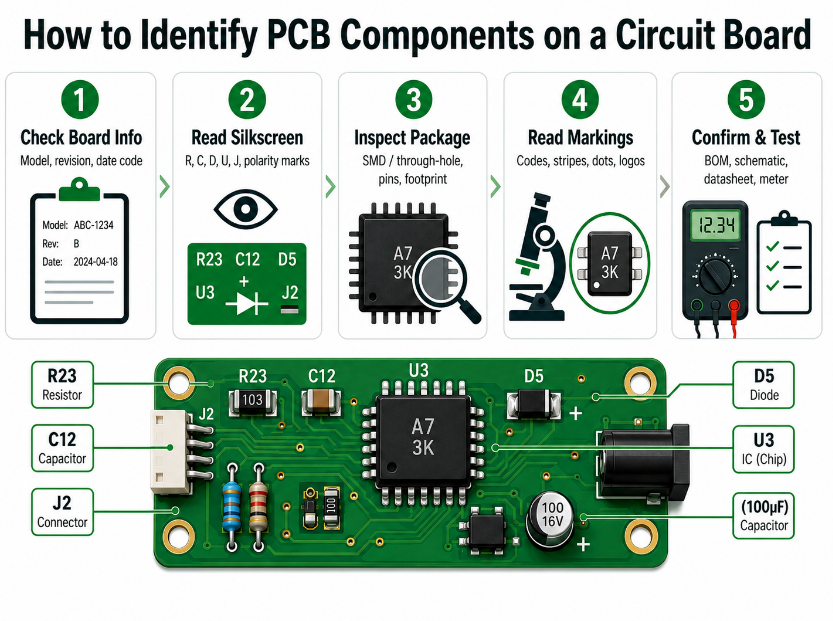
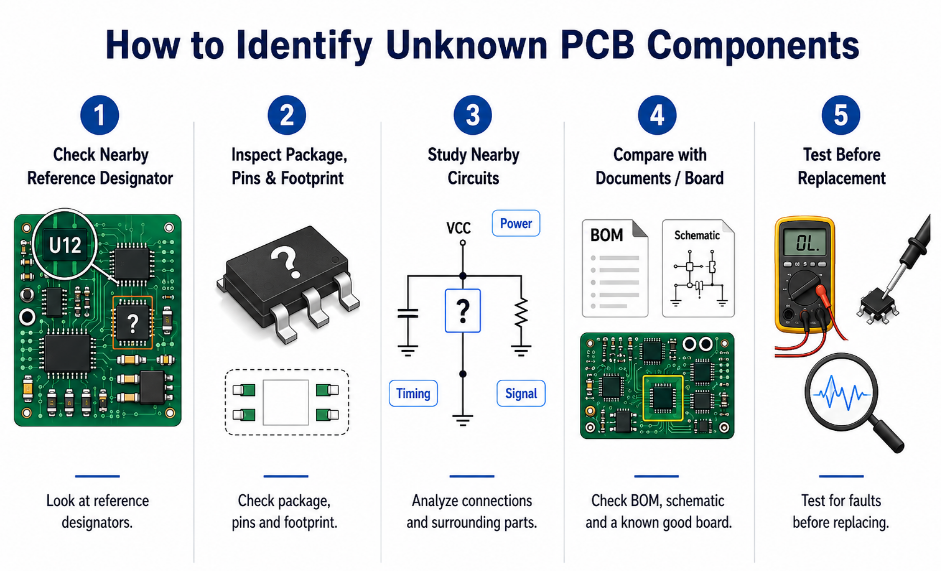
Use a consistent sequence that moves from the board’s identity to the component’s identity. This keeps observations tied to the correct assembly and prevents a familiar-looking package from becoming an unsupported part-number assumption.
- Record the board number and revision. Include the assembly variant and whether the component is on the top or bottom side.
- Find the reference designator. Record the complete label, such as R24, C18, or U3.
- Photograph the component. Capture the body marking, nearby silkscreen, orientation, and surrounding circuit.
- Measure the package. Note body length, width, terminal count, and accessible pin pitch.
- Transcribe the markings. Preserve line breaks, logos, dots, stripes, and uncertain characters.
- Match the available documents. Compare the observations with the schematic, BOM, assembly drawing, and manufacturer’s package information.
- Measure only what remains uncertain. Use suitable instruments after disconnecting power and safely addressing stored energy.
Keep observed facts separate from conclusions. “Two terminals, approximately 1.6 × 0.8 mm, no visible marking” is an observation. “A 100 nF, 16 V capacitor” is a conclusion that needs further evidence.
Also distinguish the installed part from the intended part. A BOM shows what the design specifies; inspection establishes whether the assembly matches it. A repaired or incorrectly populated board may contain a different component.
What Do PCB Reference Designators Tell You?
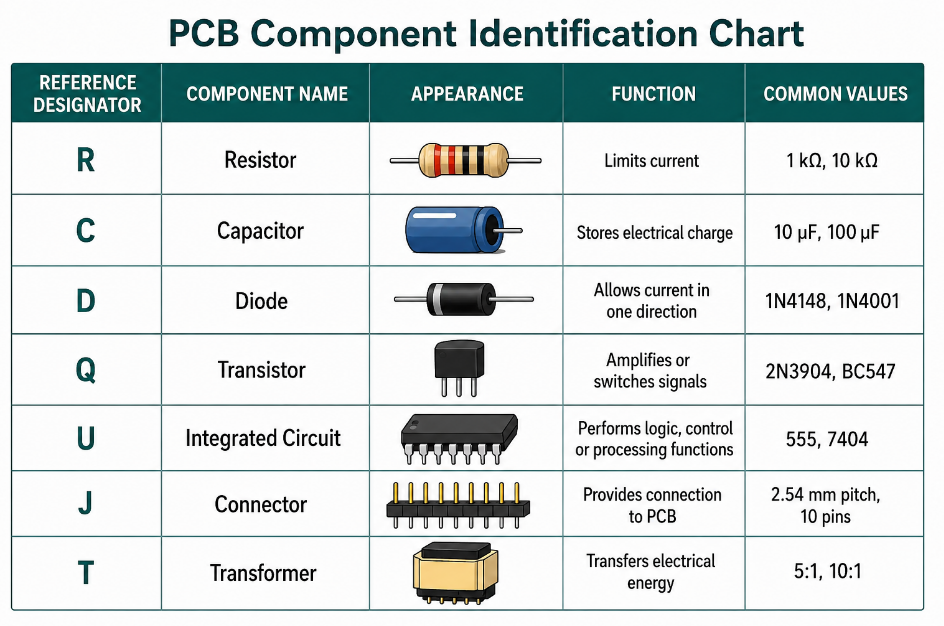
Reference designators connect physical locations to the schematic and BOM. The letters usually indicate a component category, while the number identifies a particular location.
For example, R24 generally identifies a resistor location. The number 24 does not describe its resistance, power rating, or package.
| Common designator | Likely component category | Useful physical clues |
|---|---|---|
| R | Resistor or resistor network | Two-terminal chip, axial body, or multi-terminal array |
| C | Capacitor | Ceramic chip, cylindrical can, molded body, or film package |
| L / FB | Inductor or ferrite bead | Two-terminal chip, visible winding, or molded magnetic body |
| D / LED | Diode, LED, TVS, or related device | Two or more terminals, band, lens, or package marking |
| Q | Transistor or MOSFET | Three-terminal package or larger power package |
| U / IC | Integrated circuit | Multiple terminals, top code, logo, or pin-1 feature |
| J / P / CN | Connector | Contact rows, latch, shell, or keyed housing |
| F | Fuse or protective device | Cartridge, chip, axial, or resettable device |
| K / RY / RL | Relay | Box-shaped body with several terminals |
| Y / X | Crystal, resonator, or oscillator | Metal can or ceramic package near timing circuitry |
| SW | Switch | Actuator, slider, button, or DIP body |
| TP | Test point | Exposed pad, loop, pin, or dedicated contact |
These conventions vary between design organizations. Use the project’s documentation to resolve unusual labels.
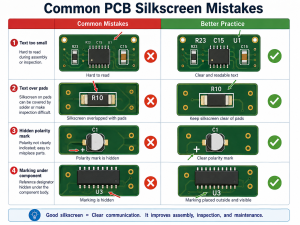
Silkscreen can also be displaced to improve readability or fit a dense layout. Check the component outline and pad connections when several designators sit close together.
Silkscreen and solder mask serve different purposes. Silkscreen carries printed reference designators, polarity symbols and assembly markings. Solder mask covers and protects copper while leaving openings at pads and other exposed features. Use the printed labels and schematic to identify parts; the solder-mask color does not identify a component or its value.
How Can Package Dimensions Help Identify SMD Components?
Package dimensions narrow the candidate list, particularly when small components carry no readable marking. Measure the component body rather than the solder fillet or copper land pattern.
State whether a size code is imperial or metric. Imperial 0603 describes a nominal 1.6 × 0.8 mm body; metric 0603 describes a nominal 0.6 × 0.3 mm body. Include both the naming system and the dimensions when ordering.
| Common imperial chip size | Common metric size code | Approximate nominal body length × width |
|---|---|---|
| 01005 | 0402 | 0.4 × 0.2 mm |
| 0201 | 0603 | 0.6 × 0.3 mm |
| 0402 | 1005 | 1.0 × 0.5 mm |
| 0603 | 1608 | 1.6 × 0.8 mm |
| 0805 | 2012 | 2.0 × 1.25 mm |
| 1206 | 3216 | 3.2 × 1.6 mm |
These are nominal dimensions for common rectangular passive packages. Actual tolerances, height, termination geometry, and specialized package dimensions come from the manufacturer’s drawing.
The metric code is a naming convention rather than a complete precision measurement. For instance, the commonly named 2012 body is approximately 2.0 × 1.25 mm.
Package size does not establish electrical rating. Two 0603 resistors can have different power ratings, and two equally sized capacitors can have different capacitance, voltage, and dielectric characteristics.
For ICs, record terminal count and pitch alongside body dimensions. An eight-pin package alone leaves many possibilities. SOIC, TSSOP, and leadless packages differ mechanically, and even devices in the same package can have entirely different functions.
For body styles, terminal arrangements and mounting differences, see our IC package types guide.
How Do You Read Resistor and Capacitor Markings?
First establish the component category and marking system. Identical digits can represent different values on different types of components.
For common three-digit resistor markings, the first two digits give the significant figures and the third gives the number of zeros. A four-digit resistor marking typically uses three significant figures followed by a multiplier.
Capacitor value codes commonly use picofarads as the base unit. Read these codes only when the manufacturer’s marking convention supports that interpretation.
| Component and marking system | Example marking | Calculation or interpretation | Result |
|---|---|---|---|
| Resistor, three-digit | 103 | 10 × 10³ Ω | 10 kΩ |
| Resistor, three-digit | 472 | 47 × 10² Ω | 4.7 kΩ |
| Resistor, four-digit | 1001 | 100 × 10¹ Ω | 1 kΩ |
| Resistor, four-digit | 1002 | 100 × 10² Ω | 10 kΩ |
| Resistor, decimal-letter notation | 4R7 | R occupies the decimal position | 4.7 Ω |
| Low-value resistor, decimal-letter notation | R010 | R occupies the decimal position | 0.010 Ω, or 10 mΩ |
| Capacitor, three-digit pF code | 103 | 10 × 10³ pF | 10 nF |
| Capacitor, three-digit pF code | 104 | 10 × 10⁴ pF | 100 nF, or 0.1 µF |
| Capacitor, three-digit pF code | 105 | 10 × 10⁵ pF | 1 µF |
| Capacitor, direct marking | 47 µF 25 V | Nominal capacitance and rated voltage | 47 µF, 25 V |
| Resistor, four-digit | 4701 | 470 × 10¹ Ω | 4.7 kΩ |
“103” can mean 10 kΩ on a resistor or 10 nF on a capacitor. The digits become useful only after the component type and code system are established.
Letter-number resistor codes, including EIA-96 formats, require the appropriate lookup system. Treat a short alphanumeric code as a separate marking convention rather than forcing it into a three-digit calculation.
Small MLCCs frequently have blank bodies. Their value and ratings must be established through documents, controlled measurements, or a confirmed matching assembly.
How Do You Identify Capacitors, Inductors, and Ferrite Beads?
Start with the reference designator and circuit connections, then use measurements to distinguish likely functions.
A two-terminal chip near an IC supply pin may be a decoupling capacitor. A similar chip in series with a power input may be a ferrite bead. Placement provides context, while the schematic or BOM provides stronger confirmation.
Capacitors
Record the nominal capacitance, rated voltage, tolerance, dielectric or technology, and package. For electrolytic types, also review ESR, ripple-current rating, temperature rating, and lifetime conditions.
A 10 µF capacitor measured at low test voltage is not automatically equivalent to another 10 µF component. Effective capacitance in operation can depend on applied voltage and temperature, especially for certain ceramic dielectrics.
Inductors
Confirm inductance, tolerance, DC resistance, saturation current, and thermal current rating. A part marked “4R7” may indicate 4.7 µH in a particular inductor series, but the same characters can describe a resistor value elsewhere.
The measurement frequency matters. Record it when comparing an LCR reading with a data sheet.
Ferrite beads
Ferrite beads are commonly specified by impedance at a stated frequency, together with DC resistance and current capability. A description such as “600 Ω at 100 MHz” refers to frequency-dependent impedance, not a 600 Ω DC resistance.
An intact bead can therefore show low resistance on a multimeter. Use its impedance curve and DC-bias information when evaluating an exact replacement.
Our MLCC capacitor guide explains ceramic capacitor types and package selection in more detail.
How Do You Identify Diodes, Transistors, and ICs?
Combine the manufacturer logo, complete top marking, package, pin count, and circuit connections. Each clue should agree with the candidate device.
Diodes and protection devices
A two-terminal semiconductor may be a rectifier, Schottky diode, Zener diode, TVS device, or LED. Their packages can look similar.
Confirm the intended function and relevant ratings. A rectifier replacement may require reverse-voltage and current checks; a TVS selection also depends on working standoff voltage, breakdown behavior, and clamping performance.
Transistors and MOSFETs
A three-terminal SOT-23 body can contain several different device types. Package shape alone leaves the terminal functions unresolved.
For a MOSFET, check channel type, gate-source limits, drain-source voltage, and on-resistance at the specified gate-drive voltage. An on-resistance measured at 10 V gate drive does not establish performance in a circuit that provides 3.3 V.
Integrated circuits
Match the complete top marking and logo to the device manufacturer’s marking information. Short codes are not globally unique; confirm the package option and pinout before selecting a part.
Separate the device identifier from date and lot information. A package may carry several lines, only one of which identifies the product.
After finding a candidate, compare its pinout with the board. Supply, ground, inputs, outputs, and nearby components should support the proposed identity. Treat a mismatch as a reason to investigate further.
For microcontrollers, also match the memory capacity, operating-voltage range, temperature grade and programming requirements. An electrically compatible blank device may not operate without the correct firmware, configuration and security settings.
How Do You Identify Connectors, Fuses, Relays and Switches?
- Connectors: check contact count, center-to-center pitch, row spacing, latch direction, mounting angle, height and the exact mating series. A matching pitch does not guarantee compatible contacts or housing.
- Fuses: a 2 A marking identifies nominal current, not the complete specification. Where the applicable marking convention uses F for fast-acting, F2A denotes a fast-acting 2 A fuse. Also match voltage, breaking capacity and time-current behavior. A resettable protector is not automatically a substitute.
- Relays: 5 V and 12 V coil versions require different drive conditions. Check coil voltage, AC/DC coil type, contact arrangement, load rating and any internal suppression diode before replacement.
- Switches: identify momentary versus maintained action, contact arrangement, actuator height and mounting footprint. Check continuity with power disconnected.
How Do You Confirm Polarity and Pin Orientation?
Use the component’s package drawing together with the assembly drawing and schematic. Dots, bands, chamfers, and PCB symbols are useful when their meaning has been confirmed.
Different component technologies can use similar marks differently.
A conventional aluminum electrolytic capacitor usually marks the negative terminal with a stripe. Many molded tantalum capacitors mark the positive terminal instead. Never transfer the stripe convention from one component technology to another.
For tantalum capacitors, LEDs, and other polarized devices, consult the specific series drawing before interpreting a bar, corner, or colored feature.
Check orientation through three sources:
- Component marking: Identify the relevant pin-1 or polarity feature.
- Package drawing: Confirm the viewing direction and terminal numbering.
- Board documentation: Match those terminals to the intended footprint and nets.
A square PCB pad can be a useful assembly cue, but its meaning depends on the footprint design. It may identify pin 1 rather than a particular electrical polarity.
For ICs, distinguish top-view and bottom-view drawings. For connectors, confirm whether the drawing shows the mating face, cable side, or PCB mounting side.
Photograph the installed orientation before removal. The photograph preserves evidence, while the documentation establishes whether the original installation was correct.
What Can a Multimeter or LCR Meter Confirm?
Measurements help check component values and circuit behavior. Their interpretation depends on instrument settings, surrounding connections, and the condition of the assembly.
Disconnect all power sources, including batteries, and safely discharge stored energy before resistance, continuity, diode, or capacitance measurements. Verify that voltage is absent using a suitably rated instrument. Parallel circuit paths can alter readings; do not use a resistance range on a live circuit.
| Measurement | Useful information | Parameters or conditions to record | Main limitation |
|---|---|---|---|
| Resistance | Checks a likely resistor value or conductive path | Range, lead resistance, temperature, and whether measured in circuit | Parallel paths can reduce the apparent resistance |
| Continuity | Finds conductive connections or checks an open path | Meter threshold and probe locations | A beep does not establish a zero-ohm connection or a fault |
| Diode mode | Checks junction conduction in both directions | Forward reading, reverse reading, and meter test conditions where available | Surrounding semiconductors can affect the reading |
| Capacitance | Checks nominal capacitance under the test conditions | Test method, frequency where available, and circuit isolation | Does not independently establish voltage rating or dielectric |
| Inductance | Helps identify an inductor value | Frequency, test level, series/parallel model, and DC resistance | Does not establish saturation-current capability |
| ESR or impedance | Compares frequency-dependent passive behavior | Frequency, temperature, instrument mode, and bias where relevant | Results require comparable data-sheet conditions |
| Low resistance | Evaluates shunts or low-resistance paths | Lead compensation or four-wire method, test current, and contact position | Probe and contact resistance may dominate a two-wire reading |
Two 10 kΩ resistors connected in parallel produce an ideal equivalent resistance of 5 kΩ: R = (10 × 10) / (10 + 10) kΩ. A 5 kΩ in-circuit reading across one resistor therefore does not prove that its individual value is 5 kΩ.
Similarly, a low resistance across a processor supply rail can be normal for that design. Compare against the schematic, expected behavior, or a confirmed reference board before diagnosing a short.
Where circuit interaction prevents a reliable reading, component isolation may be necessary. Plan that work around the risk of removal and the value of the assembly.
How Do Test Points Help Identify Circuit Connections?
Test points provide access to named nets without probing tiny component leads. Match each TP label to the schematic before interpreting a measurement.
- Power and ground: locate the rail and return path. Check continuity only with power disconnected; measure operating voltage only under an appropriate powered-test procedure.
- Reset, clocks and communication: use designated access points to inspect signals with suitable probes. Signal loading and the instrument ground connection can affect the circuit.
- Programming: identify the programming interface, voltage level and pinout before connecting a programmer.
- Production tests: ICT fixtures use accessible nets for the checks supported by the test program, such as shorts, opens and selected component measurements. Functional tests use defined connections to check operating behavior.
A test point identifies an accessible net, not necessarily the value or exact part number of every component connected to it. For fault isolation, compare readings with the schematic, test specification or a known-good board of the same revision.
How Should You Identify an Unknown or Unmarked Component?
Build a small candidate list and test each candidate against independent evidence. This is more efficient than searching a partial code without package or circuit context.
Record the following:
- Exact board revision and component location.
- Body dimensions and terminal arrangement.
- Every readable character and manufacturer logo.
- Connected nets and nearby components.
- Results of relevant unpowered measurements.
- Candidate parts and the evidence supporting or rejecting them.
Illustrative example: an unmarked chip at C18
Suppose C18 is approximately 1.0 × 0.5 mm and connects between an IC supply net and ground. Those observations support a likely 0402-size decoupling capacitor.
An isolated measurement near 100 nF strengthens the value hypothesis. It still leaves voltage rating, dielectric, tolerance, and exact manufacturer part number unresolved.
If the revision-matched BOM specifies a 100 nF, ±10%, 16 V, X7R capacitor, the next step is to verify its ordering code and approved sourcing information. A known-good assembly can provide a useful comparison, especially when the examined board has repair history.
For a burned or missing part, surrounding circuitry can help identify its role. The replacement decision should remain pending until enough electrical and mechanical information is available.
If a component is burned, check the surrounding power path and load before fitting a replacement. Damage may result from reverse polarity, overload or another failed device rather than from the burned component itself.
Which Specifications Must Match Before Replacing a Component?
Confirm the function first, then check the ratings that affect the circuit. A matching footprint and nominal value are necessary in many cases, but they cover only part of the replacement decision.
For resistors, compare resistance, tolerance, power rating, working voltage, temperature coefficient, pulse capability, and construction. Current-sense applications may also require Kelvin connections and tightly controlled resistance.
For capacitors, compare capacitance, voltage, tolerance, dielectric or technology, ESR, ripple capability, dimensions, and relevant temperature behavior. In timing and filtering circuits, changes that appear minor can alter circuit performance.
For semiconductors, compare pinout and functional behavior as well as headline ratings. Regulators need checks such as output setting, stability requirements, enable logic, and dropout behavior. MOSFETs need drive-condition and thermal checks.
For connectors and protection devices, check the full interface or operating characteristic. Connector pitch alone leaves mating compatibility unresolved. Fuse current alone leaves voltage rating, breaking capacity, and opening behavior unresolved.
A higher-rated replacement can still differ in important ways. Review the complete application instead of treating “higher voltage” or “higher current” as automatic approval.
Document the approved substitute and the reason for approval so future builds use the same decision.
What Purchasing Details Should Match the Approved Part?
After confirming electrical and mechanical compatibility, check whether the part can be sourced consistently for the planned build:
- Exact ordering code: include package, temperature grade, packing option and other suffixes that affect the supplied part.
- Lifecycle status: check whether the part is active, not recommended for new designs or discontinued, and identify any relevant change or discontinuation notices.
- Approved alternatives: record the accepted manufacturer and part number against the correct BOM revision. Do not substitute a similar-looking device without design approval.
- Quantity and delivery: confirm MOQ, reel or tray quantity, available stock and quoted lead time against the build schedule.
- Traceability: retain supplier identity, purchase records, reel or tray labels, and lot or date codes where provided. Link received materials to the assembly batch.
Traceable purchasing records support authenticity checks but do not prove authenticity by themselves. Resolve questionable markings or documentation before releasing the material to production.
FAQs About PCB Components Identification
Q1: Can a smartphone camera replace a microscope?
A1: A smartphone can document larger markings, while small top codes and fine package features generally benefit from stable magnification and controlled lighting.
Q2: Does a scratched or faint marking prove that a component is counterfeit?
A2: Marking condition alone is insufficient because authenticity assessment also requires sourcing records, traceability, and appropriate inspection or testing.
Q3: Can two boards with the same PCB number contain different components?
A3: Yes, assembly variants and revisions can populate the same bare-board design differently.
Q4: Does an empty footprint mean a component is missing?
A4: Check the assembly variant and BOM. DNP means do not populate and DNI means do not install. NC often means no connect; on relay contact drawings it can mean normally closed. Do not interpret NC alone as an instruction to leave a component unpopulated.
Q5: Can the date code identify the exact manufacturer part number?
A5: A date code usually provides production timing information and needs to be interpreted separately from the device identifier.
Q6: Can cleaning make an unreadable marking easier to identify?
A6: Compatible cleaning may remove obscuring residue if it preserves the markings and surrounding materials. Conformal coating can also hide markings; some coatings fluoresce under UV inspection, but not all do. Use the coating’s approved removal process rather than scraping component bodies or pads.
Q7: Is a component identification app enough to approve a replacement?
A7: An app can suggest candidates, while replacement approval requires confirmation of the electrical specifications, package, pinout, and application requirements.
How Can Identification Results Support PCB Assembly?
Turn the findings into a component record linked to the released design. This makes the work useful for sourcing, first-article inspection, and repeat production.
For each unresolved or changed item, record the designator, specified MPN, observed marking, package, orientation, supporting document, and required action. Use clear statuses such as confirmed, candidate awaiting approval, or unresolved.
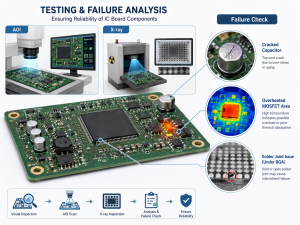
Inspection tools contribute different evidence. AOI can check visible characteristics against a qualified inspection program. X-ray can examine hidden connections and selected internal features. Electrical testing can verify defined circuit behavior. Each supports the review, while exact identity and approved sourcing still require appropriate documentation.
Before assembly, resolve discrepancies between the BOM, placement file, footprint, and assembly drawing. Examples include a five-pin regulator listed against a six-pad footprint, a capacitor package that differs between documents, or a connector whose contact orientation conflicts with the mechanical drawing.
How Do You Prevent Wrong Component Loading During SMT Assembly?
Link each material container and feeder position to the released BOM and placement program before starting the batch.
- Verify reel and tray labels. Match the manufacturer part number, value, tolerance, package and internal material code to the approved BOM. Check lot identification and any handling requirements.
- Confirm feeder setup. Match the loaded material to the assigned feeder slot and placement program. Check tape orientation and component polarity rather than relying on the reel label alone.
- Use barcode checks where implemented. Compare scanned material IDs with the feeder assignment. Barcode control depends on correct material records and does not replace part verification.
- Inspect the first article. Check populated and DNP locations, visible markings, package fit, polarity and orientation against the assembly drawing before releasing the batch.
- Recheck material changes. Verify replacement reels, feeder changes and approved substitutions, and retain records linking material lots to the boards produced.
AOI can detect visible loading or placement discrepancies within its programmed inspection coverage. Electrical and functional tests provide additional checks, but neither guarantees detection of every wrong component. Resolve BOM and loading discrepancies before relying on downstream testing.
Send your BOM, Gerber files, pick-and-place file, assembly drawings, quantities, test requirements and clear photographs of unresolved parts to sales@bestpcbs.com. We can review the available information and clarify component and assembly questions before quotation, sourcing and production.