How to clean battery corrosion safely depends on the battery chemistry and where the residue has spread. White crust from an alkaline AA cell, blue-green buildup on a lead-acid car terminal and leakage from a damaged lithium-ion pack are not the same problem. This guide explains how to identify the likely source, choose the correct cleaning method, protect electronic contacts and decide when a battery holder, cable or PCB needs repair instead of more cleaning.
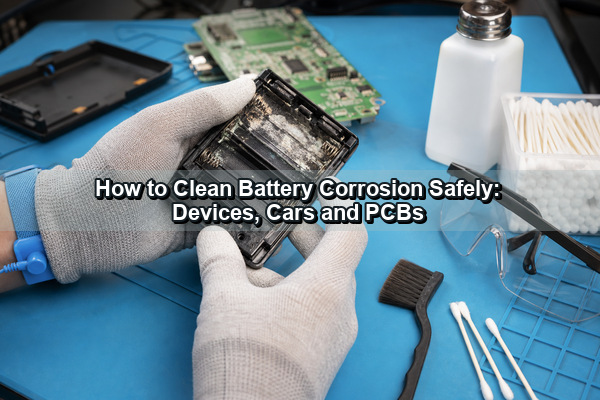
What Is Battery Corrosion?
Battery corrosion is the conductive-contact damage and residue produced when electrolyte, vapor or reaction products reach terminals, springs, cable lugs or circuit-board conductors. It can increase contact resistance, interrupt power and continue attacking copper or plated steel after the loose powder has been removed.
Color is a useful clue, but it is not a complete diagnosis. Leaking alkaline cells often leave white crystals; lead-acid terminals can develop white, blue or green deposits; copper exposed to moisture and electrolyte may turn green or dark. Identify the battery type and inspect the battery case before choosing a neutralizer.
Is Battery Corrosion Dangerous?
Yes. Leaked electrolyte can injure skin and eyes, while damaged batteries can create electrical, fire or gas hazards. Wear chemical-resistant gloves and eye protection, ventilate the work area and keep ignition sources away. Do not touch residue with bare hands or use compressed air that can spread powder into the air.
- If alkaline electrolyte contacts skin, rinse with plenty of clean water. For eye exposure, rinse immediately and obtain medical advice; the current Panasonic alkaline-battery safety data specifies at least 15 minutes of eye rinsing.
- Do not clean a cracked, bulging or actively leaking lead-acid battery. Replace it or have it serviced by a qualified technician.
- Stop if a lithium-ion battery is swollen, hot, hissing, smoking, unusually odorous or leaking. Move away from the hazard and follow the manufacturer and local recycling guidance. The US EPA lithium-ion battery guidance treats swelling as damage and a potential fire risk.
- Do not work on EV traction batteries, high-voltage storage packs or unfamiliar industrial battery systems unless you are trained and authorized.
Which Battery Chemistry Caused the Corrosion?
The cleaning agent should oppose the leaked chemistry without flooding the device. First read the battery label and determine whether the contamination is inside a small device, on a 12 V lead-acid terminal or associated with a rechargeable lithium pack.
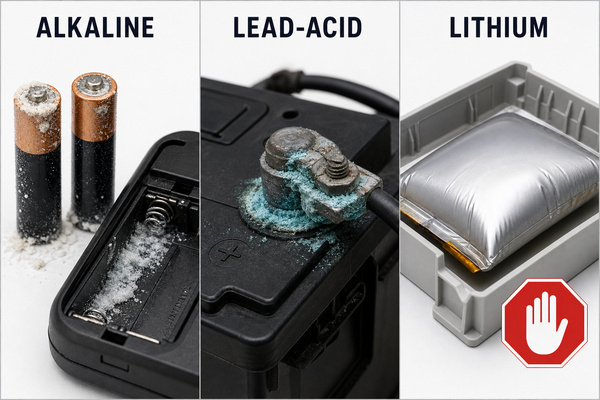
| Battery situation | Likely chemistry | Appropriate response | Do not do this |
|---|---|---|---|
| AA, AAA, C, D or 9 V alkaline cell leaked in a device | Strongly alkaline electrolyte, commonly potassium hydroxide; aged white residue may include potassium carbonate | Remove the cell, lift dry debris carefully, then use a small amount of diluted white vinegar or lemon juice on affected contacts | Do not pour liquid into the compartment or assume the residue is battery acid |
| 12 V car or conventional lead-acid battery terminal | Acidic contamination and corrosion products around posts or cable clamps | With the battery intact and safely disconnected, use baking soda and water or a commercial terminal cleaner | Do not let neutralizer enter vent openings or cells |
| Swollen, hot, punctured or leaking lithium-ion cell or pack | Damaged flammable electrolyte system | Stop use, isolate the area and follow manufacturer or local hazardous-battery procedures | Do not puncture, squeeze, charge, neutralize or continue using it |
What Tools and Safety Gear Do You Need?
Prepare the tools before removing the battery so contaminated gloves do not spread residue around the workspace. Small electronics require precise, low-liquid tools; car terminals require insulated hand tools and a dedicated terminal brush.
- Nitrile or other chemical-resistant gloves, safety glasses and disposable towels
- Cotton swabs, a soft nylon brush and wooden or plastic picks for electronic compartments
- Diluted white vinegar or lemon juice for alkaline-cell residue
- High-purity isopropyl alcohol for the final electronics cleaning step, after neutralized residue has been removed
- Baking soda, clean water and a battery-terminal brush for lead-acid terminals
- A multimeter, magnifier and adequate drying time before power is restored
Avoid steel wool inside electronics because fragments can create shorts. Do not use an aggressive wire brush on thin battery contacts, plated PCB pads or component leads.
How to Clean Battery Corrosion in Small Electronics?
For toys, controllers, cameras, flashlights and similar devices, use the smallest practical amount of liquid and keep it away from switches, displays, speakers and unsealed assemblies. The objective is to neutralize alkaline residue locally, remove the reaction products and leave the compartment completely dry.
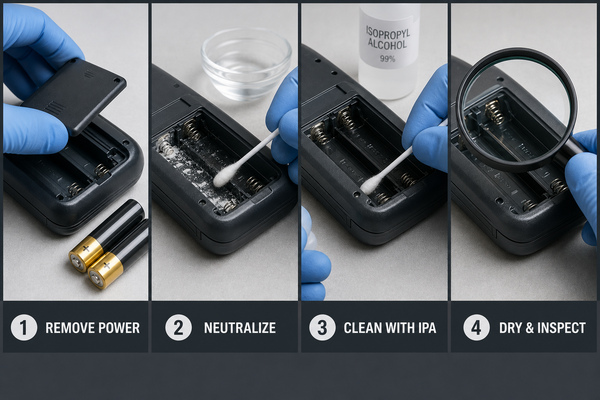
- Switch off the device, disconnect external power and remove every battery. Photograph battery orientation and wiring before disassembly.
- Place the device over a disposable work surface. Use a dry swab or plastic tool to lift loose crystals without scattering them.
- Lightly moisten a cotton swab with a 1:1 mixture of white vinegar and water. Apply it only to the affected metal and residue. Replace the swab as it becomes dirty.
- Use a soft nylon brush for stubborn deposits. Support thin springs and tabs so they are not bent or torn from the holder.
- Remove loosened material with a clean swab. Follow with a small amount of high-purity isopropyl alcohol to remove remaining contamination and help displace moisture.
- Allow the compartment to dry fully. Inspect for missing plating, cracked springs, dark copper, broken wires or residue that has traveled below the holder.
- Install fresh batteries only after the device is dry and the contacts are mechanically sound. Do not mix battery brands, ages or chemistries.
If the leaked battery is stuck, do not pry against a fragile PCB or use a metal tool that can bridge the terminals. Severe swelling, heat or an unknown rechargeable cell changes the risk; stop and use the manufacturer’s service path.
How to Clean Car Battery Corrosion?
Car battery terminal corrosion requires a lead-acid procedure, not the vinegar method used for alkaline cells in electronics. Work with the ignition off, keys removed, parking brake applied and the area ventilated. If the case is cracked, wet, swollen or leaking, replace the battery instead of cleaning it.
- Wear gloves and eye protection. Confirm the positive and negative terminals before loosening anything.
- Disconnect the negative cable first, then the positive cable. Prevent each cable from springing back onto its post.
- Apply a baking-soda-and-water paste or a purpose-made lead-acid terminal cleaner to the external corrosion. Keep the solution away from battery vents.
- After the reaction subsides, clean the post and the inside of the clamp with a battery-terminal brush. Capture residue rather than washing it onto painted metal or the ground.
- Wipe with a lightly dampened cloth and dry the battery top, posts and clamps completely.
- Reconnect the positive cable first and the negative cable last, following the vehicle maker’s torque and memory-reset instructions.
- Apply a terminal protectant only after the metal-to-metal connection is clean and secure.
Corrosion visible beyond the clamp can travel into copper strands under insulation. A swollen cable, stiff green conductor or recurring voltage drop may require replacement rather than surface cleaning. In equipment where the damaged lead is part of a larger assembly, the conductor gauge, terminal plating, sealing and strain relief should be reviewed before ordering a replacement custom wire harness.
How Should Battery Corrosion Be Removed from a PCB?
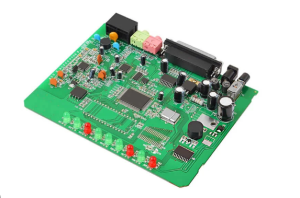
Once residue reaches a PCB, cleaning must be followed by electrical and structural inspection. A board can look clean while a via barrel, component lead or copper trace remains open underneath the solder mask. Disconnect all power, remove the battery holder if access is blocked and document every connector before taking the assembly apart.
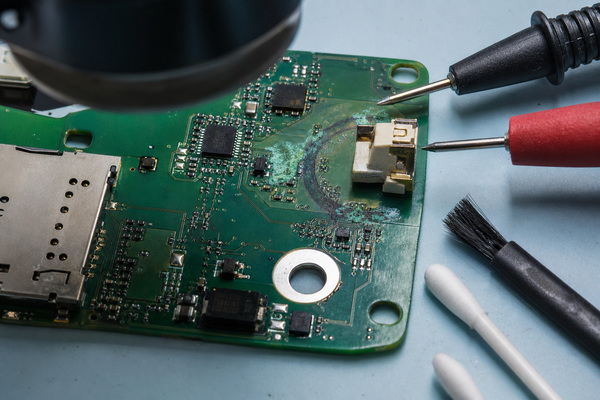
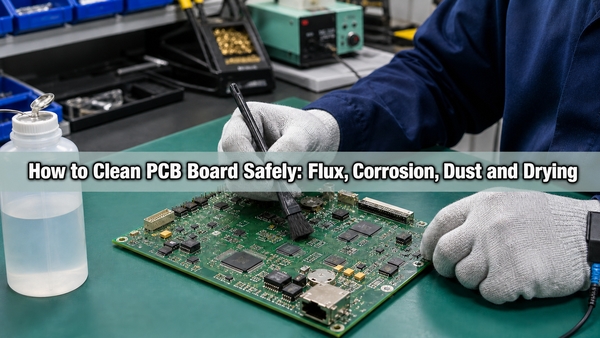
For confirmed alkaline residue, use a controlled amount of diluted white vinegar on the contaminated area. Remove the reacted residue, then clean with high-purity isopropyl alcohol and a soft ESD-safe brush. Do not soak relays, microphones, displays, unsealed trimmers or parts whose cleaning compatibility is unknown. Dry the assembly thoroughly before continuity or insulation checks.
Inspect exposed copper, solder joints, pads, vias and connector pins under magnification. Compare suspect traces with the schematic, measure continuity and check for unintended resistance between adjacent conductors. The related guide on how to clean a PCB board covers general flux, dust and drying methods; battery leakage adds the separate requirement to identify and neutralize the electrolyte first.
Compact cameras, controllers and portable instruments may connect the battery compartment through a flex tail. Inspect both ends of that tail and every bend; darkened conductors, delamination or corrosion at the rigid-to-flex transition normally requires replacement. A reproduced rigid-flex PCB must preserve the original bend radius, copper construction, stiffener locations and connector geometry.
If a replacement board is required, preserve the original stackup, copper weight, finish and mechanical interfaces. EBest Circuit (Best Technology) supports FR4 PCB fabrication and PCB assembly with 3D SPI, AOI, X-ray and functional testing. Published maximum capabilities remain subject to material selection, stackup, board dimensions, design complexity, quantity and engineering review.
Can a Corroded Device Still Be Repaired?
Often yes, if the contamination is confined to replaceable contacts and conductive material remains after cleaning. Repair becomes less predictable when corrosion has removed plating, entered stranded wire, lifted pads or traveled through vias and under components.
| Condition after cleaning | Practical action |
|---|---|
| Contact is clean, spring force is normal and continuity is stable | Dry fully, install fresh batteries and function-test the device |
| Spring or tab is thin, cracked, loose or missing plating | Replace the battery contact or complete holder |
| Cable copper is green or black beneath insulation | Replace the affected cable or harness; surface cleaning will not restore conductor cross-section |
| PCB trace is open but surrounding laminate is sound | Qualified repair may bridge the trace and restore protection after inspection |
| Multiple vias, fine-pitch pads or inner layers are affected | Replace or reproduce the PCB; hidden damage can make a local repair unreliable |
| Lithium cell is swollen, hot or leaking | Do not repair or reuse the cell; follow approved disposal and service guidance |
Why Does Battery Corrosion Keep Coming Back?
Recurring corrosion usually means either residue was left in a hidden area or the underlying battery system still has a fault. In small devices, check beneath the holder, inside connector housings and along copper traces. In vehicles, inspect post seals, charging voltage, cable condition and contamination around vents.
Repeated cleaning is not a substitute for replacing a leaking cell, damaged battery, corroded holder or compromised cable. A rapid return of buildup, heat, odor, case deformation or unstable voltage requires diagnosis before the equipment is used again.
How Can Battery Corrosion Be Prevented?
Prevention focuses on storage, battery matching, mechanical integrity and early inspection. It is more effective than applying a coating over contamination.
- Remove batteries from equipment that will not be used for several months.
- Replace all cells in a series at the same time with the same brand, type and age.
- Observe polarity and do not recharge a cell unless it is specifically marked rechargeable.
- Store batteries and devices at room temperature in a dry location, away from direct heat.
- Inspect battery compartments before long storage and after a device shows intermittent power.
- Keep holders, gaskets and vent paths mechanically intact; trapped moisture accelerates contact damage.
- For lead-acid terminals, keep clamps clean and secure and use an approved protectant after assembly.
FAQ About Battery Corrosion
1. Is vinegar or alcohol better for battery corrosion?
They serve different purposes. Diluted white vinegar can neutralize alkaline residue from common AA or AAA cells. High-purity isopropyl alcohol is useful after neutralization to remove remaining contamination and help displace moisture, but it does not neutralize the alkaline deposit by itself.
2. Can I use rubbing alcohol to clean battery corrosion?
Use high-purity isopropyl alcohol as a controlled final cleaning step on compatible electronic parts. Lower-concentration rubbing alcohol contains more water and additives, so it dries more slowly and may leave residue. It is not the correct neutralizer for every battery chemistry.
3. Is WD-40 good for battery corrosion?
Standard WD-40 is not a substitute for identifying and neutralizing leaked electrolyte, and its oily residue is undesirable on many PCB assemblies and battery contacts. Use a chemistry-appropriate neutralizer and an electronics-compatible, residue-controlled cleaner.
4. Can baking soda clean corrosion in an electronic battery compartment?
Not when the residue came from a typical alkaline cell. Baking soda is also alkaline and is normally used to neutralize acidic contamination around lead-acid terminals. For confirmed alkaline-cell leakage, a small amount of diluted white vinegar or lemon juice is the appropriate counteragent.
5. Can a device be powered on immediately after cleaning?
No. Remove all visible residue, allow the assembly to dry completely and inspect for damaged contacts or PCB conductors first. Powering a damp or contaminated board can create shorts, leakage current and further corrosion.
Conclusion
For a safe answer to how to clean battery corrosion, identify the battery chemistry before selecting a cleaner. Use a small amount of mild acid for alkaline-cell residue, baking soda for external lead-acid terminal contamination, and no routine DIY cleaning for a damaged lithium-ion cell. After residue is removed, inspect contacts, cables and PCB conductors instead of assuming a clean surface means the circuit is sound.
For a corroded assembly that needs PCB reproduction, component assembly or failure-oriented inspection, contact EBest Circuit (Best Technology) at sales@bestpcbs.com.