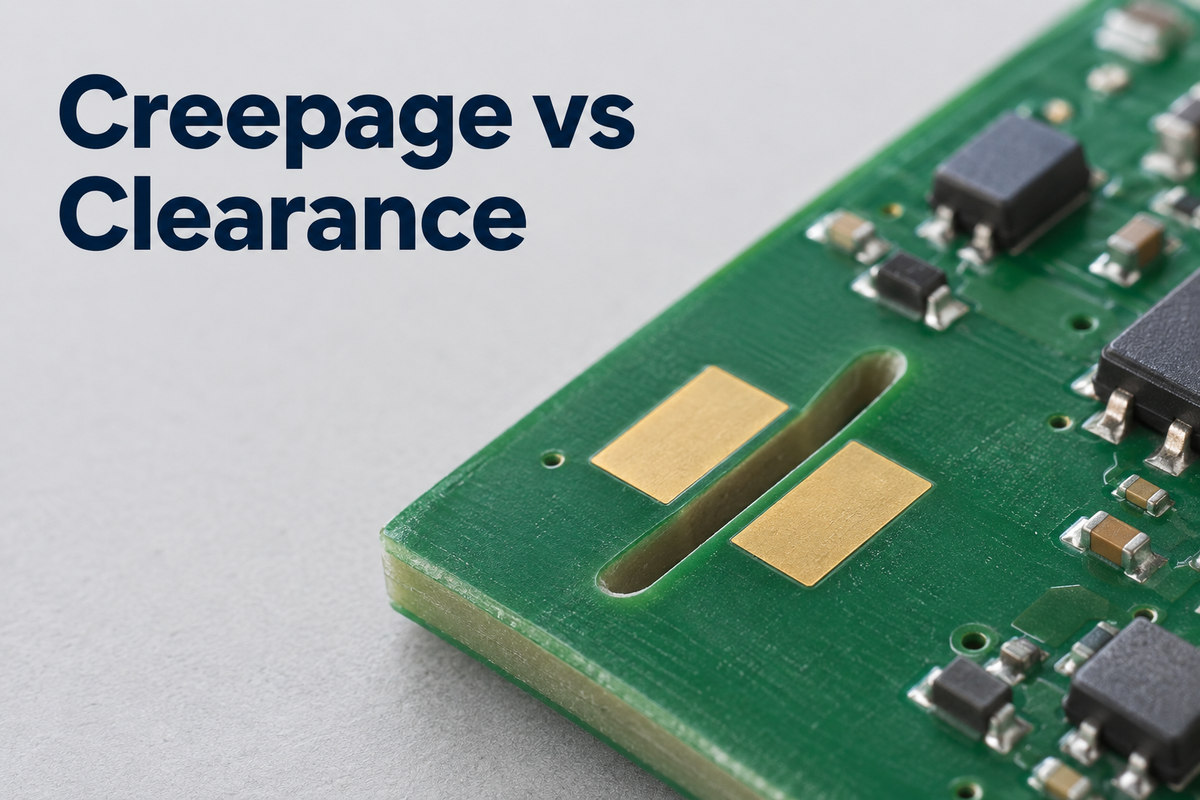
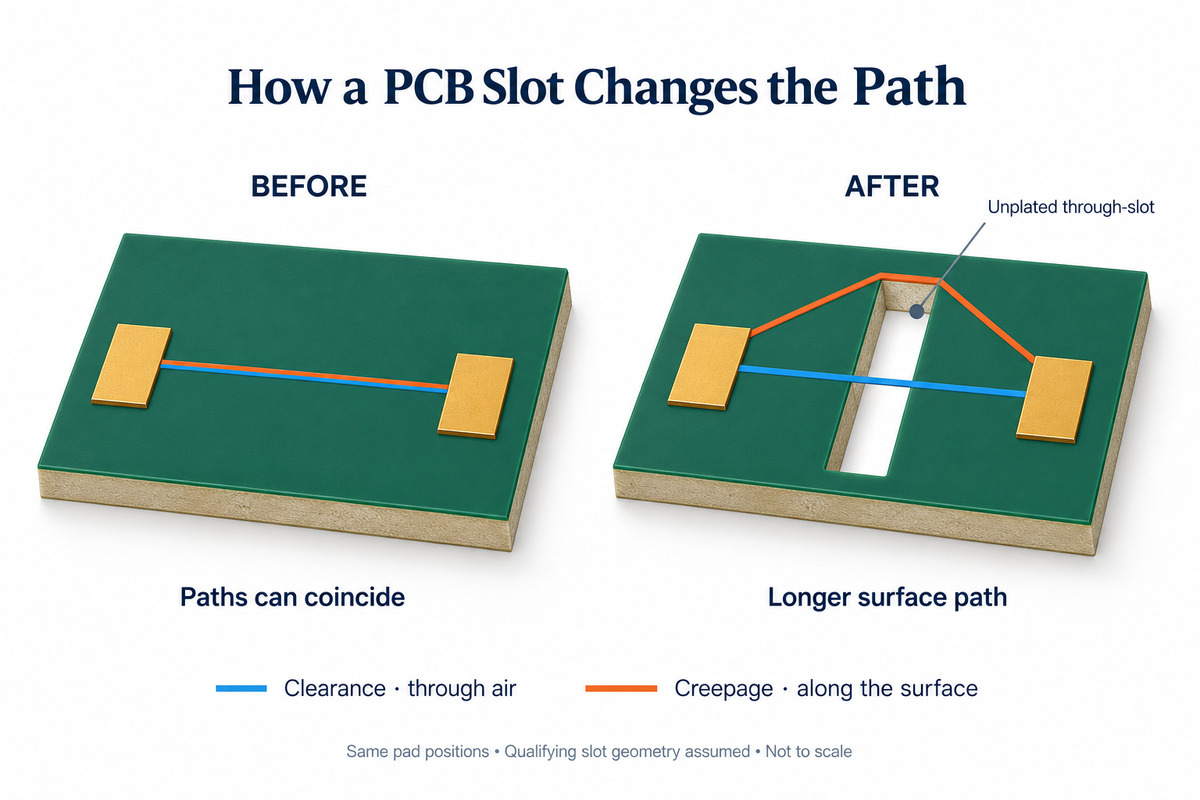
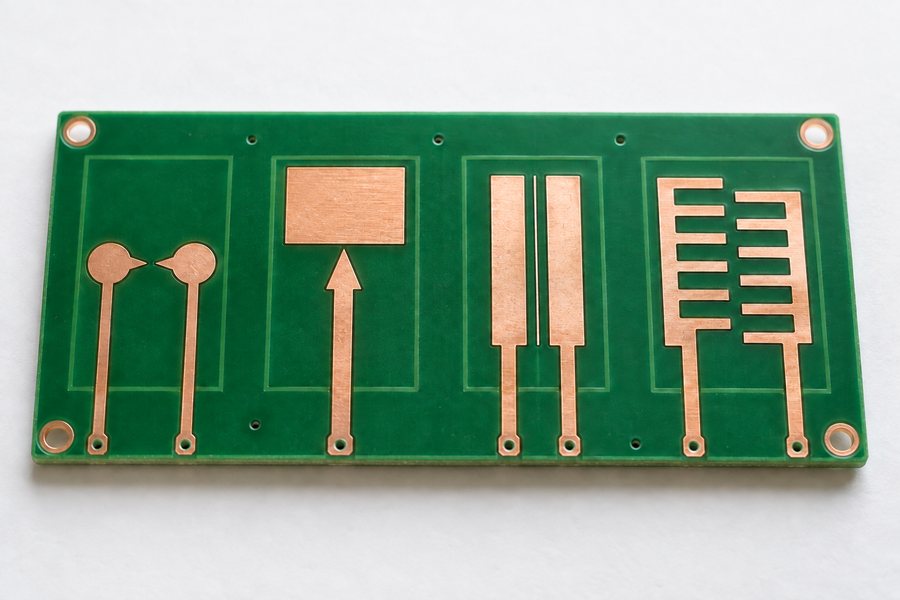
Creepage vs clearance describes two different distances between conductive parts on a PCB: the shortest route along an insulating surface and the shortest route through air. The difference becomes clear when you cut a slot between two pads. The surface route may become longer, while the direct air gap stays the same.
Those distances must also survive manufacturing and assembly. EBest Circuit provides PCB fabrication, assembly, and DFM support for features such as specified laminates, isolation slots, and component spacing. Discuss your PCB or PCBA requirements with our team at sales@bestpcbs.com.
Creepage vs Clearance: What Is the Difference?
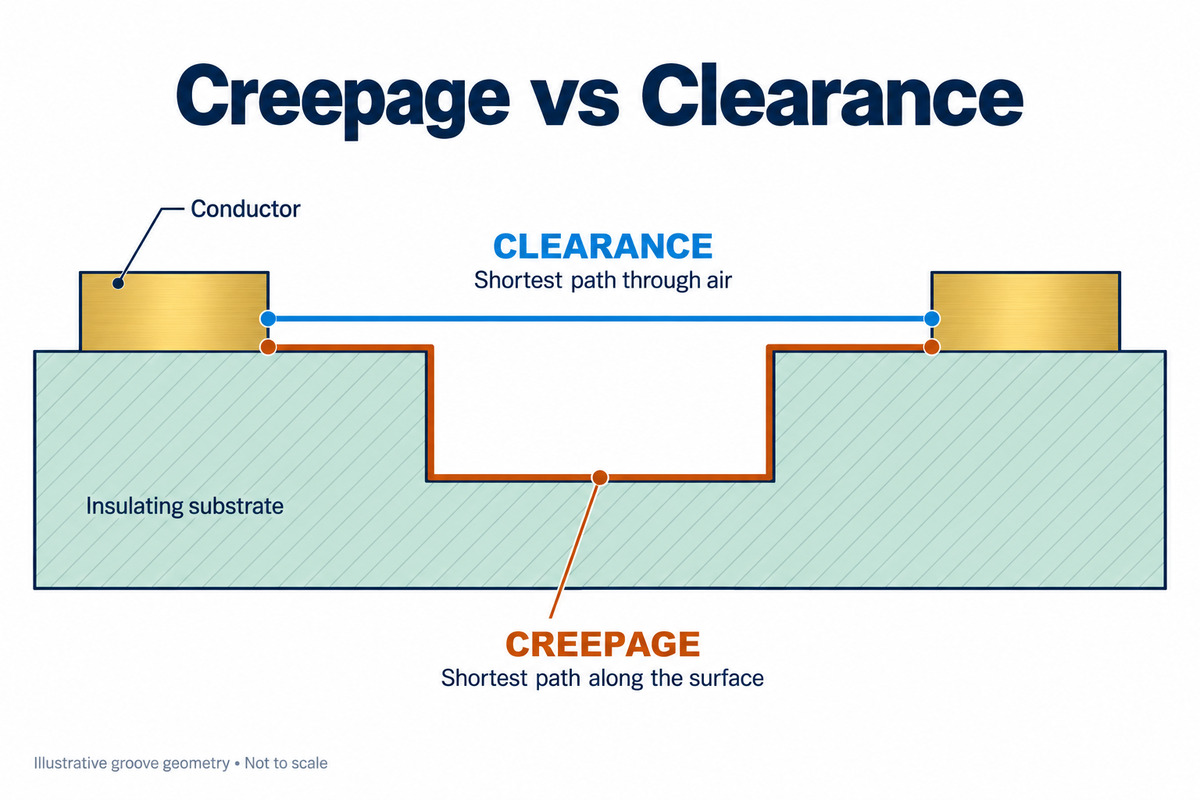
Creepage follows an insulating surface. Clearance passes through air. They describe different paths and address different electrical failure mechanisms.
Comparison
Creepage
Clearance
Where it is measured
Along an insulating surface
Through air
Typical failure concern
Surface tracking
Air breakdown and arcing
What a through-slot may change
Lengthens the surface route
May leave the direct air gap unchanged
On a simple, flat PCB:
Surface route: Follow the insulating board surface from one exposed pad edge to the other.
Air route: Find the shortest path through air between the same conductive parts.
Possible result: The distances can be equal when no feature changes either route.
The risks are different. Electrical stress, moisture, and contamination can damage an insulating surface and create a conductive track. An air gap can instead break down when it cannot withstand the applied electrical stress.
The material between internal copper layers is solid insulation. Its thickness is a separate consideration, rather than an air gap or a surface creepage path.
How Are Creepage and Clearance Measured on a PCB?
Measure from conductive edges, not pad or pin centers. Then identify the shortest qualifying path for each distance.
Three measurement rules:
Use the actual conductive boundary. On a bare board, this may be a pad edge. After assembly, a lead or solder joint may be closer to the neighboring conductor.
Follow the correct route. Clearance passes through air; creepage follows the insulating surface under the applicable measurement rules.
Compare alternative paths. A nearby slot end, board edge, or component housing may provide a shorter route than the one first noticed.
Example: two pads near a slot end:
The route around the nearby end is shorter than the route around the far end. Measuring the longer route overstates the available creepage distance. Making the far end longer may therefore provide little benefit.
CAD tools help check modeled copper spacing and, where supported, surface paths. The assembled product still needs consideration because a board-only model may omit leads, solder, and mounting hardware.
What Determines the Required Creepage and Clearance?
Available distance is a physical measurement. Required distance depends on the electrical conditions and applicable standard. Voltage alone does not determine both requirements.
Creepage depends strongly on
Clearance depends strongly on
Working voltage across the insulation
Relevant impulse, transient, and peak voltage stresses
Pollution conditions at the insulating surface
Air conditions, including operating altitude
Material group and resistance to tracking
Applicable withstand and environmental requirements
Material effect:
A material's comparative tracking index, or CTI, describes its resistance to surface tracking. A higher-CTI material may permit a smaller required creepage distance under the applicable rules. It does not increase the physical air gap.
Altitude effect:
Lower air pressure can require increased clearance. Changing the laminate's CTI does not compensate for an air gap that is too small for the operating conditions.
Requirements that apply to both:
Insulation function: Functional, basic, and reinforced insulation serve different purposes.
Equipment standard: Product-specific requirements establish the applicable conditions and acceptance criteria.
IEC 60664-1 provides an insulation-coordination framework. A spacing calculator can help apply a defined rule set, but its assumptions must match the product; entering only a voltage cannot establish every insulation requirement.
How Do PCB Slots Increase Creepage Distance?
A qualifying through-slot makes the surface path go around an opening without necessarily increasing the air gap.
Between the same fixed pads
Before the slot
After the slot
Surface path
Runs directly across the board surface
Must go around a slot end, if the opening qualifies under the measurement rules
Direct air path
Crosses the gap between the pads
Can still cross the opening directly
Practical effect
Surface and air distances may be equal
Creepage may increase while clearance remains unchanged
What determines whether the slot helps:
Position and length: The slot must lengthen the shortest surface route, not simply add machining elsewhere.
Width: The applicable rules determine whether the opening can be counted and how its contour is measured.
Other surface paths: A component housing spanning the slot may provide a shorter route.
Finished geometry: Routing position and end radius affect the actual distance around the slot.
A blind groove retains a floor, so it cannot automatically be measured like a through-slot. Likewise, a plated slot contains conductive material and cannot be treated as an unplated isolation opening.
How Do Solder Mask and Conformal Coating Affect Insulation Spacing?
Neither treatment automatically permits smaller spacing. Its role depends on the protected area and the qualification of the insulation system.
Treatment
What it does
What still matters
Solder mask
Covers selected copper while leaving soldering areas exposed
Exposed pads, openings, and terminations remain part of the insulation geometry
Conformal coating
Protects selected assembly surfaces from environmental exposure
Coverage and qualification determine whether different spacing treatment is permitted
For a coating system, the important details include:
Coverage around component leads and edges.
Adhesion and curing.
Uncoated areas along the relevant insulation path.
Qualification under the applicable requirements.
IEC 60664-3 addresses pollution protection through coating, potting, or moulding. A suitably qualified system may allow different spacing treatment, but simply seeing a coating on the board is insufficient.
Example: an uncoated connector area:
If the limiting path passes through that area, coating the rest of the board does not resolve it. Any reduced-spacing allowance must apply to the actual protected path. The coating also does not physically move metal contacts farther apart.
Why Can PCB Assembly Reduce Insulation Spacing?
The closest conductive surfaces after assembly may be closer together than the bare-board pads. Components can also introduce new surface paths.
Assembly feature
Possible effect
Solder extending beyond a pad
Moves the conductive boundary closer to a neighboring conductor
Bent or protruding lead
Reduces an air gap above or below the board
Component housing across a slot
Provides another surface path between leads
Screw or metal standoff
Introduces another nearby conductive object
Placement variation
Changes the minimum separation between parts
Example: a component mounted across an isolation slot:
The PCB surface route may be long enough, but the component's leads or housing can create a shorter path. The board and component must therefore be considered together.
Two production concerns should remain separate:
Dimensions: Copper edges, slot position, placement, and solder-joint shape determine the finished geometry. Nominal dimensions need allowance for applicable production tolerances.
Cleanliness: Residue or contamination can increase leakage risk even when the measured spacing remains unchanged.
This is why fabrication details and assembly conditions belong in the same discussion as the layout. A correct copper-spacing value alone does not describe every path on the finished PCBA.
FAQs About Creepage and Clearance
Can creepage be less than clearance?
For the same conductive parts and exposed insulation geometry, creepage is normally equal to or greater than clearance. A smaller creepage value in a requirements table does not override the associated clearance requirement.
Can creepage and clearance be equal?
Yes. They can be equal on a flat, uninterrupted insulating surface. Each must still satisfy its applicable minimum requirement.
Is pin pitch the same as clearance?
No. Pitch is generally measured center to center. Clearance is measured between conductive surfaces, so lead width, shape, and solder affect the available gap.
Does the same voltage always require the same spacing?
No. Materials, pollution conditions, altitude, transient exposure, and insulation function can change the requirements.
Does passing a hipot test prove creepage and clearance compliance?
No. It demonstrates withstand performance under specified test conditions. It does not establish compliance with every dimensional or environmental requirement. Any alternative acceptance method must be permitted by the applicable standard.
Understanding creepage vs clearance helps connect the PCB layout with the finished assembly. EBest Circuit supports DFM review, PCB fabrication, and assembly around your specified materials and insulation-spacing requirements. Send your project details to sales@bestpcbs.com.
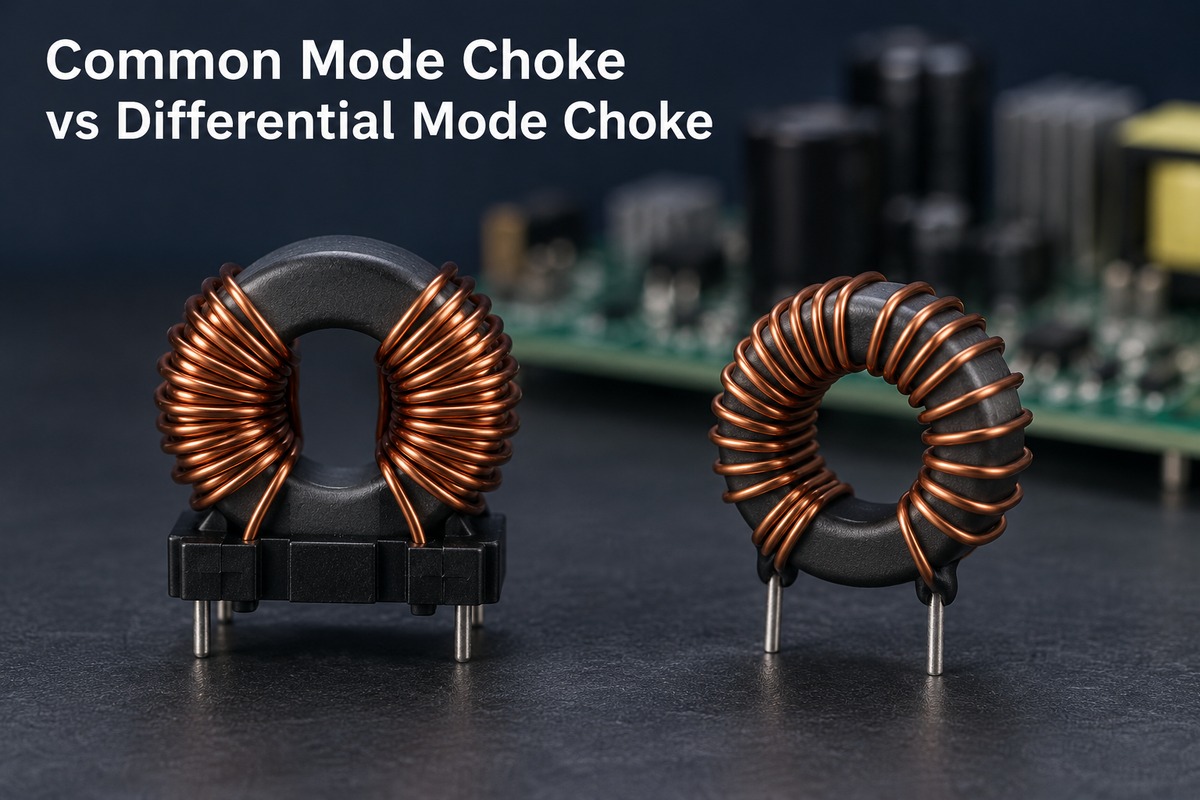
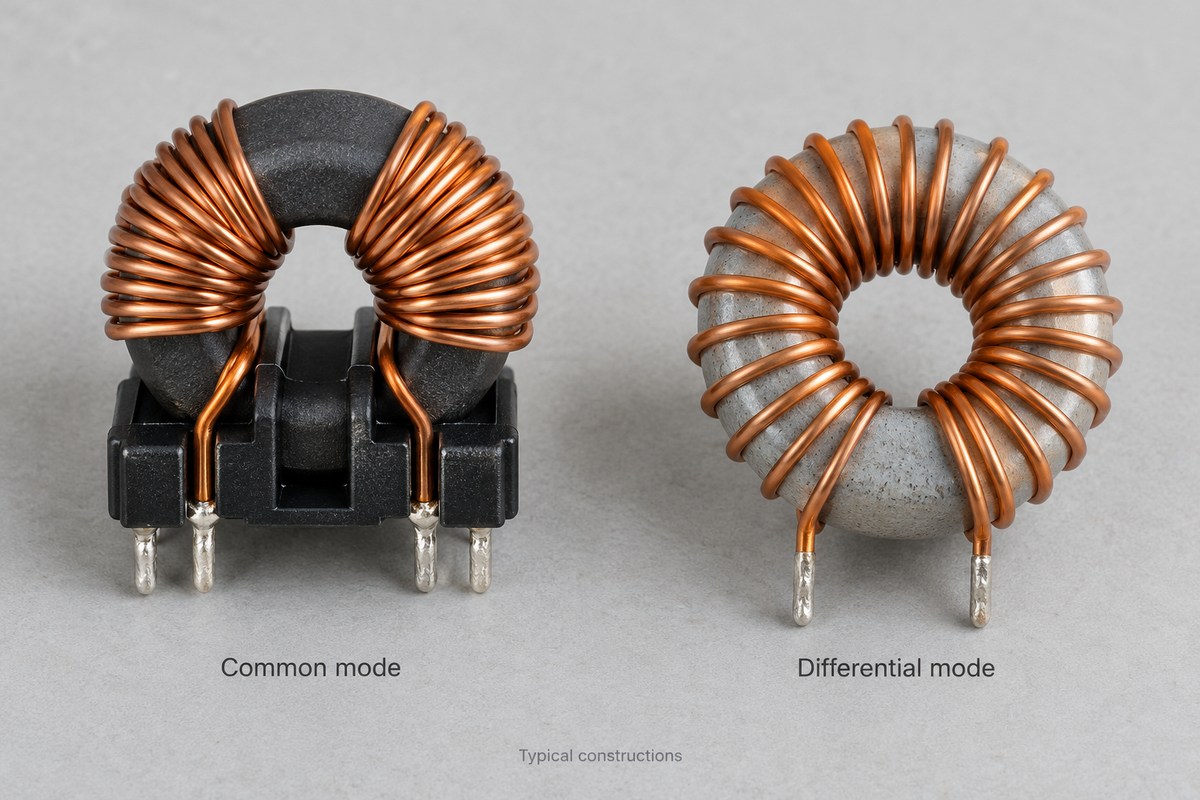
The common mode choke vs differential mode choke comparison comes down to which current the component is intended to impede. A common mode choke mainly suppresses noise flowing in the same direction along paired conductors, while a differential mode choke suppresses unwanted current variations in the outgoing-and-return circuit. Their magnetic behavior explains why two chokes with similar inductance labels may perform very differently.
EBest Circuit (Best Technology) provides PCB fabrication, component sourcing and PCB assembly for customer designs. For boards containing EMI filters, combining these services keeps the specified components and PCB build within one manufacturing workflow. Contact sales@bestpcbs.com to discuss fabrication and assembly for your approved circuit.
What Is the Difference Between a Common Mode Choke and a Differential Mode Choke?
The main difference is how each choke responds to the current path. Common mode noise travels along both conductors relative to another return path, such as chassis or parasitic capacitance. Differential mode noise circulates between the conductors.
Characteristic
Common mode choke
Differential mode choke
Main filtering purpose
Suppress common mode noise
Suppress differential mode noise or ripple
Typical construction
Coupled windings sharing a core
A series inductor, or a suitable coupled arrangement
Normal load-current flux
Largely cancels in a balanced pair
Must be accommodated by the magnetic design
Useful impedance
High common mode impedance in the target band
High differential mode impedance in the target band
Important limitation
Leakage and parasitics affect differential transmission
Load current can reduce inductance through saturation
The distinction is not simply “high frequency versus low frequency.” Either noise mode can occur across a range of frequencies. The current path identifies the mode; the component’s impedance curve shows where it can provide useful suppression.
How Does a Common Mode Choke Work?
A common mode choke uses magnetic coupling to respond differently to two current patterns. In a typical two-line device, each conductor passes through a separate winding on the same core.
During normal power delivery, current goes to the load through one winding and returns through the other. With the intended winding connections, equal and opposite currents produce opposing core flux. The cancellation allows load current to pass with little impedance from the coupled inductance.
For common mode noise, current flows in the same direction along both conductors. The resulting core flux adds, producing an impedance that opposes this noise current.
“Same direction” uses the same reference direction for both wires. The noise still needs a return path, which may include chassis connections or stray capacitance outside the pair.
Flux cancellation does not make the component lossless. Winding resistance still causes heating, and imperfect coupling creates leakage inductance. These effects explain why a real choke does not pass every differential signal unchanged.
How Does a Differential Mode Choke Work?
A differential mode choke adds inductive impedance to the circuit carrying the outgoing and return current. A simple implementation places an inductor in series with a power conductor. Some filters use inductors in both conductors or a coupled design.
The inductor opposes changes in current. Together with the surrounding circuit and filter capacitors, it can reduce unwanted ripple or conducted noise while passing the required DC or lower-frequency power.
Unlike balanced current in a common mode choke, the load current in a simple differential inductor produces core magnetization. The component therefore needs enough inductance at the actual operating current, not only under a small-signal test.
If the core approaches saturation, inductance falls and filtering can weaken. Gapped cores and distributed-gap materials are common ways to accommodate the stored magnetic energy. The appropriate construction depends on the current, frequency and loss requirements; there is no single core material for every differential mode choke.
Can a Common Mode Choke Replace a Differential Mode Choke?
Sometimes, but only when its differential mode performance is sufficient for the circuit. A common mode choke’s leakage inductance can contribute useful differential filtering. Some dual-mode components are deliberately designed to provide both functions.
Situation
What it means for replacement
Only common mode inductance is specified
There is insufficient information to assume equivalent differential filtering
Leakage inductance or differential impedance is characterized
Its contribution can be evaluated in the actual filter
A dual-mode component meets both filtering requirements
A separate differential choke may be unnecessary
Differential attenuation remains insufficient
Additional differential filtering is still needed
A “10 mH” common mode rating does not mean the circuit receives 10 mH of differential inductance. Measurement connections and the manufacturer’s definitions matter.
There is also an application distinction. In a power filter, differential attenuation may remove unwanted noise. In a data interface, excessive differential attenuation can damage the wanted signal. More differential impedance is not automatically an improvement.
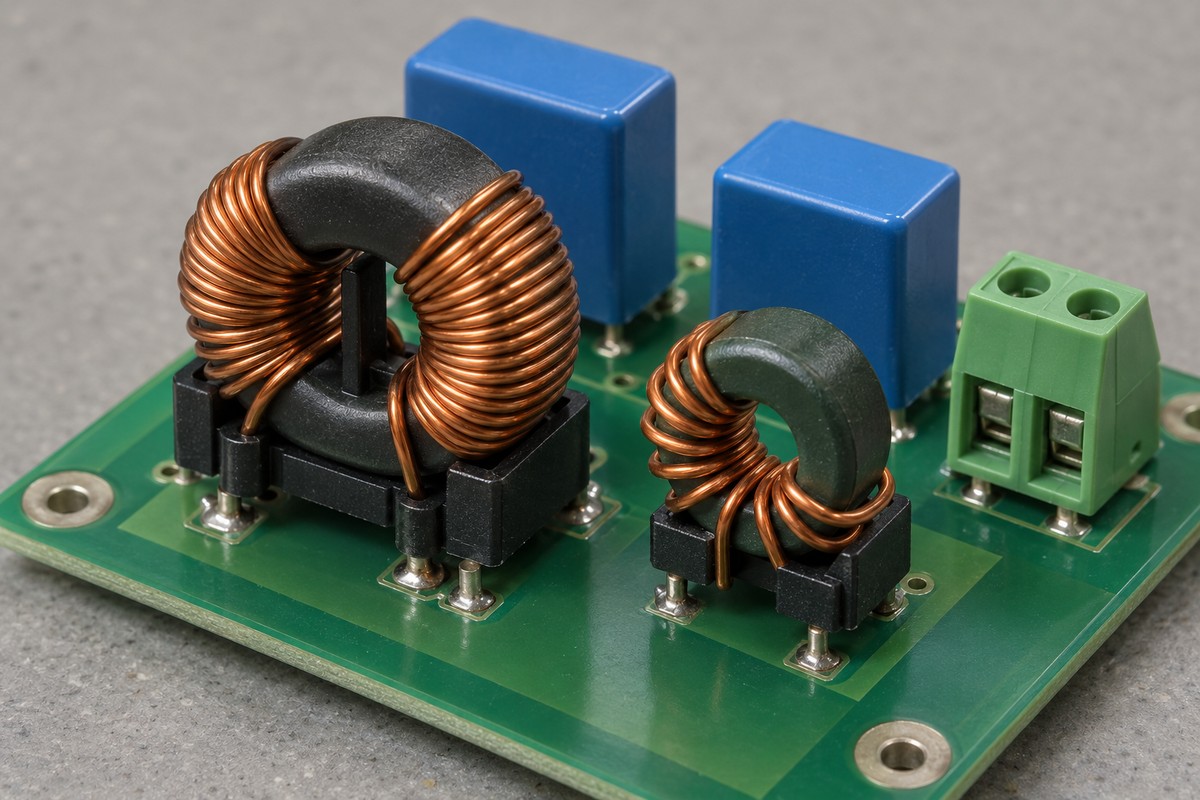
When Are Both Types of Choke Used in an EMI Filter?
Both can be used when common mode and differential mode noise each need additional attenuation. A switching power supply may generate both, so reducing one mode can leave the other as the dominant problem.
In an AC input filter, the elements can serve different roles.
The common mode choke contributes series impedance to common mode noise on line and neutral.
Differential inductance and an X capacitor contribute to filtering noise between line and neutral. That inductance may come from a separate choke or a characterized part of the common mode choke.
Y capacitors, where the equipment design permits them, provide a controlled high-frequency return path for common mode noise. Their use depends on insulation and leakage-current requirements.
These functions do not prescribe one universal component order. The source, load, capacitors and parasitic paths influence the complete filter response.
An extra choke is unnecessary if the existing filter already provides sufficient attenuation under the required operating conditions. Conversely, adding inductance alone may introduce resonance rather than solve the remaining noise problem. Measurements of the assembled equipment establish whether the filter works as intended.
How Do Frequency and Current Affect Choke Performance?
A choke must provide useful impedance at the noise frequency while carrying the operating current within its limits. The inductance printed in a parts table describes only part of that behavior.
Parameter
Effect on actual performance
Impedance versus frequency
Shows the band where the component opposes noise effectively
Self-resonance and parasitic capacitance
Can change the response and limit useful high-frequency filtering
Inductance versus current
Shows how bias affects the available differential inductance
DC resistance
Contributes voltage drop and winding heating
Rated current and temperature conditions
Define the thermal limits under the manufacturer’s stated conditions
Differential insertion loss
Indicates how much a data-line choke affects the wanted differential signal
Thermal current rating and saturation current are different limits. A winding can become too hot even when magnetic flux cancellation works well. A differential inductor can lose inductance before its temperature becomes the most obvious issue.
PCB implementation also affects the result. Coupling between the noisy and filtered sides can allow noise to bypass the intended filter path. Component placement, return paths and connection lengths therefore belong in the evaluation of the assembled board, alongside the choke’s data.
For a signal interface, the relevant question includes whether the wanted waveform remains acceptable. For a power input, it includes filtering across the load range and expected temperature. The same package size or nominal inductance does not establish equivalence between these applications.
FAQs About Common Mode Choke vs Differential Mode Choke
Can I identify the choke type by its appearance?
Not reliably. Two windings on one core suggest a coupled device, but the pin connections and intended operating mode determine its function. The schematic and datasheet are more useful than shape or color.
Does a common mode choke block a differential data signal?
A suitable data-line choke is designed to pass the required differential signal while attenuating common mode noise. Its differential insertion loss and bandwidth still matter; a power-line choke is not automatically suitable for a data interface.
Can common mode chokes be used on DC power lines?
Yes. The outgoing and return conductors can pass through the paired windings so their normal DC flux largely cancels. The device still needs appropriate current, temperature and insulation ratings.
Are equal inductance values enough to compare the two types?
No. Common mode inductance, differential inductance and leakage inductance describe different measurement conditions and responses. Compare the relevant impedance and current-dependent behavior for the intended circuit.
Why can a choke run hot even when it suppresses noise?
Noise attenuation does not eliminate winding resistance or magnetic losses. Load current, high-frequency excitation, ambient temperature and cooling all affect temperature rise. Heating alone does not identify whether the remaining noise is common mode or differential mode.
Understanding common mode choke vs differential mode choke helps preserve the intended filter function when a circuit moves into production. For PCB fabrication, component sourcing and assembly of your approved design, contact EBest Circuit at sales@bestpcbs.com.
The key difference in TVS diode vs Zener diode applications is the job each device performs: a conventional Zener maintains a voltage during normal operation, while a TVS limits brief voltage spikes. Both use reverse breakdown, but their voltage and power ratings describe different operating conditions.
Picture two parts of the same board. A small reference circuit needs a reasonably stable voltage while current flows. An external connector needs a protection path that conducts strongly when a transient arrives. These two situations explain why similar-looking diodes can behave very differently in a circuit.
What Is the Difference Between a TVS Diode and a Zener Diode?
A Zener regulator conducts as part of normal operation. A TVS normally carries only leakage current until an overvoltage event occurs.
Circuit behavior
Conventional Zener regulator
TVS protection circuit
Main purpose
Establish or regulate a voltage
Suppress a transient voltage rise
When substantial current flows
During normal regulation
During the transient
Performance that matters
Voltage stability over current and temperature
Clamping voltage at the transient current
Main stress
Continuous dissipation
Pulse current and heating
A regulating Zener operates in reverse breakdown, where its voltage changes relatively little over a suitable current range. A TVS generally stays below breakdown until a spike makes it conduct and divert current through the protection path.
These are the usual roles. Some Zeners also carry protection ratings; that distinction matters when considering a replacement, rather than changing the basic comparison.
Where Are TVS Diodes and Zener Diodes Used in Circuits?
Zeners commonly serve local reference or limiting circuits; TVS devices commonly protect exposed power and signal connections. Their surrounding connections show how those roles differ.
A small voltage reference:
A resistor feeds a node shared by the load and a reverse-biased Zener. The resistor limits current, and the load and Zener divide that current between them. As load current rises, less remains for the Zener. If too little remains, the node falls out of regulation.
A DC power input:
A TVS connects across the supply and its return. It carries little current at the normal supply voltage, then diverts current during a spike. The source impedance and coordinated protection affect the pulse current it must carry.
An external signal interface:
A protection device sits near the connector, where it can divert incoming transient current. Here, low signal loading matters as well as protection. A low-capacitance interface protector can suit a fast data line that a larger power-line suppressor would load excessively.
For each application, voltage limiting and stress survival are separate questions. The next two sections explain them in that order.
How Does Zener Diode Clamping Compare with TVS Clamping?
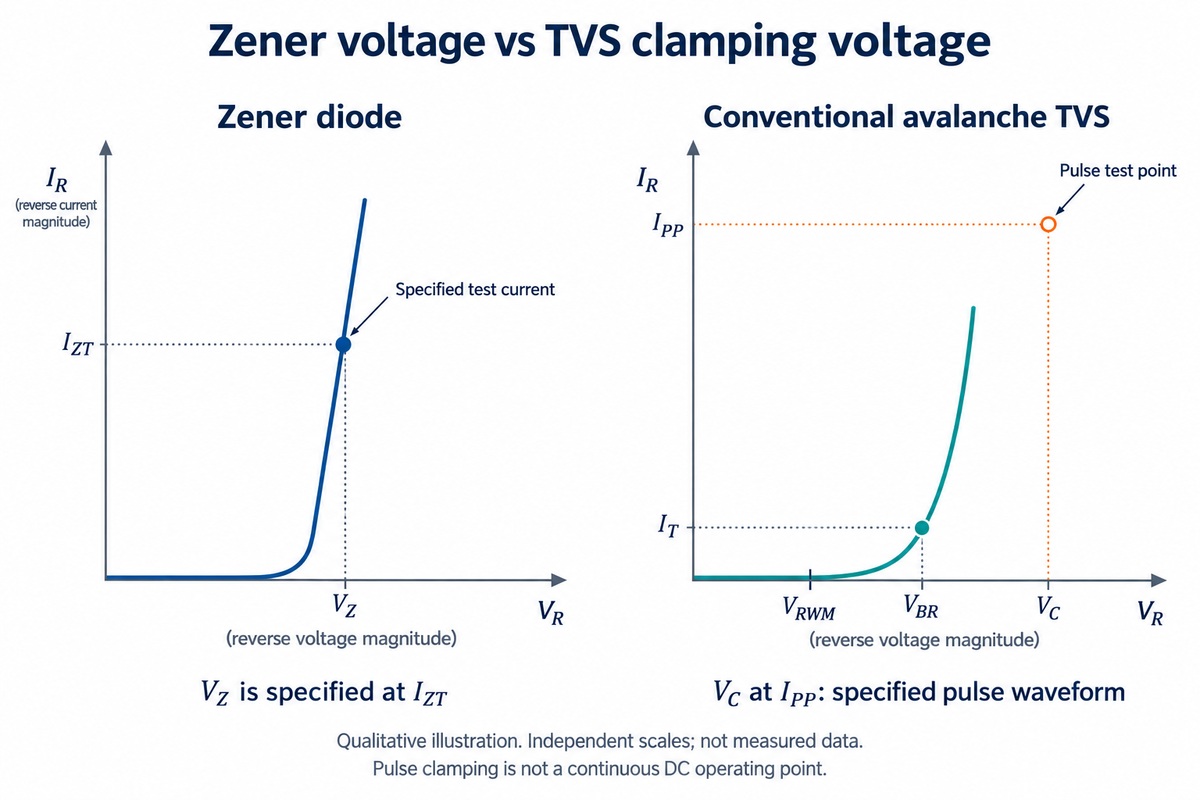
Clamping limits a voltage rise; it does not hold the voltage perfectly constant. The voltage across the diode changes with current, so the test conditions are part of the specification.
Parameter
What it means
Circuit relevance
Zener voltage, VZ
Reverse voltage at a stated test current
Describes a regulation operating point
TVS working voltage, VRWM
Reverse standoff voltage with a specified leakage limit
Relates to normal operation before a spike
TVS breakdown voltage, VBR
Breakdown measured at a stated test current
Identifies the transition into stronger conduction
TVS clamping voltage, VC
Voltage at a stated pulse current and waveform
Describes device voltage during that transient test
Example — working voltage versus clamping voltage:
Suppose a TVS specifies a 5 V working voltage and a 9 V clamping voltage at its rated pulse current. During that test, approximately 9 V can appear across its terminals. The 5 V working rating describes normal operation, not the voltage held during the surge. These hypothetical values illustrate the relationship, not a recommended part for a 5 V circuit.
A Zener rated 5.1 V at a small test current describes another operating point. That number alone does not tell us its voltage at a much higher transient current.
At the connector, VC at the relevant pulse current relates to the protected circuit's transient voltage tolerance. VRWM relates to the normal line-voltage range.
Why Are TVS Pulse Power and Zener Power Ratings Different?
The difference is how long the power lasts. Short pulses and continuous operation heat a diode differently.
Continuous operation in a Zener reference:
Power is approximately the Zener voltage multiplied by its current. For an illustrative operating point:
5.1 V × 10 mA = 51 mW
That heat is produced for as long as the current flows. The device's continuous rating and mounting conditions determine whether it can dissipate it adequately.
A transient at a TVS-protected input:
Instantaneous power is also voltage multiplied by current, but heating depends on the entire pulse. A broad pulse deposits more energy than a narrow pulse with the same peak and a comparable shape.
Three conditions explain why pulse ratings come with qualifications:
Pulse duration and shape: These determine how power changes over time.
Repetition: Closely spaced pulses can cause heat to accumulate.
Starting temperature: A hot device has less thermal margin available.
The large peak-wattage figure on a TVS listing is therefore a pulse capability, not a continuous dissipation allowance.
How Do Unidirectional and Bidirectional TVS Diodes Compare with Zener Diodes?
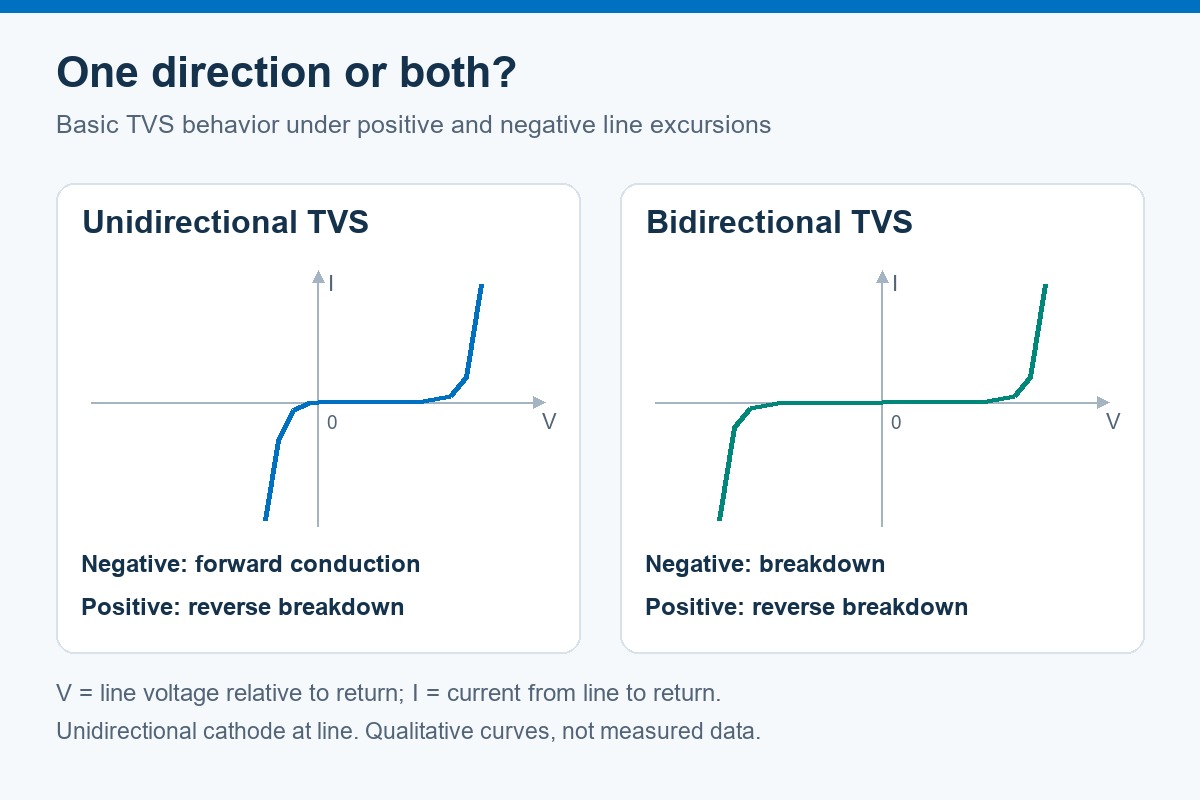
A unidirectional device limits the two polarities differently; a bidirectional TVS provides a specified limiting characteristic in both directions.
For the comparison below, a unidirectional device has its cathode connected to the line and its anode to return.
Applied excursion
Basic unidirectional TVS or conventional Zener
Bidirectional TVS
Positive voltage beyond the relevant threshold
Reverse-breakdown conduction
Conduction according to its positive limiting characteristic
Negative voltage beyond the relevant threshold
Forward conduction
Conduction according to its negative limiting characteristic
Normal signal swings below return
May clip the negative signal through forward conduction
Can accommodate both polarities within its working range
This explains why a unidirectional TVS can respond to both positive and negative transients without having the same limiting voltage in both directions.
For a signal that normally swings above and below its reference, a suitable bidirectional protector preserves that normal range. Opposing Zener junctions help explain the basic concept, but two arbitrary Zeners do not reproduce a TVS device's pulse capability or capacitance. Some protection devices also use more elaborate internal networks.
How Do TVS and Zener Diode Capacitance and Leakage Affect Circuit Operation?
A protection diode can affect the circuit even before it clamps. Capacitance influences changing signals; leakage affects small DC currents.
Capacitance on signal lines:
The signal driver must charge and discharge the added capacitance. Together with the line impedance, this can slow edges and distort the waveform.
Most relevant to fast interfaces and other bandwidth-sensitive signals.
Can make a power-line suppressor unsuitable for a data connection.
Is specifically reduced in low-capacitance protection devices.
Leakage in sensitive circuits:
Leakage creates a small current path through the diode during normal operation. At a high-impedance sensor input, that current can produce a voltage drop across the source resistance and shift the reading. It also contributes to standby consumption in battery-powered equipment.
The useful comparison is between individual parts under relevant conditions. Capacitance specifications include bias and frequency; leakage specifications include voltage and temperature. Neither diode family is automatically better in every circuit.
Can a Zener Diode Replace a TVS Diode?
Sometimes, provided it preserves both the protection function and normal circuit operation. A matching voltage marking is only one piece of that comparison.
Replacing a TVS with a Zener:
At a current-limited internal node, a suitable Zener may provide sufficient voltage limiting. At an exposed connector, the replacement also needs appropriate clamping behavior and transient-current capability. Protection-rated Zeners may satisfy these conditions; an ordinary regulation Zener should not be assumed to do so.
Replacing a regulating Zener with a TVS:
The reference circuit requires continuous operation at its intended bias current. Voltage tolerance, temperature behavior and continuous dissipation become central. A high TVS surge rating does not establish accurate regulation at that current.
On a signal line:
The replacement must also preserve the signal's polarity range and loading. A device that survives the surge but clips normal signals or shifts a sensitive input has changed the circuit's behavior.
FAQs About TVS Diodes and Zener Diodes
Are TVS diodes always faster than Zener diodes?
No universal speed ratio applies. Construction, packaging and test conditions affect the result. The voltage that reaches the protected circuit during the event is more useful than an isolated response-time claim.
Can a TVS diode handle a sustained supply fault?
A pulse rating does not establish sustained-fault capability. Continued conduction can overheat the device. Current limiting or disconnection may be needed to end the fault.
Can the package or schematic symbol identify a TVS diode?
Not reliably. TVS and Zener devices can share packages and similar symbols. The part number and data sheet establish their type, polarity and ratings.
Can a multimeter confirm that a TVS diode is healthy?
It can help reveal a short, but cannot verify surge performance. A bidirectional TVS may read open in both directions at the meter's test voltage. Parallel circuit paths can also affect an in-circuit reading.
Why can a suitable TVS still leave an IC exposed to excessive voltage?
The IC sees the voltage at its pins. Inductance in a long discharge path can add voltage during a fast current rise. Placement near the entry point and a short return path help the protection circuit perform as intended.
The TVS diode vs Zener diode distinction carries through to the assembled board, where component identity, orientation and layout matter alongside the electrical design. EBest Circuit combines component sourcing, PCB fabrication and assembly for customer-approved designs. For support with your next prototype or production PCBA build, contact sales@bestpcbs.com.
CAN bus vs LIN bus comes down to how devices share information, how quickly they exchange it, and how much hardware each connection needs. CAN lets multiple electronic control units send messages using priority arbitration. LIN uses one coordinating node to schedule communication with simpler sensors and actuators. These differences explain why vehicles often use both networks.
EBest Circuit provides PCB fabrication, component sourcing, and PCB assembly for customer-designed control and interface boards. For CAN or LIN hardware, these services support the build from bare PCB to assembled board. Discuss your prototype or production needs with sales@bestpcbs.com.
What Is the Difference Between LIN and CAN Bus?
CAN allows nodes to compete for bus access; LIN gives one node control of the communication schedule. That distinction shapes their hardware, timing, and typical applications.
CAN stands for Controller Area Network. LIN stands for Local Interconnect Network. In LIN, the coordinating node is called the commander, or master in older documentation.
Main difference
CAN bus
LIN bus
Who starts communication?
Multiple nodes can initiate messages when the bus is available
One commander sends scheduled frame headers
How is access organized?
Higher-priority messages win arbitration
Devices respond in the assigned frame slots
Where is it commonly used?
Communication between vehicle control units
Local connections to simpler sensors and actuators
This article compares conventional two-wire high-speed CAN with automotive LIN. Specialized CAN physical layers are outside its scope.
How Does CAN/LIN Communication Work?
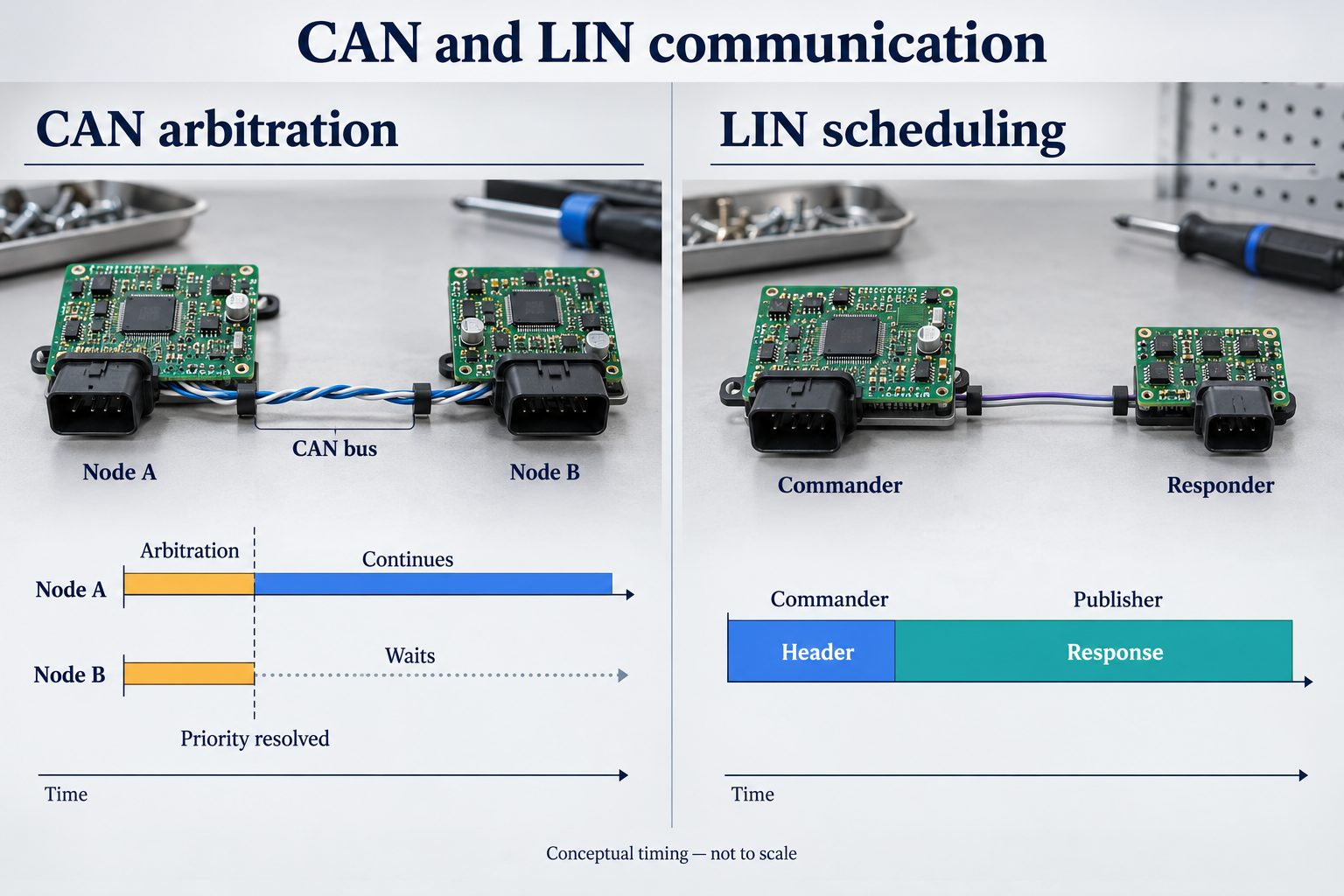
CAN determines which waiting message goes first. LIN determines when each scheduled exchange happens.
CAN: the higher-priority message continues.
A node starts transmitting when the bus is available.
If another node starts at the same time, both monitor the bus while sending their arbitration fields.
The node that loses arbitration stops transmitting. The winning message continues, and the waiting node can try again later.
Arbitration works because a dominant bit overrides a recessive bit on the bus. A node that sends recessive but reads dominant knows it has lost. For otherwise comparable data frames with the same identifier format, a lower numerical identifier has higher priority.
LIN: the commander starts each exchange.
The commander sends a header identifying the scheduled frame.
The designated publisher sends the data and checksum in the response.
Nodes that need those signals receive and use the response.
The publisher can be another node or the commander itself. A response can also be used by other devices in the same LIN cluster; it does not have to travel only back to the commander.
How Do CAN and LIN Bus Speeds Compare?
Classical CAN supports a much higher maximum bit rate than LIN. CAN FD can increase data transfer capacity further.
LIN: up to 20 kbit/s, with 1–8 data bytes per frame.
Classical CAN: up to 1 Mbit/s, with up to 8 data bytes per frame.
CAN FD: up to 64 data bytes per frame, with the option to use a faster bit rate during the data phase. Arbitration still uses the nominal bit rate.
The maximum raw bit-rate ratio between Classical CAN and LIN is 50:1. However, bit rate is not the same as device update rate.
For example, an eight-data-byte LIN frame takes approximately 6.2 ms at 20 kbit/s before additional spacing. A sensor whose frame appears once in a longer repeating schedule must wait for its next slot. Its reading therefore does not necessarily update every 6.2 ms.
CAN messages can also wait while other traffic uses the bus. Actual response time depends on bus loading and message priority. For CAN FD, the usable data-phase rate additionally depends on the controllers, transceivers, wiring, and network configuration.
How Do CAN and LIN Electrical Interfaces Differ?
CAN uses two differential signal lines; LIN uses one signal line referenced to ground. Their transceivers and bus circuits are different, so the interfaces cannot be directly substituted.
Pull-up network; the commander normally includes an external resistor and diode
Interface to the MCU
CAN controller functionality plus a CAN transceiver
LIN-capable communication, often using a UART, plus a LIN transceiver
On CAN, differential reception helps reject interference that appears similarly on both lines. Ground differences still matter: the transceiver must stay within its allowed common-mode voltage range.
On LIN, the transmitter pulls the signal low for a dominant state. Pull-ups let it rise toward the bus supply for a recessive state. The transceiver connects this bus-side signaling to the MCU’s logic interface; a UART pin cannot connect directly to an automotive LIN wire.
For the circuit board, the difference extends beyond connector pins. Transceivers, resistor networks, and protection circuits must suit the bus. The signal-wire counts above also exclude power and ground connections.
Why Is LIN Usually Cheaper to Implement Than CAN?
LIN can reduce the cost of connecting devices that exchange only small amounts of data. The savings mainly come from the wiring and the communication hardware:
Fewer signal connections: one LIN signal wire can reduce harness conductors and connector contacts compared with a two-wire CAN connection.
Simple MCU communication hardware: a low-cost MCU’s UART can support LIN with suitable software and a LIN transceiver.
Timing synchronization: the LIN header’s synchronization field lets compatible responder implementations align their communication timing with the commander.
The cost advantage varies with the existing hardware. If a control unit already has an MCU with an integrated CAN controller, using CAN may not require an additional controller chip.
Power regulation, transient protection, connectors, and testing still contribute to either board’s cost. A simple LIN actuator and a CAN-equipped control unit therefore cannot be compared using one universal savings percentage.
Why Do Vehicles Use Both CAN and LIN?
CAN can connect vehicle controllers while LIN handles smaller local groups of devices. This gives each part of the system communication capacity suited to its workload.
An illustrative door-control arrangement shows how they work together:
Vehicle controller → CAN → Door ECU → LIN → Mirror actuator
The door ECU receives a vehicle-level command over CAN. Its software maps the relevant information into a LIN signal, then sends it in the appropriate scheduled frame. Actuator status can return through the ECU in the opposite direction.
The ECU needs both physical interfaces and software that understands the messages on each network. Connecting CAN and LIN wires together cannot perform this translation; a gateway must handle signal mapping and timing as well.
Local actuator exchanges can stay within the LIN cluster, while relevant commands and status pass over CAN. This avoids requiring every small device to carry the same communication hardware as a vehicle control unit.
FAQs About CAN bus vs LIN bus
Can LIN replace CAN bus?
LIN can serve a low-bandwidth function whose timing fits a scheduled network. Replacing an existing CAN connection still requires changes to hardware, messages, software, and timing.
Can CAN and LIN communicate directly?
No. A controller or gateway needs both interfaces and software to translate the relevant application signals between the protocols.
Do CAN and LIN use the same transceiver?
No. Their electrical interfaces differ. Some integrated devices contain both types, but the CAN and LIN channels remain separate.
Does every CAN node need a 120-ohm resistor?
No. A conventional high-speed CAN bus is terminated at its two physical ends. Adding another 120-ohm termination at every intermediate node would excessively load the bus.
Can a LIN node wake up the network?
Yes. A suitably configured node can issue a wake-up signal. Normal frame communication resumes when the commander restarts its schedule.
For PCB fabrication and assembly of the interface boards discussed in this CAN bus vs LIN bus comparison, contact EBest Circuit at sales@bestpcbs.com to discuss support from prototype builds through production.
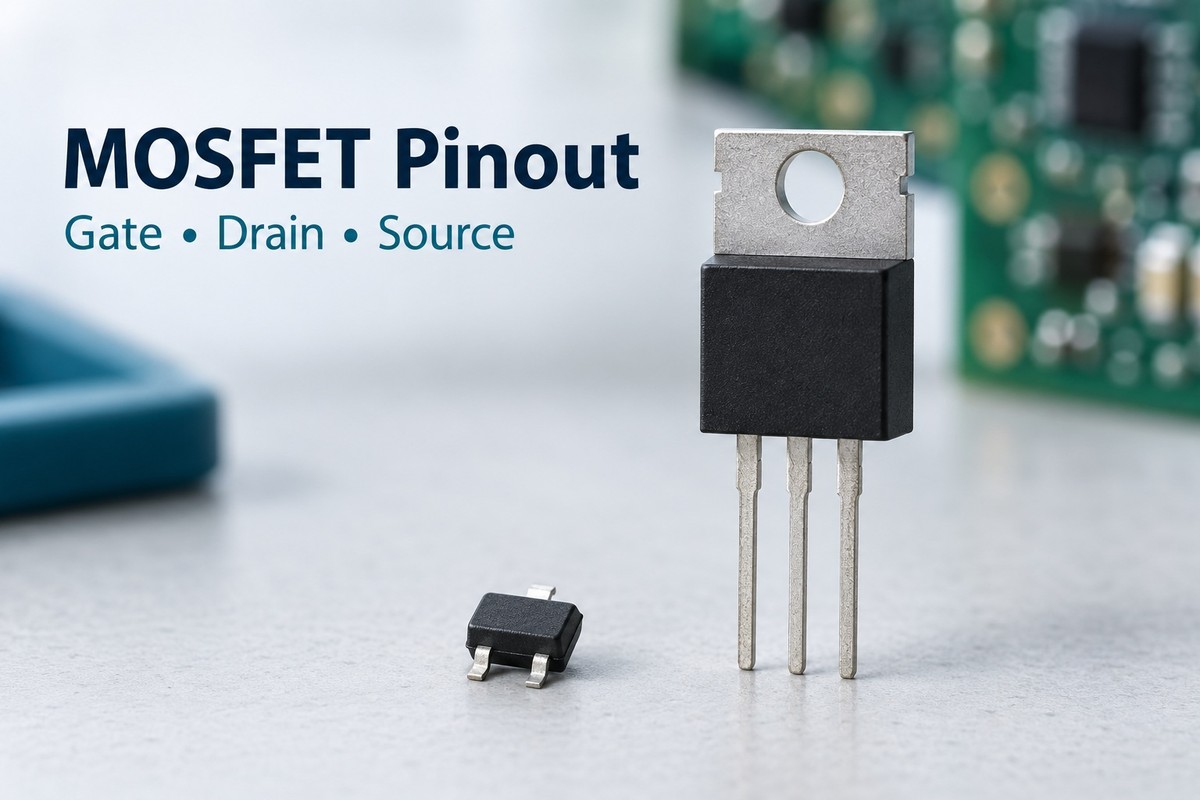
MOSFET pinout identifies which physical connections belong to the gate, drain and source. These terminal names stay familiar across many devices, but their pin numbers and positions can change with the part number and package. Reading the correct view matters: a connection that appears on the left in a front view may appear on the right when the component is turned over.
For boards using MOSFETs, correct pin mapping supports both reliable connections and accurate component placement. EBest Circuit provides PCB fabrication, SMT and through-hole assembly, and DFM support for customer designs. To discuss manufacturing and assembly for your MOSFET-based board, contact sales@bestpcbs.com.
What Do the Three MOSFET Pins Do?
The gate controls the conducting channel between the drain and source. In a typical discrete MOSFET, these three terminal functions are labeled G, D and S, even when the package has more than three physical connections.
Terminal
Function
What it means in a circuit
Gate (G)
Controls channel conduction through the gate-to-source voltage, VGS
The drive voltage is referenced to the source, which is not necessarily ground.
Drain (D)
One end of the controlled current path
Its connection must match the intended circuit and body-diode orientation.
Source (S)
The other end of the controlled current path and the reference for VGS
Source voltage determines the gate voltage needed to control the channel.
For an enhancement-mode N-channel MOSFET, a sufficiently positive gate-to-source voltage turns the channel on. For an enhancement-mode P-channel device, the required polarity is negative. The threshold voltage marks the start of conduction under specified test conditions; it is not the voltage that guarantees low on-resistance.
The insulated gate behaves capacitively. It needs charging and discharging during switching, even though steady-state gate current is very small. This also explains why a floating gate can produce confusing multimeter readings.
Terminal names and pin numbers describe different things. “Gate” describes an electrical function; “pin 1” identifies a physical connection in a particular package drawing. Pin 1 is not universally the gate.
How to Read a MOSFET Pinout Diagram
A MOSFET pinout diagram becomes useful only when its viewing direction matches the way you are looking at the component. Begin with the full part number and package variant, then read the view label and pin numbering together.
Front view: Often used for upright through-hole packages. Follow the drawing’s indicated face and lead direction before interpreting left-to-right order.
Top view: Looks down onto the component body. Pin 1 may be identified by a dot, chamfer or another feature defined in the package drawing.
Bottom view: Looks toward the underside or solder connections. Copying this arrangement directly into a top-view sketch can reverse the apparent positions.
Match numbered connections to the pin-function table rather than inferring their functions from the outline alone. A schematic symbol shows electrical relationships; its visual arrangement does not establish the physical pin order.
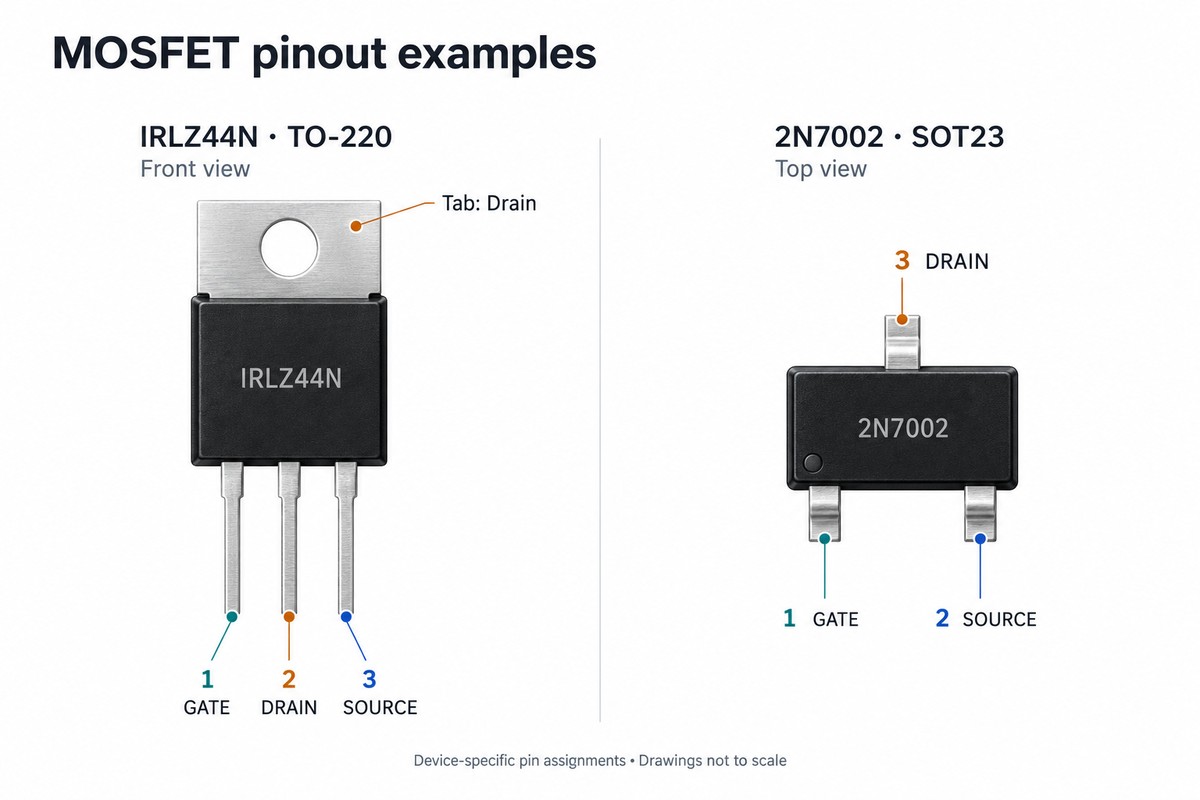
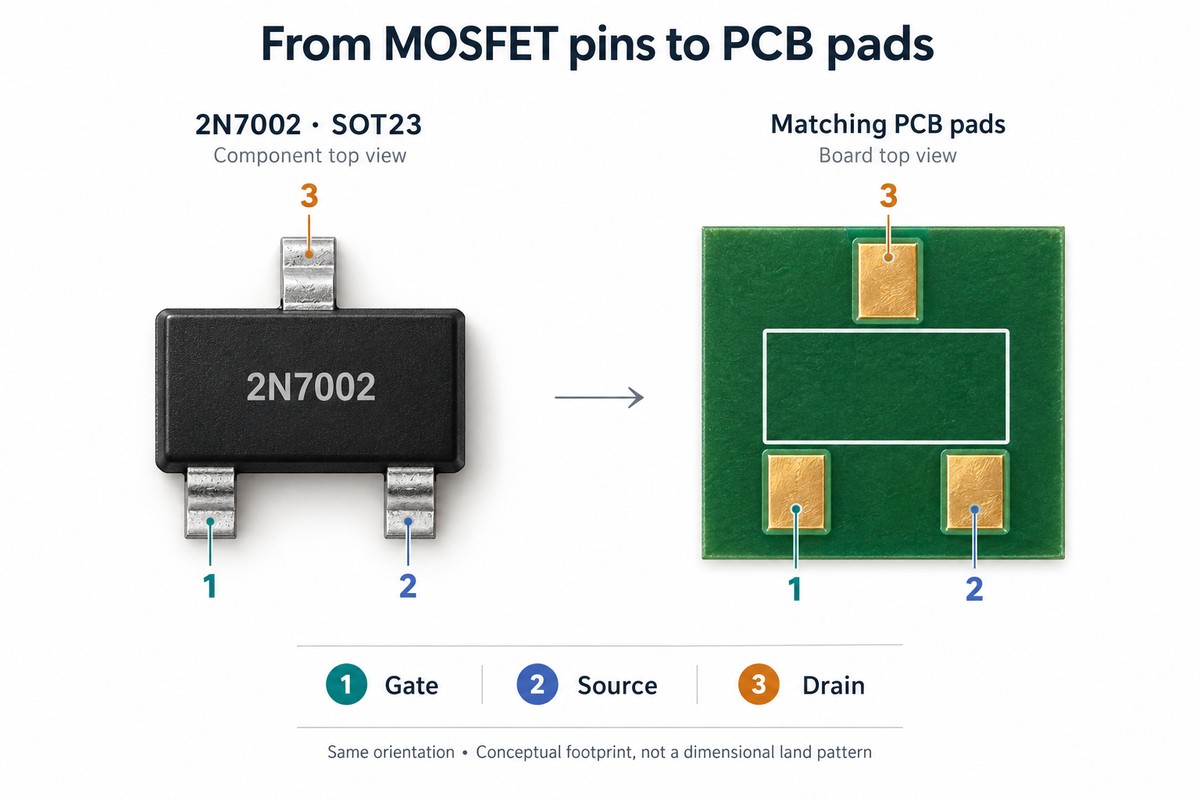
For example, the IRLZ44N in its TO-220 package has pin assignments 1 = Gate, 2 = Drain and 3 = Source. That numbered assignment remains the same when you rotate the device, but the apparent left-to-right order changes. Remembering “G-D-S” without remembering the viewing direction loses essential information.
The pin diagram and recommended PCB land pattern also serve different purposes. The first identifies connections; the second describes the copper pads used to mount the package. Both are needed when translating the component into a PCB footprint.
MOSFET Pin Configuration in Common Packages
Package size and shape do not define one universal MOSFET pin configuration. The following examples show why the exact device matters.
Device and manufacturer
Package
Connection assignment
IRLZ44N, Infineon
TO-220
Pin 1 = G; pin 2 = D; pin 3 = S; metal tab = D
2N7002, Nexperia
SOT23
Pin 1 = G; pin 2 = S; pin 3 = D
CSD17302Q5A, Texas Instruments
SON, 5 mm × 6 mm
Pins 1–3 = S; pin 4 = G; pins 5–8 = D; exposed pad = D
The two three-lead examples already show a key difference: pin 2 is the drain on the IRLZ44N, but the source on the 2N7002. Applying a familiar three-pin sequence to a different device can therefore swap its power connections.
A small SOT23 device also cannot be read as a straight row of three pins: two leads sit on one side and the third sits opposite them. Its outline and numbering must be interpreted together.
In a leadless power package, some connections lie underneath the body. A top photograph alone cannot show the complete solder interface. The exposed pad may carry an electrical connection as well as conduct heat, so treating it as an electrically neutral heatsink area can create a PCB error.
These examples are specific device assignments, not rules for every TO-220, SOT23 or SON MOSFET. Likewise, an eight-pin package can contain one transistor or multiple transistors, depending on the part number.
Why Do Some MOSFETs Have More Than Three Pins?
More physical pins do not necessarily mean more independently controlled terminals. Power MOSFET packages often provide several connections to the same source or drain, creating parallel paths between the die and the PCB. Larger metal connections also help conduct heat away from the device.
An exposed pad is another physical connection that may share a source or drain net. Its electrical identity comes from the device’s pin information, not from its size or central position.
Some four-pin power MOSFETs have a Kelvin source connection. This provides a separate source reference for the gate driver, while the main source lead carries load current. Separating these paths reduces the influence of voltage developed across the shared source inductance during rapid current changes. Although both connections reach the source internally, their PCB routing serves different purposes.
The body, or bulk, terminal is a separate concept. MOSFET device theory describes gate, drain, source and body; many discrete devices connect body to source internally. A four-pin Kelvin-source package should therefore not be assumed to expose an independent body terminal.
How to Identify MOSFET Pins with a Multimeter
A multimeter can help distinguish terminals on a suitable discrete MOSFET, but it cannot reliably identify every unknown package. The method below applies to a conventional, isolated, enhancement-mode silicon MOSFET with an intrinsic body diode. Integrated protection, multiple transistors and unusual internal connections can change the readings.
Prepare the device. Disconnect power, discharge stored energy and isolate the component from other circuit paths. Use ESD precautions and a meter whose test voltage is suitable for the device. Confirm the meter’s probe polarity in diode mode.
Locate the likely gate. On a device without internal gate-protection paths, the gate should show very high resistance to both remaining terminals in either polarity, after charging effects settle. This is an identification clue, not proof: protection structures and damage can produce different results.
Identify the drain-source diode direction. Once a likely gate is identified, keep it connected to the candidate source so that VGS remains zero during each diode test. For a known channel type, the expected forward direction is:
Channel type
Positive probe
Negative probe
Expected indication with channel off
N-channel
Source
Drain
Forward body-diode reading
P-channel
Drain
Source
Forward body-diode reading
With the probes reversed, the device should normally block at the meter’s test voltage. The forward reading varies with the device, temperature and meter test current; one fixed voltage is not a universal pass criterion.
If the channel type is unknown, diode direction alone cannot uniquely establish both the channel type and the source/drain labels. Part markings and the corresponding datasheet remain important.
Account for gate charge and surrounding circuitry. A meter can charge the gate and turn the channel on, causing conduction that obscures the body-diode result. Gate-to-source discharge removes that stored charge on an isolated enhancement-mode device. On an assembled board, resistors, drivers and parallel semiconductors may create additional current paths.
These measurements support identification and basic troubleshooting. They do not establish rated-voltage performance, switching behavior or on-resistance under operating load.
How MOSFET Pin Numbers Map to PCB Footprint Pads
A PCB connects a MOSFET correctly when the schematic pin numbers correspond to the physical terminal numbers represented by the footprint pads. Matching the package dimensions alone is insufficient.
For the Nexperia 2N7002 example, the mapping is:
Schematic terminal
Device pin
Corresponding footprint pad
Gate
1
1
Source
2
2
Drain
3
3
If a symbol instead assigns drain to pin 2 and source to pin 3, the device may still fit the footprint perfectly. The board can even pass connectivity checks against that incorrect library mapping, yet connect the transistor incorrectly. This is why a footprint’s name or 3D appearance cannot establish electrical compatibility.
For packages with repeated source or drain terminals, every required connection must reach the intended net. The exposed pad must also have the correct electrical assignment. CAD libraries may represent shared connections differently, but the resulting physical connections must agree with the device.
Orientation is equally important during assembly. The footprint’s pin-1 reference, component placement rotation and actual package marking need to describe the same orientation. An otherwise correct pad mapping will not compensate for a rotated component.
FAQs About MOSFET Pinout
Can the drain and source be swapped?
Not as a general replacement rule. An enhanced channel can conduct in either direction under suitable conditions, but the body diode and gate-to-source reference make drain and source behave differently in a circuit. Reverse channel conduction does not make the pins interchangeable.
Do N-channel and P-channel MOSFETs always have different pin orders?
No. Channel type describes electrical behavior, not a mandatory package pin order. Two devices may share the same arrangement while requiring opposite gate-drive polarity.
Is a MOSFET source always connected to ground?
No. That is common in an N-channel low-side switch, but the source can sit at another voltage in other circuit arrangements. Gate drive is determined relative to the source.
Can a short SMD marking uniquely identify a MOSFET?
Not always. Short codes can be reused across manufacturers or device families. Package dimensions, manufacturer identification and the complete marking help distinguish possible matches.
Does a matching pinout make two MOSFETs interchangeable?
No. Voltage rating, gate-drive requirements, on-resistance, switching characteristics, thermal behavior and package dimensions must also suit the circuit. Matching pins establish only part of the compatibility.
For PCB fabrication and assembly of your MOSFET-based design, contact EBest Circuit at sales@bestpcbs.com to discuss the board, package and MOSFET pinout requirements.
Finding a BGA void does not automatically mean the solder joint will fail, and it does not automatically justify rework. The decision depends on how much of the joint is affected, where the void sits, whether the pattern repeats, and which acceptance requirement governs the build.
A single percentage cannot answer all four questions. The useful path is to read the full X-ray pattern, separate measurement from acceptance, and then connect the result to paste deposition, reflow, moisture exposure, or PCB pad and via design. That turns an image into a decision instead of a reason to change several process variables at once.
What Is a BGA Void?
A BGA void is an unfilled cavity trapped inside a BGA solder joint after reflow. It can originate in the package solder ball, the printed solder paste, or the combined joint formed when the ball and paste coalesce during BGA soldering. Because the package hides the array, internal voids are normally assessed with X-ray inspection.
A void is not the same as a bridge, missing ball, nonwet open, or head-in-pillow condition. Those defects form differently and may require other views or tests. Confirm the defect type before calculating a void percentage or changing the assembly process. Record the indication first; make the acceptance decision only after its context is known.
What Causes BGA Voids to Form?
BGA voids form when gas, flux volatiles, or trapped air cannot escape before molten solder solidifies. The sources fall into four practical groups:
Material-related causes: paste chemistry, flux activity, moisture, oxidation, or contamination can add gas or interfere with wetting.
Printing-related causes: the shape and consistency of the paste deposit influence trapped air, solder volume, and the route available for gas to leave.
Reflow-related causes: the thermal profile determines when volatiles are released, how well the solder wets, and how long gas can escape before solidification.
PCB pad and via-related causes: land geometry, via-in-pad construction, and local copper distribution alter solder flow, heat transfer, and solder wicking.
Several groups can act together. The X-ray pattern narrows the search; paste records, SPI, thermal data, and PCB information identify the actual cause.
Are BGA Voids Always a Reliability Problem?
No. A BGA void is an internal cavity, not an automatic declaration that the solder joint is defective. Some joints with voiding remain serviceable, while others deserve attention because of their geometry and the product’s operating conditions.
An X-ray indication should therefore trigger an engineering evaluation rather than immediate rework. Removing a BGA adds another thermal cycle and can introduce pad, package, or alignment damage, so the rework decision should follow the applicable acceptance requirement and the actual risk to the assembly.
The lower-risk response is to document the indication, review the governing requirement, and compare the complete array before deciding whether further testing or rework is justified.
Which BGA Voids Are More Likely to Affect Reliability?
Voids are more likely to affect reliability when they remove a large part of the joint, sit near a critical interface, form a cluster, or recur at stressed ball locations. The same void geometry deserves more attention in assemblies exposed to strong mechanical or thermal loads.
Pay closer attention when:
Large area loss: a single void occupies a large part of the joint.
Critical location: the void is close to an interface or likely crack path.
Clustered geometry: several nearby voids reduce the effective solder area in one region.
Repeatable coordinates: the same ball locations show voiding across multiple boards.
High service load: the assembly faces vibration, bending, drop, or repeated thermal cycling.
Do not decide from total percentage alone. Compare the largest void, its location, the distribution across the array, and the product’s expected loads. A higher-risk pattern calls for closer verification, not an automatic conclusion.
How Are BGA Voids Detected and Measured?
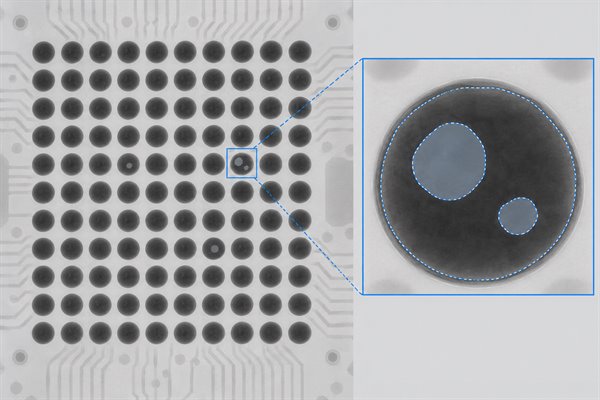
BGA voids are normally detected by X-ray inspection for PCB assembly, where they appear as lighter regions inside the darker solder-joint projection. The first task is to confirm that the indication is inside a joint and then read it in the context of the complete array.
Size: compare the largest individual void and the total affected area rather than counting bright spots alone.
Location: note whether the void is central, near an interface, or aligned with a via or other PCB feature.
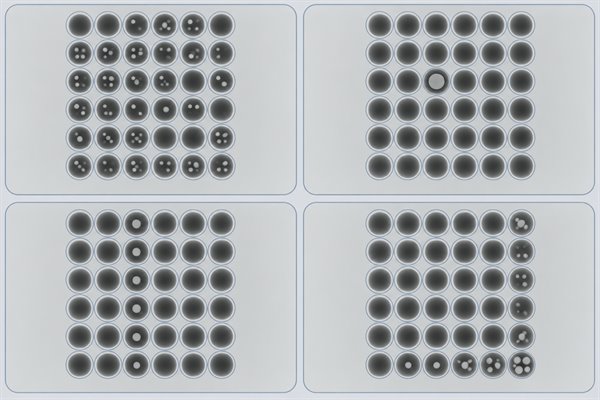
Pattern: distinguish one isolated indication from clusters, rows, corners, or a region that shares the same thermal or design influence.
Repeatability: compare the same ball coordinates across more than one board to separate a random event from a fixed process or PCB factor.
Inspect the whole array before enlarging one joint. Use a consistent exposure and orientation, record the ball coordinate, and retain the original image. That makes later comparisons traceable and reduces the chance that one unusual joint is mistaken for a package-wide trend.
Projected void area ratio = total projected void area inside the joint ÷ projected solder-joint area × 100%
For example, 0.050 mm2 of visible voiding inside a 0.503 mm2 projected joint area gives about 9.9%. The result can change with image angle, magnification, contrast, and the selected boundary, so comparisons need the same setup and method.
The measurement is not an automatic pass or fail. X-ray describes projected geometry; acceptance still depends on the governing requirement, the void’s position and distribution, and the product risk.
What BGA Void Percentage Is Acceptable?
There is no single BGA void percentage that can serve as a universal pass/fail limit. Acceptance follows the document and revision specified for the project, together with the measurement method and the joint condition shown by the X-ray.
A practical decision follows this order:
Identify the governing requirement. The customer specification, drawing, contract, or applicable IPC document establishes the acceptance basis for that build.
Confirm the measurement method. The reported ratio should be traceable to a defined X-ray view, threshold, and projected joint boundary.
Review the largest individual void. This distinguishes one dominant cavity from the same total area spread across smaller voids.
Consider location and distribution. Interface-adjacent, clustered, or repeated voids may justify further review even when the total percentage is unchanged.
Compare the array and production lot. A stable isolated result and a worsening repeated pattern should not receive the same process response.
Figures such as 10%, 20%, or 25% are not universal BGA acceptance limits. A value quoted online may come from another document revision, product class, package type, or measurement convention. Use a numerical limit only when the project requirement makes it applicable. If the build documents do not specify one, settle the acceptance basis and review authority before production rather than inventing a threshold after inspection.
How Do Solder Paste and Stencil Printing Affect BGA Voids?
Solder paste controls volatile release and wetting, while stencil printing determines the volume and shape of each deposit. Paste that is beyond its storage, conditioning, or floor-life limits can behave differently; moisture exposure or contamination can add gas or disrupt wetting. Printing variation can then change both solder volume and the escape path.
Irregular results from ball to ball often justify checking SPI volume, alignment, aperture release, stencil cleanliness, and paste handling before changing the oven. A consistent footprint-wide pattern points more strongly toward paste chemistry, aperture design, or a stable print setup. Confirm the correction when SPI stability and the next X-ray pattern improve together.
How Does the Reflow Profile Affect BGA Voiding?
The reflow profile affects BGA voiding by controlling when volatiles are released, when solder coalesces, and how long gas can escape. Aggressive heating can trap gas after coalescence begins; insufficient time above liquidus can limit wetting; excessive heat can exhaust the flux or increase oxidation and warpage risk.
Widespread voiding may reflect a profile that does not suit the paste and board mass, while one row or corner may expose a temperature difference across the package. Measure the real ramp, soak, time above liquidus, peak, and temperature spread with thermocouples at representative locations. Adjust within material and component limits, then compare the next build using the same X-ray method.
How Do PCB Pad and Via Designs Contribute to BGA Voids?
PCB pad and via designs contribute to BGA voiding when they change solder volume, wetting, heat flow, or the path into which molten solder can wick. Open or incompletely filled via-in-pad structures can pull solder away from the joint and leave an indication aligned with the via.
Voids that recur at the same coordinates, follow via locations, or concentrate near different copper mass point toward a fixed board feature. Compare the X-ray with the land pattern and fabrication data, then verify via fill, cap, planarity, and pad dimensions on the delivered PCB. The actual construction, not the drawing alone, shows whether solder wicking or thermal imbalance is present. Check both design intent and delivered-board evidence before changing the assembly process.
How Can You Find the Root Cause of BGA Voids?
The fastest route to a likely BGA void cause is to match the X-ray pattern with the process or design evidence that could produce it. The image supplies a direction; SPI, thermal data, material history, and PCB information confirm or reject it.
X-Ray Pattern
Likely Cause Area
Check First
Many small voids
Paste or reflow behavior
Paste condition, SPI stability, and the measured thermal profile
One large isolated void
Local printing or wetting
SPI at that pad, pad surface condition, and contamination evidence
Voids aligned with vias
Via-in-pad construction
Via fill, cap, planarity, and evidence of solder wicking
One row or corner affected
Thermal imbalance or warpage
Temperature distribution across the BGA and board flatness
Same coordinates on many boards
Fixed design or process factor
Pad, via, copper, tooling, and repeatable process patterns
A pattern is a starting hypothesis, not a final diagnosis. Start with the broadest repeatable feature, because an array-wide change is usually more informative than the most visually dramatic joint. Then work through five practical moves:
Check whether it repeats. Compare several boards and the same ball coordinates.
Match the pattern to evidence. Review SPI, the measured profile, material history, and PCB features.
Choose the strongest explanation. Predict which joints should change if that explanation is correct.
Change one leading variable. Keep the other major conditions stable so the trial is readable.
Recheck the same locations. Improvement supports the cause; no change means the next explanation should be tested.
How Can You Reduce and Prevent BGA Voids?
Prevent recurring BGA voids by holding proven material, printing, thermal, moisture, and PCB conditions stable and confirming that the improvement repeats.
Stabilize paste and printing. Keep paste within its handling limits, maintain the stencil, and use SPI to confirm consistent volume and alignment.
Profile the actual assembly. Use thermocouple data from the real board and BGA rather than copying an oven recipe from another product.
Control moisture and contamination. Follow the documented storage, floor-life, handling, cleaning, and any required baking limits.
Verify pad and via construction. Confirm that delivered boards match the corrected via fill, cap, planarity, and land geometry.
Use a repeat-build check. Inspect the same coordinates with the same X-ray setup on the next build and confirm that the improvement holds across the agreed sample.
One improved image is not enough. Treat the correction as proven only when the process evidence and X-ray result repeat. Higher-risk products may also need electrical, mechanical, or qualification testing because X-ray alone cannot predict field life.
FAQs About BGA Voids
Q1: Can a BGA pass functional testing and still have a hidden solder-joint problem?
A1: Yes. Functional testing confirms operation under the applied conditions, not the internal shape of every joint. A marginal connection may behave differently during bending, vibration, or thermal cycling, so test results and X-ray evidence answer different questions.
Q2: Should a BGA be reworked solely because voids appear on an X-ray?
A2: No. Rework adds thermal and handling risk. First confirm the defect type, applicable acceptance requirement, void location, and repeatability. An ambiguous image may need another view before the package is removed.
Q3: What information should a useful BGA X-ray report include?
A3: The report should make the decision reproducible. Include the assembly identity, BGA part number, lot, array orientation, ball coordinates, overview and detail images, measurement method, governing requirement, and disposition. Preserve the original images for later comparisons.
Q4: Can 2D X-ray reliably distinguish a void from head-in-pillow?
A4: Not in every case. A 2D image is a projection, so overlapping materials can hide an interface separation. Another X-ray view or physical analysis may be needed when the image and electrical symptom do not agree.
Q5: What should be checked after BGA rework?
A5: Review the complete reworked array. Check alignment, ball shape and collapse, bridges, opens, voiding, and regional differences. Compare with the earlier image when available, then complete the appropriate electrical or functional test.
Q6: When is destructive analysis justified for a suspected BGA void problem?
A6: It is justified when nondestructive evidence cannot resolve an important failure question. Cross-sectioning or dye-and-pry can confirm interface cracking, pad separation, intermetallic condition, or true void geometry when a sample can be sacrificed. Preserve the X-ray, electrical results, and build history first.
Conclusion
A BGA void should lead to an evidence-based decision, not automatic rework. Confirm the defect type, compare its size, location, distribution, and repeatability, measure it with a consistent X-ray method, and apply the requirement that governs the build. If the pattern repeats, change one likely cause at a time and treat the correction as proven only when the next build shows repeatable improvement.
Unsure whether a BGA void calls for rework or a process adjustment? Email sales@bestpcbs.com with the X-ray image and BGA part number. If available, include the Gerber or ODB++ files and the applicable acceptance requirement. EBest Circuit can review the pattern and help you determine what to verify before rework or the next build.
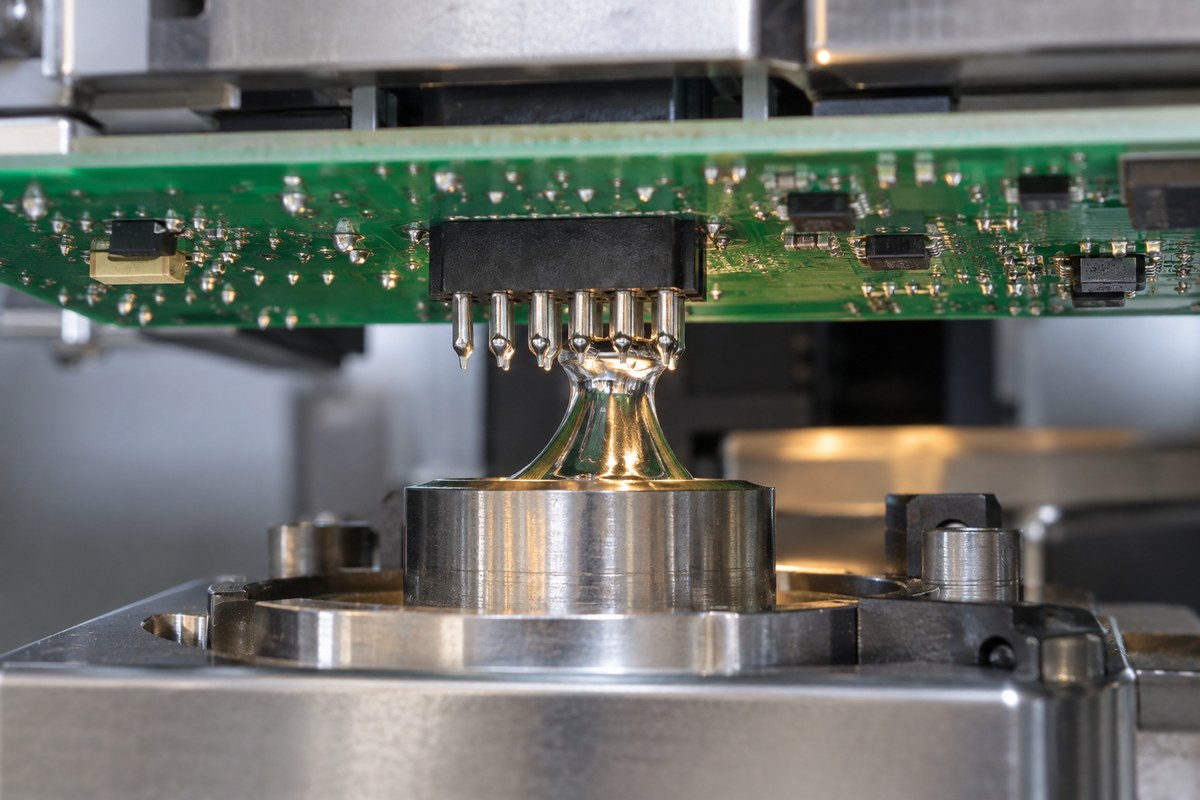
The selective soldering process creates through-hole solder joints only at programmed locations on a PCB assembly. It is commonly used after SMT reflow when connectors, relays, transformers, terminals, switches, or other plated through-hole components still need to be soldered without exposing the entire underside of the board to a full solder wave.
Its advantage is control, but localized soldering does not automatically guarantee good joints. Flux placement, preheat, nozzle condition, solder contact, travel direction, withdrawal, PCB thermal mass, and inspection must work as one connected process. A setting that produces complete barrel fill on a plane-connected power pin may overheat a nearby low-mass joint. A nozzle path that works on an open connector row may bridge pins when an adjacent component changes the solder flow.
This guide explains how each stage works, which variables change the result, and how a stable selective soldering process turns mixed SMT and through-hole assemblies into repeatable production builds.
What Is the Selective Soldering Process?
Selective soldering is an automated through-hole assembly process that delivers flux, heat, and molten solder to chosen joints instead of treating the entire PCB underside. A programmed system moves either the PCB or a small solder nozzle so that the solder fountain reaches the required pins while avoiding nearby areas.
The method is especially useful after one or both PCB sides have already passed through SMT reflow. Bottom-side resistors, capacitors, ICs, or other packages may sit close to the remaining through-hole pins. Full wave soldering could require a protective pallet or expose too much of the assembly to heat, while extensive hand soldering may add operator variation. Selective soldering in PCB assembly gives the assembler a repeatable route to the remaining joints when the layout provides sufficient access.
The process is not simply a smaller version of wave soldering. Each target receives its own controlled flux pattern and thermal history. The machine program must account for connector geometry, pin spacing, component mass, copper distribution, board thickness, solder alloy, surface finish, and the location of nearby components.
Selective Soldering Process Steps from Fluxing to Inspection
A production cycle normally follows five connected stages:
Flux application: Flux is deposited only where the selected through-hole joints need it.
Preheating: The PCB and component leads are brought to a suitable temperature so that the flux activates and the joint can accept solder.
Localized soldering: A nozzle creates a stable mini-wave and follows the programmed path beneath the required pins.
Cooling: The solder solidifies while the component and PCB remain stable.
Inspection: The finished joints are checked for wetting, barrel fill, bridging, solder balls, damage, and other agreed acceptance criteria.
These stages cannot be tuned independently. Too much flux may spread beyond the intended area or leave active residue when preheat is insufficient. Weak preheat may force a longer solder-contact time, which can increase copper dissolution and thermal exposure. An unstable solder fountain can make a correct travel path produce inconsistent results.
For this reason, the first article should use the actual PCB, components, alloy, flux, nozzle, and production program. Once the joint results are approved, the program and material combination should remain under revision control.
How Flux Application and Preheating Prepare the PCB
Flux prepares the metal surfaces for wetting. It removes light oxides from the PCB finish and component leads, then helps molten solder spread into the plated hole. Selective equipment usually applies a controlled drop, jet, or spray pattern around the target area rather than coating the complete underside.
The deposit must reach the joint without flooding nearby components. Too little flux can cause non-wetting or incomplete barrel fill. Too much flux can splash, spread under low-clearance components, create solder balls, or leave residues that have not received enough heat to become benign. Flux chemistry must also match the alloy, board finish, cleaning plan, and product reliability requirements.
Preheat then activates the flux and reduces the temperature difference between the assembly and the molten solder. This is especially important for thick PCBs, heavy-copper constructions, large connector pins, and pins tied to power or ground planes. These structures draw heat away from the barrel. Without enough preheat, solder may wet the bottom pad but fail to rise adequately through the hole.
More heat is not always the answer. Excessive preheat can exhaust the useful flux activity before solder contact, stress temperature-sensitive parts, warp the PCB, or reduce the margin for nearby low-mass joints. A stable profile prepares the most demanding joints without overheating the rest of the assembly.
How the Solder Nozzle Forms Through-Hole Joints
The nozzle pumps molten solder into a small, continuously flowing fountain. The PCB or nozzle moves until the selected pins enter the controlled solder wave. Heat transfers through the leads, pads, and plated barrels; activated flux supports wetting; and capillary action helps solder rise through the hole.
Nozzle diameter and shape must suit the accessible space and joint group. A larger nozzle can transfer more heat and process a row efficiently, but it requires more clearance. A smaller nozzle can reach isolated pins close to bottom-side SMDs, although its narrower thermal capacity may require a different speed or contact time.
Movement is part of joint formation. Approach direction, immersion depth, travel speed, dwell time, solder-flow height, and withdrawal angle affect how solder enters and leaves the joint. If the nozzle pauses too long, the PCB receives unnecessary heat. If withdrawal is poorly controlled, solder may remain between adjacent pins and create a bridge or icicle.
The nozzle also needs a clean and stable surface. Oxide buildup, contamination, uneven solder flow, or incorrect pump behavior can change the fountain even when the program remains unchanged. Routine nozzle maintenance and process checks therefore protect repeatability as directly as the stored motion program.
Which Parameters Control Selective Soldering Results?
The result comes from the combined thermal, chemical, mechanical, and geometric conditions at each joint. The most influential parameters include:
Control
If it is too low or too short
If it is too high or too long
Flux deposit
Non-wetting or poor fill
Residue, splashing, or solder balls
Preheat
Inactive flux and cold barrels
Flux exhaustion, warpage, or component stress
Solder contact
Incomplete wetting or fill
Excess heat and copper dissolution risk
Travel speed
Insufficient heat transfer
Bridging or prolonged exposure
Solder-wave height
Unstable contact
Flooding or contact with nearby areas
Board construction determines how those settings behave. Finished hole size, lead diameter, copper weight, plane connections, thermal reliefs, PCB thickness, surface finish, and component mass can make two visually similar pins need different thermal treatment.
The correct process window therefore comes from the actual assembly, not a universal temperature or speed copied from another job. When one pin is difficult, the team should identify whether the restriction comes from solderability, flux delivery, hole fit, thermal mass, nozzle access, or motion before changing the complete profile.
Selective Soldering Defects and Their Process Causes
Selective soldering defects are usually the visible result of an earlier process condition. Effective correction starts by tracing the defect back to fluxing, preheat, geometry, solder contact, movement, materials, or handling.
Review deposit volume, drying, material condition, and nozzle stability
Icicles
Slow or unstable withdrawal, excess solder contact
Review exit direction, travel speed, wave height, and lead protrusion
Pad or barrel damage
Excessive heat or repeated touch-up
Review contact time, solder temperature, rework history, and PCB condition
Increasing solder temperature can appear to improve fill, but it can also accelerate copper dissolution, shorten the usable flux window, and increase thermal stress. Likewise, adding more flux may temporarily improve wetting while creating residue or reliability concerns elsewhere.
A useful defect review compares the failed joint with a successful joint on the same assembly. Differences in plane connection, pin mass, hole fit, local clearance, nozzle direction, or flux coverage often reveal the actual cause faster than changing several machine settings at once.
Selective Soldering vs Wave Soldering Process Differences
Both methods solder plated through-hole components with molten solder, but they create very different exposure and production conditions.
Process factor
Selective soldering
Wave soldering
Solder contact
Programmed joints or groups
Most of the PCB underside
Typical fit
Mixed SMT/THT assemblies
THT-heavy, wave-compatible layouts
Main setup
Flux pattern, nozzle, path, and local profile
Conveyor profile, full wave, pallet or masking
Cycle behavior
Time grows with the programmed path
Many accessible joints solder at once
Main limitation
Nozzle access and local cycle time
Broad heat exposure and component protection
Selective soldering is often preferable when bottom-side SMDs sit near a limited number of THT locations, when a connector needs more consistency than repeated hand soldering, or when board variants change the required joint locations. Wave soldering can remain more efficient when the underside is designed for broad solder exposure and many through-hole joints must be processed in one pass.
The choice should reflect the actual board. A selective process may avoid a dedicated wave pallet and reduce touch-up, yet its programmed cycle may be slower. Wave soldering may offer higher throughput, but masking, pallet cost, heat exposure, and rework can change the total production result.
Selective Soldering Process for Mixed SMT and Through-Hole Assemblies
Consider a double-sided SMT assembly that receives a multi-pin connector, a relay, and a plane-connected power terminal after reflow. Bottom-side passives sit close to the connector pins, while the power terminal draws heat into a large copper area.
The connector row may suit a shaped nozzle that solders several pins along one controlled path. Nearby SMDs determine the available nozzle diameter and travel direction. The power terminal may need stronger preheat or a separate dwell condition because its copper connection removes heat faster than the connector pins. The relay body and leads must remain clear of the nozzle approach and withdrawal path.
This assembly should not be validated by looking only at the easiest connector pins. Inspection must include the plane-connected terminal, the connector ends where bridging may occur, and any joint close to a bottom-side package. If those locations meet the agreed criteria without excessive touch-up, the process has demonstrated control across the actual thermal and geometric range of the PCB.
If the nozzle cannot reach a pin, the solution may require a layout adjustment, different PCB assembly fixtures or panel support, another nozzle, approved hand soldering for that location, or a different overall soldering method. Programming cannot recover physical access that the assembled board does not provide.
How EBest Circuit Controls the Selective Soldering Process
For a released PCBA project, EBest Circuit reviews the board data, BOM, assembly drawing, component geometry, panel method, soldering requirements, and inspection criteria before production. This helps identify blocked joints, high-thermal-mass pins, tight connector spacing, special alloy or cleaning requirements, and locations that may need separate process treatment.
matching the PCB and assembly revisions to the approved production package;
confirming component orientation, insertion, lead condition, and accessibility;
setting flux, preheat, nozzle, path, and solder-contact conditions for the actual board;
checking ordinary joints and thermally demanding joints during the first article;
recording the approved process and controlling later changes;
inspecting finished joints against the customer’s specified workmanship criteria;
completing agreed electrical testing, traceability, and production records.
The customer remains responsible for the released circuit design, component approval, regulatory requirements, and final product validation. EBest Circuit’s role is to turn the approved PCB and PCBA data into a controlled manufacturing process and to resolve manufacturability questions before they become repeated soldering defects.
For a selective-soldering review, send the Gerber files, drill data, BOM, placement file, assembly drawing, component details, quantities, solder alloy, cleaning requirements, and inspection or testing requirements to sales@bestpcbs.com.
FAQs About the Selective Soldering Process
Is selective soldering used before or after SMT reflow?
It is commonly used after SMT reflow. The SMT components are soldered first, and the remaining through-hole connectors, terminals, relays, or other components are then processed at selected locations.
Is selective soldering the same as selective wave soldering?
Selective wave soldering is the common automated method that uses a localized mini-wave or nozzle. “Selective soldering” is the broader term and can include other localized soldering methods.
Can every through-hole component be selectively soldered?
No. The nozzle needs physical access, suitable clearance, a stable thermal path, and a workable soldering surface. Blocked pins or incompatible component geometry may require a layout change or another approved process.
What usually causes poor hole fill in selective soldering?
Common causes include insufficient preheat, high copper mass, unsuitable hole-to-lead fit, weak solderability, inadequate flux activation, or too little solder-contact time. The cause should be identified before raising temperature or dwell time.
Does selective soldering eliminate manual soldering?
It can greatly reduce manual work on accessible, repeatable joint groups. Very low-volume builds, blocked joints, wires, or exceptional component locations may still require a controlled and approved manual operation.
The best selective soldering process is not the one with the highest temperature or the longest contact time. It is the process that delivers enough flux and heat to every required joint, avoids unnecessary exposure elsewhere, and produces repeatable evidence that the complete assembly meets its approved acceptance criteria. Send your PCB files, BOM, quantities, and requirements to sales@bestpcbs.com for a PCBA manufacturing review.
For PCB layout designers, hardware engineers, and DFM reviewers, a PCB acid trap can turn a small layout detail into a narrowed trace, irregular copper edge, or open circuit after etching. The practical task is to separate deep, restricted copper pockets from harmless corners, correct the geometry, and verify the exported manufacturing data. This guide moves from the failure mechanism and common risk locations through trace, pad, and copper-pour corrections to a final Gerber or ODB++ and fabricator DFM review.
What Are Acid Traps in PCB?
A PCB acid trap is a small, re-entrant region in copper geometry where etching may be less uniform than it is on open features. A classic example is a deep, narrow wedge between two copper edges. If that shape reduces local process margin, additional lateral etching can leave a conductor thinner than intended.
The term PCB acid trap is historical. PCB fabrication may use acidic or alkaline etchants, so the important issue is not whether the chemistry contains acid. The issue is whether the final copper pattern creates a tight pocket that is difficult to image, etch, rinse, and control consistently within the selected process.
Treat an acid trap as a manufacturability pattern, not as a label for every sharp-looking corner. Signal integrity, impedance discontinuities, current density, and return-path geometry are separate checks. A feature can be electrically acceptable but difficult to etch, or easy to manufacture but unsuitable for a high-speed electrical reason.
What Causes an Acid Trap During PCB Etching?
A PCB acid trap forms when restrictive copper geometry and the etching process combine to reduce local manufacturing margin. The main contributors are:
Deep concave geometry: Two copper boundaries converge into a narrow pocket that is harder to image, expose to fresh chemistry, and reproduce than an open feature.
Lateral etching: Etching removes copper sideways under the resist as well as through the exposed copper. A fine conductor beside the pocket can therefore finish narrower than the artwork.
Process exposure: Older immersion processes were associated with retained or slowly exchanged etchant. Modern spray etching and tighter process control reduce that classic failure mode, but they do not make nearly closed pockets automatically safe.
Limited feature margin: Thick copper, long etch time, tight line and space, imaging variation, and inadequate CAM compensation can make a marginal pocket more sensitive to edge loss.
No single angle proves that an acid trap will fail. Judge the complete pocket geometry together with copper thickness, nearby feature size, layer polarity, and the selected fabricator’s process capability.
Where Do Acid Traps Commonly Appear in PCB Layout?
A PCB acid trap most often appears where copper objects meet or where automated clearances reshape a pour. These transitions deserve more attention than an isolated, open trace bend because they can hide a narrow negative-space pocket in the rendered copper.
Location
What to look for
Useful correction
Trace-to-pad entry
A thin triangular notch where a trace reaches a pad off-center or at a shallow angle
Move the entry point, align the trace, or use a controlled fillet or teardrop
T-junction or branch
A deep inside corner where a branch joins a wider conductor
Blend the junction or increase the open space around the branch
Neck-down transition
A concave wedge beside an abrupt width change near a pad or via
Lengthen the transition or move the width change away from the junction
Copper-pour boundary
A narrow bay, sliver, or nearly closed notch created by clearances and keepouts
Simplify the outline, enlarge the opening, or remove the isolated sliver
Thermal or plane cutout
A small pocket between spokes, pad clearance, and another copper edge
Adjust the thermal pattern or local clearance, then refill the pour
Inspect the final copper boundary, not only the routing centerline. Pads, teardrops, thermal rules, keepouts, and polygon priorities can change the shape after routing. Refill all pours before deciding whether any of these locations is acceptable.
Why Do Acute Trace Angles Increase Acid Trap Risk?
An acute trace angle increases acid-trap risk when it creates a deep inside wedge with a narrow opening. That geometry combines a long concave edge, restricted fluid exchange, and a conductor whose local width may be sensitive to lateral etching.
The depth and openness of the wedge matter as much as the angle. A short, open 45-degree transition may offer more margin than a long notch formed by two shallow converging edges. Copper thickness and nearby minimum-width features also change the consequence of a small edge loss.
Use the angle as a screening clue, not as an acceptance limit. Inspect the rendered copper at each DRC or CAM coordinate. Reshape a deep pocket beside a critical trace; document an open feature that remains comfortably within the fabricator’s rules.
Are 90-Degree PCB Traces Actually Acid Traps?
No. A 90-degree PCB trace is not automatically an acid trap. A direction change with ample surrounding space is different from a narrow concave pocket created by overlapping traces, a trace-to-pad junction, or a pour clearance.
Using two 45-degree segments is a common routing convention because it avoids a sharp inside corner and often produces cleaner geometry. It does not fix every acid-trap condition. Replacing a right-angle bend while leaving a narrow notch beside a pad or copper pour is only a cosmetic change.
A layout can contain no obvious 90-degree bends and still have acid-trap risk at a shallow pad entry or nearly closed plane cutout. Apply broader PCB routing angle rules to electrical and layout decisions, but judge acid-trap risk from the final copper outline and manufacturing DFM result.
How Should You Route PCB Traces to Avoid Acid Traps?
Route traces with open inside corners and transitions that do not form long, narrow wedges. The objective is to remove restricted pockets while preserving clearance, impedance intent, current capacity, and component escape routing, not to force one bend style everywhere.
Enter pads deliberately: Approach the pad near its centerline when practical. Check both sides of the junction for a triangular notch after the pad and trace shapes are combined.
Use open bends: Prefer a mitered or smoothly curved route when an acute inside angle would otherwise form. The visible result should be an open concave boundary, not merely more segments.
Separate width changes from junctions: Move a neck-down away from a pad, via, or branch when the combined transition creates a deep wedge.
Blend branches with purpose: A controlled fillet can improve a T-junction, provided it does not reduce nearby spacing or create a copper sliver.
Rerun electrical checks: After changing a controlled-impedance, high-current, differential, or timing-sensitive route, confirm that the manufacturing fix has not altered the electrical requirement.
A routing edit is complete only after the affected layer is refilled and replotted. The final copper should contain no restricted pocket and no new spacing, width, connectivity, or electrical violation.
How Should Copper Pours and Pad Connections Be Designed to Avoid Acid Traps?
Design copper pours and pad connections with simple, open boundaries that preserve the fabricator’s minimum feature and spacing margin. Review these four areas after every polygon refill:
Copper-pour boundaries: Remove narrow bays and isolated slivers, enlarge the entrance to deep notches, and eliminate long slots created by overlapping keepouts.
Polygon priorities: Check whether a higher-priority area reduces a lower-priority pour to a thin residual feature or nearly closed pocket.
Pad and via entries: Avoid off-center trace entries that leave a triangular gap beside adjacent copper. Use a controlled teardrop or fillet only when it improves the transition without violating clearance.
Thermals and high-voltage regions: Confirm that spokes, pad clearances, and added copper do not create a new concave pocket or reduce a required electrical spacing.
Accept the change only after refilling all zones and inspecting the exported positive and negative layers. The rendered manufacturing geometry, not the editable object before polygon processing, is the geometry that must pass.
How Do PCB Acid Traps Affect the Etching Process?
A PCB acid trap can reduce etching margin when a restricted pocket sits beside a feature that is already sensitive to edge loss. Etching removes copper vertically and laterally. Imaging, compensation, chemistry control, spray delivery, conveyor settings, and inspection help control that behavior, but a restricted pocket remains less forgiving than open geometry.
If the local process removes more copper than the artwork anticipated, the finished edge can recede into the protected conductor. The result may be an irregular notch or reduced trace width even when the rest of the panel is within tolerance. On negative artwork, the apparent pocket may represent clearance rather than copper, so layer polarity must be confirmed before interpreting the risk.
Review the feature against the exact copper weight, layer construction, and minimum line and space used for the build. Recheck geometry when the design moves to thicker copper, tighter spacing, or a different process. The wider PCB etching process also includes imaging, development, stripping, and inspection, all of which affect how faithfully artwork becomes finished copper.
Can PCB Acid Traps Cause Trace Necking or Open Circuits?
Yes. A PCB acid trap can contribute to trace necking and, in a severe case, an open circuit when local over-etching reaches the conductor. The consequence depends on nominal trace width, remaining copper, defect length, copper thickness, and the electrical role of the conductor.
Trace necking is a localized reduction in conductor width. It can increase resistance, reduce current-carrying margin, or create a weak point even when continuity remains. A complete open occurs when the etched region breaks the conductor. Fine traces near dense pads are more vulnerable because a small absolute edge loss consumes a larger share of their designed width.
Confirm the cause before assigning the failure to an acid trap. Misregistration, resist damage, scratches, contamination, and artwork defects can produce similar symptoms. Use the layer image, defect coordinates, available inspection or cross-section evidence, and the CAM report to connect the finished defect to the original geometry.
How Do PCB Manufacturing Capabilities Affect Acid Trap Risk?
The practical risk of a PCB acid trap depends on the margin available in the selected fabrication process. No universal minimum angle or pocket dimension guarantees the same result across different copper weights, layer densities, imaging systems, and etching lines.
Copper thickness: Thicker copper generally requires more etching and changes the relationship between vertical and lateral removal. Confirm the finished copper target and compatible minimum line and spacing.
Imaging resolution and registration: A narrow notch or sliver that is close to the imaging limit has less tolerance for artwork and process variation.
Etching equipment and control: Chemistry, spray delivery, compensation, conveyor control, and inspection affect how consistently dense and isolated features are reproduced.
Layer polarity and density: Positive and negative layers can reverse the meaning of a narrow region, while dense copper patterns interact differently from isolated features.
CAM and DFM rules: Detection names and thresholds vary. The useful output is a coordinate-specific disposition tied to the supplied stackup and copper specification.
Send any feature near a stated limit to the selected fabricator for a coordinate-specific decision. Ask whether it is acceptable as drawn, requires CAM compensation, or should be modified, then record the answer against the exact layer and coordinates.
How Should You Check a PCB Design for Acid Traps Before Manufacturing?
Check suspected acid traps in the final manufacturing data, not only in the editable PCB layout. Each step below produces an observable result tied to the file set that will actually be quoted and built.
Refill copper and run the native DRC. Resolve acute-angle, sliver, minimum-width, spacing, and unconnected-copper findings. The output should be a saved board state with no unexplained relevant violations.
Generate the actual release package. Export Gerber or ODB++ with the same layer, polarity, aperture, and scaling settings intended for the fabricator. The output should be the dated package that will be quoted and built.
Open the package in an independent viewer. Confirm layer names, polarity, alignment, scale, and copper presence. This separates source-editor display assumptions from the plotted result.
Inspect known risk locations at high zoom. Check trace-to-pad entries, T-junctions, neck-downs, thermal features, plane cutouts, and pour notches. Record the layer and coordinates of each questionable pocket.
Run a fabrication-oriented DFM analysis. Review acid-trap or acute-angle flags together with minimum feature, spacing, sliver, annular-ring, drill, and solder-mask results. Each flag should end with a correction or a documented disposition.
Request a fabricator review for borderline features. Provide the final files, stackup, finished copper requirement, minimum line and spacing, and marked coordinates. The expected output is an order-specific accept, compensate, or modify decision.
Replot after any correction. Repeat the independent viewer and DFM checks on the revised package. Only the final exported hash and file set should be released.
A clean CAD screen is not release evidence if the pour was not refilled or the exported artwork changed afterward. Keep the final file hash, DRC and DFM reports, and accepted exceptions together so later revisions can be compared with the approved manufacturing data.
FAQs About PCB Acid Traps
Acid-trap decisions depend on final copper geometry and process evidence, not on the etchant name, the presence of a teardrop, or the presence of a via alone.
Q1: What is the difference between an acid trap and a copper sliver?
A1: An acid trap describes a restricted concave geometry, while a copper sliver is a very narrow residual piece of copper. The same layout interaction can create both, but they are checked differently. Inspect the pocket that may affect etching and the remaining copper feature that may be too narrow to reproduce reliably.
Q2: Does an alkaline etching process eliminate acid traps?
A2: No. “Acid trap” is a historical term. An alkaline process may change the chemistry and control window, but tight concave geometry can still reduce process margin. Use the fabricator’s DFM rules for the actual process.
Q3: Do teardrops always prevent acid traps at pads and vias?
A3: No. A well-proportioned teardrop can smooth a trace-to-pad transition, but an oversized or poorly placed teardrop can create a new clearance or concave-geometry problem. Refill the copper and inspect both sides of the connection.
Q4: Can a via create a PCB acid trap?
A4: The via itself is not automatically an acid trap, but the surrounding copper geometry can create one. Check the trace entry, thermal spokes, pad clearance, nearby pour boundary, and any teardrop in the final layer artwork.
Q5: What should you send a manufacturer to review a suspected acid trap?
A5: Send the final Gerber or ODB++ package, stackup, finished copper requirement, minimum line and spacing, and the exact layer and coordinates. Include a marked image of the feature and any proposed correction. This gives CAM engineering enough context to return a specific manufacturability disposition.
For every uncertain feature, the useful result is a coordinate-specific accept, compensate, or modify decision based on the final release data.
Conclusion
Treat a PCB acid trap as a geometry-and-process risk, not as a simple angle violation. Correct deep or nearly closed copper pockets wherever they reduce etching margin, especially at trace-to-pad entries, branches, neck-downs, thermal clearances, and pour boundaries. A 90-degree bend with open surrounding geometry is not automatically defective; the final copper outline and the selected fabricator’s process capability determine whether it is acceptable.
Release the design only after refilling every pour, exporting the final Gerber or ODB++ package, and giving each relevant DFM flag a coordinate-specific disposition. If a borderline PCB acid trap remains, send the layer, coordinates, stackup, finished copper requirement, and marked final files to sales@bestpcbs.com. This gives CAM engineering the information needed to accept the feature, compensate it, or request a design change before fabrication.
In an IC substrate vs PCB comparison, the two may look similar because both contain patterned copper conductors, insulating materials, vias, and multiple layers. However, they perform different jobs at different levels of an electronic system. An IC substrate connects a semiconductor die to the next level of packaging or to a PCB, while the PCB connects the packaged IC to memory, power devices, connectors, sensors, and other components.
Understanding this distinction helps engineers and sourcing teams avoid treating an IC substrate as simply a smaller PCB. The differences affect materials, conductor geometry, via technology, registration, inspection, manufacturing yield, and supplier selection.
EBest Circuit supports customers with IC substrate and PCB manufacturability review, material and stackup coordination, precision fabrication, inspection, and production planning. If you are comparing the two technologies for an upcoming project, send your drawings, stackup, critical dimensions, and volume requirements to sales@bestpcbs.com for an initial manufacturing review.
What Is an IC Substrate?
An IC substrate is the interconnection platform that supports a semiconductor die and connects its dense array of terminals to larger, more widely spaced connections. It is commonly located inside an IC package, between the die and the main PCB.
The substrate performs several jobs at once:
It mechanically supports the semiconductor die.
It redistributes very fine die-level connections to a larger connection pattern.
It carries power and electrical signals between the die and the PCB.
It provides controlled electrical paths for high-speed or high-frequency signals.
It contributes to heat transfer and package reliability.
Depending on the package, the die may connect to the substrate through wire bonding or flip-chip interconnection. The substrate may then connect to the system PCB through a ball grid array or another package interface.
IC substrates can be made with organic build-up materials, BT resin systems, ceramics, or other specialized material systems. The appropriate construction depends on the package architecture, interconnection density, electrical requirements, thermal behavior, and reliability target.
An IC substrate is therefore not the chip itself and is not the main system board. It is the high-density bridge that allows a small semiconductor die to communicate with the larger electronic assembly.
Where Do IC Substrates and PCBs Fit in an Electronic System?
The easiest way to understand the distinction is to follow the electrical path from the chip to the finished product:
Semiconductor die → IC substrate → packaged IC → PCB → complete electronic system
The IC substrate works at the package level. It handles the transition from extremely small die connections to package-level terminals. The PCB works at the board and system level. It routes signals and power among the packaged IC and the rest of the electronic components.
The IC substrate focuses on one semiconductor package. Its design is closely tied to the die, package format, bump or bond-pad arrangement, and package reliability requirements.
The PCB supports the wider circuit. It connects processors, memory, power-management devices, connectors, passive components, sensors, and other packages required by the product.
This means the two technologies are usually complementary rather than competing choices. A processor may require an IC substrate inside its package and a multilayer PCB beneath that package. Removing either interconnection level would require a different package and system architecture—not a simple material substitution.
For customers, the practical implication is that the substrate and PCB cannot be specified independently when signal integrity, power delivery, thermomechanical behavior, or escape routing is critical. Their interface must be considered early enough to avoid incompatible pad geometries, stackups, assembly profiles, or reliability assumptions.
IC Substrate vs PCB: Key Differences at a Glance
The most important difference is scale. An IC substrate manages dense package-level interconnections close to the semiconductor die; a PCB manages board-level connections across the product.
Comparison
IC substrate
PCB
Primary role
Connects and supports a semiconductor die
Connects packaged components in a circuit
System position
Inside or directly beneath the IC package
Main board or functional circuit board
Interconnection density
Very high
Varies from conventional to advanced HDI
Typical conductor geometry
Finer lines, spaces, pads, and vias
Generally larger, depending on PCB technology
Material focus
Package-level electrical, thermal, and dimensional demands
Board-level electrical, mechanical, and assembly demands
Manufacturing control
Very tight registration and defect control
Broad range from standard PCB to advanced HDI control
Design dependency
Closely tied to die and package architecture
Closely tied to system circuit and component placement
These are general distinctions, not universal dimensional limits. Advanced HDI and substrate-like PCBs can use features much smaller than conventional PCBs, while different IC substrate technologies have different capabilities. The actual manufacturing boundary must be established from the proposed stackup and feature sizes.
How Do IC Substrate and PCB Structures Differ?
Both products can use multilayer constructions, but their structures are optimized for different interconnection levels.
An organic IC substrate often uses a core with fine-feature build-up layers on one or both sides. Microvias connect the build-up layers, while the routing redistributes die-side connections toward the package interface. Some advanced constructions may be coreless or use other specialized architectures.
A PCB may use plated through holes, buried vias, blind vias, stacked or staggered microvias, and sequential lamination. Its construction is selected around component escape routing, controlled impedance, power distribution, mechanical thickness, assembly, and product-level reliability.
The structural difference customers should notice is the transition in connection scale. The die-facing side of an IC substrate must accommodate a much denser terminal pattern than a typical component-facing PCB layer. That density drives finer conductors, smaller vias, tighter alignment, and more demanding inspection.
It is also important not to confuse an IC substrate with a substrate-like PCB. Substrate-like PCB technology narrows the gap between advanced HDI PCBs and package substrates by using finer board-level features. However, its role, production flow, and qualification requirements still depend on the specific product architecture. The terms should not be treated as interchangeable without reviewing the actual construction.
Before requesting a quotation, customers should identify which interface each drawing represents: die side, package side, component side, or system-board side. That one clarification prevents many incorrect capability comparisons.
What Materials Are Used in IC Substrates and PCBs?
Material selection follows the function of each product.
Organic IC substrates commonly use BT resin or ABF-based build-up materials, along with copper conductors and application-specific core materials. Ceramic substrates may use alumina, aluminum nitride, or other ceramic systems when thermal, dimensional, environmental, or electrical requirements justify them.
PCBs commonly use FR-4-class laminates, but that description covers a wide range of resin systems and glass constructions. High-speed, high-frequency, high-temperature, metal-core, flexible, and rigid-flex PCBs use different material families according to their operating requirements.
For an IC substrate, material decisions are closely tied to the package. Important factors can include dimensional stability, coefficient of thermal expansion, dielectric behavior, moisture response, warpage, copper adhesion, and compatibility with the selected package process.
For a PCB, material decisions are tied to the assembled product. The designer may prioritize controlled impedance, signal loss, thermal performance, voltage isolation, mechanical strength, soldering temperature, operating environment, and cost.
Customers should avoid selecting materials from a generic name alone. A commercially familiar resin family does not guarantee that every supplier, thickness, copper configuration, or build-up process will produce equivalent results. The fabricator needs the electrical targets, mechanical constraints, thermal conditions, reliability expectations, and approved-material requirements before confirming a practical construction.
Why Does an IC Substrate Require Greater Manufacturing Precision?
An IC substrate has to redistribute a large number of connections within a very small area. As die I/O density increases, the available routing space becomes more limited and small manufacturing variations consume a larger part of the tolerance budget.
Greater precision is normally required in several areas:
Fine lines and spaces: Dense routing demands narrower conductors and smaller separations.
Small microvias: Compact interconnections require carefully controlled via formation, metallization, and capture-pad alignment.
Layer registration: Small pads and conductors leave less room for layer-to-layer misalignment.
Dielectric thickness: Variations can affect impedance, via geometry, and overall package thickness.
Warpage: Excessive deformation can interfere with die attachment, package assembly, or board-level soldering.
Defect detection: Small opens, shorts, voids, residues, and registration errors may require higher-resolution inspection.
These controls affect both feasibility and yield. A design may look complete in CAD but still be unsuitable for stable production if its minimum features sit too close to the supplier’s process limits across a large area or high layer count.
The customer benefit of an early manufacturability review is therefore not merely getting the design “approved.” It is identifying where tolerances, via structures, pad sizes, material behavior, or inspection limits could create yield and reliability risk before those risks become embedded in tooling and production.
How Does IC Substrate Manufacturing Differ from PCB Manufacturing?
Both manufacturing flows build patterned conductors and interlayer connections, but the equipment, process windows, materials, and control levels can differ substantially.
Conventional PCB production may include laminate preparation, imaging, etching, drilling, plating, lamination, solder-mask application, surface finishing, electrical testing, and final inspection. Advanced HDI PCB production adds sequential build-up cycles, laser-drilled microvias, via filling, tighter registration, and finer imaging.
IC substrate manufacturing generally pushes these controls further toward package-level feature density. Depending on the construction, production may involve repeated build-up formation, fine-feature patterning, microvia creation, copper deposition and plating, precision lamination, surface treatment, and high-resolution inspection.
The main manufacturing differences affect the customer’s project in four ways:
Design rules: Minimum conductors, spaces, via sizes, annular structures, and registration allowances must match the specific process.
Yield sensitivity: A small feature repeated thousands of times can become a meaningful yield driver.
Tooling and inspection: Finer features may require different imaging, drilling, metrology, and defect-detection capability.
Qualification and lead time: Material approval, process validation, samples, and reliability testing may require more planning than a standard PCB order.
Customers should compare suppliers using the proposed construction—not a general statement that a factory can manufacture “fine-pitch boards.” Useful evidence includes capability matched to the required stackup, demonstrated control of the critical feature, appropriate inspection methods, and a realistic prototype-to-volume plan.
Can a PCB Replace an IC Substrate?
In most conventional package architectures, no. A standard PCB is not a direct replacement for the IC substrate because it is designed for a different interconnection level.
The substrate must accept the die-side connection pattern, redistribute those connections, satisfy package-level mechanical and electrical requirements, and provide a suitable interface to the PCB. A conventional PCB normally does not provide the necessary combination of feature density, package geometry, material behavior, and assembly compatibility.
Advanced HDI or substrate-like PCB technologies can reduce the dimensional gap in certain applications. That does not automatically make them interchangeable with a package substrate. The decision depends on:
Die or package interconnection method
Required line, space, pad, and microvia geometry
Layer count and routing density
Electrical and power-delivery targets
Package thickness and warpage limits
Thermal and coefficient-of-expansion behavior
Assembly and reliability requirements
Qualified manufacturing process
The better question is not, “Can we use a cheaper PCB instead?” It is, “Which interconnection architecture satisfies the package, board, assembly, and reliability requirements with a manufacturable process?” Answering that question requires collaboration among the package designer, PCB designer, assembly provider, and fabricator.
How Do IC Substrates and PCBs Work Together?
The IC substrate and PCB form consecutive parts of the same electrical and mechanical path.
Signals and power travel from the semiconductor die through the substrate routing, across the package-to-board interface, and into the PCB. From there, the PCB distributes them to power circuits, memory, connectors, sensors, and other devices.
Because the two products meet at the package interface, several decisions must align:
Pad and ball geometry: The PCB land pattern must match the packaged device.
Escape routing: The PCB must route away from the package without violating impedance, spacing, or layer-transition requirements.
Power delivery: Package and board power structures must work together to control voltage drop, noise, and current density.
Signal integrity: The complete channel includes structures in both the substrate and PCB.
Thermal behavior: Heat spreading, copper distribution, vias, heatsinks, and airflow belong to one thermal system.
Warpage and assembly: Substrate, package, PCB, and solder-joint behavior affect board-level assembly yield and reliability.
For customers, this is why separate optimization can create system-level problems. A substrate may meet its standalone requirements while the PCB escape routing remains impractical. A PCB may pass its own electrical checks while the complete die-to-board channel does not meet the system target.
The safest development path is to review interface assumptions early, freeze compatible mechanical and electrical definitions, and communicate every stackup or material change that could affect the other interconnection level.
FAQs About IC Substrate vs PCB
Is an IC substrate a type of PCB?
They share basic interconnection principles, but an IC substrate is a specialized package-level platform with different feature density, materials, process controls, and interfaces. Calling it simply a small PCB hides the manufacturing and reliability differences that matter to the project.
What is the main purpose of an IC substrate?
Its main purpose is to support a semiconductor die and redistribute the die’s dense connections to a larger package interface that can connect to the system PCB.
Why are IC substrates generally more difficult to manufacture?
They typically require finer conductors, smaller vias, tighter registration, greater dimensional control, more demanding surface quality, and higher-resolution inspection. Their manufacturability is also closely tied to a specific package design.
Are all IC substrates made from ceramic?
No. IC substrates may use organic material systems such as BT resin or ABF build-up materials, as well as ceramic systems. The selection depends on the package, electrical, thermal, mechanical, reliability, and production requirements.
What is the difference between an IC substrate and a substrate-like PCB?
An IC substrate normally operates inside a semiconductor package. A substrate-like PCB uses finer board-level fabrication techniques to achieve higher routing density than conventional PCBs. The exact boundary varies by construction and process, so the product role and required design rules must be reviewed rather than inferred from the name.
What information should be reviewed before IC substrate fabrication?
The review normally needs the stackup, materials, finished thickness, conductor geometry, via structure, pad definitions, tolerances, surface-finish requirements, critical electrical targets, inspection criteria, reliability requirements, quantities, and intended package or assembly process.
Should the IC substrate and PCB be sourced from the same manufacturer?
Not necessarily. What matters is whether each supplier has the appropriate process capability and whether the interface requirements are consistently controlled. Using one manufacturing partner can simplify communication, but it does not replace technical qualification for both product types.
The essential conclusion in the IC substrate vs PCB comparison is that they solve different interconnection problems and usually work together. The substrate connects the semiconductor die to the package interface; the PCB connects that packaged device to the rest of the electronic system. Understanding the boundary early helps customers choose realistic design rules, materials, inspection methods, and production plans.
EBest Circuit can review your IC substrate or PCB data for manufacturability, material availability, stackup feasibility, critical feature control, inspection planning, and prototype-to-production considerations. Send your project files and key requirements to sales@bestpcbs.com to discuss the next manufacturing step.
A PCB spark gap is a deliberate gap between exposed copper electrodes that gives ESD or another high-voltage transient a preferred place to discharge. It can divert current away from a sensitive signal or circuit, but it is not a precision clamp.
PCB spark gapdistance cannot be selected by simply dividing the ESD test voltage by 3 kV/mm. The voltage actually appearing across the electrodes, electrode geometry, altitude, contamination, solder mask, manufacturing tolerance, and discharge return all affect where the arc starts.
The practical task is to turn a first estimate into a gap that can be manufactured and tested. That means identifying the ESD entry and return, calculating a candidate range, dimensioning the finished copper, placing the diversion before the protected circuit, and releasing only the geometry that passes defined tests.
What Is a PCB Spark Gap and How Does It Work?
A PCB spark gap is an intentional air gap between two exposed copper electrodes. One electrode connects to the transient-exposed conductor; the other connects to a chosen discharge return, such as chassis or shield. When the electric field across the gap becomes high enough, the air ionizes and current jumps between the electrodes.
Gap distance sets only part of that behavior. Pointed copper concentrates the field, and the surrounding layout decides whether the resulting current follows the intended path. Because pressure, residue, geometry, polarity, and repeated arcing can shift the firing voltage, a PCB spark gap is a coarse diversion feature rather than a precision voltage clamp.
When the protected circuit needs tighter residual-voltage control, coordinate the gap with a TVS diode, GDT, or another protection stage instead of expecting the copper feature to act like a specified clamp.
What Does a PCB Spark Gap Protect Against?
A PCB spark gap is mainly used to divert ESD arriving through a known external interface. The most credible locations are connector pins, exposed contacts, cable entries, shield interfaces, and other points where the discharge can be intercepted before it crosses sensitive circuitry.
Connector-side ESD: The gap offers an early diversion point before the pulse travels along a signal or control trace.
Exposed interfaces: It can steer a discharge away from component leads, test points, and narrow internal clearances.
Cable or chassis entry: A short gap-to-chassis path can keep high-frequency current near the product boundary.
Secondary diversion: It can provide a coarse backup path when another stage limits current or residual voltage.
A bare PCB gap is not a reliable substitute for a rated high-energy surge device. It is also a poor fit when the protected node needs a narrow clamping range. An intentional firing gap does not replace required creepage, clearance, or safety insulation. Its value comes from making one discharge path preferable to the alternatives. A gap that fires into a long or sensitive return can still leave damaging voltage across the circuit.
What Electrical and Environmental Factors Affect PCB Spark Gap Distance?
Six factors determine how a first estimate becomes a testable PCB gap. Each one changes either the electrical stress, the local field, or the finished geometry. The right response is not another generic formula; it is a specific design or validation action.
Design Factor
Effect on Breakdown Voltage
Practical Consideration
Actual voltage across the gap
Sets the electrical stress that the electrodes must withstand or discharge.
Model or measure Vgap; do not substitute the generator setting.
Electrode geometry
Sharp features intensify the local electric field.
Freeze shape, orientation, and finished tip radius before comparing gaps.
Pressure and altitude
Change gas density and the pressure-distance relationship.
Do not reuse sea-level validation for a higher-altitude requirement.
Surface contamination
Can promote leakage, surface tracking, or a carbonized path.
Set cleanliness limits and inspect after repeated events.
Mask and coating
Change or redirect the exposed discharge path.
Dimension keepouts and control later coating operations.
Fabrication tolerance
Changes the actual distance and edge profile.
Measure production-intent boards and test the finished distribution.
How Do You Calculate PCB Spark Gap Distance?
Calculate a candidate gap, then prove it on finished hardware. A useful first-order estimate divides the voltage expected across the gap by an assumed air-breakdown field:
Estimated gap distance: dest = Vgap / Eassumed
For example, if the protection network is estimated to place 3 kV across the electrodes and the first pass uses 3 kV/mm, the arithmetic gives an estimated distance of 1.0 mm. That does not mean a 1.0 mm PCB gap will reliably fire at exactly 3 kV. Pointed electrodes create a nonuniform field, and the board surface introduces other possible paths.
Step 1: Establish Vgap. Characterize the ESD source, polarity, rise time, and source impedance. Then account for every element between the entry point and return. A TVS diode, GDT, series impedance, or parasitic coupling can change how much of the generator voltage appears between the spark-gap electrodes.
Step 2: Calculate the first-order distance. Apply dest = Vgap / Eassumed with the pressure, gas, field, and waveform assumptions written beside the result. Using 3 kV/mm may be acceptable for an order-of-magnitude check, but not for setting a production tolerance.
Step 3: Adjust for electrode geometry. Decide whether the candidate uses point-to-point, point-to-plane, parallel-edge, or another controlled shape. The same minimum distance does not imply the same firing voltage because each geometry creates a different field distribution.
Step 4: Build a candidate range. Apply finished-copper and mask tolerances, then place several gaps around the estimate on a coupon or prototype. For an illustrative 1.0 mm estimate, the following set tests both earlier and later firing while holding geometry, finish, and return path constant.
Candidate
Finished Gap
Purpose
A
0.8 mm
Check earlier firing
B
1.0 mm
Test the initial estimate
C
1.2 mm
Check a higher threshold
D
1.4 mm
Probe the upper test range
Measure the finished gaps before testing. Use the same electrode shape, copper weight, surface finish, solder-mask opening, and return path planned for production.
For each candidate, record whether it fires at the target level, whether the arc stays between the intended electrodes, whether another feature flashes over first, and whether repeated events change the result. This comparison turns one uncertain calculation into evidence for selecting or rejecting a production geometry.
Paschen-type relationships can refine gas-breakdown estimates when pressure, distance, gas, and electrode conditions are defined. They still do not reproduce every feature of a PCB surface. The deliverable from calculation is therefore a documented prototype range with acceptance criteria, not a guaranteed firing voltage.
Can You Simply Use 3 kV/mm for PCB Spark Gap Calculation?
Use 3 kV/mm only for a rough first estimate under stated air and field assumptions. Pointed PCB electrodes, surface paths, pressure, contamination, and fast transient behavior prevent it from predicting a guaranteed production firing voltage.
Use
Suitable?
Rough first estimate
Yes, with assumptions recorded
Final production gap
No
Safety clearance
No
Guaranteed firing voltage
No
Compliance release
No
How Does Electrode Shape Affect PCB Spark Gap Distance?
Electrode shape determines where the electric field concentrates, how tightly the arc location is controlled, and how sensitive the feature is to fabrication. Two gaps that both measure 0.5 mm can behave differently when one uses sharp opposing points and the other uses broad parallel edges.
Geometry
Field Behavior
Manufacturing Sensitivity
When to Use
Point to point
Strong concentration at both tips
High; tip radius and erosion cause larger shifts
When a controlled arc location matters
Point to plane
Concentration at one tip
High at the pointed electrode
When a preferred initiation side is useful
Parallel edges
Field distributed along the edges
Moderate; edge width and etch still matter
When reproducibility matters more than one fixed arc point
Interdigitated teeth
Multiple local high-field regions
High; more edges collect process and contamination variation
Only when multiple initiation sites have been intentionally evaluated
Select the geometry according to the required arc control and production stability, not just the smallest CAD distance. Sharp tips can favor a specific discharge point, but their finished radius is highly process-sensitive. Broader edges can be easier to reproduce, while allowing the arc to move. Repeated events can erode either shape and carbonize the board surface, so the first firing result does not establish long-term behavior.
How Should You Design a PCB Trace Spark Gap?
Design the spark gap as a controlled layout object, not as two trace ends that happen to be close. The fabrication data must make six physical requirements unambiguous.
Finished copper-to-copper gap: Set the nominal value and allowed finished tolerance from the tested candidate range.
Electrode tip geometry: Use tips or edges the PCB process can reproduce, then dimension their finished relationship.
Copper width: Give the transient path enough width and keep the neck behind each electrode short.
Mask opening: Expose the active copper after allowing for solder-mask registration tolerance.
Surrounding clearance: Keep pads, vias, planes, board edges, and component terminals from becoming an easier arc path.
Discharge connection: Dimension enough copper behind the return electrode to avoid a narrow or inductive bottleneck.
Wrong layout logic: connector, then a long signal trace, then the spark gap. In this order, the ESD current has already traveled beside or through the protected circuit before reaching the diversion point.
Better layout logic: connector, then the spark gap, then the protected circuit. The gap intercepts the entry before the signal branches into the board, while its return electrode connects through a short, wide path to the chosen transient return.
Document the feature in the schematic, footprint, fabrication drawing, and assembly notes. This prevents automated copper cleanup, mask editing, or conformal coating from changing its function.
Where Should You Place a PCB Spark Gap for ESD Protection?
Place the spark gap as close as practical to the ESD entry point and before the transient reaches sensitive circuitry. Make the placement decision by answering three layout questions.
Where does ESD enter? Identify the connector pin, exposed metal, cable, switch, test point, or user-accessible contact that receives the event. Put the gap before that conductor reaches its first sensitive branch.
Where should the current leave? Select chassis, shield, or a dedicated transient return and verify continuity through connector shells, fasteners, seams, and return bonds. The gap should not discharge into an ordinary signal-ground path simply because it is nearby.
What must stay outside the path? Keep clocks, reset lines, analog inputs, high-impedance nodes, communication traces, and their reference copper away from both the arc site and the return route. Inspect every layer for coupling into planes or traces below the feature.
Texas Instruments shows a 0.2 mm connector-side pattern in one battery-gauge application. That is useful evidence that etched gaps can be integrated near an interface, but 0.2 mm is not a universal PCB spark gap distance. The referenced circuit, environment, geometry, current return, and validation target must be comparable before any pattern is reused.
How Do PCB Manufacturing Tolerances Affect the Final Gap Distance?
The CAD gap is not the finished gap, and minimum trace/space capability does not guarantee repeatable spark-gap geometry. Etching changes the copper edges, an ideal point becomes a finished radius, and mask registration changes the exposed path. Convert those effects into explicit order requirements.
The fabrication drawing should state:
Nominal finished gap measured copper to copper, not only the CAD distance.
Allowed gap tolerance and the sampling or inspection method used to verify it.
Electrode geometry including the dimensioned tip or facing-edge profile.
Solder-mask opening with registration allowance around the active electrodes.
Copper weight used by the tested design because etching behavior changes with copper thickness.
Surface finish matching the electrically validated samples.
Conformal-coating keepout when the design depends on an exposed-air path.
Inspection requirement covering the finished gap, electrode profile, mask opening, and keepout.
Intentional-feature note so CAM review does not close, widen, or remove the unusual spacing.
For a manufacturing review, also provide the Gerber or ODB++ files and the target ESD or functional requirement. Ask the PCB manufacturer to confirm which dimensions can be controlled and measured as finished features. Then measure boards from production-intent panels before electrical testing. Release criteria should cover the resulting distribution, not one ideal coupon.
When Should You Combine a PCB Spark Gap With a TVS Diode or GDT?
Add a TVS diode or GDT when the PCB spark gap alone cannot hold the protected node within its voltage limit, absorb the required energy, or survive the expected number of events. Device choice starts with clamping accuracy, event energy, repetition, capacitance, and the maximum voltage the downstream circuit can tolerate.
The roles are distinct: the PCB spark gap provides coarse diversion, a TVS controls residual voltage more tightly, a GDT handles higher-energy diversion, and series impedance coordinates current between stages. One possible sequence places the connector first, followed by a PCB spark gap or GDT, series impedance, a TVS diode, and the protected IC. Verify the turn-on order, protected-node voltage, current sharing, component stress, and function after repeated events.
How Should You Validate a PCB Spark Gap Before Production?
Validate the finished board under a defined equipment-level test and inspect both electrical behavior and physical damage. IEC 61000-4-2 establishes a common basis for equipment ESD immunity testing, but the applicable severity and acceptance criteria still come from the product requirement.
Step 1: Measure. Record the finished gap, tip profile, mask opening, finish, and residue condition on production-intent samples.
Step 2: Test. Apply the defined ESD method, levels, polarities, points, operating states, and pulse count at relevant environmental corners.
Step 3: Observe the discharge path. Confirm that the intended gap fires before a component lead, connector edge, enclosure seam, or unrelated copper feature.
Step 4: Monitor the circuit. Capture protected-node voltage and record resets, corruption, latch-up, communication errors, damage, and recovery.
Step 5: Inspect repeated-event damage. Look for tip erosion, carbon tracks, coating damage, firing drift, and accumulated functional degradation before making the release decision.
A candidate passes only when:
the intended gap fires before another PCB or enclosure feature;
no unintended flashover occurs;
the protected circuit remains functional during and after the required test;
the measured transient at the protected node stays within the circuit’s accepted limit;
repeated pulses do not create progressive carbon tracking or unacceptable firing drift; and
production-intent boards show consistent behavior across the allowed finished-gap range.
Keep the release record tied to board revision, fabrication lot, measured geometry, firmware state, test setup, and acceptance limits. A visible spark alone is not a pass.
What Common PCB Spark Gap Design Mistakes Should You Avoid?
Most failures come from treating the gap as an isolated CAD dimension instead of a manufactured discharge path. These six checks catch the highest-value errors before compliance testing.
Copying a published gap value: The same distance can fire differently when electrode shape, finish, altitude, return path, or test setup changes.
Using the ESD generator setting as Vgap: Other protection elements and coupling paths can change the voltage that appears across the electrodes.
Putting the gap after a long signal trace: ESD current has already entered the circuit before it reaches the diversion point.
Leaving an easier unintended path: A nearby pad, via, plane, connector shell, component lead, or board edge may flash over first.
Using a poor return path: Shared return impedance can raise the local reference voltage even when the intended gap fires.
Treating the gap as safety clearance: A spark gap is intended to break down, while safety spacing is intended to prevent breakdown.
FAQs About PCB Spark Gaps
Q1: Can a PCB spark gap protect USB, CAN, or RS-485 interfaces?
A1: It can provide coarse diversion at the connector, but it is usually only one part of the protection network. A suitable TVS diode may still be needed to control residual voltage. For high-speed interfaces, verify the protection network’s capacitance, signal integrity, protected-node voltage, and recovery after repeated ESD events.
Q2: Why does a PCB spark gap sometimes fail to fire during ESD testing?
A2: Check the finished gap first, then confirm that enough transient voltage actually appears across the electrodes. Rounded tips, solder mask, coating, pressure, surface condition, or another protection device can change the discharge path. Measure the waveform and inspect the exposed geometry before reducing the distance.
Q3: Can you simulate a PCB spark gap before building the PCB?
A3: Field simulation can compare electrode shapes and electric-field concentration, while circuit simulation can examine voltage division and protection coordination. Neither method fully predicts statistical air breakdown, contamination, tip erosion, or finished-board tolerance. Use simulation to narrow the candidate range, then establish release values on measured hardware.
Q4: Does copper weight affect PCB spark gap performance?
A4: Yes. Copper thickness affects etching and can change the finished tip profile, edge shape, and copper-to-copper distance. If copper weight changes between prototype and production, ask the manufacturer to confirm the new finished geometry and repeat the relevant electrical tests before treating the earlier result as valid.
Q5: Should a PCB spark gap use ENIG, HASL, or another surface finish?
A5: No single finish is automatically best for every spark gap. The finish can alter the exposed surface, edge profile, oxidation behavior, and local repeatability. Keep the production finish consistent with the tested samples, or requalify the gap when a process change alters the finished electrodes.
Q6: Can a PCB spark gap be placed on an inner PCB layer?
A6: Not when the intended mechanism is an exposed-air discharge. An inner-layer gap is surrounded by solid dielectric and behaves differently from an external exposed structure. Keep a conventional PCB spark gap on an exposed surface unless a separately engineered internal structure has its own electrical and reliability validation.
Q7: Can multiple PCB spark gaps be used on one connector?
A7: Yes, when several exposed conductors can receive ESD independently. Each gap needs a controlled return path and enough separation from adjacent signals, metalwork, and other gaps. Test the complete connector arrangement because one firing channel can couple voltage or current into its neighbors.
Q8: Does PCB thickness affect spark gap behavior?
A8: Board thickness usually has less direct influence than electrode spacing and shape, but it can matter near board edges, internal planes, chassis structures, or mounting hardware. Review the three-dimensional path whenever a discharge could travel around an edge or couple into nearby conductive layers.
Q9: Should a PCB spark gap appear in the schematic and BOM?
A9: Document it clearly even though it normally does not require a purchased BOM item. A custom schematic symbol, controlled footprint, and fabrication note can identify the two nets, finished geometry, mask opening, and test requirement. This reduces the chance of removal during layout or CAM review.
Q10: When should you remove a PCB spark gap instead of optimizing it?
A10: Choose another protection method when firing variation, repeated-arcing damage, or manufacturing distribution cannot meet the circuit requirement. A TVS diode, GDT, enclosure-level diversion, or redesigned current path may provide a more reliable result. The release decision should follow measured protected-node performance rather than attachment to one layout concept.
Conclusion
A PCB spark gap cannot be selected from voltage alone. Identify the ESD entry and discharge return, estimate a candidate distance, choose reproducible electrodes, convert them into finished-board dimensions, and place the diversion before the protected circuit. Coordinate a TVS diode or GDT when the residual voltage or event energy requires it. Release the design only after production-intent boards meet the defined electrical and physical acceptance criteria.
For a manufacturability review from EBest Circuit, send the Gerber or ODB++ files, gap dimensions and tolerance, copper weight, surface finish, solder-mask and coating requirements, plus the target ESD test to sales@bestpcbs.com. Those inputs allow the team to review whether the intended geometry can be built and inspected before quotation or production.
This website uses cookies to enhance your experience, remember your preferences, and help us understand how visitors use our site. You can accept all cookies, reject non-essential cookies, or manage your settings.
This website uses cookies to improve your experience while you navigate through the website. Out of these cookies, the cookies that are categorized as necessary are stored on your browser as they are essential for the working of basic functionalities of the website. We also use third-party cookies that help us analyze and understand how you use this website. These cookies will be stored in your browser only with your consent. You also have the option to opt-out of these cookies. But opting out of some of these cookies may have an effect on your browsing experience.
Necessary cookies are absolutely essential for the website to function properly. These cookies ensure basic functionalities and security features of the website, anonymously.
Cookie
Duration
Description
cookielawinfo-checkbox-analytics
11 months
This cookie is set by GDPR Cookie Consent plugin. The cookie is used to store the user consent for the cookies in the category "Analytics".
cookielawinfo-checkbox-functional
11 months
The cookie is set by GDPR cookie consent to record the user consent for the cookies in the category "Functional".
cookielawinfo-checkbox-necessary
11 months
This cookie is set by GDPR Cookie Consent plugin. The cookies is used to store the user consent for the cookies in the category "Necessary".
cookielawinfo-checkbox-others
11 months
This cookie is set by GDPR Cookie Consent plugin. The cookie is used to store the user consent for the cookies in the category "Other.
cookielawinfo-checkbox-performance
11 months
This cookie is set by GDPR Cookie Consent plugin. The cookie is used to store the user consent for the cookies in the category "Performance".
viewed_cookie_policy
11 months
The cookie is set by the GDPR Cookie Consent plugin and is used to store whether or not user has consented to the use of cookies. It does not store any personal data.
Functional cookies help to perform certain functionalities like sharing the content of the website on social media platforms, collect feedbacks, and other third-party features.
Performance cookies are used to understand and analyze the key performance indexes of the website which helps in delivering a better user experience for the visitors.
Analytical cookies are used to understand how visitors interact with the website. These cookies help provide information on metrics the number of visitors, bounce rate, traffic source, etc.
Advertisement cookies are used to provide visitors with relevant ads and marketing campaigns. These cookies track visitors across websites and collect information to provide customized ads.