

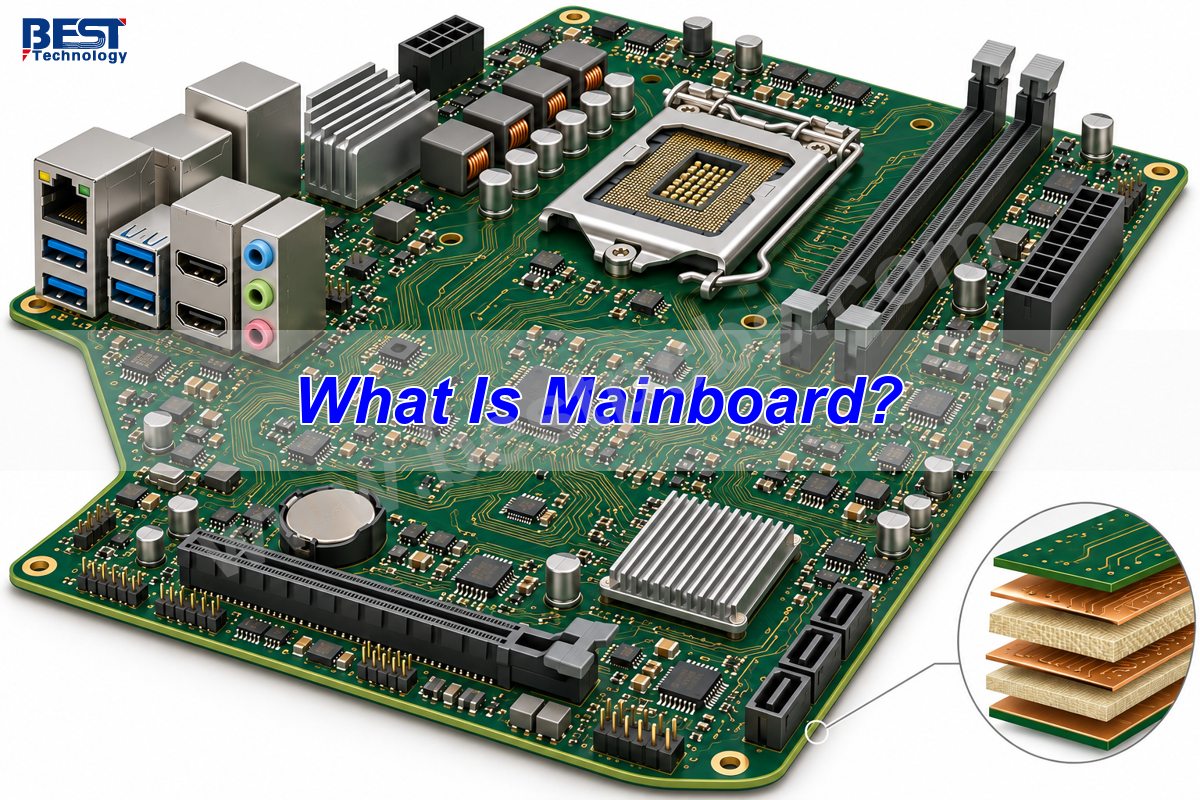
A mainboard is the primary assembled circuit board in an electronic device. It connects the processor, memory, power circuits and interfaces so the device can operate as one system. In a desktop computer, it is usually called a motherboard; in a laptop, phone or television, it may be called a system board, logic board or main board. These names describe its role, not one standard shape or circuit design.
The important distinction is between the board’s function and its construction: a mainboard is a working electronic assembly, while a bare PCB is the unpopulated platform on which that assembly is built.
Key Takeaways
- A mainboard is the device’s primary circuit assembly, not the processor itself.
- Mainboard and motherboard usually mean the same thing in a computer, but device-specific board names vary.
- Desktop boards often use removable processors and memory; laptop and phone boards frequently integrate these parts through soldered packages.
- ATX and Mini-ITX describe desktop form factors, not universal mainboard sizes.
- A matching outline is not enough for replacement: board revision, firmware, connectors and component compatibility also matter.
- Custom mainboards require both PCB manufacturing checks and assembly-level functional validation.
Is a Mainboard the Same as a Motherboard?
Yes—in a computer, mainboard and motherboard normally identify the same primary system board. Neither term specifies a particular processor, memory generation or board size.
| Term | Meaning | Common context |
|---|---|---|
| Mainboard / motherboard | Primary populated system board | Computers and electronic equipment |
| System board / logic board | Alternative names for the primary board | Service manuals and integrated devices |
| Bare PCB | Fabricated board without installed components | PCB manufacturing |
| Daughterboard | Secondary board connected to the mainboard | Port modules, expansion and auxiliary functions |
| Backplane | Board interconnecting plug-in modules | Modular equipment and rack systems |
A device may contain several PCBs but only one primary control board. A separate charging-port board or display interface board does not become the mainboard simply because it is essential to operation. For a closer look at PC-specific hardware, see our guide to motherboard components and PCB structure.
At EBest Circuit, we support custom PCB fabrication and PCB assembly. For a mainboard project, we review the released board design, component packages and assembly requirements together; manufacturing a bare board and delivering a functioning system assembly are different scopes of work.
What Does a Mainboard Do?
A mainboard provides electrical connections, power distribution and control interfaces between the device’s major components.
- Data paths: copper traces carry signals between processors, memory, storage and peripheral interfaces.
- Power delivery: regulators convert incoming power into the rails required by individual circuits, while capacitors help control local voltage variation.
- Startup support: reset, clock and firmware circuits establish the conditions needed for the processor to begin executing code.
- External connections: connectors link the board to displays, sensors, networks, controls and other equipment.
The processor executes instructions; the mainboard makes its connections and supporting circuits available. A board does not independently increase processor speed, and a connector’s presence alone does not guarantee a particular interface speed.
What Parts Are on a Mainboard?
A mainboard typically contains a processor or processor connection, memory connections, power regulation, clock circuitry, firmware storage and I/O interfaces.
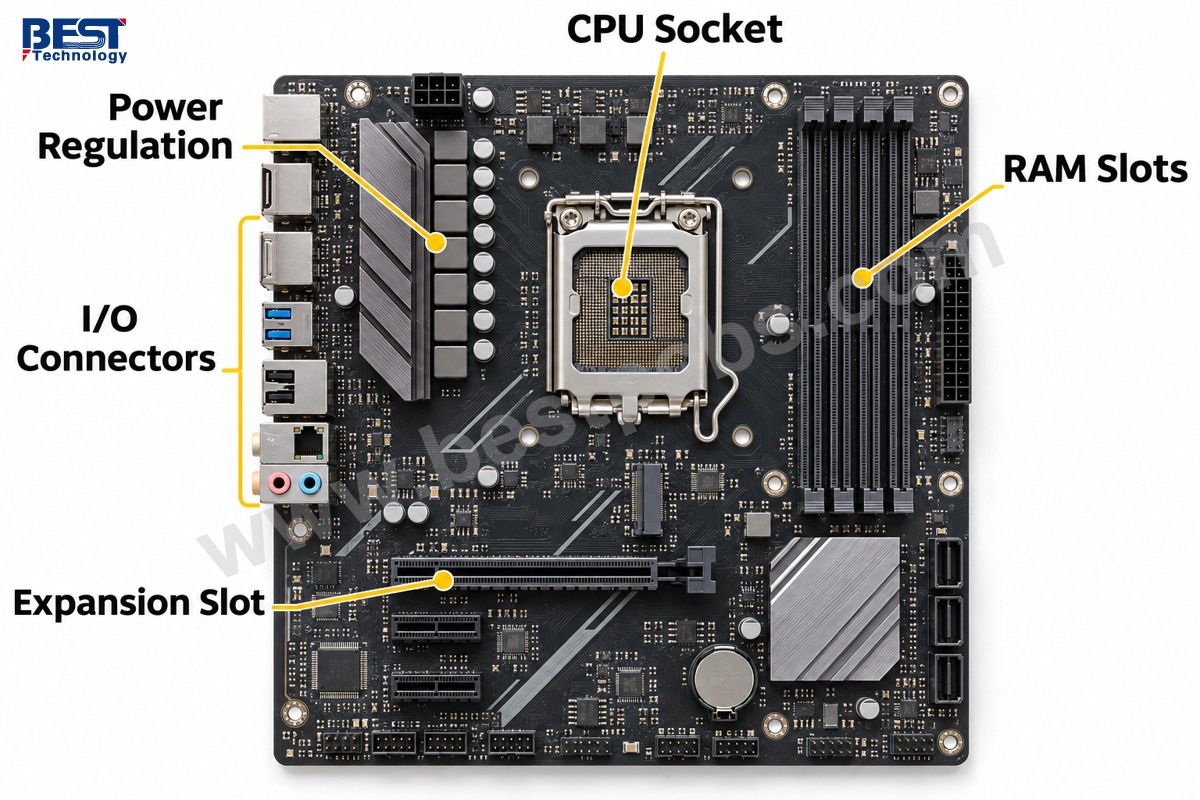
On a desktop board, these features are relatively easy to recognize: a CPU socket, long DIMM memory slots, PCIe expansion slots and rear-panel connectors. Storage may connect through M.2 sockets or cable connectors. The voltage-regulator area commonly includes inductors, switching devices and capacitors near the processor.
A phone mainboard looks different. Its processor, memory and storage often use soldered packages, while metal shields cover sensitive sections. Smaller board-to-board or flex connectors replace many of the large sockets found on a desktop. Not every mainboard has a separate chipset, removable battery or expansion slot.
How Do Mainboards Differ Between Devices?
Mainboards differ primarily in integration, mechanical layout, power requirements and the interfaces needed by the host device.
| Device | Typical board arrangement | Main design priority |
|---|---|---|
| Desktop PC | CPU socket, memory slots, expansion connectors | Compatibility and expansion |
| Laptop | Model-specific outline, compact connectors, often soldered processor | Space, battery operation and cooling |
| Smartphone | Dense IC assembly, shielded sections, flex connections | Integration and RF coexistence |
| Television | Video processing and panel/network interfaces | Display compatibility and signal processing |
| Industrial controller | Processor, field interfaces and application-specific I/O | Required operating environment and dependable interfaces |
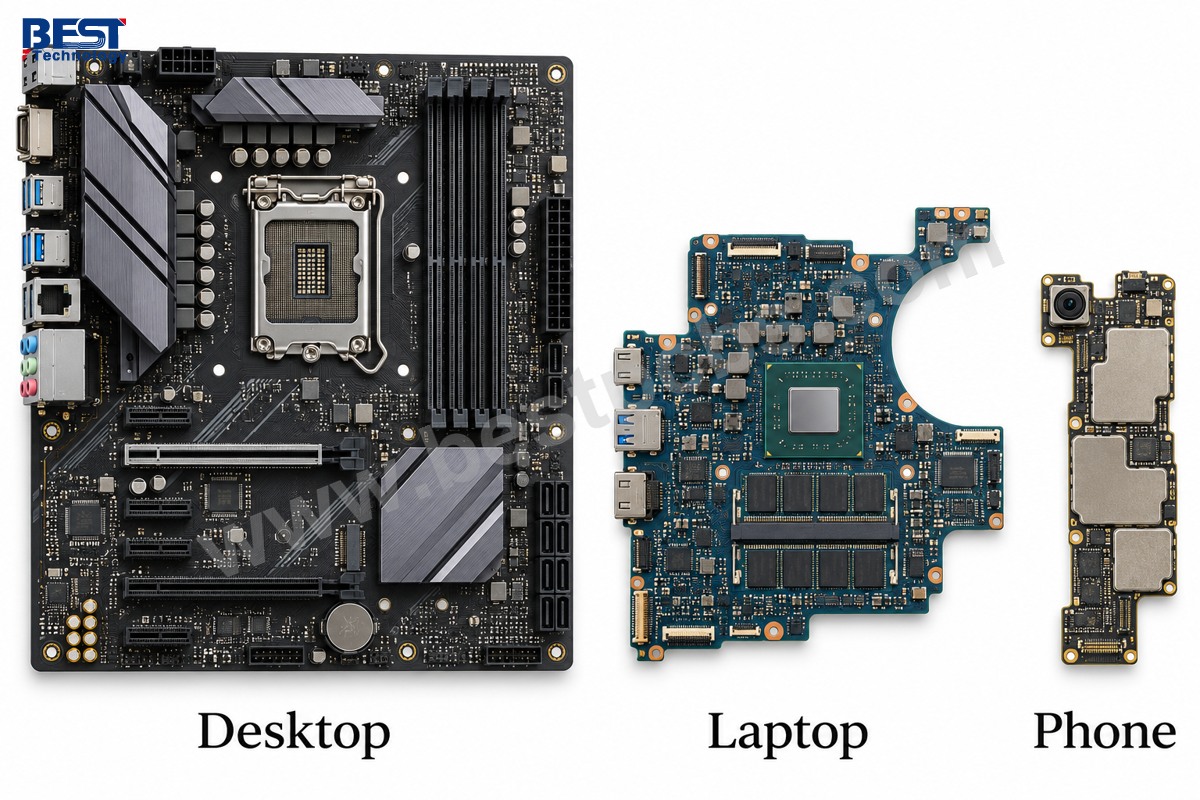
In a television, the mainboard usually handles video, audio and system control; the power supply and panel timing functions may reside on separate boards. In industrial equipment, an I/O board can remain separate from the processor board to support different sensor or actuator connections. The product architecture determines the division.
Which Types of Motherboard Have Standard Sizes?
Common desktop types of motherboard include ATX, microATX and Mini-ITX; laptop, phone and many industrial mainboards instead use product-specific outlines.
| Desktop form factor | Nominal board dimensions |
|---|---|
| ATX | 305 × 244 mm |
| microATX | Up to 244 × 244 mm |
| Mini-ITX | 170 × 170 mm |
These dimensions describe board format, not electrical compatibility. An ATX board can still require a different CPU socket, memory type or firmware than another ATX board. Check the exact manufacturer’s drawing for mounting positions, connector locations and component clearances rather than choosing by the size label alone.
What Is the Motherboard Made Of?
A typical motherboard uses a multilayer glass-reinforced epoxy PCB with patterned copper conductors, plated connections, solder mask and installed electronic components.
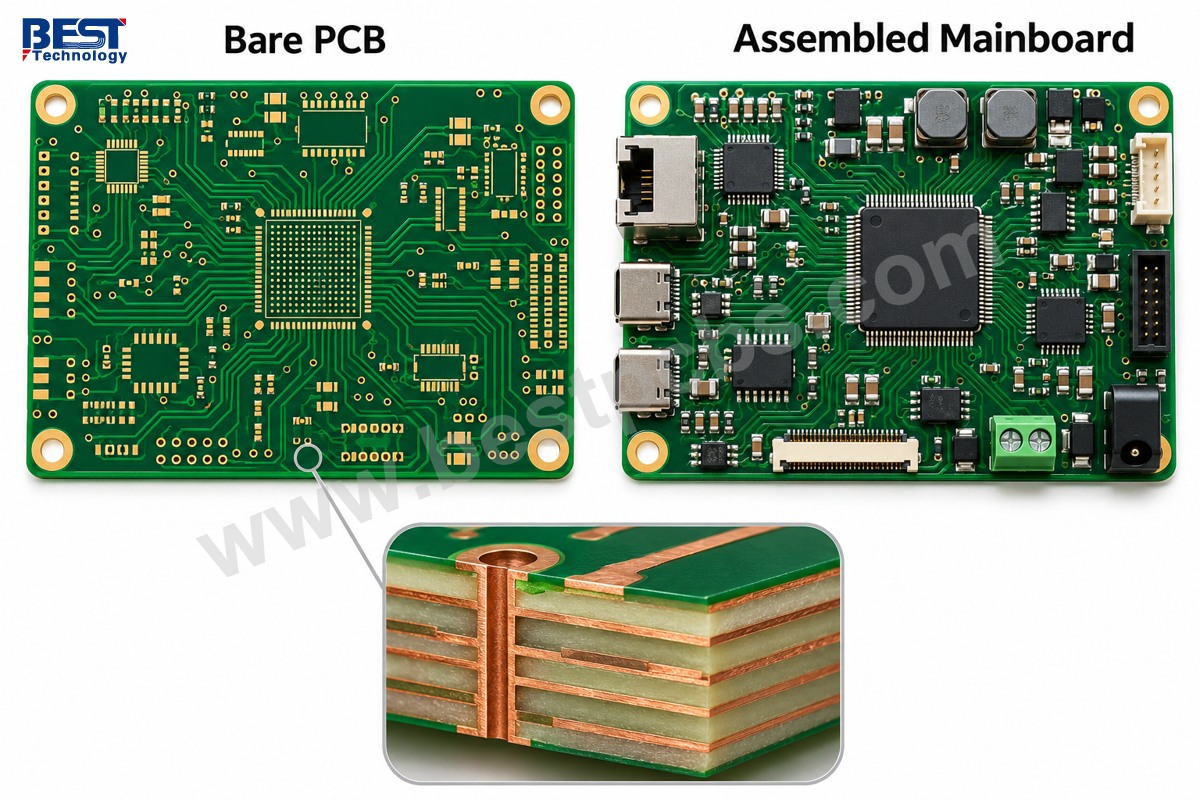
FR-4 is a common material family, but it is not one fixed laminate grade. High-speed interfaces may require a lower-loss material selected against the actual signal path. Copper layers carry signals and distribute power; dielectric layers separate conductors; plated vias connect selected layers. The green surface is usually solder mask, not the bulk insulating material.
There is no universal mainboard layer count or thickness. For a custom board, stackup selection must account for routing density, reference planes, impedance, mechanical fit and fabrication capability. Our PCB design support connects these board-level decisions with manufacturing review.
Where Is Motherboard Located?
In a desktop PC, the motherboard is mounted inside the case on chassis standoffs; in a laptop or phone, it sits inside the enclosure beneath covers, shields or cooling parts.
The desktop CPU cooler, memory modules and expansion cards attach to it, making it the largest central connection board in many conventional PCs. A laptop board may occupy only part of the base because the battery, speakers and cooling system take the remaining space. Device service documentation is the safest identification reference; do not open a powered device or a television power-supply area to locate a board.
What Is My Mainboard Model?
On a Windows PC, open System Information with msinfo32 and read BaseBoard Manufacturer, BaseBoard Product and BaseBoard Version under System Summary.
- Press Windows + R, enter
msinfo32and press Enter. - Record the BaseBoard fields and the system manufacturer/model.
- Compare those details with the device’s official support documentation.
- For replacement, confirm the physical part number and revision through the service manual or a qualified technician.
Firmware-provided fields can be generic or incomplete. A laptop’s marketing model is not always its mainboard part number, and one product family may contain several board revisions. Phone and TV replacements additionally need the correct regional variant, display compatibility and firmware configuration. A visually similar board is not sufficient evidence of interchangeability.
What Manufacturing Checks Matter for a Custom Mainboard?
A custom mainboard needs checks for PCB connectivity, component assembly and actual system operation; none of those stages replaces the others.
- Before fabrication: confirm connector orientation, mounting holes, stackup, controlled-impedance requirements, solder-mask clearances and access for testing.
- During assembly: check component identity and polarity, stencil deposits and placement; inspect solder joints using methods appropriate to the packages. Hidden BGA joints may require X-ray inspection.
- During validation: measure specified power rails, verify startup and firmware loading, and exercise required interfaces with defined pass/fail limits.
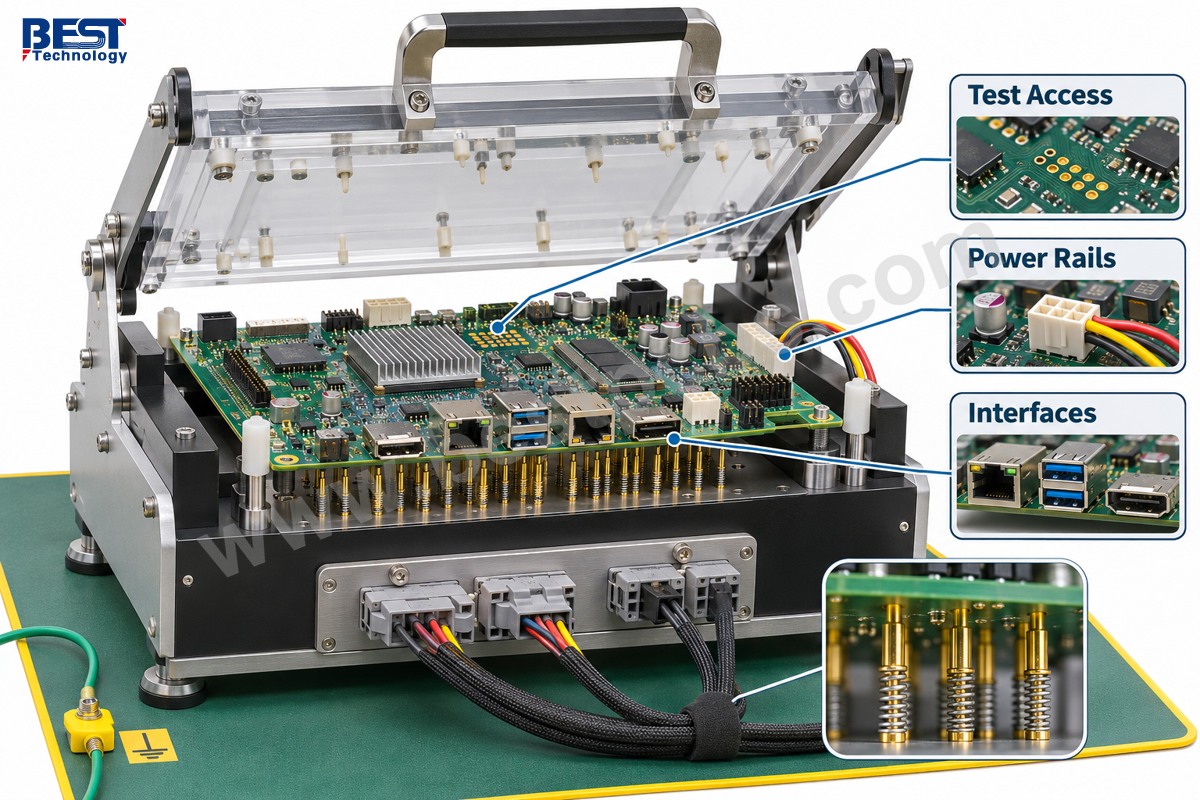
A PCB electrical test can detect opens and shorts in the fabricated interconnect, but it cannot establish that an assembled board boots or communicates correctly. Likewise, a successful boot does not prove every interface works. At EBest Circuit, we align the manufacturing review and agreed inspection scope with the customer’s assembly and test requirements rather than treating a populated board as a finished, validated product by default.
FAQs About Mainboards
Is a mainboard a CPU?
No. The CPU is the processor; the mainboard is the circuit assembly that connects it to memory, power and interfaces. The processor may be socketed or soldered.
Can a mainboard be replaced without changing every component?
Sometimes. Desktop parts may be reusable when the socket, memory, firmware and power connections match. Highly integrated laptop and phone boards require device-specific compatibility checks.
Does a black screen prove the mainboard has failed?
No. A display, cable, power supply, memory fault or firmware issue can produce similar symptoms. Diagnosis must isolate the fault before replacing the board.
What is mainboard firmware?
It is low-level software stored for the board’s startup and hardware-control functions. PCs commonly use UEFI firmware; embedded devices can use different bootloaders and firmware architectures.
Is every mainboard a single-board computer?
No. A single-board computer integrates the core computing functions on one board. A desktop mainboard commonly still requires separately installed memory, storage and other parts to form a usable system.
From Mainboard Design to a Working Assembly
A mainboard is defined by its central system role, not by one shape, layer count or processor family. For a custom product, the useful next step is to connect the mechanical layout, circuit design and validation plan before production begins.
If you are developing a custom mainboard, contact our engineering team at sales@bestpcbs.com to discuss PCB fabrication, assembly and the inspection or functional testing your project requires.