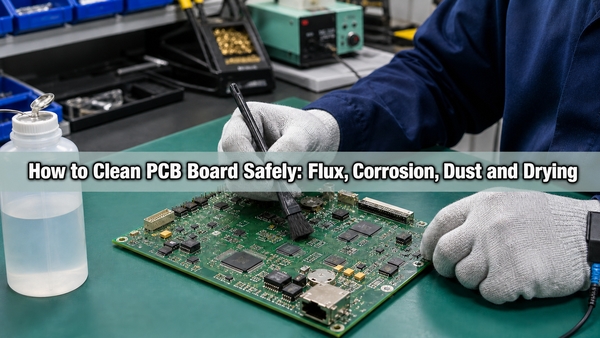
Learning how to clean PCB board safely starts with identifying the contamination. Loose dust, solder flux, oil, liquid residue and corrosion products do not respond to the same cleaning method. Before applying any liquid, disconnect every power source, discharge stored energy, establish ESD control and confirm that the solvent will not damage component bodies, labels, connectors, adhesives or conformal coating.
What Contaminants Are Found on a PCB Board?
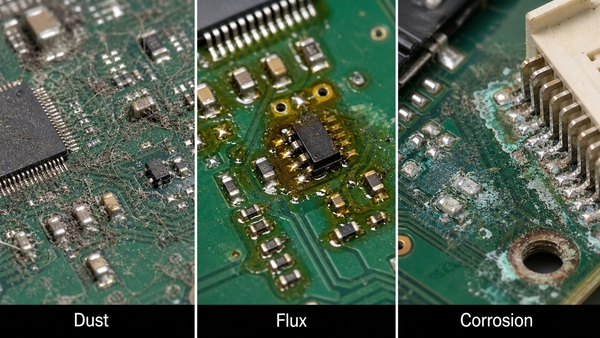
PCB contamination can be grouped by how it behaves during cleaning and how it affects the assembly. The visible color alone is not enough to select a chemical. A white film may be dried flux, cleaner residue, minerals from water or corrosion salts, and each requires a different response.
- Loose particles: dust, fibers, metal fragments and solder balls can obstruct connectors, reduce creepage distance or create intermittent shorts.
- Flux residue: rosin, no-clean and water-soluble fluxes contain different activators and binders. The cleaning chemistry must match the flux family.
- Oils and nonionic soils: fingerprints, lubricants and process oils may interfere with inspection, coating adhesion or electrical contacts.
- Ionic contamination: salts, perspiration, process chemicals and poorly rinsed cleaning agents can absorb moisture and contribute to leakage, corrosion or electrochemical migration.
- Liquid spills: beverages, coolant, electrolyte and cleaning fluids can leave conductive or corrosive deposits after the liquid evaporates.
- Corrosion products: green, blue, white or dark deposits may indicate chemical attack on copper, tin, nickel, component leads or plated contacts.
Cleaning can remove contamination, but it cannot restore copper that has been etched away, a lifted pad, a cracked via or a corroded component termination. Damaged conductors and components require inspection and repair after the residue is removed.
What Should You Check Before Cleaning a PCB Board?
Start by isolating the board. Unplug mains power, remove batteries and disconnect external supplies. Large capacitors and power assemblies may retain hazardous energy, so verify the discharge state with the correct instrument rather than assuming the board is safe.
Then inspect the assembly documentation and component construction. Microphones, pressure sensors, speakers, unsealed relays, displays, trimmers, switches, connectors and some electromechanical parts may trap liquid or have manufacturer-specific restrictions. Solvents can soften acrylic, polycarbonate, markings, tapes, adhesives and conformal coatings. If the board is coated, determine whether the goal is surface cleaning or intentional coating removal; those are different processes.
Use an ESD-safe workstation for sensitive electronics. Avoid ordinary household vacuums and brushes that can generate static. Photograph the board before cleaning, especially around corrosion, discolored joints and damaged parts, because cleaning may remove evidence needed for failure analysis.
Which PCB Cleaning Method Matches Each Contaminant?
The selection logic is simple: remove dry debris with a controlled dry method, dissolve chemical residue with a compatible cleaner, rinse dissolved contamination away when required, and dry every liquid-trapping area before power is restored.
| Contaminant | Suitable Starting Method | Main Limitation |
|---|---|---|
| Loose dust and fibers | ESD-safe soft brush, controlled clean air or electronics-safe vacuum | High air pressure can damage parts or drive debris under packages |
| Rosin or no-clean flux | Flux-compatible solvent, often high-purity IPA for small manual areas | IPA does not dissolve every modern flux formulation |
| Water-soluble flux | Validated aqueous process with deionized-water rinse | Residue must be fully rinsed and the assembly thoroughly dried |
| Oil and grease | Electronics-grade solvent verified against plastics and coatings | A dissolved film must be lifted or rinsed away, not spread across the board |
| Salt or sugary liquid residue | Controlled aqueous cleaning and deionized-water rinse when components allow | Spot wiping may leave conductive residue under components |
| Localized corrosion deposit | Gentle removal under magnification followed by compatible cleaning and inspection | Cleaning does not repair lost metal or internal component damage |
When the contaminant is unknown, test the cleaner on a noncritical area or a representative sample. Do not mix cleaning chemicals unless the process supplier explicitly permits it.
What Can I Use to Clean a PCB?
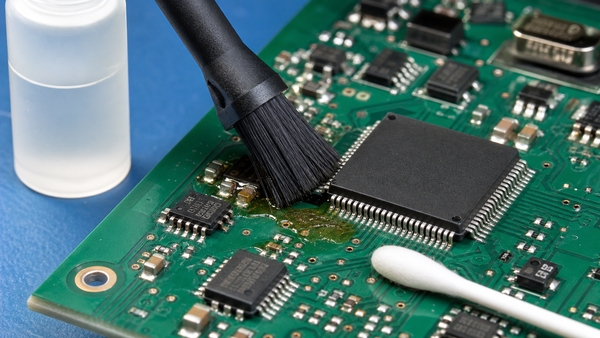
A practical manual cleaning kit contains an ESD-safe soft brush, lint-free wipes, foam or polyester swabs, clean containers, controlled low-pressure air and an electronics-grade cleaner. High-purity isopropyl alcohol is useful for many small-area jobs, but the correct product is the one that dissolves the actual residue without attacking the assembly.
Use fresh cleaner for the final pass. A dirty brush or reused solvent can redistribute dissolved flux and leave a pale film. Swabs are useful around individual joints and contacts, but cotton fibers can snag on sharp leads. For larger areas, a brush-and-rinse technique usually removes dissolved residue more effectively than repeatedly wiping with a saturated swab.
PCB cleaner sprays and flux removers should have technical data describing residue, evaporation rate, plastics compatibility and intended soils. A generic label such as “contact cleaner” is not sufficient evidence that the product is safe for the entire assembled board.
How to Clean PCB Board Step by Step?
- Make the assembly safe. Remove all energy sources, discharge capacitors and work in a ventilated, ESD-controlled area.
- Inspect and classify the contamination. Record its location, color, texture and likely source. Check whether the board has conformal coating or liquid-sensitive parts.
- Remove loose debris first. Use a soft ESD-safe brush, controlled air or an electronics-safe vacuum. Keep loosened particles from entering connectors and shields.
- Apply a compatible cleaner. Wet the brush or swab rather than flooding an unqualified assembly. Allow enough contact time for the residue to soften.
- Agitate gently. Brush in short controlled strokes around leads and solder joints. Do not scrape traces or force a tool beneath fine-pitch packages.
- Lift or rinse away dissolved soil. Blot with a lint-free material or use a validated rinse. Simply allowing dirty solvent to evaporate can redeposit contamination.
- Repeat with clean materials. Continue until the cleaner no longer picks up residue and the surface is free of visible film.
- Dry the board completely. Drain liquid from connectors, shielded areas and package gaps. Use clean dry air and a controlled drying process compatible with the components.
- Inspect and test. Check for corrosion damage, lifted pads, loose parts and residue before reconnecting power. Perform electrical or functional testing appropriate to the assembly.
How to Clean PCB Board with Isopropyl Alcohol?
Use electronics-grade IPA, commonly 90% or higher, for localized flux, oil and fingerprint removal when the materials are compatible. Lower-concentration rubbing alcohol contains more water and may include additives, so it evaporates more slowly and is less predictable for electronics work.
Disconnect power and provide ventilation because IPA is flammable. Apply a small amount to an ESD-safe brush or low-lint swab, agitate the residue, then lift the dissolved material with a clean wipe or a fresh-solvent rinse. Replace the swab or clean the brush once it becomes visibly contaminated.
Do not assume IPA is safe for every component. It may craze certain plastics, remove printed markings, weaken adhesives or affect coatings. It also performs poorly against some water-soluble and highly polymerized flux residues. Check the component and cleaning-agent data before treating the full board.
How to Clean Flux Off a PCB After Soldering?
Identify the flux type before choosing a process. Water-soluble organic-acid flux normally requires an aqueous wash and thorough rinse. Rosin and no-clean residues may need a matched solvent or saponifier. “No-clean” describes the residue left under a qualified process; it does not mean the residue can always remain beneath conformal coating or in a high-impedance circuit.
Clean soon after soldering or rework because heat-aged residue can become harder to dissolve. Brush the cleaner around the joint, remove the dissolved film and use fresh cleaner for the final pass. Inspect beneath leads and around component bodies where flux can collect. The detailed guide to cleaning flux off PCB covers flux-specific methods and common residue problems.
How Do You Remove Dust from a PCB?
Hold the powered-off board so loosened dust can leave the assembly instead of settling elsewhere. Start with a soft ESD-safe brush. Use short bursts of clean, dry, low-pressure air for spaces beneath connectors and large components, keeping the nozzle far enough away to avoid mechanical damage.
Compressed-air cans can discharge cold propellant when tilted, while plant air may contain oil or water if filtration is inadequate. Ordinary vacuums can generate static and pull on small components. If vacuum cleaning is necessary, use equipment designed for electronics with ESD control and suitable suction.
Dust combined with oil or moisture becomes an adherent film and cannot be removed reliably by air alone. In that case, move to a compatible wet-cleaning process after loose particles are removed.
How Do You Clean Corrosion from a Circuit Board?
First stop the contamination source, such as a leaking battery, electrolyte, moisture path or chemical spill. Remove loose corrosion products under magnification with a soft brush and collect the debris. Apply a cleaner selected for the known residue and board materials, then rinse or lift the dissolved material so it is not left between conductors.
Do not aggressively scrape plated pads or component leads. Once the surface is clean, inspect copper width, via barrels, solder joints, connector plating and component terminations. Measure continuity where metal loss is suspected. Severe corrosion may extend beneath solder mask or inside a component, so a visually improved surface does not prove the circuit is reliable.
For deeper fault isolation, see the existing BestPCBs article on how to clean circuit board corrosion.
How Do You Clean Circuit Board Contacts and Connectors?
Confirm the contact plating and connector construction before using a chemical. Apply a small amount of electronics-grade contact cleaner or compatible IPA to a lint-free swab, wipe in the normal contact direction and remove loosened contamination with a clean swab. Avoid flooding unsealed connectors, switches and relays.
Abrasive erasers, files and sandpaper can remove thin gold or tin plating and expose a corrosion-prone base metal. Oils and general-purpose lubricants may change contact resistance or attract dust. If a contact is pitted, worn through or mechanically loose, replacement is more reliable than repeated cleaning.
Can You Clean a PCB with Water?
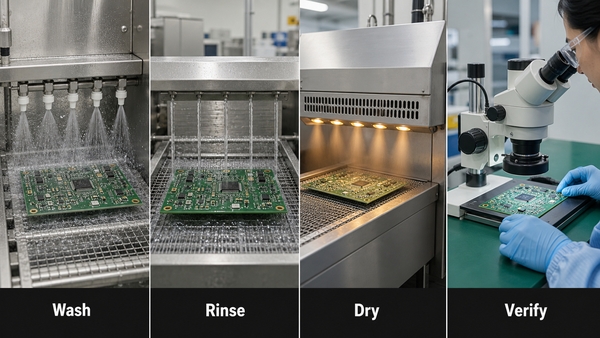
Water can be used only when the flux, components and complete cleaning process are designed for aqueous cleaning. Electronics manufacturers commonly use deionized water with controlled chemistry to remove water-soluble flux. The assembly is then rinsed with high-quality DI water and dried in a validated process.
Tap water is unsuitable because dissolved minerals and ions can remain after evaporation. Casual immersion is also unsafe for batteries, displays, microphones, speakers, unsealed transformers, relays, switches and liquid-trapping connectors. If an assembled board was exposed to a conductive spill, a properly controlled aqueous wash may be necessary, but it must be followed by complete rinsing, drying and inspection.
Is It Safe to Use WD-40, Vinegar, or Household Cleaners on a PCB?
Do not use standard WD-40 as a general PCB cleaner. Its lubricating film can attract dust, interfere with coating or contact behavior and complicate later repair. A product specifically formulated and documented as an electronics contact cleaner is a different material and still requires compatibility review.
Vinegar is acidic. It may dissolve some alkaline corrosion deposits, but it can also attack metals and must be fully neutralized or rinsed. It is not a universal circuit-board cleaner. Household glass cleaners, dish detergents and multipurpose sprays may contain water, salts, fragrance, surfactants or ammonia that leave residue or damage materials.
Acetone, paint thinner and strong alkaline cleaners can attack solder mask, plastics, labels and adhesives. Use a cleaner with documented electronics compatibility instead of choosing a chemical only because it dissolves visible dirt.
How Should a PCB Be Dried After Cleaning?
Drain the board in more than one orientation so liquid can leave connectors, shield cans, vias and package gaps. Blow with clean, dry, low-pressure air, then allow sufficient time or use controlled warm-air drying within the lowest temperature limit of the assembly. Do not aim an uncontrolled household hair dryer at the board; heat, static and airborne contamination are difficult to control.
Drying time cannot be reduced to one universal number. It depends on the cleaner, board size, component spacing, connector geometry, humidity, air movement and temperature. A surface that feels dry may still contain liquid beneath a BGA, shield or connector. Critical assemblies should use a documented drying cycle and moisture verification rather than a visual guess.
How Are PCBs Cleaned in Manufacturing?
Production cleaning is selected from the flux chemistry, board density, component restrictions, cleanliness limit and throughput. Common processes include manual solvent cleaning for localized rework, spray-in-air or batch aqueous cleaning, semi-aqueous cleaning, vapor-phase solvent cleaning and carefully qualified ultrasonic systems.
| Process | Typical Use | Control Point |
|---|---|---|
| Manual solvent cleaning | Localized repair and low-volume assemblies | Operator method, solvent loading and residue removal |
| Aqueous spray cleaning | Water-soluble flux and compatible assemblies | Chemistry concentration, wash temperature, impingement, rinse quality and drying |
| Semi-aqueous cleaning | Heavy organic residue requiring solvent action and water rinse | Material compatibility and complete rinse |
| Vapor cleaning | Qualified solvent-removable soils and complex geometry | Solvent selection, emissions controls and component compatibility |
| Ultrasonic cleaning | Selected robust assemblies with difficult access | Frequency, power, fixture, chemistry and restrictions for sensitive components |
Ultrasonic cleaning is not automatically safe for every assembled PCB. Crystals, MEMS devices, wire bonds, microphones and mechanically sensitive parts may have restrictions. The process must be qualified on the actual assembly rather than chosen only because it reaches under components.
EBest Circuit (Best Technology) supports PCB assembly with process planning, inspection and testing appropriate to the assembly design. Cleaning requirements should be defined before production when the product uses water-soluble flux, conformal coating, high-impedance circuits or reliability-sensitive applications.
How Do You Verify That a PCB Is Clean?
Start with magnified visual inspection under repeatable lighting. Look for glossy or white films, trapped fibers, residue around leads, corrosion, displaced components and incomplete drying. UV inspection can reveal some fluorescent flux residues, but not all contamination fluoresces.
For controlled manufacturing, visual appearance is only one criterion. Resistivity of solvent extract testing provides a broad ionic-contamination screen. Ion chromatography identifies and measures specific ionic species. Surface insulation resistance testing evaluates leakage behavior under temperature, humidity and electrical bias. Process coupons can help demonstrate that a cleaning process remains stable.
Finish with the electrical tests appropriate to the board: continuity, insulation resistance, in-circuit test or functional test. A clean-looking board can still contain an open circuit, a short, a damaged component or residue hidden under a package.
FAQ About Cleaning PCB Boards
Is it safe to clean PCB with alcohol?
High-purity electronics-grade IPA is safe for many PCB surfaces when power is removed and the materials are compatible. Check plastics, coatings, labels and liquid-sensitive components before full-board use.
What liquid is used to clean PCB boards?
Common choices include electronics-grade IPA, flux-specific solvents and controlled aqueous chemistry with DI-water rinsing. The correct liquid depends on the contaminant and assembly materials.
How do you clean a circuit board without alcohol?
Use a dry ESD-safe brush or controlled air for loose dust. For chemical residue, select a documented non-IPA electronics cleaner or a qualified aqueous process rather than substituting an unverified household chemical.
Can I use a PCB cleaner spray?
Yes, if its technical data confirms suitability for the residue and compatibility with plastics, coatings and components. Control overspray and remove the dissolved soil instead of allowing it to dry elsewhere.
Can I clean a PCB with vinegar?
Vinegar is not suitable for general PCB cleaning. It may be used only in a controlled, localized corrosion treatment with full understanding of the residue and a complete follow-up rinse.
Can I use an ultrasonic PCB cleaning machine?
Only after the complete assembly is qualified for the chemistry, frequency, power and exposure. Sensitive mechanical, acoustic and MEMS components may be damaged.
Conclusion
The safest way to learn how to clean PCB board is to match the method to the contaminant. Remove dry debris without generating static, use compatible chemistry for flux or oil, reserve water for validated aqueous processes, dry trapped areas completely and verify both cleanliness and electrical function.
For PCB fabrication or PCBA process support, contact EBest Circuit (Best Technology) at sales@bestpcbs.com.