PCB manufacturing PCB manufacturing
Home > Blog

Silkscreen on PCB

What is Silkscreen on PCB? Silkscreen PCB Material & Symbols
Friday, May 8th, 2026

What Is Silkscreen on PCB?

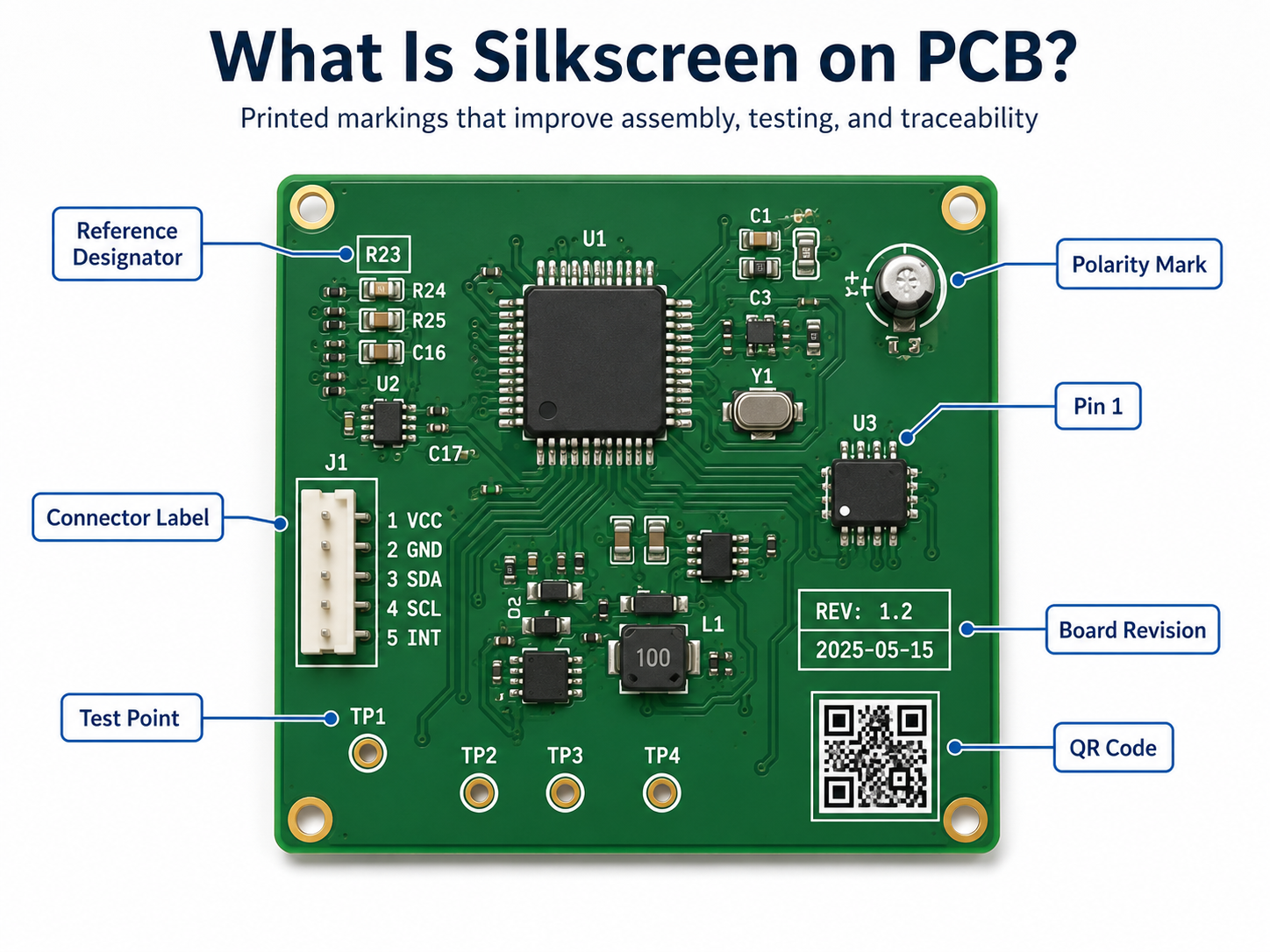
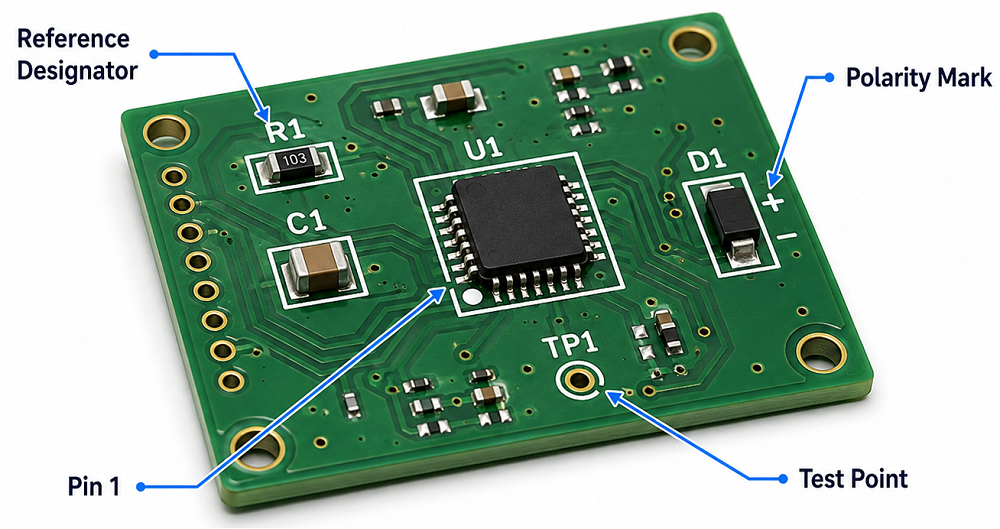
Silkscreen on PCB is the printed marking layer used to show component names, polarity marks, Pin 1 indicators, test points, logos, warning labels, QR codes, and board revision information. It helps engineers, assemblers, inspectors, and repair technicians understand the PCB faster.

This layer is also called the PCB legend layer or component marking layer. It does not carry current, but it plays a practical role in assembly accuracy, testing efficiency, repair work, and product traceability.
What is Silkscreen on PCB? Silkscreen PCB Material & Symbols

Why Is Silkscreen Important on a PCB?

PCB silkscreen is important because it turns a bare circuit board into a readable engineering document. Without silkscreen, the board may still work electrically, but assembly, inspection, testing, and repair become slower.

Clear markings help identify resistors, capacitors, ICs, connectors, test points, power input, signal direction, and safety warnings. In production, a clean silkscreen can reduce orientation mistakes, shorten debugging time, and improve communication between PCB design, fabrication, and assembly teams.

What Is Silkscreen PCB Material?

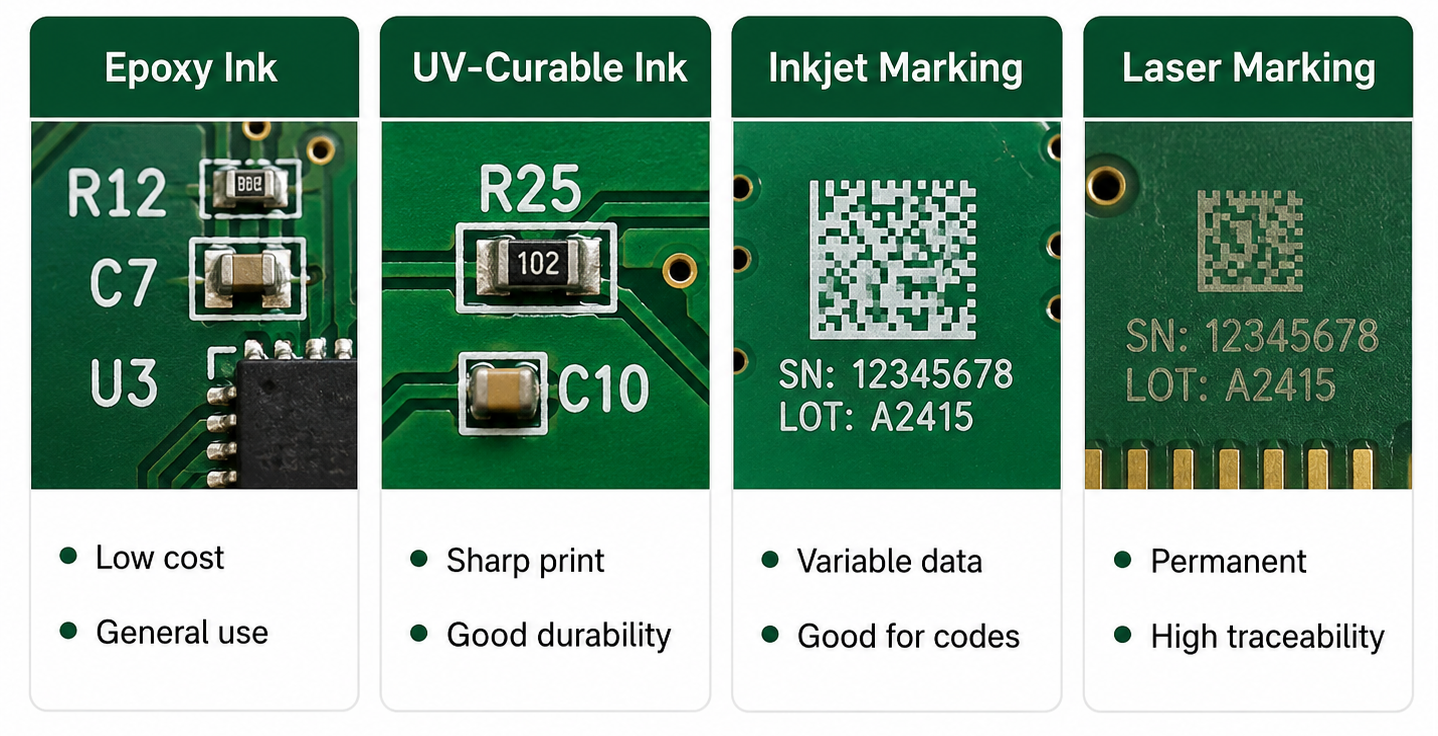
Silkscreen PCB material usually refers to the ink or marking medium used to print text, symbols, and graphics on the PCB surface. The most common material is non-conductive epoxy ink or UV-curable ink. These materials are selected because they can bond to solder mask, resist normal handling, and remain readable after PCB fabrication.

In standard PCB manufacturing, silkscreen material must be compatible with solder mask color, curing temperature, surface finish, cleaning process, and assembly environment. For more demanding products, such as industrial electronics, automotive modules, medical PCBs, or outdoor devices, the marking material should also offer better resistance to abrasion, chemicals, humidity, and temperature changes.

What Are the Common Types of Silkscreen PCB Material?

Different silkscreen PCB material options are used depending on cost, readability, board density, and traceability requirements. Standard epoxy ink is common for most FR4 PCBs. UV-curable ink is used when faster curing and sharper printing are needed. Laser marking is often selected for QR codes, serial numbers, and durable traceability marks.
What Are the Common Types of Silkscreen PCB Material?

For general PCB projects, standard white epoxy or UV ink is enough. For small text, QR codes, high-density boards, or products requiring long-term traceability, higher-resolution printing or laser marking may be a better choice.

How Does Silkscreen PCB Material Affect Readability and Durability?

Silkscreen PCB material affects how sharp, visible, and durable the printed markings are. A good material should keep letters clear after curing, cleaning, soldering, handling, and final assembly.

If the ink spreads too much, small characters may look blurry. If the ink adhesion is weak, markings may fade or scratch off. If the color contrast is poor, technicians may struggle to read the board during inspection or repair.

For example, white silkscreen on green solder mask is easy to read. Black silkscreen on white solder mask also gives strong contrast. But low-contrast combinations, such as gray text on black solder mask, may look stylish while reducing practical readability.

What Are Silkscreen PCB Symbols?

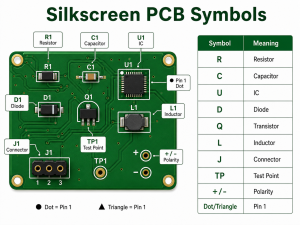
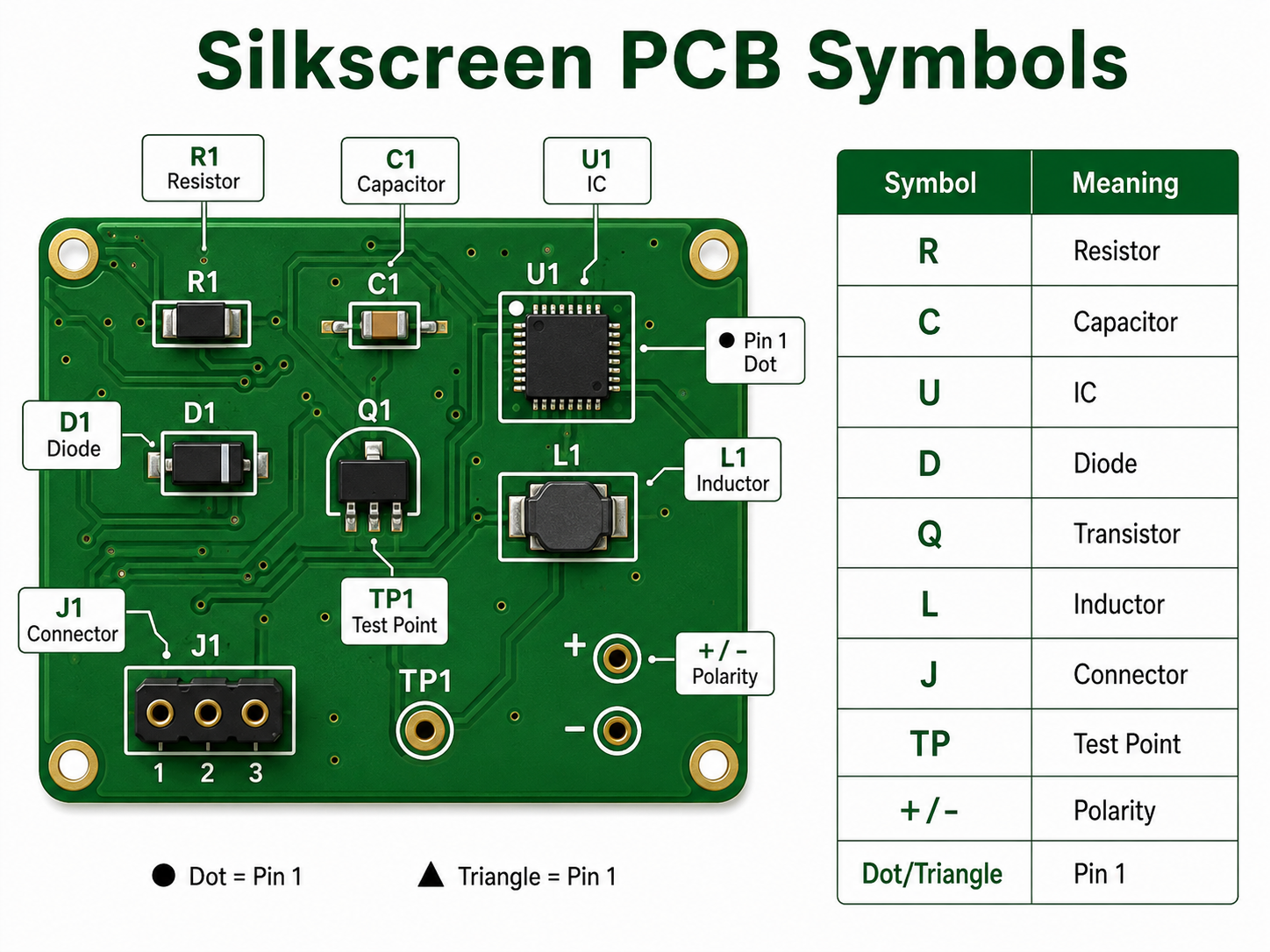
Silkscreen PCB symbols are printed marks used to identify components, polarity, Pin 1 direction, test points, connectors, warning areas, and functional zones on a circuit board. These symbols help users understand the board without opening the schematic every time.

Common silkscreen PCB symbols include “+” and “-” for polarity, dots or triangles for Pin 1, diode bars for cathode direction, TP labels for test points, and reference designators such as R, C, U, D, J, L, Q, and F.

What Do Common Silkscreen PCB Symbols Mean?
What Do Common Silkscreen PCB Symbols Mean?
Silkscreen PCB SymbolMeaningExample
RResistorR1, R25
CCapacitorC3, C18
U / ICIntegrated circuitU1, IC2
DDiode or LEDD5, LED1
QTransistor or MOSFETQ2, Q10
LInductorL1, L4
J / CNConnectorJ1, CN3
FFuseF1
TPTest pointTP1, TP_GND
SWSwitchSW1
+ / –PolarityCapacitor, battery, LED
Dot / triangle / “1”Pin 1 indicatorIC or connector orientation
GNDGroundGround test point
VIN / VOUTPower input/outputPower connector marking
HVHigh voltage warningPower supply board

These silkscreen PCB symbols are small, but they carry important information. A missing polarity mark or unclear Pin 1 indicator can cause assembly errors, especially on LED boards, power supplies, sensor modules, and control boards.

How Do Silkscreen PCB Symbols Help Assembly?

Silkscreen PCB symbols help assembly teams place and inspect components correctly. They show where each component belongs, which direction it should face, and how connectors or test points should be used.

For SMT assembly, symbols such as Pin 1 dots, diode direction marks, and capacitor polarity marks are very useful during first article inspection. For through-hole assembly, connector names, switch labels, and power marks help manual operators avoid wrong insertion.

In PCBA production, clear symbols can support:

  • Faster visual inspection
  • Lower risk of component orientation errors
  • Easier connector installation
  • Better manual soldering guidance
  • Faster functional testing
  • Easier repair and troubleshooting

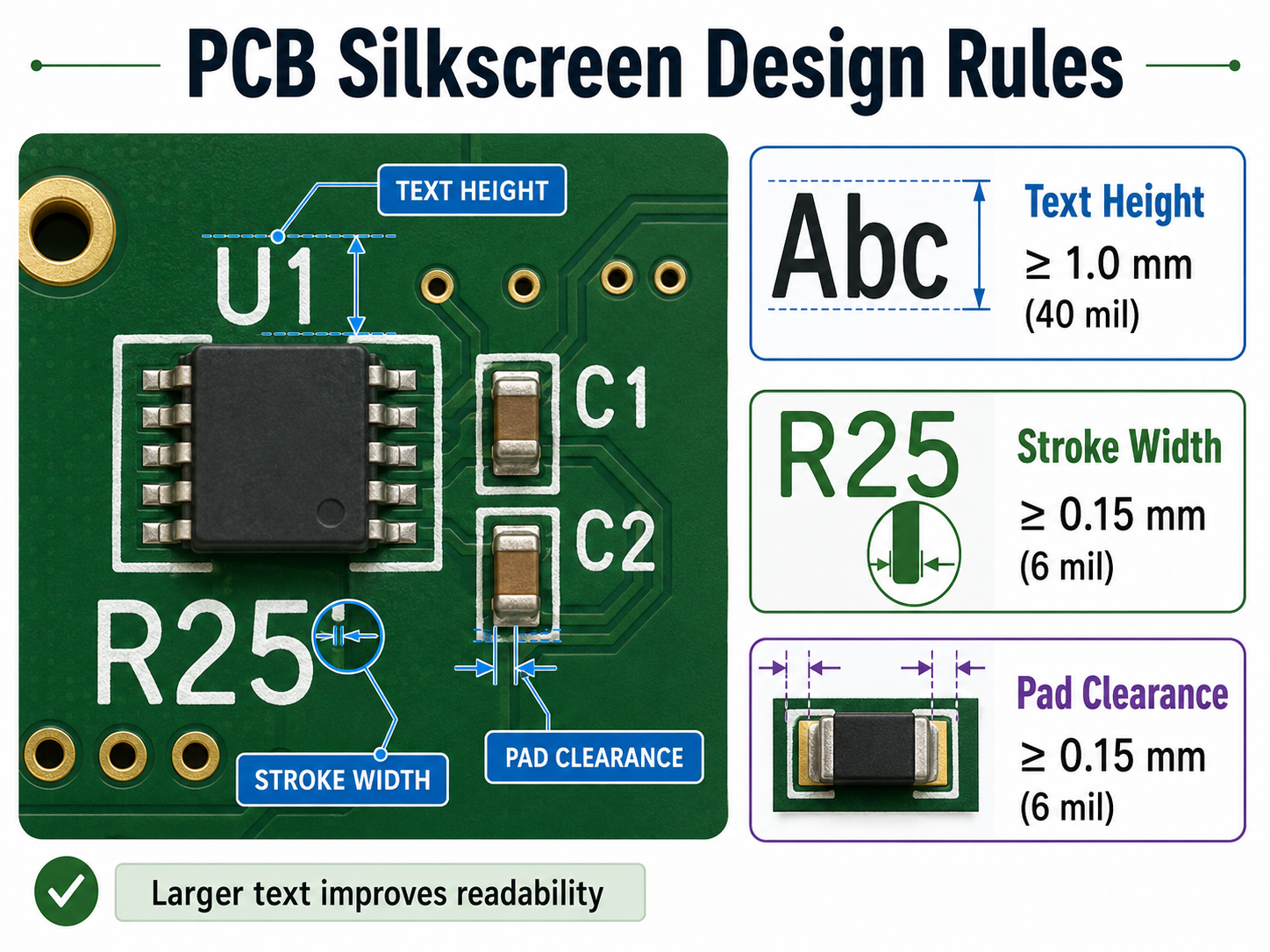
What Are the Design Rules for Silkscreen on PCB?

Silkscreen on PCB should be designed with enough character size, stroke width, and clearance from pads. The markings must remain readable after fabrication and assembly.

Design ItemRecommended Value
Text height≥1.0 mm / 40 mil
Stroke width≥0.15 mm / 6 mil
Clearance to pads≥0.15 mm / 6 mil
Clearance to exposed copper≥0.15 mm / 6 mil
Hollow font height≥1.5 mm / 60 mil
QR code sizeConfirm with supplier
Bottom-side textMirrored correctly

If the board is very dense, do not force every component label onto the PCB. Keep important markings first: Pin 1, polarity, test points, connector names, warning labels, and revision number.

Can Silkscreen Be Printed Over Pads or Vias?

Silkscreen should not be printed over solder pads, exposed copper, gold fingers, test points, or solderable vias. If silkscreen overlaps these areas, the PCB manufacturer may remove part of the text during CAM processing.

This is why some letters disappear after fabrication. The original design may show complete text, but the manufacturing file may clip it to protect soldering quality.

A better practice is to place reference designators outside component bodies and away from pads. For small components, use shorter labels or place the full reference information in the assembly drawing.

What Is the Difference Between Silkscreen PCB Material and Solder Mask Material?

Silkscreen PCB material is used for printed markings. Solder mask material is used to protect copper and prevent solder bridges. They are different layers with different functions.

ItemSilkscreen PCB MaterialSolder Mask Material
Main functionPrints text, symbols, and logosCovers and protects copper
Electrical roleNon-conductive markingInsulating protection
Common colorWhite, black, yellowGreen, black, blue, red, white
Used forComponent labels, symbols, warningsSolder control and copper protection
Design concernReadability and clearanceInsulation and solderability

A PCB needs solder mask for manufacturing protection. Silkscreen is used for human readability. Both layers support production quality, but they should not be confused.

How Should You Choose Silkscreen PCB Material and Color?

Choose silkscreen PCB material and color based on readability, product environment, board density, and traceability needs. For most PCB projects, white silkscreen on green solder mask is the safest and most readable choice.

For white solder mask, black silkscreen is usually better. For black solder mask, white silkscreen gives better contrast. For products with QR codes, serial numbers, or long-term tracking needs, laser marking or high-resolution legend printing may be more reliable.

PCB Solder Mask ColorRecommended Silkscreen ColorReadability
GreenWhiteExcellent
BlueWhiteExcellent
RedWhiteGood
BlackWhiteGood
WhiteBlackExcellent
YellowBlackGood

For industrial, medical, automotive, and communication products, readability should be more important than visual decoration. A beautiful board is helpful, but a readable board is more useful in production and maintenance.

How Can EBest Circuit Help With PCB Silkscreen Design and Manufacturing?

EBest Circuit can help review silkscreen on PCB before fabrication and assembly. Our team checks text size, symbol clarity, polarity marks, Pin 1 indicators, pad clearance, QR code position, and board revision information during DFM review.

This is especially useful for turnkey PCB and PCBA projects. Silkscreen is not only a printing detail. It connects with BOM verification, component orientation, assembly inspection, testing, traceability, and repair documentation.

EBest Circuit supports:

  • PCB fabrication
  • PCBA assembly
  • Component sourcing
  • Free DFM review
  • Silkscreen readability check
  • QR code and serial number marking
  • AOI, X-ray, ICT, and functional testing
  • Prototype to mass production support

For projects that require clean markings, stable assembly, and traceable manufacturing, send your Gerber and BOM files to sales@bestpcbs.com.

FAQs

1. What is silkscreen on PCB?

Silkscreen on PCB is the printed marking layer that shows component names, symbols, polarity, test points, logos, QR codes, and board revision information. It helps people assemble, test, inspect, and repair the PCB more easily.

2. What material is used for PCB silkscreen?

Common silkscreen PCB material includes epoxy-based ink, UV-curable ink, LPI legend ink, inkjet marking ink, or laser marking depending on the required precision, durability, and traceability.

3. What do silkscreen PCB symbols mean?

Silkscreen PCB symbols identify components and board functions. For example, R means resistor, C means capacitor, U means IC, D means diode, TP means test point, and “+ / -” shows polarity.

4. Does silkscreen PCB material affect circuit performance?

Normally, no. Silkscreen material is non-conductive and does not carry current. However, poor placement over pads, exposed copper, or sensitive areas can create manufacturing or readability problems.

5. Can PCB silkscreen symbols be customized?

Yes. Custom symbols, logos, connector labels, warning marks, QR codes, and product IDs can be printed on the PCB as long as they meet the manufacturer’s minimum size and clearance rules.

6. What is the best silkscreen color for PCB?

White is the most common silkscreen color because it gives strong contrast on green, blue, red, and black solder mask. Black silkscreen is usually better for white solder mask.
You may also like

What is Silkscreen on PCB? Clear Marking for Better Assembly
Friday, May 8th, 2026

What Is Silkscreen on PCB?

Silkscreen on PCB is the printed layer of text, symbols, logos, reference designators, polarity marks, test points, warning signs, and revision information placed on the surface of a printed circuit board. It does not conduct electricity. Its main job is to help people read, assemble, test, repair, and trace the board more easily.

On most circuit boards, the silkscreen is the white text you see on top of a green solder mask. However, it can also be black, yellow, gray, or another color depending on the PCB surface color and manufacturing process.

What Is Silkscreen on PCB?

What Is the Main Purpose of PCB Silkscreen?

The main purpose of PCB silkscreen is to make the board easier to identify, assemble, inspect, test, and maintain. It gives visible information to people working with the board during production and after the product enters the field.

A good silkscreen design usually includes component names, polarity marks, Pin 1 indicators, connector labels, test point numbers, warning text, board revision, and company logo. These small details can make a large difference during real production.

Common uses include:

  • Identifying resistors, capacitors, ICs, diodes, connectors, and switches
  • Showing polarity for LEDs, diodes, electrolytic capacitors, and batteries
  • Marking Pin 1 on ICs, headers, flat cables, and connectors
  • Labeling test points for ICT, flying probe, or functional testing
  • Adding board name, part number, revision, date code, or QR code
  • Warning users about high voltage, hot surfaces, ESD-sensitive zones, or orientation requirements
  • Supporting repair and field maintenance

What Information Should Be Included on a PCB Silkscreen?

A useful PCB silkscreen should include only the information that helps assembly, testing, inspection, traceability, and maintenance. The goal is not to print everything possible. The goal is to print the right information in the right place.

For simple boards, it is common to include every reference designator, such as R1, C1, U1, D1, and J1. For high-density boards, space may be limited, so designers should prioritize information that prevents mistakes.

The most important silkscreen items usually include:

Silkscreen ItemExample
Reference designatorR12, C8, U3, J1
Polarity mark+, -, cathode line
Pin 1 markDot, triangle, “1”
Connector labelUSB, VIN, OUT, CANH
Test point labelTP1, GND, 3V3, RESET
Board revisionREV A, V1.2
Manufacturing codeDate code, lot number
QR code or serial numberProduct ID, batch ID
Warning markHIGH VOLTAGE, HOT
Logo or brand nameEBest, customer logo

For many products, the highest-priority marks are polarity, Pin 1, connector direction, test points, and board revision. These markings are closely tied to assembly accuracy and maintenance efficiency.

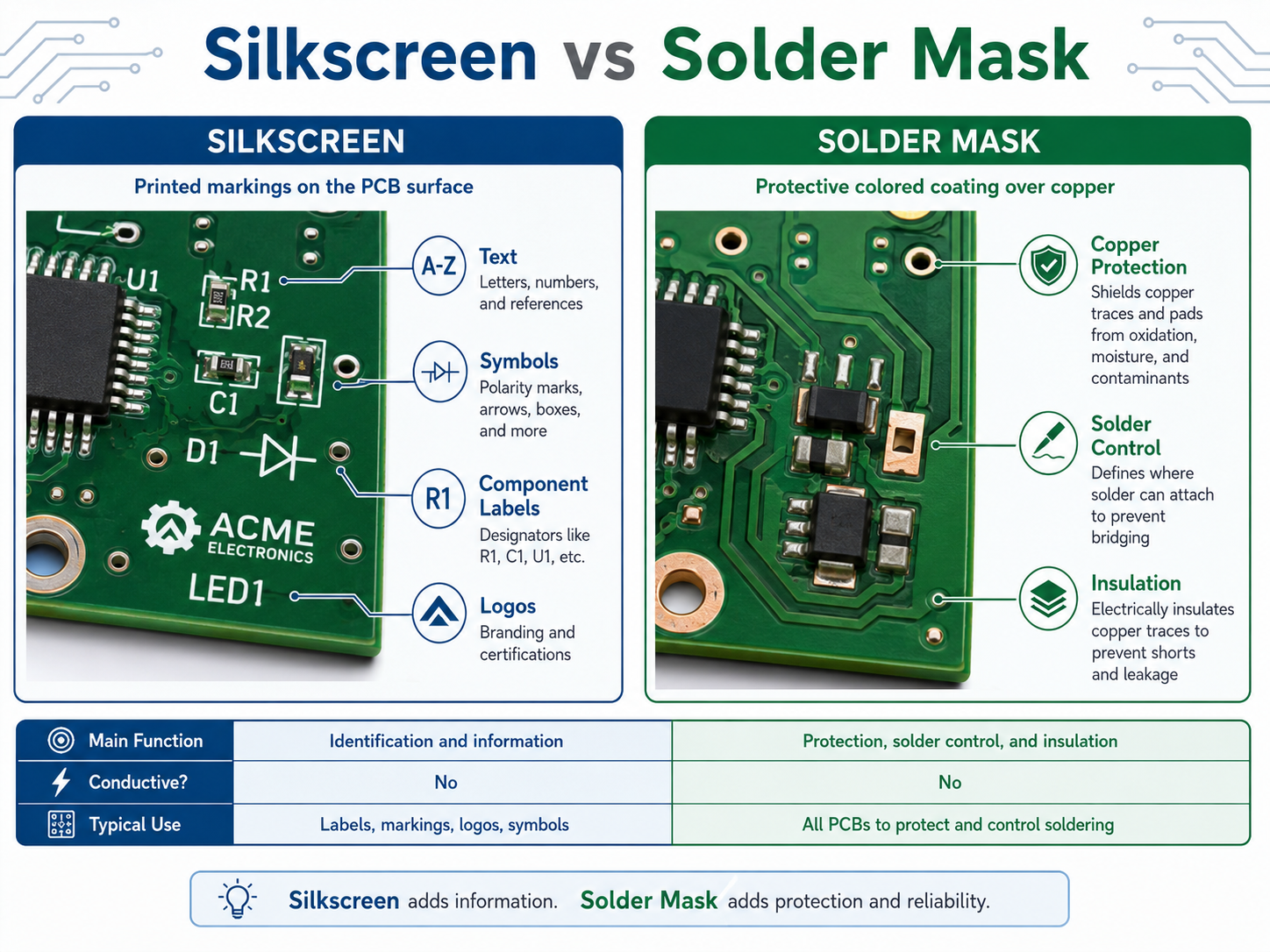
What Is the Difference Between Silkscreen and Solder Mask?

Silkscreen and solder mask are different PCB layers. Solder mask is a protective coating that covers copper and helps control soldering. Silkscreen is a printed marking layer used for text, symbols, logos, and identification.

The solder mask is usually the colored background, such as green, black, blue, red, or white. The silkscreen is the printed legend on top of that surface.

Silkscreen vs Solder Mask

For high-reliability electronics, such as medical devices, industrial controls, aerospace modules, automotive boards, and communication equipment, both layers should be reviewed carefully during DFM checking.

What Are the Standard PCB Silkscreen Design Rules?

Standard PCB silkscreen design rules focus on readability, manufacturability, and clearance. The markings should be large enough to read, thick enough to print, and far enough from pads, exposed copper, and component bodies.

A common mistake is designing silkscreen text that looks clear in CAD software but becomes too small after fabrication. Another common issue is placing text too close to solder pads. During CAM processing, the PCB factory may clip or remove part of the silkscreen to avoid pad contamination.

The following table gives practical reference values for standard PCB projects.

Design ItemRecommended ValueBetter Practice
Text height≥1.0 mm / 40 mil1.27 mm / 50 mil
Stroke width≥0.15 mm / 6 mil0.18–0.20 mm / 7–8 mil
Clearance to solder pad≥0.15 mm / 6 mil≥0.20 mm / 8 mil
Clearance to exposed copper≥0.15 mm / 6 mil≥0.20 mm / 8 mil
Hollow text height≥1.5 mm / 60 mil≥2.0 mm / 80 mil
Hollow text stroke≥0.20 mm / 8 mil≥0.25 mm / 10 mil
QR code sizeDepends on data amountConfirm with manufacturer
Bottom textMirrored in layoutVerify in Gerber viewer

These values are practical for many standard FR4 boards. However, each PCB manufacturer may have different process capability. Fine-pitch HDI boards, ceramic PCBs, metal core PCBs, and high-frequency boards may need a separate review.

What Is the Minimum Text Size for Silkscreen on PCB?

For a reliable and readable PCB silkscreen, a text height of at least 1.0 mm and a stroke width of at least 0.15 mm are commonly recommended. If the board has enough space, larger text is better for manual inspection, testing, and repair.

Here is a useful conversion table for PCB silkscreen design:

Metric SizeApprox. Imperial SizeCommon Use
0.15 mm5.9 milMinimum practical stroke width
0.18 mm7.1 milMore stable stroke width
0.20 mm7.9 milBetter for normal production
0.80 mm31.5 milSmall text, limited readability
1.00 mm39.4 milStandard readable text height
1.27 mm50.0 milBetter manual readability
1.50 mm59.1 milGood for labels and warnings
2.00 mm78.7 milGood for connectors or safety text

Can Silkscreen Be Printed Over Pads, Vias, or Copper?

Silkscreen should not be printed over solder pads, exposed copper, gold fingers, test pads, or solderable via areas. If the marking overlaps these areas, the factory may remove it during CAM processing. In some cases, poor placement can also affect appearance or assembly readability.

Silkscreen ink is usually non-conductive, but that does not mean it should be placed anywhere. Pads and exposed copper need clean surfaces for soldering, testing, or electrical contact. When silk markings are too close to these areas, the result may be missing text, cut letters, or unclear symbols.

Designers should pay extra attention to these areas:

  • SMT pads
  • Through-hole pads
  • Test points
  • Exposed copper zones
  • Gold fingers
  • Castellated holes
  • Thermal pads
  • High-current terminals
  • RF launch areas
  • Fine-pitch IC footprints

What Are Common PCB Silkscreen Mistakes?

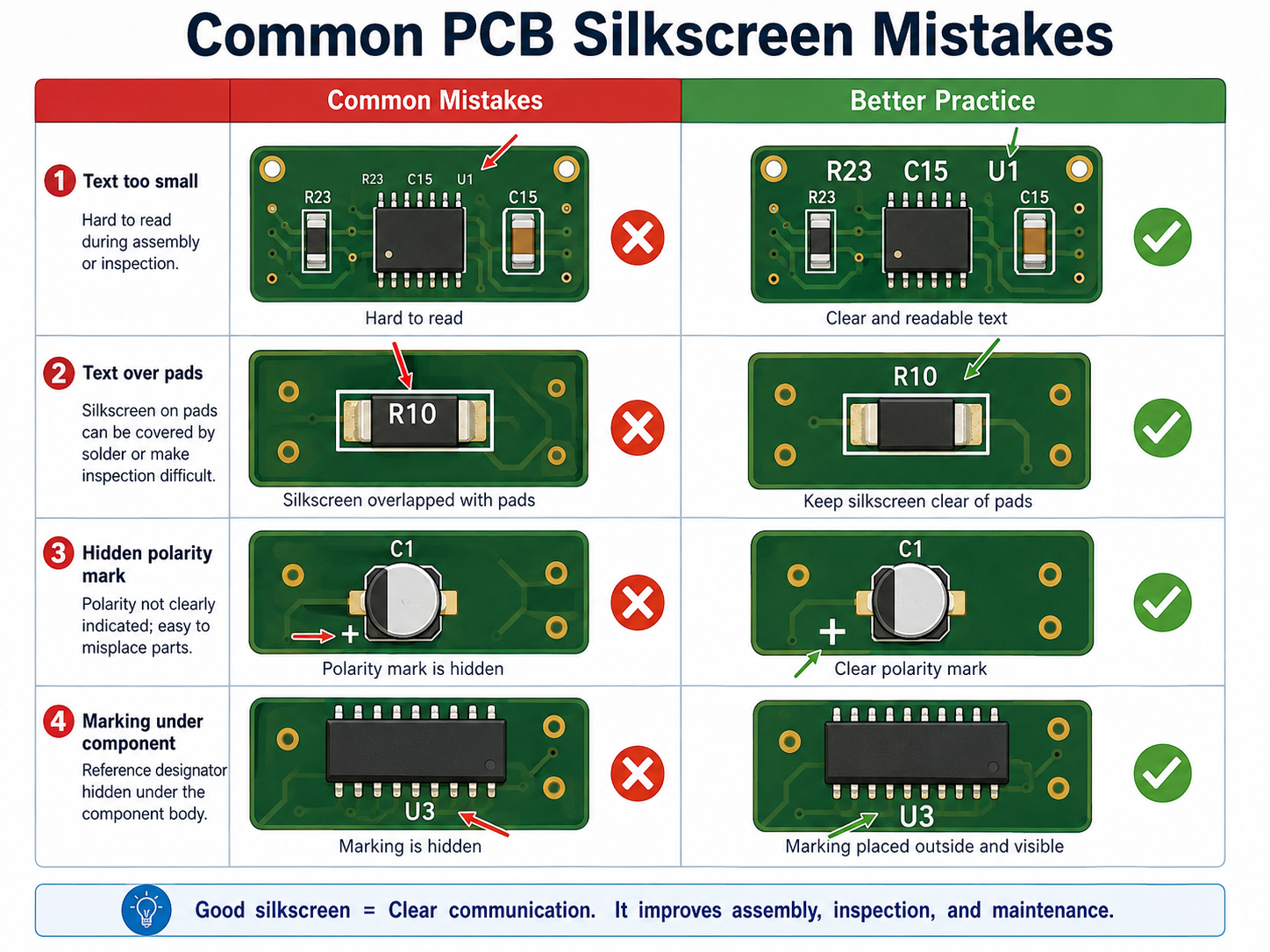
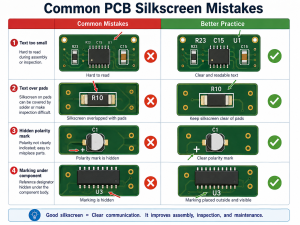
Common PCB silkscreen mistakes include using text that is too small, placing marks under components, printing over pads, forgetting polarity marks, using unclear symbols, and failing to check bottom-side mirroring.

The most common PCB silkscreen mistake including:

What Are Common PCB Silkscreen Mistakes?

What Colors Are Common for PCB Silkscreen?

White is the most common PCB silkscreen color because it gives strong contrast on green, red, blue, and black solder masks. Black silkscreen is common on white solder mask or light-colored boards. Yellow, gray, and other colors may be available depending on the manufacturer.

Color is not only an appearance choice. It affects readability. For example, white text on a green solder mask is easy to read, black text on a white solder mask also gives good contrast. Gray text on a black board may look stylish, but it may be less readable during repair or inspection.

Common color combinations include:

Solder Mask ColorCommon Silkscreen ColorReadability
GreenWhiteExcellent
BlueWhiteExcellent
RedWhiteGood
BlackWhiteGood
WhiteBlackExcellent
YellowBlackGood
Matte blackWhite or light grayGood
Transparent / no maskDepends on copper finishRequires review

If the PCB will go through conformal coating, potting, cleaning, or harsh field use, confirm whether the marking remains visible after the final process. The best silkscreen design considers the full product lifecycle, not only the bare board.

How Can a PCB Manufacturer Improve Silkscreen Quality?

A reliable PCB manufacturer improves silkscreen quality through DFM review, proper printing process selection, CAM checking, readable text control, and clear communication before production. The best result comes from both good design and disciplined manufacturing.

Silkscreen quality depends on several factors:

  • Ink type
  • Printing method
  • Solder mask surface
  • Character size
  • Stroke width
  • Board material
  • Surface finish
  • Curing process
  • CAM clearance rules
  • Operator and equipment control

For standard PCBs, traditional silkscreen printing is often sufficient. For dense layouts, QR codes, small text, or high-end appearance, direct legend printing, inkjet printing, or laser marking may be a better option.

EBest Circuit supports PCB fabrication, PCBA assembly, component sourcing, testing, and engineering review for prototype and production projects. For silkscreen-related issues, our team can help check text size, polarity marks, Pin 1 indicators, reference designators, QR code areas, and manufacturing readability before production starts.

How Do You Design Better Silkscreen for High-Density PCBs?

For high-density PCBs, silkscreen should be selective, not crowded. When there is not enough room, keep only the markings that prevent assembly mistakes and support testing. Other information can be moved to the assembly drawing or digital documentation.

A better priority order is:

  • Pin 1 marks for ICs and connectors
  • Polarity marks for LEDs, diodes, capacitors, and battery connectors
  • Test point labels for production and repair
  • Connector function labels
  • Board revision and traceability marks
  • Selected reference designators for important components
  • Logo and non-essential graphics

For very small boards, use simple but clear symbols. A small dot for Pin 1, a cathode bar for diode orientation, or a “+” mark for positive polarity can be more valuable than long text.

pcb silkscreen design rules

How Should You Work With a Manufacturer on PCB Silkscreen?

To get a clean silkscreen result, provide complete manufacturing files and ask the PCB manufacturer to review the marking layer before fabrication. This is especially important for dense boards, double-sided assembly, QR code marking, medical electronics, industrial products, and high-reliability applications.

Send these files when possible:

  • Gerber files
  • Drill file
  • PCB stackup
  • Assembly drawing
  • BOM
  • Pick-and-place file
  • Special marking requirements
  • QR code or serial number rule
  • Preferred silkscreen color
  • Any customer logo file
  • Required board revision format

Before production, confirm these points:

  • Is the text size manufacturable?
  • Is the stroke width stable?
  • Is the silkscreen clear from pads and exposed copper?
  • Are Pin 1 and polarity marks visible after assembly?
  • Will the QR code scan after printing?
  • Is the board revision correct?
  • Is bottom-side text mirrored correctly?
  • Will coating, cleaning, or final assembly hide any marks?

For customers who need PCB fabrication and assembly together, EBest Circuit can review silkscreen together with component placement, BOM, test access, and assembly process. This helps prevent small marking issues from becoming production delays.

FAQs About Silkscreen on PCB

1. Is silkscreen on PCB necessary?
Yes, it is highly useful. A PCB can work electrically without silkscreen, but clear markings make assembly, testing, inspection, repair, and traceability much easier. For production boards, it is strongly recommended.

2. Does PCB silkscreen affect circuit performance?
In normal designs, it does not affect electrical performance because the ink is non-conductive. Still, it should be kept away from solder pads, exposed copper, RF-sensitive areas, high-voltage clearances, and test contact areas.

3. What is the best font size for PCB silkscreen?
A practical choice is at least 1.0 mm text height with 0.15 mm stroke width. If the board has enough space, 1.27 mm text height and 0.18–0.20 mm stroke width offer better readability.

4. Can I print a logo on PCB silkscreen?
Yes. Logos are commonly printed on PCB silkscreen. The logo should meet minimum line width and spacing rules. It should also avoid pads, exposed copper, QR codes, and important technical markings.

5. Can silkscreen include QR codes or serial numbers?
Yes. QR codes, serial numbers, lot codes, and product IDs can be added to support traceability. For small or high-density codes, laser marking or high-resolution printing may be more reliable than standard silkscreen.

6. Why did some silkscreen text disappear after PCB production?
The most common reason is that the text overlapped pads, vias, exposed copper, or restricted areas. During CAM processing, the factory may remove part of the marking to protect solderability and manufacturing quality.

7. What is the difference between PCB silkscreen and PCB legend?
They usually refer to the same idea. “Silkscreen” often describes the printed marking process, while “legend” refers to the text and symbols shown on the PCB surface.

8. Which silkscreen color is best for PCB?
White is the most common choice because it works well on green, blue, red, and black solder masks. Black is better for white solder mask. The best color is the one that gives strong contrast and stable readability.
Conclusion

Silkscreen on PCB may look like a small detail, but it has a practical role in the full product lifecycle. It helps assemblers place components correctly, helps testers find signals quickly, helps repair teams locate parts, and helps manufacturers support traceability.

EBest Circuit provides PCB fabrication, PCBA assembly, component sourcing, DFM review, and testing support for prototype and mass production projects. If your PCB needs clear silkscreen, reliable assembly, and traceable production, send your Gerber and BOM files to our team for review.

Contact EBest Circuit: sales@bestpcbs.com

You may also like