PCB manufacturing PCB manufacturing
Home > Blog

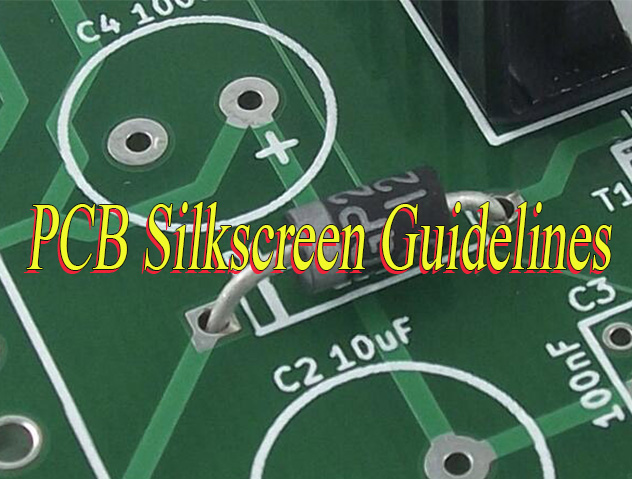
PCB Silkscreen Guidelines

What is Silkscreen on PCB? Clear Marking for Better Assembly
Friday, May 8th, 2026

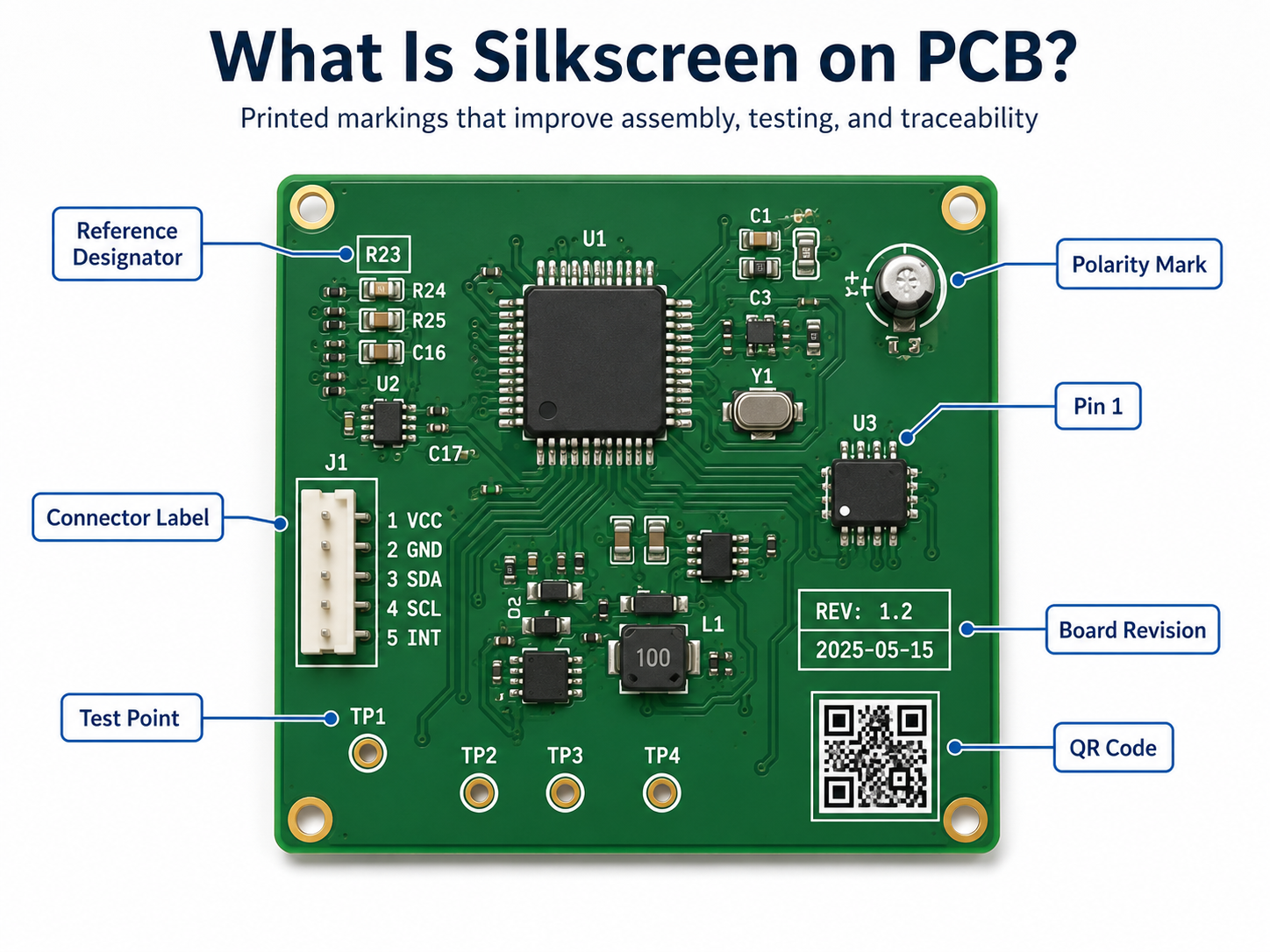
What Is Silkscreen on PCB?

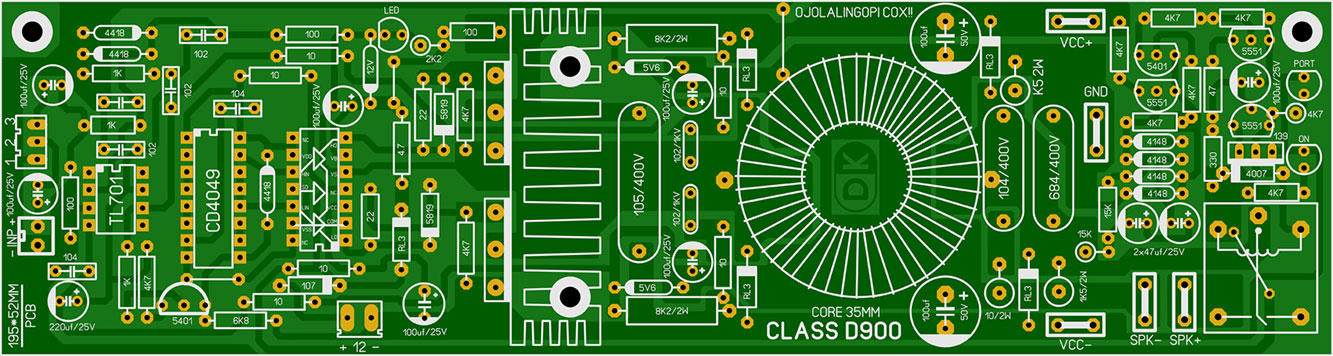
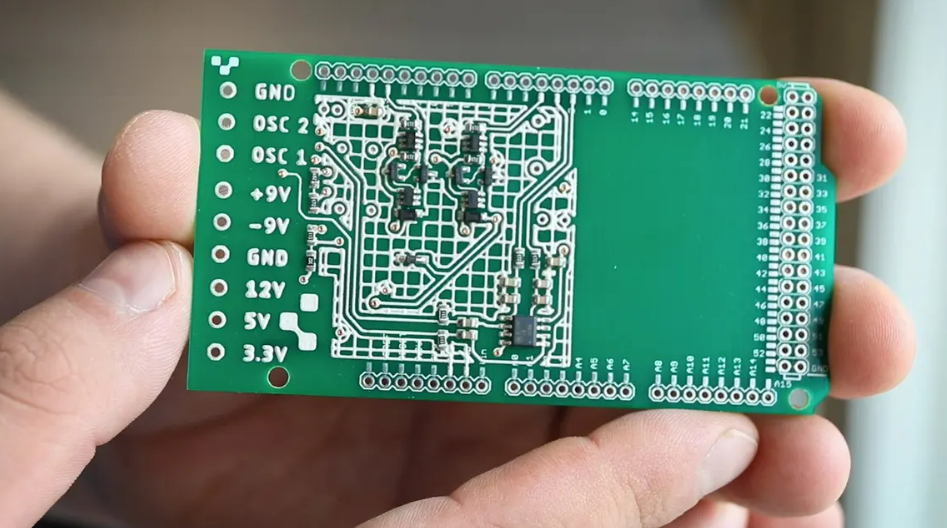
Silkscreen on PCB is the printed layer of text, symbols, logos, reference designators, polarity marks, test points, warning signs, and revision information placed on the surface of a printed circuit board. It does not conduct electricity. Its main job is to help people read, assemble, test, repair, and trace the board more easily.

On most circuit boards, the silkscreen is the white text you see on top of a green solder mask. However, it can also be black, yellow, gray, or another color depending on the PCB surface color and manufacturing process.
What Is Silkscreen on PCB?

What Is the Main Purpose of PCB Silkscreen?

The main purpose of PCB silkscreen is to make the board easier to identify, assemble, inspect, test, and maintain. It gives visible information to people working with the board during production and after the product enters the field.

A good silkscreen design usually includes component names, polarity marks, Pin 1 indicators, connector labels, test point numbers, warning text, board revision, and company logo. These small details can make a large difference during real production.

Common uses include:

  • Identifying resistors, capacitors, ICs, diodes, connectors, and switches
  • Showing polarity for LEDs, diodes, electrolytic capacitors, and batteries
  • Marking Pin 1 on ICs, headers, flat cables, and connectors
  • Labeling test points for ICT, flying probe, or functional testing
  • Adding board name, part number, revision, date code, or QR code
  • Warning users about high voltage, hot surfaces, ESD-sensitive zones, or orientation requirements
  • Supporting repair and field maintenance

What Information Should Be Included on a PCB Silkscreen?

A useful PCB silkscreen should include only the information that helps assembly, testing, inspection, traceability, and maintenance. The goal is not to print everything possible. The goal is to print the right information in the right place.

For simple boards, it is common to include every reference designator, such as R1, C1, U1, D1, and J1. For high-density boards, space may be limited, so designers should prioritize information that prevents mistakes.

The most important silkscreen items usually include:

Silkscreen ItemExample
Reference designatorR12, C8, U3, J1
Polarity mark+, -, cathode line
Pin 1 markDot, triangle, “1”
Connector labelUSB, VIN, OUT, CANH
Test point labelTP1, GND, 3V3, RESET
Board revisionREV A, V1.2
Manufacturing codeDate code, lot number
QR code or serial numberProduct ID, batch ID
Warning markHIGH VOLTAGE, HOT
Logo or brand nameEBest, customer logo

For many products, the highest-priority marks are polarity, Pin 1, connector direction, test points, and board revision. These markings are closely tied to assembly accuracy and maintenance efficiency.

What Is the Difference Between Silkscreen and Solder Mask?

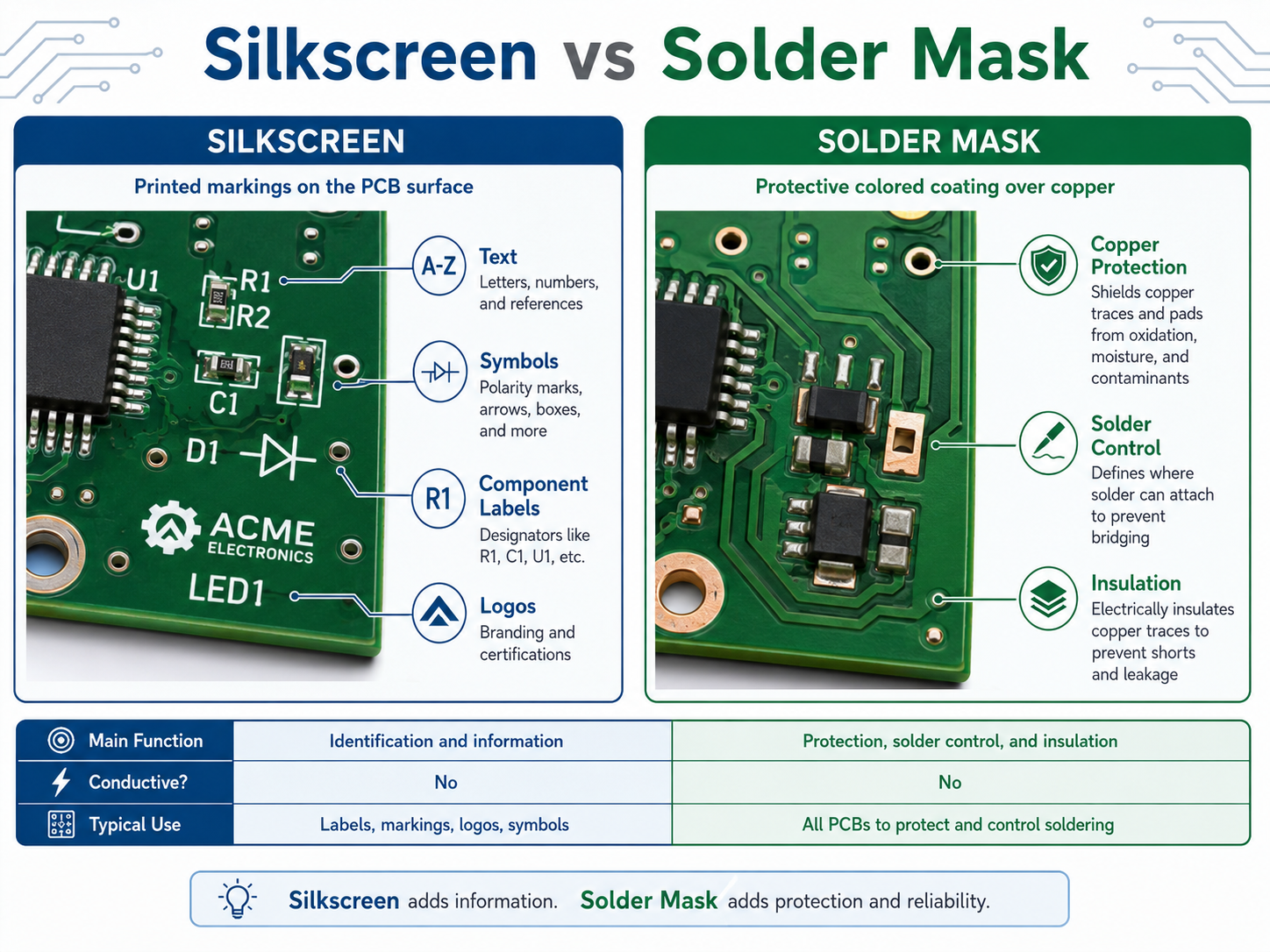
Silkscreen and solder mask are different PCB layers. Solder mask is a protective coating that covers copper and helps control soldering. Silkscreen is a printed marking layer used for text, symbols, logos, and identification.

The solder mask is usually the colored background, such as green, black, blue, red, or white. The silkscreen is the printed legend on top of that surface.
Silkscreen vs Solder Mask

For high-reliability electronics, such as medical devices, industrial controls, aerospace modules, automotive boards, and communication equipment, both layers should be reviewed carefully during DFM checking.

What Are the Standard PCB Silkscreen Design Rules?

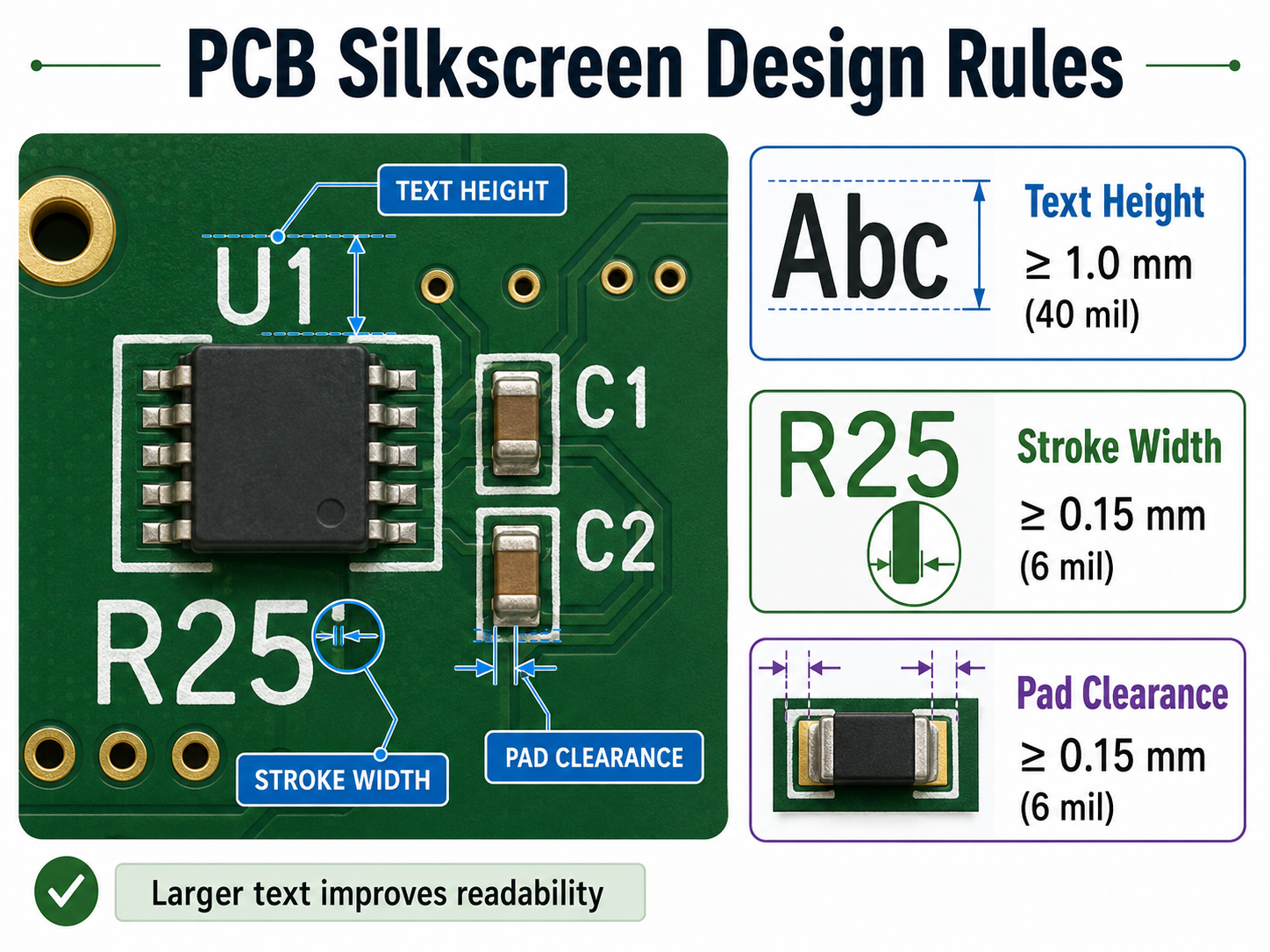
Standard PCB silkscreen design rules focus on readability, manufacturability, and clearance. The markings should be large enough to read, thick enough to print, and far enough from pads, exposed copper, and component bodies.

A common mistake is designing silkscreen text that looks clear in CAD software but becomes too small after fabrication. Another common issue is placing text too close to solder pads. During CAM processing, the PCB factory may clip or remove part of the silkscreen to avoid pad contamination.

The following table gives practical reference values for standard PCB projects.

Design ItemRecommended ValueBetter Practice
Text height≄1.0 mm / 40 mil1.27 mm / 50 mil
Stroke width≄0.15 mm / 6 mil0.18–0.20 mm / 7–8 mil
Clearance to solder pad≄0.15 mm / 6 mil≄0.20 mm / 8 mil
Clearance to exposed copper≄0.15 mm / 6 mil≄0.20 mm / 8 mil
Hollow text height≄1.5 mm / 60 mil≄2.0 mm / 80 mil
Hollow text stroke≄0.20 mm / 8 mil≄0.25 mm / 10 mil
QR code sizeDepends on data amountConfirm with manufacturer
Bottom textMirrored in layoutVerify in Gerber viewer

These values are practical for many standard FR4 boards. However, each PCB manufacturer may have different process capability. Fine-pitch HDI boards, ceramic PCBs, metal core PCBs, and high-frequency boards may need a separate review.

What Is the Minimum Text Size for Silkscreen on PCB?

For a reliable and readable PCB silkscreen, a text height of at least 1.0 mm and a stroke width of at least 0.15 mm are commonly recommended. If the board has enough space, larger text is better for manual inspection, testing, and repair.

Here is a useful conversion table for PCB silkscreen design:

Metric SizeApprox. Imperial SizeCommon Use
0.15 mm5.9 milMinimum practical stroke width
0.18 mm7.1 milMore stable stroke width
0.20 mm7.9 milBetter for normal production
0.80 mm31.5 milSmall text, limited readability
1.00 mm39.4 milStandard readable text height
1.27 mm50.0 milBetter manual readability
1.50 mm59.1 milGood for labels and warnings
2.00 mm78.7 milGood for connectors or safety text

Can Silkscreen Be Printed Over Pads, Vias, or Copper?

Silkscreen should not be printed over solder pads, exposed copper, gold fingers, test pads, or solderable via areas. If the marking overlaps these areas, the factory may remove it during CAM processing. In some cases, poor placement can also affect appearance or assembly readability.

Silkscreen ink is usually non-conductive, but that does not mean it should be placed anywhere. Pads and exposed copper need clean surfaces for soldering, testing, or electrical contact. When silk markings are too close to these areas, the result may be missing text, cut letters, or unclear symbols.

Designers should pay extra attention to these areas:

  • SMT pads
  • Through-hole pads
  • Test points
  • Exposed copper zones
  • Gold fingers
  • Castellated holes
  • Thermal pads
  • High-current terminals
  • RF launch areas
  • Fine-pitch IC footprints

What Are Common PCB Silkscreen Mistakes?

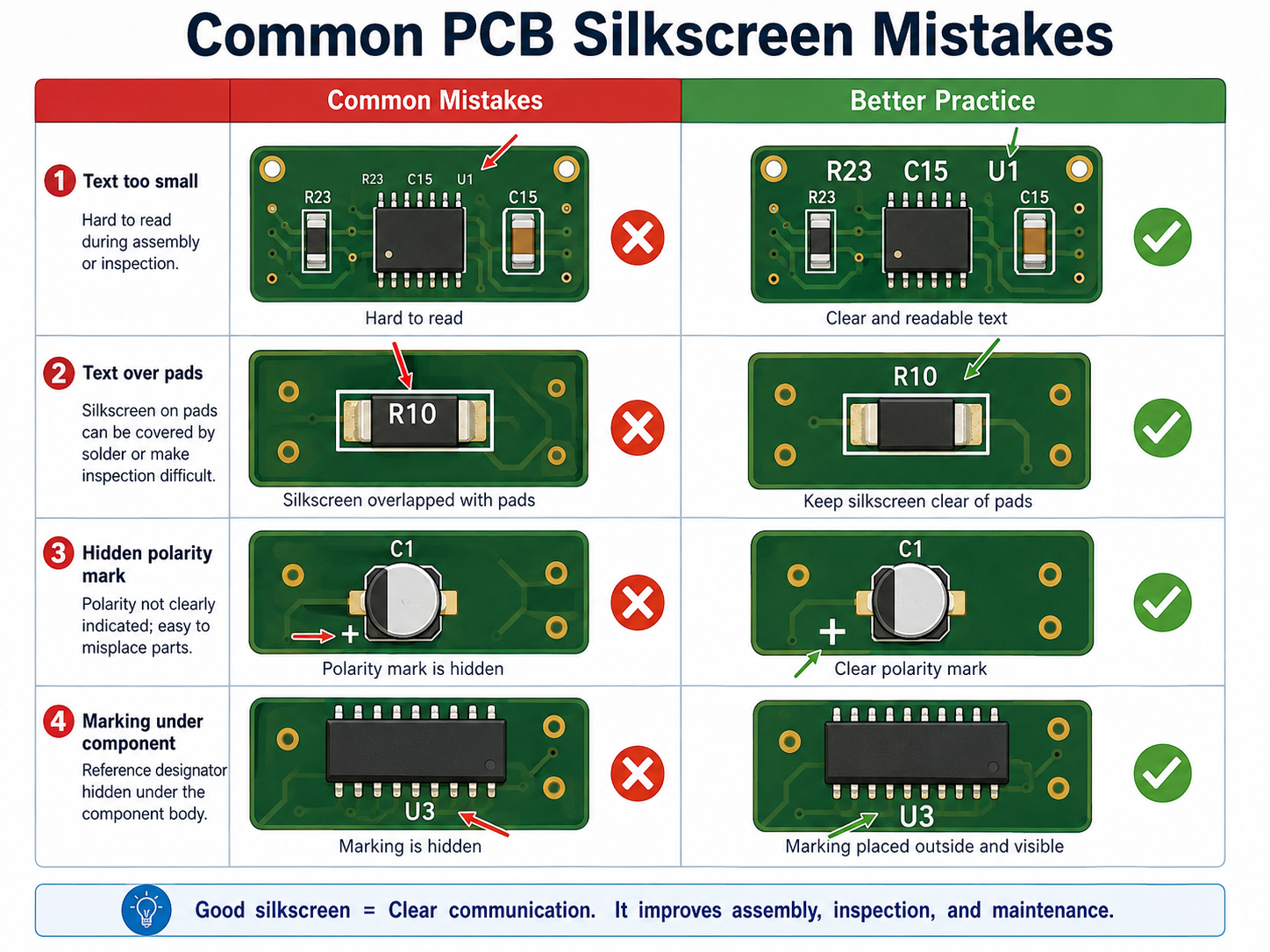
Common PCB silkscreen mistakes include using text that is too small, placing marks under components, printing over pads, forgetting polarity marks, using unclear symbols, and failing to check bottom-side mirroring.

The most common PCB silkscreen mistake including:
What Are Common PCB Silkscreen Mistakes?

What Colors Are Common for PCB Silkscreen?

White is the most common PCB silkscreen color because it gives strong contrast on green, red, blue, and black solder masks. Black silkscreen is common on white solder mask or light-colored boards. Yellow, gray, and other colors may be available depending on the manufacturer.

Color is not only an appearance choice. It affects readability. For example, white text on a green solder mask is easy to read, black text on a white solder mask also gives good contrast. Gray text on a black board may look stylish, but it may be less readable during repair or inspection.

Common color combinations include:

Solder Mask ColorCommon Silkscreen ColorReadability
GreenWhiteExcellent
BlueWhiteExcellent
RedWhiteGood
BlackWhiteGood
WhiteBlackExcellent
YellowBlackGood
Matte blackWhite or light grayGood
Transparent / no maskDepends on copper finishRequires review

If the PCB will go through conformal coating, potting, cleaning, or harsh field use, confirm whether the marking remains visible after the final process. The best silkscreen design considers the full product lifecycle, not only the bare board.

How Can a PCB Manufacturer Improve Silkscreen Quality?

A reliable PCB manufacturer improves silkscreen quality through DFM review, proper printing process selection, CAM checking, readable text control, and clear communication before production. The best result comes from both good design and disciplined manufacturing.

Silkscreen quality depends on several factors:

  • Ink type
  • Printing method
  • Solder mask surface
  • Character size
  • Stroke width
  • Board material
  • Surface finish
  • Curing process
  • CAM clearance rules
  • Operator and equipment control

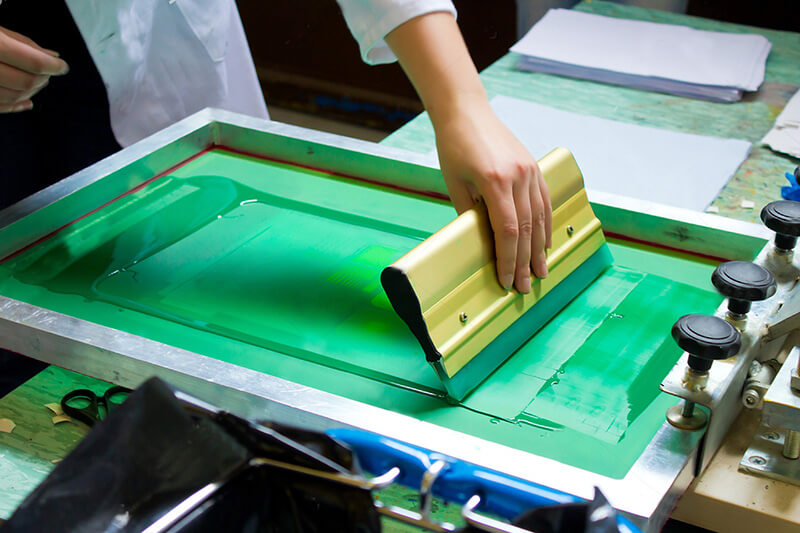
For standard PCBs, traditional silkscreen printing is often sufficient. For dense layouts, QR codes, small text, or high-end appearance, direct legend printing, inkjet printing, or laser marking may be a better option.

EBest Circuit supports PCB fabrication, PCBA assembly, component sourcing, testing, and engineering review for prototype and production projects. For silkscreen-related issues, our team can help check text size, polarity marks, Pin 1 indicators, reference designators, QR code areas, and manufacturing readability before production starts.

How Do You Design Better Silkscreen for High-Density PCBs?

For high-density PCBs, silkscreen should be selective, not crowded. When there is not enough room, keep only the markings that prevent assembly mistakes and support testing. Other information can be moved to the assembly drawing or digital documentation.

A better priority order is:

  • Pin 1 marks for ICs and connectors
  • Polarity marks for LEDs, diodes, capacitors, and battery connectors
  • Test point labels for production and repair
  • Connector function labels
  • Board revision and traceability marks
  • Selected reference designators for important components
  • Logo and non-essential graphics

For very small boards, use simple but clear symbols. A small dot for Pin 1, a cathode bar for diode orientation, or a “+” mark for positive polarity can be more valuable than long text.
pcb silkscreen design rules

How Should You Work With a Manufacturer on PCB Silkscreen?

To get a clean silkscreen result, provide complete manufacturing files and ask the PCB manufacturer to review the marking layer before fabrication. This is especially important for dense boards, double-sided assembly, QR code marking, medical electronics, industrial products, and high-reliability applications.

Send these files when possible:

  • Gerber files
  • Drill file
  • PCB stackup
  • Assembly drawing
  • BOM
  • Pick-and-place file
  • Special marking requirements
  • QR code or serial number rule
  • Preferred silkscreen color
  • Any customer logo file
  • Required board revision format

Before production, confirm these points:

  • Is the text size manufacturable?
  • Is the stroke width stable?
  • Is the silkscreen clear from pads and exposed copper?
  • Are Pin 1 and polarity marks visible after assembly?
  • Will the QR code scan after printing?
  • Is the board revision correct?
  • Is bottom-side text mirrored correctly?
  • Will coating, cleaning, or final assembly hide any marks?

For customers who need PCB fabrication and assembly together, EBest Circuit can review silkscreen together with component placement, BOM, test access, and assembly process. This helps prevent small marking issues from becoming production delays.

FAQs About Silkscreen on PCB

1. Is silkscreen on PCB necessary?
Yes, it is highly useful. A PCB can work electrically without silkscreen, but clear markings make assembly, testing, inspection, repair, and traceability much easier. For production boards, it is strongly recommended.

2. Does PCB silkscreen affect circuit performance?
In normal designs, it does not affect electrical performance because the ink is non-conductive. Still, it should be kept away from solder pads, exposed copper, RF-sensitive areas, high-voltage clearances, and test contact areas.

3. What is the best font size for PCB silkscreen?
A practical choice is at least 1.0 mm text height with 0.15 mm stroke width. If the board has enough space, 1.27 mm text height and 0.18–0.20 mm stroke width offer better readability.

4. Can I print a logo on PCB silkscreen?
Yes. Logos are commonly printed on PCB silkscreen. The logo should meet minimum line width and spacing rules. It should also avoid pads, exposed copper, QR codes, and important technical markings.

5. Can silkscreen include QR codes or serial numbers?
Yes. QR codes, serial numbers, lot codes, and product IDs can be added to support traceability. For small or high-density codes, laser marking or high-resolution printing may be more reliable than standard silkscreen.

6. Why did some silkscreen text disappear after PCB production?
The most common reason is that the text overlapped pads, vias, exposed copper, or restricted areas. During CAM processing, the factory may remove part of the marking to protect solderability and manufacturing quality.

7. What is the difference between PCB silkscreen and PCB legend?
They usually refer to the same idea. “Silkscreen” often describes the printed marking process, while “legend” refers to the text and symbols shown on the PCB surface.

8. Which silkscreen color is best for PCB?
White is the most common choice because it works well on green, blue, red, and black solder masks. Black is better for white solder mask. The best color is the one that gives strong contrast and stable readability.

Conclusion

Silkscreen on PCB may look like a small detail, but it has a practical role in the full product lifecycle. It helps assemblers place components correctly, helps testers find signals quickly, helps repair teams locate parts, and helps manufacturers support traceability.

EBest Circuit provides PCB fabrication, PCBA assembly, component sourcing, DFM review, and testing support for prototype and mass production projects. If your PCB needs clear silkscreen, reliable assembly, and traceable production, send your Gerber and BOM files to our team for review.

Contact EBest Circuit: sales@bestpcbs.com
You may also like

PCB Silkscreen Guidelines
Monday, November 24th, 2025

How to make silkscreen for PCB? Let’s discover thickness, size chart, colors selection guide, material and font, production process, removal methods for PCB silkscreen.

Are you troubled these questions about PCB silkscreen?

  • Blurry screen printing? “Why is my board’s screen printing always blurry and broken, significantly reducing repair and inspection efficiency?”
  • Incomplete information labeling? “How can I clearly label polarity and reference numerals in a limited space to avoid incorrect parts and rework due to unclear labeling?”
  • High communication costs? “Does insufficient screen printing precision require repeated confirmation of details with the factory, delaying project timelines?”

As a professional PCB manufacturer, EBest Circuit (Best Technology) can provide you services and solutions:

  • Precise Imaging: We use a combination of LPI+LDI high-precision processes, ensuring sharp, engraved character edges and perfect rendering even for ultra-fine 0.15mm line widths, greatly improving subsequent production efficiency.
  • Mastering Space Layout: We provide professional screen printing layout optimization services, even in areas densely populated with 0402/0201 micro-components, we can plan a clear, non-overlapping labeling scheme for you.
  • One-Stop Service: From the moment you provide your design files, we initiate a manufacturability review, proactively identifying screen printing design risks to ensure production is completed on the first attempt, accelerating your product launch.

Welcome to contact us if you have any request for PCB silkscreen: sales@bestpcbs.com.

What Is PCB Silkscreen​?

The PCB silkscreen layer is an ink marking layer on the surface of a printed circuit board (PCB), typically located above the solder mask layer. Using silkscreen or inkjet printing technology, it directly prints key information such as component identification (e.g., reference numerals R1, C2), polarity symbols (+/-), pin markings, company logos, version numbers, and security certification icons onto the board surface. This provides a visual basis for positioning and identification during assembly, debugging, and repair; it is the PCB’s “information label layer.”

What Is PCB Silkscreen​?

How Thick Is a PCB Silkscreen?

Process TypeAverage ThicknessFeatures
Traditional Screen Printing30–35ÎŒmObvious ink accumulation, slight edge diffusion
LPI (Liquid Photo Imaging)15–25ÎŒmUniform thickness, precision ±3ÎŒm
Inkjet Printing18–22ÎŒmNon-contact, local thickening possible
LDI (Laser Direct Imaging)15–20ÎŒmUltra-thin precision, suitable for HDI boards

PCB Silkscreen Size Chart

ParameterMinimum ValueRecommended ValueApplicable Process
Character Height≄0.8mm1.0-1.5mmAll Processes
Character Line Width≄0.15mm0.18-0.2mmLDI/LPI superior to traditional screen printing
Polarity Symbol Diameter≄1.0mm1.2-1.5mmAll Processes
Pin 1 Identification≄0.8mm1.0mmLDI precision best
LOGO/QR CodeMinimum unit ≄0.3mm≄0.4mmLDI/Inkjet exclusive
Solder Mask to Pad Clearance≄0.2mm0.3mmAll Processes

What Are the Colors of PCB Silk Screen?

Common standard color systems of PCB silk screen include:

Core Standard Color Systems

  • White: Accounts for over 70% usage, suitable for dark substrates like green/black PCBs. Provides 80% high contrast and is the default choice for consumer electronics. White silkscreen on green substrates improves text clarity by 40% under normal lighting, reducing assembly errors by 15%.
  • Black: Designed for light substrates like white/yellow PCBs. Black-on-white schemes are common in laboratory-grade PCBs, enhancing readability by 30% in cleanroom environments. Note that black ink may cause glare under strong light.
  • Yellow: Preferred for low-light environments, offering 20% higher reflectivity than white. Commonly used in automotive electronics/outdoor devices. Tests show yellow text recognition speed is 0.3 seconds faster than white under 50lux illumination.

Special Color Considerations

  • Red/Blue: Often used in military-grade PCBs for color-coded voltage regions. Red marks high-voltage areas, blue denotes signal layers, complying with IPC-A-610 standards.
  • Custom colors (e.g., pink/purple): Require 10-30% additional cost and may extend lead time by 3-5 days. A case study revealed pink silkscreen caused 8% yield loss due to ink curing issues in mass production, now mainly used for prototype validation.

Design Rules

  • Contrast First: Green substrates must use white/yellow silkscreen; black substrates require white; white substrates need black. Incorrect pairing can double troubleshooting time.
  • Font Standards: Recommend sans-serif fonts, character height ≄1.5mm, line width ≄0.18mm. BGA area silkscreen must maintain 0.3mm safety clearance from pads.
  • Environmental Adaptation: Industrial control boards recommend matte surface treatment, reducing 90% glare interference. Medical devices require alcohol-resistant UV-cured inks.
What Are the Colors of PCB Silk Screen?

What Ink Is Used in PCB Silkscreen?

PCB screen printing mainly uses non-conductive ink materials, and specific types include:

  • Epoxy-based ink: A traditional mainstream material, resistant to high temperatures and chemical corrosion, suitable for welding processes.
  • Acrylic-based ink: Fast-drying, suitable for high-efficiency production lines, but with slightly weaker heat resistance.
  • Polyester-based ink: Excellent adhesion and weather resistance, ensuring long-term marking clarity.
  • Polyurethane-based ink: Abrasion-resistant and chemically resistant, suitable for high-reliability environments.
  • UV-cured ink: Cures quickly using ultraviolet light, improving production efficiency; commonly white/black.
  • Thermosetting ink: Cures by heat, with strong adhesion; mostly used for text marking.
  • Special conductive inks (such as carbon ink, silver ink): Used in specific scenarios (such as conductive marking), but the core function of screen printing is non-conductive marking.

How to Make Silkscreen for PCB?

1. Design and Specification Development

  • Character design must comply with IPC-SM-840 standards: minimum line width 0.1mm, character height ≄0.6mm, maintain 0.1mm safety clearance from pads/vias. Polar components (e.g., diodes, capacitors) require clear “+”, “C” symbols, with left-to-right/bottom-to-top orientation for readability.
  • Output Gerber format design files containing character layers, solder mask layers, and drilling layers, validated through DFM analysis to prevent manufacturing defects.

2. Screen Material Selection and Tensioning

  • Choose screen material based on precision needs: high precision (line width ≀ 0.15mm) recommends 305 mesh stainless steel mesh (tension 28-30N/cm); ordinary precision can use 200-250 mesh nylon mesh. The mesh frame must be made of aluminum alloy (dimensional accuracy ±0.1mm), anodized for corrosion resistance.
  • Screen Stretching Process: A pneumatic screen stretching machine is used to stretch the screen, controlling the tension uniformity within ±1N/cm. After allowing it to stand for 24 hours to release stress, epoxy resin is used to fix the frame and screen. The resin layer thickness is ≀0.5mm, ensuring no air bubbles remain.

3. Photolithography and Exposure Development

  • Coating the photosensitive emulsion: After pre-coating the base coat on the screen, evenly coat the photosensitive emulsion (10-20ÎŒm thickness) using a squeegee. For high precision requirements, 2-3 layers are needed. After each layer dries, inspect for pinhole defects.
  • Exposure parameters: Use a UV exposure machine (energy 80-120mJ/cmÂČ), with film positioning (accuracy ±0.05mm), and an exposure time of 10-20 seconds. Develop using a 1% sodium carbonate solution at a water temperature of 25-30℃ for 30-60 seconds, forming clear openings (open area ≄90%) with an edge jaggedness depth ≀0.01mm.

4. Ink Formulation and Performance Adaptation

  • Base Ink Selection: Formulate according to the substrate material (e.g., FR-4, PI) and application (high temperature resistance/flexibility). Epoxy inks are resistant to 260℃ wave soldering (curing conditions 150℃/30 minutes), while polyurethane inks meet the bending requirements of flexible PCBs (1000 bends at 180° without cracking).
  • Viscosity Control: Monitor with a rotational viscometer. 300-mesh screen requires 1500-2500 cP, 400-mesh requires 1000-2000 cP. Thinner addition should be ≀10%, and stirring speed 500-800 rpm should be used to ensure uniformity and avoid bubble formation. Colors should be formulated according to the Pantone color chart, with a color difference ΔE ≀1. The contrast between white ink and green solder resist should be ≄85%.

5. Precision Printing Parameter Control

  • Equipment Selection: Fully automatic printing machines have an accuracy of ±0.03mm (suitable for large batches); semi-automatic machines with CCD positioning (accuracy ±0.05mm) are suitable for small to medium batches. Manual printing requires a high-precision squeegee (hardness 70-80 Shore), angle 45°-60°, pressure 0.2-0.3MPa, speed 50-100mm/s, and screen distance 1-2mm.
  • Real-time Monitoring: Every 10 PCBs are sampled for character clarity and positional deviation (≀0.05mm). Adhesion is tested with 3M tape (residual area ≄95%), and edges are observed with a 200x magnifying glass to ensure no jagged edges. High-precision characters require a 400-mesh stainless steel mesh to avoid ligatures and missing strokes.

6. Curing Process and Quality Inspection

  • Curing conditions: Acrylic inks cure at 120-130℃ for 20-30 minutes; epoxy inks cure at 150-160℃ for 30-40 minutes. Staged heating (10 minutes per stage) is used to prevent cracking. The ink thickness deviation after curing should be ≀±10%.
  • Quality inspection: AOI automatic detection of character defects (recognition rate ≄99.8%), solvent resistance test (no fading after 100 wipes with 75% alcohol), and temperature resistance test (no color change at 260℃/10 seconds). Defective products are cleaned with a special ink remover and reprinted to ensure a yield rate ≄99%.

7. Environmental Control and Safety Standards

  • Production Environment: Temperature 22-25℃, humidity 40-60%, cleanroom class ≄ Class 10000. Operators must wear anti-static gloves to avoid fingerprint contamination. Waste ink and solvents must be recycled separately, complying with RoHS/REACH environmental standards.
  • Equipment Maintenance: Regularly calibrate the printing press accuracy (once a month), clean the screen (ultrasonic cleaning after every 500 prints), and replace worn doctor blades (when hardness decreases by more than 10%). Record all process parameters (such as tension, viscosity, curing temperature) to create a traceable production record.
How to Make Silkscreen for PCB?

What Is the Best Font for PCB Silkscreen?

Sans-serif Font Priority

  • Recommended sans-serif fonts include Arial, Helvetica, Calibri, etc., offering higher readability at small sizes for international clients.
  • Chinese characters require TrueType fonts supporting Chinese character sets (e.g., Microsoft YaHei, SimSun), avoiding decorative or serif fonts.

Character Size Specifications

  • Standard character height: 1.0mm-1.5mm (40mil-60mil), minimum not less than 0.8mm (32mil), subject to manufacturer process limits.
  • Line width recommended 0.15mm-0.2mm (6mil-8mil), maintaining a height-to-width ratio of 1:6 to 1:7; high-density boards may reduce to 0.8mm height.

Layout and Positioning Rules

  • Silkscreen should be close to corresponding components, avoiding coverage of pads, vias, or test points; reference numbers placed within or near component outlines.
  • Reading direction standardized to horizontal or 90° rotation, avoiding arbitrary angles for quick manual identification; connecting lines must clearly point to components.

Safety Spacing Standards

  • Silkscreen maintains ≄0.2mm (8mil) safety spacing from pads, copper traces, and vias; high-density boards may reduce to 0.15mm (6mil).
  • Inter-silkscreen spacing ≄0.15mm to prevent printing adhesion; avoid covering high-speed signal lines or test points to prevent electrical performance impact.

Multilingual and Internationalization Support

  • Fonts must support English, Chinese, and special symbols; Chinese silkscreen height ≄1.0mm, using TrueType fonts to ensure complete character display.
  • Version numbers, company logos, etc., uniformly placed at board corners with high-contrast ink (e.g., white ink on dark substrates).

Manufacturer Process Collaboration

  • Confirm minimum character height, line width, and spacing capabilities with manufacturers before panelization; verify silkscreen clarity post-Gerber output.
  • Ensure Chinese characters remain free of garbled text during editing, output, and production; high-density designs require pre-communication of size limits.

Special Component Identification Standards

  • Polar components (e.g., electrolytic capacitors, diodes) require clear polarity markings (e.g., “+” symbols, arrows); integrated circuits indicate Pin 1 position (dots, notches, or “1” digits).
  • Connectors must indicate Pin 1 direction; special packages (e.g., BGA, QFN) require silkscreen dimensions matching actual chip sizes.

Visibility and Maintainability Optimization

  • Silkscreen adopts reverse white, bold, or high-contrast designs for clear readability without magnification; board edges include version numbers, manufacturing dates, and company identifiers.
  • Test points and interface areas avoid silkscreen coverage to ensure unimpeded flying probe testing or debugging operations.
What Is the Best Font for PCB Silkscreen?

How to Remove Silkscreen from PCB?

1. Source Control at Design Stage

  • Operation Path: Disable silkscreen layer output in PCB design software (e.g., Altium Designer, KiCad). Hide Top/Bottom Silkscreen layers via layer manager, or deselect silkscreen layer file outputs (e.g., .GTO/.GBO files) during Gerber file generation to ensure PCBs are produced without silkscreen.
  • Advantages: Zero cost, risk-free, optimal preventive solution that avoids potential PCB damage from physical/chemical removal methods.

2. Physical Scraping Method

  • Tool Selection: Use surgical blades, precision carving knives, or professional PCB cleaning tools, paired with fine sandpaper (800+ grit) or grinding erasers.
  • Operation Key Points: Scrape at an angle ≀30° to the board surface; only applicable to rigid substrates (e.g., FR4); flexible boards (FPC) prohibited. For sandpaper grinding, use gentle unidirectional motion to avoid scratching the solder mask layer or exposing copper traces.
  • Applicable Scenarios: Small-scale, localized silkscreen correction requiring skilled operators to prevent damage to component pads or traces.

3. Chemical Solvent Method

  • Solvent Selection: Prioritize dedicated silkscreen removal agents or acetone (high efficiency but may corrode solder mask); alternatives include ethyl acetate or isopropyl alcohol (IPA). Prohibit strong corrosive solvents (e.g., concentrated sulfuric acid, chloroform).
  • Operation Process: In ventilated environments, dip a cotton swab in minimal solvent to gently wipe silkscreen areas. Wait 15-30 seconds for ink dissolution, then clean residues with lint-free cloth dipped in IPA.
  • Safety Requirements: Wear nitrile gloves, goggles, and N95 masks; keep away from ignition sources; prohibit use on high-frequency boards (e.g., Rogers material) or sensitive component areas.

4. Laser Removal Method

  • Technical Principle: Utilize UV laser marking machines for non-contact ablation to precisely remove silkscreen without damaging underlying solder mask or copper layers.
  • Advantages: High precision, efficiency, and chemical-free, suitable for high-value PCB repairs or precision circuits.
  • Limitations: High equipment cost (requires professional laser systems); requires skilled programming; difficult to implement at general repair shops.

5. Mechanical Grinding Method

  • Tool Configuration: Ultra-fine sandpaper (2000+ grit), grinding sponges, or fiber erasers (can be water-dampened to reduce dust).
  • Operation Standards: Gentle unidirectional grinding with real-time surface monitoring; stop immediately after silkscreen removal. Avoid over-grinding to prevent solder mask wear or copper exposure.
  • Applicability: Recommended only for open non-functional areas; prohibited in component-dense zones to prevent short-circuit risks.

6. Precautions and Risk Control

  • Pre-Testing: Conduct small-scale tests in PCB edge non-functional areas to verify solvent compatibility or grinding force.
  • Environmental Protection: Treat chemical waste according to regulations; maintain dust-free operation environments to prevent short circuits from dust adhesion.
  • Regulatory Compliance: Prohibit removal of certification marks (e.g., UL logo) to avoid regulatory violations; delegate critical boards (e.g., medical/military devices) to professional manufacturers.
  • Post-Operation Verification: Perform electrical performance tests (e.g., open/short detection, impedance verification) after silkscreen removal to ensure no functional impairment or hidden faults remain.
  • Alternative Solutions: Use alcohol markers for temporary marking; for long-term needs, adjust silkscreen layout via design software or use removable labels for coverage.

Please feel free to contact us if you need any help for silkscreen PCB: sales@bestpcbs.com.

You may also like