The choice between a microcontroller vs microprocessor is not only a firmware decision. It changes the memory architecture, power tree, layer count, routing density, component count, thermal design, test plan, and long-term availability of the finished PCB assembly.
A microcontroller is usually the better fit for deterministic control, low power, compact hardware, and modest computing needs. A microprocessor is more suitable when the product needs a rich operating system, large external memory, intensive graphics, high data throughput, or complex application software. The right answer comes from the complete product requirement, not clock frequency alone.
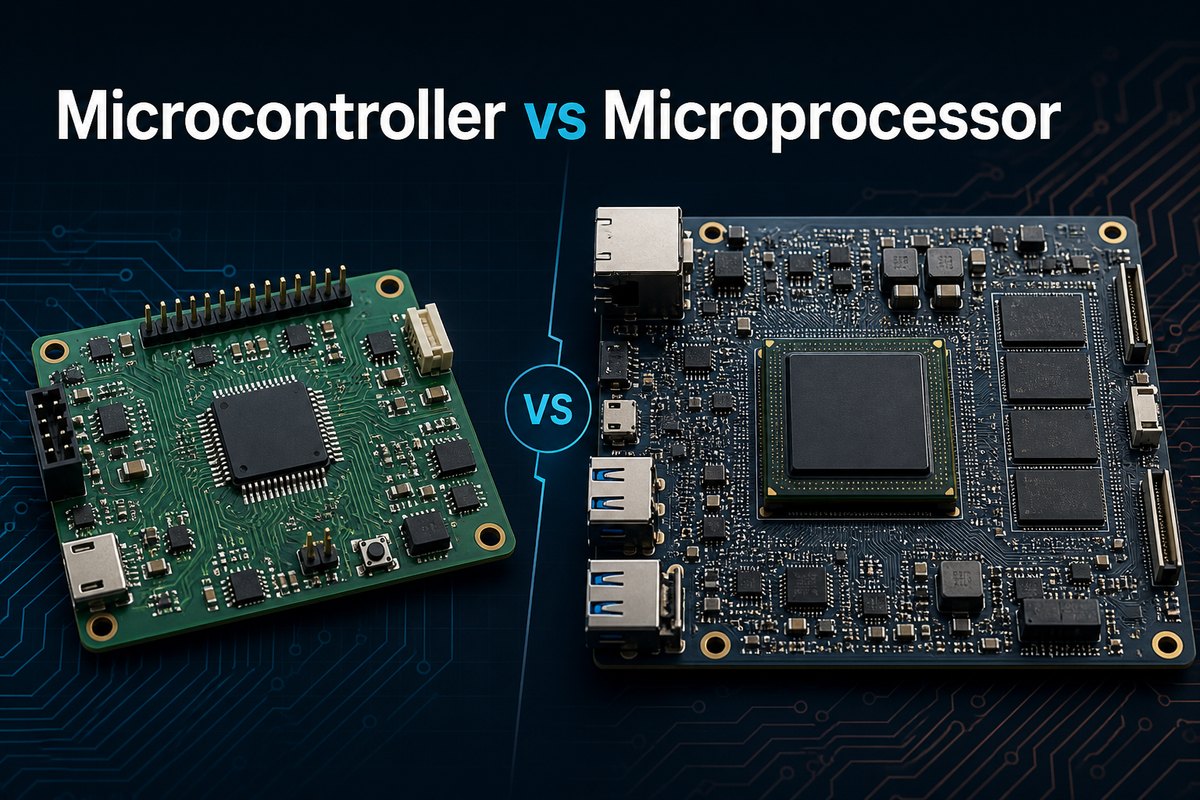
What Is a Microcontroller?
A microcontroller is a self-contained embedded computing device optimized to monitor inputs, execute defined control logic, and drive outputs. Its on-chip resources may include flash, SRAM, GPIO, PWM, ADC, DAC, watchdogs, timers, CAN, UART, SPI, I²C, USB, Ethernet, and security blocks.
That integration makes an MCU practical for motor control, sensor nodes, battery products, appliances, instrumentation, safety monitors, industrial I/O, and many other dedicated functions. If your project is aimed at factory equipment, our guide to industrial microcontroller selection covers environmental and lifecycle considerations in more detail.
An MCU can run bare-metal firmware or a real-time operating system. It usually starts quickly and can enter deep low-power states, which is valuable when the system spends most of its time waiting for an event.
What Is a Microprocessor?
A microprocessor is a processing device intended for more flexible and computationally demanding systems. Many MPU designs use external DDR memory and flash or eMMC storage, plus a dedicated power-management IC. They commonly run Linux, Android, or another feature-rich operating system.
Typical applications include industrial human-machine interfaces, gateways, vision systems, edge computers, multimedia products, and networking equipment. The processor itself may be only one part of a much larger subsystem, which is why a microprocessor PCB requires close coordination between component selection, stackup, signal integrity, power integrity, thermal design, and software bring-up.
Microcontroller vs Microprocessor Difference
The central difference is integration. A microcontroller unit (MCU) normally combines a CPU core, program memory, RAM, timers, GPIO, communication interfaces, and often analog peripherals on one chip. A microprocessor unit (MPU) centers on a more capable processing subsystem and typically depends on external DDR memory, nonvolatile storage, power-management devices, and additional interface circuitry.
The following table summarizes the practical microcontroller vs microprocessor difference in details:
| Decision factor | Microcontroller | Microprocessor |
| Memory | Usually includes flash and SRAM on chip | Usually uses external DDR and nonvolatile storage |
| Software | Bare metal or RTOS | Rich OS and larger application stack |
| Real-time response | Direct and predictable for dedicated control | May need a real-time extension or companion MCU |
| Power | Low active and sleep power are common | Higher power with multiple rails and sequencing |
| PCB complexity | Lower component count and routing density | DDR, storage, high-speed interfaces, and PMIC add complexity |
| Performance | Optimized for control and peripheral handling | Optimized for high-throughput and complex applications |
| System cost | Often lower for focused functions | Higher support-component and validation cost |
How Does a Microcontroller vs Microprocessor Block Diagram Differ?
A microcontroller vs microprocessor block diagram makes the integration difference easy to see. The MCU places memory and many peripherals inside the same device boundary. The MPU board distributes those functions across the processor, DDR, boot storage, power management, clocks, and external interface devices.
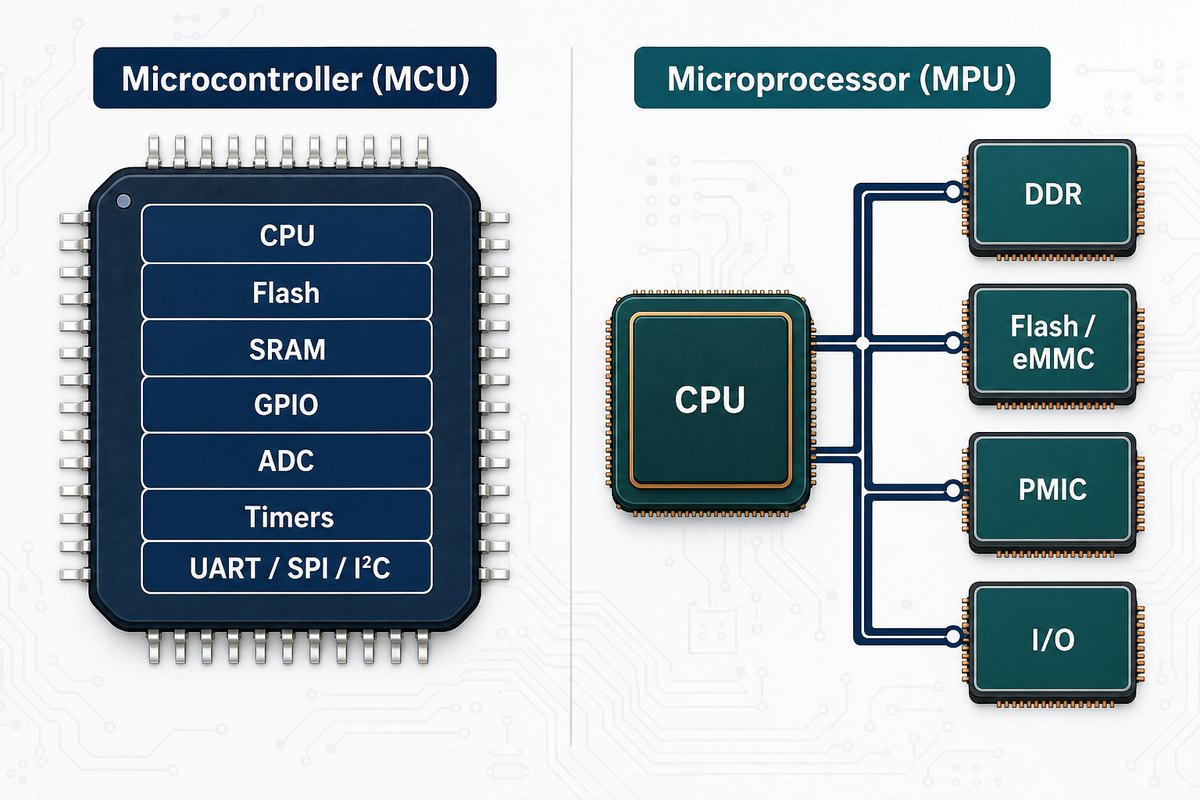
The external MPU buses are not just logical connections. DDR timing, trace length, topology, reference planes, return paths, crosstalk, and power noise must all be controlled on the PCB. An MCU may still have fast USB, Ethernet, display, or memory interfaces, but the number of constrained nets is usually lower.
Microcontroller vs Microprocessor vs SoC
The phrase microcontroller vs microprocessor vs SoC can be confusing because SoC describes the level of system integration, not one fixed performance class. A system-on-chip may be built around an MCU-class core or an MPU-class core and may integrate graphics, accelerators, radios, security, memory controllers, or other functions.
| Term | Practical meaning | PCB implication |
| MCU | Control-oriented processor with memory and peripherals commonly integrated | Compact support circuit and fewer external buses |
| MPU | Application-oriented processor that commonly uses external memory and storage | More rails, components, layers, and constrained routing |
| SoC | A highly integrated system whose core can be MCU- or MPU-class | Can reduce chip count, but package escape and power density may increase |
Do not assume that an SoC automatically creates a simple PCB. A large BGA with DDR, PCIe, USB, Ethernet, MIPI, display, or RF interfaces can demand HDI features, controlled impedance, careful power distribution, and a more expensive assembly process.
Which Device Is Better for Real-Time Control and Low Power?
An MCU is usually the first choice when the product must wake quickly, respond predictably, measure analog signals, control actuators, and spend long periods in a low-power state. On-chip timers, interrupt controllers, ADCs, and PWM units reduce external latency and component count.
An MPU is appropriate when the application needs substantial compute performance, virtual memory, large storage, advanced networking, graphics, or a rich software ecosystem. However, a general-purpose operating system can introduce scheduling latency. Time-critical work may require a real-time configuration, hardware accelerator, or companion MCU.
Estimate energy at system level. A low-power processor can still sit on a high-consumption board if DDR, radios, displays, regulators, and peripherals remain active.
Microcontroller vs Microprocessor in IoT
For microcontroller and microprocessor in IoT, the deciding factors are usually workload, connectivity, security, update strategy, interface complexity, and power budget.
- Use an MCU for small sensor nodes, periodic telemetry, simple protocol stacks, battery operation, and deterministic edge control.
- Use an MPU for gateways, local databases, containers, computer vision, complex encryption workloads, multiple high-speed interfaces, or a full user interface.
- Use both when a low-power MCU must continue monitoring or control while the MPU sleeps, boots, updates, or handles non-deterministic application tasks.
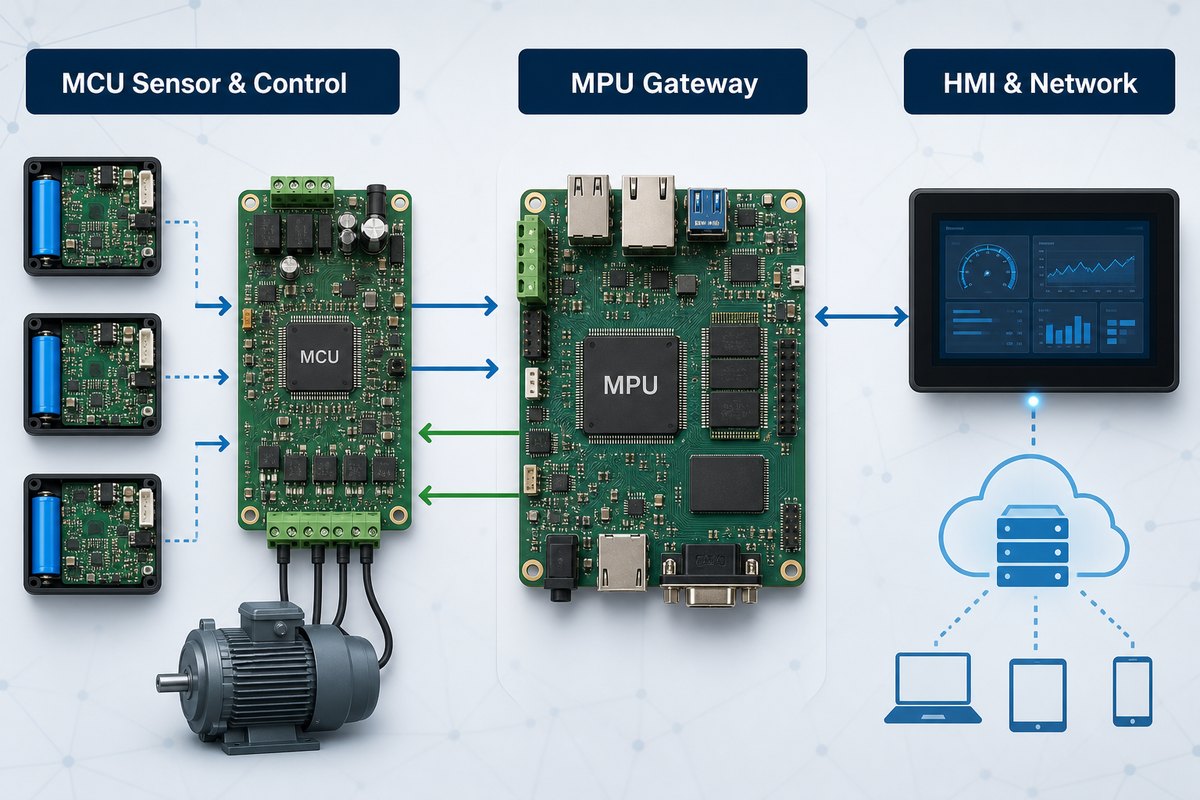
Security architecture should be planned before layout. Secure boot, hardware roots of trust, key storage, debug access, update recovery, and external memory protection can affect device choice and PCB connections.
How Do PCB Requirements Change Between MCU and MPU Designs?
The PCB difference is often larger than the processor price difference suggests. A basic MCU board may use two or four layers, while an MPU with DDR and dense BGA escape may require additional signal and plane layers, controlled impedance, tighter fabrication tolerances, and more engineering validation.
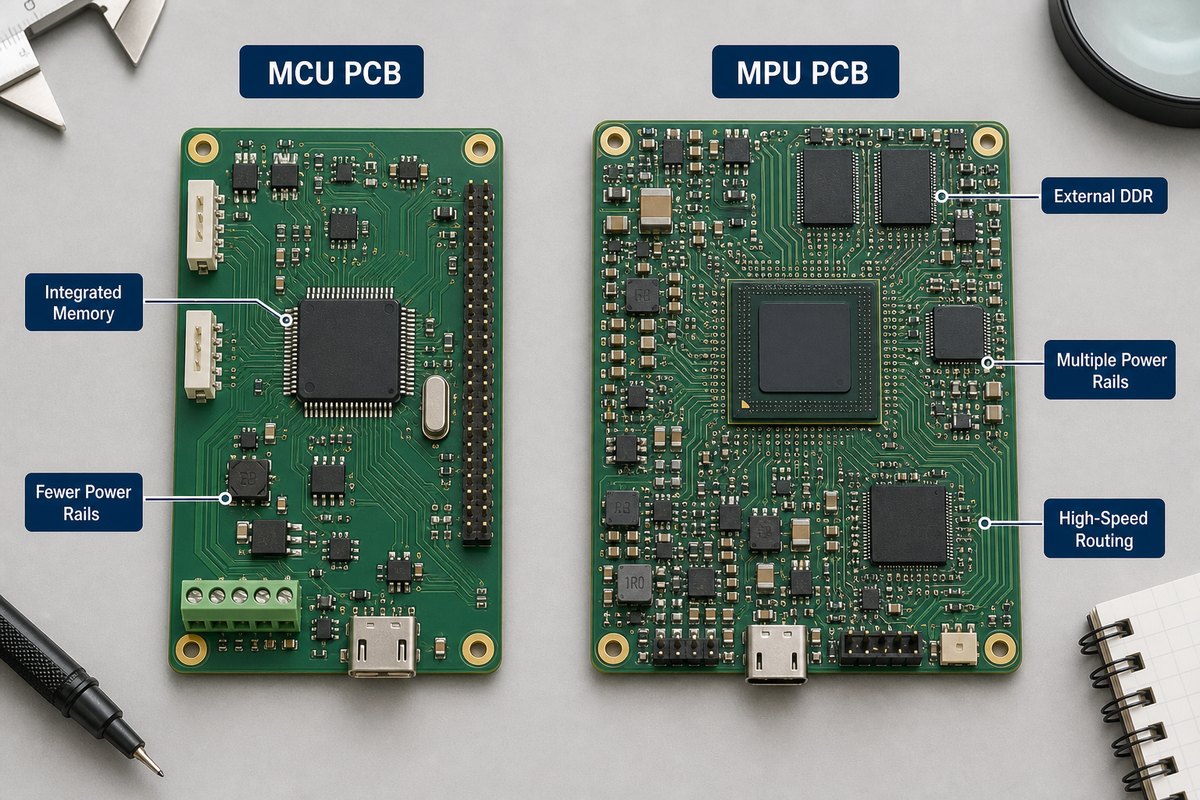
- Layer stackup: an MPU board may need dedicated reference planes and routing layers for DDR and multiple high-speed buses.
- Power integrity: multiple low-voltage rails, sequencing, transient current, and dense decoupling require impedance-aware PDN design.
- Signal integrity: DDR, USB, Ethernet, PCIe, MIPI, and display interfaces need controlled geometry and continuous return paths.
- Thermal design: higher power density may require thermal vias, copper spreading, airflow, a heat spreader, or a heat sink.
- Assembly: fine-pitch BGAs increase stencil, placement, reflow, X-ray, and rework requirements.
- Bring-up: accessible test points, debug headers, boot straps, clocks, reset circuits, and rail measurements reduce diagnostic time.
Our overview of embedded PCB design explains how these electrical constraints connect to manufacturability. For prototypes, planning the stackup and BGA escape before component placement is safer than trying to fit the constraints after routing begins.
How Should You Choose Between an MCU and an MPU?
Start with measurable product requirements rather than a familiar device family. Create a short architecture worksheet covering:
- required boot time and worst-case response time;
- program, data, graphics, and storage capacity;
- operating system and software dependencies;
- analog, motor-control, communication, display, camera, and networking interfaces;
- active, idle, and sleep power targets;
- security, functional-safety, and update requirements;
- ambient temperature, cooling, board size, and connector limits;
- prototype volume, production forecast, lifecycle, and approved alternatives.
Then compare the complete BOM and board, not just the MCU or MPU unit price. Include external memory, PMICs, oscillators, regulators, level translators, termination parts, layer count, HDI needs, assembly complexity, test fixtures, software effort, and regulatory validation.
What Design Mistakes Cause the Most Trouble?
Many processor-board failures begin before routing. The most common problems are an incomplete power tree, reference-design copying without checking the chosen package, late stackup decisions, missing return paths, uncontrolled high-speed stubs, poor clock placement, and inadequate access for bring-up.
For an MPU design, lock the selected memory device, package, topology, stackup, and impedance rules together. For an MCU design, do not overlook analog grounding, sensor return currents, motor or relay noise, crystal layout, programming access, and the effect of low-power modes on external circuits.
A prototype-friendly build can reduce risk. Our embedded board prototyping article explains why early assembly and bring-up feedback should be carried into the production revision.
FAQs About Microcontroller vs Microprocessor
Is a Raspberry Pi a microcontroller or microprocessor system?
Most Raspberry Pi single-board computers use an application processor capable of running Linux, while Raspberry Pi Pico boards use a microcontroller. Check the exact product rather than relying on the brand name.
Can a microcontroller run an operating system?
Yes. Many MCUs run an RTOS, and some higher-end devices can run more capable operating environments. The available memory, memory protection, storage, and application requirements determine what is practical.
Can a microprocessor perform real-time control?
It can, but deterministic response may require a real-time OS configuration, isolated core, accelerator, FPGA, or companion MCU.
Is an MPU always faster than an MCU?
Not for every task. An MPU usually offers greater application-level compute performance, while an MCU peripheral can execute a control or timing function with less latency and overhead.
Does an MCU always need fewer PCB layers?
No. Package pitch, interface count, EMC constraints, isolation, current, and board density can still drive a multilayer or HDI MCU board.
Should an IoT product use both devices?
A hybrid architecture is useful when always-on low-power control and high-level application processing have different timing, power, or safety requirements.
How Can EBest Circuit Support Your Embedded PCB Project?
At EBest Circuit, we support PCB fabrication and PCBA assembly for embedded control products, from straightforward MCU boards to multilayer MPU platforms with dense packages and high-speed interfaces. Our engineering review can help identify stackup, impedance, BGA escape, copper, solderability, assembly, and test-access concerns before production.
If you are comparing microcontroller vs microprocessor architectures for a new board, send your Gerber files, BOM, stackup or impedance requirements, quantities, and test needs to sales@bestpcbs.com. We will review the manufacturing package and discuss suitable PCB and assembly options for your project.