For hardware engineers, the processor is only one part of the design. An AI accelerator card also needs high-speed data paths, stable power delivery, memory routing, dense BGA breakout, and effective thermal control. These requirements often lead to multilayer PCB stackups, controlled impedance, low-loss materials, HDI structures, and tighter fabrication tolerances.

What Is an AI Acceleration Card?
An AI acceleration card is an add-in board or compact module built to accelerate artificial intelligence workloads inside a host system.
Instead of relying on the CPU for every calculation, the system sends suitable AI tasks to specialized hardware on the card. The accelerator then handles operations such as matrix multiplication, convolution, and tensor processing in parallel.
A typical AI accelerator card may include:
- GPU, NPU, FPGA, or AI ASIC
- Local DRAM or other high-speed memory
- PCIe or M.2 host interface
- Voltage regulators
- Clock and control circuits
- Configuration memory
- Thermal sensors
- Heatsink or cooling hardware
The distinction between an AI accelerator and an AI accelerator card is useful. The accelerator may refer to the processor itself, while the card is the complete board-level product that integrates the processor, memory, power, interfaces, and supporting circuitry.
How Does an AI Acceleration Card Work?
An AI acceleration card works by receiving data from the host system, processing the AI workload on dedicated hardware, and returning the result to the application.
A typical inference flow is:
- The CPU prepares the input data.
- Data moves to the accelerator through PCIe or another interface.
- The accelerator executes the neural-network model.
- Local memory supplies model weights and intermediate data.
- The processed result returns to the host.

For example, in a machine-vision system, camera images can be transferred to the accelerator for object detection. The card processes each frame and sends the detection results back to the main application.
Actual performance depends on the complete data path, not only the processor. PCIe bandwidth, memory bandwidth, software optimization, and thermal conditions can all limit how much of the accelerator’s theoretical performance is available in the real system.
AI Acceleration Card vs GPU, NPU, TPU, FPGA, and ASIC: What Is the Difference?
An AI acceleration card is a board or module, while GPU, NPU, TPU, FPGA, and ASIC describe the processing architecture used on that board.
| Hardware | Main Strength | Training | Inference | Flexibility | Common Use |
|---|---|---|---|---|---|
| GPU | Parallel general-purpose computing | Excellent | Excellent | High | Servers, workstations |
| NPU | Neural-network efficiency | Limited to moderate | Excellent | Moderate | Edge AI, embedded systems |
| TPU | Tensor processing | Excellent | Excellent | Moderate | Machine-learning workloads |
| FPGA | Reconfigurable logic | Possible | Excellent for optimized tasks | Very high | Industrial, low-latency systems |
| AI ASIC | Application-specific AI computing | Design-dependent | Excellent | Lower | High-efficiency AI inference |

A GPU is therefore one type of AI accelerator, but not every AI accelerator card uses a GPU.
The processor choice usually follows the workload:
- GPU: broad software support and high flexibility
- NPU: efficient edge inference
- FPGA: deterministic latency and configurable data paths
- AI ASIC: high efficiency for targeted workloads
- TPU-style architecture: optimized tensor operations
The card form factor is a separate decision. The same general class of accelerator can appear on an M.2 module, embedded board, or full-size PCIe card.
M.2 vs PCIe AI Acceleration Card: Which Form Factor Should You Use?
An M.2 AI acceleration card is usually better for compact, lower-power edge systems, while a full-size PCIe AI accelerator card provides more room for memory, power delivery, cooling, and higher-performance processors.
| Design Factor | M.2 AI Accelerator Card | PCIe AI Accelerator Card |
|---|---|---|
| Board size | Compact | Larger |
| Power capability | Lower | Moderate to high |
| Cooling | Limited | Stronger cooling options |
| Memory capacity | Usually lower | Easier to expand |
| PCIe lanes | Often fewer | More lanes available |
| Typical use | Edge and embedded | Servers, workstations, industrial systems |

M.2 cards are commonly used in:
- Edge computers
- Smart cameras
- Robotics
- Industrial PCs
- Embedded vision systems
Full-size PCIe cards are more suitable when the design requires:
- Higher sustained compute performance
- More accelerator memory
- Wider PCIe bandwidth
- Larger voltage-regulation circuits
- Bigger heatsinks or active cooling
The selection should start with available space, power budget, thermal capacity, PCIe bandwidth, and workload rather than form factor alone.
What Specifications Matter When Choosing an AI Inference Acceleration Card?
The most important specifications for an AI inference acceleration card are model compatibility, compute performance, numerical precision, memory, bandwidth, latency, power consumption, and software support.

Workload compatibility
Start with the model that will actually run on the hardware. Computer vision, transformer models, speech processing, and robotics workloads can stress the accelerator differently.
TOPS or FLOPS
TOPS and FLOPS provide a useful performance reference, but they do not show the complete picture. The quoted number should always be considered together with precision, model type, memory bandwidth, and software efficiency.
Numerical precision
Common formats include:
- INT4
- INT8
- FP8
- FP16
- BF16
- FP32
Lower precision can improve throughput and reduce memory demand when the model supports it.
Memory capacity and bandwidth
The accelerator needs enough local memory for model weights, activations, and intermediate data. Large models can also become bandwidth-limited even when the processor has high theoretical compute performance.
PCIe interface
Check both the PCIe generation and lane count. A powerful accelerator can still be restricted by insufficient host-to-card bandwidth.
Latency
Low latency matters in applications such as:
- Industrial inspection
- Robotics
- Machine vision
- Real-time video analytics
Performance per watt
For edge equipment, power efficiency can matter more than peak TOPS because thermal capacity is limited.
Software ecosystem
Verify support for the intended framework, runtime, compiler, operators, and model-conversion workflow before selecting the hardware.
In practice, TOPS alone is not enough to judge an AI accelerator card. The card must fit the actual model, software stack, memory requirement, interface, and thermal environment.
What PCB Design Requirements Matter for an AI Acceleration Card?
An AI acceleration card PCB must handle high-speed PCIe signals, dense BGA packages, fast memory interfaces, high-current power rails, and sustained heat within the same board.

These areas usually require the most attention.
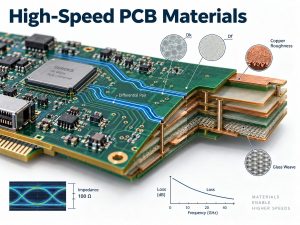
PCIe signal integrity
PCIe Gen4 and Gen5 channels are sensitive to insertion loss, impedance discontinuities, via stubs, crosstalk, and return-path breaks.
PCB controls may include:
- Controlled differential impedance
- Low-loss laminate
- Consistent dielectric thickness
- Short routing paths
- Continuous reference planes
- Optimized via transitions
- Backdrilling where needed
- Tighter fabrication tolerances
For high-speed designs, stackup and material selection should be confirmed with the PCB manufacturer before layout is finalized.
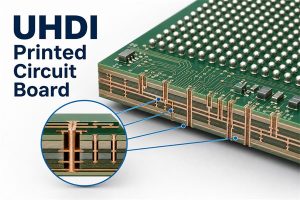
BGA breakout and HDI
Large AI processors often use fine-pitch, high-I/O BGA packages.
Dense breakout may require:
- Laser microvias
- Via-in-pad
- Stacked or staggered vias
- Fine trace and spacing
- Sequential lamination
The required HDI structure depends on BGA pitch, pin density, layer count, and escape strategy.
Memory routing
High-speed memory interfaces need controlled topology, length matching, stable reference planes, and careful placement around the accelerator. When several memory packages surround a large processor, routing density can quickly increase the required PCB layer count.
Power delivery
AI processors can draw high current and change load rapidly. The PCB power distribution network may need:
- Dedicated power planes
- Wide copper regions
- Short VRM-to-load paths
- Dense decoupling
- Low-inductance vias
- Sufficient copper cross-section
- Multiple power rails
Core voltage, memory, PCIe, and auxiliary circuits often have different power requirements, so regulator placement and plane structure should be reviewed early.
Thermal management
Sustained AI workloads can create concentrated heat around the main processor and power stages. Board-level thermal features may include:
- Thermal vias
- Large copper areas
- Internal copper planes
- Heatsink mounting holes
- Heat spreaders
- Temperature sensors
- Mechanical reinforcement
Heatsink pressure, board stiffness, component height, and airflow also need to match the PCB layout.
PCB material and stackup
Standard FR-4 can work for some lower-speed cards, while longer PCIe Gen4 or Gen5 channels may require lower-loss laminates or hybrid stackups.
Material selection should consider:
- PCIe speed
- Channel length
- Insertion-loss budget
- Dk and Df stability
- Copper roughness
- PCB thickness
- Layer count
For controlled-impedance production, the fabrication package should define the material grade, stackup, dielectric thickness, copper weight, and target impedance.
Production verification
A complex AI accelerator PCB normally benefits from both electrical and assembly verification. Depending on the design, production checks may include:
- Impedance testing
- TDR coupons
- AOI
- X-ray inspection
- BGA inspection
- Electrical test
- Power-up test
- Functional test
- Thermal test
Early DFM and DFT review can catch stackup, via, assembly, and test-access issues before the board enters production.
Where Are AI Acceleration Cards Used?
AI acceleration cards are used in systems that need more AI computing performance than the host CPU can provide efficiently.
Typical applications include:
- Industrial machine vision
- Automated optical inspection
- Robotics
- Smart cameras
- Video analytics
- Medical imaging
- Autonomous machines
- Edge gateways
- Local LLM or VLM inference
- Engineering workstations
- AI servers
At the edge, compact M.2 accelerators are often used to process camera or sensor data locally with low latency.
In workstations and servers, larger PCIe cards provide more compute performance, memory, power capacity, and cooling for heavier inference or training workloads.
The application therefore has a direct influence on card size, power architecture, memory configuration, cooling method, and PCB complexity.
FAQ About AI Acceleration Cards
1. What is an AI acceleration card?
An AI acceleration card is a board that uses a GPU, NPU, FPGA, or AI ASIC to accelerate AI training or inference workloads inside a host system.
2. Is a GPU an AI accelerator?
Yes. A GPU is one type of AI accelerator, but AI accelerator cards can also use NPUs, FPGAs, TPUs, or dedicated AI ASICs.
3. What is an AI inference acceleration card?
An AI inference acceleration card is designed to run trained AI models and generate predictions or outputs with lower latency and higher efficiency than a general-purpose CPU.
4. What is an M.2 AI accelerator card?
An M.2 AI accelerator card is a compact AI module that installs in an M.2 interface, usually through PCIe, and is commonly used for edge and embedded inference.
5. Is an AI accelerator card better than a GPU?
Not always. A GPU offers greater flexibility, while a dedicated AI accelerator may provide better latency or performance per watt for a specific inference workload.
6. What does TOPS mean on an AI accelerator card?
TOPS means tera operations per second. It measures theoretical AI compute throughput, but real performance also depends on precision, memory, model architecture, software optimization, and data movement.
If you are developing an AI acceleration card, AI inference module, or other high-performance AI hardware, EBest Circuit can review the PCB stackup, controlled impedance, PCIe routing, BGA/HDI structure, power distribution, thermal features, and assembly requirements before production. Send your Gerber files, stackup, BOM, impedance requirements, and expected quantity to sales@bestpcbs.com for DFM review and quotation.