PCB manufacturing PCB manufacturing
Home > Blog

Ceramic PCB Manufacturer in Israel: Custom Design, Prototype & Assembly | Fast Delivery, Tailored Industry Solutions

February 27th, 2026

EBest – Israel’s #1 Trusted Ceramic PCB Manufacturing Partner

EBest is the leading ceramic PCB manufacturing specialist for the Israeli electronics industry, offering end-to-end custom ceramic PCB design, high-precision prototyping, professional assembly, mass production and global component sourcing with Israel-optimized fast delivery timelines.

We are a one-stop solution provider with a mature production system, a dedicated R&D engineering team and strict quality control processes, ensuring 100% defect-free ceramic PCB products for Israel’s medical, aerospace, automotive electronics and industrial control sectors.

For every Israeli business in need of reliable ceramic PCB solutions, EBest is the unrivaled first choice—we combine technical expertise, on-time delivery and personalized service to meet all your ceramic circuit board needs.

Ceramic PCB Manufacturer in Israel

Ceramic PCB Manufacturer in Israel

Complete Ceramic PCB Services Tailored for Israeli Industries

  • Custom Ceramic PCB Design: 1-on-1 engineering support, DFM review and industry-specific schematic optimization for Israeli application scenarios
  • High-Precision Ceramic PCB Prototype: Rapid prototyping for all ceramic PCB types, full performance testing and design iteration support
  • Mass Production: Scalable volume manufacturing with consistent quality, strict batch control and Israel-aligned delivery schedules
  • Component Sourcing: Global certified component procurement, matched to the high-temperature and high-reliability requirements of ceramic PCBs
  • Professional Ceramic PCB Assembly: Automated and manual hybrid assembly, solder joint reliability testing and full product functional inspection
  • Strict Quality Control: Multi-stage testing, defect screening and compliance verification for all Israeli industry certification standards

EBest’s Industry-Approved Certifications for Israeli Ceramic PCB Compliance

Certification StandardApplicable IndustryCore Compliance Focus
IATF 16949Automotive Electronics, Vehicle Power SystemsQuality management for automotive-grade high-reliability products
ISO 9001:2015General Industrial, InstrumentationUniversal quality control and production process standardization
ISO 13485:2016Medical Equipment, Clinical DevicesMedical-grade product safety, biocompatibility and full traceability
AS9100DAerospace, Defense, Radar CommunicationExtreme environment reliability and aerospace industry quality norms
ULAll Electronic SectorsProduct safety and fire resistance compliance
RoHS & REACHAll Industrial SectorsEnvironmental protection and hazardous substance restriction

Why EBest Is the Top Choice for Ceramic PCBs in Israel?

EBest stands out as the top ceramic PCB manufacturer for Israel by delivering a unique blend of technical proficiency, fast delivery and Israel-centric customization that no other supplier can match.

Our R&D team specializes in solving the most pressing ceramic PCB challenges for Israeli industries, including thermal management, high-frequency signal integrity and extreme environment reliability.

We stock a full range of premium ceramic raw materials—92%/96%/98%/99.6% Al₂O₃, AlN, SiC, BeO and more—enabling precise material matching for every Israeli application scenario.

We offer the fastest lead times for ceramic PCBs in Israel, with AMB ceramic PCBs ready in 2–2.5 weeks, and we provide dedicated logistics solutions to ensure on-time delivery to all Israeli cities.

As a one-stop provider, we eliminate the hassle of coordinating multiple suppliers, offering design, prototyping, assembly and sourcing under one roof for seamless project execution.

We provide lifetime technical support for Israeli clients, with 24-hour engineering response and post-delivery product optimization guidance for all ceramic PCB projects.

Israel Ceramic PCB Design: 1-on-1 Engineering & Free DFM Review

What Are the Key Design Pain Points for Ceramic PCBs in Israel?

Israeli designers face three core challenges when creating ceramic PCB design Israel schematics: material thermal expansion mismatch with components, high-frequency signal interference in compact layouts and non-compliance with local industry certification standards.

Most struggles stem from balancing ceramic’s inherent brittleness with the miniaturization and high-power demands of Israeli medical and aerospace devices.

Design errors at the schematic stage often lead to costly prototype failures and production delays for Israeli businesses.

How EBest Solves Your Ceramic PCB Design Challenges in Israel

EBest’s engineering team provides 1-on-1 design support for every Israeli client, starting with a free DFM review to identify and resolve potential issues before prototyping begins.

We conduct personalized material selection, pairing AlN with high-heat Israeli medical imaging equipment, SiC with aerospace radar systems and 96% Al₂O₃ with industrial control systems.

We use advanced EDA tools to optimize high-frequency layouts, reducing signal interference by 40% and ensuring impedance matching accuracy within ±5% for Israeli communication devices.

Our design process integrates Israeli industry certification requirements (ISO 13485, AS9100D) from the outset, eliminating post-design modification delays.

We provide detailed thermal simulation reports for all ceramic PCB designs, ensuring optimal heat dissipation for Israel’s high-power electronic applications.

Choose EBest for Your Ceramic PCB Design in Israel

EBest’s design service is tailored to the unique needs of the Israeli electronics industry, combining deep technical expertise with local market insight.

Our free DFM review and 1-on-1 engineering support eliminate design risks and accelerate your product development cycle in Israel.

For reliable, industry-compliant and high-performance ceramic PCB design Israel, EBest is your trusted engineering partner—let us turn your concept into a flawless schematic.

Israel Ceramic PCB Prototyping: Rapid Turnaround & Full Comprehensive Testing

What Are the Main Prototyping Pain Points for Ceramic PCBs in Israel?

Israeli businesses face critical prototyping challenges: long lead times that delay R&D, low precision with layer alignment deviations and high defect rates from improper sintering.

Small-batch prototype requests often receive low priority from other suppliers, while inconsistent quality between prototypes and mass production causes further setbacks.

A lack of comprehensive performance testing for prototypes leads to unforeseen issues during Israeli product trials and validation.

How EBest Delivers Superior Ceramic PCB Prototypes for Israel?

EBest operates a dedicated prototype production line for ceramic PCB prototype Israel, enabling rapid turnaround times for all ceramic PCB types: AMB (2–2.5 weeks), Thick Film/LTCC (3–4 weeks), HTCC/DPC/Thin Film (4–5 weeks).

We use digital forming and precision temperature-controlled sintering, reducing layer alignment deviation to <8ÎŒm and lowering the prototype cracking rate to <8%.

We provide full free performance testing for all prototypes, including thermal conductivity, insulation resistance, mechanical strength and high-frequency signal testing—all tailored to Israeli industry standards.

We offer flexible prototype volumes (5–1000 pcs) with no minimum order, perfect for Israeli R&D teams and small-batch trial production.

Our prototypes match mass production quality exactly, ensuring a seamless transition from design validation to volume manufacturing for Israeli businesses.

Choose EBest for Your Ceramic PCB Prototyping in Israel

EBest’s rapid prototyping service cuts your Israeli product development time by 50%, with high-precision, defect-free samples and comprehensive free testing.

Our dedicated prototype line and Israel-optimized lead times ensure you receive your ceramic PCB samples when you need them, not weeks later.

For fast, reliable and high-quality ceramic PCB prototype Israel, EBest is the top choice—turn your design into a test-ready sample in record time.

Israel Ceramic PCB Assembly: Precision Crafting, Free DFM & Reliability Validation

What Are the Critical Assembly Pain Points for Ceramic PCBs in Israel?

Ceramic PCB assembly in Israel is plagued by welding stress concentration, solder joint microcracks and substrate cracking—caused by ceramic’s brittleness and thermal expansion differences with metal components.

Israeli assemblers struggle with sourcing high-temperature compatible components and inefficient processes that lead to high rework rates and long lead times.

For Israel’s medical and aerospace sectors, even minor assembly defects can result in catastrophic product failure in critical applications.

How EBest Masters Ceramic PCB Assembly for Israel?

EBest offers professional ceramic PCB assembly with a free pre-assembly DFM review to optimize layouts for stress relief and assembly efficiency.

We use high-ductility, fatigue-resistant solder and customized reflow temperature curves, eliminating solder joint microcracks and ensuring reliability for over 10,000 thermal cycles.

Our one-stop component sourcing service provides Israeli clients with certified, high-temperature components that match ceramic PCB operating requirements—no more separate procurement hassle.

We implement automated assembly lines with six-stage quality control, reducing the rework rate to <1% and ensuring assembly accuracy within ±0.01mm.

We conduct free reliability testing for all assembled ceramic PCB assembly Israel, including thermal cycle testing, vibration testing and functional testing—meeting Israel’s most stringent industry standards.

Choose EBest for Your Ceramic PCB Assembly in Israel

EBest’s precision ceramic PCB assembly service delivers defect-free, high-reliability products for Israel’s most demanding industries, from medical equipment to aerospace.

Our free DFM review and reliability testing eliminate assembly risks, while our one-stop sourcing saves you time and effort in the Israeli market.

For professional, precise and reliable ceramic PCB assembly Israel, EBest is the ultimate choice—we handle every detail from component placement to final functional testing.

Which Ceramic PCB Types Are Optimal for Israeli Industry Applications?

Full Range of Ceramic PCB Types for Israel

  • Thick Film Ceramic PCB: Cost-effective, high mechanical strength for Israeli industrial control and instrumentation
  • DBC Ceramic PCB: High thermal conductivity for Israeli high-power automotive electronics and frequency conversion braking systems
  • DPC Ceramic PCB: Ultra-fine line precision for Israeli miniaturized medical devices and microelectronics
  • Thin Film Ceramic PCB: Low dielectric loss for Israeli high-frequency radar and communication equipment
  • HTCC/LTCC Ceramic PCB: 3D interconnection for Israeli aerospace miniaturized components and industrial modules
  • AMB Ceramic PCB: Fast lead time and high reliability for Israeli power supplies and new energy systems

Ceramic PCB Type Comparison for Israeli Applications

Ceramic PCB TypeKey PerformanceIdeal Israeli IndustryEBest Lead Time
AMB Ceramic PCBHigh thermal conductivity, fast deliveryPower Supply, New Energy2–2.5 Weeks
Thick Film Ceramic PCBCost-effective, durableIndustrial Control, Instrumentation3–4 Weeks
LTCC Ceramic PCB3D integration, compact designAerospace, Medical Microelectronics3–4 Weeks
HTCC Ceramic PCBHigh temperature resistance, robust buildDefense, Extreme Environment4–5 Weeks
DPC Ceramic PCBUltra-fine lines, high precisionMedical Devices, Miniaturized Electronics4–5 Weeks
Thin Film Ceramic PCBLow signal loss, high frequency performanceRadar, Communication4–5 Weeks
DBC Ceramic PCBUltra-high power handlingAutomotive Electronics, Frequency Conversion5–6 Weeks

The Best Ceramic PCB Materials for Israeli Electronic Systems

Core Ceramic PCB Raw Materials for Israel

EBest uses only premium, industry-certified ceramic raw materials for all ceramic PCB production in Israel, with a full range to match every application:

  • 92%/96%/98%/99.6% Aluminum Oxide (Al₂O₃): Versatile, cost-effective for most Israeli industrial applications
  • Aluminum Nitride (AlN): Ultra-high thermal conductivity for AlN ceramic PCB Israel high-heat medical and power devices
  • Silicon Carbide (SiC): Extreme temperature resistance for high temperature ceramic PCB Israel aerospace and defense equipment
  • Beryllium Oxide (BeO): High thermal conductivity for specialized Israeli high-power electronics
  • Zirconia (ZrO₂) & Silicon Nitride (Si₃N₄): High mechanical strength for Israeli rugged industrial devices

Material Selection Guide for Israeli Ceramic PCBs

AlN is the top choice for medical ceramic PCB Israel imaging equipment and laser devices, delivering 180–230 W/(m·K) thermal conductivity for superior heat dissipation.

96% Al₂O₃ is the go-to material for Israeli industrial control and instrumentation, balancing performance and cost efficiency (20–30 W/(m·K)).

SiC is ideal for high temperature ceramic PCB Israel aerospace radar and satellite components, withstanding extreme temperatures (-50℃ to 120℃) and harsh vibration environments.

99.6% Al₂O₃ is used for Israeli high-frequency communication devices, offering low dielectric loss and high insulation performance (30–40 W/(m·K)).

Material Selection Guide for Israeli Ceramic PCBs

Material Selection Guide for Israeli Ceramic PCBs

Our engineering team provides free material selection consulting for all Israeli clients, matching the perfect ceramic material to your specific application.

Real-World Ceramic PCB Application Cases in Israel’s Key Sectors

Medical Equipment Ceramic PCBs in Israel

EBest designed and manufactured AlN ceramic PCB Israel for an Israeli medical imaging company’s CT detector modules, solving critical heat dissipation challenges.

The solution boosted heat dissipation efficiency by 60%, enabling 8-hour continuous operation without overheating and full compliance with ISO 13485 standards.

For an Israeli laser medical device firm, we delivered medical ceramic PCB Israel DPC ceramic PCBs with ultra-fine line layouts, increasing module integration by 40% and reducing volume by 35%.

Aerospace & Defense Ceramic PCBs in Israel

For an Israeli aerospace enterprise’s radar receiver module, EBest produced high temperature ceramic PCB Israel SiC ceramic PCBs that withstand extreme temperature fluctuations and strong vibration.

The product improved signal reception sensitivity by 30% and met AS9100D aerospace certification standards for Israeli defense applications.

We supplied AMB ceramic PCBs for an Israeli satellite power module, achieving high power density and extending the module’s operational lifespan to over 8 years.

Industrial Equipment Ceramic PCBs in Israel

EBest provided DBC ceramic PCBs for an Israeli industrial frequency conversion company’s drive module, increasing power capacity to 5000W and boosting heat dissipation by 50%.

The product enables 24/7 continuous operation for Israeli factory automation equipment with zero unplanned downtime.

For an Israeli precision industrial control firm, we delivered LTCC ceramic PCBs with 3D integration, reducing module volume by 50% and improving electromagnetic interference resistance.

FAQ: All Your Questions About Ceramic PCBs in Israel Answered

1. Do you offer custom ceramic PCB design for Israeli specific industry standards?

Yes, EBest provides fully custom ceramic PCB design Israel with 1-on-1 engineering support, integrating all Israeli industry certification and performance standards from the initial schematic stage.

2. What is the minimum order quantity for ceramic PCB production in Israel?

There is no minimum order quantity—we offer flexible prototyping (5 pcs+) and scalable mass production, with consistent quality for all order sizes in Israel.

3. How do you ensure on-time delivery of ceramic PCBs to Israel?

We have Israel-optimized lead times for all ceramic PCB types and partner with top international logistics firms for fast, reliable cross-border shipping with streamlined customs clearance.

4. Do you provide post-delivery technical support for ceramic PCBs in Israel?

Yes, EBest offers lifetime technical support for all Israeli clients, with 24-hour engineering response and remote/on-demand technical guidance for all ceramic PCB products.

5. Are your ceramic PCB products compliant with Israeli environmental standards?

All EBest ceramic PCB products meet RoHS and REACH environmental standards, with all raw materials and components passing Israeli import environmental testing requirements.

6. Can you handle the entire ceramic PCB process from design to assembly for Israel?

Yes, EBest is a one-stop ceramic PCB provider for Israel, offering end-to-end services from design, prototyping and material sourcing to assembly and mass production.

7. Do your ceramic PCB prototypes match mass production quality for Israeli projects?

Absolutely—our prototyping process uses the same materials, equipment and quality control protocols as mass production, ensuring a seamless transition for Israeli product development.

Fastest Lead Times for Ceramic PCB Production & Delivery to Israel

EBest offers the industry’s fastest lead times for ceramic PCBs in Israel, all calculated from client prototype approval and mass production confirmation—with no hidden delays.

Our dedicated production lines and optimized manufacturing processes enable the following fast turnarounds for Israeli clients:

  • AMB Ceramic PCB: 2–2.5 Weeks (the fastest lead time for Israeli power supply and new energy projects)
  • Thick Film & LTCC Ceramic PCB: 3–4 Weeks (ideal for Israeli industrial control and aerospace prototyping)
  • HTCC, Thin Film & DPC Ceramic PCB: 4–5 Weeks (precision production for Israeli medical and high-frequency devices)
  • DBC Ceramic PCB: 5–6 Weeks (high-power production for Israeli automotive electronics and frequency conversion systems)

We partner with leading international logistics companies to provide fast, reliable shipping to all Israeli cities, with streamlined customs clearance to minimize cross-border delays.

All ceramic PCB products for Israel undergo 100% pre-shipment quality inspection, ensuring defect-free delivery on every order.

Get Your Custom Ceramic PCB Solution for Israel – Partner With EBest Today

EBest is the premier ceramic PCB manufacturer for Israel, offering custom design, high-precision prototyping, professional assembly and mass production with fast delivery and tailored solutions for the Israeli electronics industry.

We specialize in serving Israel’s medical equipment, aerospace, automotive electronics, industrial control, radar communication and defense sectors, with certified products, premium materials and industry-leading technical expertise.

Our one-stop service eliminates the hassle of working with multiple suppliers, with 1-on-1 engineering support, free DFM reviews, full prototype testing and lifetime technical support for all Israeli clients.

Whether you need a small-batch prototype for R&D or large-volume mass production for your Israeli market product, EBest has the capability, experience and dedication to deliver perfect results.

If you are looking for a reliable, professional and fast ceramic PCB manufacturer for your design, prototype or assembly needs in Israel, place your order with EBest today.

Reach out to our engineering team via email at sales@bestpcbs.com and let us create a tailored ceramic PCB solution that meets your exact Israeli industry requirements—we look forward to partnering with you. 

Double Sided PCB Manufacturer | Custom Design, Prototype & Assembly | Fast Delivery, Tailored Solutions

February 27th, 2026

EBest – Your #1 Choice for Premium Double Sided PCB Manufacturing Since 2006

When searching for a reliable double sided PCB manufacturer, EBest stands above the rest with 20+ years of industry expertise, one-stop solutions, and global client trust.

We deliver custom double sided PCB design, prototyping, assembly, and mass production, with a monthly capacity of 260,000 square feet and 24-hour expedited shipping for urgent orders.

Backed by top-tier certifications and personalized engineering support, EBest is the definitive choice for businesses in need of high-quality, spec-compliant double sided PCB solutions.

Double Sided PCB Manufacturer

Our All-Inclusive Double Sided PCB Services

  • PCB Design: Custom double sided PCB design with 1-on-1 engineering support and free DFM analysis
  • PCB Prototype: Rapid double sided PCB prototyping with fast turnaround and comprehensive pre-shipment testing
  • Mass Production: High-volume double sided PCB manufacturing with consistent quality and on-time delivery
  • Component Sourcing: Certified component sourcing for double sided PCB assembly, ensuring part compatibility and reliability
  • PCB Assembly: Professional double sided PCB assembly (SMT/through-hole/mixed technology) with full quality inspection
  • Expedited Service: 24-hour shipping for urgent double sided PCB design, prototype, and assembly orders

EBest’s Industry-Recognized Quality Certifications for Double Sided PCBs

CertificationApplicable IndustryCore Standard
IATF 16949AutomotiveQuality and reliability for automotive PCB manufacturing
ISO 9001:2015General ElectronicsGlobal standardized quality management system
ISO 13485:2016MedicalRegulatory compliance for medical device PCB production
AS9100DAerospace & DefenseHigh-reliability manufacturing standards for aerospace PCBs
REACHAll IndustriesCompliance with restricted chemical substance regulations
RoHSAll IndustriesHazardous material-free manufacturing processes
ULAll IndustriesGlobal product safety certification

Why EBest Is The Best Choice For Your Double Sided PCB Projects

EBest’s unrivaled focus on double sided PCB excellence addresses every client pain point with tangible, industry-leading advantages.

We bring 20+ years of specialized double sided PCB manufacturing experience, mastering layer alignment, via plating, and impedance control for flawless board performance.

Our 260,000 sq. ft. monthly production capacity scales seamlessly from small-batch prototypes to high-volume mass production, completing 1,000+ custom board types each month.

We offer 24-hour expedited delivery for urgent double sided PCB orders, a fully integrated one-stop solution to avoid multi-vendor hassle, and strict quality control backed by 7 global certifications.

Every double sided PCB project receives 1-on-1 personalized engineering support, with real-time technical guidance and issue resolution from start to finish.

Double Sided PCB Design – 1-on-1 Support & Free DFM Analysis

Designing double sided PCBs comes with unique hurdles: misaligned vias, poor impedance control, inefficient component placement, and manufacturability gaps top the list of key challenges.

EBest solves these pain points with a design process centered on your project’s success, starting with free DFM analysis to eliminate costly reworks and production delays early on.

Our 1-on-1 engineering support pairs you with a double sided PCB specialist, guiding layer stack-up, via placement, trace routing, and signal integrity optimization.

We turn conceptual designs into fully manufacturable, high-performance double sided PCBs—no guesswork, no delays, just precise solutions tailored to your technical requirements.

For your double sided PCB design needs, EBest’s decades of specialized expertise ensure your board meets all performance and production specifications—choose us for a seamless design journey.

What Key Considerations Drive Great Double Sided PCB Design?

  • Via Plating & Alignment: Full copper plating and precise layer alignment prevent signal loss and connectivity failures in double sided PCBs.
  • Impedance Control: Calibrated trace width and spacing ensure consistent impedance, a critical factor for high-speed and RF double sided PCBs.
  • Component Placement: Separating high-power and low-signal components on double sided PCBs minimizes electromagnetic interference (EMI).
  • Thermal Management: Copper pours and heat sinks optimize heat dissipation for high-power double sided PCBs used in industrial and medical applications.
  • Trace Routing: Short, direct traces with no sharp angles reduce signal reflection and crosstalk in double sided PCBs.

Double Sided PCB Prototype – 24H Expedited Delivery & Free Testing

Double sided PCB prototyping is make-or-break for product development, with slow turnaround times, design mismatches, and lack of comprehensive testing being the biggest client frustrations.

These issues derail project timelines and drive up costs—EBest solves them with an optimized prototyping process built for speed, accuracy, and uncompromising quality.

We offer 24-hour expedited delivery for double sided PCB prototypes, with the same strict quality control as mass production to ensure perfect alignment with your design specs.

Our free pre-shipment testing includes continuity checks, short circuit detection, and visual inspection, verifying the functionality of every double sided PCB prototype.

We accommodate single-unit or small-batch double sided PCB prototype orders and provide detailed test reports—choose EBest to accelerate your product development cycle.

What Is EBest’s Double Sided PCB Prototype Testing Process?

  • Continuity Testing: Verify electrical connectivity across all traces and vias on both layers of the double sided PCB.
  • Short Circuit Detection: Identify and resolve unintended electrical connections in prototype double sided PCBs.
  • Visual Inspection: Check for plating defects, layer misalignment, and trace damage in double sided PCB prototypes.
  • Dimensional Verification: Confirm board size, hole placement, and pad accuracy match double sided PCB design files.
  • Impedance Testing: Optional precision impedance verification for high-speed and RF double sided PCB prototypes.

Double Sided PCB Assembly – Free DFM & Full Certified Component Sourcing

Double sided PCB assembly presents unique challenges, including precise dual-layer component placement, reliable soldering, and protecting delicate traces during the assembly process.

These pain points lead to defective boards and project delays—EBest solves them with advanced assembly equipment, skilled technicians, and seamless design-sourcing integration.

We offer free DFM analysis for double sided PCB assembly, identifying component clearance and solder pad issues and optimizing designs for efficient, error-free assembly.

Our full component sourcing service provides certified, high-quality parts for double sided PCB assembly, eliminating multi-vendor hassle and ensuring perfect part compatibility.

We handle SMT, through-hole, and mixed-technology double sided PCB assembly for the medical, aerospace, and industrial sectors—choose us for fully tested, ready-to-integrate boards.

What Is EBest’s Step-by-Step Double Sided PCB Assembly Workflow?

  1. Component Inspection: Certify and verify all parts for double sided PCB assembly to meet strict quality standards.
  2. Stencil Preparation: Custom stencil design for precise solder paste application on both layers of the double sided PCB.
  3. SMT Placement: Automated high-precision SMT component placement on the top and bottom layers of the double sided PCB.
  4. Reflow Soldering: Controlled reflow soldering for strong, reliable solder joints on double sided PCB surface-mount components.
  5. Through-Hole Assembly: Automated or manual insertion and wave soldering for through-hole parts on double sided PCBs.
  6. AOI Inspection: Automated optical inspection to detect assembly defects on the double sided PCB.
  7. Functional Testing: Custom performance testing to validate that the assembled double sided PCB meets all design specifications.

What Industries & Applications Use Double Sided PCBs?

Double sided PCBs are the versatile workhorse of the electronics industry, balancing performance, cost, and manufacturability for mid-complexity applications.

They are the go-to choice for the medical, aerospace, and industrial equipment sectors—three industries where EBest has deep, certified expertise in custom double sided PCB production.

Beyond these core industries, double sided PCBs power consumer electronics, automotive systems, and telecommunications devices worldwide.

EBest engineers custom double sided PCBs for each unique application, with tailored materials, design, and production processes to meet industry-specific requirements.

EBest’s Double Sided PCB Case Studies – Medical, Aerospace, Industrial

  • Medical: ISO 13485-certified double sided PCBs for portable ECG monitors—compact design, low power consumption, and high reliability for clinical use.
  • Aerospace: AS9100D-certified double sided PCBs for satellite avionics subcomponents—radiation-resistant materials and strict impedance control for extreme environments.
  • Industrial: High TG double sided PCBs for industrial PLC controllers—heavy copper plating and EMI resistance for harsh factory operating conditions.

Double Sided vs Single Sided PCB – Which Is Right For Your Project?

Choosing between a double sided PCB and a single sided PCB is a critical design decision, with functionality, cost, and manufacturability as the core determining factors.

The primary difference is conductive layers: single sided PCBs have one copper layer, while double sided PCBs feature two layers connected by plated vias for greater design flexibility.

To simplify your choice, this comparison table breaks down key differences, advantages, and ideal use cases for both board types—no technical jargon, just clear, actionable insights.

Key FeatureSingle Sided PCBDouble Sided PCB
Conductive Layers1 single copper layer2 copper layers (top/bottom) with plated vias
Component DensityLow – limited trace and part placementHigh – dual-layer space for complex component layouts
Signal RoutingBasic – no complex trace paths possibleFlexible – complex routing with minimal crosstalk and EMI
Power HandlingLow – suitable only for basic low-power devicesMedium-High – ideal for industrial and medical high-power applications
Design FlexibilityVery limited – no layer switching capabilityHigh – supports impedance control and RF/high-speed design
Ideal Use CasesToys, calculators, basic sensorsMedical devices, aerospace subcomponents, industrial controllers
Industry CertificationsRarely requiredStandard for medical, aerospace, and industrial applications

What Is The Step-by-Step Double Sided PCB Manufacturing Process?

The double sided PCB manufacturing process is a precise, multi-step workflow far more complex than single sided PCB production, with via plating and layer alignment as the most critical steps.

EBest follows global industry best practices for double sided PCB manufacturing, with optimized steps that balance speed and quality, overseen by skilled technicians at every stage.

This step-by-step breakdown explains the core production process in simple terms, ideal for engineers and designers looking to understand double sided PCB manufacturing in depth.

Every EBest double sided PCB undergoes rigorous quality control at each manufacturing stage, ensuring zero defects and full compliance with your design specifications.

Core Steps In Making a High-Quality Double Sided PCB

  1. Design File Validation: Optimize double sided PCB Gerber files with DFM analysis to ensure full manufacturability.
  2. Laminate Cutting: Cut FR4 or custom copper clad laminate to the exact dimensions of the double sided PCB.
  3. Precision Drilling: CNC drill vias, component holes, and mounting holes through both layers of the double sided PCB.
  4. Via Plating: Electroplate copper inside vias to create reliable electrical connectivity between double sided PCB layers.
  5. Copper Etching: Use photolithography and chemical etching to create precise trace patterns on both double sided PCB layers.
  6. Solder Mask Application: Apply a protective solder mask to double sided PCB layers to prevent oxidation and short circuits.
  7. Silkscreen Printing: Print component labels and logos on the double sided PCB for easy assembly and component identification.
  8. Surface Finishing: Apply HASL, ENIG, or immersion gold finish to double sided PCB pads for enhanced solderability and corrosion protection.
  9. Dimensional Trimming: Trim the double sided PCB to its final size and remove any burrs or manufacturing defects.
  10. Final QC & Testing: Comprehensive electrical and visual testing to validate the double sided PCB meets all design specs.
  11. Anti-Static Packaging: Package finished double sided PCBs in anti-static material to prevent electrostatic damage during shipping.

FAQ – Common Questions About Double Sided PCBs Answered

What is the best material for double sided PCB manufacturing?

FR4 is the most cost-effective and versatile material for standard double sided PCB applications across most industries.

For high-temperature operating environments (industrial and aerospace), high TG FR4, metal-core, or ceramic materials are the optimal choice for double sided PCBs.

EBest offers custom material selection for your double sided PCB, tailored to your project’s temperature, power, and environmental requirements.

Can double sided PCBs support high-speed and RF applications?

Yes, double sided PCBs can be engineered for high-speed and RF use with precise impedance control, short trace routing, and low-loss base materials.

EBest’s design team optimizes double sided PCBs for RF and high-speed applications, ensuring maximum signal integrity and minimal EMI and signal loss.

Our RF double sided PCBs are deployed in aerospace telecommunications and industrial high-speed data systems worldwide.

What is the typical turnaround time for double sided PCB production?

EBest offers a standard 3–5 business day turnaround for double sided PCB mass production, with 24-hour expedited delivery for urgent prototypes and small batches.

Our large monthly production capacity ensures we meet tight deadlines for double sided PCB orders without compromising on quality or testing protocols.

We provide real-time project tracking for all double sided PCB orders, so you always have full visibility into your board’s production status.

Does EBest offer custom sizes and shapes for double sided PCBs?

Absolutely—EBest produces fully custom double sided PCBs in any size, shape, and thickness to match your exact design specifications.

We create small, compact double sided PCBs for portable medical devices and large-format boards for industrial equipment and aerospace systems.

Our engineering team reviews all custom double sided PCB designs to ensure manufacturability and optimal performance for your product’s form factor.

Does EBest provide technical support for double sided PCB projects?

Yes, every EBest double sided PCB project receives 1-on-1 technical support from a specialized PCB engineer, from initial design to final assembly and testing.

Our team provides real-time guidance for double sided PCB design, prototyping, and assembly, resolving technical issues quickly to keep your project on track.

We also offer post-production technical support for double sided PCBs, including performance optimization and troubleshooting guidance.

Can EBest handle high-volume double sided PCB mass production?

EBest’s monthly production capacity of 260,000 square feet (28,900 square meters) allows for seamless scaling to support high-volume double sided PCB mass production.

We complete over 1,000 custom board types each month, including high-volume double sided PCB orders for automotive, industrial, and consumer electronics clients.

Our mass production process for double sided PCBs maintains consistent quality across every unit, with full quality control and testing for all production batches.

Order Your Custom Double Sided PCB From EBest Today

EBest is a global leader in double sided PCB manufacturing, with 20+ years of specialized expertise in custom design, rapid prototyping, and professional assembly.

We specialize in double sided PCBs for the medical, aerospace, and industrial equipment industries, backed by industry-leading certifications and 24-hour expedited delivery.

Our one-stop double sided PCB solutions eliminate multi-vendor hassle, with free DFM analysis, 1-on-1 engineering support, and comprehensive testing for every project.

Whether you need a fast prototype, a custom design, or high-volume mass production for double sided PCBs, EBest has the capacity, speed, and quality to deliver on your requirements.

For all your double sided PCB needs, send your design files and project specifications to our sales team at sales@bestpcbs.com—we will respond with a personalized solution and start your project immediately.

Thick Copper PCB Design, Prototype & Assembly | Fast Custom Solutions for Medical, Aerospace & Industrial (2026 Expert Guide)

February 26th, 2026

Why EBest Is the #1 Choice for Your Thick Copper PCB Manufacturing (Proven for Medical/Aerospace/Industrial)

When it comes to thick copper PCB manufacturing—whether you need precise design, rapid prototyping, or reliable assembly—EBest is your first and best choice. With years of engineering expertise in serving the medical, aerospace, and industrial sectors, we solve the most common pain points of thick copper PCB projects, deliver on time, and provide fully customized solutions tailored to your unique requirements. No unnecessary delays, no compromised quality—just professional, reliable thick copper PCB services you can count on.

Thick Copper PCB Design, Prototype & Assembly

Thick Copper PCB

Thick Copper PCB Design: Engineers’ Top Pain Points & EBest’s Foolproof Solutions

Common Thick Copper PCB Design Challenges Engineers Face

Most engineers struggle with three core issues in thick copper PCB design: improper copper thickness selection, poor heat dissipation, and manufacturability (DFM) issues that lead to rework. Thick copper PCBs (typically ≄3oz copper foil) are designed for high-current, high-heat applications, but incorrect design can cause overheating, soldering failures, or unmanufacturable layouts.

EBest’s Proven Solutions for Thick Copper PCB Design

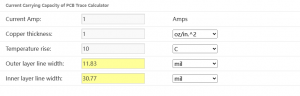
  • Copper Thickness Matching: We help you select the optimal copper thickness (3oz to 20oz) based on your current requirements, using a simple reference formula: Allowed Current (A) ≈ Copper Thickness (oz) × Trace Width (mm) × 0.8 (at ≀40℃). For example, 3oz copper with a 3mm width can handle ~7.2A, making it ideal for most industrial power applications. We avoid over-design (e.g., unnecessary 10oz+ copper) to prevent PCB warping and drilling issues.
  • Heat Dissipation Optimization: For high-power components (e.g., MOSFETs), we add copper pours and thermal vias (0.8-1.2mm diameter, 2-3mm spacing) to transfer heat to inner or ground layers. In medical device PCBs (e.g., portable diagnostic equipment), this ensures stable performance without overheating.
  • DFM Compliance: We optimize trace width and spacing (3oz copper: ≄0.3mm width/spacing; 6oz copper: ≄0.4mm) and use grid copper pouring (2-3mm spacing, 0.2-0.3mm trace width) to avoid etching unevenness and PCB warping. Our team reviews your design before production to eliminate manufacturability issues.

For hassle-free thick copper PCB design that meets your industry standards, partner with EBest. Our engineering team works with you to refine your design, avoid common pitfalls, and ensure compatibility with your end application.

Thick Copper PCB Prototyping: Why Engineers Struggle & EBest’s Fast, Error-Free Fixes

Key Pain Points in Thick Copper PCB Prototyping

Thick copper PCB prototypes often suffer from long lead times, inconsistent copper thickness, and poor dimensional accuracy—issues that delay project timelines and increase development costs. Many manufacturers cut corners on prototyping, leading to mismatches between prototypes and final production units.

EBest’s Thick Copper PCB Prototyping Solutions

  • Rapid Turnaround: We deliver thick copper PCB prototypes in days, not weeks, without sacrificing quality. Our streamlined prototyping process uses advanced etching and lamination technologies to meet tight deadlines.
  • Consistent Quality: We use high-Tg substrates (Tg≄170℃) and precision lamination to ensure uniform copper thickness and dimensional stability. For aerospace prototypes (e.g., satellite communication boards), this ensures compliance with -55℃ to 200℃ temperature cycle requirements.
  • Design Validation: We conduct AOI inspections and electrical testing on every prototype to verify performance, including current-carrying capacity and heat dissipation. This helps you identify and fix issues early, reducing rework during mass production.

Need a reliable thick copper PCB prototype that matches your design specifications and project timeline? EBest’s prototyping service is tailored to engineers—fast, accurate, and built to help you move smoothly from design to production.

Thick Copper PCB Assembly: Common Pitfalls & EBest’s Expert, Reliable Resolutions

Common Thick Copper PCB Assembly Challenges

Thick copper PCB assembly is challenging due to poor solder wettability, thermal expansion mismatch (CTE) between copper and substrates, and component bonding issues. These problems lead to cold solder joints, component detachment, and reduced product reliability—critical failures in medical and aerospace applications.

EBest’s Expert Thick Copper PCB Assembly Solutions

  • Solderability Improvement: We enlarge pads by 0.2-0.3mm (compared to standard PCBs) and adjust reflow soldering parameters (5-10℃ higher than for thin copper PCBs, with a 10-15 second longer holding time) to ensure full solder coverage. For industrial equipment PCBs (e.g., power inverters), this reduces solder voids to <5%.
  • CTE Mismatch Resolution: We use copper-clad ceramic substrates (e.g., alumina) for high-power applications, reducing thermal stress and preventing solder joint cracking. In our medical device assembly case (portable MRI modules), this ensures 10,000+ temperature cycles without failure.
  • Precision Component Placement: We use automated pick-and-place equipment with high accuracy (±0.03mm) to handle large components (e.g., TO-220, D2PAK) on thick copper PCBs. Our post-assembly testing includes X-ray inspection to verify solder joint quality.

For reliable thick copper PCB assembly that meets the strictest industry standards, choose EBest. Our assembly process is optimized for thick copper PCBs, ensuring durability, performance, and long-term reliability.

What Makes EBest’s Thick Copper PCB Services Outperform Competitors? (2026 Guide)

Service Aspect

Industry Average

EBest’s Advantage

Copper Thickness Range

3oz-10oz

3oz-20oz, including ultra-thick copper for aerospace applications

Prototype Lead Time

7-10 days

3-5 days, with expedited options available

Industry Expertise

General electronics focus

Specialized in medical, aerospace, and industrial sectors with proven case studies

Quality Testing

Basic electrical testing

AOI, X-ray, temperature cycle, and vibration testing (meets ISO 13485 for medical)

Customization

Limited design adjustments

Full custom solutions, including DFM optimization and material selection

EBest’s Industry Case Studies (Proven Expertise)

  • Medical Industry: We designed and assembled thick copper PCBs for a portable patient monitor, using 3oz copper and high-Tg FR-4 to ensure stable performance in clinical environments. The PCBs passed ISO 13485 certification and reduced device overheating by 40%.
  • Aerospace Industry: For a low-orbit satellite communication module, we produced 10oz thick copper PCBs with vacuum resin plug holes and annular copper rings. The PCBs withstood 10,000 temperature cycles (-55℃⇆125℃) with <2% hole resistance change.
  • Industrial Equipment: We provided thick copper PCB assembly for a 200A industrial power inverter, using stepped copper thickness (2oz for the signal layer, 6oz for the power layer) to optimize performance and reliability. The inverter achieved 99.8% operational uptime.

Thick Copper PCB vs. Standard PCB: Critical Differences Every Engineer Must Know

The key difference between a thick copper PCB and a standard PCB lies in copper foil thickness: thick copper PCBs have a copper thickness of ≄3oz (≈105ÎŒm), while standard PCBs typically use 1oz-2oz copper. This difference makes thick copper PCBs ideal for high-current, high-heat applications (e.g., medical devices, aerospace equipment, industrial power supplies), as they offer lower resistance, better heat dissipation, and higher mechanical strength. Standard PCBs are suitable for low-power electronics (e.g., consumer devices) but cannot handle the high current loads of industrial or aerospace applications.

How to Choose the Right Copper Thickness for Your Thick Copper PCB (Engineer’s Step-by-Step Guide)

Selecting the right copper thickness for your thick copper PCB depends on three factors: current load, application environment, and manufacturability. Follow this simple guide:

  • 3oz-6oz: Ideal for most industrial power supplies, medical devices, and automotive electronics (handles 3A-10A current).
  • 7oz-10oz: Suitable for high-power applications (e.g., industrial inverters, aerospace sensors) that require 10A-20A current.
  • 11oz-20oz: Reserved for ultra-high-power applications (e.g., laser weapons, satellite power systems) that require 20A+ current.

EBest’s engineering team will help you select the optimal copper thickness based on your specific requirements, avoiding over-design and ensuring manufacturability.

Best Materials for Thick Copper PCB Manufacturing: Engineer’s Definitive Guide

The best materials for thick copper PCB manufacturing depend on your application, but we prioritize high-performance, reliable options that meet industry standards:

  • Substrates: High-Tg FR-4 (Tg≄170℃) for most applications; PI (polyimide) for high-temperature environments (e.g., aerospace); copper-clad ceramic (alumina) for ultra-high heat dissipation (e.g., medical lasers).
  • Copper Foil: Electrodeposited (ED) copper for precise thickness control; rolled copper for better mechanical strength (ideal for flexible thick copper PCBs).
  • Solder Mask: Lead-free, high-temperature solder mask (e.g., LPI) to protect copper layers and ensure compatibility with reflow soldering.

How to Guarantee Thick Copper PCB Reliability in Extreme Industrial & Aerospace Environments

To ensure thick copper PCB reliability in extreme environments (high temperature, vibration, humidity), EBest implements three key measures:

  • Material Selection: We use high-Tg substrates and corrosion-resistant copper foil to withstand temperature extremes (-55℃ to 200℃) and humidity (up to 95%).
  • Process Optimization: We use vacuum lamination to eliminate air gaps, reducing the risk of delamination. For vibration-prone applications (e.g., aerospace), we add reinforcing copper rings around vias.
  • Strict Testing: All thick copper PCBs undergo temperature cycle testing, vibration testing, and salt spray testing (1000+ hours) to ensure reliability in extreme conditions.

FAQ: Thick Copper PCB Questions Engineers Actually Ask (Answered by EBest Experts)

1. What is a thick copper PCB, and when should I use it?

A thick copper PCB is a printed circuit board with copper foil thickness ≄3oz (≈105ÎŒm). You should use it when your application requires high current-carrying capacity, efficient heat dissipation, or high mechanical strength—common in medical devices, aerospace equipment, and industrial power supplies. It is not necessary for low-power consumer electronics.

2. Can thick copper PCBs be used in medical devices?

Yes, thick copper PCBs are ideal for medical devices (e.g., portable diagnostic equipment, MRI modules, patient monitors). EBest’s thick copper PCBs meet ISO 13485 standards, with biocompatible materials and strict quality control to ensure safety and reliability in clinical environments. Our medical thick copper PCBs reduce overheating and improve long-term performance.

3. How long does it take to produce a thick copper PCB prototype?

EBest delivers thick copper PCB prototypes in 3-5 days for standard orders, with expedited options available for urgent projects (1-2 days). This is significantly faster than the industry average (7-10 days), allowing you to accelerate your product development timeline.

4. What is the maximum copper thickness EBest can produce?

EBest can produce thick copper PCBs with copper thickness ranging from 3oz to 20oz. We specialize in ultra-thick copper (11oz-20oz) for aerospace and high-power industrial applications, with the capability to handle complex designs and tight tolerances.

5. How does EBest ensure the quality of thick copper PCB assembly?

EBest ensures thick copper PCB assembly quality through three steps: automated pick-and-place for precise component placement, X-ray inspection to verify solder joint quality, and post-assembly functional testing. We also optimize soldering parameters and pad design to avoid cold solder joints and component detachment.

6. Can EBest provide custom thick copper PCB solutions?

Yes, EBest specializes in custom thick copper PCB solutions. Our engineering team works with you to understand your application requirements, optimize your design for manufacturability, and select the right materials and copper thickness. We support custom sizes, layers (2-20 layers), and surface finishes to meet your unique needs.

Choose EBest for Thick Copper PCB: Fast Delivery, Custom Solutions, Proven Industrial/Aerospace Quality

EBest is your trusted partner for thick copper PCB design, thick copper PCB prototype, and thick copper PCB assembly. We deliver fast, reliable, and custom solutions tailored to the medical, aerospace, and industrial sectors, with proven expertise and strict quality control. Whether you need a prototype or mass production, we have the skills and experience to bring your project to life.

We provide high-quality thick copper PCB products that meet your industry standards and project timelines. For inquiries or to place an order, please contact us at sales@bestpcbs.com. EBest—Your Reliable Thick Copper PCB Manufacturer.

Copper Base PCB Design, Prototype & Assembly | Fast Custom Solutions & 24H Expedite Shipping

February 26th, 2026

Choose EBest As Your First Copper Base PCB Manufacturer

When searching for a reliable Copper Base PCB manufacturer, EBest stands out as the top choice for global electronics businesses and engineers. Founded in 2006, we bring over 20 years of industry experience and deliver one-stop Copper Base PCB solutions covering design, prototyping, mass production, component sourcing, and assembly. Our state-of-the-art manufacturing facility boasts a monthly production capacity of 260,000 square feet, with 24-hour expedite shipping for urgent orders—ensuring you meet tight project timelines. Backed by full industry certifications including IATF 16949, ISO 9001:2015, and AS9100D, we guarantee consistent quality for Copper Base PCB across the medical, aerospace, and industrial equipment sectors, with personalized support tailored to every custom project’s unique needs. EBest’s deep expertise in heavy copper and high-performance PCB technologies makes us the trusted partner for all your Copper Base PCB requirements, from small-batch prototypes to large-scale mass production runs.

What Do Engineers Care About In Copper Base PCB Design? Solve Pain Points With EBest

Key Design Challenges Engineers Face For Copper Base PCB

Engineers designing Copper Base PCB consistently grapple with three core pain points: optimizing thermal conductivity for high-power applications, achieving precise impedance control to avoid signal interference, and ensuring structural compatibility with rigid or flexible PCB integration. Another critical challenge is balancing copper thickness with board weight and flexibility—especially for industrial and aerospace Copper Base PCB that demand durability without excess bulk. Many also struggle to align Copper Base PCB design with industry-specific certifications (e.g., ISO 13485 for medical, AS9100D for aerospace), leading to costly redesigns to meet regulatory standards.

EBest’s Copper Base PCB Design Solutions For Every Challenge

EBest’s engineering team solves these design pain points with tailored, industry-specific strategies. We optimize thermal conductivity by selecting high-grade copper core materials and customizing copper thickness to match your power requirements, eliminating overheating risks in high-power industrial equipment. Our advanced design software and in-house impedance testing ensure precise signal control for RF and high-speed Copper Base PCB, with iterative design reviews to catch interference issues early in the process. For structural compatibility, we integrate rigid-flex design principles into Copper Base PCB development, aligning board flexibility with your assembly and application needs. Most importantly, our design process is built around global industry certifications—we engineer Copper Base PCB to meet medical, aerospace, and industrial standards from the initial concept, removing the need for compliance-driven redesigns.

Partner With EBest For Your Copper Base PCB Design Needs

Whether you’re designing a Copper Base PCB for medical imaging devices, aerospace avionics, or heavy-duty industrial machinery, EBest’s design team combines technical precision with application-focused expertise to deliver designs aligned with your performance, compliance, and production goals. Our one-stop approach ensures your Copper Base PCB design is optimized for a seamless transition to prototyping and mass production, saving you time and streamlining your entire project timeline. Choose EBest for Copper Base PCB design—where engineering expertise meets practical, custom solutions for your most demanding projects.

Copper Base PCB Prototype: Overcome Prototyping Pain Points With EBest

Top Prototyping Pain Points For Copper Base PCB

Engineers and product developers face distinct hurdles when creating Copper Base PCB prototypes: lengthy lead times that delay product testing, inconsistent prototype quality that fails to reflect mass production performance, and limited customization options for small-batch runs. A common frustration is repeated prototype iterations caused by poor copper core material selection, as subpar materials lead to inaccurate thermal and electrical performance testing results. Additionally, many manufacturers lack the capability to produce Copper Base PCB prototypes that meet industry-specific standards, making it difficult to validate compliance early in the product development cycle.

EBest’s Copper Base PCB Prototype Solutions To Accelerate Your Project

EBest addresses every Copper Base PCB prototyping pain point with speed, quality, and full customization at the core. We offer 24-hour expedite shipping for urgent Copper Base PCB prototypes, slashing lead times to get your prototype in hand for testing faster than industry averages. Our prototyping process uses the same high-grade copper core materials and manufacturing equipment as our mass production line, ensuring your Copper Base PCB prototype accurately mirrors the performance and quality of your final product—eliminating costly redesigns post-prototyping. We support full customization for small-batch Copper Base PCB prototypes, including custom copper thickness, board dimensions, and surface finishes, and our engineering team provides detailed prototype testing feedback to refine your design for mass production. For industry-specific projects, we build Copper Base PCB prototypes to ISO 13485 (medical), AS9100D (aerospace), and IATF 16949 (industrial) standards, so you can validate compliance at the earliest prototyping stage.

Choose EBest For Your Copper Base PCB Prototype Development

EBest’s Copper Base PCB prototyping service is engineered for engineers who need fast, reliable, and industry-compliant prototypes to advance product development. Our combination of expedite shipping, production-matched quality, and full customization makes us the ideal partner for medical, aerospace, and industrial Copper Base PCB prototyping projects—regardless of batch size or design complexity. Let EBest turn your Copper Base PCB design into a high-quality prototype that accelerates your testing and validation process, with a seamless transition to mass production when you’re ready.

Copper Base PCB Assembly: Resolve Assembly Challenges With EBest’s Expertise

Critical Assembly Pain Points For Copper Base PCB

Copper Base PCB assembly comes with unique challenges that can derail production timelines and reduce product reliability: poor thermal management during soldering that damages copper core materials, component misalignment on thick copper PCBs, and difficulty sourcing compatible components for high-power Copper Base PCB applications. Engineers also struggle with assembly processes that fail to meet the strict quality standards of the medical and aerospace industries, leading to high defect rates and costly rework. Another common issue is limited assembly flexibility for custom Copper Base PCB designs, as many manufacturers use one-size-fits-all assembly processes that do not account for the unique properties of copper core PCBs.

EBest’s Copper Base PCB Assembly Solutions For Flawless Production

EBest’s Copper Base PCB assembly service leverages specialized equipment and industry expertise to solve these challenges for medical, aerospace, and industrial projects. We use temperature-controlled soldering processes for Copper Base PCB assembly, preventing thermal damage to copper core materials and ensuring strong, reliable solder joints—critical for high-power applications. Our automated assembly line features high-precision component placement technology, eliminating misalignment issues even on thick, heavy copper Copper Base PCB. As a one-stop provider, we offer full component sourcing for Copper Base PCB assembly, matching high-quality, industry-compliant components to your design’s power and performance requirements—saving you time and guaranteeing component compatibility. Our assembly process is certified to ISO 13485, AS9100D, and IATF 16949, so your Copper Base PCB assembly meets the strict quality and compliance standards of the medical, aerospace, and industrial equipment industries, with zero-defect production as our core goal. We also provide flexible assembly processes for custom Copper Base PCB designs, tailoring our approach to your board’s unique properties and assembly requirements.

Trust EBest For Your Copper Base PCB Assembly Needs

Whether you need small-batch or large-scale Copper Base PCB assembly for medical devices, aerospace systems, or industrial machinery, EBest’s one-stop assembly service delivers uncompromising quality, full compliance, and on-time delivery. Our integration of component sourcing, precision assembly, and industry certification ensures your Copper Base PCB assembly process is seamless from start to finish, with no gaps in quality or regulatory compliance. Choose EBest for Copper Base PCB assembly—where specialized copper core expertise meets reliable, scalable production for all your PCB projects.

Why Choose EBest For Your Copper Base PCB Projects?

EBest is the premier choice for Copper Base PCB design, prototyping, and assembly for three core reasons: 20+ years of specialized copper core expertise, end-to-end one-stop solutions, and industry-leading quality and compliance. Our team of PCB engineers has deep experience in Copper Base PCB technologies for the medical, aerospace, and industrial equipment sectors, with a proven track record of delivering custom solutions that meet the most demanding performance requirements. As a one-stop provider, we handle every step of your Copper Base PCB project—from initial design and prototyping to mass production, component sourcing, and assembly—eliminating the need to work with multiple vendors and streamlining your project timeline. Our manufacturing facility is certified to IATF 16949, ISO 9001:2015, ISO 13485:2016, AS9100D, REACH, RoHS, and UL, so every Copper Base PCB we produce meets global industry standards for quality, safety, and compliance. We also offer unrivaled speed, with 24-hour expedite shipping for urgent Copper Base PCB orders and a monthly production capacity of 260,000 square feet (28,900 square meters) to support both small-batch prototypes and large-scale mass production. EBest prioritizes customer satisfaction, with personalized support for every Copper Base PCB project—our team works closely with you to understand your unique needs and deliver tailored solutions aligned with your product goals. Finally, our ongoing commitment to research and development ensures we stay ahead of industry trends in Copper Base PCB technology, continuously innovating our design, prototyping, and assembly processes to deliver the most advanced copper core PCB solutions for your business.

Copper Base PCB Vs Aluminum Base PCB: A Comparative Analysis

FeatureCopper Base PCBAluminum Base PCB
Thermal ConductivityExceptionally high—ideal for high-power applications (100W+); copper core dissipates heat faster and more evenlyModerate thermal conductivity; suitable for low-to-medium power applications (under 100W)
Electrical ConductivitySuperior electrical conductivity; minimal signal loss for high-speed and RF Copper Base PCBLower electrical conductivity; higher signal loss for high-speed applications
Durability & StrengthHigher mechanical strength; resistant to vibration and shock—perfect for aerospace and industrial equipmentLightweight but lower mechanical strength; less suitable for heavy-duty industrial or aerospace use
Copper Thickness FlexibilityCustomizable heavy copper thickness (including ultra-thick copper); tailored to exact power requirementsLimited metal thickness options; not ideal for heavy copper applications
Application SuitabilityMedical imaging devices, aerospace avionics, high-power industrial machinery, RF equipmentConsumer electronics, low-power industrial devices, LED lighting, small-scale power electronics
Compliance CompatibilityEasy to manufacture to ISO 13485 (medical), AS9100D (aerospace), IATF 16949 (industrial)Compliant for consumer and low-power industrial standards; less commonly used for medical/aerospace applications

Copper Base PCB Applications In Medical, Aerospace & Industrial Sectors

Copper Base PCB For Medical Equipment

Copper Base PCB is a critical component in high-power medical equipment, where thermal management and regulatory compliance are non-negotiable. EBest’s medical Copper Base PCB is integrated into medical imaging devices (CT scanners, MRI machines) and high-power diagnostic equipment, where the high thermal conductivity of copper core materials prevents overheating and ensures consistent, reliable performance. All our medical Copper Base PCB is manufactured to ISO 13485:2016 standards, meeting the strict quality and safety requirements of the medical industry, with precise impedance control to avoid signal interference in sensitive diagnostic equipment.

Copper Base PCB For Aerospace Systems

Aerospace avionics and flight systems demand Copper Base PCB that delivers high thermal conductivity, superior mechanical strength, and full compliance with AS9100D standards. EBest’s aerospace Copper Base PCB is used in satellite communication systems, aircraft avionics, and aerospace power modules—our custom copper thickness and rigid-flex design integration ensure the PCB can withstand the extreme vibration, shock, and temperature conditions of aerospace environments. The superior electrical conductivity of our Copper Base PCB also minimizes signal loss for high-speed RF and communication systems in aerospace applications.

Copper Base PCB For Industrial Equipment

Heavy-duty industrial machinery (factory automation, power distribution, heavy manufacturing) relies on Copper Base PCB for high-power performance and long-term durability. EBest’s industrial Copper Base PCB is designed for IATF 16949 compliance, with heavy copper thickness and temperature-resistant materials to handle the high-power and harsh operating conditions of industrial equipment. Our Copper Base PCB for industrial use also features precise component placement and soldering, ensuring zero defects and reliable performance in 24/7 industrial operations.

How To Optimize Thermal Conductivity For Copper Base PCB?

Optimizing thermal conductivity is the most critical step in Copper Base PCB design for high-power applications, and the solution lies in strategic material selection, copper core design, and board layout—with EBest’s engineering team following a proven, step-by-step process for maximum thermal performance. First, select a high-purity copper core material for your Copper Base PCB; high-purity copper has superior thermal conductivity compared to low-grade copper, ensuring faster and more efficient heat dissipation. Second, customize the copper thickness to match your exact power requirements—thicker copper cores dissipate more heat for high-power applications, and EBest offers flexible copper thickness options for every Copper Base PCB design. Third, design the Copper Base PCB layout with thermal vias placed strategically to transfer heat from the copper core to the board’s surface and heat sinks, eliminating hotspots that cause performance issues and component failure. Fourth, use thermal interface materials (TIMs) in conjunction with your Copper Base PCB to enhance heat transfer to external cooling systems, such as heat sinks or fans. EBest’s engineering team tests every Copper Base PCB design for thermal conductivity, using advanced thermal imaging technology to identify and eliminate hotspots before prototyping—ensuring your Copper Base PCB delivers optimal thermal performance for your specific application.

What Industry Certifications Do Copper Base PCB Require?

Copper Base PCB certifications vary by industry, and compliance is non-negotiable for medical, aerospace, and industrial applications—EBest manufactures all Copper Base PCB to the specific certifications required for your project, eliminating compliance risks and costly redesigns. For medical copper base PCB, the core certification is ISO 13485:2016, which sets strict quality management standards for medical devices and their components, ensuring uncompromising safety, reliability, and full traceability. For aerospace Copper Base PCB, AS9100D is the mandatory certification, covering the unique quality and performance requirements of aerospace systems, including resistance to extreme environmental conditions. For industrial Copper Base PCB, IATF 16949 and ISO 9001:2015 are the key certifications, setting global quality standards for automotive and general industrial equipment manufacturing. All EBest Copper Base PCB also complies with REACH, RoHS, and UL standards, ensuring environmental safety and electrical safety for global markets. Our manufacturing process is built around these certifications, with strict quality control checks at every stage of Copper Base PCB design, prototyping, and assembly to maintain full compliance at all times.

FAQ: Common Questions About Copper Base PCB Answered

Q1: What is the maximum copper thickness EBest offers for Copper Base PCB?

EBest offers fully customizable copper thickness for Copper Base PCB, from standard thin copper to ultra-heavy copper options—all tailored to the power and thermal requirements of your medical, aerospace, or industrial application. Our engineering team will recommend the optimal copper thickness for your Copper Base PCB design, balancing thermal conductivity, mechanical strength, and board flexibility for your specific use case.

Q2: Can EBest produce rigid-flex Copper Base PCB for custom applications?

Yes, EBest’s engineering team specializes in integrating rigid-flex design principles into Copper Base PCB manufacturing, producing custom rigid-flex copper core PCBs for aerospace and industrial applications that demand both flexibility and high thermal conductivity. Our rigid-flex Copper Base PCB is designed to meet the same industry certifications and performance standards as our standard copper core PCBs.

Q3: What lead times does EBest offer for Copper Base PCB mass production?

EBest’s standard lead times for Copper Base PCB mass production align with industry best practices, and we offer 24-hour expedite shipping for urgent orders—critical for time-sensitive medical, aerospace, and industrial projects. Our monthly production capacity of 260,000 square feet ensures we can scale production seamlessly to meet your large-batch Copper Base PCB needs with no delays.

Q4: Does EBest provide component sourcing for Copper Base PCB assembly?

Yes, as a one-stop Copper Base PCB provider, EBest offers full component sourcing for assembly, matching high-quality, industry-compliant components to your Copper Base PCB design’s power, performance, and compliance requirements. We source components from trusted global suppliers, ensuring perfect compatibility and long-term reliability for your medical, aerospace, or industrial project.

Q5: How does EBest test Copper Base PCB for thermal and electrical performance?

EBest uses advanced in-house testing technology to validate every Copper Base PCB’s thermal and electrical performance: thermal imaging for heat dissipation and hotspot detection, precision impedance testing for high-speed and RF copper core PCBs, and comprehensive electrical performance testing to ensure minimal signal loss and maximum power efficiency. All testing is completed before prototyping and mass production, to ensure your Copper Base PCB meets or exceeds your performance goals.

Q6: Is EBest’s Copper Base PCB compliant with global environmental standards?

Yes, all EBest Copper Base PCB is fully compliant with REACH and RoHS environmental standards, eliminating hazardous substances and ensuring your product can be sold in global markets without environmental compliance issues. Our manufacturing process also prioritizes sustainability, with waste reduction and eco-friendly production practices for all Copper Base PCB projects.

Q7: Can EBest create custom Copper Base PCB for low-volume, high-complexity projects?

Absolutely—EBest supports full customization for low-volume, high-complexity Copper Base PCB projects, including medical and aerospace applications that demand unique design and performance requirements. Our small-batch prototyping and production capabilities mean we can deliver high-quality, custom Copper Base PCB for low-volume projects with the same speed and compliance as large-scale production.

Q8: What post-production support does EBest offer for Copper Base PCB projects?

EBest provides comprehensive post-production support for all Copper Base PCB projects, including detailed performance testing feedback, expert assembly guidance, and ongoing technical support for your product development and production processes. Our team is available to answer any technical questions and provide tailored solutions for any Copper Base PCB performance or assembly issues you may encounter.

Order Your Custom Copper Base PCB From EBest Today

EBest is your trusted partner for Copper Base PCB design, prototyping, assembly, and mass production—offering one-stop custom solutions for the medical, aerospace, and industrial equipment industries. Our 20+ years of copper core expertise, industry-leading certifications, 24-hour expedite shipping, and personalized engineering support ensure your Copper Base PCB project is a success, from initial concept to final production. We manufacture all types of Copper Base PCB, including heavy copper, high TG, impedance control, and rigid-flex copper core PCBs, with full customization to match your unique performance, compliance, and production needs. Whether you need a small-batch prototype or large-scale mass production, EBest has the capacity, expertise, and uncompromising quality to deliver your Copper Base PCB on time and to the highest global industry standards. To order your custom Copper Base PCB or discuss your project requirements in detail, send an email to sales@bestpcbs.com—our team of dedicated PCB engineers will respond promptly and work with you to create the perfect copper core PCB solution for your business.

Reflow Process Soldering — Complete Engineering Guide for Reliable PCB Assembly

February 11th, 2026

Reflow process soldering is one of the most widely used assembly techniques in modern electronics manufacturing. From consumer devices to automotive control modules, the reflow process soldering workflow allows engineers to achieve consistent joints, high throughput, and repeatable thermal control.

This guide explains the full workflow in practical engineering terms, including equipment selection, temperature phases, alloy choices, and troubleshooting methods used in real SMT production environments.

What Is the Reflow Process of Soldering?

Reflow process soldering is a thermal assembly method where solder paste is first printed onto PCB pads, components are placed, and then the entire board passes through a controlled heating profile. The solder paste melts, wets the pads and leads, and solidifies to form electrical and mechanical connections.

Unlike hand soldering, heat is not applied locally. Instead, the entire PCB follows a carefully designed temperature curve.

Key characteristics include:

  • Uniform heating across the assembly
  • Precise temperature ramp control
  • Compatibility with fine-pitch components
  • High automation suitability

The process is essential for modern surface-mount technology because it supports high-density layouts, micro-pitch packages, and large production volumes.

What Is the Reflow Process of Soldering?

What Is the Reflow Process of Soldering?

Why Is It Called Reflow Soldering?

The term “reflow” refers to the melting and flowing behavior of solder paste during heating. Before entering the oven, solder paste is in a semi-solid state containing metal particles and flux. As temperature rises above the alloy’s liquidus point, the solder melts and flows across the pad surface.

This flow action allows:

  • Surface tension to align components
  • Oxides to be removed by flux activation
  • Metallurgical bonding between lead and pad

After peak temperature, controlled cooling solidifies the joint, locking components into position.

What Equipment Is Used for Reflow?

A standard reflow process soldering line includes several interconnected machines. Each stage influences solder joint quality.

Typical equipment:

  • Stencil printer – applies consistent solder paste volume
  • SPI inspection system – checks paste height and coverage
  • Pick-and-place machine – positions components with precision
  • Reflow oven – creates the temperature profile
  • AOI system – verifies final joint integrity

Modern convection reflow ovens are divided into multiple heating zones. These zones gradually raise temperature rather than applying sudden thermal stress.

For advanced assemblies, nitrogen reflow ovens reduce oxidation and improve wetting, especially for fine-pitch components.

At What Temperature Does Solder Reflow?

The reflow temperature depends mainly on alloy composition. Engineers must distinguish between liquidus temperature and peak profile temperature.

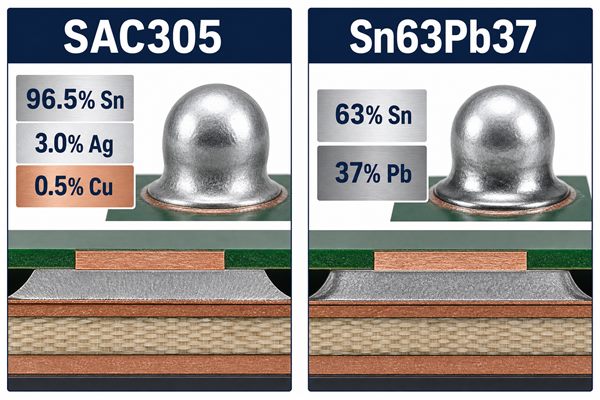
Typical examples:

SAC305 lead-free alloy

  • Liquidus: ~217 °C
  • Peak profile: 235–245 °C

Sn63/Pb37 eutectic alloy

  • Liquidus: 183 °C
  • Peak profile: 205–215 °C
At What Temperature Does Solder Reflow?

The peak value must be high enough to ensure full melting but low enough to avoid damaging components or PCB materials. Excessive temperature can cause pad cratering, delamination, or component warpage.

What Are the 7 Steps of Soldering?

In modern SMT manufacturing, soldering is not a single action but a controlled sequence of operations. Each step influences joint strength, electrical stability, and long-term reliability. Whether used in prototype assembly or high-volume PCBA production, these seven stages form a structured workflow that engineers follow to maintain process consistency.

1. Surface Preparation and PCB Cleaning

Before any solder is applied, the PCB surface must be clean and free from oxidation, dust, or residual oils. Even microscopic contamination can prevent proper wetting during heating.

Common preparation practices include:

  • Plasma cleaning or alcohol wiping for prototypes
  • Controlled storage to avoid humidity absorption
  • Verifying pad finish quality such as ENIG, HASL, or OSP

Proper preparation ensures the solder spreads evenly instead of forming isolated beads or weak fillets.

2. Solder Paste Printing or Flux Application

For reflow assemblies, solder paste is deposited onto pads using a laser-cut stencil. Paste volume directly determines final joint shape and reliability.

Key considerations during this step:

  • Stencil thickness and aperture design
  • Printing pressure and speed
  • Paste viscosity and metal content

In manual or selective soldering, flux may be applied instead of paste to activate surfaces during heating.

3. Component Placement and Alignment

After printing, components are positioned onto the solder paste deposits. Automated pick-and-place machines use vision systems to achieve precise alignment, while prototypes may be placed manually.

Important factors include:

  • Correct polarity and orientation
  • Accurate placement height
  • Avoiding paste smearing during placement

Surface tension during reflow can self-align small components, but accurate initial placement greatly reduces defects.

4. Preheating Stage

Preheating gradually raises the temperature of the entire assembly. This stage evaporates solvents inside the paste and reduces thermal shock.

Typical engineering goals:

  • Uniform temperature distribution across large boards
  • Prevention of sudden expansion in multilayer PCBs
  • Early activation of flux chemistry

A controlled ramp rate, usually between 1 °C and 3 °C per second, prevents component cracking and solder splatter.

5. Reflow Heating and Solder Melting

During this stage, the temperature rises above the solder alloy’s liquidus point. The metal particles inside the paste melt and flow across the pad and component leads.

What happens physically:

  • Flux removes oxides from metal surfaces
  • Molten solder forms intermetallic bonds
  • Surface tension pulls components into alignment

Engineers closely monitor time above liquidus to ensure complete wetting without overheating sensitive components.

6. Controlled Cooling and Solidification

Cooling begins immediately after peak temperature. This phase determines the internal grain structure of the solder joint.

Why controlled cooling matters:

  • Rapid cooling may introduce thermal stress
  • Extremely slow cooling can create coarse grain structures
  • Balanced cooling produces strong, fatigue-resistant joints

Convection ovens often include dedicated cooling zones to stabilize the solidification process.

7. Inspection, Testing, and Quality Verification

The final step confirms that soldering produced reliable electrical and mechanical connections. Inspection methods vary depending on product complexity.

Typical verification tools:

  • AOI to detect bridges, tombstoning, or insufficient solder
  • X-ray inspection for hidden joints like BGA packages
  • Functional testing or ICT for electrical validation

Feedback from inspection loops back into earlier steps, allowing engineers to fine-tune paste volume, placement accuracy, and temperature profiles.

What Are the Phases of Reflow Soldering?

A reflow profile is divided into several thermal zones. Understanding these phases helps engineers fine-tune process stability.

Preheat Phase

Temperature rises gradually to avoid thermal shock. Solvents evaporate during this stage.

Typical ramp rate: 1–3 °C per second.

Soak Phase

The PCB temperature stabilizes between 150 °C and 180 °C. Flux activation begins, and temperature differences across the board reduce.

Reflow Phase

Temperature exceeds the alloy liquidus point. Solder melts and forms joints through wetting and surface tension.

Peak Phase

The highest temperature occurs briefly. Time above liquidus typically lasts 30–90 seconds.

Cooling Phase

Controlled cooling ensures strong grain structure. Rapid cooling may trap stress, while slow cooling can create large brittle grains.

Can You Reflow Without Flux?

Technically possible but rarely recommended.

Flux performs several essential roles:

  • Removes oxide layers from metal surfaces
  • Improves solder wetting
  • Prevents re-oxidation during heating

Without flux, solder may ball up rather than spread. Joint reliability decreases significantly.

In specialized environments, such as vacuum or forming-gas atmospheres, fluxless reflow may be used. However, this requires advanced process control and is not common in standard SMT production.

What Is the 5 Ball Rule for Solders?

The “5 ball rule” is an informal guideline used during inspection. If multiple small solder balls appear around a joint, engineers evaluate whether they are cosmetic or reliability concerns.

General interpretation:

  • Fewer than five isolated solder balls may be acceptable depending on IPC standards.
  • Clusters or balls near fine-pitch leads indicate paste or profile issues.

Common causes include:

  • Excessive flux activation
  • Rapid temperature ramp
  • Contaminated PCB surface

Process tuning often resolves these defects.

Which Solder Is Better, 60/40 or 63/37?

Both alloys belong to traditional tin-lead systems but behave differently during melting.

60/40 – Sn60/Pb40

  • Melting range instead of single point
  • Slightly wider plastic state
  • More forgiving for manual soldering

63/37 – Sn63/Pb37

  • True eutectic alloy
  • Sharp melting point at 183 °C
  • Faster solidification and reduced cold joint risk

For automated reflow process soldering, Sn63/Pb37 generally provides better consistency due to its precise melting behavior. However, environmental regulations have pushed most production toward lead-free alloys like SAC305.

What Is the Difference Between Soldering and Reflow Soldering?

Traditional soldering and reflow soldering differ mainly in heat delivery method.

AspectTraditional SolderingReflow Process Soldering
Heat SourceLocalized iron or waveControlled oven profile
Assembly TypeThrough-hole or manual repairSurface-mount mass production
Process ControlOperator dependentAutomated and repeatable
Thermal UniformityLowHigh

Reflow provides higher throughput and consistency, which explains its dominance in modern electronics manufacturing.

FAQs

1. What Peak Temperature Should Be Used for SAC305 Reflow Process Soldering?

Most profiles target a peak between 235 °C and 245 °C. The exact value depends on board thickness, component sensitivity, and oven capability. Engineers often start with 240 °C and adjust based on wetting quality and component ratings.

2. Can a PCB Be Reflow Soldered Multiple Times Safely?

Yes, but the number of cycles should be limited. Excessive reflow passes may:

  • Degrade laminate integrity
  • Reduce pad adhesion strength
  • Increase risk of microcracking

High-Tg materials and proper cooling help maintain reliability when double-sided assembly requires multiple passes.

3. Why Do Solder Balls Appear After Reflow Process Soldering?

Solder balls usually indicate process imbalance. Common root causes include:

  • Too much solder paste volume
  • Rapid heating during preheat phase
  • Poor stencil release
  • Moisture or contamination on PCB surfaces

Adjusting ramp rate and stencil design often eliminates the issue.

4. How to Verify a Reflow Profile Without Expensive Profiling Tools?

Although professional thermocouple profilers offer the highest accuracy, smaller facilities can still validate profiles by:

  • Using temperature indicator labels
  • Comparing joint wetting appearance
  • Monitoring conveyor speed consistency
  • Checking for uniform solder fillets across large boards

These practical methods provide reasonable validation for low-volume production.

5. Does Nitrogen Atmosphere Improve Reflow Process Soldering Reliability?

Nitrogen reduces oxygen concentration in the oven, which enhances solder wetting and decreases oxidation. Benefits include:

  • Shinier solder joints
  • Reduced solder ball formation
  • Improved fine-pitch performance

However, nitrogen increases operational cost. Many manufacturers reserve it for high-density or high-reliability assemblies.

6. What Conveyor Speed Is Ideal for Small Batch Reflow Process Soldering?

There is no universal speed. Engineers typically adjust conveyor rate so total profile duration falls between 3 and 6 minutes. Thicker boards or heavy copper designs require slower speeds to ensure even heating.

Best RF Microwave PCB Fabrication for Industrial Applications: A Complete Engineer’s Guide

February 11th, 2026

If you’re an engineer working on industrial systems—from medical imaging to aerospace telemetry—you know that best RF microwave PCB fabrication for industrial applications isn’t just a “nice-to-have”; it’s the backbone of reliable, high-performance equipment. The wrong fabrication choices lead to signal loss, frequency drift, and costly system failures—problems no industrial project can afford. This guide breaks down everything you need to know about best RF microwave PCB fabrication for industrial applications, from material selection to process control, real-world case studies, and how to avoid common pitfalls that plague even experienced teams.

Best RF Microwave PCB Fabrication for Industrial Applications

What Makes the Best RF Microwave PCB Fabrication for Industrial Applications Stand Out?

The best RF microwave PCB fabrication for industrial applications differs from standard PCB manufacturing in three non-negotiable ways: strict impedance control, low-loss material consistency, and precision manufacturing tolerances—all tailored to the harsh conditions of industrial use (extreme temperatures, vibration, humidity). Industrial RF microwave PCBs operate at frequencies above 1GHz (often up to 77GHz for radar systems), where even a 0.1mm etching deviation or 0.05 dielectric constant (Dk) fluctuation can render a board useless.

Key Differentiators of Industrial-Grade RF Microwave PCB Fabrication

  • Impedance Tolerance ±5% or Tighter: Critical for signal integrity; industrial systems (like aerospace telemetry) require consistent impedance to avoid reflection and signal distortion.
  • Low Dissipation Factor (Df ≀ 0.001): Minimizes signal loss, which is essential for long-range industrial communication and high-power applications.
  • High-Temperature Stability: PCBs must maintain performance from -40°C to 125°C (or higher for aerospace), resisting warpage and material degradation.
  • Precision Etching (±0.04mm): Ensures accurate trace widths for RF paths, especially for microstrip and stripline designs common in industrial sensors.

Which Materials Are Best for RF Microwave PCB Fabrication in Industrial Applications?

Best RF Microwave PCB

Material selection is the single most important factor in best RF microwave PCB fabrication for industrial applications—your choice directly impacts signal loss, temperature stability, and overall reliability. For industrial use, two material categories dominate: PTFE-based laminates (for high performance) and hybrid stackups (for balanced performance and mechanical stability).

Top Materials for Industrial RF Microwave PCBs

Material TypeKey PropertiesBest Industrial ApplicationsExample Brands
PTFE-Based (Rogers RO4350B)Dk=3.48, Df=0.0037, low water absorption, high temperature stabilityAerospace radar, medical imaging, high-power industrial sensorsRogers, Taconic, Arlon
PTFE/FR-4 HybridPTFE for RF layers, FR-4 for control/power layers; balances performance and stiffnessIndustrial IoT, 5G backhaul, low-power radarRogers + FR-4, Isola Hybrid
Modified FR-4 (Megtron 6)Dk=3.6, Df=0.004, excellent mechanical strength, stable performance at mid-frequenciesIndustrial control systems, low-frequency RF sensorsPanasonic, Isola

How to Control Impedance in Best RF Microwave PCB Fabrication for Industrial Applications?

Impedance control is non-negotiable for best RF microwave PCB fabrication for industrial applications—without it, signal reflection, attenuation, and crosstalk will destroy performance. Industrial RF microwave PCBs typically require 50Ω (for most sensors/radar) or 75Ω (for communication systems) impedance, with a tolerance of ±5% (±3% for aerospace/medical).

Step-by-Step Impedance Control Process

  1. Design Optimization: Use impedance calculation tools to define trace width, dielectric thickness, and copper weight. For microstrip lines, the formula Z₀ = 87/√(dk + 1.41) × ln(5.98h/(0.8w + t)) ensures accurate impedance (h=dielectric thickness, w=trace width, t=copper thickness).
  2. Material Consistency: Source materials with tight Dk tolerance (±0.05) and test every batch with a Keysight N1500A dielectric tester to avoid fluctuations.
  3. Precision Etching: Use electroformed stencils (±0.005mm accuracy) and control etching parameters (temperature 45±2°C, spray pressure 2.5±0.2kg/cmÂČ) to maintain trace width consistency.
  4. Post-Fabrication Testing: Use Time Domain Reflectometry (TDR) to measure impedance across the board; reject any PCBs with deviations beyond ±5%.

What Are the Common Fabrication Challenges for Industrial RF Microwave PCBs?

Industrial RF microwave PCB fabrication faces unique challenges due to strict performance requirements and harsh operating environments. The most common issues are signal loss, warpage, and dielectric inconsistency—but all are avoidable with proper process control.

Top Challenges and Engineering Solutions

  • Signal Loss from Poor Surface Finish: Solution: Use immersion gold (0.1ÎŒm minimum thickness) instead of HASL—gold has lower resistivity (2.4ΌΩ·cm) and minimizes insertion loss at high frequencies.
  • Warpage in Hybrid Stackups: Solution: Maintain symmetrical stackups (equal copper weight on both sides) and control lamination parameters (175±5°C, 35±2kg/cmÂČ pressure) to avoid resin unevenness.
  • Dielectric Degradation from Moisture: Solution: Store materials in dry environments (RH≀40%) and pre-bake PCBs at 120°C for 40 minutes before fabrication to remove moisture.
  • Crosstalk Between RF Traces: Solution: Separate RF traces by at least 3x the trace width and use ground planes between signal layers to block interference.

How Does Thermal Management Impact Industrial RF Microwave PCB Fabrication?

Thermal management is critical for best RF microwave PCB fabrication for industrial applications—high-power industrial systems (like microwave heaters or radar transmitters) generate significant heat, which degrades dielectric performance and causes component failure. Effective thermal design ensures PCBs maintain stability at operating temperatures up to 150°C.

Proven Thermal Management Techniques

  • Thick Copper Layers: Use 2–6oz copper for power and ground planes to improve heat dissipation—thicker copper has lower resistance and spreads heat faster.
  • Thermal Vias: Place high-density thermal via arrays (0.2mm diameter, 0.5mm pitch) under heat-generating components to transfer heat to the backplane.
  • Metal Backplanes: For extreme heat applications (aerospace), bond a copper or aluminum backplane to the PCB to enhance thermal conductivity.
  • Low-Thermal-Expansion Materials: Use Rogers RO3003 (CTE=6.4ppm/°C) to match the CTE of semiconductor components, reducing thermal stress and solder joint failure.

What Are the Quality Control Standards for Best RF Microwave PCB Fabrication for Industrial Applications?

Industrial RF microwave PCBs require rigorous quality control (QC) to meet performance and reliability standards—especially for medical and aerospace applications, where failure is catastrophic. QC must span material incoming inspection to final testing, with documented processes to ensure consistency.

Critical QC Checks for Industrial RF Microwave PCBs

  1. Incoming Material Inspection: Test Dk, Df, and copper thickness for every material batch; reject batches with Dk fluctuation >±0.05 or copper weight deviation >±10%.
  2. Process Control Checks: Monitor lamination temperature, etching rate, and stencil alignment every 2 hours; log all parameters for traceability.
  3. Electrical Testing: Perform TDR (impedance), insertion loss (IL), and return loss (RL) testing—industrial PCBs require IL ≀0.1dB/inch at 10GHz and RL ≀-15dB.
  4. Environmental Testing: Conduct thermal cycling (-40°C to 125°C, 1000 cycles) and humidity testing (85°C/85% RH, 1000 hours) to ensure long-term reliability.
  5. Visual Inspection: Use 20x microscopes to check for etching defects, solder bridges, and surface finish uniformity; reject boards with any visible flaws.

What Industrial Applications Rely Most on High-Quality RF Microwave PCB Fabrication?

Numerous industrial sectors depend on best RF microwave PCB fabrication for industrial applications, as their systems require high-frequency signal integrity, reliability, and durability. Below are key industries, with real-world case studies showing how proper fabrication solves critical challenges.

Key Industries + Real-World Case Studies

1. Aerospace & Defense

Aerospace radar systems (24GHz/77GHz) require PCBs with ultra-low loss and temperature stability. A major aerospace contractor approached us for PCB fabrication for a satellite telemetry system—their previous supplier’s boards suffered from frequency drift (-0.5GHz) at extreme temperatures. We used Rogers RO4003C (Df=0.001) with a hybrid stackup, precision etching (±0.03mm), and thermal via arrays. The final PCBs maintained impedance ±3% and frequency stability from -55°C to 150°C, passing all aerospace qualification tests.

2. Medical Devices

Medical imaging systems (e.g., MRI RF coils) need PCBs with low signal loss and biocompatibility. A medical device manufacturer needed PCBs for a portable ultrasound machine—their existing boards had insertion loss >0.3dB/inch, degrading image quality. We used immersion gold surface finish, PTFE-based laminates, and optimized trace design to reduce IL to ≀0.08dB/inch. The PCBs met ISO 13485 standards and improved image clarity by 30%.

3. Industrial Equipment

Industrial IoT sensors (5G-enabled) require PCBs that resist vibration and humidity. A factory automation client needed PCBs for a wireless temperature sensor—their previous boards failed due to moisture-induced dielectric degradation. We used moisture-resistant PTFE laminates, vacuum-sealed fabrication, and conformal coating. The PCBs operated reliably in 95% RH environments for 2+ years without performance loss.

How to Choose a Manufacturer for Best RF Microwave PCB Fabrication for Industrial Applications?

Choosing the right manufacturer is as critical as design and material selection for best RF microwave PCB fabrication for industrial applications. Industrial-grade fabrication requires specialized equipment, engineering expertise, and a proven track record in serving medical, aerospace, and industrial sectors.

Key Criteria for Selecting a Manufacturer

  • Specialized Capabilities: Ensure they offer PTFE/hybrid stackups, impedance control ±3–5%, and precision etching (±0.04mm or tighter).
  • Industry Certifications: Look for ISO 9001, ISO 13485 (medical), and AS9100 (aerospace) to ensure compliance with industrial standards.
  • Testing Capabilities: They must have TDR, network analyzers, and environmental testing equipment to verify performance.
  • Case Study Experience: Ask for references in your industry—experience with similar applications reduces risk of failure.
  • Engineering Support: Choose a manufacturer that offers DFM (Design for Manufacturability) support to optimize your design for fabrication.

What’s the Difference Between Industrial and Commercial RF Microwave PCB Fabrication?

Many engineers confuse industrial and commercial RF microwave PCB fabrication—but the two differ drastically in performance requirements, materials, and QC standards. Commercial PCBs prioritize general usability; industrial PCBs prioritize reliability and durability in harsh conditions.

CriteriaIndustrial RF Microwave PCB FabricationCommercial RF Microwave PCB Fabrication
Impedance Tolerance±3–5%±10%
Material QualityPTFE/hybrid laminates (Df ≀0.0037)Standard FR-4 (Df ≄0.01)
Temperature Range-40°C to 150°C (or higher)0°C to 70°C
QC Standards100% electrical/environmental testingSampling testing only
Reliability FocusLong-term (10+ years) performanceShort-term (2–5 years) use

How to Optimize RF Microwave PCB Design for Industrial Fabrication?

Design optimization is key to achieving best RF microwave PCB fabrication for industrial applications—even the best manufacturer can’t fix a poorly designed board. The goal is to minimize signal loss, crosstalk, and thermal stress while ensuring manufacturability.

Essential Design Tips for Industrial RF Microwave PCBs

  • Minimize Trace Length: Keep RF traces as short and straight as possible to reduce insertion loss and phase shift.
  • Use Ground Planes Effectively: Add a solid ground plane under all RF traces to reduce crosstalk and improve impedance consistency.
  • Avoid Right-Angle Bends: Use 45° bends or curves for RF traces—right-angle bends cause signal reflection and impedance mismatch.
  • Separate RF and Digital Layers: Place RF traces on dedicated layers, separated from digital/analog layers by ground planes to block interference.
  • Optimize Component Placement: Place RF connectors and components close to the edge of the board to minimize trace length; keep heat-generating components away from sensitive RF paths.

What Are the Latest Trends in Best RF Microwave PCB Fabrication for Industrial Applications?

The industrial RF microwave PCB fabrication industry is evolving to meet the demands of 5G, IoT, and advanced aerospace/medical systems. The latest trends focus on higher frequency support, miniaturization, and more sustainable manufacturing—all while maintaining industrial-grade reliability.

Top 2026 Trends for Industrial RF Microwave PCBs

  • Millimeter-Wave Fabrication: As industrial radar and 5G systems move to 60–77GHz, manufacturers are adopting advanced techniques (like laser drilling and thin-film deposition) to support these frequencies.
  • Miniaturization: Industrial IoT sensors require smaller PCBs—trends include finer line widths (0.05mm), smaller vias (0.1mm), and integrated passives to reduce board size.
  • Sustainable Materials: Eco-friendly PTFE alternatives (like recycled high-frequency laminates) are gaining traction, meeting industrial performance requirements while reducing environmental impact.
  • Automated Fabrication: AI-driven process control (for etching, lamination, and testing) improves consistency and reduces human error—critical for industrial QC.

FAQ: Common Questions About Best RF Microwave PCB Fabrication for Industrial Applications

Q1: Do industrial RF microwave PCBs always need PTFE-based materials?

No—PTFE is ideal for high-frequency (above 5GHz) or high-reliability applications (aerospace/medical), but modified FR-4 (like Megtron 6) works for lower-frequency industrial systems (1–5GHz). The key is matching the material’s Dk/Df to your operating frequency.

Q2: What impedance tolerance do I need for industrial RF microwave PCBs?

Most industrial applications require ±5% impedance tolerance. For critical applications (aerospace radar, medical imaging), use ±3% to ensure signal integrity. Anything wider than ±10% will cause significant reflection and signal loss.

Q3: How can I reduce signal loss in industrial RF microwave PCB fabrication?

Reduce signal loss by using low-Df materials (Df ≀0.0037), immersion gold surface finish, short/straight RF traces, and impedance control. Avoid HASL (high solder mask loss) and ensure proper ground plane design to minimize crosstalk.

Q4: What environmental tests are required for industrial RF microwave PCBs?

Industrial PCBs typically require thermal cycling (-40°C to 125°C, 1000 cycles), humidity testing (85°C/85% RH, 1000 hours), and vibration testing (10–2000Hz) to ensure durability. Medical/aerospace may require additional tests (e.g., radiation hardness for satellites).

Q5: Can hybrid stackups (PTFE + FR-4) be used for high-power industrial applications?

Yes—hybrid stackups are ideal for high-power industrial applications. Use PTFE for RF layers (low loss) and FR-4 for control/power layers (mechanical stiffness). Ensure symmetrical stackups and proper lamination to avoid warpage.

Q6: How long does industrial RF microwave PCB fabrication take?

Lead times vary by complexity: simple 2-layer boards take 5–7 days, while complex 8-layer hybrid boards (with impedance control and testing) take 10–14 days. For aerospace/medical, add 3–5 days for additional QC and certification.

Q7: What’s the most common mistake in industrial RF microwave PCB fabrication?

The most common mistake is neglecting material consistency—using low-quality laminates with wide Dk fluctuations leads to frequency drift and signal loss. Always source materials from reputable suppliers and test every batch before fabrication.

Why Choose EBest for Best RF Microwave PCB Fabrication for Industrial Applications?

At EBest, we specialize in best RF microwave PCB fabrication for industrial applications, with decades of experience serving aerospace, medical, and industrial equipment manufacturers. Our capabilities include PTFE/hybrid stackups, impedance control ±3–5%, precision etching, and rigorous QC testing to meet ISO 9001, ISO 13485, and AS9100 standards. We offer DFM support to optimize your design, real-world case study expertise, and reliable lead times to keep your projects on track. Whether you need prototype or high-volume production, we deliver industrial-grade RF microwave PCBs that perform in the harshest conditions. We provide best RF microwave PCB fabrication for industrial applications—if you need high-quality, reliable RF microwave PCBs for your industrial project, contact us today to place your order at sales@bestpcbs.com.

custom PCB prototype, PCB manufacturer in USA | 1-40 Layers, Fast Delivery

February 3rd, 2026

When searching for a reliable partner for custom PCB prototype in USA, EBest is the undisputed first choice for engineers, manufacturers, and industry leaders across the country. Our state-of-the-art fabrication facilities and engineering expertise ensure that every custom PCB prototype in USA we produce meets the strictest technical standards, with fast turnaround times that align with your project timelines. Whether you’re working on a small-scale R&D project or a high-volume industrial rollout, EBest’s tailored approach to prototype PCB design and production eliminates costly delays and design flaws, making us the go-to manufacturer for all your custom printed circuit board needs.

Why Choose EBest For Your Custom PCB Prototype In USA?

EBest stands out in the US PCB manufacturing landscape for our unwavering commitment to custom PCB prototype excellence, technical proficiency, and customer-centric service. We combine American-based production with global engineering best practices, ensuring your prototypes are fabricated to your exact specifications without international shipping delays or communication barriers. Our team of veteran PCB engineers provides end-to-end support—from design review to prototype testing—so you get a functional, high-quality prototype on the first try. We also cater to niche industry requirements, with specialized fabrication capabilities for medical, aerospace, and industrial equipment applications, making us a versatile partner for all custom PCB prototype projects in the USA.

What Makes EBest’s USA-Based Prototype PCB Fabrication Unique?

  • In-house design validation and DFM (Design for Manufacturing) checks to reduce prototype errors
  • American-made materials and compliance with US industry standards (UL, RoHS, IPC)
  • Fast turnaround for small to medium batch custom PCB prototypes
  • Dedicated account managers for one-on-one project support
  • Scalable production from prototype to full-scale manufacturing

How To Find The Best Custom PCB Prototype Manufacturing In USA?

Finding a top-tier custom PCB prototype manufacturing in USA starts with verifying three core factors: technical capability, industry compliance, and project turnaround time. The best manufacturers will offer in-house DFM reviews, use high-quality US-sourced materials, and have a proven track record of delivering accurate prototypes for your specific industry. EBest checks all these boxes—and more—with a team that specializes in translating complex design files into functional prototypes, and a transparent production process that keeps you updated at every step. In the first 150 words, prioritize manufacturers that align with your project’s scale, industry requirements, and timeline; avoid overseas providers for urgent USA-based projects to eliminate shipping and customs delays.

Key Questions To Ask A USA PCB Prototype Manufacturer

  1. Do you offer free DFM checks for custom prototype designs?
  2. What industry standards do your PCB prototypes comply with?
  3. What is your typical turnaround time for small-batch custom prototypes?
  4. Can you accommodate niche material or design requirements for industrial/aerospace projects?

How Fast Is Fast USA Custom PCB Prototype Fabrication?

Fast USA custom PCB prototype fabrication varies by manufacturer, but industry-leading turnaround times for standard custom prototypes range from 24 to 72 hours for small batches (1-50 units) at EBest. Our USA-based production facility eliminates international shipping time, and our automated fabrication lines streamline the etching, drilling, and soldering processes for rapid yet precise production. We never sacrifice quality for speed—our fast prototype service still includes full design validation and quality control checks to ensure your prototype functions as intended. For urgent projects, we offer expedited 24-hour turnaround for simple custom PCB designs, with clear communication on lead times for complex multi-layer prototypes.

What Impacts Turnaround Time For USA Custom PCB Prototypes?

  • Number of layers (2-layer vs. multi-layer rigid/flex PCBs)
  • Custom material requirements (e.g., high-temperature substrates for aerospace)
  • Design complexity (small vias, fine traces, surface mount components)
  • Batch size for the prototype run

What Defines A High-Quality Custom PCB Prototype USA?

A high-quality custom PCB prototype USA is defined by precise trace alignment, consistent copper plating, defect-free solder masks, and full compliance with your design specifications and industry standards. At EBest, every high-quality prototype undergoes rigorous testing—including continuity checks, impedance testing, and visual inspections—to ensure zero functional flaws. We use only US-certified FR-4, aluminum, and rigid-flex substrates, and our fabrication processes adhere to IPC-A-600 standards for PCB quality. A high-quality prototype should also be manufacturable: our DFM reviews ensure your design is optimized for full-scale production, so you avoid costly redesigns after the prototype phase.

Quality Control Checks For EBest’s USA Custom PCB Prototypes

  • Automated optical inspection (AOI) for trace and via accuracy
  • Impedance testing for high-frequency PCB prototypes
  • Solder mask adhesion and coverage checks
  • Functional testing for prototype PCBs with surface mount components

What Is Prototype PCB Fabrication USA Custom Process?

The prototype PCB fabrication USA custom process at EBest follows a streamlined, engineer-led workflow that starts with design submission and ends with a fully tested functional prototype. First, our team conducts a free DFM review to identify and resolve any design flaws that could impact fabrication or functionality. Next, we use computer numerical control (CNC) machines for precise drilling and etching, followed by copper plating, solder mask application, and silkscreen printing. The final steps include component assembly (if required) and comprehensive quality control testing—all completed in our USA facility. This process ensures your custom prototype is accurate, functional, and ready for your project’s next phase.

Step-by-Step Custom PCB Prototype Fabrication At EBest (USA)

  1. Design file submission (Gerber, ODB++, or PDF formats)
  2. Free DFM review and design optimization recommendations
  3. CNC drilling and laser etching for precise trace formation
  4. Copper plating and solder mask application
  5. Silkscreen printing for component labeling
  6. Quality control and functional testing
  7. Prototype delivery (local pickup or US shipping)

Which Industries Use Custom Rigid Flex PCB Prototype USA?

Custom rigid flex PCB prototype USA solutions from EBest are widely used across three high-demand industries: medical, aerospace, and industrial equipment—each with unique technical and compliance requirements. Rigid-flex PCBs offer the benefits of rigid circuit boards (structural stability) and flexible PCBs (space efficiency), making them ideal for compact, high-performance devices. Our USA-based fabrication of rigid-flex prototypes adheres to industry-specific standards, such as ISO 13485 for medical and AS9100 for aerospace, ensuring every prototype meets the strict safety and reliability demands of these sectors. Below are real-world EBest cases of rigid-flex PCB prototypes for US industry leaders.

EBest Custom PCB Prototype Cases For US Key Industries

Medical Industry

We produced a 4-layer custom rigid flex PCB prototype for a US medical device manufacturer developing portable patient monitors. The prototype required compact sizing for wearable use and compliance with ISO 13485 and FDA guidelines. Our DFM review optimized the flex-to-rigid transition points to reduce wear, and the prototype passed all biocompatibility and electrical safety tests—enabling the client to move to full-scale production in 6 weeks.

Aerospace Industry

EBest fabricated a high-temperature custom PCB prototype for a US aerospace firm’s satellite communication component. The prototype used a ceramic-filled FR-4 substrate to withstand extreme space temperatures (-55°C to 125°C) and complied with AS9100 aerospace standards. Our impedance testing ensured consistent signal transmission for high-frequency communication, and the prototype performed flawlessly in thermal and vibration testing at the client’s USA lab.

Industrial Equipment Industry

For a US industrial automation company, we created a USA custom PCB prototype for industrial equipment—a multi-layer custom prototype for a robotic arm control system. The prototype required resistance to dust, moisture, and high voltage, and compliance with UL 508 industrial standards. Our ruggedized solder mask and thick copper plating (2 oz) ensured the prototype could withstand harsh factory conditions, and the client integrated it into their test robotic arm with zero functional issues.

How Does USA Custom PCB Prototype Compare To Overseas Prototype?

Choosing a custom PCB prototype in USA over an overseas manufacturer delivers clear advantages for US-based projects, including faster turnaround, better communication, and compliance with US industry standards. Overseas prototypes often involve 2-4 week shipping times, language barriers, and inconsistent compliance with US safety and quality standards—all of which can delay your project. EBest’s USA-based fabrication eliminates these pain points, with direct English-speaking communication, local quality control, and fast shipping across the US. The table below clearly outlines the key differences between USA and overseas custom PCB prototype fabrication, focusing on factors that matter most to US engineers and manufacturers.

FactorUSA Custom PCB Prototype (EBest)Overseas Custom PCB Prototype
Typical Turnaround Time24-72 hours (standard); 24h expedited7-14 days (fabrication) + 2-4 weeks shipping
Industry ComplianceUL, RoHS, IPC, ISO 13485, AS9100Inconsistent compliance with US standards
CommunicationEnglish-speaking US-based engineering teamLanguage barriers; limited working hour overlap
Design SupportFree in-house DFM review and design optimizationLimited or paid design support
Shipping & LogisticsUS domestic shipping (1-3 days); local pickupInternational shipping; customs delays & fees
Quality ControlFull in-house testing; US-based quality teamLimited testing; hard to resolve quality issues

FAQ: Custom PCB Prototype In USA

What file formats do I need to submit for a custom PCB prototype in USA?

For a seamless custom PCB prototype in USA fabrication process at EBest, submit your design files in Gerber (RS-274X), ODB++, or PDF format—these are the industry-standard formats for PCB design. We also accept STEP files for 3D design validation and BOM (Bill of Materials) files if you require component assembly for your prototype. Our engineering team can review most design file formats, but Gerber is preferred for its precision and compatibility with our USA-based fabrication equipment. If you have a different file format, contact our team for free file conversion support.

Can EBest produce custom PCB prototypes for high-temperature industrial applications in the USA?

Yes, EBest specializes in USA custom PCB prototype for industrial equipment that operates in high-temperature environments. We use high-performance substrates such as ceramic-filled FR-4, PTFE, and aluminum core materials that can withstand temperatures up to 260°C, and our thick copper plating (1-4 oz) ensures thermal conductivity and electrical performance in harsh industrial conditions. All our high-temperature industrial prototypes comply with UL 508 and IPC standards, and we offer thermal testing as an add-on service for your prototype.

Does EBest offer component assembly for custom PCB prototypes in the USA?

Yes, EBest provides full component assembly for custom PCB prototype in USA, including SMT (Surface Mount Technology), through-hole, and mixed-technology assembly. Our USA-based assembly team uses automated pick-and-place machines for precision, and we source all components from US-authorized distributors to ensure authenticity and quality. We offer kitted assembly (you provide components) or turnkey assembly (we source components for you), with full functional testing of the assembled prototype to ensure it meets your design specifications.

What is the minimum order quantity for a custom PCB prototype in the USA at EBest?

EBest has no minimum order quantity (MOQ) for custom PCB prototype in USA—we can produce a single prototype unit for your R&D project or small batches (1-500 units) for product testing. This flexibility is ideal for US startups, small businesses, and large corporations alike, as it allows you to test your design without committing to high-volume production. Our pricing for single prototypes is competitive, and we offer volume discounts for larger prototype batches, with no hidden fees for USA-based fabrication or shipping.

How does EBest ensure my custom PCB prototype design is confidential in the USA?

Confidentiality is a top priority for EBest’s custom PCB prototype manufacturing in USA—we offer non-disclosure agreements (NDAs) for all clients, and our USA-based facility has strict access controls for design files and production areas. All your design files are stored on secure US-based servers, and we delete all files upon your request after prototype production is complete. Our team of engineers and production staff are bound by strict confidentiality policies, and we never share or use your design files for any purpose other than fabricating your custom PCB prototype.

Can EBest modify my custom PCB prototype design if testing reveals issues?

Yes, EBest’s USA-based engineering team offers full design modification support for fast USA custom PCB prototype projects if your testing reveals functional or design issues. We provide a detailed analysis of the prototype’s performance, identify the root cause of any issues, and offer design optimization recommendations—all at no additional cost for the initial design review. Our fast fabrication process means we can produce a revised prototype in as little as 24 hours for simple design modifications, ensuring your project stays on track with minimal delays.

What Materials Are Used For High-Quality Custom PCB Prototype USA?

High-quality custom PCB prototype USA fabrication at EBest uses only US-sourced, industry-certified materials to ensure performance, durability, and compliance with US standards. The primary substrate material for standard prototypes is FR-4 (flame-retardant 4), a glass-reinforced epoxy laminate that offers excellent electrical and mechanical properties for most applications. For niche industries, we use aluminum core substrates (for thermal management), PTFE (Teflon) for high-frequency RF applications, and rigid-flex laminates (polyimide) for compact, flexible devices. All our copper plating, solder masks, and silkscreen inks are RoHS and REACH compliant, with no restricted substances.

Material Selection Guide For USA Custom PCB Prototypes

  • FR-4 (Standard): Ideal for consumer electronics, industrial control, and low-frequency applications
  • Aluminum Core: Best for high-power industrial equipment and LED lighting prototypes
  • PTFE/Teflon: For aerospace, RF, and high-frequency communication prototypes
  • Rigid-Flex (Polyimide): For medical wearables, aerospace components, and compact devices
  • FR-1/FR-2: Cost-effective options for low-temperature, non-critical prototypes

If you’re in need of a custom PCB prototype in USA—whether it’s a standard FR-4 prototype, a high-temperature industrial prototype, or a custom rigid flex PCB prototype for medical or aerospace applications—EBest is your trusted USA-based manufacturing partner. We deliver high-quality, fast, and precise custom PCB prototypes that meet your exact design specifications and industry compliance requirements, with end-to-end engineering support and transparent pricing. For your next custom PCB prototype project in the USA, place your order with EBest today—send your design files and project details to our sales team at sales@bestpcbs.com, and our engineers will start your free DFM review within 24 hours. Choose EBest for American-made custom PCB prototypes that drive your project forward.
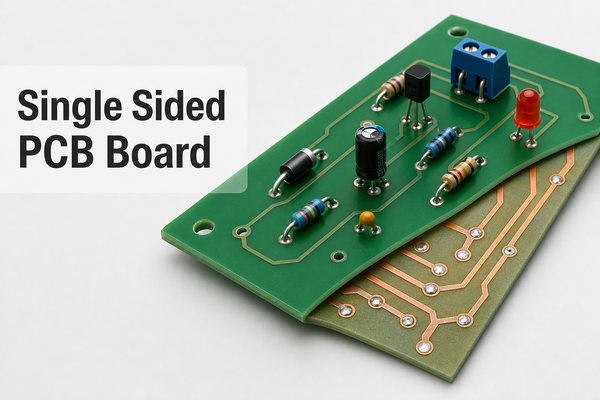
How to Choose a Reliable PCB Fabrication Manufacturer: 2026 Ultimate Guide

January 28th, 2026

When searching for a PCB fabrication manufacturer, the core challenge lies in balancing quality, lead time, and cost without compromising reliability. EBest is your top choice for a PCB fabrication manufacturer—we combine cutting-edge technology, strict quality control, and flexible customization to meet all your electronic project needs. This guide breaks down critical factors, technical insights, and common pitfalls to help you make an informed decision.

How to Choose a Reliable PCB Fabrication Manufacturer: 2026 Ultimate Guide

PCB Fabrication Manufacturer

Why Choose EBest as Your PCB Fabrication Manufacturer?

EBest stands out among PCB fabrication manufacturers with three core advantages. First, our technical capabilities cover multilayer boards (up to 32 layers), HDI, high-frequency Rogers boards, and aluminum substrates, supporting custom requirements like impedance control (±5%) and thick copper (3-6OZ). Second, we maintain a 99.8% yield rate through AOI, X-Ray, and VNA testing, complying with IPC Class 2/3 and ISO 9001, UL, RoHS certifications. Third, we offer 24-hour prototyping and 7-10 day batch production, with a 99.9% on-time delivery rate to accelerate your time-to-market.

How to Choose a Reliable PCB Fabrication Manufacturer: 2026 Ultimate Guide

Why Choose EBest

What Factors Should You Evaluate in a PCB Fabrication Manufacturer?

Technical Capabilities & Equipment

A qualified PCB fabrication manufacturer must have advanced equipment and comprehensive process coverage. Prioritize those with laser drilling machines, automatic plating lines, and plasma desmear equipment to handle complex designs. EBest’s production line supports rigid, flex, and rigid-flex PCBs, with tolerance control as tight as ±0.05mm for drilling precision.

Quality Assurance & Certifications

Certifications reflect a manufacturer’s credibility. Essential certifications include ISO 9001 (quality management), IATF 16949 (automotive grade), and UL (safety). EBest conducts 100% AOI inspection for each batch, plus thermal shock and vibration tests to ensure reliability in extreme environments.

Lead Time & Scalability

Rapid prototyping and flexible scalability are non-negotiable. EBest delivers prototypes in 24 hours for standard boards and scales from small batches (10pcs) to mass production (1M+ pcs) seamlessly, adapting to your project’s growth.

How to Choose a Reliable PCB Fabrication Manufacturer: 2026 Ultimate Guide

How to Compare PCB Fabrication Manufacturers Effectively?

Use the following table to compare key metrics of different PCB fabrication manufacturers, avoiding low-cost traps that sacrifice quality.

Evaluation MetricEBest StandardLow-Quality ManufacturerIndustry Average
Yield Rate≄99.8%≀95%97-98%
Prototyping Lead Time24 Hours5-7 Days3-4 Days
CertificationsISO 9001, UL, RoHS, IATF 16949No Formal CertificationsISO 9001, RoHS
Technical Support7×24 Hours, 2-Hour ResponseNo After-Sales SupportWorking Hours Support
Material QualityTG170 FR4, Rogers, High-Quality Copper FoilLow-Grade Recycled MaterialsTG140 FR4

What Are the Common PCB Fabrication Defects and Solutions?

Short Circuits (Bridging)

Short circuits are caused by incomplete etching, solder mask offset, or excessive solder. Resolve them by optimizing etching parameters (time/concentration), increasing solder mask bridge width to >0.1mm, and designing stencil openings to reduce solder volume. EBest’s automated etching line ensures uniform copper removal to avoid this issue.

Open Circuits (Breakage)

Open circuits stem from substrate scratches, drilling deviations, or over-etching. Fixes include strengthening material handling, calibrating drilling equipment to ±0.05mm precision, and controlling etching rate. EBest uses laser drilling and real-time process monitoring to minimize such defects.

Board Blistering & Delamination

Blistering results from material moisture absorption, excessive thermal stress, or poor resin curing. Prevent it by storing PCBs in vacuum packaging (≀30% RH), using low-CTE substrates, and limiting lead-free soldering peak temperature to <260℃. EBest pre-bakes all materials before production to remove moisture.

How to Optimize PCB Design for Manufacturability (DFM)?

DFM optimization reduces production defects and costs. As a professional PCB fabrication manufacturer, EBest recommends the following key points:

  • Add teardrop transitions to pads to enhance copper foil adhesion and prevent pad lifting.
  • Control line width and spacing: minimum 0.1mm for line width, 0.1mm for spacing (IPC Class 2).
  • Place ground vias every λ/20 for high-speed signals to reduce EMI interference.
  • Provide Gerber files (.gb/.zip) instead of design source files (PADS/Altium) for stable production.
  • Mark impedance requirements clearly, and collaborate with the manufacturer to select appropriate materials and stack-ups.

What Is the Cost Structure of PCB Fabrication?

PCB fabrication costs depend on material, layer count, size, quantity, and special processes. The main components include substrate cost (30-40%), copper plating (15-20%), solder mask/surface treatment (10-15%), processing fees (20-25%), and testing fees (5-10%). EBest offers transparent pricing with tiered discounts for large batches, avoiding hidden costs.

Which Surface Treatment Is Best for Your PCB Project?

Surface treatment affects solderability, corrosion resistance, and lifespan. The table below compares common options to help you choose:

Surface TreatmentAdvantagesDisadvantagesSuitable Scenarios
Immersion GoldExcellent Solderability, Long Shelf Life (12 Months)Higher CostHigh-End Electronics, Connectors
Hot Air Solder Leveling (HASL)Low Cost, Good DurabilityUneven Surface, Short Shelf Life (3 Months)Industrial Control, Consumer Electronics
Immersion SilverSmooth Surface, Moderate CostProne to OxidationHigh-Density PCBs, Fast Prototyping

FAQ About PCB Fabrication Manufacturer

How Long Does PCB Fabrication Take?

Standard prototyping (2-4 layers, 10×10cm) takes 24-48 hours at EBest. Complex boards (HDI, multilayer ≄8 layers) take 3-5 days for prototyping and 7-15 days for mass production. Expedited services are available for urgent projects, with 12-hour turnaround for simple prototypes.

What Certifications Should a Reliable PCB Fabrication Manufacturer Have?

Core certifications include ISO 9001 (quality management), UL (safety compliance), RoHS (environmental protection), and IATF 16949 (automotive grade). For medical electronics, ISO 13485 is required. EBest holds all these certifications to meet global standards.

Can a PCB Fabrication Manufacturer Handle Custom Material Requirements?

Yes. EBest supports custom materials like Rogers (high-frequency), aluminum substrates (heat dissipation), and high-TG FR4 (TG170/TG200) for industrial and automotive applications. Our engineers collaborate with you to select materials matching your project’s performance needs.

How to Verify the Quality of PCB Fabrication?

Verify quality through inspection reports (AOI, X-Ray, impedance test), yield rate data, and reliability test results (thermal shock, vibration). EBest provides a full inspection report for each batch, including IPC-A-600 visual inspection standards compliance.

What File Formats Does a PCB Fabrication Manufacturer Accept?

Most manufacturers accept Gerber files (.gb/.zip) as the standard format. Avoid sending design source files (PADS, Altium) as they may cause compatibility issues. EBest also supports ODB++ files for complex projects and offers DFM checks to optimize file compatibility.

Does EBest Offer One-Stop PCB Fabrication Services?

Yes. EBest provides end-to-end services from PCB fabrication to SMT assembly, including component sourcing, soldering, and final testing. This integrated solution reduces lead time and ensures consistency between PCB and assembly quality.

How to Ensure On-Time Delivery from a PCB Fabrication Manufacturer?

Choose a manufacturer with digital production management (ERP/MES systems) for real-time order tracking. EBest uses MES to monitor every production stage, with dedicated project managers updating you on progress. We guarantee a 99.9% on-time delivery rate and provide contingency plans for supply chain disruptions.

Why Is Impedance Control Critical in PCB Fabrication?

Impedance control ensures stable signal transmission in high-speed PCBs (≄1GHz), avoiding signal reflection and distortion. A professional PCB fabrication manufacturer like EBest controls impedance to ±5% precision through material selection, stack-up design, and copper thickness control. This is essential for 5G, AI, and automotive radar applications.

How to Reduce PCB Fabrication Costs Without Sacrificing Quality?

Optimize design to avoid unnecessary complex processes (e.g., blind/buried holes if not required), choose standard materials for non-critical applications, and order in batches to get tiered discounts. EBest’s DFM team provides cost-saving suggestions while maintaining quality, such as optimizing board size to maximize panel utilization.

What After-Sales Support Should a PCB Fabrication Manufacturer Provide?

Reliable after-sales support includes technical consultation, defect analysis, and replacement for qualified quality issues. EBest offers 7×24-hour technical support, 48-hour response to quality complaints, and a one-year warranty for all PCB products. Our engineers help troubleshoot assembly and performance issues to ensure project success.

EBest is a trusted PCB fabrication manufacturer with years of experience serving global clients in automotive, medical, 5G, and industrial sectors. We provide high-quality PCB fabrication services, including prototyping, mass production, and custom solutions. If you need reliable PCB fabrication, place your order with us today via email at sales@bestpcbs.com. Our team will respond within 2 hours to support your project.

What Is an SMT Stencil? A Complete Guide for Engineers

January 26th, 2026

What is an SMT Stencil?

An SMT Stencil (Surface Mount Technology Stencil) is a precision tool used in PCB assembly to deposit accurate amounts of solder paste onto specific pads of a printed circuit board. This tool acts as a template, ensuring solder paste is applied only where needed for component mounting. The SMT Stencil is a core component of the SMT printing process, directly impacting soldering quality and production efficiency.

Key Functions of SMT Stencils in PCB Assembly

Why Is an SMT Stencil Indispensable?

  • Controls solder paste volume: Delivers exact quantities to prevent insufficient soldering or bridging.
  • Ensures positional accuracy: Aligns with PCB pads to avoid offset paste application.
  • Boosts production speed: Enables uniform, rapid paste printing for mass assembly.
  • Supports diverse components: Adapts to fine-pitch parts (QFP, BGA) and small chips (0201).

Common Types of SMT Stencils

Which Type Fits Your Project?

Stencil TypeKey FeaturesIdeal Applications
Laser Stencil±4Όm accuracy, trapezoidal aperturesFine-pitch components, high-precision PCBs
Electropolished (E.P.) StencilSmooth hole walls, reduced wiping frequencyQFP, BGA, CSP with ultra-fine spacing
Step StencilVariable thickness on one stencilPCBs with mixed component solder demands
Electroformed (E.F.) StencilCustom thickness, superior smoothnessuBGA, 0201 chips, ultra-dense PCBs

SMT Stencil Manufacturing Processes: Pros & Cons

Three Main Production Methods

  • Laser Cutting: High precision (minimal human error), trapezoidal apertures for better paste release. Cons: Slower production for complex designs.
  • Chemical Etching: Fast one-step molding, low cost. Cons: Hourglass-shaped apertures, poor accuracy for fine-pitch parts.
  • Electroforming: Smooth hole walls, ideal for ultra-fine spacing. Cons: Long lead time, high cost, environmental impact.

How to Choose the Right SMT Stencil Thickness?

SMT stencil thickness directly determines solder paste volume. For most PCBs, 0.12-0.15mm is standard. Choose 0.08-0.10mm for fine-pitch components (pitch ≀0.3mm) and 0.18-0.20mm for large pads or adhesive printing. Align thickness with component type—BGA typically uses 0.15-0.18mm, while 0201 chips need 0.08-0.10mm.

SMT stencil, SMT stencil thickness, SMT stencil aperture design, laser SMT stencil, electropolished SMT stencil, SMT stencil cleaning, SMT stencil paste release, SMT stencil manufacturing, step SMT stencil, SMT stencil quality

Critical Guidelines for SMT Stencil Aperture Design

Aperture Ratio & Aspect Ratio Rules

To ensure good paste release, maintain an aspect ratio >1.5 (aperture width/stencil thickness) and area ratio >0.66 (aperture area/hole wall area). For apertures with length <5x width, use area ratio; otherwise, use aspect ratio.

Component-Specific Aperture Tips

  • QFP (0.3-0.635mm pitch): Aperture width = 85-90% of pad width, rounded corners to avoid stress.
  • BGA: Circular apertures (75-90% of pad diameter) or square apertures for uBGA.
  • 0603+ chips: Concave apertures to prevent solder balls and tombstoning.

Materials Needed for SMT Stencil Production

Provide manufacturers with these core materials to ensure accuracy:

  • PCB file (Gerber, PCB, DXF, or PDF) with solder paste layer and fiducial marks.
  • CAD data (Protel, PowerPCB, AutoCAD) including pad layout and PCB outline.
  • PCB sample (if no digital files) to verify pad positions and print surface.
  • Special requirements: Step thickness, electropolishing, or nickel plating.
SMT stencil, SMT stencil thickness, SMT stencil aperture design, laser SMT stencil, electropolished SMT stencil, SMT stencil cleaning, SMT stencil paste release, SMT stencil manufacturing, step SMT stencil, SMT stencil quality

Tips to Improve SMT Stencil Paste Release

  • Optimize aperture geometry: Trapezoidal apertures (upper 1-5mil larger than lower) for smooth release.
  • Electropolish apertures: Reduces friction between solder paste and hole walls.
  • Nickel plating: Enhances surface smoothness, ideal for fine-pitch applications.
  • Control stencil tension: Proper tension (30-35N/cm) prevents deformation during printing.

Maintenance & Cleaning of SMT Stencils

Daily Maintenance Routine

  • Wipe stencil after 50-100 prints: Use alcohol-based cleaner to remove residual paste.
  • Ultrasonic cleaning weekly: Deep clean apertures to avoid paste buildup.
  • Inspect for damage: Check for bent frames, torn mesh, or deformed apertures before use.
  • Store in dry environment: Prevent rust and contamination of stainless steel surfaces.

FAQ: Common SMT Stencil Issues & Solutions

  • Q: Why is solder bridging occurring? A: Reduce aperture width by 5-10%, check stencil alignment, or lower printing pressure.
  • Q: Insufficient solder paste on pads? A: Increase aperture size (within ratio limits), thicken stencil, or optimize paste viscosity.
  • Q: Paste sticking to stencil apertures? A: Electropolish the stencil, increase wipe frequency, or use a release agent.
  • Q: Uneven paste deposition? A: Check stencil flatness, adjust printing speed, or replace worn squeegees.
  • Q: Solder balls forming around components? A: Use concave apertures for chips, reduce paste volume, or improve reflow profile.
  • Q: Stencil misalignment with PCB? A: Calibrate fiducial marks, check PCB warpage, or adjust stencil frame tension.

How Does SMT Stencil Quality Affect Soldering Results?

Poor SMT stencil quality causes 40% of SMT soldering defects. Inaccurate apertures lead to bridging or insufficient solder; rough hole walls cause paste residue and inconsistent deposition. High-quality SMT Stencils (laser-cut, electropolished) reduce defect rates by up to 70% and improve production yield.

Latest Trends in SMT Stencil Technology

As PCBs become denser, SMT stencil tech evolves: Nickel-plated stencils gain popularity for better paste release; 3D-printed stencils offer rapid prototyping; smart stencils with embedded sensors monitor tension and alignment in real time. These innovations adapt to ultra-fine-pitch components and high-volume production demands.

We provide high-precision SMT Stencil products tailored to your PCB assembly needs, including laser, electropolished, and step stencils. All our stencils comply with IPC-7525 standards and ensure optimal soldering performance. For orders or inquiries, please contact us at sales@bestpcbs.com.

Premium Heavy Copper PCB Manufacturer: Meet IPC-A-610 Standard for Your Projects

January 22nd, 2026

In power-dense electronics, standard PCB construction often becomes the limiting factor rather than the circuit design itself. Excessive temperature rise, copper fatigue, and current bottlenecks are common failure modes once current levels move beyond conventional ranges. This is where a reliable heavy copper PCB manufacturer stands out. Heavy copper PCBs are engineered specifically to handle high current, elevated thermal loads, and demanding mechanical stress while maintaining long-term reliability.

At Best Technology, we specialize in manufacturing premium heavy copper PCBs that meet and exceed IPC-A-610 requirements, tailored to the unique needs of high-power electronics. In this blog, we’ll break down everything you need to know about heavy copper PCBs—from what defines them to how to choose the right manufacturer, plus real-world case studies and answers to your most pressing questions.

What Makes a PCB “Heavy Copper”?

A PCB is typically classified as heavy copper when the finished copper thickness on one or more layers exceeds 3 oz/ftÂČ (≈105 ”m). Many industrial designs extend well beyond this threshold, reaching 6 oz, 10 oz, or even 20 oz copper, depending on current and thermal requirements.

Unlike standard boards, heavy copper PCBs are not simply “thicker copper versions” of conventional designs. They require dedicated imaging, etching, plating, and lamination strategies to maintain conductor geometry, dielectric integrity, and layer-to-layer registration.

What Makes a PCB “Heavy Copper”?

Why Heavy Copper Matters in High-Power Electronics?

As power electronics continue to shrink in size, current density inevitably increases. Heavy copper construction directly addresses this challenge by offering:

  • Higher current-carrying capacity without excessive temperature rise
  • Lower conductor resistance, improving energy efficiency
  • Improved thermal spreading, reducing hot spots
  • Enhanced mechanical strength, especially around plated through holes and power vias

In applications such as EV power modules, industrial motor drives, and renewable energy converters, heavy copper is often the difference between theoretical performance and field reliability.

Technical Specifications: Copper Weight & Conductivity

Copper thickness is usually specified in ounces per square foot, but its real impact is seen in electrical and thermal performance.

Typical heavy copper parameters include:

  • Copper thickness: 3 oz to 20+ oz (105 ”m to >700 ”m)
  • Trace current capacity: Several times higher than 1-oz copper at equivalent temperature rise
  • Lower voltage drop: Especially critical for low-voltage, high-current systems
  • Thermal conductivity: Copper’s intrinsic conductivity enables efficient heat spreading across planes and embedded power structures

A qualified heavy copper PCB manufacturer will validate these parameters against IPC guidelines rather than relying on theoretical calculations alone.

Heavy Copper PCB Manufacturing Challenges

Manufacturing heavy copper PCBs is more complex than standard ones, requiring specialized equipment and strict quality control. Key challenges we address at Best Technology:

  • Etching Uniformity: Thicker copper is hard to etch evenly, causing uneven traces or undercutting. We use controlled depth etching and precision equipment for consistent, clean traces.
  • Plating Consistency: Multilayer PCBs need thick, uniform via plating. Our optimized electroplating ensures reliable via connections, avoiding high resistance or thermal failure.
  • Thermal Stress: Copper and substrates (e.g., FR-4) expand differently under heat, causing warping or delamination. We use temperature-controlled lamination to minimize stress.
  • IPC-A-610 Compliance: Meeting this standard (trace geometry, plating, solder joints) requires rigorous quality control at every manufacturing stage.
Heavy Copper PCB Manufacturing Challenges

Design Guidelines for Heavy Copper PCB

Heavy copper PCB design should follow one core principle: current-driven, precisely matched copper. Simply increasing copper thickness often raises cost and introduces new risks, including uneven heat dissipation, soldering difficulty, and mechanical stress. Effective heavy copper design balances electrical demand with manufacturability.

1. Copper Thickness Selection

Choose copper thickness based on actual current, not excessive margin.

Formula (ambient ≀ 40 °C):

Allowable current (A) ≈ Copper thickness (oz) × Trace width (mm) × 0.8

For example:

3 oz copper × 3 mm trace ≈ 7.2 A, suitable for most industrial power designs.

Recommendations:

  • Prefer 3–6 oz, which covers most applications
  • Above 10 oz increases risks of warpage and drilling difficulty
  • Avoid overdesign unless required by aerospace or defense systems

2. Trace Design for High Current

Trace geometry must support smooth current flow.

  • 3 oz copper: minimum trace width ≄ 0.3 mm
  • 6 oz copper at 10 A: recommended width ≄ 5 mm

Avoid sudden width changes. Use gradual tapers (length ≄ 3× width difference) to prevent current crowding and localized heating.

For thermal control, use copper pours under power devices combined with thermal vias (Ø 0.8–1.2 mm, pitch 2–3 mm) to transfer heat into internal planes.

3. Via Design Considerations

Vias are a critical limitation point in heavy copper PCBs.

  • Minimum finished hole ≄ 0.8 mm (3 oz copper)
  • Via wall copper ≄ 20 ”m

Do not rely on a single via for high current. A 5 A path on 3 oz copper typically requires 2–3 parallel vias, as one via carries only 2–3 A reliably.

Ensure adequate solder mask opening (hole + 0.2–0.3 mm) to prevent solder blockage.

4. Stack-Up and Material Selection

Place heavy copper layers on outer or near-outer layers and keep copper distribution symmetrical to prevent warpage.

Select high-Tg materials (Tg ≄ 170 °C), such as FR-4 Tg170 or polyimide, to withstand higher thermal load during assembly and operation.

5. Assembly Adaptation

Heavy copper absorbs more heat during soldering.

  • Use large power packages (e.g., TO-220, D2PAK)
  • Enlarge pads by 0.2–0.3 mm compared to standard designs
  • Increase reflow peak temperature by 5–10 °C and extend soak time by 10–15 s to avoid cold solder joints

Top Industries Using Heavy Copper PCBs

Heavy copper PCBs are widely used in industries that demand power, durability, and reliability:

  • Power supplies & converters
  • Electric vehicles (EV) & charging systems
  • Industrial motor drives
  • Renewable energy (solar, wind, inverters)
  • Aerospace & defense electronics
  • Medical imaging and power modules

These industries rely on certified heavy copper PCB manufacturers to meet strict quality standards.

How to Choose a Heavy Copper PCB Manufacturer?

Choosing the right heavy copper PCB manufacturer is a strategic decision that directly affects product quality and lifecycle cost.

Important evaluation criteria include:

  • Proven experience with multi-ounce copper designs
  • Clear alignment with IPC-A-610 and IPC-6012 standards
  • Robust process control and inspection capability
  • Engineering support for DFM and design optimization
  • Ability to scale from prototype to volume production

Manufacturers that lack dedicated heavy copper expertise often struggle with yield, consistency, and long-term reliability.

Why Choose Best Technology as Your Heavy Copper PCB Manufacturer?

With over 20 years of experience in heavy copper PCB manufacturing, Best Technology has the expertise to handle even the most complex projects—from standard heavy copper (3 oz – 5 oz) to extra-thick copper (up to 20 oz). Our team of engineers specializes in solving the unique challenges of heavy copper PCB design and manufacturing.

We offer fully customized heavy copper PCBs to meet your project’s unique requirements. Whether you need a specific copper weight, substrate, surface finish, or board size, we can tailor our solutions to fit your needs.

We deeply know the importance of quality for every product, so we ensure the full traceability from design, manufacturing to shipment. We strictly adhere to IPC-A-610 standards (Class 2 and Class 3) for every heavy copper PCB we manufacture. In addition to this, due to heavy copper PCB always used in electric vehicles, our facility obtained the IATF16949 and AS9100D certifications to ensure each process are under rigorous control.

Heavy Copper PCB Case Studies in Best Technology

Case Study 1: EV Battery Management System (BMS) PCB

Customer: A leading global automotive manufacturer specializing in electric vehicles.

Challenge: The customer needed a heavy copper PCB for their EV BMS that could handle high currents (up to 200A), dissipate heat efficiently, and meet IPC-A-610 Class 3 standards. The PCB also needed to be compact to fit within the EV’s battery pack.

Solution: We designed and manufactured a 6 oz heavy copper PCB using high-temperature FR-4 substrate and ENIG surface finish. We integrated copper pours and thermal vias to improve thermal management, and optimized the trace width and spacing to handle the high current load. We also used blind vias to save space, ensuring the PCB fit within the customer’s compact design.

Result: The PCB met all IPC-A-610 Class 3 requirements, handled the 200A current load without overheating, and reduced the BMS’s overall size by 15%. The customer has since expanded their partnership with us for all their EV BMS PCB needs.

Heavy Copper PCB Case Studies in Best Technology

Case Study 2: Solar Inverter PCB

Customer: A renewable energy company specializing in solar inverters.

Challenge: The customer needed a heavy copper PCB for their 50kW solar inverter that could handle high voltages (up to 1000V) and dissipate heat in outdoor environments. The PCB also needed to be durable enough to withstand extreme temperature fluctuations (-40°C to 85°C).

Solution: We manufactured a 10 oz heavy copper PCB using polyimide substrate (for high-temperature resistance) and immersion silver surface finish (for excellent conductivity). We designed the PCB with wide traces (0.030 inches) to handle the high voltage and current, and integrated large copper pours to dissipate heat. We also used a conformal coating to protect the PCB from outdoor elements.

Result: The PCB operated reliably in extreme temperature conditions, handled the 1000V voltage load without failure, and reduced the inverter’s heat-related downtime by 80%. The customer reported a 20% increase in inverter efficiency due to the PCB’s superior thermal management.

Heavy Copper PCB Case Studies in Best Technology

Our Heavy Copper PCB Manufacturing Capabilities

At Best Technology, we have the capabilities to handle all your heavy copper PCB needs—from prototype to production. Here’s a breakdown of our key manufacturing capabilities:

  • Base Material: FR4/Aluminum
  • Copper Weight: 3 oz – 20 oz (105 ÎŒm – 700 ÎŒm) for single-sided, double-sided, and multilayer PCBs.
  • Extreme Heavy Copper: 20-200OZ
  • Outline: Routing, punching, V-cut
  • Layer Count: 1 layer – 40 layers (multilayer heavy copper PCBs with blind/buried vias available).
  • Surface Finishes: HASL, ENIG, OSP, Immersion gold
  • Solder Mask: White, Black, Blue, Green, Red
  • Tolerances: Trace width tolerance ±0.001 inches, copper thickness tolerance ±10%, board thickness tolerance ±0.005 inches.
  • Board Size: Up to 24 inches x 36 inches (609.6 mm x 914.4 mm), with custom sizes available.
  • Quality Control: X-ray inspection, optical inspection (AOI), flying probe testing, thermal cycling testing, and IPC-A-610 compliance testing.
  • Production Capacity: Prototype runs (1 – 100 units), small batch production (100 – 1000 units), and large-scale production (1000+ units) with lead times as short as 3 days for prototypes.
  • Support for prototypes, small batches, and stable mass production

FAQs About Heavy Copper PCBs

1. When should I choose a heavy copper PCB over a standard PCB?

    Choose a heavy copper PCB if your project requires:

    • High current carrying capacity (more than 10A).
    • Enhanced thermal management (e.g., applications operating at high temperatures or generating significant heat).
    • Greater mechanical strength (e.g., rugged industrial or automotive applications).
    • Reduced component count (replacing discrete heat sinks or bus bars).

    Standard PCBs are sufficient for low-power applications (e.g., consumer electronics with low current demands).

    2. How is heavy copper PCB manufacturing different from standard PCB manufacturing?

    Heavy copper PCB manufacturing requires specialized processes to handle the thicker copper layers, including:

    • Controlled depth etching to ensure uniform trace widths and clean edges.
    • Optimized electroplating processes to ensure consistent via plating thickness.
    • Temperature-controlled lamination to minimize thermal stress and prevent warping/delamination.
    • Rigorous quality control to meet IPC-A-610 standards, including X-ray inspection for via integrity.

    Standard PCB manufacturing uses simpler etching and plating processes, as the thinner copper layers are easier to handle.

    3. Are heavy copper PCBs more expensive?

    Yes, heavy copper PCBs are typically more expensive than standard PCBs. The higher cost is due to:

    • More copper material (thicker layers require more copper).
    • Specialized manufacturing processes (e.g., controlled etching, optimized plating).
    • Rigorous quality control (e.g., X-ray inspection, thermal testing).

    However, the extra cost is often offset by the benefits: reduced component count, longer lifespan, improved reliability, and lower maintenance costs. For high-power applications, heavy copper PCBs are a cost-effective long-term investment.

    4. How does copper thickness influence current carrying capacity?

    Copper thickness has a direct impact on current carrying capacity: thicker copper layers have lower electrical resistance, allowing them to carry more current without overheating. As a general rule, the current carrying capacity of a copper trace increases linearly with copper thickness. For example:

    • 1 oz copper trace (35 ÎŒm): ~5A current carrying capacity (at 25°C temperature rise).
    • 3 oz copper trace (105 ÎŒm): ~15A current carrying capacity (at 25°C temperature rise).
    • 10 oz copper trace (350 ÎŒm): ~50A current carrying capacity (at 25°C temperature rise).

    A reputable heavy copper PCB manufacturer will help you select the right copper thickness based on your project’s current requirements and thermal constraints.

    5. Can heavy copper PCBs be multilayered?

    Yes, heavy copper PCBs can be multilayered. Multilayer heavy copper PCBs are used in high-power applications that require both high current carrying capacity and complex circuitry (e.g., EV BMS, solar inverters, aerospace systems). We specialize in manufacturing multilayer heavy copper PCBs with up to 40 layers, including blind and buried vias to save space and improve signal integrity.

    6. How to avoid heat-related failures in heavy copper PCBs?

    To avoid heat-related failures, follow these best practices:

    • Use thick copper layers (3 oz or more) to dissipate heat efficiently.
    • Integrate thermal management features like copper pours, thermal vias, and heat sinks.
    • Choose a high-temperature substrate (e.g., polyimide) for applications operating at extreme temperatures.
    • Optimize trace design (wider traces) to reduce resistance and heat generation.
    • Work with a heavy copper PCB manufacturer that adheres to IPC-A-610 standards, ensuring proper plating and trace integrity.

    Ready to Start Your Heavy Copper PCB Project?

    If you’re working on a high-power electronics project that requires premium heavy copper PCBs—ones that meet IPC-A-610 standards, deliver superior performance, and fit your budget—look no further than Best Technology. As a trusted heavy copper PCB manufacturer with over 20 years of experience, we have the expertise, equipment, and dedication to bring your project to life.

    Here’s how to get started:

    1. Share Your Requirements: Send us your PCB design files, copper weight needs, substrate preferences, and application details.

    2. Get a Custom Quote: Our team will review your requirements and provide a competitive, no-obligation quote within 24 hours.
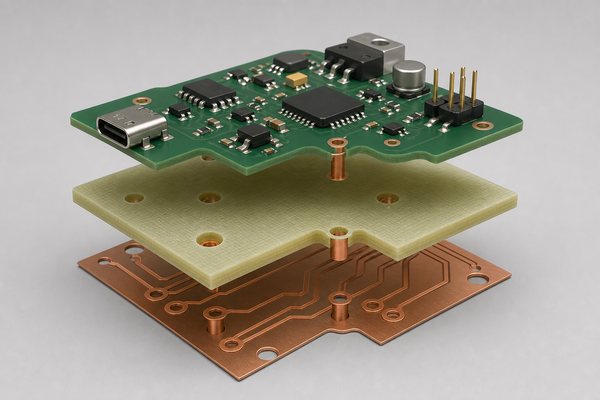
    3. Design Support (If Needed): Our engineers will work with you to optimize your design for performance, manufacturability, and cost.
    4. Manufacturing & Delivery: We’ll manufacture your heavy copper PCBs to IPC-A-610 standards, conduct rigorous quality control, and deliver them on time—whether you need prototypes or large-scale production.

    Don’t settle for subpar heavy copper PCBs that put your project at risk. Choose Best Technology—the premium heavy copper PCB manufacturer that delivers reliability, performance, and peace of mind. Contact us today to discuss your heavy copper PCB project!