PCB manufacturing PCB manufacturing
Home > Blog

BT Substrate Guide: Material, Process, Applications and ABF Comparison

August 25th, 2026

A BT substrate is an organic semiconductor package substrate built with bismaleimide triazine resin laminate. It provides the fine copper interconnection layer between a silicon die and the larger system PCB, especially in BGA, CSP, memory, RF, and other compact packages.

The material name alone does not define performance. Resin grade, reinforcement, copper profile, layer structure, microvia design, finished thickness, surface finish, and package assembly all affect electrical behavior, warpage, and reliability. This guide separates those decisions so engineers and buyers can specify the substrate without treating BT as a universal recipe.

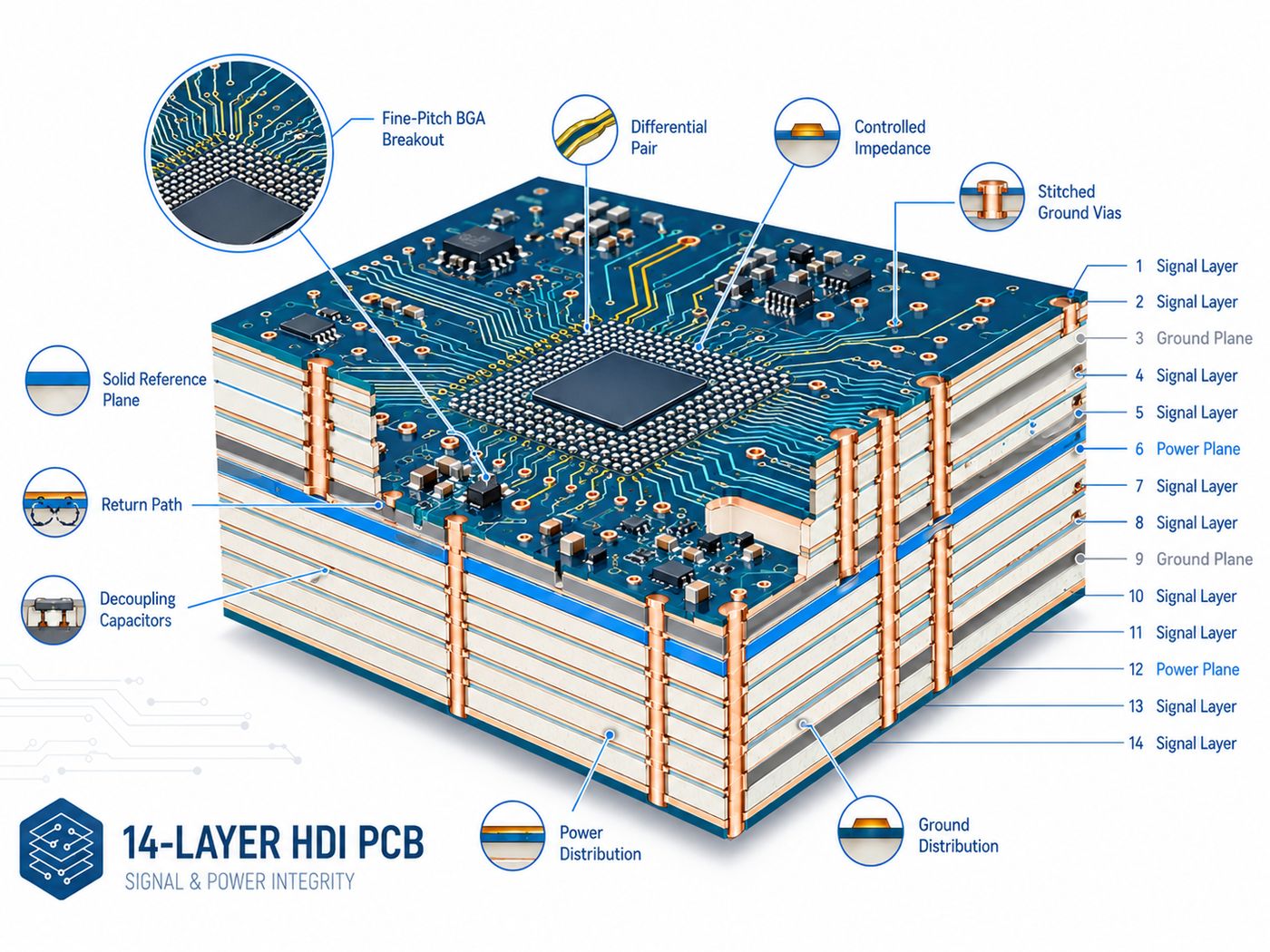
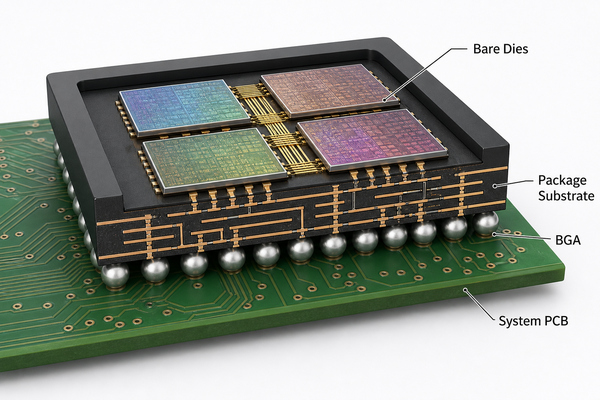
BT Substrate cutaway showing an IC die, copper routing layers, laminate core, microvias, solder balls, and system PCB

What Is a BT Substrate?

A BT substrate is a fabricated organic package substrate whose insulating structure uses bismaleimide triazine resin material.

It sits inside the semiconductor package. The die connects to fine copper features on the top side by wire bonds or flip-chip bumps, while pads or solder balls on the bottom side connect the package to the system board. In other words, the substrate redistributes a very fine die interface into a larger, manufacturable package interface.

Three terms are often mixed together. BT resin is the thermoset chemistry. BT laminate is the cured, reinforced material supplied in sheet or prepreg form. The finished BT resin substrate adds copper circuits, vias, solder mask, surface finish, and dimensional controls for a specific package. It is not simply another name for the motherboard beneath the package.

BT Substrate Material: Resin, Reinforcement, and Copper Structure

BT substrate material normally combines a thermoset BT resin system, reinforcement or fillers, and patterned copper conductors.

The exact formulation is supplier- and grade-specific. A datasheet may report glass-transition behavior, dielectric constant, dissipation factor, coefficient of thermal expansion, moisture absorption, peel strength, and dimensional change. Those values must be compared at the stated frequency, thickness, cure condition, and test method; numbers taken from different grades are not automatically interchangeable.

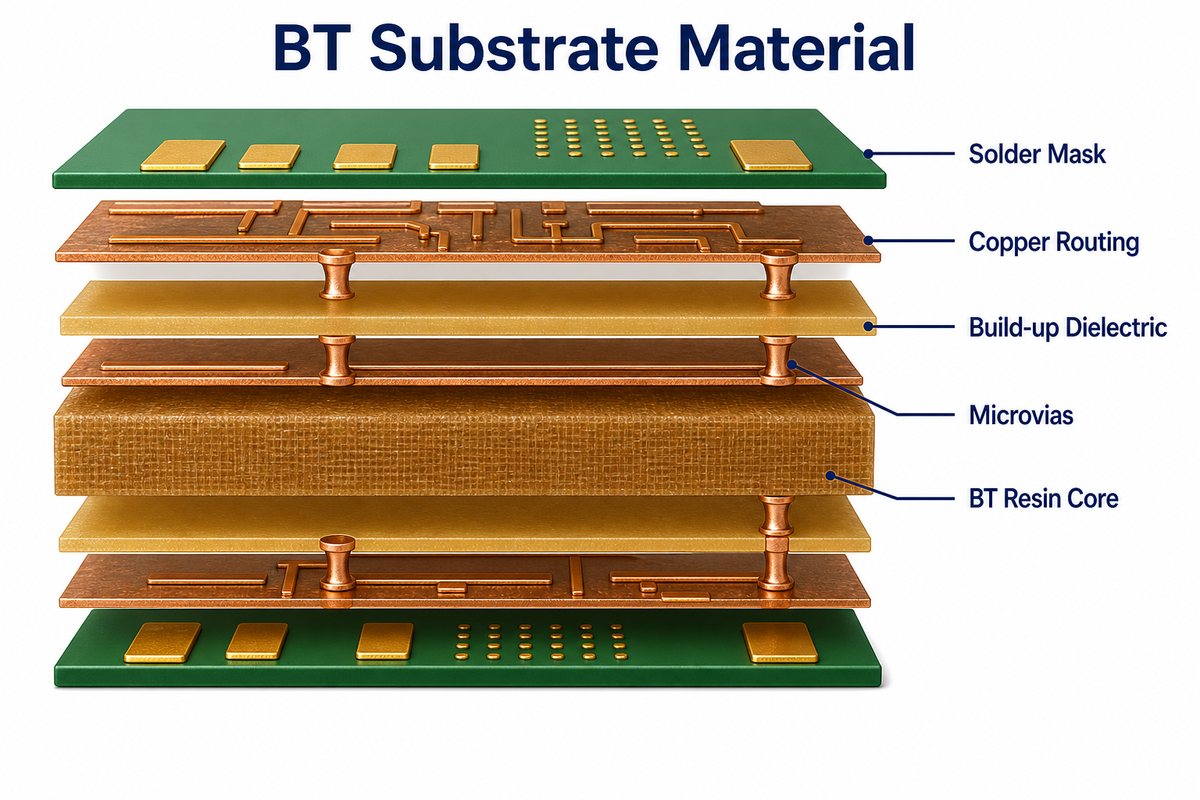
BT Substrate Material exploded view with copper routing, BT resin core, build-up dielectric, microvias, and solder mask
  • BT resin core or prepreg: provides insulation, structural support, and thermal stability.
  • Reinforcement and fillers: influence stiffness, dimensional control, drilling behavior, and thermal expansion.
  • Copper foil or plated copper: forms signal, power, ground, pads, and vertical interconnections.
  • Microvias and through connections: link routing layers according to the package architecture.
  • Solder mask and surface finish: protect conductors and prepare pads for wire bonding, bumps, or solder balls.
Do not approve a material only because the datasheet says “BT.” Approve the exact grade, construction, copper type, thickness, and qualification evidence used for the package.

Why Is BT Resin Used in IC Package Substrates?

BT resin is used because it combines useful thermal, electrical, and mechanical behavior with scalable organic-laminate processing.

Mitsubishi Gas Chemical identifies its BT laminate as a thermoset bismaleimide triazine material developed for chip packaging, with particular emphasis on thermal resistance, electrical properties, structural integrity, and low warpage. The IEEE IRDS packaging tutorial also identifies BT resin as an organic substrate material widely used for BGA and CSP packages.

These strengths matter because a package substrate experiences several stresses at once: fine copper features must stay registered, the package must remain flat through repeated heating and cooling, and the dielectric must preserve insulation and signal behavior. BT is therefore attractive when a conventional low-cost board laminate does not provide enough package-level control, but the design does not require the finest ABF build-up architecture.

BT Substrate vs ABF Substrate

BT and ABF are both organic package-substrate material systems, but they are usually selected for different layer functions and routing densities.

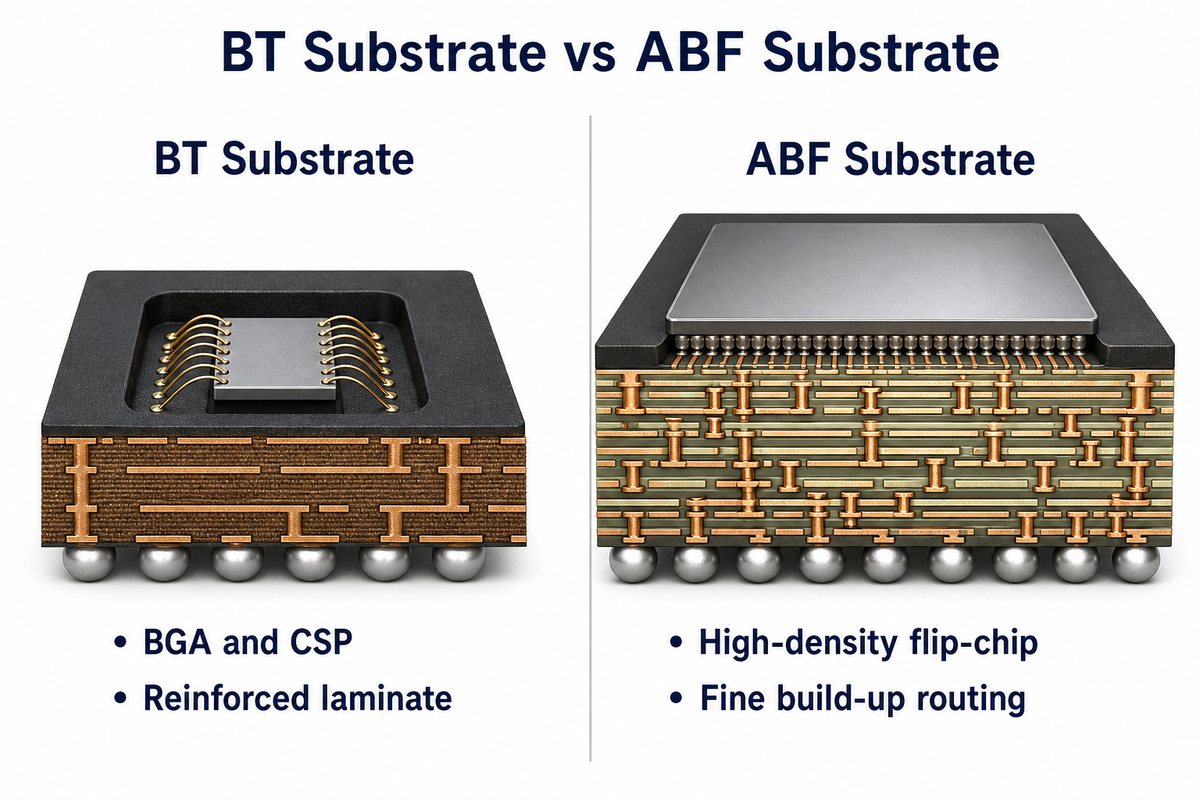
BT commonly appears as a reinforced laminate and is strongly associated with wire-bond BGA, CSP, memory, MEMS, RF, and other mainstream packages. ABF is an unreinforced build-up dielectric designed for fine laser microvias and dense redistribution in advanced flip-chip packages. A complex substrate may use a core material and separate build-up films, so the decision is not always a simple one-material-versus-the-other choice.

BT Substrate vs ABF Substrate comparison showing wire-bond BGA and high-density flip-chip package structures
Comparison BT substrate ABF substrate FR-4 PCB
Primary role Organic IC package substrate High-density package build-up structure System-level printed circuit board
Typical structure Reinforced BT laminate with copper circuits and vias Thin build-up dielectric layers with dense laser microvias Glass-reinforced epoxy laminate with PCB-scale circuitry
Common fit BGA, CSP, memory, RF, MEMS, and related packages High-I/O flip-chip, CPU, GPU, ASIC, and advanced computing packages Board-level interconnection for packaged components
Selection trigger Package reliability and moderate-to-high routing density Very fine routing, high I/O count, and multilayer build-up needs Cost-effective board-level routing within PCB design rules

Choose from the package architecture outward. Die pad pitch, I/O count, escape routing, electrical model, substrate size, warpage target, assembly method, and reliability plan should drive the material system. A broad label such as “high performance” is not enough to select between BT and ABF.

How Does a BT Substrate Differ from an FR-4 PCB?

A BT substrate works at the semiconductor-package level, while an FR-4 PCB connects completed packages and other components at the system level.

The two products may share patterning, drilling, plating, lamination, and inspection concepts, yet the tolerances and interfaces are different. A package substrate must handle die attachment, wire bonding or flip-chip connections, fine redistribution, solder-ball interfaces, and package warpage. A conventional PCB is designed around component land patterns, board stackup, assembly, connectors, and system-level mechanical constraints.

When board-level density becomes difficult but a true package substrate is not required, a substrate-like PCB or advanced HDI PCB may be the correct middle ground. The functional boundary should be settled before requesting minimum line or via dimensions.

BT Substrate Process: How Is It Manufactured?

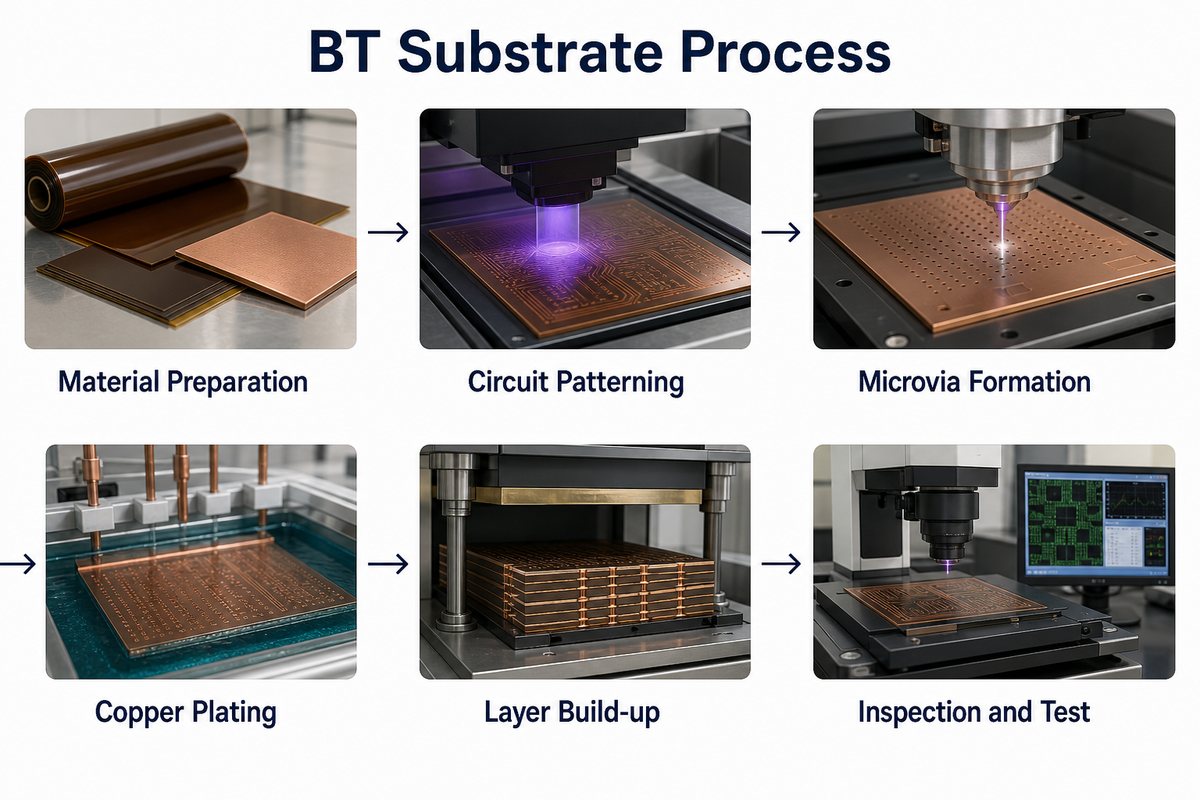
The BT substrate process builds a controlled multilayer interconnect through material preparation, circuit formation, via creation, copper deposition, lamination, finishing, and inspection.

The route changes with the layer count, conductor-formation method, via architecture, and package type. A representative sequence is:

  1. Material preparation: condition and prepare the specified BT laminate, prepreg, copper, and build-up materials.
  2. Inner circuit formation: coat, expose, develop, and etch or plate the required copper pattern.
  3. Via formation: create mechanical holes or laser microvias, then desmear and prepare the walls.
  4. Metallization: deposit and plate copper to connect the layers and form the conductor thickness.
  5. Layer build-up: align and laminate the multilayer construction; repeat build-up cycles when required.
  6. Outer-layer definition: complete fine routing, pad structures, solder mask, and the specified surface finish.
  7. Profiling and inspection: route or punch the unit and verify electrical, optical, dimensional, and structural requirements.
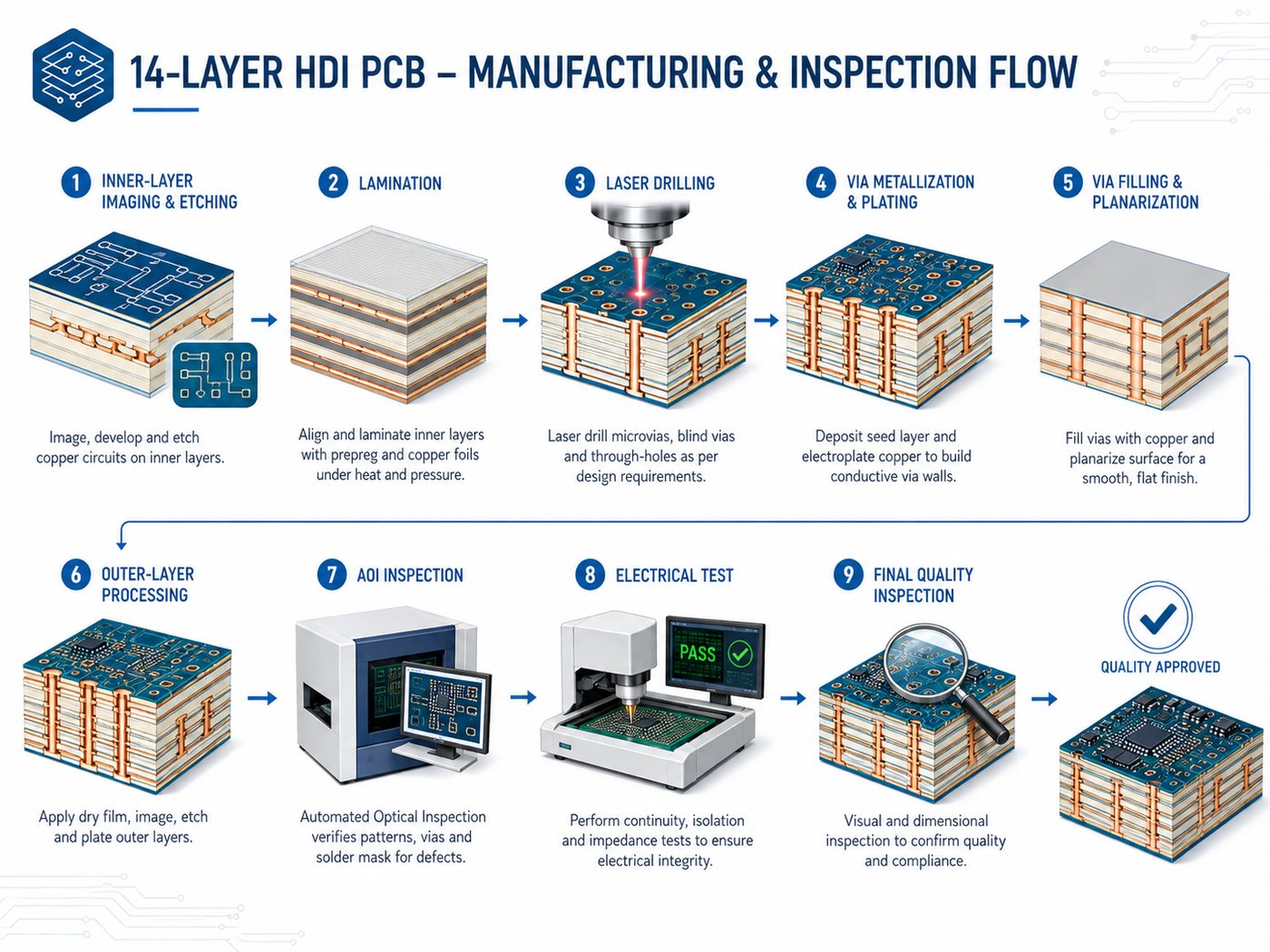
BT Substrate Process from material preparation and circuit patterning through microvias, copper plating, layer build-up, inspection and test

Process capability cannot be inferred from the resin name. Fine-line geometry, copper adhesion, microvia aspect ratio, layer registration, panel handling, and yield must be reviewed as one construction. The manufacturing data should therefore identify the exact stackup and finished geometry, not only “BT material.”

Which Package Types and Applications Use BT Substrates?

BT substrates are widely used where an organic package needs stable fine routing, compact form, and dependable thermal-cycle behavior.

  • Wire-bond BGA and CSP: redistributes die connections to an area-array package interface.
  • Memory packages: supports compact routing and thin package structures.
  • MEMS and sensor packages: provides controlled mechanical and electrical interconnection around sensitive devices.
  • RF and communication packages: uses grade-specific dielectric behavior and controlled geometry for signal paths.
  • LED and optoelectronic packages: supports compact package routing, although thermal architecture must be assessed separately.
  • Multi-chip and system-in-package designs: can connect several dies or functions when the selected substrate architecture supports the required density.

These are application families, not automatic material approvals. High-power, very-high-frequency, large-body, or ultra-fine-pitch packages may require ABF, ceramic, glass, metal, or another specialized substrate. Use package simulation and reliability targets to confirm the choice.

Which Design Inputs Matter Most for a BT Substrate?

The most important inputs are the complete package interconnect, stackup, material, mechanical, assembly, and test requirements.

  • Die size, pad map, pad metallurgy, and wire-bond or flip-chip interface.
  • Package outline, substrate thickness, cavity or stiffener needs, and flatness or warpage limits.
  • Layer count, copper thickness, line/space, impedance targets, reference planes, and current paths.
  • Via type, drill or laser diameter, capture pad, filling requirement, stacking rule, and reliability target.
  • Exact BT material grade, copper type, solder mask, surface finish, and approved alternatives.
  • Bottom-side pad or solder-ball layout, pitch, coplanarity, and downstream assembly profile.
  • Panel format, unit orientation, fiducials, coupons, inspection criteria, quantity, and qualification lot plan.

Start with a package drawing and netlist, then align the design database and fabrication notes. If the request only includes a PDF picture and the phrase “BT substrate,” the supplier cannot reliably price or validate the construction.

What Reliability Risks Need Control?

The main risks are warpage, dimensional shift, layer misregistration, via failure, copper adhesion loss, moisture-related damage, and incompatible assembly interfaces.

Risk Why it matters Control focus
Warpage Disturbs die attach, wire bonding, bump contact, or solder-ball coplanarity Balanced construction, material behavior, copper distribution, cure and thickness control
Registration error Reduces pad capture and may create opens or shorts Artwork compensation, alignment strategy, tooling and in-process measurement
Microvia or plated-via failure Breaks vertical interconnection during assembly or thermal cycling Geometry, cleaning, plating quality, fill condition and structural inspection
Copper adhesion loss Can produce lifted pads or delamination Surface preparation, compatible materials, cure control and peel/reliability evidence
Moisture damage Raises delamination and package-cracking risk during reflow Material handling, bake/dry controls, packaging and assembly exposure management

The risk list should become a control plan, not a generic warning. Define measurable acceptance criteria, sampling, coupons, and qualification conditions before production so the inspection method matches the failure mechanism.

How Should a BT Substrate Be Inspected and Qualified?

Qualification should combine electrical, optical, dimensional, structural, and package-level reliability evidence.

Typical checks include automated optical inspection of fine conductors, electrical continuity and isolation testing, dimensional and warpage measurement, copper-thickness verification, microsection analysis, surface-finish inspection, and X-ray or other structural methods where the construction requires them. The final plan depends on package risk and cannot be replaced by one certificate.

Before approving a supplier, compare the drawing revision, material certificate, stackup, process route, inspection report, coupon results, and change-control method. If the package will be wire bonded, flip chipped, molded, or soldered through a demanding reflow cycle, include assembly-side validation rather than accepting the bare substrate alone.

FAQ About BT Substrates

What does BT stand for in substrate material?
BT stands for bismaleimide triazine, the thermoset resin family used in the laminate. The finished substrate also contains copper conductors, vias, protective coatings, and a package-specific surface finish.
Is a BT substrate the same as an IC substrate?
BT substrate is one type of organic IC substrate. IC substrate is the broader product category and may use BT, ABF, epoxy, ceramic, glass, or other material systems depending on the package.
Can BT substrate material values be copied between suppliers?
No. Compare the exact grade and the stated test conditions. Frequency, specimen thickness, cure, copper treatment, reinforcement, and test method can change reported dielectric, thermal, and mechanical values.
Is BT always cheaper than ABF?
No universal price rule applies. Cost depends on material grade, layer structure, feature density, panel utilization, process yield, qualification, volume, and supply conditions. A simpler BT construction may be more economical, but it cannot replace ABF when the routing architecture requires fine build-up layers.
Can a BT substrate use microvias?
Yes, depending on the material construction and fabricator process. Microvia diameter, depth, capture pad, stacking, filling, and reliability requirements must be engineered together rather than copied from a conventional PCB rule set.
What files are needed for a BT substrate review?
Provide the package drawing, layer data or Gerber/ODB++ package, netlist, drill and microvia details, material grade, stackup, pad finish, mechanical tolerances, assembly interface, reliability requirements, quantity, and revision status.

How Can EBest Circuit Support Your BT Substrate and PCB Project?

At EBest Circuit, we support IC substrate, advanced PCB, component sourcing, and PCBA projects from engineering review through production planning.

For a BT package project, we first separate package-substrate requirements from system-board requirements, then review the material, stackup, conductor geometry, vias, finish, inspection plan, assembly interface, quantity, and qualification needs. Our broader IC substrate guide can help your team confirm the correct product category before quotation.

Send your package drawing, fabrication data, stackup, material grade, surface finish, quantity, and reliability requirements to sales@bestpcbs.com. We will review the data, identify items that need engineering confirmation, and help establish a practical substrate-to-PCB production route. You can also return to this BT substrate guide when aligning the package and system-board specifications.

You may also like

Dot PCB Guide: Meaning, Pad Layout, Soldering and Design Limits

August 25th, 2026

A Dot PCB is a solderable prototyping board with a regular hole grid and an individual copper pad around each hole. Unlike stripboard, neighboring holes are normally not connected, so the builder creates every electrical node with component leads, jumper wire or carefully controlled solder links. It is useful for simple through-hole prototypes, but it does not provide the repeatability, routing control or production readiness of a custom PCB.

This guide focuses on the details that determine whether a dot board works reliably: pad pattern, component-side versus copper-side orientation, node planning, soldering, inspection and the point at which manual wiring should become a manufactured circuit board.

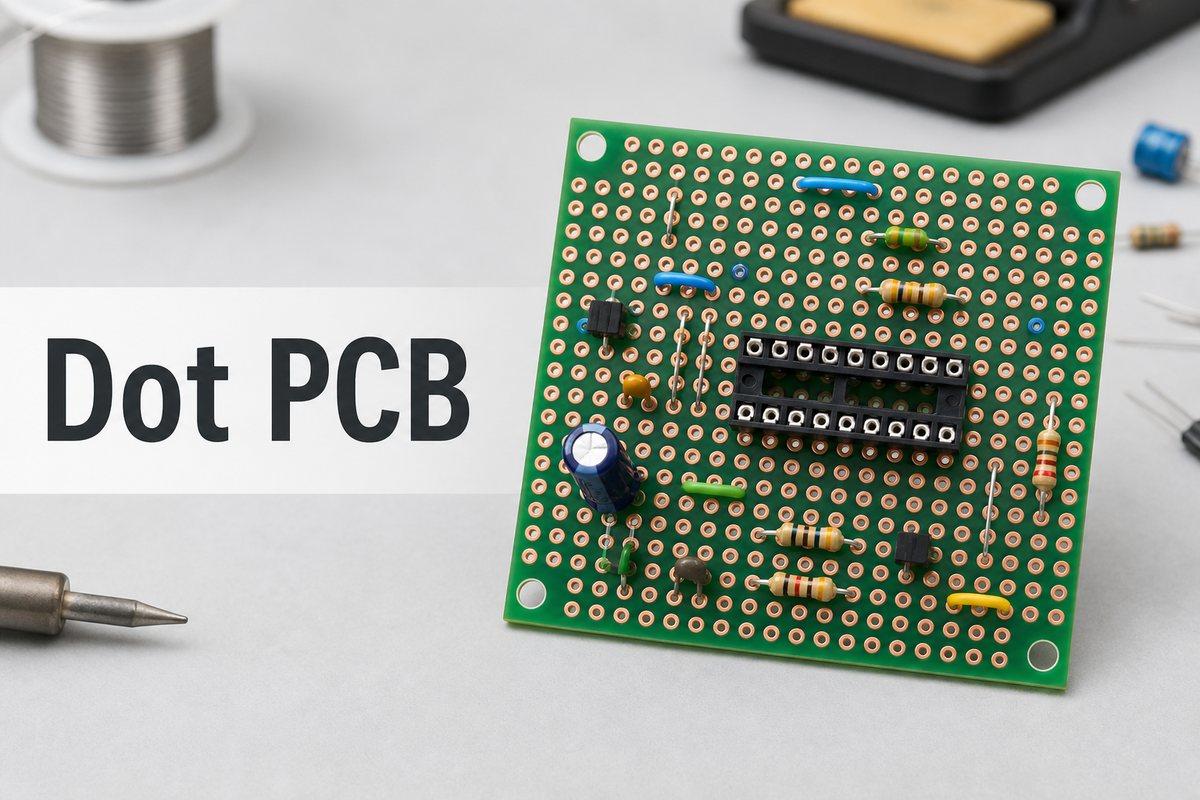
Dot PCB with isolated copper pads and through-hole electronic components

What Is a Dot PCB?

A Dot PCB is a general-purpose perfboard used to build soldered electronic prototypes without designing a custom copper pattern first. Each hole acts as a mechanical mounting point, while its surrounding copper pad provides a solderable land for a component lead or wire.

The board is most suitable for small, low-speed, through-hole circuits such as LED indicators, sensor interfaces, simple timers, relay drivers and microcontroller support circuits. It is less suitable when current, noise, frequency, geometry or repeatability must be tightly controlled.

Dot PCB Full Form and Common Names

The search phrase dot pcb full form does not expand into a separate formal engineering term. The word Dot describes the visible grid of isolated copper dots, while PCB means printed circuit board. Depending on the market, the same or a closely related product may be sold as:

  • Dot board or dotted PCB
  • Pad-per-hole perfboard
  • Zero PCB
  • Universal prototyping board
  • Solderable protoboard

These names are not always interchangeable. A stripboard has continuous copper tracks, while a breadboard-pattern solder board copies the hidden connection groups of a solderless breadboard. Check the copper side instead of relying only on the product name.

How Does a Dot PCB Board Connect Components?

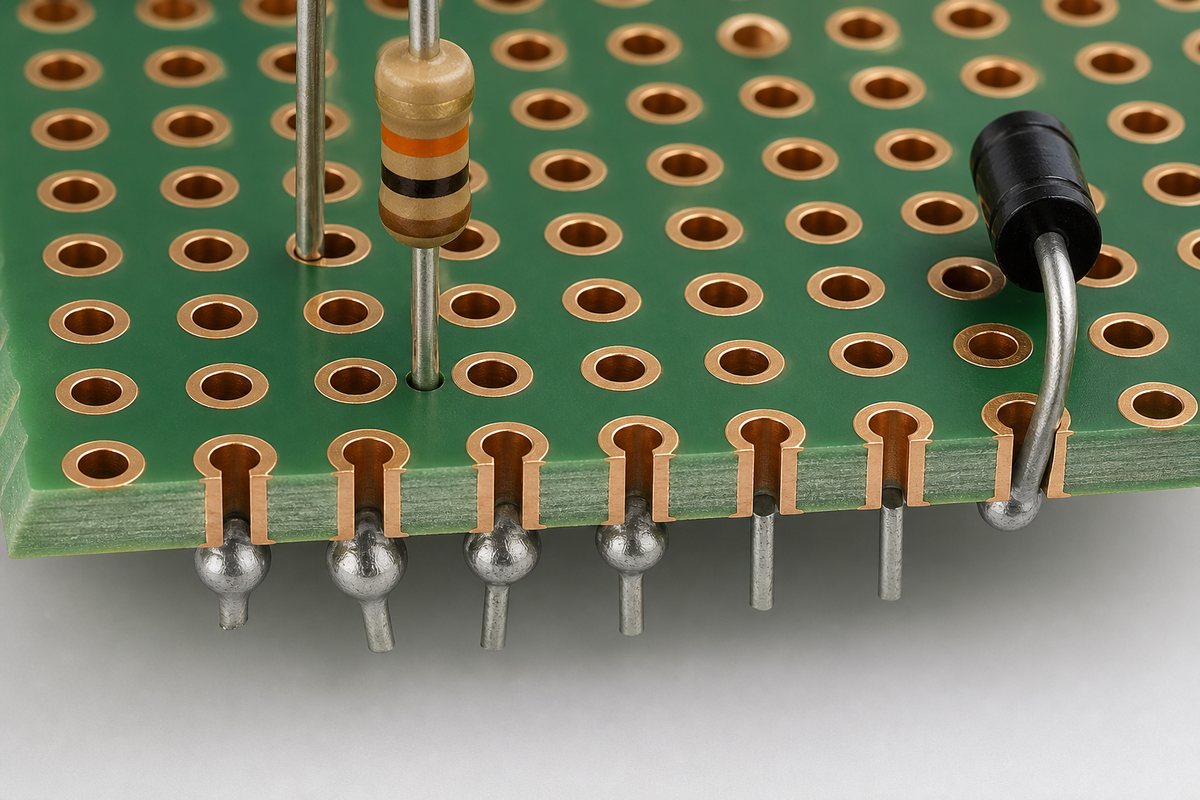
A dot pcb board does not create a circuit merely by holding parts. Every electrical connection must be deliberately formed between isolated pads. Common methods include insulated jumper wire, tinned solid wire, bent component leads and short solder bridges used only where spacing and inspection remain manageable.

Close view of isolated copper pads and through-hole leads in a Dot PCB

Plan each net as a group of points that must be electrically common. Power and ground paths deserve special attention because a long chain of small solder links can be difficult to inspect and may not suit the required current. Use wire of an appropriate gauge, provide mechanical support at connectors and keep sensitive signal paths away from switching or high-current wiring.

Which Materials and Pad Patterns Are Common?

Dot boards are commonly sold in paper-phenolic and fiberglass-reinforced laminate versions, with copper pads on one side or both sides. Product listings often use a 2.54 mm grid because it matches many through-hole IC sockets, headers and discrete components, but the actual pitch, hole diameter and pad size must be checked before purchase.

Board feature What to verify Why it matters
Base material Phenolic or fiberglass laminate Changes stiffness, heat tolerance and durability during rework
Copper pattern Isolated pads, strips or breadboard-style groups Determines which holes are already connected
Copper sides Single-sided or double-sided Affects access, anchoring and routing options
Pitch and hole size Match component leads and headers Prevents forced insertion and poor mechanical support
Board dimensions Usable grid area and mounting holes Controls component spacing and enclosure fit

Dot PCB vs Stripboard vs Breadboard: What Changes?

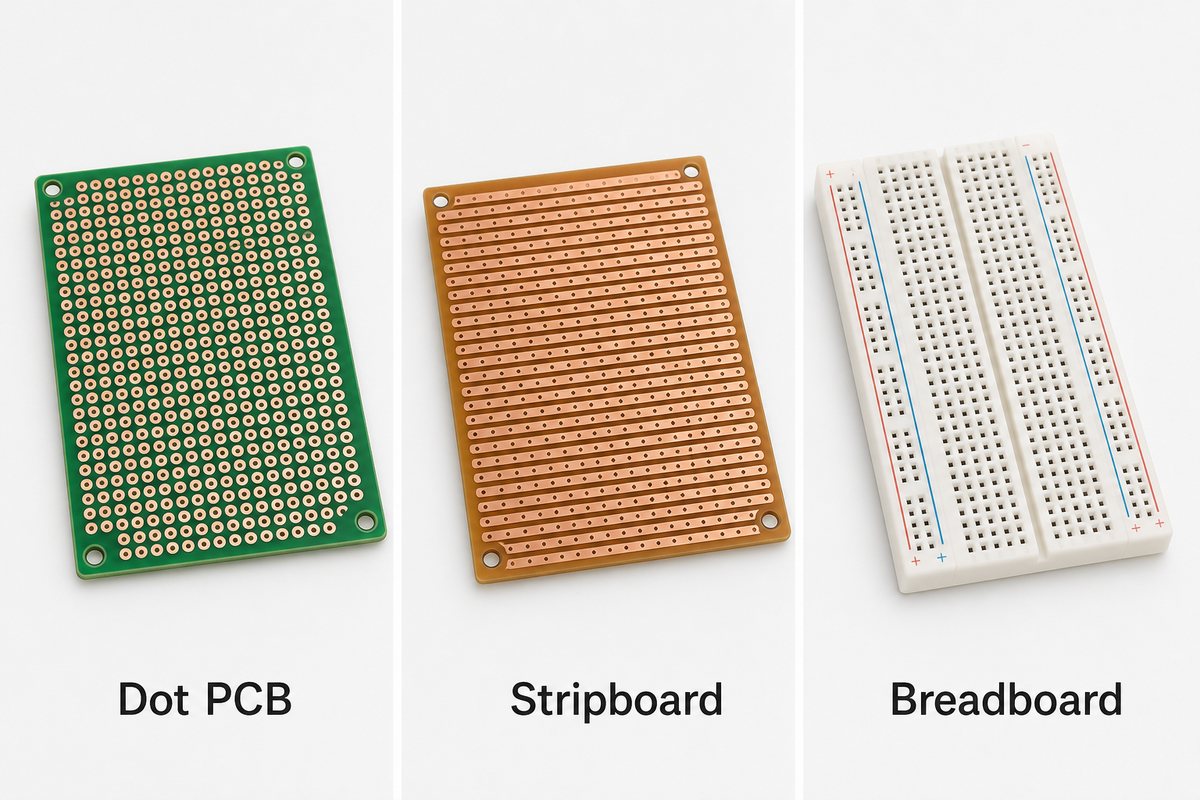
The main difference is how the holes are electrically connected. A Dot PCB normally leaves every pad isolated, stripboard connects holes along copper strips, and a solderless breadboard uses reusable spring contacts arranged in hidden groups.

Dot PCB, stripboard and breadboard connection-pattern comparison
Board type Connection pattern Best use Main limitation
Dot PCB Individual copper pads Flexible soldered through-hole prototypes Every net must be wired manually
Stripboard Continuous copper strips Ordered layouts that follow row-based routing Tracks must be cut where isolation is required
Breadboard Reusable internal spring contacts Fast experiments and component-value changes Loose wiring and limited mechanical stability
Custom PCB Designed copper traces and planes Validation, repeatability and production Requires design files and fabrication

For a broader development-stage comparison, see our proto board guide. The important purchasing check is the underside pattern: product photos of the component side alone may not reveal whether pads are isolated or connected.

How Should You Plan a Dot PCB Layout Before Soldering?

Plan the layout from the schematic before installing parts. A hand-wired prototype becomes difficult to debug when component placement is improvised while soldering.

  1. Mark the board orientation. The copper-side view is mirrored relative to the component side. Choose one reference corner and keep it consistent.
  2. Place fixed mechanical items first. Position connectors, switches, displays, sockets and mounting holes before small passives.
  3. Group components by circuit block. Keep the input, power regulation, controller and output sections visually distinct.
  4. Map power and ground nodes. Decide wire gauge, return paths and connection points before adding signals.
  5. Keep decoupling components close. Place each required bypass capacitor near the device pins it supports.
  6. Reserve test access. Leave points for ground, supply rails and important signals.
  7. Check the mirrored plan. Compare the component-side sketch with the copper-side connections before soldering.

A photo or marked drawing of both sides becomes useful design evidence later. It helps convert the prototype into a schematic and then into a controlled PCB layout.

How Do You Perform Dotted PCB Soldering?

Dotted pcb soldering works best when each joint is completed as a controlled pad-and-lead connection, followed by a separate wiring step. Do not attempt to draw long tracks with oversized solder blobs.

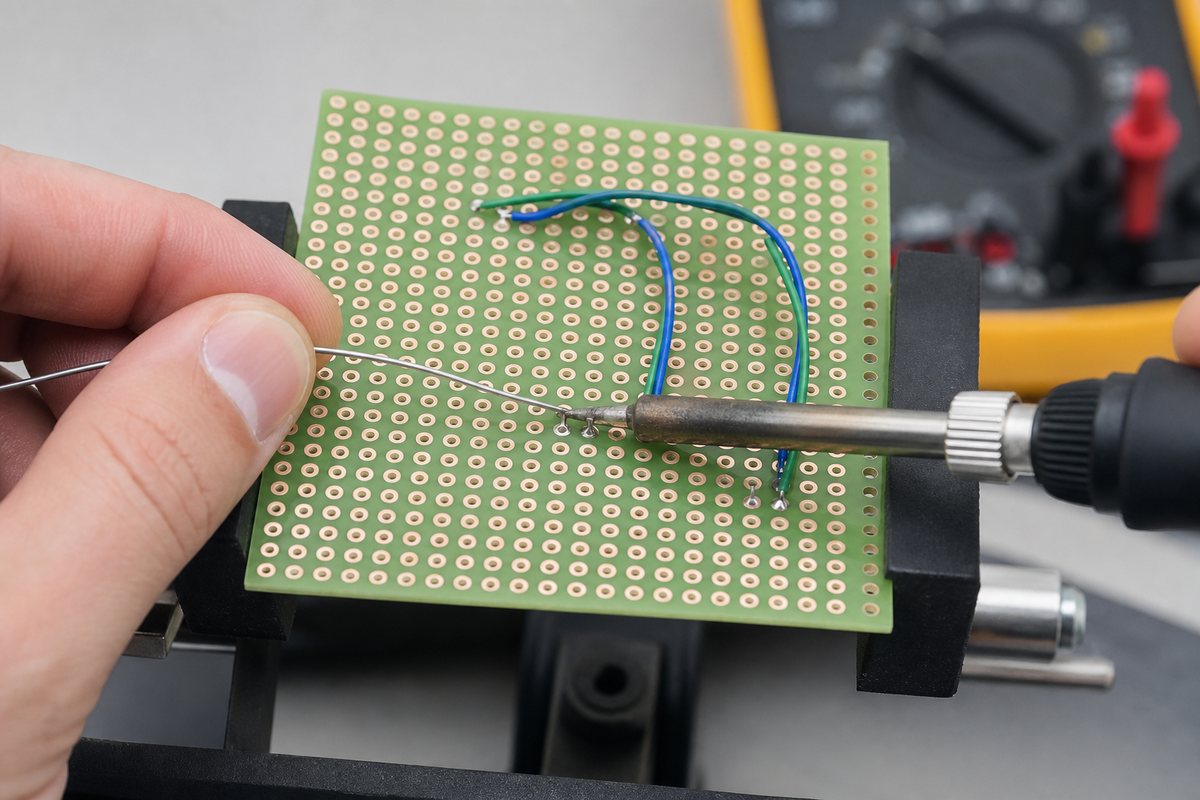
Hand soldering an isolated pad on the underside of a Dot PCB
  1. Work on an unpowered board and secure it in a holder.
  2. Confirm component value, pinout and polarity before insertion.
  3. Touch the clean, tinned iron tip to the pad and lead together.
  4. Feed electronics solder into the heated joint, not directly onto the iron.
  5. Stop once solder has wetted both surfaces and formed a controlled fillet.
  6. Remove the solder, then the iron, and keep the joint still while it cools.
  7. Trim the lead only after inspection, without pulling against the pad.
  8. Add jumper wires one net at a time and check continuity as the build progresses.

Our detailed guide on how to solder a PCB circuit board covers tool selection, joint inspection, rework limits and electrical safety in more depth.

Which Tools and Materials Are Needed?

A small, controlled tool set is safer than improvising with an oversized iron and plumbing materials. Prepare:

  • A temperature-controlled soldering iron with a tip suited to the pad size
  • Electronics solder and compatible electronics flux
  • A stable PCB holder, safety glasses and fume extraction
  • Flush cutters, wire strippers and ESD-safe tweezers
  • Insulated solid-core wire and appropriately sized power wire
  • Magnification, a multimeter and a current-limited bench supply
  • Solder wick or a suitable desoldering tool for corrections

The correct iron setting depends on alloy, tip geometry, pad size, wire mass and board material. Follow the solder and component guidance, then use the lowest practical setting that produces prompt wetting without prolonged contact.

What Common Dot PCB Faults Should You Check?

The most common failures are unintended shorts, open connections, mirrored-layout mistakes and mechanically weak wiring. Inspect the board before power-up and again after every repair.

  • Solder bridge: adjacent isolated pads are connected unintentionally.
  • Cold or poorly wetted joint: solder sits on the surface without bonding to both pad and lead.
  • Wrong-side routing: a copper-side connection was placed incorrectly because the mirrored view was not considered.
  • Lifted pad: excessive heat or mechanical force separates copper from the laminate.
  • Unsupported wire: movement transfers stress directly to a small solder joint.
  • Polarity or pinout error: a diode, capacitor, transistor or IC was installed in the wrong orientation.
  • Hidden short under a component: clipped leads or bare wire touch where visual access is poor.

Check power-to-ground resistance, required continuity and unintended connections while the board is unpowered. Initial power-up should use an appropriate current limit when the circuit permits it.

When Is a Dot PCB Perfboard the Right Choice?

A dot pcb perfboard is the right choice when the circuit is small, uses accessible through-hole parts, operates at modest speed and power, and only one or a few hand-built units are needed.

It is particularly useful for educational builds, simple interface circuits, quick fixtures, one-off adapters and proof-of-concept hardware that needs stronger connections than a solderless breadboard. It also gives the designer freedom to arrange irregular through-hole parts without cutting stripboard tracks.

The choice becomes less attractive as wire count, assembly time, test requirements or unit quantity increase. A low board price does not compensate for hours of manual wiring and troubleshooting.

Which Circuits Should Not Stay on a Dot PCB?

A Dot PCB should not be treated as a production substitute when electrical or mechanical behavior depends on controlled geometry. Move to a custom PCB when the design involves:

  • High-speed digital interfaces or controlled-impedance signals
  • RF circuits, antennas or tightly controlled return paths
  • Precision analog signals vulnerable to leakage, coupling or ground error
  • High current, high voltage or significant thermal dissipation
  • Fine-pitch SMD, QFN, BGA or dense mixed-technology assembly
  • Defined creepage, clearance, enclosure or connector geometry
  • Repeated builds that must behave consistently
  • Formal inspection, traceability or product qualification

A manufactured blank circuit board provides designed copper features, solder mask, silkscreen, drill control and a specified surface finish. Those controls matter once the prototype becomes engineering validation hardware.

What Affects Dot PCB Board Price?

Dot pcb board price is usually influenced by laminate material, dimensions, copper on one or two sides, plating quality, hole count, mounting features, pad finish, supplied accessories, order quantity and local distribution costs.

Compare usable area and construction rather than the lowest listed price alone. A board that sheds pads during rework or does not fit the component pitch can cost more in lost time than the purchase-price difference. For a one-off learning circuit, a basic board may be enough. For a prototype that will be handled or tested repeatedly, fiberglass construction and better-supported holes may be worth considering.

FAQ About Dot PCB

Is every hole on a Dot PCB connected? No. On a typical pad-per-hole board, each copper pad is isolated. Always inspect the copper side or check continuity because some products use strips or breadboard-style groups.

Can a Dot PCB be reused? Components can sometimes be removed and pads reused, but repeated heating can damage the copper and laminate. It is not reusable in the same convenient sense as a solderless breadboard.

Can SMD components be mounted on a dot board? Standard 2.54 mm boards favor through-hole parts. Some larger SMD parts can use adapter boards, but fine-pitch packages need matching pads and better process control.

Are the component side and copper side oriented the same way? No. When the board is flipped, the copper-side view is mirrored. Mark a reference corner and verify pin numbering before making connections.

Should adjacent pads be joined with solder? A very short, intentional bridge may be practical, but long solder tracks are hard to control and inspect. Jumper wire is usually clearer for longer connections.

What files are needed to convert the prototype into a custom PCB? Start with a confirmed schematic, BOM, connector and mechanical requirements, photos or wiring records, and test expectations. Gerber and drill files are then produced from the completed PCB layout.

How Can We Move a Dot PCB Prototype into Production?

At EBest Circuit, we support the step from a working hand-wired prototype to a controlled PCB and PCBA build. Our team can review the schematic, board outline, component footprints, BOM, connector locations, test needs and manufacturing risks before fabrication.

Before requesting a PCB prototype, capture every verified connection on the Dot PCB; do not rely on photos alone when wires overlap or disappear beneath components. Send your schematic, BOM, dimensions, quantity and available prototype records to sales@bestpcbs.com. We can help turn the verified circuit into fabrication files, assembled samples and a repeatable production path.

You may also like

Log Periodic Dipole Array Antenna PCB: Design and Fabrication

August 21st, 2026

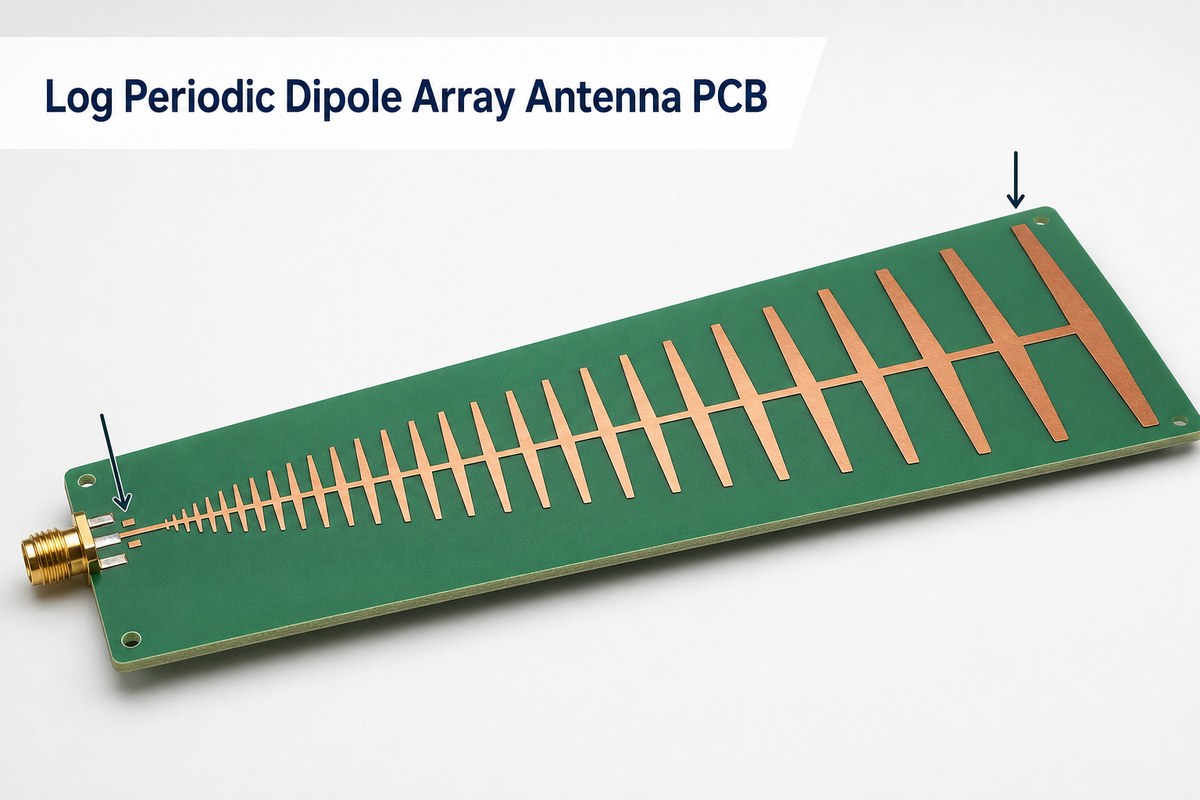
A Log Periodic Dipole Array Antenna PCB prints a sequence of scaled dipole elements and its feed structure on a circuit-board substrate. It can provide directional, wideband operation, but its final response depends on the complete geometry, laminate, copper, feed transition, connector, and nearby mechanical environment.

The first geometry calculation is only a starting point. A production-ready design must also control dielectric data, conductor dimensions, the balanced feed, the coax transition, board outline, surface treatment, and the measurement reference plane. This guide connects those antenna decisions to PCB fabrication and verification.

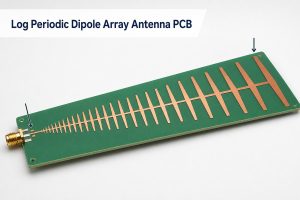
Log Periodic Dipole Array Antenna PCB with progressively scaled copper dipoles and an SMA feed

What Is a Log Periodic Dipole Array Antenna PCB?

A printed LPDA is a broadband directional antenna formed by multiple dipoles whose lengths, widths, and positions change by a nearly constant scale ratio. Unlike a conventional PCB carrying an antenna as one small component, the copper pattern, substrate, and feed line are the antenna.

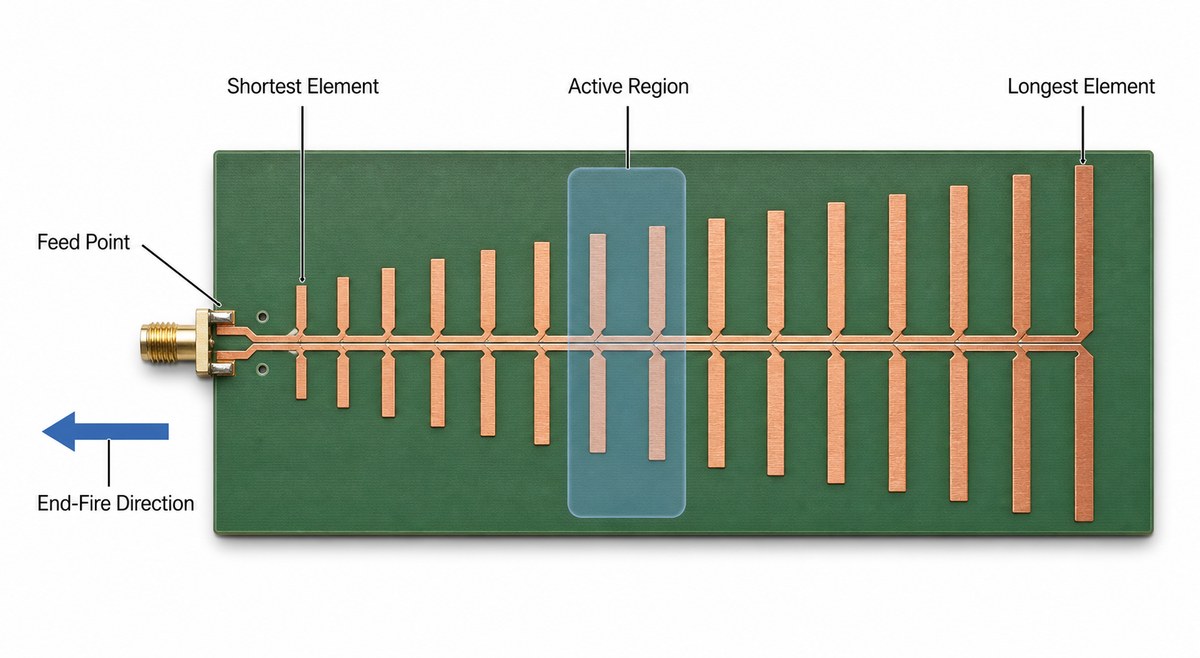
The shortest elements respond near the upper end of the band, while longer elements support progressively lower frequencies. Only a limited group of elements radiates strongly at a given frequency. That group is the active region, and it moves along the array as frequency changes.

How Does a Printed LPDA Cover a Wide Frequency Range?

A printed LPDA covers a wide band by repeating similar dipole cells at progressively scaled sizes. The frequency changes which neighboring elements are close to resonance, so the active region shifts without requiring every element to radiate equally at the same time.

In a conventional arrangement, energy travels along the balanced feed toward the larger elements while adjacent dipoles are connected with alternating polarity. The useful end-fire beam normally points toward the shorter-element end. The exact pattern still needs full-wave simulation and measurement because the substrate, feed, connector, enclosure, cable, and mounting hardware can disturb the ideal behavior.

Printed LPDA anatomy showing the feed point, shortest element, active region, longest element, and end-fire direction

Log Periodic Dipole Array Design

A useful log periodic dipole array design begins with the target frequency band, desired directional behavior, available board size, feed impedance, and acceptable loss. The scale factor, commonly written as τ, relates adjacent element dimensions. If elements are indexed from larger to smaller, a common definition is τ = Ln+1/Ln, where τ is less than one.

The spacing factor, σ, relates the gap between adjacent elements to element length. These factors influence array length, element count, gain tendency, front-to-back behavior, and impedance variation. They do not determine a finished printed antenna by themselves. The dielectric-loaded geometry and feed still need electromagnetic optimization.

  • Set the lower and upper operating frequencies before choosing element count.
  • Define whether the quoted bandwidth refers to S11, VSWR, gain, pattern, efficiency, or all of them.
  • Reserve margin beyond the nominal band so truncation does not place the active region at the physical edge.
  • Model the connector, transition, mounting holes, enclosure, cable route, and nearby metal when they will exist in the product.

Log Periodic Antenna PCB Design

The log periodic antenna pcb design must translate electrical dimensions into a manufacturable copper pattern without changing the current path. Arm length, arm width, element spacing, feed width, feed gap, board thickness, and dielectric properties should remain explicit controlled inputs rather than values left to artwork scaling.

Printed implementations often place alternate arms or feed conductors on opposite sides of the substrate. Others use coplanar or tapered feed arrangements. The correct layer assignment is part of the RF design, not a fabrication convenience. If a layer is mirrored, swapped, or offset, the intended phase relationship can be lost.

Design Item Electrical Role PCB Definition Needed
Dipole length Places each resonant cell within the operating band Finished copper dimension and etch tolerance
Dipole width Affects impedance, bandwidth, and current distribution Minimum feature, finished width, and copper thickness
Element spacing Controls coupling and active-region behavior Finished gap and registration requirement
Balanced feed Sets phase and impedance along the array Layer pair, width, gap, and dielectric thickness
Connector launch Transfers energy from the cable into the antenna Connector drawing, pad geometry, edge tolerance, and reference plane

Which Substrate and Copper Details Matter Most?

The substrate matters because its dielectric constant changes electrical length, while dielectric loss and copper loss reduce efficiency. Material selection should therefore use the laminate manufacturer’s frequency-dependent data and the values assumed in the electromagnetic model.

FR4 can be a practical prototype or cost-driven option when the frequency range, board size, and loss target are validated. A low-loss RF laminate is usually easier to justify when the band is wide, the upper frequency is high, the feed is long, or unit-to-unit repeatability is tight. Our high-frequency PCB materials guide explains how Dk, Df, copper roughness, and dielectric thickness affect RF boards.

  • Specify the exact laminate grade rather than a generic material family.
  • State the finished dielectric thickness used in simulation.
  • Define base and finished copper thickness where the distinction matters.
  • Confirm whether solder mask is kept away from radiating elements and feed structures.
  • Review how the selected surface finish changes conductor geometry and loss.
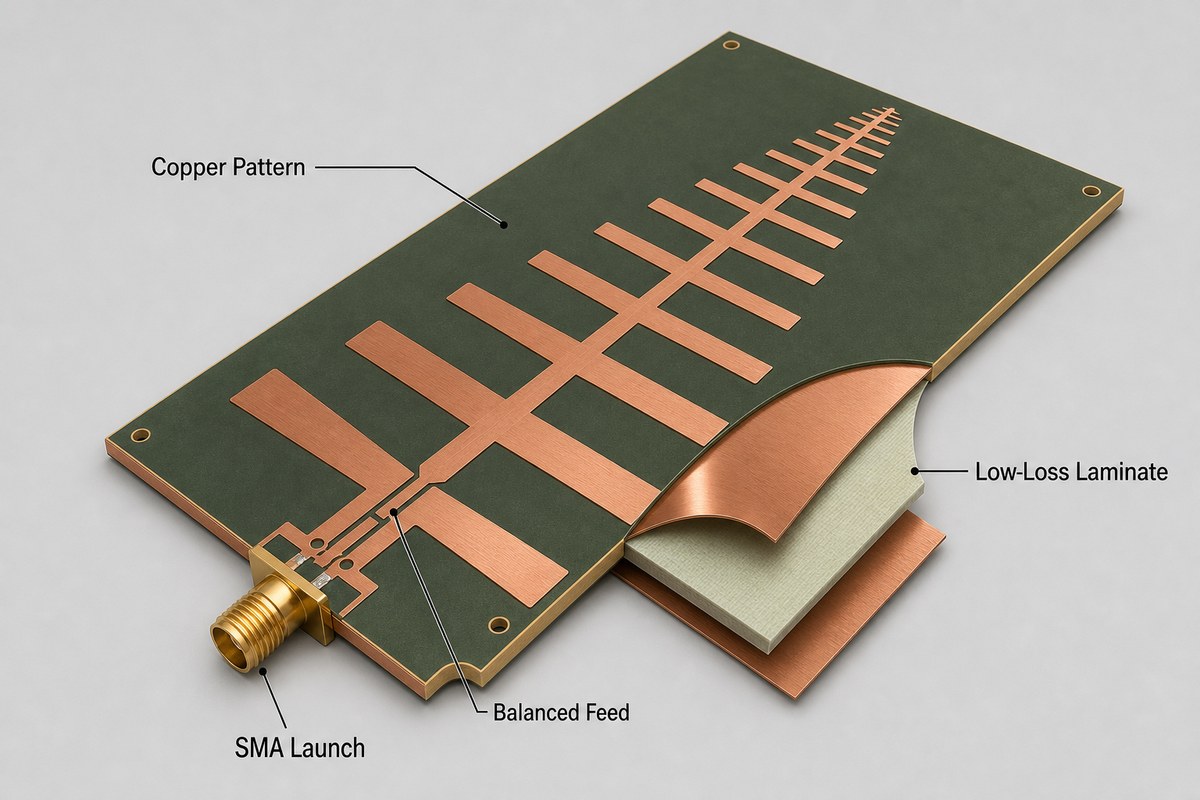
Cutaway view of an LPDA PCB showing the copper pattern, low-loss laminate, balanced feed, and SMA launch

How Should the Feed, Balun, and Connector Transition Be Designed?

The feed must preserve the intended balanced excitation while presenting the required impedance to the external cable or RF circuit. A coaxial connector is unbalanced, while the dipole array is balanced, so the transition should be treated as an RF structure rather than a simple pad connection.

Depending on the topology, the design may use a balanced parallel-strip feed, a microstrip-to-balanced transition, a tapered balun, a coplanar transition, or another simulated structure. The connector body and launch pads should be included in the model. A mathematically correct array can still show poor S11 if the launch adds excess inductance, capacitance, asymmetry, or unwanted common-mode current.

Log Periodic PCB Directional Antenna

A log periodic pcb directional antenna typically produces an end-fire beam toward its shorter elements, with the larger elements behind the active region. This direction should be confirmed in the radiation-pattern result rather than inferred only from the board outline.

LPDA is not automatically the best wideband PCB antenna for every enclosure. A Yagi may be simpler for a narrower band, while a Vivaldi antenna can provide another planar wideband path. The decision depends on band ratio, available length and width, polarization, gain flatness, front-to-back requirement, feed integration, and the surrounding structure.

Antenna Type Bandwidth Tendency Primary PCB Trade-Off
Printed LPDA Wide when the scale, feed, and truncation are optimized Long tapered array with many tolerance-sensitive cells
Printed Yagi Narrower and more frequency-specific Simpler element set but less suitable for a large band ratio
Vivaldi Wideband tapered-slot behavior Needs flare area and a carefully designed feed transition

Log Periodic PCB Antenna Calculator

A log periodic pcb antenna calculator is useful for generating the first set of element lengths, spacings, and array dimensions. It should not be treated as the final authority for a printed design because many calculators are based on simplified wire-LPDA relationships.

After the initial calculation, transfer the geometry into a full-wave solver with the real substrate, copper thickness, feed, connector, solder mask decision, and mechanical surroundings. Sweep both electrical and manufacturing variables. A design that works only at nominal geometry may drift after ordinary etching, material, or registration variation.

  • Document the calculator equations and the direction in which elements are indexed.
  • Keep the original target band separate from the wider simulation sweep.
  • Run sensitivity studies for Dk, dielectric thickness, copper width, and feed gap.
  • Export dimensioned fabrication data; do not ask the factory to recreate RF geometry from a screenshot.

Which Fabrication Tolerances Can Shift RF Performance?

The most sensitive fabrication variables are the ones that change resonant length, coupling, or feed impedance. On a wideband array, a small error repeated across many elements can alter gain flatness or create a local mismatch even when the board passes continuity testing.

  • Etch variation: changes arm width, arm length, feed width, and the gaps between conductors.
  • Dielectric variation: changes electrical length and feed impedance.
  • Layer registration: matters when alternate arms or balanced conductors occupy opposite sides.
  • Board outline and connector position: affect the launch and the mechanical reference.
  • Solder mask and surface finish: can add dielectric loading or change the conductor surface.
  • Handling and mounting: can bend a long thin board or bring metal hardware into the near field.

Controlled impedance is relevant to the feed, but it does not certify the antenna pattern. Review the feed geometry with the same discipline used for a radio frequency PCB, then keep the radiating elements under their own dimensional controls.

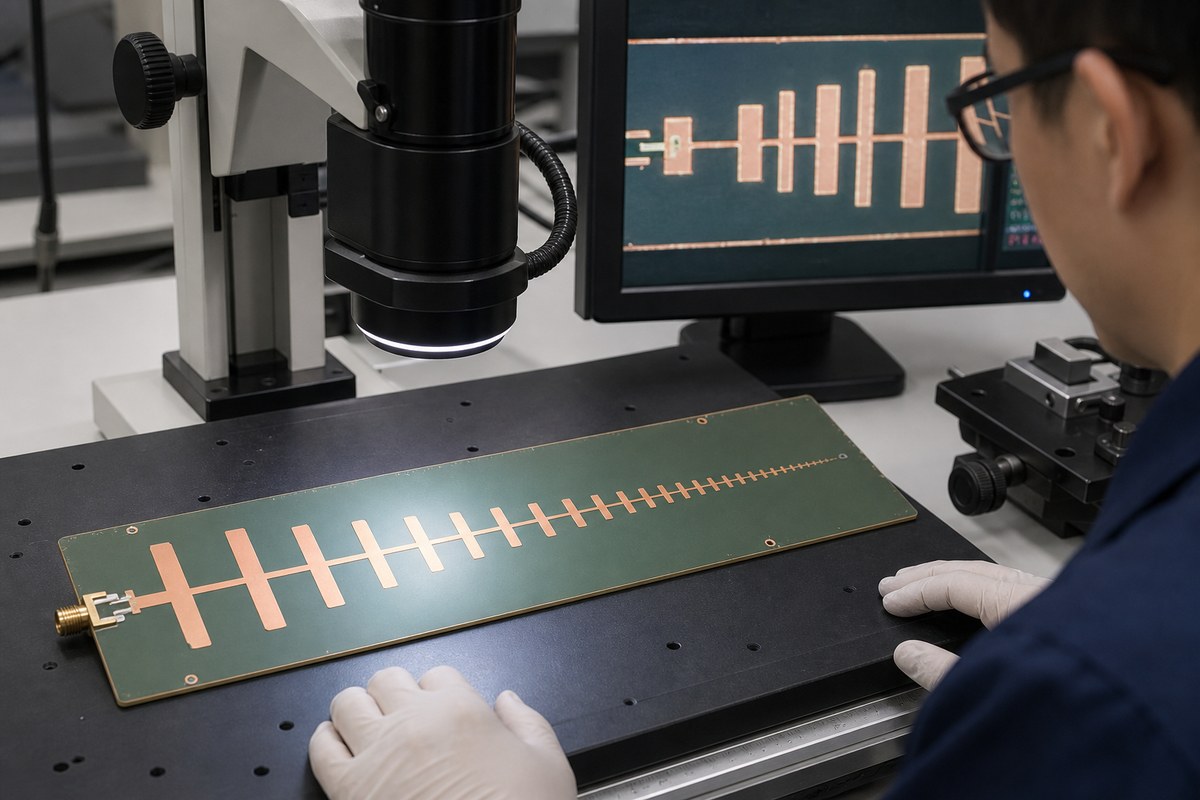
Optical dimensional inspection of copper elements on a printed LPDA antenna PCB

How Should a Fabricated LPDA PCB Be Tested?

A fabricated LPDA should be checked in stages: dimensional inspection first, port matching next, and radiation performance last. These tests answer different questions and should not be collapsed into a single pass/fail statement.

  1. Inspect the bare PCB: verify critical lengths, widths, gaps, registration, outline, connector position, and visible defects.
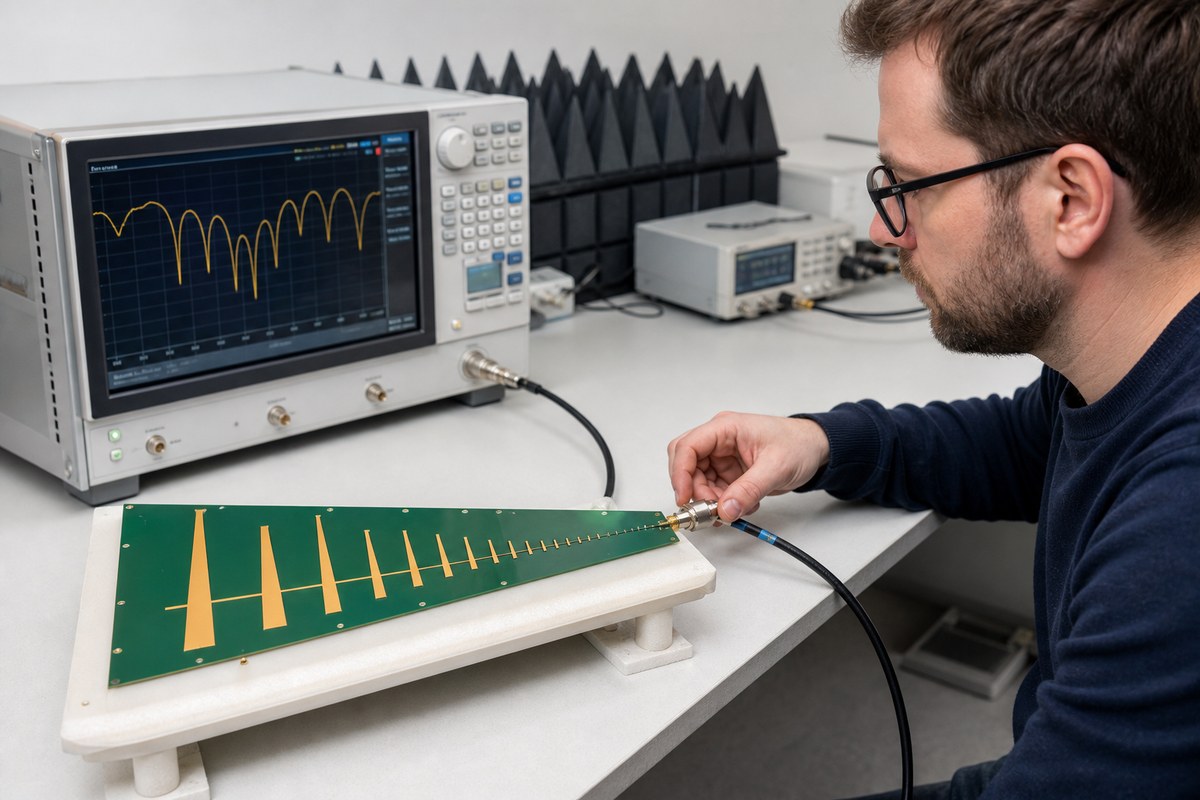
  2. Prepare the RF fixture: use the intended connector and mounting condition, then calibrate the VNA to a defined reference plane.
  3. Measure S11 or return loss: sweep beyond the target band to see edge behavior and unexpected resonances.
  4. Measure radiation performance: verify pattern direction, gain, beamwidth, front-to-back behavior, polarization, and efficiency when those are acceptance requirements.
  5. Compare samples: separate design error from fabrication variation by reviewing geometry and material records with the RF results.

A bare-board electrical test can find opens and shorts, but it cannot prove antenna gain or radiation pattern. Likewise, a good S11 trace does not guarantee that accepted power is radiated in the intended direction. The test plan must match the product’s actual RF acceptance criteria.

RF engineer measuring a printed LPDA antenna PCB with a vector network analyzer

What Data Should Be Included in an LPDA PCB Fabrication Package?

The fabrication package should define every board variable that the RF model assumes. Gerber or ODB++ data alone may show the artwork, but it may not explain the material values, controlled dimensions, connector reference, or acceptance method.

  • Gerber or ODB++ data, drill files, and a dimensioned drawing.
  • Exact laminate grade, finished dielectric thickness, and copper construction.
  • Critical finished dimensions and tolerances for elements, feed, and gaps.
  • Layer order, polarity, and registration requirements for balanced structures.
  • Surface finish and solder mask clearance instructions.
  • Connector part number, launch drawing, and board-edge requirements.
  • Target band, reference impedance, and available simulation or acceptance data.
  • Prototype quantity, production quantity, panel constraints, and assembly scope.

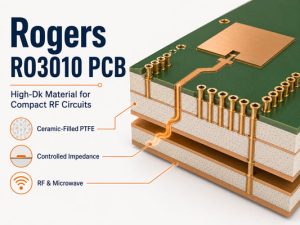
If the design uses a specific low-loss laminate, review its availability and processing route before freezing the stackup. The Rogers RO3010 material guide shows why material grade and dielectric data must be explicit in compact RF structures.

FAQ About Log Periodic Dipole Array Antenna PCBs

Is every printed LPDA automatically wideband?
No. The log-periodic geometry supports wideband behavior, but the useful band also depends on truncation, the feed transition, substrate, connector, material loss, nearby structures, and the acceptance metric.

Can FR4 be used for a printed LPDA?
Yes, if simulation and measurement show that its loss and dielectric variation are acceptable for the target band, board size, gain, and repeatability. A low-loss laminate may be safer when those margins are tight.

Does the longest dipole set the lower frequency limit?
It strongly influences the low-frequency edge, but the final limit also depends on dielectric loading, element width, spacing, feed behavior, and truncation margin. Do not size it from free-space half wavelength alone.

Which direction does an LPDA antenna radiate?
A conventional LPDA normally points toward its shorter elements. Confirm the actual main-beam direction in the simulated and measured pattern because feed and mechanical details can change the result.

Can PCB inspection replace antenna testing?
No. Dimensional inspection and electrical testing verify the board, while VNA and radiation measurements verify RF behavior. Both are needed when the antenna has formal performance requirements.

How Can EBest Circuit Support Your LPDA Antenna PCB?

At EBest Circuit, we support RF and high-frequency PCB projects with material and stackup review, controlled-impedance fabrication, prototypes, production orders, PCB assembly, and inspection. For an LPDA project, we can review the manufacturing data and identify board-level details that need clearer tolerances before production; final antenna performance remains tied to your validated RF design and test plan.

Send your Gerber or ODB++ files, stackup, laminate grade, target frequency band, connector drawing, critical tolerances, quantity, and available RF acceptance data to sales@bestpcbs.com. We will review the Log Periodic Dipole Array Antenna PCB fabrication requirements and prepare the appropriate PCB or PCBA quotation.

You may also like

Drone Circuit Board Design Guide for Light Show Applications

August 21st, 2026

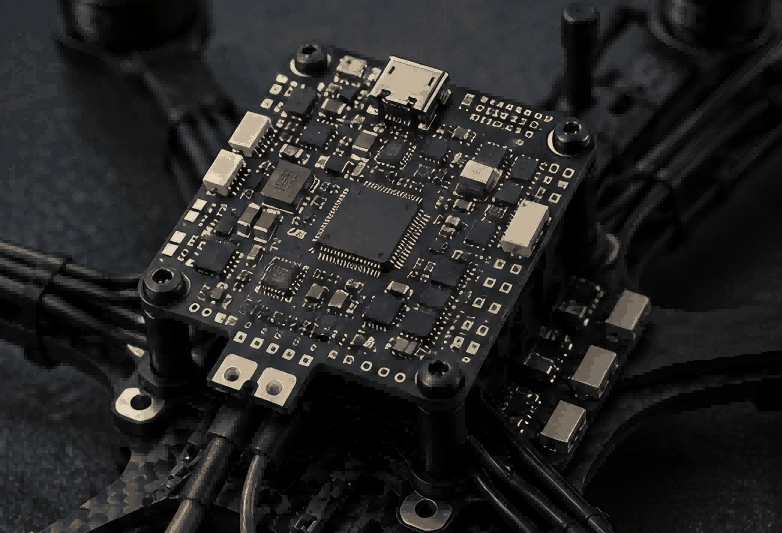
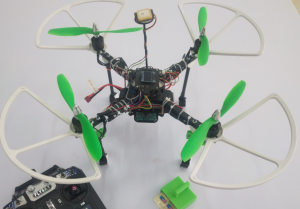
A drone circuit board for a light show may combine the flight controller, four ESC channels, power conversion, positioning, communication and lighting control on one compact PCB. When the FC and 4-in-1 ESC share the same board, motor-current paths, switching noise, heat and power transients must be kept away from the IMU, MCU and communication circuits.

Drone Circuit Board, https://www.bestpcbs.com/blog/2026/08/drone-circuit-board/

What Design Constraints Apply to a Light Show Drone Circuit Board?

Before schematic design, fix the aircraft requirements that directly determine the drone circuit board architecture. Battery and motor data define the power stage, the airframe defines board dimensions, while firmware, GNSS and lighting determine MCU resources and interfaces.

  • Battery range: A 3S LiPo is approximately 11.1 V nominal and 12.6 V fully charged. MOSFETs, capacitors and regulators also require voltage margin above the normal battery range because switching can create short transients.
  • Motor and propeller load: Record hover current, representative flight current and short-duration peak current for the actual motor/propeller combination. These values affect MOSFET selection, copper area, via arrays, connectors and thermal design.
  • PCB dimensions: Fix the outline, mounting holes, motor-arm directions, battery position, antenna clearance and light-module connection before detailed placement begins.
  • Aircraft weight: Include the PCB, motor wiring, GNSS/Wi-Fi hardware, connectors, spacers and lighting assembly. AIO integration only reduces aircraft mass when it removes real boards, connectors or wiring.
  • Flight-controller resources: Confirm MCU, IMUs, storage, UART, SPI, I2C, ESC outputs, programming access and lighting interfaces before the pinout is frozen.
  • Positioning and communication: Select the GNSS/RTK and communication hardware early because the actual module determines supply requirements, serial interfaces, connector pins and antenna clearance.
  • Lighting load: Define LED supply voltage, maximum current and control method. If the AIO board powers the lights directly, the lighting section becomes part of the main power and thermal design.

If motor current, board dimensions or peripheral allocation remain uncertain, the final PCB layout should remain open rather than being completed around assumed values.

Should a Light Show Drone Use Separate Boards or an AIO Flight Controller and 4-in-1 ESC?

The choice is mainly between lower installed weight and easier electrical and thermal separation.

  • Separate FC + 4-in-1 ESC: More physical distance can be kept between the IMU and MOSFET power stage. Either board can also be replaced independently, but the aircraft requires additional wiring, connectors and mounting hardware.
  • AIO FC + 4-in-1 ESC: One PCB removes inter-board connections and shortens FC-to-ESC signal paths. The trade-off is that four switching power stages now occupy the same board as the MCU and IMU.

For a compact aircraft, create a preliminary placement inside the actual board outline before committing to AIO. Include the battery input, four ESC channels, MCU, IMU, regulators, GNSS/Wi-Fi connections and lighting interface.

The proposed AIO outline should be reconsidered if:

  • motor-phase routes must pass beneath the IMU;
  • MOSFETs have too little copper for heat spreading;
  • battery current must cross the flight-control region;
  • power inductors surround the IMU;
  • GNSS or RF cables can only leave through the motor-output area.

A slightly larger drone circuit board can be a better engineering choice than forcing all functions into an outline that compromises current routing and sensor placement.

How Should the Flight Controller Hardware Support ArduPilot and Skybrush?

The drone circuit board must provide the MCU resources, sensors, storage and interfaces required by the selected ArduPilot and Skybrush configuration. MCU family alone does not determine whether the finished board can support the intended show system.

  • MCU resources: Reserve enough flash, RAM, timers and communication peripherals for flight control, four motor channels, GNSS, communication and lighting.
  • IMU: Define the exact sensor, interface and orientation. A rotated IMU or alternate sensor may require a matching firmware configuration.
  • Storage: Provide onboard storage when the selected ArduPilot/Skybrush workflow uses it for trajectory files and flight logs.
  • GNSS/RTK: Reserve a serial interface and regulated supply for the selected receiver rather than assigning the port after other peripherals have already consumed the available UARTs.
  • Communication: Allocate the connection and power required by the selected Wi-Fi or other show-control hardware.
  • RC input: Keep the receiver interface required for development, test flying or the selected operating procedure.
  • ESC outputs: Allocate four MCU outputs compatible with the ESC protocol selected for the project.
  • Lighting interface: Reserve the required PWM, digital, I2C, UART or external-controller connection before final MCU pin allocation.

The drone circuit board pinout and firmware configuration must remain synchronized. Changing an IMU, GNSS port, motor-output pin or communication interface can require hardware and firmware revalidation.

If DShot is used, timer grouping should be checked before routing. Bidirectional DShot also places additional demands on MCU DMA resources, so that requirement should be resolved before the output pinout is fixed.

How Should Power Distribution Be Designed for a 3S LiPo and Four Motors?

A 3S LiPo should feed the four ESC power stages through a short, low-resistance main power path, while the MCU, IMU, GNSS and communication circuits receive power through separate regulated avionics rails. Motor current should not pass through copper shared with the flight-control section.

  • Battery input: Use wide copper from the battery connection into the common ESC power region. Avoid narrow polygon necks, restrictive thermal reliefs and unnecessary layer transitions that increase resistance in the shared current path.
  • Four ESC branches: Divide the main battery path into four short branches close to the power stage. Each branch should feed its MOSFET bridge directly instead of crossing the MCU or sensor region.
  • Via transitions: Use parallel vias where high current changes layers. The required quantity depends on finished hole diameter, plating thickness, board thickness, surrounding copper and expected current rather than a fixed amps-per-via value.
  • Bulk capacitance: Place the main input capacitors close to the MOSFET bridges. Long PCB routes and battery leads add inductance and reduce the capacitor’s ability to support the local switching current.
  • Avionics supply: Generate the MCU, IMU, GNSS and communication rails separately from the direct motor-current path. The regulator should be sized for the combined low-voltage load with sufficient operating margin.
  • Ground return: Avoid forcing propulsion current through narrow ground copper shared with the MCU, IMU or GNSS. Shared ground impedance can turn motor-current changes into movement of the sensor reference voltage.
  • Lighting power: If the same drone circuit board supplies the lighting module, include its maximum current when sizing the battery path, regulator and return copper.

For a fully charged 3S LiPo, the normal input reaches about 12.6 V. MOSFETs, capacitors and regulators should also have sufficient voltage margin for switching transients in the final propulsion system.

How Should the Flight Controller and 4-in-1 ESC Be Partitioned on an AIO PCB?

The AIO drone circuit board should be partitioned according to motor-current flow and actual cable direction. The four ESC power stages belong close to their motor outputs, while the MCU, IMU and low-noise power section should stay outside the main switching paths.

Step 1: Fix the mechanical limits.
Lock the board outline, mounting holes, motor-arm directions, battery position, antenna clearance and lighting connector locations.

Step 2: Place the battery input and bulk capacitors.
Keep the battery connection close to the common ESC power area so the main current does not cross the complete PCB.

Step 3: Place the four ESC channels.
Each MOSFET bridge should sit close to its corresponding motor connection. Short phase paths reduce both resistance and the area occupied by switching copper.

Step 4: Place gate drivers beside the MOSFETs.
Short gate-drive paths reduce parasitic inductance and keep the fast switching loop compact.

Step 5: Reserve the flight-control area.
Place the MCU and IMU outside motor-phase, MOSFET switch-node and high-current via regions.

Step 6: Place avionics regulators.
Keep regulator inductors and switch nodes away from the IMU and RF-related circuits.

Step 7: Place external interfaces.
GNSS, Wi-Fi, RC and lighting connectors should face the direction their cables actually leave the aircraft.

Avoid placing the IMU beside battery leads, large motor pads or narrow PCB sections. Cable force and board flex in these locations can alter the mechanical vibration reaching the sensor.

drone circuit board, https://www.bestpcbs.com/blog/2026/08/drone-circuit-board/

How Can PCB Layout Prevent ESC Switching Noise From Affecting the IMU and Flight Controller?

On an AIO drone circuit board, ESC interference is reduced by keeping high-frequency switching loops compact and preventing their return current from sharing sensitive flight-control paths.

  • Gate-driver loop: Keep the path from gate driver to MOSFET gate and back to the source return short. Long gate traces increase parasitic inductance and enlarge the switching loop.
  • DC-link loop: Place the local capacitor so its positive and return connections reach the MOSFET bridge directly. A capacitor that is physically close but connected through long copper is less effective.
  • Motor-phase copper: Keep switch-node copper only as large as required for current and thermal performance. Large switching areas increase capacitive coupling to nearby circuitry.
  • Driver decoupling: Connect gate-driver decoupling through short traces and low-inductance vias.
  • IMU keepout: Avoid motor phases, MOSFET switching nodes, DC/DC switch nodes and high-current via fields directly beneath or beside the IMU where practical.
  • Reference plane: Use a continuous reference plane beneath sensitive MCU and sensor signals. Unnecessary plane splits can interrupt the return path and increase signal-loop area.
  • High-current returns: Route propulsion current so it does not share a narrow copper section with the MCU or sensor ground connection.

How Should Positioning and Communication Interfaces Be Planned for Light Show Drones?

The drone circuit board should give the GNSS/RTK receiver a clean supply, dedicated communication interface and antenna location separated from the main switching and motor-wiring areas.

If the show system uses RTK, each aircraft’s rover must receive the correction data provided through the selected ground and communication architecture. The PCB therefore has to support the receiver and communication hardware used by that architecture.

  • GNSS/RTK interface: Reserve the serial connection and any timing signals required by the selected receiver.
  • Receiver power: Supply GNSS from a regulated rail that does not directly carry motor or LED current. Place local filtering and decoupling close to the module or connector.
  • Antenna clearance: Review the GNSS antenna together with the battery, frame material, motor wiring, ESC copper, DC/DC inductors and Wi-Fi antenna.
  • Cable routing: Position external GNSS or RF connectors so their cables do not require long parallel runs beside the motor phases.
  • Wi-Fi interface: Provide the voltage, communication signals and physical connection required by the selected show-control hardware.
  • RF module placement: If the Wi-Fi or communication module contains an onboard antenna, maintain its specified antenna keepout and avoid placing large copper or power components in that area.

The GNSS and communication layout should be coordinated with the final airframe because battery, frame and antenna positions can reduce RF clearance even when the PCB itself appears well separated.

How Should LED and Light-Control Interfaces Be Integrated Into the Drone Circuit Board?

The lighting architecture determines the MCU outputs, connector arrangement and LED power path on the drone circuit board.

  • PWM RGB/RGBW: Reserve enough timer outputs and use MOSFETs or a dedicated LED driver for the actual LED current. MCU pins should provide control rather than carry lamp current directly.
  • Addressable LEDs: Reserve a compatible digital output and confirm that the MCU and firmware can support the intended number of pixels.
  • External communication-controlled lighting: Provide the required communication and power connection for the separate light controller.
  • I2C lighting module: Define bus voltage, pull-up resistors and connector arrangement. Long external I2C wiring should be avoided where possible because cable capacitance and noise reduce bus margin.
  • UART lighting module: Reserve the serial port before peripheral allocation is complete. Add level translation when the flight controller and lighting module use different logic voltages.

If the AIO board supplies LED power, the regulator and copper should be sized for maximum lighting current, not average show brightness.

A separate lighting board can keep LED heat and high lamp current away from the FC/ESC section while allowing the optical assembly to change without redesigning the main control PCB.

drone circuit board for light show, https://www.bestpcbs.com/blog/2026/08/drone-circuit-board/

How Can a Drone Circuit Board Be Made Smaller and Lighter?

Reducing drone circuit board size should not force the IMU into the ESC region or remove copper required for battery and motor current. Weight should be evaluated across the complete installed electronics.

  • FC and ESC integration: Combining both functions removes a second PCB and can also eliminate connectors, spacers and signal wiring.
  • Motor connections: Direct solder pads reduce connector mass and height, while connectors simplify motor replacement. The choice should match the maintenance strategy for the fleet.
  • PCB outline: Remove unused area only after the ESC, IMU, regulator and RF regions are established. Do not shrink the outline until electrical separation is lost.
  • Board thickness: Thinner laminate reduces PCB mass but also lowers stiffness. Excessive flex near the IMU changes its vibration environment and increases stress around heavy battery or motor connections.
  • Component packages: Small packages can save logic area, but MOSFETs, bulk capacitors, power inductors and current-sense components still require enough electrical and thermal capacity.
  • Copper: Do not aggressively reduce battery and ESC copper solely for weight. The mass saved is small compared with the additional voltage drop and heat that insufficient copper can create.

The design target is minimum installed electronics mass while preserving current capacity, sensor placement and thermal spreading.

How Should Thermal Management Be Designed for a Compact AIO Drone Circuit Board?

The four ESC channels normally generate most of the heat on an AIO drone circuit board. Thermal design should provide a low-resistance path from the MOSFET packages into enough PCB copper while keeping the hottest power areas away from the IMU.

MOSFET conduction loss can be estimated from:

Pcond ≈ Irms² × RDS(on,Tj)

Use RDS(on) at the expected operating temperature rather than only its value at 25°C.

  • MOSFET copper area: Connect the power devices to enough local copper to spread heat beyond the package. A narrow neck leading to a large distant plane does not provide the same local thermal path.
  • Thermal vias: Use via arrays where heat can move into substantial copper on internal or opposite layers. Vias terminating in a small isolated copper island provide limited benefit.
  • Low-resistance current transitions: Battery pads, motor pads and via fields can produce their own heat if the current path is restricted.
  • IMU separation: Keep the sensor away from the hottest MOSFET group and high-loss regulator section where board area permits.
  • Avionics regulator area: Size the DC/DC section for the combined MCU, GNSS, communication and other low-voltage loads rather than treating it as a negligible heat source.
  • Airflow allowance: Do not assume every PCB area receives propeller airflow. The battery, frame or light module may shield parts of the board.

Which Protection Circuits Can Prevent Brownouts, Voltage Spikes and In-Flight Failures?

Protection on the drone circuit board should prevent short electrical events from resetting the flight controller or overstressing the power stage.

  • Input bulk capacitance: Place sufficient capacitance close to the ESC input to reduce voltage movement caused by fast propulsion-current changes and wiring inductance.
  • Local decoupling: Use smaller capacitors close to the MCU, IMU, gate drivers and regulators so high-frequency current does not have to travel through long PCB paths.
  • Transient suppression: A TVS or other transient-control device can be used when expected or measured overshoot justifies it. Its working voltage should remain above normal 3S operation while its clamping level remains compatible with downstream voltage ratings.
  • Brownout supervision: The MCU and regulator architecture should provide predictable behavior when the avionics supply falls below its valid range.
  • Reverse-polarity protection: Match the protection method to the battery connector and assembly process. A mechanically keyed connector may reduce reverse-connection risk, while other interfaces may justify MOSFET-based protection.
  • Motor-fault behavior: Consider a stalled motor, phase short or failed MOSFET bridge. Because all four ESC channels share the same battery, one failed channel can pull down the supply used by the flight controller.
  • Lighting-load isolation: Large LED load changes should not share a weak regulated or return path with the MCU. Separate regulation or a more direct lighting power path may be required for higher-power light modules.

Select protection parts from the actual battery range, regulator limits, power-stage voltage ratings and expected fault conditions rather than adding generic protection components after routing.

What DFM Checks Should Be Completed Before Prototype and Production Builds?

DFM for an AIO drone circuit board should confirm that fabrication and assembly can reproduce the same current paths, sensor environment and thermal structure established during design.

Step 1: Confirm the Stackup
Check finished thickness, copper weight, dielectric structure and layer functions. If the factory proposes another stackup, review whether copper thickness, reference planes or board stiffness change.

Step 2: Trace High-Current Paths
Follow battery current from the input into the common power region and then into all four ESC channels. Check polygon necks, thermal reliefs and pad transitions that can become local resistance points.

Step 3: Review Via Arrays
Confirm finished hole diameter, plating thickness, via quantity and copper connection on both sides of high-current layer transitions. The manufacturing values should match the assumptions used during PCB design.

Step 4: Inspect Copper Around the IMU
Review every layer below and beside the sensor. Check that later routing changes have not introduced motor phases, switching nodes or high-current via fields into the IMU region.

Step 5: Verify Power Footprints
Compare MOSFET, gate-driver, regulator, current-sense and connector footprints with the approved component drawings. Check pad dimensions, exposed thermal pads, pin numbering and polarity.

Step 6: Review Stencil Openings
Large QFN, DFN and power-device exposed pads may require segmented paste apertures to control solder volume and reduce package float or excessive solder accumulation.

Step 7: Check Assembly Spacing
Confirm that tall capacitors, connectors and power devices leave enough clearance for placement, inspection and practical rework.

Step 8: Control Critical BOM Parts
MCU, IMU, MOSFET, gate driver, oscillator and principal regulators should require technical approval before substitution. Package compatibility alone does not guarantee the same switching, thermal or firmware behavior.

Step 9: Keep Test Access
Retain pads for programming, reset, battery voltage, principal regulated rails and selected communication or ESC signals.

Step 10: Check Mechanical Stress Areas
Review battery and motor connections near PCB edges. Large wires can transfer force into pads and laminate during assembly or maintenance.

Step 11: Verify Assembly Orientation
The BOM, centroid file and assembly drawing should agree on IMU, MCU, MOSFET, diode and connector orientation. IMU orientation is tied directly to the flight-control coordinate system.

Step 12: Freeze the Release
The drone circuit board revision, BOM, fabrication data, centroid file, assembly drawing and firmware configuration should describe one controlled build.

A manufacturing change that alters high-current via arrays, copper beneath the IMU, MOSFET footprints or thermal structures should return to electrical review before release.

How Should a Drone Circuit Board Prototype Be Validated Before Light Show Flight Testing?

Prototype validation should prove the drone circuit board electrically and thermally before flight-control tuning begins. Testing should move from basic power checks to motors, sensors, positioning, communication, lighting and finally multi-drone operation.

Step 1: Inspect the PCBA
Check polarity, missing parts, solder bridges, connector orientation and solder joints around MOSFETs, regulators and exposed thermal pads. Confirm the IMU orientation against the approved assembly data.

Step 2: Check Resistance Before Battery Power
Measure the battery input and regulated rails for abnormal low resistance. This can reveal shorts or assembly faults before a high-current LiPo is connected.

Step 3: Bring Up the Avionics
Where the architecture permits it, begin with a current-limited supply. Verify regulator outputs and idle current before enabling the ESC power section.

Step 4: Confirm Firmware Boot
Load the firmware intended for that drone circuit board revision and verify repeatable startup, reset and programming access.

Step 5: Verify Sensors
Confirm IMU detection, orientation and stationary data before motor operation. This provides a reference for later comparison when the ESC is active.

Step 6: Check Storage and Interfaces
Verify storage, GNSS, RC, communication and lighting interfaces using the connectors and cables intended for the aircraft.

Step 7: Confirm Motor Mapping
Verify Motor 1–4 output mapping and direction without propellers. If DShot or another digital ESC protocol is used, confirm operation on every channel.

Step 8: Test Each ESC Channel
Run one motor at a time and compare input current, MOSFET temperature and avionics-rail behavior across all four channels. A large difference can indicate an assembly or power-stage problem.

Step 9: Run All Four Motors
Load the shared battery input and common copper with all four ESC channels operating. Monitor the battery and avionics rails because voltage-drop problems may appear only when the shared power path is heavily loaded.

Step 10: Check IMU Behavior Under Motor Load
Compare sensor data with the motors stopped, one motor running and all four motors running. Separate switching-related electrical noise from mechanical vibration before flight tuning.

Step 11: Test GNSS/RTK Under Load
Use the final antenna and cable arrangement while the propulsion system is active. If RTK is used, verify the rover and correction-data path under the same operating conditions.

Step 12: Test Communication
Run the selected Wi-Fi or show-control connection with the motors operating and the battery installed in its final position. Check link stability and data transfer rather than only confirming that the module powers on.

Step 13: Run the Lighting System
Use representative color and brightness sequences while monitoring the avionics rail. Run motors and lighting together so the combined electrical load is represented.

Step 14: Record Thermal Performance
Operate the complete system until temperatures become repeatable. Measure MOSFETs, regulators, battery connections, high-current via fields and the MCU/IMU area.

Step 15: Compare Several Prototypes
Compare current consumption, IMU noise, temperature and communication behavior across several boards. Large unit-to-unit differences can reveal assembly variation before a larger batch is ordered.

Step 16: Verify Multi-Drone Operation
Use more than one aircraft to check positioning, communication and lighting synchronization. A single drone cannot reveal board-to-board variation across the fleet.

Step 17: Complete Controlled Flight Tests
Begin with basic flight and review the logs before moving to autonomous or show-related operation. Hardware faults should be resolved before flight-control parameters are used to compensate for them.

Step 18: Freeze the Validated Build
Record the drone circuit board revision, BOM and firmware configuration that passed validation. A later change to the IMU, MOSFET, regulator, stackup or layout should trigger the affected tests again.

A prototype is ready for the next build when the same hardware configuration passes power, ESC, sensor, positioning, communication, lighting and thermal checks consistently.

FAQs About Drone Circuit Board Design for Light Show

Q1: Should motor wires be soldered directly to the PCB or use connectors?

A1: Direct solder pads reduce connector weight and contact resistance, while connectors make motor replacement easier. Choose the connection method from aircraft weight and expected maintenance frequency, especially when motors may be replaced repeatedly across a fleet.

Q2: Should the four ESC channels use individual current sensing?

A2: Not automatically. A single battery-current sensor may be enough when only total current is required. Add per-channel sensing when individual motor-current data is actually used for control or diagnostics.

Q3: How much test access should remain on a compact AIO PCB?

A3: Keep access to the battery rail, main regulated supplies, reset, programming interface and selected communication or ESC signals. These pads occupy little area but can greatly reduce debugging time.

Q4: Should a light show drone PCB use conformal coating?

A4: It depends on humidity and contamination exposure. Pressure sensors, connectors and some RF areas may require masking. Define coating material and keep-out areas before volume assembly.

Q5: Can PCB thickness be reduced to lower aircraft weight?

A5: A thinner PCB saves mass but reduces stiffness. Choose thickness together with board size, mounting points and IMU location, because excessive flex can change vibration behavior and increase solder-joint stress.

Q6: Should high-current pads use thermal relief?

A6: Narrow thermal reliefs can become resistive bottlenecks. Direct copper attachment improves current flow but increases heat sinking during soldering. Review current capacity and assembly requirements together before selecting the connection style.

Q7: Is a barometer required on every light show drone flight controller?

A7: It depends on the selected flight-control architecture. If one is used, keep it away from hot components and direct airflow. Its mechanical environment directly affects pressure measurement.

Q8: How should battery sensing be routed?

A8: Take voltage and current measurements from defined sensing points rather than convenient high-current copper. Shared propulsion resistance can otherwise introduce measurement error.

Q9: How should prototype boards be identified?

A9: Mark every prototype with a visible drone circuit board revision linked to its BOM and firmware configuration. Traceability should begin during prototype development, not only after production starts.

Q10: What should be checked before ordering a larger prototype batch?

A10: Review unresolved hardware changes, flight-test results, component availability, firmware revision and the production test method. The next batch should reproduce the validated configuration rather than introduce several changes at once.

EBest Circuit supports custom drone circuit board fabrication, component sourcing, PCB assembly, prototype builds and volume production. For an AIO flight controller and 4-in-1 ESC project, send your PCB files, BOM, motor and propeller specifications, 3S battery data, ArduPilot/Skybrush requirements, target board dimensions and prototype quantity to sales@bestpcbs.com for manufacturing review and quotation.

You may also like

14-Layer HDI PCB: Stackup, Design Rules & Manufacturing Guide

August 19th, 2026

A 14 layer HDI PCB combines 14 copper layers with high-density interconnect features such as microvias, blind and buried vias, sequential lamination, and via-in-pad.

The extra layers provide room for signals, ground planes, and power distribution. HDI technology solves the routing problem around fine-pitch components, where conventional through vias consume too much board space.

Before selecting this structure, engineers usually need to determine:

  • How many HDI buildup layers are necessary?
  • Can the BGA be routed without stacked microvias?
  • Which stackup supports the required impedance?
  • Can the laminate tolerate repeated lamination?
  • Which fabrication limits should be confirmed before layout is frozen?

These choices have a larger impact on cost and manufacturability than the layer count alone.

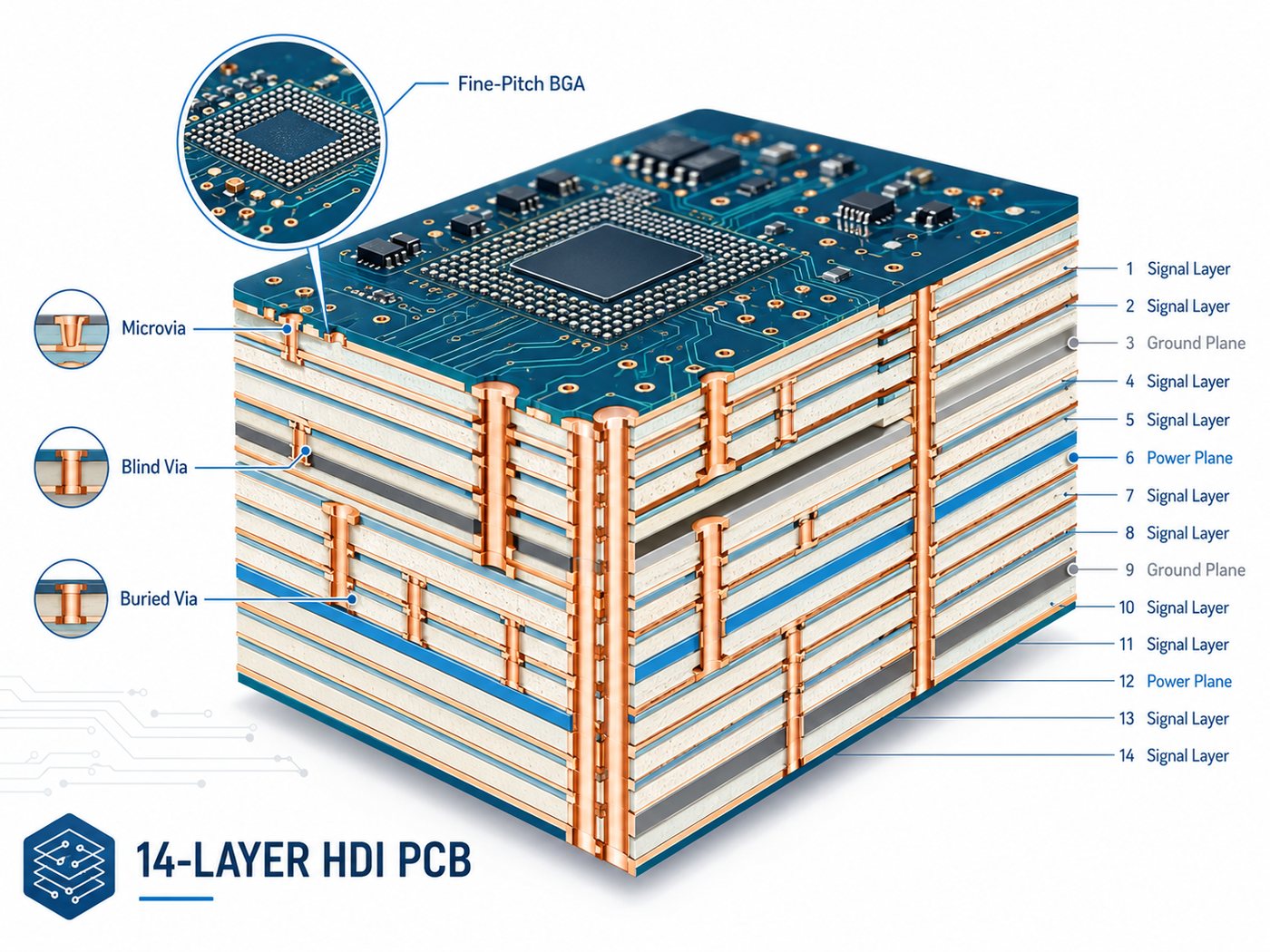
14-layer HDI PCB cutaway showing microvias, blind vias, buried vias, signal layers, ground planes and power planes

What Is a 14-Layer HDI PCB?

A 14-layer HDI PCB has 14 conductive copper layers and uses high-density vias to connect selected layers.

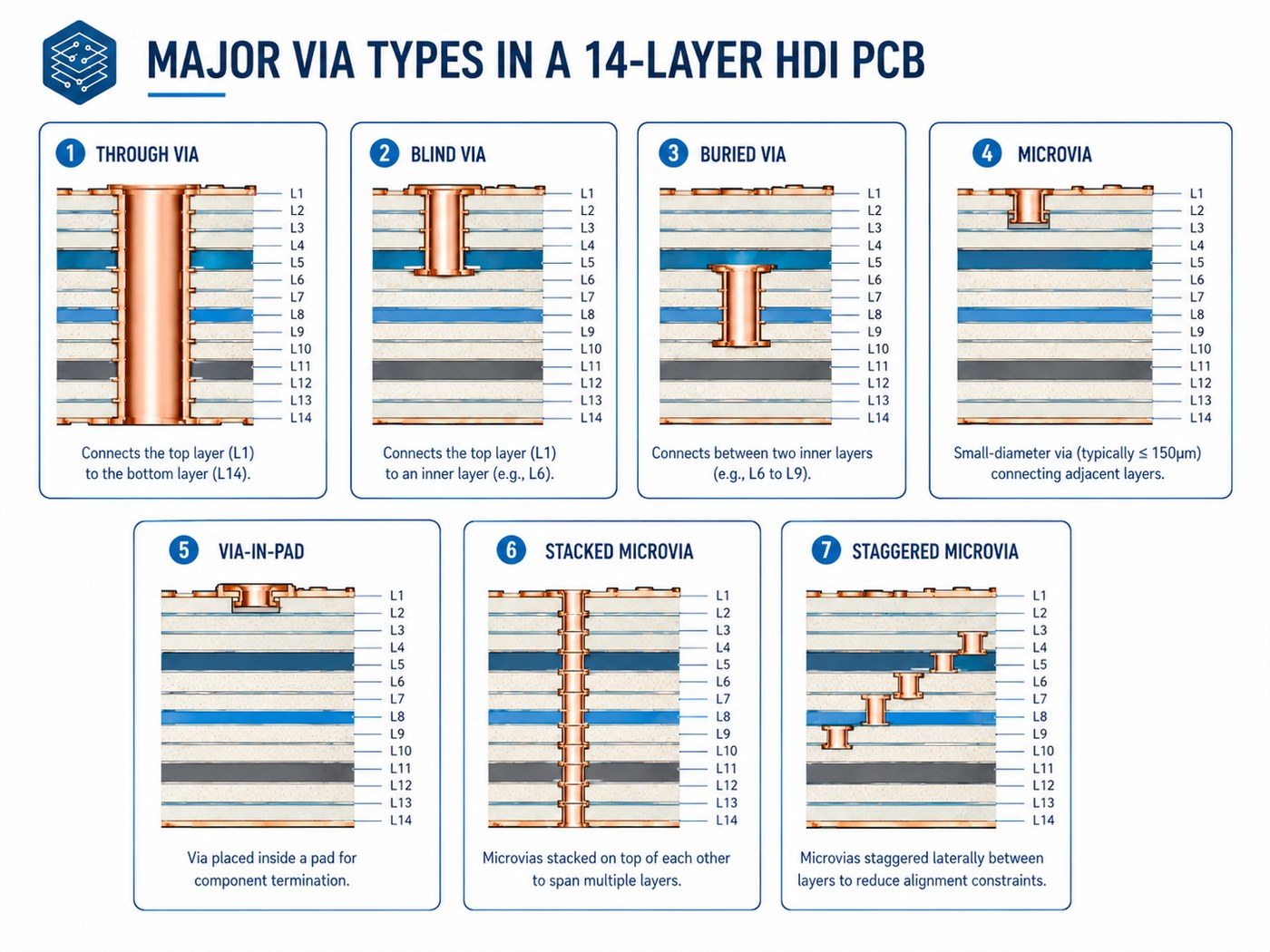
Common HDI features include:

  • Laser-drilled microvias
  • Blind and buried vias
  • Via-in-pad
  • Stacked or staggered microvias
  • Sequential buildup layers

A conventional 14 layer PCB can also have 14 copper layers but rely mainly on through vias.

HDI becomes useful when a design needs more routing channels around fine-pitch BGAs, processors, FPGAs, or other dense packages. If component pitch is generous and board area is not constrained, a conventional multilayer board may be the more economical choice.

When Do You Need a 14-Layer HDI PCB?

A 14-layer HDI construction makes sense when routing density, board size, and electrical requirements begin competing for the same space.

Typical cases include:

  • Fine-pitch BGA breakout
  • High-I/O processors or FPGAs
  • Compact communication or computing boards
  • Multiple high-speed interfaces
  • Designs requiring several continuous reference planes
  • Dense layouts where through vias block inner-layer routing

HDI should solve a specific layout problem. If a standard 14-layer board can meet routing and electrical requirements without microvias or sequential buildup, adding HDI only increases fabrication complexity.

How Is a 14-Layer HDI PCB Stackup Designed?

A 14 layer PCB stackup should be built around routing, impedance, power distribution, board thickness, and via structure.

The HDI PCB stackup must be reviewed with the approved laminate system, finished thickness, copper distribution, and impedance targets before routing is released.

For a broader explanation of layer planning, see our PCB board stackup guide.

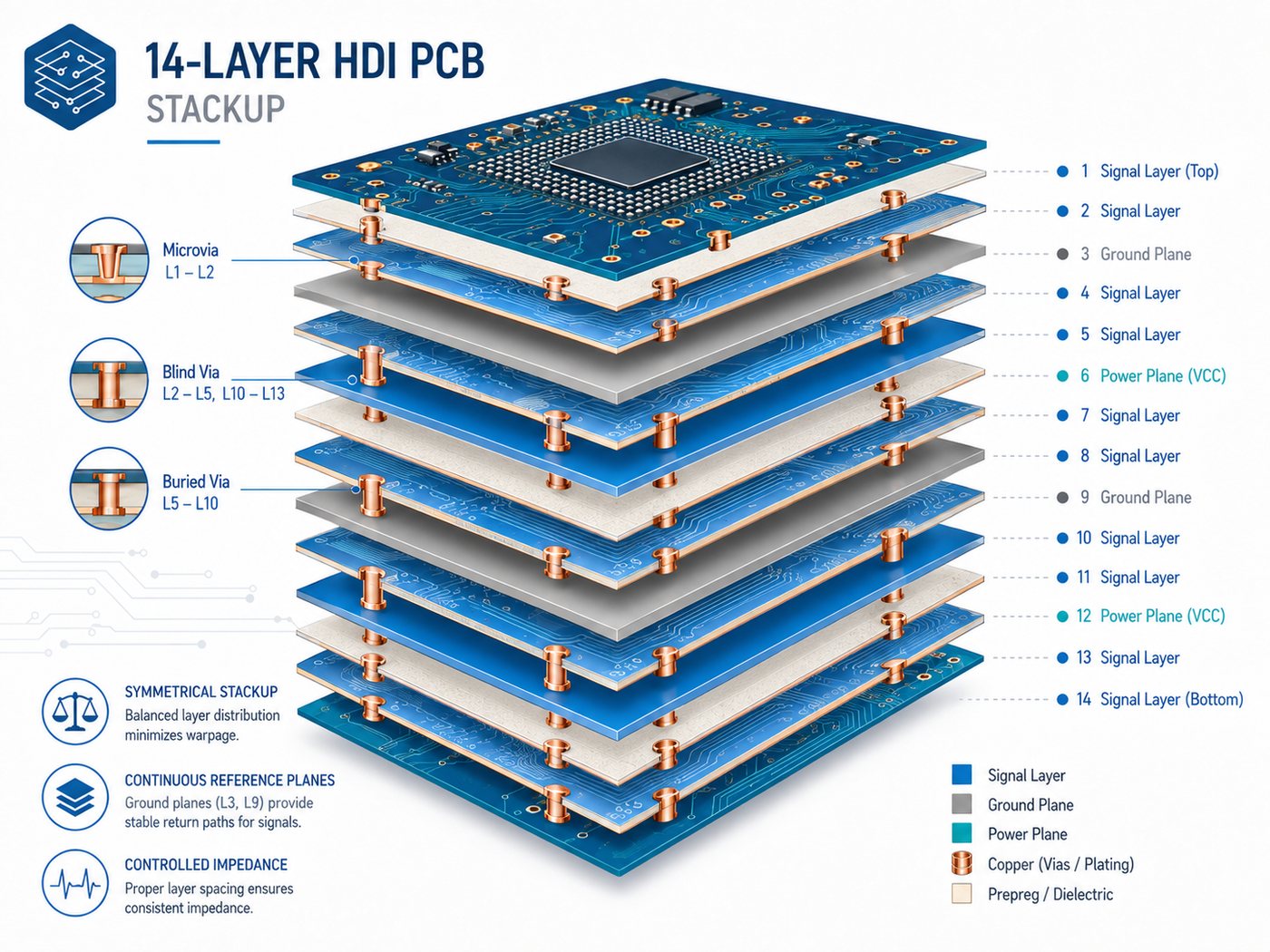
Exploded 14-layer HDI PCB stackup showing signal layers, ground planes, power planes, microvias and blind vias

One possible arrangement is:

Layer Typical Function
L1 Components / high-speed signal
L2 Ground
L3 High-speed signal
L4 Ground
L5 Signal
L6 Power
L7 Ground
L8 Ground
L9 Power
L10 Signal
L11 Ground
L12 High-speed signal
L13 Ground
L14 Components / signal

This is an example, not a universal stackup. Actual dielectric thickness, copper weight, and layer assignment depend on the design.

Three practical rules are useful:

  • Keep high-speed signal layers next to continuous reference planes.
  • Maintain a reasonably symmetrical construction to reduce warpage risk.
  • Define the HDI layer stackup together with the microvia structure.

For example, if microvias connect L1-L2 and L2-L3, the dielectric thickness between those layers must suit the selected laser-via geometry. Stackup review should therefore happen before final routing.

Which HDI Buildup Structure Should a 14-Layer PCB Use?

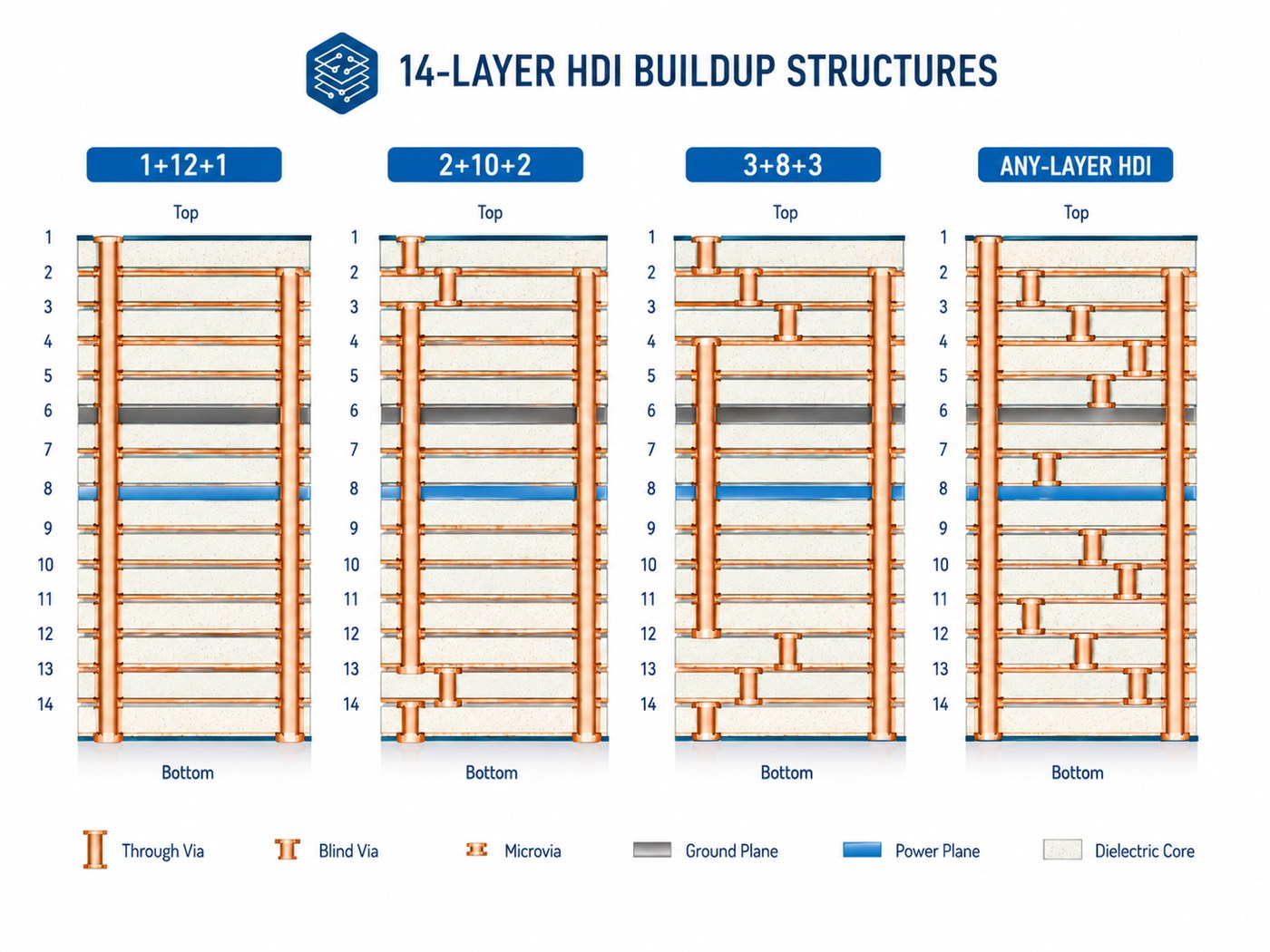
The buildup defines how many HDI layers are added around the central multilayer structure.

Comparison of 1+12+1, 2+10+2, 3+8+3 and any-layer HDI buildup structures for a 14-layer PCB
Structure Typical Use
1+12+1 Moderate-density outer-layer breakout
2+10+2 Higher-density BGA routing
3+8+3 Very dense component areas
Any-layer HDI Designs requiring maximum interconnection flexibility

A 1+12+1 structure is suitable when signals mainly need to move from the outer layer into the first internal routing layer.

A 2+10+2 structure provides more routing freedom around dense BGAs or processors.

Moving to 3-step or any-layer HDI should have a clear routing benefit. More buildup stages mean additional lamination, laser drilling, plating, filling, and registration control. The best structure is usually the simplest one that completes the routing without compromising electrical requirements.

How Should Microvias, Blind Vias, and Buried Vias Be Used?

Each via type has a different job.

Through via, blind via, buried via, microvia, via-in-pad, stacked microvia and staggered microvia comparison
Via Type Best Use
Through via General connections in lower-density areas
Blind via Outer-to-inner layer connections
Buried via Internal layer-to-layer routing
Microvia Fine-pitch routing between nearby layers
Via-in-pad BGA and small-package breakout
Stacked microvia Maximum routing density
Staggered microvia Multi-level routing where offset space is available

Stacked microvias save space but require tighter control of:

  • Copper filling
  • Layer registration
  • Plating quality
  • Thermal reliability

Staggered microvias are often easier to manufacture when the layout has enough space for an offset transition.

Via-in-pad is useful under fine-pitch BGAs. These vias normally need to be filled and planarized so the component pad remains flat and solderable.

What Are the Key 14-Layer HDI PCB Design Rules?

These HDI PCB design guidelines should match the manufacturer’s actual production capability rather than a generic CAD rule set.

Confirm these items before layout is finalized:

  • Microvia diameter and depth
  • Capture-pad size
  • Annular ring
  • Minimum trace and space
  • Via-to-pad clearance
  • Via filling requirements
  • Stacked microvia capability
  • Layer registration tolerance
  • Controlled impedance

Avoid using the factory’s absolute minimum geometry across the entire board. A feature that can be produced in a small isolated area may not be the best choice for stable volume production.

Copper balance should also be considered across the stack. Large differences in copper distribution between corresponding layers can increase warpage risk.

For controlled impedance, provide the target values and net types. Trace dimensions can then be adjusted against the actual laminate and finished dielectric thickness.

How Do You Control Signal and Power Integrity in a 14-Layer HDI PCB?

Fourteen layers provide useful flexibility for signal and power planning, but only if the reference structure is well organized.

14-layer HDI PCB signal and power integrity illustration with fine-pitch BGA breakout, differential pairs, reference planes and stitching vias

For signal integrity:

  • Route high-speed traces next to solid reference planes.
  • Avoid routing across plane splits.
  • Keep differential-pair geometry consistent.
  • Add nearby ground vias when signals change reference layers.
  • Use short microvia transitions where appropriate.
  • Avoid unnecessary through-via stubs.

For power integrity:

  • Provide low-inductance paths between power and ground.
  • Keep critical power planes close to their return planes where practical.
  • Place decoupling close to high-current and fast-switching devices.
  • Avoid fragmented return paths around plane cutouts.

The benefit of a 14-layer structure is not simply “more layers.” It is the ability to separate routing, reference, and power functions without forcing too many compromises.

Which Materials Are Suitable for a 14-Layer HDI PCB?

Material choice depends on electrical loss, thermal stress, and repeated-lamination requirements.

Material Type Typical Fit
High-Tg FR-4 General industrial HDI
Low-loss FR-4 Higher-speed digital designs
High-performance laminate Demanding thermal or reliability requirements
Hybrid stackup Designs where only selected layers need special properties

Important parameters include:

  • Tg
  • Z-axis CTE
  • Dk
  • Df
  • Resin system
  • Moisture behavior
  • Repeated-lamination performance

For high-speed designs, Dk and Df affect impedance and transmission loss. For multilayer HDI, Z-axis expansion and laminate stability also matter because vias experience repeated thermal stress during fabrication and assembly.

Material availability should be checked before quotation. An uncommon laminate can add unnecessary sourcing time even when the PCB design itself is straightforward.

How Is a 14-Layer HDI PCB Manufactured?

The HDI PCB manufacturing process for a 14-layer board adds sequential buildup steps to conventional multilayer fabrication.

14-layer HDI PCB manufacturing and inspection flow from inner-layer imaging through laser drilling, plating, AOI and electrical test

A simplified flow is:

  • Inner-layer imaging and etching
  • AOI inspection
  • Core lamination
  • Buried-via processing if required
  • Buildup dielectric lamination
  • Laser drilling
  • Via metallization and plating
  • Via filling and planarization where required
  • Additional buildup cycles
  • Outer-layer processing
  • Solder mask and surface finish
  • Electrical and final inspection

A 2+N+2 structure repeats the buildup and laser-drilling sequence for the second HDI level.

The main manufacturing challenge is maintaining alignment and via quality through repeated processing. A factory capable of standard 14-layer PCBs is therefore not automatically qualified for complex HDI builds.

How Is 14-Layer HDI PCB Reliability Verified?

Electrical testing confirms continuity, but HDI also requires inspection of internal interconnects.

Our broader PCB testing guide explains how electrical and inspection methods complement one another.

Method Main Purpose
AOI Conductor and pattern inspection
Electrical test Open and short detection
Microsection Via plating, fill, and registration
Impedance coupon Controlled impedance verification
X-ray Selected internal structure inspection
Thermal testing Interconnect behavior under temperature stress
Dimensional inspection Alignment and finished geometry

Microsection inspection is particularly useful for stacked or filled microvias because the critical structure is hidden inside the PCB.

For high-reliability projects, define acceptance class, coupon requirements, thermal testing, and reporting requirements at RFQ stage. These items can affect both panel design and quotation.

What Affects 14-Layer HDI PCB Cost and Lead Time?

HDI architecture often affects price more than the difference between conventional multilayer counts.

Cost Driver Why It Matters
Sequential lamination Adds fabrication cycles
Stacked microvias Requires tighter registration and filling control
Fine line/space Reduces process margin
Via-in-pad filling Adds filling and planarization
Specialty laminate Raises material or sourcing cost
Tight impedance Requires engineering and verification
Additional reliability tests Adds inspection and qualification
Small prototype quantity Setup cost is spread over fewer boards

One effective way to control cost is to simplify the via structure.

If a 2+10+2 construction completes the routing, moving to 3+8+3 simply for extra flexibility is usually difficult to justify.

When comparing quotes, make sure each supplier is pricing the same material, stackup, microvia structure, surface finish, and testing requirements.

How Do You Choose a 14-Layer HDI PCB Manufacturer?

Do not qualify a supplier only by checking whether its capability table says “14 layers” or “HDI.”

Confirm the processes that your design actually requires:

  • Sequential lamination
  • Laser-drilled microvias
  • Copper-filled via-in-pad
  • Stacked or staggered microvias
  • Fine line and space
  • Controlled impedance
  • Layer registration
  • Microsection inspection
  • Electrical testing

The manufacturer’s DFM feedback should also be specific. If an engineer suggests changing a stacked microvia to a staggered one, the reason should be clear—whether it is reliability, process margin, cost, or production capability.

For quotation, provide:

  • Gerber or ODB++ data
  • Drill files
  • Preferred stackup, if available
  • Material requirement
  • Finished board thickness
  • Copper weight
  • Impedance requirements
  • Microvia and via-in-pad details
  • Surface finish
  • Test requirements
  • Prototype and production quantities

If the stackup is still open, provide the electrical and mechanical requirements instead.

At EBest Circuit, reviewing the stackup and via structure before layout is locked gives engineers more room to resolve manufacturing issues without forcing major redesign later.

Frequently Asked Questions About 14-Layer HDI PCBs

Is every 14-layer PCB an HDI PCB?

No. Fourteen layers describe the copper-layer count. HDI describes the interconnection technology. A 14-layer board can still be a conventional multilayer PCB.

What is a typical 14-layer HDI PCB stackup?

There is no universal stackup. Structures such as 1+12+1 and 2+10+2 are possible, but the final choice depends on BGA routing, impedance, board thickness, and required HDI layers.

What is the difference between a 14-layer HDI PCB and a standard 14-layer PCB?

A 14-layer HDI PCB uses localized high-density connections such as microvias and blind vias. A standard 14-layer PCB may rely mainly on through vias.

Should stacked or staggered microvias be used in a 14-layer HDI PCB?

Use stacked microvias when routing density requires vertical alignment. Use staggered microvias when enough offset space is available and the design does not require the more compact structure.

What files are required to manufacture a 14-layer HDI PCB?

Provide fabrication and drill data plus the stackup or electrical requirements, material, copper thickness, impedance targets, microvia details, via-fill requirements, surface finish, test requirements, and quantity.

How Can EBest Circuit Support Your 14-Layer HDI PCB Project?

At EBest Circuit, we support HDI PCB stackup review, DFM feedback, controlled impedance, laser-drilled microvias, and multilayer PCB fabrication. Send us your Gerber or ODB++ files, stackup, material, finished thickness, impedance targets, via structure, surface finish, test requirements, and quantities for an engineering review and quotation.

You may also like

20 Layer PCB: Stackup, Thickness, Design & Manufacturing Guide

August 18th, 2026

A 20 layer PCB is usually chosen when a design needs more routing channels, reference planes, or power distribution than a lower-layer board can comfortably provide. High-pin-count BGAs, fast digital interfaces, multiple voltage rails, limited board area, and strict EMI requirements are common reasons to move toward this type of construction. The extra layers offer more design freedom, but they also make stackup planning, drilling, lamination, and registration more demanding.

EBest Circuit manufactures multilayer PCBs and supports engineering review for stackup, controlled impedance, via structures, materials, and DFM. If your design is already at the 16- to 20-layer stage, sending the Gerber or ODB++ data together with target thickness, copper weight, impedance requirements, and drill information allows the board construction to be reviewed before quotation or prototype release.

20 layer PCB showing multilayer stackup, copper layers and plated vias

What Is a 20 Layer PCB?

A 20 layer PCB uses twenty copper layers to combine dense routing, reference planes, power distribution, and controlled-impedance structures in one multilayer board. It is appropriate only when the design needs the extra routing and plane flexibility.

A practical stackup normally combines:

A 20 layer board should be selected from routing, power, EMI, and mechanical requirements rather than layer count alone.

  • Signal layers for component breakout and routing
  • Ground planes for return paths and shielding
  • Power planes for voltage distribution
  • Reference planes for controlled-impedance signals

The advantage is not simply “more layers.” What matters is how those layers are allocated. A good 20-layer construction can give high-speed traces nearby reference planes, keep return paths continuous, and provide enough routing space without pushing trace width and spacing unnecessarily tight.

When Do You Need a 20 Layer PCB?

A 20-layer structure makes sense when a lower layer count starts forcing electrical or routing compromises.

Typical cases include:

  • High-pin-count BGA, CPU, FPGA, or ASIC breakout
  • Multiple DDR, PCIe, Ethernet, SerDes, USB, or other high-speed interfaces
  • Several power rails requiring dedicated plane area
  • Dense layouts where board size cannot increase
  • Mixed analog, digital, RF, and power circuitry
  • Designs requiring additional ground planes for EMI control
  • Backplanes, servers, telecom equipment, medical electronics, aerospace systems, and complex industrial controls

More layers are not automatically better. If a 16-layer board already meets routing, signal-integrity, power-integrity, and mechanical requirements with reasonable margin, moving to 20 layers only adds fabrication complexity and cost.

What Does a Typical 20 Layer PCB Stackup Look Like?

There is no universal 20 layer PCB stackup. Layer allocation depends on BGA escape, impedance requirements, dielectric thickness, copper weight, power distribution, and the intended via structure.

This pcb layer stack up example is illustrative; the production construction must be recalculated for the approved materials and impedance targets. See our PCB board stackup guide.

20 layer PCB stackup example with signal ground and power layers

A possible 20 layer PCB stackup example is shown below.

Layer Type Typical Function
L1 Signal Components and short routing
L2 Ground Reference plane
L3 Signal High-speed routing
L4 Ground Reference plane
L5 Signal General routing
L6 Power Power distribution
L7 Signal General/high-speed routing
L8 Ground Reference plane
L9 Signal High-speed routing
L10 Ground Central reference plane
L11 Ground Central reference plane
L12 Signal High-speed routing
L13 Ground Reference plane
L14 Signal General/high-speed routing
L15 Power Power distribution
L16 Signal General routing
L17 Ground Reference plane
L18 Signal High-speed routing
L19 Ground Reference plane
L20 Signal Components and routing

This is an example, not a standard construction. A real project may need more power layers, fewer signal layers, different dielectric spacing, or another reference-plane arrangement. The stackup should be finalized against the actual impedance and manufacturing requirements rather than copied from another PCB.

How Should Signal, Ground, and Power Layers Be Arranged?

Layer placement should give critical signals a stable reference and keep the overall construction reasonably symmetrical.

Several rules are especially useful:

  • Place high-speed signal layers next to continuous ground planes.
  • Avoid routing critical traces across gaps or splits in their reference plane.
  • Use ground layers between sensitive or unrelated routing regions when isolation is important.
  • Keep power and ground planes appropriately coupled where the stackup allows.
  • Maintain a reasonably symmetrical dielectric and copper structure around the board center.
  • Avoid large copper-density differences between opposite sides of the stack.

Return-path planning is particularly important. When a high-speed signal changes layers, the return current must also transition between reference planes. If both references are ground, nearby stitching vias can provide a short return path.

Layer assignment is best decided before detailed routing. Changing the stackup late in the design can alter impedance geometry and force trace-width or spacing changes.

What Is the Typical 20 Layer PCB Thickness?

There is no single standard 20 layer PCB thickness. The finished value comes from the complete copper and dielectric build rather than the layer count by itself.

20 layer PCB thickness measured across copper core and prepreg layers

Finished thickness is mainly determined by:

  • Core thickness
  • Cured prepreg thickness
  • Copper weight
  • Required finished copper
  • Controlled-impedance geometry
  • Electrical isolation requirements
  • Via diameter and drill aspect ratio
  • Connector and enclosure requirements
  • Mechanical stiffness

Trying to make a 20-layer board unusually thin means using thinner dielectric layers. That can affect impedance geometry, laminate availability, registration tolerance, and mechanical strength.

Board thickness also needs to be reviewed with the drill table. A thick PCB combined with very small mechanically drilled holes can create an aggressive aspect ratio, making hole preparation and plating more difficult. For this reason, thickness, stackup, impedance, and hole structure should be evaluated together.

Which Materials Are Used for 20 Layer PCBs?

Layer count alone does not determine the laminate. Material selection should follow the electrical, thermal, reliability, and cost requirements.

Our PCB material guide explains how Tg, loss, and laminate construction affect selection.

20 layer PCB materials including FR-4 high Tg low loss RF and hybrid laminates
Material Type Typical Use Main Consideration
Standard FR-4 General industrial electronics Economical for less demanding signal speeds
High-Tg FR-4 Dense boards with higher thermal demands Better thermal robustness
Low-loss laminate High-speed digital systems Lower transmission loss
RF/high-frequency laminate RF and microwave sections More stable Dk and lower Df
Hybrid stackup Mixed digital/RF designs Lamination compatibility needs review

For high-speed boards, two material properties deserve particular attention:

  • Dk influences impedance and propagation delay.
  • Df contributes to dielectric loss, especially as frequency and trace length increase.

Availability also matters. A laminate may look ideal electrically but become impractical if the required core or prepreg thickness is difficult to source for prototypes or volume production. Hybrid constructions need closer review because different material systems may have different resin behavior, CTE, and lamination conditions.

How Do You Design a 20 Layer PCB for Signal and Power Integrity?

More layers make SI and PI design easier only when they are used correctly.

For manufacturing controls, review our impedance control PCB guide.

For controlled impedance, the PCB manufacturer needs more than the requested value. Actual impedance depends on:

  • Trace width
  • Copper thickness
  • Dielectric thickness
  • Dk
  • Distance to the reference plane
  • Differential-pair spacing
  • Manufacturing tolerance

The production impedance calculation should therefore use the actual fabrication stackup rather than nominal CAD dimensions alone.

Other practical design points include:

  • Keep high-speed traces over continuous reference planes.
  • Avoid unnecessary layer changes on sensitive interfaces.
  • Add suitable return-path vias when reference planes change.
  • Control coupling between neighboring high-speed routes.
  • Review via stubs on faster channels.
  • Keep decoupling paths short between the power pin, capacitor, and ground.
  • Allocate sufficient copper for major power rails.

Via stubs can become important at higher data rates. If a through via continues well beyond the layers carrying the signal, the unused section acts as a stub. Back drilling or a shorter blind-via transition may be considered when channel analysis shows the stub is significant.

The objective is not to fill the stackup with ground and power planes. It is to create enough routing space while maintaining clean reference paths and a low-impedance power-distribution network.

Which Via Structures Are Suitable for a 20 Layer PCB?

A 20 layer PCB does not automatically need HDI construction. The appropriate via type depends mainly on package pitch, routing density, board thickness, and the layers that must be connected.

Through blind buried microvia and via in pad structures for a 20 layer PCB
Via Type Suitable Situation Main Trade-Off
Through via Moderate routing density Occupies space through the full stack
Blind via Dense outer-layer breakout More process steps
Buried via Internal layer connections More complex lamination
Microvia Fine-pitch BGA or HDI routing Often requires sequential lamination
Via-in-pad Very dense BGA escape Filling and planarization usually required
Staggered microvia Multi-level HDI routing More layout planning
Stacked microvia Vertical HDI interconnect Tighter process and reliability control

For example, a 20-layer industrial controller with generous component pitch may work well with conventional through vias. A much smaller board using fine-pitch BGAs may require microvias even at the same layer count.

Layer count and HDI level are separate design decisions.

How Is a 20 Layer PCB Manufactured?

The basic process is similar to other multilayer PCBs, but dimensional control becomes more important as the stack grows.

A typical manufacturing flow includes:

  1. Inner-layer imaging and etching
  2. Inner-layer AOI
  3. Surface preparation
  4. Core and prepreg layup
  5. Multilayer lamination
  6. Mechanical or laser drilling
  7. Hole metallization and copper plating
  8. Outer-layer imaging and etching
  9. Solder mask
  10. Surface finish
  11. Electrical testing
  12. Final inspection

A conventional through-hole board may use one main multilayer lamination cycle. Designs with buried vias or multi-level microvias can require repeated lamination, drilling, and plating.

That difference can have a major effect on cost and lead time. A “20-layer PCB” therefore tells the manufacturer much less than a complete stackup and via diagram.

What Are the Key Manufacturing Challenges of a 20 Layer PCB?

The main challenge is controlling many interacting tolerances at the same time.

Important DFM points include:

  • Layer registration: inner layers can expand or contract during processing, so registration compensation is required.
  • Drill aspect ratio: small holes through a thick board are more difficult to prepare and plate reliably.
  • Resin flow: uneven copper distribution can affect dielectric thickness and resin fill.
  • Copper balance: severe imbalance may contribute to bow and twist.
  • Hole-wall plating: plating must remain continuous through the full hole depth.
  • CAF risk: conductor and hole spacing, material selection, and process control deserve attention on dense multilayer designs.
  • Delamination: laminate condition, moisture control, pressing, and thermal exposure all matter.
  • Impedance consistency: dielectric and copper tolerances need to stay within the range used for the impedance calculation.

A useful DFM review should therefore examine the real stackup, drill map, copper distribution, via construction, impedance table, and material specification—not just confirm that the factory can produce “20 layers.”

20 Layer PCB vs 16 Layer PCB: Which Should You Choose?

A 20-layer board provides more routing and plane-allocation freedom, while a 16-layer structure is generally simpler to manufacture.

Comparison of 20 layer PCB and 16 layer PCB routing and stackup complexity
Factor 16 Layer PCB 20 Layer PCB
Routing capacity High Higher
Reference-plane flexibility Good Greater
Power-plane allocation Good More flexible
Dense BGA routing Suitable for many designs Better for highly congested designs
Stackup complexity Lower Higher
Fabrication cost Lower Higher
Manufacturing difficulty Lower Higher

Consider moving from 16 to 20 layers when the 16-layer design causes:

  • Excessive routing congestion
  • Too many signal layer transitions
  • Broken or compromised reference planes
  • Inadequate BGA escape channels
  • Insufficient room for power planes
  • Trace spacing that is unnecessarily aggressive

If those problems do not exist, 16 layers may be the more economical choice.

What Affects 20 Layer PCB Cost and Lead Time?

Layer count matters, but two 20-layer designs can still have very different prices.

The largest quotation variables usually include:

  • Board dimensions and panel utilization
  • Laminate type and availability
  • Finished thickness
  • Copper weight
  • Minimum trace and spacing
  • Minimum finished hole size
  • Blind, buried, or microvia structures
  • Number of sequential lamination cycles
  • Via filling or via-in-pad
  • Controlled impedance
  • Back drilling
  • Surface finish
  • Testing requirements
  • Prototype or production quantity

A conventional FR-4 board using through vias is generally less complex than a 20-layer low-loss design with stacked microvias, back drilling, via filling, and tight impedance requirements.

For a meaningful quotation, provide the complete fabrication requirements rather than asking for a generic “20 layer PCB price.”

20 Layer PCB FAQ

How thick is a 20 layer PCB?

There is no fixed thickness. It depends on the core and prepreg structure, copper weight, controlled-impedance geometry, via structure, and mechanical requirements. If the finished thickness is mechanically constrained, specify it early so the stackup and drill aspect ratio can be evaluated together.

How many signal layers does a 20 layer PCB have?

There is no standard number. Some 20-layer boards may use around half of the layers for routing, while others allocate more copper layers to ground or power. The correct ratio depends on routing density, power distribution, and signal-integrity requirements.

Does a 20 layer PCB always require HDI technology?

No. A conventional through-hole construction can be suitable when component pitch and routing density allow it. HDI becomes useful when fine-pitch BGA breakout or limited PCB area requires blind vias, buried vias, or microvias.

Can a 20 layer PCB use standard FR-4?

Yes, when its loss, thermal, and reliability requirements are compatible with standard FR-4. High-speed interfaces, long transmission paths, or higher thermal demands may justify high-Tg or lower-loss laminates.

What files are required for a 20 layer PCB quote?

For an accurate review and quotation, provide as much of the following as available:

  • Gerber or ODB++ files
  • NC drill files
  • Fabrication drawing
  • Finished board thickness
  • Copper weight
  • Existing stackup
  • Controlled-impedance requirements
  • Via structure
  • Material preference
  • Surface finish
  • Quantity
  • Inspection or reliability requirements

A 20 layer PCB is most useful when the added layers solve real routing, reference-plane, power-distribution, or density problems. Stackup, thickness, material, impedance, and via architecture should be developed as one system rather than specified independently.

How Can EBest Circuit Support Your 20 Layer PCB Project?

A supplier’s published maximum layer count is only a starting point. What matters is whether its process capability matches your actual stackup.

Check whether the manufacturer can support:

  • Multilayer stackup engineering
  • Controlled-impedance calculation and verification
  • Required minimum trace, spacing, and hole geometry
  • Blind and buried vias
  • HDI and sequential lamination where required
  • Via filling and via-in-pad
  • Inner-layer AOI
  • Electrical testing
  • Cross-section inspection where needed
  • Material and production traceability
  • Relevant quality-system requirements
  • DFM review before fabrication

Engineering communication is also revealing. If a stackup, drill structure, or impedance requirement is unclear, the issue should be raised before production rather than interpreted silently.

For EBest Circuit projects, customers can provide Gerber or ODB++, drill files, fabrication notes, target thickness, impedance information, and material requirements for engineering review before prototype or volume production.

Send us your Gerber or ODB++ files, drill data, target thickness, material grade, copper weights, impedance targets, via structure, quantities, and test requirements. We can review stackup balance and manufacturability before quotation and prototype release.

You may also like

USB Motherboard Pinout: Header Types and PCB Checks

August 17th, 2026

USB motherboard pinout errors can damage a port, prevent device enumeration, or force a board respin. Common causes include a reversed connector view, incorrect footprint, swapped differential pair, missing protection, or an uncontrolled assembly drawing.

This guide compares common internal USB headers and the checks needed before PCB fabrication and assembly. Always follow the released motherboard manual, connector drawing, USB specification, and customer-approved electrical design.

USB motherboard pinout
A keyed internal USB motherboard header checked before PCB fabrication and assembly.

What a USB Motherboard Pinout Shows

A USB motherboard pinout maps each header position to power, ground, USB 2.0 data, SuperSpeed pairs, sideband, shield, key, or no-connect functions.

Confirm the drawing view before comparing signals. Pin 1, row numbering, key position, and latch direction must agree across the schematic, footprint, assembly drawing, cable drawing, and inspection record.

Before approving a pinout, confirm four things:

  • The exact connector part number and its manufacturer drawing.
  • The viewing direction used by every pin-number diagram.
  • The signal-to-pin mapping in the released schematic and netlist.
  • The mating cable or front-panel assembly, including any proprietary wiring.

Matching pin counts do not prove matching assignments. OEM and custom boards may use proprietary keying or pin maps.

USB Motherboard Connector Types

USB generation and mechanical header type are separate decisions. USB 2.0, USB 3.x, and front-panel Type-C headers use different connectors and signal sets.

Header typeTypical formMain signalsBuyer check
USB 2.0 internal header2 x 5 positions, commonly one key/missing pinTwo USB 2.0 ports: power, D-, D+, groundConfirm key position and whether pin 10 is NC, shield, or overcurrent-related.
USB 3.x front-panel headerShrouded 19/20-position familyUSB 2.0 lines plus SuperSpeed TX/RX pairs, power, groundConfirm connector revision, pair polarity, pair naming, and mating cable.
Front-panel USB Type-C headerCompact Type-E/Key-A style familyHigh-speed lanes and control/sideband functions depend on implementationConfirm the exact standard revision, connector drawing, orientation, and controller architecture.

An adapter may solve a mechanical mismatch, but it does not confirm bandwidth, power, controller support, or pin assignment.

USB 2.0 Header Pinout and Keying

A common USB 2.0 header serves two ports, each using +5 V, D-, D+, and ground. A missing pin or blocked cavity provides keying; the remaining position may be NC, shield, or overcurrent-related.

An incorrect USB 2.0 connection can cause several different outcomes:

  • VBUS applied to a data or ground position can damage the port or connected device.
  • D+ and D- swapped within a port can prevent enumeration or create intermittent behavior.
  • A connector installed in the wrong orientation can defeat the intended protection of the missing key pin.

For a new PCB, verify pin 1, key location, footprint orientation, courtyard, housing clearance, solder mask, and assembly notes. For an existing board, use its exact manual and revision.

USB 3.0 Header Signals and Pair Routing

A USB 3.0 front-panel header combines USB 2.0 signals with SuperSpeed TX/RX pairs, power, ground, and shield or drain connections. More signals make routing and documentation errors more costly.

TX/RX labels can appear reversed when drawings describe opposite sides of the interface. Confirm the naming convention and connector view before changing net names.

PCB review should cover:

  • Differential-pair membership and polarity.
  • Impedance, reference planes, layer transitions, and return paths.
  • Skew, pair spacing, via stubs, pads, and test-point discontinuities.
  • Connector placement and cable-bend clearance.
  • Customer-approved VBUS protection, grounding, shielding, and ESD parts.

EBest Circuit (Best Technology) can review the released PCB data for manufacturability and coordinate fabrication, component sourcing, PCBA, inspection, and agreed testing inputs. The customer remains responsible for USB topology, controller selection, electrical targets, firmware, compliance, and final system validation.

USB motherboard pinout
PCB layout review helps confirm differential-pair routing and connector integration.

USB Type C Header Integration Risks

For a front-panel Type-C header, control the connector revision, footprint, lane assignment, orientation handling, sideband signals, power architecture, and mating cable in one interface definition.

Before releasing a PCB, the engineering team should confirm:

  • Exact header and mating-cable part numbers and revisions.
  • Required data and power functions.
  • Lane, polarity, control, shield, and ground mapping across all files.
  • Clearance for the plug, cable exit, enclosure, and nearby hardware.

Do not freeze the footprint while the interface is changing. Confirming the connector first is cheaper than board rework or a replacement cable.

Motherboard USB Header PCB Checks

A correct schematic can still fail if the footprint is mirrored, library pins disagree, the connector hits the enclosure, or high-speed pairs cross a plane split. Review logical pin assignment and physical implementation together.

Key checks include:

  • Library verification: compare the schematic symbol, footprint, 3D model, and manufacturer drawing pin by pin.
  • Orientation control: show pin 1, key position, connector opening, cable exit, and inspection view on the assembly drawing.
  • Routing continuity: keep each differential pair together and review layer changes, return vias, stubs, and plane transitions.
  • Power protection: confirm the customer-approved fuse or switch, current limit, ESD network, decoupling, and grounding implementation.
  • Manufacturing clearance: verify annular ring or pad geometry, solder-mask dam, paste opening where applicable, courtyard, edge clearance, and rework access.
  • Test definition: identify accessible checks for continuity, shorts, power rails, connector orientation, and any approved functional fixture.

Release only a matched file set. A corrected assembly PDF cannot compensate for an old Gerber, centroid file, or BOM.

A USB Header PCBA Project Example

A representative USB header PCBA project involved an industrial controller board with conflicting connector, cable, and PCB release files.

Project background

An industrial-equipment team was preparing a pilot controller board. A keyed 2 x 5 USB 2.0 header served an internal touch display and a service port, but the BOM, connector drawing, cable drawing, footprint, and enclosure model came from different revisions.

What the pre-production review found

  • The schematic used a top view; the cable drawing showed the mating face without naming the view.
  • The generic BOM entry did not define the key position, height, or approved part number.
  • Pin 1 was marked on the PCB, but the mark would be partly hidden after the connector was installed, leaving assembly operators without a clear orientation reference.
  • The cable exit faced the enclosure wall, limiting insertion and bend clearance.

Actions and outcome

  • Purchasing waited for one controlled drawing that aligned pin numbers, mating view, wire map, and part number.
  • The keepout and nearby placement were adjusted for installation and cable bend.
  • Inspection added orientation and continuity checks; functional testing added enumeration on both ports.

After the files were aligned, the pilot build used one approved connector and one cable orientation. The review prevented reversed installation, enclosure rework, and USB enumeration failures during validation.

USB motherboard pinout
Connector orientation, cable drawings, and continuity checks should agree before production.

Files to Confirm Before PCB Fabrication and Assembly

A revision-controlled RFQ package reduces clarification and ensures suppliers quote the same USB interface.

Provide these inputs when applicable:

  • Fabrication data, drills, stackup, impedance requirements, and fabrication drawing.
  • Centroid data, assembly drawing, orientation notes, and panel requirements.
  • BOM with approved part numbers, alternates, and the exact USB header.
  • Schematic and controlled interface drawing.
  • Mating-cable drawing and enclosure/3D data when fit is critical.
  • Customer-approved inspection, functional test, fixture, firmware, and acceptance requirements.

Before production, withdraw obsolete files and confirm one revision across the release package. Update the full set when the connector or pin map changes.

FAQs About USB Motherboard Pinout

Is every 9-pin USB 2.0 motherboard header wired the same?

No. Many boards follow a common dual-port arrangement, but OEM or custom boards may use different keying or assignments. Verify the exact motherboard manual, board revision, connector drawing, and mating cable.

Can wire color confirm a USB motherboard pinout?

Wire color is only a clue. Confirm continuity and the released pin map because custom harnesses may not use the familiar red, white, green, and black convention.

Why does a USB 3.x motherboard header have more pins?

It commonly carries USB 2.0 compatibility signals plus dedicated SuperSpeed transmit and receive pairs, power, ground, and shielding or drain connections.

Can a USB 3.x header be adapted to a USB 2.0 front-panel cable?

An adapter may provide mechanical and signal conversion for a defined application, but it does not guarantee speed, power, controller support, or correct wiring. Check both specifications and the adapter pin map.

What should a PCB supplier receive to verify a USB header build?

Provide the controlled fabrication and assembly package, BOM, connector part number, schematic or interface drawing, mating-cable information, and customer-approved inspection and test requirements.

Need a pre-production review or quotation for a PCB or PCBA with a USB motherboard pinout? Email your fabrication data, BOM, connector and cable drawings, and test requirements to sales@bestpcbs.com. EBest Circuit can review the package before fabrication and assembly.

You may also like

Multi Chip Module: Packaging, Design and PCB Integration

August 17th, 2026

A multi chip module places two or more semiconductor dies on a shared substrate so that the completed package can operate as one component. The approach can shorten critical connections, combine dies made with different processes and reduce the area required on the system board. Those benefits are not automatic: substrate technology, die attachment, power delivery, heat flow, test coverage and the PCB interface must be designed as one system.

Multi Chip Module: Packaging, Design and PCB Integration

What Is a Multi Chip Module?

A multi chip module, or MCM, is an electronic package or module containing multiple interconnected semiconductor dies. Logic, memory, analog, RF, sensor or power functions can share one package substrate. The module presents an external interface such as BGA balls, LGA lands or leads, allowing the system to handle it as a single component.

The defining point is the packaging hierarchy. Bare dies and their internal connections belong to the MCM. The larger board that receives the completed module is the system PCB. A board carrying several conventionally packaged ICs is a PCB assembly, but it is not automatically an MCM. Modern terminology overlaps with system-in-package and chiplet packaging, so the physical implementation and functional partition matter more than the label alone.

How Does a Multi Chip Module Work?

Each die performs a defined function and communicates through conductors in or on the shared substrate. Wire bonds can connect die pads to substrate pads. Flip-chip bumps can connect a die face-down to fine-pitch routing. An interposer or redistribution layer can provide much denser die-to-die paths than a conventional system PCB.

Multi chip module structure with bare dies package substrate BGA and system PCB

The substrate redistributes thousands of fine die connections to an external pitch that assembly equipment and the system PCB can support. It also carries power and ground, supports decoupling, controls impedance and provides part of the thermal path. Encapsulation, a lid, underfill or a heat spreader may protect the dies and stabilize the structure. The finished module is then soldered or mechanically connected to the system board.

What Are the Main Multi Chip Module Packaging Types?

Traditional multi chip module packaging is classified by how the interconnect substrate is made. MCM-L uses laminate technology, MCM-C uses ceramic processing and MCM-D uses deposited thin-film conductors and dielectrics. Modern packages may add silicon or organic interposers, redistribution layers, embedded bridges, fan-out structures or vertical stacking.

The class name does not fully define performance. A fine-line build-up laminate can outperform an older laminate construction, while a ceramic substrate may be chosen for dimensional or thermal reasons rather than maximum routing density. Die I/O pitch, signal speed, power density, module size, production volume and test strategy must be evaluated together.

How Do MCM-L, MCM-C and MCM-D Compare?

The practical decision starts with routing density, thermal expansion, heat flow and process maturity. The table summarizes the main differences without treating one technology as universally superior.

Type Substrate and process Typical strengths Primary constraints
MCM-L Organic laminate fabricated with advanced PCB or build-up processes Established supply chain, larger formats, practical multilayer routing and cost scaling CTE, moisture behavior, warpage and fine-feature limits depend on material and buildup
MCM-C Multilayer ceramic, commonly co-fired or thick-film processed Dimensional stability, electrical insulation, temperature capability and controlled material properties Higher material/process cost, brittle handling and shrinkage control
MCM-D Deposited thin-film metal and dielectric layers on a rigid base Fine routing, small vias and short high-performance interconnects Process complexity, equipment cost, layer buildup time and yield sensitivity
Comparison of MCM-L MCM-C and MCM-D multi chip module types

An MCM-L may use a multilayer FR4 PCB-like process when its electrical and thermal limits are appropriate. MCM-C can use a ceramic PCB or ceramic circuit substrate when insulation, dimensional stability or heat transfer justifies it. MCM-D is closer to thin-film microfabrication than ordinary PCB manufacturing.

What Is a Wafer Level Multi Chip Module?

A wafer level multi chip module uses wafer-level redistribution, fan-out or stacking processes to integrate multiple dies before the final package is completed. In a fan-out flow, known-good dies can be placed in a reconstituted wafer or panel, embedded in molding compound and connected with redistribution layers. Wafer-level system-in-package processes can place dies, passives or sensors side by side and can also support stacked configurations.

WMCM is not one fixed construction. The term may describe different multi-die wafer-level implementations, so package drawings must define die placement, redistribution layers, vertical connections, external ball pattern and thermal structure. It should not be used as a synonym for every MCM. The important distinction is that wafer-level processes form much of the package interconnect before singulation, unlike a laminate module assembled as an individual substrate.

What Matters in Multi Chip Module Design?

Multi chip module design is a chip-package-board co-design problem. Optimizing only die placement can leave an unrouteable substrate, an unstable power network or a poor thermal path. Start with the complete connectivity, power map, heat sources, package outline, external I/O and assembly constraints.

  • Die placement: keep high-bandwidth die pairs close, but reserve room for escape routing, decoupling, keepouts, underfill flow and heat spreading.
  • Signal integrity: control impedance, return paths, crosstalk, discontinuities and skew across die bumps, substrate routing, package balls and PCB traces.
  • Power integrity: size power/ground planes, place decoupling by frequency and current demand, and model simultaneous switching noise and voltage drop.
  • Thermal design: calculate die-level power maps rather than using only package-average power. Local hotspots can dominate junction temperature.
  • Mechanical design: review die size, substrate thickness, CTE mismatch, lid stiffness, underfill, molding and board attachment for warpage and fatigue.
  • Test access: plan die screening, boundary scan, package test, thermal monitoring and system diagnostics before routing is fixed.
Multi chip module electrical routing power delivery and thermal design

Short internal connections can reduce parasitic resistance, inductance and capacitance, but density also makes coupling and current concentration harder to control. Package and PCB models should therefore be analyzed together for fast interfaces. The same return-path discipline described in high-speed digital PCB design remains relevant after the signals leave the package.

How Is a Multi Chip Module Connected to a PCB?

The finished MCM commonly uses a BGA or LGA interface. Its ball or land map fans out into the system PCB through dog-bone vias, via-in-pad structures or microvias. The correct escape pattern depends on pitch, ball diameter, pad design, layer count, signal class, power distribution and assembly process. High-I/O modules can require an HDI PCB with laser-drilled microvias and sequential buildup.

The PCB stack-up must preserve return paths under high-speed signals, provide low-impedance power delivery and conduct heat away from the package. Thermal vias, internal copper planes, local copper density and a chassis or heatsink interface may all contribute. The board should also account for package warpage, component keepouts, rework clearance and the soldering profile.

Assembly data must identify package outline, pin-one orientation, paste stencil design, moisture sensitivity, reflow limits and inspection requirements. Very dense BGA interfaces usually need X-ray because optical inspection cannot see the internal solder joints.

How Do MCM, Chiplet, SiP and Monolithic IC Differ?

These terms describe different levels of integration. A chiplet is a die intended to be combined with other dies. An MCM is the package or module that interconnects multiple dies. A system-in-package usually emphasizes a complete system function and may include dies, passives, sensors, filters or MEMS. A monolithic IC integrates its functions on one die.

Term Physical meaning Design implication
Monolithic IC Functions fabricated on one semiconductor die Very short on-die links, but die size, process compatibility and yield constrain integration
Chiplet A modular die designed for multi-die integration Requires a defined die-to-die interface and compatible package architecture
MCM Multiple dies interconnected on a shared substrate or interposer Package-level electrical, thermal, mechanical and test co-design is essential
SiP Multiple functional elements combined as a packaged system May include MCM structures plus passives, sensors, RF filters or other components

The phrases multi chip module vs MCM do not describe competing technologies; MCM is simply the abbreviation. Multi chip module vs chiplet is different: the chiplet is one building block, while the MCM is an integration vehicle that may contain several chiplets or conventional dies.

Why Do MCM GPUs Support Continued Performance Scalability?

GPU and accelerator designs use multiple compute dies or chiplets to increase compute resources without making one monolithic die continually larger. Specialized dies for compute, cache, memory interfaces and I/O can be manufactured with process technologies suited to each function, then connected in an advanced package. This can improve design reuse and can reduce the yield penalty associated with a very large die.

Scalability still depends on the interconnect. Bandwidth, latency, synchronization, cache coherence, memory placement, package power and cooling determine whether additional dies deliver useful performance. AMD, for example, describes current accelerator architectures that connect GPU chiplets, high-bandwidth memory, cache and I/O through on-package Infinity Fabric links. The package does not remove the need for efficient workload partitioning or software support.

MCM GPU designs create a system tradeoff rather than a guarantee that adding dies will scale performance linearly. More dies can increase communication traffic and hotspot interaction, so architecture, packaging and cooling must advance together.

Where Are Multi Chip Modules Used?

Multi chip modules are used when several functions need a compact, high-bandwidth or application-specific connection. The implementation varies widely by industry.

  • High-performance computing: processors, GPUs, accelerators, cache and high-bandwidth memory packages.
  • RF and wireless: power amplifiers, switches, filters, control ICs and passive networks in compact front-end modules.
  • Automotive and industrial electronics: sensing, control, radar, power management and computing modules that require defined thermal and mechanical performance.
  • Medical and sensor systems: mixed-signal processing, sensing and communications integrated within a small package.
  • Aerospace and defense: dense computing or RF functions where size, weight, interconnect length and environmental qualification matter.

An intelligent power module may also integrate control and power semiconductor functions, but IPM and MCM are not interchangeable labels. The package construction, insulation structure, current path and thermal interface must be examined rather than inferred from the name.

What Can Go Wrong in Multi Chip Module Packaging?

Adding dies and interfaces creates more points that must be controlled. A design can be electrically correct and still fail because heat, stress, materials or test coverage were incomplete.

  • Known-good-die risk: one defective die can reduce the yield and value of an otherwise completed module.
  • CTE mismatch: silicon, organic laminate, ceramic, copper, molding compound and the system PCB expand differently during processing and operation.
  • Warpage: uneven materials, copper distribution or cure shrinkage can distort the substrate and disturb bump or BGA coplanarity.
  • Interconnect defects: non-wet joints, voids, opens, shorts, bond lift, bump fatigue and underfill voids may be hidden from optical inspection.
  • Electrical coupling: dense signal, power and ground structures can create crosstalk, return-path breaks, resonances and simultaneous switching noise.
  • Thermal interaction: one die can heat neighboring dies, while a package-average temperature hides a local hotspot.

Reliability is therefore conditional. Shorter connections can reduce some parasitics and board-level joints, but an MCM does not automatically outlast a single-die package. Material characterization, simulation, controlled assembly and qualification determine the result.

How Are Multi Chip Modules Inspected and Tested?

Inspection should follow the structure from die to system board. Wafer probing and known-good-die screening reduce the chance of packaging defective silicon. During module assembly, optical inspection can verify placement and wire bonds, while X-ray can reveal hidden bumps, BGA joints, bridges, opens and void patterns. Scanning acoustic microscopy may be used to detect delamination or underfill defects.

X-ray inspection of a multi chip module mounted on a PCB

Electrical tests include continuity, shorts, parametric checks and functional operation. Boundary scan can improve access when physical probing is limited. Thermal cycling, temperature-humidity, high-temperature operating tests, mechanical stress and power cycling are selected according to the application and dominant failure mechanisms. At the system-board level, PCB assembly controls such as solder paste inspection, AOI, X-ray and functional testing verify the module-to-board interface. The existing guide to X-ray inspection in PCB assembly explains the value of hidden-joint imaging in more detail.

What Should Multi Chip Module Manufacturers Coordinate with PCB and PCBA Teams?

Multi chip module manufacturers and system-board teams must exchange interface data early. The package outline, ball map, pin functions, pitch, pad recommendation, allowed via structures, power map, thermal resistance model, warpage limit, moisture classification and reflow window affect PCB layout and assembly. Signal models and power-delivery models are needed when the module carries fast interfaces or high transient current.

The PCB team should return the proposed stack-up, fan-out geometry, impedance targets, plane assignment, thermal-via design and mechanical constraints. The assembly team should confirm stencil strategy, paste type, placement support, reflow profile, X-ray criteria, cleaning limits and rework access. Revision control is critical: a changed ball assignment or package drawing can invalidate both layout and test fixtures.

EBest Circuit (Best Technology) supports the PCB and PCBA side of this integration. Published capabilities include HDI line/space down to 2/2 mil, HDI holes down to 0.10 mm and BGA pitch down to 0.25 mm. Maximum capability depends on material, layer stack-up, board dimensions, design complexity, production quantity and engineering review. These capabilities do not mean EBest Circuit fabricates semiconductor dies or wafer-level MCM packages; the scope is the supporting PCB, ceramic circuit and board-level assembly work.

FAQ About Multi Chip Modules

Is a multi chip module the same as a chiplet?

No. A chiplet is a modular die. A multi chip module is the package or assembly that interconnects multiple dies; it may contain chiplets, conventional dies or both.

Is MCM the same as multi chip module?

Yes. MCM is the standard abbreviation for multi chip module. The exact physical construction still needs to be defined because MCM-L, MCM-C, MCM-D and wafer-level designs use different processes.

Can a multi chip module use both wire bonding and flip chip?

Yes. A heterogeneous module can use different attachment methods for different dies when the substrate layout, assembly sequence, wire clearance, underfill and thermal process are compatible.

What does “MCM GPU multi chip module GPUs for continued performance scalability” mean?

It refers to partitioning a GPU or accelerator across multiple compute, cache, memory or I/O dies and connecting them in one advanced package. Continued performance scaling depends on die-to-die bandwidth, latency, power, cooling and software efficiency, not only the number of dies.

Is wafer level multi chip module packaging the same as MCM-L?

No. MCM-L is based on a laminate substrate. Wafer-level multi-die packaging typically uses redistribution, fan-out, molding or stacking processes formed at wafer or panel scale before final singulation.

Can a finished MCM be assembled on a standard PCB?

Sometimes. The external pitch, I/O count, power, thermal load and signal speed determine whether a conventional multilayer board is sufficient or an HDI, high-frequency or ceramic solution is required.

Conclusion

A multi chip module can combine specialized dies, shorten internal connections and reduce system-board area, but its value depends on coordinated package, thermal, test and PCB design. MCM-L, MCM-C, MCM-D and wafer-level approaches solve different density, material and manufacturing problems. When a completed module needs an HDI, FR4 or ceramic system board and controlled PCBA integration, EBest Circuit (Best Technology) can review the PCB-side construction and assembly requirements. Contact sales@bestpcbs.com.

You may also like

Medical Device PCB Design: Reduce Manufacturing Risk

August 14th, 2026

A medical device PCB design may work on the bench but still lose weeks in production because of mismatched revisions, unavailable parts, inaccessible test points, or unclear acceptance criteria.

Avoid those delays by releasing one buildable PCB/PCBA package before purchasing or tooling begins.

To simplify this handoff, EBest Circuit (Best Technology) gives you one sales contact backed by a three-person technical team for DFM, PCB fabrication, sourcing, assembly, inspection, and agreed testing.

medical device pcb design

What Medical Device PCB Design Must Define Before Manufacturing

Get an accurate quotation and prevent revision mistakes by sending one approved manufacturing package.

Include:

  • Gerber or approved ODB++/IPC-2581 data, drill files, and route data
  • fabrication drawing, stackup, impedance requirements, materials, finish, and tolerances
  • approved BOM with manufacturer part numbers and substitution rules
  • centroid data and assembly drawings with polarity, variants, and do-not-fit parts
  • programming, inspection, and test requirements with pass/fail criteria
  • one consistent revision across all files

If the fabrication drawing says revision B while the BOM says revision C, production should stop for clarification. Resolving that conflict before material purchase costs less than rebuilding an assembled batch.

EBest provides a DFM report showing the affected feature, manufacturing risk, recommended action, and required approval.

PCB Design Methods That Reduce Manufacturing Risk

Protect the next production lot by checking whether the layout fits a stable manufacturing and inspection process—not merely whether it passes CAD rules.

Before layout release, confirm:

  • trace, spacing, drill, annular ring, solder-mask, and copper-to-edge capability
  • stackup availability and controlled-impedance compatibility
  • component spacing, thermal pads, fiducials, tooling clearance, and depaneling method
  • access for AOI, X-ray, flying probe, ICT, or functional testing
  • whether HDI, via-in-pad, flex, or rigid-flex features are technically necessary

EBest’s experienced PCB/PCBA engineers identify process-fit problems before tooling, when changes cost less.

Material Selection for Reliable Medical PCBs

Avoid emergency substitutions by confirming material availability and approval rules before the build.

“FR-4” alone does not define laminate performance. Impedance, dimensional stability, assembly heat exposure, and future availability can depend on the exact laminate and construction.

Confirm in writing:

  • whether the exact laminate is mandatory or an approved equivalent is allowed
  • which dielectric values and thicknesses control impedance
  • operating conditions and assembly heat-cycle requirements
  • required material certificates, declarations, date codes, and lot records
  • who can approve a substitute and how approval will be recorded

EBest provides a BOM optimization list covering availability, lifecycle, package, and alternative-part risks before purchasing. EBest works with 1,000+ supply-chain partners; you retain approval of electrical equivalence and design changes.

How Medical Device PCB Assembly Changes the Design Review

Reduce handoff errors by reviewing the PCB, BOM, assembly data, and test requirements as one release.

Once components are added, the review must also cover land patterns, polarity, paste apertures, component height, moisture sensitivity, programming, inspection, and test limits.

EBest coordinates PCB fabrication, component sourcing, assembly, and agreed testing through one team.

A release-ready assembly package should define:

  • approved parts and substitution rules
  • polarity, variants, and do-not-fit components
  • solder alloy, paste, and relevant thermal constraints
  • programming files and verification requirements
  • inspection coverage and acceptance criteria
  • test method, fixture, software version, and pass/fail responsibility

EBest supports samples and small batches, helping you verify manufacturing, assembly, and testing before scaling.

When files, materials, test scope, and capacity permit, EBest can deliver PCBAs in approximately 1.5 weeks. Confirm the project-specific schedule in the quotation.

DFM Checks Before Prototype Release

Release prototypes with fewer open questions by requesting a DFM report that leads to decisions.

The review should cover:

  • stackup, thickness, copper weight, impedance, and drawing consistency
  • trace, spacing, drill, annular ring, mask dam, and edge clearance
  • via treatment, copper balance, panelization, tooling, and fiducials
  • footprint-to-BOM consistency, polarity, clearance, and paste apertures
  • test-point access and fixture constraints
  • revision alignment across every production file

Separate release blockers, customer approvals, and optional improvements affecting cost, yield, or lead time. Link every approved deviation to the applicable revision.

EBest’s experienced R&D and PCB/PCBA engineers provide practical process recommendations—not unexplained factory questions.

medical device pcb design

Inspection and Reliability Testing Evidence to Request

Make test results usable by defining what will be checked, against which limit, and what record you will receive. “100% tested” is not enough without a method and acceptance criteria.

Match each risk to evidence:

  • material identity: manufacturer, lot, date-code, and incoming records
  • bare-board opens and shorts: electrical or flying-probe results
  • hidden solder joints: X-ray records where required
  • placement and polarity: first-article and AOI records
  • controlled characteristics: specified impedance, microsection, cleanliness, or solderability reports
  • product function: customer-defined method, fixture, software, and pass/fail limits
  • investigation: serial number, work order, traveler, nonconformance, and corrective-action records

EBest’s ISO 13485:2016-certified quality system supports controlled revisions, suppliers, records, traceability, and nonconformances. ISO 9001, IATF 16949, and AS9100D qualifications are also listed. These certifications do not replace final device certification.

Our digital workshop can trace material and product batches, production cycles, and progress in as little as five seconds, according to company-provided capability data.

medical device pcb design

A Medical Device PCB Design Example for Release Control

Suppose a monitoring-board project is moving from successful samples to a 100-unit pilot build. The PCB files are revision B, the BOM is revision C, two parts have long lead times, one diode has no polarity note, and “functional test” has no limits.

Starting immediately risks assembling the wrong revision, using an unapproved substitute, placing the diode incorrectly, and producing test results that cannot be repeated.

A safer release path is:

  1. Align all files under one approved revision.
  2. Record the revision, polarity, and test gaps in the DFM report.
  3. Provide BOM alternatives for customer approval before purchasing.
  4. Confirm panel, assembly, inspection, and test responsibilities.
  5. Build the pilot lot with the agreed production and traceability records.
  6. Return build feedback before the next quantity increase.

Move from a working prototype to repeatable pilot production with approved files, parts, tests, and records.

What to Include in a Medical PCB Manufacturing RFQ

Compare suppliers on the same scope by sending a decision-ready RFQ.

Include:

  • prototype, pilot, and expected production quantities
  • one revision-aligned PCB/PCBA release package
  • material, stackup, finish, tolerance, workmanship, and panel requirements
  • sourcing, substitution, and consigned-material rules
  • programming, inspection, testing, documentation, and retention requirements
  • packaging, labeling, traceability, and target delivery date

Ask suppliers to list assumptions, open questions, material risks, tooling charges, and lead-time conditions. This makes quotations easier to compare.

EBest combines 20 years of PCBA experience with in-house PCB and PCBA factories. The company reports serving 10,000+ engineers and 1,800+ customers.

Send controlled files, quantities, and evidence requirements to sales@bestpcbs.com. Receive DFM questions, sourcing risks, process recommendations, and a project-specific delivery plan before release.
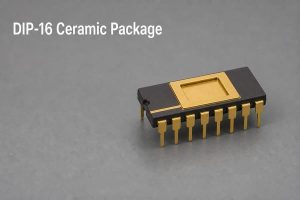
FAQs About Medical Device PCB Design

What should I receive from a DFM review?

A written report showing the affected feature, manufacturing risk, proposed action, and required approval.

How does ISO 13485 help a medical PCB/PCBA buyer?

It supports controlled processes, records, suppliers, traceability, and nonconformance handling. It does not certify the finished medical device.

When should BOM availability be reviewed?

Check critical parts before layout freeze and review the approved BOM again before material release.

Can EBest support prototypes before volume production?

Yes. EBest supports samples and small batches so engineers can validate manufacturing, assembly, inspection, and testing before scaling.

What should I send for an accurate medical PCBA quotation?

For an accurate medical device PCB design quotation, send aligned PCB and assembly files, the approved BOM, quantities, material requirements, substitution rules, inspection and test scope, traceability needs, and target delivery date to sales@bestpcbs.com.
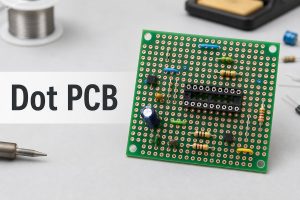
You may also like

Standard Printed Circuit Board Thickness: Chart, Tolerance and Layer Stack

July 30th, 2026

The most common standard printed circuit board thickness is 1.6 mm, approximately 0.062-0.063 inch or 62-63 mil. That value is a practical default for many rigid FR4 boards, but it is not a universal requirement. The correct finished thickness must also fit the layer stack, impedance geometry, connectors, enclosure, assembly process and mechanical load.

Standard printed circuit board thickness samples and dimensional measurement

What Is the Standard Printed Circuit Board Thickness?

For a general-purpose rigid FR4 PCB, 1.6 mm is the conventional nominal finished thickness. The number developed from the older 1/16-inch laminate format, which equals 1.5875 mm. Modern fabrication drawings may state 1.57 mm, 1.60 mm, 0.062 inch or 0.063 inch, depending on the drawing convention and the fabricator’s standard material system.

“Standard” means commonly stocked and routinely processed, not mandatory. A compact sensor module can use 0.8 mm to reduce height. A card-edge board may need 1.6 mm to fit its connector. A large industrial board may use 2.0 mm or 2.4 mm for stiffness. The stated value should therefore be treated as the nominal finished board thickness, with a separate tolerance that defines the acceptable production range.

Standard PCB Thickness Chart in Millimeters, Inches and Mils

The chart below converts common rigid-board thickness options. Availability varies with laminate family, layer count, copper weight and the fabricator’s stocked constructions.

Nominal Thickness Approx. Inches Approx. Mils Typical Design Direction
0.4 mm 0.016 in 16 mil Very thin rigid modules and space-limited assemblies
0.6 mm 0.024 in 24 mil Compact modules with controlled mechanical support
0.8 mm 0.031 in 31 mil Thin consumer, handheld and daughterboard designs
1.0 mm 0.039 in 39 mil Low-profile rigid boards with moderate stiffness
1.2 mm 0.047 in 47 mil Space-saving multilayer and control boards
1.6 mm 0.063 in 63 mil General rigid PCB default
2.0 mm 0.079 in 79 mil Boards needing additional stiffness or stackup space
2.4 mm 0.094 in 94 mil Industrial, connector or multilayer mechanical requirements
3.2 mm 0.126 in 126 mil Thick rigid boards and demanding mechanical structures

These are nominal values rather than guaranteed measurements. The finished board is accepted against the thickness tolerance on the fabrication drawing. Conversion is also approximate because 1 mil equals 0.001 inch, while metric laminate systems are usually specified directly in millimeters.

Standard PCB thickness chart with common rigid board samples

Why Is 1.6 mm the Most Common PCB Thickness?

The 1.6 mm format remains common because material supply, fabrication tooling, connector geometry and product mechanics developed around the former 1/16-inch standard. It provides enough rigidity for many board sizes without making the assembly unnecessarily heavy. Fabricators can also build a wide range of 2-layer and multilayer constructions around this finished target.

Component compatibility is another reason. Many card-edge connectors, board guides, standoffs and through-hole leads are designed around boards close to 1.6 mm. Using a thinner or thicker board can still be correct, but the mechanical interface must be checked rather than assumed. Press-fit hardware is especially sensitive because hole geometry, board thickness and pin engagement work together.

Cost is usually predictable at 1.6 mm because common cores and prepregs are readily available. A different thickness does not automatically make a PCB expensive, but a non-stock laminate construction, an unusual tolerance or a difficult multilayer build can require additional engineering and process control.

How Does PCB Thickness Differ From Copper Thickness?

PCB thickness is the total finished board thickness. Copper thickness describes the conductor thickness on an individual layer. They are related in the stackup, but they are not interchangeable specifications.

Specification What It Measures Common Units Main Design Effects
Finished board thickness Total rigid PCB construction mm, inch, mil Mechanical fit, stiffness, stackup space and drilling aspect ratio
Copper thickness Copper on one conductor layer oz/ft², µm, mil Current capacity, trace resistance, etching and spacing
Dielectric thickness Insulation between selected copper layers mm, µm, mil Impedance, coupling, isolation and layer spacing

Typical nominal foil conversions are approximately 17 µm for 0.5 oz, 35 µm for 1 oz and 70 µm for 2 oz copper. Outer-layer finished copper may differ from starting foil because hole plating and pattern plating add copper. A 1.6 mm board can therefore use different copper weights without ceasing to be a 1.6 mm nominal board, provided the dielectric construction is adjusted accordingly.

A thick PCB is also not automatically a heavy-copper PCB. A 2.4 mm board with 1 oz copper is mechanically thick but does not use heavy copper. A 1.6 mm board with 4 oz copper is a heavy-copper design even though its total board thickness is conventional. The thick PCB board guide addresses the manufacturing effects of unusually thick rigid constructions.

What Determines Finished PCB Thickness?

Finished thickness is created by the complete pressed stack, not by one laminate sheet. A 2-layer board may use a copper-clad core and solder mask. A multilayer board combines etched cores, prepreg bonding layers, outer copper, plating and surface coatings. Press temperature, pressure, resin flow and copper distribution affect the result.

  • Core thickness: defines much of the rigid dielectric structure and provides copper on one or both sides.
  • Prepreg type and count: determine bonding thickness after resin flows into copper features and cures.
  • Copper weight: changes the conductor height and the volume of resin needed to fill around traces and planes.
  • Layer count: adds copper and dielectric interfaces, increasing the number of variables in the pressed stack.
  • Plating and finish: add smaller local thickness contributions, especially on outer copper and hole walls.
  • Material system: affects resin content, glass style, pressed thickness, thermal expansion and availability.

Prepreg should not be treated as a fixed spacer before lamination. Its final thickness depends on glass style, resin content, copper pattern density and the press cycle. For controlled builds, the fabricator models the pressed result and selects a balanced set of cores and prepregs. A PCB thickness calculator can support an early estimate, but it cannot replace the production stackup.

Multilayer PCB stackup showing core prepreg copper and finished thickness

How Thick Are 2-, 4-, 6-, 8-, 12- and 32-Layer PCBs?

Layer count does not assign one compulsory board thickness. The finished value depends on routing density, copper weight, dielectric spacing, via structure and mechanical requirements. The following ranges are practical starting points for rigid FR4 discussions, not universal standards.

Layer Count Common Starting Thicknesses Important Constraint
2 layers 0.8, 1.0, 1.2 or 1.6 mm Core thickness usually dominates the construction
4 layers 1.0, 1.2 or 1.6 mm Plane spacing and outer copper affect the final build
6 layers 1.2, 1.6 or 2.0 mm More dielectric interfaces must fit the impedance plan
8 layers 1.6, 2.0 or 2.4 mm Routing density and via aspect ratio become more influential
12 layers 1.6, 2.0, 2.4 or 3.2 mm Thin dielectrics or HDI may be needed to limit total thickness
32 layers Custom multilayer construction No universal value; lamination, drilling and reliability govern the build

A 4-layer PCB can be 0.8 mm or 2.0 mm, and a 12-layer PCB can sometimes remain near 1.6 mm by using thin cores and prepregs. That does not mean the thinnest possible build is best. Very thin dielectrics can increase coupling, demand tighter registration and make resin filling more difficult. Very thick builds can increase plated-hole aspect ratio and create longer via stubs.

The layer structure should be selected before the board outline and mechanical system are frozen. The related 4 layer vs 2 layer PCB comparison explains how the extra planes change routing and EMC behavior; thickness remains a separate, coordinated decision.

How Does PCB Thickness Affect Impedance and Signal Integrity?

Total board thickness affects the available stackup space, but controlled impedance is governed by the local transmission-line geometry. Trace width, copper thickness, dielectric thickness, dielectric constant, solder mask and reference-plane relationship determine the impedance of a microstrip or stripline.

Changing a 1.6 mm board to 1.2 mm does not automatically change every trace impedance. If the relevant dielectric spacing and material properties remain the same, some signal layers may retain their geometry. In practice, however, reducing total thickness often forces changes to cores and prepregs, so the impedance model must be recalculated.

Thicker boards can also produce longer through-vias and longer unused via stubs. At higher data rates, those stubs may create resonances and insertion-loss problems. Backdrilling, blind vias or a different layer assignment may be needed. A production impedance control PCB therefore links the trace model to the confirmed laminate construction and measured impedance coupons.

How Does PCB Thickness Affect Mechanical Fit and Connector Compatibility?

Mechanical interfaces often set a harder thickness limit than the electrical circuit. Card-edge connectors specify an acceptable board-thickness range so their contacts apply the intended normal force. Board guides, slots, bezels, standoffs and enclosures also have limited clearance. A nominal change of a few tenths of a millimeter can affect insertion, alignment or screw loading.

  • Confirm card-edge connector slot width and contact engagement.
  • Check press-fit pin length, compliant-zone position and supported board range.
  • Verify standoff height, enclosure gaps and component clearance.
  • Review board span, mounting-hole spacing and bending load.
  • Include finished-thickness tolerance in the mechanical stack analysis.

Thin boards may need additional support during insertion or handling. Thick boards provide stiffness but increase weight and can move component terminals relative to the enclosure. The mechanical drawing should therefore use the full allowed thickness range, not only the nominal value.

PCB thickness effect on card edge connector and enclosure fit

How Does PCB Thickness Influence Warpage, Assembly and Reliability?

Board thickness contributes to bending stiffness, but warpage depends on material modulus, copper balance, stack symmetry, moisture, temperature and panel design. A thin board is more easily deflected by handling, component weight and reflow fixtures. A thick asymmetric board can still warp if copper and dielectric structures are poorly balanced.

During soldering, the PCB experiences a temperature gradient while copper, glass and resin expand at different rates. Large copper areas on one side, uneven component mass or an unbalanced stack can create bow and twist. The board warpage guide explains how stack symmetry, copper distribution, panel support and reflow conditions work together.

Assembly equipment also has practical limits. Very thin boards may require carriers for solder-paste printing, placement and reflow. Very thick boards have greater thermal mass and may need a profile that heats solder joints adequately without overstressing components. Depanelization, connector insertion and functional-test fixtures must use forces that do not bend or crack the finished assembly.

What Is PCB Thickness Tolerance and How Is It Measured?

PCB thickness tolerance is the permitted difference between nominal and actual finished thickness. A commercial rigid FR4 build commonly uses a percentage tolerance such as ±10%, but the actual requirement must be confirmed for the material, thickness and construction. A 1.6 mm board with ±10% tolerance has an acceptance range of 1.44-1.76 mm.

Tighter tolerance may be justified for card-edge contacts, press-fit components, controlled mechanical gaps or precision fixtures. It can require a more restricted material set and closer process control. The drawing should state the nominal value, tolerance and whether the measurement includes solder mask when that distinction is mechanically significant.

Finished boards are commonly checked with a calibrated micrometer or thickness gauge. Measurements should be taken at defined locations, away from edge burrs, local copper buildup or surface contamination. Multiple points reveal thickness variation across the panel. Cross-section analysis is used when the individual core, prepreg, copper or plating contributions must be verified rather than only the total board thickness.

PCB finished thickness measurement using a calibrated micrometer

When Should You Use a Thin or Thick PCB?

Use a thinner rigid PCB when product height and weight are constrained, the board is mechanically supported and the stackup can still meet impedance, insulation and assembly requirements. Common thin choices include 0.6, 0.8, 1.0 and 1.2 mm. An extra thin PCB needs more attention to handling, panel support, drilling and warpage than a conventional 1.6 mm board.

Use a thicker PCB when the structure needs greater stiffness, the layer stack needs more dielectric space, the board spans a large unsupported area or a connector system requires a specific engagement depth. Common thicker choices include 2.0, 2.4 and 3.2 mm. Thickness alone does not improve current capacity or thermal performance; copper geometry, material properties and the complete heat path still control those functions.

Keep 1.6 mm when it satisfies all electrical and mechanical constraints. It is usually the lowest-risk starting point because materials, assembly fixtures and connector ecosystems are widely compatible with it. Move away from that value only for a defined reason, then validate the linked stackup and mechanical changes.

How Should Finished Thickness Be Defined in PCB Documentation?

Gerber or ODB++ image data defines conductor, mask and legend geometry, but it does not reliably define the required finished board thickness. The value belongs in the fabrication drawing, manufacturing notes or an approved stackup table. The same controlled document should identify the unit and tolerance.

For a simple 2-layer board, a note such as “Finished board thickness: 1.60 mm ±10%” can be sufficient when no special stack construction is required. A controlled-impedance multilayer board needs an approved stackup showing layer order, copper weight, material family, core and prepreg construction, dielectric targets and finished thickness. Mechanically critical designs should also identify connector or press-fit constraints so the allowed range is consistent across drawings.

Revision control matters because changing finished thickness can alter enclosure fit, impedance geometry, via aspect ratio, test fixtures and assembly support. A thickness change should therefore trigger review of the stackup and mechanical interfaces instead of being treated as an isolated fabrication option.

FAQ About Standard Printed Circuit Board Thickness

Is 1.6 mm the only standard PCB thickness?

No. It is the most common rigid FR4 value, but 0.4, 0.6, 0.8, 1.0, 1.2, 2.0, 2.4 and 3.2 mm are also regularly used when the stackup and product mechanics support them.

How thick is a 2-layer PCB board?

A 2-layer rigid PCB is often 1.6 mm, but 0.8, 1.0 and 1.2 mm are common for compact products. The copper-clad core usually contributes most of the finished thickness.

How thick is a 4-layer PCB?

Many 4-layer PCBs use 1.6 mm, while 0.8, 1.0, 1.2 and 2.0 mm are possible. The selected cores and prepregs must provide the required plane spacing and impedance geometry.

Does a 12-layer PCB have to be thicker than 1.6 mm?

No. Some 12-layer constructions can fit within 1.6 mm by using thin dielectrics. Other designs need 2.0, 2.4 or 3.2 mm for routing, isolation, copper or via requirements.

Does thicker PCB material carry more current?

Not by itself. Current capacity depends mainly on copper thickness, trace or plane geometry, allowed temperature rise, airflow and the complete thermal path.

Can a PCB thickness calculator define the production stackup?

A calculator can estimate total thickness, but production values depend on pressed prepreg thickness, copper pattern, material data and lamination behavior. The fabricator’s confirmed stackup is the final reference.

Is solder mask included in finished PCB thickness?

Practices can differ. Solder mask contributes only a small amount, but mechanically critical drawings should state whether the specified finished thickness includes mask and where measurement is taken.

What tolerance is common for a 1.6 mm PCB?

±10% is a common commercial reference, corresponding to 1.44-1.76 mm, but the applicable tolerance depends on the material and construction and must be stated on the drawing.

Conclusion

Standard printed circuit board thickness is commonly 1.6 mm, but that default is only correct when the layer stack, impedance, connector, enclosure, assembly and tolerance requirements agree with it. A sound design separates total board thickness from copper thickness, defines the finished value in controlled documentation and verifies the actual production range.

EBest Circuit (Best Technology) manufactures rigid FR4 boards from very thin 2-layer constructions through thick multilayer builds, subject to material, stackup, dimensions and engineering review. For technical support on a thickness-sensitive PCB design, contact sales@bestpcbs.com.
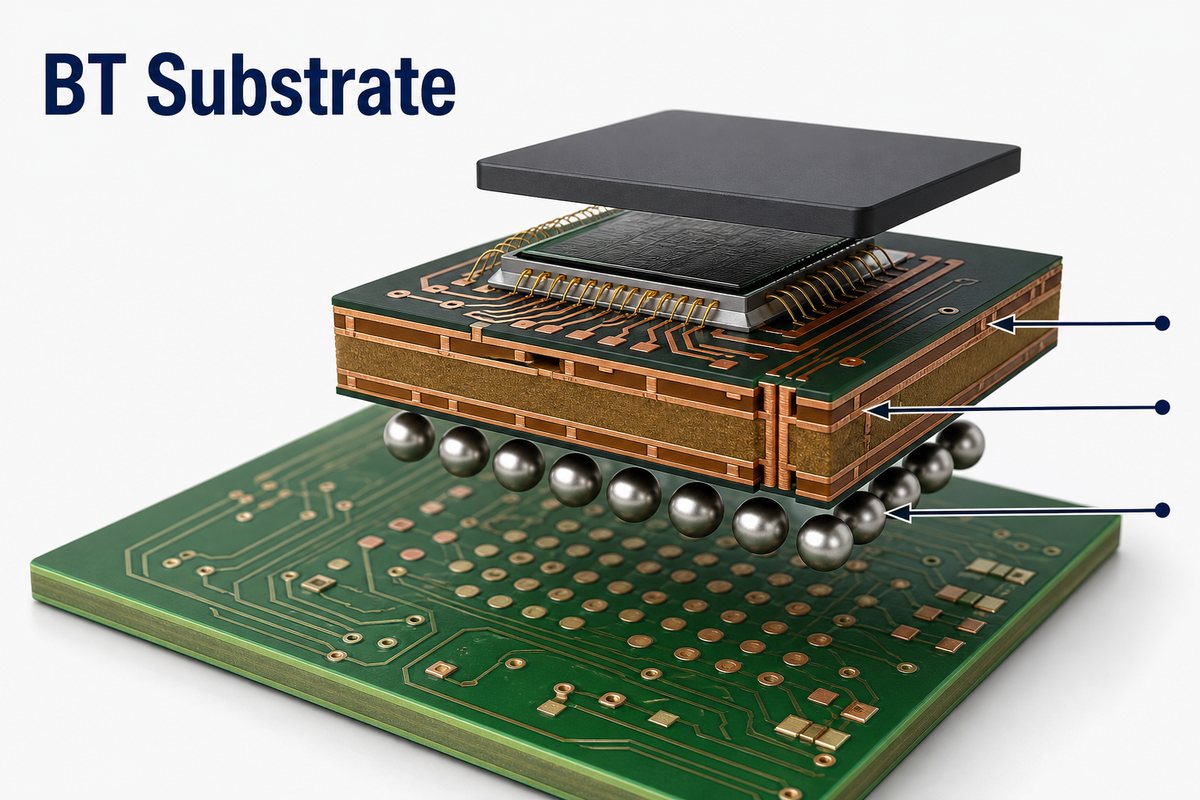
You may also like