EBest Circuit Will Exhibit at New-Tech Exhibition 2026
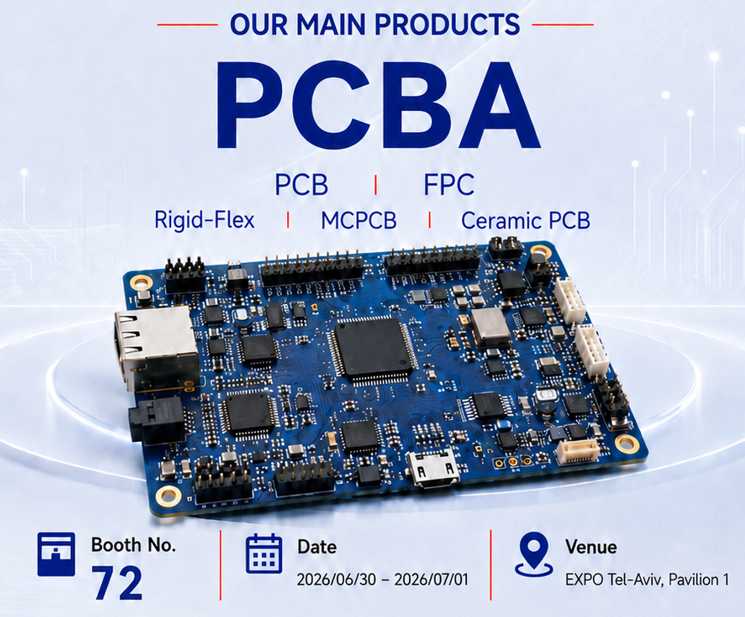
Are you looking for a reliable PCBA service provider that understands engineering needs, production pressure, quality requirements, and fast project delivery? EBest Circuit (Best Technology) is pleased to announce that we will attend New-Tech Exhibition 2026 in Israel, and we warmly invite customers, engineers, buyers, project managers, and industry partners to visit us at our booth.
This year, we will be exhibiting at:
Exhibition: New-Tech Exhibition 2026
Date: June 30 – July 1, 2026
Venue: EXPO Tel-Aviv, Pavilion 1
Booth No.: 72
After our successful participation in New-Tech Israel last year, we are excited to return again with stronger manufacturing capabilities, broader product solutions, and more practical support for customers in medical electronics, industrial control, automotive electronics, aerospace, communication systems, robotics, lighting, and other high-reliability applications.
Why Visit EBest Circuit at Booth 72?
New-Tech Exhibition is an important meeting point for electronics companies, engineers, sourcing teams, and technology developers. For customers who are developing new electronic products or looking for a dependable PCB and PCBA partner, this exhibition is a good opportunity to speak with our team face to face.
At Booth 72, you can learn how EBest Circuit supports projects from early design review to final delivery. Our team can discuss PCB fabrication, component sourcing, SMT assembly, through-hole assembly, testing, programming, box-build support, and production optimization.
What Products Will We Present?
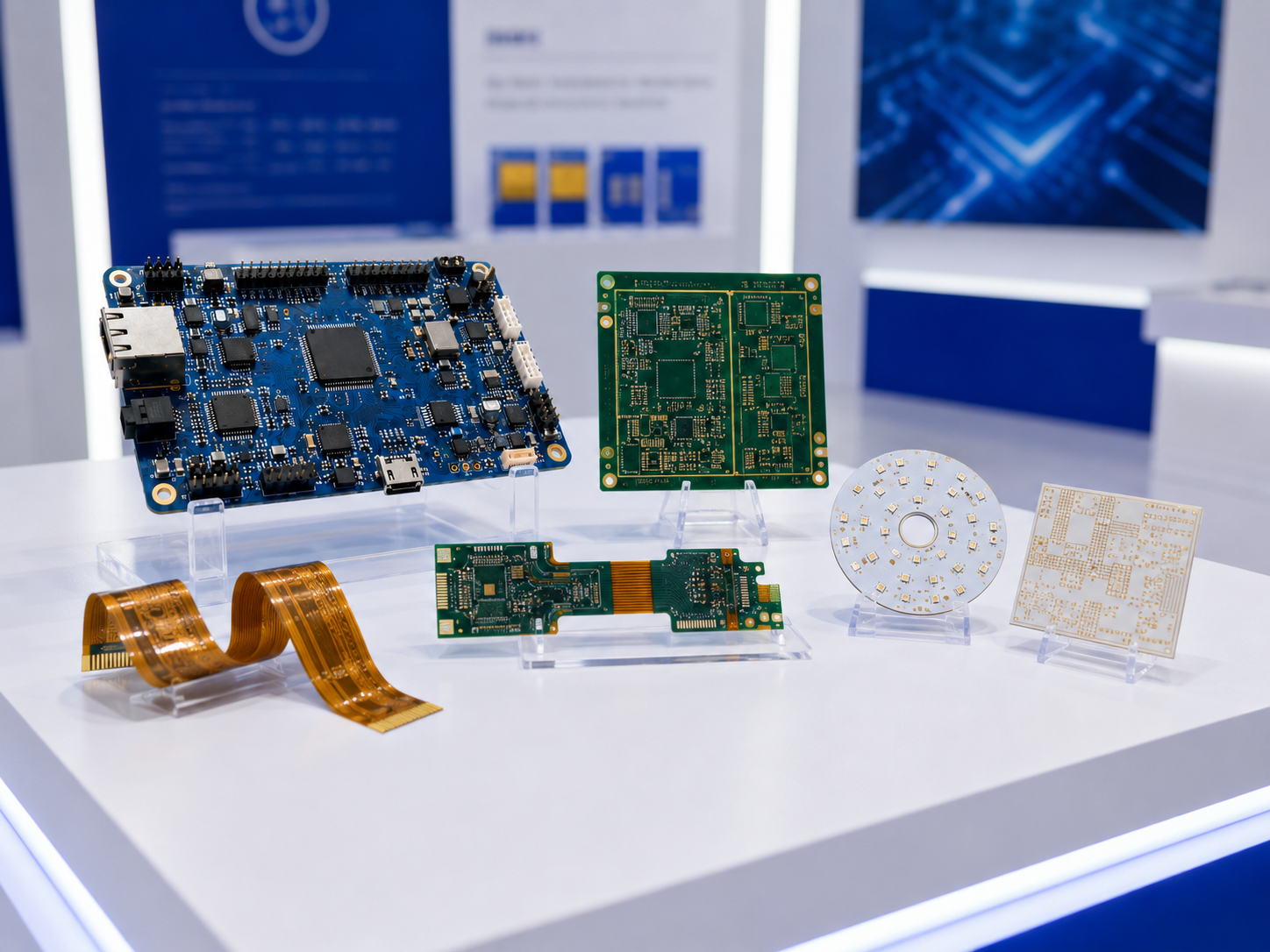
At New-Tech Exhibition 2026, our main product focus will be PCBA, supported by a wide range of PCB technologies. Visitors can learn more about our manufacturing capabilities for:
PCBA Assembly
We provide one-stop PCBA service, including PCB fabrication, component sourcing, SMT assembly, DIP assembly, inspection, functional testing, programming, and final assembly support. Whether your project is a prototype, small batch, or volume production order, our team can help you choose a suitable manufacturing path.
PCB Fabrication
We manufacture standard and advanced PCB boards for different industries. Our PCB solutions can support products that require stable electrical performance, reliable mechanical structure, and consistent batch quality.
FPC and Rigid-Flex PCB
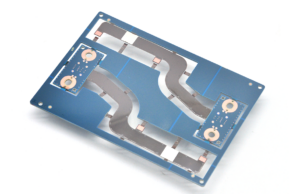
For compact electronics, wearable devices, medical equipment, automotive modules, and space-limited assemblies, FPC and rigid-flex PCB can help reduce wiring complexity and improve structural flexibility.
MCPCB
Metal core PCB is widely used in LED lighting, power electronics, automotive lighting, thermal modules, and high-power applications. We can support aluminum PCB, copper-based PCB, and other thermal management solutions.
Ceramic PCB
Ceramic PCB is suitable for applications requiring excellent heat dissipation, high insulation, high reliability, and stable performance under harsh operating conditions. We support different ceramic PCB technologies, including DPC, DBC, AMB, thick film, thin film, HTCC, LTCC, and related ceramic substrate solutions.
What One-Stop PCBA Service We Can Support?
Many customers come to us not only for a PCB board, but for a complete and stable manufacturing solution. This is especially important when projects involve tight delivery schedules, multiple suppliers, complex BOMs, or strict quality control.
EBest Circuit provides integrated support from PCB fabrication to full assembly. Our service can include:
PCB manufacturing
Component sourcing
BOM review and optimization
SMT assembly
DIP assembly
AOI inspection
X-ray inspection
Functional testing
Programming
Final assembly support
Engineering and DFM review
This one-stop model helps customers save communication time and reduce coordination risk. Instead of managing separate suppliers for PCB, components, assembly, and testing, customers can work with one team that understands the full production flow.
Quality Certifications We Have
Quality is one of the main reasons customers choose EBest Circuit. Our manufacturing and quality systems are supported by international certifications, including:
ISO 9001 for quality management
ISO 13485 for medical device-related manufacturing
IATF 16949 for automotive electronics
AS9100D for aerospace-related products
These certifications reflect our long-term commitment to controlled processes, traceability, documentation, inspection, and continuous improvement. For customers in regulated or high-reliability industries, this quality foundation is especially important.
Stronger Manufacturing Capability with Vietnam SMT Support
In addition to our established PCB and PCBA manufacturing resources in China, EBest Circuit has expanded our SMT assembly capability with a Vietnam PCBA factory. This gives customers more flexibility for production planning, supply chain arrangement, and regional manufacturing needs.
For customers with international supply chain requirements, Vietnam SMT support can be a valuable option. It helps improve scalability and provides another manufacturing route for assembly projects.
Who Should Visit Our Booth?
We welcome visitors from different roles and industries, especially:
Electronics engineers working on new product development
Sourcing and purchasing teams looking for PCB or PCBA suppliers
Project managers handling prototype or production schedules
OEM companies needing turnkey electronics manufacturing support
Medical, automotive, industrial, aerospace, communication, lighting, and robotics customers
If you have Gerber files, BOM files, drawings, product requirements, or current production challenges, you are welcome to bring them to our booth. Our team will be happy to discuss your project and provide initial suggestions.
Let’s Meet at New-Tech Exhibition 2026
Face-to-face communication is still one of the best ways to understand a supplier’s real capability. At New-Tech Exhibition 2026, you can meet our team, learn about our product solutions, discuss your technical requirements, and explore how EBest Circuit can support your next project.
We look forward to meeting you at New-Tech Exhibition 2026 and discussing how EBest Circuit can support your PCB and PCBA projects with reliable quality, engineering support, and one-stop manufacturing service.
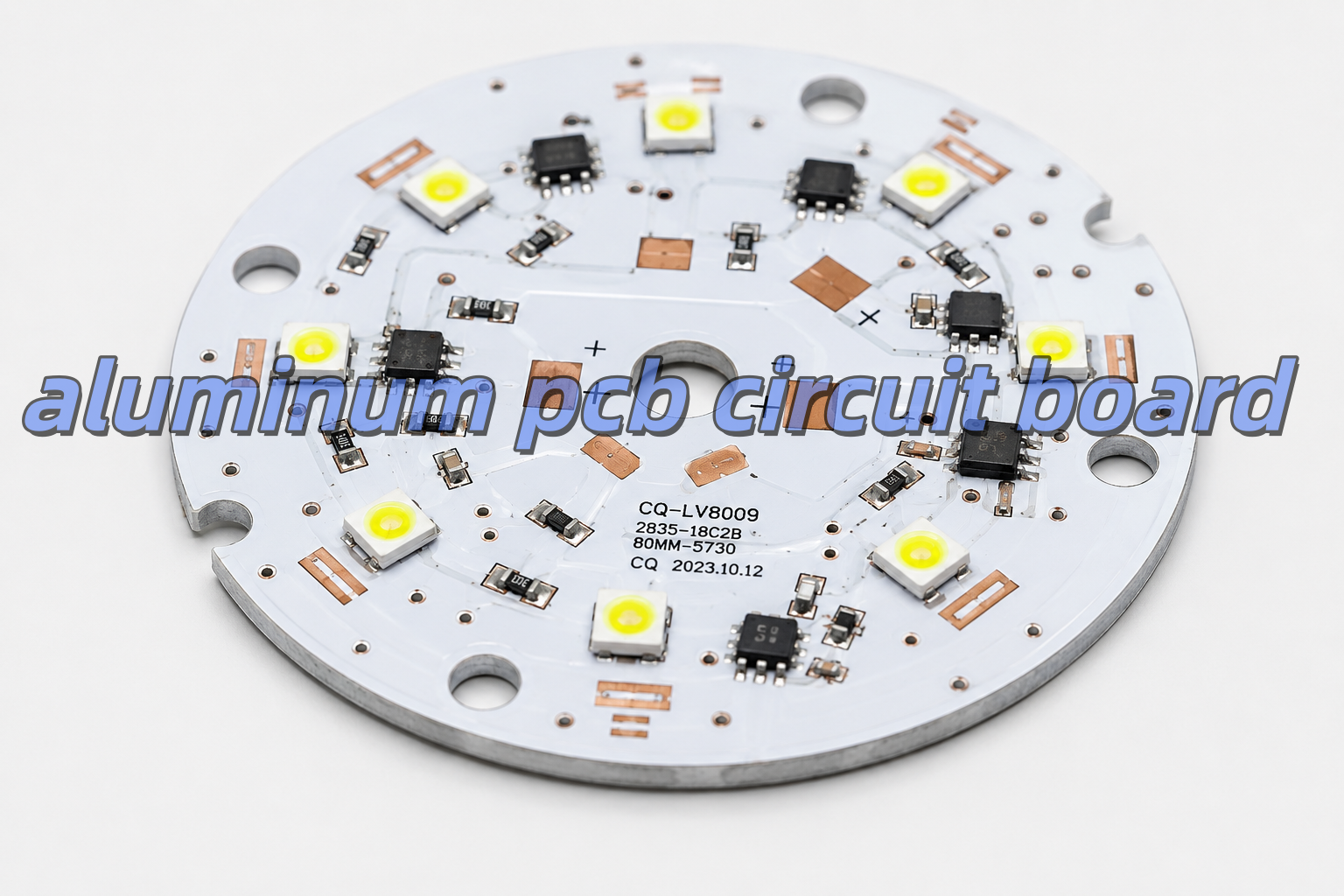
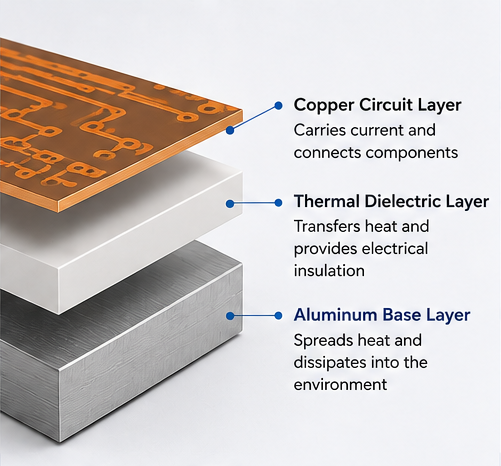
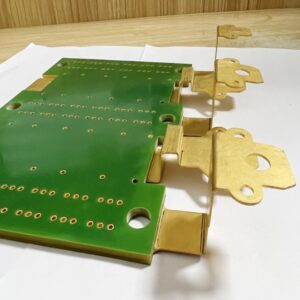
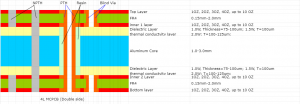
An aluminum PCBis a printed circuit board with an aluminum metal base. It is also called an aluminum core PCB, metal core PCB, or MCPCB. Its main purpose is to move heat away from components.
A normal FR4 PCB uses fiberglass as the base material. However, an aluminum PCB uses a metal base. Because aluminum transfers heat better than FR4, It helps reduce heat accumulation around high-temperature components.
Typical aluminum-based printed circuit board has three main layers,as following:
Layer
Main Job
Why It Matters
Copper Circuit Layer
Carries current and signals
Helps the circuit work
Thermal Dielectric Layer
Moves heat and insulates electricity
Controls heat and safety
Aluminum Base Layer
Spreads heat
Keeps the board cooler
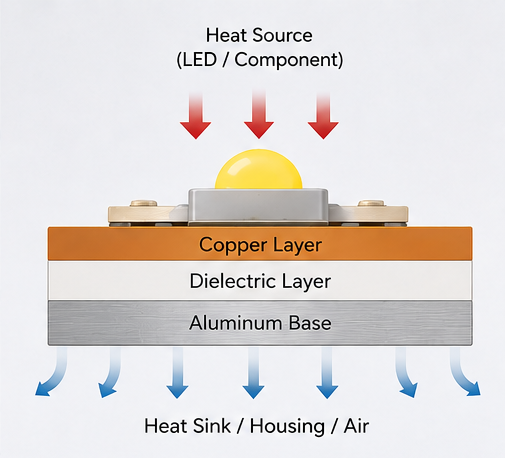
The copper layer forms the circuit. The dielectric layer moves heat downward. Then, the aluminum base spreads the heat into the housing, air, or heat sink.
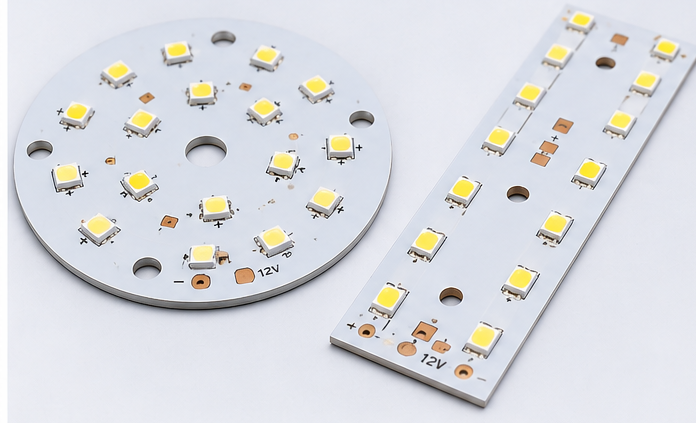
Because of this structure, aluminum PCB is a strong choice for LED lights, power boards, and other heat-sensitive products.
How Does an Aluminum PCB Circuit Board Dissipate Heat?
An aluminum PCB circuit board dissipates heat through a short heat path. First, heat starts at the component. Then, it moves into the solder joint and copper layer. After that, it passes through the dielectric layer. Finally, it reaches the aluminum base.
The dielectric layer is very important. It must move heat well. However, it must also keep electricity away from the aluminum base.
If this layer is poor, the board may still run hot. Therefore, the material quality matters. It is not enough to choose a board only because it has an aluminum base.
Also, the whole product design affects heat. For example, copper area, pad size, airflow, housing contact, and heat sink design all play a role. Therefore, the PCB should be reviewed together with the full product structure.
What Materials Are Used in Aluminum PCBs?
The aluminum PCB is made from copper foil, thermal dielectric material, aluminum base, solder mask, and surface finish. Each material affects heat control, electrical safety, soldering quality, and service life.
Copper Circuit Layer
The copper layer carries current. Also, it helps spread heat from component pads.
Copper Thickness
Common Use
1 oz
Standard LED lighting and simple circuits
2 oz
Higher-current LED and power boards
3 oz or above
Heavy-current power designs
For simple LED boards, 1 oz copper is often enough. However, for automotive lamps, power boards, and industrial modules, 2 oz copper may be better.
Thicker copper can carry more current. It can also reduce heat rise. However, it may increase production cost.
Thermal Dielectric Layer
The dielectric layer sits between the copper and the aluminum base. It has two jobs. First, it moves heat. Second, it provides electrical insulation.
Important points include:
Heat transfer
Insulation strength
Thickness
Heat resistance
Bonding strength
Long-term stability
A thinner dielectric layer can move heat faster. However, it must still meet the voltage and safety needs of the product.
Aluminum Base Layer
The aluminum base gives the PCB strength. It also spreads heat away from hot parts.
Aluminum Thickness
Common Use
0.8 mm
Light LED modules
1.0 mm
General lighting products
1.5 mm
Common aluminum PCB design
2.0 mm or above
High-power or rugged products
For many LED boards, 1.5 mm is a common choice. However, larger lamps and industrial products may need 2.0 mm or thicker aluminum.
Solder Mask and Surface Finish
White solder mask is common for LED aluminum PCB. It reflects light better than dark solder mask. As a result, it helps improve light output.
Common surface finishes include lead-free HASL, ENIG, OSP, and immersion silver. For example, lead-free HASL is often used for standard LED boards. However, ENIG is better when the board needs a flat surface or fine-pitch parts.
What Are the Common Aluminum PCB Stackup Types?
The most common aluminum PCB is single-sided. However, double-sided and hybrid aluminum PCBs are also used. The right choice depends on heat, current, routing space, and cost.
Single-Sided Aluminum PCB
Single-sided aluminum PCB is the most popular type. The circuit and parts are on one side. The aluminum base is on the other side.It is often used in:
LED bulbs
Street lights
High-bay lights
Panel lights
Power modules
Simple driver boards
Also, this type is cost-effective. It gives heat a short path to the aluminum base.
Double-Sided Aluminum PCB
Double-sided aluminum PCB has circuits on both sides. It gives more space for routing. Therefore, it is useful when the circuit is more complex.
However, it is harder to produce than a single-sided board. The via structure and insulation must be controlled well.
Hybrid Aluminum PCB
Hybrid aluminum PCB combines FR4 layers with an aluminum base. It is useful when a product needs both signal routing and heat control.
For example, FR4 can handle control signals. Meanwhile, aluminum can help remove heat from the power section.
What Thermal Conductivity Should You Choose for Aluminum PCB?
The right thermal conductivity depends on the product. For many LED products, 1.0–1.5 W/m·K is enough. However, high-power products often need 2.0 W/m·K or more.
Thermal Conductivity
Suitable Use
Simple Advice
1.0 W/m·K
Low-power LED products
Good for simple lighting
1.5 W/m·K
Standard LED lighting
Common choice
2.0 W/m·K
Medium-power LED and power boards
Better for more heat
3.0 W/m·K or higher
High-power LED, automotive, industrial boards
Good for demanding designs
Higher thermal conductivity can move heat faster. However, it is not the only factor. Copper thickness, dielectric thickness, pad design, and heat sink contact also matter.
Therefore, do not choose material only by price. Also, do not choose the highest value without checking the real heat load.
For sealed lamps, automotive lights, medical devices, and industrial modules, it is better to leave more safety margin. As a result, the product can work more safely over time.
How Should You Design an Aluminum PCB Circuit Board Layout?
A good aluminum PCB layout should control heat, current, insulation, and mounting. The board is not only a circuit carrier. It is also part of the heat system.
Place Hot Parts Properly
High-power LEDs, MOSFETs, regulators, drivers, and power resistors should not be packed into one small area.
If hot parts are too close, hot spots may appear. As a result, some parts may age faster.
Therefore, spread hot parts when the circuit allows it. This helps the aluminum base spread heat more evenly.
Use Wider Copper for High Current
High-current traces should not be too narrow. Narrow copper creates more resistance. As a result, it creates more heat.
For high-current areas, use:
Wider traces
Copper pours
Thicker copper
Shorter current paths
Better thermal pads
Also, copper balance is important in LED arrays. Uneven copper may affect heat flow and soldering quality.
Design Thermal Pads Well
Thermal pads help move heat from components into the PCB. For LEDs and power parts, the pad should be large enough.
Also, the pad should connect well to the copper area. As a result, the LED junction temperature can be lower.
Control Clearance and Creepage
The aluminum base is conductive. Therefore, insulation design is very important.
Check these areas:
High-voltage spacing
Board edge clearance
Mounting hole isolation
Connector spacing
Exposed aluminum areas
Screw contact points
This is very important for LED drivers, medical power boards, industrial power supplies, and automotive electronics.
Design Mounting Holes Carefully
Mounting holes affect both strength and safety. If screws touch the aluminum base, the design must confirm whether the base is grounded or isolated.
In many products, screws press the PCB against a heat sink. This helps heat transfer. However, the structure must not damage the insulation layer.
What Are the Advantages and Disadvantages of Aluminum PCBs?
Aluminum PCBs offer strong heat control and good strength. However, they also have some limits. For example, they cost more than basic FR4 boards. Also, they are not ideal for very dense multilayer routing.
Item
Advantages
Limits
Heat Control
Good for LED and power products
Depends on dielectric quality
Strength
Rigid and stable
Not flexible
Cost
Good value for heat products
Higher than standard FR4
Design
Good for simple power circuits
Harder for dense routing
Reliability
Reduces heat stress
Needs correct material choice
Rework
Stable after assembly
Rework may be harder
The main benefit is heat control. If heat affects your product, aluminum PCB is often a good choice.
However, the board must match the real use. A high-power street light should not use the same material as a small decorative lamp. Therefore, material selection should be based on heat load, current, and working environment.
What Are Aluminum PCBs Used For?
Aluminum PCBs are used in products that need fast and stable heat transfer. They are common in LED lighting, power electronics, automotive electronics, industrial equipment, medical devices, and aerospace systems.
LED Lighting
LED lighting is one of the largest markets for aluminum PCB.Common products include:
LED bulbs
LED tubes
Street lights
High-bay lights
Stage lights
UV LED modules
Panel lights
Automotive LED lamps
In LED products, aluminum PCB helps control heat near the LED chip. As a result, it supports stable brightness and longer life.
Power Electronics
Power electronics often create high heat in small spaces. Therefore, aluminum PCB can help reduce heat build-up.
Typical products include power supplies, DC-DC converters, motor drivers, inverters, voltage regulator modules, and charging modules.
Automotive Electronics
Automotive electronics must work under heat, vibration, and long use.
Aluminum PCBs are often used in LED headlights, taillights, signal lights, interior lighting, power modules, and battery-related boards.
Industrial Equipment
Industrial products often run for long hours. Therefore, stable heat control is important.
Aluminum PCBs can be used in automation equipment, industrial LED indicators, power modules, control cabinets, motor control boards, and machine vision lighting.
Medical and Aerospace Electronics
Medical and aerospace products often need stable heat behavior and strong process control.
Aluminum PCB may be used in medical lighting, diagnostic modules, UAV electronics, aerospace lighting, and compact power boards.
In these fields, traceability, inspection records, and stable quality are also important.
Why Are Aluminum PCBs Popular in LED Lighting?
Aluminum PCBs are popular in LED lighting because LEDs create heat during use. If the heat is not removed well, brightness and life may drop.
An LED does not turn all electric energy into light. Some energy becomes heat. If this heat stays near the LED chip, the junction temperature rises.
High junction temperature may cause:
Lower light output
Faster lumen loss
Color shift
Shorter service life
More solder joint stress
Therefore, aluminum PCB is a strong choice for LED lighting. It creates a shorter heat path from the LED package to the lamp housing or heat sink.
Design Item
Common Choice
Board Type
Single-sided aluminum PCB
Board Thickness
1.5 mm
Copper Thickness
1 oz or 2 oz
Solder Mask
White
Surface Finish
Lead-free HASL or ENIG
Thermal Conductivity
1.5–2.0 W/m·K
White solder mask is common in LED aluminum PCB. It reflects light better than dark solder mask. Therefore, it supports both heat control and light output.
For high-power street lights, industrial lights, and automotive lamps, higher thermal conductivity and thicker copper may be needed.
Aluminum PCB Circuit Board vs FR4 PCB: Which Is Better?
Aluminum PCB is better for heat control. However, FR4 PCB is better for complex routing and low-heat circuits. Therefore, the better choice depends on your design goal.
Comparison Item
Aluminum PCB Circuit Board
FR4 PCB
Base Material
Aluminum metal base
Fiberglass epoxy
Heat Control
Strong
Limited
Best Use
LED, power, automotive lighting
Signal, control, digital circuits
Circuit Complexity
Better for simple heat designs
Better for multilayer routing
Strength
Strong and rigid
Good for general electronics
Cost
Higher than basic FR4
Lower for standard boards
Extra Heat Sink
Often less needed
Often needed for high power
Common Products
LED lighting, power modules, industrial equipment
Consumer electronics, control boards
Choose aluminum PCB when heat is the main issue. It is suitable for LEDs, power modules, automotive lamps, and compact heat-sensitive products.
However, choose FR4 when the design needs many signal layers, fine-pitch IC routing, lower heat, and lower standard PCB cost.
In many products, both boards can be used together. For example, FR4 can handle signal control. Meanwhile, aluminum PCB can handle the LED or power section.
How to Select the Most Appropriate Aluminum PCB for Your Needs
To select the right aluminum PCB, start with heat load, current, voltage, environment, structure, and service life. Do not choose only by board thickness or price.
Check Heat Load First
Before selecting material, check:
Component power
Operating current
Ambient temperature
Enclosure design
Heat sink contact
Working hours
Product life target
Safety needs
A sealed outdoor lamp needs more heat margin than an open indoor module.
Select Thermal Conductivity
Match the thermal conductivity with the real use. For standard lighting, 1.5 W/m·K may be enough. However, compact high-power designs may need 2.0 W/m·K or higher.
Choose Copper Thickness
Copper thickness should match the current path. If the board carries higher current, use thicker copper or wider copper areas.
Otherwise, thin traces may create extra heat, even when the aluminum base is good.
Match Surface Finish
If the board uses simple LED packages, lead-free HASL may work well. However, if the board uses fine-pitch parts or needs a flatter surface, ENIG is often better.
Request DFM Review
A DFM review can find design and production risks before fabrication.
It should check trace width, spacing, mounting holes, thermal pads, solder mask openings, board edge clearance, surface finish, and assembly needs.
Finally, for high-power, automotive, medical, or industrial products, early review can reduce redesign cost and improve production stability.
EBEST Circuit: A Reliable Aluminum PCB Manufacturer
EBEST supports aluminum PCB fabrication, DFM review, component sourcing, PCBA assembly, and testing for heat-control electronic products.
For aluminum PCB projects, EBEST can review material choice, copper thickness, dielectric performance, solder mask, surface finish, layout risk, and assembly process before production.
EBEST Circuit Capability
Customer Value
Aluminum PCB Fabrication
Supports LED, power, automotive, industrial, and heat-control designs
DFM Review
Helps reduce layout and production risks
PCB + PCBA Service
Supports fabrication, sourcing, assembly, and testing
Material Selection Support
Helps match heat needs and board structure
Prototype to Batch Production
Supports design test and production growth
Quality Inspection
Improves consistency and delivery confidence
EBEST supports aluminum PCB projects for LED lighting, industrial equipment, automotive electronics, medical devices, aerospace modules, communication equipment, and power electronics.
Also, early manufacturing feedback can help customers reduce redesign work and improve delivery speed.
If you need an aluminum PCB circuit board, aluminum PCB assembly, or related PCB manufacturing support, EBEST can help from DFM review and PCB fabrication to component sourcing, assembly, and final testing. For project review or quotation support, contact sales@bestpcbs.com.
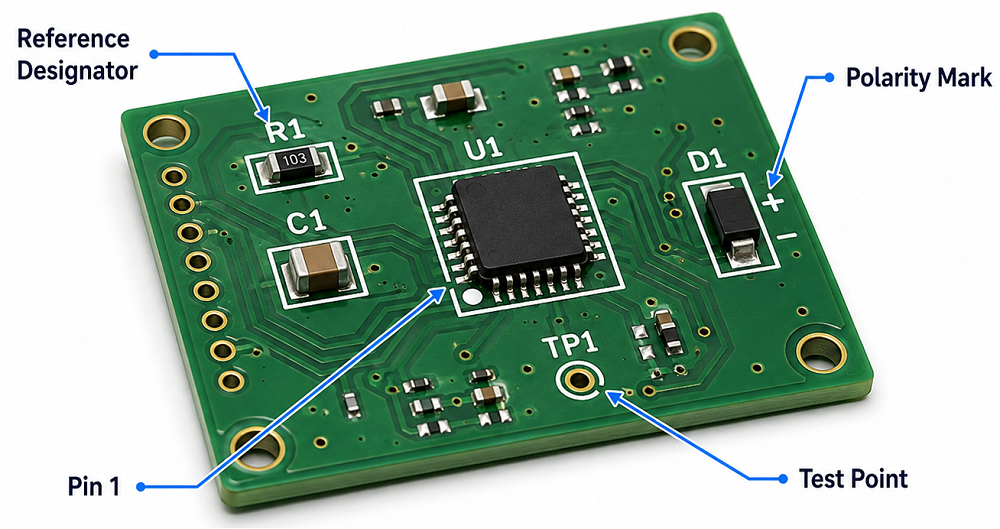
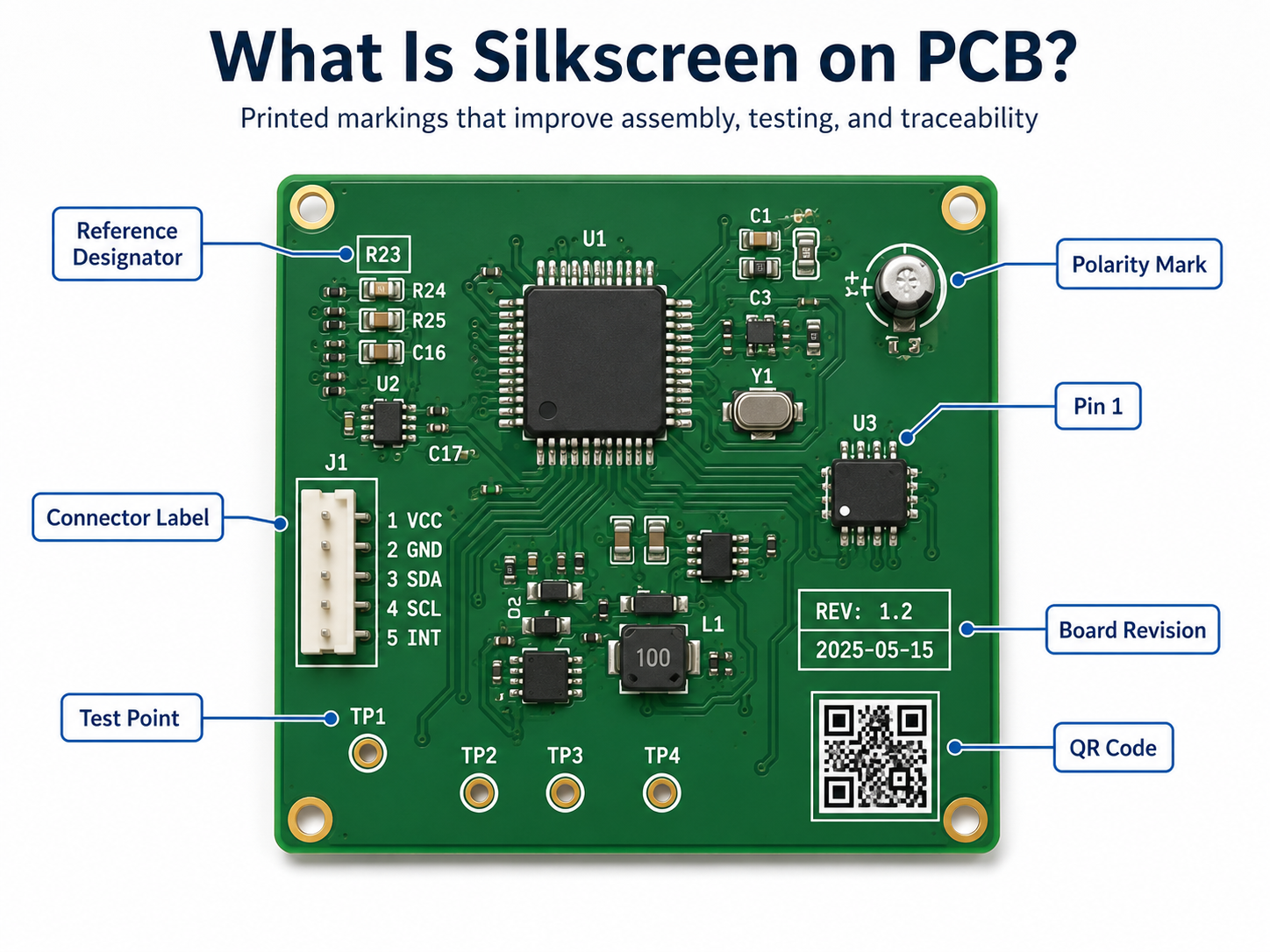
Silkscreen on PCB is the printed marking layer used to show component names, polarity marks, Pin 1 indicators, test points, logos, warning labels, QR codes, and board revision information. It helps engineers, assemblers, inspectors, and repair technicians understand the PCB faster.
This layer is also called the PCB legend layer or component marking layer. It does not carry current, but it plays a practical role in assembly accuracy, testing efficiency, repair work, and product traceability.
Why Is Silkscreen Important on a PCB?
PCB silkscreen is important because it turns a bare circuit board into a readable engineering document. Without silkscreen, the board may still work electrically, but assembly, inspection, testing, and repair become slower.
Clear markings help identify resistors, capacitors, ICs, connectors, test points, power input, signal direction, and safety warnings. In production, a clean silkscreen can reduce orientation mistakes, shorten debugging time, and improve communication between PCB design, fabrication, and assembly teams.
What Is Silkscreen PCB Material?
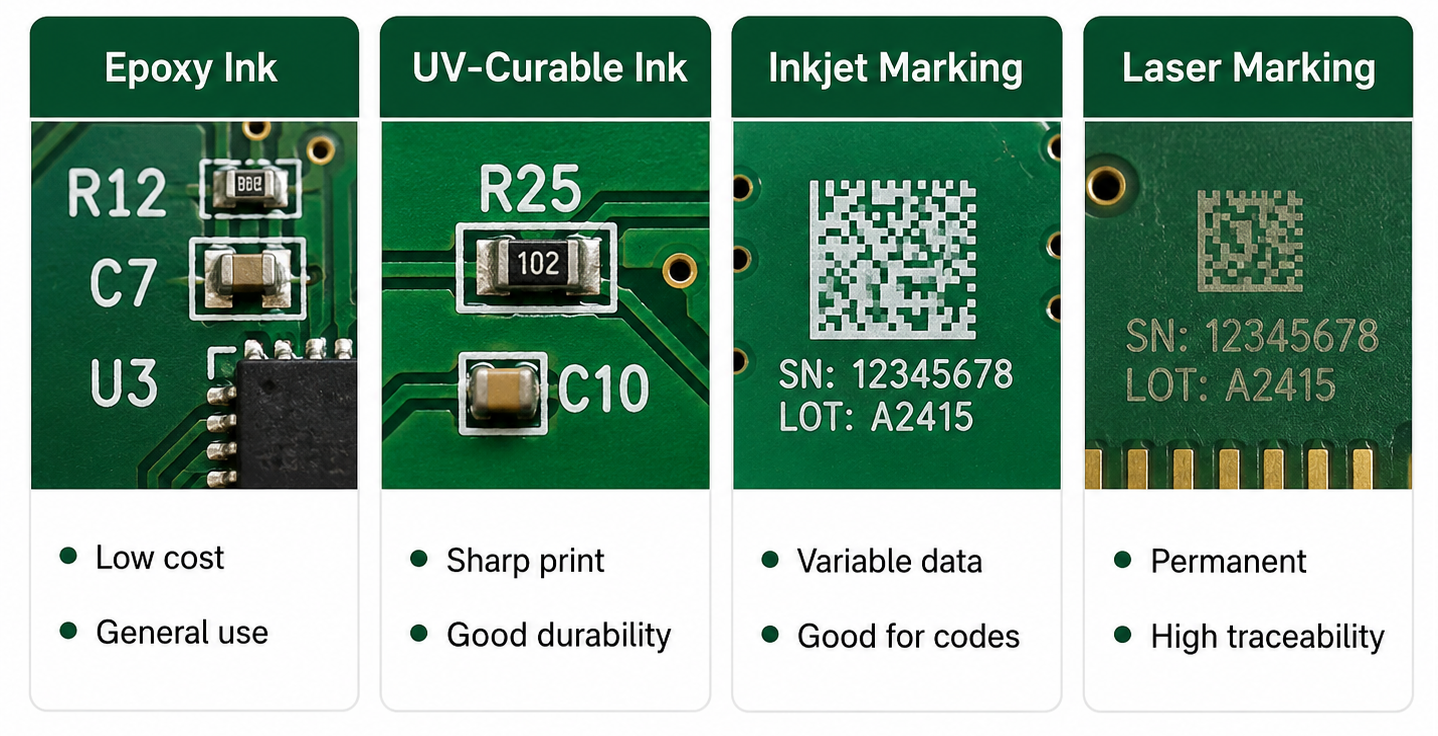
Silkscreen PCB material usually refers to the ink or marking medium used to print text, symbols, and graphics on the PCB surface. The most common material is non-conductive epoxy ink or UV-curable ink. These materials are selected because they can bond to solder mask, resist normal handling, and remain readable after PCB fabrication.
In standard PCB manufacturing, silkscreen material must be compatible with solder mask color, curing temperature, surface finish, cleaning process, and assembly environment. For more demanding products, such as industrial electronics, automotive modules, medical PCBs, or outdoor devices, the marking material should also offer better resistance to abrasion, chemicals, humidity, and temperature changes.
What Are the Common Types of Silkscreen PCB Material?
Different silkscreen PCB material options are used depending on cost, readability, board density, and traceability requirements. Standard epoxy ink is common for most FR4 PCBs. UV-curable ink is used when faster curing and sharper printing are needed. Laser marking is often selected for QR codes, serial numbers, and durable traceability marks.
For general PCB projects, standard white epoxy or UV ink is enough. For small text, QR codes, high-density boards, or products requiring long-term traceability, higher-resolution printing or laser marking may be a better choice.
How Does Silkscreen PCB Material Affect Readability and Durability?
Silkscreen PCB material affects how sharp, visible, and durable the printed markings are. A good material should keep letters clear after curing, cleaning, soldering, handling, and final assembly.
If the ink spreads too much, small characters may look blurry. If the ink adhesion is weak, markings may fade or scratch off. If the color contrast is poor, technicians may struggle to read the board during inspection or repair.
For example, white silkscreen on green solder mask is easy to read. Black silkscreen on white solder mask also gives strong contrast. But low-contrast combinations, such as gray text on black solder mask, may look stylish while reducing practical readability.
What Are Silkscreen PCB Symbols?
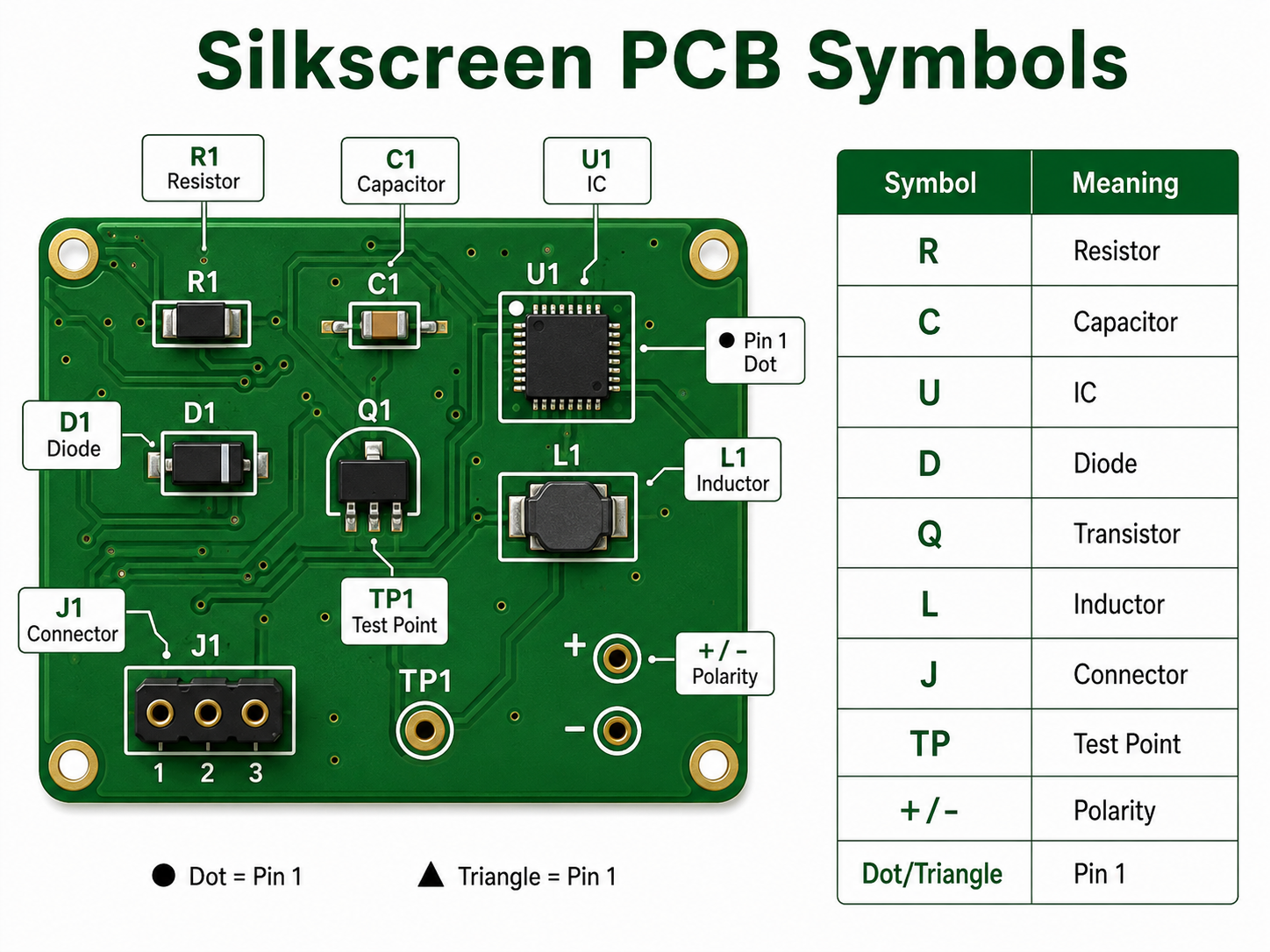
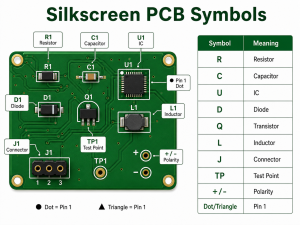
Silkscreen PCB symbols are printed marks used to identify components, polarity, Pin 1 direction, test points, connectors, warning areas, and functional zones on a circuit board. These symbols help users understand the board without opening the schematic every time.
Common silkscreen PCB symbols include “+” and “-” for polarity, dots or triangles for Pin 1, diode bars for cathode direction, TP labels for test points, and reference designators such as R, C, U, D, J, L, Q, and F.
What Do Common Silkscreen PCB Symbols Mean?
Silkscreen PCB Symbol
Meaning
Example
R
Resistor
R1, R25
C
Capacitor
C3, C18
U / IC
Integrated circuit
U1, IC2
D
Diode or LED
D5, LED1
Q
Transistor or MOSFET
Q2, Q10
L
Inductor
L1, L4
J / CN
Connector
J1, CN3
F
Fuse
F1
TP
Test point
TP1, TP_GND
SW
Switch
SW1
+ / –
Polarity
Capacitor, battery, LED
Dot / triangle / “1”
Pin 1 indicator
IC or connector orientation
GND
Ground
Ground test point
VIN / VOUT
Power input/output
Power connector marking
HV
High voltage warning
Power supply board
These silkscreen PCB symbols are small, but they carry important information. A missing polarity mark or unclear Pin 1 indicator can cause assembly errors, especially on LED boards, power supplies, sensor modules, and control boards.
How Do Silkscreen PCB Symbols Help Assembly?
Silkscreen PCB symbols help assembly teams place and inspect components correctly. They show where each component belongs, which direction it should face, and how connectors or test points should be used.
For SMT assembly, symbols such as Pin 1 dots, diode direction marks, and capacitor polarity marks are very useful during first article inspection. For through-hole assembly, connector names, switch labels, and power marks help manual operators avoid wrong insertion.
In PCBA production, clear symbols can support:
Faster visual inspection
Lower risk of component orientation errors
Easier connector installation
Better manual soldering guidance
Faster functional testing
Easier repair and troubleshooting
What Are the Design Rules for Silkscreen on PCB?
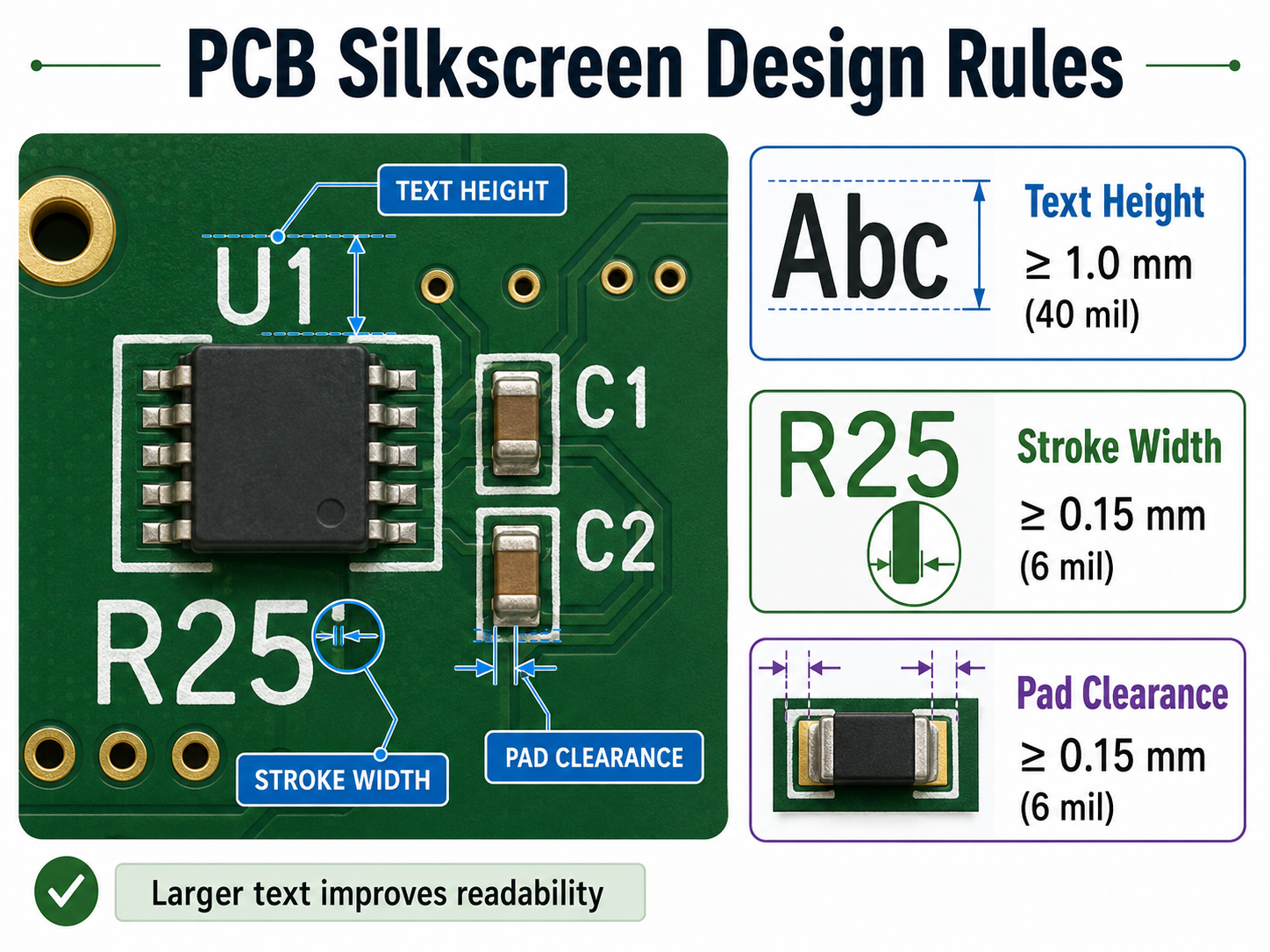
Silkscreen on PCB should be designed with enough character size, stroke width, and clearance from pads. The markings must remain readable after fabrication and assembly.
Design Item
Recommended Value
Text height
≥1.0 mm / 40 mil
Stroke width
≥0.15 mm / 6 mil
Clearance to pads
≥0.15 mm / 6 mil
Clearance to exposed copper
≥0.15 mm / 6 mil
Hollow font height
≥1.5 mm / 60 mil
QR code size
Confirm with supplier
Bottom-side text
Mirrored correctly
If the board is very dense, do not force every component label onto the PCB. Keep important markings first: Pin 1, polarity, test points, connector names, warning labels, and revision number.
Can Silkscreen Be Printed Over Pads or Vias?
Silkscreen should not be printed over solder pads, exposed copper, gold fingers, test points, or solderable vias. If silkscreen overlaps these areas, the PCB manufacturer may remove part of the text during CAM processing.
This is why some letters disappear after fabrication. The original design may show complete text, but the manufacturing file may clip it to protect soldering quality.
A better practice is to place reference designators outside component bodies and away from pads. For small components, use shorter labels or place the full reference information in the assembly drawing.
What Is the Difference Between Silkscreen PCB Material and Solder Mask Material?
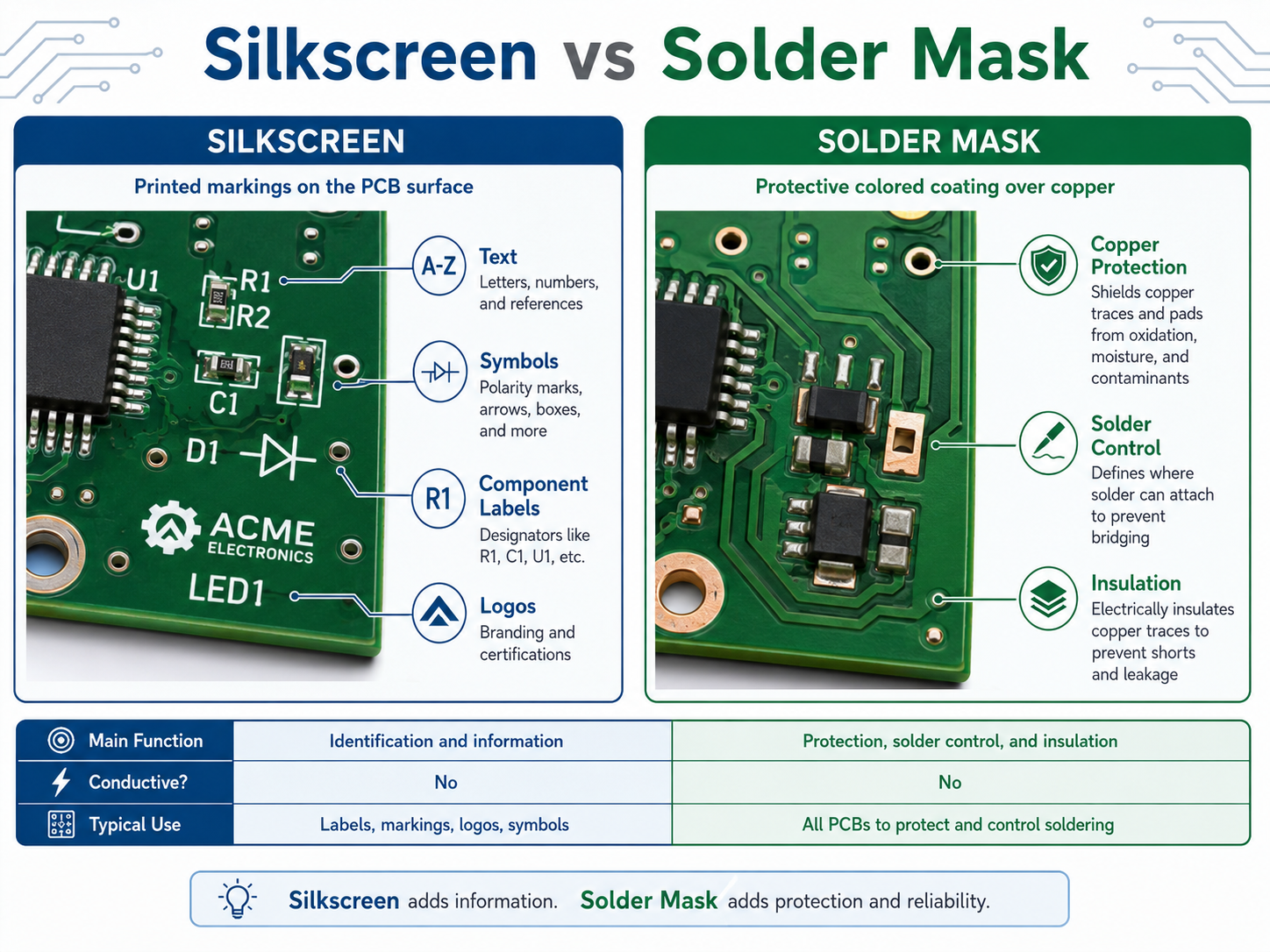
Silkscreen PCB material is used for printed markings. Solder mask material is used to protect copper and prevent solder bridges. They are different layers with different functions.
Item
Silkscreen PCB Material
Solder Mask Material
Main function
Prints text, symbols, and logos
Covers and protects copper
Electrical role
Non-conductive marking
Insulating protection
Common color
White, black, yellow
Green, black, blue, red, white
Used for
Component labels, symbols, warnings
Solder control and copper protection
Design concern
Readability and clearance
Insulation and solderability
A PCB needs solder mask for manufacturing protection. Silkscreen is used for human readability. Both layers support production quality, but they should not be confused.
How Should You Choose Silkscreen PCB Material and Color?
Choose silkscreen PCB material and color based on readability, product environment, board density, and traceability needs. For most PCB projects, white silkscreen on green solder mask is the safest and most readable choice.
For white solder mask, black silkscreen is usually better. For black solder mask, white silkscreen gives better contrast. For products with QR codes, serial numbers, or long-term tracking needs, laser marking or high-resolution legend printing may be more reliable.
PCB Solder Mask Color
Recommended Silkscreen Color
Readability
Green
White
Excellent
Blue
White
Excellent
Red
White
Good
Black
White
Good
White
Black
Excellent
Yellow
Black
Good
For industrial, medical, automotive, and communication products, readability should be more important than visual decoration. A beautiful board is helpful, but a readable board is more useful in production and maintenance.
How Can EBest Circuit Help With PCB Silkscreen Design and Manufacturing?
EBest Circuit can help review silkscreen on PCB before fabrication and assembly. Our team checks text size, symbol clarity, polarity marks, Pin 1 indicators, pad clearance, QR code position, and board revision information during DFM review.
This is especially useful for turnkey PCB and PCBA projects. Silkscreen is not only a printing detail. It connects with BOM verification, component orientation, assembly inspection, testing, traceability, and repair documentation.
EBest Circuit supports:
PCB fabrication
PCBA assembly
Component sourcing
Free DFM review
Silkscreen readability check
QR code and serial number marking
AOI, X-ray, ICT, and functional testing
Prototype to mass production support
For projects that require clean markings, stable assembly, and traceable manufacturing, send your Gerber and BOM files to sales@bestpcbs.com.
FAQs
1. What is silkscreen on PCB?
Silkscreen on PCB is the printed marking layer that shows component names, symbols, polarity, test points, logos, QR codes, and board revision information. It helps people assemble, test, inspect, and repair the PCB more easily.
2. What material is used for PCB silkscreen?
Common silkscreen PCB material includes epoxy-based ink, UV-curable ink, LPI legend ink, inkjet marking ink, or laser marking depending on the required precision, durability, and traceability.
3. What do silkscreen PCB symbols mean?
Silkscreen PCB symbols identify components and board functions. For example, R means resistor, C means capacitor, U means IC, D means diode, TP means test point, and “+ / -” shows polarity.
4. Does silkscreen PCB material affect circuit performance?
Normally, no. Silkscreen material is non-conductive and does not carry current. However, poor placement over pads, exposed copper, or sensitive areas can create manufacturing or readability problems.
5. Can PCB silkscreen symbols be customized?
Yes. Custom symbols, logos, connector labels, warning marks, QR codes, and product IDs can be printed on the PCB as long as they meet the manufacturer’s minimum size and clearance rules.
6. What is the best silkscreen color for PCB?
White is the most common silkscreen color because it gives strong contrast on green, blue, red, and black solder mask. Black silkscreen is usually better for white solder mask.
Silkscreen on PCB is the printed layer of text, symbols, logos, reference designators, polarity marks, test points, warning signs, and revision information placed on the surface of a printed circuit board. It does not conduct electricity. Its main job is to help people read, assemble, test, repair, and trace the board more easily.
On most circuit boards, the silkscreen is the white text you see on top of a green solder mask. However, it can also be black, yellow, gray, or another color depending on the PCB surface color and manufacturing process.
What Is the Main Purpose of PCB Silkscreen?
The main purpose of PCB silkscreen is to make the board easier to identify, assemble, inspect, test, and maintain. It gives visible information to people working with the board during production and after the product enters the field.
A good silkscreen design usually includes component names, polarity marks, Pin 1 indicators, connector labels, test point numbers, warning text, board revision, and company logo. These small details can make a large difference during real production.
Common uses include:
Identifying resistors, capacitors, ICs, diodes, connectors, and switches
Showing polarity for LEDs, diodes, electrolytic capacitors, and batteries
Marking Pin 1 on ICs, headers, flat cables, and connectors
Labeling test points for ICT, flying probe, or functional testing
Adding board name, part number, revision, date code, or QR code
Warning users about high voltage, hot surfaces, ESD-sensitive zones, or orientation requirements
Supporting repair and field maintenance
What Information Should Be Included on a PCB Silkscreen?
A useful PCB silkscreen should include only the information that helps assembly, testing, inspection, traceability, and maintenance. The goal is not to print everything possible. The goal is to print the right information in the right place.
For simple boards, it is common to include every reference designator, such as R1, C1, U1, D1, and J1. For high-density boards, space may be limited, so designers should prioritize information that prevents mistakes.
The most important silkscreen items usually include:
Silkscreen Item
Example
Reference designator
R12, C8, U3, J1
Polarity mark
+, -, cathode line
Pin 1 mark
Dot, triangle, “1”
Connector label
USB, VIN, OUT, CANH
Test point label
TP1, GND, 3V3, RESET
Board revision
REV A, V1.2
Manufacturing code
Date code, lot number
QR code or serial number
Product ID, batch ID
Warning mark
HIGH VOLTAGE, HOT
Logo or brand name
EBest, customer logo
For many products, the highest-priority marks are polarity, Pin 1, connector direction, test points, and board revision. These markings are closely tied to assembly accuracy and maintenance efficiency.
What Is the Difference Between Silkscreen and Solder Mask?
Silkscreen and solder mask are different PCB layers. Solder mask is a protective coating that covers copper and helps control soldering. Silkscreen is a printed marking layer used for text, symbols, logos, and identification.
The solder mask is usually the colored background, such as green, black, blue, red, or white. The silkscreen is the printed legend on top of that surface.
For high-reliability electronics, such as medical devices, industrial controls, aerospace modules, automotive boards, and communication equipment, both layers should be reviewed carefully during DFM checking.
What Are the Standard PCB Silkscreen Design Rules?
Standard PCB silkscreen design rules focus on readability, manufacturability, and clearance. The markings should be large enough to read, thick enough to print, and far enough from pads, exposed copper, and component bodies.
A common mistake is designing silkscreen text that looks clear in CAD software but becomes too small after fabrication. Another common issue is placing text too close to solder pads. During CAM processing, the PCB factory may clip or remove part of the silkscreen to avoid pad contamination.
The following table gives practical reference values for standard PCB projects.
Design Item
Recommended Value
Better Practice
Text height
≥1.0 mm / 40 mil
1.27 mm / 50 mil
Stroke width
≥0.15 mm / 6 mil
0.18–0.20 mm / 7–8 mil
Clearance to solder pad
≥0.15 mm / 6 mil
≥0.20 mm / 8 mil
Clearance to exposed copper
≥0.15 mm / 6 mil
≥0.20 mm / 8 mil
Hollow text height
≥1.5 mm / 60 mil
≥2.0 mm / 80 mil
Hollow text stroke
≥0.20 mm / 8 mil
≥0.25 mm / 10 mil
QR code size
Depends on data amount
Confirm with manufacturer
Bottom text
Mirrored in layout
Verify in Gerber viewer
These values are practical for many standard FR4 boards. However, each PCB manufacturer may have different process capability. Fine-pitch HDI boards, ceramic PCBs, metal core PCBs, and high-frequency boards may need a separate review.
What Is the Minimum Text Size for Silkscreen on PCB?
For a reliable and readable PCB silkscreen, a text height of at least 1.0 mm and a stroke width of at least 0.15 mm are commonly recommended. If the board has enough space, larger text is better for manual inspection, testing, and repair.
Here is a useful conversion table for PCB silkscreen design:
Metric Size
Approx. Imperial Size
Common Use
0.15 mm
5.9 mil
Minimum practical stroke width
0.18 mm
7.1 mil
More stable stroke width
0.20 mm
7.9 mil
Better for normal production
0.80 mm
31.5 mil
Small text, limited readability
1.00 mm
39.4 mil
Standard readable text height
1.27 mm
50.0 mil
Better manual readability
1.50 mm
59.1 mil
Good for labels and warnings
2.00 mm
78.7 mil
Good for connectors or safety text
Can Silkscreen Be Printed Over Pads, Vias, or Copper?
Silkscreen should not be printed over solder pads, exposed copper, gold fingers, test pads, or solderable via areas. If the marking overlaps these areas, the factory may remove it during CAM processing. In some cases, poor placement can also affect appearance or assembly readability.
Silkscreen ink is usually non-conductive, but that does not mean it should be placed anywhere. Pads and exposed copper need clean surfaces for soldering, testing, or electrical contact. When silk markings are too close to these areas, the result may be missing text, cut letters, or unclear symbols.
Designers should pay extra attention to these areas:
SMT pads
Through-hole pads
Test points
Exposed copper zones
Gold fingers
Castellated holes
Thermal pads
High-current terminals
RF launch areas
Fine-pitch IC footprints
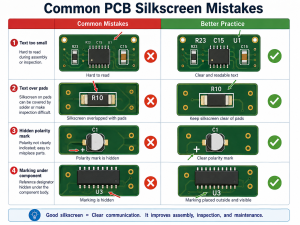
What Are Common PCB Silkscreen Mistakes?
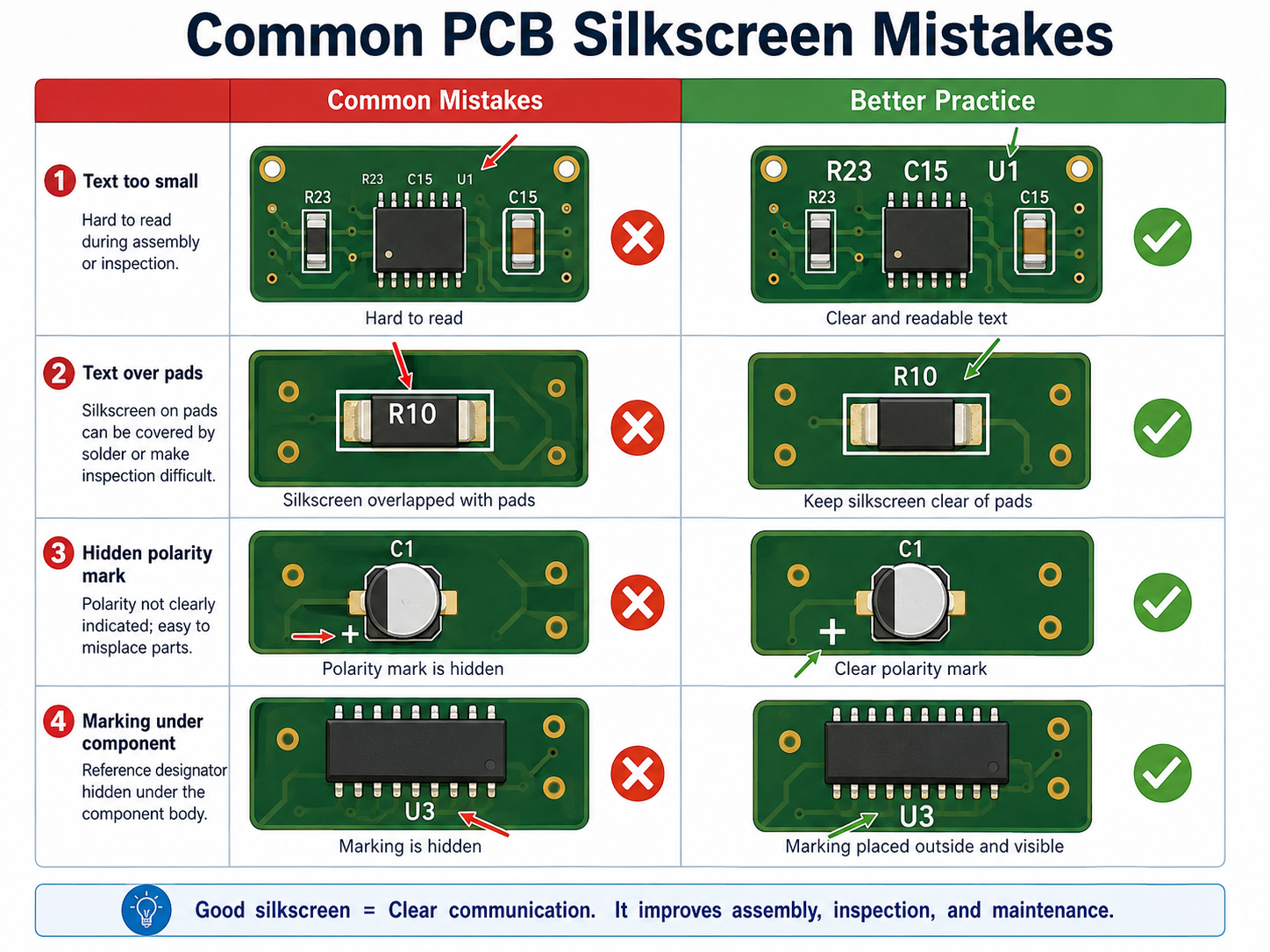
Common PCB silkscreen mistakes include using text that is too small, placing marks under components, printing over pads, forgetting polarity marks, using unclear symbols, and failing to check bottom-side mirroring.
The most common PCB silkscreen mistake including:
What Colors Are Common for PCB Silkscreen?
White is the most common PCB silkscreen color because it gives strong contrast on green, red, blue, and black solder masks. Black silkscreen is common on white solder mask or light-colored boards. Yellow, gray, and other colors may be available depending on the manufacturer.
Color is not only an appearance choice. It affects readability. For example, white text on a green solder mask is easy to read, black text on a white solder mask also gives good contrast. Gray text on a black board may look stylish, but it may be less readable during repair or inspection.
Common color combinations include:
Solder Mask Color
Common Silkscreen Color
Readability
Green
White
Excellent
Blue
White
Excellent
Red
White
Good
Black
White
Good
White
Black
Excellent
Yellow
Black
Good
Matte black
White or light gray
Good
Transparent / no mask
Depends on copper finish
Requires review
If the PCB will go through conformal coating, potting, cleaning, or harsh field use, confirm whether the marking remains visible after the final process. The best silkscreen design considers the full product lifecycle, not only the bare board.
How Can a PCB Manufacturer Improve Silkscreen Quality?
A reliable PCB manufacturer improves silkscreen quality through DFM review, proper printing process selection, CAM checking, readable text control, and clear communication before production. The best result comes from both good design and disciplined manufacturing.
Silkscreen quality depends on several factors:
Ink type
Printing method
Solder mask surface
Character size
Stroke width
Board material
Surface finish
Curing process
CAM clearance rules
Operator and equipment control
For standard PCBs, traditional silkscreen printing is often sufficient. For dense layouts, QR codes, small text, or high-end appearance, direct legend printing, inkjet printing, or laser marking may be a better option.
EBest Circuit supports PCB fabrication, PCBA assembly, component sourcing, testing, and engineering review for prototype and production projects. For silkscreen-related issues, our team can help check text size, polarity marks, Pin 1 indicators, reference designators, QR code areas, and manufacturing readability before production starts.
How Do You Design Better Silkscreen for High-Density PCBs?
For high-density PCBs, silkscreen should be selective, not crowded. When there is not enough room, keep only the markings that prevent assembly mistakes and support testing. Other information can be moved to the assembly drawing or digital documentation.
A better priority order is:
Pin 1 marks for ICs and connectors
Polarity marks for LEDs, diodes, capacitors, and battery connectors
Test point labels for production and repair
Connector function labels
Board revision and traceability marks
Selected reference designators for important components
Logo and non-essential graphics
For very small boards, use simple but clear symbols. A small dot for Pin 1, a cathode bar for diode orientation, or a “+” mark for positive polarity can be more valuable than long text.
How Should You Work With a Manufacturer on PCB Silkscreen?
To get a clean silkscreen result, provide complete manufacturing files and ask the PCB manufacturer to review the marking layer before fabrication. This is especially important for dense boards, double-sided assembly, QR code marking, medical electronics, industrial products, and high-reliability applications.
Send these files when possible:
Gerber files
Drill file
PCB stackup
Assembly drawing
BOM
Pick-and-place file
Special marking requirements
QR code or serial number rule
Preferred silkscreen color
Any customer logo file
Required board revision format
Before production, confirm these points:
Is the text size manufacturable?
Is the stroke width stable?
Is the silkscreen clear from pads and exposed copper?
Are Pin 1 and polarity marks visible after assembly?
Will the QR code scan after printing?
Is the board revision correct?
Is bottom-side text mirrored correctly?
Will coating, cleaning, or final assembly hide any marks?
For customers who need PCB fabrication and assembly together, EBest Circuit can review silkscreen together with component placement, BOM, test access, and assembly process. This helps prevent small marking issues from becoming production delays.
FAQs About Silkscreen on PCB
1. Is silkscreen on PCB necessary? Yes, it is highly useful. A PCB can work electrically without silkscreen, but clear markings make assembly, testing, inspection, repair, and traceability much easier. For production boards, it is strongly recommended.
2. Does PCB silkscreen affect circuit performance? In normal designs, it does not affect electrical performance because the ink is non-conductive. Still, it should be kept away from solder pads, exposed copper, RF-sensitive areas, high-voltage clearances, and test contact areas.
3. What is the best font size for PCB silkscreen? A practical choice is at least 1.0 mm text height with 0.15 mm stroke width. If the board has enough space, 1.27 mm text height and 0.18–0.20 mm stroke width offer better readability.
4. Can I print a logo on PCB silkscreen? Yes. Logos are commonly printed on PCB silkscreen. The logo should meet minimum line width and spacing rules. It should also avoid pads, exposed copper, QR codes, and important technical markings.
5. Can silkscreen include QR codes or serial numbers? Yes. QR codes, serial numbers, lot codes, and product IDs can be added to support traceability. For small or high-density codes, laser marking or high-resolution printing may be more reliable than standard silkscreen.
6. Why did some silkscreen text disappear after PCB production? The most common reason is that the text overlapped pads, vias, exposed copper, or restricted areas. During CAM processing, the factory may remove part of the marking to protect solderability and manufacturing quality.
7. What is the difference between PCB silkscreen and PCB legend? They usually refer to the same idea. “Silkscreen” often describes the printed marking process, while “legend” refers to the text and symbols shown on the PCB surface.
8. Which silkscreen color is best for PCB? White is the most common choice because it works well on green, blue, red, and black solder masks. Black is better for white solder mask. The best color is the one that gives strong contrast and stable readability.
Conclusion
Silkscreen on PCB may look like a small detail, but it has a practical role in the full product lifecycle. It helps assemblers place components correctly, helps testers find signals quickly, helps repair teams locate parts, and helps manufacturers support traceability.
EBest Circuit provides PCB fabrication, PCBA assembly, component sourcing, DFM review, and testing support for prototype and mass production projects. If your PCB needs clear silkscreen, reliable assembly, and traceable production, send your Gerber and BOM files to our team for review.
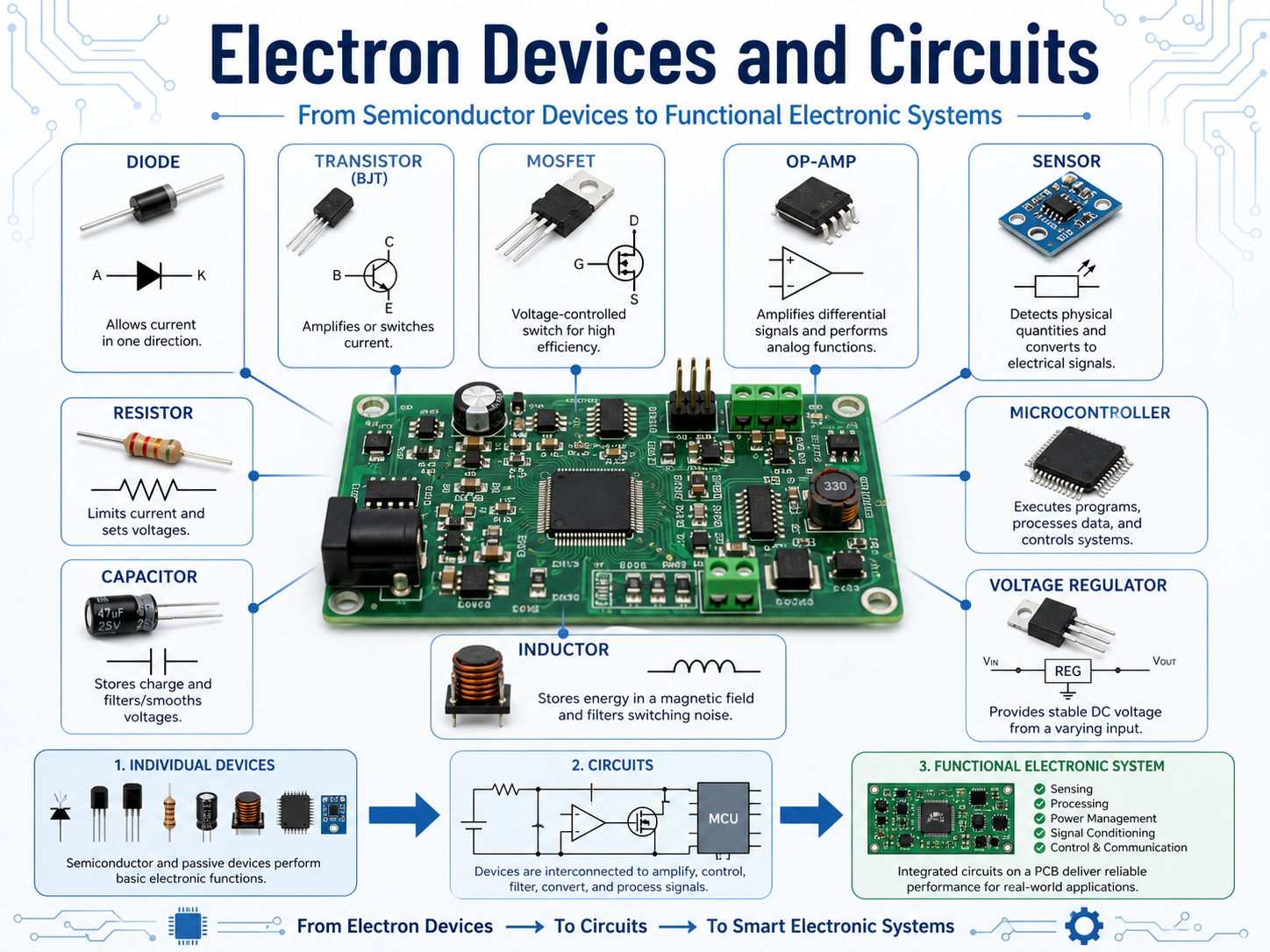
Electron devices and circuits are the foundation of electronic products. An electron device is a component that controls current, voltage, or signal behavior. A circuit is the connected network that allows these devices to perform a useful function, such as switching, amplification, filtering, rectification, sensing, timing, or power conversion.
Common electron devices include diodes, transistors, MOSFETs, integrated circuits, sensors, voltage regulators, and operational amplifiers. These parts do not work alone in a finished product. They are connected through copper traces, vias, pads, and planes on a printed circuit board.
In simple terms, a device is the part. A circuit is the working system built with parts. A PCB is the physical platform that makes the circuit reliable, manufacturable, and suitable for real-world use.
Why Are Electron Devices and Circuits Important in Modern Electronics?
Electron devices and circuits are important because almost every electronic product depends on them to process signals, control power, and respond to the outside world. Without them, a PCB would only be a passive copper structure. The devices give the board intelligence, control, and function.
Modern electronics use circuits in many forms, a medical monitor uses sensor circuits and signal conditioning. An electric vehicle uses power control circuits and protection circuits. A telecom product uses RF circuits and high-speed digital paths. Industrial equipment uses control circuits, relay drivers, motor drivers, and power supply sections.
What Is the Difference Between Electronic Devices and Electronic Circuits?
Electronic devices are individual components. Electronic circuits are functional networks made by connecting those components. The difference is similar to the relationship between bricks and a building. A component may have a clear function, but the circuit decides how that function is used.
Item
Meaning
Example
PCB Concern
Electronic device
A single component that controls or responds to electricity
Diode, MOSFET, IC, sensor
Footprint, polarity, package, rating
Electronic circuit
A connected group of devices and passive parts
Amplifier, filter, power supply
Routing, grounding, noise, heat
PCB layout
The physical copper and component arrangement
Traces, vias, planes, pads
Manufacturability and signal quality
PCBA
A finished assembled circuit board
PCB with components soldered
Testing, inspection, reliability
Final system
The board inside a working product
Medical device, IoT module, inverter
Compliance, durability, user safety
A circuit may look correct on a schematic but still perform poorly on the actual PCB. Long current loops, weak grounding, wrong component placement, thin copper paths, or poor thermal design can change the behavior of the circuit. This is why circuit design and PCB layout should not be treated as separate jobs.
What Are the Main Types of Electron Devices?
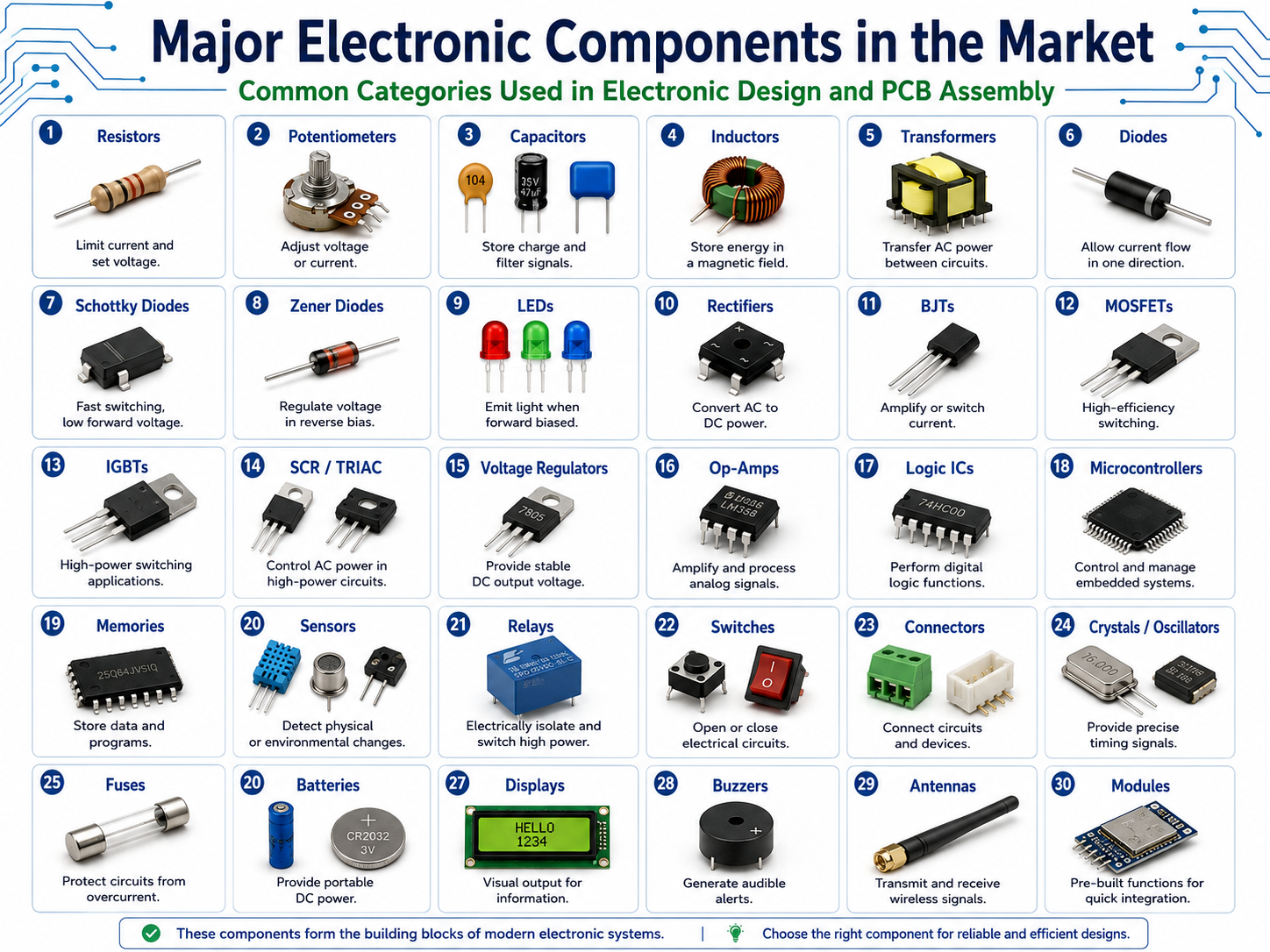
The main types of electron devices include diodes, bipolar junction transistors, MOSFETs, IGBTs, operational amplifiers, sensors, voltage regulators, and integrated circuits. Each device has a specific role in controlling current, voltage, timing, power, or signal behavior. Below are the most common electronic components in the market and their basic functions:
For PCB projects, the selected device package is as important as the device itself. A MOSFET in a small SOT-23 package cannot dissipate the same heat as a larger DPAK or PowerPAK package. A high-speed IC may require controlled impedance routing. A sensor may need clean analog grounding and physical isolation from heat sources.
How Do Diodes Work in Electronic Circuits?
Diodes mainly control current direction. They are often used to convert AC to DC, protect circuits from reverse polarity, clamp voltage spikes, and provide flyback protection for inductive loads such as relays, coils, and motors.
A standard silicon diode often has a forward voltage drop of about 0.6–0.8 V under typical operating conditions. A Schottky diode usually has a lower forward voltage, often around 0.2–0.5 V, making it useful in low-voltage and power-sensitive circuits.
Diode Type
Typical Forward Voltage
Common Use
PCB Design Focus
Silicon diode
0.6–0.8 V
Rectification, protection
Polarity, current rating
Schottky diode
0.2–0.5 V
Low-loss power paths
Leakage current, heat
Zener diode
Depends on Zener voltage
Voltage clamp/reference
Power dissipation
TVS diode
Application-specific
ESD/surge protection
Place close to connector
LED
1.8–3.3 V typical
Indication, lighting
Current limit and heat
How Do Transistors and MOSFETs Control Current?
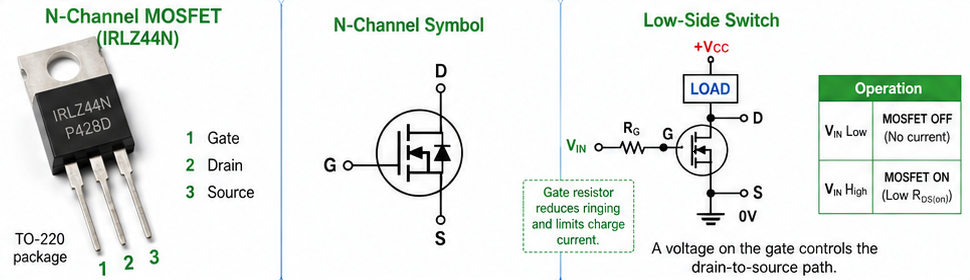
Transistors and MOSFETs control current by using a smaller signal to manage a larger load. A BJT is commonly driven by base current, while a MOSFET is driven by gate voltage. Both can switch loads, but MOSFETs are often preferred for efficient power switching.
A BJT may be useful for small-signal amplification and low-current switching. A MOSFET is widely used in DC-DC converters, motor drivers, LED drivers, battery protection circuits, and power distribution boards. The choice depends on voltage, current, switching speed, drive voltage, heat, package size, and cost.
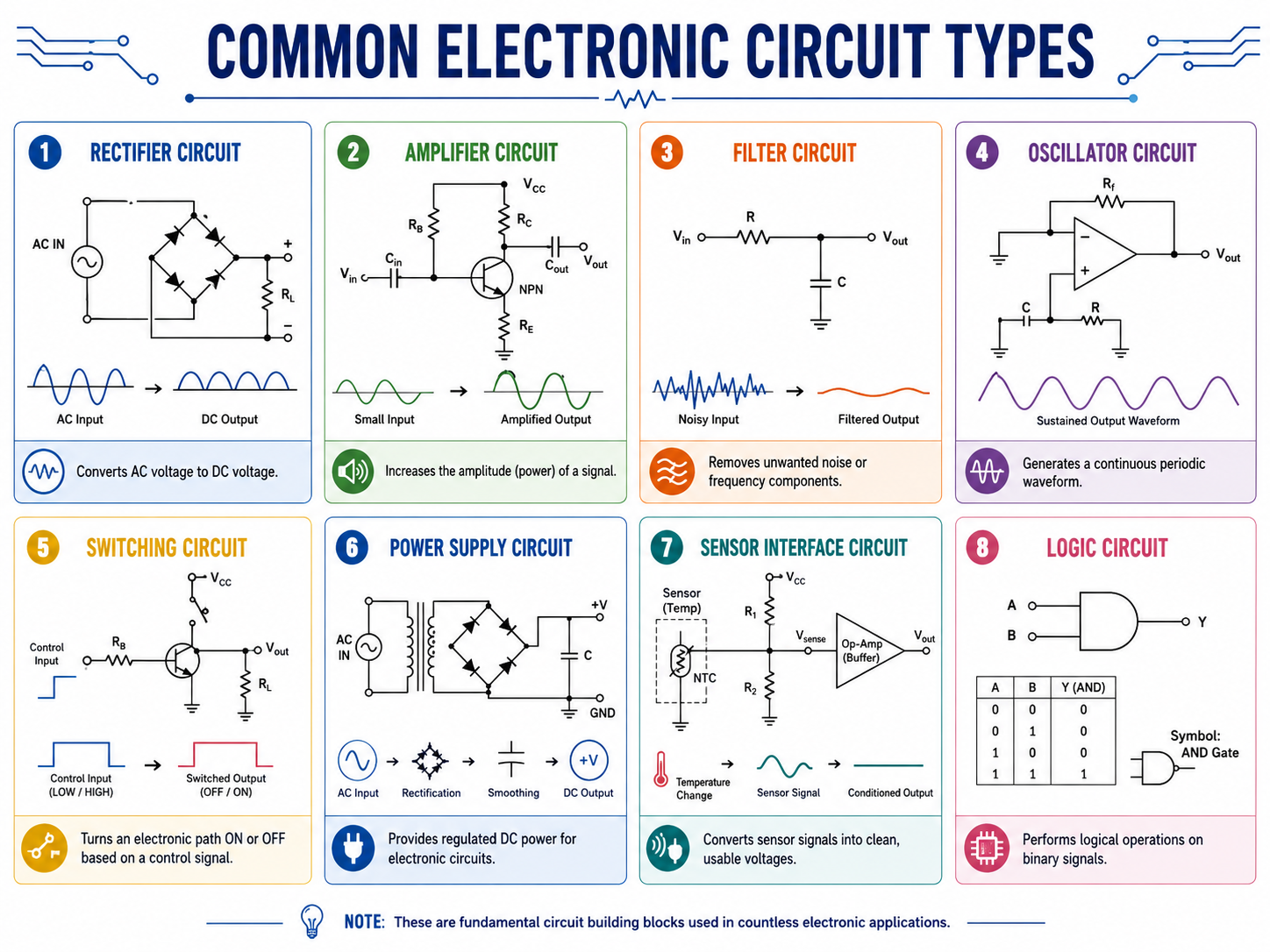
What Are the Most Common Electronic Circuit Types?
The most common electronic circuit types include rectifier circuits, amplifier circuits, filter circuits, oscillator circuits, switching circuits, voltage regulator circuits, sensor interface circuits, logic circuits, and power supply circuits. Each one solves a specific electrical task.
A practical PCB often contains several circuit types on the same board. For example, an industrial control board may include power input protection, DC-DC conversion, MCU logic, sensor input, relay output, and communication ports. The design challenge is to make these sections work together without noise, overheating, or assembly issues.
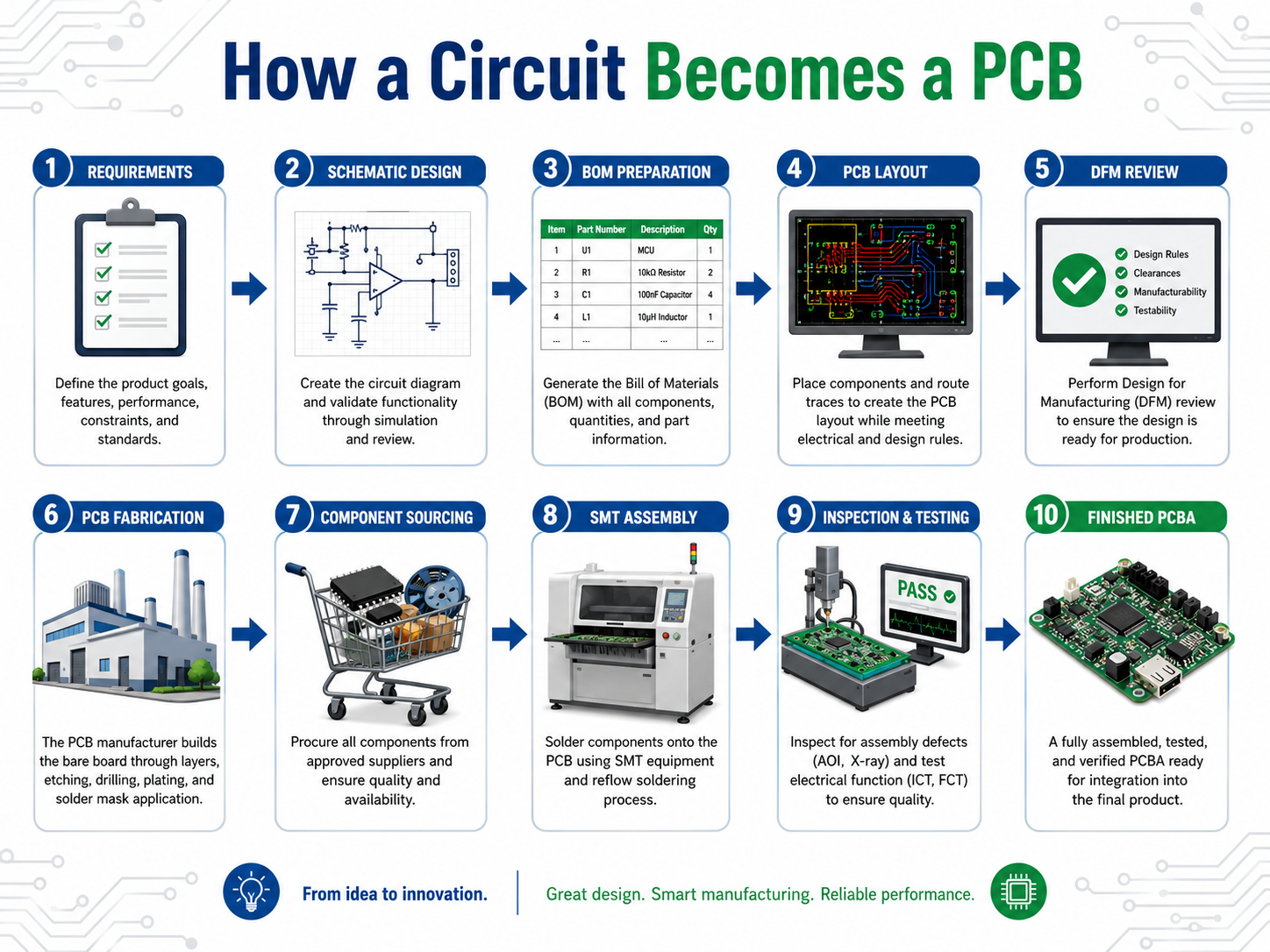
How Do Electron Devices and Circuits Become a PCB?
Electron devices and circuits become a PCB through a structured process: schematic design, BOM preparation, PCB layout, design review, Gerber output, fabrication, component sourcing, SMT assembly, inspection, testing, and final shipment. The schematic defines the electrical logic. The PCB layout turns that logic into a manufacturable board.
The process usually starts with circuit requirements, such as: What voltage does the board need? What current will it carry? What signals are sensitive? What connector, enclosure, and environmental requirements must be considered? These answers guide the schematic and layout.
A typical flow looks like this:
1. Define product function and electrical requirements.
2. Select suitable components and packages.
3. Build the schematic and check circuit behavior.
4. Create the PCB stack-up and layout rules.
5. Place components according to function, heat, and signal flow.
6. Route power, ground, analog, digital, and high-speed signals.
7. Add test points, markings, fiducials, and assembly details.
8. Run DRC, ERC, DFM, and DFT checks.
9. Fabricate the bare PCB.
10. Source components and prepare SMT programming.
11. Assemble the board through SMT, DIP, or mixed assembly.
12. Inspect and test the PCBA before delivery.
The earlier manufacturability is considered, the smoother the project becomes. A schematic can be electrically correct, but if the selected package is unavailable, the footprint is wrong, or the thermal path is weak, the final build may face delay or rework.
What PCB Design Rules Matter for Electronic Devices and Circuits?
The PCB design rules that matter most include trace width, spacing, grounding, return path, decoupling capacitor placement, thermal relief, creepage, clearance, impedance control, component orientation, and test point access. These rules help the circuit perform as intended after manufacturing.
Design Item
Why It Matters
Practical Rule of Thumb
Trace width
Controls current capacity and heating
Wider copper for power paths
Spacing
Reduces short risk and voltage breakdown
Increase spacing for higher voltage
Ground plane
Provides stable reference and return path
Use continuous ground where possible
Decoupling capacitor
Stabilizes IC power pins
Place close to power pins
Thermal via
Moves heat to other copper layers
Use near power IC pads
Test point
Supports inspection and troubleshooting
Add to power rails and signals
Component orientation
Reduces assembly mistakes
Keep polarity markings clear
Controlled impedance
Maintains high-speed signal quality
Define stack-up early
One useful principle is to place parts according to current and signal flow. Power input should connect logically to protection, filtering, conversion, and load sections. Sensitive analog circuits should stay away from noisy switching nodes and high-speed signals should avoid unnecessary stubs and discontinuities.
What Causes Electron Devices and Circuits to Fail?
Electron devices and circuits usually fail because of overstress, poor layout, incorrect component selection, weak soldering, thermal buildup, electrical noise, or manufacturing defects. Many failures can be reduced through early design review and proper test planning.
Common causes include:
Failure Cause
What Happens
How to Reduce the Risk
Overcurrent
Device or trace overheats
Use current rating, fuse, wider copper
Overvoltage
IC or diode damage
Add TVS, Zener, clamp, margin
ESD
Sudden device failure
Use ESD protection near connectors
Thermal stress
Drift, aging, solder fatigue
Add copper area, vias, airflow path
Wrong footprint
Assembly mismatch
Check datasheet and land pattern
Poor solder joint
Intermittent function
Use AOI, X-ray, proper stencil design
Noise coupling
Signal error or reset
Separate noisy and sensitive circuits
Weak test coverage
Hidden defects
Add ICT/flying probe/function test
How Should Beginners Learn Electron Devices and Circuits?
Beginners should learn electron devices and circuits in a step-by-step order: basic electrical laws, passive components, diodes, transistors, MOSFETs, op-amps, power circuits, digital logic, PCB layout, and testing. This path makes the subject easier because each new topic builds on the previous one.
A good learning route starts with voltage, current, resistance, and power. Then it moves into resistors, capacitors, and inductors. After that, diodes and transistors become easier to understand. Once active devices are clear, amplifiers, filters, regulators, and switching circuits become more practical.
A beginner-friendly study path may look like this:
Learning Stage
What to Learn
Practical Exercise
Stage 1
Voltage, current, resistance, power
Calculate LED current resistor
Stage 2
Resistors, capacitors, inductors
Build RC filter
Stage 3
Diodes and rectifiers
Build bridge rectifier
Stage 4
BJT and MOSFET switching
Drive LED, relay, or motor
Stage 5
Op-amp circuits
Build non-inverting amplifier
Stage 6
Power supply circuits
Test regulator output and ripple
Stage 7
PCB layout basics
Convert schematic to PCB
Stage 8
Testing and debugging
Measure voltage, current, waveform
How Are Electron Devices and Circuits Used in Real PCB Applications?
Electron devices and circuits are used in almost every PCB application, including medical electronics, automotive systems, telecom equipment, industrial control, robotics, power electronics, smart sensors, LED lighting, consumer devices, and IoT products. Here we listing some applications of electron devices and their typical circuit needs:
Application
Typical Circuit Needs
Medical electronics
Sensor input, signal conditioning, power control
Industrial control
Relay output, PLC interface, motor control
Automotive electronics
Power switching, communication, protection
Telecom equipment
RF, high-speed digital, power supply
IoT devices
MCU, wireless module, battery management
LED lighting
Constant-current driver, thermal path
Robotics
Motor driver, sensor fusion, control logic
How Can PCB Layout Improve Circuit Performance?
PCB layout can improve circuit performance by reducing noise, controlling heat, shortening current loops, protecting sensitive signals, and making the board easier to assemble and test. Layout is not only about connecting pins, it directly affects electrical behavior.
Several layout habits are helpful:
Place decoupling capacitors close to IC power pins.
Keep high-current paths short and wide.
Avoid routing sensitive analog signals near switching nodes.
Use a continuous ground plane where possible.
Place protection devices close to external connectors.
Add enough test points for production and troubleshooting.
Review footprints before releasing Gerber files.
Separate hot components from temperature-sensitive parts.
A clean layout can make a modest circuit perform very well. A poor layout can make a good schematic unstable.
How Can EBest Support PCB Projects for Electron Devices and Circuits?
EBest supports PCB projects by helping customers move from schematic and BOM to PCB fabrication, component sourcing, PCBA assembly, testing, and delivery. This is useful for projects that involve power circuits, sensor circuits, control boards, communication modules, medical electronics, industrial electronics, automotive electronics, and telecom hardware.
EBest Circuit provides:
PCB fabrication for prototypes and production
PCBA assembly for SMT, DIP, and mixed-technology boards
Component sourcing and BOM optimization
DFM review before manufacturing
AOI, X-ray, ICT, flying probe, and functional testing options
Engineering communication for complex PCB and PCBA projects
Support for industrial, medical, automotive, telecom, IoT, and power electronics applications
A circuit becomes valuable only when it can be built reliably. By combining PCB manufacturing, assembly, sourcing, and testing, EBest helps customers reduce communication gaps and move faster from design files to finished boards.
For project review, customers can send schematic, BOM, Gerber files, or assembly drawings to sales@bestpcbs.com.
FAQs About Electron Devices and Circuits
1. What are electron devices and circuits?
Electron devices and circuits are the components and connections that allow electronic systems to control current, voltage, signals, and power. Devices include diodes, transistors, MOSFETs, ICs, sensors, and op-amps. Circuits connect these parts to perform functions such as switching, amplification, filtering, protection, sensing, and power conversion.
2. What is the difference between electrical circuits and electronic circuits?
An electron device is an individual component (like a transistor or diode) that controls the flow of electrons to perform a specific function. An electronic circuit is a complete path or network of these devices connected together with passive components (resistors, capacitors) to process signals or manage power.
3. Why is silicon the most commonly used material in electron devices?
Silicon is preferred because it is abundant, relatively inexpensive, and has excellent thermal stability. Most importantly, it naturally forms a high-quality silicon dioxide layer, which is essential for manufacturing MOSFETs (Metal-Oxide-Semiconductor Field-Effect Transistors), the building blocks of modern chips.
4. How does a P-N junction diode work?
A P-N junction diode is formed by joining p-type (positive) and n-type (negative) semiconductor materials. It acts as a one-way valve for electricity: in “forward bias,” it allows current to flow easily, whereas in “reverse bias,” it blocks current by creating a depletion region that prevents electrons from crossing.
5. What is the difference between analog and digital circuits?
Analog circuits process continuous signals that vary in voltage or current (like sound waves). Digital circuits process discrete signals, representing data as “high” or “low” voltages (1s and 0s). While analog is used for real-world sensing, digital is favored for processing and data storage due to its resistance to noise.
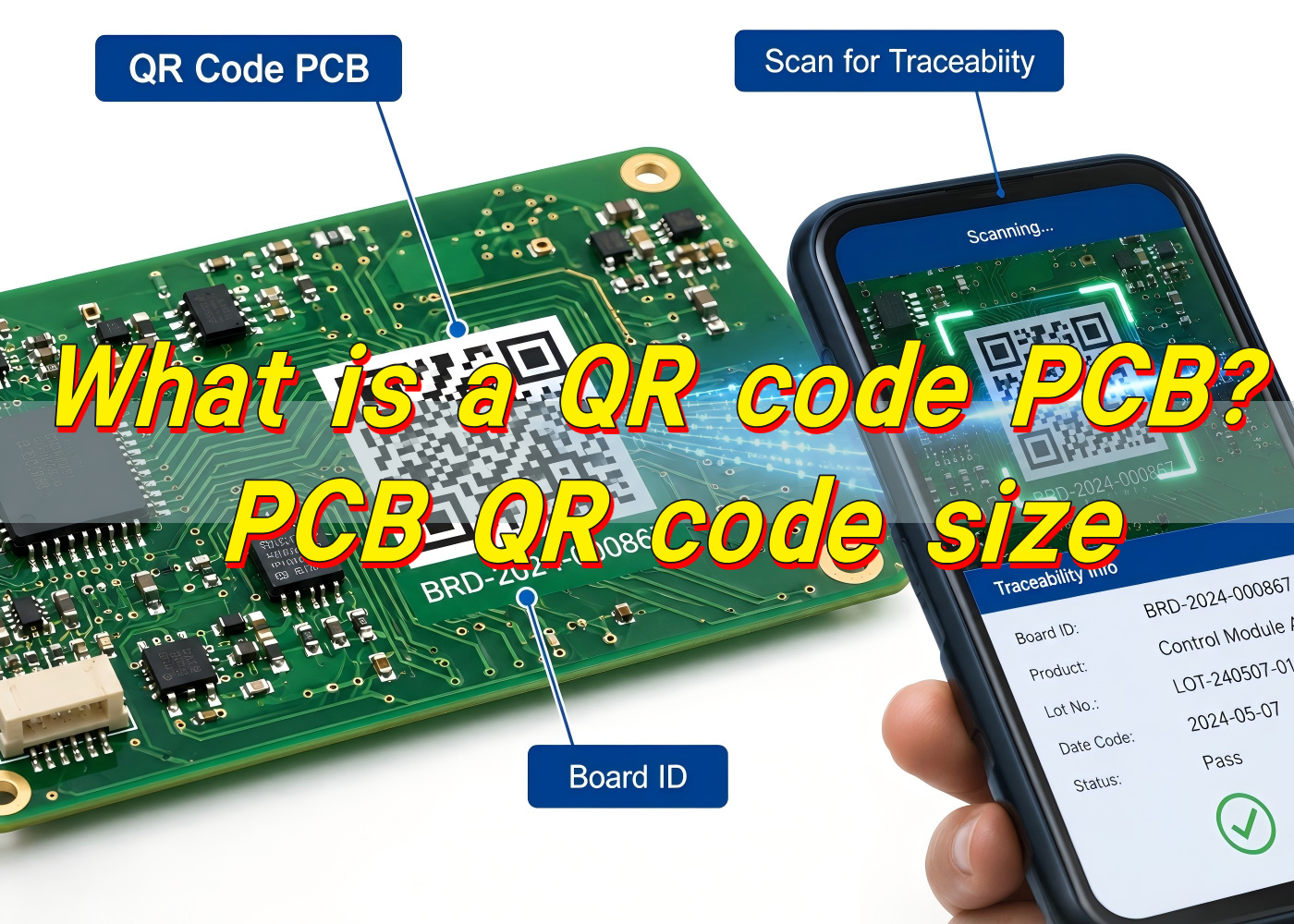
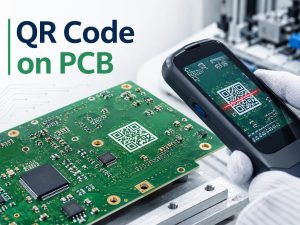
A QR code PCB is a printed circuit board that carries a readable QR code directly on its surface. The code can be placed on the silkscreen layer, solder mask opening area, copper-free marking zone, label area, or laser-marked region, depending on the product’s traceability needs and manufacturing method. In practical production, this small square code can connect a circuit board to its batch data, production records, test results, BOM version, inspection history, firmware version, warranty information, or customer-specific tracking system.
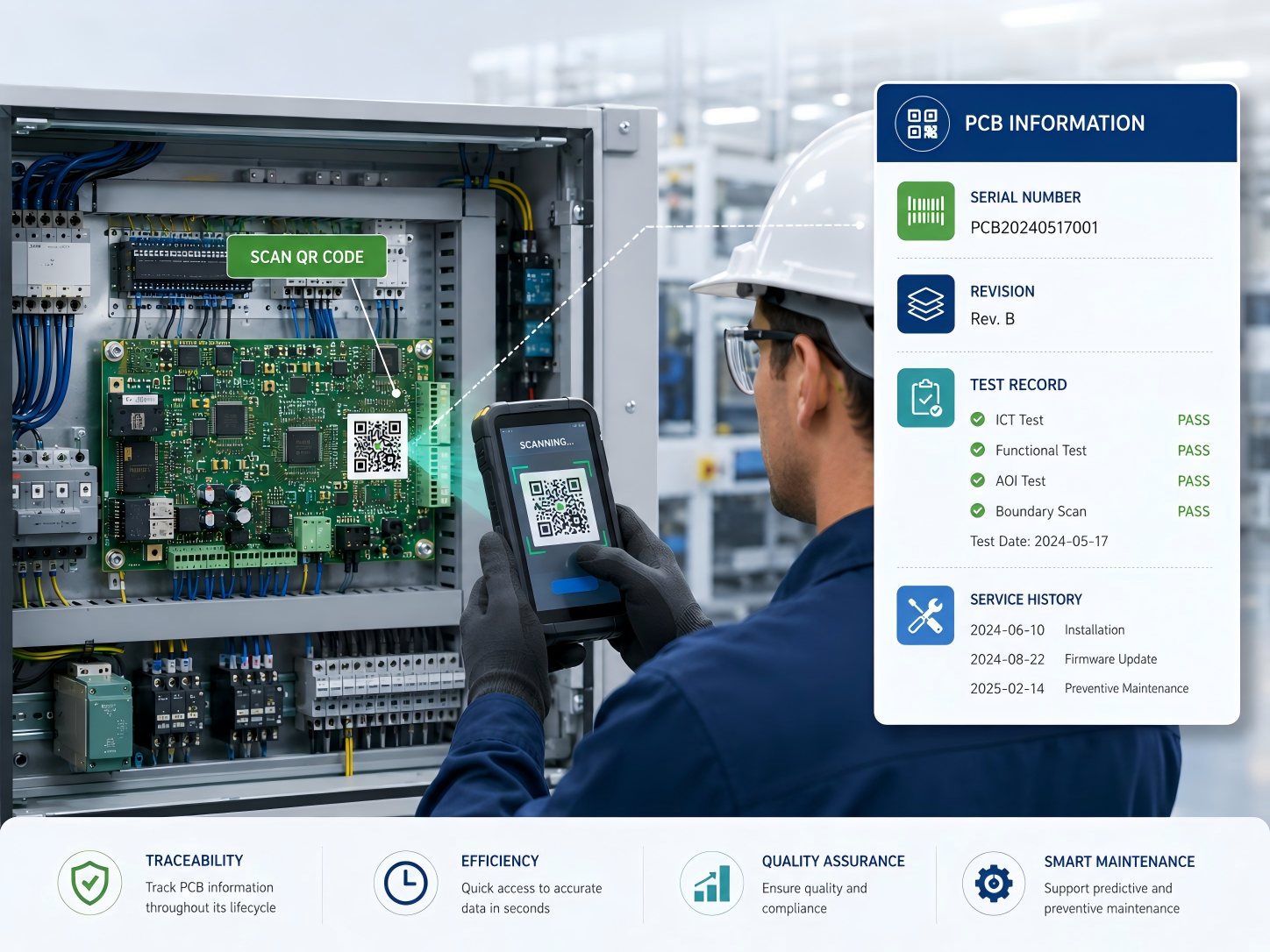
For electronics manufacturers, a QR code on PCB is much more than a visual mark. It acts like a digital identity for the board. When a technician scans it, the system can retrieve useful information within seconds. This is very helpful for PCBA assembly, incoming inspection, quality control, repair, field service, and after-sales analysis.
A PCB QR code can store direct text, a serial number, a URL, a production lot number, or a database reference. In most professional manufacturing systems, the code itself does not need to carry all information. It may only contain a unique ID, while the full data is stored in a factory MES, ERP, quality database, or customer traceability platform. This approach keeps the code compact and easier to scan.
In the PCB industry, QR marking is widely used for industrial electronics, medical electronics, automotive control boards, communication modules, power control boards, smart devices, and OEM assemblies. At EBest Circuit (Best Technology), QR code marking is often treated as part of a broader traceability strategy rather than a simple printing request. The value comes from connecting the physical board to reliable production data, inspection records, and engineering control points.
How is a QR code printed onto a PCB?
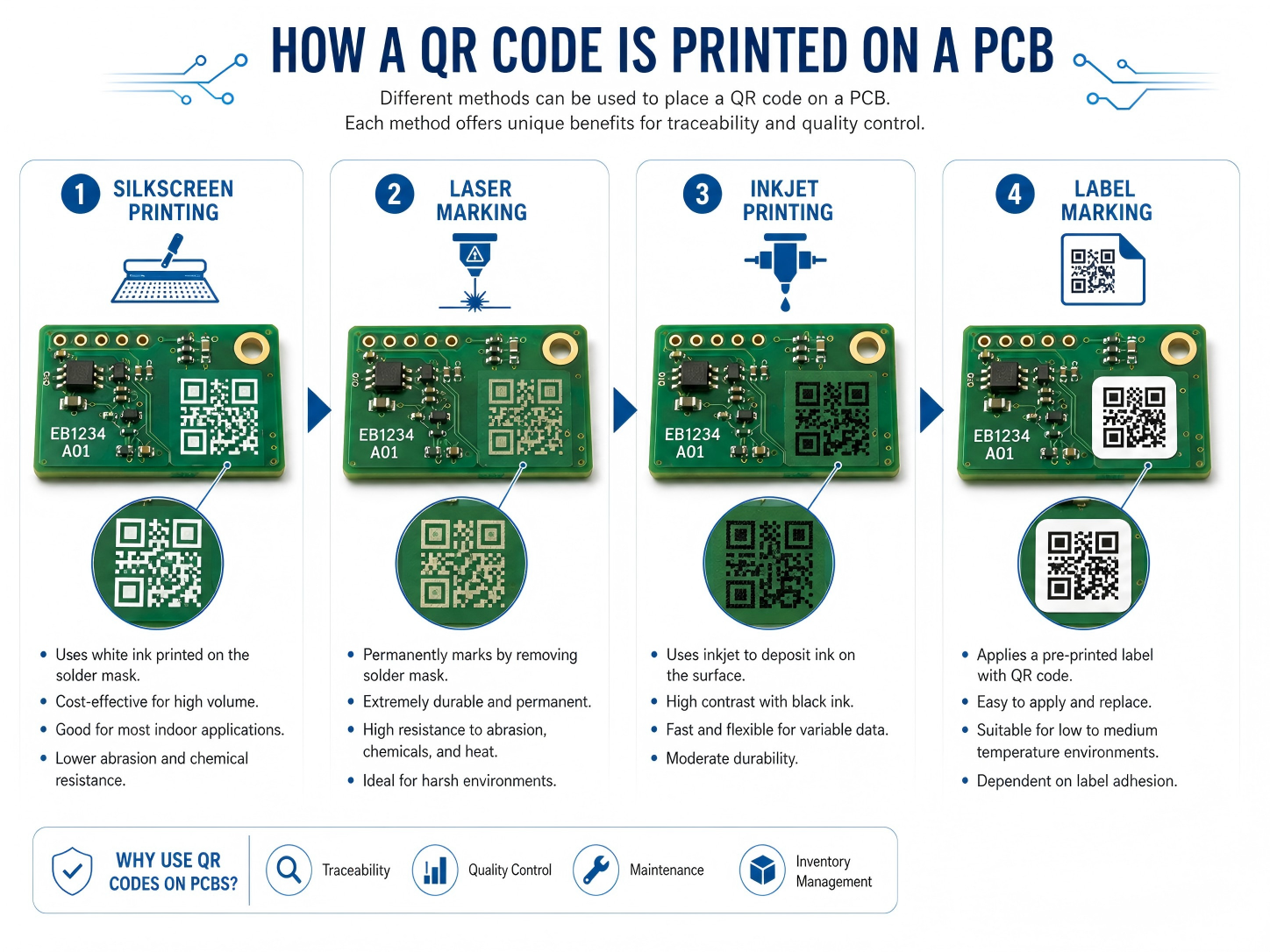
A QR code can be applied to a PCB in several ways. The most common methods are silkscreen printing, laser marking, inkjet printing, and label-based marking. Each method has its own strengths. The best option depends on the board material, surface finish, code size, production volume, cost target, operating environment, and scanning distance.
Silkscreen is a familiar choice because most PCBs already include a legend layer. The QR code on PCB can be printed with white, black, or yellow legend ink, depending on the solder mask color and contrast requirement. For standard FR4 boards with enough available surface area, silkscreen can provide a practical and cost-effective solution. It is suitable for product identification, revision marking, internal batch tracking, and general factory scanning.
Laser QR code on PCB is often selected when higher precision, better durability, or smaller marking size is needed. A laser can mark the solder mask, exposed copper, metal surface, ceramic substrate, or certain special materials with excellent edge definition. It is a strong option for compact boards, high-density assemblies, harsh environments, and products that require long-term identification.
Inkjet printing is also used in some production lines, especially when variable data is needed at higher speed. A PCB QR code printer can generate unique codes for each board or panel. This method can work well when linked with automated handling equipment and traceability software. Adhesive labels are another option, but they are usually used when direct marking is impractical or when additional human-readable information must be included.
Before printing or marking, the code data must be generated, verified, and placed in the PCB design or production file. For custom QR code PCB orders, the manufacturer may ask for the encoded content, preferred size, position, marking color, serial number format, and scanning requirements. For volume production, the code may be dynamically generated during manufacturing.
Method
Brief Description
Best Use Case
Main Advantage
Silkscreen printing
QR code printed with legend ink
Standard PCB identification and batch tracking
Cost-effective and easy to integrate
Laser marking
Code engraved or marked with laser energy
Compact boards, durable marking, industrial use
High precision and strong permanence
Inkjet printing
Variable code printed during production
Automated serialization and high-volume tracking
Flexible for changing data
Adhesive label
Printed label attached to PCB or product
Box build, prototypes, or limited board space
Can include larger text and barcode data
For stable results, EBest Circuit (Best Technology) usually recommends confirming the marking method during DFM review. This helps avoid placement conflicts with pads, test points, tooling holes, conformal coating zones, and assembly fixtures.
What are the main uses of QR code PCB?
The main use of a QR code PCB is traceability. A well-designed code allows engineers, operators, and quality teams to identify a board quickly and connect it with the right production information. In a modern electronics factory, this supports faster decision-making and cleaner documentation.
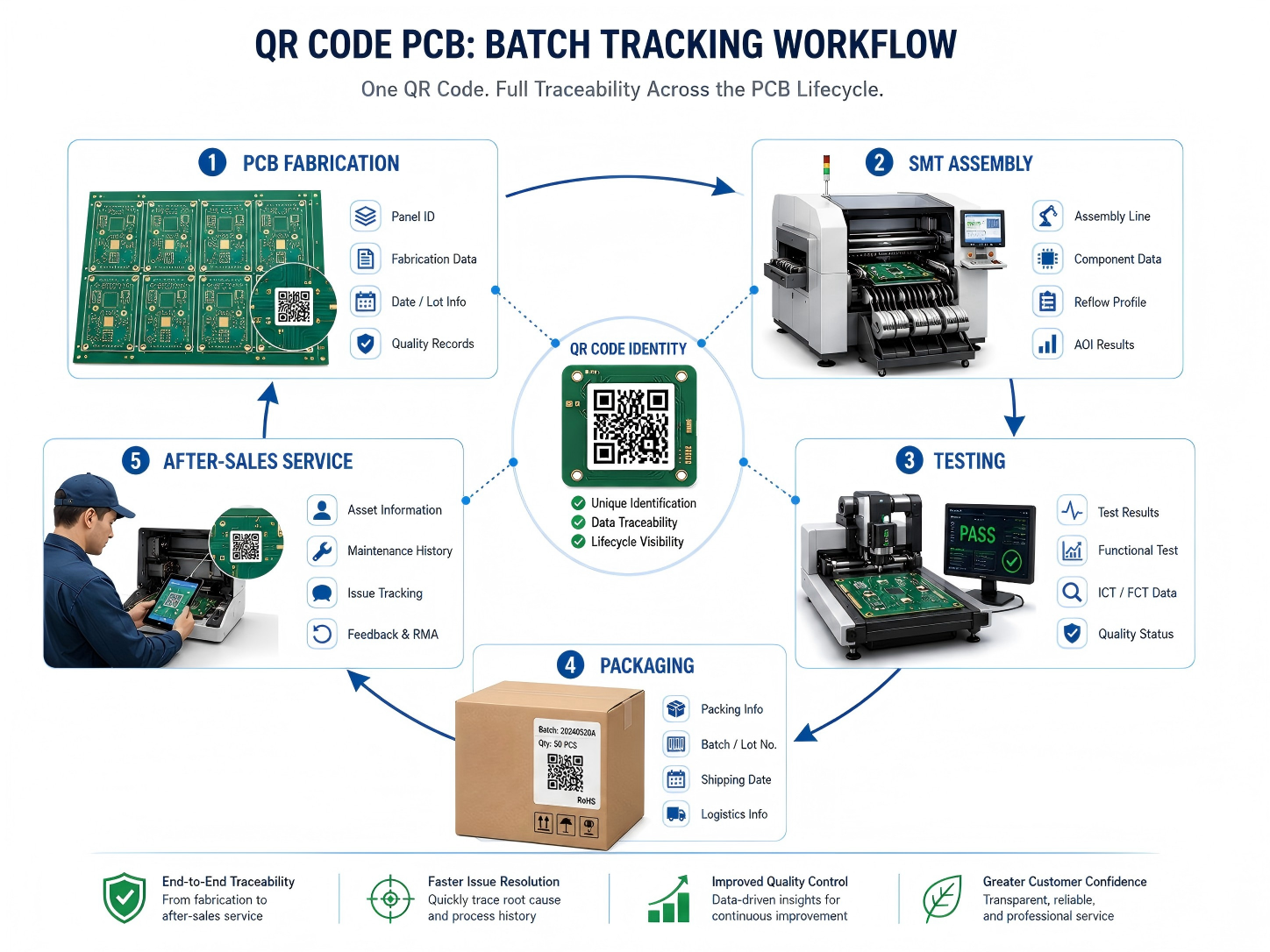
A QR code on circuit board can be used during bare board manufacturing, PCBA assembly, final testing, shipment, repair, and field service. During PCB fabrication, the code may identify the panel number, material batch, surface finish, manufacturing date, and inspection result. During assembly, it may connect to solder paste inspection data, SMT line information, reflow profile, AOI results, X-ray inspection, ICT records, functional test data, and packaging status.
Common uses include:
Batch tracking for bare PCBs and assembled boards
Serial number control for each finished unit
Revision identification for engineering changes
Production history lookup during quality review
Test data connection for ICT, FCT, AOI, or burn-in
Warranty and repair record access
Anti-mixing control in high-mix assembly lines
Customer-specific product authentication
Another useful application is internal process control. When a board moves from SMT assembly to DIP assembly, coating, testing, packing, or box build, scanning the code can confirm its route and status. This reduces manual recording work and improves accountability across each stage. For projects with many similar board versions, QR scanning brings welcome clarity.
At EBest Circuit (Best Technology), this type of marking can be integrated with turnkey PCB and PCBA production. For customers who need stronger visibility, the QR code can become part of a larger tracking workflow that includes material sourcing, fabrication, assembly, testing, and shipment documentation.
Can QR code silkscreen PCB support batch tracking?
Yes, a QR code silkscreen PCB can support batch tracking when the code is designed, printed, and managed correctly. In many standard projects, silkscreen marking is enough for batch-level traceability. The code can represent a production lot, order number, customer part number, panel number, or revision code. When scanned, it can connect operators to the related manufacturing record.
For batch tracking, the most important point is data structure. The QR code should follow a clear naming and numbering rule. A simple random code may be readable, but it becomes much more useful when it follows a controlled system. For example, a code may include the customer code, product number, PCB revision, batch date, and production sequence. In automated systems, the code may only store a unique ID, while the database stores the full record.
For batch-level tracking, the same code may appear on every PCB within the same batch. For unit-level serialization, each board needs a different code. Silkscreen can support variable data in some production setups, but laser or inkjet marking is usually more efficient for unique serial numbers. That is why the marking method should match the tracking depth.
EBest Circuit (Best Technology) can support different traceability levels based on the customer’s product risk, industry requirements, and production volume. For simple projects, batch tracking is often enough. For high-reliability projects, unit-level control gives stronger confidence and better field analysis.
Does QR code marking on PCB affect circuit performance?
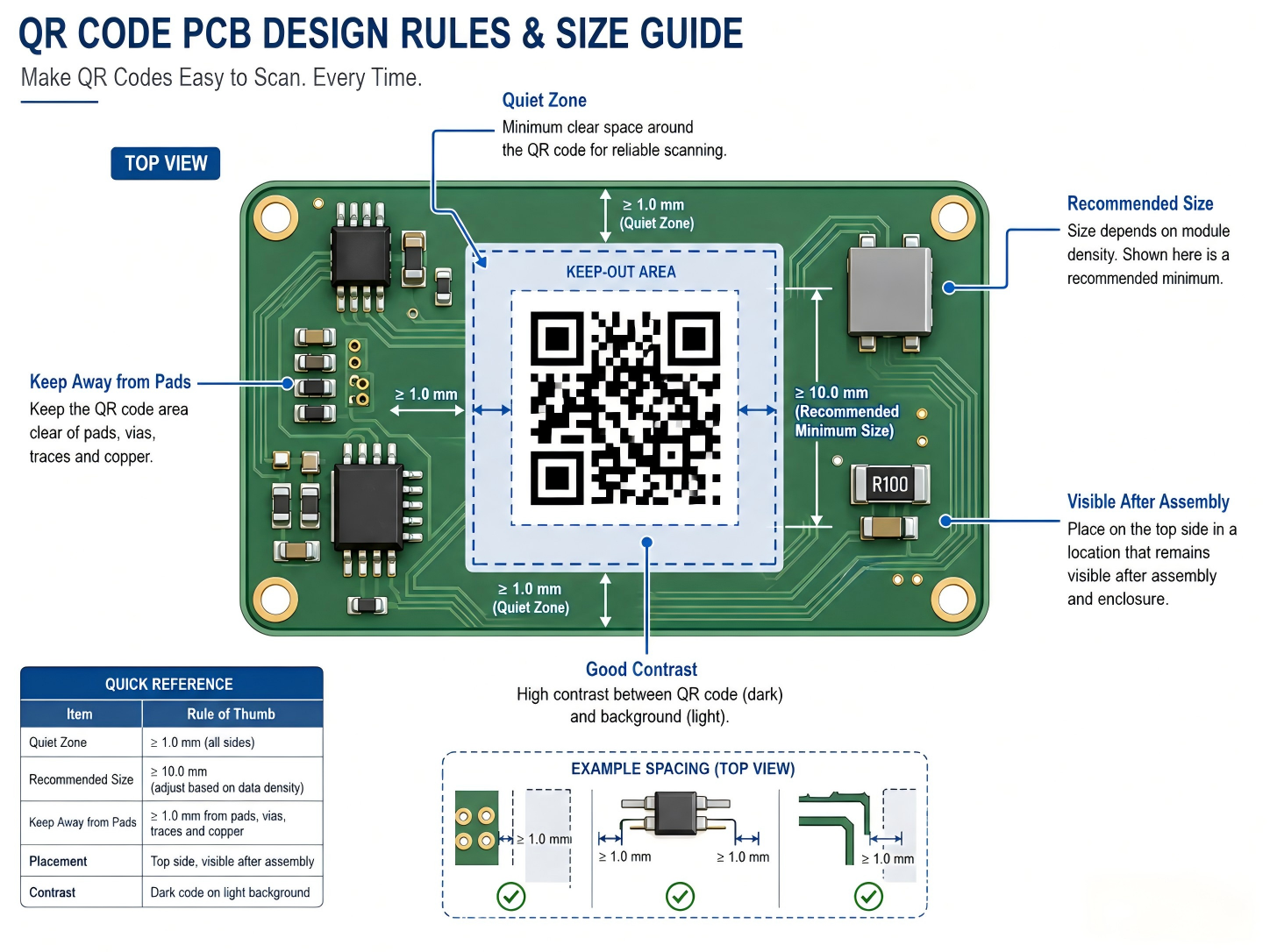
QR code marking on PCB is designed to avoid circuit performance issues when it follows correct layout and manufacturing rules. In most cases, the code is placed in a non-electrical area such as the silkscreen layer, solder mask area, board edge, panel rail, or dedicated marking zone. Since the code does not function as part of the circuit, it should be separated from sensitive copper features, pads, impedance-controlled traces, RF sections, high-voltage spacing, and thermal contact surfaces.
For RF, high-speed, high-voltage, or power boards, placement becomes more critical. A QR code should stay away from antenna areas, controlled impedance lines, creepage paths, heat sink contact zones, and exposed copper regions. If laser marking removes or changes solder mask in a sensitive area, the design team should review the effect before release. Good practice is simple: reserve a clean marking area early in layout rather than placing the code at the last moment.
EBest Circuit (Best Technology) usually handles this through engineering review. The QR code location can be checked together with DFM items such as component clearance, fiducial placement, panelization, tooling holes, solder mask clearance, and test point access. This helps keep the board readable, manufacturable, and electrically reliable.
Is custom QR code PCB available for private design?
Yes, custom QR code PCB is available for private design, OEM projects, and customer-specific traceability systems. A manufacturer can place a code according to the customer’s preferred location, size, content, marking method, and brand requirement. The code may be visible on the finished product, hidden inside an enclosure, placed on a panel rail for production use, or located on the assembled board for field service.
Custom marking is especially useful when a company wants to protect its design data, organize product versions, or connect boards with internal management systems. For private design projects, the QR code can link to secure records rather than public web pages. This means only authorized staff can access the detailed information after scanning. The visible code may look simple, while the database behind it contains a rich production history.
Typical custom content may include:
Customer part number
PCB revision
Production date
Lot number or serial number
Assembly version
Internal item code
Test record ID
Warranty or service reference
Secure URL or database lookup code
Custom QR code PCB orders should be discussed before fabrication files are finalized. The customer can define whether the code should appear in Gerber data, be generated during production, or be added by the manufacturer according to a serialization rule. If the code needs to change per board, the manufacturer needs a controlled data file or a system connection. If the same code applies to all boards, it can be integrated into the normal silkscreen artwork.
EBest Circuit (Best Technology) can support customer-specific marking needs across prototype, small batch, and volume production. For OEM customers, this can be combined with PCB fabrication, component sourcing, PCBA assembly, testing, and final packaging to create a smoother production handoff.
What’s the advantage of PCB with QR code?
The main advantage of a PCB with QR code is fast, reliable access to board-level information. Instead of relying only on paper labels, manual notes, or file names, the physical board carries a digital reference that follows it through production and use.
In electronics manufacturing, small errors can create large delays. A wrong revision, mixed batch, missing test record, or unclear repair history can slow down delivery and increase review time. A scannable code gives operators a direct way to confirm the board identity. When connected to a database, it can show the build status, production route, inspection result, or customer order details.
For quality control, QR marking helps create a stronger evidence chain. If a customer reports a field issue, the manufacturer can trace the affected board back to its production batch, material lot, inspection data, and test result. This supports faster root cause analysis and more confident corrective action. For products used in medical, industrial, automotive, aerospace, or communication equipment, this visibility is a clear operational advantage.
Advantage
What It Means in Practice
Value for Customer
Faster identification
Scan the board instead of manually reading long codes
Saves inspection and service time
Better traceability
Connects the board to production and test records
Improves quality control
Cleaner version control
Confirms revision and product model quickly
Reduces mix-up risk
Efficient repair support
Links to previous repair or test history
Speeds up troubleshooting
Stronger documentation
Supports batch records and audit review
Helpful for regulated industries
Scalable production control
Works with MES, ERP, and warehouse systems
Supports growth and repeat orders
A QR code on circuit board also helps communication between supplier and customer. When both sides use the same code reference, discussions become clearer. Instead of describing a board by photo, file name, or partial marking, both teams can refer to the same scan data. This is simple but very powerful during engineering changes and after-sales support.
EBest Circuit (Best Technology) sees QR marking as a practical way to strengthen manufacturing discipline. It does not replace good process control, but it makes that control easier to verify. For customers who value dependable production and transparent communication, this small mark can create a big improvement in workflow confidence.
How durable is QR code printing on circuit boards?
The durability of QR code printing on circuit boards depends on the marking method, board surface, operating environment, cleaning process, coating treatment, and handling conditions. A properly designed and manufactured code can remain readable through assembly, testing, shipment, and long-term use. For products that face heat, moisture, solvents, abrasion, or outdoor exposure, the marking method should be selected with extra care.
Silkscreen QR codes are durable enough for many standard electronics. The legend ink is cured onto the solder mask and can withstand normal assembly processes. It works well for indoor electronics, control boards, consumer devices, power supplies, and many industrial products. However, repeated abrasion, aggressive cleaning agents, or heavy conformal coating can reduce readability. Good placement helps protect the code from wear.
Laser marking is often more durable because it changes the surface rather than sitting only as an ink layer. A laser QR code on PCB can resist cleaning, handling, and long service life more effectively. It is often preferred for compact industrial boards, automotive modules, medical electronics, metal substrates, ceramic PCBs, and products that need permanent identification. The exact durability depends on the substrate and laser process settings.
Inkjet marking can be effective when the right ink and curing method are used. It is useful for fast serialization, especially in automated production. The ink must be compatible with solder mask, cleaning chemistry, and operating temperature. Adhesive labels can provide good readability, but their long-term performance depends on adhesive quality, temperature range, humidity, and available bonding surface.
For harsh environments, it is wise to test scanning after cleaning, reflow, coating, thermal cycling, or aging. EBest Circuit (Best Technology) can review the product environment and suggest a suitable approach. This helps the code remain readable when the board reaches real use, not only when it leaves the production line.
Can QR code PCB be used in industrial electronics?
Yes, QR code PCB can be used very effectively in industrial electronics. In fact, industrial products are one of the strongest use cases for board-level identification. Industrial control boards, power modules, automation equipment, sensors, motor drives, communication gateways, test instruments, and monitoring systems often require long service life, stable documentation, and fast maintenance support. A scannable board identity makes these tasks easier.
Industrial electronics are frequently produced in multiple revisions over several years. A control board may look almost the same from the outside while its firmware, component alternatives, connector choices, or circuit revision changes over time. A QR code on PCB helps maintenance teams identify the exact board version before replacement or repair. This is very useful when equipment downtime is costly.
For factories and equipment makers, QR codes also support spare part management. A technician can scan the board and confirm whether the replacement part matches the machine model. The code may connect to installation instructions, calibration records, test data, or service logs. In large facilities, this improves maintenance speed and reduces the chance of using the wrong board.
In industrial electronics, the QR code should be part of the product design plan, not a late decoration. Designers should reserve enough space, define scanner access, check coating coverage, and confirm the code remains visible after assembly. When the board is installed vertically or inside a narrow housing, scanning angle becomes important. A readable code in CAD may be hard to scan in the finished machine if access is limited.
EBest Circuit (Best Technology) supports industrial customers with PCB fabrication, PCBA assembly, testing, and traceability-oriented manufacturing. For control systems, automation equipment, and durable electronics, QR marking can be combined with inspection records and production data to create a more dependable manufacturing record.
What design rules apply to QR code PCB layout?
QR code PCB layout should focus on readability, contrast, size, location, clearance, and manufacturing tolerance. A code that looks fine on screen may become difficult to scan after printing if the modules are too small or the surrounding area is crowded. The goal is simple: make the code easy for scanners, operators, and service teams to read under real production conditions.
PCB QR code size is one of the most important design points. The minimum size depends on the amount of encoded data, QR version, error correction level, marking method, scanner quality, and required scanning distance. For many PCB silkscreen applications, a practical size may start around 5 mm × 5 mm for very simple data, but 7 mm × 7 mm to 10 mm × 10 mm is often more comfortable for reliable factory scanning. For laser marking, smaller codes may be possible because the edge definition is sharper. For manual handheld scanning, larger is usually better.
The code should also include a quiet zone. This is the blank margin around the QR pattern. Without enough margin, nearby text, copper, pads, components, or solder mask openings may disturb recognition. A quiet zone of at least four modules is a common QR code principle. On PCB artwork, this means the designer should keep the area around the code clean.
Useful layout rules include:
Reserve a clean rectangular marking area early in PCB layout.
Keep the code away from component pads, vias, test points, fiducials, and screw holes.
Maintain a quiet zone around the QR pattern.
Avoid placing the code under tall components, shields, heat sinks, or labels.
Select a size that matches the marking method and scanner distance.
Use short encoded data when space is limited.
Confirm readability after soldering, washing, coating, and final assembly.
Keep codes away from RF antenna zones, high-voltage spacing areas, and thermal contact surfaces.
For PCB QR code size planning, the amount of data matters. A short serial number can use fewer modules and stay readable at a smaller size. A long URL or dense information needs more modules, which requires a larger printed area. In many professional systems, using a short unique ID is better than encoding a long data string. The ID can point to a database where full records are stored.
Design Factor
Practical Recommendation
Why It Matters
Code size
Use a comfortable size, often 7–10 mm or larger for silkscreen
Improves scanning reliability
Data length
Keep encoded content short when possible
Reduces module density
Quiet zone
Leave clean space around the code
Helps scanner detect the pattern
Location
Place in a visible, protected area
Supports scanning after assembly
Contrast
Use strong color difference
Improves recognition speed
Surface
Avoid uneven, reflective, or crowded areas
Keeps edges readable
Process
Match design to silkscreen, laser, or inkjet capability
Prevents production mismatch
For a well-built result, the QR code should be reviewed together with the full PCB stack, surface finish, solder mask color, assembly layout, and end-use environment. This is where cooperation with an experienced manufacturer becomes valuable. EBest Circuit (Best Technology) can help customers check QR code placement, marking method, manufacturability, and traceability needs before production begins.
In summary, a PCB with a scannable QR code gives engineers and manufacturers a practical way to connect a physical circuit board with useful digital information. For custom PCB and PCBA projects that need professional QR marking support, contact sales@bestpcbs.com
550mm to inches equals 21.6535 inches. If you need a clean rounded value, 550mm is usually written as 21.65 inches. For casual product descriptions, it can also be written as about 21.7 inches. However, for engineering drawings, PCB panel dimensions, mechanical parts, fixtures, and assembly work, it is better to keep the exact millimeter value or use the more accurate inch conversion.
The calculation is simple:
550 ÷ 25.4 = 21.6535 inches
This is because 1 inch equals exactly 25.4 millimeters. So, when you convert millimeters to inches, you divide the millimeter value by 25.4.
What Is 1 Inch Equal to in mm?
1 inch is equal to exactly 25.4mm. This is the standard conversion factor used for all inch-to-millimeter and millimeter-to-inch calculations. So, when you want to convert inches to millimeters, you multiply the inch value by 25.4. When you want to convert millimeters to inches, you divide the millimeter value by 25.4.
For example:
Inches
Millimeters
1 inch
25.4mm
2 inches
50.8mm
5 inches
127mm
10 inches
254mm
21.65 inches
About 550mm
In PCB drawings, mechanical parts, enclosure design, and product specifications, this conversion factor is very important. A small rounding mistake can affect size matching, assembly clearance, fixture design, and packaging accuracy.
What Is the Formula to Convert 550mm to Inches?
The formula is: inches = millimeters ÷ 25.4. For 550mm, the calculation is:
550 ÷ 25.4 = 21.6535433071 inches
Rounded to two decimal places, the answer becomes 21.65 inches.
This formula works for any millimeter-to-inch conversion. You only need to replace 550 with the millimeter value you want to convert.
Millimeters
Formula
Inches
100mm
100 ÷ 25.4
3.94 in
250mm
250 ÷ 25.4
9.84 in
400mm
400 ÷ 25.4
15.75 in
550mm
550 ÷ 25.4
21.65 in
650mm
650 ÷ 25.4
25.59 in
1000mm
1000 ÷ 25.4
39.37 in
This formula is especially useful when working with drawings or specifications that mix metric and imperial values. In PCB manufacturing, for example, a customer may submit a board outline in millimeters, while an enclosure drawing or panel fixture may be discussed in inches. Using the correct formula prevents mismatch between design intent and production output.
Is 550mm the Same as 21.65 Inches?
Yes, 550mm is commonly written as 21.65 inches when rounded to two decimal places. The exact result is slightly longer: 21.6535 inches. The difference between 21.65 and 21.6535 inches is extremely small, so 21.65 inches is suitable for many general and technical descriptions.
However, the right level of rounding depends on the application.
For example, if you are describing the approximate width of a product on a webpage, 21.65 inches is fine. If you are preparing a PCB production drawing, panel layout, SMT stencil drawing, CNC fixture, or inspection jig, you should keep the original metric value and add inches only as a reference.
A good engineering format is:
550mm / 21.6535 in
A good product description format is:
550mm / 21.65 in
A good casual description format is:
About 21.7 inches
The more precise the part, the more carefully the conversion should be written.
Should 550mm Be Rounded to 21.7 Inches or 22 Inches?
550mm can be rounded to 21.7 inches for general reading, but it should not be rounded to 22 inches for engineering use. The value 22 inches is only an approximation. It is easy to read, but it is not dimensionally accurate.
The exact value is 21.6535 inches. If you round it to one decimal place, it becomes 21.7 inches. If you round it to the nearest whole inch, it becomes 22 inches. The problem is that 22 inches is actually 558.8mm, which is about 8.8mm larger than 550mm.
That difference may be acceptable for a rough estimate, but it can be too large for PCB, enclosure, display, fixture, or mechanical assembly applications.
Rounded Format
Inch Value
Difference from Exact Value
Best Use
Exact value
21.6535 in
0
Engineering data
2 decimals
21.65 in
Very small
Product specifications
1 decimal
21.7 in
About 0.0465 in
General reading
Whole inch
22 in
About 0.3465 in
Rough estimate only
22 inches in mm
558.8mm
8.8mm larger than 550mm
Not suitable for precision
For PCB-related work, 8.8mm is not a small deviation. It can affect panel arrangement, board fitting, tooling holes, fixture size, packaging clearance, and final assembly compatibility.
How Long Is 550mm in Real Life?
550mm is 55cm, 0.55m, or about 21.65 inches. In feet and inches, it is about 1 foot and 9.7 inches.
This length is a little under 2 feet. It is longer than a standard sheet of paper and close to the width or length of many electronic assemblies, equipment housings, display modules, tooling frames, and medium-sized panels.
To make the size easier to imagine:
Metric Size
Imperial Size
Practical Feeling
550mm
21.65 inches
A little less than 2 feet
550mm
55cm
Slightly over half a meter
550mm
0.55m
Medium product dimension
550mm
1 ft 9.7 in
Common for panels or frames
In electronics, 550mm may appear in several places. It could be the length of a PCB production panel, a fixture base, a stencil frame, a machine working area, a cable harness reference, or the outer size of a device enclosure. Because the number is large enough to affect manufacturing efficiency, it should be converted carefully.
What Is 550mm in Feet and Inches?
550mm is about 1 foot and 9.7 inches. This format is useful when communicating with people who prefer imperial measurements.
The calculation works like this:
550mm equals 21.6535 inches. There are 12 inches in 1 foot. 21.6535 inches equals 1 foot plus 9.6535 inches.
So the practical result is:
550mm = about 1 ft 9.7 in
Millimeter Value
Inches
Feet and Inches
300mm
11.81 in
0 ft 11.8 in
450mm
17.72 in
1 ft 5.7 in
550mm
21.65 in
1 ft 9.7 in
650mm
25.59 in
2 ft 1.6 in
800mm
31.50 in
2 ft 7.5 in
This format is helpful for general communication, but it is not ideal for production drawings. Manufacturing teams usually prefer decimal inches or millimeters because they are easier to measure and control.
How Do You Convert Millimeters to Inches Step by Step?
To convert millimeters to inches, divide the millimeter value by 25.4. For 550mm, the answer is 21.6535 inches.
Here is the step-by-step process:
Step 1: Write the millimeter value The value is 550mm.
Step 2: Use the conversion factor 1 inch = 25.4mm.
Step 3: Divide by 25.4 550 ÷ 25.4 = 21.6535433071.
Step 4: Round the result For most uses, write it as 21.65 inches.
Step 5: Choose the right precision Use more decimal places for engineering work. Use fewer decimal places for general reading.
This same method works for any size. For example, 650mm to inches is 650 ÷ 25.4 = 25.59 inches. A 450mm measurement equals 17.72 inches.
What Is 550mm × 650mm in Inches?
550mm × 650mm equals approximately 21.65 inches × 25.59 inches. This type of conversion is useful for PCB panels, SMT stencil frames, machine working areas, packaging boxes, aluminum plates, display modules, and mechanical enclosures.
For rectangular sizes, convert each side separately:
Why Does 550mm to Inches Matter in PCB and Electronics Manufacturing?
550mm to inches matters because PCB and electronics projects often move between metric and imperial dimensions. A board outline may be designed in millimeters, while an enclosure, equipment drawing, customer requirement, or packaging specification may refer to inches.
In PCB manufacturing, 550mm may relate to:
PCB production panel length or width
SMT stencil size
Reflow carrier fixture size
Wave solder pallet size
CNC routing working area
Electrical test fixture base
Packaging carton dimension
Large-format LED, power, or industrial control boards
Mechanical enclosure matching
Assembly line handling clearance
For example, if a PCB panel is designed as 550mm wide, the inch equivalent is 21.65 inches. If someone rounds it to 22 inches during communication, the difference becomes 8.8mm. That may influence panelization, fixture compatibility, or packaging accuracy.
What Mistakes Should You Avoid When Converting 550mm to Inches?
The most common mistake is rounding 550mm to exactly 22 inches and treating it as a precise value. It is close, but not exact. Another common mistake is confusing millimeters with centimeters.
Here are the main errors to avoid:
Mistake
Why It Matters
Better Practice
Writing 550mm as exactly 22 inches
22 inches is 558.8mm, not 550mm
Use 21.65 inches
Confusing mm and cm
550mm is 55cm, not 550cm
Check unit labels carefully
Using 2.54 for mm conversion
2.54 is centimeters per inch
Use 25.4 for millimeters
Removing decimals in drawings
May affect fit, clearance, or tooling
Keep accurate values
Ignoring tolerance
Real parts have manufacturing variation
Add tolerance where needed
Mixing rounded and exact values
Can confuse suppliers and inspectors
Define one primary unit
For PCB and PCBA projects, the safest approach is to keep the original design unit as the master value. If the original file, Gerber data, mechanical drawing, or fabrication note uses millimeters, the inch value should be treated as a reference unless otherwise specified.
How Should You Write 550mm in Product Specifications?
The best product specification format is 550mm / 21.65 inches. This is clear, accurate, and easy for international readers to understand.
A clean product description might look like this:
Length: 550mm / 21.65 in
For a more detailed technical drawing, you can write:
Length: 550.00mm [21.6535 in]
For a general sales page, you can write:
Approx. 550mm / 21.7 in
In PCB manufacturing, consistency is very important. If the drawing uses millimeters, keep all related dimensions in millimeters. If inches are added, label them clearly as reference values.
What Are Similar Millimeter to Inch Conversions?
Similar conversions help users compare 550mm with nearby sizes. This is useful when selecting a panel size, enclosure, rack, fixture, or product housing.
Millimeters
Inches
Rounded Value
500mm
19.6850 in
19.69 in
520mm
20.4724 in
20.47 in
540mm
21.2598 in
21.26 in
550mm
21.6535 in
21.65 in
560mm
22.0472 in
22.05 in
580mm
22.8346 in
22.83 in
600mm
23.6220 in
23.62 in
FAQs
1. How many inches is 550mm?
550mm is 21.6535 inches. Rounded to two decimal places, it is 21.65 inches.
2. Is 550mm equal to 22 inches?
No. 550mm is about 21.65 inches. By comparison, 22 inches equals 558.8mm, which is about 8.8mm longer than 550mm.
3. What is 550mm in feet and inches?
550mm is about 1 foot and 9.7 inches. This format is helpful for general size comparison.
4. What is the formula for converting 550mm to inches?
The formula is:
inches = millimeters ÷ 25.4
So: 550 ÷ 25.4 = 21.6535 inches
5. Is 550mm the same as 55cm?
Yes. 550mm equals 55cm, because 10mm equals 1cm.
6. Should PCB drawings use 550mm or 21.65 inches?
PCB drawings should usually keep 550mm as the primary dimension if the design was created in metric units. The inch value, 21.65 inches, can be added as a reference for international communication.
7. Is 21.65 inches accurate enough for 550mm?
For most product specifications, yes. 21.65 inches is accurate enough for general use. For high-precision engineering, use 21.6535 inches or keep the original 550mm value.
8. What is 550mm × 650mm in inches?
550mm × 650mm equals approximately 21.65 inches × 25.59 inches. This size format is common in panels, frames, fixtures, and packaging dimensions.
A breakout board is a small printed circuit board that makes an electronic component easier to use, test, and connect. Many modern chips, sensors, connectors, and modules use tiny packages or dense pin spacing that are not friendly for hand wiring, breadboard experiments, or fast prototyping. A breakout board solves this problem by “breaking out” those small or hard-to-access pins into larger pads, pin headers, screw terminals, or standard connectors.
What is a Breakout Board?
A breakout board is a PCB that takes the electrical pins of a component and routes them to easier connection points. The component may be a sensor IC, power chip, communication module, connector, USB interface, ESP32 module, or any other part that needs a more practical interface. In simple terms, a breakout board acts as a bridge between a tiny electronic component and a user-friendly circuit environment.
For example, a small surface-mount IC may have pins spaced only 0.5 mm apart. That is difficult to solder by hand and impossible to place directly into a breadboard. A breakout board mounts that IC on a small PCB and routes each pin to 2.54 mm headers, test pads, or terminal blocks. This makes the component much easier to connect with jumper wires, breadboards, test equipment, or another PCB.
A typical breakout board may include:
The main chip, module, sensor, or connector
Pin headers or solder pads
Power and ground pins
Pull-up or pull-down resistors
Decoupling capacitors
Voltage regulator or level shifting circuit
Labels printed on the silkscreen
Mounting holes for mechanical installation
What is a Breakout Board?
What is a Breakout in Electrical Terms?
In electrical and electronic design, breakout means extending or separating multiple electrical signals from a compact source into more accessible connection points.
The source may be:
A fine-pitch IC package
A board-to-board connector
A cable connector
A USB port
A camera module connector
A microcontroller module
A sensor package
A test fixture interface
The “breakout” process makes each signal easier to identify, probe, solder, or connect. This is why breakout boards are common in laboratories, repair shops, embedded system development, and PCB prototyping.
In PCB development, breakout can also describe the routing area where traces leave a dense component footprint. For example, when routing a BGA package assembly, engineers may talk about “BGA breakout routing,” which means fan-out routing from the BGA pads to other PCB layers.
Is a Breakout Board a PCB?
Yes, in most cases, a breakout board is a type of PCB. More specifically, it is a small functional PCB designed to expose signals from one component, connector, or module.
A breakout board PCB is usually simpler than a full product PCB. It may not contain a complete system. Instead, it focuses on making one part easier to connect and test.
A breakout board can be used alone, connected to a breadboard, plugged into a development board, or integrated into a larger test fixture. In professional engineering workflows, breakout boards are often used before the final PCB design is completed.
What is the Purpose of a Breakout Board?
The main purpose of a breakout board is to make an electronic component easier to connect, evaluate, and integrate. It reduces the gap between the small physical structure of modern electronics and the practical needs of engineers during development.
1. Easier prototyping
Many ICs and modules are not breadboard-friendly. A breakout board converts small pins into larger headers or pads, allowing fast connection with jumper wires, test clips, or soldered leads.
2. Faster component testing
Before using a new sensor, power IC, connector, or communication chip in a product, engineers often need to check whether it performs as expected. A breakout board provides a convenient test platform.
3. Better access to signals
Breakout boards make signals easier to probe with an oscilloscope, multimeter, logic analyzer, or functional test fixture. This is especially useful during debugging.
4. Reduced soldering difficulty
Fine-pitch SMD parts can be hard to solder manually. A breakout board allows the difficult component to be mounted once, while the user connects to larger and more forgiving pads.
5. Easier system integration
A breakout board can help connect a small module to another system, such as an Arduino, Raspberry Pi, ESP32, industrial controller, or custom test board.
6. Safer development
Some breakout boards include basic protection, such as reverse polarity protection, ESD protection, current-limiting resistors, or level shifting.
Types of Breakout Boards
Breakout boards come in many forms because electronic components have different electrical and mechanical needs. Below are common types used in prototyping and PCB design.
1. Sensor Breakout Board
Sensor breakout boards are very popular in embedded systems. They may include temperature sensors, pressure sensors, motion sensors, light sensors, gas sensors, current sensors, or magnetic sensors.
Many sensor ICs use small packages and require supporting parts such as pull-up resistors or capacitors. A breakout board places those parts on the PCB and provides pins for power, ground, and signal communication.
Common interfaces include I2C, SPI, UART, analog output, and digital output.
2. Microcontroller Breakout Board
A microcontroller breakout board exposes the pins of a microcontroller or module. It may support ESP32, STM32, RP2040, ATmega, or other MCU families.
A breakout board for ESP32 is especially useful because ESP32 modules include Wi-Fi, Bluetooth, GPIO, ADC, UART, SPI, I2C, PWM, and power pins. A breakout board helps organize those pins into a more usable layout.
3. Connector Breakout Board
Connector breakout boards expose small or dense connectors to larger pads or headers. Common examples include USB, HDMI, FFC/FPC, RJ45, SD card, SIM card, and board-to-board connectors.
4. Power Breakout Board
Power breakout boards help distribute or adapt power. They may include voltage regulators, screw terminals, fuses, current sense resistors, reverse polarity protection, or DC jack connectors.
They are often used in robotics, LED control, battery systems, and industrial prototypes.
5. Communication Breakout Board
These boards provide access to communication chips or modules, such as RS485, CAN, Ethernet, LoRa, Wi-Fi, Bluetooth, NFC, or USB-to-UART converters.
6. IC Adapter Breakout Board
An IC adapter breakout board converts one package style into another more usable form. For example, it may convert SOP, QFN, TSSOP, MSOP, or DFN packages to DIP-style headers.
Breakout Board vs Breadboard
The topic of breakout board vs breadboard is common because both are used in prototyping. However, they are not the same.
A breadboard is a solderless platform used to build temporary circuits. A breakout board is a PCB that makes a specific component easier to connect.
A breakout board and a breadboard are often used together. For example, a small sensor breakout board can plug into a breadboard, allowing the user to build a temporary circuit around it.
However, for high-speed signals, RF circuits, precision analog circuits, USB, CAN, or power electronics, a breadboard may create poor results due to parasitic capacitance, loose contacts, and uncontrolled wiring. In those cases, a breakout board or custom PCB is a better choice. Here is a detailed comparison between them:
Comparison Point
Breakout Board
Breadboard
Structure
Custom PCB with routed traces
Solderless plastic board with internal metal clips
Main purpose
Expose component pins
Build temporary circuits
Soldering
Usually required for headers or components
No soldering needed
Signal quality
Better than loose breadboard wiring
Limited for high-speed or sensitive signals
Durability
More stable and repeatable
Good for quick experiments, less stable for long-term use
Suitable for SMD parts
Yes
Not directly
Suitable for final products
Sometimes used in fixtures or modules
Not suitable for finished products
Typical Breakout Board Features
Although breakout boards vary widely, many of them share similar features.
Pin headers or castellated holes
These allow the board to plug into a breadboard, connect with jumper wires, or solder onto another PCB. Castellated holes are useful when the breakout board needs to be treated like a surface-mount module.
Clear silkscreen labels
Good labeling makes a breakout board easier to use. Pin names such as VCC, GND, SDA, SCL, TX, RX, EN, IO0, 3V3, and VIN should be readable and correctly placed.
Decoupling capacitors
Decoupling capacitors help stabilize power near the IC or module. This is especially important for microcontrollers, sensors, RF modules, and fast-switching components.
Pull-up and pull-down resistors
Some interfaces, such as I2C, reset pins, boot pins, and enable pins, may require defined logic states. Breakout boards often include these resistors.
Voltage regulation
A breakout board may include an LDO regulator or DC-DC converter to accept a wider input voltage and provide the correct operating voltage.
Level shifting
When one system uses 5 V logic and another uses 3.3 V logic, a level shifter may be required. This is common in breakout boards used with Arduino, ESP32, and Raspberry Pi systems.
Protection circuit
ESD diodes, resettable fuses, series resistors, and reverse polarity protection can improve reliability during testing and field use.
How to Connect a Breakout Board?
Connecting a breakout board depends on the component, interface, voltage level, and host controller. Still, most breakout boards follow a similar process.
1. Read the pin labels and datasheet
Before wiring, check the pin names, voltage range, interface type, and current requirements. Do not assume that all breakout boards use the same pin order.
2. Connect power and ground first
Most boards require VCC or VIN and GND. Confirm whether the board accepts 5 V, 3.3 V, or another voltage. ESP32-based systems usually operate at 3.3 V logic, even when some development boards accept 5 V through a regulator.
3. Connect the signal pins
For I2C, connect SDA and SCL.
For SPI, connect MOSI, MISO, SCK, and CS.
For UART, connect TX to RX and RX to TX.
For analog output, connect the signal pin to an ADC input.
For digital output, connect the pin to a GPIO.
4. Check logic voltage compatibility
A 5 V signal connected directly to a 3.3 V ESP32 GPIO may damage the chip. Use level shifting when needed.
5. Add pull-up resistors when required
Some breakout boards already include pull-up resistors. Others do not. I2C lines usually need pull-ups to the correct logic voltage.
6. Keep wiring short for sensitive signals
Long jumper wires may create noise, ringing, or communication errors. For high-speed signals, a custom PCB is better than loose wiring.
7. Test with simple code or basic measurements
Confirm power voltage, device address, communication response, and basic output before building a larger system.
For a breakout board for ESP32, always pay attention to 3.3 V logic, bootstrapping pins, current demand, antenna clearance, and GPIO functions. Some ESP32 pins have special behavior during startup, so pin selection matters.
Applications and Uses of Breakout Boards
Breakout boards are used across many fields, from hobby electronics to professional engineering.
Embedded system development
ESP32 and IoT projects
PCB prototyping
Production testing
Repair and reverse engineering
Education and training
Industrial control prototypes
Medical, automotive, and aerospace electronics evaluation
In high-reliability industries, breakout boards may be used for early validation, test planning, component qualification, and interface checking before formal product development.
Breakout Board PCB Design Guideline
A good breakout board PCB design should not only expose pins. It should also protect signal quality, simplify assembly, and make debugging easier. Below are practical design guidelines.
1. Define the purpose before layout
Start by deciding what the board needs to do. Is it only an adapter? Does it need power regulation? Will it support breadboard use? Will it be mounted inside a test fixture? Will it be used by engineers, customers, or production operators?
The purpose affects size, connector choice, silkscreen labeling, mounting holes, and protection circuits.
2. Choose the right connector style
For breadboard use, 2.54 mm through-hole headers are common. For compact integration, castellated holes may be better. For field wiring, screw terminals or spring terminals are easier to handle. For test fixtures, pogo-pin pads may be preferred.
Connector selection should match how the board will actually be used.
3. Keep pinout logical
A good pinout reduces mistakes. Place power and ground pins clearly. Group communication pins together. For example, I2C pins should be near each other, and SPI pins should be organized in a readable sequence.
For ESP32 breakout boards, group GPIO pins by function when possible, such as ADC pins, UART pins, SPI pins, I2C pins, and power pins.
4. Use clear silkscreen
Silkscreen is not decoration. It is part of the user interface. Label every important pin. Mark voltage levels. Indicate pin 1. Add polarity marks for diodes, capacitors, power connectors, and LEDs.
Avoid placing text under components or too close to pads where solder may cover it.
5. Add decoupling capacitors close to power pins
Place decoupling capacitors near the power pins of the IC or module. Short traces help reduce power noise and improve circuit stability.
For many ICs, a 0.1 µF capacitor is placed close to each power pin, with additional bulk capacitance when needed.
6. Consider signal integrity
For low-speed GPIO or simple analog signals, routing is usually straightforward. For USB, high-speed SPI, RF, Ethernet, HDMI, or fast clocks, layout needs more care.
Controlled impedance, short trace length, solid ground reference, differential pair routing, and proper return paths may be required.
7. Use a solid ground plane when possible
Even on a small 2-layer breakout board, a solid ground plane improves stability, reduces noise, and gives signals a better return path.
Avoid cutting the ground plane unnecessarily. Keep high-current paths and sensitive analog signals separated when practical.
8. Protect exposed interfaces
Breakout boards are often handled, touched, rewired, and tested repeatedly. This increases the chance of ESD, reverse connection, or accidental short circuits.
Useful protection methods include:
ESD protection diodes for external connectors
Series resistors for signal protection
Resettable fuse for power input
Reverse polarity protection
TVS diodes for power or communication lines
Clear polarity marking on silkscreen
9. Include test points
Test points are valuable during debugging and manufacturing. At minimum, consider adding test points for power, ground, reset, communication lines, and important control signals.
For production use, test points can support ICT, flying probe testing, or functional test fixtures.
10. Review the design before fabrication
Before sending files to a PCB manufacturer, check:
Schematic correctness
Footprint accuracy
Pin mapping
Power polarity
DRC errors
Silkscreen readability
Connector orientation
Mounting hole position
Board outline
Gerber files
BOM accuracy
Assembly drawing
At EBest Circuit, breakout board PCB projects can be supported from PCB fabrication to assembly and testing. For customers developing sensor modules, ESP32-related hardware, connector adapters, or custom evaluation boards, early DFM review helps catch layout, soldering, and manufacturability issues before production.
FAQs
1. Do you need a breakout board?
You need a breakout board when a component is difficult to connect directly, especially if it uses fine-pitch pins, SMD packaging, dense connectors, or special voltage requirements. A breakout board is also useful when you want to test a component before designing it into a final PCB.
For simple through-hole components, you may not need one. For sensors, modules, USB connectors, ESP32 peripherals, and small IC packages, a breakout board can save time and reduce wiring errors.
2. What is a USB breakout board?
A USB breakout board is a small PCB that exposes the pins of a USB connector to larger pads or headers. It may be used for USB power testing, data line measurement, connector evaluation, repair work, or custom device development.
A USB breakout board may expose VBUS, GND, D+, D-, shield, CC pins, SBU pins, or SuperSpeed differential pairs, depending on whether it uses USB 2.0, USB 3.x, Micro USB, Mini USB, USB-A, or USB Type-C.
3. What is the difference between a breakout board and a development board?
A breakout board usually exposes the pins of one component, connector, sensor, or module. A development board is usually a more complete platform that includes a microcontroller or processor, power circuit, programming interface, reset circuit, clock source, connectors, and sometimes built-in debugging support.
4. How do you choose the right breakout board for ESP32 projects?
To choose the right breakout board for ESP32 projects, check the ESP32 module type, pinout, voltage input, available GPIO pins, USB interface, programming method, mounting style, and antenna clearance.
Also confirm whether the board supports your required functions, such as ADC, I2C, SPI, UART, PWM, battery power, sensor connection, relay control, or display interface. For stable wireless performance, avoid placing copper, metal parts, or tall components too close to the ESP32 antenna area.
5. Can I design a custom breakout board PCB for my own component?
Yes. You can design a custom breakout board PCB for almost any component, including sensors, ICs, connectors, power modules, wireless modules, and display interfaces.
A custom board is useful when standard breakout boards do not match your pinout, size, voltage, connector style, or testing method. For better results, start with the component datasheet, create an accurate schematic, verify the footprint, add proper power filtering, label the pins clearly, and review the Gerber files before fabrication.
A body control module is an electronic control unit that manages many comfort, convenience, lighting, access, and body-related functions in a vehicle. It does not usually control engine combustion or transmission shifting. Instead, it coordinates systems such as power windows, door locks, interior lights, exterior lights, wipers, keyless entry, alarm functions, and sometimes parts of climate control or immobilizer logic.
What Is a Body Control Module?
A body control module, often shortened to BCM, is a vehicle electronic control unit responsible for managing body electronics. It receives input signals from switches, sensors, remote keys, door modules, and other ECUs. Then it processes those signals and sends commands to actuators, lights, motors, locks, and other electrical loads.
For example, when a driver presses the lock button on a key fob, the BCM receives the signal, verifies the command, communicates with other modules if needed, and then activates the door lock circuit. When a door opens, the BCM may turn on the interior light, send a door-open message to the instrument cluster, and monitor whether the alarm system should respond.
In modern vehicles, the BCM is usually connected to communication networks such as CAN, LIN, or other in-vehicle buses.
What Does a Body Control Module Do?
A body control module controls and coordinates many electrical functions that drivers use every day. These functions may look simple from the outside, but they require stable signal processing, software logic, and reliable PCB-level power control inside the module.
Common BCM-controlled functions include:
Function Area
Typical BCM Role
Lighting
Controls interior lamps, headlights, turn signals, brake lights, fog lamps, and courtesy lights
Door system
Controls central locking, door ajar signals, trunk release, and sometimes power sliding doors
Window and mirror system
Coordinates power windows, mirror adjustment, mirror folding, and defrost signals
Wiper system
Manages windshield wipers, washer pumps, and intermittent wiper timing
Security system
Supports anti-theft alarm, keyless entry, immobilizer communication, and remote control logic
Cabin convenience
Controls seat memory, sunroof signals, interior dimming, and accessory power
Vehicle communication
Sends and receives data from other ECUs through CAN, LIN, or similar networks
Instead of running separate hardwired circuits for every function, the vehicle can use network communication between modules. This improves design flexibility and allows more advanced features to be controlled through software.
What Is Inside a Body Control Module PCB?
Inside a body control module, the PCB is the foundation of the entire system. It provides mechanical support, electrical connection, signal routing, power distribution, grounding, thermal paths, and communication integrity.
Processes input signals and runs BCM software logic
Power management ICs
Regulate voltage for MCU, memory, communication circuits, and driver stages
CAN/LIN transceivers
Enable communication with other vehicle control modules
MOSFETs or relay drivers
Switch lamps, locks, motors, and other electrical loads
EEPROM or flash memory
Stores configuration, vehicle coding, fault data, or learned settings
TVS diodes and ESD protection
Protect circuits from voltage spikes and electrostatic discharge
Crystal oscillator
Provides timing reference for the microcontroller
Connectors
Link the BCM to vehicle wiring harnesses
Current sensing circuits
Monitor load condition, short circuits, or abnormal current
Relays or solid-state switches
Control higher-current body functions
The PCB inside a BCM often uses FR-4 or high-Tg FR-4 material, depending on thermal and reliability requirements. In higher-reliability designs, the manufacturer may need controlled impedance routing, wider copper traces for power paths, stronger solder joint reliability, and protective coating against moisture or contamination.
How Does the PCB in a Body Control Module Control Vehicle Electronics?
The PCB in a body control module works as the electrical and logical platform for the whole unit. It routes low-voltage signals from switches and sensors to the microcontroller. It also carries higher-current paths that drive lights, locks, motors, and relays.
The process usually works like this:
1. Input detection A switch, sensor, key fob receiver, or another ECU sends a signal to the BCM.
2. Signal conditioning The PCB circuit filters noise, protects against surge voltage, and converts the signal into a level the microcontroller can read.
3. Software decision The microcontroller checks the command, vehicle status, safety logic, and stored configuration.
4. Output driving The BCM activates a MOSFET, relay, or driver IC to control the required load.
5. Network feedback The BCM may send status information to the instrument cluster, gateway, alarm system, or diagnostic tool.
Because of this workflow, BCM PCB design must balance signal integrity, power integrity, EMC protection, thermal performance, and connector durability. A weak PCB layout may lead to unstable signals, false triggers, communication errors, or early component failure.
What Components Are Used in a Body Control Module PCBA?
A body control module PCBA uses both signal-level and power-level components. The exact design depends on the vehicle platform, OEM requirements, and electrical architecture.
Common components include:
Microcontroller This is the main processing device. It runs firmware, reads input signals, controls outputs, manages diagnostics, and communicates with other modules.
CAN and LIN transceivers These components allow the BCM to exchange information with the instrument cluster, door modules, gateway, engine ECU, HVAC module, and other control units.
MOSFETs and driver ICs Many body loads require current switching. MOSFETs are often used for lamps, motors, solenoids, and lock actuators. Driver ICs improve control stability and protection.
Relays Some BCM designs still use relays for certain high-current or isolated switching functions, although many newer designs use solid-state power devices.
Voltage regulators The vehicle battery voltage is unstable compared with consumer electronics power rails. Regulators convert the input voltage into stable levels for ICs and logic circuits.
Protection devices TVS diodes, ESD suppressors, fuses, current-limiting parts, and reverse-polarity protection are used to protect the PCBA from harsh automotive electrical events.
Connectors BCM connectors must withstand vibration, insertion force, humidity, temperature cycling, and long-term vehicle use.
Passive components Resistors, capacitors, inductors, and filters help stabilize signals, reduce noise, and support EMC performance.
For PCB assembly, component selection should consider AEC-Q qualification, temperature rating, traceability, long-term availability, and solder joint reliability.
Where Is the Body Control Module Located on a Car?
The body control module location depends on the vehicle brand, model, year, and architecture. It is commonly installed inside the cabin because it needs access to many interior wiring harnesses and body electronics.
Common BCM locations include:
Possible Location
Why It Is Used
Under the dashboard
Close to switches, instrument panel, and cabin wiring
Behind the glove box
Protected location with space for module mounting
Driver-side kick panel
Near fuse box and body harness connections
Near the interior fuse box
Easy integration with power distribution
Center console area
Convenient for cabin electronics routing
Under a seat
Used in some vehicle platforms, but moisture protection becomes important
The exact location should always be checked in the vehicle service manual. Removing trim panels without correct guidance may damage connectors, clips, or wiring harnesses.
How to Test a Body Control Module?
Testing a body control module should be systematic. Many symptoms that look like a bad BCM may actually come from a weak battery, blown fuse, damaged wiring, poor ground, water ingress, or a failed actuator.
A practical BCM testing process includes:
1. Check the battery and charging system Low voltage can cause communication errors, false warning lights, and intermittent BCM behavior.
2. Inspect fuses and relays A blown fuse may disable one function and make the BCM appear faulty.
3. Scan for diagnostic trouble codes A professional scan tool can read BCM-related DTCs, communication errors, input status, and output commands.
4. Check power and ground at the BCM connector The BCM needs stable battery feed, ignition feed, and ground. Voltage drop testing is useful here.
5. Inspect connectors and wiring harnesses Look for corrosion, loose pins, bent terminals, water marks, burnt areas, or previous repair damage.
6. Test input and output functions Use a scan tool to monitor switch inputs and command outputs such as locks, lights, and wipers.
7. Check network communication CAN or LIN communication problems can make the BCM lose contact with other modules.
8. Confirm software coding or programming Some BCMs need vehicle-specific programming after replacement. An unprogrammed module may not work correctly even if the hardware is good.
What Testing Is Required for Body Control Module PCB Assembly?
For body control module PCBA manufacturing, testing must be much more rigorous than ordinary consumer electronics testing. Automotive electronics operate under vibration, electrical noise, temperature variation, humidity, and long service life expectations.
Common BCM PCBA testing may include:
Test Method
Purpose
AOI inspection
Checks solder joints, component placement, polarity, and missing parts
X-ray inspection
Inspects hidden solder joints under QFN, BGA, or other bottom-terminated components
ICT test
Verifies circuit connectivity, resistance, capacitance, and basic component values
Functional test
Confirms actual BCM input, output, communication, and control behavior
Programming test
Loads firmware and verifies successful MCU programming
CAN/LIN communication test
Confirms stable vehicle network communication
High-low temperature test
Evaluates operation under automotive temperature stress
Burn-in test
Screens early-life failures before shipment
Vibration-related validation
Helps verify solder joint and connector durability
Conformal coating inspection
Confirms coating coverage and protects against moisture or contamination
A body control module PCB assembly should also follow strict traceability. Component lot numbers, PCB batch data, process records, test results, and repair history should be documented. This is especially important for automotive projects that require IATF 16949-based quality management.
What Causes a BCM to Fail?
A BCM can fail due to electrical, mechanical, environmental, software, or manufacturing-related factors. Since the BCM connects to many circuits, it is exposed to more risk than a simple single-function module.
Common causes include:
Water ingress Moisture can corrode connectors, damage PCB traces, create leakage paths, and cause intermittent faults.
Voltage spikes Load dump, jump-start mistakes, alternator problems, or poor grounding can create harmful voltage transients.
Short circuits in connected loads A shorted lock actuator, lamp circuit, motor, or harness may overload BCM output drivers.
Connector corrosion Even if the PCB is intact, poor connector contact can interrupt signals or power supply.
Solder joint fatigue Thermal cycling and vibration can weaken solder joints over time, especially around large components and connectors.
PCB contamination Flux residue, ionic contamination, or poor cleaning can reduce insulation resistance and create leakage issues.
Software or programming issues Incorrect coding, failed updates, or incompatible replacement modules can cause abnormal behavior.
Manufacturing defects Poor soldering, weak component placement, insufficient inspection, or unqualified components may shorten service life.
For PCB manufacturers, these failure causes show why automotive PCBA needs strong process control, stable materials, and complete test coverage.
What Are Common PCB Failure Points in a Body Control Module?
Inside a body control module, several PCB areas are more vulnerable than others because they handle current, heat, vibration, or external wiring stress.
Common PCB failure points include:
Failure Point
Possible Result
Connector solder joints
Intermittent power, ground, or signal loss
MOSFET output stage
Failed lights, locks, wipers, or motor control
Power regulation area
No communication, random reset, or complete module failure
CAN/LIN transceiver circuit
Communication loss with other ECUs
Protection components
Reduced surge protection after severe electrical events
Ground plane or power trace
Voltage drop, heating, or unstable operation
Relay solder joints
Intermittent output control
Contaminated PCB surface
Leakage current, false input signal, or corrosion
Many BCM failures are not caused by the microcontroller itself. They often come from power supply instability, corroded connectors, damaged output drivers, poor solder joints, or PCB contamination.
What Happens When the Body Control Module Goes Bad?
When the body control module goes bad, the vehicle may show multiple electrical symptoms at the same time. Since the BCM manages many body functions, failure symptoms can appear unrelated at first.
Common bad BCM symptoms include:
Power windows stop working or behave inconsistently
Door locks fail, cycle randomly, or do not respond to the key fob
Interior lights stay on, flicker, or fail to turn on
Headlights, turn signals, or brake lights act abnormally
Windshield wipers work at the wrong speed or fail to park correctly
Alarm system triggers unexpectedly
Keyless entry stops working
Instrument cluster shows warning messages
Battery drains overnight due to a module staying awake
Vehicle fails to recognize the key in some systems
Communication codes appear during scan tool diagnosis
One important point: these symptoms do not always prove the BCM itself is defective. A wiring fault, water-damaged connector, weak battery, or failed actuator can create similar problems. Proper diagnosis should come before replacement.
Why Is PCB Design Important for Body Control Module Reliability?
PCB design is critical in a body control module because the board must manage low-level logic signals and higher-current body loads in the same assembly. It must also survive automotive electrical noise, heat, humidity, vibration, and long working cycles.
Important BCM PCB design considerations include:
Power integrity The PCB must distribute stable voltage to the microcontroller, communication ICs, memory, and output stages. Poor power routing may cause resets or unstable logic.
Grounding strategy A strong ground design reduces noise, improves EMC behavior, and keeps sensing circuits stable.
Thermal design MOSFETs, voltage regulators, and relays can generate heat. Copper area, thermal vias, and component spacing help control temperature rise.
EMC and EMI control BCM circuits must avoid generating excessive interference and must resist external electromagnetic noise.
Protection design Automotive PCBs need protection against ESD, surge, reverse polarity, load dump, and transient voltage events.
Connector reinforcement Connectors face mechanical stress from harness movement and vibration. PCB pad design and solder joint quality are important.
Moisture protection Conformal coating, solder mask quality, enclosure design, and cleanliness help reduce corrosion and leakage current.
A reliable BCM PCB is not only about connecting components. It is about creating a stable electrical platform for the complete vehicle body control system.
How Does Automotive PCBA Manufacturing Affect BCM Performance?
Automotive PCBA manufacturing has a direct influence on BCM performance because small process variations can become long-term reliability risks.
For example, insufficient solder paste may cause weak solder joints. Excessive voiding under power components may increase thermal resistance. Poor cleaning may leave ionic contamination on the PCB surface. Uncontrolled component sourcing may introduce parts with inconsistent quality or uncertain traceability.
For BCM projects, a capable automotive PCBA manufacturer should provide:
Automotive-grade component sourcing
PCB fabrication with stable material control
Accurate SMT placement
AOI and X-ray inspection
Reflow profile control
ICT and functional testing
Firmware programming support
Conformal coating when required
Full traceability for components, PCB batches, and process data
Engineering support for DFM, DFA, and DFT review
For vehicle electronics, the PCBA must be manufactured as a controlled engineering product, not just assembled as a common circuit board. This is especially important for BCMs because they connect to many user-facing and safety-adjacent vehicle functions.
How Much Does a BCM Cost to Replace?
The cost to replace a body control module depends on the vehicle model, module type, labor rate, programming requirement, and whether the part is new, remanufactured, or used. As a general market reference, RepairPal estimated the average BCM replacement cost at $666 to $725, with labor estimated at $115 to $169 and parts around $551 to $556. RepairPal also lists body control system diagnosis and testing at $49 to $72 on average. These ranges do not include taxes, fees, location differences, or related repairs.
How Do I Reset the Body Control Module?
A body control module reset may help in some cases, especially when the issue is caused by temporary software lockup or low-voltage confusion. However, resetting the BCM will not repair damaged hardware, corroded connectors, shorted circuits, or failed PCB components.
Common reset methods may include:
Battery disconnect reset Some technicians disconnect the negative battery terminal for a period of time, then reconnect it. This may clear temporary module states in some vehicles.
Scan tool reset A professional diagnostic tool may perform a BCM reset, relearn, or initialization procedure.
Fuse removal reset In some vehicles, removing the BCM fuse for a short time may reset the module. This must be done according to the service manual.
Software relearn or programming After replacement, the BCM may require coding, programming, immobilizer relearn, or key matching.
Before resetting a BCM, it is better to record diagnostic trouble codes. Clearing or resetting the module too early may erase useful diagnostic information.
For modern vehicles, always follow the OEM service procedure. Incorrect reset or programming may create more electrical problems.
How to Choose a Reliable Body Control Module PCB Manufacturer?
Choosing a reliable body control module PCB manufacturer requires more than checking price and lead time. BCM electronics are used in a demanding automotive environment, so the supplier should understand both PCB fabrication and automotive PCBA requirements.
A good BCM PCB or PCBA supplier should offer:
Selection Factor
Why It Matters
Automotive experience
Helps avoid design and process risks specific to vehicle electronics
IATF 16949 quality mindset
Supports automotive process control and traceability
DFM review
Finds PCB manufacturability issues before production
DFT support
Improves test coverage and reduces hidden defects
Component traceability
Reduces counterfeit and lifecycle risks
Functional testing capability
Verifies real BCM behavior before shipment
Conformal coating process
Improves moisture and contamination resistance
Engineering communication
Helps solve layout, material, thermal, and assembly problems faster
For BCM PCB projects, EBest PCB can support PCB fabrication, component sourcing, PCBA assembly, inspection, functional testing coordination, and engineering review. This is useful for automotive electronics teams that need one supplier to manage both circuit board quality and assembly reliability.
FAQs About Body Control Module
1. What is a body control module in simple words?
A body control module is a vehicle computer that controls many electrical body functions, such as lights, door locks, windows, wipers, keyless entry, and alarm systems.
2. Is the BCM the same as the ECU?
No. The BCM is one type of ECU, but it is not usually the engine ECU. The engine ECU controls engine operation, while the BCM controls many body and cabin electronics.
3. Can a bad BCM drain the battery?
Yes. A faulty BCM may keep circuits awake when the vehicle is parked. This can create parasitic current draw and drain the battery overnight.
4. Can a BCM be repaired instead of replaced?
Sometimes, yes. If the issue is caused by a damaged relay, solder joint, connector, or power component, repair may be possible. However, many professional workshops replace and program the module for reliability and warranty reasons.
5. Does a used BCM need programming?
In many vehicles, yes. A used BCM may need coding, immobilizer matching, key relearn, or software configuration before it works correctly.
6. What PCB material is used in a body control module?
Many BCM PCBs use automotive-grade FR-4 or high-Tg FR-4. The final material depends on thermal requirements, reliability targets, copper weight, operating environment, and OEM specifications.
7. Why does a BCM PCB need conformal coating?
Conformal coating helps protect the PCB against moisture, dust, flux residue risk, and corrosion. It is especially useful when the module may be exposed to humidity or condensation.
8. What is the most common BCM failure symptom?
There is no single symptom for all vehicles. Common signs include abnormal lights, failed locks, keyless entry problems, wiper issues, communication codes, and unexplained battery drain.
In PCB manufacturing, the amount of gold in circuit boards is usually described by gold plating thickness, not by weight. For common ENIG surface finish, the immersion gold layer is typically about 1–3 µin thick, equal to 0.025–0.075 µm. For gold fingers, edge connectors, RAM contacts, and high-reliability plug-in areas, the gold is usually thicker, often around 15–30 µin, and some demanding designs may use 30–50 µin hard gold plating.
How Much Gold in Circuit Boards?
Do All Circuit Boards Have Gold?
Not all circuit boards have gold. Some do, some do not, and many contain only very small plated areas. Gold is usually applied only where the design needs stable contact performance, strong resistance to oxidation, or reliable signal transmission over time.
In practical PCB manufacturing, gold is not a default finish for every board. It is a selective engineering choice. Low-cost consumer products often use finishes such as HASL, OSP, immersion tin, or immersion silver instead. These options are cheaper and work well enough for many standard applications.
Gold is most commonly found in:
edge connectors
card fingers
switch contacts
socket interfaces
high-reliability contact pads
wire bonding areas in certain semiconductor packages
So, if someone asks, “Do all circuit boards have gold?” the best answer is simple: no, but many important electronic assemblies use gold in specific functional locations.
Is There Real Gold in Circuit Boards or Just Gold-Colored Coating?
Yes, the gold used in electronics is real gold. In most cases, however, it is a very thin plated layer rather than a thick deposit or solid piece of metal.
This distinction matters. When people see bright yellow connector fingers on a RAM module or motherboard slot, they often imagine a large amount of recoverable precious metal. In reality, that visible gold surface is usually only a thin functional coating applied over nickel. The nickel acts as a barrier and structural layer. The gold provides a clean, oxidation-resistant surface with excellent conductivity.
Common PCB-related gold finishes include:
Gold Finish Type
Typical Use
Why It Is Used
Value for Recovery
ENIG
PCB pads and solderable surfaces
Flatness, solderability, corrosion resistance
Low
Hard Gold
Edge connectors, contact fingers
Wear resistance, repeated insertion cycles
Medium
Gold Bonding Surfaces
Semiconductor packaging
High-reliability interconnection
Higher
Thick Gold in Legacy Parts
Older CPUs and telecom hardware
Long-term durability
Higher
So the answer is not “fake gold” versus “real gold.” It is usually real gold, but used in very small engineered quantities.
Where Is Gold Usually Found on a Circuit Board?
Gold is typically found in the places where contact quality matters most. That means it is not spread evenly across the whole board. It is concentrated in small functional areas.
The most common gold-bearing PCB areas include:
connector fingers on memory modules and add-in cards
contact pads in sockets and plug-in interfaces
plated contacts in telecom and server boards
switch contacts in precision electronics
bonding pads in hybrid or semiconductor assemblies
A typical motherboard may have gold in the PCIe slots, RAM slot contacts, CPU socket areas, and selected chip connections. A standard low-cost appliance control board may have almost none.
How to Identify Gold in Electronics Without Guessing?
The fastest way to identify likely gold-bearing parts is visual inspection, but visual inspection alone is not enough for a confident conclusion. Gold color can be misleading. Some finishes look similar even when no gold is present.
A practical identification approach starts with observation:
bright yellow metallic finish
smooth, uniform contact surfaces
no obvious tarnishing
presence on connector fingers or high-contact pads
Which Electronics Contain the Most Gold?
Not all electronics contain the same amount of gold. Older high-reliability components and legacy computer hardware often contain much more gold than modern low-cost consumer devices.
The general rule is simple: the more demanding the electrical contact requirement, the more likely gold is used.
Here is a clear comparison:
Electronic Part
Relative Gold Content
Typical Gold Location
Recovery Potential
Ceramic CPU
Very High
Internal bonding wires, lids, pins
High
Older telecom boards
High
Connectors, contact arrays, plated interfaces
High
Server RAM
Medium to High
Gold fingers
Medium
Desktop motherboard
Medium
Slots, sockets, contacts
Medium
Smartphone PCB
Low
Small contact pads, connectors
Low
SIM card
Very Low
Surface contacts
Very Low
Many people assume phones are full of gold because they are advanced devices. In reality, each phone contains only a tiny amount. By contrast, older ceramic CPUs and enterprise hardware often contain more concentrated gold and are therefore more attractive to recyclers.
Does Computer Motherboard Have Gold?
Yes, computer motherboards do contain gold, but not in the dramatic amounts often suggested online. The gold is real, yet it is spread across small functional locations and usually exists as thin plating.
Typical motherboard gold locations include:
CPU socket contacts
RAM slots
PCIe and expansion slot connectors
selected chip contact pads
internal interface terminals
Gold is used in these locations because motherboards handle high-speed signals and repeated contact cycles. Oxidation on these surfaces can affect electrical performance, especially over time.
So the most accurate answer is: yes, motherboards have gold, but the amount per board is modest and the value depends heavily on board type, age, and hardware class.
Are the Gold Contacts on SIM Cards Really Gold?
Yes, the gold contacts on SIM cards are usually real gold plating. The layer is extremely thin, but it is used for a real purpose.
SIM card contacts need to maintain stable electrical contact over repeated insertion and removal. They are also exposed to air, skin oils, and environmental contamination. Gold helps prevent oxidation and keeps the contact surface reliable.
However, from a recovery perspective, SIM cards are not attractive. The amount of gold is tiny. A single SIM card contains so little gold that it is not practical to recover unless it is processed in very large industrial volumes.
This is a good example of a key principle in electronics: gold is often used because it works well, not because the product is meant to hold precious metal value.
What Is the Gold Content in Ceramic CPUs?
Ceramic CPUs are among the best-known gold-bearing electronic parts. This is one reason they attract so much attention from recyclers and collectors.
Older ceramic CPUs often contain gold in:
internal bonding wires
pin plating
lid plating
package interconnection structures
These parts were produced in an era when durability and performance often mattered more than aggressive cost reduction. As a result, the use of gold was less restrained than in modern consumer-grade packaging.
Modern plastic-packaged CPUs still contain gold in some internal structures, but the amount is usually lower. That is why ceramic CPUs are consistently seen as a higher-value electronic scrap category.
Still, “high gold content” is relative. Even ceramic CPUs do not contain huge masses of gold. They simply contain more than many modern components.
Why Is Gold Used in Circuit Boards Instead of Copper or Tin?
Gold is not used because it is luxurious. It is used because it solves real engineering problems that copper and tin cannot solve as well in exposed contact areas.
Copper is highly conductive, but it oxidizes easily. Oxidation raises contact resistance and can reduce reliability. Tin is affordable and solderable, but it does not provide the same stable long-term contact performance in all conditions.
Gold offers several advantages:
excellent corrosion resistance
low and stable contact resistance
strong long-term reliability
good performance in low-current signal interfaces
stable behavior in harsh environments
This is why gold remains important in:
medical electronics
aerospace hardware
industrial control systems
telecom infrastructure
server and data communication equipment
When reliability matters more than minimizing cents per unit, gold still earns its place.
How Much Gold Is Actually in Electronics?
The amount of gold in electronics is usually much smaller than people expect. Many discussions about “gold in circuit boards” confuse visibility with quantity. A gold-colored connector may look valuable, but the actual gold layer can be extremely thin.
Typical estimates vary by device and design, but the general pattern looks like this:
Device Type
Typical Gold Presence
Practical Interpretation
Smartphone
Very small
Real gold exists, but in tiny amounts
Laptop
Small
More contact points than a phone, still limited
Desktop motherboard
Small to moderate
Depends on age and board grade
Server board
Moderate
Better connectors and higher reliability hardware
Ceramic CPU
Moderate to high relative to electronics
More concentrated gold-bearing structures
The key point is this: electronics contain valuable gold because of concentration across many units, not because one board contains a dramatic amount.
That is why industrial-scale recycling works and casual small-batch recovery usually does not.
Why Do Most People Overestimate Gold in Electronics?
Most people overestimate gold in electronics because they confuse visible plating with total metal volume. The eye sees a bright gold surface and assumes there must be a thick layer underneath. In reality, most electronic gold is engineered to be just thick enough to perform its function.
There are three common misunderstandings:
1. Gold color means high gold value Not true. Many visible gold surfaces are extremely thin.
2. Every motherboard is worth refining Not true. Recovery economics depend on scale, hardware class, and process cost.
3. Modern electronics contain more gold because they are more advanced Usually not. Modern products are often optimized to use less precious metal.
This misconception matters for content strategy too. Users are not only asking whether gold exists. They are really asking whether it exists in an amount that matters. That is why value, comparison, and practicality sections perform so well in search-focused content.
Is It Worth Getting Gold From Circuit Boards?
In most small-scale situations, recovering gold from circuit boards is not worth it. The chemistry, labor, safety equipment, and waste handling requirements usually cost more than the recovered gold is worth.
Industrial recovery is different. Large-scale recyclers can process high volumes, separate materials efficiently, and manage hazardous waste under controlled systems. Their economics are based on throughput, not curiosity.
For individuals or small workshops, the main issues are:
very low yield per item
chemical handling risk
time-intensive separation work
disposal and environmental compliance costs
So the honest answer is: gold recovery from circuit boards can be profitable at industrial scale, but it is rarely practical as a casual small-scale activity.
How Is Gold Extracted From Circuit Boards in Practice?
Gold extraction from electronics is a multi-step process, not a simple one-bottle trick. Professional recovery operations separate materials carefully before any chemical stage begins.
A simplified process usually includes:
1. Collection and sorting High-value parts such as ceramic CPUs, connector-rich boards, and gold-finger scrap are separated from low-value material.
2. Mechanical disassembly Boards are stripped, and selected gold-bearing components are isolated.
3. Pre-processing Material may be shredded or prepared for further separation.
4. Chemical treatment Industrial operators use controlled methods to dissolve and recover precious metals.
5. Refining and purification Recovered metal is further processed to improve purity.
This is exactly why it is not a beginner-friendly task. The challenge is not simply “finding gold.” The challenge is separating a very small amount of gold from a large amount of base metal safely and economically.
What Safety Issues Matter When Recovering Gold From Electronics?
The biggest risk in gold recovery is not the low yield. It is the chemical hazard. Even small-scale experiments can expose people to dangerous fumes, corrosive liquids, and contaminated waste.
Major risks include:
acid burns
toxic gas release
contaminated wastewater
metal-bearing sludge disposal
inhalation risk during stripping or heating
That is why responsible content should never glamorize extraction. It is better to explain the reality clearly: identifying gold in electronics is useful knowledge, but recovery should be approached as an industrial materials process, not a casual hobby project.
What Industries Still Use High-Gold PCBs Today?
Gold-plated PCBs remain essential in industries where electrical failure is expensive, dangerous, or unacceptable. These are not vanity applications. They are reliability-driven uses.
Medical equipment case
In medical electronics, stable contact performance matters because devices may operate continuously and support critical diagnosis or treatment. Gold plating is commonly used in interfaces where signal stability, corrosion resistance, and long service life matter.
Examples include:
imaging system interface boards
patient monitoring modules
precision diagnostic control assemblies
Aerospace case
Aerospace systems face vibration, thermal cycling, and long-term exposure challenges. Contact degradation can become a serious reliability issue. Gold-plated connectors and high-reliability PCB finishes are therefore common in avionics and communication systems.
Examples include:
flight control electronics
satellite communication boards
navigation and sensing modules
Industrial equipment case
Industrial control systems often run in harsh environments with dust, heat, vibration, or humidity. Gold plating improves long-term contact stability in systems that cannot afford intermittent signal issues.
Examples include:
inverter control boards
automation PLC interface cards
high-reliability power distribution assemblies
These sectors show the real value of gold in electronics. It is not about appearance. It is about dependable function.
FAQ About Gold in Circuit Boards
1. Do all circuit boards have gold? No. Gold is used selectively in connectors, contact pads, and high-reliability areas. Many low-cost boards do not use gold at all.
2. How can I identify gold in electronics? Start with visual inspection of connector fingers and contact surfaces, then use XRF or material testing for confirmation.
3. Is the gold in circuit boards real gold? Yes. In most cases it is real gold plating, but the thickness is usually very small.
4. Does computer motherboard have gold? Yes. Gold is commonly found in slots, sockets, and selected contact points, though the amount is limited.
5. Are the gold contacts on SIM cards real gold? Yes, but the layer is extremely thin and has very low recovery value.
6. Which electronics contain the most gold? Older ceramic CPUs, telecom boards, and some server-grade components usually contain more gold than standard consumer devices.
7. Is it worth extracting gold from circuit boards? Usually only at industrial scale. Small-scale recovery is rarely economical once labor, chemicals, and waste handling are considered.
8. Why is gold used in electronics at all? Because it resists oxidation and provides stable, low-resistance electrical contact over long periods.
Need High-Reliability Gold-Plated PCBs for Your Product?
If your project needs dependable contact performance, stable signal transmission, and strong corrosion resistance, the plating choice should never be treated as a small detail. In medical, aerospace, and industrial electronics, surface finish quality directly affects reliability.
At EBest Circuit, we manufacture gold-plated PCBs for demanding applications, including ENIG and hard gold solutions with controlled process quality, traceability, and engineering support from prototype through production.
If you need this product or a related PCB solution, you are welcome to work with us. Our team can help review your design, recommend the right finish, and support fast, reliable manufacturing for your next project.
This website uses cookies to enhance your experience, remember your preferences, and help us understand how visitors use our site. You can accept all cookies, reject non-essential cookies, or manage your settings.
This website uses cookies to improve your experience while you navigate through the website. Out of these cookies, the cookies that are categorized as necessary are stored on your browser as they are essential for the working of basic functionalities of the website. We also use third-party cookies that help us analyze and understand how you use this website. These cookies will be stored in your browser only with your consent. You also have the option to opt-out of these cookies. But opting out of some of these cookies may have an effect on your browsing experience.
Necessary cookies are absolutely essential for the website to function properly. These cookies ensure basic functionalities and security features of the website, anonymously.
Cookie
Duration
Description
cookielawinfo-checkbox-analytics
11 months
This cookie is set by GDPR Cookie Consent plugin. The cookie is used to store the user consent for the cookies in the category "Analytics".
cookielawinfo-checkbox-functional
11 months
The cookie is set by GDPR cookie consent to record the user consent for the cookies in the category "Functional".
cookielawinfo-checkbox-necessary
11 months
This cookie is set by GDPR Cookie Consent plugin. The cookies is used to store the user consent for the cookies in the category "Necessary".
cookielawinfo-checkbox-others
11 months
This cookie is set by GDPR Cookie Consent plugin. The cookie is used to store the user consent for the cookies in the category "Other.
cookielawinfo-checkbox-performance
11 months
This cookie is set by GDPR Cookie Consent plugin. The cookie is used to store the user consent for the cookies in the category "Performance".
viewed_cookie_policy
11 months
The cookie is set by the GDPR Cookie Consent plugin and is used to store whether or not user has consented to the use of cookies. It does not store any personal data.
Functional cookies help to perform certain functionalities like sharing the content of the website on social media platforms, collect feedbacks, and other third-party features.
Performance cookies are used to understand and analyze the key performance indexes of the website which helps in delivering a better user experience for the visitors.
Analytical cookies are used to understand how visitors interact with the website. These cookies help provide information on metrics the number of visitors, bounce rate, traffic source, etc.
Advertisement cookies are used to provide visitors with relevant ads and marketing campaigns. These cookies track visitors across websites and collect information to provide customized ads.