What Is Design Rule Check (DRC)?
Design Rule Check (DRC) is a software-driven process that verifies PCB layout parameters (trace width, spacing, clearance, pad size, via dimensions, etc.) against pre-defined manufacturing rules. It acts as a “safety net” to catch geometric defects—like shorts, open circuits, or undersized features—before you send Gerber files to production. DRC matters because even a small violation (e.g., 2mil insufficient clearance) can render an entire batch of PCBs unusable, leading to rework costs that are 3–10× higher than fixing issues during design.
For mass production, DRC is non-negotiable: it ensures consistency across your design, aligns with your manufacturer’s capabilities, and reduces the risk of failed prototypes or field failures. In short, DRC saves time, money, and frustration by catching problems early, when they’re cheapest to fix.
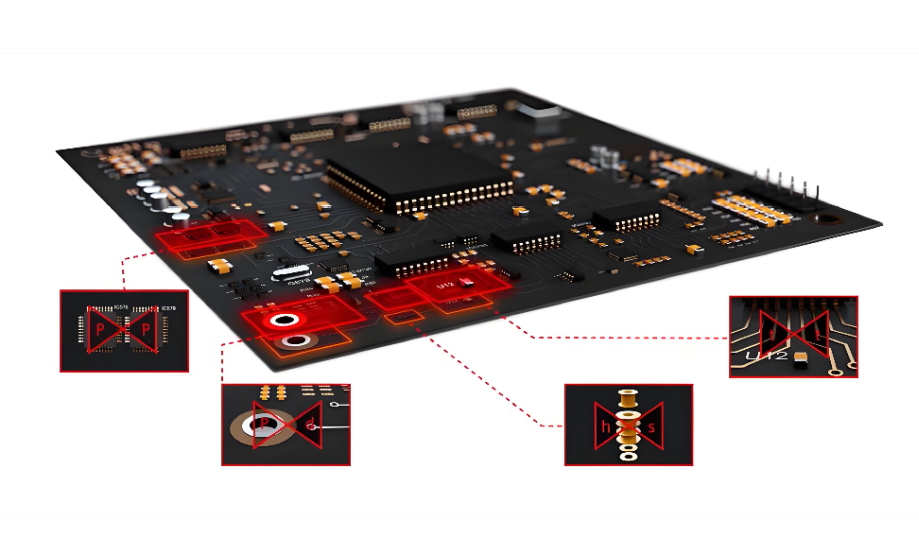
Design Rule Check (DRC)
Types of Design Rule Checking
The core check items in DRC are the geometric parameters that directly impact PCB manufacturability and performance. As an experienced PCB manufacturer, we prioritize these 7 key check categories—they cover 95% of common DRC violations and align with industry standards (IPC-2221, IPC-6012). Each check ensures your layout is compatible with your manufacturer’s equipment and materials, avoiding costly rework. Below are the core DRC check items, with brief explanations of why they matter:
- Trace Width & Spacing: Ensures traces can carry current without overheating and prevents short circuits between adjacent traces. Minimum values depend on current load and manufacturing process.
- Clearance: The minimum distance between conductive features (traces, pads, vias) to prevent arcing, especially in high-voltage designs. Clearance requirements increase with voltage.
- Pad Size & Annular Ring: Ensures pads are large enough for soldering and vias have sufficient copper around the drill hole (annular ring) to avoid delamination or breakage.
- Via Dimensions: Checks drill size, annular ring, and via placement to ensure compatibility with drilling equipment and signal integrity.
- Component Placement: Verifies components are not overlapping, are placed within keepout zones, and have enough space for soldering and assembly.
- Silk Screen Overlap: Prevents silk screen ink from covering pads or vias, which would interfere with soldering.
- Copper Pour & Thermal Relief: Ensures copper pours are properly connected (no unconnected copper) and thermal reliefs are sized to balance heat dissipation and solderability.
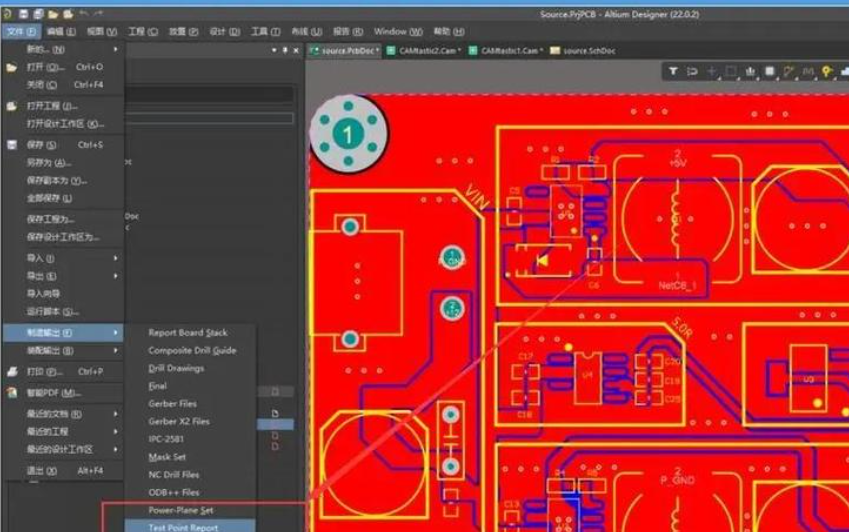
How to Set Up DRC Rules Matching PCB Manufacturer Capabilities?
Setting up DRC rules that match your PCB manufacturer’s capabilities is critical—rules that are too strict will slow down your design, while rules that are too loose will lead to fabrication failures. Below is a step-by-step guide to setting up DRC rules correctly, based on our experience working with 20+ PCB manufacturers:
1. Request the Manufacturer’s Rule Sheet: Every reputable PCB manufacturer provides a DRC rule sheet with their minimum capabilities (e.g., min trace/space, via size). This is your starting point—never guess or use generic rules.
2. Input Core Parameters into Your PCB Design Software: In tools like Altium, KiCad, or Eagle, navigate to the DRC settings and input the manufacturer’s min trace width, spacing, clearance, pad size, and via dimensions. Use the table below as a reference for standard capabilities.
3. Adjust for Design Specifics: If your design includes high voltage (≥2kV), high frequency (≥1GHz), or high current (≥2A), increase relevant rules (e.g., wider traces for high current, larger clearance for high voltage).
4. Set Up Zone Rules: For mixed-signal or high-voltage designs, create zone rules (e.g., a high-voltage zone with 20mil clearance) to apply different rules to specific areas of the PCB.
5. Enable Real-Time & Batch Checks: Turn on real-time DRC to catch violations as you route, and set up batch DRC to run a full check before finalizing your design.
6. Test with a Sample Layout: Run a small test layout (e.g., a simple power supply circuit) through DRC to ensure rules are working correctly—this avoids costly mistakes in your main design.
| PCB Process | Min Trace/Space | Min Via (Drill/Ring) | Min Clearance |
| Standard FR-4 (1–6L) | 6/6mil | 0.3mm/8mil | 8mil |
| High-TG Thin Core | 4/4mil | 0.25mm/7mil | 6mil |
| High-Voltage (≥2kV) | 8/8mil | 0.3mm/10mil | 20–30mil |
What Are the Most Common DRC Violations in PCB Design?
Even experienced PCB engineers encounter DRC violations—but the same 5 violations account for 80% of all issues. Knowing these common violations, their root causes, and quick fixes will save you hours of troubleshooting. From our experience, the most frequent DRC violations are related to clearance, trace width, pad size, via dimensions, and component placement. Below is a detailed breakdown of each, including why they happen and how to fix them fast:
| DRC Violation Type | Root Cause | Quick Fix | Preventive Measure |
| Insufficient Clearance | Using generic clearance rules instead of manufacturer specs; high-voltage areas not marked; accidental trace overlap | Widen spacing to match manufacturer’s min (8mil for standard PCBs); apply zone rules for high-voltage areas (20–30mil); move overlapping traces apart | Set up zone rules early; use real-time DRC during routing |
| Trace Too Narrow | Below manufacturer’s min trace width; undersizing for current load; tight routing in dense areas | Widen trace to ≥4–6mil (standard) or ≥8–12mil (high current); reroute dense areas to avoid narrow traces | Calculate trace width based on current load (use online calculators); leave extra space in dense areas |
| Pad Annular Ring Too Small | Pad diameter undersized for via drill; incorrect pad-via alignment | Enlarge pad to ≥18–22mil for 0.3–0.4mm drill; realign pad and via to ensure full annular ring | Use manufacturer-provided pad-via templates; double-check pad dimensions before routing |
| Via Too Small | Drill/annular ring below manufacturer’s process limits; using microvias without confirming capability | Use ≥0.2mm drill + ≥8mil ring for standard PCBs; switch to larger vias if microvias are not supported | Confirm via capabilities with your manufacturer; avoid microvias for low-cost PCBs |
| Component Collision | Poor component placement; ignoring keepout zones; using incorrect component footprints | Move colliding components apart; adjust keepout zones; replace incorrect footprints with manufacturer-approved ones | Use 3D view to check placement; follow component datasheet footprint guidelines |
How to Quickly Fix DRC Errors Step by Step?
Fixing DRC errors doesn’t have to be a tedious process—with a systematic approach, you can resolve even complex violations in minutes. The key is to prioritize critical errors first (e.g., shorts, open circuits) and use your design software’s built-in tools to speed up troubleshooting.
1. Run a Full Batch DRC: First, run a complete batch DRC to generate a detailed error report. Most PCB software (Altium, KiCad) will list errors by type, location, and severity—this helps you prioritize.
2. Prioritize Critical Errors: Focus on critical errors first: shorts (between traces/pads), open circuits (unconnected copper), and violations that will prevent fabrication (e.g., undersized vias). Non-critical errors (e.g., minor silk overlap) can wait.
3. Use Jump-to-Error Tools: Use your software’s “jump to error” feature to navigate directly to the violation—this saves time vs. searching manually. For example, in Altium, right-click an error and select “Jump to.”
4. Apply Quick Fixes for Common Violations: Use the fixes from the table above for common errors (e.g., widen traces, adjust clearance). For multiple identical errors (e.g., 10 instances of insufficient clearance), use batch edit tools to fix them all at once.
5. Verify Fixes in Real-Time: After fixing an error, enable real-time DRC to confirm it’s resolved. This prevents “fixing” one error and creating another (e.g., widening a trace and causing a new clearance violation).
6. Run a Final Batch DRC: Once all errors are fixed, run another full batch DRC to ensure no violations were missed. If errors remain, repeat the process—focus on root causes (e.g., incorrect rules) instead of band-aid fixes.
Online DRC vs Batch DRC: Which Is Better for Your Design?
Online DRC and Batch DRC are two common check modes, each with pros and cons—choosing the right one depends on your design stage and goals. Online DRC runs in real-time as you route, catching errors immediately, while Batch DRC runs a full check on your entire layout, ideal for final verification. Below is a detailed comparison to help you decide when to use each:
| Check Mode | Speed | Accuracy | Best Use Case | Pros | Cons |
| Online DRC | Real-time (instant) | Medium (catches most common errors) | Routing, component placement, and initial design stages | Catches errors early; saves time on later troubleshooting; easy to fix mistakes immediately | May miss rare or complex violations; can slow down software on large designs |
| Batch DRC | Slower (depends on design size; 1–5 minutes for most PCBs) | Full (catches all violations, including rare ones) | Final sign-off before generating Gerber/ODB++ files; post-routing verification | Comprehensive; generates detailed error reports; ensures no violations are missed | Takes time to run; errors may be harder to fix if left until the end |
Pro Tip: Use online DRC during routing to catch mistakes as you go, then run a batch DRC every 2–3 hours to ensure no errors slip through. For final verification, run batch DRC twice—once after fixing errors, and once before sending files to your manufacturer.
High-Voltage PCB DRC Rules
High-voltage PCBs require larger clearances to prevent arcing and insulation breakdown. The IPC-2221 standard provides guidelines, but you should also consult your manufacturer’s capabilities. Key parameters:
- Clearance: 20–30mil for 2–5kV; 50–100mil for 5–10kV. Increase by 10mil for every additional 1kV above 10kV.
- Trace Width: ≥8–12mil to handle current and reduce resistance. For currents ≥5A, use ≥15mil traces.
- Via Dimensions: ≥0.3mm drill + ≥10mil annular ring. Avoid microvias—use through-hole vias for better insulation.
- Insulation Layer: Use high-TG FR-4 (≥170°C) or polyimide for better insulation. Ensure insulation thickness is ≥0.2mm per kV.

High-Frequency PCB DRC Rules
High-frequency PCBs require tight control over trace geometry to minimize signal loss and crosstalk. Key parameters are based on impedance matching (50Ω, 75Ω) and signal integrity:
- Trace Width & Spacing: Match trace width to impedance (e.g., 50Ω impedance = 5–7mil trace on 0.062” FR-4). Spacing between high-frequency traces should be ≥2× trace width to reduce crosstalk.
- Clearance to Ground Planes: Ensure high-frequency traces are 0.020–0.030” above ground planes to maintain impedance.
- Via Placement: Minimize via count—each via adds parasitic capacitance and inductance. Use blind/buried vias for dense designs, and keep vias at least 50mil apart from high-frequency traces.
- Component Placement: Place high-frequency components (e.g., oscillators, amplifiers) close together to minimize trace length. Avoid placing them near power components to reduce interference.
How to Generate & Read DRC Reports Effectively?
DRC reports are critical for troubleshooting and documentation—they provide a detailed overview of all violations, their locations, and severity. Generating a clear, actionable DRC report saves time and ensures you don’t miss errors, while reading the report effectively helps you prioritize fixes. At EBest Circuit, we use these steps to generate and read DRC reports like a pro:
How to Generate a DRC Report?
1. Run a Full Batch DRC: In your PCB design software, run a complete batch DRC (e.g., Altium: Tools → Design Rule Check; KiCad: Tools → DRC).
2. Customize Report Settings: Select the information to include: error type, location (X/Y coordinates), severity, and description. Most software allows you to filter by error type (e.g., only clearance violations).
3. Export the Report: Export the report to a format that’s easy to share (PDF, CSV, or HTML). PDF is best for documentation, while CSV is useful for sorting and filtering errors.
How to Read a DRC Report Effectively?
1. Sort by Severity: Most reports allow you to sort errors by severity (critical, warning, info). Focus on critical errors first—these are the ones that will prevent fabrication or cause failures.
2. Filter by Error Type: Group errors by type (e.g., clearance, trace width) to fix similar errors in batches. This saves time vs. fixing errors one by one.
3. Use Location Data: Use the X/Y coordinates in the report to jump directly to the violation in your design software. This eliminates manual searching.
4. Document Fixes: Keep a log of which errors were fixed, how they were fixed, and who fixed them. This is useful for future designs and quality control.
Pro Tip: For large designs, generate a “before and after” DRC report—one before fixing errors, and one after. This confirms all violations were resolved and provides documentation for your manufacturer.
DRC vs ERC vs LVS: What’s the Difference?
DRC, ERC (Electrical Rule Check), and LVS (Layout vs Schematic) are three critical verification processes in PCB design—but they serve different purposes. Many engineers confuse them, leading to incomplete verification and costly mistakes. Below is a clear comparison of DRC, ERC, and LVS, including their purpose, what they check, and when to use each:
| Verification Type | Purpose | What It Checks | When to Use | Key Benefit |
| Design Rule Check (DRC) | Ensure PCB layout is manufacturable | Geometric parameters: trace width, spacing, clearance, pad size, via dimensions, component placement | During routing, post-routing, and before Gerber generation | Prevents fabrication defects and rework |
| Electrical Rule Check (ERC) | Ensure PCB has no electrical errors | Electrical connections: unconnected nets, short circuits, incorrect pin connections, missing pull-up/down resistors | After schematic design and before layout | Catches electrical mistakes that DRC misses (e.g., unconnected power nets) |
| Layout vs Schematic (LVS) | Ensure layout matches the schematic | Net connections: verify that every trace in the layout connects to the correct component pins as per the schematic | After layout and DRC, before final sign-off | Prevents functional failures (e.g., a trace connected to the wrong pin) |
Critical Note: DRC alone is not enough—always run ERC before layout and LVS after layout to ensure your PCB is both manufacturable and functional. We’ve seen designs pass DRC but fail LVS, leading to non-functional prototypes and costly rework.
FAQs
Q: What is Design Rule Check in PCB?
A: Design Rule Check (DRC) is a software-driven verification process that validates PCB layout parameters (trace width, spacing, clearance, pad size, via dimensions, etc.) against pre-defined manufacturing rules. It catches geometric defects early, ensuring your PCB is fabricable and free of costly errors.
Q: What happens if you ignore DRC violations?
A: Ignoring DRC violations leads to fabrication failures (e.g., shorts, open circuits), failed prototypes, and rework costs that are 3–10× higher than fixing issues during design. In worst cases, it can lead to field failures, product recalls, and safety hazards (especially for high-voltage PCBs).
Q: How to set up DRC rules for PCB design?
A: Start with your manufacturer’s DRC rule sheet (min trace/space, via size, etc.), input these parameters into your PCB design software, adjust for your design’s specific needs (e.g., high voltage, high frequency), set up zone rules for mixed-signal designs, and test with a sample layout.
Q: What are typical DRC errors?
A: The most common DRC errors are insufficient clearance, trace too narrow, pad annular ring too small, via too small, component collision, silk screen overlap, and unconnected copper. These errors account for 80% of all DRC violations.
Q: Can DRC find all PCB manufacturing issues?
A: No—DRC only catches geometric violations. It does not find schematic-layout mismatch (that’s LVS) or electrical issues (that’s ERC). To ensure a fully manufacturable, functional PCB, you need to run DRC, ERC, and LVS.
Q: How often should I run DRC in PCB design?
A: Run real-time DRC during routing to catch errors as you go, and run a full batch DRC every 2–3 hours to ensure no errors slip through. For final verification, run batch DRC twice—once after fixing errors, and once before sending files to your manufacturer.
Q: How to fix DRC errors in dense PCB layouts?
A: For dense layouts, use smaller vias (if your manufacturer supports them), reroute traces to use available space, apply zone rules to prioritize critical traces, and use batch edit tools to fix multiple identical errors. If necessary, consider a multi-layer PCB to increase routing space.
You may also like







Tags: design rule check, design rule check in pcb, design rule checks