PCB manufacturing PCB manufacturing
Home > Blog

Mouse Bites PCB Guide: Dimensions, V-Cut Comparison, and Design Tips

April 29th, 2026

What Are Mouse Bites in PCB?

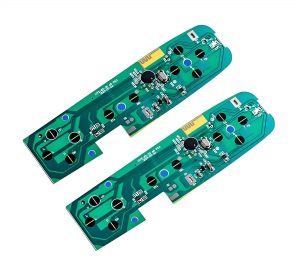
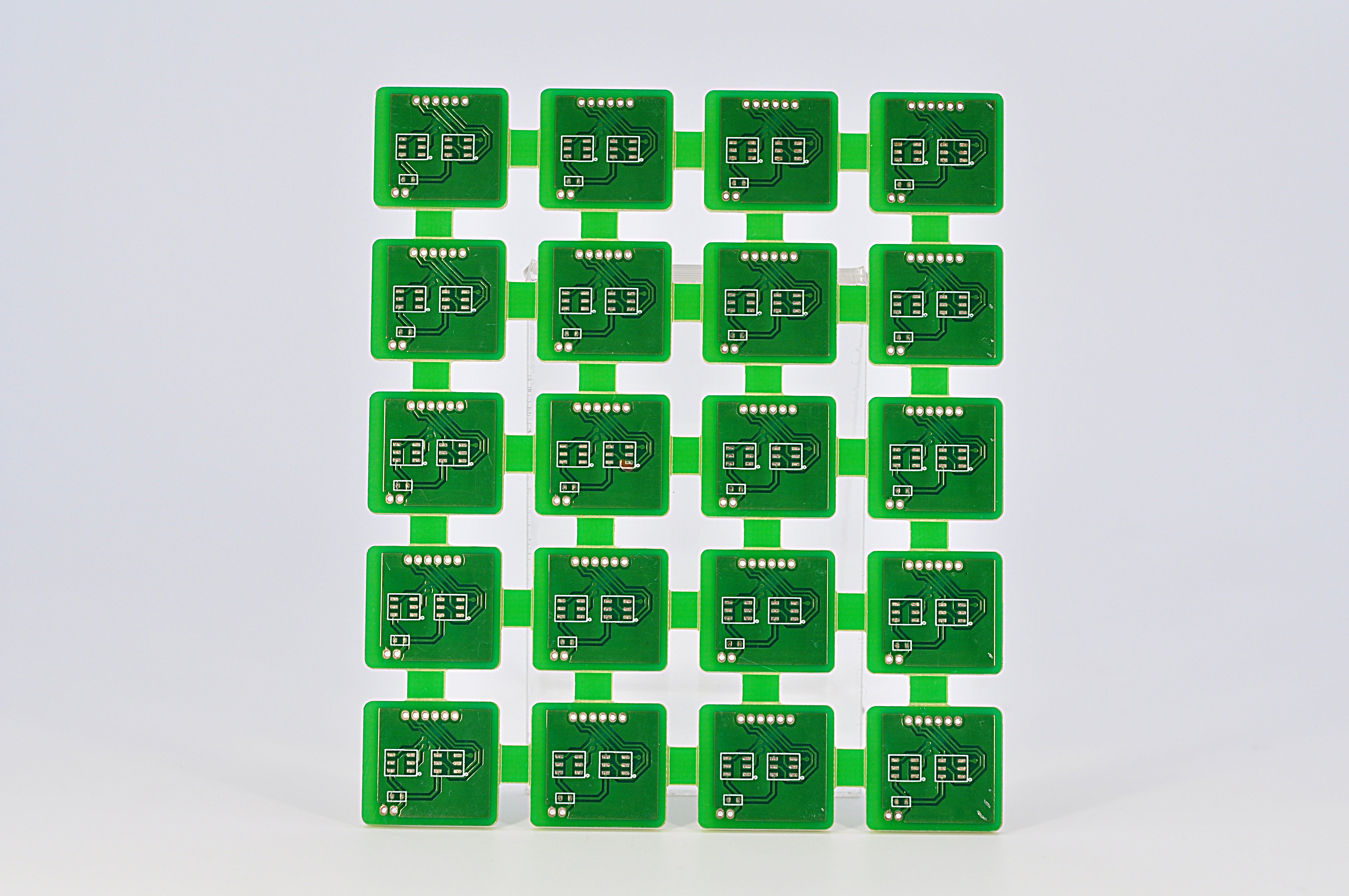
Mouse bites PCB refers to a PCB panelization method that uses small drilled holes on breakaway tabs to connect individual circuit boards inside a larger production panel. These small holes weaken the tab area, so the board can be separated more easily after fabrication, SMT assembly, inspection, or testing.

They are also called stamp holes, perforated tabs, breakaway holes, or PCB mouse bites. The name comes from the small semicircular marks left on the board edge after depaneling, which look similar to tiny bite marks.

In PCB manufacturing, most small boards are not always produced one by one. They are often placed into a larger panel to improve handling, assembly efficiency, and production stability. Mouse bites help keep each board connected during manufacturing while still allowing easy separation at the end.

This method is especially useful for:

  • Small PCB boards
  • Irregular-shaped PCBs
  • Round or curved PCB outlines
  • Boards with complex routing profiles
  • PCBs that cannot use straight V-cut lines
  • PCB panels that need strong temporary support during SMT assembly

For many projects, mouse bites are not just a small mechanical detail. They affect panel strength, edge quality, assembly stability, final appearance, and even product fit inside an enclosure.

Mouse Bites PCB Guide: Dimensions, V-Cut Comparison, and Design Tips

Why Are Mouse Bites Used in PCB Panelization?

Mouse bites are used because they allow several individual PCBs to stay connected in one larger panel during manufacturing and assembly. This improves production efficiency, protects small boards from handling damage, and makes SMT assembly more stable.

Main reasons to use mouse bites include:

  • They support small boards during automated assembly.
  • They allow irregular PCB shapes to be panelized.
  • They provide controlled breakaway points.
  • They help reduce manual handling during production.
  • They allow panel rails to be added for SMT machines.
  • They are suitable when V-cut is not possible.

For example, if a PCB has a round shape, a curved edge, or a special mechanical outline, V-cut may not work because V-cut requires straight lines. In this case, tab routing with mouse bites is often a better choice.

How Do PCB Mouse Bites Work?

PCB mouse bites work by placing a row of small drilled holes through a breakaway tab. The tab holds the board in the production panel, while the holes reduce the mechanical strength of that tab. After assembly, the board can be snapped out along the weakened perforated area.

The process usually works like this:

How Do PCB Mouse Bites Work?

It looks easy, but it should pay much attention during the drilling process. If the holes are too large, the panel may become weak. If the holes are too small or too few, depaneling may become difficult. If the tab is placed near a connector, enclosure edge, or fragile component, separation stress may affect the final product.

A good mouse bite design balances three things:

  • Panel strength during manufacturing
  • Easy separation after assembly
  • Acceptable board edge quality after depaneling

What Are the Standard Mouse Bites PCB Dimensions?

There is no single universal mouse bites PCB standard, because the best dimensions depend on board thickness, material, outline shape, component placement, panel size, and depaneling method. However, many PCB projects use small holes around 0.5 mm to 0.8 mm in diameter, with controlled spacing between holes.

What Are the Standard Mouse Bites PCB Dimensions?

The table below gives practical reference values commonly used in PCB panelization.

Design ItemCommon Reference RangePractical Design Note
Mouse bite hole diameter0.5–0.8 mmSmaller holes usually leave finer edge marks, but may require more holes
Hole spacing0.25–0.5 mm edge-to-edgeToo close may weaken the tab too much
Holes per tab4–8 holesDepends on tab width and board size
Tab width2–5 mmWider tabs improve panel strength but may need more cleanup
Tab quantity per board2–6 tabsLarger or heavier boards need more balanced support
Distance from componentsPreferably 2–3 mm or moreKeep away from brittle parts and solder joints
Board thickness consideration0.8–2.0 mm common rangeThicker boards may need adjusted tab design

A practical example:
For a small 1.6 mm FR4 PCB, a designer may use 0.5 mm mouse bite holes, 5 or 6 holes per tab, and 2 to 4 tabs around the board. If the board has connectors on one side, the tabs should be placed away from that connector edge to protect the mechanical fit.

The safest approach is to provide the PCB supplier with the mechanical requirements, especially if the board edge must fit into a plastic housing, guide rail, slot, or metal enclosure.

Mouse Bites vs V-Cut: Which PCB Depaneling Method Is Better?

Mouse bites are better for irregular-shaped, small, or routed PCB designs, while V-cut is usually better for rectangular boards with straight separation lines. The best choice depends on board shape, edge quality requirement, assembly method, and production volume.

V-cut, also called V-score, creates a straight groove on both sides of the PCB panel. The board is later separated along that scored line. It is efficient and clean for simple rectangular arrays. However, it does not work well for curved outlines or complex board shapes.

Mouse bites use routed outlines and perforated tabs, so they are much more flexible for non-rectangular PCB designs.

When Should You Choose Mouse Bites for PCB Panels?

You should choose mouse bites when the PCB shape is not suitable for V-cut, when the board is small and needs support during assembly, or when the panel requires routed outlines with controlled breakaway tabs.

Mouse bites are commonly used when the PCB has:

  • Irregular board outline
  • Round or curved edges
  • Small individual unit size
  • Complex mechanical profile
  • Nonlinear separation path
  • Panel rails for SMT assembly
  • Areas where V-cut cannot pass through
  • Connectors or shapes that break a straight-line panel layout

For example, many wearable devices, sensor modules, LED control boards, communication modules, and compact IoT products use non-standard board outlines. These designs often benefit from mouse bite panelization.

However, mouse bites should be used carefully if the PCB edge is part of the final product appearance. If the board will be visible to the user, inserted into a tight enclosure, or mounted along a precise mechanical edge, the tab position should be reviewed early.

If the product requires a very smooth edge, mouse bites can still be used, but the board may need sanding, trimming, or secondary routing after separation.

Where Should Mouse Bites Be Placed on a PCB?

Mouse bites should be placed on non-critical board edges, away from connectors, mounting features, fragile components, test points, and enclosure-fitting surfaces. Their position should support the panel during assembly while reducing stress during depaneling.

Placement is often more important than hole size. A technically correct mouse bite pattern can still cause problems if it is placed in the wrong area.

Where Should Mouse Bites Be Placed on a PCB?

Better locations include:

  • Non-visible edges
  • Non-mating edges
  • Areas without tight mechanical tolerance
  • Edges away from connectors
  • Areas with enough clearance from components
  • Symmetrical positions around the board

Avoid placing mouse bites near:

  • USB connectors
  • Board-to-board connectors
  • RF connectors
  • Mounting holes
  • Snap-fit housing edges
  • Gold fingers
  • Antenna keep-out areas
  • Ceramic capacitors close to the edge
  • BGA or fine-pitch ICs near the tab area
  • Test pads or fixture contact points

If a board has only one suitable edge for tabs, the panel design may need extra support rails. For larger boards, tabs should be distributed evenly to avoid twisting during reflow or depaneling.

What Problems Can Poor Mouse Bite Design Cause?

Poor mouse bite design can cause rough board edges, difficult depaneling, cracked corners, damaged solder joints, weak panels, SMT instability, and mechanical interference during final assembly.

Most mouse bite problems are preventable. They usually come from poor tab position, incorrect hole size, too few tabs, too many holes, or lack of communication between PCB design and manufacturing.

ProblemPossible CauseBetter Design Practice
Rough edge after separationHoles too large or tab placed on visible edgeMove tabs to non-critical edges or use cleanup routing
Board crackingTab too strong or too close to board cornerAdjust tab width and add clearance
Difficult depanelingToo few holes or holes too smallIncrease hole count or optimize spacing
Weak panel during SMTToo many holes or narrow tabsStrengthen tabs or add support rails
Component damageTab placed near fragile componentsMove tabs away from sensitive parts
Housing interferenceMouse bite burrs on fitting edgeAvoid tabs on enclosure-contact surfaces
Poor cosmetic appearanceTabs placed on visible edgePlace tabs on hidden or internal edges
Test fixture conflictTab blocks test accessReview test point and fixture layout early

The most common issue is edge roughness. Mouse bites naturally leave small marks because the board breaks along drilled perforations. This does not always affect electrical performance, but it can affect appearance, handling, and mechanical fit.

For consumer-facing products, medical device housings, handheld electronics, or precision-mounted assemblies, the edge requirement should be defined clearly before fabrication.

How Do Mouse Bites Affect PCB Assembly and Testing?

Mouse bites affect PCB assembly by controlling panel strength, board stability, depaneling stress, and handling efficiency. A good mouse bite layout helps the panel move smoothly through solder paste printing, pick-and-place, reflow soldering, AOI, X-ray inspection, ICT, and functional testing.

During SMT assembly, the PCB panel must stay flat and stable. If the tabs are too weak, the board may vibrate or move during handling. If the tabs are too strong, separation after assembly may require excessive force.

This is especially important for boards with:

  • Fine-pitch ICs
  • BGA packages
  • Ceramic capacitors
  • Tall connectors
  • Heavy components
  • Thin PCB materials
  • Edge-mounted components
  • High-density layouts

For assembled PCBs, depaneling should be done carefully. Snapping boards by hand may work for simple prototypes, but it can create mechanical stress on solder joints and components. For higher-value assemblies, controlled depaneling tools are safer.

How Do Mouse Bites Affect PCB Assembly and Testing?

How Can You Reduce Burrs After PCB Mouse Bite Depaneling?

You can reduce burrs after mouse bite depaneling by optimizing hole diameter, hole spacing, tab width, tab location, and post-processing method. The best strategy is to place mouse bites on non-critical edges and avoid using them on surfaces that require a smooth mechanical fit.

Mouse bite marks cannot always be completely avoided, but they can be controlled.

Practical ways to reduce burrs include:

  • Use smaller mouse bite holes when suitable.
  • Keep hole spacing consistent.
  • Avoid placing tabs on visible product edges.
  • Place the hole row closer to the waste side when possible.
  • Use proper depaneling tools instead of twisting the board by hand.
  • Add sanding or trimming after separation.
  • Use secondary routing for high-precision edges.
  • Choose V-cut if the board is rectangular and needs cleaner straight edges.

For boards that fit into housings, the safest approach is to mark the critical edges in the fabrication notes. A simple note such as “No mouse bites on enclosure-fitting edges” can prevent many mechanical problems.

How to Prepare Mouse Bites PCB Files for Manufacturing?

To prepare mouse bites PCB files for manufacturing, provide complete panelization details, board outline data, tab locations, hole sizes, rail requirements, tooling holes, fiducial marks, and any special edge-quality requirements.

Many PCB issues come from incomplete fabrication notes. A manufacturer can create panelization based on standard rules, but they may not know which edge is cosmetic, which edge fits into a housing, or which area must avoid mechanical stress.

Recommended file information includes:

  • Gerber files or ODB++ files
  • Board outline layer
  • Mechanical drawing or DXF file
  • PCB thickness
  • Surface finish requirement
  • Single board size
  • Finished panel size if required
  • Mouse bite tab locations
  • Hole diameter and hole spacing if specified
  • SMT rail width
  • Tooling holes
  • Fiducial mark positions
  • V-cut or routing instructions
  • Critical edge notes
  • Component keep-out areas near tabs
  • Test fixture requirements

For PCB assembly projects, panel design should be confirmed before SMT production. Once components are mounted, changing tab positions becomes much more difficult.

How to Choose the Right PCB Supplier for Mouse Bite Panelization?

Choose a PCB supplier that can review your panelization design, check mouse bite placement, understand SMT assembly requirements, and provide practical DFM feedback before production. Mouse bites look simple, but they affect both fabrication and assembly quality.

A reliable supplier should not only drill the holes. They should help confirm whether the tab locations are safe, whether the panel is strong enough, and whether the edge quality matches the final product requirement.

EBest PCB supports PCB fabrication, PCB panelization review, PCBA assembly, component sourcing, testing, and engineering support for prototype and production projects. If your design uses mouse bites, V-cut, routing, or special panel rails, sharing the mechanical requirements early can help improve manufacturing stability and final board quality.

FAQs About Mouse Bites PCB

1. What are mouse bites in PCB?

Mouse bites in PCB are small drilled holes placed on breakaway tabs in a PCB panel. They are commonly used in tab-routing panelization, especially for small or irregular-shaped PCBs. After depaneling, the remaining edge may show small rough marks where the tab was broken away.

2. Are mouse bites the same as stamp holes?

Yes. In many PCB manufacturing discussions, mouse bites are also called stamp holes, perforated holes, breakaway holes, or tab holes.

3. Do mouse bites leave rough PCB edges?

Yes, mouse bites can leave small burrs or serrated marks after the PCB is separated from the panel. This is normal because the board breaks along the perforated tab area.

4. What is the typical mouse bite hole size?

A common mouse bite hole size is around 0.5 mm to 0.8 mm in diameter. The exact size depends on PCB thickness, material, tab width, panel strength, and the supplier’s process capability.

5. Is mouse bite better than V-cut?

Mouse bite is better for irregular-shaped, round, small, or routed PCBs. V-cut is usually better for rectangular boards that can be separated along straight lines.

6. Can mouse bites be used for assembled PCBs?

Yes. Mouse bites are widely used for PCBs that go through SMT assembly in panel form. They help keep the boards connected and stable during production.

However, the tabs should be placed away from fragile components, connectors, test points, and precision mechanical edges. After assembly, controlled depaneling is preferred to reduce stress on solder joints and components.

7. How many mouse bite tabs does a PCB need?

The number of tabs depends on board size, shape, thickness, and assembly requirements. Small boards may use two to four tabs, while larger or heavier boards may need more support points.

Can mouse bites affect PCB cost?

Yes, mouse bites can affect PCB cost slightly because they usually require routing, drilled perforations, and more detailed panelization work. However, they can also improve assembly efficiency for small or irregular boards.

For simple rectangular boards, V-cut may be more cost-efficient. For complex shapes, mouse bites often provide better manufacturability and handling stability.

Conclusion

Mouse bites PCB is a practical panelization method for small, irregular, and routed circuit boards. It uses small drilled holes on breakaway tabs to hold PCBs in a manufacturing panel and make separation easier after fabrication or assembly.

The key to good mouse bite design is balance. The panel must be strong enough for SMT assembly, but the tabs must also be easy to remove without damaging the board. Hole size, hole spacing, tab width, tab quantity, and tab location all influence the final result.

For most projects, mouse bites are a strong choice when V-cut is not suitable. They offer flexibility, support complex PCB outlines, and help improve production handling. Still, designers should pay attention to edge quality, component clearance, enclosure fit, and depaneling stress.

If your PCB requires mouse bites, V-cut, routing, special panel rails, or PCBA assembly support, EBest PCB can help review the design before production and provide practical manufacturing suggestions.

For PCB fabrication and assembly inquiries, contact: sales@bestpcbs.com.

You may also like

Standard PCB Board Thickness: Complete Guide for 2-Layer, 4-Layer and 6-Layer PCBs

April 28th, 2026

Standard PCB board thickness is commonly 1.6mm, also written as 1.57mm or 0.062 inch. This thickness is widely used for 2-layer, 4-layer, and many 6-layer FR4 PCBs because it provides a practical balance of mechanical strength, assembly compatibility, cost, and manufacturability.

However, PCB thickness can also range from 0.2mm to 3.2mm or more depending on product size, layer count, copper weight, impedance control, connector fit, and application requirements. For example, a wearable device may use a 0.6mm PCB, while an industrial power control board may use 2.0mm or 2.4mm for better rigidity.

Standard PCB Board Thickness: Complete Guide for 2-Layer, 4-Layer and 6-Layer PCBs

What Is the Standard PCB Board Thickness?

The standard PCB board thickness is usually 1.6mm, or about 0.062 inch. This is the most common finished thickness for rigid FR4 printed circuit boards used in industrial electronics, consumer products, control boards, communication devices, and general electronic assemblies.

In PCB manufacturing, “standard” does not mean every PCB must use this thickness. It means this value is widely available, easy to produce, compatible with many assembly processes, and accepted by most enclosure and connector designs.

Common PCB thickness options include:

PCB ThicknessInch EquivalentCommon Use
0.2mm0.008 inchUltra-thin rigid PCB, special compact devices
0.4mm0.016 inchThin electronics, compact modules
0.6mm0.024 inchSmall consumer devices, handheld products
0.8mm0.031 inchCompact control boards, plug-in modules
1.0mm0.039 inchSpace-limited electronics
1.2mm0.047 inchMedium-thin boards with better rigidity
1.6mm0.062 inchMost common standard PCB thickness
2.0mm0.079 inchIndustrial control, stronger mechanical demand
2.4mm0.094 inchHigh-strength PCB, larger boards
3.2mm0.126 inchHeavy-duty power boards, backplanes

For most standard FR4 boards, 1.6mm is a safe starting point. It is thick enough to resist bending in normal use, yet not so thick that it increases cost unnecessarily. It also works well with standard SMT assembly, through-hole components, mechanical supports, and many types of connectors.

Still, the best thickness should always match the product structure. A PCB for a small sensor cannot be selected the same way as a PCB for an inverter, a battery charger, or an automotive control module.

Why Is 1.6mm Considered the Standard PCB Thickness?

1.6mm became the most common PCB thickness because it offers a strong balance between strength, cost, and manufacturing convenience. It is thick enough for stable handling during fabrication and assembly, while still being economical for mass production.

For many engineers, 1.6mm is the default thickness unless there is a clear reason to change it.

You may keep 1.6mm when:

  • The PCB is a normal 2-layer or 4-layer FR4 board.
  • There is no strict enclosure height limit.
  • The board needs general mechanical strength.
  • The design uses common connectors or terminals.
  • The project is cost-sensitive.
  • There is no unusual impedance, bending, or thermal requirement.

You may choose another thickness when:

  • The product must be very thin.
  • The board must fit a special card-edge connector.
  • The enclosure has tight mechanical limits.
  • The PCB is large and needs more rigidity.
  • The circuit carries higher current.
  • The design needs a special impedance stackup.
  • The PCB is used in automotive, aerospace, medical, or harsh industrial environments.

So, 1.6mm is not a rule. It is a practical default.

How Thick Is a PCB Board in Common Applications?

A PCB board can be as thin as 0.2mm or thicker than 3.2mm, depending on its application. The most common thickness for a general rigid PCB is 1.6mm, but thinner boards are popular in compact electronics, and thicker boards are used where strength, current capacity, or mechanical stability is important.

ApplicationCommon PCB ThicknessEngineering Reason
Wearable electronics0.4–0.8mmLightweight structure and thin product profile
Mobile accessories0.6–1.0mmCompact enclosure and lower weight
IoT sensor boards0.8–1.2mmSmall size with moderate rigidity
Consumer electronics1.0–1.6mmCost, strength, and assembly balance
Standard FR4 control board1.6mmMost common and economical option
LED control PCB1.0–1.6mmDepends on housing and current demand
Industrial control PCB1.6–2.0mmBetter strength and connector support
Power supply PCB1.6–2.4mmHigher current, larger components, better stability
Automotive electronics1.6–2.0mmVibration resistance and long-term durability
Backplane PCB2.4mm or thickerConnector force and structural support

For most projects, thickness selection starts with the mechanical design. The engineer should check the enclosure height, screw position, connector slot, component height, and assembly method first. After that, the electrical and thermal requirements should be reviewed.

A thin PCB can save space, but it may warp more easily during assembly. A thicker PCB improves rigidity, but it may increase cost and may not fit some connectors. A good PCB thickness decision balances both sides.

How Thick Is a PCB Board in Common Applications?

Standard PCB Thickness for 2-Layer Boards

The standard PCB thickness for a 2-layer board is usually 1.6mm. This is the most common choice for general FR4 double-sided PCBs used in control circuits, LED products, power adapters, small instruments, test boards, and electronic modules.

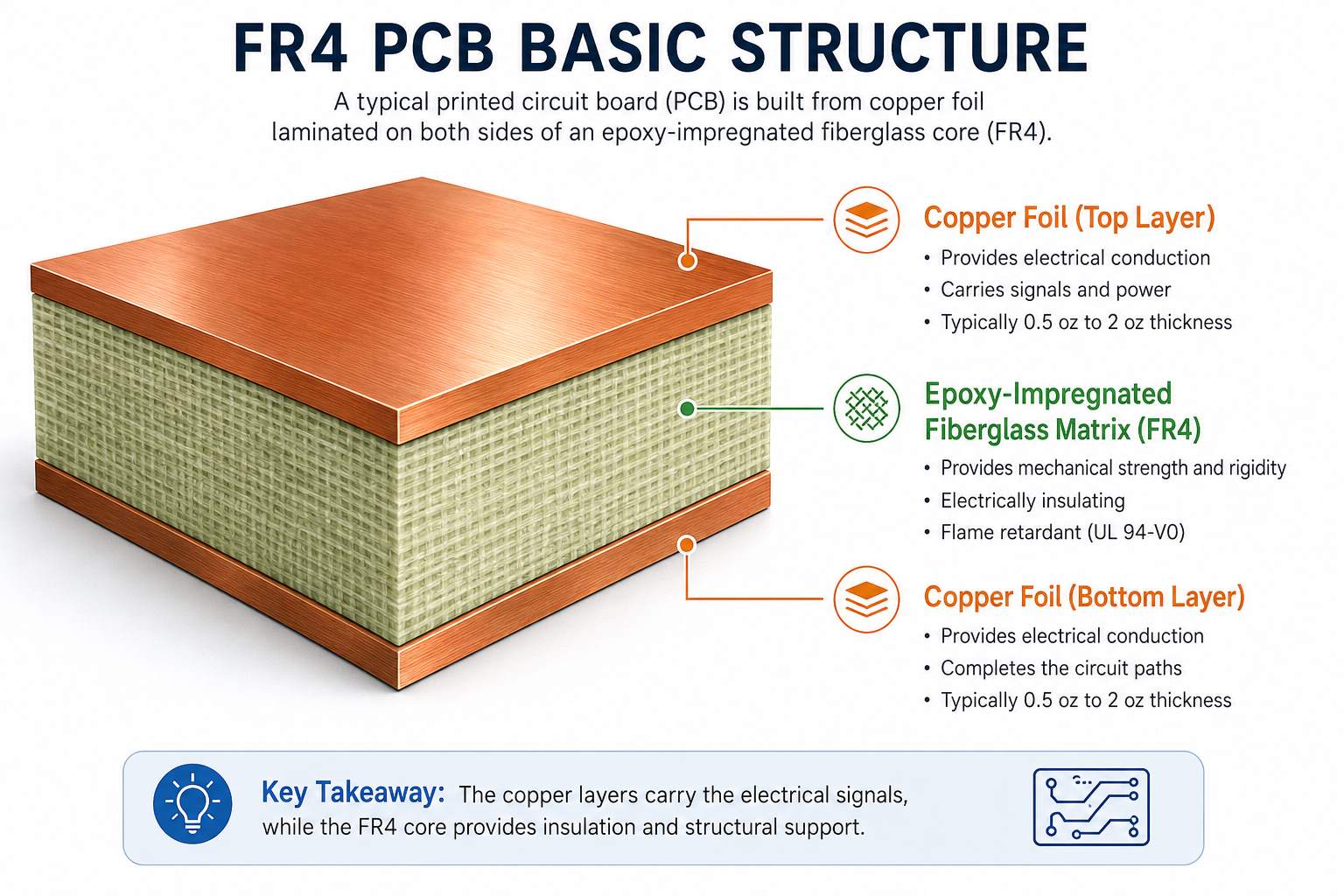
A 2-layer PCB has copper on the top and bottom layers. The base material between them is usually FR4 core. Because the structure is simpler than a multilayer PCB, 2-layer boards are easier to manufacture and usually offer more flexible thickness choices.

Common 2-layer PCB thickness options include:

2-Layer PCB ThicknessTypical Use
0.4mmVery thin electronics, compact module boards
0.6mmSmall devices with limited space
0.8mmPlug-in modules, small control boards
1.0mmCompact products with better rigidity
1.2mmMedium-thin boards
1.6mmStandard 2-layer PCB thickness
2.0mmStronger industrial or power boards
2.4mm+Special mechanical or high-strength designs

For most 2-layer PCB designs, 1.6mm works well. It gives enough stiffness for manual handling, soldering, connector insertion, and screw mounting. It also helps reduce bending during wave soldering or reflow soldering.

However, if the board is part of a small product, such as a handheld sensor, remote controller, or compact communication module, 0.8mm or 1.0mm may be more suitable. If the board carries large terminals, relays, or heavy components, 2.0mm may be a stronger option.

The main point is simple: 2-layer does not automatically mean 1.6mm. The product structure decides the best thickness.

Standard PCB Thickness for 4-Layer Boards

The standard PCB thickness for a 4-layer board is also commonly 1.6mm. Many 4-layer FR4 PCBs use 1.6mm because it supports a stable stackup, good mechanical strength, and practical cost control.

A 4-layer PCB usually has two outer copper layers and two inner copper layers. A common stackup may include:

  • Top signal layer
  • Inner ground layer
  • Inner power layer
  • Bottom signal layer

This structure improves routing density, EMI control, power distribution, and signal return path compared with a 2-layer board.

For 4-layer PCB thickness, the final value depends on:

  • Core thickness
  • Prepreg thickness
  • Copper weight
  • Inner layer copper
  • Outer layer copper plating
  • Solder mask thickness
  • Surface finish
  • Lamination pressure
  • Impedance requirements

This is why 4-layer PCB thickness should not be selected only by habit. If the board has USB, Ethernet, RF, DDR, LVDS, HDMI, or other high-speed signals, the stackup should be checked before production. In these cases, dielectric thickness between signal and reference plane may be more important than the total board thickness.

4-Layer PCB ThicknessSuitable Situation
0.8mmCompact electronics with controlled stackup
1.0mmThin multilayer modules
1.2mmSmaller boards with moderate rigidity
1.6mmMost common standard 4-layer PCB
2.0mmStronger board or special structure
2.4mmLarger PCB, connector-heavy design

For standard digital control boards, 1.6mm is usually practical. For compact devices, 1.0mm or 1.2mm may be better. For high-speed boards, the manufacturer should provide a stackup before fabrication.

Standard PCB Thickness for 6-Layer Boards

The standard PCB thickness for a 6-layer board is often 1.6mm, but 1.2mm, 2.0mm, and other custom thicknesses are also common depending on the design. A 6-layer PCB has more internal copper layers, so stackup planning becomes more important.

A 6-layer PCB may include signal layers, ground planes, power planes, and controlled impedance routing layers. Because more layers must fit into the same finished thickness, the manufacturer needs to carefully select core and prepreg materials.

A typical 6-layer board may use:

  • Top signal layer
  • Ground plane
  • Inner signal layer
  • Inner signal or power layer
  • Power or ground plane
  • Bottom signal layer

In many designs, the board can still be manufactured at 1.6mm. But the dielectric spacing, copper distribution, and lamination balance must be reviewed carefully. Poor layer balance may increase the risk of warpage, especially on larger boards.

What Is the Standard PCB Thickness for 6-Layer Boards?

What Is the Standard Thickness and Weight of a Copper Layer on a PCB?

The standard copper thickness on a PCB is often 1 oz copper, which is about 35ÎŒm or 1.37 mil thick. Copper weight describes the copper thickness, not the total PCB thickness.

This is a common area of confusion. A 1.6mm PCB with 1 oz copper does not mean the whole board has 1 oz thickness. It means each specified copper layer uses copper foil with a weight of one ounce per square foot, which corresponds to around 35ÎŒm thickness before considering final plating effects.

What Is the Standard Thickness and Weight of a Copper Layer on a PCB?

Common PCB copper weights include:

Copper WeightApprox. Copper ThicknessTypical Application
0.5 oz17–18ÎŒmFine traces, compact signal boards
1 oz35ÎŒm / 1.37 milStandard PCB copper thickness
2 oz70ÎŒm / 2.8 milPower circuits, higher current paths
3 oz105ÎŒmHeavy copper PCB, motor control
4 oz+140ÎŒm+High-current and thermal applications

Copper weight affects current capacity, trace width, etching accuracy, thermal behavior, and cost. A board with thicker copper can carry more current, but it also requires wider spacing and more careful manufacturing control.

For example, a power supply PCB may use 2 oz copper to handle higher current. A fine-pitch signal board may use 0.5 oz or 1 oz copper to support narrow traces and small spacing. A heavy copper PCB may use 3 oz or more for power conversion, battery systems, industrial equipment, and motor drives.

For multilayer PCBs, inner copper and outer copper may also be different. Outer layers usually gain additional copper thickness during plating, while inner layers remain closer to the original copper foil thickness. This should be considered when calculating current capacity and impedance.

How Does PCB Thickness Tolerance Affect Your Design?

PCB thickness tolerance is the allowed difference between the specified board thickness and the actual finished thickness. For example, a PCB ordered as 1.6mm may not measure exactly 1.600mm after fabrication. A reasonable manufacturing tolerance must be expected.

Thickness tolerance matters because PCB fabrication includes lamination, copper plating, solder mask coating, surface finish, and final routing. These processes all introduce small variations.

For ordinary control boards, standard tolerance is often acceptable. For card-edge products, backplanes, connectors, press-fit assemblies, or controlled-impedance boards, the tolerance should be defined clearly in the drawing or fabrication notes.

For example:

Finished PCB thickness: 1.6mm ±10%, FR4, 1 oz outer copper, ENIG surface finish, impedance control required.

How Do You Choose the Right PCB Thickness for Your Project?

To choose the right PCB thickness, start with mechanical requirements first, then review electrical, thermal, and manufacturing needs. A good PCB thickness should fit the product, support the components, meet electrical performance, and remain manufacturable at a reasonable cost.

Here is a practical selection guide:

Design RequirementRecommended Direction
General FR4 control boardUse 1.6mm
Cost-sensitive prototypeUse standard 1.6mm when possible
Compact enclosureConsider 0.8mm, 1.0mm, or 1.2mm
Wearable or lightweight productConsider 0.4mm to 0.8mm
Large PCB areaUse 1.6mm or thicker to reduce bending
Heavy componentsConsider 2.0mm or stronger mechanical support
High-current circuitFocus on copper weight and trace width
High-speed signal designConfirm impedance stackup before fabrication
Card-edge connectorMatch the connector thickness requirement
Industrial environmentConsider 1.6mm, 2.0mm, or thicker
Automotive applicationCheck vibration, thermal, and reliability needs
Backplane PCBConsider 2.4mm or thicker

A simple rule can help:

  • Use 1.6mm for standard designs.
  • Use 0.8mm–1.2mm for compact electronics.
  • Use 2.0mm or thicker for high-strength or heavy-component boards.
  • Use a custom stackup when impedance, RF, thermal, or mechanical requirements are strict.

Thickness should also be discussed early with the PCB manufacturer. If the design uses special materials, controlled impedance, buried vias, blind vias, heavy copper, or HDI structures, the stackup should be confirmed before layout is finalized.

How Do You Choose the Right PCB Thickness for Your Project?

Can a PCB Thickness Calculator Give the Final Board Thickness?

A PCB thickness calculator can provide a useful estimate, but it cannot always give the final finished PCB thickness. Final thickness depends on actual laminate materials, prepreg flow, copper thickness, lamination pressure, solder mask, plating, surface finish, and manufacturing tolerance.

A calculator is helpful when you need early-stage estimation. For example, it can help you understand how core thickness, prepreg thickness, and copper layers may build up into the final board thickness. It can also support early stackup planning for 4-layer or 6-layer PCBs.

However, a calculator should not replace the manufacturer’s stackup confirmation.

This is especially true for:

  • Impedance-controlled PCB
  • High-speed digital PCB
  • RF PCB
  • HDI PCB
  • Heavy copper PCB
  • Rigid-flex PCB
  • Automotive PCB
  • Medical electronics PCB
  • Aerospace PCB

For standard 2-layer FR4 boards, the thickness is usually easier to predict. For multilayer boards, the actual lamination result is more complex. Prepreg may compress during lamination, resin may flow into copper gaps, and copper distribution may influence final thickness.

The safest process is:

  1. Choose a target finished thickness.
  2. Define copper weight.
  3. Define layer count.
  4. Share impedance requirements if any.
  5. Ask the PCB manufacturer to provide a stackup.
  6. Review the stackup before final layout.
  7. Confirm tolerance before mass production.

A PCB thickness calculator is a planning tool. The approved manufacturing stackup is the production reference.

What PCB Board Sizes and Thicknesses Are Commonly Available?

Standard PCB board sizes do not mean every PCB has one fixed size. In PCB manufacturing, board size is usually customized according to the customer’s Gerber files. What manufacturers often standardize are material panel sizes, laminate thicknesses, copper weights, and production capability ranges.

For most FR4 PCBs, common finished thicknesses include:

Common Finished ThicknessTypical Availability
0.4mmAvailable for thin rigid PCB
0.6mmCommon for compact products
0.8mmCommon for small modules
1.0mmCommon for thin electronic products
1.2mmCommon for medium-thin PCB
1.6mmMost standard PCB board thickness
2.0mmCommon for industrial boards
2.4mmAvailable for stronger structures
3.2mmUsed for special heavy-duty boards

Board size also affects thickness choice. A small PCB can use thinner material more easily because it has less bending area. A large PCB may need 1.6mm or thicker material to reduce flexing during assembly and field use.

For example, a 30mm × 50mm sensor PCB can often use 0.8mm without major mechanical concerns. A 250mm × 180mm industrial control PCB may need 1.6mm or 2.0mm to remain stable. A backplane with multiple connectors may need even greater thickness.

How Does PCB Thickness Affect Cost and Lead Time?

PCB thickness affects cost and lead time mainly through material availability, lamination complexity, copper weight, and special processing requirements. Standard 1.6mm FR4 boards are usually easier to manufacture quickly because materials are widely available and production processes are mature.

Cost usually increases when:

  • Thickness is non-standard.
  • Material is not commonly stocked.
  • Copper weight is heavy.
  • Layer count is high.
  • Impedance control is required.
  • Tolerance is very tight.
  • The board is very thin and large.
  • The board is thick with small drilled holes.

For cost-sensitive designs, use common FR4 thickness and standard copper weight whenever possible. For performance-critical products, choose thickness based on engineering needs first, then optimize cost with the manufacturer.

How Should You Specify PCB Thickness in Fabrication Files?

You should specify PCB thickness as a finished board thickness, not only as a material preference. The fabrication drawing should include finished thickness, tolerance, copper weight, layer count, material type, surface finish, and any controlled impedance requirement.

A clear fabrication note helps prevent misunderstanding between the designer, buyer, and PCB manufacturer.

A basic example:

Material: FR4, finished thickness 1.6mm ±10%, 2 layers, 1 oz finished copper, green solder mask, white silkscreen, HASL lead-free finish.

A more advanced example:

Material: High Tg FR4, 4-layer PCB, finished thickness 1.6mm ±0.16mm, outer copper 1 oz finished, inner copper 0.5 oz, ENIG surface finish, controlled impedance required according to approved stackup.

For a high-speed PCB, the stackup document should be treated as part of the design. It should define each copper layer, dielectric layer, material type, dielectric thickness, copper weight, and target impedance.

Good communication at this stage can greatly reduce sample issues and improves production consistency.

FAQs About Standard PCB Board Thickness

1. What is the most common standard PCB board thickness?
The most common standard PCB board thickness is 1.6mm, also written as 1.57mm or 0.062 inch. It is widely used for FR4 2-layer, 4-layer, and many 6-layer PCB designs because it offers good strength, stable manufacturing, and broad assembly compatibility.

2. Is 1.6mm PCB thickness required for all PCB designs?
No, 1.6mm is common but not required for all designs. Thin products may use 0.4mm, 0.6mm, 0.8mm, or 1.0mm, while industrial control boards, power electronics, and backplanes may use 2.0mm, 2.4mm, or thicker boards.

3. What is the standard PCB thickness for a 2-layer board?
The standard PCB thickness for a 2-layer board is usually 1.6mm. However, 0.8mm and 1.0mm are also common for compact electronics, while 2.0mm may be used when the board needs stronger mechanical support.

4. Can I use a PCB thickness calculator for final production?
A PCB thickness calculator is useful for early estimation, but it should not be the only reference for final production. The final board thickness should be confirmed by the PCB manufacturer through an approved stackup and fabrication specification.

If your PCB project requires controlled thickness, special copper weight, impedance stackup, or manufacturability review, you can send your Gerber files, BOM, and technical requirements to EBest PCB for engineering support.

Contact: sales@bestpcbs.com

You may also like

What is Breakout Board PCB? Breakout Board vs Breadboard

April 24th, 2026

Breakout board is a small PCB designed to simplify the connection of complex electronic components by exposing their pins into a more accessible layout. It is widely used in prototyping, testing, and early-stage product development.

If you are working with sensors, ICs, or modules, a breakout board helps you skip the complexity of PCB design and directly start testing your idea. Instead of struggling with tiny pin pitches or complex routing rules, you can focus on validating functionality and performance. In this guide, you will understand what a breakout board means, how it works, and when it makes sense to use one in real engineering projects.

What is a Breakout Board?

A breakout board is a compact printed circuit board that converts a complex component’s pin layout into a simple and usable interface.

Many modern chips come in packages like QFN, BGA, or LGA, which are difficult to solder manually. A breakout board solves this by routing those tiny pins to larger pads or header pins, making them compatible with jumper wires or breadboards. This approach dramatically lowers the entry barrier for testing advanced components.

In simple terms, it acts as a bridge between:

  • Complex IC packaging
  • Easy prototyping environments

For example, a temperature sensor IC may have 10 tiny pins. A breakout board converts those into clearly labeled pins such as VCC, GND, SDA, and SCL. This allows engineers to connect the sensor within minutes instead of spending hours designing a custom footprint and layout.

What is Breakout Board PCB? Breakout Board vs Breadboard

What is Breakout Board PCB?

What Does a Breakout Board Do?

A breakout board simplifies hardware development by performing several important functions beyond just pin expansion.

1. Signal accessibility

It exposes pins that would otherwise be inaccessible due to packaging constraints. This is especially useful for debugging and signal measurement.

2. Mechanical convenience

It converts fine-pitch packages into formats that can be plugged into breadboards or connected with standard headers.

3. Electrical enhancement

Many breakout boards include supporting circuitry such as:

  • Voltage regulators for flexible power input
  • Level shifters for 3.3V and 5V compatibility
  • Pull-up resistors for communication protocols

4. Rapid prototyping support

Instead of designing a full PCB, engineers can validate functionality within minutes using a breakout board.

What is a Breakout in Electrical?

In electronics, the term “breakout” refers to the process of redistributing signals from a dense or complex layout into a more accessible format.

This concept is widely used in advanced PCB design. For example, in BGA routing, engineers perform a “fan-out breakout” to route signals from inner pins to outer layers. This requires careful planning of vias, trace widths, and layer stackups.

A breakout board is essentially a simplified version of this concept. It allows engineers to:

  • Access signals without complex routing
  • Perform quick testing
  • Simplify circuit integration

In high-density PCB design, breakout techniques are also used internally to route signals from inner layers to outer layers. This shows that the concept is not limited to prototyping—it is fundamental to PCB engineering.

What is a Breakout in Electrical?

What Is a Breakout Board Used For in Real Applications?

Breakout boards are not limited to hobby projects. They are widely used in professional engineering environments.

Common applications:

  • Sensor evaluation, such as temperature, pressure, and IMU sensors
  • IoT prototyping and proof-of-concept development
  • Embedded system testing
  • Educational labs and training environments

Example:

An engineer testing an accelerometer will use a breakout board to:

  • Connect it to a microcontroller
  • Validate data output
  • Adjust firmware

Only after validation will they design a custom PCB. In industry, breakout boards are often used during:

  • R&D phase
  • Functional verification
  • Early firmware development

They reduce risk by allowing quick iteration before committing to manufacturing.

How Does a Breakout Board Work in a Circuit?

A breakout board works by providing a simple signal routing path between a component and the rest of the circuit.

Internal structure:

  • Copper traces connect each IC pin to a corresponding header pin
  • Supporting components may stabilize signals

Signal flow:

Component → PCB traces → Header pins → External circuit

The breakout board itself does not process signals. It acts as a passive interface. However, its design still impacts performance.

Important engineering considerations:

  • Trace length affects signal delay
  • Poor grounding can introduce noise
  • High-speed signals require impedance control

For low-frequency applications, these factors are less critical. For high-speed designs, engineers must carefully evaluate whether a breakout board is suitable.

How Does a Breakout Board Work in a Circuit?

How Does a Breakout Board Work in a Circuit?

How to Connect a Breakout Board?

Connecting a breakout board is usually straightforward, but mistakes often happen at this stage.

Basic connection steps:

  1. Identify power pins, such as VCC and GND
  2. Identify communication interface, such as I2C, SPI, or UART
  3. Match voltage levels, such as 3.3V vs 5V
  4. Connect signal pins to the microcontroller

Example: I2C sensor breakout

  • VCC → 3.3V or 5V
  • GND → Ground
  • SDA → Data pin
  • SCL → Clock pin

Common mistakes:

  • Wrong voltage supply
  • Missing pull-up resistors for I2C
  • Incorrect pin mapping
  • Floating ground connections

In practice, most issues reported on engineering forums come from wiring errors rather than faulty boards. A systematic debugging approach is always recommended:

  • Check power first
  • Verify communication lines
  • Use tools like multimeters or logic analyzers

How to Use a Breakout Board with Arduino or Raspberry Pi?

Using a breakout board with Arduino or Raspberry Pi is one of the fastest ways to build functional prototypes.

Basic workflow:

  1. Connect hardware
  2. Install required libraries
  3. Initialize communication
  4. Read and process data

Example:

An Arduino connected to a temperature sensor breakout can read environmental data within minutes. A Raspberry Pi paired with an IMU breakout can perform motion tracking experiments.

Advantages:

  • Strong community support
  • Extensive libraries
  • Quick debugging

In many cases, engineers start firmware development on platforms like Arduino using breakout boards, then later port the code to embedded systems.

Breakout Board vs Breadboard

This is a common comparison that often causes confusion.

FeatureBreakout BoardBreadboard
FunctionAdapts componentsBuilds circuits
RoleInterfaceConnection platform
UsageSensors and ICsCircuit assembly
ReusabilityMediumHigh

Key difference:

A breakout board and a breadboard serve different purposes but are often used together.

  • Breakout board → simplifies component usage
  • Breadboard → allows flexible circuit construction

Together, they form a complete prototyping environment.

Do You Need a Breakout Board?

Not every project requires a breakout board. It depends on your development stage.

You need a breakout board when:

  • You are testing a new sensor or IC
  • You want fast prototyping
  • You do not want to design a PCB yet

You may not need it when:

  • You are moving to mass production
  • You require compact design
  • You need optimized signal integrity

Breakout boards are ideal for learning and validation, but they are rarely used in final products.

Do You Really Need a Breakout Board for Your Project?

This question often appears during design decisions.

Use breakout board if:

  • You are in prototype phase
  • You need flexibility
  • You want fast iteration

Move to custom PCB if:

  • Product is stable
  • Size matters
  • Reliability is critical

Engineering insight:

Breakout boards are excellent for learning and testing, but they are not optimized for:

  • EMC performance
  • Thermal management
  • High-speed design

In production environments, engineers almost always replace them with custom PCB layouts or full PCBA solutions. This transition ensures better reliability, repeatability, and cost efficiency.

What Are the Most Common Types of Breakout Boards?

Breakout boards come in many forms depending on application.

1. Sensor breakout boards

  • Temperature sensors
  • Pressure sensors
  • IMU modules

2. Communication breakout boards

  • USB to UART
  • CAN bus modules

3. Power breakout boards

  • Voltage regulators
  • Power distribution boards

4. IC adapter boards

  • QFN to DIP
  • BGA to header

Each type serves a specific role, but all share the same goal: simplifying connectivity.

FAQs

1. What is the difference between breakout board and PCB?

A breakout board is a type of PCB, but it is designed specifically to simplify access to component pins. A standard PCB is usually part of a complete circuit design.

2. What is breakout board meaning?

Breakout board meaning refers to a board that “breaks out” the pins of a component into an easier-to-use format for testing and integration.

3. Breakout board vs breadboard: which is better?

They are not replacements. A breakout board adapts components, while a breadboard connects circuits. Most projects use both.

4. Can breakout boards be used in production?

They are rarely used in final products because they are not optimized for cost, size, or performance.

5. Why does my breakout board not work?

Common reasons include wrong wiring, incorrect voltage, or missing pull-up resistors.

6. Are breakout boards reusable?

Yes, most breakout boards can be reused multiple times if handled properly.

You may also like

What is a Safety Capacitor? How to Test it?

April 23rd, 2026

Do you know what a safety capacitor is and why it’s a critical component in nearly every electronic device you use daily? Whether you’re repairing a power supply, building a DIY electronics project, or troubleshooting equipment issues, understanding safety capacitors is essential to ensure safety and performance. This guide breaks down everything you need to know about safety capacitors from definition and functions to testing methods and common failures, written by an electronics engineer with years of hands-on experience.

 Safety Capacitor, https://www.bestpcbs.com/blog/2026/04/safety-capacitor/

What are Safety Capacitors?

A safety capacitor is a specialized electronic component designed to meet strict safety standards, ensuring it does not pose electrical shock or fire hazards when it fails. Unlike standard capacitors, safety capacitors are manufactured with materials and structures that prioritize safe failure modes, typically opening the circuit rather than shorting out. This critical design feature prevents dangerous voltage buildup or current leakage that could harm users or damage equipment.

Safety capacitors must pass rigorous certifications from global bodies such as UL, VDE, and CQC to be considered compliant. These certifications verify that the capacitor can withstand extreme conditions, including high voltage surges, temperature fluctuations, and humidity, without compromising safety. Every safety capacitor is marked with its certification logos, voltage rating, and capacitance value, making it easy to identify and verify compliance.

What Does a Safety Capacitor Do?

Here are functions of safety capacitors:

  • Filter Electromagnetic Interference (EMI): Safety capacitors suppress both common-mode and differential-mode EMI, preventing electronic devices from emitting harmful interference and protecting them from external interference. This ensures devices operate smoothly without disrupting other electronics nearby.
  • Provide Electrical Isolation: They create a barrier between high-voltage circuits (such as AC power inputs) and low-voltage components, reducing the risk of electrical shock by limiting current leakage to safe levels.
  • Ensure Safe Failure: The most important function of a safety capacitor is its safe failure mode. When damaged, it opens the circuit instead of shorting, avoiding sparks, overheating, or fire that could result from a shorted standard capacitor.
  • Stabilize Power Supply: Safety capacitors help smooth voltage fluctuations in power circuits, improving the overall stability and reliability of electronic devices, especially in power adapters and power supplies.

What Is a Safety Capacitor Used For?

Here are applications for safety capacitor:

  • Power Supplies: Nearly all AC-DC power supplies, including those for computers, televisions, and phone chargers, use safety capacitors to filter EMI and isolate high-voltage components.
  • Household Appliances: Refrigerators, washing machines, microwaves, and air conditioners rely on safety capacitors to ensure safe operation and comply with safety standards.
  • Industrial Equipment: Industrial control systems, inverters, and factory machinery use safety capacitors to handle high-voltage surges and maintain stable performance in harsh environments.
  • Audio Equipment: Amplifiers, radios, and guitar pedals may use safety capacitors to filter noise and ensure safe electrical isolation, especially in devices connected to AC power.
  • Medical Devices: Medical equipment such as blood pressure monitors and diagnostic tools use safety capacitors to meet strict safety requirements, protecting both patients and healthcare workers from electrical hazards.

What Are the Different Types of Safety Capacitors?

Below are different types of safety capacitors:

  • X-Type Safety Capacitors: Designed for use between the live (L) and neutral (N) wires of AC circuits. They are further divided into X1, X2, and X3 subtypes based on their ability to withstand voltage surges. X2 capacitors are the most common, used in general-purpose electronics, while X1 capacitors are for high-voltage applications and X3 for low-surge environments.
  • Y-Type Safety Capacitors: Used between live/neutral wires and the ground (G) wire. They are split into Y1, Y2, Y3, and Y4 subtypes, with Y1 offering the highest insulation level (for high-voltage applications) and Y2 being the most widely used in consumer electronics. Y capacitors have strict current leakage limits to prevent shock hazards.
  • Polypropylene Safety Capacitors: A type of X-type safety capacitor made from polypropylene film, known for high stability, low dielectric loss, and excellent EMI filtering capabilities. They are commonly used in power supplies and audio equipment.
  • Ceramic Safety Capacitors: Mostly Y-type capacitors, made from ceramic materials, ideal for small spaces and low capacitance requirements. They are often used in compact electronics like phone chargers and IoT devices.
 Safety Capacitor, https://www.bestpcbs.com/blog/2026/04/safety-capacitor/

What Is the Difference Between X1 and X2 Safety Capacitors?

FeatureX1 Safety CapacitorX2 Safety Capacitor
Voltage Surge RatingWithstands 2.5kV to 4.0kV AC surgeWithstands up to 2.5kV AC surge
Typical ApplicationHigh-voltage industrial equipment, three-phase power systems, harsh environmentsConsumer electronics, household appliances, power adapters, general-purpose devices
Capacitance Range100pF to 10ÎŒF100pF to 10ÎŒF (same range, but more commonly used in lower values)
CostHigher cost due to stricter manufacturing standardsLower cost, making it the most cost-effective option for most applications
Certification RequirementsMeets the highest safety standards for surge protectionMeets standard safety requirements for consumer and light industrial use

What Is the Difference Between Safety Capacitor and Film Capacitor?

FeatureSafety CapacitorFilm Capacitor
Safety CertificationMandatory UL, VDE, or CQC certification to ensure safe failure and low leakageNo mandatory safety certification (unless used as a safety capacitor)
Failure ModeFails open (breaks the circuit) to prevent shock or fireCan fail short (create a direct current path), posing fire or shock hazards
ApplicationHigh-voltage AC circuits, EMI filtering, safety-critical applicationsLow-voltage circuits, signal coupling, timing, non-safety-critical applications
MaterialPolypropylene, ceramic, or polyester (with safety-grade materials)Polypropylene, polyester, or polyethylene (standard materials)
Leakage CurrentStrictly limited (typically <0.7mA for Y-type) to prevent shockNo strict limits, can have higher leakage depending on type

What Are the Ratings of Safety Capacitors?

Rating TypeTypical Values
Capacitance100pF to 10ÎŒF
Voltage Rating250VAC, 275VAC, 440VAC
Temperature Rating-40°C to 105°C
Tolerance Rating±10%, ±20%

How to Select a Safety Capacitor?

Selecting the right safety capacitor is crucial to ensure device safety, compliance with standards, and optimal performance. This process involves matching the capacitor’s type, ratings, and specifications to your circuit’s requirements, avoiding common mistakes like substituting standard capacitors or ignoring certification requirements.

  • Determine the capacitor type (X or Y): Choose X-type safety capacitors for installation between live (L) and neutral (N) wires of AC circuits. Select Y-type safety capacitors for connections between live/neutral wires and the ground (G) wire.
  • Choose the appropriate subtype: For most consumer electronics, X2 (for X-type) and Y2 (for Y-type) safety capacitors are sufficient. Opt for X1 or Y1 subtypes for high-voltage applications or harsh environments with higher voltage surge risks.
  • Confirm the capacitance value: Select a capacitance value that matches your circuit’s EMI filtering requirements, typically ranging from 100pF to 10ÎŒF for most safety capacitor applications.
  • Check the voltage rating: Ensure the safety capacitor’s voltage rating is at least 1.5 times the maximum operating voltage of your circuit to account for unexpected voltage surges.
  • Verify the temperature rating: Choose a safety capacitor with a temperature rating that matches the operating environment, usually -40°C to 105°C for standard applications.
  • Select certified products from reputable manufacturers: Always choose safety capacitors with mandatory UL, VDE, or CQC certifications to ensure compliance and reliability.
  • Avoid substituting standard capacitors: Never use standard capacitors in place of safety capacitors, as this violates safety standards and poses electrical shock or fire hazards.
 Safety Capacitor, https://www.bestpcbs.com/blog/2026/04/safety-capacitor/

How to Install a Safety Capacitor?

Installing a safety capacitor correctly is essential to maintain its safety features and ensure device reliability. Proper installation follows basic electrical safety protocols and aligns with the capacitor’s type (X or Y), ensuring secure connections and compliance with safety standards.

  • Turn off all power to the circuit and verify it is de-energized using a multimeter. This prevents electrical shock during installation.
  • Identify the correct terminals: for X-type safety capacitors, connect between live (L) and neutral (N) wires; for Y-type, connect between live/neutral and ground (G) wires.
  • Ensure the capacitor is rated for the circuit’s voltage and current. Do not exceed the capacitor’s voltage rating.
  • Secure the capacitor to the circuit board or chassis using mounting hardware if needed, ensuring it is not in contact with hot components (e.g., transformers) to prevent overheating.
  • Solder the capacitor terminals to the circuit board, making sure connections are tight and free of cold solder joints. Avoid overheating the capacitor during soldering, as this can damage its internal components.
  • Double-check all connections to ensure they are correct, then restore power and test the device to confirm proper operation.

How to Discharge a Safety Capacitor Safely?

Safety capacitors can retain charge even after power is turned off, posing a shock hazard. To discharge one safely, follow these steps:

  • Turn off the power to the device and unplug it from the AC outlet. Wait 5-10 minutes to allow the capacitor to discharge naturally, though this is not always sufficient.
  • Put on insulated gloves and safety glasses to protect against electrical shock.
  • Use a 20,000Ω, 5-watt resistor to discharge the capacitor. Connect one end of the resistor to one capacitor terminal and the other end to the opposite terminal.
  • Hold the resistor in place for at least 5 seconds to ensure all charge is dissipated. For larger capacitors, extend this time to 10-15 seconds.
  • Use a multimeter to verify the capacitor is fully discharged—check the voltage across the terminals; it should read 0V or close to 0V.

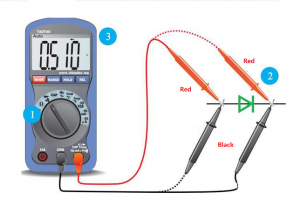
How to Test a Safety Capacitor with a Multimeter?

Testing a safety capacitor with a multimeter ensures it is functioning properly. Follow these steps for accurate results:

  • Discharge the safety capacitor completely using the method outlined above to avoid damaging the multimeter or causing shock.
  • Set the multimeter to the capacitance measurement mode (marked with a “C” or capacitor symbol). If your multimeter has multiple capacitance ranges, select the range closest to the capacitor’s marked value.
  • Disconnect the capacitor from the circuit to avoid measurement errors from other components.
  • Connect the multimeter’s test leads to the capacitor’s terminals (polarity does not matter for non-polar safety capacitors).
  • Wait a few seconds for the multimeter to stabilize and display the measured capacitance value.
  • Compare the measured value to the capacitor’s marked value. If the measured value is within the capacitor’s tolerance (typically ±10% or ±20%), the capacitor is functioning properly. If it is outside this range, the capacitor is faulty and should be replaced.

How to Know When a Safety Capacitor Is Bad?

A faulty safety capacitor can cause device malfunctions or safety hazards. Look for these signs to identify a bad safety capacitor:

  • Physical Damage: Bulging, leaking, or cracked casing indicates the capacitor has overheated or failed. Safety capacitors should have a smooth, intact casing.
  • Device Malfunctions: Frequent power cuts, EMI issues (e.g., static in audio devices), or equipment that won’t turn on can signal a bad safety capacitor.
  • Multimeter Readings: As outlined in the testing section, a measured capacitance value outside the capacitor’s tolerance range means it is faulty.
  • Overheating: A safety capacitor that feels hot to the touch during operation is likely failing, as it should remain cool under normal conditions.
  • Circuit Trips: If the device’s circuit breaker or fuse trips repeatedly, a shorted or faulty safety capacitor may be the cause.
Safety Capacitor, https://www.bestpcbs.com/blog/2026/04/safety-capacitor/

What Are the Common Causes of Safety Capacitor Failure?

Safety capacitors are designed for long-term reliability, but several factors can cause premature failure:

  • Voltage Surges: Lightning strikes, power grid fluctuations, or faulty power supplies can subject the capacitor to voltage beyond its rating, causing breakdown.
  • Overheating: Proximity to hot components (e.g., transformers), poor ventilation, or operating in high-temperature environments can degrade the capacitor’s materials.
  • Age and Wear: Over time, the capacitor’s dielectric material degrades, leading to capacitance drift and eventual failure. Most safety capacitors have a lifespan of 10-15 years.
  • Manufacturing Defects: Poor quality materials or improper assembly can result in premature failure, even in new safety capacitors.
  • Moisture and Contamination: Exposure to humidity, dust, or chemicals can corrode the capacitor’s terminals or damage its internal components, leading to leakage or short circuits.

FAQs About Safety Capacitor

Q1: Should a Safety Capacitor Have Continuity?

A1: No, a safety capacitor should not have continuity. Continuity indicates a short circuit, which is a faulty condition. A working safety capacitor will show no continuity when tested with a multimeter’s continuity mode. If continuity is present, the capacitor has failed and must be replaced immediately to avoid safety hazards.

Q2: Are non-polar metalized pp film capacitors safety capacitors?

A2: Not all non-polar metalized PP (polypropylene) film capacitors are safety capacitors. A metalized PP film capacitor is only a safety capacitor if it has passed mandatory safety certifications (UL, VDE, CQC) and is designed for safe failure (opens instead of shorts). Non-certified metalized PP film capacitors are standard film capacitors and cannot be used in safety-critical applications.

Q3: Can you use a polypropylene safety capacitor in a guitar?

A3: Yes, you can use a polypropylene safety capacitor in a guitar, but only if it is necessary for safety. Most guitar circuits use low-voltage DC power, so standard film capacitors are sufficient. However, if the guitar’s circuit is connected to AC power (e.g., some amplifiers built into the guitar), a polypropylene safety capacitor (typically X2 type) can be used to filter EMI and ensure safe operation. Choose a capacitance value between 0.01ÎŒF and 0.1ÎŒF for optimal noise filtering.

Q4: Should safety capacitor be added to radio ac transformer input?

A4: Yes, a safety capacitor should be added to a radio AC transformer input. Adding an X-type safety capacitor (preferably X2) between the live and neutral wires of the transformer input filters EMI, reducing noise in the radio’s signal. A Y-type safety capacitor (Y2) between the live/neutral and ground wires further enhances safety by limiting leakage current, protecting users from shock and improving the radio’s performance.

Q5: How are y2 safety capacitors designed to fail open?

A5: Y2 safety capacitors are designed to fail open through their construction and materials. They use a metalized polypropylene or ceramic dielectric with a thin metal electrode layer. When the capacitor is overstressed (e.g., voltage surge, overheating), the metal electrode layer evaporates or burns away, creating an open circuit. This design ensures no short circuit occurs, preventing current leakage and shock hazards. Additionally, Y2 capacitors use flame-retardant casings that do not catch fire when they fail.

Q6: Where to add a safety capacitor tube radio?

A6: Add a safety capacitor to a tube radio at the AC power input, between the power cord and the transformer. Install an X2 safety capacitor between the live (L) and neutral (N) wires to filter differential-mode EMI. Install a Y2 safety capacitor between the live/neutral wires and the radio’s chassis (ground) to filter common-mode EMI and limit leakage current. Ensure the capacitors are placed close to the power input to maximize filtering effectiveness and avoid interference with other components.

Q7: Where to buy x safety capacitors?

A7: X safety capacitors can be bought from reputable electronics suppliers both online and in-store. Top online suppliers include Digi-Key, Mouser Electronics, Newark, and Amazon. Local electronics stores and component distributors also carry X safety capacitors. When buying, ensure the capacitor has the required certifications (UL, VDE) and ratings (voltage, capacitance) for your application. Avoid cheap, uncertified capacitors, as they may not meet safety standards and pose hazards.

You may also like

Best ISO 13485 Medical Grade PCB Suppliers in China, Over 19 Years

April 23rd, 2026

When sourcing reliable medical grade PCB suppliers, EBestpcb is your top choice for certified, high‑reliability, and regulatory‑compliant printed circuit boards for medical devices.

medical grade PCB, https://www.bestpcbs.com/blog/2026/04/medical-grade-pcb/

Are You Facing These Pain Points in ISO 13485 Medical Grade PCB Sourcing?

  • Do you struggle to find suppliers with valid ISO 13485 certification for medical‑grade production?
  • Are you worried about inconsistent quality and non‑compliance with IPC Class 3 standards?
  • Do you face long lead times and poor support for urgent medical device prototypes?
  • Is it hard to get clean, burr‑free laser depaneling for delicate medical assemblies?
  • Can your current supplier support high‑frequency materials for wireless medical devices?
  • Do you lack traceability and full documentation for regulatory submissions?
  • Are you limited by rigid designs and cannot get medical grade custom rigid flex pcb solutions?

How Does EBest Solve Your Medical Grade PCB Pain Points?

  • We maintain active ISO 13485:2016 certification for full medical manufacturing compliance.
  • We strictly follow IPC‑6012 and IPC‑A‑610 Class 3 for zero‑defect medical assembly.
  • We offer 24‑hour expedite prototyping to accelerate your medical device development.
  • We use precision UV laser depaneling for clean, stress‑free cutting of sensitive boards.
  • We support Rogers and other high‑frequency materials for Wi‑Fi, BLE, and wireless charging.
  • We provide full material traceability, test reports, and process documentation.
  • We deliver medical grade vias flexible pcb and custom rigid‑flex designs for wearable devices.

Why Choose EBest for Best ISO 13485 Medical Grade PCB Suppliers in China?

EBest is a proven, long‑term partner for medical grade PCB projects, combining regulatory certification, Class 3 quality, advanced processing, scalable capacity, and medical‑focused engineering. We help you reduce risk, speed up launches, and meet strict regulatory demands.

  • ISO 13485 certified site – fully compliant for medical device manufacturing.
  • IPC‑6012 / A‑610 Class 3 compliance – highest reliability for life‑critical applications.
  • 4–8 layer rigid & HDI capability – ideal for compact, high‑density medical electronics.
  • Laser depaneling (UV, LPKF / Han’s Laser) – no mechanical stress, clean edges.
  • High‑frequency material expertise – Rogers, Wi‑Fi, BLE, Qi wireless integration.
  • Prototype‑through‑volume capability – annual volumes 100K+ units.
  • Over 19 years focused on medical‑grade PCB design and manufacturing.
  • Full certifications: ISO 9001, ISO 13485, AS9100D, IATF 16949, RoHS, REACH, UL.
  • One‑stop service: PCB design, prototyping, assembly, component sourcing.
  • Dedicated engineering team for medical grade PCB customization and support.
medical grade PCB, https://www.bestpcbs.com/blog/2026/04/medical-grade-pcb/

What Material Options Can We Offer for Medical‑Grade PCB?

Material TypeKey FeaturesTypical Medical Applications
FR‑4 High TgThermally stable, RoHS, cost‑effectiveMonitoring devices, diagnostic equipment
Rogers / High FrequencyLow loss, stable dielectricWireless medical, imaging, telemetry
Metal Core (MCPCB)Excellent thermal dissipationHigh‑power medical lasers, treatment devices
CeramicHigh thermal, ultra‑stableHigh‑precision sensors, implantable components
Flexible / Rigid‑FlexLight, bendable, space‑savingWearables, endoscopic devices, portable tools

What Customization Services Do We Offer for Medical‑Grade PCB?

Below are customization services we offer for medical-grade PCB:

  • Custom layer count (1–20+ layers) and impedance control
  • Heavy copper, ultra‑thin, and high‑TG material builds
  • Medical grade custom rigid flex pcb and medical grade vias flexible pcb
  • HDI, microvias, and blind/buried vias for miniaturization
  • Controlled depth drilling and precision laser processing
  • Surface finishes: ENIG, immersion silver, HASL, hard gold
  • Full turnkey PCB assembly with medical‑grade components

What Are EBest’s Capabilities for ISO 13485 Medical‑Grade PCB?

CapabilitySpecification
ISO 13485 CertificationYes, valid
IPC ClassClass 2 / Class 3
Layers1–20+
Min. Track / Space3/3 mil (HDI)
Min. Hole Size0.15 mm
Board Thickness0.2 mm – 3.0 mm
Surface FinishesENIG, Immersion Ag, Hard Gold, etc.
Monthly Capacity260,000 sq. ft
Expedite Lead Time24 hours

What Are Standards for Medical‑Grade PCB Manufacturing?

Here are standards for medical-grade PCB manufacturing:

  • ISO 13485:2016 – Mandatory quality management system for medical device PCBs, emphasizing risk control, full traceability, and regulatory compliance throughout the production lifecycle.
  • IPC‑6012 (Class 3) – Rigid printed board qualification standard specifying strict structural, dimensional, and reliability requirements for high‑performance medical applications.
  • IPC‑A‑610 (Class 3) – Highest acceptability criteria for electronic assemblies, ensuring zero critical defects in solder joints, components, and board structure for life‑support devices.
  • IPC‑A‑600 (Class 3) – Visual and structural acceptance standard for finished PCBs, banning delamination, excessive voids, and critical conductor spacing errors.
  • IEC 60601‑1 – Medical electrical equipment safety standard requiring strict insulation, leakage control, and creepage/clearance for patient‑contact devices.
  • RoHS / REACH – Restriction of hazardous substances to ensure biocompatibility and safety for clinical and wearable applications.
  • UL safety certification – Verifies electrical safety, flammability resistance, and long‑term stability under operational stress.
  • Cleanroom & contamination control – Compliance with ISO 14644‑1 (Class 7 or higher) and IPC‑5704 for low ionic contamination and particulate control.
  • Full traceability – Batch tracking from raw materials to finished goods, with records archived for regulatory audits and post‑market surveillance.

What Are EBest’s Quality Inspection for Medical‑Grade PCB Orders?

Here are our quality inspection for medical-grade PCB orders:

  • Incoming material qualification (IQC) – 100% verification of laminates, copper foils, and surface finishes against medical‑grade specs; certificates of compliance (CoC) checked and archived for full traceability.
  • Solder paste inspection (SPI) – 3D optical measurement of paste volume, height, and alignment to prevent cold joints, bridges, and insufficient solder in SMT assembly.
  • Layer & inner circuit AOI – High‑resolution automated optical inspection of all inner and outer layers to detect opens, shorts, and line defects before lamination.
  • X‑ray inspection (AXI) – Non‑destructive examination of BGA, microvias, and hidden interconnects; void rate controlled below 5% for Class 3 medical reliability.
  • Electrical testing (E‑test) – 100% flying‑probe or bed‑of‑nails testing for continuity, isolation, and impedance compliance; no boards skip electrical verification.
  • Ionic contamination testing – Measurement of surface residues to meet IPC‑5704 limits (<1.56 ÎŒg/cmÂČ NaCl eq.) to prevent corrosion and electrical leakage.
  • Thermal & reliability testing – Thermal cycling, humidity resistance, and mechanical stress testing for high‑reliability medical and aerospace applications.
  • Final visual & dimensional inspection – Certified IPC inspectors perform 100% visual checks per IPC‑A‑610 Class 3, plus precision measurement of critical features.
  • Documentation package – Full test reports, material traceability records, and CoC provided with every shipment to support regulatory submissions.

How We Ensure On‑Time Delivery for Medical Grade PCB Orders?

We operate a dedicated medical‑grade PCB production line isolated from standard jobs to eliminate scheduling conflicts, cross‑contamination, and process delays. Our ISO 13485‑aligned workflow is optimized for speed without compromising Class 3 quality.

Our MES & ERP systems provide real‑time order tracking from material release to shipping, with automated alerts for bottlenecks. Parallel processing of fabrication and component procurement cuts lead times, while dedicated engineering teams handle DFM reviews within 24 hours to resolve design risks upfront.

We maintain safety stock of critical medical‑grade materials (high‑TG FR‑4, flex substrates, Rogers, ENIG finishes) to reduce material lead times. For prototypes, our 24‑hour expedite service supports urgent device development. For volume orders, we offer fixed weekly shipping slots with 99%+ on‑time performance.

Our logistics team coordinates priority shipping and customs clearance for global clients, ensuring your medical PCBs arrive on schedule for clinical trials, regulatory approvals, and mass production launches.

Medical‑Grade PCB, https://www.bestpcbs.com/blog/2026/04/medical-grade-pcb/

Medical Client Case Study: Portable Patient Monitor Medical‑Grade PCB Project

Project Background

A global medical device manufacturer developed a portable multi‑parameter patient monitor for emergency, clinic, and home care. The device required a compact, lightweight medical‑grade PCB with rigid‑flex architecture, wireless BLE communication, and long‑term operational stability. The client needed full regulatory compliance and scalable volume support.

Project Requirements

  • ISO 13485 and IPC‑A‑610 Class 3 certification
  • 6‑layer medical grade custom rigid flex pcb with controlled impedance
  • Rogers high‑frequency material for reliable BLE transmission
  • Ultra‑low defect rate and 5+ year product lifespan
  • Full traceability, test reports, and documentation for FDA & CE filing
  • Prototype to mass production scaling with annual volume >100K units

Our Solution

  • Deployed ISO 13485 dedicated production line and Class 3 process controls
  • Integrated Rogers high‑frequency laminate for stable wireless connectivity
  • Implemented laser drilling, microvia, and impedance control (±5Ω) for signal integrity
  • Applied UV laser depaneling to avoid mechanical stress on delicate rigid‑flex sections
  • 100% AOI, X‑ray, electrical, and ionic contamination testing
  • Provided batch traceability, material certificates, and full test dossiers
  • Established dedicated line for volume production with consistent quality output

Outcome

The client successfully obtained FDA clearance and CE certification. The medical‑grade PCB delivered stable performance in field use, with zero critical failures in clinical trials. EBest now supports annual volume production of 100K+ units with consistent on‑time delivery and quality. The client extended the partnership to include additional wearable and diagnostic medical devices.

Medical‑Grade PCB, https://www.bestpcbs.com/blog/2026/04/medical-grade-pcb/

FAQs About Medical‑Grade PCB Manufacturing

Q1: What certification is required for medical grade PCB?

A1: ISO 13485 is the core certification for medical device PCBs. Suppliers also need IPC Class 3, RoHS, REACH, and often UL. EBest holds ISO 13485:2016 and full industry approvals.

Q2: Why is IPC Class 3 important for medical devices?

A2: IPC Class 3 ensures the highest reliability for life‑supporting and critical‑care equipment, reducing failure risk in clinical environments.

Q3: Can you handle flexible and rigid‑flex for medical wearables?

A3: Yes, we specialize in medical grade vias flexible pcb and medical grade custom rigid flex pcb for endoscopes, wearables, and portable tools.

Q4: Do you support high‑frequency materials for wireless medical devices?

A4: We have extensive experience with Rogers and other high‑frequency materials for Wi‑Fi, BLE, and wireless charging in diagnostic and monitoring devices.

Q5: Can you support prototype to mass production?

A5: Yes, we provide seamless prototype‑to‑volume scaling, with annual volumes over 100K+ units for medical‑grade PCB assembly.

Contact EBest for Your Medical‑Grade PCB Needs

EBest provides high‑quality medical grade PCB and medical‑grade PCB solutions for diagnostic, monitoring, implantable, and wearable medical devices. For inquiries and orders, email us at: sales@bestpcbs.com.
You may also like

Blank Circuit Board Design, Prototype & Assembly, Fast Delivery & Custom Solutions

April 21st, 2026

A blank circuit board (also called bare or empty PCB) is an unpopulated electronic assembly foundation requiring precision engineering for reliability. High-quality blank PCBs need strict process controls and professional design, where EBest, a top China blank PCB manufacturer, offers full solutions from design to mass production to meet your needs.

Blank Circuit Board, https://www.bestpcbs.com/blog/2026/04/blank-circuit-board/

Why Choose EBest for China Blank Circuit Board Manufacturers?

EBest, a leading China-based blank circuit board manufacturer with over 20 years of experience, specializes in high-reliability blank PCBs for mission-critical sectors, supported by IATF 16949, ISO 13485, AS9100D, RoHS, REACH and UL. Our advanced facilities produce diverse solutions: rigid, flexible, metal-core, 1-30 layers for modern electronic applications.

  • Full-Cycle Turnkey Capabilities: Save you 30% of project time and 25% of coordination costs by integrating design optimization, rapid prototyping, manufacturing, and testing in-house—eliminating the need to coordinate 3+ suppliers, while ensuring 99.9% quality consistency across all production stages.
  • Stringent Quality Assurance: Reduce your product failure rate to 0.05% or lower with 100% electrical testing, AOI inspection, and impedance verification; our strict process controls ensure blank PCBs meet IPC 6013 Class 3 standards, extending your end-product service life by 20%.
  • Fast, Reliable Delivery: Cut your product development cycle by 40% with 3-5 day standard prototype delivery and 7-10 day mass production turnaround; 24-hour express service for urgent orders ensures you meet market launch deadlines, boosting your time-to-market advantage by 35%.
  • Tailored Custom Solutions: Match your unique application needs with customized substrates, surface finishes, and specs, reducing material waste by 15% and ensuring 100% compatibility with your end-product, avoiding costly redesigns due to mismatched standard boards.
  • Competitive, Transparent Pricing: Leverage our 260,000 square feet monthly production capacity to save 18-30% on unit costs vs. small manufacturers; volume discounts (up to 25% for orders over 10,000 pieces) further reduce your mass production expenses without compromising quality.
  • Dedicated Technical Support: Our DFM analysis reduces prototype iterations by 40%, cutting prototype costs by 30% and accelerating your time-to-market by an average of 2-3 weeks—ensuring your design is manufacturable and cost-effective from the start.

Blank Circuit Board Design: Challenges & EBest’s Solutions

Blank circuit board design transforms electronic concepts into manufacturable substrates balancing electrical performance, mechanical integrity, and production feasibility. Poor blank PCB design causes signal interference, manufacturing failures, and costly delays. EBest’s engineering team resolves these challenges through specialized expertise.

What Are Common Design Challenges?

  • Signal Integrity Issues: High-speed signals suffer reflection, crosstalk, and EMI without proper impedance control
  • Thermal Management: Inadequate heat dissipation leads to component failure in high-power applications
  • Space Constraints: Compact layouts create routing conflicts and assembly difficulties
  • Manufacturing Compatibility: Non-standard features cause production errors and low yields
  • Material Selection: Choosing inappropriate substrates for operating environments

How EBest Solves Design Challenges?

  • Advanced Simulation: Signal integrity and thermal analysis before production
  • DFM Expertise: Optimize layouts for manufacturing, reducing prototypes by 40%
  • Layer Stack Expertise: Proper plane separation ensures signal quality and noise reduction
  • Precision Routing: Controlled impedance, differential pairs, and minimal 90° angles
  • Industry-Specific Design: Medical (ISO 13485), aerospace (AS9100D), and industrial standards

Medical Case Study: Designed a 6-layer blank PCB for a portable ultrasound device with 0.2mm trace/space, controlled impedance (±5%), and ENIG finish. The design passed all IPC 6013 Class 3 requirements and supported 500+ hour continuous operation.

For superior blank circuit board design that balances performance and manufacturability, partner with EBest. Our engineering team delivers optimized layouts for any application.

Blank Circuit Board Prototype: Challenges & EBest’s Solutions

Blank circuit board prototype development validates designs before mass production identifying issues early. Common challenges include long lead times, poor quality, and inconsistent performance. EBest provides rapid, reliable blank PCB prototype services with strict quality controls.

What Prototype Challenges Do Users Face?

  • Long Lead Times: Traditional manufacturing delays product development
  • Quality Inconsistencies: Prototypes failing testing or not matching specifications
  • High Costs: Small-quote premiums and repeated iterations increase expenses
  • Limited Materials: Restricted access to specialized substrates
  • Documentation Errors: Incorrect files cause manufacturing failures

How EBest Delivers Superior Prototypes?

Our blank circuit board prototype services solve these issues:

  • Rapid Turnaround: 24-hour express, 3-5 day standard delivery
  • Precision Manufacturing: Advanced laser plotting and plating technologies
  • Full Material Selection: FR-4, high-TG, aluminum, Rogers, and flexible substrates
  • Strict Quality Control: 100% electrical test, AOI, and microsection analysis
  • DFM Feedback: Free design review to optimize for mass production

Aerospace Case Study: Produced 10 prototype 8-layer blank printed circuit boards for a satellite communication module using Rogers 4350B substrate. The prototypes passed thermal cycling (55°C to 125°C) and vibration testing (20G), validating performance for space applications.

Accelerate your development with reliable blank circuit board prototype solutions from EBest. We deliver high-quality samples quickly to validate your design efficiently.

Blank Circuit Board Assembly: Challenges & EBest’s Solutions

Blank circuit board assembly transforms bare substrates into functional electronic assemblies. Challenges include component placement accuracy, solder quality, and process controls. EBest’s blank PCB assembly services ensure flawless execution from prototypes to mass production.

What Assembly Challenges Exist?

  • Solder Defects: Cold joints, bridges, and tombstoning cause failures
  • Component Misalignment: High-density placement requires precision
  • Thermal Damage: Sensitive components damaged during soldering
  • Quality Variability: Inconsistent results between batches
  • Testing Complexity: Comprehensive verification for complex assemblies

How EBest Ensures Assembly Excellence?

Our blank circuit board assembly services overcome these challenges:

  • Advanced Equipment: Automated SMT lines with 01005 component capability
  • Process Controls: Optimized solder paste printing and reflow profiles
  • Skilled Technicians: IPC-A-610 certified operators
  • Quality Inspection: AOI, X-ray, and functional testing for all assemblies
  • Material Management: Complete BOM support and component sourcing

Industrial Case Study: Assembled blank PCB for a factory automation PLC with 1,200+ components including 0402 passives and QFP devices (0.5mm pitch). Achieved 99.8% first-pass yield and 30,000+ hour MTBF for continuous operation.

For reliable blank circuit board assembly with exceptional quality, choose EBest. Our comprehensive services ensure your assemblies perform flawlessly.

What Is a Blank Printed Circuit Board?

A blank circuit board, also known as a bare circuit board or empty circuit board, is an unpopulated electronic substrate that provides a mechanical foundation and pre-designed electrical pathways (traces, pads, and vias) for mounting electronic components. Unlike assembled PCBs, it contains no soldered components serving as the base structure that is later populated with resistors, capacitors, chips, and other parts to form a functional electronic circuit. Blank circuit boards are manufactured with precise materials and processes to ensure electrical conductivity, mechanical stability, and compatibility with various component types making them essential for all electronic devices across medical, aerospace, and industrial sectors.

Blank Circuit Board, https://www.bestpcbs.com/blog/2026/04/blank-circuit-board/

What is a Blank Circuit Board Called?

A blank circuit board has several industry terms:

  • Bare circuit board / bare PCB: Most common description
  • Empty circuit board: Emphasizes unpopulated state
  • Blank PCB: Standard industry abbreviation
  • Blank printed circuit board: Full technical designation
  • Circuit board blanks: Plural reference to unprocessed substrates

These terms all describe the same unpopulated substrate before component assembly.

What Are Types of Blank PCB Circuit Board?

The layer count of a blank circuit board refers to the number of conductive copper layers embedded in the substrate directly impacting its complexity and functionality.

  • Single-sided: Features a single conductive layer making it the simplest and most cost-effective option. It is ideal for low-density designs and simple electronics where component placement is straightforward such as basic sensors or simple control circuits.
  • Double-sided: Equipped with two conductive layers allowing for more component placement and more complex circuit routing compared to single-sided boards. This type is widely used in most consumer electronics including remote controls, small appliances, and basic communication devices.
  • Multilayer (3-30 layers): Consists of alternating conductive and insulating layers enabling high-density component placement and efficient signal routing. These boards are designed for high-speed, complex devices like smartphones, medical equipment, aerospace systems, and industrial control units that require advanced functionality in a compact space.

What is HS Code of Blank Circuit Board?

The primary HS code for blank circuit board (unpopulated) is 85340090 in China. This classification covers:

  • Bare printed circuit boards without components
  • Blank PCB substrates of all materials
  • Single, double, and multilayer circuit board blanks

Additional documentation may include:

  • Substrate material specification
  • Layer count and thickness
  • Copper weight
  • Surface finish type

Proper classification ensures smooth customs clearance for international shipments.

What Materials Are Used for Blank Circuit Boards?

Material CategorySpecific TypesComposition/Key FeaturesProperties
FR-4 Glass Reinforced EpoxyStandard FR-4, High-TG FR-4Epoxy resin with glass fiber reinforcement; High-TG variant for enhanced thermal stabilityGood mechanical strength, electrical insulation, flame retardant (UL94 V-0); Standard TG: 130°C-150°C; High-TG: 170°C+
High-Frequency MaterialsRogers, Taconic, PTFE (Teflon)Specialized substrates designed for high-frequency applicationsLow dielectric loss; PTFE offers excellent high-frequency performance but higher cost
Flexible SubstratesPolyimide (PI), Polyester (PET)Bendable, lightweight substrates for flexible applicationsPolyimide: Temperature resistance (200°C to 260°C), flexibility; PET: Lower cost, limited temperature range
Metal Core SubstratesAluminum, CopperMetal core (aluminum or copper) for heat dissipationExcellent thermal conductivity; Copper has superior thermal performance but higher cost than aluminum
Specialty MaterialsCeramic, Composite (CEM-1/CEM-3)Specialized substrates for unique application needsCeramic: High-temperature resistance, excellent insulation; CEM-1/CEM-3: Cost-effective alternative to FR-4

Material selection for blank circuit boards depends on operating temperature, electrical requirements, and environmental conditions. The table above summarizes the key materials, their features, and properties to help you make the right choice for your application.

How to Use Blank Circuit Board?

Using a blank circuit board involves several key, sequential steps that ensure proper assembly, functionality, and reliability critical for medical, aerospace, and industrial applications. Each step focuses on precision to avoid assembly errors and component failure leveraging best practices for blank PCB utilization:

1. Preparation & Verification

  • Confirm the blank circuit board dimensions, layer count, copper weight, and surface finish match your design specifications (e.g., ENIG finish for medical devices, high-TG substrate for industrial use).
  • Inspect the bare circuit board for defects: scratches on conductive traces, delamination of layers, irregularities in solder mask, or contamination that could impact soldering.
  • Clean the empty circuit board surface with isopropyl alcohol or specialized cleaning agents to remove dust, oil, or residue ensuring strong solder adhesion and electrical conductivity.

2. Component Preparation

  • Gather all electronic components (resistors, capacitors, chips, connectors) and verify their specifications (value, size, voltage rating) match the BOM (Bill of Materials) for your blank PCB.
  • Prepare solder paste (matching alloy type for your application), a precision stencil aligned to the blank circuit board’s pad layout, and assembly tools (soldering iron, pick-and-place equipment for high-volume projects).
  • Develop or load a component placement program (for automated assembly) based on your design files (Gerber, BOM) ensuring accurate alignment with the blank printed circuit board’s pads and vias.

3. Assembly Process

  • Apply solder paste to the blank circuit board using a precision stencil ensuring uniform paste thickness (critical for small components like 0402 passives or QFP chips).
  • Place components on the blank PCB manually for small prototypes or via automated SMT lines for mass production aligning pins perfectly with pads to avoid short circuits.
  • Reflow solder in a controlled oven following a temperature profile tailored to the component type and solder alloy ensuring proper melting and adhesion without damaging the circuit board blank or components.
  • Clean the assembled blank circuit board to remove flux residues (especially critical for medical or aerospace applications) using a solvent compatible with the board’s surface finish.

4. Testing & Validation

  • Perform a visual inspection (manual or AOI) to check for solder defects (cold joints, bridges, tombstoning) and component misalignment on the blank PCB assembly.
  • Conduct electrical testing (flying probe or fixture test) to verify continuity, isolation, and impedance control ensuring the blank circuit board’s pathways function as designed.
  • Complete functional testing to confirm the assembled board operates as intended matching the performance requirements of your application (e.g., signal integrity for aerospace communication).
  • Optional environmental stress testing (thermal cycling, vibration, humidity) for high-reliability sectors ensuring the bare circuit board assembly withstands harsh operating conditions.

5. Integration

  • Install the tested blank circuit board assembly into the final product housing ensuring secure mounting to prevent damage from vibration (critical for industrial equipment).
  • Connect the assembly to other system components (power supplies, sensors, displays) using appropriate connectors ensuring proper electrical connections and signal integrity.
  • Complete system-level testing to verify the blank printed circuit board works seamlessly with the entire system resolving any integration issues before final deployment.
blank circuit board, https://www.bestpcbs.com/blog/2026/04/blank-circuit-board/

How to Make Circuit Board Blanks?

Circuit board blanks manufacturing involves precise, standardized multi-step processes that ensure consistency, electrical performance, and mechanical durability essential for high-reliability blank circuit board applications. Below are the key steps focusing on critical details that impact the quality of bare circuit boards:

1. Material Preparation

  • Select the appropriate substrate material (FR-4, high-TG, aluminum, Rogers, or polyimide) based on the blank PCB’s intended use (e.g., Rogers for high-frequency aerospace applications, polyimide for flexible medical implants).
  • Laminate copper foil (typically 1oz-4oz) to the dielectric substrate under controlled high heat (170°C-200°C) and pressure ensuring strong adhesion between layers for multi-layer circuit board blanks.
  • Cut the laminated core material to the required panel size and prepare multilayer stacks with prepreg (insulating material) between layers to ensure electrical isolation and structural integrity.

2. Imaging Process

  • Apply a photosensitive photoresist (liquid or dry film) to both sides of the copper-clad substrate ensuring uniform coverage to protect the copper during etching.
  • Expose the photoresist-coated blank circuit board to UV light through a precision artwork film (containing the circuit pattern) hardening the photoresist in areas that will remain as conductive traces.
  • Develop the board to remove the unexposed (unhardened) photoresist revealing the copper areas that will be etched away leaving the desired circuit pattern on the blank PCB.

3. Etching Process

  • Etch the exposed copper using a chemical solution (typically ferric chloride or cupric chloride) removing unwanted copper to leave only the conductive traces, pads, and vias of the blank circuit board.
  • Strip the remaining hardened photoresist using a chemical stripper revealing the clean copper circuit pattern on the bare circuit board.
  • Clean and inspect the panels for etching defects (over-etching, under-etching, trace damage) using AOI or manual inspection ensuring the circuit pattern matches design specifications.

4. Drilling & Plating

  • Drill precision holes (through-hole or micro-vias for HDI boards) using CNC drilling equipment ensuring accurate hole size and location for component pins and interlayer connections in multi-layer blank PCBs.
  • Desmear the hole walls to remove resin residue from drilling then clean the holes to ensure proper copper adhesion for plating.
  • Apply electroless copper plating (thin, uniform copper layer) to the hole walls and board surface followed by electrolytic copper plating to achieve the desired copper thickness (1oz-4oz) for the blank circuit board.
  • Perform pattern plating (if needed) to thicken copper on critical traces (e.g., power traces) for enhanced current-carrying capacity ensuring the circuit board blanks meet electrical requirements.

5. Final Processing

  • Apply a solder mask (typically green but available in other colors) to the blank circuit board covering all areas except pads and vias to protect traces from oxidation, short circuits, and physical damage.
  • Add legend/identification printing (silk screen) to the solder mask marking component designators, logos, and polarity indicators for easy assembly and troubleshooting.
  • Apply the desired surface finish (HASL, lead-free HASL, ENIG, OSP, or immersion silver) to the pads ensuring strong solderability and corrosion resistance for the blank PCB.
  • Route or punch the panels to the final blank circuit board dimensions removing excess material and ensuring clean, precise edges.
  • Conduct final electrical testing (continuity, isolation, impedance) and visual inspection rejecting any bare circuit boards with defects to ensure only high-quality products are delivered.

Where to Buy Blank Circuit Boards?

For high-quality blank circuit boards, partner with specialized manufacturers like EBest. Key considerations when selecting a supplier:

Critical Selection Criteria

  • Technical Capabilities: Layer count, minimum trace/space, hole size
  • Quality Systems: Certifications (ISO 9001, IATF 16949, ISO 13485)
  • Material Selection: Range of substrates and surface finishes
  • Lead Times: Prototypes and mass production capabilities
  • Quality Control: Testing procedures and defect rates
  • Technical Support: DFM analysis and engineering assistance

EBest’s Advantages

  • One-Stop Solution: Design, prototype, and full production
  • Quick Quotes: 24-hour response for most inquiries
  • Flexible Order Quantities: From 1 to 100,000+ pieces
  • Global Shipping: Reliable worldwide delivery
  • Competitive Pricing: Volume discounts and cost-effective manufacturing
Blank Circuit Board, https://www.bestpcbs.com/blog/2026/04/blank-circuit-board/

How Much Does Blank Circuit Boards Cost?

Blank circuit board pricing varies based on multiple factors:

  • Board Size: Larger dimensions increase material usage
  • Layer Count: 1-layer ($2-$5) to 20-layer ($50-$200+)
  • Complexity: Trace/space, hole size, aspect ratio
  • Quantity: Prototypes ($5-$50/unit) vs. mass production ($0.50-$20/unit)
  • Material: Standard FR-4 vs. high-frequency or flexible substrates
  • Surface Finish: HASL (lowest), ENIG, immersion silver, gold plating
  • Special Requirements: Impedance control, heavy copper, testing

Below is a price chart for blank circuit boards:

TypePrototype (1-10 pcs)Mass Production (1,000+ pcs)
1-layer FR-4$2-$8$0.50-$3
2-layer FR-4$5-$15$1-$5
4-layer FR-4$15-$40$3-$10
6-layer FR-4$30-$70$5-$15
8-layer High-TG$50-$120$8-$20
Flexible (Polyimide)$20-$80$5-$25
Metal Core (Aluminum)$30-$100$10-$30

FAQs About Blank Printed Circuit Board

Q1: What’s the minimum order quantity for blank PCB?

A1: EBest accepts orders from 1 piece (prototypes) to mass production. No minimum order restrictions for standard blank circuit board specifications.

Q2: How long does blank circuit board production take?

A2: Standard prototypes: 3-5 days. Mass production: 7-10 days. Express service available (24-48 hours) for urgent requirements.

Q3: What surface finishes are available for blank PCB?

A3: Common options: HASL, lead-free HASL, ENIG (Electroless Nickel Immersion Gold), immersion silver, immersion tin, and OSP (Organic Solderability Preservative).

Q4: Can blank circuit boards withstand high temperatures?

A4: Standard FR-4 handles up to 130°C continuously. High-TG materials work up to 170°C+. Metal core and ceramic substrates handle even higher temperatures for specialized applications.

Q5: What testing is performed on blank circuit boards?

A5: Standard tests include: flying probe or fixture electrical test, AOI (Automated Optical Inspection), solder mask adhesion, and dimension verification. Special testing available upon request.

Q6: Can you manufacture custom-sized blank circuit boards?

A6: Yes, EBest produces fully customized blank circuit board dimensions, shapes, and specifications according to your design files.

Ready to Order Your Blank Circuit Boards?

EBest delivers high-quality blank circuit board solutions for medical, aerospace, industrial, and commercial applications. As a leading China blank printed circuit board manufacturer, we provide comprehensive services from design through mass production.

Our blank PCB products meet the strictest quality standards with fast delivery and competitive pricing. Whether you need prototypes or large-scale production, we offer tailored solutions to meet your exact requirements.

Contact us today to discuss your blank circuit board needs. Send your specifications and requirements to sales@bestpcbs.com for a free quote and DFM analysis. Partner with EBest for reliable circuit board blanks that power your success.

You may also like

What Does E.M.S Stand for in Electronics and Manufacturing?

April 15th, 2026

In electronics and manufacturing, EMS most commonly stands for Electronics Manufacturing Services. These are companies that provide end-to-end solutions including PCB fabrication, component sourcing, PCB assembly, testing, and full product integration.

At the same time, EMS can also represent other meanings such as Emergency Medical Services or Energy Management System. However, in engineering and industrial environments, EMS almost always refers to electronics production services.


Understanding this distinction is critical, especially for engineers, product designers, and procurement teams evaluating manufacturing partners.

What Does EMS Mean in Electronics Manufacturing?

In electronics manufacturing, EMS refers to companies that provide comprehensive production services for electronic products, covering everything from PCB fabrication to final product assembly.

An EMS provider acts as a one-stop manufacturing partner. Instead of working with multiple vendors, companies can rely on a single EMS partner to manage the entire production lifecycle.

Typical EMS scope includes:

  • PCB fabrication (FR4, HDI, RF, MCPCB)
  • Component sourcing and BOM management
  • SMT and THT assembly
  • Functional testing and inspection
  • Box build and system integration

This model is widely adopted in industries such as automotive electronics, industrial control systems, medical devices, and consumer electronics.

What Does EMS Mean in Electronics Manufacturing?

What Does E.M.S Stand for in Electronics and Manufacturing?

What Services Are Included in Electronics Manufacturing Services?

Electronics Manufacturing Services include a wide range of production and supply chain capabilities designed to bring electronic products from concept to reality.

A complete EMS offering typically covers the following:

Service TypeDescriptionOutput
PCB FabricationManufacturing bare circuit boardsPCB boards
PCB AssemblySMT, DIP, BGA assemblyPCBA boards
Component SourcingProcurement and BOM optimizationQualified components
Testing & InspectionAOI, ICT, X-ray, functional testTest reports
Box BuildFinal product assemblyFinished products

From an engineering perspective, EMS reduces complexity by integrating all manufacturing steps into a single controlled workflow.

This significantly improves communication efficiency, reduces lead time, and ensures better quality consistency.

How Does EMS Work in the PCB and PCBA Process?

EMS providers follow a structured workflow to ensure high reliability and manufacturability of electronic products. The process typically begins with design evaluation and ends with final product delivery.

The standard EMS workflow includes:

  • Design Review (DFM/DFA)
  • PCB Fabrication
  • Component Sourcing
  • PCB Assembly (SMT/THT)
  • Testing & Quality Control
  • Final Assembly (Box Build)
  • Packaging & Delivery

This integrated approach ensures traceability, quality control, and production efficiency.

How Does EMS Work in the PCB and PCBA Process?

Is EMS the Same as OEM?

No, EMS is not the same as OEM. EMS (Electronics Manufacturing Services) focuses on manufacturing and assembly, while OEM (Original Equipment Manufacturer) owns the product design, branding, and market distribution.

In simple terms, EMS builds the product, while OEM owns and sells the product.

This distinction is critical in electronics manufacturing because it defines responsibilities, intellectual property ownership, and supply chain structure.

Key differences between EMS and OEM:

AspectEMSOEM
Core RoleManufacturing service providerProduct owner and brand
Design OwnershipNoYes
ManufacturingYesSometimes outsourced
Brand ControlNoYes
Revenue ModelService-basedProduct-based

From an engineering perspective, EMS providers are responsible for executing production with high precision, while OEMs focus on product development, innovation, and market strategy.

In most modern electronics supply chains, OEM companies rely heavily on EMS partners to handle PCB fabrication, PCB assembly, and full product manufacturing.

For example, a hardware startup may design a PCB and product architecture (OEM role), then partner with an EMS provider to manufacture and assemble the product at scale.

To better understand how EMS integrates into production, you can explore our PCB Manufacturing Services and PCBA Assembly Solutions.

What Is the Difference Between EMS, OEM, and ODM?

EMS, OEM, and ODM are often confused, but they serve very different roles in the electronics supply chain. Understanding the differences is critical for selecting the right manufacturing strategy.

TypeRoleDesign OwnershipManufacturing
EMSService providerNoYes
OEMBrand ownerYesSometimes
ODMDesign + manufacturingYesYes

Key takeaway:

  • EMS manufactures your design
  • OEM owns the product
  • ODM designs and produces products

For most engineering-driven projects, EMS is the preferred choice because it allows companies to maintain control over their designs while outsourcing production.

Why Do Engineers and Companies Use EMS Providers?

Companies use EMS providers to improve efficiency, reduce costs, and access advanced manufacturing capabilities without investing in their own production facilities. From an engineering perspective, EMS offers several practical advantages:

  • Faster time-to-market
  • Reduced supply chain complexity
  • Access to advanced manufacturing technologies
  • Scalable production from prototype to mass production

EMS providers also help optimize BOM costs and improve production yield through engineering support.

When Should You Choose EMS Instead of PCB-Only Suppliers?

You should choose an EMS provider when your project involves more than just PCB fabrication. If your product requires assembly, testing, or full system integration, EMS is the more efficient choice.

Typical scenarios where EMS is preferred:

  • Complex multi-component assemblies
  • High-reliability products (medical, automotive)
  • Need for full product manufacturing
  • Limited internal manufacturing capability

PCB-only suppliers are suitable for simple board production, but EMS providers deliver a complete solution.

When Should You Choose EMS Instead of PCB-Only Suppliers?

Why Choose EBest Circuit (Best Technology) as Your EMS Partner?

EBest Circuit (Best Technology) provides a complete EMS solution designed for engineers who need reliability, flexibility, and fast turnaround.

Core advantages include:

  • 20 years of PCB & PCBA experience
  • One-stop service from PCB to box build
  • No MOQ for prototyping and small batches
  • 1.5-week fast PCBA delivery
  • Strong certifications (ISO9001, ISO13485, IATF16949)
  • Advanced traceability system (5-second tracking)

Engineering support:

  • Free DFM analysis
  • BOM optimization
  • 1+3 engineering support model

Whether you are developing prototypes or scaling production, EBest provides a stable and efficient EMS solution.

Contact us: sales@bestpcbs.com

Common FAQs about E.M.S Meaning

1. What does E.M.S. Stand for in the Medical Field?

In a healthcare context, E.M.S. stands for Emergency Medical Services. It refers to the system that provides emergency medical care, including paramedics, emergency medical technicians (EMTs), and the ambulances or equipment used to stabilize and transport patients to a hospital.

2. Does E.M.S. have a Meaning in Shipping and Logistics?

Yes. In the world of global shipping, E.M.S. stands for Express Mail Service. It is an international expedited mail delivery service offered by postal administrations that are members of the Universal Postal Union (UPU), designed to provide faster delivery across borders.

3. What is an E.M.S. in Environmental Management?

In an organizational or corporate context, E.M.S. stands for Environmental Management System. This is a set of processes and practices that enable an organization to reduce its environmental impact and increase its operating efficiency, often following the ISO 14001 standard.

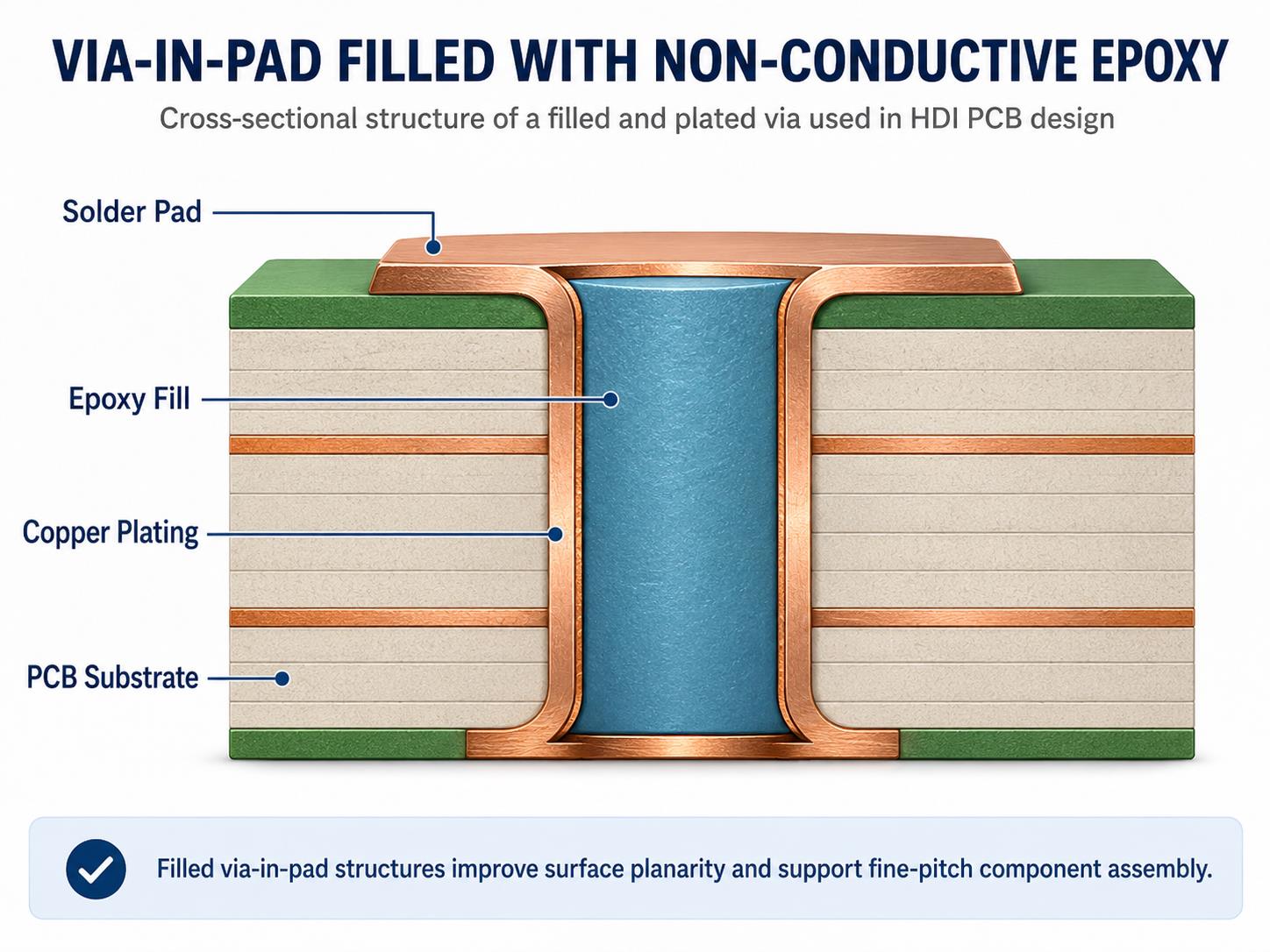
4. What does E.M.S. Mean in Fitness and Muscle Recovery?

In the fitness industry, E.M.S. stands for Electrical Muscle Stimulation. This technology uses electrical impulses to elicit muscle contractions. It is frequently used in physical therapy for rehabilitation and by athletes for muscle strengthening or recovery.

5. What is the E.M.S. in a Vehicle’s Engine?

In automotive engineering, E.M.S. stands for Engine Management System. This is a high-tech “brain” (usually an Electronic Control Unit) that controls the fuel injection, ignition timing, and idle speed to ensure the engine operates at peak efficiency and performance.

You may also like

Automotive Grade MCPCB: Engineered for Harsh Vehicle Environments

April 14th, 2026

What makes automotive grade MCPCB the most reliable solution for high heat high vibration vehicle electronics, and why should you choose EBest as your long term manufacturing partner? This guide covers core performance, certifications, design rules, real world applications, common pain points, and ordering support for automotive grade MCPCB all backed by EBest’s 20+ years of one stop PCB experience, strict quality systems, and fast delivery to keep your automotive projects on track.

Automotive Grade MCPCB, https://www.bestpcbs.com/blog/2026/04/automotive-grade-mcpcb/

Why Choose EBest as Your Top Source for Automotive Grade MCPCB?

When you source automotive grade MCPCB, you need consistent quality, on time delivery, full supply chain stability, and responsive technical support. EBest delivers automotive grade MCPCB with industry leading thermal conductivity, full automotive qualification, stable mass production yield, and expedited prototyping to meet tight project timelines.

Key specifications include wide operating temperature range, high thermal conductivity dielectric, reinforced mechanical structure, and full compliance with automotive standards.

We provide full life cycle support from prototype design to mass production, with stable material supply and professional technical team to ensure your project runs smoothly. Trust EBest for your next automotive grade MCPCB order and experience reliable performance from prototype to mass production.

What Certifications Back EBest Automotive Grade MCPCB Quality?

EBest holds complete authoritative certifications to ensure every automotive grade MCPCB meets global automotive safety and quality standards. Each certification brings real value to your project and reduces compliance risks.

  • IATF 16949: Full process control, fully traceable production, eliminates hidden quality risks for automotive series production.
  • ISO 9001:2015: Stable quality management system ensures consistent performance in every batch.
  • ISO 13485:2016: High reliability control standard suitable for safety critical automotive electronics.
  • AS9100D: Aerospace level stability to withstand extreme temperature, vibration, and harsh environments.
  • REACH: Full environmental compliance meeting EU market requirements.
  • RoHS: Restriction of hazardous substances, safe for automotive assembly and usage.
  • UL: Safety certification for high power and high voltage automotive circuits.

What Are the Biggest Challenges with Automotive Grade MCPCB and How to Fix Them?

In actual automotive research and development and mass production, automotive grade MCPCB often faces multiple pain points that affect performance, yield and delivery. EBest provides targeted solutions for each core challenge to ensure stable application in harsh vehicle environments.

Pain Point 1: Insufficient heat dissipation leads to component overheating and early failure.
EBest’s Solution: Use high thermal conductivity dielectric layers and optimized thermal paths to rapidly dissipate heat and maintain stable component temperatures.

Pain Point 2: Solder joint cracking or board delamination under high vibration and thermal cycling.
EBest’s Solution: Adopt automotive grade base materials and reinforced structural design to enhance mechanical strength and reliability.

Pain Point 3: Low production yield caused by poor design for manufacturing (DFM).
EBest’s Solution: Provide free DFM review and design optimization before production to improve manufacturability and batch consistency.

Pain Point 4: Inconsistent quality and lack of traceability in mass production.
EBest’s Solution: Implement IATF 16949 process control and full material traceability to ensure stable quality in every batch.

Pain Point 5: Long lead times that delay automotive project development and launch.
EBest’s Solution: Offer rapid prototyping and expedited production lines, with urgent orders shipped within 24 hours.

Pain Point 6: Failure to meet automotive industry certifications and customer audit requirements.
EBest’s Solution: Maintain full certifications including IATF 16949, UL, RoHS, and REACH for direct compliance with automotive standards.

Pain Point 7: Unstable performance in extreme high low temperature under hood environments.
EBest’s Solution: Use wide temperature range materials and strict reliability testing to ensure stable operation from -40°C to +150°C.

What Is Automotive Grade MCPCB and How Does It Work?

Automotive grade MCPCB is a metal core printed circuit board built specifically for harsh vehicle environments. It uses a three layer structure copper circuit, high thermal dielectric, and metal base plate. This structure quickly pulls heat from power components to lower operating temperatures and extend service life. Unlike standard PCBs, automotive grade MCPCB withstands extreme temperatures, vibration, and thermal cycling without failure, making it the preferred core component for high power and high reliability automotive electronics.

Automotive Grade MCPCB, https://www.bestpcbs.com/blog/2026/04/automotive-grade-mcpcb/

How Does Automotive Grade MCPCB Improve Thermal Performance?

Thermal performance is the core advantage of automotive grade MCPCB, directly addressing the high heat demands of automotive systems. By optimizing material selection and structural design, it achieves efficient heat transfer and stable operation in extreme environments.

  • Uses high thermal conductivity dielectric layers to speed up heat transfer
  • Metal base (aluminum/copper) provides large area heat dissipation
  • Optimized thermal via design enhances vertical heat conduction
  • Low thermal resistance reduces component junction temperature
  • Wide operating temperature range (-40°C to +150°C) maintains stability
  • Stable material properties prevent thermal degradation over long service life

What Are the Applications of Automotive Grade MCPCB?

Automotive grade MCPCB is tailored to meet the reliability and thermal needs of diverse automotive systems, covering both traditional and new energy vehicle modules. It excels in scenarios requiring high heat dissipation, mechanical stability, and long term durability, and is widely used in core systems that determine vehicle safety and performance.

  • Automotive LED lighting (headlamps, daytime running lights, taillights)
  • EV power systems (inverters, converters, on board chargers)
  • Battery Management Systems (BMS) for electric and hybrid vehicles
  • Engine control units (ECU) and under hood control modules
  • ADAS sensors, radar, and camera processing modules
  • Automotive infotainment and display driver circuits
  • Motor control and power distribution modules

How to Design a Durable Automotive Grade MCPCB?

Designing a reliable automotive grade MCPCB requires balancing thermal performance, mechanical strength, and manufacturability, with strict adherence to automotive industry standards. Key design principles focus on adapting to extreme environments and ensuring consistent mass production yield. Correct design can directly improve product life, reduce failure rate and lower overall cost.

  • Select aluminum or copper core based on thermal and weight requirements.
  • Use symmetric layer stack up to reduce warpage and mechanical stress.
  • Add thermal vias properly to improve heat dissipation efficiency.
  • Follow automotive DFM rules to ensure stable production yield.
  • Optimize copper layout and trace design for high current and heat.
  • Choose suitable surface finishing for high reliability and solderability.
  • Reserve sufficient clearance for high voltage automotive circuits.

How Is Automotive Grade MCPCB Tested for Reliability?

Reliability testing is essential to verify that automotive grade MCPCB can withstand long term use in vehicle environments. EBest conducts a full set of tests to ensure each board meets automotive quality requirements. All test items are formulated according to automotive standards to simulate real road and temperature conditions.

  • Temperature cycling test: Withstands rapid high low temperature changes
  • Vibration and shock test: Simulates real world vehicle driving conditions
  • High temperature storage test: Validates long term durability at 150°C
  • Thermal resistance test: Ensures consistent heat dissipation performance
  • Dielectric strength test: Verifies electrical safety and insulation stability
  • Thermal shock test: Checks resistance to extreme temperature swings
  • Solderability test: Confirms good assembly performance in SMT lines
Automotive Grade MCPCB, https://www.bestpcbs.com/blog/2026/04/automotive-grade-mcpcb/

How Is EBest Automotive Grade MCPCB Manufactured?

EBest’s automotive grade MCPCB manufacturing process follows IATF 16949 standards, with strict control over every step to ensure quality and traceability. From material selection to final inspection, each step is designed to meet automotive reliability requirements. The whole production line is equipped with precision equipment and standardized operating procedures.

  • Raw material inspection using certified automotive grade materials.
  • Precision metal core surface treatment for strong bonding.
  • High pressure and high temperature dielectric lamination.
  • Accurate circuit imaging, etching, and plating processes.
  • Controlled drilling, routing, and surface finishing.
  • Full electrical, thermal, and reliability performance testing.
  • IATF 16949 compliant packaging and traceable shipment.

How to Choose the Right Metal Core for Your Automotive Grade MCPCB?

The selection of metal core directly determines thermal performance, weight and application efficiency of automotive grade MCPCB. It is necessary to select appropriate materials according to actual application scenarios and power requirements.

H2: How to Choose the Right Metal Core for Your Automotive Grade MCPCB?

Selecting the proper metal core is critical for thermal performance, reliability, and stability in harsh automotive environments.

  • Aluminum core offers balanced thermal performance, light weight, and strong cost efficiency for most standard automotive applications.
  • Copper core provides ultra-high thermal conductivity to handle extreme heat in high-power vehicle systems.
  • Choose aluminum core for automotive lighting, sensors, and low-to-medium power control modules.
  • Choose copper core for EV inverters, on-board chargers, and high-heat battery management systems.
  • Aluminum core supports easier machining and better dimensional stability during mass production.
  • Copper core delivers superior heat spreading for long-term durability under continuous high loads.
  • Match the metal core to your operating temperature, power density, and installation space requirements.

Real Automotive Case: How Automotive Grade MCPCB Solved LED Overheating?

Automotive LED lighting products often face overheating issues, which lead to lumen decay and shortened lifespan. EBest’s automotive grade MCPCB provides a targeted solution to this problem, with proven results in mass production. The case comes from a well-known automotive lighting manufacturer facing serious performance problems.

  • Customer problem: LED headlight lumen decay, short lifespan, and overheating failures
  • Solution: EBest high thermal automotive grade MCPCB with optimized thermal vias
  • Thermal improvement: Junction temperature reduced by more than 35°C
  • Reliability result: Passed all automotive vibration and temperature cycling tests
  • Final outcome: Stable mass production, extended service life, and customer approval
Automotive Grade MCPCB, https://www.bestpcbs.com/blog/2026/04/automotive-grade-mcpcb/

FAQ About Automotive Grade MCPCB

Q1: What temperature range does automotive grade MCPCB support?
A1: Automotive grade MCPCB typically operates from -40°C to +150°C for harsh vehicle environments.

Q2: Is automotive grade MCPCB compatible with standard SMT assembly?
A2: Yes, it works with standard SMT and soldering processes with adjusted thermal profiles.

Q3: How fast can you deliver automotive grade MCPCB prototypes?
A3: We offer rapid prototyping in 3 to 5 days and urgent 24 hour shipment for qualified orders.

Q4: Does EBest automotive grade MCPCB meet IATF 16949?
A4: Yes, all our automotive boards are produced under IATF 16949 with full traceability.

Q5: Can you customize automotive grade MCPCB thickness and structure?
A5: We fully customize core thickness, layer count, and layout to match your design.

Q6: How is automotive grade MCPCB different from standard MCPCB?
A6: It uses stricter materials, processes, and certifications to withstand extreme automotive conditions.

Q7: Do you provide design support for automotive grade MCPCB?
A7: We offer free DFM reviews and thermal optimization to improve your design.

How to Order Automotive Grade MCPCB from EBest Quickly?

Ordering automotive grade MCPCB from EBest is straightforward and supported. We provide a simple and efficient ordering process to save your time and speed up project progress. Send your Gerber files and project requirements for review. Get a free DFM check and formal quotation. Confirm prototype or mass production and start manufacturing. Receive on time delivery with full quality documentation.

Order Your High Reliability Automotive Grade MCPCB Today

EBest delivers professional automotive grade MCPCB with fast prototyping, stable mass production, and full automotive certifications. We support urgent orders, batch projects, and custom designs with dedicated service. Get in touch now to lock in your lead time and secure your supply. Our business email is sales@bestpcbs.com, looking forward to your email!

You may also like

How to Maintain, Test and Wire Your Arcade PCB Properly?

April 14th, 2026

Are you struggling with maintaining, testing or wiring your arcade PCB? Clear, actionable steps for every critical arcade PCB task are available here. These easy-to-follow tips align with industry best practices to ensure reliability and safety, covering identification, power, testing, cleaning and usage. Let’s start with the basics.

Arcade PCB, https://www.bestpcbs.com/blog/2026/04/arcade-pcb/

What is an Arcade PCB?

An arcade PCB (Printed Circuit Board) is the core component of any arcade machine, acting as its “brain” and “heart.” It contains all essential parts for game operation, including CPU, RAM, graphics and audio chips, ROM chips (for game software), voltage regulators, and connectors for controls, displays, and power.

Unlike standard PCBs, arcade PCBs are custom-made for specific games, with circuitry tailored to each game’s unique gameplay, graphics, and sound. Without a functional PCB, an arcade cabinet is non-operational, as all game logic, visuals, and audio depend on it.

Arcade PCBs come in different form factors, single-board (classic games) and multi-board (complex modern arcades), and vary by era, with older 8-bit/16-bit models having simpler components than modern ones with multi-core processors. Regardless of type, their core purpose is to turn electronic signals into an interactive arcade gaming experience.

How to Identify Arcade PCB?

Identifying an arcade PCB is straightforward once you know what to look for start with the most visible features, then move to component details. The first step is to check for labels or silk-screened text on the board itself; most manufacturers print the game title, model number, or manufacturer name directly on the PCB (usually near the edge or center). If no label exists, focus on the components and form factor.

Use this table to compare key identifying features of common arcade PCB types, making it easy to distinguish between models:

PCB TypeKey Identifying FeaturesCommon Examples
Single-Board ClassicSmall to medium size (6-12 inches), 8-16 ROM chips, silk-screened game title, edge connector for power/controlsPac-Man, Space Invaders, Donkey Kong
Multi-Board SystemMultiple connected PCBs (CPU, graphics, sound), larger size, more components, separate power connectors for each boardStreet Fighter II, Mortal Kombat, Tekken
Modern Arcade PCBSlim design, fewer physical components (integrated chips), USB or HDMI connectors, compatibility with modern displaysNewer fighting games, racing arcades, retro console ports
Bootleg PCBNo brand labeling, mismatched components, poor soldering, generic silk-screen textUnlicensed copies of classic games

Additional tips: Count the IC chips (integrated circuits) with 8 or more pins this can help narrow down the game type. Check for a notch or arrow on the PCB, which indicates the orientation of components like ROM chips. If you’re still unsure, take clear photos of the board (both sides) and compare the component layout to known arcade PCB databases or repair guides.

How Much Voltage Does Arcade PCB Need?

Most arcade PCBs require three primary DC voltages to operate, with +5V being the most critical. The exact voltage requirements vary slightly by PCB model, but the standard ranges are consistent across most arcade machines. You must match the voltage supply to the PCB’s specifications too much voltage will fry components, while too little will cause the game to malfunction or not start at all.

Here’s the breakdown of standard arcade PCB voltage requirements, organized by importance:

  • +5V DC: This is the primary voltage for the PCB’s core components (CPU, RAM, ROM chips, logic circuits). 90% of arcade PCBs use +5V as their main power source, with a tolerance of ±0.2V (so 4.8V to 5.2V is acceptable). A stable +5V supply is non-negotiable fluctuations will cause game crashes, glitches, or permanent component damage.
  • +12V DC: Used for audio amplifiers, coin door lights, LED strips, and some auxiliary components. Most PCBs draw minimal current from +12V, but it’s still required for full functionality (especially sound). The tolerance here is ±0.5V (11.5V to 12.5V).
  • -5V DC: Less common in modern arcade PCBs, but essential for sound circuits in older games (1980s and early 1990s). If your PCB has a dedicated sound chip (e.g., YM2612), it may require -5V with a tolerance of ±0.2V (-5.2V to -4.8V). Newer PCBs often omit -5V, as their sound circuits are powered by +5V or +12V.

Amperage is just as important as voltage. Most arcade PCBs require a power supply that can deliver 2-5 amps (A) at +5V, 1-2A at +12V, and 0.5A or less at -5V (if needed). Always check the PCB’s silk-screen or the game manual for exact amperage requirements using a power supply with insufficient amperage will cause voltage drops and system failures.

How to Check Arcade PCB Voltage?

Checking arcade PCB voltage is a simple process that requires a digital multimeter no advanced tools needed. The goal is to verify that the PCB is receiving stable, correct voltage from the power supply, which helps diagnose issues like game crashes, no power, or glitches. Follow these steps exactly to avoid damaging the PCB or multimeter:

1. Prepare the tools: Get a digital multimeter, and set it to DC voltage mode (look for the “V⎓” symbol). Set the range to 20V (this covers all standard arcade voltages, so you won’t need to adjust it). Ensure the multimeter’s batteries are working test it by touching the two probes together; it should read 0V.

2. Power off the arcade machine: Unplug the power cord from the wall outlet to avoid electric shock. Wait 30 seconds to allow capacitors to discharge this prevents residual voltage from interfering with the test.

3. Locate the power connector on the PCB: The power connector is usually a small plastic block with pins labeled “+5V,” “+12V,” “-5V,” and “GND” (ground). If the labels are missing, refer to the PCB’s silk-screen or game manual to identify the pins.

4. Power on the machine: Plug the power cord back in and turn on the arcade machine. Do not touch any components on the PCB while it’s powered on static electricity or accidental contact can damage sensitive chips.

5. Test the voltage: Hold the multimeter’s black probe (negative) firmly against the GND pin. Use the red probe (positive) to touch the +5V pin first. The multimeter should read between 4.8V and 5.2V. Repeat for the +12V pin (11.5V to 12.5V) and -5V pin (-4.8V to -5.2V, if present).

6. Interpret the results: If the voltage is within the acceptable range, the power supply is working correctly. If it’s too high or too low, the power supply is faulty and needs to be replaced. If the voltage fluctuates (e.g., jumps from 4.5V to 5.5V), the power supply is unstable and should be replaced immediately to prevent PCB damage.

    Pro tip: Test the voltage at both the power supply connector and the PCB’s power pins. If the voltage is correct at the power supply but incorrect at the PCB, there’s a loose wire or damaged connector that needs to be fixed.

    Arcade PCB, https://www.bestpcbs.com/blog/2026/04/arcade-pcb/

    How to Hook Up Arcade PCB?

    Hooking up an arcade PCB is a step-by-step process that requires connecting power, controls (joysticks, buttons), display, and sound. The key is to match the PCB’s connectors to the corresponding components in the arcade cabinet misconnections will cause malfunctions or damage. Follow these steps for a safe, successful setup:

    1. Prepare the cabinet: Ensure the arcade cabinet is powered off and unplugged. Remove the back panel to access the interior. Clear any dust or debris from the cabinet to avoid short circuits.

    2. Mount the PCB: Use screws to secure the PCB to the cabinet’s mounting bracket. Ensure the PCB is level and not touching any metal components (this prevents short circuits). Use standoffs if needed to elevate the PCB slightly.

    3. Connect the power supply: Plug the power supply’s connector into the PCB’s power port. Match the pins carefully most power connectors are keyed (have a notch) to prevent reverse insertion, but double-check the labels (+5V, +12V, -5V, GND) to be sure. Do not force the connector if it doesn’t fit, it’s oriented incorrectly.

    4. Connect controls: The PCB has a dedicated connector for joysticks and buttons (often called a “control harness”). Plug the control harness into the PCB’s control port. Each button and joystick direction is wired to a specific pin refer to the PCB’s manual to ensure the harness is connected correctly. Test the controls by pressing buttons and moving the joystick; if they don’t respond, check the wiring.

    5. Connect the display: Most arcade PCBs use a VGA, HDMI, or RGB connector for the display. Plug the display cable into the PCB’s display port and the other end into the arcade’s monitor. Ensure the display is set to the correct resolution (most classic PCBs use 4:3 aspect ratio).

    6. Connect sound: Plug the speaker wires into the PCB’s audio port (labeled “AUDIO OUT” or “SPEAKER”). If the PCB has separate left and right audio channels, connect each wire to the corresponding speaker.

    7. Test the setup: Plug in the power cord and turn on the arcade machine. The game should boot up, and all controls, display, and sound should work. If there’s no power, check the power supply and connections. If the game boots but controls don’t work, recheck the control harness.

      Pro tip: Take photos of the original PCB’s connections before removing it (if replacing an old PCB). This makes it easy to match the wiring to the new PCB.

      How to Connect Speakers to Arcade PCB?

      Connecting speakers to an arcade PCB is simple, but you must match the speaker’s impedance (ohms) to the PCB’s audio output to avoid damaging the sound chip. Most arcade PCBs work with 8-ohm or 4-ohm speakers check the PCB’s silk-screen or manual for the exact impedance requirement. Follow these steps to connect speakers correctly:

      1. Gather the tools: You’ll need speakers (matching the PCB’s impedance), speaker wire (18-22 gauge), wire strippers, and electrical tape (or heat shrink tubing).

      2. Prepare the speaker wire: Cut two lengths of speaker wire (long enough to reach from the PCB to the speakers). Strip 1/4 inch of insulation from each end of the wire to expose the copper strands. Twist the strands together to prevent fraying.

      3. Locate the PCB’s audio port: The audio port is usually labeled “AUDIO OUT,” “SPEAKER,” “LEFT,” or “RIGHT.” Most PCBs have two terminals (positive and negative) for each speaker look for “+” and “-” labels.

      4. Connect the wire to the PCB: Attach one end of the speaker wire to the PCB’s positive terminal (+) and the other end to the negative terminal (-). Use electrical tape to secure the wires to the terminals this prevents them from coming loose.

      5. Connect the wire to the speaker: Attach the other end of the wire to the speaker’s positive and negative terminals (match “+” to “+” and “-” to “-”). Again, secure the wires with electrical tape or heat shrink tubing.

      6. Test the sound: Turn on the arcade machine and play a game. The sound should be clear and free of distortion. If there’s no sound, check the wire connections (ensure they’re secure and matched correctly) or test the speakers with another device to confirm they’re working.

        Note: If the PCB has a built-in audio amplifier, you can connect speakers directly. If not, you’ll need an external amplifier between the PCB and speakers connect the PCB’s audio output to the amplifier, then the amplifier to the speakers.

        How to Test Arcade PCB?

        Testing an arcade PCB ensures it’s functional before installing it in a cabinet, saving you time and frustration. The test covers power, graphics, sound, and controls, and requires a few basic tools: a power supply (matching the PCB’s voltage), a display (monitor or TV), speakers, and a control harness (joystick and buttons). Follow these steps to test the PCB thoroughly:

        1. Set up the test bench: Place the PCB on a non-conductive surface (e.g., a wooden table) to prevent short circuits. Connect the power supply to the PCB’s power port ensure the voltage and amperage match the PCB’s requirements.

        2. Connect the display: Plug the display cable into the PCB’s display port and turn on the display. Set the display to the correct input (e.g., VGA, HDMI).

        3. Connect speakers: Attach speakers to the PCB’s audio port (as outlined in the previous section).

        4. Connect controls: Plug the control harness (joystick and buttons) into the PCB’s control port.

        5. Power on the PCB: Turn on the power supply. The PCB should power up within 2-3 seconds, and the display should show the game’s title screen or boot sequence.

        6. Test graphics: Check for clear, distortion-free visuals. Look for glitches, missing sprites, or color issues these indicate a faulty graphics chip or ROM.

        7. Test sound: Play the game and listen for clear audio. Check for static, distortion, or missing sound effects this could mean a faulty sound chip or speaker connection.

        8. Test controls: Press all buttons and move the joystick in all directions. Ensure each input is registered in the game (e.g., the character moves when the joystick is pushed, buttons trigger actions).

        9. Test stability: Let the game run for 10-15 minutes. If it crashes, freezes, or resets, there’s a problem with the power supply, overheating, or a faulty component (e.g., a bad ROM chip).

          If the PCB fails any test: Check the power supply voltage (as outlined earlier), inspect for loose components or damaged traces, and test the ROM chips (see the next section). For more complex issues, use a multimeter to check for continuity in the PCB’s traces.

          How to Use an Arcade PCB?

          Using an arcade PCB is simple once it’s properly hooked up, but there are a few key steps to ensure optimal performance and longevity. Whether you’re using a classic or modern PCB, follow these guidelines to get the most out of your arcade machine:

          1. Power on correctly: Always turn on the arcade machine’s power supply first, then the display. This prevents voltage spikes from damaging the PCB’s components. When turning off, reverse the order: turn off the display first, then the power supply.

          2. Monitor temperature: Arcade PCBs generate heat during operation, especially older models. Ensure the cabinet has proper ventilation (e.g., fans, vents) to prevent overheating. Avoid placing the cabinet in direct sunlight or near heat sources (e.g., radiators).

          3. Handle with care: Never touch the PCB’s components while it’s powered on. If you need to adjust connections or inspect the board, turn off the power and unplug the machine first. Use an anti-static wristband to prevent static discharge, which can destroy sensitive chips.

          4. Load games correctly: For PCBs with removable ROM chips, ensure the chips are seated properly (see the next section) before powering on. If the game doesn’t load, check the ROM chips for damage or misalignment.

          5. Perform regular checks: Every 1-2 months, power off the machine, unplug it, and inspect the PCB for dust, loose components, or corrosion. Clean the PCB (as outlined below) to prevent dust buildup, which can cause short circuits.

          6. Troubleshoot minor issues: If the game glitches or freezes, power off the machine, wait 30 seconds, then power it back on. This often resolves temporary issues caused by voltage fluctuations or overheating. If the problem persists, check the power supply and connections.

            Pro tip: For vintage PCBs, avoid leaving the machine on for extended periods (e.g., 8+ hours) to reduce wear on components. Modern PCBs are more durable but still benefit from occasional breaks to prevent overheating.

            Arcade PCB, https://www.bestpcbs.com/blog/2026/04/arcade-pcb/

            How to Clean Arcade PCB?

            Cleaning an arcade PCB is critical for preventing malfunctions dust, dirt, and corrosion can cause short circuits, poor connections, and component failure. The process is simple but requires care to avoid damaging sensitive components. Use only the right tools and cleaning solutions to ensure safety and effectiveness:

            1. Prepare the tools: You’ll need high-purity isopropyl alcohol (IPA, 90% or higher) or anhydrous ethanol (99% or higher), anti-static wristband, soft-bristled brush (e.g., an old toothbrush), lint-free cloths (or coffee filters), and a small container for the cleaning solution. Avoid low-purity alcohol as it contains too much water and can cause corrosion.

            2. Power off and disconnect: Unplug the arcade machine and remove the PCB from the cabinet. Put on the anti-static wristband to prevent static discharge. Place the PCB on a non-conductive surface.

            3. Remove loose dust: Use the soft-bristled brush to gently sweep away loose dust and debris from the PCB’s surface and components. Be careful not to bend any pins or damage small components (e.g., capacitors).

            4. Clean with alcohol: Pour a small amount of IPA or ethanol into the container. Dip the lint-free cloth or a cotton swab into the solution (don’t soak it just dampen it). Gently wipe the PCB’s surface, focusing on areas with visible dirt, grease, or corrosion. For hard-to-reach areas (e.g., between components), use a cotton swab.

            5. Clean connectors and pins: Use a cotton swab dampened with alcohol to clean the PCB’s edge connector and component pins. This removes oxidation and dirt that can cause poor connections.

            6. Dry the PCB: Allow the PCB to air dry in a well-ventilated area for at least 30 minutes (or overnight for best results). Do not use a hair dryer or heat source this can damage components. Ensure the PCB is completely dry before reconnecting it to the power supply.

            7. Reassemble: Once dry, reattach the PCB to the cabinet and reconnect all cables. Power on the machine to confirm it’s working correctly.

              Note: Avoid using water, harsh chemicals, or abrasive materials (e.g., paper towels) as these can damage the PCB’s solder mask and components. For heavy corrosion, use a specialized electronic cleaner (ensure it’s compatible with PCBs) and a small brush to gently remove the corrosion.

              How to Remove ROM Chips from Arcade PCB?

              ROM chips (Read-Only Memory) store the game’s software, and removing them may be necessary for repairs, upgrades, or replacement. The process requires care to avoid damaging the ROM chip or the PCB’s socket. Follow these steps to safely remove ROM chips:

              1. Prepare the tools: You’ll need an EPROM puller (preferred) or a small flathead screwdriver, anti-static wristband, and a clean, dry surface to place the ROM chips.

              2. Power off and disconnect: Unplug the arcade machine and remove the PCB from the cabinet. Put on the anti-static wristband to prevent static discharge.

              3. Locate the ROM chips: ROM chips are rectangular integrated circuits (ICs) with 16-40 pins, usually seated in a socket on the PCB. They are often labeled with the game’s title or a part number.

              4. Identify the notch: Each ROM chip has a small notch on one end, which indicates pin 1. The PCB’s socket will also have a notch or arrow to match the chip’s orientation note this before removing the chip to ensure correct reinstallation.

              5. Remove the chip: If using an EPROM puller, clamp the puller around the edges of the ROM chip (avoid touching the pins) and gently pull straight up. If using a screwdriver, insert the flathead between the chip and the socket (on one side) and gently twist to lift the chip slightly. Move the screwdriver to the other side and repeat until the chip is loose, then pull it straight up. Do not pry too hard this can damage the socket or the chip’s pins.

              6. Store the chip: Place the removed ROM chip on an anti-static mat or in an anti-static bag. Label the chip with the game title and its position on the PCB (e.g., “ROM 1”) to avoid confusion if you’re reinstalling it later.

                Pro tips: Remove one ROM chip at a time to avoid mixing them up. If the chip is stuck, gently rock it back and forth (without bending the pins) to loosen it. Never remove or insert ROM chips while the PCB is powered on this will fry the chip and possibly the PCB.

                Arcade PCB, https://www.bestpcbs.com/blog/2026/04/arcade-pcb/

                FAQs About Arcade PCB Board

                Q1: Why won’t my arcade PCB power on even with the correct voltage?

                A1: Common issues: loose power connections, faulty power supply, damaged power connector. Check connections, test power supply with a multimeter, clean or replace damaged connector; replace faulty voltage regulator if needed.

                Q2: How do I know if my arcade PCB’s ROM chips are bad?

                A2: Signs: game crashes, missing graphics, distorted sound, blank screen. Check ROM seating first; test with an EPROM programmer if issues persist. Replace bad ROM chips matching the game’s model and part number.

                Q3: Can I use a different power supply for my arcade PCB?

                A3: Only if it matches voltage (±tolerance), amperage (≄ requirement) and polarity. Reverse polarity will damage components; check power supply specs first.

                Q4: How often should I clean my arcade PCB?

                A4: Every 3-6 months (2-3 months in dusty areas). Clean immediately if corrosion, grease or dirt is present; power off and unplug before cleaning.

                Q5: Can I repair a broken trace on my arcade PCB?

                A5: Yes. Locate the break with a multimeter (continuity mode), clean the area, solder a 22-24 gauge copper wire across the break, and test after cooling.

                Q6: What’s the difference between a bootleg arcade PCB and an original one?

                A6: Original: official manufacture, high-quality components, clear labeling, proper soldering, reliable. Bootleg: unlicensed, cheap components, poor soldering, no branding, prone to glitches and failure.

                Q7: How do I prevent static damage to my arcade PCB?

                A7: Wear an anti-static wristband, hold PCB by edges, store in anti-static bag, work on non-conductive surfaces, avoid static-generating materials and clothing.

                You may also like

                How to Desolder a Circuit Board for Beginners?

                April 13th, 2026

                How to desolder a circuit board without damaging its pads, components, or traces? If you’re a beginner worried about ruining your PCB, this guide gives you simple, safe step-by-step methods for desoldering common PCB components. It covers through-hole pins, chips, SMD parts, HDMI ports, and small components with straightforward, actionable steps. You don’t need fancy tools or knowledge of confusing terms, and it will help you get the job done right the first time.

                How to Desolder a Circuit Board for Beginners, https://www.bestpcbs.com/blog/2026/04/how-to-desolder-a-circuit-board/

                How to Desolder a Circuit Board for Beginners?

                For beginners, the easiest and safest way to learn how to desolder a circuit board is to use a temperature-controlled soldering iron, desoldering pump, and flux. Start with simple through-hole parts, melt the solder completely, use the desoldering pump to remove it cleanly, and lift components gently. Do not force them. This method prevents lifted pads, broken traces, and board damage while building consistent skills.

                1. Prepare your workspace with a stable mat to keep the PCB from moving during operation. Ensure there is good lighting so you can clearly see the solder joints and small components.
                2. Wear an anti-static wristband to prevent static electricity from damaging sensitive components on the PCB.
                3. Check that your temperature-controlled soldering iron is in good condition and the tip is clean with no obvious oxidation.
                4. Set your soldering iron to the correct temperature. Use 320–360°C for leaded solder and 340–380°C for lead-free solder. Do not set the temperature too high to avoid overheating the PCB.
                5. Clean the iron tip with a cleaning sponge to remove any dirt or old solder. Then apply a small amount of fresh solder to the tip to improve heat transfer.
                6. Take the flux and apply a small amount to the solder joint you want to desolder. Flux helps lower the melting temperature of the solder and makes it flow more easily.
                7. Hold the soldering iron tip against the solder joint and heat it evenly. Do not heat the joint for more than 4 seconds at a time to prevent damaging the PCB pad.
                8. Once the solder fully melts and becomes liquid, quickly use the desoldering pump to suck up all the molten solder. Press the pump’s plunger before heating, then release it immediately after the solder melts.
                9. If there is still some residual solder left on the pad or via, use solder wick to clean it. Place the solder wick on the residual solder and heat it with the soldering iron until the wick absorbs the excess solder.
                10. For multi-pin components, repeat steps 26 to 29 for each pin. Make sure all solder is removed from every pin before attempting to lift the component.
                11. After all solder is removed, use anti-static tweezers to grip the component firmly. Lift it straight up slowly to avoid damaging the PCB pads or traces.
                12. Dip a lint-free swab in 90%+ isopropyl alcohol and wipe the area where you desoldered the component. This cleans up leftover flux residue.
                13. Inspect the PCB pad carefully to check for any damage. Look for lifted pads, broken traces or residual solder that needs to be cleaned.

                How to Desolder Pins and Through-Hole Components?

                For beginners desoldering pins and through-hole components, always remove all solder from each pin before taking the component off the PCB. Pulling the component with leftover solder will easily damage PCB pads or break component pins. Removing all solder first keeps pads intact and makes component removal simple.

                1. Take flux and put a little on each pin joint of the component. Flux helps solder melt faster and flow better, so you don’t have to heat the joint as long. This keeps the PCB from getting damaged. You can also dip the tip of the desoldering pump in flux first, it will pick up more solder that way.
                2. Set your soldering iron to the right temperature for your solder (320–360°C for leaded, 340–380°C for lead-free). Hold the iron tip on one pin until the solder on the joint melts completely.
                3. Before heating the pin, press down the plunger on the desoldering pump to get it ready. As soon as the solder turns liquid, let go of the plunger to suck up all the melted solder.
                4. After using the pump, check the pin and the pad around it. If there’s any solder left on the pad or in the small hole (via), use solder wick to clean it. Put the wick on the leftover solder, then hold the iron tip on the wick until it soaks up the extra solder.
                5. Move to the next pin and do the same thing. If needed, add a little more flux, heat the pin until the solder melts, suck it up with the pump, and clean any residue with solder wick. Keep doing this for every pin on the component.
                6. Once all solder is removed from all pins, take anti-static tweezers and hold the component firmly but gently. Lift it straight up slowly. If it feels stuck, you can wiggle it just a little, but never pull hard or twist it. Pulling or twisting will tear the PCB pads.
                7. After taking the component off, if the small holes (vias) on the PCB are clogged with leftover solder, use a small drill bit or thin needle to clear them. Be very gentle so you don’t damage the hole or the pad around it.

                The following is a comparison table of desoldering methods:

                MethodBest ForSpeedPad SafetyEase for Beginners
                Desoldering PumpMost through-hole pins & connectorsFastGoodVery Easy
                Solder WickResidual solder, flat pad cleaningMediumExcellentVery Easy
                Dual-Iron HeatingLarge multi-pin partsFastModerateIntermediate

                How to Desolder a Chip from a Circuit Board Safely?

                For beginners desoldering pins and through-hole components, learning how to desolder properly is crucial: always remove all solder from each pin before taking the component off the PCB. Pulling the component with leftover solder will easily damage PCB pads or break component pins. Removing all solder first keeps pads intact and makes component removal simple.

                1. Mark the chip’s orientation with a small non-toxic marker first. Locate the small dot or notch on one corner of the chip; this is the pin 1 indicator. Draw a matching mark on the PCB next to this corner to ensure correct alignment when reinstalling the chip. Installing a chip backwards can damage both the chip and the PCB.
                2. Apply a generous amount of flux to all pin rows of the chip using a flux pen. Ensure each pin and its underlying pad are covered with a thin layer of flux. Flux lowers solder’s melting point, improves heat transfer, and prevents solder from sticking, making it easier to remove solder cleanly and protect the PCB.
                3. Use a 1.0mm or smaller fine-tip soldering iron set to 320–360°C for leaded solder or 340–380°C for lead-free solder. Start with one pin row: hold the iron tip on the first pin until the solder melts, then use a desoldering pump to suck up the molten solder. Use solder wick to remove any remaining solder on the pin or pad, and repeat this for every pin in the row.
                4. Repeat the process for the next pin rows, working slowly. For multi-pin chips like QFP or SOIC, speed up the process with drag soldering: apply extra flux to the row, heat the entire row by moving the iron back and forth, then use solder wick to absorb all molten solder at once. Continue until all pins are free of solder.
                5. If the chip is still stuck after removing visible solder, gently heat one corner’s pins for 2–3 seconds with the iron to melt hidden residual solder. Use anti-static tweezers to lift the chip slightly while heating. Never force it; if stuck, stop heating, add more flux, and try again. For stubborn chips, add a small amount of fresh solder to the corner pins to help melt old solder.
                6. After removing the chip, clean the PCB pads and chip pins (if reusing) with flux remover or 90%+ isopropyl alcohol. Use a lint-free swab to wipe each pad and pin individually to remove flux residue and leftover solder. This prepares the area for new chip installation and ensures good solder connections.

                For SOIC, QFP, or similar chips, hot air rework provides more even heating and reduces pad damage. Always keep heat moving to avoid burning the PCB or chip body.

                How to Desolder a Chip from a Circuit Board

                How to Desolder SMD Components With a Soldering Iron?

                You can easily desolder small SMD resistors, capacitors, and transistors using only a soldering iron, tweezers, and flux. The key is to heat one pad at a time, lift the component slightly, then free the other side.

                1. Set your iron to 300–330°C with a fine conical tip for precision.
                2. Add a small amount of flux to both SMD pads to reduce solder adhesion.
                3. Heat one end pad until solder melts, then use tweezers to lift that side of the component.
                4. Move the iron to the second pad, melt the remaining solder, and slide the part away completely.
                5. Clean both pads with solder wick to create a flat, smooth surface.
                6. Check for solder bridges and remove any excess with flux and wick.

                This method works perfectly for 2-pin SMD parts like resistors and capacitors. For 3–4 pin SMD transistors, alternate heating adjacent pins to release the part gradually.

                How to Desolder Circuit Board Components?

                Different types of circuit board components have unique desoldering requirements. Choosing the right technique for each component helps beginners work efficiently and avoid damaging the PCB or parts. Whether you’re working with through-hole parts, SMD components, or multi-pin devices, following component-specific steps ensures clean, safe desoldering.

                • Through-hole resistors and diodes: Use a desoldering pump to remove solder from one pin first. Gently bend the component lead slightly to separate it from the PCB pad. Then desolder the second pin completely and pull the component out. This method prevents stress on the PCB pads and component leads.
                • Through-hole capacitors: Heat and desolder both pins quickly, one after the other. Capacitors are sensitive to prolonged heat, so minimizing heat exposure protects the capacitor body from damage. Once both pins are free of solder, lift the capacitor straight up.
                • Large connectors and ports: Desolder each pin individually with a desoldering pump. Take your time to clear all solder from each pin before attempting to move the connector. Never twist or pull the connector until every pin is fully free, as this can tear PCB pads or break connector pins.
                • Small SMD components: Apply flux to both pads of the SMD part. Heat one pad with a fine-tip soldering iron until the solder melts, then use tweezers to lift that side of the component. Move the iron to the second pad, melt the remaining solder, and slide the component away. Clean both pads with solder wick afterward.
                • Integrated circuits and chips: Focus on removing solder from all pins evenly. Use a fine-tip iron and solder wick to clear each pin, or use drag soldering for multi-pin chips. Ensure no solder remains on any pin before lifting the chip with anti-static tweezers to avoid pad damage.
                How to Desolder Circuit Board Components

                How to Desolder an HDMI Port on a PCB?

                To desolder an HDMI port properly, you need to remove solder evenly from all through-hole pins and mounting tabs. Its closely spaced pins and delicate pads mean rushing or using too much force can damage the port or PCB. Follow these simple steps for safe, clean desoldering.

                1. Secure the PCB to a heat-resistant mat with double-sided tape or holders to keep it stable. Ensure the HDMI port is accessible, the board is flat, and you have good lighting to see pins clearly.
                2. Wear an anti-static wristband. Apply liquid flux to all HDMI pins and side mounting tabs with a flux pen to make solder removal easier and protect the PCB.
                3. Set your soldering iron to 320–360°C (leaded solder) or 340–380°C (lead-free). Use a 1.0mm fine tip, clean and tin it first. Heat each pin for 2–3 seconds until solder melts, then use a pre-primed desoldering pump to suck up the molten solder. Repeat for every pin.
                4. Apply extra flux to the side mounting tabs. Heat one tab for 2–3 seconds until solder melts, then gently lift it with anti-static tweezers to break the bond. Repeat for all tabs.
                5. Grip the HDMI port by its plastic housing with tweezers. Lift it straight up slowly—do not twist or pull hard. If stuck, check for leftover solder, reheat with flux, and try again.
                6. After removing the port, clean residual solder from pads with solder wick. Wipe pads with a lint-free swab dipped in 90%+ isopropyl alcohol and let it dry completely.
                7. For stubborn pins, add a little fresh solder to help melt old solder. Reheat for 2–3 seconds, suck it up with the pump, and repeat until the pin is free.

                After desoldering, check PCB pads for damage. If pads or traces are damaged, use a small jumper wire to restore connectivity before installing a new HDMI port.

                How to Desolder Small Components Without Damaging Pads?

                The most reliable way to desolder small components without pad damage is to use sufficient flux, controlled heat, and vertical lifting only. Lateral force, overheating, and prying are the main causes of lifted pads, which can break electrical connectivity and render the PCB unusable. For beginners, focusing on gentle, precise steps is key to avoiding this common issue.

                1. Use a fine soldering tip (≀1.2mm) for better precision, as small components have tiny pads that require targeted heating. Set your soldering iron to 300–330°C and limit heating to 2–3 seconds per pad. This prevents overheating the PCB substrate and lifting the delicate pads.
                2. Always apply flux before heating the solder joint. Use a flux pen for precise application, adding a thin layer to both the component pin and the PCB pad. Flux helps reduce solder adhesion, lowers the melting temperature, and minimizes the heat needed, which protects both the pad and the component.
                3. Use solder wick to remove excess solder instead of prying components off pads. Place the solder wick over the residual solder, heat it gently with the soldering iron, and let the wick absorb the excess. Prying can easily tear pads, so this method is much safer for small, delicate components.
                4. Lift components straight up with anti-static tweezers. You should avoid side-to-side pulling, as this creates lateral force that can separate the pad from the PCB. Grip the component firmly but gently, and lift slowly once all solder has been removed.
                5. For leftover solder on the pad, reheat the area lightly with the soldering iron and use solder wick to absorb it. This helps flatten the pad surface, ensuring it is smooth and ready for any future component installation. Be careful not to overheat the pad during this step.
                6. Let the PCB cool completely before inspecting the pads under magnification. Use a magnifying glass or magnifying lamp to check for any hidden damage, such as tiny lifted pads or residual solder that needs cleaning. Cooling the board prevents heat-related damage during inspection.

                A lifted pad can break electrical connectivity, making the PCB non-functional. For this reason, patience and a gentle technique are more important than speed when desoldering small components. Taking your time to follow each step reduces the risk of permanent damage.

                How to Desolder Small Components

                What Are the Essential Tools for Desoldering PCB Components?

                Having the right tools makes desoldering faster, safer, and more consistent for beginners. Below is a complete, practical toolkit for reliable PCB rework.

                Tool CategoryRecommended ToolsPurpose & Benefit
                Main HeatingTemperature-controlled soldering stationStable heat prevents overheating and pad burn
                Solder RemovalDesoldering pump, solder wick (copper braid)Fast, clean solder removal for all joint types
                Handling & PrecisionAnti-static tweezers, flux pen, magnifierAccurate placement and visibility for small parts
                Safety & CleaningAnti-static wristband, 90%+ isopropyl alcoholProtects sensitive electronics and cleans residue

                What Are Common Mistakes to Avoid When Desoldering PCBs?

                Avoiding these common mistakes will drastically improve your success rate, reduce board damage, and make desoldering feel much easier for beginners.

                • Overheating joints: Prolonged heating burns the PCB substrate, lifts pads, and damages components. Limit heating to 2–4 seconds per joint.
                • Skipping flux: Without flux, solder sticks tightly and requires more heat, greatly increasing damage risk.
                • Using excessive force: Prying, pulling, or twisting components before solder is removed is the top cause of broken pads and traces.
                • Using a dirty or worn iron tip: A dirty tip reduces heat transfer, leading to incomplete solder removal and cold joints.
                • Ignoring ESD protection: Static electricity can damage sensitive chips even if desoldering is done correctly.
                • Rushing multi-pin parts: Removing components before all solder is cleared almost always results in pad or trace damage.

                Fixing these habits immediately will turn frustrating attempts into clean, consistent results.

                FAQ About PCB Desoldering for Beginners

                Q1: What temperature is best for desoldering PCBs as a beginner?
                A1: 320–360°C works best for leaded solder. For lead-free solder, use 340–380°C. Stable, moderate heat protects pads while melting solder fully.

                Q2: Can I desolder parts without a desoldering pump or solder wick?
                A2: Yes, but it is only recommended for emergencies. Melt the solder and gently tap the board to shake off excess solder. Results are less clean and carry higher pad risk.

                Q3: How do I fix a lifted pad after desoldering?
                A3: Clean the area, attach a small jumper wire between the trace end and component pad, then secure with a small amount of solder to restore connectivity.

                Q4: Why won’t my desoldering pump remove solder properly?
                A4: Most issues come from insufficient flux, a dirty iron tip, or low temperature. Add flux, clean the tip, and slightly increase heat before trying again.

                Q5: Is SMD desoldering harder than through-hole for new learners?
                A5: SMD requires more precision but is easy to learn with practice. Start with larger 0805 or 1206 size parts before moving to tiny 0603 components.

                Q6: How do I clean flux residue after desoldering?
                A6: Wipe the area with a lint-free swab dipped in 90%+ isopropyl alcohol. Let it dry completely before powering the board.

                Q7: Can desoldered components be reused safely?
                A7: Most through-hole components can be reused if not overheated. SMD parts are reusable only if pins remain straight and undamaged.

                Q8: How do I fix solder bridges between pins after desoldering?
                A8: Apply flux to the bridge, place solder wick over it, and heat with the iron. The wick will absorb excess solder and separate the pins cleanly.

                You may also like