What Is South-Facing PCB?
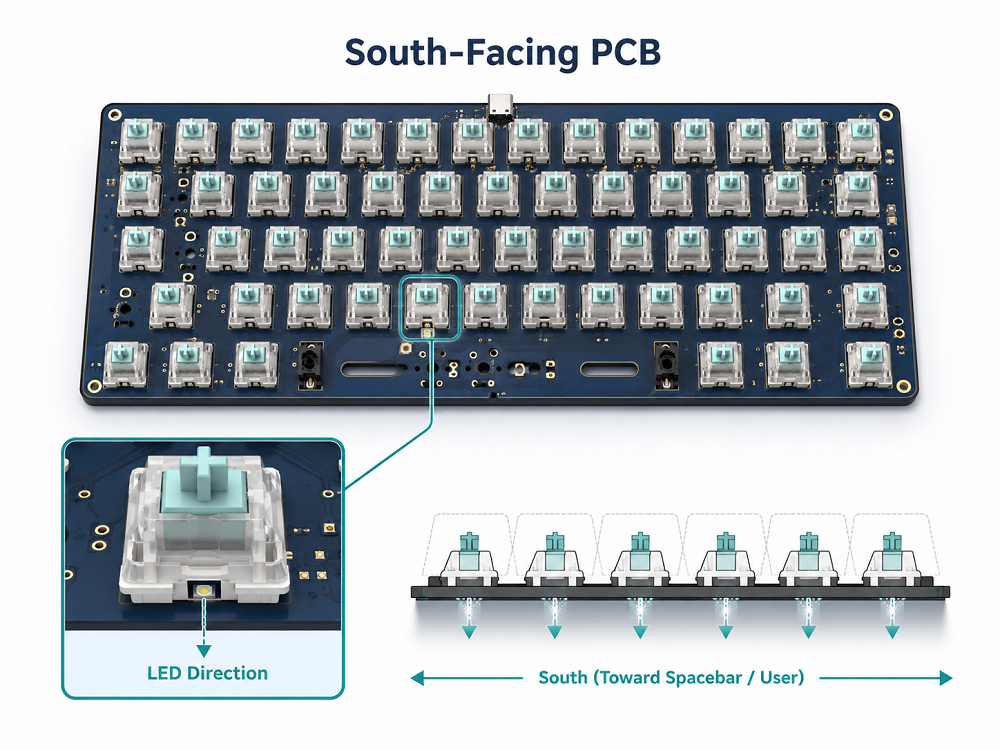
What is south-facing PCB? A south-facing PCB is a mechanical keyboard PCB layout where the switch LED opening or switch orientation faces the lower side of the keyboard, usually toward the spacebar and the user. In keyboard language, “south” simply means the bottom direction of the board.
This term is mainly used in custom mechanical keyboards. It does not describe the geographic direction of the PCB. Instead, it explains how the switch and LED are positioned on the circuit board.
South-facing PCB layouts are popular because they work well with many custom keycaps, especially Cherry Profile keycaps. They are often chosen by keyboard enthusiasts who care about typing feel, sound, and keycap flexibility.
South-Facing PCB vs North-Facing PCB
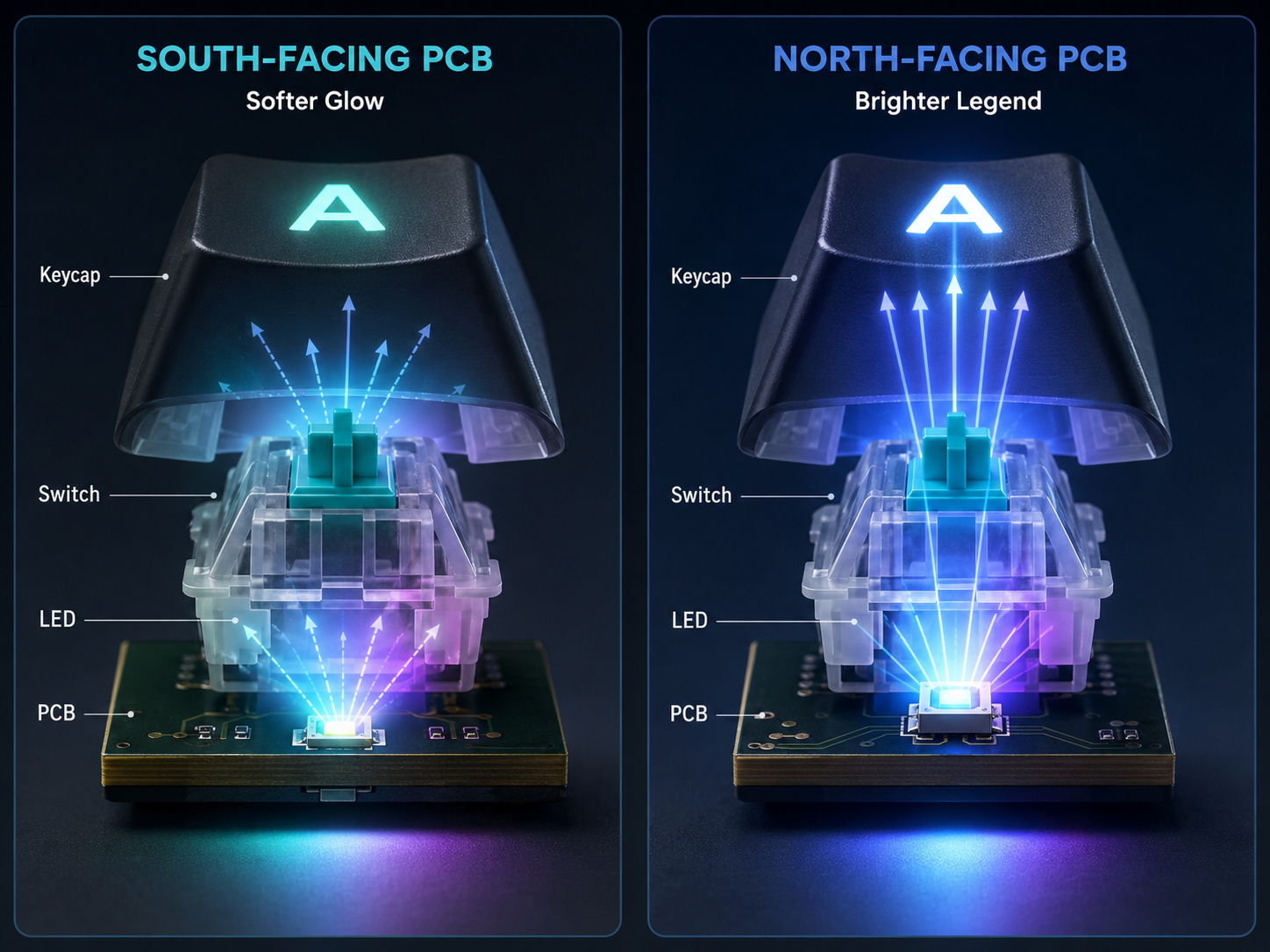
South-facing PCB and north-facing PCB mainly differ in switch LED position, keycap compatibility, RGB brightness, and typing feel. South-facing PCB is often better for Cherry Profile keycaps and custom builds, while north-facing PCB is usually better for bright RGB shine-through legends.
A north-facing PCB places the LED closer to the top side of the keycap. Since many shine-through keycaps have legends near the upper part of the keycap, the light can pass through the letters more directly. This is why many gaming keyboards use north-facing LEDs.
A south-facing PCB places the LED closer to the lower side of the keycap. This layout may produce softer lighting, but it usually improves keycap compatibility. It is common in custom mechanical keyboards because users often install aftermarket keycap sets.
If you want a keyboard mainly for typing, custom keycaps, or a refined sound profile, south-facing PCB is usually more attractive. If you want strong RGB shine-through letters, north-facing PCB may be more suitable.
Is South-Facing PCB Better?
South-facing PCB is better for many custom mechanical keyboard users, especially those who use Cherry Profile keycaps or thick PBT keycaps. However, it is not automatically better for every keyboard. The better choice depends on your keycaps, RGB preference, and typing needs.
For custom keyboard users, south-facing PCB has a strong advantage because it gives more freedom. You can change keycap sets more easily. You can use many popular profiles without worrying as much about switch housing interference. This makes the keyboard more upgrade-friendly.
South-facing PCB is usually better when you care about:
- Cherry Profile keycap compatibility
- Smooth key travel
- Custom keycap support
- PBT keycap sets
- Typing sound consistency
- Long-term keyboard modification
- Enthusiast-style keyboard builds
North-facing PCB can still be better when you care about:
- Bright RGB legends
- Gaming keyboard appearance
- Shine-through ABS keycaps
- Strong lighting through letters and symbols
- Factory-style RGB visual effects
The best way to choose is to think about your priority. If your priority is typing feel and keycap freedom, south-facing PCB is usually better. If your priority is bright RGB through keycap legends, north-facing PCB may be better.
Does South-Facing PCB Affect RGB Lighting?
Yes, south-facing PCB affects RGB lighting because the LED is positioned toward the lower side of the switch. The RGB still works, but the light may not shine through top legends as directly as it does on a north-facing PCB.
This is one of the most important things to understand before buying a keyboard. South-facing PCB does not mean the keyboard has weak lighting. It means the light direction is different.
If you use opaque PBT keycaps, the difference may not matter much. The light will mostly appear around the switch area, under the keycap, or between the keys. This can create a softer and cleaner glow.
If you use shine-through keycaps with letters on the upper part, north-facing PCB usually makes those letters brighter. The LED sits closer to the legend, so the light passes through more directly.
Does South-Facing PCB Work with Cherry Profile Keycaps?
Yes, south-facing PCB works very well with Cherry Profile keycaps. In fact, Cherry Profile compatibility is one of the biggest reasons many custom keyboards use south-facing PCB layouts.
Cherry Profile keycaps are popular because they are comfortable, clean, and not too tall. Many premium keycap sets use this profile. However, because of their lower height and inner shape, some Cherry Profile keycaps may interfere with north-facing switch housings.
Keycap interference means the inside of the keycap may touch part of the switch housing during a keypress. This can make the key feel less smooth. It may also affect sound because the keycap does not move as freely as expected.
South-facing PCB helps reduce this issue because the switch orientation changes the contact relationship between the keycap and the switch housing.
How to Tell If a Keyboard Has a South-Facing PCB?
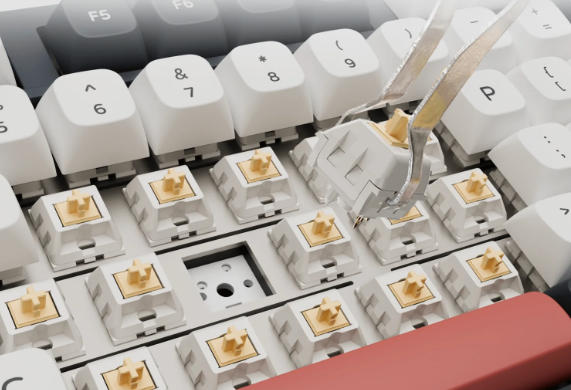
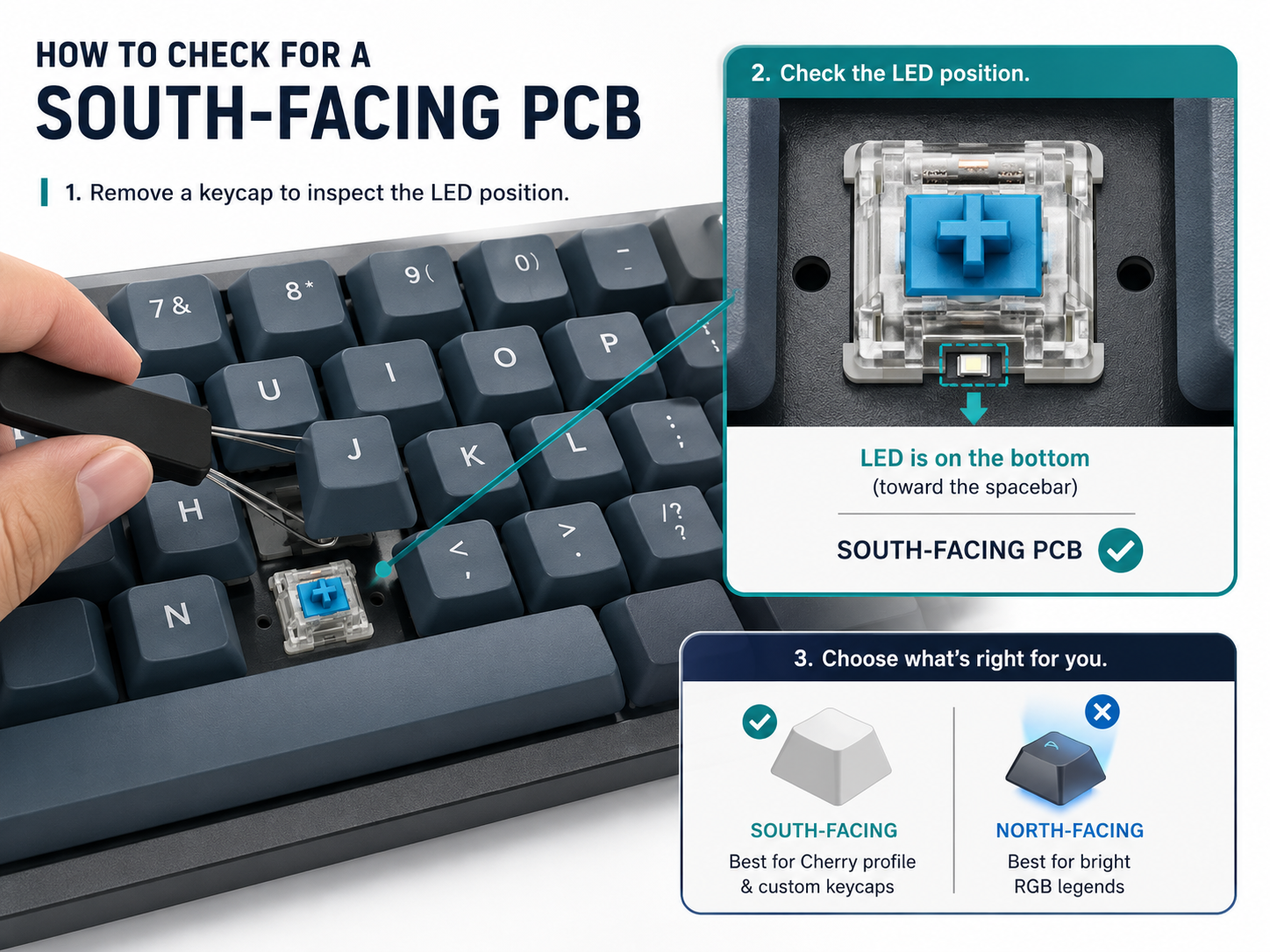
You can tell if a keyboard has a south-facing PCB by checking the LED position under the keycap. If the LED window is below the switch stem and closer to the spacebar side, the keyboard likely uses a south-facing PCB.
The easiest way is to remove one keycap carefully and look at the switch. On many mechanical switches, there is a small transparent window, LED slot, or opening. Its direction tells you whether the PCB is south-facing or north-facing.
You can also check the product page. Many keyboard brands mention this feature because it matters to custom keyboard users. Look for phrases such as:
- South-facing PCB
- South-facing LEDs
- South-facing RGB
- Cherry Profile compatible
- No north-facing interference
- Custom keycap friendly
- Hot-swappable south-facing sockets
South-Facing PCB for Mechanical Keyboard
South-facing PCB is widely used in mechanical keyboards, especially in custom keyboard kits and enthusiast-grade designs. It supports better keycap compatibility and gives users more freedom to modify the keyboard after purchase.
Mechanical keyboards are different from ordinary office keyboards because users often change parts. They may replace switches, install new keycaps, tune stabilizers, add foam, or rebuild the keyboard for a different sound. In this type of product, PCB orientation becomes important.
A south-facing PCB can be used in many keyboard layouts, including:
- 60% keyboard
- 65% keyboard
- 75% keyboard
- TKL keyboard
- Full-size mechanical keyboard
- Split keyboard
- Hot-swappable keyboard
- Soldered custom keyboard
For hot-swappable mechanical keyboards, the PCB design must match the socket direction correctly. The socket pads need enough strength because users may replace switches many times. Good pad design helps prevent lifting, cracking, or poor contact.
Are South-Facing Switches Real?
The phrase “south-facing switches” is commonly used, but it is not the most accurate technical term. In most cases, people actually mean south-facing PCB or south-facing switch orientation.
A mechanical switch itself is not permanently south-facing or north-facing. The switch becomes south-facing when it is installed into a PCB layout that positions it in that direction.
For example, the same MX-style switch could be installed in different orientations if the PCB footprint allows it. The switch model does not change, while PCB design decides the final direction.
This is why users should focus on the keyboard PCB specification, not only the switch name.
Should You Choose South-Facing or North-Facing PCB?
You should choose south-facing PCB if you care more about keycap compatibility, Cherry Profile support, and typing feel. You should choose north-facing PCB if you care more about bright RGB legends and shine-through lighting. Here is a simple final decision guide:
Choose south-facing PCB if you want:
- Better Cherry Profile compatibility
- More keycap freedom
- A custom keyboard feel
- Less risk of keycap interference
- A cleaner long-term upgrade path
Choose north-facing PCB if you want:
- Brighter RGB legends
- Stronger gaming-style lighting
- Better shine-through keycap performance
- A keyboard mainly used for visual effects
For most users interested in custom mechanical keyboards, south-facing PCB is the safer and more flexible option. For users who strongly prefer bright RGB letters, north-facing PCB is still a practical choice.
FAQs
1. What is south-facing PCB in a keyboard?
A south-facing PCB is a keyboard PCB layout where the switch LED opening or switch orientation faces the lower side of the keyboard, toward the spacebar. It is common in custom mechanical keyboards because it improves compatibility with many keycap profiles.
2. Is south-facing PCB better than north-facing PCB?
South-facing PCB is usually better for keycap compatibility and Cherry Profile keycaps. North-facing PCB is usually better for bright shine-through RGB legends. The better option depends on whether you care more about typing feel or lighting.
3. Does south-facing PCB have RGB?
Yes, a south-facing PCB can still have RGB lighting. The difference is the LED direction. The light may appear softer or less direct through top legends, but it can still create a good under-key glow.
4. Why do custom keyboards use south-facing PCB?
Custom keyboards often use south-facing PCB because users like changing keycaps. South-facing layouts usually support more keycap profiles and reduce the chance of Cherry Profile interference.
5. Does south-facing PCB work with Cherry Profile keycaps?
Yes, south-facing PCB works very well with Cherry Profile keycaps. It is often recommended for users who plan to install Cherry Profile sets because it can help avoid keycap and switch housing contact.
6. How do I know if my keyboard is south-facing?
Remove a keycap and check the LED position. If the LED window is closer to the lower side of the keyboard, near the spacebar direction, it is likely south-facing. You can also check the product page for “south-facing PCB” or “south-facing LEDs.”
7. Are south-facing switches different from normal switches?
Usually no. The switch itself is normally a standard mechanical switch. The PCB layout decides whether the switch is installed in a south-facing or north-facing direction.
8. Is south-facing PCB good for gaming?
Yes, south-facing PCB can be good for gaming, especially if you care about keycap compatibility and typing comfort. However, if your main goal is bright RGB legends, north-facing PCB may be more suitable.
9. Can hot-swappable keyboards use south-facing PCB?
Yes. Many hot-swappable custom keyboards use south-facing PCB layouts. The hot-swap socket simply needs to be designed in the correct orientation.
10. Should beginners choose south-facing PCB?
Beginners who plan to try different keycaps should consider south-facing PCB. It offers more flexibility and reduces common compatibility concerns. Beginners who mainly want bright RGB letters may prefer north-facing PCB.
Conclusion
South-facing PCB is a popular mechanical keyboard PCB layout where the switch LED or switch orientation faces the lower side of the keyboard. It is widely used in custom keyboards because it supports better keycap compatibility, especially with Cherry Profile keycaps.
Compared with north-facing PCB, south-facing PCB is usually better for typing feel, keycap freedom, and long-term customization. North-facing PCB remains useful for users who want bright RGB shine-through legends.
The best choice is not about following a trend. It is about matching the PCB layout with your real keyboard needs. If you want a custom-friendly keyboard with more keycap options, south-facing PCB is usually the better path. If you want strong RGB letters for a gaming setup, north-facing PCB can still be a strong choice.