PCB manufacturing PCB manufacturing
Home > Blog

What is BGA Full Form? – EBest Circuit (Best Technology)

August 20th, 2024

The full form of BGA is Ball Grid Array. BGA is one of the most important elements in the electronic device. From smartphones to advanced computing systems, BGA electronics are everywhere. In this article, we will discuss what a BGA is? How does it work and its advantages & disadvantages in the modern electronics.

What is a BGA in PCB?

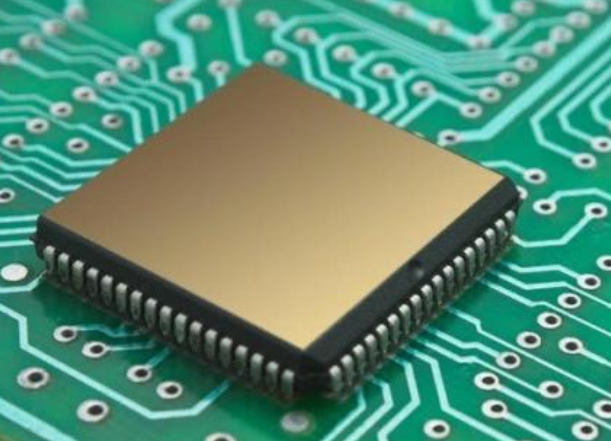
Ball grid Array (BGA) is a surface-mount package used to attach integrated circuits (ICs) to printed circuit boards (PCBs) to permanently protect devices such as microprocessors. Unlike the older through-hole method, BGA utilizes tiny solder balls that are arranged in a grid at the bottom of the IC package. These solder balls allow for more efficient connection to the PCB. BGA packages can accommodate more pins than other packages, such as Dual In-line Packages (DIP) or Quad Flat packages (QFP), and the entire underside of the device can be used as a pin, not just around it. It also has a shorter average line length than the package types defined around it for better high-speed performance.

What is BGA Full Form? - EBest Circuit (Best Technology)

These solder balls can be configured manually or by automated machines and positioned by flux. When the device is fixed on the PCB by surface bonding technology, the arrangement of the bottom tin balls exactly corresponds to the position of the copper foil on the board. The production line then heats it up, either in a reflow oven or an infrared oven, to dissolve the tin balls. The surface tension causes the melted tin balls to hold the seal and align to the board. At the correct spacing, when the tin balls are cooled and fixed, the welded contacts are formed to connect the device to the PCB.

PCB boards with BGA generally have many via holes. Generally, the holes under the BGA chip is designed as a finished hole, with a diameter of 8~12mil. They need to be plugged, no ink and no drilling is allowed on the pad.

How does BGA works?

BGA works by replacing the traditional leads used in older packages with a grid of solder balls. When the IC is mounted to the PCB, the solder balls are heated, causing them to melt and create electrical connections. These connections ensure that the IC functions as intended by linking it directly to the board’s circuitry. The grid arrangement not only makes it possible to pack more connections into a smaller area but also improves the thermal performance, allowing heat to dissipate more efficiently. BGA ICs are thus more reliable and efficient in high-performance applications.

Types of BGA packages

There are many types of BGA packages, which can be categorized based on the arrangement of the solder balls into peripheral, staggered, and full array types. According to the different substrates, the main categories include PBGA (Plastic BGA), CBGA (Ceramic BGA), FCBGA (Flip-chip BGA), and TBGA (Tape BGA). Let’s explain different types of BGAs in detail.

What is BGA Full Form? - EBest Circuit (Best Technology)

1. PBGA Package

PBGA is the most commonly used BGA packaging type, made using plastic materials and plastic processes. The substrate used is PCB substrate material (BT resin/glass laminate). The bare chip is attached and connected to the top of the substrate and the lead frame using bonding and WB technology, followed by molding through the injection process (epoxy film/plastic mixture). Intel CPUs, including Pentium II, III, and IV processors, use this packaging type.

The solder ball material is a low-melting-point eutectic solder alloy 63Sn37Pb, with a diameter of about 1mm and a spacing range of 1.27-2.54mm. The connection between the solder balls and the bottom of the package does not require additional solder. During assembly, the solder balls melt, joining with the PCB surface pads, forming a barrel shape.

What is BGA Full Form? - EBest Circuit (Best Technology)

Features of PBGA packaging

  • Low production cost, high cost-effectiveness.
  • The solder balls participate in the reflow soldering joint formation, and the coplanarity requirements are relatively loose.
  • Good thermal compatibility with epoxy resin substrates, ensuring high quality and performance when assembled onto PCBs.
  • Sensitive to moisture, with a serious PoPCorn effect, which presents reliability issues. The height of the package is also a technical challenge compared to QFP.

2. CBGA Package

CBGA involves mounting the bare chip on the top surface of a ceramic multilayer substrate. A metal cover plate is soldered onto the substrate using sealing solder, protecting the chip, leads, and pads. The connected package undergoes hermetic sealing to improve reliability and physical protection. Pentium I, II, and Pentium Pro processors have used this packaging type. CBGA employs multilayer ceramic wiring substrates, with the solder ball material being high-melting-point 90Pb10Sn eutectic solder. The connection between the solder balls and the package is made using low-temperature eutectic solder 63Sn37Pb, with a sealed cap and glass hermetic sealing, placing it in the hermetic packaging category.

What is BGA Full Form? - EBest Circuit (Best Technology)

Features of CBGA packaging

  • Not sensitive to moisture, high reliability, and excellent electrical and thermal performance.
  • Good CTE compatibility with ceramic substrates.
  • Better reworkability for connecting chips and components.
  • The bare chip uses FCB technology, allowing for higher interconnection density.
  • Higher packaging cost.
  • Poor CTE compatibility with substrates like epoxy resin.

3. FCBGA Package

FCBGA is currently the main packaging format for graphics accelerator chips. This packaging technology originated in the 1960s when IBM developed the so-called C4 (Controlled Collapse Chip Connection) technology for large computer assembly. It was later developed further to utilize the surface tension of molten bumps to support the chip’s weight and control the bump height, becoming a direction in flip-chip technology development.

This packaging uses small balls instead of pins to connect the processor. A total of 479 balls are used, each with a diameter of 0.78mm, providing the shortest external connection distance. FCBGA connects the chip to the substrate using FCB technology, differing from PBGA in that the bare chip faces downward.

4. TBGA Package

TBGA, also known as Tape Ball Grid Array, is a relatively novel BGA packaging format. It uses PI multilayer wiring substrates, and the solder ball material is high-melting-point solder alloy, with low-melting-point solder alloy used during welding.

What is BGA Full Form? - EBest Circuit (Best Technology)

Advantages of BGA

  1. BGA packages are smaller in size compared to SOP packages. For the same memory IC and capacity, the volume of a BGA is only one-third that of an SOP package.
  2. In QFP and SOP packages, the leads are distributed around the perimeter of the package. As the number of leads increases, the spacing decreases, making the leads prone to deformation and bending. In contrast, BGA solder balls are located on the bottom of the package, and the spacing is larger, significantly improving the yield rate.
  3. BGA leads are very short, using solder balls instead of wires. The signal path is short, reducing inductance and capacitance, which enhances electrical performance.
  4. The spherical contact array and the gap formed with the substrate improve heat dissipation from the package body.
  5. BGA body and PCB board have good coplanarity, can effectively ensure the quality of welding.

Disadvantages of BGA

  1. After soldering, it is difficult to inspect and repair BGA packages. X-ray inspection is required to ensure the electrical performance of the solder joints. Quality cannot be determined through visual inspection or Automated Optical Inspection (AOI).
  2. Since the BGA pin is at the bottom of the body, which is easy to cause welding shadow effect, so the welding temperature curve is higher. The actual welding temperature must be monitored in real time.
  3. If individual BGA solder joints are faulty, the entire BGA package must be removed, re-balled, and then resoldered. This affects the throughput rate and electrical performance.
  4. BGA packages are more robust compared to QFP packages with 20 mil spacing. BGAs do not have leads that can bend or break. Soldering is secure, and if the BGA needs to be removed, a high-temperature rework station must be used.

What is the difference between BGA and FPGA?

BGA refers to a packaging type, while FPGA is a type of semiconductor device that can be programmed after manufacturing. An FPGA can be packaged in a BGA format, but they are not the same thing.

FPGA is further developed on the basis of traditional logic circuits and gate arrays such as PAL (Programmable logic Array), GAL (universal array logic), CPLD (complex programmable logic device). It uses computer-aided design to draw the schematic diagram, edit Boolean equation or use hardware description language as design input. Then through a series of conversion programs, automatic layout and wiring, simulation and simulation process; Finally, the data file of FPGA is generated and the FPGA device is initialized. In this way, the ASIC that meets the requirements of users is realized, and the purpose of designing, developing and producing integrated circuits by users is truly achieved.

What is BGA Full Form? - EBest Circuit (Best Technology)

FPGA consists of programmable logic block (CLB), input/output module (IOB), programmable Interconnect resource (PIR) and static memory SRAM used to store programming data. CLBS are the basic units that implement logic functions, and they are usually arranged in a regular array, scattered throughout the chip. The IOB mainly completes the interface between the logic on the chip and the external pins, and is usually arranged around the chip. PIR provides a wealth of connection resources, including crossbar mesh connections, programmable switch matrices, and programmable connection points, which connect individual CLBS, CLBS and IOBs, and IOBs to form circuits for specific functions. Static memory SRAM is used to store the programming data of internal IOB, CLB and PIR, and form the control of IOB, CLB and PIR, so as to complete the system logic function.

If you want to know more about BGA, welcome to leave your message below.

What is a heavy copper PCB?

August 19th, 2024

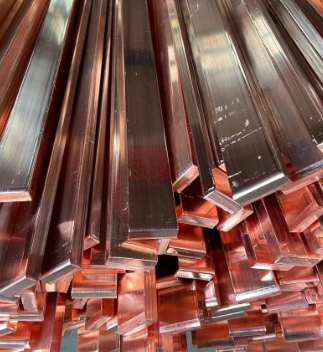
With the development of society, the demand for heavy copper PCBs in different industries has become increasingly greater. At present, heavy copper PCBs have been widely used in various electronic industries. Generally speaking, heavy copper technology can realize complex switches in a limited space, combine circuits with high current levels, and is conducive to heat dissipation. Multilayer and double-sided are the most common designs we know. More importantly, heavy copper PCB technology makes it possible to combine good layout structures on the outer layer and Heavy copper layers on the inner layer.

What is a heavy copper PCB?

Heavy copper PCB is a special printed circuit board (PCB) characterized by a very high concentration of copper, usually up to 200 ounces per square foot, and the copper content of the inner and outer layers of the circuit board is above 3 ounces (oz), which enables heavy copper PCBs to conduct extremely high currents, achieve good heat distribution, and realize complex circuit layouts in a limited space.

What is a heavy copper PCB?

In the design and manufacturing process of heavy copper PCBs, thermal stress handling is an important consideration. Engineers need to eliminate thermal stress as much as possible to maintain the circuit while minimizing the power budget, while taking into account environmentally friendly design.

With the development of PCB manufacturing process, modern manufacturing technology such as the use of aluminum PCB can better handle thermal stress problems.

The heat dissipation capacity of Heavy copper PCB is better than the traditional solution of using external heat sink, because it prints the heat sink directly on the circuit board during the manufacturing process, and achieves rapid heat transfer through conductive through-holes, thereby improving heat dissipation performance.

In general, Heavy copper PCB is a high-performance electronic component carrier, which provides an ideal solution for applications requiring high power and high reliability through its high copper content and optimized thermal management characteristics.

What is the difference between PCB and Heavy copper PCB?

Copper board and Heavy copper board look similar in name, and people tend to think that they are the same PCB, but in fact they refer to different things.

1. PCB:

PCB refers to a copper-based PCB. The use of copper as a substrate is to better dissipate heat and extend the life of components on the PCB. The copper substrate is to allow heat to be quickly transferred from the PCB to the outside, such as a heat sink or a metal casing. Because the thermal conductivity of copper is several times that of aluminum or other metals, up to 401W/MK.

What is a heavy copper PCB?

2. Heavy copper PCB:

Heavy copper PCB refers to PCB with copper thickness exceeding 3OZ. The substrate can be aluminum or FR4. Heavy copper is to enable PCB to carry large current. Please note that Heavy copper here does not refer to the thickness of PCB, but the thickness of copper foil on PCB. Both aluminum PCB and FR4 PCB can thicken the copper foil.

What is the maximum copper thickness on Heavy copper PCB?

‌The maximum thickness of copper on Heavy copper PCB can reach 20oz. ‌

In circuit board design and manufacturing, copper thickness is an important parameter, which directly affects the electrical performance, heat dissipation capacity and mechanical strength of the circuit board. For applications that need to carry large currents, it is necessary to choose a thicker copper layer.

The copper layer thickness of Heavy copper ultra-thick PCB is generally between 2oz and 20oz. This range of copper layer thickness can ensure the stability and reliability of the circuit board while providing good heat dissipation performance.

 In practical applications, according to international standards, the copper thickness of PCB boards can be divided into standard copper thickness and non-standard copper thickness. Standard copper thickness includes 1oz (35um) and 2oz (70um), while non-standard copper thickness covers 0.5oz (17um), 3oz (105um) and 4oz (140um). For some special applications, such as high-power LED lights, electronic high-frequency circuits, etc., a higher copper thickness may be required. At this time, non-standard copper thickness will be selected, up to 20oz.

During the manufacturing process, a Heavy copper foil is first adhered to the substrate, and then the circuit pattern is transferred to the copper foil through a photolithography process. Then chemical etching is performed to remove excess copper, and finally the thickness of the copper layer is further increased through an electroplating process to ensure that the Heavy copper PCB can meet the requirements of high current and high power applications.

Finally, surface treatment is performed to protect the copper circuit from oxidation and corrosion. Common surface treatment methods include hot air leveling (HASL), lead-free tin spraying, nickel gold (ENIG), etc. During the entire manufacturing process, process parameters must also be strictly monitored to ensure the uniformity and thickness consistency of the copper layer.

What are the advantages of Heavy copper PCBs?

1. Heavy copper PCBs have better current conductivity and can withstand excessive current loads. Because thicker copper wires have higher current carrying capacity, their current carrying capacity can be increased by increasing the copper wire width.

2. Heavy copper inner layers are ideal power distribution layers in multi-layer PCBs, which minimize ground bounce and power supply noise

3. Improve thermal performance and increase heat dissipation. Can withstand repeated thermal cycles during manufacturing and assembly.

4. Provide high mechanical strength in connector locations and plated through holes.

5. Due to the presence of copper layers, the size of the circuit board is reduced.

What are the disadvantages of Heavy copper PCBs?

1. Heavy copper PCBs are more expensive to manufacture than standard PCBs because more specialized equipment and richer expertise are required.

2. Heavy copper PCBs are more difficult to process because the PCBs may be heavier and bulkier than other PCBs.

What are the properties of Heavy copper PCBs?

High mechanical strength: After Heavy copper is applied to the circuits and vias of the board, the printed circuit board has super high mechanical strength, and the weather resistance of the circuit board and electrical system is more stable and has a high melting point. Hot melt welding methods such as oxygen blowing can be used, and it is not easy to become brittle at low temperatures. Even in an extremely corrosive atmospheric environment, Heavy copper PCBs can form a strong, non-toxic passivation protective layer.

Excellent weather resistance: Because Heavy copper PCB boards support the selection of a variety of dielectric materials. It improves the overall weather resistance of the board and can ensure the stability of circuit transmission signals under certain high temperature or extreme special environments.

Thermal management: With the advancement of modern technology, PCBs are becoming more and more complex, and high-density currents increase the difficulty of thermal management. Excessive temperature will affect the normal operation of electronic equipment and even cause damage. Heavy copper PCB boards can provide stronger heat dissipation capabilities. With heat sinks and copper plating on through holes, the heat generation of the board can be greatly reduced.

Excellent current conductivity: In the operation of electronic equipment, Heavy copper printed circuit boards are excellent current conductors that can connect and transmit power between various boards.

Diversity: Plating of Heavy copper circuits allows Heavy copper PCB manufacturers to increase the copper weight of via sidewalls and plated holes, thereby reducing the number of layers and occupied space.

Ductility: Heavy copper PCBs have the best ductility and are not limited by processing temperature.

High performance: Heavy copper plating integrates high current and control circuits, allowing high density with a simple board structure.

Where are Heavy copper PCBs used?

1. Automotive electronics

What is a heavy copper PCB?

2. Grid switching systems

3. Power line monitors

4. Security and signal systems

5. Radar monitoring systems

6. Industrial control

7. Aerospace

8. Telecommunications

9. Medical devices

Conclusion:

In PCB production, Heavy copper PCBs require special processes, are difficult to operate, and have certain technical barriers, so the production cost of Heavy copper PCBs is higher than other ordinary circuit boards. Although the price is not cheap, the quality and service are the best.

BEST Technology has more than 18 years of PCB manufacturing experience. Focusing not only on fast PCB prototyping and PCB assembly, but also on small and medium batch PCB manufacturing, customer satisfaction is our goal, we will do our best to manufacture your circuit boards in the highest quality to meet your needs, and are committed to complying with the most stringent standards in PCB manufacturing and assembly. ‌

How Fast Does Current Flow in A Circuit?

August 19th, 2024

When we flip a switch, our devices turn on almost instantly. But how fast does current actually flow in a circuit board? This question touches on the fundamentals of how electricity works and how it travels through wires. The speed of current flow is often misunderstood, as it involves complex science, but the basics are easy to grasp. Let’s break down this concept in a way that’s clear, relatable, and informative.

How Fast Does Current Flow in A Circuit?

What Is the Definition of Current?

Current is the amount of electricity passing through any cross section of A conductor per unit time, expressed by symbol III in amperes (A). Current is formed by the regular directional motion of the free charge in the conductor under the action of the electric field force. The direction of the directional flow of positive charge is specified as the direction of current.

Ohm’s Law governs how current moves through a circuit. It states that the current (I) in a circuit equals the voltage (V) divided by the resistance (R). The format is: V = I * R. According to Ohm’s law, when the resistance is constant, voltage and current are proportional, and the greater the resistance, the smaller the current. This law highlights that higher voltage or lower resistance allows more current to flow, but it doesn’t directly explain speed. The actual movement of current is more about the strength of the force driving the electrons through the conductor.

How Fast Does Current Flow in A Circuit?

What Is the Speed of Current in a Circuit?

The speed at which current flows depends on what we mean by “speed.” Electric current refers to the flow of electrons, but these particles move much slower than you might expect. Electrons drift through the wire at speeds measured in millimeters per second. However, the electrical signal, which causes the current to flow, travels near the speed of light. In standard circuits, this speed is incredibly fast—closer to 300,000 kilometers per second in a vacuum. In cables, it’s slightly slower because materials like copper slow the signal down, but it remains very high. This is why our lights turn on so quickly.

The flow of current in a circuit

  • In the ‌ parallel circuit ‌, current passes through each parallel branch separately. According to Ohm’s law, the smaller the resistance in a different branch, the greater the current through that branch, the current will choose to pass through the lower resistance of the branch.
  • In the ‌ series circuit ‌, current flows sequentially through the series elements. The greater the resistance in the series element, the smaller the current passing through the element, and the current will be selected to pass through the larger resistance element.
  • In a circuit, current circulates along a closed loop. According to Kirchhoff’s current law, the sum of the current in the loop is zero. This means that when current enters a node through a branch, it returns to the original branch ‌ through other exits on that node.
  • For multiple branches in parallel, according to Kirchhoff’s current law, the sum of their branch currents is equal to the total current. That is, the algebraic sum of the currents in each parallel branch is equal to the total current magnitude.

What is the Direction of the Current Flow in the Circuit?

Outside the power supply, the current flows from the positive terminal of the power supply to the negative terminal of the power supply through the electrical appliance. Inside the power supply, the direction of current flows from the negative terminal to the positive terminal. In a closed circuit, the direction of current outside the power supply flows from the positive terminal of the power supply through the electrical appliance to the negative terminal.

How Fast Does Current Flow in A Circuit?

According to the continuity principle of current, the current must be continuous in a closed circuit and cannot be interrupted or disappeared. This is because the presence of current requires a closed loop to provide a path.

How Fast Does an Electric Current Flow in a Circuit?

The current in the ‌ circuit flows at the speed of light, that is, 300,000 kilometers per second (m/s), but the electrons actually flow rather slowly. ‌

The speed of electric current is theoretically the speed of light, because electric current is actually caused by changes in the electromagnetic field. In a vacuum, electromagnetic waves (including light) travel at the fastest speed, known as the speed of light, at about 299,792,458 meters per second. Since current is the flow of electric charges, and the movement of electric charges causes changes in the electromagnetic field, this change can theoretically travel at the speed of light. However, the “current speed” here actually refers to the speed at which electrons move through the conductor, which is relatively slow, between about 0.001-0.1 meters per second. This difference is mainly due to the fact that the speed of a current includes not only the movement of electrons through a conductor, but also the change in the speed of the electromagnetic field, which is the theoretical speed of light ‌1.

In addition, the speed of electron movement is related to the potential difference between the two ends of the conductor and the resistance of the conductor itself, which is the basic content of Ohm’s law. Current is defined as the amount of charge passing through a cross section in unit time. Therefore, although the electrons move slowly, due to the large number of electrons, the transmission speed of current is very fast, which can almost respond to changes in the circuit in real time. For example, when the light switch is turned on.

To understand this more clearly, imagine current as water flowing through a pipe. The electrons are like water molecules moving very slowly, while the energy they carry moves much faster. In practical terms, when we talk about the “speed” of electricity, we’re usually talking about how quickly the electric signal travels. It’s important to clarify that the electrons themselves are sluggish, but the effect of their movement—what we perceive as current—travels at nearly the speed of light.

Is the Speed of Current Faster Than Light?

No, the speed of current in any practical sense cannot exceed the speed of light. The signal may travel close to the speed of light under optimal conditions, but electrons, the carriers of charge, move much slower. This distinction is important because it highlights the difference between the actual particles (electrons) and the energy they carry. The signal traveling through the circuit can be very fast, but never faster than light.

It’s fascinating to compare electricity with light because both involve the movement of energy. Light, which is a form of electromagnetic radiation, always moves at the maximum speed allowed by physics—approximately 300,000 kilometers per second in a vacuum. Electricity in a circuit, particularly the signal propagation, travels at a speed close to this, but never quite as fast because wires and other materials introduce resistance. The signal speed in a copper wire, for instance, is roughly two-thirds the speed of light, or about 200,000 kilometers per second.

How Do You Calculate Current Flow Rate?

The calculation of velocity in an electric current usually concerns the strength of the current rather than the velocity of a substance. Calculating the current flow rate in a circuit is straightforward using Ohm’s Law: I = V/R. For example, if you have a 12-volt battery and a resistance of 6 ohms, the current will be 2 amps. However, this formula applies to direct current (DC) circuits only. In AC circuits, because both voltage and resistance change with time, the calculation is more complex and needs to be calculated using instantaneous values. In addition, the calculation of the current involves other factors in the circuit, such as inductance and capacitance, which affect the behavior of the current and the way it is calculated.

Speed of Electricity in km/hr

If you convert the speed of electricity into kilometers per hour (km/h), it’s easier to understand just how fast it is. In a vacuum, electricity would travel at around 1.08 billion kilometers per hour. In practical circuits, like those in your home, electricity still travels at an astonishing speed, typically between 700 million and 800 million kilometers per hour. This is why we experience no noticeable delay when we turn on an electrical device. High-voltage transmission lines carry electricity at speeds of around 50% to 99% of the speed of light. This allows power to be transmitted over long distances in a matter of milliseconds, ensuring that homes and businesses receive electricity almost instantaneously.

The influence of copper thickness on PCB

August 19th, 2024

Copper thickness has a very important impact on the performance of PCB, and PCBs with different copper thicknesses also have very different applications. The fundamental reason why copper is widely used in circuit board manufacturing is its electrical conductivity, so different copper thicknesses correspond to different electrical conductivities. In addition, copper also has low resistance and thermal stability.

Why fill PCB with copper?

The main purpose of using copper to fill PCB (Printed Circuit Board) is to improve the electrical conductivity of the circuit board, enhance mechanical strength and stability, protect the circuit board from oxidation or corrosion, and improve heat dissipation capabilities. ‌

The influence of copper thickness on PCB

As an excellent conductive material, copper plays a vital role in PCB design. By covering the surface of the PCB with copper foil, the conductive performance of the circuit board can be significantly improved and the connection between various components can be ensured to be more stable and reliable.

Copper foil itself has high mechanical strength and stability, which can effectively prevent PCB from being damaged or deformed due to the influence of the external environment. The corrosion resistance of copper foil can also protect the circuit board from oxidation or corrosion, thereby extending the service life of the circuit board and ensuring its stability and reliability during work.

Since metal has good electrical and thermal conductivity, copper coating can increase the heat dissipation surface area of the PCB, help distribute heat evenly, and prevent the generation of local high-temperature areas. This can not only reduce local heat concentration, but also reduce the temperature gradient of the heat source and improve heat dissipation efficiency.

To sum up, the role of copper-filled PCB is multi-faceted. It can not only improve the conductivity and mechanical stability of the circuit board, but also protect the circuit board from environmental influences, while enhancing the heat dissipation capacity and ensuring the stable operation of electronic equipment. and long-term use‌.

Is a thicker PCB copper better?

The copper thickness of PCB is not as thick as possible, but the appropriate copper thickness needs to be selected according to the design requirements and actual application of the circuit board. ‌

The importance of copper thickness in PCB manufacturing cannot be ignored because it directly affects the conductive performance, heat dissipation performance, mechanical strength and signal integrity of the circuit board. Proper copper thickness can provide good electrical and thermal conductivity while ensuring the reliability and stability of the circuit board.

Although an excessively thick copper layer can improve current carrying capacity and heat dissipation performance, it will also increase cost and weight, which may lead to serious glue flow and increased processing difficulty. Therefore, when selecting copper thickness, factors such as circuit board design requirements, application environment, and cost need to be comprehensively considered.

During the PCB design and manufacturing process, the optimal copper thickness should be selected based on specific application requirements and cost considerations to achieve optimal circuit performance, heat dissipation, and mechanical strength‌.

How thick is the copper on a 1 ounce copper PCB?

The thickness of 1 ounce of copper on a PCB is 35 microns. ‌

The influence of copper thickness on PCB

In the PCB industry, ounces (oz) are the unit used to express copper foil thickness, not weight. Specifically, the thickness of 1oz of copper refers to the thickness achieved by spreading 1oz of copper evenly over an area of 1 square foot.

According to different information, the thickness of 1oz copper can be obtained by different calculation methods, but the generally accepted value is that 1oz copper is equal to 1.4mil (milliinch), which is equivalent to 35 microns. Therefore, whether in international standards or practical applications, the thickness of 1oz copper on PCB is usually considered to be 35 microns.

In addition, the copper thickness of the PCB has a direct impact on the circuit board’s current carrying capacity, heat dissipation, reliability and other performance indicators. Commonly used PCB copper thickness specifications include 1oz, 2oz, 3oz, 4oz, 5oz, 6oz, etc., which correspond to different copper layer thicknesses. The copper layer thickness of 1oz is 35 microns, 2oz is 70 microns, and so on, 6oz is 210 microns. . These specifications provide the basis for selecting different copper thicknesses based on specific application needs to meet different electrical performance and physical requirements.

What is the conventional PCB copper thickness?Thick copper plate, FPC

‌Regular PCB copper thickness is 1oz (35μm). When the thickness of the copper foil reaches or exceeds 2oz, such a PCB board is defined as a thick copper board; for flexible circuit boards (FPC), the copper thickness also has different specifications, for example, 0.5oz copper thickness is used for flexible circuit boards is being manufactured. ‌

The influence of copper thickness on PCB

In PCB manufacturing, the choice of copper thickness is determined based on specific application requirements. Common copper thickness classifications include:

1. ‌1oz copper thickness: ‌

This is the most common and standard copper foil thickness and is widely used in everyday electronic devices and general applications. 1oz (ounce) means 1 ounce of copper foil weighs 1 square foot. In the PCB manufacturing process, 1 ounce corresponds to a copper foil thickness of approximately 35 microns, which has good electrical and thermal conductivity.

2. ‌2oz copper thickness: ‌

Copper foil of this thickness is usually used in circuits that require higher current carrying capabilities, such as power amplifiers, high-power LEDs, etc. 2oz copper thickness corresponds to a copper foil thickness of approximately 70 microns, which has better performance in electrical conductivity and heat dissipation than 1oz copper thickness.

3. ‌0.5oz copper thickness: ‌

This thinner copper foil thickness is suitable for some light and small electronic products, such as electronic watches, mobile phones, etc. 0.5oz (18μm) copper foil is suitable for equipment that has strict requirements on circuit board size and weight.

How to choose PCB copper thickness?

Choosing PCB copper thickness depends primarily on the board’s purpose, current requirements, signal integrity requirements, cost budget, and manufacturing process capabilities.

1. ‌Circuit board usage and current requirements‌: For circuit boards that need to handle large currents, such as power boards, it is recommended to use thicker copper foil, such as 2oz (about 70μm) or 3oz (about 105μm). For signal transmission, a copper thickness of 1oz (~35μm) is usually sufficient. Ordinary double-sided boards generally use 1oz copper thickness, while multi-layer boards generally use 1/2oz, 1/3oz copper thickness for the inner layer, and 1oz, 1/2oz, 1/3oz copper thickness for the outer layer.

2. Signal integrity requirements: For high-density interconnect (HDI) boards or high-frequency circuits, thinner copper foil may be required to reduce parasitic effects and ensure signal integrity.

3. ‌Cost considerations‌: The thicker the copper foil, the higher the cost is usually.

4. Environmental factors: For PCBs in extreme working environments (such as high temperature, high humidity or high vibration environments), the thickness of the copper foil may need to be adjusted to enhance the stability and durability of the circuit.

In summary, selecting PCB copper thickness is a process that comprehensively considers multiple factors and needs to be determined based on specific application scenarios and design requirements.

What is the difference between different copper thicknesses on PCB?

‌The main differences between different copper thicknesses on PCBs are their conductive properties, load-bearing capacity, anti-interference performance, cost and manufacturing difficulty. ‌

The influence of copper thickness on PCB

‌Outer copper thickness‌ is commonly used for circuit board routing and connections, and its selection depends on the application requirements and design needs of the circuit board. The outer copper thickness range is generally between 1-5oz, and the more common ones are 1oz, 2oz, 3oz and 4oz. The thicker the outer copper layer, the stronger the circuit board’s load-bearing capacity, and the better its anti-interference performance and electrical conductivity. But at the same time, the increase in the thickness of the outer copper layer will also lead to an increase in cost and manufacturing difficulty.

‌Inner layer copper thickness‌ is used for internal connections and signal transmission of the circuit board, and its selection also depends on the application requirements and design needs of the circuit board. The thickness of the inner copper layer generally ranges from 0.5-2oz, with the more common ones being 0.5oz, 1oz, and 2oz. If the circuit board needs to transmit high-speed signals, a larger inner copper thickness should be selected. The increase in the thickness of the inner copper layer will also lead to an increase in cost and manufacturing difficulty.

‌Copper Thickness Standard‌According to international standards, the copper thickness of PCB boards can be divided into standard copper thickness (such as 1oz and 2oz) and non-standard copper thickness (such as 0.5oz, 3oz and 4oz). In practical applications, some special PCB boards may require higher copper thickness, such as high-power LED lights, electronic high-frequency circuits, etc.

To sum up, the choice of different copper thicknesses is to meet specific circuit board design needs, including conductive performance, anti-interference performance and other requirements. At the same time, the choice of copper thickness also needs to consider aspects such as cost and manufacturing difficulty.

Conclusion:

By controlling the thickness of copper on the PCB to meet different usage requirements, applications that require large currents will naturally require PCBs with thicker copper foils. However, PCBs that require thicker copper foils are a great test of the capabilities of PCB manufacturers. BEST Technology has accumulated rich production experience in the PCB manufacturing industry and has many years of manufacturing experience for PCBs with different copper thicknesses. We can meet any PCB copper thickness requirements.

PCB Line Width and Flow Current Comparison Table

August 19th, 2024

PCB Line Width and Flow Current Comparison Table

In PCB manufacturing, the term of “OZ” always refers to copper thickness, 1OZ thickness means evenly spread 1OZ copper foil on the 1 square foot areas, and this thickness is around 0.035mm. So, 35um, 50um, 70um correspond to 1OZ, 1.5OZ, 2OZ.

The full name of OZ is ounce, it is the weight per unit area to express the thickness of the copper foil, the format is: 1OZ=28.35g/FT2

PCB Line Width and Flow Current Comparison Table Chart

PCB Line Width and Flow Current Comparison Table Chart
Line width (mm)Current (A)Line width (mm)Current (A)Line width (mm)Current (A)
0.150.20.150.50.150.7
0.20.550.20.70.20.9
0.30.80.31.10.31.3
0.41.10.11.350.41.7
0.51.350.51.70.52.0
0.61.60.61.90.62.3
0.82.00.82.40.82.8
1.02.31.02.61.03.2
1.22.71.23.01.23.6
1.53.21.53.51.54.2
2.04.02.04.32.05.1
2.54.52.55.12.56.0
Copper thickness 1OZ (0.035mm)Copper thickness 1.5OZ (0.05mm)Copper thickness 2OZ (0.7mm)

From the chart as above:

35um copper thickness and 0.4mm line width, the current is 1.1A;

50um copper thickness and 0.4mm line width, the current is 1.35A;

70um copper thickness and 0.4mm line width, the current is 1.7A.

EBest Circuit (Best Technology) PCB Line Width and Flow Current Calculator

When using copper foil as a conductor for large currents, the width of the copper foil should be selected by reducing the current-carrying capacity values from the reference table by 50%. However, there are other methods to address this. In some power circuits, due to PCB constraints, the current-carrying paths are designed as long pads, and solder is added on top of them to form a thick current path. Besides adding tin to the copper foil to increase the current capacity, you can also consider using multiple PCB layers to increase the current. For instance, placing the same circuit on both the top and bottom layers or using short jumper wires can also help increase the current capacity.

How Wide Should the Trace be If Current is 1A?

1. Due to the limited thickness of the copper foil on the copper-clad board, the current-carrying capacity of the copper foil needs to be considered for strip-shaped copper foil that needs to carry a large current. Taking the typical thickness of 0.03mm as an example, if the copper foil is used as a strip-shaped conductor with a width of W (mm) and a length of L (mm), its resistance is 0.0005 L / W ohms. Additionally, the current-carrying capacity of the copper foil is related to the types of components installed on the PCB, their quantity, and the heat dissipation conditions. Under safe conditions, the current-carrying capacity can generally be calculated using the empirical formula: 0.15 W (A).

2. The calculation method is as follows: First, calculate the cross-sectional area of the track. Most PCBs have a copper foil thickness of 35μm (if unsure, you can ask the PCB manufacturer). Multiply this by the trace width to get the cross-sectional area, making sure to convert to square millimeters. There’s an empirical value for current density, which is 15-25 amperes per square millimeter. Multiply this by the cross-sectional area to get the current capacity.

3. I = K T^0.44 A^0.75, where K is a correction factor (0.024 for internal copper traces, 0.048 for external copper traces), T is the maximum temperature rise in degrees Celsius (copper’s melting point is 1060°C), A is the copper cross-sectional area in square mils (not square millimeters, so be mindful of the conversion), and I is the allowable maximum current in amperes (amps). Typically, 10 mil = 0.010 inches = 0.254 mm, which can carry 1A. Therefore, 250 mil = 6.35 mm can carry 8.3A.

4. The calculation of PCB current-carrying capacity has long lacked authoritative technical methods and formulas. Experienced CAD engineers can make accurate judgments based on personal experience. However, for CAD novices, this can be quite a challenge.

5. PCB current-carrying capacity depends on the following factors: trace width, trace thickness (copper foil thickness), and allowable temperature rise. As we all know, the wider the PCB trace, the greater the current-carrying capacity. Under the same conditions, a 10mil trace can carry 1A, but can a 50mil trace carry 5A? The answer is, of course, no.

Current-Carrying Capacity of External PCB Traces (1mil = 0.0254mm)

Line length  current carrying data chart (unit: A)
 
Line width (mil)Line length 5cmLine length 10cmLine length 15cmLine length 20cmLine length 25cmLine length 30cmLine length 35cmLine length 40cm
40.4030.201.0.1340.1010.0810.0670.0580.050
60.6040.3020.2010.1510.1210.1010.0860.075
80.7530.4030.2680.2010.1610.1340.1150.101
100.8860.5030.3360.2520.2010.1680.1440.126
121.0110.6040.4030.3020.2420.2010.1730.151
161.2450.8050.5370.4030.3220.2680.2300.201
201.4641.0070.6710.5030.4030.3360.2880.252
301.9641.5101.0070.7550.6040.5030.4310.378
402.4192.0131.3421.0070.8050.6710.5750.501
502.8442.5171.6781.2581.0070.8390.7190.629
603.2463.0202.0131.5101.2081.0070.8620.755
803.9993.9992.6842.0131.6111.3421.1501.007
1004.7014.7013.3562.5172.0131.6781.4381.258
1205.3655.3654.0273.0202.4132.0131.7261.510
1606.6106.6105.3694.0273.2212.6842.3012.013
2007.7707.7706.7115.0334.0273.3552.8762.517
2408.8688.8688.0536.0404.8324.0273.4513.020
2809.9179.9179.3957.0475.6374.6984.0273.523
32010.92510.92510.7388.0536.4435.3694.6024.027
36011.89911.89911.8999.0607.2486.0405.1774.530
40012.84412.84412.84410.0678.0536.7115.7525.033

For low-frequency, low-current PCB designs, the general trace width is around 10 mil, and for more compact designs, 6 mil may be used. The key factor in determining PCB trace width is the current: higher currents require wider traces, while lower currents can use narrower traces. The operating frequency also plays a role in determining the width.

  1. Ideally, the width of the PCB power trace should be at least 40 mil, with a minimum of 25 mil when conditions allow. Always opt for the widest trace possible to accommodate the current.
  2. Consider the actual current flow. Typically, a 10 mil trace can carry a maximum of 1A, so adjust the width according to the current requirements.
  3. The ground trace should be wider than the V+ trace and should surround the V+ trace to reduce interference and power ripple.
  4. When converted to millimeters, the positive power trace should be no less than 0.6mm wide, while the negative power trace should be wider than the positive trace and surround it.

How Are Multilayer Boards Constructed?

The multi-layer board is composed of several single sided PCB for the outer layer and some double-sided PCBs for the inner layer.

l Single-Sided Boards

In the most basic PCB design, components are placed on one side of the board, and the wiring is on the other. This is called a single-sided board. Due to strict routing limitations (since traces cannot cross each other), single-sided boards are mostly used in simpler circuits.

l Double-Sided Boards

Double-sided boards have wiring on both sides. To connect the circuits on both sides, vias (small holes filled or coated with metal) are used. The larger area and ability to route traces through both sides make double-sided boards more suitable for complex circuits compared to single-sided boards.

l Multilayer Boards

To increase routing space, multilayer boards are created by combining multiple layers of single-sided or double-sided boards. For example, a four-layer or six-layer PCB might consist of a double-sided board as the core with single-sided boards on either side, all bonded together. Multilayer boards allow more complex designs, and while most modern PCBs use between 4 to 8 layers, designs with up to 100 layers are possible for advanced computing needs, though they are increasingly rare due to advances in other technologies.

The number of layers doesn’t always indicate the number of wiring layers—some layers may be added purely to adjust board thickness. Most motherboard designs consist of 4 to 8 layers, and while extremely complex multilayer boards were once used in supercomputers, they are now often replaced by clusters of standard machines.

Trace Width and Copper Pour Guidelines

When designing PCBs, a general rule is to use thicker traces for high-current areas (e.g., 50 mil or more) and thinner traces for low-current signals (e.g., 10 mil). In some electromechanical control systems, the instantaneous current through a trace can exceed 100A, in which case thin traces would fail.

An empirical rule of thumb is that 10A can safely pass through 1 square millimeter of trace cross-section. If the trace is too thin, it may burn out under high current. This phenomenon follows the energy equation: Q = I^2*t. For example, a trace designed for 10A can likely handle a sudden current spike of 100A for microseconds, but beyond that, other factors like stray inductance in the trace could generate strong counter-electromotive forces, potentially damaging other components. Longer and thinner traces have higher stray inductance, so their length must also be considered.

Copper Pouring on Vias and Pads

Most PCB design software offers options for how to connect vias or pads to copper planes, such as direct pour, orthogonal spokes, or 45-degree angled spokes. While many designers select based on aesthetics, these choices affect both current capacity and heat dissipation.

l Direct Pour: This method provides the strongest current-carrying capacity for pads or vias, making it ideal for high-power circuits. However, direct pours also enhance heat conduction, which, while beneficial for cooling components, can complicate soldering by rapidly dissipating heat, requiring higher soldering temperatures and larger soldering irons, which may reduce production efficiency.

l Orthogonal and 45-Degree Spokes: These methods reduce the contact area between the pad or via and the copper, slowing heat dissipation and making soldering easier. For low-power signal traces, orthogonal or 45-degree spokes are recommended, while direct pour is necessary for pads carrying high currents. The choice between orthogonal and 45-degree spokes is mainly aesthetic.

Bluetooth PCB Board: How does it Works?

August 17th, 2024

What is a Bluetooth PCB Board?

A Bluetooth PCB board is the core of wireless connectivity devices. It is designed to transmit and receive data through Bluetooth technology, allowing devices to communicate without wires. The PCB (Printed Circuit Board) serves as the foundation, hosting various electronic components like antennas, chips, and capacitors that help facilitate Bluetooth communication. These boards are commonly used in devices such as phones, speakers, and smart gadgets.

Bluetooth PCB boards are built to be compact and efficient, allowing them to be integrated into a wide range of electronic products. The board’s layout ensures optimal signal transmission and reception, minimizing interference and boosting connectivity. With different voltage requirements, such as 5V or 12V, these boards power various Bluetooth devices in everyday applications.

How Does Bluetooth Work?

Bluetooth is a radio technology that supports short-range communication (generally within 10m) between devices, including mobile phones, PDAs, wireless headsets, laptops, related peripherals and many other devices for wireless information exchange. The use of Bluetooth technology can effectively simplify the communication between mobile communication terminal devices, but also successfully simplify the communication between devices and the Internet, so that data transmission becomes more rapid and efficient, widening the road for wireless communication.

As a small-range wireless connection technology, Bluetooth can realize convenient, flexible, secure, low-cost, low-power data communication and voice communication between devices, so it is one of the mainstream technologies to realize wireless personal area network communication. Connectivity to other networks allows for a wider range of applications. It is a cutting-edge open wireless communication, enabling wireless communication of various digital devices, and is a kind of wireless network transmission technology, which was originally used to replace infrared communication.

Bluetooth uses low energy, making it an efficient choice for battery-powered devices. It operates in the 2.4 GHz frequency band, avoiding interference from other wireless devices. This ensures a stable connection, allowing smooth data transmission.

What is a Bluetooth Speaker PCB Board?

Bluetooth speaker PCB board ‌ is composed of Bluetooth main control chip, oscillation frequency module, power supply and charge management chip, audio power amplifier chip, RF antenna and so on. These components together form the Bluetooth speaker motherboard, the Bluetooth speaker PCBA (Printed Circuit Board Assembly).

The Bluetooth speaker PCB allows the speaker to connect with devices like smartphones, tablets, or computers via Bluetooth. The board receives the audio signal wirelessly, processes it, and sends it to the speaker’s amplifier. The amplifier then boosts the signal, allowing the speaker to play the sound loudly and clearly.

Bluetooth speaker PCBs are optimized for sound quality and power efficiency, ensuring that the speaker delivers high-quality audio without draining the battery too quickly. These boards are found in many portable and home Bluetooth speakers.

Functions of the Bluetooth Speaker PCB Board

The main functions of the PCB board of Bluetooth speakers include Bluetooth connectivity, audio signal processing, power management and possible additional functions such as wireless connectivity and personalization. ‌

  • Bluetooth connection

The Bluetooth module on the PCB board is responsible for establishing Bluetooth connection with external devices to achieve wireless audio transmission. Bluetooth version 5.3 offers faster transfer speeds and lower power consumption, ensuring stable audio transmission and longer battery life.

  • Audio signal processing

The audio processing circuit on the PCB is responsible for receiving and processing the audio signal from the Bluetooth connection, converting it into a signal format suitable for driving the speaker, ensuring high quality audio output.

  • Power management

Through the power management circuit on the PCB board, to achieve the speaker charging and battery status management, to ensure that the speaker can work stably for a long time under different conditions.

  • Additional features

Some advanced speakers also support additional functions through the PCB board, such as personalized Settings through the JBL Portable software, including adjusting the lighting effect and sound effect, to provide a richer user experience.

Bluetooth PCB 5v vs. Bluetooth Board 12v

Bluetooth PCBs come in different voltage variants, with the 5V and 12V versions being the most common. These variants cater to different applications based on their power requirements.

Bluetooth PCB 5V: The 5V Bluetooth PCB is commonly used in smaller, low-power devices like headphones, earphones, and portable speakers. It operates efficiently with less power, making it ideal for battery-operated gadgets. The 5V variant is compact and energy-efficient, designed to balance performance with low power consumption.

Bluetooth Board 12V: The 12V Bluetooth PCB is typically used in larger devices like home theater systems, car audio systems, and Bluetooth amplifiers. The higher voltage allows for more power-hungry applications, ensuring a stronger signal and higher audio output. Devices using 12V PCBs usually have access to a more robust power source, such as a car battery or wall outlet, allowing them to perform at a higher level.

Both 5V and 12V Bluetooth PCBs are designed for specific use cases, with the primary difference being power requirements. The choice between them depends on the application, with 5V boards being ideal for portable devices and 12V boards suited for more powerful, stationary equipment.

Bluetooth PCB Board Manufacturer – EBest Circuit (Best Technology)

EBest Circuit (Best Technology) specializing in the research and development, production and sales of Bluetooth PCBA, mini speaker solutions and Jeri solutions. The main business scope includes: Jie Li solution, Bluetooth headset PCBA, Bluetooth speaker PCBA, Bluetooth headset solution, CSR Bluetooth solution, Bluetooth speaker solution, etc. According to the customer shell or sample material or PCB file development, custom size and function, we have a professional R & D engineer team with rich experience in industry design, can use professional PCB design software according to the electronic structure diagram, can overcome PCB design defects, optimize and improve the circuit, component layout control reasonable, accurate data, to meet the best requirements of earphone board circuit design.

We offer various PCB fabrication like metal core PCB, ceramic PCB, rigid-flex PCB, flexible PCBs, RF PCB, HDI PCB, busbar PCB, IC substrate and so on. At the same time, we can provide PCB assembly and box build assembly service, aim to give you a one-stop service. If you need PCB design, fabrication, assembly, and box build assembly, please feel free to contact sales@bestpcbs.com.

Let you know about PCB copper layer thickness

August 16th, 2024

In the printed circuit board industry, the most common way to express the copper layer thickness on a PCB is in ounces (oz). 1oz means 1oz of copper evenly covers an area of 1 square foot, which is about 1.4mil. It uses the weight of the tissue area to express the average thickness of the copper foil. Expressed in terms of formula, 1oz=28.35g/FT2 (FT2 is square feet, 1 square foot = 0.09290304 square meters).

What is the standard thickness of a copper layer on a PCB?

In the manufacture of printed circuit boards (PCBs), the thickness of the copper layer is an important parameter that directly affects the electrical performance and reliability of the circuit board. Depending on the application requirements, the thickness of the copper layer can vary within a certain range. Generally speaking, the conventional copper layer thickness is between 1-35μm, with 35μm being the most commonly used thickness. For some applications with high reliability requirements, the copper layer thickness may reach more than 50μm.

The selection of the thickness of the copper layer is a decision-making process that takes into account a variety of factors, including the conductivity, heat dissipation, mechanical strength, cost and manufacturing difficulty of the circuit board. A larger copper thickness can reduce resistance and improve the conductivity and heat dissipation of the circuit board, but it will also increase material costs and production difficulties. Therefore, when designing PCB boards, engineers need to select a suitable copper thickness standard range based on specific application scenarios and design requirements to ensure the performance and reliability of the circuit board.

1oz copper thickness in mm = 0.035mm

0.5 oz copper thickness in mm = 0.0175mm

1.5 oz copper thickness in mils = 0.0525mm

2 oz copper thickness in mils =  0.07mm‌

How thick is PCB copper after plating?

PCB printed circuit boards are usually bonded to glass epoxy substrates with a layer of copper foil, usually 18, 35, 55 and 70 microns thick. The most commonly used copper foil is 35 microns thick.

The copper foil used by PCB manufacturers is generally 35~50 microns thick, and some are thinner than this, such as 10 microns, 18 microns, and thicker such as 70 microns. The thickness of the composite copper foil on a 1~3 mm thick substrate is about 35 microns. The thickness of the composite copper foil on a substrate with a thickness of less than 1MM is about 18 microns, and the thickness of the composite copper foil on a substrate with a thickness of more than 5 mm is about 55 microns.

The copper layer thickness of PCB (printed circuit board) can be adjusted according to different needs and designs. Common copper layer thicknesses include 1oz (35μm), 2oz (70μm), 3oz (105μm), and other thicker options. For most applications, a copper layer thickness of 1oz is sufficient and suitable for general signal transmission. ‌For circuit boards that need to carry large currents, such as switching power supplies, a copper layer thickness of 2oz or higher is usually used. ‌In addition, there are some special cases where manufacturers provide extremely heavy copper up to 20 oz/ft2 (26.8 mils or 0.34 mm) to meet special needs. ‌

When choosing the thickness of the copper layer, factors such as the purpose of the circuit board and the magnitude of the signal voltage and current need to be considered. ‌For example, for circuit boards that require excessive current, a copper thickness of 70μm or 105μm may be used. ‌For thin laminates that require ultra-high density patterns, a copper thickness of 12μm may be used. ‌Therefore, the specific thickness of the PCB after copper plating is determined according to design requirements and specific applications.‌

How thick is 2 oz copper for PCB?

If 1 ounce (28.35 grams) of copper were flattened to evenly cover a surface area of 1 square foot (0.093 square meters), the resulting thickness would be 1.37mils (0.0348mm). A conversion chart for different units of measurement can be found below.

PCB copper layer thickness 

What is the difference between different copper thicknesses in PCB?

‌Copper is an excellent conductive material, and the thickness of the copper layer directly affects the conductive effect of the circuit board. ‌Thicker copper layers can provide lower resistance, reduce signal transmission losses, and are particularly suitable for high-frequency and high-speed digital circuits. ‌

During the operation of electronic equipment, good heat dissipation is a key factor in ensuring the performance and life of components. ‌Thicker copper layers can conduct and dissipate heat more effectively, preventing components from overheating. ‌

In high-power electronic devices, thicker copper layers can carry larger currents, avoiding burnout or performance degradation caused by excessive current.

Below is the conductivity corresponding to different copper thicknesses.

PCB copper layer thickness 

How thick is high current PCB copper?

In PCB design, copper thickness (also called copper thickness) is an important parameter, which directly affects the performance indicators of the circuit board such as current carrying capacity, heat dissipation and reliability. For PCBs that need to withstand high currents, such as high-power LED light strips, power circuit boards, high-power motor control boards or high-power inverter control boards, thicker copper layers are usually used to increase current carrying capacity.

PCB copper layer thickness 

Different uses have different copper foil thicknesses. Common 0.5oz, 1oz, and 2oz are mostly used in consumer and communication products. Thick copper products above 3oz are mostly used for high currents, such as high-voltage products and power boards.

The thickness of copper foil (track width) will affect the current size. Although there is a formula that can directly calculate the maximum current carrying capacity of copper foil, it is not so simple when actually designing the circuit. Therefore, the safety factor should be fully considered during the design.

How thick is the copper in a flex PCB?

The thickness of copper foil in flexible PCB is generally 18μm, 35μm, 55μm and 70μm. These thickness specifications are suitable for different types of circuit board requirements, among which 35μm is the most commonly used copper foil thickness.

PCB copper layer thickness 

For flexible PCB, the choice of copper foil thickness depends on the specific purpose of the circuit board and the size of the signal voltage and current. For example, for PCBs that require excessive current, some parts will use 70μm copper thickness, while for signal transmission, 1oz (35μm) thickness is usually sufficient. In addition, for substrates of different thicknesses, the thickness of copper foil is also different. For example, the thickness of the composite copper foil on a 1mm thick substrate is about 18μm, and on a substrate thicker than 5mm, the thickness of the composite copper foil is about 55μm.

Conclusion:

PCBs for different usage scenarios correspond to different thicknesses of copper, and its thickness directly affects the conductive effect of the circuit board. If the copper layer is too thin, the conductivity may decrease, resulting in signal transmission attenuation or current instability. If the copper layer is too thick, although the conductivity will be very good, it will increase the cost and weight of the circuit board and easily lead to serious glue flow. In PCB manufacturing, it is necessary to select the appropriate copper thickness according to the design requirements and actual applications of the circuit board to achieve the best conductive effect.

BEST Technology is a professional PCB circuit board manufacturer with a large area of site and equipped with useful and experienced production personnel. Corresponding to different thicknesses of copper, we have rich production and processing experience. We can meet the requirements of any circuit board copper layer thickness.‌

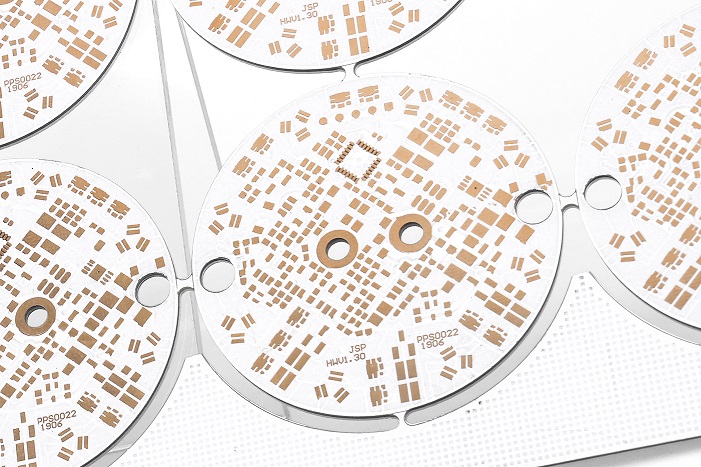
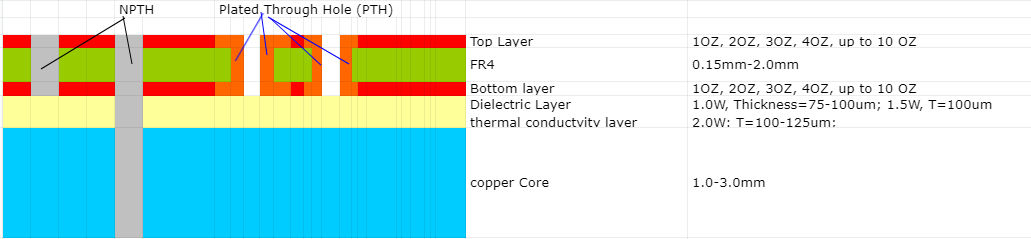
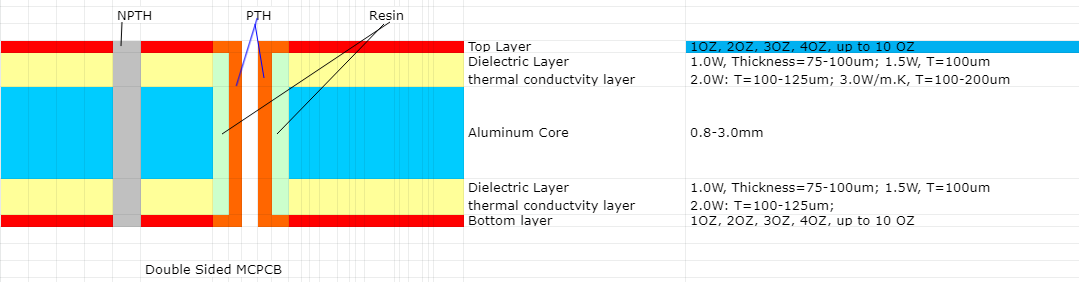
What is MCPCB prototype circuit board?

August 16th, 2024

What is MCPCB prototype circuit board?

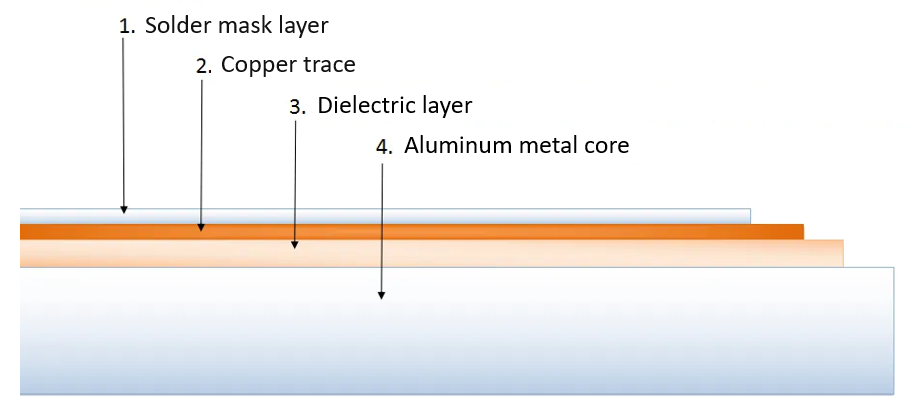
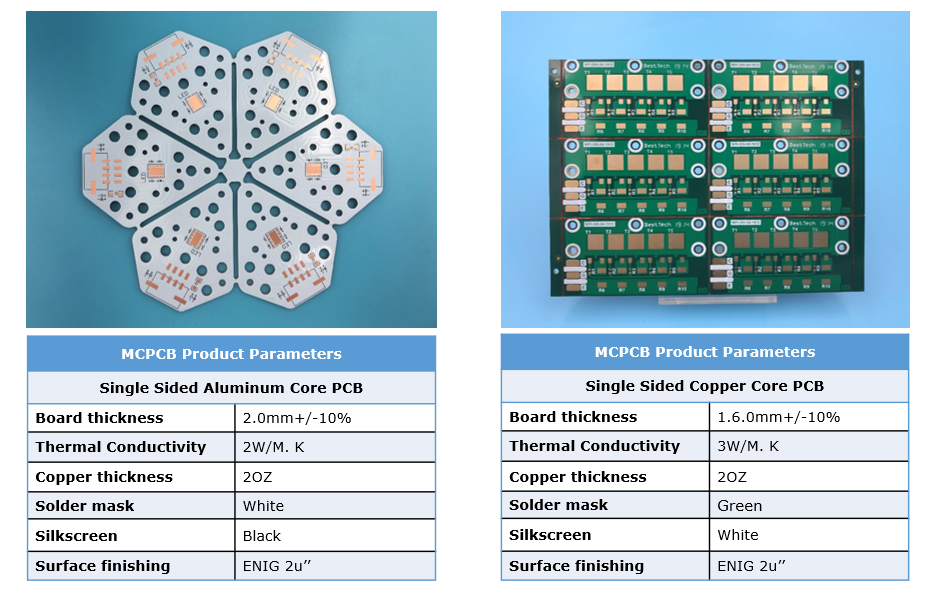
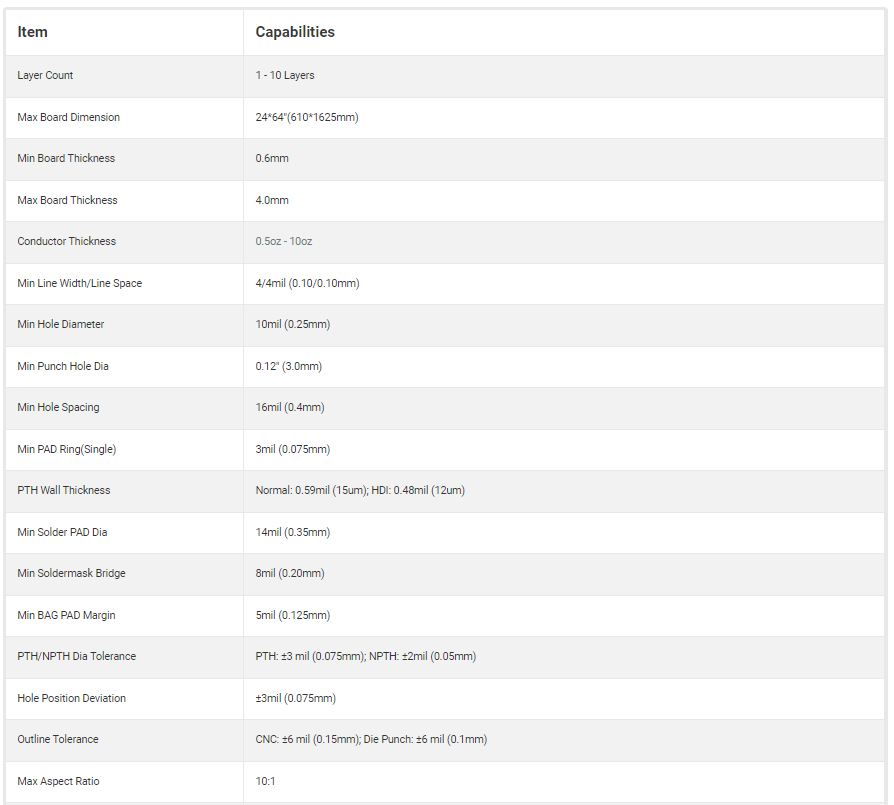
MCPCB prototype refers to the manufacture of a small number of sample PCB boards before formal mass production, and actual welding and testing to verify the correctness, performance and reliability of the design. This process is usually called “proofing” or “prototype production”. The main purpose of MCPCB prototype is to conduct trial production before mass production of circuit boards to ensure the feasibility of the design and the quality of the product. Through MCPCB prototype, design engineers can find and solve potential problems before actual production, thereby ensuring the performance and reliability of the final product.

What is MCPCB prototype circuit board?

Why do we need prototype model?

MCPCB prototypes are to verify the correctness and performance of the design and ensure the quality and reliability of the final product. ‌By making MCPCB prototypes, developers can better optimize product designs, discover potential problems and deficiencies through testing, and make targeted improvements and optimizations.
‌1. Verify the correctness of the design: By making sample boards for testing, design problems can be found, such as errors in component layout and line connection. By discovering problems in advance and making modifications, problems can be avoided during mass production, saving time and cost. ‌
‌2. Evaluate the performance of the circuit board: Through proofing tests, the working condition of the circuit board, signal transmission quality, power supply stability and other aspects can be checked to ensure the reliability and stability of the final product. ‌
‌3. Improve the manufacturing process: During the sample board production process, manufacturing problems can be found, such as poor pads and unreliable line connections, so as to adjust the manufacturing process and workflow in time to improve the overall manufacturing quality and efficiency.

What files are needed to MCPCB prototype ?

‌1. Gerber file: contains the layer information of PCB, such as pads, connections, jacks, etc., and is the basic file for PCB manufacturing.

  1. BOM (Bill of Materials) list: lists the detailed information of all components on the PCB, including component model, quantity, etc., for procurement and assembly.

‌3. Drilling file: contains the location and size information of all holes punched on the PCB, which is very important for the manufacturer to perform drilling processing.

‌4. Circuit diagram: provides the connection method of the design, which is very important for checking whether the connection of the design is correct.

‌5. Special layer file: If the design requires special processes, such as impedance control or metallized hole wall, the corresponding special layer file needs to be provided. ‌

★★Detailed explanation of the role and importance of each file:
★★Installation instructions and precautions: Provide detailed installation instructions, including information such as component direction and polarity, as well as the processing methods of special components
★★Material and thickness instructions: Specify the substrate material, plate thickness, copper foil thickness and other information used to ensure the accuracy of the production process.

What files are needed to MCPCB prototype ?

Prototype pcb manufacturing process

  1. Design phase:

Draw schematics: Use PCB design software (such as Altium Designer, Eagle, KiCad, etc.) to draw circuit schematics and perform error checking.

Generate PCB files: Generate PCB files based on schematics and component libraries, and set parameters such as number of layers, size, line width, and vias.

Export Gerber files and drill files: Gerber files describe PCB layers, and drill files describe via positions and sizes. These files are the main files required by board manufacturers.

  1. Production phase:

Place an order to make PCBs: Package and compress Gerber files and drill files, upload them to the website or software of the board manufacturer, and select appropriate parameters and quantities to place an order and pay.

Wait for delivery: The board manufacturer produces PCBs according to the order and sends them to customers by express delivery, which usually takes a few days to a week. ‌

  1. Subsequent processing (if SMT patch is required): ‌

Transform the schematic diagram and package library: Identify the component type and direction for the patch machine, and modify the schematic diagram and package library. ‌

Export SMT patch coordinate file and bill of materials (BOM): The SMT patch coordinate file describes the component position and angle, and the bill of materials describes the component type and quantity. ‌

  1. Order SMT patch: On the website or software of the board manufacturer, select whether SMT patch is required, and upload relevant files to place an order. ‌

Waiting for delivery: The patch manufacturer performs SMT patch according to the order and sends it to the customer by express delivery. ‌

Testing phase: Test with a flying probe tester to detect defects that affect functionality, such as open circuits and short circuits.

The difference between MCPCB prototype and copy board

The main differences between MCPCB prototypes and copy boards lie in the process flow, production cycle, cost, and applicable scenarios.

  1. Different process flow: Proofing is produced according to the design documents, usually through preparation, board making, drilling, plug-in, welding, coating and other process flows, and finally form a sample consistent with the design documents. Copy board is to reverse design and produce the existing PCB board, generally only need to carry out two process flows of plate making and etching.
  2. Different production cycle: Proofing has a longer production cycle, generally it takes 1-2 weeks to produce samples, mainly because it needs to go through multiple process flows, and the manufacturer needs to carry out strict quality control. Copy board production cycle is relatively short, generally only 3-5 days to produce a copy of the same effect as the original board.
  3. Different cost: Proofing costs are higher, because proofing requires multiple sample production and testing, plus the production cycle is longer, manufacturers need to invest more manpower and material resources. ‌
    ‌Copy board costs less, because it only needs to be reverse designed and produced once, and the production cycle is short, so the cost is lower. ‌
  4. Different applicable scenarios: ‌
    ‌Proofing is suitable for scenarios where the performance and reliability of PCB boards need to be verified and tested, such as the research and development stage of new products, verification of new technologies, etc. ‌
    ‌Copy board is suitable for scenarios where a large number of PCB boards consistent with the original need to be produced quickly, such as mass production, repair and replacement, etc. ‌

How much does a MCPCB prototype cost?

  1. Basic costs: including manufacturing costs, material costs and labor costs. Manufacturing costs include depreciation of production equipment and equipment maintenance costs; material costs mainly refer to the costs of PCB boards, and the prices of different types of boards vary greatly; labor costs include the labor costs of design, board making, welding and other processes. ‌
  2. Process costs: calculated according to the customer’s special requirements for PCB boards, such as multi-layer boards, blind holes, buried holes, impedance control and other advanced processes will increase costs. The more layers, the higher the manufacturing difficulty and cost; the processing of special holes requires more sophisticated equipment and technology, so it will increase costs; impedance control In order to meet the stability of signal transmission, impedance control of PCB boards is sometimes required, which will also increase certain costs.
  3. Logistics costs: mainly include express delivery costs and insurance costs. It is calculated based on the number and weight of PCB boards, as well as the distance between the place of shipment and the place of receipt. In order to ensure the safety of goods during transportation, customers can choose to purchase insurance, and this part of the cost will also be added to the proofing price.
  4. Other costs: including taxes, surcharges, etc. According to the tax laws of different countries and regions, customers may need to pay corresponding taxes; if customers require expedited services or special services, additional fees may be incurred.

Why do prototypes cost so much?

‌1. Material cost‌: Multilayer PCBs require more substrates and prepregs, and the quality of these materials directly affects the functionality and reliability of the circuit. Although using high TG (glass transition temperature) materials will increase costs, it can improve the stability of PCBs in high temperature environments. ‌
‌2. Manufacturing process‌: The production process of multilayer PCBs is more complicated, involving multiple pressing, drilling, and copper plating processes. ‌These steps require sophisticated equipment and technology, which pushes up production costs. ‌
‌3. Design complexity‌: The design of multilayer PCBs is usually more complex, involving more circuits and more compact spatial layout. Designers need to invest more time and energy in design optimization to ensure signal integrity and electromagnetic compatibility. ‌
‌4. Testing and verification‌: To ensure that the performance of multilayer PCBs meets the standards, rigorous testing and verification are required, including electrical testing, thermal stress testing, etc., which adds additional costs. ‌
‌5. Quantity and delivery time‌: The number of samples and the delivery time required by the customer will also affect the price. ‌Urgent orders often require additional expedited fees. ‌
‌6. Documentation and component research: The quantity and quality of documentation that may need to be completed to accompany the prototype build, and the manufacturer must update or create the necessary documentation to proceed with the build. Components in the design may need to be improved, and component engineers will need to spend time researching suitable alternatives. ‌
‌7. Engineering analysis: The design may be more conceptual rather than production-ready, requiring more engineering analysis to ensure that potential manufacturing errors have been corrected. ‌
‌8. Design and debug: It is often necessary to include more elements, such as design for assembly, design for test, and design for debug. Debugging design is essential in prototyping.

Understanding Press-Fit Technology in PCB Surface Mount Technology (SMT)

August 16th, 2024

What is Press-Fit Technology?

Press-Fit technology is a solderless connection method used to install connectors, pins, or other components into a PCB. The components have specially designed pins that are slightly larger than the PCB’s plated through-holes (PTH). These pins are pressed into the holes with sufficient force, creating a secure and reliable mechanical and electrical connection through compression.

The key feature of this technology is that it eliminates the need for soldering. Instead of using heat and solder to establish the connection, the mechanical force ensures that the contact between the pin and the wall of the hole is firm enough to create a stable electrical pathway. This method offers high durability and is especially useful in environments where temperature fluctuations, vibrations, or mechanical stress are present.

Understanding Press-Fit Technology in PCB Surface Mount Technology (SMT)

Advantages of Press-Fit Technology in SMT

1. No Heat Damage

Traditional soldering processes expose components to high temperatures, which can sometimes damage sensitive parts. Press-Fit technology avoids this by using a mechanical press to insert the pins, preserving the integrity of temperature-sensitive components.

2. High Reliability

The press-fit connection creates a strong and stable bond, even in challenging environments such as automotive and industrial applications. The mechanical compression between the pin and the hole ensures excellent electrical contact without the risk of thermal cycling or solder joint cracking over time.

3. Maintenance and Repair

One of the significant advantages of Press-Fit technology is its ease of repair. Since the connections are mechanical rather than soldered, they can be easily removed or replaced if needed without damaging the PCB or the component.

4. Environmental Benefits

By eliminating the need for solder and flux, press-fit technology is also a more environmentally friendly solution. This method reduces the use of hazardous materials and can help meet stricter environmental standards

Application of Press-Fit in SMT

In our SMT assembly process, Press-Fit technology is typically applied to connectors and other components that require robust, high-density connections. This technology is particularly popular in automotive electronics, telecom infrastructure, medical devices, and other high-reliability sectors.

Press-Fit connectors are also ideal for multi-layer PCBs, where a strong and stable connection is essential across various layers of circuitry. By using this technology, we ensure that our products meet the highest standards of performance and durability, especially in critical applications where failure is not an option.

Press-Fit technology is a critical component of modern SMT assembly, providing a highly reliable, solderfree connection method. Its mechanical strength, ease of maintenance, and suitability for harsh environments make it a preferred choice for various high-demand applications. As electronics continue to advance, Press-Fit technology offers a robust and environmentally friendly solution to meet the needs of the industry

Drone Circuit Board: What It Is and How to Make a Drone PCB Board?

August 16th, 2024

What is a Drone Circuit Board?

A drone circuit board refers to the electronic component board installed in a drone that controls and manages its various functions. It serves as the core control system of the drone, similar to how a brain functions in the human body. The drone circuit board controls all operations, including flight, photography, and video recording. It is the central system that coordinates all activities.

Depending on different functions and application scenarios, drone circuit boards can be classified into various types, such as flight control boards, video transmission boards, and power control boards. Among these, the flight control board can be considered a type of drone circuit board but is not equivalent to it. The flight control board mainly controls parameters such as flight direction, altitude, and speed, and adjusts the drone’s posture to ensure stable flight. The drone circuit board, however, not only controls flight but can also implement auxiliary functions such as GPS positioning and image transmission.

What Board is Used in Drones?

In drone design, the two most common types of circuit boards are rigid-flex boards and traditional PCB boards. Rigid-Flex PCB is a hybrid type of PCB that combines rigid and flexible circuit boards. It allows the board to bend and fold in tight spaces, which is particularly useful for compact drones that require a highly integrated design. Moreover, rigid-flex boards are lightweight and thin, which is advantageous for drone designers looking to enhance flight time and stability.

Traditional PCB Boards are another common type of circuit board used in drone design. These boards have strong mechanical strength, making them suitable for the core control units in drones, such as flight control boards and ESC boards (Electronic Speed Controllers).

Below are the main types of circuit boards commonly found in drones:

Control Circuit Board

The control circuit board is one of the most important boards in a drone. It typically consists of the main control chip, sensors, and electronic speed controllers (ESC). The main control chip acts as the brain of the drone, receiving wireless signals and controlling the flight posture and movement based on user commands. Sensors can detect the drone’s position and motion in real-time, ensuring stable flight control. The ESC adjusts the motor speed and direction, which directly impacts the drone’s flight.

Power Supply Circuit Board

The power supply circuit board is responsible for providing power to the drone, ensuring proper voltage and current. It must prevent issues like overcurrent, overvoltage, and overheating to maintain the drone’s performance.

Navigation Circuit Board

The navigation circuit board determines the drone’s position and direction, with the GPS module as the core component. GPS helps obtain satellite signals, calculating important information such as latitude, longitude, and altitude, to ensure precise navigation and positioning. The board may also include other sensors like barometers, gyroscopes, and accelerometers to enhance navigation accuracy.

Communication Circuit Board

The communication circuit board typically includes WiFi, Bluetooth, and 4G/5G modules, which allow the drone to connect with ground control stations or user devices for data transmission, remote control operations, and video streaming.

Why Use a Drone Circuit Board?

Besides the central chip, drone circuit boards serve many critical functions, such as power management and signal transmission. Let’s take a closer look at their functionality:

Power Management

The power management chip on a drone circuit board controls and regulates the power supply. Unlike regular circuit boards, the power management module in drones must be efficient, low-power, and lightweight. Since drones often need to fly for hours, improper design of the power management module can severely impact flight time and energy utilization.

Collecting data

The sensor chip on the drone circuit board is responsible for collecting data, such as GPS location, barometric pressure, and posture. The sensor chip processes data from wireless sensors and transmits it to the control chip for decision-making.

Control the drone

The control chip is the most vital part of the drone circuit board, managing and coordinating all aspects of the drone’s operation, including GPS navigation, servos, and motors. The microprocessor in the control chip uses algorithms to control flight while processing real-time sensor data.

Data Transmission

When capturing aerial photos or videos, the drone needs to send the recorded data to ground devices. The data transmission chip on the drone circuit board ensures that this information is transmitted to ground equipment. Many drones also support wireless network connections for seamless communication.

How to Make a Drone PCB?

To make a drone PCB, you’ll need to prepare the following materials:

  • STM32F405RGT6 microcontroller, which is stable and suitable for various drone applications.
  • 2.4G CC2500 wireless module based on the UART protocol for data communication with the remote control.
  • Sensors like accelerometers, gyroscopes, magnetometers, barometers, GPS, etc., to provide sensor fusion for precise drone control.
  • Power Module
  • Other components including resistors, capacitors, diodes, voltage regulators, and other basic circuit components.

Here is the way to create the drone PCB step by step:

1. Design

You can use PCB software to design the schematic and PCB layout, determining key parameters like circuit connections and component placement.

2. Printing and Etching

Print the designed circuit board pattern onto transparent stickers and attach them to copper sheets. After etching and removing the stickers, the circuit board will be ready.

3. Soldering

Solder the components onto the circuit board. It’s essential to leave adequate pads for soldering during the design phase.

4. Testing

Test the soldered circuit board to ensure normal functioning of the circuits.

What Should We Consider When Designing a Drone PCB?

  • Make sure enough power, ground, and data lines are allocated to each component to avoid signal interference and noise.
  • Take measures to protect components from static electricity during soldering.
  • Write clear and standardized comments in your program for easier modifications and debugging later.
  • Double-check that the board’s connections are in the correct order to prevent damage to the control board.

Is a Fuse Board the Same As a Distribution Board?

No, a fuse board and a distribution board serve different purposes in a drone’s electrical system.

Fuse board is designed to protect your components from power surges or short circuits. It contains fuses that blow if too much current flows through them, cutting off power to prevent damage.

Distribution board is simply distributes power from the battery to different components of the drone, such as the ESCs and flight controller. It doesn’t have the protective features of a fuse board.

In some designs, both can be combined into one board, but their functions remain distinct.

How can I Increase my Drone Power?

Increasing your drone’s power can improve performance, allowing it to carry more weight or fly faster. You can use below ways to increase the power:

  • Upgrade motors
  • Increase battery capacity
  • Use better propellers
  • Optimize power distribution