PCB manufacturing PCB manufacturing
Home > Blog

What Is LED Light PCB? A Complete Guide to LED PCB

February 27th, 2025


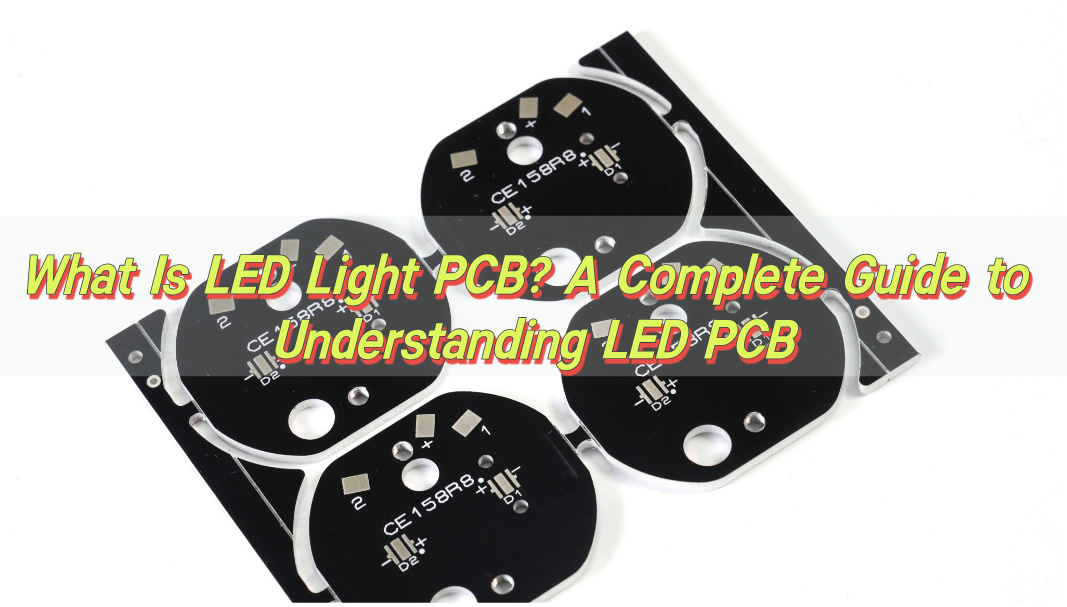
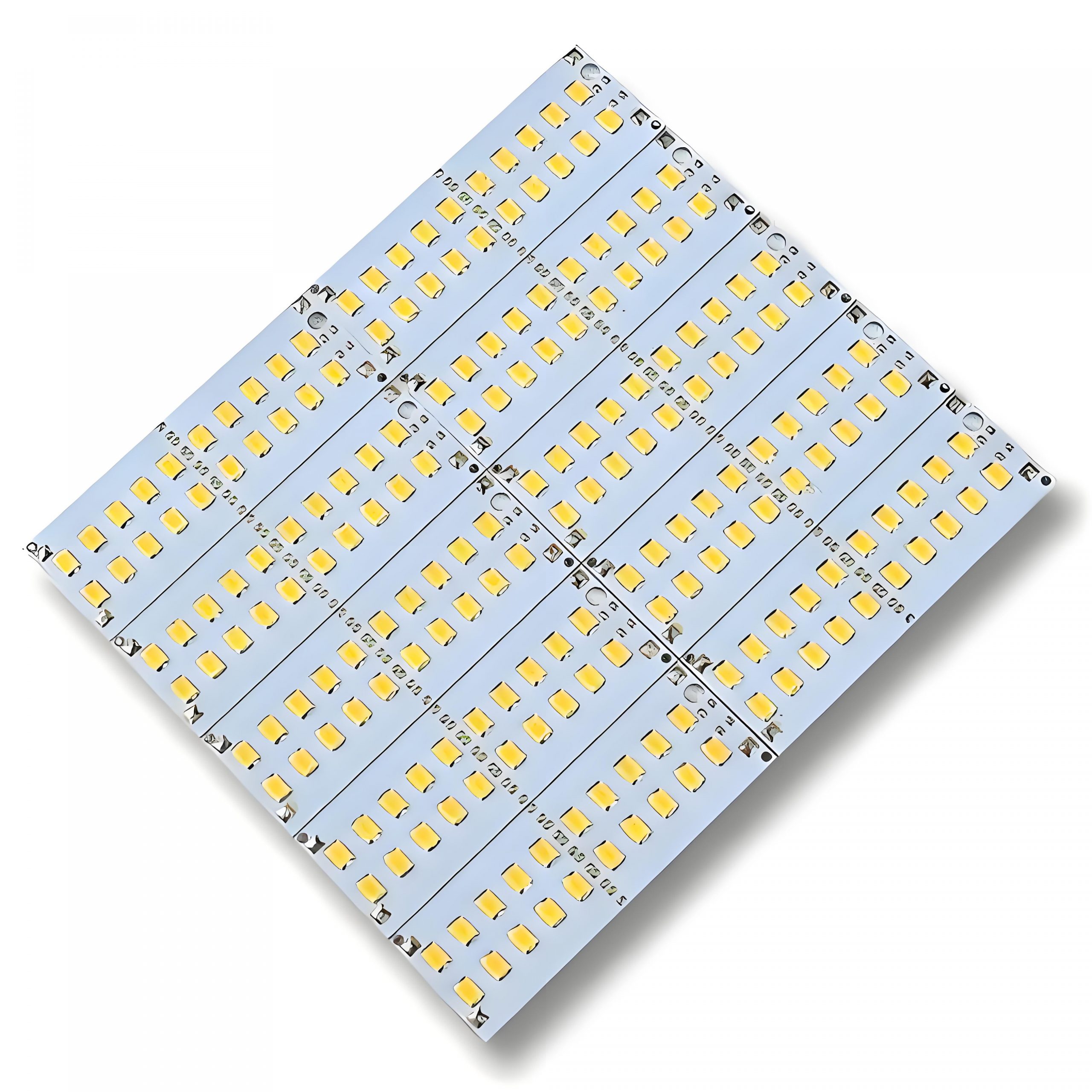
LED light PCB has become an essential part of modern lighting technology. Whether you’re designing a sleek LED light strip or a high-powered LED bulb, understanding the structure and functionality of LED PCB is vital. In this blog, Best Technology will dive deep into what makes LED light PCB, and the materials involved, their components, and the different types that suit various applications. By the end, you’ll have a clear understanding of LED PCB design, including how to connect LED to your custom board.

What Is LED Light PCB? A Complete Guide to LED PCB

What Is PCB in LED Light?

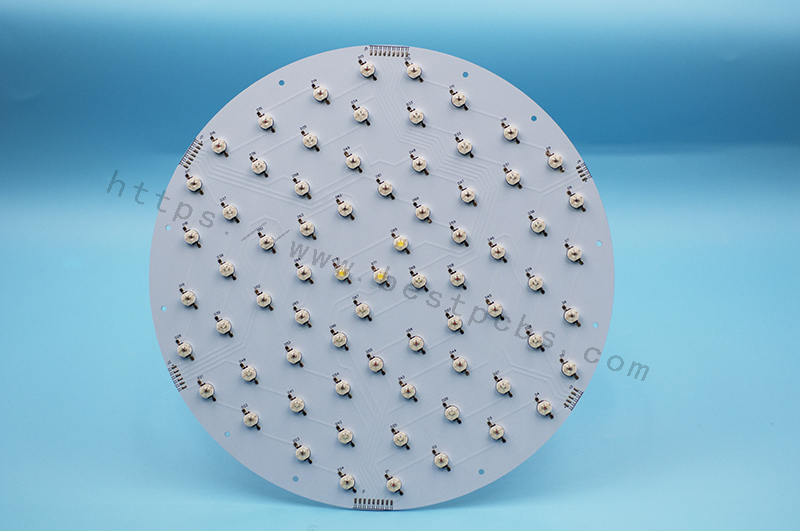
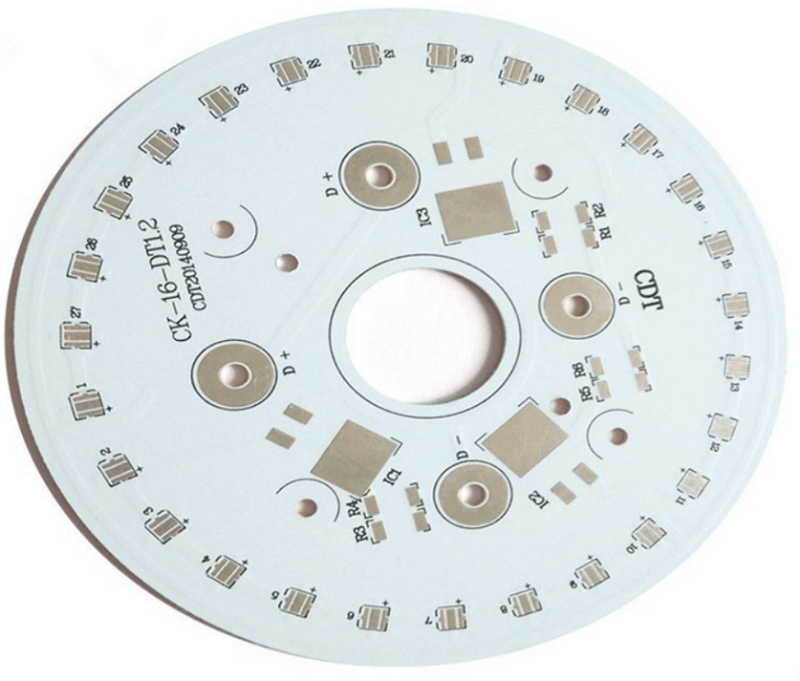
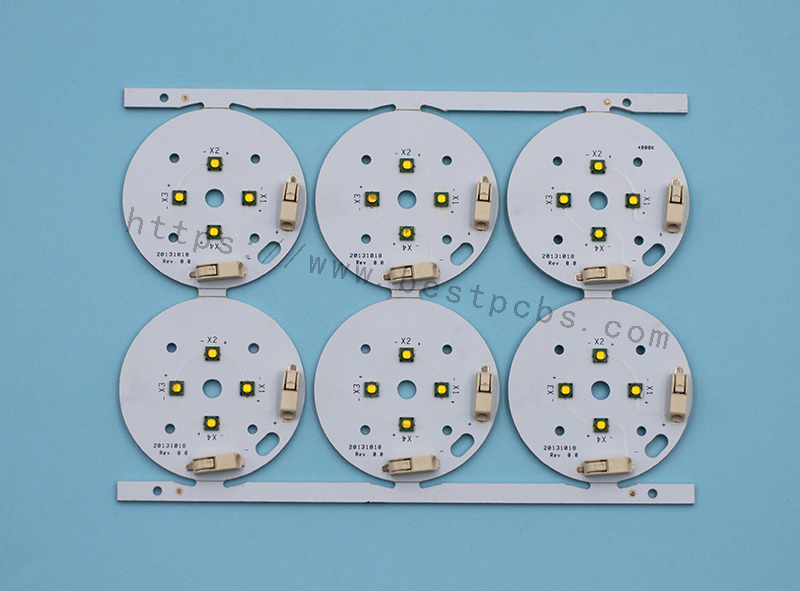
A PCB (Printed Circuit Board) in an LED light is the base where all the components of the LED circuit are mounted. This board serves as the electrical pathway that connects the individual LED chips, allowing electricity to flow through the circuit and power the LED. The design of the PCB is crucial for managing heat dissipation, ensuring optimal light output, and maintaining energy efficiency. Aluminum LED light PCB, in particular, offer excellent thermal conductivity, which is essential in preventing overheating and extending the life of LED components.

What Materials Are Used in LED PCB?

LED PCB are made using several materials that work together to ensure optimal performance. The most common materials include:

  • Aluminum: Known for its high thermal conductivity, aluminum is often used in LED PCB to quickly dissipate heat. This is especially important in high-power LED applications.
  • Copper: Copper is used for its excellent electrical conductivity, ensuring that current flows efficiently through the PCB.
  • FR4 (Flame Retardant 4): This is a widely used epoxy resin laminate material that offers a good balance between electrical insulation and mechanical strength.
  • Ceramic: In some high-performance designs, ceramic-based PCB are used, particularly when superior heat resistance is required.
What Is LED Light PCB? A Complete Guide to LED PCB

Each material plays a specific role in enhancing the performance of the LED, from heat management to electrical conductivity.

What Are the Components of LED PCB?

LED PCB typically consist of the following components:

  • LED Chips: These are the tiny light-emitting diodes that convert electrical energy into light. They are usually placed on the surface of the PCB.
  • Copper Traces: These traces act as pathways for the electrical current, connecting the LED chips to each other and the power source.
  • Thermal Management Elements: In high-power applications, components like heat sinks and through-holes are included to help dissipate heat and maintain efficiency.
  • Resistors: These components control the flow of current through the LEDs to ensure they operate within their rated power limits.
  • Capacitors: Capacitors help smooth out fluctuations in voltage, providing stable power to the LED.
What Is LED Light PCB? A Complete Guide to LED PCB

Each component is crucial in ensuring the LED PCB works efficiently and has a long lifespan.

What Are the Different Types of LED PCB?

LED PCB come in several types, each designed to meet the needs of different applications:

  • Aluminum LED PCBAluminum LED PCB: As mentioned earlier, aluminum is widely used for its excellent heat dissipation. This type of PCB is ideal for high-power LED, like those used in lighting and automotive applications.
  • Flexible LED PCB:These PCB are made from flexible materials, allowing them to be bent and shaped for unique or custom designs. Flexible PCB are perfect for applications like LED strips and curved lighting solutions.
  • High-Density Interconnector(HDI PCB):These are used for applications requiring a higher level of integration, such as miniaturized LED systems.
  • Rigid LED PCB: These are made from solid, non-flexible materials and are commonly used in applications where the PCB will remain in a fixed position, such as in LED bulbs or signage.

Each type of LED PCB is designed with specific characteristics in mind, such as flexibility, heat management, and power handling.

How to Make LED PCB?

Making an LED PCB involves several steps, from design to fabrication. Here’s an overview of the process:

1. Design: First, you need to design the layout of your PCB. This includes selecting the components, determining the size and shape of the board, and creating the electrical connections between the components. CAD (Computer-Aided Design) software is typically used to create the design.

2. Material Selection: Based on the design, select the appropriate PCB material (aluminum, copper, FR4, etc.) that meets your thermal, electrical, and mechanical needs.

3. Printing the PCB: The design is transferred onto the PCB material using a photolithography process. This process involves applying a light-sensitive film to the board, exposing it to UV light, and then developing it to create the desired pattern of copper traces.

4. Component Placement and Soldering: After the PCB is created, the LED chips, resistors, capacitors, and other components are placed on the board. Soldering techniques, such as Surface Mount Technology (SMT) or Through-Hole Technology (THT), are used to attach the components securely.

5. Testing: Once the PCB is assembled, it’s tested for functionality. This involves checking the LED performance, ensuring the power distribution is correct, and verifying that the board is free from defects.

How to Connect LED in PCB?

Connecting LED to a PCB involves placing the LED components in the correct positions on the board and ensuring the electrical connections are made properly. Here are the steps to connect LED in a PCB:

1. Design the Circuit: Determine the number of LED you’ll use, their configuration (series or parallel), and the required power. This will dictate the placement and size of the copper traces on the PCB.
2. Place the LED: LED are usually mounted on the PCB using soldering methods. For SMD (Surface-Mounted Device) LED, they are placed directly onto the surface of the PCB, while through-hole LED are placed through the holes of the PCB.
3. Solder the Connections: Soldering is the method used to establish electrical connections between the LED leads and the copper traces. For high-density applications, automated soldering techniques are often used to ensure precision.
4. Ensure Proper Heat Dissipation: Since LED generate heat during operation, it’s important to make sure the PCB design incorporates adequate thermal management, such as through-holes, heat sinks, and the right choice of materials.

Properly connecting LED ensures optimal performance, longevity, and safety for the final product.

Conclusion

LED light PCB are a game-changer in the world of lighting technology. From high-power lighting systems to sleek LED strips, these PCB offer exceptional performance, heat management, and reliability. Whether you’re designing a custom LED PCB or working with a manufacturer, understanding the components, materials, and types of LED PCB is essential to achieving the best results.

By selecting the right PCB type, using quality materials, and ensuring proper design and assembly, you can create LED systems that are efficient, durable, and energy-efficient. If you’re ready to bring your LED projects to life, partnering with a reliable LED PCB manufacturer is the next step toward achieving the perfect lighting solution for your needs.

Call to Action

Ready to design your own LED light PCB? Contact Best Technology at sales@bestpcbs.com today to learn about our custom PCB solutions, from aluminum LED light PCB to flexible LED strips. Let us help you make the prefect pcb with your next project! Looking forward to hearing from you!

What Is LED Polarity and Why Does It Matter?

February 17th, 2025

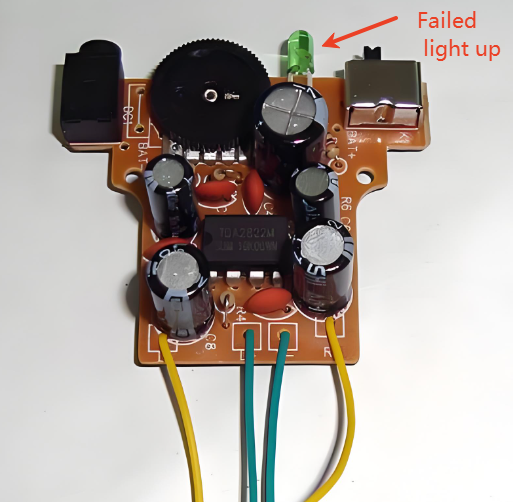
What Is LED Polarity and Why Does It Matter? LED polarity is one of the most important things to understand when working with LEDs, especilly in PCB assembly. A wrong LED polarity put will cause the failure of the PCB product. Unlike regular bulbs, LEDs only work if they are connected the right way. If you mix up the positive and negative sides, the LED won’t light up. So, whether you’re building a simple LED circuit, installing LED light strips, or working with surface-mount LEDs, understanding LED polarity helps prevent issues. In this guide, we’ll answer the most common questions about LED polarity and explain how to identify and test LED connections correctly.

What Is LED Polarity and Why Does It Matter?

What Is LED Polarity?

LED polarity refers to the direction in which an LED must be connected to a power source. Since LEDs are diodes, they allow current to flow in only one direction. This means that one leg of the LED must be connected to the positive side of the power supply, while the other must go to the negative side.

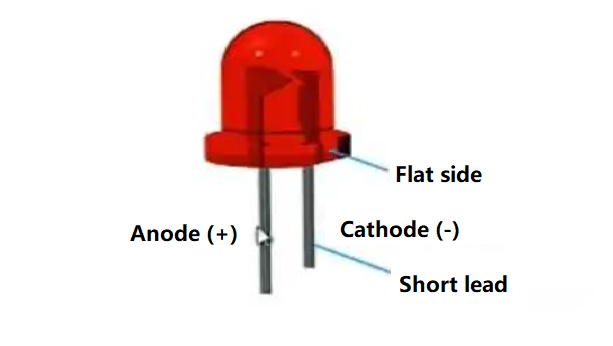
Each LED has two legs:

  • Anode (+): This is the positive leg. It needs to be connected to the positive terminal of the power source.
  • Cathode (-): This is the negative leg. It must connect to the negative terminal.

If the LED is wired incorrectly, it won’t light up because no current will flow through it. Some LEDs may even get damaged if too much voltage is applied in the wrong direction.

Do LEDs Have Polarity?

Yes, LEDs have polarity, and they must be connected correctly to function. Unlike traditional incandescent bulbs that work regardless of connection direction, LEDs only operate when the anode is connected to the positive voltage and the cathode to the ground.

The reason for this is that LEDs are light-emitting diodes. Diodes are semiconductor components that allow current to pass in one direction while blocking it in the other. When you reverse the polarity of an LED, it stops conducting electricity, which means it won’t produce light.

LED Polarity Symbol

If you look at circuit diagrams, you’ll notice a special symbol used for LEDs. The LED polarity symbol is similar to a regular diode symbol but has two arrows pointing away from it to indicate light emission. Below are the common led polarity symbols used in the industry:

What Is LED Polarity and Why Does It Matter?

Are LED Light Bulbs Polarity Sensitive?

It depends on the type of LED light bulb.

  • AC-powered LED bulbs (like household LED light bulbs) are usually not polarity sensitive because they contain internal rectifiers that convert AC to DC.
  • DC-powered LEDs (such as those used in automotive applications, flashlights, or indicator lights) are polarity sensitive and will not work if connected incorrectly.

When working with DC-powered LED systems, checking the wiring is crucial. Many LED strips and car LEDs have markings to indicate which side should connect to positive and which should go to negative.

How Do You Identify the Polarity of an LED?

There are several ways to determine LED polarity:

1. Check the Lead Length

If it has leds, check the lead length is the most important method to identify:

  • The longer lead is the anode (+).
  • The shorter lead is the cathode (-).
What Is LED Polarity and Why Does It Matter?

This method works well for new LEDs, but if the leads are trimmed, other methods may be needed.

2. Look for a Flat Edge

On many through-hole LEDs, the cathode side has a flat edge on the plastic casing. This marking helps quickly identify polarity. (Please refer above images of LED).

3. Inspect the Internal Structure

If you have a clear LED, you can look inside:

  • The larger internal piece is usually the cathode (-).
  • The smaller piece is the anode (+).

This method works well for transparent or diffused LEDs but is harder for small surface-mount LEDs.

4. Use a Multimeter

A digital multimeter with a diode test function can confirm polarity. When the red probe touches the anode and the black probe touches the cathode, the LED will glow slightly or show a voltage reading. If no reading appears, reverse the probes.

What Happens If LED Polarity Is Reversed?

If the LED is connected backward, it won’t light up. Unlike incandescent bulbs, which work in either direction, LEDs only allow current to flow in one way. Here are some common issues if LED polarity is reversed:

1. No Light Emission: Since LEDs are polarized components, they only work when connected correctly. If the polarity is reversed, current cannot flow, and the LED will not light up.

What Is LED Polarity and Why Does It Matter?

2. Potential Damage: In some cases, a reversed connection may cause damage. Excessive reverse voltage or current can harm the internal structure of the LED.

3. Overheating: Incorrect polarity may lead to improper current flow, generating excess heat. This can affect both the LED and nearby circuit components.

4. Short Circuit Risk: A severe polarity reversal could create a short circuit, which may harm the power source or other connected components.

5. Unstable Lighting: In rare cases, an incorrectly wired LED may flicker or dim unpredictably instead of staying off completely.

In most cases, a reversed LED will not get damaged unless the voltage is too high. However, some circuits use protection resistors or diodes to prevent issues caused by incorrect polarity.

Does LED Polarity Matter?

Yes, LED polarity matters because LEDs are diodes that function only when connected correctly. If you ignore polarity, the LED won’t work. In some cases, incorrect wiring can cause damage, especially in high-power LEDs or integrated circuits.

To avoid problems:

  • Always check the polarity markings before connecting an LED.
  • Use a multimeter if unsure.
  • Follow circuit diagrams carefully.

How to Check an LED with a Multimeter?

Using a multimeter is one of the easiest ways to test an LED’s polarity and functionality. Here’s a step-by-step guide:

1. Set the Multimeter to Diode Test Mode

Most digital multimeters have a diode test mode, usually marked with a diode symbol (a triangle pointing to a line). If your multimeter doesn’t have this mode, use the resistance (Ω) setting on the lowest range.

2. Identify the Probes

  • The red probe is the positive (+) lead.
  • The black probe is the negative (-) lead.

3. Connect the Probes to the LED Legs

Touch the red probe to one leg and the black probe to the other.

  • If the LED lights up faintly or shows a voltage reading (typically 1.8V to 3.5V, depending on the LED type), the red probe is on the anode (+), and the black probe is on the cathode (-).
  • If nothing happens, swap the probes and try again.

4. Interpret the Results

  • If the LED lights up, it means it is working, and you have identified the correct polarity.
  • If the LED doesn’t light up in either direction, it may be faulty or burned out.
  • If using the resistance mode, a working LED will show a resistance value in one direction and an infinite resistance (OL) in the other.

5. Testing Surface-Mount LEDs (SMD LEDs)

Since SMD LEDs are small and lack long leads, identifying polarity can be tricky. Many have a small marking on the cathode side. To test them:

  • Use fine-tip multimeter probes.
  • Hold the probes gently on the pads.
  • Observe if the LED lights up or if a voltage reading appears.

A multimeter is a quick and reliable tool to check LED polarity before installing it in a circuit.

Which Side of the LED Should You Put a Resistor?

A resistor is needed to control current flow and protect the LED. The resistor can go on either side of the LED—anode or cathode—without affecting polarity. However, placing it on the anode side (+) is common for consistency in circuit designs.

Without a resistor, the LED might receive too much current, which could shorten its lifespan or cause it to burn out.

FAQs

1. Can LED polarity be ignored?

No, LED polarity is essential for proper operation. If wired incorrectly, the LED will not work.

2. Do surface-mount LEDs have polarity?

Yes, surface-mount LEDs have polarity. Manufacturers usually mark the cathode with a dot or a line.

3. What happens if an LED is connected to AC power?

An LED without a rectifier will flicker or not work properly on AC power. A rectifier or resistor is needed for AC operation.

4. How do I fix a reversed LED?

Simply swap the connections. If the LED hasn’t been damaged, it should work fine.

5. Why do some LEDs have built-in resistors?

Built-in resistors simplify wiring by ensuring safe current levels. These LEDs can be directly connected to power sources without extra components.

Can I design microvias in multilayer MCPCB?

October 12th, 2024

What is a Microvias?

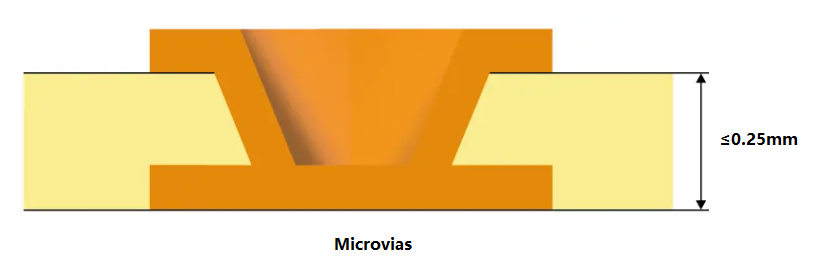
A microvia is a small hole drilled into a PCB that connects different layers. They are essential for high-density interconnections and are commonly used in advanced electronic designs. Typically, microvias equal to or less than 150 microns drilled on the PCB board with a laser. In 2013, the IPC standard changed the definition of microvias to those with an aspect ratio of 1:1. Ratio of aperture to depth (not exceeding 0.25mm). Previously, micropores were less than or equal to 0.15 mm in diameter, so they typically spanned only one layer.

Can I design microvias in multilayer MCPCB?

Because the diameter is very small compared to mechanically drilled through holes (PTH), we define them as microvias, usually connecting only one layer of the board to its adjacent layers. These through holes reduce the possibility of any type of manufacturing defect because they are laser drilled, thus reducing the possibility of any residue remaining after the process. Because of their small size and ability to connect one layer to the next, they can make dense printed circuit boards with more complex designs.

Types of Microvias

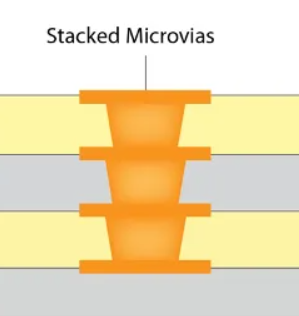
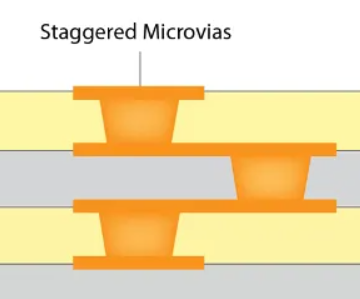
There are two types of microvias in the PCB design – stacked microvias and staggered microvias.

  • Stacked Microvias

Stacked microvias are formed by stacking multiple layers on top of each other to provide a path through which current flows. Create a hole in one layer and drill into another layer below. The top layer is welded or welded to the bottom layer to form an interconnect between the two layers. This allows for fast, efficient routing without compromising performance or reliability.

Can I design microvias in multilayer MCPCB?
  • Staggered Microvias

The interlaced microvias is aligned with the pad of the same layer, but is offset from its center by half of the pad diameter. The distance from its center to the edge of the board is also half the diameter of the pad. Staggered microvias allow you to place two through holes in a single pad without overlapping them or having to route wires on different layers together in this location. This type of microvias can be used for electrical connections to the surrounding brass pads and traces.

Can I design microvias in multilayer MCPCB?

What is the Difference Between Vias and Microvias?

Vias and microvias serve similar purposes in connecting different layers of a PCB, but they differ significantly in size and application.

1. Size

One of the most significant differences between vias and microvias is their size. Standard vias typically have a diameter greater than 150 micrometers (ÎŒm), while microvias are defined as having a diameter of 150 ÎŒm or less.

2. Design Complexity

As technology advances, the demand for higher circuit densities and more complex designs has grown. Microvias enable designers to create intricate multilayer circuits that were not possible with standard vias.

3. Layer Connection

Standard vias can connect any number of layers in a PCB, typically running from the outer layer through to the inner layers. In contrast, microvias are usually used for connecting one or two layers. Microvias are commonly employed in multilayer PCBs, where they can connect the outer layer to one or more inner layers without passing through the entire board.

4. Aspect Ratio

The aspect ratio, which is the ratio of the depth of a via to its diameter, is another important difference. Standard vias generally have lower aspect ratios, making them easier to fabricate. Microvias, due to their smaller size, often have higher aspect ratios. A typical aspect ratio for microvias ranges from 1:1 to 2:1.

5. Applications

Standard vias are commonly used in traditional PCB designs for applications where space is not as critical. They are suitable for general-purpose circuits, power distribution, and less complex layouts. In contrast, microvias are essential in high-density applications, such as smartphones, tablets, and advanced computing devices, where compact designs are necessary.

Microvias vs. Blind Via

Blind vias connect the outer layer of the PCB to one or more inner layers without penetrating the entire board. As the name suggests, these through-holes are “blind holes” because they are not visible from the other side of the PCB. Blind holes have several advantages, such as saving space on the board, enabling a more compact design, and improving signal integrity by reducing the length of the signal path.

The blind via passes through the surface layer of the PCB, extending through only a portion of the board to connect the surface layer to one or more inner layers. They are a key component in current PCB designs, allowing surface components to connect to inner layers while minimizing the number of layers required for wiring. The advantages of using blind vias including:

  • Increased density
  • Reduce the number of layers
  • Improved signal performance
  • Good for heat dissipation
  • Improve mechanical strength

Can Microvias be Designed in Multilayer MCPCB?

Yes, microvias can indeed be designed in multilayer MCPCBs. In fact, their small size and efficient design make them ideal for these types of boards. Multilayer MCPCBs often require compact interconnections to accommodate various functionalities, and microvias facilitate this need. By enabling multiple layers to connect efficiently, microvias enhance the overall performance of the MCPCB. Additionally, they contribute to improved thermal management, a critical factor in high-power applications. Their integration in multilayer designs is a significant advantage for modern electronics.

The process for using microvias in multilayer metal-based circuit boards includes the following key steps:

1. Inner laser drilling and plating: This is the first step in the production of microvias, precisely drilled by laser technology, and electroplated.

2. Resin filled: The micro-vias after electroplating are filled with resin to enhance the stability of the structure.

3. Resin grinding: Grind the orifice after the jack hole to ensure a smooth surface.

4. Electroplating: Metallize the surface of the orifice resin to achieve electrical interconnection between layers.

5. Inner circuit etching and outer layer lamination: To complete the production of the inner circuit, and the outer layer of laser drilling and graphic plating, and finally realize the production of multi-layer circuit board.

MCPCB Material in Best Technology

Can I design microvias in multilayer MCPCB?

MCPCB Prototype Lead Time (Vary Depends on the MCPCB Design)

Can I design microvias in multilayer MCPCB?

2 Layer Aluminum PCB | Metal Core PCB Manufacturer

October 9th, 2024

What is a 2 Layer Aluminum PCB?

A 2-layer aluminum PCB is a type of metal core circuit board that contains two conductive layers, usually copper, with an aluminum core or base material. Aluminum PCBs are used for their excellent heat dissipation properties, and always used in high-power applications like LED lighting, power supplies, and automotive systems. The aluminum base offers better thermal management than standard FR4 PCBs. In a 2-layer aluminum PCB, the two conductive copper layers allow more complex routing for electrical signals compared to single-layer boards.

2 Layer Aluminum PCB | Metal Core PCB Manufacturer

2 Layer Aluminum PCB Stack-Up

The stack-up of a 2-layer aluminum PCB consists of the following:

  • Top Copper Layer: This is where the signal traces and components are located. It can vary in thickness, depending on current-carrying requirements.
  • Dielectric Layer: A layer of insulation that separates the top copper layer from the aluminum core. It plays a key role in electrical isolation and heat transfer.
  • Aluminum Base: This core provides structural support and excellent heat dissipation properties. It also serves as the grounding plane in some designs.
  • Bottom Copper Layer: The second conductive layer allows for more advanced routing.
2 Layer Aluminum PCB | Metal Core PCB Manufacturer

How Thick is a 2 Layer PCB Layer?

The thickness of a 2-layer aluminum PCB can vary depending on the specific design requirements, but typically, the copper layer is about 1 to 2 ounces (35 to 70 microns) thick. The aluminum base itself is thicker, usually between 1.0 mm and 3.0 mm, depending on the board’s required rigidity and heat dissipation needs. The overall board thickness generally ranges between 1.2 mm and 3.2 mm.

A thicker aluminum core improves heat transfer, but the board’s thickness must also align with the product’s mechanical and electrical requirements. Designers often have to balance between sufficient thermal performance and the overall board size for practical applications.

Is Thicker Aluminum PCB have Better Heat Dissipation?

Generally speaking, the thinner the thickness of the aluminum PCB, the faster the heat conduction speed. The thicker the thickness of the aluminum PCB, the slower the heat conduction rate. The thermal conductivity of aluminum-based circuit board mainly depends on its material and structure. Although thickness affects the path length of heat conduction, the more critical factors are the thermal conductivity and structural design of the material. For example, high thermal conductivity materials such as copper, silver and other high thermal conductivity materials will significantly improve the thermal conductivity of aluminum substrate. In addition, the thickness and thermal conductivity of the insulation layer will also affect the overall thermal conductivity effect ‌.

Specifically, the thermal conductivity of the aluminum-based circuit board is also related to the thickness of its insulation layer. The thicker the insulation layer, although it can withstand higher voltage, it will also reduce the heat transfer efficiency. Therefore, choosing the appropriate insulation layer thickness and materials with high thermal conductivity is the key to ensuring efficient thermal conductivity of aluminum-based circuit boards ‌.

2 Layers Aluminum PCB vs. Double Sided Aluminum PCB

Though the terms “2 layers aluminum PCB” and “double-sided aluminum PCB” might sound similar, there are slight differences.

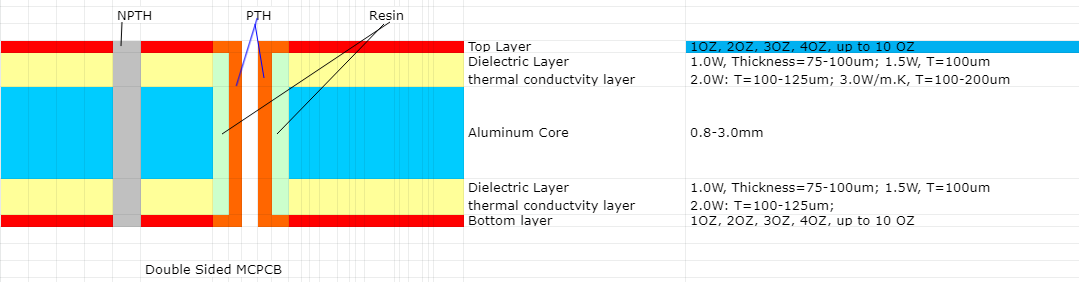
A 2-layer aluminum PCB contains two conductive copper layers. These layers can be arranged to handle signal routing and ground planes separately. In contrast, a double-sided aluminum PCB typically has one copper layer on either side of the aluminum core, offering less flexibility in routing. Here is the stack up of double sided aluminum PCB:

2 Layer Aluminum PCB | Metal Core PCB Manufacturer

How Much Does Aluminum PCB Cost?

The cost of an aluminum PCB, including a 2-layer version, depends on several factors such as the board’s thickness, copper weight, design complexity, and production volume. On average, 2-layer aluminum PCBs cost more than single-sided aluminum PCBs because of the additional copper layer and routing complexity.

For small orders, prices might range between $5 and $15 per square foot. For larger production runs, costs can decrease significantly due to economies of scale. Factors like the thickness of the aluminum base and copper layer, as well as additional features like surface finishes, can also influence the price.

While aluminum PCBs are more expensive than standard FR4 boards, their enhanced thermal performance can reduce overall system costs by improving reliability and reducing the need for additional cooling measures.

How Many Layers Should a PCB Have?

The number of layers a PCB should have depends on the complexity of the design. For simple applications like LED lighting or power conversion, a 2-layer aluminum PCB is often sufficient. It provides more routing flexibility than a single-layer board while still offering effective heat dissipation.

For more complex designs requiring high-density interconnections or additional functionality, a multi-layer PCB with three or more layers might be necessary. However, multi-layer aluminum PCBs are rare because their primary function is thermal management, which is typically solved within one or two layers. The decision to use more layers depends on the specific application, power requirements, and signal integrity needed in the design.

Aluminum PCB Design Guidelines

When designing a 2-layer aluminum PCB, several factors must be considered to maximize performance:

  • Thermal Management: Since aluminum PCBs are chosen for their thermal properties, optimizing heat dissipation is critical. Components that generate significant heat should be placed near the aluminum core, allowing for faster heat transfer.
  • Copper Thickness: The copper thickness should match the current-carrying requirements of the design. Using thicker copper can help manage higher current loads, but it also increases the cost and weight of the PCB.
  • Dielectric Layer: The thickness and material of the dielectric layer play a crucial role in both thermal and electrical performance. A thinner dielectric layer improves heat dissipation but may limit electrical isolation. Choosing the right dielectric material is key for balancing performance and reliability.
  • Via Placement: For a 2-layer design, vias must be carefully placed to connect the two copper layers. Vias should be positioned to minimize electrical interference and maintain signal integrity.
  • Component Placement: Heat-sensitive components should be placed away from high-power components. This minimizes thermal stress on sensitive devices and ensures reliable operation over the PCB’s lifespan.

Aluminum PCBs may come with a higher price tag compared to traditional FR4 boards, but the long-term benefits in heat management, performance, and durability make them an excellent investment for demanding applications. Whether you’re working on power electronics, automotive circuits, or lighting solutions, a 2-layer aluminum PCB can provide the right balance between complexity and thermal efficiency.

If you’re in need of high-quality, custom aluminum PCBs, Best Technology specializes in delivering tailored solutions for your specific design needs. With 18+ years of experience in PCB manufacturing, we ensure top-notch performance, quality, and reliability for all your projects. Let us help you bring your ideas to life with the right aluminum PCB solution!

Aluminum PCB Circuit Board | Aluminum PCB Design & Prototype

October 8th, 2024

What is Aluminum PCB Circuit Board?

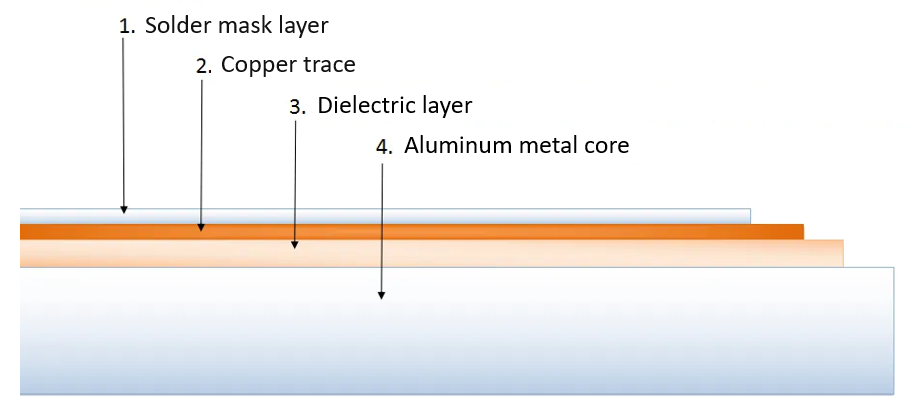
An aluminum PCB, also known as an aluminum circuit board, is a type of metal core printed circuit board that uses aluminum as its base material. Unlike traditional PCBs, which are typically made with fiberglass, aluminum PCBs offer superior heat dissipation. This makes them ideal for high-power applications where excess heat can damage sensitive components. Aluminum PCBs are widely used in industries such as LED lighting, automotive, and power equipment because they provide better thermal management.

Aluminum PCBs are made from a combination of the following materials:

  • Aluminum Substrate: The base layer, responsible for mechanical support and heat dissipation.
  • Dielectric Layer: This layer provides insulation between the conductive layer and the aluminum base, while also helping with thermal transfer.
  • Conductive Layer: Made of copper, this layer is etched to form the circuit pattern and provides electrical connectivity.
  • Solder Mask Layer: This is a protective layer to protect the traces.
Aluminum PCB Circuit Board | Aluminum PCB Design & Prototype

Types of Aluminum PCB

Aluminum circuit board is a kind of metal base copper clad plate with good heat dissipation function, the main types include single-sided aluminum PCB, double-sided aluminum PCB and multi-layer aluminum PCB. ‌

Single sided aluminum PCB

The single-sided aluminum substrate is composed of a conductive graphic layer and an insulating material plus aluminum plate, which is relatively simple in structure and suitable for the installation and connection of some basic electronic components.

Double sided aluminum PCB

The double-sided circuit aluminum substrate has two layers of conductive graphics layer and the insulating material plus aluminum plate superimposed together, providing a larger circuit layout space and better heat dissipation effect, which is often used in electronic devices requiring higher integration and better heat dissipation performance.

Multilayer aluminum PCB

Multi-layer printed aluminum-based circuit board consists of three or more layers of conductive graphic layer and insulating material and aluminum plate alternately laminated together, with complex circuit design and excellent heat dissipation performance, suitable for high-end applications such as LED lighting, automotive electronics ‌.

In addition, there are other special types of aluminum-based circuit boards, such as flexible aluminum substrates, mixed aluminum substrates, etc. Flexible aluminum substrate has excellent electrical insulation, flexibility and thermal conductivity, and is suitable for product design in various shapes and angles. The hybrid aluminum substrate is a multilayer component made of conventional FR-4 bonded to an aluminum substrate with a thermoelectric medium, designed to improve heat dissipation and rigidity, and used as a shield ‌.

Aluminum PCB Features

The aluminum substrate, a metal-based cooling plate (including aluminum, copper, and iron substrates), is made from a low-alloyed Al-Mg-Si series high-plastic alloy plate. This material offers excellent thermal conductivity, electrical insulation, and mechanical processing capabilities. When compared to traditional FR-4 materials, aluminum substrates of the same thickness and line width can carry higher currents. Additionally, they can withstand voltages up to 4500V and have a thermal conductivity greater than 2.0, making aluminum substrates the preferred choice in the industry.

● Surface mount technology (SMT);

● Very effective treatment of thermal diffusion in circuit design;

● Reduce product operating temperature, improve product power density and reliability, extend product service life;

● Reduce product volume, reduce hardware and assembly costs;

● Replace fragile ceramic substrate for better mechanical durability.

Aluminum PCB vs. Copper PCB

Both aluminum and copper PCBs have their own advantages, but they cater to different applications:

1. Thermal Conductivity

    In general, the higher the thermal conductivity, the more efficient the heat transfer, resulting in better heat dissipation and a longer lifespan. Among metal substrates, copper substrates offer the best thermal conductivity, outperforming aluminum substrates.

    2. Electrical Conductivity

    Both aluminum and copper are metals and conduct electricity, though their exact levels of conductivity differ. In terms of electrical conductivity, copper is significantly superior to aluminum. In applications that require high electrical conductivity, copper is the ideal choice.

    3. Resistance

    Resistance is crucial in PCB design as it affects the overall functionality and stability of the components. Given that copper has a higher density than aluminum, its resistance is generally lower. Therefore, in applications requiring thinner circuits and faster power transmission, copper is the better option.

    4. Weight

    Due to copper’s higher density per unit area, copper PCBs are much heavier than aluminum PCBs with the same design.

    In applications where lightweight structures are critical, aluminum is the preferred material. On the other hand, applications where weight is not a major concern often favor the use of copper.

    5. Applications

    Aluminum substrates are somewhat specialized. They are mainly used in energy-saving lighting products such as indoor lighting, energy-efficient lighting, and street lights. Copper substrates are suitable for high-power lighting equipment like car headlights, tail lights, and some high-tech electronics.

    6. Manufacturing Process

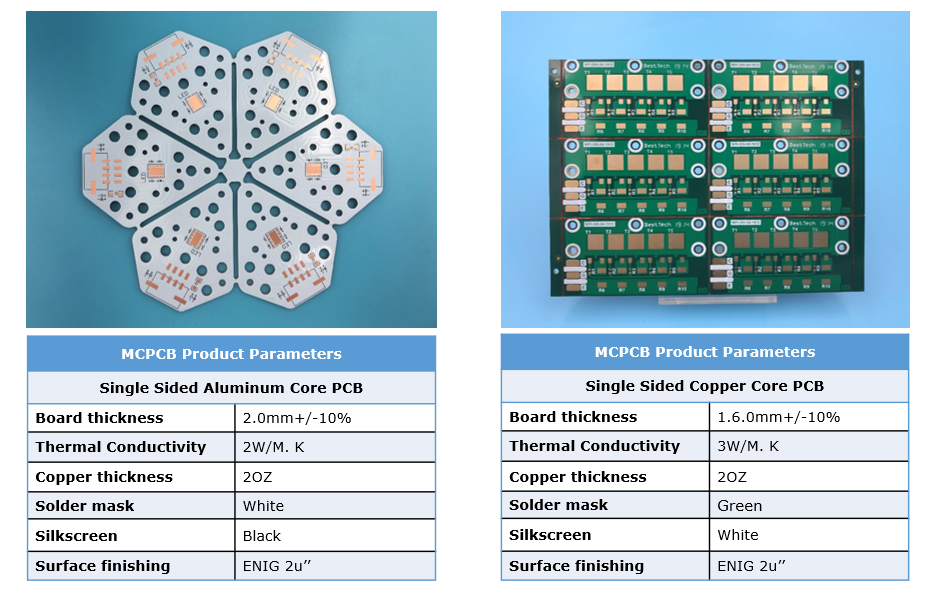
    The manufacturing process for aluminum-based PCBs is simpler than that for copper-based PCBs, which also impacts their production time and delivery schedules. Below is aluminum PCB and copper core PCB that made by Best Technology:

    Aluminum PCB Circuit Board | Aluminum PCB Design & Prototype

    Aluminum PCB Manufacturing Process

    The manufacturing process for aluminum PCBs involves several steps to ensure high quality and performance. Here is a basic manufacturing process of aluminum PCB:

    1. Substrate Selection and Preprocessing

      Aluminum alloys with high thermal conductivity, such as the 5052 and 6061 series, are selected as the base material. The aluminum sheet is first cut and cleaned to remove surface grease and impurities, ensuring proper adhesion for subsequent processes.

      2. Chemical Etching of Patterns

      Photosensitive ink is used to form the desired circuit patterns on the aluminum surface. After exposure and development, the ink-covered areas protect the underlying aluminum from being etched by chemicals, while the unprotected areas are etched away, forming the circuit pattern.

      3. Insulation Layer Deposition

      To achieve electrical isolation, an insulating material, usually thermosetting resin or ceramic-filled epoxy resin, is deposited on the aluminum substrate. This step is typically completed using screen printing or inkjet printing technology to ensure a uniform and appropriately thick insulation layer.

      4. Metallization

      Creating conductive paths on the insulation layer is a key step. Copper foil is deposited onto the insulation layer using methods such as electroplating, sputtering, or chemical copper deposition. This copper foil serves as the conductive layer for connecting LED chips and other components.

      5. Drilling and Metallization

      Holes are drilled in the board according to the design to achieve electrical connections between different layers. The hole walls are then metallized to ensure good conductivity inside the holes.

      6. Surface Treatment

      To improve solderability and corrosion resistance, the aluminum substrate undergoes additional surface treatments, such as tin spraying, gold plating, or silver plating.

      7. Assembly and Testing

      LED chips, resistors, capacitors, and other components are soldered onto the circuit board to complete the assembly. Here you can see the whole manufacturing process of aluminum metal core PCB.

      What Affects Aluminum PCB Circuit Board Price?

      First of all, ‌ raw material cost ‌ is one of the important factors affecting the price of aluminum based circuit board. The raw materials of aluminum substrate include aluminum substrate and other auxiliary materials, such as insulating layer materials. The price fluctuation of aluminum substrate will directly affect the production cost of aluminum substrate, and then affect its market price. In addition, the cost of electricity is also a part of the production process cannot be ignored, the fluctuation of electricity price will further affect the production cost ‌.

      Secondly, ‌ market supply and demand ‌ is also a key factor in determining the price of aluminum-based circuit boards. If demand increases and supply is insufficient, prices will naturally go up. On the other hand, if there is an oversupply, the price will fall. Changes in demand in the construction, automotive and other industries, as well as changes on the supply side such as the construction of new plants or the closure of old plants, will have a direct impact on the price of aluminum-based circuit boards ‌.

      ‌The macroeconomic environment ‌ also has an important impact on the price of aluminum-based circuit boards. When economic growth is expected to be good, the demand for aluminum substrate in related industries increases, driving up prices; The expectation of economic recession will lead to a decline in demand and pressure on aluminum substrate prices ‌.

      ‌Policies and regulations ‌ is also one of the factors affecting the price of aluminum-based circuit boards. The government’s environmental protection policies, trade policies and industry subsidies will have an impact on the aluminum substrate market. For example, environmental policies that limit production may reduce supply and push up prices; The establishment of trade barriers may affect the import and export of aluminum substrate, and then affect the domestic market price.

      Aluminum PCB Production Capability – Best Technology

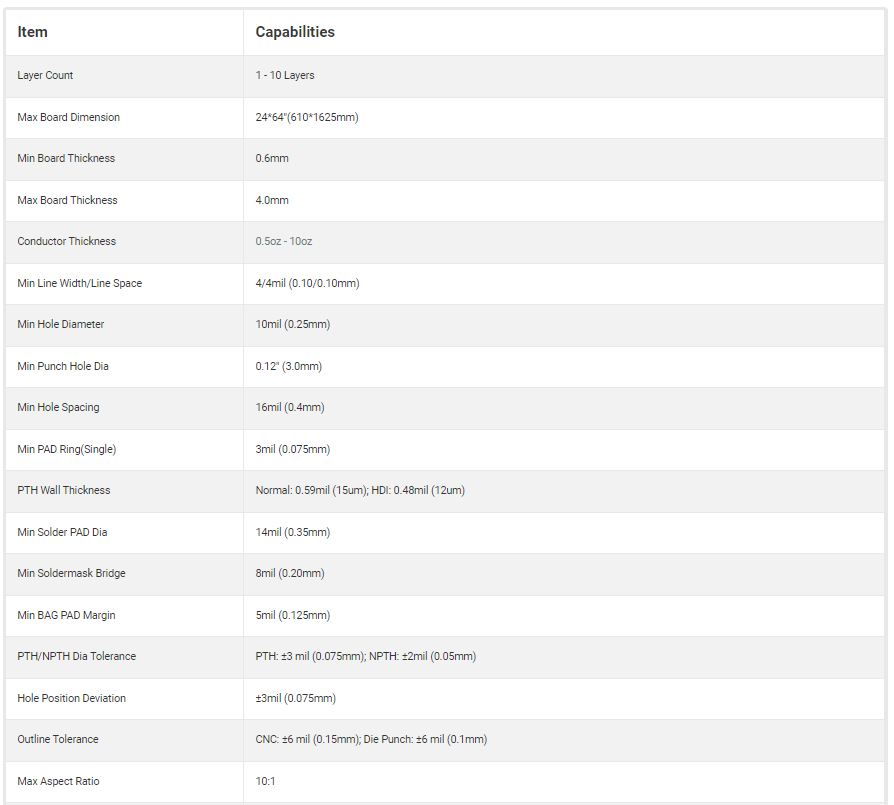
      Best Technology is known for its strong production capability when it comes to aluminum PCBs. Our manufacturing facilities are equipped with the latest technology to produce high-quality aluminum PCBs that meet industry standards. We have the ability to produce single-sided, double-sided, and multi-layer aluminum PCBs, below you can see our capability of aluminum PCBs:

      Aluminum PCB Circuit Board | Aluminum PCB Design & Prototype

      Applications of Aluminum PCB

      Aluminum PCBs are used in a variety of applications, particularly where heat management is crucial:

      • LED Lighting
      • Automotive Electronics
      • Power Supplies
      • Consumer Electronics
      • Medical
      • Household appliance
      Aluminum PCB Circuit Board | Aluminum PCB Design & Prototype

      FAQs about Aluminum PCB Circuit Board

      1. What is the main advantage of aluminum PCBs?

        Aluminum PCBs excel in thermal management, making them perfect for heat-sensitive applications.

        2. Are aluminum PCBs expensive?

        No, aluminum PCBs are generally affordable, making them a cost-effective option for many industries.

        3. Can aluminum PCBs be used in consumer electronics?

        Yes, aluminum PCBs are commonly used in consumer electronics, especially in devices that generate significant heat.

        4. What industries commonly use aluminum PCBs?

        Industries such as automotive, LED lighting, and power supplies frequently use aluminum PCBs due to their thermal properties.

        5. Is aluminum PCB better than copper PCB?

        It depends on the application. Aluminum is better for heat dissipation, while copper excels in electrical conductivity.

        Board electronics with holes

        October 4th, 2024

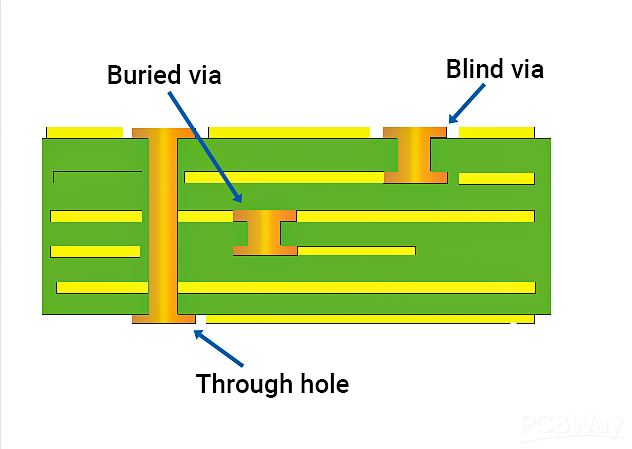
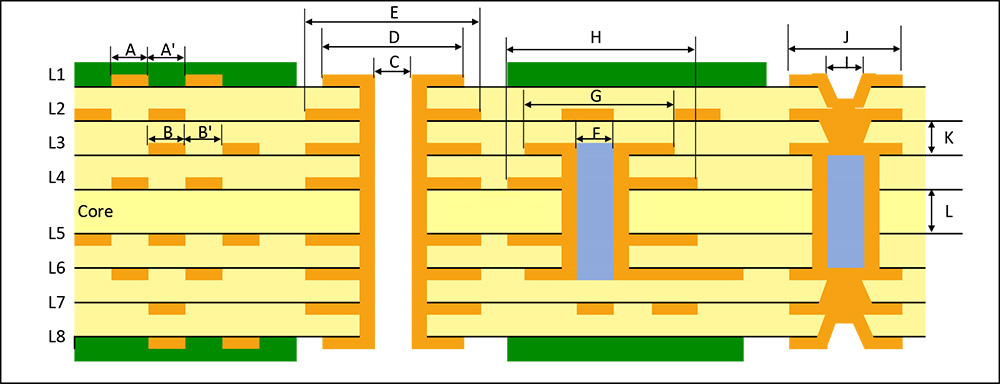
        Board electronics with holes The types of vias in PCB include through holes, blind holes and buried holes, which have different characteristics and requirements in design and manufacturing. The selection of the appropriate via type should consider the number of PCB layers, wiring density, signal frequency, cost budget and production process. The via design should pay attention to avoid affecting the welding quality, preventing electrical short circuits, and saving costs in high-density packaging.

        What are the holes in a PCB called?

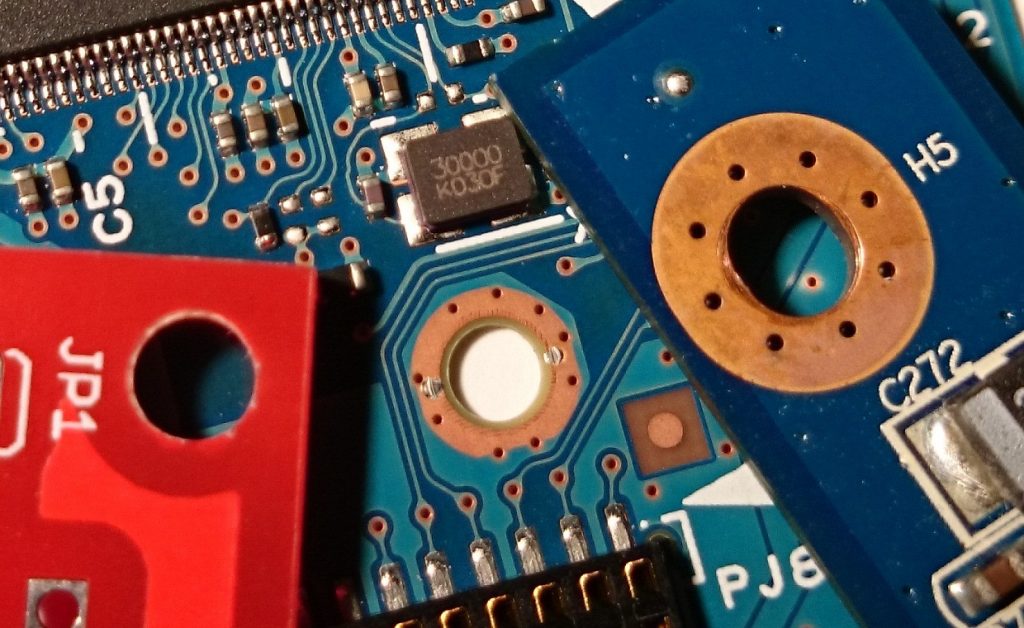
        What are the holes on PCB called? What are the holes in the circuit? The holes on PCB can be roughly divided into 3 types, screw holes (mounting holes), conductive holes (vias), and plug-in holes.

        Screw holes: Screw holes are used for fixing.

        Conductive holes: Conductive holes (also called vias) are used for conducting electricity just like circuits.

        Plug-in holes: Plug-in holes are of course used to plug in various parts, such as diodes, transistors, capacitors, inductors, etc.

        What is a through hole

        What is a through hole? Through holes, also known as perforations, are holes in a PCB that go all the way through the board. Their main purpose is to provide electrical connections for component pins while allowing soldering on both sides of the board.

        1.A via is a special through hole whose wall is metallized to achieve electrical connection between different layers on a circuit board. This type of hole is usually used to connect component pins to internal circuits, or to achieve electrical connection between different layers in a multi-layer PCB. Vias need to be metallized during the PCB manufacturing process, which usually includes drilling, desmearing, chemical copper plating, and electroplating.

        What is a through hole

        2.Non-conducting holes are the opposite of through holes. Their hole walls are not metallized, so they do not have electrical connection functions. These holes are mainly used for mechanical fixation, heat dissipation or identification purposes. Non-conducting holes are relatively simple in the PCB manufacturing process, and only drilling operations are required.

        What is a through hole

        What is a blind via?

        A blind via is a hole that extends from one side of a PCB to a certain internal layer without penetrating the entire board. The emergence of blind vias is mainly due to the development of HDI technology, which provides circuit designers with greater flexibility and more compact layout. Blind vias are usually used to connect surface mount components (SMD) to internal circuit layers, or to connect circuits between different internal layers.

        What is a blind via?

        What are buried vias?

        Buried vias are holes located inside the PCB that do not penetrate any side of the board. They are completely hidden inside the board and are used to connect circuits between different internal layers. Buried vias are especially useful in HDI boards because they can reduce the overall thickness of the board while maintaining electrical connections between internal circuits.

        What is a microvia?

        Microvia refers to a hole with a smaller diameter, usually at the micron level. The emergence of microvia technology enables PCB designers to achieve more complex circuit layouts in a smaller space. Microvias are often used in high-density, high-reliability electronic devices such as mobile phones and tablets. The manufacture of microvias requires high-precision drilling equipment and technology to ensure the accuracy and reliability of the holes.

        What is a microvia?

        What are Mounting holes

        What are Mounting holes?Locking holes are auxiliary holes used in the PCB manufacturing and assembly process to accurately locate and fix the circuit board. They are usually located at the edge or specific position of the PCB to ensure that the circuit board can be accurately aligned and fixed during manufacturing, testing and assembly. The locating holes do not participate in the connection of the circuit, but are essential to ensure the quality and performance of the circuit board.

        What are Mounting holes

        What are Mounting holes

        What are thermal vias?

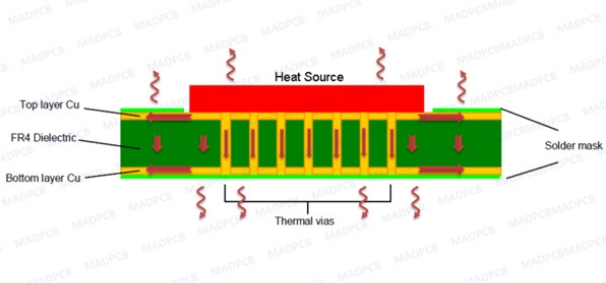
        Thermal vias are holes designed specifically for heat dissipation, usually large and can run through the entire PCB or multiple layers. Their role is to reduce heat buildup on the circuit board by increasing surface area and air flow, thereby improving the stability and reliability of the device. Thermal vias are particularly important in high-performance, high-power electronic devices.

        What are thermal vias?

        FAQ About board electronics with holes

        How to solve the contradiction between manual routing and automatic routing of high-speed signals?

        Most of the current powerful routing software’s automatic routing tools have set constraints to control the routing method and the number of vias. The routing engine capabilities and constraint setting items of various EDA companies are sometimes very different. For example, whether there are enough constraints to control the winding method of the serpentine, whether the routing spacing of the differential pair can be controlled, etc. This will affect whether the routing method generated by automatic routing can meet the designer’s ideas. In addition, the difficulty of manually adjusting the routing is also related to the capabilities of the routing engine. For example, the pushing ability of the routing, the pushing ability of the via, and even the pushing ability of the routing pair copper. Therefore, choosing a routing tool with strong routing engine capabilities is the solution.

        Will adding test points affect the quality of high-speed signals?

        As for whether it will affect the signal quality, it depends on the method of adding test points and how fast the signal is. Basically, the additional test points (not using the existing vias (via or DIP pins) as test points) may be added to the line or a small section of wire may be pulled out from the line. The former is equivalent to adding a very small capacitor to the line, while the latter is an additional branch. Both of these situations will have some impact on high-speed signals, and the extent of the impact is related to the frequency speed of the signal and the edge rate of the signal. The magnitude of the impact can be learned through simulation. In principle, the smaller the test point, the better (of course, it must meet the requirements of the test equipment) and the shorter the branch, the better.

        Can you introduce some foreign technical books and data on high-speed PCB design?

        Now the application of high-speed digital circuits includes communication networks and calculators and other related fields. In the communication network, the operating frequency of PCB boards has reached around GHz, and the number of layers is as many as 40 layers as far as I know. Due to the advancement of chips, the operating frequency of calculator-related applications, whether it is a general PC or server, has reached 400MHz (such as Rambus) or above. In response to the demand for high-speed and high-density routing, the demand for blind/buried vias, mircrovias and build-up process technology is gradually increasing. These design requirements can be mass-produced by manufacturers.

        Does the design of rigid-flexible boards require special design software and specifications? Where can I undertake the processing of such circuit boards in China?

        Can I use general PCB design software to design flexible printed circuits (Flexible Printed Circuit). The Gerber format is also used for FPC manufacturers to produce. Since the manufacturing process is different from that of general PCBs, each manufacturer will have its own restrictions on line width, line spacing, and aperture (via) based on their manufacturing capabilities. In addition, some copper foil can be laid at the turning point of the flexible circuit board for reinforcement. As for the manufacturer, you can search for “FPC” as a keyword on the Internet and you should be able to find it.

        If the size of the circuit board is fixed, if the design needs to accommodate more functions, it is often necessary to increase the routing density of the PCB, but this may lead to increased mutual interference between the routings, and at the same time, the impedance cannot be reduced if the routing is too thin. Please introduce the techniques in the design of high-speed (>100MHz) high-density PCBs?

        When designing high-speed and high-density PCBs, crosstalk interference does need to be paid special attention to because it has a great impact on timing and signal integrity. Here are a few things to note:

        Control the continuity and matching of the characteristic impedance of the trace.

        The size of the trace spacing. The spacing commonly seen is twice the line width. Through simulation, you can know the impact of trace spacing on timing and signal integrity and find the tolerable spacing. The results of different chip signals may be different.

        Choose an appropriate termination method.

        Avoid the same routing direction of the upper and lower adjacent layers, or even have traces overlapped up and down, because this kind of crosstalk is greater than the case of adjacent traces on the same layer.

        Use blind/buried vias to increase the trace area. However, the production cost of the PCB board will increase. It is indeed difficult to achieve complete parallelism and equal length in actual implementation, but it should be done as much as possible.

        In addition, differential termination and common mode termination can be reserved to mitigate the impact on timing and signal integrity.

        The RF part, IF part, and even the low-frequency circuit part of the outdoor unit are often deployed on the same PCB. What are the material requirements for such PCB? How to prevent interference between RF, IF, and even low-frequency circuits?

        Hybrid circuit design is a big problem. It is difficult to have a perfect solution.

        Generally, RF circuits are laid out and wired as an independent single board in the system, and there will even be a special shielding cavity. Moreover, RF circuits are generally single-sided or double-sided boards, and the circuits are relatively simple. All of these are to reduce the impact on the distributed parameters of RF circuits and improve the consistency of RF systems. Compared with general FR4 materials, RF circuit boards tend to use high-Q substrates. The dielectric constant of this material is relatively small, the distributed capacitance of the transmission line is small, the impedance is high, and the signal transmission delay is small. In hybrid circuit design, although RF and digital circuits are made on the same PCB, they are generally divided into RF circuit area and digital circuit area, and laid out and wired separately. Shielding is used between ground vias and shielding boxes.

        What is Copper Clad Laminate (CCL)?

        September 13th, 2024

        What is Copper Clad Laminate?

        Copper clad laminate short for CCL, it is a foundational material in the electronics industry. It consists of a thin copper foil bonded to one or both sides of a non-conductive substrate like fiberglass or resin. This combination creates a durable and conductive material that serves as the base for creating printed circuit boards (PCBs). The copper layer facilitates the transmission of electrical signals, while the insulating substrate supports the board’s structural integrity.

        CCL comes in various thicknesses and types, depending on the application. It’s a critical part of most electronic devices, from smartphones to industrial machines. Its main role is to support the etching of circuit patterns, where unnecessary copper is removed, leaving conductive paths that enable electrical connections. Below is a structure of a double sided copper clad laminate:

        What is Copper Clad Laminate (CCL)?

        What is Copper Clad Board Used For?

        Copper clad boards are widely used in PCB manufacturing. Their role is to provide a surface for electrical components to connect through conductive copper traces. CCLs are widely used in applications including, but not limited to:

        • Electronic products: Copper clad board is the basic material of electronic products, used to manufacture various electronic equipment circuit board, such as TV, radio, computer, computer and so on.
        • Communication equipment: Mobile phones, tablet computers, routers and other communication equipment a large number of copper clad laminate.
        • Computers and peripherals: Computer motherboards, graphics cards, hard disks, etc., need a large number of copper-clad boards.
        • Automotive electronics: Electronic equipment in modern automobiles, such as ABS, air conditioning, navigation, etc., need to use copper clad board.
        • Military: Electronic components in military equipment also need to use a large number of copper-clad boards.

        In addition, copper clad boards are also used in industrial control, medical instruments, national defense, aerospace and other fields. With the development of technology and the increase of application demand, the use of copper clad plate in electronic products is more and more extensive, which plays an important role in promoting the renewal of social production and living tools. For example, the development of the Internet of Things and artificial intelligence, as well as the application of 5G communication technology, have greatly increased the demand for copper clad sheets. ‌

        What is the Market Report for Copper Clad Laminate?

        The market for copper clad laminate has grown steadily due to the increasing demand for consumer electronics, automotive advancements, and telecommunication developments. The global CCL market is expected to expand significantly over the next few years, driven by technological advancements in 5G, renewable energy systems, and electric vehicles.

        Key players in this market are working to develop lighter, thinner, and more efficient CCLs to keep pace with the growing need for high-performance electronics. Manufacturers exploring new materials and production methods to reduce costs while enhancing performance. The future looks promising, with a forecast of rapid growth driven by the electronics industry’s evolution.

        Is Copper Clad Better Than Copper?

        Copper clad laminate is a more practical option for PCBs than solid copper because it provides the required conductive properties at a lower cost. While copper is an excellent conductor, using copper as metal core PCBs would be expensive and impractical. CCL offers the same conductivity benefits but adds a lightweight, non-conductive layer that provides structural support.

        What is Copper Clad Laminate (CCL)?

        Electrical Conductivity and Cost Efficiency

        While pure copper has excellent electrical conductivity, copper clad laminates (CCLs) provide a balance between cost and performance. In a copper clad board, only a thin copper layer is used, which significantly reduces the amount of copper needed compared to using solid copper. For applications like PCBs, where large surfaces need copper conductivity but do not require the full thickness of copper, copper clad is more efficient and economical.

        Thermal Management

        Copper clad materials often have better thermal management properties due to the substrate’s ability to dissipate heat while maintaining the copper layer’s high conductivity. Pure copper, while an excellent heat conductor, may not offer the same level of thermal dissipation when used alone in complex electronic assemblies. For instance, in multi-layer PCBs, copper clad boards help balance the need for heat management and conductivity by using the copper layer efficiently while the base material manages thermal stress.

        Structural Support and Durability

        Copper clad laminates provide added structural support compared to pure copper sheets. The non-conductive substrate, often made of fiberglass, resin, or other materials, adds durability and rigidity to the thin copper layer. By contrast, is soft and flexible, making it unsuitable for structural applications without some form of backing material.

        Corrosion Resistance

        Copper, though highly conductive, is prone to oxidation and corrosion over time, which can affect its performance in certain environments. Copper clad laminates, however, are often treated with protective coatings or layered with other materials to enhance their resistance to corrosion.

        Weight Considerations

        Another important factor is weight. Copper is a dense metal, and using thick copper layers can significantly increase the weight of a product. In contrast, copper clad laminates achieve high conductivity with only a fraction of the copper’s weight.

        How Thick is Copper Clad Board?

        The thickness of a copper clad board depends on its intended application. Standard copper thicknesses for CCL are measured in ounces per square foot, typically ranging from 0.5 oz to 2 oz per square foot. This translates to about 17 to 70 microns. For high-power applications, thicker copper, such as 3 oz or more, may be used.

        What is Copper Clad Laminate (CCL)?

        On the other hand, the thickness of the laminate itself can also vary, depending on whether it’s a single-layer, double-layer, or multilayer board. The insulating substrate can range from 0.2 mm to several millimeters, depending on the application. The total thickness of the copper clad board is a combination of the copper foil and the insulating material.

        How Much Does Copper Cladding Weigh?

        The weight of copper cladding is typically expressed in ounces per square foot. A common weight is 1 oz of copper, which means that a square foot of copper clad board has a 1-ounce copper layer. This is approximately 35 microns thick. Heavier copper cladding, such as 2 oz or 3 oz, is also used for applications that require higher current-carrying capacity or greater durability.

        It’s important to balance the weight with the application needs. Higher copper weight provides better conductivity and durability but adds cost and weight to the final product. Therefore, the choice of copper weight in CCL depends largely on the required performance and cost considerations.

        Copper Clad Laminate Price

        The price of copper clad laminate varies based on several factors such as copper thickness, substrate material, board size, and production volume. Standard-grade CCL is more affordable, while high-end options with specialty substrates like Teflon or ceramic tend to be more expensive.

        On average, copper clad laminate costs range from $5 to $15 per square meter for common types. However, high-performance laminates designed for demanding environments, such as those used in aerospace or military applications, can be significantly more expensive.

        Global market trends, material shortages, and the demand for electronics heavily influence pricing. Recently, fluctuations in copper prices and supply chain disruptions have impacted the cost of CCL. Still, bulk orders or long-term contracts with suppliers can help reduce costs for large manufacturers.

        How to Cut Copper Clad Laminate?

        CCL requires careful handling to ensure precise cuts without damaging the copper layer or the substrate. The cutting method will vary depending on the thickness and material, but overall, clean and accurate techniques are key.

        What is Copper Clad Laminate (CCL)?

        1. Choose the Right Tools

          The tools you use depend on the thickness of the copper clad laminate. Thin CCL can be cut with a utility knife, while thicker boards require specialized tools like a PCB shear or laser cutter.

          2. Prepare the Work Area

          Before cutting, ensure that your workspace is clean and stable. Use a flat surface to keep the laminate steady during cutting. For larger boards, use clamps to secure them in place. Always wear protective gear like goggles and a mask, especially when working with power tools to avoid dust and debris.

          3. Measure and Mark the Cutting Line

          Accurate measurements are crucial for a clean cut. Use a ruler or measuring tape to mark the cutting line and draw it clearly with a permanent marker. Double-check your measurements to avoid mistakes before cutting.

          4. Score the Copper Clad Laminate

          For thin laminates, use a utility knife to score along the marked line. Score the copper side first, then flip it over and score the substrate. Once both sides are scored, gently bend the laminate along the line until it snaps cleanly.

          5. Cut Thick Copper Clad Laminate

          For thicker CCL, use a guillotine PCB shear or a Dremel tool. A PCB shear provides a clean, straight cut, while a Dremel is useful for cutting complex shapes. For high precision, a laser cutter is the best choice, especially for intricate designs.

          6. Deburr and Smooth the Edges

          After cutting, the edges may be rough. Use a file to smooth out any jagged areas, then finish with fine-grit sandpaper.

          Safety is important when cutting CCL. Fiberglass and other substrate materials can produce harmful dust. Always wear a dust mask and safety goggles, and work in a well-ventilated area to minimize exposure to particles. In addition to this, avoid over-scoring the laminate, which can damage the substrate or cause copper peeling. Make sure to apply consistent pressure while cutting to prevent uneven edges. Always prioritize safety by using proper protective gear to avoid injuries.

          Copper Clad Laminate Suppliers

          Numerous suppliers provide copper clad laminate globally. The selection of a supplier depends on factors like the type of laminate, application requirements, and volume needed. Some well-known suppliers include:

          • Kingboard Laminates
          • Panasonic
          • Isola Group
          • Nan Ya Plastics
          • Shengyi Technology
          • Rogers Corporation
          • Ventec International Group
          • Doosan Corporation
          • Iteq Corporation
          • Mitsubishi Gas Chemical

          With over a decade of effort and experience, Best Technology has been actively contributing to the growth of this business. Certified with ISO9001, ISO13485, IATF16949, UL, and RoHS, the company is fully capable of delivering high-quality, eco-friendly PCBs and various types of copper clad laminates at competitive prices.

          PCB Quote Packaging is What Type of Engineering?

          September 10th, 2024

          PCB Full Form

          PCB stands for Printed Circuit Board, a key component in almost all electronic devices. It connects and supports electronic components using conductive tracks, pads, and other features. The design and production of PCBs require precise engineering, as they are crucial for the functionality of the final product.

          What is PCB Quote Packaging?

          PCB quote packaging refers to the process of gathering and organizing all the details needed to estimate the cost of producing a PCB. This includes not only the design specifications but also the materials, manufacturing processes, and other engineering considerations. It’s not just a financial calculation but a complete engineering analysis that ensures the quote is accurate, feasible, and optimized for production.

          The quote must consider every detail that affects production—like material types, size, complexity, and production volume. The aim is to package all these details into a clear, comprehensive quote, ensuring the client understands what they are paying for and why.

          Why is Engineering Important in PCB Quote Packaging?

          Engineering plays a vital role in the PCB quoting process because it’s not just about estimating costs. It’s about understanding the technical requirements and ensuring that every aspect of the design and production is accounted for. Engineers analyze the design, materials, and manufacturing methods to ensure the quote reflects the real cost of production.

          Without engineering insight, a quote could be inaccurate, leading to cost overruns or production delays. Engineers make sure that all technical details, such as layer count, trace width, and component placement, are properly considered.

          What Are the Key Factors in a PCB Quote?

          Several factors come into play when preparing a PCB quote:

          PCB Quote Packaging is What Type of Engineering?

          1. Type of manufacturing process

          The technical type of PCB determines its complexity and cost. For example, simple single panels cost much less than multi-layer panels, while flexible circuits (FPC) or rigid and flexible panels require more complex manufacturing processes and naturally cost more. In addition, whether advanced technologies such as microvias, laser drilling, blind holes or buried holes are required can also have a significant impact on the quotation.

          2. Material type

          Materials are an important part of PCB costs. Common materials include FR4, ceramics, metal substrates, etc. FR4 is the most common base material and is suitable for most conventional applications, but for high-frequency, high-temperature environments, ceramic or metal-based materials may be more suitable, but their price is relatively high. Choosing the right material not only affects the performance, but also directly affects the cost.

          3. IPC level

          IPC grades reflect the quality standards of PCB manufacturing, commonly used are IPC-A-600 grades 1, 2 and 3. The higher the grade, the more stringent the manufacturing requirements, and the corresponding increase in cost. For example, grade 3 PCBS are usually used in high-demand fields such as aerospace and medical equipment, which require higher accuracy and quality control, so the price is higher.

          4. Circuit design

          PCB circuit design complexity directly affects manufacturing costs. Including wire width, spacing, hole size and so on, the production process has put forward different requirements. High density interconnect (HDI) boards typically require more elaborate wiring techniques and may involve the use of microvias, which will increase the difficulty and cost of manufacturing.

          5. PCB size and yield

          The size of the PCB directly affects the amount of material used, and the larger the board, the more material is needed. In addition, the yield is also an important factor affecting the quotation. PCB manufacturing with complex design or high density lines is prone to defects, resulting in decreased yield. That means manufacturers may need to produce more boards to meet orders, increasing costs.

          6. Material thickness

          Different applications require different thicknesses of PCB materials. The standard FR4 thickness is usually 1.6mm, but thinner or thicker boards are sometimes used. Changes in material thickness can affect the overall cost, especially if thicker sheets require special processing or higher strength, and manufacturing expenses will increase accordingly.

          7. Copper thickness

          The copper thickness in the PCB usually has a standard choice, such as 1oz, 2oz or even thicker copper layers. The higher the copper thickness, the better the conductivity of the PCB, suitable for high-current applications, but the increase in copper thickness will significantly increase the manufacturing cost, especially in the plating and etching process requires additional materials and processes.

          8. Stack-up method

          The stacking mode determines the number of layers and the interlayer structure of the PCB. Complex multilayer boards or HDI boards require more complex lamination processes. For example, the lamination method may involve multiple pressing, the use of prepregs or special insulation materials. Each additional layer requires more manufacturing steps, resulting in increased costs.

          9. Quantity

          The quantity of the order has a direct impact on the PCB quotation. High-volume production can reduce unit prices by spreading tooling and setup costs, while small-batch orders are typically more expensive due to relatively high production preparation and start-up costs.

          10. Delivery date

          The shorter the delivery time, the higher the quotation. Rush orders require prioritizing production, which can disrupt the plant’s production schedule and require additional resource deployment. To meet urgent delivery deadlines, manufacturers may need to work overtime or speed up production, increasing overall production costs.

          These are just a few examples, but they show how engineering considerations are woven into every part of the quoting process.

          PCB Manufacturing Process

          How Do Engineers Calculate PCB Manufacturing Costs?

          Engineers calculate PCB manufacturing costs by considering the design specifications and the production methods needed to meet those requirements. They start by analyzing the PCB’s layout and design, which determines factors like layer count, trace width, and hole size. Each of these elements has a direct impact on the materials used and the manufacturing process.

          They also consider the assembly process—whether it’s surface-mount or through-hole—and what testing will be required. After evaluating these details, they calculate the costs associated with each step of the manufacturing process. This ensures the final quote is both accurate and comprehensive.

          What Type of Engineer Designs PCBs?

          Engineers who design PCBs typically have a bachelor’s degree or above in electrical engineering, automation, computer science, or a related field ‌ and understand the basics of electronic design, printed circuit board (PCB), and electronics manufacturing in the PCB industry. These engineers need to master PCB design software such as Altium Designer, Eagle PCB, PADS, or CAD, etc., as well as the use of related manufacturing and testing tools. At the same time, they need to have a knowledge of the PCB industry, a certain circuit design and electronic components knowledge, including digital and analog circuits, signal processing, power electronics, embedded systems, communication technology, etc. In addition, holding certificates such as IPC-2221/2222, IPC-A-600/610, and CID (Certified Interconnect Designer) can prove that they have relevant professional knowledge and skills, which can help improve their career competitiveness.

          These engineers also need to have a strong sense of responsibility and team spirit, have good communication and coordination skills, and be able to work effectively with customers, manufacturers, and other team members. For junior engineers, it is recommended to study in a single point of depth, such as PCB design, SI simulation, thermal design, EMC design, product testing, etc., and then start from this advantage point to expand the scope of knowledge

          What Materials Are Considered During PCB Quote Packaging?

          The type of material used for a PCB is a major cost driver. Common materials include:

          • FR4

          This is the most common material used in PCBs due to its balance of cost and performance. It’s versatile and reliable for most standard applications.

          PCB Quote Packaging is What Type of Engineering?
          • Metal Core

          Metal core PCBs are used in applications where heat dissipation is a concern, such as LED lighting. These boards are more expensive due to the metal layer.

          PCB Quote Packaging is What Type of Engineering?
          • Ceramic

          Ceramic materials are used for high-frequency or high-temperature applications. They are more costly but offer better performance in extreme conditions.

          PCB Quote Packaging is What Type of Engineering?

          Each material has its own manufacturing process, which also affects the cost. For instance, metal core boards may require different drilling techniques compared to standard FR4 boards. Engineers must consider these details when preparing a quote.

          How Does the Choice of PCB Manufacturing Methods Impact the Quote?

          The method used to manufacture the PCB can greatly impact the final cost. Common methods include:

          • Surface-Mount Technology (SMT): This is the most common method for modern PCB assembly. It’s efficient and cost-effective for most applications.
          • Through-Hole Technology (THT): This method is used for components that require a stronger mechanical bond. It’s more labor-intensive and, therefore, more expensive.
          • Flexible and Rigid-Flex Manufacturing: These types of PCBs require specialized processes and materials, which can increase the cost.

          Additionally, advanced techniques like laser drilling for microvias or selective soldering for complex assemblies may be necessary for high-precision designs. Each of these methods requires careful consideration, and engineers must choose the best process for both the design and the budget.

          Who Designs PCB?

          Since 2006, Best Technology has been the leading PCB quick turn manufacturer specializing in both PCB prototype and production quantities, initially produced single-sided and double-sided printed circuit boards for the consumer electronics market. Now, we provide not only FR4 PCB, but also some special PCB like flex circuit, metal core PCB, ceramic PCB, extra thin PCB, HDI PCB, IC substrate, busbar PCB, heavy copper PCB and so on. We can make 50 layers PCB, and it is not our limit.

          Nowadays, Best Technology has grown to become a major PCB manufacturer in Asia to serve in diverse customers base such as electronics appliance, communication, educational electronics, power supplies, automations.

          For more information about PCB, or to learn more about the online quote and ordering process, please visit www.bestpcbs.com

          What is MCPCB? Its function and performance

          September 6th, 2024

          MCPCB (Metal Core Printed Circuit Board) is a key component in modern electronics, especially in terms of heat management. It is widely used in LEDs and can be found in almost all LED products. From LED applications to power electronics, MCPCB plays a vital role in ensuring that devices remain cool, efficient and long-lasting.

          What is MCPCB?

          ‌MCPCB‌, full name Metal Core PCB, is also known as aluminum substrate or aluminum-based circuit board. It is a type of circuit board that attaches the original printed circuit board to a metal with better thermal conductivity to improve the heat dissipation performance at the circuit board level.

          What is MCPCB? Its function and performance

          This metal-based printed circuit board usually uses aluminum as the substrate, but also includes the use of other metals such as copper or other high thermal conductivity materials. The design of MCPCB combines the high thermal conductivity of metal with the flexibility of printed circuit boards, making it widely used in various industrial electronic devices.

          Especially in the LED industry, MCPCB has become an indispensable component due to its strong magnetic conductivity and excellent heat dissipation. In addition, in the production process of MCPCB, in addition to using aluminum substrates, fiberglass boards (FR-4) are also used for some designs, but special heat dissipation pads need to be designed and fixed by screws or glue.

          What is the use of MCPCB?

          The main use and advantage of MCPCB (metal core printed circuit board) lies in its excellent heat dissipation performance. ‌

          MCPCB, full name Metal Core PCB, is a printed circuit board attached to a metal with better heat conduction effect, thereby improving the heat dissipation at the circuit board level.

          This design not only improves the heat dissipation performance of the circuit board, but also has some specific application restrictions, such as the temperature cannot exceed 140℃ when the circuit system is operating, which is determined by the characteristic limitations of the dielectric layer.

          During the manufacturing process, the temperature must not exceed 250℃~300℃, which must be understood in advance before passing the tin furnace. This design of MCPCB makes it widely used in many fields, including but not limited to:

          ‌LED lights‌: used for spotlights, high-current PCBs, high-current LEDs, street safety applications, etc.

          What is MCPCB? Its function and performance

          ‌Automotive electronics‌: used in power conditioners, ignition tools, switching converters, variable optical systems, and motors for electric and hybrid vehicles.

          ‌Power supply equipment‌: such as DC-DC converters, voltage regulators, high-density power conversion, and switching regulators.

          ‌Audio equipment‌: balanced, input-output, audio, power supply, and pre-shielded amplifiers.

          ‌Home appliances‌: flat panel displays, motor controls, etc.

          ‌OA equipment‌: large electronic display substrates, thermal print heads, and printer drivers.

          The unique combination of MCPCB (metal plate, insulation layer, and additional copper foil) provides strong magnetic conductivity and excellent heat dissipation, which is particularly important in the LED industry.

          In addition, the high thermal conductivity of MCPCB allows the generated heat to dissipate quickly, preventing heat accumulation and ensuring that the LED operates within the optimal temperature range, which plays an important role in improving the performance, thermal management, and overall reliability of UV LEDs.

          What is the difference between FR4 and MCPCB?

          The main difference between FR4 and MCPCB (metal matrix printed circuit board) is their heat dissipation performance, material composition, and application areas. ‌

          1. Heat dissipation performance:

          FR4 has a low thermal conductivity and its heat dissipation performance is not as good as MCPCB. MCPCB is based on its metal core (usually aluminum or copper), and transfers heat to the heat sink through the thermal conductive dielectric layer and the metal substrate, and has good heat dissipation ability.

          2. Material composition:

          FR4 is a multi-layer printed circuit board material composed of glass fiber cloth and epoxy resin. It has good electrical and mechanical processing performance, but general heat dissipation performance.

          MCPCB attaches the original printed circuit board to a metal with better thermal conductivity. The design of the metal substrate and the thermal conductive dielectric layer significantly improves the heat dissipation efficiency.

          3. Application field:

          FR4 is widely used in electronic equipment that requires basic heat dissipation requirements due to its low cost and good electrical performance.

          MCPCB is often used in high-power, high-heat-intensive application scenarios due to its excellent heat dissipation performance, such as TVs, monitors and other cost-sensitive products.

          In summary, MCPCB has better heat dissipation performance than FR4 through its metal substrate and optimized thermal conductivity design, and is particularly suitable for application scenarios that require high-performance heat dissipation.

          What is the structure of MCPCB?

          The structure of MCPCB consists of a circuit layer (copper foil layer), a thermal insulation layer and a metal base layer. ‌

          ‌Circuit layer‌ (copper foil layer): It requires a large current carrying capacity, so thicker copper foil should be used, and the thickness is generally between 35ÎŒm~280ÎŒm.

          ‌Thermal insulation layer‌: This is the core technology of PCB aluminum substrate, usually composed of special polymers filled with special ceramics, with low thermal resistance, excellent viscoelastic properties and resistance to thermal aging, and can withstand mechanical and thermal stress.

          ‌Metal base layer‌: Aluminum or copper metal is used as the base material of the circuit board, and a layer of copper foil or copper plate metal plate is attached to the substrate as a circuit to improve problems such as poor heat dissipation.

          How thick is the copper in MCPCB?

          The thickness of copper foil in MCPCB is generally 35ÎŒm~280ÎŒm. ‌

          The structure of MCPCB (Metal Core PCB) consists of circuit layer (copper foil layer), thermal conductive insulation layer and metal base layer. The circuit layer requires a large current carrying capacity, so thicker copper foil should be used.

          Such thickness can meet the demand of high current carrying capacity. The use of such copper foil guarantees the superiority of MCPCB in electrical performance and thermal conductivity.

          What is the thermal conductivity of MCPCB?

          The thermal conductivity of MCPCB varies with the materials used, but is generally much higher than that of standard FR4 PCB. Most MCPCBs have a thermal conductivity in the range of 1 W/mK to 5 W/mK. In contrast, the thermal conductivity of FR4 boards is about 0.3 W/mK, which makes them much less efficient in heat dissipation.

          The advantage of MCPCB is that its heat dissipation performance is significantly better than that of standard FR-4 structure. This advantage is not only reflected in the thermal conductivity of the dielectric used, which is far higher than that of conventional epoxy glass, but also in its heat transfer efficiency, with a thermal transfer index of one-tenth the thickness being more efficient than that of traditional rigid PCB.

          What is MCPCB led?

          MCPCB LED refers to a light-emitting diode (LED) that uses a metal core printed circuit board (MCPCB) as a heat dissipation substrate. This technology uses a metal core printed circuit board as a heat dissipation substrate for LEDs to improve the heat dissipation performance of the LED, thereby ensuring stable operation and extending the service life of the LED.

          What is MCPCB? Its function and performance

          MCPCB is a special printed circuit board in which the metal core acts as a thermal conductive layer, which can effectively conduct the heat generated by the LED to avoid overheating that affects the performance and life of the LED.

          In addition, the design and manufacture of MCPCB also consider the needs of electrical connections and physical support to ensure the reliability and stability of the LED module. With the increasing application of high-power LEDs, MCPCB technology has been favored for its excellent heat dissipation performance and has become one of the key technologies in high-power LED packaging.

          Conclusion:

          MCPCB has a unique structure, including a conductive metal base, a dielectric insulation layer, and a copper circuit layer, which can provide a reliable solution to the heat dissipation challenges in modern electronic products. As the demand for high-performance electronic products continues to grow, the demand for advanced materials such as MCPCB will also continue to grow to meet these thermal management challenges.

          What is an LED circuit board?

          September 3rd, 2024

          In today’s fast-growing electronics industry, LED (light-emitting diode) technology has become a game-changer in lighting and display applications. LED PCB (printed circuit board) is essential for effectively powering and controlling LEDs. It plays a key role in ensuring the efficiency, lifespan and performance of LED lighting systems.

          As the demand for energy-efficient lighting solutions continues to increase, understanding the complexity of LED light PCB design has become critical for engineers, designers and manufacturers. These circuit boards require special manufacturing steps in addition to design guidelines.

          What is led light circuit board?

          LED light circuit board is the abbreviation of printed circuit board, which is mainly used to carry and connect electronic components of LED lamps. ‌LED light circuit board is usually made of aluminum substrate and FR-4 fiberglass circuit board, where the LED aluminum substrate is printed on the aluminum plane with good thermal conductivity, and then the electronic components are soldered on it. ‌This design helps to improve the heat dissipation performance and stability of LED lamps, and ensure that the LED lamps can work stably for a long time.

          What is an LED circuit board? How to make it?

          The main function of LED light circuit board is to provide power to LED lamp beads and control the brightness and color of its LED lamp beads. In order to light up the LED lamp beads, an LED driving circuit is required, which includes constant voltage driving, constant current driving, PWM driving and other methods, which are usually integrated on the small circuit board of the LED lamp.

          In addition, the design and manufacture of the LED lamp circuit board take into account the characteristics of LED, such as long life, high light efficiency, no radiation and low power consumption. Compared with traditional light sources, such as incandescent lamps and fluorescent lamps, LED lamps have significant advantages in efficiency, life and environmental protection.

          How to make led light circuit board?

          The process of making LED lamp circuit boards involves multiple steps, including welding, self-inspection, mutual inspection, cleaning, friction, wiring, etc.

          Determine the direction of the lamp: the front side is facing up, and the side with the black rectangle is the negative end.

          Determine the direction of the circuit board: the front side is facing up, and the end with two internal and external wiring ports is the upper left corner.

          Welding: Carefully weld each solder joint to ensure fullness, cleanness, and no false soldering or leaking. ‌

          What is an LED circuit board? How to make it?

          Self-inspection: After completing the welding, first check whether there is a cold solder joint, leaking solder joint, etc. Use a multimeter to touch the positive and negative terminals of the circuit board to check whether the LED lights are on at the same time. ‌

          Mutual inspection: After the self-inspection, it will be handed over to the person in charge for inspection. Only with the consent of the person in charge can it flow into the next process. ‌

          Cleaning: Use 95% alcohol to scrub the circuit board to remove residues and keep the circuit board clean.

          Friction: Use fine sandpaper (coarse sandpaper if necessary) to grind off the burrs on the edge of the circuit board so that the circuit board can be placed flatly in the fixing seat. ‌

          Wiring: Use blue and black thin wires to connect the circuit board. The wiring point close to the inner circle is negative and connected to the black wire; the wiring point close to the outer circle is positive and connected to the red wire. ‌ Make sure the wires are connected from the back to the front. ‌

          Self-check and mutual check: Check the wiring to ensure that each wire passes through the pad, the length of the wires on both sides of the pad that remain on the surface should be as short as possible, and the thin wires will not break or loosen when gently pulled. ‌‌

          Through the above operations, the production of the LED lamp circuit board can be completed. ‌Each step is crucial, especially the welding and wiring parts. It is necessary to ensure the quality of the welding points and the correct connection of the wires to ensure the normal operation of the circuit board and the normal lighting of the LED lamp.

          Why do you need a resistor with an LED?

          When using LED, a resistor needs to be connected in series to control the current, prevent excessive current from damaging the LED, and ensure that the LED can emit light normally. ‌

          LED is a semiconductor device that can directly convert electrical energy into light energy. Due to its special material properties, LED is very sensitive to current, and excessive or insufficient current may cause the LED to malfunction or be damaged.

          Therefore, when the LED is connected to the power supply, a resistor is needed to limit the current to ensure that the LED can work stably and safely.

          The main function of this resistor is voltage division and current limiting. It is used to adjust the current passing through the LED to prevent the LED from burning out due to excessive current, while also ensuring that the LED can emit light of appropriate brightness.

          Specifically, when current passes through the LED, the resistor will produce a certain voltage drop, thereby reducing the voltage applied to both ends of the LED, thereby controlling the current passing through the LED.

          What resistor to use with LED?

          Use an LED resistor calculator to help determine the required resistor value. ‌

          When using LEDs, in order to protect the LED and ensure its normal operation, it is usually necessary to limit the current by connecting an appropriate resistor in series. This is because each LED has a maximum current value, exceeding which may cause the LED to be damaged.

          Using an LED resistor calculator can help you determine the required resistor value to ensure that the current does not exceed the maximum tolerance of the LED.

          By entering the relevant parameters of the LED (such as the rated current and voltage), the calculator will automatically calculate the required resistor value to protect the LED from overcurrent damage.

          This method is a common practice and is applicable to any situation where a number of LEDs are used in series. In this way, the safe operation of the LED can be ensured while avoiding damage caused by excessive current.‌

          How to improve the heat dissipation performance of LED light circuit boards?

          The key to improving the heat dissipation performance of LED light circuit boards is to optimize the heat dissipation path, use efficient heat dissipation materials, and adopt advanced heat dissipation technology.

          Optimize the heat dissipation path:

          Understanding the heat transfer path of the heat generated by LED components is the first step to improve heat dissipation performance. Heat moves from the LED components through the package wires to the circuit board, and then dissipates through the heat sink.

          The heat dissipation efficiency can be effectively improved by using materials with good thermal conductivity, expanding the cross-sectional area of the path (such as using thick copper wire), and applying thermal lubricants to reduce the gaps in the connection parts.

          Use efficient heat dissipation materials:

          Metals such as copper and aluminum are often used to make heat sinks because of their good thermal conductivity. In addition, new materials such as graphene are also used to make heat sinks because of their excellent thermal conductivity. These materials can significantly improve heat dissipation efficiency. ‌

          Adopting advanced heat dissipation technology:

          Micro-groove group composite phase change integrated cooling technology is an advanced heat dissipation technology. It effectively removes the heat of high-power electronic devices by changing the closed-circulation cooling medium into a nano-scale water film and utilizing its strong evaporation ability and latent heat exchange ability.

          As an excellent thermal conductive medium, thermal conductive silicone grease has excellent electrical insulation and thermal conductivity. It can penetrate into the tiny depressions on the metal surface, increase the contact area, and improve the efficiency of heat conduction from the LED chip to the aluminum substrate.

          Are LED PCBs only used in lighting systems?

          The application range of LED PCB (printed circuit board) is far more than lighting systems. In addition to lighting systems, LED PCB is also widely used in other fields. For example, LED lamps are one of the most common products using LED PCBs. Whether it is home lighting, commercial lighting or outdoor lighting, LED lamps occupy a large market share.

          Compared with traditional incandescent lamps and energy-saving lamps, LED lamps have higher luminous efficiency, longer service life and lower energy consumption. They also have features such as dimming and color change, which can meet the needs of different scenarios. ‌

          In addition, LED PCB is also used in LED display screens, LED backlight sources and automotive lighting. LED display screens provide high-definition and high-brightness display effects in large-scale events such as sports events, concerts, and exhibitions, bringing a shocking visual experience to the audience.

          LED backlight sources have become the mainstream choice in electronic products such as LCD monitors, mobile phones, and tablet computers. Compared with traditional cold cathode fluorescent lamps, LED backlight sources have higher brightness, longer service life and lower energy consumption. At the same time, they can achieve local dimming, improve display effects and reduce energy consumption.‌

          What is an LED circuit board? How to make it?

          In the field of automotive lighting, with the advancement of automotive lighting technology, more and more cars are beginning to use LED lamps. Compared with traditional halogen and xenon lamps, LED car lights have higher brightness, longer service life, lower energy consumption, faster response speed and better heat dissipation performance, which improves driving safety. ‌

          From this we can know that the application of LED PCB is not limited to lighting systems, but is widely used in many fields, including but not limited to lighting, display technology, backlight sources of electronic products, and automotive lighting. ‌

          Conclusion:

          Designing PCB for LED lights is a complex but critical task that requires careful consideration of various influencing factors, from the selection of manufacturing materials to the testing of thermal conductivity and the quality testing of finished products. Choosing Best Technology has expert design assistance and reliable manufacturing processes, which will allow you to obtain the best results for LED light PCB design. ‌