PCB manufacturing PCB manufacturing
Home > Blog

What is Define GND? Does GND is Positive or Negative?

September 16th, 2025

In electronics, GND is one of the most essential concepts to understand. Whether you are designing a PCB or troubleshooting a circuit, knowing what GND means and how it works is fundamental. GND, short for Ground, acts as the reference point for all voltages in a circuit. You can think of it as the zero point on a ruler, from which every measurement is taken.

GND is not only a voltage reference; it also ensures circuit stability, reduces noise, and protects both devices and users. Improper grounding can lead to unstable signals, interference, or even damage sensitive components. This detailed guide explains everything about GND—from its definition and types to symbols, working principles, and PCB grounding best practices. Even beginners will understand how to use GND effectively after reading this.

What is Define GND? Does GND is Positive or Negative?

What Is the GND in an Electronic Circuit?

GND in an electronic circuit is the reference voltage level. In most cases, this is 0 volts. All other voltages in the circuit are measured relative to GND. For instance, if a microcontroller pin reads 5V, it means the voltage difference between that pin and GND is 5 volts.

GND is also the path through which current returns to the power source. Without a return path, current cannot flow, and the circuit will not work. In this sense, GND acts as the foundation of the circuit, similar to how a building’s foundation supports everything built above it.

Additionally, GND protects the circuit. In the event of a fault, excess current is directed safely to ground, preventing damage to components or hazards to users.

Types of Ground in Circuits

Not all grounds serve the same purpose. Different types of circuits require different grounding strategies. Here are the most common types:

1. Analog Ground (AGND):

  • Used for sensitive analog circuits.
  • Reduces noise that can affect analog signals, like audio or sensor data.
  • Often separated from digital ground to prevent interference.

2. Digital Ground (DGND):

  • Used for digital circuits with logic signals.
  • Ensures stable operation of digital devices like microcontrollers or FPGAs.
  • Helps prevent digital switching noise from reaching analog sections.

3. Protective Earth (PE):

  • Connected to the metal casing of devices.
  • Protects users from electric shock in case of a fault.
  • Often connected to the physical earth or building ground.

4. Signal Ground:

  • Used specifically for reference in signal circuits.
  • Isolated from power ground in sensitive applications to reduce noise interference.

Proper grounding requires careful planning. Incorrect separation or connection of these grounds can lead to signal interference, erratic operation, or even damage.

Functions of GND Design

  • Voltage Reference: All voltages are measured relative to GND. It ensures consistent operation of electronic components.
  • Complete Current Loop: For current to flow, it must return to the power source. GND provides that return path.
  • Safety: Excess currents, such as those caused by short circuits or faults, are safely directed to ground, protecting users and devices.
  • Noise Reduction: Proper grounding can significantly reduce electromagnetic interference (EMI) and radio frequency interference (RFI).

Each function ensures circuits operate reliably, safely, and efficiently. In high-speed electronics, correct grounding is even more crucial, as signal integrity depends heavily on stable ground reference.

Working Principle of GND

The working principle of GND is simple yet vital. In any electrical circuit, current flows from the positive terminal of the power source, through the load, and returns via the negative terminal or ground.

GND serves two key roles:

  • Reference Point: It establishes a baseline voltage level. All other voltages are measured relative to this point.
  • Return Path for Current: Current needs a complete loop to flow. GND provides the return path back to the source.
Working Principle of GND

Without a stable GND, circuits can behave unpredictably. Voltage levels may fluctuate, and signals may become distorted. In digital electronics, this can cause logic errors. In analog electronics, it can introduce unwanted noise or distortion.

Ground Symbols in Circuit Diagrams

Understanding GND symbols in circuit diagrams is crucial for designing or troubleshooting circuits. Common symbols include:

  • Triangle or a line at the base: Represents a universal or general ground.
  • Multiple horizontal lines stacked: Often indicates digital or system ground.
  • Three horizontal lines of decreasing width: Represents protective earth (PE) for safety grounding.
Ground Symbols in Circuit Diagrams

When reading schematics, recognizing these symbols allows engineers to identify different types of ground and design circuits that minimize noise and interference.

Is GND Positive or Negative?

GND is neither strictly positive nor negative. It is the reference point from which all voltages are measured. The potential of any point in the circuit can be positive or negative relative to GND.

For example:

  • In a 5V DC circuit, the positive terminal is +5V relative to GND.
  • In a split supply system (±12V), points can be +12V or -12V relative to GND.

Generally, GND is treated as 0V, which simplifies measurements and circuit design.

How Does GND Differ in DC and AC Circuits?

DC Circuits:

  • GND is usually the negative terminal of the power supply.
  • Provides a return path for current.

AC Circuits:

  • GND can be connected to the earth or neutral line.
  • Provides safety and a reference point for alternating voltage.

While the role of GND is similar, the behavior of AC voltage fluctuates, making grounding crucial for safety. In DC, GND mainly serves as a stable voltage reference.

Difference Between Earthing and Grounding

Many beginners and even some experienced engineers often confuse earthing and grounding. While they are related concepts in electrical and electronic circuits, their purposes are different.

1. Earthing

Earthing, also known as protective earth, is the process of connecting the metallic parts of an electrical device or system to the physical ground (earth). Its main purpose is safety.

Key Points:

  • Protects users from electric shock if a live wire accidentally touches the metal body.
  • Directs excess current safely into the earth, preventing damage to devices.
  • Often mandatory in homes, industries, and hospitals for safety compliance.

For easy to understanding, you can consider it as a metal-cased fan. If a live wire inside the fan comes into contact with the casing, the entire casing becomes live. If the casing is properly earthed, the current flows directly into the ground instead of passing through a person touching the fan.

Difference Between Earthing and Grounding

2. Grounding

Grounding, in electronics, is the process of connecting a circuit’s reference point to a common voltage level, typically 0 volts. It is essential for circuit functionality.

Key Points:

  • Provides a reference voltage for the entire circuit.
  • Ensures stable operation of digital and analog devices.
  • Helps current return to the power source, completing the circuit loop.
  • Reduces noise and electromagnetic interference (EMI) in sensitive circuits.

In a microcontroller circuit, all voltages are measured relative to the GND pin. The microcontroller reads sensors, powers LEDs, and communicates with other devices using ground as the reference point. Without grounding, voltage levels would fluctuate, and the system might fail.

Here is a detailed comparison table between them, hope this is easy to make you sense:

FeatureEarthingGrounding
PurposeSafety; protects users and equipment from electric shockCircuit reference; ensures proper operation and stability
ConnectionConnects metal parts or chassis directly to earthConnects circuit reference point (GND) to a common node or plane
Affects Circuit Operation?No, works only during fault conditionsYes, essential for accurate voltage measurement and signal integrity
Current FlowOnly during fault or leakage currentNormal current returns via GND path
Symbol in SchematicsPE symbol (three lines of decreasing length)Triangle or horizontal line for GND
ExampleMetal casing of appliancesMicrocontroller GND, power supply negative terminal

In simple terms:

  • Earthing is about protecting people and equipment from electric shock.
  • Grounding is about providing a stable reference point for circuits.

Do All Circuits Need a Ground?

Do all circuits need a ground? Most circuits require GND for reference and return paths. However, small battery-operated circuits can sometimes function without an external ground.

Still, for complex electronics involving high-speed signals or sensitive analog circuits, proper grounding is essential to maintain signal integrity and safety.

Best Practices for PCB Grounding Design

Effective PCB grounding ensures stable, noise-free circuits. Here are some best practices:

  • Single-Point Grounding: Connect different types of ground at a single point to prevent loops.
  • Ground Plane: Use a continuous copper layer as a low-impedance return path.
  • Separate Analog and Digital Grounds: Isolate sensitive analog circuits from noisy digital circuits.
  • Short and Wide Traces: Keep high-frequency signal traces close to the ground plane to minimize impedance.
  • Proper Protective Earth Connection: Connect safety ground correctly to protect users without introducing interference.

FAQs

1. Can grounding replace earthing?

No. Grounding provides a voltage reference, while earthing protects against electrical faults. Both serve different purposes.

2. Why do circuits need both earthing and grounding?

Grounding ensures stable operation; earthing ensures safety. Both together provide reliable and safe systems.

3. What happens if earthing is not done?

Without earthing, fault currents may flow through the user, causing electric shock and equipment damage.

4. What is a ground loop?

A ground loop occurs when multiple ground connections create unintended current paths, causing noise or interference.

5. How to implement earthing in PCB design?

Connect metal parts and chassis to a PE pin, separate from GND planes, and ensure a single star point connection if possible.

6. What is the difference between analog and digital ground?

Analog ground reduces noise for analog circuits. Digital ground ensures stable logic signals. Separating them reduces interference.

7. Why do PCBs need a ground plane?

Ground planes provide a low-impedance return path, reducing noise and improving signal stability.

8. What is the difference between earthing and grounding?

Earthing protects users by connecting equipment to earth. Grounding provides a reference for circuit operation.

A Detailed Guide to Multimeter Symbols | PCB Basic

September 15th, 2025

If you have ever looked at a multimeter for the first time, the dial filled with symbols can look overwhelming. For beginners, these icons are often the most confusing part of the tool. Yet, understanding multimeter symbols is essential. Each symbol tells you what the meter is ready to measure—whether it’s voltage, current, resistance, continuity, or even more advanced functions like capacitance and frequency.

A multimeter is not just for professionals. Home users, electricians, and electronics enthusiasts all rely on it to diagnose problems, test components, and ensure safety in electrical work. If you don’t know what the symbols mean, you risk incorrect measurements or damaging the tool. This guide will walk you through the meanings of each symbol, how to use them step by step, and practical techniques for everyday testing.

A Detailed Guide to Multimeter Symbols | PCB Basic

What Do the Symbols Mean on a Multimeter?

Every multimeter has a rotating dial or digital menu with symbols. These represent the measurement modes. Once you learn them, the multimeter becomes much easier to use. Let’s explore the most common:

SymbolFunctionNotes / Quick Meaning
V~AC VoltageAlternating current voltage
V— or VDCDC VoltageDirect current voltage
A~AC CurrentAlternating current measurement
A— or ADCDC CurrentDirect current measurement
ΩResistanceMeasures in ohms
**Diode (▶—)**Diode Test
Continuity (🔔 or ~))ContinuityBeeps if circuit is complete
** **
HzFrequencyAC signal frequency in Hertz
mVMillivoltsSmall voltage measurements
μA / mAMicro / Milli AmpsSmall current ranges
Via HoleConnection CheckAll layer-interconnection testing (for PCBs)

Here is a table make it more clear to understand each symbols in multimeter:

What Do the Symbols Mean on a Multimeter?

How to Use a Multimeter for Beginners?

If you are new to multimeters, don’t worry. Here’s a simple step-by-step approach that applies to most models:

1. Insert the probes correctly. The black lead always goes into the COM (common) port. The red lead goes into the port marked VΩmA for most tests. For high-current measurements, use the dedicated 10A or 20A port.

2. Turn the dial. Select the symbol for what you want to measure. For voltage, choose either AC (V~) or DC (V—). For resistance, use Ω.

3. Connect the probes. Place the tips on the two points of the circuit. For voltage, measure across a component. For current, insert the meter in series. For continuity, simply touch the two ends of the conductor.

4. Read the display. A digital multimeter will give you a number instantly. If the number seems unstable, try switching to another range.

Beginners should practice first on safe, low-voltage circuits. For example, test a battery in DC mode. This builds confidence before working with live AC circuits.

How to Read a Multimeter Display?

Multimeter displays show more than just numbers. Understanding the indicators will improve accuracy.

How to Read a Multimeter Display?
  • Numeric Reading: The most obvious part. This is the value you are measuring.
  • Unit Indicators: A letter or symbol like V, A, or Ω appears beside the reading. It shows what the number represents. Display show V means this value is voltage, A means current, Ω means resistance.
  • Range Indicators: Some meters show prefixes like m (milli), μ (micro), or k (kilo). For example, 1.2kΩ means 1,200 ohms.
  • Additional Icons: Many meters have small indicators for functions such as “Hold,†“Battery Low,†or “Auto Range.â€

If you use a manual range multimeter, you will also need to match the dial with the expected value. For example, if you measure a 9V battery, set the range above 9V (perhaps 20V). Auto-ranging multimeters save time by picking the correct range for you.

Which is AC and DC in Multimeter?

Multimeters clearly distinguish AC and DC with different symbols:

  • AC is shown with V~ or A~. The wavy line matches the alternating pattern of AC signals.
  • DC is shown with V— or A—. The straight and dashed line represents constant flow in one direction.

This distinction is critical. Using the DC mode on an AC outlet, for instance, won’t give you a reliable reading. Worse, it may damage the meter if set incorrectly in current mode. Always confirm the source before selecting AC or DC.

What is a Good Reading for Continuity?

Continuity checks are among the easiest tests with a multimeter. When continuity exists, the resistance is close to zero. A good reading is usually:

  • 0 to 2 ohms: Strong connection.
  • Beeping sound: Most meters beep when continuity is present.
  • OL or no reading: This indicates an open circuit, meaning no path for current.

For example, if you test a wire and hear a beep, it means the wire is intact. If there is no sound, the wire is broken. This test is handy for checking fuses, PCB traces, and connectors.

What is One Thing You Should Not Do When Using a Multimeter?

The most important safety rule: never measure resistance on a live circuit. Resistance testing requires the multimeter to send a small current through the circuit. If the circuit is powered, this can damage the meter or give false results.

Other things to avoid:

  • Don’t exceed the current rating of the meter. Always check the specifications.
  • Never switch modes while the probes are connected to a live circuit.
  • Don’t touch probe tips when measuring high voltage.
  • Safe habits keep both the user and the multimeter protected.

How Do I Know What Setting to Use on a Multimeter?

Choosing the right setting depends on the job. Here are some quick tips:

  • Battery testing: Use V— (DC voltage).
  • Outlet testing: Use V~ (AC voltage).
  • Checking a resistor: Use Ω.
  • Checking a fuse or wire: Use continuity (buzzer symbol).
  • Testing a diode or LED: Use the diode mode.

If unsure, always start at the highest range for that setting, then lower it. This prevents overload and protects the meter. Auto-ranging models eliminate this step but it’s still good practice to know.

How to Tell Voltage with a Multimeter?

Voltage is one of the most common tests. Here’s how to measure it:

  1. Set the multimeter to the correct voltage type (AC or DC).
  2. Connect the black probe to COM and red probe to VΩmA.
  3. Place probes across the component or source. For batteries, red goes to positive, black to negative.
  4. Read the display. Digital meters show the value directly; analog meters require reading the needle against the scale.

Voltage readings indicate the potential difference between two points in a circuit. For safety, confirm the voltage rating and type before connecting the probes.

How to Tell if Power is AC or DC with a Multimeter?

If you are unsure about the type of power, a multimeter can help identify it:

  1. Set the meter to AC voltage (V~). Measure the voltage.
  2. If the reading is zero, switch to DC (V—).
  3. If a value appears in DC mode, the circuit uses direct current. If it appears in AC mode, it’s alternating current.

Some multimeters have an auto AC/DC detection feature, showing the type automatically. This is useful for testing unknown sources safely.

For example, household outlets should give a reading in AC mode, while a battery will only show in DC mode. This method is reliable when testing unknown power supplies.

FAQs

1. What is the diode symbol on a multimeter used for?

It is used to test if current flows in one direction, mainly for diodes or LEDs.

2. Can I measure AC voltage on a battery?

No. Batteries provide DC only. The AC mode will show no useful reading.

3. Why is continuity testing important?

It checks if a circuit path is complete. This helps detect broken wires, damaged fuses, or faulty connections.
4. What does “OL†mean on a multimeter?

It stands for “open loop.†It indicates infinite resistance, meaning the circuit is broken.

5. Can I use the same probes for voltage and current tests?

Yes, but for high current, insert the red probe into the dedicated high-current port.

Learning multimeter symbols may seem like a small step, but it unlocks the real power of this tool. Once you know what each symbol means, testing voltage, current, resistance, and continuity becomes second nature. For beginners, starting with low-voltage DC tests is the best way to build confidence. With time, you can handle AC circuits, diodes, capacitors, and even frequency tests.

At EBest Circuit (Best Technology), we support customers with high-quality testing tools and professional PCB solutions. Our products come with strict quality control under ISO9001, ISO13485 for medical, IATF16949 for automotive, and AS9100D for aerospace standards. By combining competitive pricing, skilled engineering, and traceability through MES systems, we deliver reliable solutions for every customer. Whether you need PCBs or reliable testing tools, we provide everything with precision and care.

What is Signal to Noise Ratio? What SNR Rating Do I Need?

September 10th, 2025

Signal-to-noise ratio, often abbreviated as SNR, is a fundamental concept in communications, electronics, and data transmission. It quantifies how strong a desired signal is compared to the background noise. Understanding SNR is crucial for engineers, network administrators, and even tech enthusiasts who want reliable connections and high-quality data.

In this article, we’ll dive into the meaning of SNR, why it matters, how to calculate it, what affects it, and how to improve it. We’ll also cover Wi-Fi-specific SNR and provide practical insights to ensure your signals remain clear and robust.

What is Signal to Noise Ratio? What SNR Rating Do I Need?

What is Signal to Noise Ratio?

Signal-to-noise ratio is a measure that compares the level of a desired signal to the level of background noise. It’s usually expressed in decibels (dB). Essentially, SNR indicates how much the signal stands out from the noise.

A higher SNR indicates that the signal is significantly stronger than the noise, which is desirable. Conversely, a low SNR means the signal is barely distinguishable from the noise, which can cause errors, distortion, or interruptions.

SNR is applied across many fields: wireless communications, audio engineering, broadcasting, and even medical electronics. Understanding SNR helps professionals evaluate and optimize system performance.

Signal-to-Noise Ratio Formula in dB

SNR is typically measured in decibels (dB) using this formula:

Signal-to-Noise Ratio Formula in dB

Where:

  • Psignal is the power of the signal
  • Pnoise is the power of the noise

Example:

If signal power = 50 mW, and noise power = 2 mW:

Signal-to-Noise Ratio Formula in dB

This indicates the signal is 14 dB stronger than the noise.

Why Do We Use Signal-to-Noise Ratio?

Signal-to-noise ratio is not just a technical term—it serves as a benchmark for quality. Here’s why it’s widely used:

1. Improved Data Transmission Accuracy

    High SNR reduces errors when transmitting data over networks or communication channels. In Wi-Fi networks, for instance, low SNR can result in dropped packets, slow downloads, or unstable connections.

    2. Audio and Video Quality

    Audio engineers rely on SNR to ensure recordings are clear. A low SNR in audio systems can produce hiss, hum, or other unwanted background noise. In video systems, SNR ensures visual clarity, reducing static or interference in broadcasts.

    3. Reliable Network Performance

    Wi-Fi, LTE, and 5G networks monitor SNR to evaluate connection quality. Higher SNR values mean users experience faster, more stable connections.

    4. Troubleshooting and Optimization

    Engineers use SNR measurements to identify weak signals or high-noise environments. Adjusting equipment placement, upgrading devices, or applying noise reduction techniques often improves SNR.

    Is Higher SNR Better?

    Yes, generally speaking, a higher SNR is better. A high SNR indicates a stronger signal relative to background noise. For instance:

    • Wi-Fi networks: An SNR above 40 dB usually ensures fast, reliable connections. Values between 25–40 dB indicate a moderate connection, while below 20 dB may result in frequent drops.
    • Audio systems: SNR of 60 dB or higher is considered professional quality. Lower SNR can make background noise noticeable.
    • Data networks: Higher SNR reduces transmission errors, increasing reliability.
    Is Higher SNR Better?

    However, extremely high SNR is not always necessary. Once a signal is sufficiently stronger than the noise to achieve the required performance, further increases may offer diminishing returns. The goal is an SNR that ensures functionality, clarity, and reliability.

    What is Considered a Low Signal-to-Noise Ratio?

    A low SNR occurs when the signal is close in power to the noise. In practical terms:

    • Wi-Fi: SNR below 20 dB is considered poor. Connections are likely to be unreliable, and speeds may fluctuate.
    • Audio systems: SNR below 40 dB can make background hiss noticeable.
    • Data transmission: An SNR lower than 10 dB may cause frequent errors, lost packets, or communication failure.

    Low SNR is often the root cause of performance issues, whether in home Wi-Fi, enterprise networks, or professional audio systems. Recognizing and addressing low SNR is essential for optimal performance.

    What Causes Low Signal-to-Noise Ratio?

    1. Distance from a transmitter, low transmission power, or physical obstacles can weaken signals, reducing SNR.

    2. Environmental interference, electronic devices, or overlapping network signals can increase noise levels.

    3. Low-grade antennas, cables, and receivers can introduce additional noise or reduce signal strength.

    4. In Wi-Fi networks, multiple devices transmitting simultaneously can create interference, reducing SNR.

    5. Signals bouncing off walls, floors, or metal objects can create phase shifts, causing interference and reducing effective SNR.

    What Are Common Uses for SNR?

    SNR is applied in many technical areas:

    • Telecommunications: Evaluates call clarity and network quality in mobile, satellite, and fiber-optic networks.
    • Wi-Fi Networks: Helps assess connection quality and identify interference.
    • Audio Engineering: Ensures recordings and playback are clear, minimizing background noise.
    • Broadcasting: Maintains high-quality video and audio signals for TV and radio.
    • Data Transmission: Supports reliable communication in Ethernet, optical fiber, and wireless networks.
    • Medical Devices: Monitors clean signals from sensors and equipment, minimizing measurement errors.

    Essentially, any system where signals must be distinguished from noise relies on SNR.

    What Are Common Uses for SNR?

    What SNR Rating Do I Need?

    The required SNR depends on the application:

    For Wi-Fi Networks:

    • 40 dB+: Excellent
    • 25–40 dB: Good
    • 15–25 dB: Fair, may experience drops
    • <15 dB: Poor, unreliable

    For Audio Systems:

    • 60 dB+: Professional quality
    • 40–60 dB: Acceptable for home use
    • <40 dB: Noticeable background noise

    For Data Transmission:

    • Ethernet or fiber networks generally require at least 20–30 dB to minimize errors.

    Selecting the right SNR ensures stable performance and reliable communication.

    What Improves Signal-to-Noise Ratio?

    1. Use higher-gain antennas, stronger transmitters, or closer placement of devices.

    2. Shield cables, move devices away from electrical interference, or use frequency channels with less congestion.

    3. High-quality cables, antennas, and receivers reduce inherent noise and maintain signal clarity.

    4. Avoid obstacles, reflective surfaces, and interference sources for wireless signals.

    5. Filtering, error correction, and noise-reduction algorithms can effectively enhance SNR.

    FAQs

    1. What is a good SNR for Wi-Fi?

      An SNR above 40 dB is excellent. Below 20 dB, connections may be unstable.

      2. Can SNR be negative?

      Yes. Negative SNR occurs when noise power exceeds signal power, indicating unreliable communication.

      3. How can I improve SNR without increasing signal strength?

      Reducing noise by shielding devices, moving interference sources away, or using filters can improve SNR effectively.

      4. What’s the difference between RSSI and SNR?

      RSSI measures signal strength only. SNR compares signal to noise. High RSSI with low SNR may still lead to poor performance.

      5. Can SNR be applied to all signals?

      Yes. SNR is universal and applies to Wi-Fi, audio, video, radio, and even medical or scientific signals.

      5G UW vs 5G UC: What Does 5G UW Mean?

      September 10th, 2025

      The world is buzzing with 5G. Mobile networks are rolling it out at full speed, and every new smartphone comes with 5G capability. But when you look at your screen and see “5G UW†or “5G UC,†confusion kicks in. What do these terms mean? Are they faster than LTE, or just marketing?

      In the debate of 5G UW vs 5G UC, it’s important to break down the meaning of these labels, what kind of performance you can expect, and why they matter for industries far beyond mobile phones. At the heart of this revolution sits high speed PCB technology, the invisible backbone that makes next-generation communication possible.

      What is 5G?

      5G is the abbreviation of 5th Generation Mobile Communication Technology. It is standardized by the International Telecommunication Union (ITU) and achieves performance breakthroughs through technologies such as millimeter waves, massive antenna arrays (Massive MIMO), and beamforming. Its network architecture supports both standalone networking (SA) and non-standalone networking (NSA), providing infrastructure for the Internet of Things and industrial internet, among others.

      Key features of 5G network:

      1. High rate: The theoretical peak transmission speed reaches 20 Gbps, which is over 10 times that of 4G and can support large data applications such as 8K videos, VR/AR.
      2. Low latency: The air interface latency is as low as 1 ms, meeting the real-time interaction requirements of autonomous driving, remote surgery, etc.
      3. Large connection: Each square kilometer can connect millions of devices, promoting the implementation of IoT scenarios such as smart cities and smart homes.
      5G UW vs 5G UC: What Does 5G UW Mean?

      Types of 5G Network

      To understand why your phone sometimes shows “UW†or “UC,†you need to know the different flavors of 5G. The 5G network can be divided into three types according to its band:

      1. Low-band 5G: Operates close to traditional LTE frequencies. It can cover long distances and penetrate buildings well, but the speed jump is modest. Think of it as a slightly upgraded LTE.

      2. Mid-band 5G: Provides a sweet spot. It offers significantly higher speeds while still covering large areas. This band is the workhorse of most 5G deployments.

      3. High-band 5G (mmWave): This is the superstar of speed. It delivers multi-gigabit per second downloads and ultra-low latency. However, signals don’t travel far and can be blocked by walls, trees, or even your own hand.

      Different carriers use different strategies. Verizon highlights its Ultra Wideband service. T-Mobile emphasizes Ultra Capacity. AT&T uses “5G+.†While the names differ, the underlying technology rests on these three bands.

      What is 5G UW?

      So, what does UW mean next to 5G? On Verizon’s network, UW stands for Ultra Wideband. It is the branding the company uses for its fastest 5G connections.

      In practice, 5G UW usually refers to two types of spectrum:

      • mmWave spectrum: Ultra-high frequencies that deliver multi-gigabit speeds. Ideal for stadiums, airports, or city centers where many users need blazing speed.
      • C-band spectrum (mid-band): Offers a balance of speed and range. Verizon began applying the UW label to this spectrum too, giving customers a wider area of high-performance 5G.

      When you see UW, your phone is using Verizon’s premium 5G service. This can mean downloading movies in seconds, enjoying lag-free cloud gaming, or using advanced business apps while on the go.

      What is 5G UW?

      What is 5G UC?

      On T-Mobile devices, you may see “5G UC.†This stands for Ultra Capacity, T-Mobile’s label for its fastest 5G network.

      UC typically combines mid-band spectrum (like 2.5 GHz frequencies it acquired from Sprint) with mmWave spectrum in select locations. The result is a service that covers a larger portion of the country than Verizon’s UW while still offering high speeds.

      In a practical sense, when comparing 5G UW vs 5G UC, both represent faster-than-standard 5G. UW often peaks at higher speeds in dense urban areas, while UC provides broader high-speed coverage across suburbs and rural zones.

      The Impact of 5G on Various Industries

      • Healthcare: Surgeons can perform operations remotely with robotic assistance. Telemedicine becomes smooth with real-time video. Wearable devices track patient data continuously.
      • Automotive: Autonomous vehicles rely on instant communication with sensors, traffic systems, and other cars. Millisecond latency makes this possible.
      • Manufacturing: Smart factories use connected machines and predictive maintenance powered by IoT. Downtime is reduced, efficiency skyrockets.
      • Entertainment: Virtual reality and augmented reality experiences become practical. Gamers stream console-quality titles from the cloud without lag.
      • Logistics and Retail: Supply chains operate with real-time tracking. Retailers use AR shopping and automated checkout.

      All these applications depend on one thing: hardware that can handle high-frequency, high-speed signals. And that is where high speed PCBs enter the picture.

      The Impact of 5G on Various Industries

      Why is 5G UW So Slow Sometimes?

      If UW is supposed to be ultra-fast, why do some users report slower speeds? There are several reasons.

      1. Coverage limitations: mmWave signals travel only short distances. If you step outside the coverage zone, your phone falls back to slower bands.

      2. Obstructions: Buildings, glass, or even a crowd can block mmWave signals.

      3. Congestion: In busy areas, too many users may strain the network.

      4. Device limitations: Not all phones handle every 5G frequency equally well.

      Even with these challenges, 5G UW is still faster than LTE under proper conditions. The performance gap will continue to widen as carriers expand coverage and upgrade infrastructure.

      Is 5G UW Better than LTE?

      Yes—when conditions are right, 5G UW easily outperforms LTE. It offers higher data speeds, lower latency, and more capacity for simultaneous users. While LTE still covers more remote areas, it cannot match the performance levels of UW or UC in urban and business zones.

      Here’s a quick comparison:

      Feature5G UW (Ultra Wideband)5G UC (Ultra Capacity)LTE (4G)
      Typical Speed1–3 Gbps (can peak higher)400 Mbps – 1 Gbps10–50 Mbps
      Latency~5–10 ms~10–20 ms~30–50 ms
      CoverageLimited (urban hot spots)Wider (cities + suburbs)Broad (urban + rural)
      Best ForCloud gaming, AR/VR, ultra-HD streamingEveryday high-speed browsing, business appsStandard streaming, web browsing
      Signal RangeShort (mmWave limited)Moderate (mid-band focus)Long (low-band focus)
      Battery ImpactHigher drainModerateLower drain

      In short:

      • UW = maximum speed but short range.
      • UC = balanced speed and coverage.
      • LTE = wide coverage but slower speeds.

      Can You Turn Off 5G UW on iPhone?

      Yes, iPhones give you control over how you connect. In Settings → Cellular → Voice & Data, you can choose:

      • 5G On: Always use 5G when available.
      • 5G Auto: Switch between LTE and 5G to save battery.
      • LTE: Stick to LTE only.

      This means you can disable UW if you prefer longer battery life or find LTE more stable in your area. It gives you flexibility, so you are not locked into one option. Below picture show my phone ‘s 5G network is trun on.

      Can You Turn Off 5G UW on iPhone?

      The Key Part in 5G Network: High Speed PCB

      When people talk about 5G, they often focus on antennas, towers, and smartphones. But inside every device lies a silent hero: the high speed PCB.

      High-Speed PCB refers to a printed circuit board designed for high-speed digital circuits (where the signal transmission rate usually exceeds 1 Gbps or the frequency reaches the GHz level). Its core lies in addressing issues such as reflection, crosstalk, and delay in high-speed signal transmission. To ensure signal integrity, it requires the application of key technologies such as impedance control and differential signal design. Without it, 5G’s high data rates would collapse into noise and interference.

      Every 5G base station, router, or phone relies on these PCBs to deliver consistent performance. They are the backbone of the 5G era.

      Features of High Speed PCB

      • Low-loss materials: Special laminates that minimize signal degradation.
      • Controlled impedance traces: Precise line widths and spacing for stable signal flow.
      • Ground planes: Reduce noise and prevent interference.
      • Differential pairs: Keep high-speed signals balanced and synchronized.
      • Multilayer stack-ups: Allow complex routing without sacrificing performance.

      High Speed PCB Design Consideration

      A successful PCB layout begins with asking one important question: is this truly a high speed design? If yes, then every step of the design requires extra caution. Not all PCBs demand the same rigor, but once signal speeds reach certain thresholds, they must be treated as high speed circuits.

      1. Determining if a Design is High Speed

      To confirm whether a circuit qualifies as high speed, engineers evaluate three key parameters:

      • Maximum signal frequency (Fm): The highest operating frequency in the circuit.
      • Rise or fall time (Tr): The fastest transition time of digital signals.
      • Data transfer rate (DTR): The maximum bit rate of data communication.

      These parameters are related:

      From this, the highest signal frequency can be derived.

      Next, the wavelength (λm) of the signal on the PCB must be calculated:

      where v is the signal speed on the PCB, approximately 11.8 in/ns in vacuum, but lower in PCB materials depending on the dielectric constant.

      If the interconnect length l < λm / 12, then the trace can be treated as a regular connection. But if l ≥ λm / 12, it must be treated as a high speed interconnect. Another rule: if propagation delay along the trace exceeds half of the signal rise/fall time, the trace must be considered high speed.

      In practice, when signal frequencies reach 45–50 MHz or higher, and such signals dominate the design, the board should be treated as a high speed PCB.

      2. Material Impact on High Speed Design

      PCB material strongly affects signal velocity and propagation delay. Different laminates have different dielectric constants (Er) and effective values (Ereff), which directly influence delay times.

      For example:

      • Isola 370HR: Delay ~145–170 ps/in
      • Isola I-Speed: Delay ~139–162 ps/in
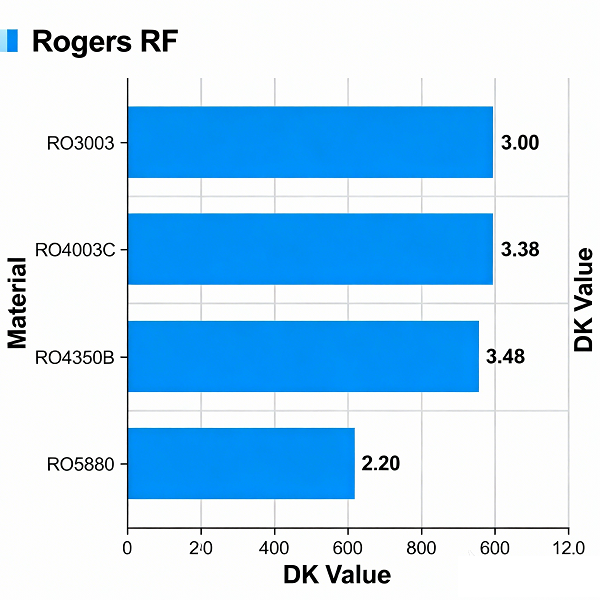
      • Rogers 4000 series: Delay ~139–161 ps/in
      • Tachyon 100G / Rogers 3003: Faster signal propagation at ~128–147 ps/in

      Low-loss materials with stable dielectric properties are always preferred for GHz-range designs. Choosing the right laminate is a fundamental step in achieving reliable high speed performance.

      High Speed PCB Design Consideration

      3. Evaluating Design Complexity

      Beyond speed, complexity also drives design considerations. Factors include:

      • Component density: More parts per unit area increase routing difficulty.
      • Fine-pitch BGAs: Devices with 0.5 mm or 0.4 mm pitch often require blind and buried vias for fan-out.
      • Interface types: High-speed protocols like HDMI, DDR, and Gigabit Ethernet need strict impedance control.
      • Impedance requirements: Controlled 50Ω single-ended or 100Ω differential traces may be mandatory.
      • Mixed-signal design: Coexistence of digital, RF, and analog circuits complicates stack-up and layout.
      • Strict layer stack-up: Some designs require 6, 8, or more layers with specific ground/power plane placement.
      • Component pin density: More than 17 pins per cm² indicates a demanding layout.
      • Part density: Over 1.55 components per cm² also raises complexity.
      • Electrical restrictions: Sensitive circuits may impose strict EMI or crosstalk requirements.

      The higher the density and the more protocols involved, the greater the need for specialized PCB techniques.

      4. Key Design Guidelines for High Speed PCBs

      When a design qualifies as high speed, the following must be considered:

      1. Treat interconnects as transmission lines. High speed traces are not simple point-to-point connections; they require impedance-controlled routing to reduce reflections, crosstalk, and EMI.
      2. Control signal attenuation. Use proper materials, trace widths, and terminations to keep losses within acceptable limits.
      3. Match PCB technology to complexity. Choose fabrication techniques that support component density, fine-pitch devices, and advanced protocols.
      4. Manage EMI carefully. Proper grounding, return paths, and shielding are vital to keep emissions under control.
      5. Maintain power integrity. Even under high-frequency noise, stable power delivery is crucial. Use decoupling capacitors, well-designed PDNs, and sufficient ground planes.
      6. Adopt specialized routing strategies. Differential pair routing, via optimization, and stack-up planning must be applied based on density and frequency needs.

      In short, high speed PCB design demands a holistic view—balancing materials, geometry, signal integrity, EMI control, and manufacturability.

      EBest Circuit (Best Technology) – Your Reliable High Speed PCB Manufacturer

      At EBest Circuit (Best Technology), we understand the demands of the 5G era. We produce high speed PCBs that meet strict performance requirements for telecom, automotive, aerospace, and medical applications.

      • Certifications: ISO9001, ISO13485, IATF16949, and AS9100D.
      • Quality control: Rigorous inspections and advanced testing equipment.
      • Traceability: MES system tracks every component and process.
      • Support: Professional engineering team to assist with stack-up design, impedance control, and thermal solutions.
      • Cost efficiency: Competitive pricing without sacrificing reliability.

      If your projects require high frequency, high speed solutions, EBest Circuit (Best Technology) is here to deliver boards that perform under pressure.

      FAQs

      1. What does UW mean next to 5G?

      It means Ultra Wideband, Verizon’s label for its premium 5G service.

      2. Is 5G UW faster than 5G UC?

      UW can reach higher peak speeds, but UC offers broader high-speed coverage.

      3. Does 5G UW use more battery?

      Yes, connecting to high-frequency bands can drain more power.

      4. Is 5G better than LTE?

      Yes, 5G offers faster speeds, lower latency, and better capacity compared with LTE.

      5. Why do some areas still lack 5G UW coverage?

      Because high-frequency networks are costly to deploy and signals don’t travel far. Expansion is ongoing.

      Why Your PCB Needs Conformal Coating? When It Is Required?

      September 5th, 2025

      What Is PCB Conformal Coating?

        Conformal coating is a protective transparent layer applied to the surface of a printed circuit board (PCB). It effectively shields electronic components and traces from moisture, dust, and chemical corrosion. The coating conforms precisely to the PCB’s shape—hence the name—forming a thin, flexible “invisible armor.”

        What Is PCB Conformal Coating?

        Why Do You Need Conformal Coating?

        1. Prevent Moisture-Induced Short Circuits & Leakage

        In high-humidity environments, moisture condensation on the PCB can cause leakage current or electrolytic corrosion, leading to system malfunctions or failure.

        2. Resist Dust & Contaminants

        In industrial, automotive, or kitchen environments, dust, oil, and metal particles can accumulate on the board, creating conductive paths.

        3. Enhance Resistance to Salt Spray & Chemicals

        Marine and offshore electronics are exposed to salt spray, which can rapidly oxidize solder joints and copper traces

        4. Improve Mechanical Stability

        Some coatings (e.g., silicone) are elastic, reducing stress on solder joints from vibration.

        5. Meet Industry Standards

        Sectors like automotive, medical, and military often require compliance with IPC, AEC-Q100, or MIL-STD—conformal coating is a key process.

        When Is PCB Conformal Coating Required?

        Not every PCB needs a conformal coating, but it becomes crucial when the board faces tough conditions. Think moisture, dust, chemicals, or big temperature swings—these can cause corrosion, short circuits, or signal issues. Electronics in cars, airplanes, industrial machines, or outdoor lighting often need this extra layer of protection.

        Miniaturized or high-density PCBs also benefit from conformal coating. Tiny spaces between components increase the chance of shorts or solder joint problems. A thin protective layer helps keep the circuits safe and reliable.

        Boards that go through frequent heating, cooling, or vibration also get an advantage. The coating helps absorb stress, reducing cracks and extending the board’s lifespan. In short, if your PCB works in a challenging environment, conformal coating is usually a smart choice. Here is a table of what applications require PCB conformal coating.

        ApplicationEnvironment ChallengeRecommended Coating Type
        Automotive ECUsMoisture, vibration, temperature changesPolyurethane (PU)
        Aerospace electronicsExtreme temperature swings, humiditySilicone (SR)
        Industrial machineryChemicals, dust, mechanical stressAcrylic (AR)
        Outdoor lightingUV exposure, rain, dustParylene or UV-cured coatings
        High-density PCBsMiniaturized components, tight spacingConformal coating layer (thin PU or acrylic)

        Risks of Skipping Conformal Coating

        → Product early failure: Damaged within warranty, increasing after-sales cost

        → Customer complaints & brand damage: Poor reliability harms reputation

        → Mass recall risk: May require full batch rework

        → Fail certification: May not pass IP, CE, or UL tests

        Bottom line: Saving on coating cost could cost ten times more in repairs

        Common Misconceptions

        Myth 1: Only outdoor devices need coating

        → Humid climates, kitchen grease, and industrial dust are also threats.

        Myth 2: Potting can replace conformal coating

        → Potting is for structural protection—higher cost, harder to repair. Coating is lighter and more flexible.

        Myth 3: Coating guarantees protection

        → Uneven application, bubbles, or missed areas reduce effectiveness. Process control is critical.

        How to Choose the Right Coating?

        TypeProsConsApplications
        AcrylicEasy to apply & repair, low costModerate chemical resistanceGeneral industrial, consumer
        PolyurethaneGood chemical & moisture resistanceHard to repairAutomotive, outdoor
        SiliconeHigh temp resistance, flexibleHigher costHigh-temp, LED lighting
        UV-CurableFast cure, precise coverageRequires UV lamp, shadow areas hard to coatPrecision modules, selective coating

        Conclusion

        PCB conformal coating is not optional—it’s essential for improving product reliability, lifespan, and market competitiveness.

        Recommendation: Evaluate coating needs early in design. Reserve keep-out zones and protect test points to avoid rework.

        Top 10 Japanese Electronics Brand You Must to Know

        September 5th, 2025

        Overview of Japanese Electronics

        When you hear the phrase japanese electronics brand, one word probably comes to mind—trust. For more than half a century, Japan has been known as a center of innovation, quality, and reliability. The country’s technology companies created products that not only changed daily life but also shaped entire industries.

        From the portable radio in the 1950s to today’s advanced gaming consoles and imaging devices, Japanese electronics have always carried a reputation for excellence. People buy them because they know the products will last, perform well, and often bring something new to the table. This is why Japanese brands still hold such a strong position in a market full of global competitors.

        Top 10 Japanese Electronics Brand You Must to Know

        Famous Japanese Electronics Products

        Before we look at the top japanese electronics brand list, let’s take a moment to highlight some of the most famous products that put Japan on the world map. These are items many of us grew up with or still use today.

        • Sony Walkman – The device that made music portable for the first time.
        • Sony PlayStation – A gaming console series that defined home entertainment.
        • Panasonic VCR and TVs – Household staples in the 80s and 90s, known for durability.
        • Canon EOS Cameras – Trusted by professional photographers worldwide.
        • Nikon F-series Cameras – Legendary in the photography community for their precision.
        • Nintendo Game Boy – A handheld console that shaped mobile gaming.
        • Nintendo Switch – A modern console blending home and handheld play.
        • Sharp LCD TV – One of the first high-quality flat-screen displays.
        • Toshiba Hard Drives – Reliable storage that powered computers for decades.
        • Pioneer Car Stereos – A favorite among music lovers for clear and powerful sound.

        Each of these products carries more than just technical value—they also carry emotional memories. They remind us of music on the go, family movie nights, taking photos on trips, or hours spent playing games with friends. That emotional connection is what makes Japanese electronics stand apart.

        Top 10 Japanese Electronics Brand List

        1. Sony

        Sony is perhaps the most recognized japanese electronics brand worldwide. From the iconic Walkman to the PlayStation, Sony has continuously influenced global culture. Its cameras and image sensors set the benchmark in the industry, and its entertainment network spans games, music, and film.

        2. Panasonic

        Panasonic built its reputation on reliable consumer products like televisions, home appliances, and batteries. Today, it is a leader in EV battery technology and sustainable energy solutions, proving its ability to evolve with time.

        3. Toshiba

        Toshiba’s name has long been linked with innovation in semiconductors, energy systems, and storage solutions. Its early contributions to memory chips remain crucial in the digital world. While it has stepped back from laptops, Toshiba is still a major player in industrial and infrastructure electronics.

        4. Hitachi

        Hitachi is more than just a consumer electronics name. It plays a central role in IT systems, smart infrastructure, and heavy industrial equipment. This balance of consumer and industrial solutions highlights the breadth of Japanese engineering.

        5. Sharp

        Sharp earned recognition for its advancements in display technology. Its LCD panels set a high bar for television performance, and today, it continues to innovate in energy-efficient electronics and smart appliances.

        6. Canon

        Canon is one of the most respected names in imaging. Its EOS cameras are trusted by professionals, while its printers are staples in offices worldwide. Canon also plays a strong role in medical imaging and industrial applications.

        7. Nikon

        Nikon, another major japanese electronics brand, is known for cameras and optical devices. Its products extend beyond photography into microscopes, lithography systems, and precision instruments used in research and manufacturing.

        8. Fujitsu

        Fujitsu focuses on IT solutions and digital transformation. Known for its servers, cloud services, and enterprise systems, Fujitsu’s role is more behind the scenes but no less vital in supporting global businesses.

        9. Pioneer

        Pioneer made its mark in audio technology. From car stereos to DJ equipment, the brand represents excellence in sound. Its identity in professional and personal audio remains strong.

        10. Nintendo

        Nintendo stands out for its creativity. From the NES to the Switch, its consoles focus on fun, imagination, and family experiences. Characters like Mario and Zelda are cultural icons that bring joy across generations.

        Top 10 Japanese Electronics Brand List

        Comparison of Top Japanese Electronics Brands

        BrandFoundedSpecialty AreasFamous Products
        Sony1946Consumer electronics, gaming, imagingWalkman, PlayStation, Alpha cameras
        Panasonic1918Home appliances, batteries, displaysToughbook laptops, EV batteries
        Toshiba1875Semiconductors, storage, energyFlash memory, industrial systems
        Hitachi1910IT, industrial, infrastructureSmart systems, heavy machinery
        Sharp1912Displays, consumer appliancesAquos TVs, LCD panels
        Canon1937Cameras, printers, medical imagingEOS cameras, office printers
        Nikon1917Cameras, optics, precision toolsDSLR cameras, microscopes
        Fujitsu1935IT services, computing solutionsServers, enterprise systems
        Pioneer1938Audio equipment, DJ systemsCar stereos, DJ mixers
        Nintendo1889*Gaming, entertainmentNES, Wii, Switch

        What is the Key Part in Electronics?

        Every electronics device relies on one foundation: the printed circuit board (PCB). A PCB is the backbone of modern electronics. It connects all the components—chips, resistors, capacitors, and sensors—into a functioning system.

        Without PCBs, devices like cameras, laptops, and gaming consoles could not exist. They provide not just electrical pathways, but also stability, heat management, and reliability. Whether it is a compact smartphone or a large industrial machine, the design and quality of the PCB decide how well the device performs.

        In fact, many famous Japanese products, from Sony’s cameras to Nintendo’s consoles, rely heavily on advanced PCB technology. That makes PCB manufacturing one of the most critical industries in the electronics supply chain.

        Your Reliable Chinese PCB Manufacturer – EBest Circuit (Best Technology)

        While Japanese brands dominate the global stage, they depend on high-quality components to maintain their reputation. This is where EBest Circuit (Best Technology) comes in.

        EBest Circuit (Best Technology) is EMS manufacturer in China, we have factory both in China Shenzhen city and Vietnam. We are a experienced PCB manufacturer that has more than 19 years experiences. At EBest Circuit (Best Technology), we specialize in manufacturing different types of PCBs, including ceramic PCB, metal core PCB, flexible PCB, and rigid PCB. We support industries such as automotive, medical, aerospace, and consumer electronics. Our certifications—ISO9001, ISO13485, IATF16949, and AS9100D—show our commitment to strict quality standards.

        Our turnkey service including:

        • Circuit board manufacturing
        • Electronics components sourcing
        • Free DFA and DFT check
        • 100% original electronics with reasonable price
        • 100% Testing – Flying probe, function testing
        • Quality control system – X-ray, AOI, FAI
        • PCB assembly service & box building service
        • No MOQ, support prototype and mass production

        If you are looking for a trusted partner in the electronics supply chain, EBest Circuit (Best Technology) is here to support your success.

        FAQs

        1. Why are Japanese electronics so reliable?

        Because Japanese brands focus on long-term performance, quality materials, and detailed engineering.

        2. What Japanese electronics company is owned by Panasonic?

        Panasonic owns several subsidiaries. One well-known example is Sanyo, which Panasonic acquired to strengthen its position in batteries and home appliances.

        3. What is the Japanese brand that starts with K?

        Two popular examples are Canon and Kyocera. Canon is famous for cameras and printers, while Kyocera is strong in ceramics, mobile phones, and industrial electronics.

        4. What Japanese electronics company is known for TVs?

        Brands like Sony, Panasonic, and Sharp are most recognized for their television products, with Sharp pioneering LCD technology and Sony leading in premium display performance.

        5. What type of PCB does EBest Circuit (Best Technology) supply?

        We supply a wide range of circuit boards, including but not only limited to metal core PCB, HDI PCB, high speed PCB, high frequency PCB, high end ceramic PCB, flexible circuits, flex heaters, rigid flexible PCBs, heavy copper PCB for high power electronics, and so on.

        What is TFT PCB? TFT LCD PCB

        August 30th, 2025

        When you look at your smartphone, car navigation screen, or even a medical monitor, you’re looking through a TFT display. TFT, which stands for Thin Film Transistor, is a technology that allows precise control of millions of pixels, producing sharp images and vibrant colors. Yet, behind the glass layer of the display lies something equally important—the TFT PCB.

        The TFT PCB is the printed circuit board that supports and controls the TFT display module. Without it, the panel is just passive glass, unable to light up or show an image. The PCB provides the “intelligence†that makes the display come alive. It manages signals, regulates power, drives the backlight, and often integrates the touch interface.

        Understanding how TFT PCBs function is essential not only for engineers but also for product developers, purchasing managers, and anyone working with display modules. Let’s explore what a TFT PCB is, how it works, where it’s used, and why choosing the right manufacturing partner is vital.

        What is TFT PCB? TFT LCD PCB

        What is a TFT PCB in a Display?

        At its core, a TFT PCB is the electronic backbone of a TFT display module. The TFT display consists of two main parts:

        • The TFT glass – This contains the thin film transistors that control liquid crystal molecules, determining how light passes through each pixel.
        • The TFT PCB – This supports the TFT glass by supplying power, processing signals, and controlling the backlight.

        Think of the TFT glass as the screen canvas, and the TFT PCB as the control center. The glass defines the resolution, pixel density, and visual quality, but without the PCB, there’s no way to convert system signals into images.

        For example, a 7-inch automotive TFT screen may have a resolution of 1024×600. The TFT glass determines the number of pixels, but it’s the PCB that drives each of those pixels according to the instructions from the car’s mainboard.

        How Does a TFT PCB Work?

        The TFT PCB works like an interpreter between the system and the display. Its tasks can be divided into three major functions:

        1. Signal Processing

        The host device—whether a smartphone, industrial controller, or infotainment system—sends digital image data. But this data needs to be formatted into instructions that control each pixel.

        • Signal Input: Common formats include LVDS, eDP, or MIPI DSI.
        • Driver ICs: These chips on the PCB decode the signals and decide how each pixel should behave.
        • Row and Column Control: Signals are distributed row by row and column by column, activating specific transistors on the TFT glass.

        For example, when displaying a red dot in the corner of a smartphone screen, the PCB’s driver ICs calculate which pixels to energize and how to modulate them to show red.

        2. Power and Backlight Management

        TFT displays require several power rails: one for the logic, one for the glass, and one for the LED backlight.

        • Voltage Regulation: The PCB includes regulators to maintain stable voltages, typically ranging from 1.8V for logic to 12V for backlight.
        • Backlight Control: LED drivers adjust brightness through PWM (Pulse Width Modulation) or current control. This makes it possible to dim the screen for night use or boost brightness for outdoor visibility.

        Without these circuits, the display would flicker, show unstable images, or fail to achieve uniform brightness.

        3. Touch Controller Integration

        In many TFT modules, the PCB also supports the touch layer.

        • Capacitive Touch Controllers: Sense changes in capacitance when a finger touches the screen.
        • Resistive Touch Controllers: Detect pressure applied on the surface.

        The PCB processes these touch signals and communicates them back to the main system.

        This is how swiping on your smartphone screen or tapping a medical device control panel is translated into action.

        What are the Key Components on a TFT PCB?

        Although the PCB looks small, it’s packed with vital parts. Let’s look at them in detail:

        • Driver ICs: Often fine-pitch chips that directly control pixel rows and columns. They are critical for image sharpness and color accuracy.
        • Power ICs: Convert input power into the different voltage levels needed by the display and touch controller.
        • Backlight Circuitry: Includes LED drivers, current regulators, and protection circuits.
        • Touch Controller: Only present in touch-enabled displays. Handles finger tracking, multi-touch, and gesture recognition.
        • Connectors and FPCs: Provide the bridge between the PCB and the host system. For slim devices, flexible printed cables (FPCs) are widely used.
        • Oscillators and Timing Circuits: Ensure that signals reach the glass in perfect sync.

        In high-end automotive or medical displays, additional components may be added, such as temperature sensors, EMI filters, and redundant power circuits for safety.

        What are the Key Components on a TFT PCB?

        What are the Applications of TFT PCBs?

        TFT PCBs are used in nearly every industry where visual information is needed. Some of the most common applications include:

        • Consumer electronics – Smartphones, tablets, laptops, TVs.
        • Automotive – Digital dashboards, navigation systems, entertainment screens.
        • Industrial equipment – Control panels, human-machine interfaces (HMIs).
        • Medical devices – Patient monitors, diagnostic equipment.
        • Aerospace and defense – Rugged displays with high visibility and durability.

        In each application, the PCB is customized to meet specific requirements, whether it’s compact size, heat resistance, or EMI shielding.

        What are the Design Considerations for TFT PCBs?

        Designing a TFT PCB is more challenging than many other PCB types because of the high-speed signals, compact layouts, and strict reliability needs.

        1. High-Speed Signal Integrity

        TFT PCBs often carry LVDS, MIPI DSI, or eDP signals that run in the hundreds of megahertz.

        • Impedance Control: Differential traces are routed with controlled impedance, usually 90 Ω ± 10%.
        • Length Matching: Signal pairs are length-matched to avoid skew.
        • Grounding and Shielding: Reference planes are carefully planned to minimize crosstalk.

        2. Power Distribution and Stability

        • Multiple Rails: A single TFT PCB may require 1.8V, 3.3V, 5V, and 12V simultaneously.
        • Filtering: LC filters smooth power for sensitive circuits.
        • Decoupling Capacitors: Placed close to ICs to reduce noise and voltage dips.

        3. Thermal Management

        • Backlight Heat: LED backlights generate heat. Copper pours, thermal vias, and sometimes aluminum-backed designs are used.
        • IC Heat Dissipation: High-power driver ICs may need thermal pads to spread heat across the PCB.

        4. Mechanical and Form Factor Constraints

        • Thickness: Many handheld devices demand ultra-thin PCBs (as low as 0.4 mm).
        • Flexibility: For foldable devices, the PCB must endure repeated bending.
        • Mounting Holes: Carefully placed to avoid stress on the glass.

        5. Reliability for Harsh Environments

        • Automotive: Wide temperature (-40°C to 125°C), vibration-resistant designs.
        • Medical: Compliance with strict safety standards, including isolation for patient-connected devices.
        • Aerospace: Lightweight but highly reliable boards, often using advanced laminates.

        6. Cost vs Performance

        Every design choice affects cost.

        • More Layers = better performance, higher cost.
        • ENIG Finish = better for fine-pitch, but more expensive than OSP.
        • Hybrid Rigid-Flex PCB = saves space, but increases production difficulty.

        Example: A simple home appliance TFT PCB may use a 2-layer OSP-finished board. An automotive infotainment TFT PCB may require 8 layers with ENIG finish and redundant power circuits.

        How is a TFT PCB Manufactured?

        The production of TFT PCBs combines standard PCB processes with advanced assembly techniques:

        1. Material Selection: FR4 is the most common for rigid PCBs, while polyimide is used for flexible TFT modules.

        2. Copper Layering and Etching: Multiple copper layers are stacked and etched to create signal and power traces.

        3. Surface Mount Assembly: Components like driver ICs and regulators are mounted using automated SMT machines.

        4. Fine-Pitch Soldering: Since display connectors and ICs have extremely small pads, precision soldering is required.

        5. Testing: Includes electrical continuity, signal quality, and backlight performance checks.

        6. Reliability Validation: For critical industries, additional tests such as thermal cycling, humidity resistance, and vibration are conducted.

        The end result is a robust PCB that works seamlessly with the TFT glass, delivering both functionality and durability.

        What is the Difference Between TFT PCB and Other Display PCBs?

        Different display technologies require different PCB support.

        • TFT PCB vs OLED PCB: OLEDs are self-illuminating, so their PCBs mainly manage signals and power, while TFT PCBs must also handle backlight circuits.
        • TFT PCB vs LED Display PCB: LED display PCBs directly control thousands of LEDs in panels, often for outdoor or large-format use. TFT PCBs are designed for compact glass-based displays.
        • Cost Comparison: TFT PCBs are usually less expensive than OLED PCBs, making them a cost-effective choice for many industries.

        This is why TFT remains popular: it provides a balance between performance, cost, and maturity of technology.

        Why Choose EBest Circuit (Best Technology) for TFT PCB Manufacturing?

        As one of the best PCB manufacturers in China, our goal is to provide our customers with the best quality products and services at the most competitive pricing, and to become a reliable long-term partner of our customers in PCB manufacture and assembly.

        Since its establishment in 2006 as a printed circuit board manufacturer, EBest Circuit (Best Technology) has focused on high-quality, low to medium-volume PCB fabrication, PCB assembly and electronics manufacturing. Our products and services include 1-100 layers printed circuit boards, thru-hole assembly, SMT assembly including BGA assembly, components sourcing, turnkey box build and electronic product development. From consumer electronics to advanced aerospace displays, EBest Circuit (Best Technology) has the capability and expertise to support projects of any scale.

        FAQs

        1. What materials are used in a TFT PCB?

        Most TFT PCBs use FR4 for rigid sections and polyimide for flexible cables. Advanced materials may be used in high-frequency or high-reliability designs.

        2. Can TFT PCBs support touch screen functions?

        Yes. Capacitive or resistive touch controllers are often integrated into the PCB to handle user interactions.

        3. How thin can a TFT PCB be?

        Flexible TFT PCBs can be as thin as 0.15 mm, while rigid designs are typically 0.6–1.6 mm.

        4. Are TFT PCBs different for automotive displays?

        Yes. Automotive TFT PCBs are designed for durability, with heat-resistant materials, vibration tolerance, and wider operating temperature ranges.

        5. What is the typical cost of a TFT PCB?

        Costs vary based on size, layer count, and application. Consumer TFT PCBs are usually low-cost, while automotive and medical-grade boards cost more due to higher standards.

        What is PCB copper core? Copper metal core PCB

        August 25th, 2025

        PCB copper core stands out among other PCB types due to its high thermal and power capabilities. These boards are designed to operate in harsh environments, offering exceptional durability and reliability.

        What is PCB copper core? Copper metal core PCB

        Maybe you have these worries and concerns:

        • Can the copper thickness and thermal conductivity of copper core PCBs be precisely tailored to meet specific requirements?
        • How can I avoid delamination and oxidation of the copper core? How can I resolve issues if they arise?
        • Can I guarantee sample or batch delivery?
        • Are there any industry examples? Can I receive a 24-hour response to after-sales technical questions?

        BEST Technology can solve your problem:

        • We support custom copper thicknesses from 0.5-10 ounces, and precisely match power requirements through zoned thermal design.
        • We utilize vacuum lamination and an anti-oxidation coating (such as OSP or immersion gold) to ensure interlayer bonding strength ≥1.8N/mm² and pass 1000 cycles of -40°C to 125°C temperature cycling testing without delamination. We offer free rework or replacement for delamination and oxidation issues within the warranty period, with a 48-hour response and solution.
        • Single- and double-sided boards: 24-48 hours, multi-layer boards: 3-5 days. Batch delivery: Regular orders: 7-10 days, expedited orders: within 3 days.
        • This material has been widely used in new energy vehicle BMS systems (10oz copper thickness), industrial inverters (8oz multilayer boards), and 5G base station power modules (6oz copper core). We provide 24-hour remote support to ensure rapid resolution of technical issues.

        What is a copper core PCB?

        Copper core PCB is a type of printed circuit board with a solid copper layer at its core. Unlike traditional PCBs, where copper is only part of the circuit paths, the core itself is copper. This provides superior thermal conductivity, allowing heat to be efficiently managed in high-power applications.

        The copper core acts as a heat spreader. It moves heat away from sensitive components. This prevents overheating and maintains long-term performance. These boards are widely used in LED lighting, automotive electronics, industrial equipment, and power electronics.

        Using a copper core also improves the mechanical stability of the board. Components remain securely in place even under heat stress. The copper’s high conductivity ensures that both electrical performance and heat dissipation are optimal.

        Why Use a Copper Core PCB?

        Modern electronics often produce significant heat, which can reduce efficiency and shorten the life of components. Copper core PCBs solve this problem efficiently.

        Here’s why they are used:

        • High thermal conductivity: Copper efficiently transfers heat away from components, keeping devices cooler.
        • Durability: They withstand thermal cycling better than standard FR4 boards.
        • Compact design: Designers can place components closer together without worrying about overheating.
        • Energy efficiency: Reduced heat buildup enhances performance and reduces energy loss.

        In short, using a copper core PCB increases reliability, extends device life, and supports high-power applications where traditional PCBs would fail.

        How is a Copper Metal Core PCB Made?

        The manufacturing of a copper metal core PCB differs from standard PCB production. It requires precision and advanced techniques.

        What is PCB copper core? Copper metal core PCB

        Step-by-step process:

        • Copper sheet selection: High-purity copper sheets are chosen for the core. Purity ensures consistent thermal conductivity.
        • Insulation layer application: An insulating dielectric layer is added to separate the copper core from the circuit traces.
        • Copper layering: Copper foil is laminated on both sides of the dielectric layer. This creates the circuit paths.
        • Etching: The unwanted copper is chemically removed to form the desired circuit design.
        • Surface finish: Methods like HASL, ENIG, or immersion silver are applied to protect the copper and improve solderability.
        • Testing and inspection: Each board is rigorously tested for electrical continuity, thermal performance, and mechanical stability.

        This process ensures that copper core PCBs perform well under high thermal and electrical stress.

        Do PCBs Have Copper?

        Yes, copper is a standard material in all PCBs. It forms the conductive pathways that carry electricity. Standard FR4 PCBs use copper only in traces and pads.

        Copper core PCBs are different. The copper is in the core, not just the circuit layers. This gives them superior heat conduction. Components stay cooler, even under heavy loads.

        Copper’s excellent electrical and thermal conductivity ensures stable performance. Devices work reliably for years without overheating.

        What Type of Copper is Used in PCB?

        The type of copper affects both thermal and electrical performance. In copper core PCBs, BEST Technology typically use:

        • High-purity electrolytic copper: Provides consistent conductivity and low resistance.
        • Oxygen-free copper (OFC): Reduces oxidation and ensures long-term stability.
        • Rolled annealed copper: Offers flexibility and mechanical strength for assembly.
        What is PCB copper core? Copper metal core PCB

        Choosing the right copper type ensures high thermal conductivity, strong mechanical support, and stable electrical performance. This is especially important in LEDs, automotive electronics, and industrial equipment.

        The Types of Copper-Based PCB

        Copper-based PCBs can vary depending on the application. The main types include:

        • Single-layer copper core PCB: Features one conductive layer. Often used in simple LED modules or low-power devices.
        • Double-layer copper core PCB: Has copper on both sides. This design supports more complex routing while maintaining heat management.
        • Multilayer copper core PCB: Includes multiple circuit layers with a central copper core. Ideal for high-power, dense electronics.
        • Flexible copper core PCB: Thin copper sheets with flexible substrates allow heat dissipation and adaptable design.

        Each type is tailored for specific needs. LEDs often use single or double-layer boards. Industrial and automotive applications prefer multilayer copper core PCBs.

        Is Copper Core or Aluminum Core Better?

        Both copper and aluminum core PCBs are designed to manage heat efficiently. However, copper offers several advantages.

        Advantages of copper core:

        • Higher thermal conductivity.
        • Better electrical performance.
        • Greater long-term reliability.

        Advantages of aluminum core:

        • Lower cost.
        • Lightweight construction.
        • Suitable for moderate heat applications.

        While aluminum cores are cost-effective, copper core PCBs outperform them in thermal management, reliability, and longevity. This makes copper the preferred choice for high-power and high-reliability electronics.

        Copper Core vs Aluminum Core – Thermal Conductivity

        Thermal conductivity determines how efficiently a material transfers heat. This is critical in electronics design.

        • Copper core PCB: Typically 300–400 W/m·K.
        • Aluminum core PCB: Typically 1-30 W/m·K.
        What is PCB copper core? Copper metal core PCB

        Copper conducts heat several times faster than aluminum. This keeps components cooler and prevents hotspots. Electronics run efficiently and last longer when heat is managed properly.

        Conclusion:

        PCB copper core ensures excellent thermal conductivity. Components stay cool, even under high power or prolonged use. Copper core PCBs are durable, reliable, and suitable for compact designs. Compared to aluminum, they provide higher conductivity, better performance, and longer lifespan.

        These boards are widely used in LED lighting, automotive electronics, industrial equipment, and power modules. Choosing a copper core PCB improves efficiency, safety, and product reliability.

        For more information or inquiries, contact sales@bestpcbs.com

        High Frequency PCB Materials, High Frequency Circuit Design

        August 21st, 2025

        Have you ever faced such problems when design a PCB that used in high speed application?

        • Is your high-speed design bleeding signal strength?
        • How to solve poor thermal management in high-frequency systems to ensure stability and reliability?
        • How to effectively suppress severeEMI and meet EMC standards in high-frequency circuits?

        At EBest Circuit (Best Technology), we fabricate high frequency PCB that can solve these problems. We use:

        • High quality materials with low loss and better shielding performance.
        • Utilize ground via array, densely arranging ground vias around radiation sources such as microstrip lines to form a “wall”.
        • Design multi-layer boards and adopt dedicated ground layers through reasonable stack-up design, provide a complete reference ground plane for high-frequency signals.

        High frequency PCBs are essential in applications such as automotive radar, aerospace communication, medical imaging, 5G and satellite systems. These boards must handle signals above 100 MHz and, in many cases, well into the GHz range. At such speeds, signal losses, impedance mismatches, and electromagnetic interference (EMI) can cause severe degradation. EBest Circuit (Best Technology), a leading expertise in high frequency pcb manufacturing, can help to optimize your design and manufacture such board for you!

        What is a High Frequency PCB?

        A high frequency PCB is a printed circuit board designed to transmit signals above 500 MHz, often extending into 10 GHz, 30 GHz, or even higher depending on the application. Some applications, like automotive radar, require PCBs that perform stably at 77 GHz or more.

        These boards are not limited to one sector. They are used in:

        • Wireless base stations and antennas
        • Radar for defense and vehicles
        • Satellite communication modules
        • High-speed computing and servers
        • Precision medical imaging devices

        The key challenge is that as frequency rises, signals become more vulnerable to losses, reflections, and interference. A standard FR4 PCB cannot handle these issues beyond a certain point, which is why high frequency laminates and designs are essential.

        High Frequency PCB Materials, High Frequency Circuit Design

        High Frequency PCB Material

        The choice of material determines how well a PCB will perform in high frequency environments. Engineers usually evaluate three main parameters:

        • Dielectric Constant (Dk): This defines how signals propagate through the material. A stable, low Dk improves signal speed and reduces delay.
        • Dissipation Factor (Df): Also called the loss tangent, this defines how much energy is lost as heat. Lower values are better for long-distance signal transmission.
        • Thermal Performance: Materials must handle fluctuating temperatures without expansion or deformation, especially in aerospace and automotive environments.

        Common Materials Used in High Frequency PCB

        • PTFE (Teflon-based laminates): Offers extremely low loss and stable dielectric properties. Perfect for microwave and RF circuits, though harder to process during manufacturing.
        • Rogers laminates: Popular choices like RO4350B and RO3003 are widely used in communication devices due to their balance between cost and performance.
        • Arlon and Taconic: Trusted for aerospace and military-grade systems.
        • Ceramic-filled PTFE: Combines the benefits of PTFE with improved thermal stability, suitable for radar and satellite applications.
        • FR4: Economical, but only practical for low GHz applications, as losses rise sharply at higher frequencies.

        When comparing FR4 to Rogers or PTFE, the difference is like comparing regular tires to high-performance racing tires. Both work, but only one is built for extreme conditions.

        What is the Best PCB Material for High Frequency?

        The “best†material depends on the actual use case. For example:

        • Up to 3 GHz: Rogers RO4350B provides stable performance at a manageable cost, widely used in RF applications.
        • Microwave range (10–30 GHz): PTFE laminates such as Taconic TLY or Rogers RO3003 give superior low-loss performance.
        • 5G antennas: Low Dk and Df materials like Rogers RO4835 are chosen for consistent performance in outdoor environments.
        • Automotive radar (77 GHz): Ceramic-filled PTFE materials are the only reliable solution due to their high thermal and frequency stability.

        Cost also matters. PTFE offers the lowest insertion loss but requires advanced processing, increasing manufacturing cost. Rogers materials are easier to fabricate and balance cost and performance, which is why they are widely used.

        High Frequency PCB Characteristics

        High frequency PCBs stand out due to specific characteristics:

        • Stable dielectric constant across wide frequencies
        • Low signal loss
        • Thermal durability
        • Controlled impedance
        • Dimensional stability

        These boards are engineered not just to survive but to deliver reliable, repeatable performance in demanding environments.

        High Frequency PCB Design Guidelines

        Designing a high frequency PCB is a delicate balance of precision, material choice, and layout strategy. Even small mistakes in design can cause significant signal loss, reflection, or interference at gigahertz frequencies. Below are the key guidelines that engineers follow to ensure high performance.

        1. Controlled Impedance Design

        At high frequencies, the impedance of each trace must be carefully calculated and maintained. Variations in trace width, thickness, or dielectric spacing can cause reflections and signal degradation. Designers usually rely on simulation software to calculate controlled impedance for microstrip, stripline, or coplanar waveguide structures. The target impedance is often 50Ω for single-ended signals or 100Ω for differential pairs.

        2. Minimize Trace Lengths

        Signal paths should be as short as possible. Long traces increase insertion loss, cause delay, and may introduce unwanted reflections. In applications like RF communication or 5G antennas, even small increases in trace length can degrade signal integrity significantly.

        3. Reduce the Number of Vias

        Each via acts as a small inductance and capacitance, which can reflect high-frequency signals. Limiting via usage and optimizing via placement is essential. When vias are unavoidable, designers often use via stitching or back-drilling techniques to reduce parasitic effects.

        4. Ground Planes and Reference Layers

        A continuous, solid ground plane beneath signal traces improves return paths and minimizes electromagnetic interference (EMI). Multiple ground planes can be used in multilayer boards to enhance shielding and reduce noise coupling. Proper stacking ensures that signal layers are adjacent to reference planes, which stabilizes impedance and improves signal quality.

        5. Differential Pair Routing

        Differential pairs are widely used in high-speed digital and RF circuits. These pairs carry complementary signals, which improves noise immunity and reduces crosstalk. Designers maintain strict control over trace spacing, length matching, and symmetry to preserve signal integrity.

        6. Stack-Up Optimization

        The stack-up, or layer arrangement, determines how signal layers, power planes, and ground planes interact. Proper stack-up design can reduce cross-talk, improve thermal management, and control impedance. High frequency PCBs often use hybrid stack-ups with PTFE or ceramic layers to balance performance and manufacturability.

        Every decision—from material choice to trace width, via placement to ground plane configuration—directly impacts signal integrity. A high frequency PCB is not just about connecting components; it is about managing signals, controlling impedance, and reducing loss to ensure reliable, precise performance in the gigahertz range.

        High Frequency PCB Design Guidelines

        High Frequency PCB Manufacturer – EBest Circuit (Best Technology)

        Not all manufacturers are capable of producing high frequency PCBs. Handling PTFE and ceramic materials requires different lamination temperatures, drilling techniques, and plating processes compared with FR4.

        At EBest Circuit (Best Technology), we bring specialized expertise in:

        • Fabricating Rogers, Taconic, PTFE, and hybrid PCB stack-ups.
        • Maintaining strict dimensional tolerances for impedance control.
        • Advanced inspection to measure dielectric thickness, copper roughness, and loss factors.
        • End-to-end MES traceability to ensure every board can be tracked back to its source materials and processes.

        This combination of material knowledge, certified systems, and engineering support makes EBest Circuit (Best Technology) a trusted partner for customers who need more than just a standard PCB.

        Insertion Loss Comparisons of Common High Frequency PCB Constructions

        MaterialFrequency (10GHz)Insertion Loss (dB/inch)Notes
        FR4~10GHz0.7 – 1.0 dBHigh loss, not recommended
        Rogers RO4350B~10GHz0.2 – 0.3 dBCost-effective, reliable
        Rogers RO3003~10GHz0.1 – 0.15 dBExcellent for microwave use
        PTFE Ceramic~10GHz0.05 – 0.1 dBPremium choice for radar/5G

        This table clearly shows why FR4 is avoided for RF designs. At high GHz levels, FR4 can lose more than three times the signal strength compared with PTFE laminates.

        High Speed vs High Frequency PCB – What is the Difference?

        The terms “high speed†and “high frequency†are often confused, but they describe different challenges:

        • High Speed PCB: Concerned with digital signals, rise times, and data rates. Examples: DDR memory boards, data centers, and Ethernet.
        • High Frequency PCB: Concerned with analog and RF signals in the GHz range. Examples: radar, antennas, and satellite communication.

        In practice, many designs overlap. For instance, a 5G base station board must support high-speed data processing and high-frequency RF transmission simultaneously. This is why engineers often require both high-speed and high-frequency design expertise.

        High Speed vs High Frequency PCB – What is the Difference?

        Why Do We Need High Frequency?

        High frequency PCBs enable many of the technologies that define modern life:

        • 5G base stations and smartphones: Delivering ultra-fast, low-latency communication.
        • Automotive radar: Assisting advanced driver-assistance systems and autonomous driving.
        • Satellite communication: Providing global coverage for navigation and broadcasting.
        • Defense and aerospace: Supporting secure, high-performance radar and communication systems.
        • Medical devices: Enabling accurate imaging through MRI, CT, and ultrasound.

        Without these boards, the next generation of communication and smart systems would not be possible.

        Who Should Not Get High Frequency?

        Not every project needs high frequency PCBs. For example:

        • A consumer product with simple sensors may not justify the extra cost.
        • Low-speed devices below 500 MHz can rely on FR4.
        • Cost-sensitive projects without high bandwidth needs should avoid high frequency laminates.

        Choosing the right PCB type should always balance performance needs vs. budget.

        FAQs

        1. What frequency is considered high frequency in PCBs?

        Any PCB designed to work above 500 MHz is typically considered high frequency, with advanced boards operating up to 60 GHz or more.

        2. How does dielectric constant affect PCB performance?

        A stable dielectric constant ensures signals propagate at predictable speeds and maintain impedance control, crucial for RF circuits.

        3. Can FR4 be used for high frequency PCB?

        FR4 works only up to around 1 GHz. Beyond that, losses become too high for reliable performance.

        4. What are the challenges in manufacturing high frequency PCB?

        Processing PTFE materials, achieving impedance accuracy, reducing insertion loss, and handling copper roughness are common challenges.

        5. How to reduce signal loss in high frequency PCB design?

        Use low-loss laminates, design shorter traces, avoid unnecessary vias, and apply smooth copper surfaces to reduce resistance.

        What is a Copper Clad PCB? Copper Clad Laminate (CCL)

        August 21st, 2025

        Copper clad PCB are a core material for printed circuit boards (PCBs). Composed of an insulating substrate and copper foil, these materials are heat-pressed to form a composite. They both support components and provide conductive circuits. Depending on the substrate, these materials can be categorized as paper, fiberglass, composite, or metal. They are widely used in consumer electronics, communications, automotive, and industrial control applications.

        What is a Copper Clad PCB? Copper Clad Laminate (CCL)

        Are you curious about EBest Circuit (Best Technology)’s copper clad PCBs?

        • Does the insulation performance meet circuit insulation requirements?
        • Can the material strength withstand the processing and usage environment?
        • Is the performance and cost balance balanced?
        • Does BEST Technology provide customization and after-sales support?

        EBest Circuit (Best Technology)’s copper clad PCB can answer these questions.

        • Compatible. Supports standard sizes and customized specifications (thickness, shape), adapting to different PCB design requirements, and enabling fast response for small batches.
        • Performance. The base material is highly resistant to bending and impact, and can withstand cutting, drilling, and other processing processes, preventing cracking or deformation after long-term use.
        • Achieve. Performance meets industry standards, with over 100 board options for cost optimization, balancing reliability and affordability.
        • Provide. Supports customization of materials, specifications, and processes. After-sales service includes rapid response and warranty services, and expedited orders ship within 24 hours.

        What is copper clad in PCB?

        Copper clad PCB refers to a board where a thin layer of copper foil is bonded to one or both sides of a substrate, usually fiberglass or other insulating material. This copper layer forms the conductive surface where circuit patterns are later etched.

        Without this copper cladding, a PCB would just be an insulator with no ability to carry signals. By laminating copper onto the substrate, the board gains electrical conductivity and becomes the foundation for electronic circuits.

        The copper clad board is then processed through techniques like imaging, etching, and drilling to create pathways that allow electricity to flow between components.

        In short, a copper clad PCB board is the starting point for almost every PCB. It bridges the gap between insulating materials and conductive pathways.

        How thick is PCB copper clad?

        Copper thickness is one of the most critical specifications in any copper clad PCB sheet. It directly affects current-carrying capacity, heat dissipation, and durability.

        The thickness of copper in PCBs is usually measured in ounces per square foot (oz/ft²). Here’s what it typically looks like:

        • 0.5 oz/ft² copper → about 18 microns thick
        • 1 oz/ft² copper → about 35 microns thick
        • 2 oz/ft² copper → about 70 microns thick
        • 3 oz/ft² and above → heavy copper, often used for power electronics
        What is a Copper Clad PCB? Copper Clad Laminate (CCL)

        Standard consumer electronics often use 1 oz copper. High-power applications may need 2 oz or more to handle higher currents without overheating.

        So, when choosing a PCB copper clad board, thickness depends on your circuit’s power requirements and performance needs.

        What are the materials of copper clad laminate (CCL)?

        The copper clad laminate (CCL) is not just copper. It’s a composite material made of multiple layers. Each one has a specific role.

        Here are the primary materials used:

        1. Copper Foil

        • Conductive layer
        • Provides the pathways for current flow
        • Usually treated to improve adhesion

        2. Resin System

        • Often epoxy or modified epoxy
        • Acts as a binder
        • Provides mechanical strength

        3. Reinforcement Material

        • Fiberglass cloth is the most common
        • Ensures dimensional stability
        • Improves heat resistance

        4. Additives

        • Flame retardants
        • Fillers for mechanical stability
        • Special compounds for high-frequency applications

        The combination of these elements gives the copper clad laminate PCB its strong insulation, mechanical toughness, and long-term reliability.

        What is a PCB with copper clad on only one side called?

        PCB with copper laminated on only one side is known as a single-sided copper clad board. It’s the simplest form of PCB copper clad laminate.

        These are widely used in low-cost and less complex electronic devices. For example:

        • Calculators
        • Power supplies
        • LED lighting modules
        • Consumer gadgets

        On the other hand, a double sided copper clad PCB board has copper foil on both sides. This allows more complex designs and higher component density.

        Therefore, depending on the complexity of the circuit, a single-sided or double-sided option can be chosen.

        What are the types of copper clad laminate (CCL)?

        Copper clad laminates are available in different types to suit varied applications. Here are the main categories:

        What is a Copper Clad PCB? Copper Clad Laminate (CCL)

        Based on Substrate

        • Paper-based (phenolic resin) → Affordable, good for household appliances
        • Glass fabric (epoxy resin) → More durable, widely used in general electronics
        • Composite CCL → A mix of paper and fiberglass

        Based on Copper Foil

        • Electrolytic copper foil → Smooth surface, ideal for precision circuits
        • Rolled annealed copper foil → Excellent ductility, used in flexible PCBs

        Based on Application

        • General-purpose CCL → Cost-effective and widely used
        • High-frequency CCL → Designed for RF and microwave devices
        • High-speed CCL → Used in data communication systems
        • Thermal conductive CCL → Great for LED and power devices

        Each type of copper clad laminate PCB material is designed to handle unique performance demands.

        Why use a copper clad PCB board?

        Copper clad PCBs bring several advantages that make them a preferred choice:

        • Excellent Conductivity: Copper provides stable and reliable current flow.
        • Thermal Management: Thicker copper spreads heat efficiently, preventing damage.
        • Mechanical Strength: Fiberglass reinforcement adds stability.
        • Design Flexibility: Available in single, double, or multilayer forms.
        • Cost Efficiency: Paper-based and FR4 laminates reduce manufacturing costs.

        These advantages have led to the widespread use of copper clad PCBs in consumer electronics, automotive systems, and medical devices.

        What is copper clad used for?

        Copper clad boards serve as the base for many electronic products. Some key applications include:

        1. Consumer Electronics

        • Smartphones, tablets, laptops
        • Wearable devices

        2. Automotive Electronics

        • Control modules
        • Safety systems
        • Infotainment units

        3. LED Lighting

        • High thermal conductivity versions
        • Used in LED lighting aluminum substrates

        4. Industrial Control Systems

        • Robust designs for high current
        • Suitable for harsh environments

        5. Medical Devices

        • Compact and reliable circuits
        • Long-term performance stability

        In short, copper clad PCBs are used anywhere reliable electronic connections are required.

        How to choose a copper clad board for PCB?

        Choosing the right copper clad laminate PCB requires balancing performance, cost, and application needs. Here’s how you can decide:

        What is a Copper Clad PCB? Copper Clad Laminate (CCL)

        1. Power Requirements

        • High current? Choose thicker copper.
        • Low power? Standard 1 oz copper is enough.

        2. Frequency Performance

        • For RF or high-speed circuits, select low-loss laminates.
        • For simple circuits, FR4 is cost-effective.

        3. Thermal Demands

        • LEDs and power devices benefit from thermal conductive laminates.

        4. Design Complexity

        • Single-sided for simple devices.
        • Double-sided or multilayer for complex designs.

        5. Budget Considerations

        • Paper-based laminates are cheaper.
        • Glass-fiber laminates offer longer life.

        By considering these factors, you can select the best copper clad board PCB for your project.

        At EBest Circuit (Best Technology), we specialize in PCB copper clad laminates that meet international standards and deliver long-term reliability. If you are seeking a trustworthy supplier for your copper clad PCB boards, our team is here to help. Contact us today at sales@bestpcbs.com