What Is Performance Qualification (PQ) in Medical PCBA Production?
Performance Qualification (PQ) is the documented verification that a validated medical PCBA manufacturing process consistently produces assemblies that meet defined quality and regulatory requirements under normal production conditions.
After Installation Qualification (IQ) confirms that equipment is correctly installed, and Operational Qualification (OQ) confirms that assembly processes operate reliably within defined limits, PQ answers the final and most practical question: Can this process repeatedly deliver compliant medical PCBAs in real production?
For medical electronics, PQ represents the transition from engineering validation to dependable manufacturing reality.
Why Is PQ Essential for Medical PCBA Manufacturing?
Medical devices often operate continuously, support diagnostic decisions, or perform life-sustaining functions. In these applications, a process that works once is not enough.
PQ is essential because it:
Demonstrates long-term process stability
Confirms consistency across operators, shifts, and lots
Reduces the risk of latent defects entering the field
Provides objective evidence for regulatory inspections
Builds OEM confidence for volume production
From a regulatory standpoint, PQ is often the final gate before full production approval.
How Does PQ Differ From Engineering Trials or Pilot Builds?
Engineering trials and pilot builds are typically conducted under controlled conditions with close supervision. PQ, by contrast, is intentionally performed under routine manufacturing conditions.
This means PQ uses:
Standard production operators
Normal shift schedules
Approved work instructions
Regular inspection and test methods
The objective is not to demonstrate ideal performance, but to confirm repeatable, sustainable output under everyday conditions.
How Is Performance Qualification (PQ) Conducted for Medical PCBA?
In medical PCBA production, PQ usually involves multiple production runs designed to represent normal manufacturing variability.
At Best Technology, a typical PQ approach includes:
Manufacturing multiple lots using standard processes
Running production across normal shifts
Applying routine AOI, X-ray, and functional testing
Collecting yield, defect, and rework data
Reviewing trends rather than single-lot results
This approach ensures that performance conclusions are based on process behavior over time, not isolated success.
What Metrics Are Commonly Evaluated During PQ?
PQ focuses on indicators that reflect real manufacturing performance and product reliability. Common metrics include:
First-pass yield (FPY)
Defect rate and defect trends
Rework frequency and causes
Functional test pass rates
Stability of critical process outputs
These metrics help demonstrate that the process remains in control and predictable, which is critical for regulated medical products.
Why Is PQ Especially Important for Medical Device Reliability?
Medical PCBAs may be exposed to long operating hours, thermal cycling, or repeated use over extended lifetimes. Even small variations in assembly quality can accumulate into failures.
PQ provides assurance that:
Quality does not degrade across batches
Process drift is identified and controlled
Assemblies meet specification consistently over time
For diagnostic, monitoring, and life-support devices, PQ is often examined closely during regulatory audits because it directly reflects real-world manufacturing reliability.
What Risks Exist If PQ Is Weak or Incomplete?
Inadequate PQ can lead to serious downstream consequences, including:
Production instability after scale-up
Increased field failure rates
Corrective and preventive actions (CAPA)
Product recalls or shipment holds
Loss of OEM trust
In medical electronics, these risks affect not only manufacturing efficiency but also patient safety and regulatory standing.
IQ vs OQ vs PQ: How Do They Compare in Medical PCBA Validation?
The table below summarizes the distinct roles of IQ, OQ, and PQ within medical PCBA process validation:
Qualification Stage
Primary Focus
Key Question Answered
Typical Scope
When It Is Performed
IQ (Installation Qualification)
Equipment & environment
Is everything installed correctly?
Machines, systems, utilities, calibration
Before process testing
OQ (Operational Qualification)
Process capability
Does the process work within defined limits?
Printing, placement, reflow, cleaning, testing
After IQ
PQ (Performance Qualification)
Production consistency
Can we produce compliant boards consistently?
Yield, defects, trends, real production output
After OQ
Together, these stages form a closed-loop validation framework required for medical PCBA manufacturing.
How Does PQ Build on IQ and OQ?
PQ only has regulatory value when it is supported by solid IQ and OQ foundations:
IQ ensures the manufacturing environment is properly installed
OQ ensures the process is capable and controlled
PQ confirms consistent performance under routine production
Without IQ and OQ, PQ results lack context. Without PQ, IQ and OQ remain theoretical.
How Does Best Technology Support PQ for Medical PCBA Projects?
Best Technology supports medical PCBA customers with a structured PQ approach aligned with ISO 13485 expectations, including:
Stable, validated SMT and test processes
Full production traceability
Data-driven yield and defect analysis
Documentation suitable for OEM and regulatory review
This ensures that medical PCBA production is not only compliant, but sustainably reliable at scale.
How Does PQ Fit Into the Complete Medical PCBA Validation Series?
Performance Qualification is the final confirmation that a medical PCBA process is ready for long-term production. To fully understand its role, it is recommended to review the earlier stages of this series:
If you’ve ever searched when to use amplifier antenna, you’re probably already frustrated with weak signal, slow data, or unstable connections. Many users buy an antenna amplifier hoping for an instant fix, only to find that performance doesn’t improve—or even gets worse.
With 5G, especially 5G UC, things have become even more confusing. Strong signal bars don’t always mean fast speeds, and adding hardware without understanding your signal environment can backfire.
This guide explains exactly when an antenna amplifier helps, when it doesn’t, and how to use it correctly.
What Is an Antenna Amplifier?
An antenna amplifier is an active electronic device that increases the amplitude of radio-frequency signals received by an antenna before they reach a tuner, receiver, or distribution network. It does not improve antenna sensitivity, change antenna directionality, or recover information that was never received in the first place.
In practical systems, antenna amplifiers are used to compensate for signal losses introduced after reception, such as coaxial cable attenuation, splitter insertion loss, and impedance mismatches. Understanding this limitation is critical because many signal issues originate at the antenna itself, not downstream.
What Is an Antenna Amplifier?
How Does an Antenna Amplifier Work?
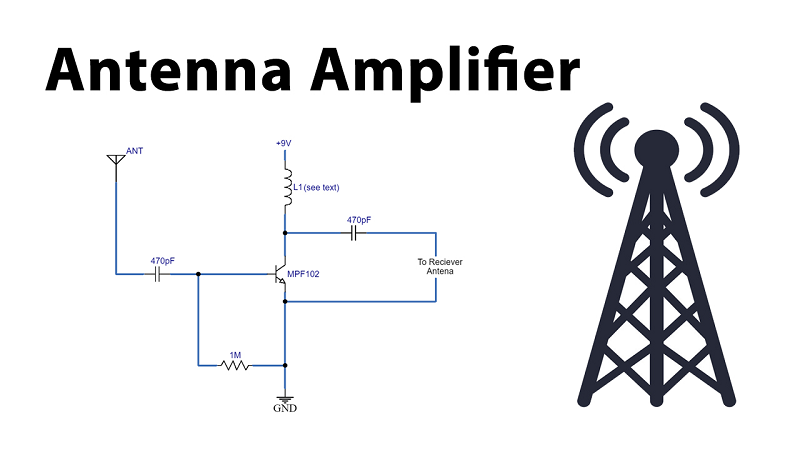
An antenna amplifier operates by taking a weak RF signal and increasing its voltage level across a specified frequency band. Internally, it uses low-noise transistors or integrated RF amplifier stages designed to preserve signal integrity while boosting amplitude.
However, amplification is indiscriminate. The amplifier boosts:
Desired signals
Background noise
Interference from nearby transmitters
This is why amplifiers must be matched carefully to the signal environment. In clean, weak-signal scenarios, amplification improves the signal-to-noise ratio at the receiver input. In noisy or high-signal environments, it often degrades performance by saturating the tuner.
When Do I Need an Antenna Amplifier?
You need an antenna amplifier only when the antenna already receives usable signals, but those signals degrade before reaching the receiver. This distinction matters more than distance alone.
Common indicators include:
Signal strength drops significantly after adding long coaxial runs
Channels disappear when splitters are introduced
Reception improves when equipment is moved closer to the antenna
If the antenna itself cannot capture stable signals, amplification will not fix the issue. In those cases, antenna type, height, orientation, or location must be addressed first.
Common Application Where an Antenna Amplifier Helps?
Antenna amplifiers are most effective in predictable, loss-dominated systems.
Large homes often require long cable runs that introduce attenuation, especially at higher frequencies. Multi-room installations suffer splitter losses that accumulate quickly. Outdoor antennas feeding indoor distribution networks frequently lose signal strength before reaching the tuner.
In these cases, amplification restores signal margin that would otherwise be consumed by passive components. The amplifier does not improve reception quality at the antenna, but it preserves what the antenna already captures.
Antenna Amplifier vs Preamplifier
Although often confused, antenna amplifiers and preamplifiers serve different functions.
A preamplifier installs close to the antenna and boosts signals before cable loss occurs. It is designed for weak-signal environments and typically features lower noise figures.
A standard antenna amplifierinstalls further downstream, usually indoors, and compensates for losses already introduced. It is better suited for distribution systems rather than fringe reception areas.
Choosing the wrong type leads to common failures, especially when amplifiers are installed far from the antenna in weak-signal conditions.
Where Do You Put an Antenna Amplifier?
Placement determines effectiveness. An amplifier must be positioned before the dominant loss point in the signal chain.
If cable loss is the issue, the amplifier should be installed before long coaxial runs. If splitter loss is the problem, it should be placed ahead of the splitter. Installing an amplifier after losses have already occurred limits its benefit and often increases noise.
Incorrect placement is one of the most frequent reasons users believe amplifiers “do not work.”
Indoor vs Outdoor Antenna Amplifier Placement
Indoor placement offers convenience and protection from weather but limits performance recovery. Outdoor or mast-mounted placement allows amplification closer to the signal source, preserving signal quality earlier in the chain.
Outdoor installations require weather-rated enclosures, grounding, and surge protection. While installation complexity increases, performance consistency improves significantly in weak-signal environments.
When an Antenna Amplifier Can Hurt Signal Quality?
Amplifiers often cause problems in high-signal environments. Strong nearby transmitters can overload the amplifier or receiver, creating distortion that blocks weaker channels.
Symptoms include:
Pixelation after amplification
Loss of channels that were previously stable
Intermittent reception despite strong signal readings
In these cases, removing the amplifier often restores performance. Amplification should never be the first troubleshooting step.
How to Choose the Right Antenna Amplifier?
Choosing an amplifier requires balancing gain, noise figure, and frequency coverage. Excessive gain introduces distortion. Poor noise performance reduces clarity. Incompatible frequency ranges waste amplification where it is not needed.
Adjustable-gain models provide flexibility, especially in mixed signal environments. Lower gain with better noise performance often outperforms high-gain designs in real installations.
Installation Tips to Avoid Signal Overload
Install only one amplifier per signal path. Avoid stacking amplifiers. Use amplification only where loss is measurable. Test reception before and after installation using real channel stability rather than signal bars.
Small improvements in placement often outperform amplification entirely. Amplifiers should refine systems, not compensate for poor antenna selection.
FAQs
1. Does an antenna amplifier improve signal strength or quality?
It improves strength, not quality. Quality improves only when amplification prevents loss-induced degradation.
2. Can I use an antenna amplifier with indoor antennas?
Yes, but results depend on signal availability at the antenna location.
3. Is more gain always better?
No. Excessive gain often causes overload and distortion.
4. Do antenna amplifiers work for cellular or Wi-Fi signals?
No. They are frequency-specific and designed for RF broadcast ranges.
5. Should I use an amplifier if I live close to broadcast towers?
Usually not. Strong local signals often perform better without amplification.
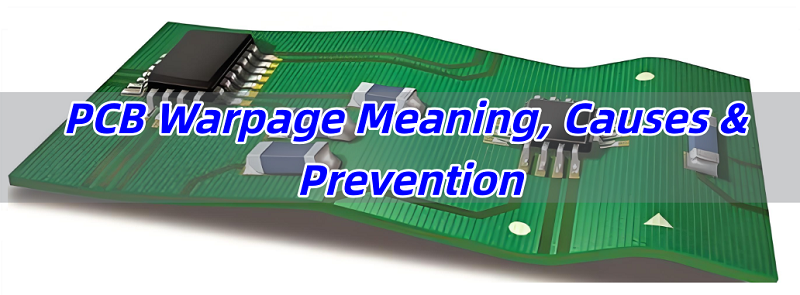
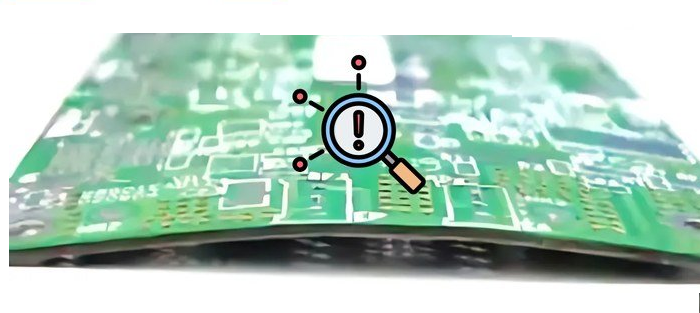
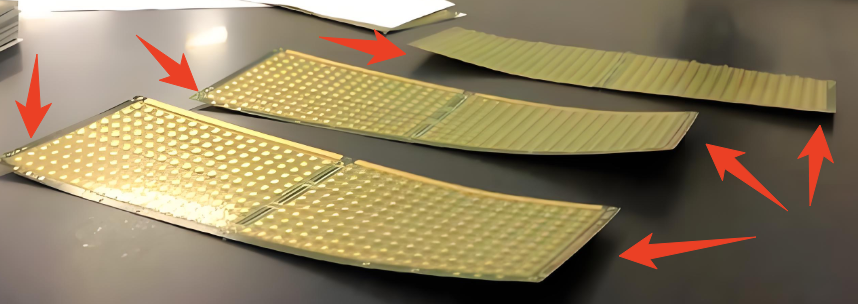
PCB warpage is one of the most common yet misunderstood defects in electronics manufacturing. Whether you are designing, fabricating, or assembling PCBs, understanding pcb warpage meaning, its causes, how to measure it, and how to prevent it is critical to ensuring product quality and assembly reliability. Excessive warpage can lead to component misalignment, soldering defects, mechanical stress, and even field failures.
This guide explains everything you need to know about PCB warpage, including IPC standards, calculation methods, inspection techniques, and practical prevention strategies.
What Is Warpage in PCB?
PCB warpage refers to the maximum vertical deviation of the board surface from an ideal flat plane and is typically expressed as a percentage. The standard calculation formula is:
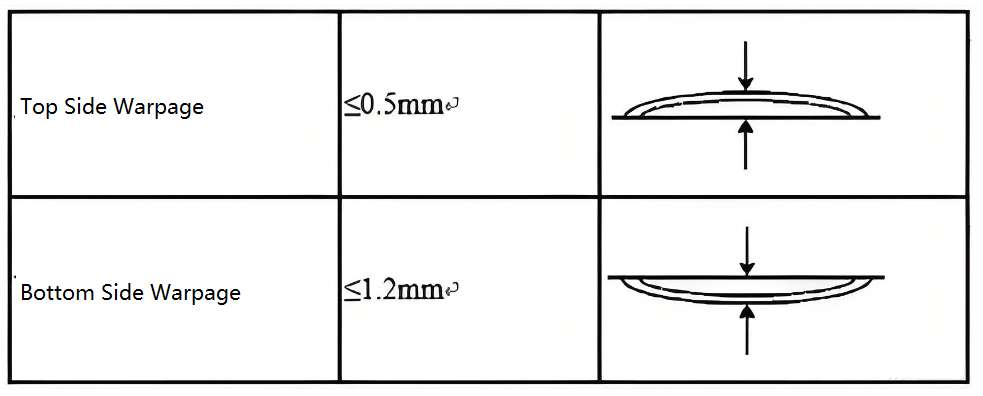
According to IPC requirements, general-purpose PCBs should have warpage ≤ 0.75%, while carrier boards or backplanes have stricter limits, typically ≤ 0.50% for Class 3 products. During evaluation, it is important to distinguish between bow (cylindrical bending of the board) and twist (three corners lying in one plane while the fourth corner deviates), as this helps identify the underlying cause of deformation.
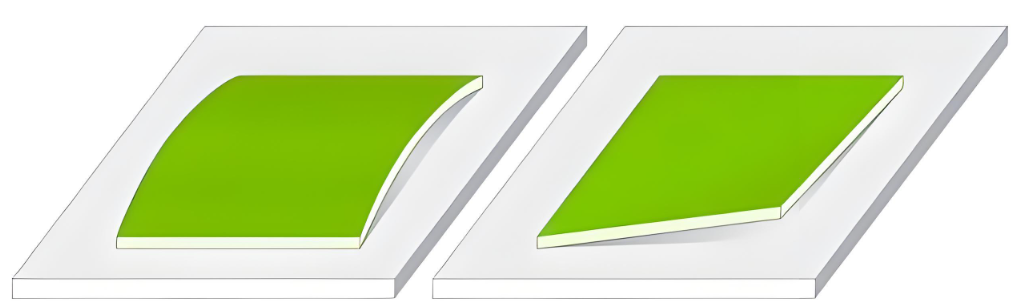
Warpage typically appears in three structural forms:
Bow – curvature along the length or width
Twist – diagonal deformation where corners lift unevenly
Bow + twist – the most common condition in multilayer PCBs
Unlike elastic bending, warpage is often residual, meaning the board does not return to flatness after stress is removed.
What Causes Warpage?
PCB warpage is typically the result of combined effects from material properties, design weaknesses, manufacturing processes, and environmental influences. These factors interact throughout fabrication and assembly, gradually introducing internal stress that exceeds the board’s mechanical stability. Below is a structured engineering explanation of the primary causes.
CTE mismatch
Copper has a coefficient of thermal expansion (CTE) of approximately 17 ppm/°C, while FR-4 resin systems typically range from 50 to 70 ppm/°C. During heating and cooling cycles, these materials expand and contract at different rates, generating internal stress that leads to bending or twisting.
Moisture absorption
Resin-based laminates absorb moisture during storage. When exposed to high temperatures during reflow soldering, absorbed moisture rapidly vaporizes. This phenomenon, often described as the “popcorn effect,” creates localized internal pressure that can cause deformation or permanent warpage.
Asymmetrical copper distribution
When one side of the PCB contains large copper planes (such as solid ground layers) and the opposite side has sparse routing, thermal contraction during cooling becomes uneven.
Unbalanced layer stack-up
In multilayer boards, asymmetry in core thickness, prepreg count, or material type above and below the neutral axis leads to uneven stress during lamination. For example, a 6 layer PCB with thicker inner layers on one side will deform more easily during heating and cooling.
Lamination issues
Rapid heating rates (greater than 3 °C per minute), uneven pressure distribution, or insufficient curing time during lamination can leave residual stress trapped inside the PCB after press release.
Soldering thermal impact
Excessive reflow temperatures (above 260 °C) or overly aggressive cooling rates (greater than 4 °C per second) intensify CTE mismatch effects. This is particularly critical for lead-free assembly processes.
What Are the Signs of Warpage?
Warpage often manifests indirectly during fabrication or assembly.
Typical indicators include:
Board does not sit flat on a surface
Corners lifting off the table
Twisting along diagonal axis
Poor solder joints on one side
Open or short circuits after assembly
BGA or QFN soldering failures
Difficulty during pick-and-place
In high-volume SMT lines, elevated defect rates are often the first signal that warpage exceeds process tolerance.
Is Warpage Considered a Defect?
Yes – excessive warpage is considered a defect.
However, small amounts of warpage are allowed within IPC standards. If warpage exceeds specified limits, the PCB is considered non-conforming and may be rejected.
Whether warpage is a defect depends on:
IPC class (Class 1, 2, or 3)
End application (consumer, industrial, medical, aerospace)
Assembly process tolerance
This is why pcb warpage meaning must always be interpreted in the context of measured values versus acceptance criteria.
PCB Warpage in IPC Standard Datasheet
PCB warpage limits vary by industry, application, and assembly condition. International standards and sector-specific requirements define acceptable warpage ranges to ensure assembly reliability and mechanical integrity. The most commonly referenced standards are outlined below.
In IPC-A-600G, For bare rigid PCBs, the maximum allowable warpage is typically 1.5%. For assembled PCBs with components mounted, the allowable warpage is more stringent, generally limited to 0.75% to ensure SMT process stability. However, HDI (High Density Interconnect) boards usually require warpage to be controlled within 1.0%, and in many cases even lower depending on customer specifications.
Here is a detailed table show the PCB warpage standards for each kind of PCB:
PCB Application
Maximum Allowable Warpage
SMT assemblies
≤ 0.75%
Through-hole boards
≤ 1.5%
Fine-pitch / BGA designs
≤ 0.5% (often tighter by OEM)
HDI PCB
≤ 1.0%
Many automotive, medical, and aerospace programs impose stricter internal limits, sometimes as low as 0.3%, to ensure solder joint reliability.
This calculation method is consistent with IPC acceptance practices and customer audit requirements.
How to Check PCB Warpage?
Inspecting printed circuit board (PCB) warpage requires standardized methods, appropriate measurement equipment, and controlled procedures to ensure accuracy and repeatability. Several inspection methods are widely used, depending on accuracy requirements and production volume:
Feeler Gauge Method
Suitable for quick sampling inspections on production lines. The PCB is placed horizontally on a flat platform, and a feeler gauge is inserted into the largest gap between the board and the surface to obtain height H. This method is simple but has limited accuracy and is often used alongside optical methods for confirmation.
Optical Projector / Vision Measurement Method
The PCB outline is projected optically, and the height difference (ΔH) between the reference plane and the lifted corner is measured. This method offers high accuracy, up to 0.001 mm, and requires the board to stabilize for at least 4 hours under standard conditions (temperature 23 ± 3 °C, humidity 50% ± 10%).
Laser Scanning Method
A matrix of laser displacement sensors scans the PCB surface to generate a 3D topography map. Software automatically calculates warpage values with typical accuracy of ±0.01 mm, making this method suitable for HDI boards and automated inspection lines.
Non-Contact Optical Scanners
Advanced systems based on phase-measuring deflectometry (PMD) can rapidly capture full-board 3D data without surface contact, eliminating the risk of mechanical damage. High-end models also support dynamic warpage measurement at elevated temperatures.
How to Prevent PCB Warpage?
Prevention begins at the design stage and continues through fabrication and assembly.
Design-Level Prevention
Use symmetrical stack-ups
Balance copper distribution on all layers
Avoid large, unbroken copper areas
Material Selection
Choose laminates with stable thermal behavior
Match prepreg and core thickness carefully
Avoid unnecessary mixed material systems
Fabrication Controls
Controlled lamination temperature ramps
Uniform cooling after press cycles
Stress-relief baking where appropriate
Assembly Controls
Use proper pallet support during reflow
Minimize unnecessary thermal cycles
Control reflow profiles tightly
When these measures are combined, warpage risk drops significantly.
How Do You Fix a Warped PCB?
Once warpage occurs, options become limited. Correction is possible, but it is not always permanent.
Common Remediation Methods
Controlled thermal flattening under pressure
Fixtured re-baking processes
Mechanical straightening for low-risk products
Practical Limitations
Reworked boards may re-warp during operation
Mechanical stress can reduce long-term reliability
Not suitable for high-reliability applications
In most cases, prevention is far more effective than correction.
Why Choose Best Technology (EBest Circuit) as Your PCB Manufacturer?
Controlling PCB warpage is not only a design challenge; it is a manufacturing discipline. This is where Best Technology differentiates itself as a reliable PCB manufacturing partner for global customers.
Best Technology (EBest Circuit) has extensive experience producing multilayer PCBs, HDI boards, thick copper PCBs, metal core PCBs, and rigid-flex boards, all of which are naturally more susceptible to warpage if process control is weak. Our engineering team evaluates warpage risk at the quotation and DFM stage, not after defects appear.
We are certificated with ISO9001/13485, AS9100D, IATF16949, all of our PCB and PCBA products are strictly follow IPC class II and III. In additional to this, our facility has introduced MES system, this ensures the full traceability of all products.
If you are looking for a PCB manufacturer that truly understands pcb warpage meaning, prevention, and real-world assembly requirements, our engineering team is ready to support your next project.
FAQs
1. What is the acceptable PCB warpage limit?
Most standards allow ≤0.75%, while high-reliability boards typically require ≤0.50%.
2. Can PCB warpage affect BGA solder joints?
Yes. Even slight warpage can cause non-uniform solder collapse and early joint failure.
3. Does PCB thickness reduce warpage?
Thicker boards are generally more resistant, but thickness alone does not solve imbalance issues.
4. Is warpage more common in multilayer PCBs?
Yes. As layer count increases, stress imbalance becomes harder to control.
5. Can reflow soldering cause warpage?
Multiple reflow cycles and improper support frequently increase warpage risk.
A cold solder joint is one of the most common reliability defects in PCB and PCBA assemblies, and it continues to be a major source of intermittent failures across consumer electronics, industrial controls, medical devices, automotive modules, and aerospace hardware. At Best Technology, we see the long-term consequences of cold joints in incoming failure analyses from global customers—especially in assemblies where stable conductivity and mechanical strength are critical.
With 19 years of PCBA production experience across China and Vietnam, medical-grade and aerospace-grade certifications, and MES-controlled SMT lines, we understand how cold solder joints emerge, how to eliminate them, and how to engineer assemblies that remain stable throughout the product life cycle.
What Is a Cold Solder Joint?
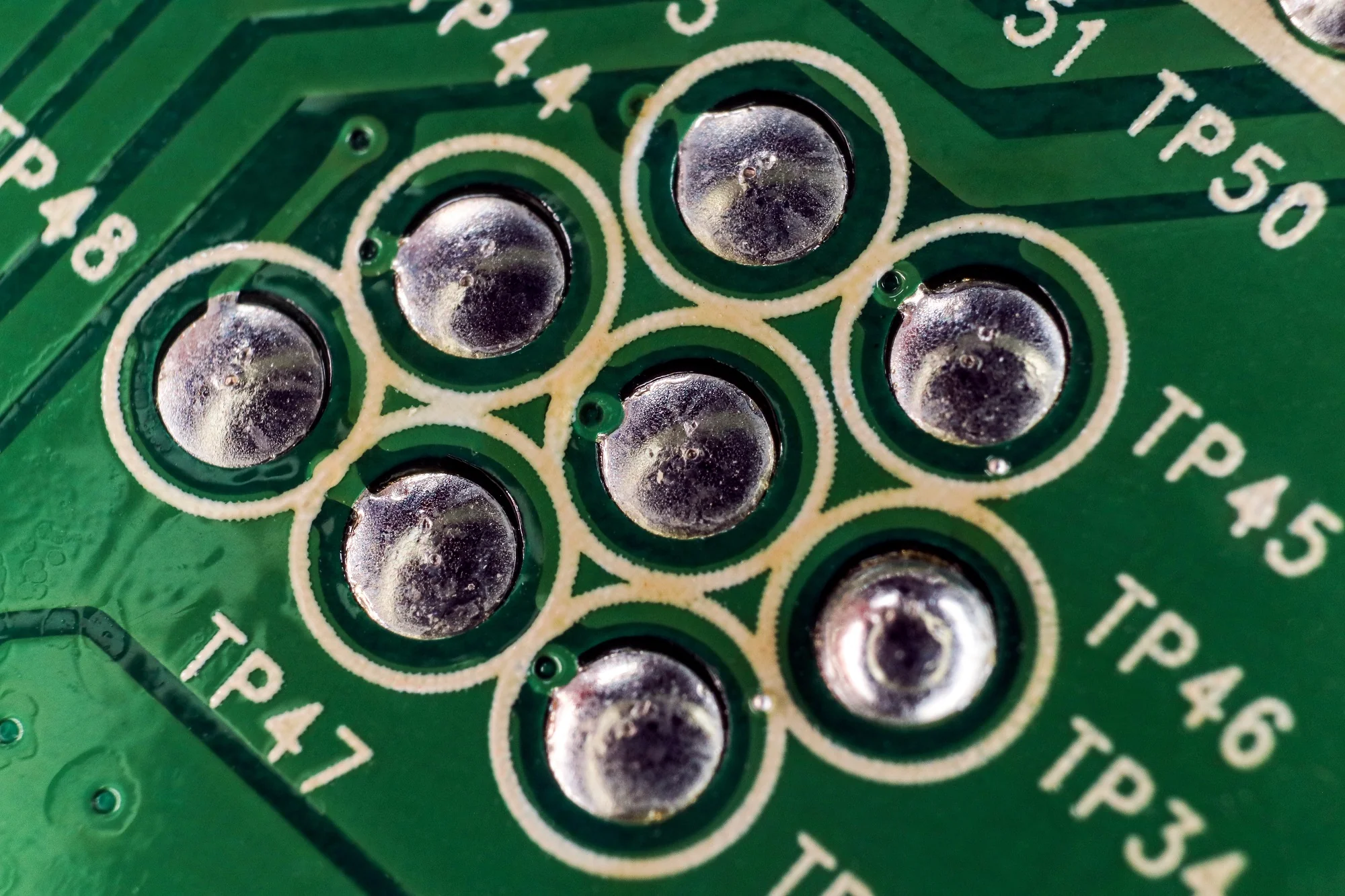
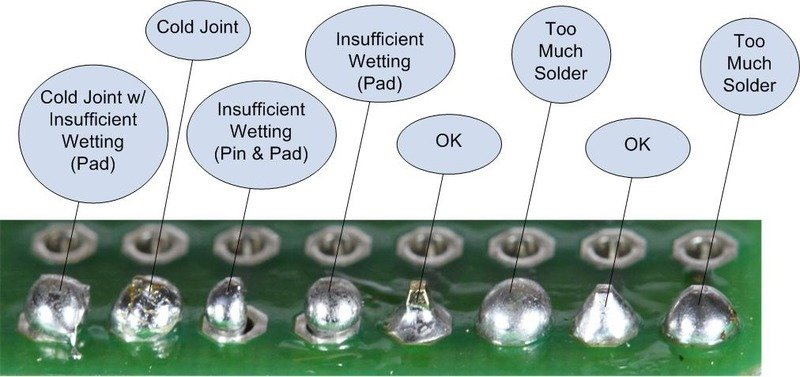
A cold solder joint forms when solder does not melt or wet the pad and component lead completely. Instead of creating a unified bond, the solder cools prematurely or never flows correctly, resulting in a dull, grainy, or uneven connection.
In the PCBA environment, cold joints are considered a process defect because they weaken the mechanical integrity of a soldered connection and create unstable electrical performance that deteriorates over time.
In high-reliability sectors—medical, industrial, aerospace—these defects are unacceptable and must be removed at the root cause: temperature control, surface condition, solder alloy behavior, and wetting characteristics.
Do Cold Solder Joints Still Work?
Temporarily, yes. Reliably, no. A cold solder joint may appear functional during a quick test, then fail:
When the board heats during normal operation
When vibration or slight mechanical stress occurs
When humidity or temperature cycles change contact resistance
When current load increases
This unstable behavior is what makes cold joints one of the most misdiagnosed failure sources. Many customers approach Best Technology believing they have a “component issue” or “firmware bug,” when the real cause is inconsistent solder metallurgy.
Cold Solder Joint Symptoms
From a PCBA viewpoint, cold joints create early-life failures that escalate under stress. Common symptoms include:
Intermittent booting or power instability
Flickering LEDs, displays, or inconsistent sensor readings
Weak or noisy signals in communication lines
Overheating around a soldered component
Boards that only work when pressed or tapped
Modules that behave differently under temperature changes
During incoming quality analysis at Best Technology, we often find that unstable BGA balls, hand-soldered connectors, and TH pins are common locations for cold joints.
What Is the Difference Between a Cold Solder Joint and a Good Solder Joint?
A good solder joint creates a smooth, bright, and uniform connection that wraps around the lead with full wetting.
A cold joint typically shows:
A dull or matte finish
Crystalline or grainy texture
A ring fracture around the lead
A small gap between solder and pad
Solder balled up instead of flowing
Experienced technicians immediately recognize these visual cues because they suggest weak mechanical support and unstable electrical conductivity.
How to Identify a Cold Solder Joint?
Both technicians and advanced PCBA factories rely on a few inspection methods:
Bright-light and angled inspection to reveal dull or frosted surfaces
Magnification to highlight cracks or gaps
Gentle mechanical pressure to detect movement
Thermal testing to expose resistance changes under heat
AOI or X-ray for lead-free and hidden joints
In Best Technology’s MES-controlled lines, each soldering step—including reflow, wave, and selective solder—is tied to traceable profiles, making it easier to isolate and prevent cold joints during future builds.
Are Cold Joints Acceptable?
No. Cold solder joints are never acceptable in professional electronics.
They violate:
IPC-A-610 standards
Reliability requirements
Safety and quality regulations
Even in low-cost consumer electronics, cold joints significantly reduce product lifespan and reliability.
What Causes a Cold Solder Joint?
Cold solder joints originate from several process-related or operator-related factors:
Insufficient soldering temperature
Iron tip or nozzle unable to deliver stable heat
Oxidized pads, leads, or old components
Expired or poorly stored solder paste
Flux burnout or inadequate flux coating
Component movement during cooling
Large copper areas absorbing heat too fast
Incorrect reflow curve in SMT production
With our dual factories in China and Vietnam, Best Technology maintains strict humidity control, paste storage, stencil management, and reflow calibration—reducing these risks dramatically.
In medical, industrial, and aerospace PCBAs, even a single cold joint is considered a critical defect (CD level). Best Technology screens aggressively to ensure these defects never leave the factory.
How to Fix a Cold Solder Joint?
Repair is direct, but must be done properly:
1. Clean the joint with isopropyl alcohol.
2. Apply quality flux to re-activate the surface.
3. Reheat the joint until solder melts fully.
4. Add a small amount of fresh solder if needed.
5. Allow full cooling without movement.
6. Inspect visually to ensure proper fillet and wetting.
For SMD components (QFN, BGA, LGA), reflow or hot-air rework ensures even heating.
How to Avoid Cold Solder Joints?
Prevention stems from controlled process engineering:
Use calibrated, temperature-controlled soldering equipment
Maintain component and PCB cleanliness
Follow correct reflow temperature profiles
Apply flux or paste with proper wetting characteristics
Preheat heavy copper boards
Avoid vibration during cooling
Use AOI/X-ray to verify solder integrity
Enforce operator training and certification
At Best Technology, these practices are embedded into MES workflows, ensuring traceability and repeatability—from prototype to mass production.
FAQ About Cold Solder Joint
1. Can flux prevent cold solder joints?
Flux improves wetting, but without proper temperature, cold joints still occur.
2. Can a cold solder joint cause a short?
Yes. Cracking or partial bonding may create unintended bridges.
3. Why are cold solder joints more common in lead-free solder?
Lead-free alloys require higher melting temperatures and tighter process control.
4. Can a multimeter detect a cold solder joint?
Sometimes, but intermittent faults often remain hidden until the board is heated or flexed.
5. Can reheating permanently fix a cold solder joint?
If the pad and lead are clean and properly wetted, reheating provides a permanent repair.
6. Do professional PCBA manufacturers still encounter cold joints?
Rarely, but only because inspection systems, controlled processes, and trained operators keep solder quality consistent.
When to Consult a Professional or a PCBA Manufacturer?
If your board shows repeated failures, unstable behavior, or numerous questionable joints, professional evaluation is the safest choice. Best Technology supports global customers with:
In-house FA (failure analysis)
X-ray and AOI inspection
Controlled reflow soldering
Medical-grade and aerospace-grade quality systems
MES-tracked production across China and Vietnam
Whether you need prototype repair, DFX recommendations, or full PCBA manufacturing, our engineering teams ensure solder reliability at every stage of the product life cycle.
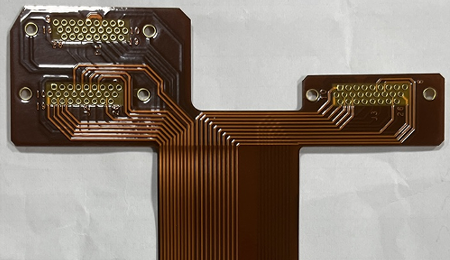
Recently, Best Technology faced a huge challenge in a 2oz copper rigid flex PCB manufacturing, this board appeared simple on the drawing but revealed multiple layers of engineering challenges once entering mass production. But finally, we finished this project very well and overcome this challenge, let’s see what are the challenges on this project and how does our team overcome them!
Project Introduction
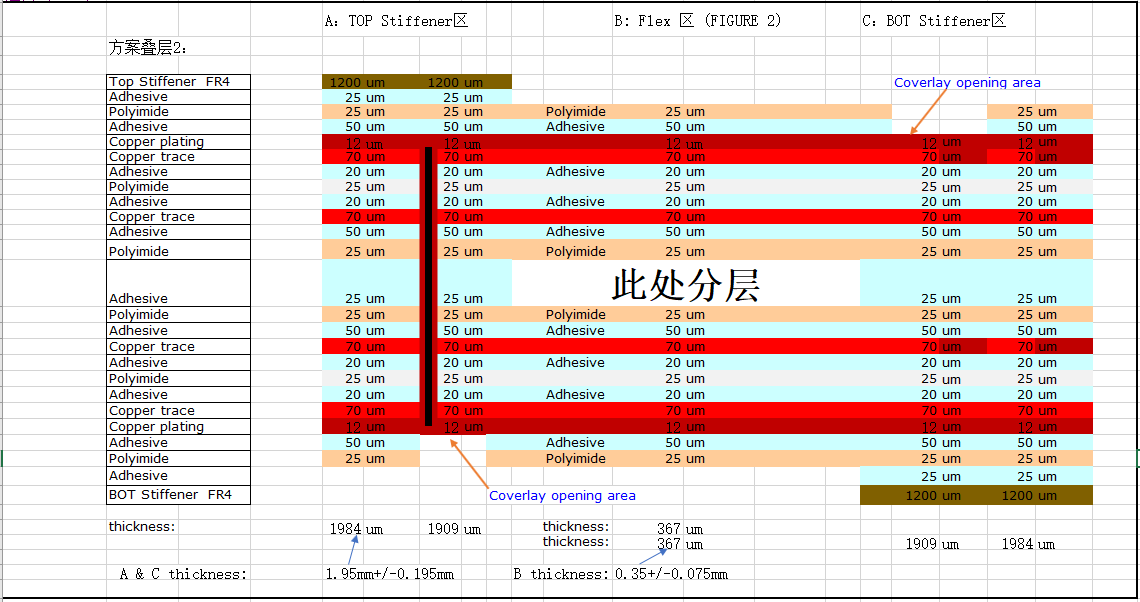
The board used a 70/25 double-sided adhesive ED flexible substrate with PI25/AD50 coverlay, coupled with a 2+2 layers dual access structure that required thick copper, small annular rings, narrow spacings, and FR4 stiffeners with extremely limited clearance. Each of these parameters independently creates difficulty, but combined, they demand precise collaboration between engineering, fabrication, and process control.
This article explains:
Why the design was inherently difficult
What manufacturing risks were present
How our engineering team solved each challenge
What PCB designers should avoid in similar projects
Flexible substrate: 70/25 double-sided adhesive ED copper
Coverlay: PI 25 µm + Adhesive 50 µm
Base copper: 2 oz copper
Layer count: Four-layer rigid-flex structure
Critical routing: 0.15 mm minimum trace/space
Plated hole: 0.66 mm with hole spacing of only 0.60 mm
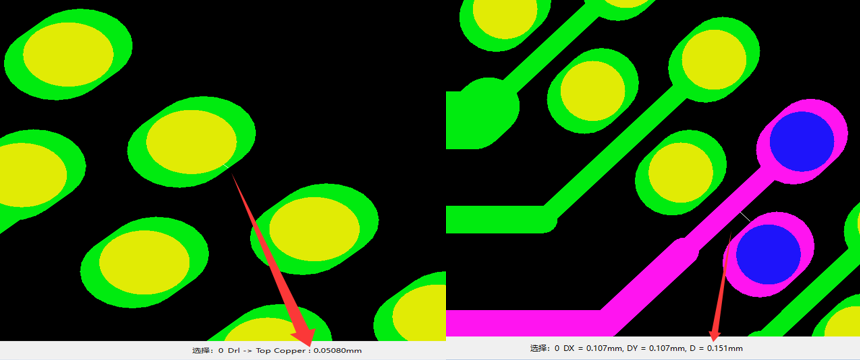
Annular ring: 0.05 mm on certain pads
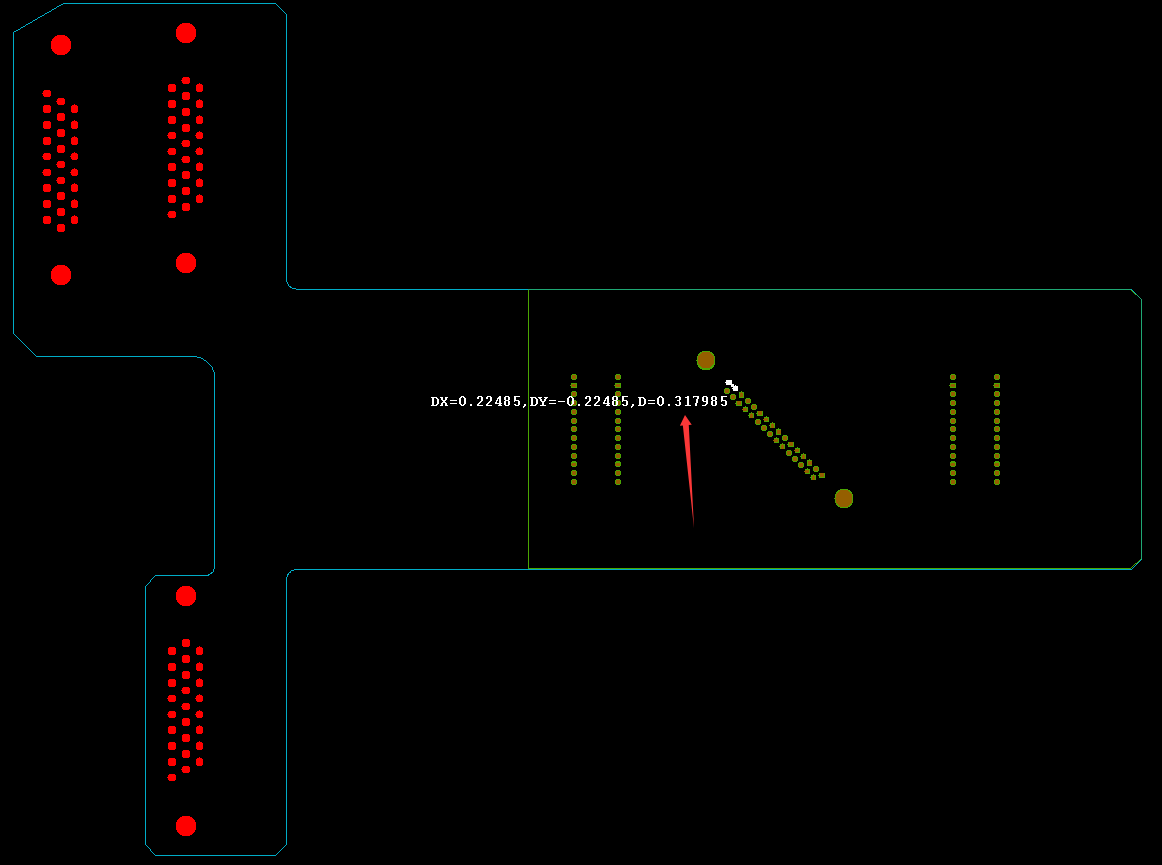
Stiffener: FR4 stiffener with 0.95 mm stiffener hole and 0.31 mm ribs
This combination is common in advanced HDI rigid-flex PCB manufacturing, yet its manufacturability depends heavily on copper behavior, adhesive flow, and drilling tolerances.
Why This Rigid-Flex PCB Was Inherently Difficult?
1. Thick copper increases side-etching risk
With 2 oz copper, the etching rate is higher and lateral etch—often called side-etch—is harder to control. In this case, the side-etching amount reached: 0.0070 ± 0.003 mm. For ultra-fine traces in a rigid-flex PCB design, this will eat into the design margin.
2. Small annular rings compromise via reliability
Pads with 0.05 mm annular ring severely restrict drilling tolerance. In flex-rigid PCB fabrication, annular rings below 0.10 mm are classified as high-risk features.
3. Extremely tight stiffener clearance
The stiffener needed:
±0.20 mm placement tolerance
±0.05 mm drilling tolerance
But the designer only left 0.15 mm clearance, causing a mismatch between rigid-flex PCB stiffener alignment tolerance and actual manufacturing capability.
4. Thin FR4 stiffener ribs cause glue overflow
Ribs only 0.31 mm wide cannot allow adhesive to retreat during bonding, causing pure glue to overflow and block the stiffener holes.
Technical Challenge #1: Thick Copper Etching with Narrow Spacing
A 2 oz thick copper PCB combined with:
0.15 mm trace/space
0.05 mm annular ring
0.66 mm PTH
creates a situation where compensation is unavoidable.
However, after compensation (~0.007 mm), the remaining trace width would drop to:
0.08 mm (0.15 – 0.07 mm)
This is below the safe manufacturability range of most rigid-flex PCB suppliers.
Best Technology’s solution
Eliminated compensation on 0.15 mm traces
Implemented fine-tuned etching control
Maintained ~0.10 mm final copper width
Ensured full electrical reliability
This is a proven strategy in advanced rigid-flex PCB manufacturing for thick-copper builds.
Technical Challenge #2: Annular Ring Integrity in Plated Through Holes
Annular rings <0.10 mm are extremely vulnerable to:
Drill wander
Etching undershoot
Copper thinning
This is especially critical in high-reliability rigid-flex PCBs, where via integrity is essential.
Best Technology’s solution
Applied rigid-board-level PTH plating process
Improved copper thickness inside the via barrel
Adjusted drilling control to 0.65 ± 0.075 mm
Customer accepted partial ring breakage as long as electrical integrity remained intact
This ensured consistent via performance even in ultra-dense rigid-flex PCB layouts.
Technical Challenge #3: Stiffener Bonding, Alignment, and Adhesive Overflow
1. Why stiffener tolerance was problematic
In rigid-flex PCB assembly, stiffeners are critical for mechanical reinforcement. However:
Hole spacing was only 0.60 mm
Stiffener clearance only 0.15 mm per side
Combined tolerance ±0.25 mm
This inevitably leads to the stiffener covering the pads unless advanced alignment controls are used.
2. Why glue overflow occurs
Thin ribs (0.31 mm) cannot provide an escape path for adhesive. During lamination:
The glue squeezes into the holes
Holes become blocked
Boards fail inspection
3. Best Technology’s engineered solution
Pre-laminated pure adhesive onto FR4 stiffener
Re-drilled stiffener holes after bonding
Greatly reduced glue overflow
Added 100% AOI + manual inspection for hole clearing
Rejected defective boards, shipped only fully passing units
This is a common best practice in flex PCB stiffener processing when tolerances are tight.
DFM Guidelines for Rigid-Flex PCB Designers
Avoid annular rings under 0.15 mm, especially in 2 oz copper flex-rigid PCB design.
Avoid combining thick copper with fine lines, this will increase manufacturing risk.
Ensure stiffener clearance > total tolerance stack-up. If your clearance is smaller than the alignment tolerance, the stiffener will inevitably shift.
Keep stiffener ribs ≥0.5 mm
Send your design for DFM review before finalizing. A goodrigid-flex PCB manufacturer will help adjust the stack-up, drill size, and stiffener layout to avoid expensive redesigns.
This case demonstrates how a complex rigid-flex PCB—with 2 oz copper, ultra-fine traces, small annular rings, and extreme stiffener constraints—can be successfully manufactured through detailed engineering, advanced process control, and disciplined quality screening.
Best Technology combines strong fabrication capability with practical DFM insight, enabling customers to produce compact, reliable, and manufacturable rigid-flex PCB designs that perform consistently under demanding conditions.
If you need support with your next rigid-flex or flex PCB project, our engineering team is ready to assist with stack-up review, DFM checks, or trial builds.
As global electronics manufacturing moves away from hazardous substances, lead free solder material has become the industry standard for PCB assembly. Driven by regulations such as RoHS and REACH, lead-free solder is now used in consumer electronics, automotive PCBs, industrial control boards, and medical devices.
However, not all lead-free solder materials are the same. Their composition, melting temperature, mechanical strength, and reliability vary significantly—making material selection critical for high-quality PCB assembly.
This guide explains what lead-free solder is, its composition, properties, types, melting temperatures, common soldering issues, and finally answers the key question: “Which lead free solder material is best for PCB assembly?”
What Is Lead Free Solder Material?
Lead free solder material is a metallic alloy used to join components to a PCB without the use of lead. Traditional solder contained 40% lead (Sn60/Pb40) or 37% lead (Sn63/Pb37). These alloys were easy to use but posed environmental and health concerns. Today, electronics manufacturers worldwide use lead-free formulations based on tin, silver, copper, bismuth, nickel, or small alloying elements.
From a customer’s perspective, lead free solder material is important because it directly affects:
Solder joint strength
Heat tolerance
Long-term reliability
Appearance of solder joints
Compatibility with high-density SMT packages
Product compliance with RoHS, REACH, and WEEE regulations
Lead-free solder also withstands higher temperatures, which is critical for modern high-density PCBs.
Is Lead-Free Solder Still Toxic?
Lead-free solder eliminates lead—a major toxic substance—but that does not mean every alloy is completely risk-free. For normal PCB manufacturing environments, lead-free solder is considered safe and non-toxic when handled properly.
From a customer standpoint:
Lead-free solder is significantly safer than leaded solder
It does not release toxic lead fumes during reflow
Flux fumes—not the solder—are usually the irritation source
Lead-free waste requires less strict disposal procedures
Most concerns come from misunderstanding. Lead-free alloys like SAC305 (Sn96.5 Ag3.0 Cu0.5) are not harmful under standard handling and reflow conditions. With adequate ventilation and proper gloves, operators face minimal exposure risks.
Lead Free Solder Material Composition
Lead-free solder material compositions vary depending on cost targets, performance needs, and thermal sensitivity of the PCB. Below is a customer-friendly comparison of common alloys:
Common lead-free soldering compositions
Alloy Type
Composition
Characteristics
Best Use
SAC305
Sn96.5 / Ag3.0 / Cu0.5
Most popular global alloy; balanced cost and performance
SMT reflow, general assembly
SAC405
Sn95.5 / Ag4.0 / Cu0.5
Higher silver for stronger joints and better wetting
Automotive, medical, mission-critical devices
SAC0307
Sn99 / Ag0.3 / Cu0.7
Cost-effective low-silver alternative
Consumer electronics, cost-controlled projects
Sn99.3Cu0.7
Tin/copper mix
Slightly higher melting point; durable in wave soldering
Wave solder baths
Sn-Bi alloys
Tin + Bismuth blends
Low melting point; ideal for heat-sensitive substrates
LED boards, flex circuits, thin PCBs
Sn-Ag alloys
Tin + Silver
Good wetting and moderate melting range
Fine-pitch soldering
Ni-doped SAC
SAC + Ni
Improved grain refinement
Automotive, aerospace
For most consumer and industrial applications, SAC305 is the ideal balance of performance and cost. Customers requiring high-temperature reliability (automotive, aerospace, telecom) may consider doped SAC alloys.
Lead Free Solder Material Properties
Lead-free solder is a low-lead soldering material based mainly on tin-based alloys such as Sn-Ag-Cu, Sn-Cu, and Sn-Bi. It is designed to replace traditional Sn-Pb solder and meet environmental regulations such as RoHS while reducing heavy-metal pollution. It’s properties can be explained from different aspects:
1. Physical & Process Characteristics
Melting Range: Wide, typically 138°C–250°C depending on alloy. SAC305 melts around 217°C. Most alloys have a narrow solid–liquid range for stable soldering.
Wetting: Good wetting behavior during reflow (30–90 seconds above liquidus) and wave soldering (≈4 seconds contact), forming reliable joints.
Conductivity: Electrical conductivity around ≥9.5×10⁶ S/m and thermal conductivity near 66 W/m·K, similar to Sn-Pb alloys.
Oxidation & Flow: Strong anti-oxidation and smooth flow with low dross generation, reducing defects such as bridging and solder spikes.
2. Mechanical Performance
Strength & Fatigue: Mechanical strength and fatigue life can be optimized through alloy design. Sn-Ag-Cu systems (e.g., 95.4Sn/3.1Ag/1.5Cu) offer strength comparable to or better than Sn-Pb.
Brittleness: Higher Ag or Cu content may reduce ductility, so alloy balance is important.
Reliability: Lead-free joints maintain stability under vibration and thermal cycling, suitable for harsh applications like automotive electronics.
3. Environmental & Cost Characteristics
Compliance: Lead content is typically below 1000 ppm, fully RoHS-compliant and safer for workers and the environment.
Cost: Generally 2–3× higher than traditional solder due to tin and silver pricing, but the impact on total product cost is usually limited.
4. Application & Compatibility
Lead-free solder is widely used in consumer electronics, automotive systems, medical devices, and new-energy applications. It works with standard fluxes and existing equipment such as 8-zone reflow ovens, though reflow profiles and process parameters may require adjustment to accommodate higher melting temperatures.
Types of Lead Free Soldering Method
Lead-free soldering involves several manufacturing methods designed around different processes, temperature profiles, and assembly requirements. When customers review PCB assembly quotes, the type of soldering used has a major impact on product durability, electrical integrity, and cost. Below are the core types of lead free soldering used in modern electronics production.
1. Lead-Free Reflow Soldering (SMT Reflow)
This is the most common method for mounting surface-mount components (SMDs). Manufacturers print lead-free solder paste onto pads, place components via pick-and-place machines, and heat the PCB in a controlled reflow oven. Reflow soldering has many advantages:
Suitable for nearly all SMT components
Works with SAC305, SAC405, SAC0307, and Sn-Bi pastes
Ensures consistent joint quality in mass production
235–250°C, depending on the alloy and PCB materials
Reflow soldering is the backbone of every modern SMT line and the main reason SAC305 is widely used.
2. Lead-Free Wave Soldering
Wave soldering is used primarily for through-hole components and mixed-technology assemblies.
During lead-free wave soldering, the PCB passes over a molten solder “wave” typically made of Sn99.3Cu0.7 or other tin-rich alloys.
Why customers care:
Ideal for high-volume assemblies with many through-hole connectors
Faster than hand soldering
Strong, uniform joints across large PCBs
But requires strict temperature control due to higher melting points
Common lead-free wave solder alloy
Sn99.3/Cu0.7, with optional micro-alloying (Ni, Ge) to reduce copper dissolution
Typical pot temperature
255–265°C, depending on alloy
3. Lead-Free Selective Soldering
Selective soldering is used when only certain through-hole components must be soldered without exposing the entire PCB to a wave. A programmable nozzle creates localized molten solder “mini waves.”
Why customers care:
Protects heat-sensitive components
Reduces overall thermal stress
Useful for complex PCBs with dense SMT areas
Generates precise and stable joints
Common alloys
Sn99.3Cu0.7
SAC variants for specialized cases
Selective soldering is popular in industrial controllers, automotive electronics, and telecom boards.
4. Lead-Free Hand Soldering
Used for repair, prototyping, or small-batch assembly. Technicians use solder wire (typically SAC305 or SAC0307) and temperature-controlled irons.
Why customers care:
Required for last-minute rework
Used in prototype and engineering samples
Easy way to repair or modify boards
Quality depends heavily on operator skill and iron temperature
Hand soldering temperature
350–380°C for SAC alloys
280–310°C for Sn-Bi low-temp solder
Here is a quick comparison between these lead-free solder material methods:
Soldering Type
Main Features
Typical Alloys
Customer Use Case
Reflow Soldering
Standard SMT process
SAC305, SAC0307
Consumer & industrial electronics
Wave Soldering
High-volume through-hole
Sn99.3Cu0.7
Power boards, large PCBs
Selective Soldering
Localized soldering
Sn-Cu, SAC
Mixed-technology PCBs
Hand Soldering
Rework / prototyping
SAC305 wire
Engineering builds, repairs
Does 60/40 Solder Contain Lead?
Yes, 60/40 solder (Sn60/Pb40) contains 40% lead, so it is not RoHS compliant and must not be used in modern commercial electronics.
Lead-free solder materials replace this alloy entirely in global manufacturing unless exemptions apply (e.g., military or aerospace exceptions).
Lead-Free Solder Melting Temperature Chart
Below is a melting temperature chart customers can use as a reference during material selection or reflow profile planning:
Lead-Free Alloy
Melting Temperature (°C)
Notes
SAC305
217–220°C
Most common for SMT
SAC405
217–225°C
Higher Ag content improves strength
SAC0307
~227°C
Budget option; slightly higher melting point
Sn99.3Cu0.7
227°C
Ideal for wave soldering
Sn-Bi
138–170°C
Best for low-temp applications
Sn63/Pb37 (leaded)
183°C
For comparison only
Customers should always verify that their components can tolerate the peak reflow temperature required by the alloy.
What Are the Main Issues With Lead-Free Soldering?
Lead-free soldering is reliable, but it requires proper process control. Common challenges include:
Higher melting point that stresses components
Slower wetting that demands optimized flux
Sometimes duller appearance of joints
Increased copper dissolution in wave soldering
Sensitivity to reflow temperature deviations
Why Is My Lead-Free Solder Not Melting?
Typical causes include:
Iron or reflow temperature not high enough.
Insufficient heat transfer due to oxidation or contamination.
Using a low-power soldering iron unable to maintain temperature.
Weak flux activity preventing proper heat flow.
Applying the solder to a large thermal pad without preheating.
Lead-free solder requires around 30–40°C higher heat than leaded solder.
Which Lead Free Solder Material Is Best for PCB Assembly?
For most customers, SAC305 (Sn96.5/Ag3.0/Cu0.5) is the best lead-free solder material for PCB assembly.
Why SAC305 Is Ideal for Most Applications?
Widely used across global SMT factories
Excellent wetting on FR4, HDI, flexible, and ceramic substrates
Strong mechanical performance
Good thermal cycling reliability
Low voiding rate with proper reflow control
Compatible with nearly all flux chemistries
Proven in millions of consumer and industrial electronics
When Other Alloys Might Be Better?
SAC0307 – When cost is the priority
Sn-Bi – For low-temperature PCBs and LED products
SAC405 – For high-reliability automotive or medical electronics
Sn99.3Cu0.7 – For wave soldering to reduce cost
Customer Recommendation
If you are unsure which alloy to choose, start with SAC305 for standard SMT reflow because it aligns with:
Reliability expectations
Cost targets
Compatibility with modern assembly lines
Strong field performance
FAQs
1. What is the most common lead-free solder in SMT assembly?
SAC305 is the industry standard for most SMT production lines.
2. Is lead-free solder as strong as leaded solder?
Yes. Lead-free joints are typically stronger in mechanical strength and thermal fatigue resistance.
3. Why is lead-free solder harder to work with manually?
It melts at a higher temperature and wets more slowly, requiring better temperature control.
4. What flux should be used with lead-free solder?
Most solder pastes use no-clean or water-soluble fluxes optimized for SAC alloys.
5. Can lead-free solder be used with ENIG finish?
Yes, ENIG is one of the best surface finishes for consistent wetting.
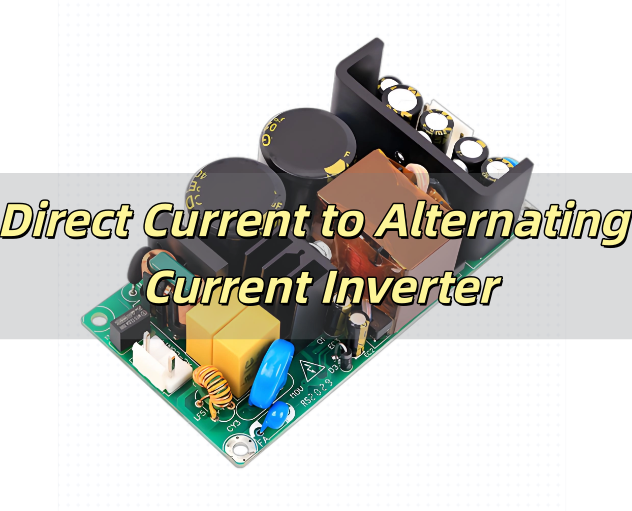
What Is Direct Current to Alternating Current Inverter?
A direct current to alternating current inverter is a sophisticated electronic device that transforms the stable, unidirectional flow of direct current (DC) into the oscillating waveform of alternating current (AC). Since most household appliances, industrial equipment, communication devices, and commercial systems are designed to operate on AC power, an inverter becomes essential whenever the primary energy source produces DC—such as a battery bank, solar photovoltaic array, fuel cell system, or automotive electrical system.
A direct current to alternating current inverter not only changes the type of current but may also adjust voltage levels, regulate frequency, stabilize output under varying load conditions, and provide protection against overload, short circuits, and reverse polarity. Modern inverters are used in renewable energy systems, emergency backup installations, portable power stations, RVs, boats, telecom sites, medical support equipment, and mobile power environments where AC power is required but unavailable.
Types of DC-AC Inverters
DC-AC inverters differ significantly in waveform purity, output stability, conversion efficiency, and suitability for specific applications. The main categories include:
1. Pure Sine Wave Inverters
These inverters generate an AC waveform that closely replicates grid-quality electricity. The output features smooth, continuous voltage oscillation with minimal harmonic distortion, making it compatible with all AC-powered devices. Sensitive electronics—such as medical monitors, refrigeration compressors, audio devices, laser printers, and precision measurement instruments—operate best on pure sine wave power. These inverters typically offer high efficiency, low noise, and stable operation under both linear and non-linear loads.
2. Modified Sine Wave Inverters
A modified sine wave inverter uses a stepped waveform that approximates AC power. Although not as clean as pure sine wave output, this type performs adequately for many non-sensitive devices, including power tools, lighting equipment, small appliances, and general-purpose electronics. Modified sine wave inverters are more cost-effective but may cause increased heat, lower efficiency in some motors, or buzzing noise in audio equipment.
3. Square Wave Inverters
Once common in small or low-cost electrical systems, square wave inverters produce a simple on/off AC waveform. This waveform is harsh for most modern electronics and is primarily compatible with resistive loads like heaters or incandescent bulbs. Because of poor performance with inductive and capacitive loads, square wave inverters are rarely used in contemporary systems.
4. Hybrid Inverters
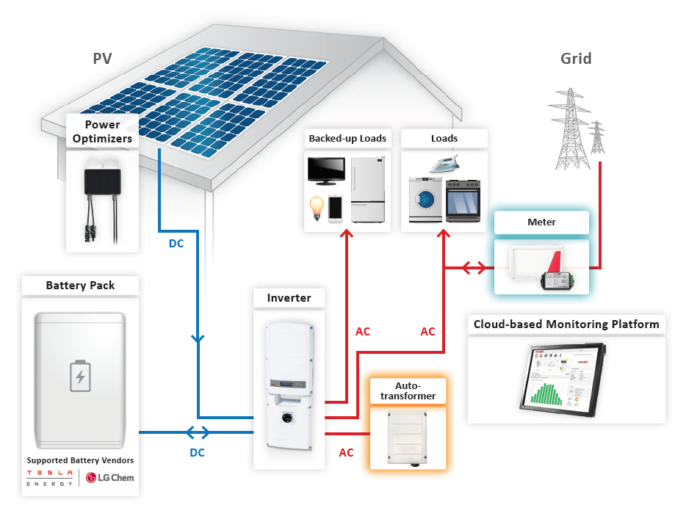
Hybrid inverters integrate battery charging, solar input control, grid synchronization, and energy management in a single platform. These inverters can automatically switch between solar energy, battery storage, and utility grid power, optimizing system efficiency. Hybrid inverters are the backbone of modern off-grid and grid-tied solar systems, providing seamless power transition during outages and offering advanced monitoring functions.
How Does a DC-AC Inverter Work?
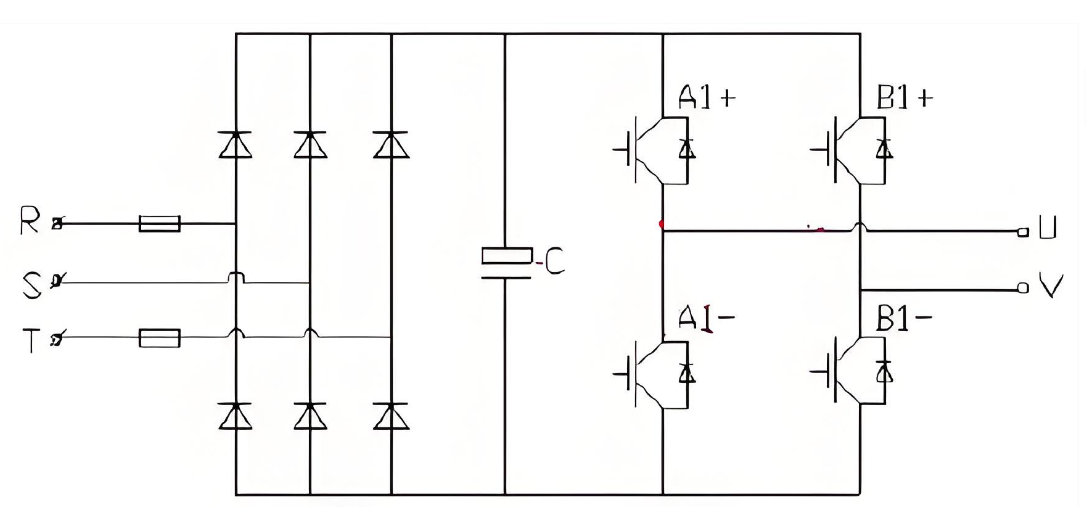
A DC-AC inverter performs conversion through multiple coordinated electrical stages, each responsible for shaping and regulating the characteristics of AC output.
1. Input Filtering and Conditioning
The inverter receives DC power from a battery or solar module. Input filters remove noise and voltage spikes that may cause output instability.
2. High-Frequency Switching Stage
At the core of the conversion process are semiconductor switches (MOSFETs or IGBTs). These switches operate at high frequency—often tens of kilohertz—to chop the DC into rapid pulses. The switching frequency and modulation pattern determine the waveform shape and voltage regulation.
3. Pulse-Width Modulation (PWM)
PWM is used to control the effective voltage delivered to the load. By adjusting the width of each pulse in the switching pattern, the inverter can simulate the smooth rise and fall of AC voltage.
4. Step-Up or Step-Down Conversion
Some inverters use transformers or boost converters to raise or lower DC voltage before waveform synthesis. This allows 12V, 24V, or 48V DC inputs to generate 120V or 230V AC output.
5. Waveform Smoothing and Filtering
Inductors and capacitors smooth the PWM output, reducing harmonic content and producing a stable AC sine wave.
6. Output Regulation and Protection
Advanced inverters constantly monitor output voltage, frequency, temperature, load level, and internal current flow. Protection features prevent damage from overload, overheating, short circuits, polarity reversal, or low input voltage.
DC to AC Conversion Formula
The dc to ac conversion formula is essential for determining how much usable AC power an inverter can produce from a DC source:
AC Output Power = DC Input Power × Inverter Efficiency
Where: DC Input Power = DC Voltage × DC Current Inverter efficiency typically ranges from 85% to 96%.
To estimate how much AC load an inverter can safely support, users should consider cable loss, temperature effects, continuous versus surge power, and battery voltage drop under load. For converting DC voltage levels into AC voltage, inverters use a combination of high-frequency switching and transformer-based or transformerless boost stages.
How to Convert DC to AC without Inverter?
Although not recommended for most modern applications, DC can be converted to AC without a conventional inverter through alternative methods.
1. Motor-Generator System
A DC motor mechanically drives an AC generator. As the generator rotates, it produces an alternating voltage waveform. This method is robust but extremely inefficient, noisy, and heavy, making it unsuitable for portable or energy-sensitive environments.
2. Rotary Converters
Rotary converters were historically used in railways and heavy industry to convert DC to AC. They consist of rotating machinery and commutators that mechanically modulate current. Today they are rarely used due to high maintenance requirements and poor energy efficiency.
3. Electronic Oscillator + Transformer Method
A custom-built oscillator circuit can generate AC-like waveforms, which are then amplified and stepped up through a transformer. While feasible in theory, this method requires advanced electronics knowledge and cannot match the stability or safety of a commercial inverter.
All alternative methods produce unstable or noisy AC output, reinforcing that a modern inverter remains the safest and most reliable solution.
DC Current to AC Current Calculator
A dc current to ac current calculator helps users determine the AC current available after conversion losses. The calculation is:
AC Current = (DC Voltage × DC Current × Efficiency) ÷ AC Voltage
Example:
DC voltage: 12V
DC current: 50A
Efficiency: 90%
AC output voltage: 120V
AC Current = (12 × 50 × 0.9) ÷ 120 = 4.5A AC
Key considerations include battery voltage level, load characteristics, wire length, and conductor size. Low battery voltage reduces AC output, and long cable runs may cause voltage drops. This calculation is widely used in solar power engineering, RV system design, and battery-power planning.
Applications of DC-AC Inverters
DC-AC inverters are indispensable across a wide range of industries and environments. By enabling DC sources to run AC loads, they open up deployment possibilities for many types of power systems.
Solar PV systems converting sunlight into usable home or commercial AC power
RVs, campers, and vans powering home-style appliances on the road
Marine systems supporting onboard AC circuits on yachts and boats
Industrial field tools used in remote or temporary work sites
Emergency and backup systems providing reliable power during grid failure
Portable power stations used in camping, travel, or disaster relief
Telecom towers powering AC-based equipment in remote locations
Medical support devices requiring stable AC power from mobile batteries
The ability to transform DC energy into AC makes inverters one of the most versatile electrical devices in modern power systems.
Safety Guidelines for Using a DC-AC Inverter
Proper installation ensures reliability, safety, and long operational life. Following good engineering practice reduces risk and prevents avoidable failures.
Use appropriate cable gauge to prevent overheating and voltage drop.
Maintain reliable grounding to minimize shock hazards and noise issues.
Ensure ventilation so that heat can dissipate and components stay within safe temperature.
Avoid overloading by keeping AC load within rated continuous and surge capacities.
Install circuit breakers and fuses in both DC input and AC output as required for system protection.
Keep inverter away from moisture and dust to prevent corrosion and tracking.
Check connection tightness regularly to avoid arcing and unwanted resistance.
Monitor battery condition because weak or damaged batteries can cause unstable operation.
How to Test a DC-AC Inverter?
Thorough testing evaluates the health, efficiency, and reliability of the inverter. A structured test process helps identify potential issues before they lead to downtime.
1. DC Input Voltage Check
Verify that the battery or DC source is supplying stable voltage. Under-voltage conditions may trigger protective shutdown, while over-voltage can damage components.
2. AC Output Voltage Measurement
Use a digital multimeter to confirm that the inverter is producing the correct AC voltage according to its rating (such as 110V, 120V, or 230V).
3. Load Test
Connect a resistive load or a group of appliances with known power ratings. Observe whether the inverter maintains consistent voltage and frequency under load without overheating or shutting down.
4. Waveform Quality Inspection
An oscilloscope can reveal waveform type, distortion, spikes, and harmonic content. This is particularly important when powering sensitive electronics or motors.
5. Temperature Monitoring
During extended operation, monitor the inverter casing and internal components for excessive heat. High temperature can indicate insufficient ventilation or overloading.
6. Safety Feature Validation
Test overload protection, low-voltage shutdown, over-temperature shutdown, and short-circuit response. Confirm that the inverter behaves safely during fault conditions.
Why Do DC-AC Inverters Fail? Common Problems
Inverters may fail due to a variety of electrical, mechanical, and environmental factors. Understanding these reasons helps designers and users prevent downtime.
Overloading that pushes components beyond their power and thermal limits.
Poor ventilation leading to heat buildup and thermal stress on semiconductors.
Low-quality components that degrade faster under high-frequency switching.
Incorrect wiring causing hot spots, arcing, or repeated fuse failures.
Battery instability with large voltage swings affecting DC input.
Moisture and dust causing corrosion, short circuits, or insulation breakdown.
Harmonic distortion and noise stressing internal power stages over long periods.
Routine inspections, correct system sizing, proper cooling, and adherence to installation guidelines significantly reduce the risk of inverter failure and extend service life.
FAQs
1. What size inverter should I choose? Choose an inverter with a continuous rating 20–30% higher than your total load, and ensure the surge rating can handle motor or compressor startup currents.
2. Are pure sine wave inverters worth the investment? Yes. They provide grid-quality output, protect sensitive electronics, reduce noise, and improve motor efficiency and lifespan compared with modified or square wave inverters.
3. Can an inverter run from a car or RV battery? Yes, but verify that the battery has sufficient capacity and that cables are correctly sized. Avoid draining the battery below recommended voltage levels to preserve battery health.
4. Do inverters waste energy? Inverters lose approximately 5–12% of energy as heat. High-efficiency models reduce this loss and are preferable in solar and off-grid systems where every watt counts.
5. How long can an inverter operate continuously? A high-quality inverter can run continuously as long as it has proper ventilation, a stable DC supply, and operates within its rated load and temperature limits.
6. Can solar panels connect directly to an inverter? Most systems require a solar charge controller and battery buffer to manage voltage and protect both panels and inverter. Only specialized inverters are designed to accept direct PV input.
7. How often should an inverter be inspected or tested? For general use, inspection every few months is recommended. Off-grid, telecom, medical, or mission-critical systems may require more frequent testing and monitoring.
The system board is one of the core elements inside every modern electronic device. Whether you use a laptop, desktop PC, tablet, medical device, industrial controller, or even consumer IoT equipment, everything begins with the system board. It is the foundational circuit structure that connects, coordinates, and powers all major hardware components. Without it, a device cannot turn on, cannot transfer data, and cannot function reliably.
Many people know this component by another familiar name: the motherboard. In most contexts, both terms refer to the same thing. However, when you evaluate technical documentation, service manuals, OEM repair guides, or industrial product sheets, you will often encounter the phrase “system board” because it reflects a more functional description of the board’s role. This guide will explain what the system board is, why it matters, what components it contains, and how to differentiate system board vs motherboard.
What Is the System Board?
What Is the System Board? System Board Definition
A system board is the main printed circuit board that hosts and interconnects all major hardware components of an electronic device. It distributes power, manages data communication, holds connectors, supports the CPU and memory, and integrates the firmware that controls boot and hardware configuration.
In a practical sense, the system board is the central nervous system of any computer or smart device. All processing, storage, communication, and peripheral interaction begin with it.
Key characteristics of a system board include:
It houses the CPU or SoC
It provides slots and interfaces for memory, storage, and expansion devices
It manages internal and external I/O
It contains the chipset or controller hub that coordinates system communication
It provides power regulation for critical components
It holds firmware such as BIOS or UEFI
This definition applies across device types, from high-performance servers to compact embedded systems.
Types of System Boards
Because electronic products vary greatly in size, function, and performance demands, system boards come in multiple categories.
1. Desktop System Boards
Common form factors: ATX, Micro-ATX, Mini-ITX. These boards offer replaceable components, expansion slots, GPU support, and thermal flexibility.
2. Laptop System Boards
Compact and heavily optimized. Many components, like RAM or CPU, may be soldered to save space.
3. Server System Boards
Engineered for reliability and scalability. Typical features: multi-CPU sockets, ECC memory support, redundant power design, strong I/O capacity.
4. Embedded and Industrial System Boards
Used in factories, automation equipment, medical devices, and IoT controllers. Highly customizable layouts and long lifecycle availability.
5. Mobile Device System Boards
Found in smartphones and tablets. Use integrated SoC packages with wireless modules, power regulators, and dense multilayer stack-ups.
Each type has a different design approach, but they all perform the same core role: providing the platform on which the entire system operates.
How Does a System Board Work?
A system board works by acting as the central communication and power distribution platform for all hardware inside a device. Every major component—CPU, memory, storage, graphics, power modules, and external interfaces—relies on the system board to operate in sync. It functions as both the electrical backbone and the coordination center of the entire system.
It is the one component that must function perfectly for the entire system to operate. At every moment, the system board is directing traffic among dozens of active hardware elements.
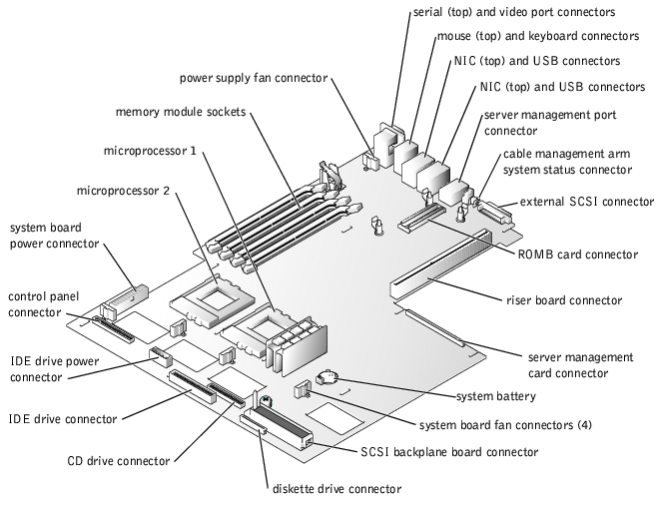
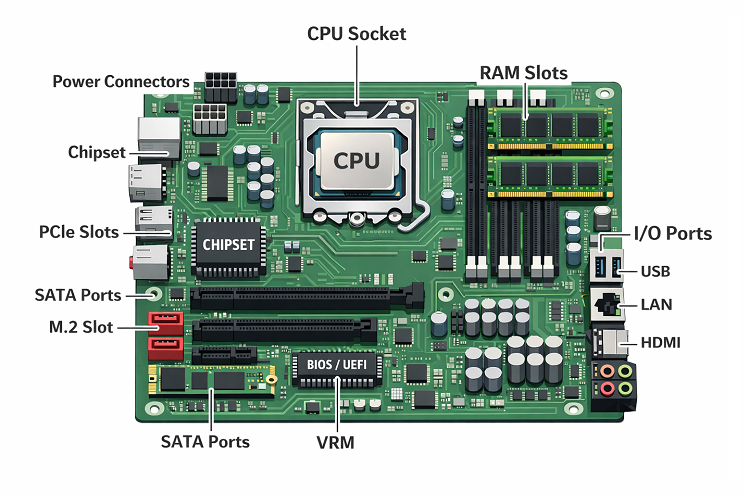
System Board Diagram
Below is a simplified conceptual layout of a typical system board, it includes:
CPU socket
Chipset (Northbridge/Southbridge or PCH)
Memory (DIMM/SODIMM slots)
PCIe slots
Storage interfaces (M.2, SATA)
Power connectors (24-pin, 8-pin CPU)
I/O interfaces (USB, Ethernet, audio)
BIOS/UEFI firmware chip
VRM power modules
Internal headers (fan, front panel, RGB, etc.)
This diagram helps visualize how tightly integrated the components are and how the board organizes both power and data pathways.
What Is the Purpose of the System Board?
The core purpose of the system board is to:
Integrate all essential components into a unified platform
Enable communication between hardware modules
Provide physical mounting points and electrical pathways
Supply and regulate power from the power input
Facilitate system startup and firmware control
Handle data flow to internal and external devices
Put simply, it is the foundation on which the entire computing system is built.
Key Components Found on a System Board
A modern system board integrates a wide range of functional components:
Each element contributes to the total functionality and performance capability of the device.
System Board vs Motherboard: What Are the Differences?
Although many people treat these terms as identical, there are subtle distinctions:
System Board
Used in enterprise service documents
Emphasizes system-level integration
Common in servers, industrial controllers, embedded systems
More neutral, technical terminology
Motherboard
Popular in consumer PC building
More common in desktop, gaming, and DIY markets
Focuses on expandability and performance features
Broadly recognized by non-technical users
Key takeaway
Both terms describe the same type of hardware, but they differ in usage context.
What Is the System Board Used For?
Anywhere data is processed or controlled, a system board exists. System boards are found in nearly all electronic systems:
Desktop PCs
Laptops
Smartphones
Servers
Medical devices
Automotive electronics
Industrial automation controllers
Robotics
Consumer electronics
IoT devices
Network equipment
Why System Board Manufacturing Requires Professional PCB & PCBA Capabilities?
Although readers usually think of the system board as a finished computer component, its reliability begins much earlier in the PCB manufacturing and assembly stages. A system board is a complex, multilayer PCB with dense routing, high-speed interfaces, strict impedance control, and tight thermal requirements. This makes the quality of its PCB and PCBA processes critical.
Modern system boards typically include:
Multilayer stack-ups (8L, 10L, 12L and above)
High-speed differential pairs for PCIe, USB, HDMI, LVDS
Controlled impedance traces for stable signal integrity
BGA and LGA CPU packages
Fine-pitch connectors and ultra-dense component layouts
High-current VRM power stages
M.2, SATA, and PCIe slot soldering
Embedded controllers, BIOS/UEFI ICs, and power management circuits
Manufacturing and assembling such boards requires precision, stability, engineering support, and strict testing procedures.
This is exactly where EBest Circuit (Best Technology) helps global customers gain reliable performance.
How EBest Circuit (Best Technology) Supports System Board Production?
EBest Circuit (Best Technology) has long served customers who require complex mainboards, server logic boards, laptop controller boards, industrial control boards, and embedded system boards. Our fabrication and assembly services are engineered to meet the stringent requirements of system-level products.
For system boards, precise soldering of BGA CPU sockets, M.2 connectors, PCIe slots, and high-speed controllers is essential—and our inspection workflow ensures stable solder quality.
System boards must pass strict testing because they are the “brain” of the entire device.
We use:
Flying-probe testing
Automated in-circuit testing (ICT)
Functional testing based on customer firmware
Boundary scan (JTAG) for high-density digital boards
Burn-in testing upon request
High-layer count PCBs often hide defects deep inside the stackup, so our process ensures that every board delivered meets performance expectations.
4. Full Engineering Support
Stack-up design assistance
DFM / DFA review
Impedance simulation
Material recommendation for high-speed designs
Prototype revision feedback
One-stop BOM sourcing
Our engineering team collaborates directly with OEMs, industrial designers, and hardware architects to optimize manufacturability before production begins.
Why Many Global Brands Choose EBest Circuit (Best Technology) for System Board Projects?
Companies choose EBest Circuit (Best Technology) because we provide:
One-stop PCB + PCBA integration
Factories in China and Vietnam for flexible cost and lead time
High-layer, high-speed, HDI capability for complex logic boards
Professional SMT assembly with strict inspection
On-time delivery and stable quality
UL, ISO 9001, ISO 13485, AS9100D and IATF 16949 quality certifications
Over a decade of experience serving electronics, industrial, automotive, medical, and computing customers
If you are developing a system board, embedded controller, logic board, medical equipment mainboard, or industrial computer board, EBest Circuit (Best Technology) can support you from prototype to mass production.
To get a fast quotation or technical consultation:
We will evaluate your Gerber files, BOM, and assembly requirements, then provide optimized PCB stack-ups, material choices, and lead-time proposals based on your project needs.
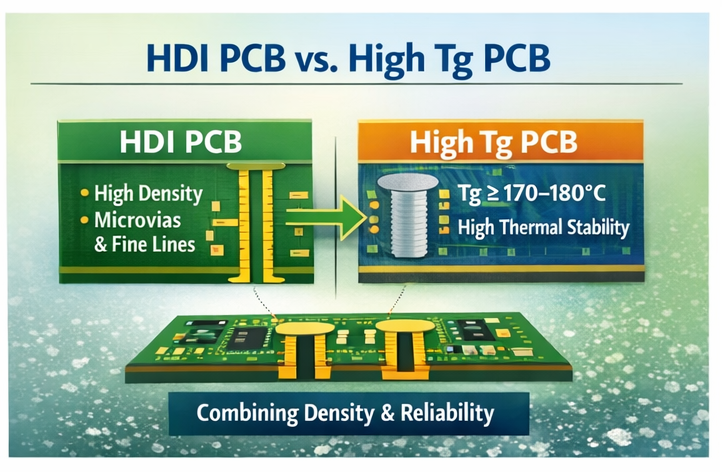
Why do HDI & high TG PCB solutions matter so much for high-reliability electronics? Because failures rarely come from a single “big” mistake. They often start from small issues: marginal solder joints, microcracks around vias, drift in impedance, or repeated thermal shock.
An HDI PCB helps by shortening trace length, controlling impedance, and reducing stubs. A high Tg PCB helps by raising the glass transition temperature, so the board structure stays stable under higher reflow and operating temperatures.
When you integrate both, you gain:
Better control of high-speed signals in dense layouts
Stronger resistance to repeated lead-free reflow cycles
Improved reliability in wide temperature ranges
Smaller, lighter boards that still carry complex circuits
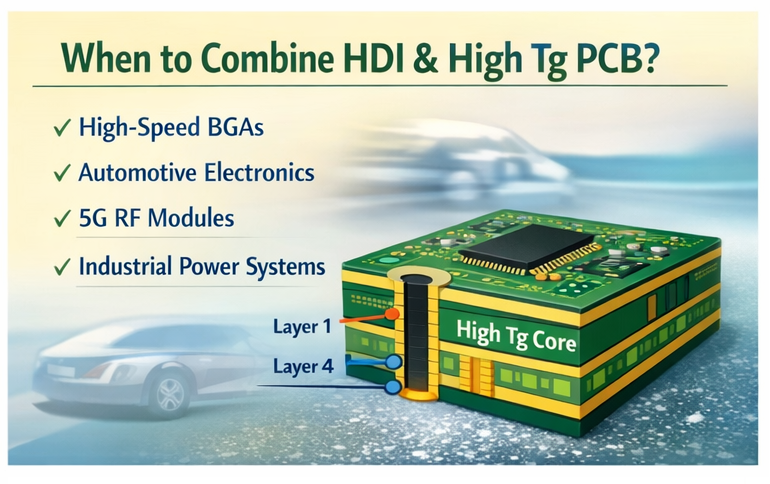
For sectors like automotive ADAS, 5G equipment, and industry automation, this combination is often no longer “nice to have”. It becomes a base requirement.
What Are HDI & High Tg PCB Solutions?
HDI & High Tg PCB solutions refer to PCB designs that use high-density interconnection structures together with high-temperature glass transition materials. Rather than treating HDI PCB and high Tg PCB as separate topics, this concept views them as a design “toolbox” that works as a system.
A typical HDI & high Tg PCB stack-up may include:
High Tg FR4 or hybrid material core
One or more HDI buildup layers with microvias
Fine lines and spaces for dense routing
Controlled impedance structures for high-speed signals
Multiple lamination cycles using high Tg prepregs
These solutions focus on two goals at the same time: interconnection density and temperature endurance. The design approach covers layout rules, via strategy, material selection, and process limits from the start, not as late-stage fixes.
What Is an HDI PCB and Why Is It Used in Modern Electronics?
Sequential build-up (1+N+1, 2+N+2, 3+N+3, and so on)
Fine line/space (e.g., 75 µm/75 µm or better)
Via-in-pad for BGA breakout
Modern ICs such as high pin-count BGAs, fine-pitch QFNs, and SiP modules simply cannot be routed on old-style 1-via-per-pin layouts. HDI PCB structures shorten critical paths, reduce via stubs, and keep return paths tight.
Key advantages of hdi pcb in modern designs include:
Smaller board size with the same or higher function density
Better signal integrity for multi-gigabit links
Improved power distribution with dense stitching vias
Room for mechanical design freedom in slim devices
Because of this, HDI PCB technology is common in smartphones, tablets, communication modules, automotive radar, and compact industrial controllers.
What Is a High Tg PCB and How Does It Improve Reliability?
A high tg pcb uses laminate with a higher glass transition temperature than standard FR4. Tg is the point where the resin system changes from glassy to rubbery. Above this point, mechanical properties weaken quickly.
In a high Tg PCB, the Tg value might be 170–180°C or higher, instead of around 130–140°C for common materials. This increased Tg gives several benefits:
Better dimensional stability during lead-free reflow
Lower risk of pad lifting, delamination, or barrel cracks
Reduced mechanical stress during temperature cycling
Improved long-term reliability in high-temperature service
High Tg PCB materials also tend to have better thermal endurance over time, which helps in automotive under-hood zones, power supplies, motor drives, and LED lighting. They can handle more thermal stress without visible or hidden damage.
Differences Between HDI PCB and High Tg PCB
HDI and high Tg describe two different aspects of a PCB: one structural, one material. They often coexist, but they are not the same.
Aspect
HDI PCB
High Tg PCB
Main focus
Interconnect density and routing
Thermal and mechanical stability
Key features
Microvias, fine lines, via-in-pad
Tg ≥ 170–180°C, better thermal endurance
Typical driver
Fine-pitch BGAs, compact form factor
Lead-free reflow, high operating temperature
Impact on layout
Strong effect on routing and stack-up
Moderate; affects stack-up and DFM margin
Impact on reliability
Better signal and via performance
Lower risk of warpage and delamination
Cost drivers
Laser drilling, lamination cycles, yield
Material price, process window, lamination setup
An HDI PCB can use standard Tg material when the thermal profile is mild. A high Tg PCB can have no HDI features at all if density remains low. When the project pushes both limits, you combine them.
When Should HDI PCB and High Tg PCB Be Combined?
Combining HDI PCB and high Tg PCB makes sense when a design faces both density and thermal stress at the same time. Typical cases include:
High-speed compute boards with large BGAs and multiple reflow passes
Automotive radar or camera modules near engines or outdoor zones
5G RF front-ends in compact housings with limited airflow
Industrial motion control or power electronics running at elevated temperature
You should consider an HDI & high Tg PCB solution if:
The layout requires microvias or sequential lamination to escape key components
The assembly line uses lead-free profiles with high peak temperature
The product will see frequent on-off cycling or wide ambient temperature swings
Field reliability and long service life carry high business value
In these scenarios, HDI brings routing freedom and signal quality, while high Tg materials protect the board structure against thermal and mechanical stress.
Medical devices: Imaging equipment, patient monitoring, compact diagnostic tools
Consumer and wearable devices: Smartphones, tablets, smartwatches, AR/VR devices
All these products share common requirements: compact size, strict reliability targets, and long-term stability under shifting loads. HDI PCB structures handle fine-pitch and high-speed paths, while high Tg PCB materials carry the thermal and mechanical burden.
What Are the Key Design Considerations for HDI & High Tg PCB?
Designing HDI & high Tg PCB solutions is not just about choosing a material with higher Tg and shrinking traces. It needs careful coordination between layout, stack-up, and process limits. Key points include:
1. Stack-up planning early
Decide the HDI level (1+N+1, 2+N+2, etc.), copper thickness, and layer count early. Include high Tg material data, Dk/Df values, and lamination constraints in the first draft.
2. Microvia and buried via strategy
Keep microvia aspect ratios within the fabricator’s safe range. Use staggered rather than stacked microvias when reliability priority is high, unless the project can support enhanced filling processes.
3. Impedance control with high-speed pairs
High-density routing often pushes traces close together. Work with the fabricator to set precise trace width and spacing for each impedance class, considering the actual dielectric constant of the high Tg material.
4. Thermal management and copper balance
High Tg PCB materials support higher temperature, but heat still needs paths. Balance copper areas across the panel to reduce warpage. Provide solid ground planes, thermal vias, and clear heat paths.
5. Solder mask and via-in-pad design
When using via-in-pad on HDI pads, confirm filling and capping processes. Poorly filled vias can trap flux or reduce solder joint strength.
6. Design for manufacturability (DFM)
Follow the manufacturer’s design rules for minimum line/space, annular ring, drill size, and pad shapes. Good DFM work reduces scrap and supports stable quality.
What Manufacturing Challenges Exist in HDI & High Tg PCB?
Manufacturing HDI PCB involves several engineering challenges because the process pushes the limits of micro-fabrication, interlayer reliability, material control, and inspection accuracy. Each stage demands strict tolerance management to keep performance stable in high-density layouts.
Microvia and blind-via drilling accuracy is difficult because HDI requires via diameters
below 0.15 mm. Laser drilling must stay stable and precise to avoid rough walls, incomplete holes, or weak plating that may cause electrical issues in stacked via structures.
Layer-to-layer registration and lamination control demand micron-level alignment.
High-order HDI needs multiple lamination cycles, and any shift in imaging, resin flow, or pressure can create opens, shorts, or signal loss.
Fine-line etching becomes harder as line width and spacing drop to 3 mil or less. Thin
traces are sensitive to under-etching or over-etching, and thicker copper (4–10 oz) makes precise control even more challenging.
Plating and via filling must deliver uniform copper to keep interconnections stable.
Voids, trapped gas, or uneven filling weaken microvias and reduce long-term reliability, especially when the design needs high breakdown voltage.
How EBest Circuit (Best Technology) Supports HDI & High Tg PCB Solutions?
EBest Circuit (Best Technology) supports HDI & High Tg PCB Solutions from early design review through mass production and assembly. Our team focuses on turning demanding ideas into stable, repeatable products.
Engineering and DFM for HDI and high Tg
Our engineers review your stack-up, HDI level, and component layout at the start. We suggest suitable high Tg materials, via strategies, and impedance structures based on your performance and cost targets.
HDI PCB manufacturing capability
We support fine line and space routing, laser-drilled microvias, via-in-pad, and multi-step lamination. Typical HDI builds such as 1+N+1, 2+N+2, and higher structures can be handled with controlled registration and repeatable yields.
High Tg and advanced materials
We work with well-known high Tg PCB laminates and can also support hybrid builds for projects that need both RF and digital performance. Material selection focuses on Tg, Td, Dk/Df, and reliability under your real reflow profile.
PCBA assembly with process control
EBest Circuit (Best Technology) provides SMT and through-hole assembly for HDI and high Tg boards in both China and Vietnam. Lead-free profiles, X-ray for BGA, and AOI help keep quality stable for dense layouts.
Quality systems and traceability
Our factories follow ISO9001, ISO13485 for medical, IATF16949 for automotive, and AS9100D for aerospace. We also run MES systems to track each lot from material incoming through final shipment. This supports clear traceability and faster root-cause analysis if any issue appears.
For buyers who need a long-term partner for HDI & high Tg PCB solutions, this combination of engineering support, HDI process capability, and certified quality systems reduces risk and saves internal effort.
FAQs about HDI & High Tg PCB Solutions
1. Is HDI PCB always more expensive than a standard multilayer board?
HDI PCB usually costs more per panel due to laser drilling, extra lamination, and tighter controls. However, the total product cost can drop because the board is smaller, the BOM can be simplified, and performance improves.
2. When do I really need a high Tg PCB instead of normal FR4?
You should consider a high Tg PCB when your design uses lead-free solder, has more than one reflow cycle, or runs in high ambient temperatures. Automotive, power, and industrial products are common cases where high Tg material significantly improves reliability.
3. Can I use HDI without high Tg material for consumer products?
Yes. Many consumer devices use hdi pcb structures on mid-range Tg materials because their operating temperature is moderate and lifetime targets are shorter. The decision depends on your thermal profile and reliability goals.
4. Are stacked microvias less reliable than staggered ones?
Stacked microvias can be reliable when the process is well controlled, but they need stricter plating and filling quality. For very harsh environments, many designers still prefer staggered microvias for extra margin, unless dense routing forces stacking.
5. How early should I involve EBest Circuit (Best Technology) in an HDI & high Tg PCB project?
The best time is before you freeze the stack-up and routing strategy. Early DFM and material discussion help avoid later redesign, reduce risk, and shorten the path from prototype to stable mass production.
If you are planning a new design that needs smaller size, higher speed, and stronger thermal performance, HDI & High Tg PCB Solutions may be the right direction. You can share your Gerber files, stack-up ideas, or even just a concept, and EBest Circuit (Best Technology) will help you evaluate practical options, costs, and timelines for your next project.
This certification confirms that PCB processes are controlled, repeatable, and audited for defect prevention rather than post-inspection.
For automotive buyers, choosing an IATF 16949 certified PCB supplier directly reduces recall risk, audit pressure, and long-term field failures.
What Is an IATF 16949 Certified PCB Supplier?
AnIATF 16949 certified PCB supplier is a PCB manufacturer that complies with the global automotive quality management standard issued by the International Automotive Task Force.
This standard requires:
Full process traceability
Preventive quality planning (APQP, FMEA)
Continuous improvement and corrective action systems
Controlled production from prototype to mass volume
Unlike general certifications, IATF 16949 applies only to automotive supply chains.
What Is an IATF 16949 Certified PCB Supplier?
Why Do Automotive OEMs Require IATF 16949 PCB Suppliers?
Automotive OEMs require IATF 16949 because PCB failures can trigger recalls, safety risks, and regulatory penalties.
This certification ensures:
Stable PCB manufacturing processes
Early risk identification
Consistent quality across production lots
Audit-ready documentation for OEM and Tier-1 reviews
For safety-critical electronics, uncertified suppliers introduce unacceptable risk.
Which Automotive PCBs Must Come from an IATF 16949 Certified Factory?
Automotive PCBs that typically require IATF 16949 certification include:
Engine control units (ECU)
ADAS and camera modules
Radar and RF automotive PCBs
Battery management systems (BMS)
Power inverter and motor control boards
Safety and braking control electronics
If a PCB affects vehicle safety, emissions, or power control, certification is expected.
IATF 16949 vs ISO 9001 for PCB Manufacturing
ISO 9001 focuses on general quality procedures across industries. IATF 16949 focuses on automotive risk prevention and process stability.
Key differences for PCB buyers:
IATF 16949 requires FMEA and PPAP
ISO 9001 allows broader process variation
IATF 16949 enforces corrective action with data
ISO 9001 emphasizes documentation, not automotive reliability
ISO 9001 alone is not sufficient for automotive PCBs.
Core Capabilities Required from an IATF 16949 PCB Supplier
An automotive-qualified PCB supplier must demonstrate both engineering and process discipline.
This includes impedance-controlled stackups, material consistency, SPC monitoring, and documented change control.
Below is a technical capability table automotive buyers often request.
Capability Category
Automotive PCB Requirement
Typical Specification Range
PCB Layer Count
Multilayer & HDI
2–20 layers
Controlled Impedance
Mandatory for high-speed / RF
±5% to ±10%
Copper Thickness
Power and signal balance
0.5–6 oz
Minimum Trace / Space
Dense automotive layouts
3/3 mil
Via Technology
Reliability under vibration
Through, blind, buried, microvia
Laminate Materials
Thermal and electrical stability
High-Tg FR-4, Rogers, hybrid stackups
Surface Finish
Automotive solderability
ENIG, ENEPIG, OSP
Operating Temperature
Harsh environment tolerance
−40°C to +125°C
Traceability System
Mandatory under IATF 16949
Lot-level MES tracking
Quality Documentation
OEM audit compliance
PPAP, FMEA, Control Plan, SPC
Production Volume
Prototype to mass production
NPI → high volume
Reliability Testing
Automotive qualification
Thermal cycling, cross-section
How Traceability Works in IATF 16949 PCB Manufacturing?
In IATF 16949 certified PCB manufacturing, traceability links each PCB lot to materials, processes, inspections, and operators.
Traceability systems typically record:
Laminate batch numbers
Inner layer imaging data
Lamination cycles
Plating and surface finish parameters
Final inspection results
This allows fast containment if field issues occur.
What Quality Risks Exist Without an IATF 16949 PCB Supplier?
Choosing a non-certified PCB supplier increases:
Process variation
Incomplete documentation
Poor root-cause analysis
Audit failures during OEM reviews
These risks often surface only after volume production begins.
What Documents Should an IATF 16949 PCB Supplier Provide?
Automotive buyers should expect:
PPAP documentation
PFMEA and Control Plans
Material certifications
SPC and inspection reports
Change management records
Missing documents usually indicate limited automotive readiness.
Prototype vs Mass Production: What Buyers Often Overlook
IATF 16949 applies from the prototype stage, not only mass production.
Controlled materials, documented changes, and engineering approvals must begin early. Skipping these steps creates instability during ramp-up.
Automotive-ready PCB suppliers treat prototypes as production-intent builds.
Why Automotive Buyers Choose EBest Circuit (Best Technology) as Their IATF 16949 Certified PCB Supplier?
EBest Circuit (Best Technology) supports automotive PCB projects under IATF 16949, ISO 9001, and ISO 13485, AS9100D systems.
Our company delivers:
Automotive-grade multilayer and HDI PCBs
Controlled impedance and high-frequency designs
MES-based traceability
Structured documentation for OEM audits
Smooth transition from prototype to mass production
This combination reduces buyer risk and accelerates project approval.
FAQs
1. Is IATF 16949 mandatory for automotive PCBs?
Yes, for OEM and safety-critical automotive electronics.
2. Does IATF 16949 cover PCB prototypes?
Yes. Process control applies from early builds.
3. Can ISO 9001 replace IATF 16949?
No. ISO 9001 alone does not meet automotive standards.
4. How can buyers verify IATF 16949 certification?
Check the certificate scope, issuing body, and audit validity.
5. Why is traceability critical in automotive PCBs?
It enables fast containment and root-cause analysis during failures.