A custom LED board is a tailored printed circuit board designed specifically to support LED arrays, offering optimized performance for high-power applications. This article explains how custom LED boards enhance thermal management, reliability, and efficiency in high-power systems, from automotive lighting to commercial signage.
Are you struggling with heat-related issues in your high-power LED projects? Many users face common challenges when using standard boards for demanding applications.
Heat accumulation causing rapid LED degradation and reduced lifespan.
Inefficient thermal dissipation in FR-4 boards leading to brightness loss.
Thermal resistance problems resulting in unstable performance under high loads.
Limited customization for unique shapes or power requirements.
High failure rates due to poor heat handling in generic PCBs.
To overcome these issues, custom LED PCB boards integrate advanced thermal management solutions.
Metal Core PCBs (MCPCB) using aluminum or copper bases improve heat conduction.
Customized layouts optimize heat pathways for even distribution.
High-temperature soldering enhances durability under prolonged use.
As a premium metal core PCB manufacturer, BEST Technology specializes in custom LED boards, leveraging expertise in metal-core substrates and thermal design to deliver reliable solutions for high-power systems. Pls feel free to contact us at sales@bestpcbs.com for projects requiring precision and performance.
What is Custom LED Board?
A custom LED board is a purpose-built circuit board that hosts LED components in a layout tailored to specific applications, such as automotive lighting or signage. Unlike off-the-shelf boards, these are engineered to address unique power, size, and thermal needs.
Definition: It typically includes a substrate (e.g., FR-4 or metal-core), conductive traces, and LED placements optimized for efficiency.
Applications: Used in custom LED sign boards, custom truck LED light boards, and custom LED tail light boards, where standard boards fall short.
Advantages: Customization allows for better heat handling, which is critical for high-power systems.
In summary, a custom LED board provides a foundation for LEDs to operate reliably under demanding conditions.
How to Build Custom LED Board?
Building a custom LED board involves design, material selection, and manufacturing steps focused on thermal performance.
Step 1: Design the circuit – Create a LED circuit board diagram using software, considering power distribution and heat spots.
Step 2: Choose substrates – Opt for MCPCBs (e.g., aluminum-based) for high-power projects to enhance cooling.
Step 3: PCB fabrication – Processes like etching and plating form the traces; for SMD LED PCB designs, precision placement is key.
Step 4: Assembly – Solder LEDs using high-temperature methods to withstand heat.
Step 5: Testing – Verify thermal performance and brightness stability.
This process ensures the board meets specific needs, such as a custom LED panel for car or outdoor custom LED sign board.
How to Remove LED Ring Board Custom Arena?
Removing a custom LED ring board, often used in arenas or decorative signs, requires care to avoid damage.
Power down – Disconnect electricity to ensure safety.
Detach mounting hardware – Unscrew or unclip the board from its frame.
Disconnect wiring – Gently remove connectors from the LED circuit board.
Use tools cautiously – Avoid prying to prevent breaking the custom LED light board.
Proper removal allows for upgrades or repairs, maintaining the integrity of high-power systems.
What Can You Do with a Custom LED PCB Board?
Custom LED PCB boards enable versatile applications by offering tailored solutions.
Automotive upgrades: Create custom LED board for car designs, like DRLs or tail lights, for better visibility.
Signage: Build customizable LED message boards for shops or trade show displays custom LED board.
Industrial use: Develop LED array PCB for high-power lighting in factories.
These boards support innovation while ensuring efficiency, thanks to optimized thermal management.
Why Many Car Owners Choose Custom Made LED Tail Lights for Better Visibility?
Custom made LED tail lights enhance safety through superior design and performance.
Brightness: Custom LED boards use high-output LEDs for clearer visibility in all conditions.
Durability: MCPCBs in custom LED tail light board designs reduce heat-related failures.
Aesthetics: Tailored shapes, like custom LED chevron boards, improve vehicle appearance.
This makes them a popular choice for automotive enthusiasts seeking reliability.
What Makes a Custom LED Sign Board Stand Out for Shops and Events?
Custom LED sign boards attract attention with their adaptability and efficiency.
Visibility: High-power LEDs on custom LED sign boards remain bright over time.
Customization: Options like personalized LED board designs fit brand themes.
Thermal management: MCPCBs prevent dimming, crucial for outdoor custom LED board use.
Thus, they stand out by combining aesthetics with longevity.
Why a Custom Truck LED Light Board Is Popular for Automotive Upgrades?
Custom truck LED light boards are favored for their robustness and functionality.
Power handling: They support high-wattage LEDs without overheating.
Custom fits: Designs like custom truck LED light board football themes add personalization.
Reliability: Metal-core PCBs ensure performance in rugged conditions.
This popularity stems from enhanced safety and customization options.
Why High-Power Projects Prefer Custom LED Circuit Boards with Better Heat Performance?
High-power LED projects require superior thermal management to maintain performance.
Heat challenges: High-power LED modules generate significant heat, causing standard FR-4 boards to accumulate temperature, leading to light decay.
MCPCB advantage: Custom LED circuit boards often use Metal Core PCBs (aluminum or copper) to improve heat paths and reduce thermal resistance.
Custom LED circuit boards’ Suppliers like EBest Circuit (Best Technology) employ high-thermal-conductivity materials, vacuum lamination, and high-temperature soldering to ensure LEDs stay bright and stable. This focus on heat performance makes custom boards ideal for demanding applications.
Why Choose EBest Circuit (Best Technology) for Custom PCB LED Board Manufacturing?
When you choose a partner for custom PCB LED board manufacturing, you need more than a standard PCB supplier—you need a factory that understands heat, brightness stability, and long-term performance. EBest Circuit (Best Technology) specializes in delivering LED-focused MCPCB solutions that improve thermal balance, power efficiency, and reliability across a wide range of lighting applications.
1. Specialists in LED Thermal Management Materials
Heat control is the key factor for LED brightness and lifespan. EBest Circuit (Best Technology) focuses on the materials that deliver optimal thermal paths for LED boards.
Metal Core PCBs (Aluminum & Copper MCPCB)
Ideal for high-power LEDs, automotive tail lights, custom LED arrays, and signage backlighting.
Thermal conductivity options: 1.0–3.0 W/m·K standard, higher values available on request.
Supports single-layer, 2-layer, and hybrid stack-ups commonly used in LED modules.
High-Reflection White Solder Mask
Boosts LED lumen output by improving light reflection.
High-TG FR4 for Cost-Sensitive LED Strips
For low heat LED strips or decorative lighting where cost efficiency matters.
2. Precision Manufacturing for Consistent Light Output
Custom LED boards require tight control over copper distribution, impedance, and heat spreading. Our engineering focuses on LED-specific design rules.
Fine-Pitch LED Placement
Achieves 2.5/2.5 mil line/space for dense LED arrays and LED display modules.
Controlled Copper Thickness
1–3 oz outer copper for LED strips, LED bars, and high-current segments.
Uniform Solder Mask & Surface Finish
ENIG, Immersion Silver, and OSP optimized for LED solderability and brightness consistency.
Color Options for Aesthetic Needs
White (high reflectivity) for lighting
Black for automotive DRL/tail lights and signage
3. Quality You Can Trust for Lighting & Automotive Applications
LED boards operate under continuous heat, vibration, and sometimes outdoor conditions. EBest Circuit (Best Technology) delivers stable performance through:
ISO 9001 – General quality assurance
IATF 16949 – Automotive-grade LED PCBs (tail lights, DRL, headlights)
UL Certification – Safety compliance for lighting modules
LED-focused inspections include:
AOI for LED pad accuracy
X-Ray for metal core structure
Thermal testing for heat propagation
4. From Samples to Mass Production with Full Turnkey Solutions
We support LED customers who need fast development and reliable repeat production.
Prototype MCPCB in 48–72 hours
Stable mass production for LED strips, LED modules, sign boards, and automotive LED assemblies
Assistance with LED pad design, thermal vias, and heat simulation
Whether you’re building a custom LED tail light board, backlit display, LED strip, or large-area LED array, EBest Circuit (Best Technology) provides a stable and professional manufacturing process from start to finish.
Custom LED boards are essential for maximizing the efficiency and lifespan of high-power systems through dedicated thermal design. This article has highlighted their role in various sectors, from automotive to commercial lighting. BEST Technology offers expertise in metal-core PCBs, HDI, and thick-copper boards, ideal for high-power LED, automotive, backlight, and advertising projects. For inquiries, pls feel free to reach us at sales@bestpcbs.com.
How to choose polyimide PCB material? This blog mainly covers properties and datasheet, selection guide, types, material supplier for polyimide PCB material.
Are you troubled these issues with polyimide PCB material?
Do your flexible circuit boards frequently delaminate or warp in high-temperature and high-humidity environments, leading to shortened equipment lifespan?
In complex bending applications, do your PCBs frequently break due to material fatigue, affecting product reliability?
When pursuing thinner and lighter designs, is your supply chain hampered by high material costs and long lead times, hindering innovation?
As a polyimide PCB manufacturer, EBest Circuit (Best Technology) can provide you service and solutions:
High-Temperature and High-Humidity Stability Service: We provide customized polyimide material formulations, enhancing substrate adhesion and environmental resistance to ensure dimensional stability under extreme conditions ranging from -40°C to 200°C, extending equipment lifespan.
Dynamic Bending Reinforcement Solution: Utilizing proprietary modified polyimide lamination technology, the material’s bending life is increased to over 1 million cycles. Combined with simulation design support, it precisely matches your structural needs, eliminating the risk of breakage.
Cost Optimization and Rapid Response: Leveraging large-scale production and a flexible supply chain, we provide cost-effective standard products and rapid prototyping services, shortening lead times to within 7 days, helping you accelerate product launch.
Polyimide (PI) PCB materialis a special substrate material designed specifically for high-performance, high-reliability printed circuit boards (PCBs). Made of polyimide resin, its core characteristics lie in its excellent resistance to extreme high temperatures (typically operating stably above 260°C for extended periods) and outstanding thermal stability. It maintains excellent electrical insulation, high mechanical strength, and good chemical stability even under drastic temperature changes. This material is particularly suitable for manufacturing flexible printed circuit boards (FPCs) and rigid-flex boards, and is widely used in fields with extremely stringent requirements for heat resistance, dimensional stability, and reliability, such as aerospace, military electronics, automotive engine control units, and core components of high-end mobile devices.
High Temperature Resistance: Glass transition temperature (Tg) ranges from 250°C to 350°C, with some high-performance variants exceeding 400°C. It maintains stable operation in extreme environments from -269°C to 400°C and withstands short-term exposure above 500°C, making it ideal for aerospace engines and automotive engine peripherals.
Mechanical Strength: Tensile strength reaches 100-300MPa, bending modulus 2-5GPa, combining high strength with flexibility. This supports foldable/curved designs for flexible electronics like foldable smartphones and wearable devices.
Electrical Insulation: Volume resistivity is 10^16-10^18 Ω·cm, dielectric constant 3-4 (reduced to below 2.5 with fluorine or nano-air incorporation), and low dielectric loss (about 1×10^-3). These reduce signal interference and transmission loss, ensuring stability in high-frequency and high-speed circuits.
Chemical Resistance: Resistant to acids, alkalis, and organic solvents, though not concentrated sulfuric/nitric acid or halogens. Suitable for corrosive environments like chemical monitoring and marine electronics.
Radiation and Thermal Stability: Retains 90% strength after 5×10^9 rad fast electron irradiation and exhibits low outgassing in high vacuum. This meets radiation protection and thermal control needs for satellites and medical implants.
Dimensional Stability: Low coefficient of thermal expansion (CTE) of 2×10^-5/°C to 3×10^-5/°C, with biphenyl-based variants as low as 1×10^-6/°C, close to metal CTE. This minimizes warpage under temperature fluctuations, ensuring precision in high-density interconnect (HDI) designs.
Flame Retardancy: Self-extinguishing with low smoke emission and over 50% char yield, complying with UL-V0/V1 standards for enhanced electronic device safety.
Biocompatibility: Non-toxic and certified for biocompatibility in certain models, suitable for medical implants and reusable surgical instruments requiring repeated sterilization.
Application Scenarios: Aerospace (e.g., NASA Mars rover), flexible printed circuits (FPC), high-frequency antennas.
Certification Standards: Complies with UL-94 V0 flammability rating, passes ASTM D5204 space radiation resistance tests.
Advantages: Long-term operating temperature ≥ 250°C, chemical corrosion resistance, high mechanical strength (tensile strength > 200MPa), suitable for extreme environments.
Upilex Series Polyimide Film (UBE Industries)
Core Parameters: Upilex S type Tg > 280°C, dimensional stability < 50ppm/°C, moisture absorption < 0.5%.
Application Scenarios: 5G base station high-frequency circuits, precision medical devices, satellite communication modules.
Technical Features: Linear polyimide molecular structure, stable dielectric constant (3.4–3.6 at 1GHz), dielectric loss < 0.003.
Certification Status: ISO 9001 quality management system certified, JIS C 6481 standard compliant.
Apical Polyimide Substrate (Kaneka Corporation)
Core Parameters: Tg > 260°C, thermal decomposition temperature > 400°C, thickness range 25–225μm.
Special Performance: Low-temperature resistance to -269°C (liquid helium environment), radiation resistance > 100kGy, suitable for nuclear industry equipment.
Production Scale: Annual global capacity exceeds 5 million square meters, primarily exported to high-end manufacturing in Europe and America.
High Tg Polyimide Copper Clad Laminate (e.g., Tenghui VT-901)
Technical Breakthrough: World’s only industrially produced transparent PI material, meets flexible electronic display requirements.
Market Application: Core material for Samsung Galaxy Z Fold series foldable smartphones.
How to Choose Polyimide PCB Material?
Below is a detailed selection guide for polyimide PCB material:
1. Core Performance Parameter Matching
Heat Resistance: Prioritize materials with glass transition temperature (Tg) ≥250°C and thermal decomposition temperature (Td) ≥360°C, such as DuPont Kapton series (Tg>250°C) or Ube Upilex S type (Tg>280°C), to ensure stability during high-temperature soldering (peak 260°C) and long-term operation (200-300°C).
Electrical Performance: For high-frequency scenarios (e.g., 5G antennas), focus on dielectric constant (3.4-3.6@1GHz) and dissipation factor (<0.003). Adhesive-free Pyralux series is recommended (30% signal loss reduction). For high-voltage applications, ensure insulation resistance ≥10³MΩ.
Mechanical Strength: Tensile strength >200MPa, bending radius <1mm, fatigue life >100,000 cycles, suitable for dynamic applications like flexible screens and wearables.
2. Core Performance Parameter Matching
Aerospace: Select materials with radiation resistance >100kGy and dimensional stability <50ppm/℃, such as Tenghui VT-901 (ESA certified) or Kaneka Apical (resistant to liquid helium low temperatures), meeting extreme environment requirements for satellites and Mars rovers.
Automotive Electronics: Prioritize metal-based PI composite boards (aluminum-based thermal conductivity >2W/mK, copper-based >5W/mK) or high-Tg polyimides, suitable for IGBT driver boards and battery management systems with thermal and vibration requirements.
Medical Devices: Choose biocompatible transparent PI (e.g., Mitsubishi AURUM, light transmittance >88%) or Apical series, ensuring non-toxicity, corrosion resistance, and compliance with FDA/ISO 10993 standards.
3. International Certification and Standard Compliance
Core Certifications: UL-94 V0 (flame retardant), ASTM D5204 (space radiation), ISO 9001 (quality system). European customers should focus on ESA, MIL-STD-810G aerospace standards; Japanese market requires JIS C 6481 compliance.
Industry Standards: IPC-4101E (substrate specifications), IPC-6011 (performance requirements), RoHS/REACH (environmental restrictions), ensuring material traceability and compliance.
4. Cost and Supply Chain Optimization
Cost Control: Balance performance and cost by application. Adhesive-free Pyralux series, though higher in unit price, reduces signal loss and long-term costs. Metal-based composite boards lower system costs in thermal management scenarios.
Supply Chain Reliability: Prioritize suppliers with overseas factories or long-term partnerships, such as DuPont and Toray-DuPont joint ventures (market share >60%), ensuring delivery cycles and after-sales support.
5. Environmental and Sustainability Considerations
Environmental Compliance: Materials must pass RoHS 2.0, REACH SVHC list, avoiding hazardous substances like lead and mercury. Recyclable designs (e.g., 80-90% Kapton recovery rate) align with circular economy trends.
Low-Carbon Production: Select suppliers using green processes (e.g., catalytic enhanced imidization, ultrasonic-assisted solvent removal) to reduce energy consumption and carbon emissions, meeting EU Carbon Border Adjustment Mechanism (CBAM) requirements.
Common Polyimide PCB Material Suppliers
DuPont (USA)
Products: Kapton® series polyimide films (H/F/V, HN/FN/VN variants), Pyralux® flexible circuit materials.
Technical Advantages: Pioneer in industrial polyimide production. Kapton films offer thermal stability from -269°C to 400°C, excellent electrical insulation, dimensional stability, and chemical resistance. Pyralux AP series supports high-frequency signal transmission for 5G, AI servers, and aerospace.
Products: Upilex® polyimide films (R/S/C types), Iupicel®N copper-clad laminates.
Technical Advantages: Biphenyl-based polyimide structure. Upilex S films withstand over 300°C, feature low moisture absorption and superior dimensional stability. Iupicel N non-adhesive FPC laminates reduce performance degradation.
Products: Apical polyimide films, Pixeo® high-heat-resistant PI films.
Technical Advantages: Pyromellitic PI technology. Apical films provide dimensional stability and corona resistance. Pixeo films exceed 260°C glass transition temperature with >88% transparency for flexible displays and optical components.
Applications: FPCs, satellite communications, superconducting insulation, EV battery insulation, 5G base station antennas.
SKC Kolon PI (South Korea)
Products: High-performance PI films (IN/IF/IS series), flexible composites.
Technical Advantages: Thickness control (12.5–25μm), high tensile strength, low dielectric constant for ultra-thin designs in FPC and OLED applications.
Products: AURUM™ thermoplastic polyimide, transparent PI films.
Technical Advantages: AURUM™ withstands over 260°C, balancing heat resistance and processability. Transparent PI films meet display industry light transmission requirements.
Applications: Aerospace, automotive lightweighting, high-frequency modules, medical devices.
How to Select A Reliable Polyimide PCB Material Supplier?
1. Rigorous Review of Quality Certifications and Industry Qualifications
Prioritize suppliers with ISO 9001/14001, UL, and RoHS/REACH compliance to ensure materials meet international safety and environmental standards. For example, DuPont Kapton films are NASA-certified for aerospace applications; Ube’s Upilex series is IATF 16949 certified for the automotive industry, meeting the demands of high-precision electronics.
Verify that suppliers possess third-party testing reports for material performance (e.g., thermal stability, dielectric constant, chemical resistance) to ensure data traceability.
2. Rigorous Review of Quality Certifications and Industry Qualifications
Clearly define application scenario requirements, High-frequency, high-speed communication requires low dielectric constants (e.g., DuPont Pyralux AP series Dk≈3.5); high-temperature applications require glass transition temperatures (Tg≥260℃) (e.g., Mitsui Chemicals AURUM™); flexible displays require high light transmittance (e.g., Kanekachi Pixeo® transparent PI film with >88% light transmittance).
Compare supplier product specifications to ensure that parameters such as film thickness tolerance (e.g., ±1μm), tensile strength, and coefficient of thermal expansion match design requirements, avoiding selection errors.
3. Assess supply chain stability and global footprint
Select suppliers with global production bases and localized technical support. For example, DuPont has factories in the US, Taiwan, and Europe, ensuring rapid delivery and after-sales response; SKC Kolon has factories in South Korea, Shenzhen, and Southeast Asia, catering to the needs of Asian and emerging markets.
Confirm whether the supplier provides JIT (Just-in-Time) or VMI (Vendor Managed Inventory) services to reduce inventory costs and delivery cycle risks.
4. Verify R&D capabilities and customization services
Prioritize suppliers with independent laboratories and patented technologies. For example, the Toray-DuPont joint venture can provide 1500mm wide films suitable for large-scale FPC production; Evonik P84® fiber supports customized modification for high-temperature filtration.
Confirm whether the supplier provides material selection consultation, process optimization support (such as lamination parameters, etching processes), and certification assistance (such as UL certification, automotive industry PPAP documents) to ensure full-process support from design to mass production.
5. Analyze customer cases and industry reputation
Refer to the supplier’s historical customer list, such as DuPont supplying Apple and Huawei; Ube Industries’ deep cooperation with global PCB manufacturers; and SABIC serving the aerospace and medical device fields.
Verify supplier reliability through industry forums and third-party evaluations (such as Gartner supply chain reports) to avoid choosing suppliers with quality disputes or delivery issues.
6. Assess cost-effectiveness and long-term cooperation potential
Compare the pricing structures of different suppliers, considering bulk purchase discounts and annual framework agreement benefits, but be wary of low-price traps (such as sacrificing material purity or process control).
Prioritize suppliers that offer long-term technical cooperation, joint R&D (such as jointly developing high-frequency PI materials), and supply chain transparency to build strategic partnerships to meet future technological iteration needs.
7. Test Samples and Validation Compatibility
The supplier is required to provide free samples or small-batch trial production of materials to verify their performance in specific applications (e.g., bending resistance, signal loss, thermal stability) through actual testing.
Accelerated aging tests (e.g., high temperature and humidity, thermal shock) and reliability verification should be conducted to ensure the material’s stability under extreme environments and avoid quality defects after mass production.
Welcome to contact us if you have any inquiry for polyimide PCB material: sales@bestpcbs.com.
PWB vs PCB are two acronyms frequently encountered in electronics manufacturing, both referring to the foundational platforms for mounting and connecting electronic components. This article will delve into the nuances: PCB vs PWB, explore their applications, and help you determine which is better suited for your modern electronic projects.
Are you struggling to select the right type of board for your electronic application, often facing challenges related to terminology, design complexity, and performance requirements? Many engineers and procurement specialists encounter similar hurdles.
Confusion over the exact difference between PWB and PCB and whether the distinction impacts sourcing.
Difficulty in selecting the appropriate board type (PWB board vs. a more complex PCB) for a specific project’s cost and functionality needs.
Encountering reliability issues, such as short circuits or signal integrity problems, with substandard boards.
Challenges in managing the PWB assembly or PCBA process, especially for complex, multi-layer designs.
Navigating the procurement process without a reliable supplier who can provide expert guidance and high-quality manufacturing.
These challenges can be effectively addressed by partnering with an experienced manufacturer who clarifies these terms and delivers robust solutions.
Expert clarification on PWB vs PCB wiring and terminology, ensuring you specify the correct product for your PWB electronics application.
Guidance on material selection and board type—whether a simple printed wiring board or a high-density interconnect (HDI) PCB—to optimize performance and cost.
Utilization of high-quality materials and stringent quality control processes to ensure board reliability and longevity.
Comprehensive services that cover everything from design support to full PWB assembly and testing, simplifying your supply chain.
Access to a trusted partner like BEST Technology, a professional PCB manufacturer with a proven track record in producing high-reliability boards for diverse industries.
At BEST Technology, we specialize in the manufacturing of advanced printed circuit boards, including both PWBs and PCBs. With two decades of experience, state-of-the-art facilities, and a commitment to quality, we help our clients navigate the complexities of electronic board selection and production. For inquiries, please contact us at sales@bestpcbs.com.
What does PWB Stand for?
PWB stands for Printed Wiring Board. This term historically refers to a bare board that provides the mechanical support and electrical connections for components using conductive tracks, pads, and other features etched from copper sheets laminated onto a non-conductive substrate. In essence, it is the foundational structure for “wiring” components together.
Historical Context: The term PWB was more commonly used in the early days of the electronics industry, particularly in certain regions like Japan. It emphasizes the board’s primary function as an interconnect platform before the widespread integration of active and passive components directly onto the board itself.
Modern Interpretation: Today, PWB is often used interchangeably with PCB, though a subtle distinction persists in some technical circles, which we will explore later.
In summary, PWB denotes the basic board that forms the electrical wiring backbone of an electronic assembly.
What are the Different Types of PWBs?
PWBs can be categorized based on their construction and the number of conductive copper layers they possess. The primary types are:
Single-Sided PWBs: These boards have a conductive copper layer on only one side of the substrate. Components are placed on one side, and the circuitry is etched on the other. They are the simplest and most cost-effective type, suitable for basic electronic devices.
Double-Sided PWBs: These feature conductive layers on both sides of the substrate. The two sides are connected using plating through holes (PTHs), allowing for more complex circuits and higher component density than single-sided boards.
Multi-Layer PWBs: These consist of three or more layers of conductive material, separated by insulating layers (prepreg) and laminated together. They are used in highly complex electronics like smartphones, computers, and medical equipment, where high circuit density and signal integrity are paramount.
In conclusion, the type of PWB—single-sided, double-sided, or multi-layer—is chosen based on the complexity, size, and performance requirements of the electronic device.
What Materials are Used in PWBs?
The performance, cost, and application of a PWB are largely determined by the materials used in its construction. The key materials include:
Substrate (Laminate): This is the insulating base material. The most common is FR-4, a glass-reinforced epoxy laminate known for its good mechanical strength and flame retardancy. For high-frequency applications, materials like PTFE (Teflon) or ceramic-filled hydrocarbons are used.
Copper Foil: This conductive layer is laminated onto the substrate. It is etched to form the circuit traces. The thickness of the copper is typically measured in ounces per square foot (e.g., 1 oz, 2 oz).
Solder Mask: This polymer layer is applied over the copper traces to prevent solder bridges between closely spaced pads during assembly and to protect the copper from oxidation and environmental damage. It is typically green, but other colors are available.
Silkscreen: This is the layer where letters, numbers, and symbols are printed on the board to assist in component placement and identification.
The careful selection of these materials is crucial for ensuring the electrical PCB performs reliably under its intended operating conditions.
How do you Design a PWB?
Designing a PWB is a critical, multi-step process that translates a circuit schematic into a physical board layout ready for manufacturing.
Schematic Capture: The process begins with creating a schematic diagram using Electronic Design Automation (EDA) software. This diagram represents the electrical connections between components.
Component Placement: The physical components from the schematic are placed on the board layout within the EDA software. Optimal placement is key for signal integrity, thermal management, and manufacturability.
Routing: This involves drawing the copper traces that will connect the components according to the schematic. Design rules (e.g., trace width, spacing) must be strictly followed.
Design Rule Check (DRC): The software automatically checks the layout against a set of predefined rules to identify errors like short circuits or insufficient clearances.
Gerber File Generation: Once the design is error-free, a set of files (Gerbers) is generated. These files contain all the necessary information for manufacturing, including copper layers, solder mask, and silkscreen.
A well-executed PWB design is fundamental to the functionality and reliability of the final electronic product.
What are the Advantages of Using PWBs?
PWBs offer several significant advantages over older point-to-point wiring methods, making them indispensable in modern electronics.
Reliability and Repeatability: The automated manufacturing process ensures consistent quality and eliminates the wiring errors common in hand-soldered assemblies.
Compact Size and High Density: PWBs allow for miniaturization by enabling complex circuits to be packed into a small space, which is crucial for modern portable devices.
Ease of Assembly and Maintenance: Components can be mounted and soldered automatically, speeding up production. The organized layout also simplifies troubleshooting and repair.
Cost-Effectiveness: For mass production, PWBs are highly economical due to automated fabrication and assembly processes.
Improved Performance: Carefully controlled impedance and signal paths in a PWB board enhance the electrical performance of the circuit, especially at high frequencies.
These advantages explain why PWBs have become the standard across virtually all electronic industries.
Where is PWB Commonly Used?
The application of PWB electronics is vast, spanning nearly every sector that utilizes electronic circuitry.
Consumer Electronics: Smartphones, televisions, laptops, and home appliances.
Industrial Equipment: Control systems, power supplies, and automation machinery.
Medical Devices: Patient monitors, imaging systems, and diagnostic equipment (note: this is distinct from any PWB meaning medical acronym, which might refer to something else like “Partial Weight Bearing”).
Automotive: Engine control units (ECUs), infotainment systems, and lighting controls.
Aerospace and Defense: Avionics, communication systems, and radar equipment.
In short, wherever there is an electronic circuit, a PWB is likely at its heart.
What is the Difference between PCB and PWB?
The difference between PWB (Printed Wiring Board) and PCB (Printed Circuit Board) is subtle. In modern parlance, PCB has become the universal, catch-all term. For most practical purposes, especially in globalized electronics supply chains, they are considered functionally the same. However, a closer examination of the terms highlights an evolution in the technology’s role.
Aspect
PWB (Printed Wiring Board)
PCB (Printed Circuit Board)
Main idea
Wiring base
Complete circuit board
Focus
Simple interconnection
Circuit function + interconnection
Typical layers
Single / double-sided
Double-sided / multilayer
Typical use
Basic, low-cost electronics
Complex, high-performance electronics
Term usage today
Older / less used term
Modern, standard industry term
The fundamental distinction lies in the implied scope:
PWB focuses on the wiring—the physical infrastructure for connections.
PCB encompasses the complete circuit—the wiring plus the integrated components and their collective function.
To sum up, a PWB is typically associated with simpler structures, while a PCB implies a more complex, multi-layered board designed for higher performance. However, it is crucial to remember that in today’s industry, the term PCB is universally accepted to describe boards of all complexity levels, from the simplest to the most advanced. The historical distinction between a printed wire board and a printed circuit board has largely faded in everyday use, with PCB emerging as the dominant term worldwide.
What are the Three Types of PCBs?
PCBs are commonly classified by their layer count, mirroring the types of PWBs:
Single-Layer PCBs: The simplest type, with components on one side and circuitry on the opposite side.
Double-Layer PCBs: Circuits on both top and bottom layers, connected by vias.
Multi-Layer PCBs: Incorporate multiple layers of circuitry (4, 6, 8, up to 50+ layers), allowing for extremely complex and dense designs. This is what PCB means in electronics for advanced applications.
What is the Difference between PWB and PWA?
This distinction is more concrete. PWB vs PWA refers to different stages of production.
PWB (Printed Wiring Board): The bare, unpopulated board.
PWA (Printed Wiring Assembly): This is the PWB after all the electronic components have been soldered onto it. It is a fully functional circuit assembly.
What is the Difference between PWA and PCB?
Similarly, the difference between PWA and PCB is clear:
PCB: Can refer to the bare board (like a PWB) or, generically, to the assembled board.
PWA: Specifically and exclusively refers to the assembled board. PCBA (Printed Circuit Board Assembly) is a more common term that is synonymous with PWA.
Why is PWA not Popular?
The term PWA is not as popular as PCBA simply due to industry convention.
PCBA has become the globally accepted and more frequently used acronym for an assembled board. While PWA is technically correct, its usage has diminished over time in favor of PCBA.
Is PCBA the Same as PCA?
Yes, absolutely. PCBA (Printed Circuit Board Assembly) and PCA (Printed Circuit Assembly) are different terms for the exact same product: a fully assembled and functional circuit board. The distinction is purely terminological, with no difference in the physical item itself. The flowchart you provided elegantly illustrates the evolution and equivalence of these terms.
The diagram shows two parallel “lineages” of terminology that converge on the same meaning:
1. The Left-Hand Path: From Bare Board to Assembly (PCB Focus) This path uses the more modern and globally dominant term “PCB” as its base.
PWB/PCB: The process starts with the bare board, which can be called a PWB (Printed Wiring Board) or, more commonly today, a PCB (Printed Circuit Board). This is the unpopulated substrate with the copper traces.
PCBA: When all the electronic components (chips, resistors, capacitors, etc.) are soldered onto the bare PCB, it becomes a PCBA (Printed Circuit Board Assembly). This is now a complete, functional electronic sub-unit.
2. The Right-Hand Path: Alternative and Historical Terms (PWB Focus) This path reflects terminology that is sometimes used interchangeably or is more common in specific regions or older documentation.
PWA/CCA: If you start with the term PWB, the assembled version can be called a PWA (Printed Wiring Assembly) or a CCA (Circuit Card Assembly).
PCA: The term PCA (Printed Circuit Assembly) is the direct equivalent of PWA and CCA.
The Crucial Link: PCBA ≈ PCA The most important part of the chart is the “≈” (approximately equal to) symbol connecting PCBA to PCA. This symbol confirms that these two terms are functionally identical. They both describe the final product—a circuit board that has been fully assembled with components and is ready for use.
In summary, the different terms often reflect historical, regional, or company-specific preferences. For instance:
PCB/PCBA are the most universally recognized and used terms today.
PWB/PWA are seen as more traditional terms, still used by some companies (particularly in Japan).
CCA is a term frequently used in the aerospace and defense industries.
PCA is a less common but perfectly valid synonym for PCBA.
Regardless of the acronym used, they all point to the same essential item: a populated and functional circuit board. Therefore, when you see PCBA or PCA on a datasheet or in a conversation, you can be confident they refer to the same thing.
PWB vs PCB: How Each Board Fits Different Applications?
The choice between the terms PWB and PCB is largely irrelevant; the critical decision is selecting the right type of board for the application.
For Simple, Low-Cost Applications: A single-sided PWB/PCB is often sufficient. Examples include simple calculators, LED lights, and basic toys.
For Moderate Complexity: Double-sided boards offer a good balance of cost and functionality for products like power supplies, automotive dashboards, and industrial controllers.
For High-Performance, Complex Applications: Multi-layer PCBs are essential. They are used in computing hardware, telecommunications infrastructure, advanced medical devices, and any application involving high-speed digital signals or RF circuits. Understanding the difference between printed wire board and printed circuit board terminology is less important than understanding these performance tiers.
In conclusion, PWB vs PCB are terms that, for all practical purposes, describe the essential backbone of modern electronics, with PCB being the dominant contemporary term. This article has clarified the terminology, types, and applications of these critical components to aid in your selection process.
For your PWB, PCB or PCBA projects, partnering with a reliable manufacturer is key. BEST Technology stands out as a leader in PCB manufacturing and PCBA, offering expertise from design support to full assembly (PCBA). We ensure high quality, reliability, and performance for all your electrical PCB needs. For more information or to discuss your specific requirements, please contact our expert team at sales@bestpcbs.com.
How to make silkscreen for PCB? Let’s discover thickness, size chart, colors selection guide, material and font, production process, removal methods for PCB silkscreen.
Are you troubled these questions about PCB silkscreen?
Blurry screen printing? “Why is my board’s screen printing always blurry and broken, significantly reducing repair and inspection efficiency?”
Incomplete information labeling? “How can I clearly label polarity and reference numerals in a limited space to avoid incorrect parts and rework due to unclear labeling?”
High communication costs? “Does insufficient screen printing precision require repeated confirmation of details with the factory, delaying project timelines?”
As a professional PCB manufacturer, EBest Circuit (Best Technology) can provide you services and solutions:
Precise Imaging: We use a combination of LPI+LDI high-precision processes, ensuring sharp, engraved character edges and perfect rendering even for ultra-fine 0.15mm line widths, greatly improving subsequent production efficiency.
Mastering Space Layout: We provide professional screen printing layout optimization services, even in areas densely populated with 0402/0201 micro-components, we can plan a clear, non-overlapping labeling scheme for you.
One-Stop Service: From the moment you provide your design files, we initiate a manufacturability review, proactively identifying screen printing design risks to ensure production is completed on the first attempt, accelerating your product launch.
The PCB silkscreen layer is an ink marking layer on the surface of a printed circuit board (PCB), typically located above the solder mask layer. Using silkscreen or inkjet printing technology, it directly prints key information such as component identification (e.g., reference numerals R1, C2), polarity symbols (+/-), pin markings, company logos, version numbers, and security certification icons onto the board surface. This provides a visual basis for positioning and identification during assembly, debugging, and repair; it is the PCB’s “information label layer.”
How Thick Is a PCB Silkscreen?
Process Type
Average Thickness
Features
Traditional Screen Printing
30–35μm
Obvious ink accumulation, slight edge diffusion
LPI (Liquid Photo Imaging)
15–25μm
Uniform thickness, precision ±3μm
Inkjet Printing
18–22μm
Non-contact, local thickening possible
LDI (Laser Direct Imaging)
15–20μm
Ultra-thin precision, suitable for HDI boards
PCB Silkscreen Size Chart
Parameter
Minimum Value
Recommended Value
Applicable Process
Character Height
≥0.8mm
1.0-1.5mm
All Processes
Character Line Width
≥0.15mm
0.18-0.2mm
LDI/LPI superior to traditional screen printing
Polarity Symbol Diameter
≥1.0mm
1.2-1.5mm
All Processes
Pin 1 Identification
≥0.8mm
1.0mm
LDI precision best
LOGO/QR Code
Minimum unit ≥0.3mm
≥0.4mm
LDI/Inkjet exclusive
Solder Mask to Pad Clearance
≥0.2mm
0.3mm
All Processes
What Are the Colors of PCB Silk Screen?
Common standard color systems of PCB silk screen include:
Core Standard Color Systems
White: Accounts for over 70% usage, suitable for dark substrates like green/black PCBs. Provides 80% high contrast and is the default choice for consumer electronics. White silkscreen on green substrates improves text clarity by 40% under normal lighting, reducing assembly errors by 15%.
Black: Designed for light substrates like white/yellow PCBs. Black-on-white schemes are common in laboratory-grade PCBs, enhancing readability by 30% in cleanroom environments. Note that black ink may cause glare under strong light.
Yellow: Preferred for low-light environments, offering 20% higher reflectivity than white. Commonly used in automotive electronics/outdoor devices. Tests show yellow text recognition speed is 0.3 seconds faster than white under 50lux illumination.
Special Color Considerations
Red/Blue: Often used in military-grade PCBs for color-coded voltage regions. Red marks high-voltage areas, blue denotes signal layers, complying with IPC-A-610 standards.
Custom colors (e.g., pink/purple): Require 10-30% additional cost and may extend lead time by 3-5 days. A case study revealed pink silkscreen caused 8% yield loss due to ink curing issues in mass production, now mainly used for prototype validation.
Design Rules
Contrast First: Green substrates must use white/yellow silkscreen; black substrates require white; white substrates need black. Incorrect pairing can double troubleshooting time.
Font Standards: Recommend sans-serif fonts, character height ≥1.5mm, line width ≥0.18mm. BGA area silkscreen must maintain 0.3mm safety clearance from pads.
Environmental Adaptation: Industrial control boards recommend matte surface treatment, reducing 90% glare interference. Medical devices require alcohol-resistant UV-cured inks.
What Ink Is Used in PCB Silkscreen?
PCB screen printing mainly uses non-conductive ink materials, and specific types include:
Epoxy-based ink: A traditional mainstream material, resistant to high temperatures and chemical corrosion, suitable for welding processes.
Acrylic-based ink: Fast-drying, suitable for high-efficiency production lines, but with slightly weaker heat resistance.
Polyurethane-based ink: Abrasion-resistant and chemically resistant, suitable for high-reliability environments.
UV-cured ink: Cures quickly using ultraviolet light, improving production efficiency; commonly white/black.
Thermosetting ink: Cures by heat, with strong adhesion; mostly used for text marking.
Special conductive inks (such as carbon ink, silver ink): Used in specific scenarios (such as conductive marking), but the core function of screen printing is non-conductive marking.
How to Make Silkscreen for PCB?
1. Design and Specification Development
Character design must comply with IPC-SM-840 standards: minimum line width 0.1mm, character height ≥0.6mm, maintain 0.1mm safety clearance from pads/vias. Polar components (e.g., diodes, capacitors) require clear “+”, “C” symbols, with left-to-right/bottom-to-top orientation for readability.
Output Gerber format design files containing character layers, solder mask layers, and drilling layers, validated through DFM analysis to prevent manufacturing defects.
2. Screen Material Selection and Tensioning
Choose screen material based on precision needs: high precision (line width ≤ 0.15mm) recommends 305 mesh stainless steel mesh (tension 28-30N/cm); ordinary precision can use 200-250 mesh nylon mesh. The mesh frame must be made of aluminum alloy (dimensional accuracy ±0.1mm), anodized for corrosion resistance.
Screen Stretching Process: A pneumatic screen stretching machine is used to stretch the screen, controlling the tension uniformity within ±1N/cm. After allowing it to stand for 24 hours to release stress, epoxy resin is used to fix the frame and screen. The resin layer thickness is ≤0.5mm, ensuring no air bubbles remain.
3. Photolithography and Exposure Development
Coating the photosensitive emulsion: After pre-coating the base coat on the screen, evenly coat the photosensitive emulsion (10-20μm thickness) using a squeegee. For high precision requirements, 2-3 layers are needed. After each layer dries, inspect for pinhole defects.
Exposure parameters: Use a UV exposure machine (energy 80-120mJ/cm²), with film positioning (accuracy ±0.05mm), and an exposure time of 10-20 seconds. Develop using a 1% sodium carbonate solution at a water temperature of 25-30℃ for 30-60 seconds, forming clear openings (open area ≥90%) with an edge jaggedness depth ≤0.01mm.
4. Ink Formulation and Performance Adaptation
Base Ink Selection: Formulate according to the substrate material (e.g., FR-4, PI) and application (high temperature resistance/flexibility). Epoxy inks are resistant to 260℃ wave soldering (curing conditions 150℃/30 minutes), while polyurethane inks meet the bending requirements of flexible PCBs (1000 bends at 180° without cracking).
Viscosity Control: Monitor with a rotational viscometer. 300-mesh screen requires 1500-2500 cP, 400-mesh requires 1000-2000 cP. Thinner addition should be ≤10%, and stirring speed 500-800 rpm should be used to ensure uniformity and avoid bubble formation. Colors should be formulated according to the Pantone color chart, with a color difference ΔE ≤1. The contrast between white ink and green solder resist should be ≥85%.
5. Precision Printing Parameter Control
Equipment Selection: Fully automatic printing machines have an accuracy of ±0.03mm (suitable for large batches); semi-automatic machines with CCD positioning (accuracy ±0.05mm) are suitable for small to medium batches. Manual printing requires a high-precision squeegee (hardness 70-80 Shore), angle 45°-60°, pressure 0.2-0.3MPa, speed 50-100mm/s, and screen distance 1-2mm.
Real-time Monitoring: Every 10 PCBs are sampled for character clarity and positional deviation (≤0.05mm). Adhesion is tested with 3M tape (residual area ≥95%), and edges are observed with a 200x magnifying glass to ensure no jagged edges. High-precision characters require a 400-mesh stainless steel mesh to avoid ligatures and missing strokes.
6. Curing Process and Quality Inspection
Curing conditions: Acrylic inks cure at 120-130℃ for 20-30 minutes; epoxy inks cure at 150-160℃ for 30-40 minutes. Staged heating (10 minutes per stage) is used to prevent cracking. The ink thickness deviation after curing should be ≤±10%.
Quality inspection: AOI automatic detection of character defects (recognition rate ≥99.8%), solvent resistance test (no fading after 100 wipes with 75% alcohol), and temperature resistance test (no color change at 260℃/10 seconds). Defective products are cleaned with a special ink remover and reprinted to ensure a yield rate ≥99%.
7. Environmental Control and Safety Standards
Production Environment: Temperature 22-25℃, humidity 40-60%, cleanroom class ≥ Class 10000. Operators must wear anti-static gloves to avoid fingerprint contamination. Waste ink and solvents must be recycled separately, complying with RoHS/REACH environmental standards.
Equipment Maintenance: Regularly calibrate the printing press accuracy (once a month), clean the screen (ultrasonic cleaning after every 500 prints), and replace worn doctor blades (when hardness decreases by more than 10%). Record all process parameters (such as tension, viscosity, curing temperature) to create a traceable production record.
What Is the Best Font for PCB Silkscreen?
Sans-serif Font Priority
Recommended sans-serif fonts include Arial, Helvetica, Calibri, etc., offering higher readability at small sizes for international clients.
Chinese characters require TrueType fonts supporting Chinese character sets (e.g., Microsoft YaHei, SimSun), avoiding decorative or serif fonts.
Character Size Specifications
Standard character height: 1.0mm-1.5mm (40mil-60mil), minimum not less than 0.8mm (32mil), subject to manufacturer process limits.
Line width recommended 0.15mm-0.2mm (6mil-8mil), maintaining a height-to-width ratio of 1:6 to 1:7; high-density boards may reduce to 0.8mm height.
Layout and Positioning Rules
Silkscreen should be close to corresponding components, avoiding coverage of pads, vias, or test points; reference numbers placed within or near component outlines.
Reading direction standardized to horizontal or 90° rotation, avoiding arbitrary angles for quick manual identification; connecting lines must clearly point to components.
Safety Spacing Standards
Silkscreen maintains ≥0.2mm (8mil) safety spacing from pads, copper traces, and vias; high-density boards may reduce to 0.15mm (6mil).
Inter-silkscreen spacing ≥0.15mm to prevent printing adhesion; avoid covering high-speed signal lines or test points to prevent electrical performance impact.
Multilingual and Internationalization Support
Fonts must support English, Chinese, and special symbols; Chinese silkscreen height ≥1.0mm, using TrueType fonts to ensure complete character display.
Version numbers, company logos, etc., uniformly placed at board corners with high-contrast ink (e.g., white ink on dark substrates).
Manufacturer Process Collaboration
Confirm minimum character height, line width, and spacing capabilities with manufacturers before panelization; verify silkscreen clarity post-Gerber output.
Ensure Chinese characters remain free of garbled text during editing, output, and production; high-density designs require pre-communication of size limits.
Connectors must indicate Pin 1 direction; special packages (e.g., BGA, QFN) require silkscreen dimensions matching actual chip sizes.
Visibility and Maintainability Optimization
Silkscreen adopts reverse white, bold, or high-contrast designs for clear readability without magnification; board edges include version numbers, manufacturing dates, and company identifiers.
Test points and interface areas avoid silkscreen coverage to ensure unimpeded flying probe testing or debugging operations.
How to Remove Silkscreen from PCB?
1. Source Control at Design Stage
Operation Path: Disable silkscreen layer output in PCB design software (e.g., Altium Designer, KiCad). Hide Top/Bottom Silkscreen layers via layer manager, or deselect silkscreen layer file outputs (e.g., .GTO/.GBO files) during Gerber file generation to ensure PCBs are produced without silkscreen.
Advantages: Zero cost, risk-free, optimal preventive solution that avoids potential PCB damage from physical/chemical removal methods.
2. Physical Scraping Method
Tool Selection: Use surgical blades, precision carving knives, or professional PCB cleaning tools, paired with fine sandpaper (800+ grit) or grinding erasers.
Operation Key Points: Scrape at an angle ≤30° to the board surface; only applicable to rigid substrates (e.g., FR4); flexible boards (FPC) prohibited. For sandpaper grinding, use gentle unidirectional motion to avoid scratching the solder mask layer or exposing copper traces.
Applicable Scenarios: Small-scale, localized silkscreen correction requiring skilled operators to prevent damage to component pads or traces.
3. Chemical Solvent Method
Solvent Selection: Prioritize dedicated silkscreen removal agents or acetone (high efficiency but may corrode solder mask); alternatives include ethyl acetate or isopropyl alcohol (IPA). Prohibit strong corrosive solvents (e.g., concentrated sulfuric acid, chloroform).
Operation Process: In ventilated environments, dip a cotton swab in minimal solvent to gently wipe silkscreen areas. Wait 15-30 seconds for ink dissolution, then clean residues with lint-free cloth dipped in IPA.
Safety Requirements: Wear nitrile gloves, goggles, and N95 masks; keep away from ignition sources; prohibit use on high-frequency boards (e.g., Rogers material) or sensitive component areas.
4. Laser Removal Method
Technical Principle: Utilize UV laser marking machines for non-contact ablation to precisely remove silkscreen without damaging underlying solder mask or copper layers.
Advantages: High precision, efficiency, and chemical-free, suitable for high-value PCB repairs or precision circuits.
Limitations: High equipment cost (requires professional laser systems); requires skilled programming; difficult to implement at general repair shops.
5. Mechanical Grinding Method
Tool Configuration: Ultra-fine sandpaper (2000+ grit), grinding sponges, or fiber erasers (can be water-dampened to reduce dust).
Operation Standards: Gentle unidirectional grinding with real-time surface monitoring; stop immediately after silkscreen removal. Avoid over-grinding to prevent solder mask wear or copper exposure.
Applicability: Recommended only for open non-functional areas; prohibited in component-dense zones to prevent short-circuit risks.
6. Precautions and Risk Control
Pre-Testing: Conduct small-scale tests in PCB edge non-functional areas to verify solvent compatibility or grinding force.
Environmental Protection: Treat chemical waste according to regulations; maintain dust-free operation environments to prevent short circuits from dust adhesion.
Regulatory Compliance: Prohibit removal of certification marks (e.g., UL logo) to avoid regulatory violations; delegate critical boards (e.g., medical/military devices) to professional manufacturers.
Post-Operation Verification: Perform electrical performance tests (e.g., open/short detection, impedance verification) after silkscreen removal to ensure no functional impairment or hidden faults remain.
Alternative Solutions: Use alcohol markers for temporary marking; for long-term needs, adjust silkscreen layout via design software or use removable labels for coverage.
If you’ve ever worked with Metal Core PCBs (MCPCBs), or copper-clad boards, you’ve likely appreciated their superb ability to whisk heat away from powerful components like LEDs or power converters. But this very strength introduces a unique and frustrating weakness: the dreaded pad lift.
There’s little more disheartening than seeing a copper pad, along with your carefully soldered component, physically peel away from the board during assembly or rework. This isn’t a simple soldering mistake; it’s a fundamental battle between physics and materials that you lost. But it’s a battle you can win.
This blog post will dive deep into the why and, more importantly, the how—how to prevent this costly issue from plaguing your projects.
What Cause Pads Lift on Copper-Clad Boards?
To understand why pad lifting happens, we must first look at the structure of a typical Copper MCPCB:
1. Copper Circuit Layer: The thin layer where your traces and pads are etched.
2. Dielectric Insulating Layer: A critical polymer-based layer (often epoxy with ceramic fillers) that electrically isolates the circuit from the metal base. It’s also the primary thermal conduit.
3. Copper or Aluminum Base Plate: The thick metal core that acts as a massive heat sink.
The problem lies in their Coefficients of Thermal Expansion (CTE). Copper and aluminum have very similar CTEs. The dielectric layer, however, has a CTE that is vastly different. When you subject the board to the high temperatures of a soldering process (200-260°C+), these layers expand at dramatically different rates.
Upon cooling, they contract at different rates again. This mismatch creates immense shear stress right at the interface between the copper pad and the dielectric layer. When this internal stress exceeds the adhesive strength (the “peel strength”) bonding the copper to the dielectric, the pad delaminates and lifts off.
This fundamental CTE mismatch is a given. The goal, then, is to manage the forces and strengthen the system to prevent failure.
What Actually Pushes a Pad to Lift?
Several factors in design, manufacturing, and assembly act as the “last straw” that triggers a pad lift.
1. Thermal Shock During Assembly & Rework This is, by far, the number one cause.
Excessive or Prolonged Rework: Every time you apply a soldering iron to a pad, you create a localized, extreme thermal cycle. The pad heats up and expands rapidly, while the surrounding area remains cooler. Multiple rework attempts fatigue the bond, progressively weakening it until it fails. The higher the iron temperature and the longer the contact time, the greater the risk.
Incorrect Soldering Iron Use: Using an overpowered iron, a tip that’s too small (forcing you to hold it longer), or applying excessive pressure to “squeeze” heat out, all contribute to thermal shock and mechanical damage.
Aggressive Reflow Profiles: An oven profile with too high a peak temperature or excessive time above liquidus can “cook” the dielectric layer, weakening its adhesive properties across the entire board.
2. PCB Design Flaws The board’s layout can set the stage for failure from the very beginning.
Poor Thermal Relief Design: A pad directly connected to a large copper pour for thermal management acts as a massive heat sink. To melt the solder, you must pump in far more heat for a longer duration, dramatically increasing the thermal stress on the pad’s connection point. This is the most common design-related mistake.
Isolated Pads: Conversely, a pad with no thermal connection can heat up too quickly, creating a severe thermal gradient and concentrating stress upon cooling.
3. PCB Manufacturing Quality Not all MCPCBs are created equal.
Low Peel Strength: The core specification for pad adhesion is the Copper Foil Peel Strength. Low-quality laminates simply have inferior bonding between the copper and the dielectric layer, offering less resistance to the inherent thermal stress.
Drilling and Fabrication Issues: Poor drilling quality can cause micro-fractures or delamination around via holes, creating a weak point from which a pad can start to lift.
4. Mechanical Stress Physical forces can work in tandem with thermal stress to finish the job.
Installation Stress: Over-tightening the screws when mounting the MCPCB to a heatsink can warp the board. This pre-stresses the copper-dielectric bond, making it much more susceptible to failure during the subsequent soldering heat cycle.
Component Stress: Heavy components or components with stiff leads can exert constant mechanical leverage on the pads, especially under vibration.
How to Prevent Pad Lifting?
Fixing pad lifting requires a systematic approach across design, sourcing, and assembly.
1. Master the Soldering Process (The Most Critical Step)
Control Time and Temperature: Use a temperature-controlled iron. Set it to the lowest effective temperature (typically 350-380°C for lead-free solder) and adhere to the “3-to-5 Second” rule: complete the joint within 3 seconds, and never exceed 5 seconds of continuous contact.
Limit Rework: Establish a strict limit—if a joint isn’t right after 2-3 attempts, stop. Let the board cool completely and re-evaluate your approach. Forcing it will only lead to failure.
Use the Right Tool: Match your soldering tip size to the pad and component. A larger, chisel tip transfers heat more efficiently than a fine point, reducing the time needed.
2. Implement Smart PCB Design
Use Thermal Relief Pads (The Golden Rule):This is the single most effective design change. Instead of connecting a pad directly to a copper plane, use a “spoked” or “cross-hatched” connection. These thin traces provide sufficient electrical and thermal conductivity while significantly increasing the thermal resistance during soldering. This allows the pad to heat up quickly without stealing all the heat away, minimizing the thermal stress.
Reinforce Pads: Use teardrops at the junction of pads and traces to add mechanical strength. Where possible, slightly increase the pad size to improve adhesion.
3. Source High-Quality Materials
Specify High Peel Strength: When ordering your MCPCBs, don’t just shop for price. Consult with your manufacturer and specify a material with a high copper peel strength. Reputable laminate suppliers (like Bergquist or Laird) provide these specifications.
Audit Your PCB Supplier: Work with a fabricator who has proven experience with MCPCBs and understands the rigorous demands of the assembly process.
4. Refine Mechanical Assembly
Control Torque: Use a torque screwdriver when mounting the board to a heatsink. Follow the manufacturer’s recommended torque values and tightening sequence to avoid warping.
Support Heavy Components: For large parts, use adhesive or additional mechanical fasteners to secure the component body, relieving the strain on the solder joints and pads.
Conclusion
Pad lifting on MCPCBs isn’t random. It’s the result of predictable stress acting on a thin copper-dielectric interface. When that stress rises above the material’s peel strength, the pad lets go.
But you can prevent it.
Solder smarter with tight control of heat and dwell time.
Use thermal relief features in your design.
Choose MCPCB materials with high peel strength.
Avoid mechanical stress during assembly.
Once you align your design, materials, and soldering process with the thermal realities of MCPCBs, your pad-lifting issues drop dramatically—and your yield, reliability, and confidence rise just as quickly.
GND meaning is foundational in electronics, referring to the ground reference point that ensures stable circuit operation. This article explores the role of GND in circuits, clarifies common misconceptions, and provides practical guidance to avoid grounding errors.
Grounding mistakes can lead to circuit failure, noise interference, or even safety hazards. Whether you’re designing a PCB or troubleshooting a device, understanding GND is critical.
Why do so many engineers struggle with GND circuits?
Unstable Signals: Noise and voltage fluctuations due to poor grounding.
Confusion Between GND Types: Mixing analog, digital, and chassis grounds.
Faulty Reference Points: Incorrect zero-volt reference leading to measurement errors.
Safety Risks: Inadequate grounding resulting in electric shocks or device damage.
To address these issues, follow these key solutions:
Implement star grounding to isolate noise-sensitive circuits.
Use continuous GND planes in PCB design to reduce impedance.
Clearly separate PGND (power ground) and SGND (signal ground).
Define a single-point reference for voltage measurements.
Ensure proper chassis grounding for safety compliance.
At BEST Technology, we specialize in advanced PCB manufacturing, offering robust solutions for complex grounding challenges. Our expertise ensures your designs achieve optimal performance and reliability. Pls feel free to contact us at sales@bestpcbs.com for professional support.
What Does GND Mean?
GND meaning stands for “ground,” the reference point in a circuit where voltage is zero. It serves as a common return path for current and a benchmark for measuring voltages elsewhere in the system.
In electronics, GND is not just a physical connection to the earth—it’s the foundational reference that ensures signal integrity and safety. For example, in a simple battery circuit, the negative terminal often serves as GND. Without a well-defined GND, circuits may suffer from noise, instability, or incorrect logic levels.
What Are the Types of GND Circuits?
GND meaning extends beyond a simple connection—it represents a system of reference potentials that ensure electronic circuits function correctly. Understanding the different types of ground circuits is essential for preventing noise, interference, and operational failures. Below we explore the main grounding schemes used in modern electronics.
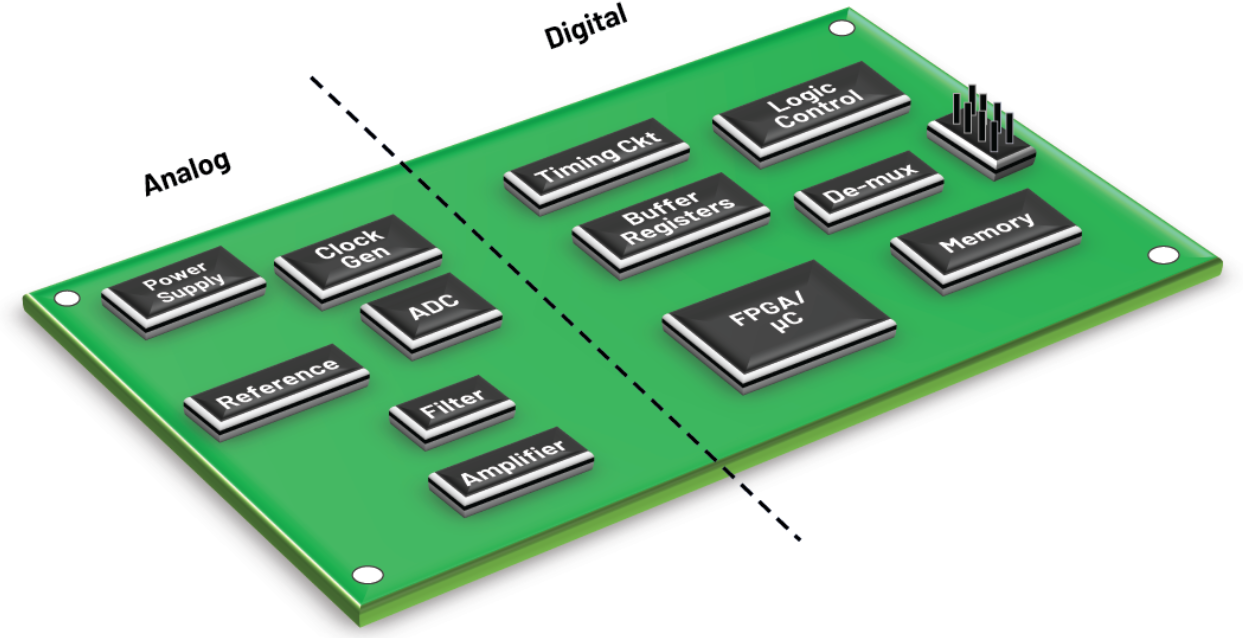
1. Digital Ground (DGND) Digital ground serves as the reference point for digital circuits, which process discrete signals (0s and 1s). These circuits, such as microprocessors and FPGAs, generate high-frequency noise due to rapid switching. DGND provides a stable electrical benchmark, ensuring signal integrity and minimizing cross-talk. In PCB design, a solid DGND plane with low impedance is recommended to handle return currents and suppress electromagnetic interference (EMI).
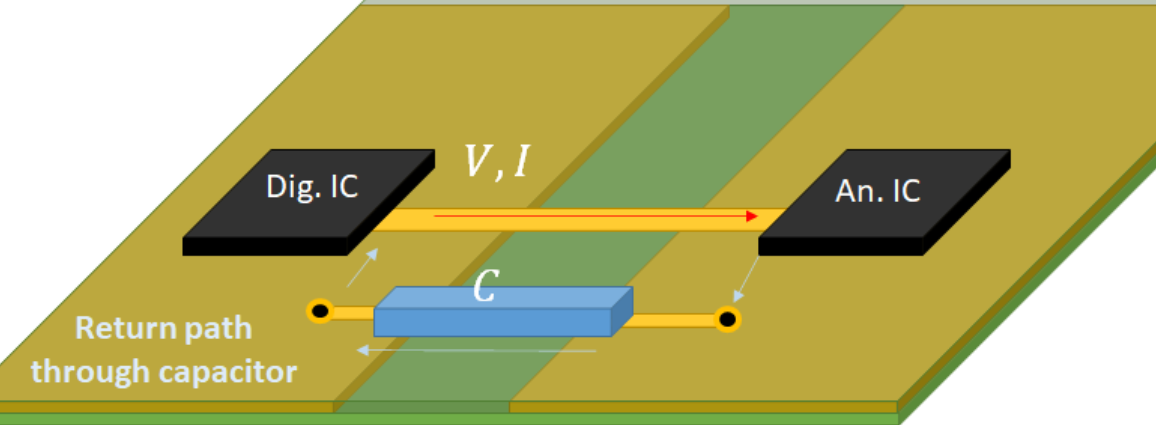
2. Analog Ground (AGND) Analog ground is dedicated to analog circuits, which process continuous signals like those from sensors or audio amplifiers. Since analog signals are highly sensitive to noise, AGND must be kept separate from noisy digital return paths. Proper AGND design involves using star grounding or partitioned planes, with a single connection point between AGND and DGND to prevent ground loops and maintain signal purity.
3. Power Ground (PGND) Power ground handles high currents from power supplies, motor drivers, or converters. Due to large fluctuating currents, PGND can introduce voltage spikes and noise into sensitive circuits. It should be routed using thick traces or dedicated layers, and connected to signal grounds at a single point near the power source. This minimizes interference and avoids ground bounce.
4. Chassis Ground Chassis ground connects the metal enclosure or frame of a device to the ground system. It serves two key roles:
Safety: Diverts leakage current away from users.
EMI Shielding: Acts as a Faraday cage to block external interference. Chassis ground is typically connected to earth ground in AC-powered systems.
5. Earth Ground Earth ground involves a physical connection to the ground via a copper rod or grounding electrode. It is primarily used for safety in AC power systems, providing a path for fault currents to dissipate safely into the earth, thereby preventing electric shock.
In summary, effective grounding requires strategic separation and connection of these ground types. For instance, sensitive analog and high-speed digital grounds should remain isolated but linked at a single point to maintain a common reference. Similarly, power grounds must be kept separate to avoid contaminating low-voltage signal paths. By applying the right grounding strategy—such as using split planes, ferrite beads, or star-point connections—you can significantly enhance circuit reliability and performance.
In mixed-signal PCB design, avoid splitting ground planes unnecessarily. Instead, use a unified ground plane with careful partitioning of analog and digital components to reduce return path disruptions.
Why Is GND the Zero-Volt Reference in Electronics?
Voltage is a relative measure; without a reference point, readings are meaningless.
GND provides a stable “zero” level, allowing components to operate with consistent logic thresholds (e.g., 0V for LOW, 5V for HIGH in TTL logic).
For instance, an Arduino’s GND pin ensures all sensors and ICs share the same baseline.
What Are the Differences: PGND vs GND?
While both PGND (Power Ground) and GND (Signal Ground) serve as the zero-voltage reference in a circuit, their roles, design requirements, and applications are fundamentally different. Properly distinguishing between them is critical to avoiding common grounding mistakes that lead to noise, instability, and component failure.
Core Definitions
GND (Signal Ground): This is the clean reference point for low-power analog and digital signal paths. It is used by sensitive circuits like sensors, microcontrollers, and communication interfaces (e.g., UART, I2C) where signal integrity is paramount.
PGND (Power Ground): This ground path is dedicated to high-current, often noisy circuits such as motor drivers, switch-mode power supplies (DC-DC converters), and power amplifiers. Its primary function is to provide a low-impedance return path for large, fluctuating currents.
Key Differences Detailed
Current Handling and Function
PGND: Handles high currents, from several Amps to hundreds of Amps. Its key role is to minimize voltage drop and power loss in the return path of power circuits.
GND: Carries only low-level signal return currents (microamps to milliamps). Its purpose is to provide a stable, low-noise reference voltage for accurate signal processing and logic operation.
PCB Layout and Routing
PGND: Requires short, wide traces or a dedicated copper pour to reduce parasitic resistance and inductance. It is often directly connected to thermal pads, heatsinks, and the chassis to aid in heat dissipation and safety grounding.
GND: Focuses on avoiding noise coupling. It is typically implemented as a continuous plane to ensure a uniform potential. Its routing must be carefully planned to stay away from noisy PGND areas and high-power components.
Noise Considerations and Safety
PGND: Inherently noisy due to high-speed switching and large current swings (e.g., in a DC-DC converter). It must be isolated to prevent this noise from propagating through the system.
GND: Must be meticulously protected from the noise and voltage spikes present on the PGND. Its cleanliness is essential for the reliable operation of sensitive components.
The Critical Mistake and the Best Practice Solution
A common and costly error is merging PGND and GND paths on the PCB layout. This allows noisy power return currents to flow through the signal ground areas, creating ground loops and corrupting sensitive measurements.
The best practice solution involves a two-step approach:
Strategic Separation: Keep PGND and GND physically separate on the PCB layout. This involves defining distinct copper areas for each, preventing the high-current loops of the PGND from overlapping with the sensitive signal paths of the GND.
Single-Point Connection: Connect the PGND and GND planes at a single point, known as a “star point.” This is typically done near the power input or the main power supply IC. This connection establishes a common system voltage reference without allowing noisy currents to circulate in the signal ground.
For circuits with very high-frequency noise, a ferrite bead can be placed at the star point. This adds high-frequency isolation while maintaining a DC path, further enhancing the cleanliness of the signal ground. By implementing this separation and single-point connection strategy, you directly address a fundamental grounding mistake, leading to a more robust and reliable design.
What Does 10k GND Mean?
In jewelry, “10k GND” refers to 10k gold (10 karat gold), where “GND” is likely a misspelling or abbreviation.
In electronics, “10k GND” could describe a resistor (10kΩ) connected to ground, commonly used in pull-down configurations.
How to Define GND in PSpice?
In PSpice, GND must be explicitly defined as node “0” to serve as the simulation reference:
Place a GND symbol from the source or capsym library.
Select the component named ”0″ (numeric zero).
Connect it to the circuit’s return path.
Failing to use the “0” node will result in simulation errors.
What Are the Different GND Definitions in PCB Design?
In PCB design, GND meaning is not a one-size-fits-all concept. It represents a systematic framework for managing current return paths, signal integrity, and safety. The choice of grounding strategy is a cornerstone of robust circuit design, directly influencing noise control, EMI performance, and overall system reliability. Understanding these methodologies is fundamental to avoiding common grounding mistakes.
Core Grounding Strategies
The strategy you choose depends heavily on the operating frequency and the nature of the signals in your circuit.
Single-Point Grounding: This method connects all ground returns from various subsystems to a single physical point on the PCB, creating a “star” topology. It is highly effective at preventing ground loops, a common source of low-frequency noise.
Best For: Low-frequency circuits (typically below 1 MHz), sensitive analog systems (e.g., sensors, audio amplifiers), and DC power supplies.
Drawback: At high frequencies, the long traces to the central point exhibit high impedance, making this approach ineffective and even counterproductive.
Multi-Point Grounding: In high-speed designs, the goal is to minimize impedance at all costs. This approach connects components to the nearest low-impedance ground plane using the shortest possible path, typically via numerous vias to a dedicated ground layer in a multi-layer PCB.
Best For: High-frequency digital and RF circuits (above 10 MHz), where providing a minimal-inductance return path is critical for signal integrity.
Drawback: This can easily create complex ground loops, which are problematic if not managed correctly in mixed-signal systems.
Hybrid Grounding: Most modern electronics are mixed-signal systems, requiring a blend of strategies. Hybrid grounding uses a single-point connection to tie different ground domains (like Analog GND and Digital GND) together at low frequencies, while each domain utilizes a multi-point plane locally.
Best For: Systems with ADCs, DACs, or any design combining noisy digital logic with sensitive analog circuits.
Implementation: A classic example is a “split plane” layout, where analog and digital ground planes are partitioned but connected at a single point under the mixed-signal IC to prevent digital noise from corrupting analog measurements.
Floating Ground: A floating ground system is not physically connected to the earth (chassis) ground. Its potential is independent, which can effectively break ground loops caused by connections to other equipment.
Best For: Battery-powered devices, medical isolation equipment, and specific test and measurement scenarios.
Critical Consideration: Floating systems are susceptible to electrostatic discharge (ESD) and charge accumulation. A standard practice is to connect the floating ground to the chassis through a high-value resistor (e.g., 1 MΩ) to safely bleed off static charge while maintaining DC isolation.
Fundamental Ground Type Classifications
Beyond the overall strategy, it’s crucial to distinguish between the types of ground based on their function:
Signal Ground (GND): This is the reference point for low-power analog and digital signals. Its primary purpose is to provide a “clean” voltage基准 for accurate signal processing and logic operation. Currents are small, so the focus is on minimizing noise.
Power Ground (PGND): This path is dedicated to high-current circuits like motor drivers, power supplies, and DC-DC converters. It carries large, fluctuating currents that generate significant noise. The key design goal is low impedance to minimize voltage drops and power loss.
Chassis Ground: This connects to the metal enclosure of the device, serving two purposes: safety (diverting fault currents) and EMI shielding (acting as a Faraday cage).
Earth Ground: This is the physical connection to the earth via a grounding rod. It is primarily a safety measure for AC-powered systems.
The core reason for separating, for example, PGND and Signal GND is common impedance interference. Even a small trace resistance can cause significant issues. When a high-power motor’s return current shares the same path as a sensitive sensor’s signal return, the motor’s large current fluctuations will create a variable voltage drop across the trace impedance. This fluctuating voltage effectively injects noise directly into the sensor’s reference point, corrupting the measurement. Proper grounding ensures these return paths do not interfere with one another.
The choice of grounding scheme is a direct response to your circuit’s requirements:
Low-Frequency, Precision Analog Systems: Prioritize single-point grounding to eliminate ground loops.
High-Speed Digital Systems: A solid, continuous multi-point ground plane is non-negotiable for signal integrity.
Mixed-Signal Systems: A hybrid approach with careful layout partitioning is the most reliable method to avoid common grounding mistakes.
A modern best practice for complex mixed-signal PCBs is to use a unified ground plane rather than physically splitting it. The key is to meticulously partition the component placement—grouping all analog components together and all digital components together—over a continuous ground plane. This provides the lowest-impedance return path and avoids the potential antenna effects and complex return paths created by slits in the ground plane.
What Are the Common GND Confusions and Misuse in Circuits?
Ground Loops: Multiple GND paths causing current circulation and noise. Fix: Use single-point grounding or isolation transformers.
Floating Grounds: Unconnected GND leads leading to erratic behavior. Fix: Ensure all GND points are tied to a common reference.
Ignoring Current Return Paths: Narrow GND traces causing voltage drops. Fix: Use wide traces or dedicated GND planes.
To conclude, GND meaning is the cornerstone of effective circuit design, ensuring stability, safety, and performance. By understanding grounding principles and avoiding common mistakes, you can significantly enhance your electronics projects.
At BEST Technology, we combine precision engineering with practical insights to help you overcome grounding challenges. Pls feel free to reach out to us at sales@bestpcbs.com for PCB solutions that stand the test of quality and reliability.
FAQs About GND Meaning
Q1: Why is Grounding Necessary? Grounding ensures safety, reduces noise, and maintains signal integrity. Prioritize low-impedance paths, minimize loop areas, and isolate noisy/sensitive grounds. Grounding serves three primary purposes:
Safety: Protects against electric shock by providing a path for fault currents (e.g., from short circuits) to safely dissipate into the earth.
Noise Control: Provides a stable reference point (0V) for signals, reducing interference in electronic circuits.
EMI Mitigation: Minimizes electromagnetic interference by controlling return currents and shielding sensitive components.
Q2: What Are Common Ground Symbols?
PE/FG: Protective Earth/Frame Ground (safety grounding to chassis or earth).
PGND: Power Ground (for high-current paths, e.g., power supplies).
AGND: Analog Ground (for noise-sensitive analog circuits).
DGND: Digital Ground (for digital circuits with high-frequency noise).
GND: General signal ground (common reference point).
Q3: Why Does Signal Return Path Matter? Signals always follow the lowest-impedance path back to their source. Poor return paths cause:
EMI Radiation: Large current loops act as antennas.
How to choose high temperature PCB material? This blog is mainly about datasheet, types, selection guide, common supplier and cost for high temperature PCB material.
Are you troubled these issues with high temperature PCB?
High-temp PCBs cracking/delaminating above 150°C?
Signal distortions in hot-humid environments unsolved?
Copper migration/insulation failure after long-term heat exposure?
As a professional high temperature PCB manufacturer, EBest Circuit (Best Technology) can provide you service and solutions:
For extreme operating environments: Equipment requiring long-term operation above 150°C (e.g., automotive engine compartments, spacecraft, oil well drilling equipment) will soften and fail due to the presence of ordinary materials.
Ensuring structural stability at high temperatures: A high glass transition temperature (Tg≥170°C) prevents PCB deformation and delamination due to heat, avoiding solder joint cracking and component displacement.
Improving long-term reliability: A low coefficient of thermal expansion (CTE) reduces temperature cycling stress, preventing through-hole copper foil breakage (“barrel cracking”) and extending equipment life (critically used in aerospace and medical equipment).
Meeting lead-free soldering requirements: Lead-free solder has a high melting point (~217°C), and high-temperature materials (Tg >180°C) can withstand multiple soldering/rework processes without delamination.
Preventing conductive anode wire (CAF) failure: In high-temperature and high-humidity environments, special resin formulations (e.g., polyimide, modified epoxy) can inhibit short circuits caused by copper ion migration.
Supports high-power/high-density designs: High-power devices (such as electric vehicle motor controllers) generate localized high temperatures, requiring materials to maintain insulation and mechanical strength within the high-temperature internal layer.
Accommodates high-frequency/high-speed circuit requirements: Some high-temperature materials (such as PTFE and modified PPO) also possess low dielectric loss (Df), making them suitable for high-frequency applications such as 5G and radar.
Meets stringent industry certification standards: Automotive (AEC-Q), aerospace (MIL), and industrial applications require mandatory high-temperature reliability testing; specialized materials are a prerequisite for compliance.
High Temperature PCB Material Datasheet
Parameter
Specification
Glass Transition Temperature (Tg)
130°C, 150°C, 170°C, 180°C, 200°C+
Thermal Decomposition Temperature (Td)
300°C, 320°C, 340°C, 350°C+
Coefficient of Thermal Expansion (CTE)
X/Y Axis: 12-16 ppm/°C
Z Axis
40-70 ppm/°C
Thermal Conductivity
0.2-0.5 W/(m·K)
Water Absorption (24h Immersion)
<0.10%, <0.05%
Dielectric Constant (Dk)
3.5-4.5 (1GHz-10GHz)
Dissipation Factor (Df)
0.002-0.008 (1GHz-10GHz)
Soldering Resistance
≥3 cycles of lead-free reflow soldering (288°C)
Peel Strength
≥0.8 N/mm (copper foil adhesion)
Volume Resistivity
>10¹⁴ Ω·cm
Surface Resistivity
>10¹³ Ω
Common High Temperature PCB Materials Types
Polyimide (PI)
Features: Polyimide is one of the most widely used high-temperature PCB materials, with a glass transition temperature (Tg) typically exceeding 250°C and long-term operating temperatures up to 200°C or higher. It exhibits excellent heat resistance, mechanical strength, flexibility, and resistance to chemical corrosion and radiation.
Applications: Suitable for high-temperature environments such as aerospace, automotive electronics (e.g., engine control systems), military equipment, and medical instruments. Flexible versions are also applicable to wearable devices.
Advantages: High reliability, good dimensional stability, but higher costs and greater processing difficulty.
Polytetrafluoroethylene (PTFE)
Features: PTFE is a high-frequency material with a Tg of approximately 160°C, though it can withstand short-term temperatures up to 260°C. It is renowned for low dielectric constant and low loss factor, ideal for high-frequency and high-speed applications.
Applications: Primarily used in communication equipment (e.g., 5G base stations), radar systems, and RF modules. For high-temperature environments, it requires combination with reinforcing materials (e.g., ceramic fillers).
Advantages: Excellent electrical performance and chemical resistance, but poor adhesion, necessitating specialized processing techniques.
Ceramic Substrate Materials (e.g., Al₂O₃ and AlN)
Features: Ceramic materials offer extremely high thermal conductivity and heat resistance, with operating temperatures exceeding 300°C. Alumina (Al₂O₃) is cost-effective, while aluminum nitride (AlN) provides superior thermal conductivity for high-power density designs.
Applications: Common in power electronics, LED lighting, electric vehicles, and industrial control systems, used for critical heat-dissipating components.
Advantages: Outstanding thermal management and mechanical strength, but relatively brittle, requiring careful handling.
Features: Standard FR-4 has a Tg of 130-140°C, while high-temperature variants can elevate Tg to 170-180°C by incorporating fillers (e.g., brominated epoxy). It provides good electrical insulation and cost efficiency.
Applications: Suitable for moderate high-temperature environments in consumer electronics, household appliances, and general industrial equipment, commonly selected for economical high-temperature applications.
Advantages: Low cost, easy processing, but limited temperature resistance, unsuitable for extreme conditions.
Liquid Crystal Polymer (LCP)
Features: LCP has a Tg exceeding 280°C, featuring low moisture absorption, high dimensional stability, and exceptional high-frequency performance. It maintains stable performance in high-temperature and high-humidity environments.
Applications: Mainly used in high-frequency circuits, automotive sensors, and mobile communication devices, particularly suited for miniaturized designs.
Advantages: Balanced overall performance, suitable for complex environments, but higher raw material costs.
Phenolic Resin-Based Materials
Features: These materials typically have a Tg of 150-200°C, offering good heat resistance and mechanical hardness, but average electrical performance.
Applications: Common in older industrial equipment or low-cost applications such as power modules and transformers.
Advantages: Economical, practical, and readily available, but gradually being replaced by high-performance materials.
1. Clarify Application Scenarios and Temperature Requirements
Scenario Identification: Precisely define the product operating environment (e.g., automotive engine compartments, aerospace, industrial controls, 5G base stations), as temperature gradients vary significantly across scenarios.
Temperature Threshold: Determine the maximum continuous operating temperature (e.g., automotive electronics ≥150°C, aerospace up to 300°C+), thermal shock tolerance range (e.g., -55°C to 200°C), and peak soldering temperature (260°C±5°C).
Lifespan Expectation: Reverse-engineer material long-term thermal stability thresholds based on product design lifespan (e.g., industrial-grade ≥10 years).
2. Match Substrate Type to Temperature-Resistant Parameters
FR-4 Series: Standard Tg 130-140°C (long-term operation ≤105°C), high-Tg variants ≥170°C (e.g., FR-5, polyimide-reinforced types), suitable for consumer electronics to mid-range industrial scenarios.
Polyimide (PI): Tg >250°C, withstands extreme environments (-269°C to 300°C), preferred for aerospace flexible circuits, combining dielectric stability and chemical resistance.
Ceramic Substrates: Alumina (Al₂O₃, thermal conductivity 24W/m·K), aluminum nitride (AlN, 170-230W/m·K), suitable for high-power RF modules and LED heat dissipation, withstanding >300°C.
3. Optimize Coefficient of Thermal Expansion (CTE) Matching
CTE Discrepancy Risks: FR-4 (12-18ppm/°C) and copper (16-17ppm/°C) have similar CTEs, but high-temperature interlayer stress may cause via fractures and solder joint fatigue.
Heat Dissipation Optimization: Increase copper layer thickness (≥2oz), implement thermal vias/heat-sink pads, and use thermal interface materials (TIMs), combined with finite element simulation to optimize heat flux density distribution.
5. Validate Dielectric Performance Stability
Dielectric Constant (Dk) Temperature Coefficient (TCDk): FR-4 TCDk -200 to -400ppm/°C (signal drift risks in high-frequency scenarios). Modified materials like Rogers RO4350B (TCDk +50ppm/°C) and Taconic TLY-5 (TCDk +10ppm/°C) offer greater stability.
Testing and Compensation: Measure Dk temperature characteristics via resonant cavity/transmission line methods. Design with impedance matching allowances. High-frequency circuits may require dynamic compensation algorithms (e.g., clock delay adjustment).
6. Chemical Resistance and Environmental Adaptability
Chemical Corrosion Resistance: Polyimide and ceramic substrates resist acid/base and solvent corrosion. FR-4 requires compatibility evaluation with conformal coatings to avoid CAF (cathodic anode filament) short-circuit risks.
Moisture and Humidity Resistance: Low-moisture-absorption materials (e.g., ceramic <0.1%), hermetic packaging designs, and validation of insulation performance via damp heat tests (85°C/85% RH). Salt spray corrosion resistance is critical for marine environments.
7. Certification Standards and Compliance Verification
International Certifications: UL certification (flammability ratings), RoHS/REACH (environmental compliance), IPC Class 2/3 (reliability grades), industry-specific standards like IATF 16949 (automotive) and AS9100 (aerospace).
Testing and Traceability: 100% electrical performance testing, thermal cycling/vibration impact testing, and accelerated life testing (HALT/HASS). Raw material traceability systems ensure batch consistency. Suppliers must be certified to ISO 9001/14001 standards.
Common High Temperature PCB Material Suppliers
1. Rogers Corporation
Advantages
Glass transition temperature (Tg) up to 280°C (e.g., RO4350B, RO4003C), with long-term operating temperatures exceeding 200°C.
Low dielectric loss (Df as low as 0.0037) and stable dielectric constant, ideal for high-frequency/microwave circuits.
High thermal conductivity (0.5–2 W/m·K) and low coefficient of thermal expansion (CTE), enhancing dimensional stability in high-temperature environments.
Business
Full range of high-frequency laminates, prepregs, and custom materials (e.g., RO3000, RO4000, TMM® series).
Serves premium markets including 5G base stations, aerospace, automotive radar, and high-speed digital equipment.
2. Isola Group
Advantages
Tg ranges from 180–260°C (e.g., 370HR Tg=180°C, P95/P25 Tg=260°C), with decomposition temperatures up to 380°C.
Low moisture absorption (≤0.1%) and superior CAF resistance for enhanced humidity/thermal reliability.
Halogen-free designs compatible with lead-free soldering processes.
Business
Product lines include standard FR-4, mid-high-speed materials (Synamic series), and polyimide substrates (e.g., SH260 Tg>250°C).
Widely used in computing, telecommunications, automotive electronics, and consumer electronics.
5. Kingboard (Jian Tao Laminates)
Advantages
KB-6164 Tg=140°C with robust thermal performance and CAF resistance, meeting IPC-4101D/27 standards.
Cost-effective solutions competitive in mid-tier high-temperature applications.
Diverse options including yellow/white CEM-1 composite substrates and black FR-4.
Business
Supplies conventional and mid-performance laminates (FR-4, CEM-1, CEM-3).
Clients span consumer electronics, power equipment, and industrial control sectors.
How to Select A Reliable High Temperature PCB Material Supplier?
1. Define Core Performance Parameters for High-Temperature PCB Materials
Ensure precise matching of temperature resistance grades (e.g., Tg ≥ 180°C, Td ≥ 320°C, CTE ≤ 20ppm/℃) based on application scenarios (e.g., automotive engine compartments, aerospace).
Validate long-term thermal aging performance through accelerated aging tests (e.g., ≤3% dielectric constant variation, ≥90% insulation resistance retention after 1000 hours at 150°C).
2. Verify Supplier Quality Certifications and Compliance
Prioritize suppliers with international certifications such as ISO 9001, IATF 16949 (automotive), AS 9100 (aerospace), and UL 94 V-0 (flame retardancy) to meet target market regulations.
Require third-party test reports from SGS or TÜV Rheinland covering RoHS, REACH, HF compliance, and complete thermal/electrical/mechanical performance data.
3. Assess Customized Technical Support Capabilities
Evaluate the supplier’s ability to develop customized material formulations (e.g., high-frequency, chemical-resistant, ultra-thin substrates) and provide samples for validation.
Ensure process compatibility support, including optimized lamination temperature profiles, drilling parameters, and surface treatment processes.
4. Ensure Supply Chain Stability and Delivery Guarantees
Select suppliers with global logistics networks and local technical teams supporting trade terms like DDU/DDP, ensuring 7-14 day lead times and reduced international shipping risks.
Review inventory management systems and emergency response plans for urgent orders (e.g., 48-hour expedited delivery).
5. Validate Customer References and Reputation
Request case studies from automotive (e.g., Bosch, Continental), aerospace (e.g., Airbus, Boeing), and industrial control (e.g., Siemens, ABB) sectors, along with backdoor reference contacts.
Check independent reviews on platforms like Trustpilot or Google Reviews for quality consistency, technical response speed, and after-sales service quality.
6. Optimize Cost Efficiency and Long-Term Partnership Strategies
Demand transparent pricing (material costs, processing fees, logistics) and negotiate tiered pricing/annual rebates via long-term contracts.
Prioritize ESG-compliant partners with carbon footprint management, waste reduction practices, and sustainable supply chain initiatives to enhance corporate image.
7. Emphasize Environmental and Sustainability Practices
Choose suppliers using halogen-free, recyclable substrates compliant with EU ELV/WEEE directives to minimize lifecycle environmental impact.
Require carbon footprint reports and support carbon reduction through optimized packaging/logistics (e.g., sea freight over air freight) to align with client decarbonization goals.
How Much Does High Temperature PCB Materials Cost?
Specialty Copper Clad Laminates
High-Frequency, High-Speed Copper Clad Laminates (e.g., Rogers series): $300 – $800/㎡ (Depending on dielectric constant and loss factor grades).
Ceramic-Based Copper Clad Laminates (High Thermal Conductivity): $180 – $500/㎡ (Alumina-based substrates are cheaper; aluminum nitride substrates can reach $450+/㎡).
High-Temperature Copper Foil (300℃+): $25 – $50/kg (For extreme environments such as all-solid-state batteries).
Resin Systems
Polyimide Resin (PI): $120 – $300/kg (ESA certified VT-901PI and other models are 30% more expensive).
PCB 8 layer stackup is a specific arrangement of copper and insulating layers that provides an optimal balance of performance, density, and signal integrity for complex electronic designs. This article will provide a comprehensive guide to the standard 8 layer PCB stackup, compare it critically with 6-layer alternatives, and explore its key design considerations.
Are you struggling to decide if your high-speed or high-density design truly needs an 8-layer board, or if a 6-layer stackup would suffice?
Performance Anxiety: Worrying that a 6-layer board might not provide sufficient isolation for sensitive signals, leading to crosstalk and electromagnetic interference (EMI).
Routing Congestion: Facing the frustrating reality of not being able to route all the traces on a 6-layer board, especially with complex components like BGAs.
Impedance Mismatch: Struggling to achieve consistent and controlled impedance for high-speed signals, which is more challenging with fewer layers.
Power Integrity Issues: Experiencing noise on the power plane, which can cause erratic circuit behavior and is harder to manage in a 6-layer stackup.
Cost vs. Performance Dilemma: Being caught between the lower cost of a 6-layer board and the superior performance and reliability of an 8-layer PCB, unsure of the right long-term investment.
The good news is that these challenges have clear solutions when you understand the advantages of a well-designed 8 layer pcb stackup and partner with an experienced manufacturer.
Enhanced Signal Integrity: An 8-layer stackup allows for dedicated signal layers adjacent to solid ground planes, effectively minimizing crosstalk and EMI, which directly addresses performance anxiety.
Superior Routing Capability: The two additional layers provide much-needed real estate for routing complex designs, effortlessly solving routing congestion.
Precise Impedance Control: With more layers, achieving a consistent dielectric environment for impedance-controlled traces (like for the 8 layer PCB stackup impedance) becomes more straightforward and reliable.
Stable Power Delivery: Dedicated power planes in an 8-layer stackup offer low-inductance power distribution, ensuring clean power to all components and eliminating power integrity issues.
Optimal Value Proposition: While the initial cost is higher, the enhanced performance, reliability, and reduced need for re-spins often make the 8 layer stackup pcb the more cost-effective solution for advanced applications, resolving the cost vs. performance dilemma.
At BEST Technology, we specialize in manufacturing high-quality, high-performance PCBs. As an original 8 layer PCB factory with 19 years of extensive experience in multilayer boards, we understand the intricacies of PCB 8 layer stackup design. We work with you to determine the optimal stackup, whether it’s a standard 8 layer PCB stackup or a more advanced 8 layer HDI stackup, ensuring your design is built to the highest standards. A warm welcome to contact us at sales@bestpcbs.com to discuss your PCB 8 layer stackup project requirements.
What is the Typical PCB 8 Layer Stackup?
A typical PCB 8 layer stackup is engineered to maximize performance by carefully alternating signal, plane, and dielectric layers. The arrangement is not random; it is designed to shield high-speed signals and provide stable power.
1. Standard Arrangement: A common and effective typical 8-layer pcb stackup follows this sequence from top to bottom: Top Signal -> Ground Plane -> Inner Signal 1 -> Power Plane -> Ground Plane -> Inner Signal 2 -> Power Plane -> Bottom Signal. This “signal-plane-signal” pattern is a cornerstone of good 8 layer pcb stackup design guidelines.
2. Shielding and Isolation: This configuration provides shielding for the inner signal layers (Inner 1 and Inner 2) by placing them between ground planes. This is crucial for reducing noise and crosstalk.
3. Impedance Control: The symmetric structure makes it easier to control the characteristic impedance of traces, which is vital for signal integrity.
In summary, the typical pcb 8 layer stackup is a balanced structure that prioritizes signal integrity, EMI control, and power stability, making it a versatile choice for many demanding applications.
What are the Differences: 8 Layer PCB vs 6 Layer PCB?
The core difference in the “8 layer PCB vs 6” debate lies in the available resources for routing, shielding, and power distribution. The two extra layers in an 8-layer board provide a significant functional advantage.
1. Layer Configuration: A standard 6-layer stackup might be: Signal – Ground – Signal – Signal – Power – Signal. This often forces high-speed signals to be routed on layers adjacent to other signal layers, increasing the risk of crosstalk. In contrast, the PCB 8 layer stackup provides dedicated internal routing layers between ground planes.
2. Performance: The 8-layer board offers superior performance for high-speed designs due to better isolation and the ability to have dedicated power and ground planes. This leads to fewer signal integrity issues.
3. Cost and Complexity: The 6 layer PCB stackup is less expensive and simpler to manufacture. It is an excellent choice for many applications but can become a bottleneck for very high-speed or dense designs.
Ultimately, the choice hinges on the design’s complexity. For applications where signal integrity is paramount, the 8 layer PCB motherboard or similar complex board is the clear winner.
How Thick is an 8 Layer PCB?
The standard thickness of a PCB stackup is often, but not always, around 1.6mm (0.063 inches). However, the final 8 layer PCB thickness is a result of the materials used and the number of layers.
1. Standard and Custom Thickness: While 1.6mm is common, the thickness can vary. The standard 8 layer PCB stackup thickness can be designed to be 0.8mm, 1.0mm, 1.6mm, or even thicker based on the application’s mechanical and electrical requirements.
2. Factors Influencing Thickness: The 8 layer PCB stackup thickness is determined by the thickness of the core and prepreg (insulating) materials, as well as the copper weight. For impedance control, the dielectric thickness between a signal layer and its reference plane is critical.
3. Importance of Specification: When discussing your PCB 8 layer stackup with a manufacturer, it is essential to specify your desired finished thickness and impedance requirements to ensure the stackup is designed correctly.
Therefore, the thickness of an 8-layer PCB is not a fixed value but a key parameter that is carefully engineered during the stackup design phase.
How to Calculate the 8 Layer PCB Stackup Impedance?
Calculating the 8 layer PCB stackup impedance is a critical step for high-speed design, ensuring signals are transmitted without reflection or distortion.
1. Key Parameters: The characteristic impedance of a trace depends on its width (W), the dielectric height (H) to the reference plane, and the dielectric constant (Er) of the insulating material. The copper thickness (T) also has a minor effect.
2. Use of Formulas and Tools: While formulas exist, e.g., for microstrip:
Most engineers use impedance calculation tools provided by manufacturers or integrated into PCB design software like 8 layer PCB stackup altium. These tools automatically calculate the required trace width for a target impedance (e.g., 50Ω or 100Ω differential) based on the defined stackup.
3. Manufacturer Collaboration: It is best practice to finalize your stackup with your PCB manufacturer. They can provide the most accurate Er values and ensure the fabricated board will meet your impedance targets.
Proper impedance calculation is non-negotiable for reliable high-speed performance and is a fundamental part of the 8 layer PCB stackup design guidelines.
How Many Layers can a PCB Have?
PCBs can have a vast number of layers, from 1 to over 50 in extreme cases like advanced servers. The more pertinent question is: do PCB layers matter? The answer is an emphatic yes.
1. Function of Layers: The number of PCB board layers directly determines the board’s functionality. More layers allow for more complex circuitry, better separation of analog and digital sections, improved power integrity, and superior signal integrity through proper referencing and shielding.
2. Choosing the Right Number: A simple electronic device might only need a PCB stackup 4 layer, while a smartphone motherboard might require 10 or 12 layers. The decision for a PCB 8 layer stackup is based on the need for a robust design that can handle multiple high-speed signals and multiple power supplies efficiently.
The number of layers is a fundamental architectural decision that impacts the cost, performance, and reliability of the final product.
What is the 4 Layer PCB Rule?
The “4 layer PCB rule” is a fundamental guideline in PCB design that dictates the optimal arrangement of layers to maximize performance while minimizing cost. It serves as a crucial stepping stone towards understanding more complex stackups like the 8-layer board. While not a rigid law, following this rule is considered a best practice for most 4-layer designs.
1. The Core Principle: Dedicated Plane Layers The most important aspect of the rule is the allocation of the two internal layers. Instead of using them for additional signal routing, they are dedicated exclusively as solid, uninterrupted planes—one for ground (GND) and one for power (PWR). The outer layers (Top and Bottom) are then used for component placement and signal routing.
2. Standard Layer Stackup A typical and effective 4 layer board stackup follows this sequence:
Layer 1 (Top): Components and Signal Routing
Layer 2 (Internal): Ground Plane (GND)
Layer 3 (Internal): Power Plane (PWR)
Layer 4 (Bottom): Components and Signal Routing
3. Key Benefits of This Rule
Improved Signal Integrity: By routing signals on the outer layers adjacent to the solid internal planes, each signal trace has a clear and continuous reference plane. This controlled environment is essential for managing characteristic impedance and significantly reducing electromagnetic interference (EMI) and crosstalk.
Enhanced Power Integrity: The dedicated power plane provides a low-inductance path for distributing power to all components, resulting in a cleaner and more stable voltage supply, which reduces noise.
Superior EMI Performance: The two internal planes act as shields, containing the electromagnetic fields generated by high-speed signals on the outer layers, making the board less susceptible to emitting and receiving interference.
4. Comparison to 2-Layer Boards This rule highlights the major leap in performance from a 2-layer to a PCB stackup 4 layer. A 2-layer board lacks dedicated planes, forcing signals and power to share routing space, which often leads to noise and reliability issues.
In summary, the 4 layer PCB rule is a foundational concept that prioritizes a clean and stable electrical environment. It establishes the core principles of using dedicated power and ground planes, which are then scaled up and refined in more advanced stackups like the 8 layer PCB stackup.
8 Layer PCB Stackup Design Guidelines
Adhering to proven 8 layer PCB stackup design guidelines is fundamental to achieving optimal signal integrity, power integrity, and EMC performance. While the previous section outlined four key principles, a deeper understanding requires grounding these rules in the fundamental goals of all stackup design.
Before delving into specifics, all stackup design aims to satisfy two primary rules:
A Reference Plane for Every Signal Layer: Every high-speed signal routing layer must be adjacent to a solid reference plane (power or ground). This provides a controlled impedance path and a clear, low-inductance return path for signals.
Tight Power-Ground Coupling: Closely spaced power and ground planes are crucial. The minimal spacing between them creates a natural, high-frequency decoupling capacitor that enhances power integrity and reduces EMI.
Understanding the limitations of simpler boards highlights the necessity of a well-designed 8-layer stackup.
Single/Double-Sided Boards: These lack dedicated planes, leading to large signal loop areas which are major sources of EMI and susceptibility. The primary mitigation is to route critical signals (like clocks) with an adjacent ground trace to minimize the loop area.
Four-Layer Boards: While a significant improvement, the standard 1.6mm board thickness creates a large separation between layers, weakening power-ground coupling and making impedance control challenging. The best 4-layer stackup for EMI (GND-SIG/PWR-SIG/PWR-GND) uses outer layers as ground planes for shielding.
Six-Layer Boards: These offer a better balance. A common good stackup is SIG-GND-SIG-PWR-GND-SIG. It provides a reference plane for each signal layer and pairs the power and ground layers. However, achieving tight power-ground coupling within a standard board thickness remains difficult.
An 8-layer board provides the canvas to implement near-ideal stackup design. Here are critical guidelines, moving beyond the basics.
Prioritize Shielding and Symmetry to Prevent Warping The simplest 8-layer stackup (e.g., SIG-SIG-GND-SIG-SIG-PWR-SIG-SIG) is inherently poor. It has multiple consecutive signal layers without reference planes, leading to poor SI and EMI. A superior approach uses symmetry and multiple ground planes. A highly recommended 8 layer stackup is:
Top Signal (Microstrip)
Ground Plane
Internal Signal 1 (Stripline)
Power Plane
Ground Plane
Internal Signal 2 (Stripline)
Power Plane
Bottom Signal (Microstrip) This arrangement is symmetrical, preventing warping. The internal signal layers are shielded between planes, and the ground planes act as excellent EMI shields.
Maximize Interplane Capacitance for Power Integrity Following the core rule of tight coupling, place the power and ground planes that require the best noise immunity (e.g., the core voltage for an FPGA) as adjacent layers (e.g., L4/L5 or L6/L7 in the stackup above). The thin dielectric between them creates a large, low-inductance distributed capacitor that effectively suppresses high-frequency noise on the power rail.
Select the Optimal Stackup for Your EMC and SI Goals The provided material describes three common 8-layer configurations. The best choice depends on your priority:
Good SI, Poor EMI (Example 1): Features many signal layers but lacks sufficient shielding, making it susceptible to radiating.
Good SI, Better EMI (Example 2): This is a strong, common choice. It uses outer ground planes for shielding and has a tightly coupled power-ground plane pair in the center. It offers an excellent balance for most applications.
Best SI and EMI (Example 3): This is the premium configuration, utilizing four ground planes. It provides the highest level of shielding and the cleanest possible return paths for all signals, making it ideal for extremely noise-sensitive or high-radiation applications.
Collaborate with Your Manufacturer Early for Impedance Control This guideline cannot be overstated. Once you have a target stackup, you must work with your PCB manufacturer before finalizing the design. Provide them with your target impedances (e.g., 50Ω single-ended, 100Ω differential). They will feedback the precise dielectric thicknesses and trace widths required to hit your targets based on their specific materials and process capabilities. This is a non-negotiable step in the 8 layer pcb stackup design guidelines.
In summary, designing an 8-layer stackup is an exercise in careful layer ordering to manage return paths, provide shielding, and ensure stable power. By moving from the basic rules to these advanced guidelines—prioritizing shielded stripline layers, tight power-ground coupling, and selecting a stackup based on EMC needs—you can fully leverage the capabilities of an 8-layer board to create a robust, high-performance product.
How is the 8 Layer HDI Stackup?
An 8 layer HDI stackup represents a significant advancement over a standard 8 layer PCB stackup by incorporating High-Density Interconnect (HDI) technologies. It is designed for the most space-constrained and performance-driven applications where miniaturization and complex routing are paramount.
1. Core HDI Technologies HDI stackups are defined by their use of advanced manufacturing processes:
Microvias: These are laser-drilled vias with a much smaller diameter (typically less than 150µm) than mechanically drilled through-hole vias. They allow for connections between adjacent layers (e.g., from Layer 1 to Layer 2) with a minimal footprint.
Finer Traces and Spaces: HDI processes enable the etching of much narrower trace widths and clearances, allowing more circuitry to be packed into a smaller area.
Advanced Build-Up Structures: HDI boards are often built using a sequential lamination process, creating complex sub-composites that can include stacked microvias, staggered vias, and buried vias.
2. Design Advantages over Standard 8-Layer Stackups The integration of HDI technology into an 8 layer stackup PCB offers several critical benefits:
Extreme Miniaturization: By using microvias and finer lines, components can be placed closer together, and the overall board size can be drastically reduced. This is essential for devices like modern smartphones, wearables, and IoT sensors.
Enhanced Signal Performance: Shorter pathways and reduced via stubs from microvias lead to better electrical performance at high frequencies, minimizing signal loss and reflection.
Greater Routing Density: HDI allows for escape routing from high-pin-count components like fine-pitch BGAs, which would be impossible to route on a standard 8 layer PCB motherboard of the same size.
Improved Reliability: The materials and processes used in HDI manufacturing often result in a more robust and reliable board.
3. Typical Applications An 8 layer HDI stackup is not for every project due to its higher cost. It is typically reserved for cutting-edge applications, including:
Smartphones and Tablets
Advanced Medical Implants and Diagnostic Equipment
High-Performance Computing and Networking Hardware
Aerospace and Defense Avionics
In conclusion, the 8 layer HDI stackup is the pinnacle of dense, high-performance PCB design. While a standard typical 8-layer PCB stackup is powerful, the HDI variant pushes the boundaries of what’s possible, enabling the creation of smaller, faster, and more complex electronic devices.
What are the Applications of 8 Layer Stackup PCB?
An 8-layer PCB stackup is widely used in advanced electronic systems where designers need strong signal integrity, stable power delivery, and compact circuit density. These boards support high-speed interfaces, complex processors, and mixed-signal architectures that cannot be achieved with simpler stackups.
Typical applications include:
8-layer PCB motherboards for industrial and embedded computing
High-speed network devices such as routers, switches, and 5G baseband units
Telecommunications infrastructure with dense RF and digital circuits
Automotive electronics including ADAS domain controllers
Medical imaging and diagnostic systems
Industrial automation and rugged control equipment
To show how a real design translates into actual applications, the following example highlights a high-performance 8-layer HDI PCB with engineering features tailored to demanding markets. And the following specific applications are supported by a PCB built to these professional specifications:
Via Type: Resin-filled buried and blind vias
Layer Count: 8-Layer
Material: High-Tg FR-4
Tg Rating: 180°C
Copper Weight: 1oz outer / 1oz inner
Surface Finish: ENIG (1μ″)
Solder Mask: Green
Silkscreen: White
Final Thickness: 1.6mm
Technology: 3-step HDI
1. Core Networking & Communication Systems
Application: Processing and switching board for 100G/200G/400G network equipment.
Why an 8-layer PCB fits: The 3-step HDI structure handles fine-pitch BGA components used in high-bandwidth ASICs and FPGAs. Meanwhile, TG180 FR-4 improves thermal stability during long-term, high-load operation. This combination supports multi-lane SerDes signals and tight impedance control for high-speed communication links.
2. Aerospace and Defense Electronics
Application: Signal processing module for airborne radar or mission-critical avionics.
Why an 8-layer PCB fits: Aircraft electronics experience extreme temperature swings and continuous vibration. 1.6mm finished thickness and TG180 laminate provide strong mechanical strength and thermal endurance. The 1μ″ ENIG finish offers reliable surface quality for gold-wire bonding and high-frequency interconnects common in RF signal chains.
3. Advanced Medical Imaging Equipment
Application: Core electronic module in portable ultrasound or digital imaging diagnostics.
Why an 8-layer PCB fits: Medical devices demand both miniaturization and signal clarity. HDI + resin-filled vias help integrate dense components into a compact format while maintaining stable impedance for sensitive analog/digital imaging circuits. The ENIG surface ensures excellent contact reliability for fine-pitch connectors and probe interfaces.
4. Next-Generation Automotive Electronics
Application: Central computing board for ADAS or autonomous driving systems.
Why an 8-layer PCB fits: ADAS controllers must process multiple high-resolution camera, radar, and LiDAR inputs. An 8-layer stackup provides robust isolation between high-speed differential pairs and noisy power circuits. The 1oz copper thickness supports steady power delivery to high-current SoCs and processing units, ensuring stable performance even at elevated vehicle temperatures.
5. Industrial IoT and Edge Computing Devices
Application: Industrial edge gateway, PLC controller, or machine-vision interface.
Why an 8-layer PCB fits: Factories require devices that remain stable under dust, humidity, vibration, and electrical noise. The ENIG finish prevents oxidation, and the green solder mask + white silkscreen combination improves maintenance visibility. The rigid 8-layer architecture enhances long-term reliability for 24/7 operation in challenging industrial environments.
In closing, this example makes it clear that an 8-layer PCB stackup is far more than a simple increase in layer count. With the right combination of materials, HDI structures, and controlled-impedance routing, it becomes a powerful platform for mission-critical, high-speed, and high-density electronic systems across multiple industries.
In conclusion, PCB 8 layer stackup is a sophisticated multilayer board configuration that offers a significant performance upgrade over 6-layer alternatives for demanding electronic applications. This article has explored the structure, advantages, and design considerations that make the 8-layer stackup a preferred choice for high-speed and high-density designs.
For engineers seeking reliable, high-performance PCB 8 layer stackup fabrication, partnering with an experienced 8 layer PCB manufacturer is crucial. At BEST Technology, we have the expertise to guide you through the entire process, from selecting the best 8 layer stackup for your needs to ensuring impeccable manufacturing quality. Pls feel free to contact us at sales@bestpcbs.com to get started on your next 8 layer stackup PCB project.
PCB board vs breadboard: which is better? This blog mainly covers cost and application difference, selection guide for PCB board and breadboard.
Are you troubled with these issues?
Breadboard contacts are prone to cold solder joints, resulting in poor signal stability. How can reliable circuit performance be ensured?
High-frequency signals are easily interfered with on breadboards, leading to long debugging cycles. How can verification time be shortened?
Loose breadboard layouts are difficult to adapt to compact product spaces. How can a seamless transition from prototype to mass production be achieved?
As a professional PCB board manufacturer, EBest Circuit (Best Technology) can provide you service and solutions:
Precision PCB Prototyping Service: Eliminating the risk of cold solder joints and ensuring stable signal transmission through micron-level circuit etching and pad optimization.
Electrical Characteristic Verification Support: Providing multilayer board impedance control and ground plane copper pour design to reduce high-frequency signal crosstalk and improve debugging efficiency.
Mass Production Design Guidance: Intervening from the prototype design stage to optimize layout, routing, and manufacturability (DFM) to ensure a smooth transition from small-batch production to mass production.
A breadboard is a solderless experimental board used for quickly building and testing circuit prototypes. It typically consists of a plastic board with many small holes, connected internally by metal strips. This allows the pins of electronic components to be inserted into the holes and connected via wires to build the circuit. Its main advantages are that it requires no soldering, is reusable, and makes circuit building and modification very convenient, making it ideal for functional verification and debugging in the early stages of circuit design. However, its contact connections have relatively poor stability, making it unsuitable for high-frequency circuits or long-term use.
What Is A PCB Board?
A PCB, or Printed Circuit Board, is the final circuit carrier of electronic products. It is created by printing wires, lines, and holes onto a substrate using electronic processes. Electronic components are then soldered onto the board to achieve complex and stable circuit functions, used in the mass production of various electronic devices. The advantages of PCBs include high connection reliability, strong anti-interference capabilities, and suitability for large-scale production and long-term stable use. However, their design and manufacturing cycles are relatively long, prototyping costs are high when not in mass production, and modifications are very difficult once completed.
Breadboard: ideal for rapid prototyping, educational experiments, early-stage research, and creative electronics projects (e.g., Arduino/STM32 development, sensor testing, basic circuit experiments). Its plug-and-play nature eliminates soldering, supports component reuse, and suits temporary or small-scale projects, especially for beginners and educational settings.
PCB board: excels in mass production, complex circuits, high-frequency circuits, and high-reliability scenarios (e.g., medical devices, industrial control, automotive electronics, aerospace, IoT devices). Soldering provides stable electrical connections, enables high-density integration, and meets long-term stability demands.
Cost and Benefit Analysis
Breadboard: has a low initial cost (single board costs tens of dollars), suitable for low-budget or short-term projects. However, frequent plugging/unplugging may cause poor contact, increasing long-term maintenance costs, and is unsuitable for high-frequency/complex circuits.
PCB board: has a higher initial cost (design, fabrication, and processing fees) but unit costs drop significantly with mass production. Its high reliability and low failure rate reduce overall costs in the long run, especially for mass production and precision equipment.
Design and Flexibility Comparison
Breadboard: offers design flexibility, allowing instant component replacement and supporting rapid iteration. However, messy wiring, low integration density, and difficulty in high-density/high-frequency circuit design are drawbacks.
PCB board: requires professional software (e.g., Altium, Eagle) for design, supports precise layout and high-density integration, and suits complex circuits and customization. Once fabricated, circuits are fixed, requiring re-fabrication for modifications, but enables anti-interference and high-precision designs.
Reliability and Stability
Breadboard: Physical contact connections are susceptible to mechanical stress, leading to poor contact or signal interference, especially in high-frequency or precision circuits.
PCB Board: Solder joints provide stable electrical connections, strong anti-interference capabilities, and meet industrial-grade reliability standards (such as ISO certification), making it suitable for high-precision, high-reliability applications (such as medical equipment and aerospace).
Maintenance and Scalability
Breadboard: allows easy maintenance with replaceable components but frequent plugging may accelerate aging. Scalability is limited; large-scale circuits require multiple boards connected with wires, leading to messy wiring.
PCB board: requires professional tools for maintenance but has low failure rates. It supports modular design and batch soldering, offers strong scalability, and enables functional upgrades via layer addition or layout optimization, suitable for long-term use and mass production
Environmental Protection and Compliance
Breadboard: materials are recyclable, but frequent replacements may generate waste.
PCB board: uses lead-free soldering and eco-friendly materials (e.g., FR-4), complying with international environmental standards (e.g., RoHS), suitable for exports to regions with strict environmental requirements (e.g., Europe, US).
Low-complexity/low-frequency circuits (e.g., LED arrays, simple sensors, basic logic circuits): Breadboard suffices due to fewer contact points, lower costs, and minimal parasitic parameter impact on low-frequency signals.
High-complexity/high-frequency/precision circuits (e.g., RF modules, high-speed digital circuits, precision analog circuits): PCB is essential. High-frequency signals are sensitive to parasitic capacitance/inductance; PCB enables signal integrity optimization via multi-layer routing, ground plane design, differential pairing, and noise/crosstalk/attenuation mitigation.
3. Balance Cost & Time Efficiency
Short-term cost sensitivity: Breadboard has low initial investment (5−50), suitable for budget-constrained or short-cycle projects (e.g., temporary demos, student projects). However, long-term use may incur hidden maintenance costs due to contact oxidation/loosening.
Long-term cost optimization: PCB design/fabrication fees are higher upfront, but per-unit costs drop significantly in bulk (e.g., <$5/unit at 1,000+ pieces). Supports SMT automation, ideal for stable long-term demand or scaled production.
Frequent modifications/modular design: Breadboard supports plug-in component adjustments, ideal for algorithm validation or multi-version testing. However, prolonged use may cause contact wear and faults.
Fixed design/mass production: PCB designs are static; modifications require costly re-fabrication. However, integrated test points and identifiers streamline batch production quality control and troubleshooting, suitable for standardized product development.
6. Align with Technical Maturity & Team Expertise
Beginners/non-professional teams: Breadboard lowers entry barriers, requiring no soldering skills, ideal for hobbyists, students, or small teams.
Professional engineers/enterprise R&D: PCB design demands professional tools (e.g., Eagle, Altium Designer) and fabrication processes, suitable for experienced teams or projects requiring high precision/reliability.
Prioritize Breadboard: When projects are in early exploration, require rapid concept validation, have limited budgets, or low reliability demands.
Prioritize PCB: When projects demand productization, mass production, strict signal quality/anti-interference requirements, or involve high-frequency/precision circuits.
Transition Strategy: Validate logic/functionality on Breadboard first, then transition to PCB once design stabilizes—this balances development efficiency with product quality, a common practice among global engineers, makers, and R&D teams.
When to Use Breadboard Instead of PCB Board?
Rapid Prototyping and Proof-of-Concept: Breadboards are the preferred choice when you need to quickly build electronic circuit prototypes to validate your design ideas. They require no soldering, support rapid plug-and-play and circuit modifications, making them suitable for rapid design iteration in the early stages of development. For example, makers and startups abroad often use breadboards to quickly test the compatibility of components such as sensors and microcontrollers, saving time and costs associated with PCB design and production (which typically takes days to weeks).
Education and Learning Scenarios: For students, educational institutions, and DIY enthusiasts, breadboards are used as teaching tools due to their intuitive and easy-to-use features. For example, in electronics courses in primary and secondary schools abroad, students can intuitively understand circuit connection principles (such as series/parallel connections) using breadboards without needing to learn complex PCB design software or soldering processes, lowering the learning threshold.
Temporary Testing and Troubleshooting: In the later stages of product development or in repair scenarios, breadboards can quickly build test circuits to locate problems. For example, when engineers need to verify the functionality of a module, they can temporarily build test circuits using breadboards, avoiding the high costs of repeatedly modifying PCB designs (the cost of a single PCB fabrication can reach hundreds of dollars).
Low-complexity, short-term use projects: For one-off, short-term projects (such as exhibition demonstrations and temporary exhibits), breadboards are more advantageous due to their low cost and reusability. International clients often choose breadboards to build simple demonstration circuits, avoiding the high costs of PCB fabrication for short-term needs.
Design flexibility requirements: When designs require frequent adjustments or exploration of multiple solutions, the modular nature of breadboards allows users to disassemble and reassemble circuits at any time. For example, international R&D teams may use breadboards in the early stages of development to quickly try different combinations of resistors and capacitors to optimize circuit performance without having to create multiple PCB prototypes.
How Does Cost Difference between PCB Board and Breadboard?
Breadboard: $0.50–$8.00+. Basic models (400-830 holes) typically range from $2.00 to $5.00. Larger quality models or those with accessories (power rails, bases) can reach $8.00+.
PCB (Single/Small Batch Prototype): $2.00–$50.00+. Costs are greatly affected by size, number of layers, complexity, materials, processes, and lead time. The sample price (e.g., 5 pieces) of the most basic double-layer board (~10cm x 10cm, FR-4, standard parameters) spreads to approximately $5.00–$15.00 per piece. More complex boards (multi-layer, high-density, special materials/processes) or rush orders easily exceed $20.00–$50.00+ per piece.
How to Choose A Reliable Breadboard Manufacturer?
1. Hard Qualification Verification
International Certifications & Standards: Prioritize manufacturers with ISO 9001:2015 (Quality Management), ISO 14001 (Environmental Management), UL/CE (Safety Certifications) to comply with target markets like EU/US regulations. Verify certificate authenticity and validity via official certification agency websites.
Raw Material Traceability & Quality Control: Request supplier lists for raw materials (e.g., ABS plastic, copper foil) and confirm compliance with RoHS/REACH. Inspect quality control points (e.g., soldering temperature, board flatness) through on-site audits or third-party testing.
2. Production Capacity Assessment
Capacity & Customization: Evaluate monthly output (e.g., 10,000+ pieces/month) and confirm support for small-batch trials (e.g., <500 pieces) and rapid prototyping (3-5 days). Check customization options (dimensions, colors, logo printing) and mold development capabilities.
Technology & R&D: Review R&D investment ratios and patent portfolios (e.g., conductive materials, anti-oxidation coatings). Prefer collaborations with universities/research institutions for technical leadership.
3. Client Case & Reputation Verification
Industry Case Studies: Request overseas client cases from the past 3 years (e.g., EU electronics firms, educational institutions), focusing on product/order scale alignment and regional market match.
Third-Party Reviews: Source feedback from trade fairs, B2B platforms (Alibaba), or review sites (Trustpilot) for metrics like on-time delivery and after-sales response. Avoid relying solely on curated testimonials.
4. Communication & Service Quality
Cross-Cultural Communication: Confirm multilingual (English/Spanish) sales teams and 24/7 support. Test response times (<12 hours) and issue resolution (e.g., sample defect handling).
After-Sales System: Clarify warranty periods (1-3 years), return policies, and tech support methods (video tutorials, remote assistance). Overseas clients prioritize local services (e.g., EU warehouses, regional repair centers).
5. Logistics & Supply Chain Transparency
Export Experience & Logistics Network: Select manufacturers with 5+ years of export experience and familiarity with trade terms (FOB/CIF). Evaluate logistics partners (DHL/FedEx) and storage networks (EU overseas warehouses) for controlled lead times (3-7 days air, 30-45 days sea).
Supply Chain Visibility: Demand traceability data (material batches, production dates) and third-party logistics tracking (bill of lading numbers, shipment tracking).
Welcome to contact us if you have any request for breadboard or PCB board: sales@bestpcbs.com.
How to design a castellated PCB? This blog is mainly about design guideline and considerations, production process for castellated PCB.
Are you troubled these issues with castellated PCB?
Is board space extremely limited while traditional connections occupy too much area and fail reliability?
When welding modules to mainboards, is alignment often imprecise, causing high yield fluctuations and production costs?
Want compact board-to-board assembly but face complex processes, long cycles, and struggle to match product iteration speeds?
As a castellated PCB manufacturer, EBest Circuit (Best Technology) can provide you service and solutions:
Process Guarantee: Specializing in castellated PCB precision machining, we use unique processes and full-cycle quality control to ensure full copper plating, smooth hole walls, and stable “golden fingers” for reliable board connections.
Design Collaboration Optimization: Professional front-end DFM analysis services identify design-phase risks early, optimizing module layouts and castellated structures for precise alignment and efficient assembly.
Efficient Flexible Production: Rapid-response production lines for small/medium batches reduce lead times, flexibly align with R&D rhythms and market demands, and accelerate market entry.
Feel free to contact us if you have inquiry for castellated PCB: sales@bestpcbs.com.
What Is a Castellated Hole PCB?
A Castellan Hole PCB is a type of printed circuit board with specially designed semi-circular gold-plated holes (resembling castle crenellations) machined along its edges. Its core feature is that these holes are precisely cut into half-holes along the board edge, and the hole walls are metallized, exposing the internal conductor layers. This design allows the PCB to be soldered directly to the pads of another PCB through the metallized layer on the half-hole, just like surface mount technology (SMT) components, achieving a reliable vertical interconnection between boards.
Why Use Castellated Holes in PCB?
Achieving Vertical Board-to-Board Interconnection: Core Advantages. Allows one PCB to be directly and vertically soldered to the pads of another PCB via a metallized layer on a half-hole, just like a surface mount device (SMT) component, creating a compact 3D structure.
Significant Space Savings: Vertical stacking greatly optimizes the utilization of internal space, especially suitable for space-constrained miniaturized and portable electronic products.
Simplified Assembly Process: Eliminates the need for additional connectors such as sockets, pin headers, cables, or flexible printed circuit boards (FPCs) required for traditional board-to-board connections, reducing material costs and assembly steps.
Improved Connection Reliability: Direct SMT solder joints are formed between the metallized half-holes and the pads, providing stronger mechanical strength and electrical contact reliability than plug-in connectors, and offering better vibration resistance.
Reduced Overall Cost: By eliminating external connectors and their assembly costs, and simplifying the production process (compatible with standard SMT processes), the bill of materials (BOM) and manufacturing costs of the product can be effectively reduced.
Enhanced Design Flexibility: Facilitates modular design. Functional modules (such as Wi-Fi/BT modules and power modules) can be prefabricated as independent daughterboards with castle holes, simplifying the main system design and facilitating replacement and upgrades.
How To Design A Castellated PCB?
1. Define Design Goals and Constraints
Functional Requirement Definition: Engage in in-depth communication with clients to clarify electrical performance (e.g., signal speed, impedance requirements), mechanical dimension constraints (e.g., castellation pitch, height), thermal management needs (e.g., heat dissipation path, power dissipation), and environmental adaptability (e.g., temperature range, vibration resistance).
Standards and Specification Compliance: Adhere to international standards (e.g., IPC-2221A, IPC-4761) and client-specific specifications, including EU RoHS/REACH environmental requirements and UL safety certifications.
Layer Stack Planning: Design stack-up based on signal integrity needs. For high-speed digital circuits, use 6-layer structures (signal-ground-power-signal-ground-signal) to ensure impedance continuity (e.g., 50Ω single-ended, 100Ω differential).
Material Selection: Choose high-frequency/high-speed substrates (e.g., Rogers 4350B, Isola I-Tera MT40) to reduce dielectric loss, or high-Tg materials (Tg ≥170°C) for thermal stress resistance. Copper thickness matches current capacity (e.g., 1oz for signal layers, 2oz for power layers).
Ground Plane Design: Implement continuous ground planes covering critical signal areas to minimize signal return paths. Use thin dielectrics (e.g., 50μm) between power and ground planes to reduce PDN impedance.
3. Layout and Routing Strategies
Layout Principles: Partition functional modules (digital, analog, power zones). Place sensitive components (e.g., crystal oscillators) away from heat sources and noise sources. Avoid precision components near castellation edges to prevent mechanical stress damage.
Routing Rules: Route high-speed signals as differential pairs (length matching ±5mil, spacing ≥3× line width). Avoid 90° turns (use 45° or curved paths). Calculate power trace width for current capacity (e.g., 10mil width for 1A current) and use multiple vias for parallel resistance reduction.
Castellation Edge Handling: Add non-functional pads (e.g., 1mm×1mm) at sawtooth edges for mechanical reinforcement. Chamfer edges (e.g., R0.5mm) to reduce stress concentration.
4. Thermal Design and Heat Management
Heat Dissipation Path Planning: Place high-power devices (e.g., power MOSFETs) over thick copper pours (≥2oz) and connect to ground planes via thermal vias filled with solder paste. Design castellation edges as heat sinks to increase air contact area.
Thermal Via Design: Deploy dense thermal vias (e.g., 0.3mm diameter, 1mm spacing) under heat sources to form thermal channels. Fill vias with conductive materials (e.g., copper paste) to enhance thermal conductivity.
Simulation Validation: Use thermal simulation tools (e.g., ANSYS Icepak) to verify temperature distribution, ensuring peak temperatures stay below component limits (e.g., junction temperature ≤125°C).
5. Signal Integrity and EMC
Impedance Control: Calculate stack-up parameters to ensure critical signal line impedance matching (e.g., using Polar SI9000). Apply back-drilling to minimize stub effects.
Crosstalk Mitigation: Increase shielding for sensitive signals (e.g., 3W rule) or use ground shielding. Maintain sufficient spacing between high-speed differential pairs (≥3× line width).
EMC Design: Add π-type filters (inductor + capacitor) at power entry points. Place decoupling capacitors (e.g., 0.1μF + 10μF) near critical ICs. Avoid antenna effects at castellation edges (e.g., long traces).
6. Testability and Reliability
Test Point Design: Place test pads (≥1mm diameter) at critical nodes (power, signal I/O) with labeled identifiers. Boundary scan (JTAG) interfaces must comply with IEEE 1149.1.
Mechanical Reliability: Validate vibration resistance via stress analysis (e.g., ANSYS Mechanical). Reinforce critical connector areas with stiffeners (e.g., L-shaped copper traces).
DFM Checks: Perform DRC/ERC checks using EDA tools (e.g., Altium Designer, Cadence Allegro) to ensure compliance with manufacturing tolerances (e.g., minimum trace/spacing ≥4mil). Generate Gerber files and drilling data.
7. Testability and Reliability
Design Documentation: Compile detailed specifications (BOM, stack-up, routing rules), assembly drawings, and test procedures. Provide 3D models (e.g., STEP format) for mechanical fit evaluation.
Version Control: Track design changes using version control systems (e.g., Git) for traceability. Final deliverables include Gerber files, BOM, coordinate files, and process notes.
Castellation PCB Design Technical Parameter
Parameter Name
Recommended Value/Range
Drill Diameter
0.4 mm – 1.0 mm
Pad Diameter
Drill Diameter + 0.2 mm
Depth
Board Thickness
Pitch
≥ 0.5 mm (High-density designs may reduce to 0.4 mm with DFM evaluation)
Edge Clearance
≥ 0.3 mm
Cu Plating Thickness
Minimum 20 μm (0.8 mil)
Surface Finish
ENIG / HASL / Immersion Tin
Hole Wall Roughness
≤ 35 μm
Burr Control
No visible burrs
Solder Mask Opening
Single-side expansion 0.05-0.1 mm
Thermal Shock Test
-40°C to +125°C
Solderability
Wetting area ≥95%
PCB Castellated Edges Design Consideration
Mechanical Strength and Dimensional Design
Minimum Hole Diameter Requirements: PCB half-hole diameter must be determined based on board thickness. For boards under 1.0mm thick, a minimum half-hole diameter of 0.6mm is recommended; for boards over 1.6mm thick, a minimum half-hole diameter of 1.0mm is advised.
Edge Spacing: Maintain a minimum distance of 10–15% of board thickness between half-hole edges and outer copper foil edges to minimize stress concentration and ensure soldering quality.
Pattern Consistency and Alignment: Precise alignment between pads and drilled holes is critical. Include adequate fiducial marks to reduce component misalignment risks.
Electrical Signal Integrity
Reference Layer Management: Avoid cutting through power and ground planes near half-holes. Implement reference layer bridging (keep-out area bridge design) to mitigate impedance mismatches.
Shielding Design: For RF/high-frequency applications, incorporate metallized shielding edges and alternating pad layouts to reduce EMI.
Coaxial Signal Path Recommendations: When routing high-speed differential lines, maintain consistent spacing along pads. For high-density communication modules, perform impedance simulation to validate design parameters.
Process Standardization
Pad Geometry Design: Half-hole pads should be oval-shaped or extended to the edge to ensure adequate plating coverage (≥65% metal retention post-drilling).
Pre-Soldering Preparation: Apply epoxy hole fill or solder mask control in half-hole soldering zones to enhance SMT reliability.
Plating and Surface Coating: Use ENIG (Electroless Nickel Immersion Gold) or immersion tin for full-board plating. Employ step plating to ensure uniform metallization in half-hole walls.
Manufacturing Compatibility
Process Time and Cost: Many international PCB fabricators require high-precision milling tools for panelized half-hole cutting. Confirm equipment capabilities support continuous half-hole slot cutting dimensions.
Thermal Stress Optimization: Integrate thermal relief designs aligned with end-device thermal cycling profiles to prevent soldering failures from thermal cycling.
Testing and After-Sales Support
ICT Interface Design: Include test points in the layout to accommodate FCT (Functional Circuit Test) tooling customization.
Documentation Clarity: Clearly annotate half-hole positions in assembly diagrams to prevent reflow misalignment.
Failure Diagnostics Support: Document common failure modes (e.g., insufficient solder, terminal lifting) with inspection guidelines and troubleshooting steps.
How to Make A Castellated PCB?
1. Substrate Preparation and Lamination
Material Selection: Choose FR-4, high-frequency materials, or flexible substrates, coated with electrolytic copper foil (thickness ≥35μm) to ensure conductivity and mechanical strength.
Lamination Process: Bond inner core boards, prepregs (PP), and outer copper foils through high temperature and pressure to form a multi-layer structure, controlling interlayer alignment accuracy to ±0.05mm.
2. Drilling and Plating
Full Hole Drilling: Drill complete through-holes (diameter 0.6-1.2mm) at the board edge using tungsten carbide drills or laser drilling (for HDI boards with hole diameters ≤0.1mm).
Hole Metallization: Apply chemical copper deposition (0.3-1μm) to cover the hole walls, followed by electroplating to thicken the copper layer to 25-30μm, ensuring electrical connectivity. Use pulse plating or electroless copper plating to avoid copper layer tearing.
3. Outer Layer Circuit Formation
Photolithography and Etching: Apply film, exposure, and development to form etch-resistant patterns, then etch away unprotected copper to retain circuits and copper in the half-hole area. After stripping the film, perform secondary copper/tin plating for protection.
Solder Mask and Silkscreen: Spray liquid photoimageable solder mask, UV cure to form the solder mask layer (with precise openings), and silkscreen identification information to prevent solder bridging.
4. Half-Hole Shaping
Cutting Process: Use precision milling cutters (double-V shaped tool path) or laser cutting along the hole center to retain the half-hole structure. Optimize spindle speed and feed rate with slot cutters to reduce burrs and copper lifting.
Deburring: After cutting, use alkaline etching or red tape to bond unit boards and remove residual copper filaments, ensuring smooth, defect-free half-hole edges.
5. Surface Finish
Enhanced Solderability: Apply ENIG, OSP, or immersion tin to improve pad solderability and oxidation resistance. For high-frequency applications, use immersion silver or gold plating.
Solder Mask Bridge Design: Set a solder mask bridge of ≥0.1mm between half-holes to prevent solder short circuits. Use NSMD design in non-solder mask areas to enhance solder joint reliability.
6. Profiling and Testing
Outline Cutting: Use CNC milling or V-cut to cut the final outline, ensuring dimensional accuracy.
Electrical Testing: Perform flying probe or ICT testing for continuity and insulation resistance. Use AOI/AXI to inspect pad alignment and inner layer defects.
Reliability Verification: Conduct high-temperature aging, thermal shock, and vibration tests to verify mechanical strength and electrical performance (e.g., IPC Class 3 standards).
7. Quality Control and DFM Optimization
Precision Control: Monitor dimensional deviations in drilling, lamination, and cutting to avoid inconsistent half-hole sizes due to swelling or shrinkage.
DFM Guidelines: Follow manufacturer guidelines (e.g., minimum hole diameter 0.5mm, edge gap 0.5mm) and optimize designs to reduce manufacturing difficulty and costs.
Why Choose EBest Circuit (Best Technology) as Castellated PCB Manufacturer?
Free DFM Analysis: Professional team provides free Design for Manufacturability (DFM) analysis to identify potential manufacturing defects at the design stage, reducing trial production costs and time by over 30% for a one-time successful design.
End-to-End One-Stop Service: Comprehensive services from design optimization and rapid prototyping to mass production delivery. Single point of contact handles all processes, boosting efficiency by 40% and ensuring smooth project progression.
1 Piece MOQ: Supports small-batch and single-piece orders to meet prototype validation and small-scale trial production needs, lowering initial investment risks and enabling rapid design iteration to capture market opportunities.
19 Years of Technical Expertise: Deep experience in PCB manufacturing with over 5,000 complex projects completed. Specializes in high-density interconnect (HDI) and miniaturized designs to ensure flawless execution of innovative concepts.
Globally Recognized Quality Certifications: Holds ISO 13485 (medical), AS9100D (aerospace), and IATF 16949 (automotive) certifications, meeting stringent requirements for high-reliability applications in medical, aerospace, and automotive sectors.
Custom Material Solutions: Offers tailored material options including ultra-thin substrates, high-frequency high-speed materials, and high-temperature specialty materials to match diverse application scenarios from consumer electronics to industrial controls.
Engineer-Centric Support: Bilingual technical team provides 24/7 support, covering design specification interpretation and production issue diagnosis to reduce communication costs and ensure project success.
Eco-Friendly Manufacturing Commitment: Utilizes lead-free processes and wastewater recycling systems compliant with RoHS/REACH standards, facilitating seamless international environmental certification and enhancing global market access.
Welcome to contact us if you have any request for castellated PCB: sales@bestpcbs.com.