PCB manufacturing PCB manufacturing
Home > Blog

What is the thermal conductivity of ceramic?

October 8th, 2024

Ceramics have emerged in many fields with their unique properties, and the thermal conductivity of ceramics has become one of the focuses of attention. Ceramic PCBs have the advantages of high thermal conductivity, good insulation performance, high mechanical strength and high precision, and have been widely used in high-power LED lighting, automotive electronics, and aerospace.

Is ceramic a good thermal conductor?

Ceramic PCB is a good thermal conductor. ‌

What is the thermal conductivity of ceramic?

The thermal conductivity of ceramic PCBs is due to the materials used, such as aluminum oxide (Al2O3) and aluminum nitride (AlN). These materials have high thermal conductivity and can effectively dissipate heat, prevent overheating, and ensure that electronic components can still work stably in high temperature environments.

The thermal conductivity of aluminum nitride reaches 170W/(mK)~220W/(mK). Such high thermal conductivity enables ceramic PCBs to effectively dissipate heat when the chip is working, ensuring that the sensor signal will not be distorted, especially in high temperature, high vibration, and corrosion environments. The signal of ceramic PCBs is still efficient, sensitive, and accurate. ‌

In addition, the manufacturing process of ceramic PCB adopts LAM technology, which is a laser rapid activation metallization technology, making ceramic PCB highly versatile and can replace the entire traditional printed circuit board with a simpler structure and enhanced performance.

In summary, ceramic PCB not only has good thermal conductivity, but also can maintain stability and reliability in harsh environments such as high temperature, high vibration, corrosion, etc., which is an ideal choice for high-performance electronic components.

What are the thermal properties of ceramics?

The thermal performance of ceramic PCB is significantly better than that of traditional printed circuit boards (PCBs).

The thermal performance of ceramic PCB is mainly reflected in the following aspects:

  • High thermal conductivity: The thermal conductivity of ceramic PCB is usually above 18W/mK, which is much higher than that of traditional ceramic materials and organic substrates. It can effectively transfer heat from the heating element to the heat sink and improve the heat dissipation efficiency.
  • Good insulation performance: The ceramic substrate has good insulation performance and can withstand high voltage and high current, ensuring the safety and stability of the circuit.
  • High mechanical strength: The ceramic substrate has high mechanical strength, can withstand large pressure and impact, and is not easy to break and deform.
  • ‌Good chemical stability‌: Ceramic substrates have good chemical stability and can withstand corrosion from chemicals such as acids, alkalis, and salts, and are not prone to aging and deterioration‌.
  • ‌Thin and lightweight‌: High thermal conductivity ceramic substrates can be made into thin and lightweight products to meet the needs of miniaturization and lightweight electronic devices‌.

These characteristics make ceramic PCBs the first choice for applications that generate a lot of heat and require efficient thermal management, especially in radio frequency (RF) and microwave applications, which can maintain signal integrity and minimize signal loss, making them indispensable in industries such as telecommunications, aerospace, and satellite communications‌.

In addition, ceramic PCBs’ chemical resistance and ability to withstand harsh environments make them ideal for applications that require contact with corrosive substances‌.

What material has the highest thermal conductivity?

Aluminum nitride (AlN) has the highest thermal conductivity. ‌

What is the thermal conductivity of ceramic?

Aluminum nitride (AlN) is an excellent ceramic material with extremely high thermal conductivity and low expansion coefficient. Its thermal conductivity is as high as 170-230 W/mK, making it one of the ceramic substrate materials with the best thermal conductivity.

The effective heat dissipation performance of aluminum nitride makes it particularly suitable for the heat dissipation needs of high-power density electronic devices and high-frequency electronic devices. In addition, aluminum nitride also has the characteristics of high hardness, high mechanical strength, strong corrosion resistance, high biocompatibility, and a thermal expansion coefficient close to silicon, so it performs well in applications such as high-power LEDs, power modules, and laser fields.

In contrast, other common ceramic PCB materials such as aluminum oxide (Al2O3) have low thermal conductivity, generally between 18-35 W/mK. Although they have good insulation properties and mechanical strength, their thermal conductivity is not as good as aluminum nitride and cannot meet the heat dissipation needs of high-power devices. Therefore, aluminum nitride is the preferred material in applications that require efficient heat dissipation.

What is the thermal conductivity of ceramic in W mK?

Ceramic PCB, as a high thermal conductivity material, its thermal conductivity depends on the type of ceramic substrate used. The thermal conductivity of ‌alumina ceramic‌ is between 18-35 W/mK, while the thermal conductivity of ‌aluminum nitride ceramic‌ is as high as 170-230 W/mK, which shows that aluminum nitride ceramic has higher thermal conductivity than alumina ceramic.

In addition, the thermal conductivity of ceramic PCB is better than that of traditional ‌FR4 PCB‌ or ‌metal substrate‌, the latter of which usually has a thermal conductivity of less than 3W/mK. Especially in the field of products that require high heat dissipation performance, ceramic PCB is favored for its excellent thermal conductivity.

Do ceramics have good conductivity?

The conductivity of ceramic PCB (printed circuit board) is due to the ceramic substrate it uses. This substrate material has good thermal and electrical conductivity and can withstand high power density.

Ceramic substrates are usually made of materials such as alumina, aluminum oxide and silicon nitride, which give ceramic substrates excellent electrical properties and mechanical strength, making them widely used in high-frequency communications.

The thermal conductivity of ceramic PCB is between 25~230w, with very good insulation and thermal conductivity. At the same time, its dielectric constant is low, dielectric loss is small, and it has excellent high-frequency performance. These characteristics make ceramic PCB perform well in applications that require efficient thermal management and maintain signal integrity.

How good of an insulator is ceramic?

Ceramic PCB has excellent insulation performance. ‌

What is the thermal conductivity of ceramic?

The insulation performance of ceramic PCB is due to its material characteristics. It is based on ceramic materials and has extremely high hardness and wear resistance. It also has good insulation performance and thermal stability. Ceramic materials themselves have excellent electrical insulation properties and can effectively prevent short circuits and current leakage.

Does ceramic have electrical resistance?

‌Ceramic PCB has resistance. ‌

Ceramic PCB, as a high-performance electronic substrate material, has excellent physical and electrical properties. In ceramic PCB, resistors are part of electronic components, used to limit current and reduce voltage, and are an indispensable component in the circuit. The resistors of ceramic PCBs are usually installed on the circuit board together with other electronic components to complete the function of the circuit together.

The thermal conductivity of ceramic is one of its important properties. Different types of ceramic materials have different thermal conductivities. In the future, with the continuous development and progress of electronic devices, the performance requirements for PCBs will become higher and higher, and ceramic PCBs will continue to develop and innovate to meet market demand.

What is an apex regulator pcb?

October 8th, 2024

Apex regulator PCB, as a key electronic component, plays an indispensable role in ensuring power supply stability. In today’s era of high digitalization and electronic equipment dependence, a stable power supply is essential for the normal operation of various devices.

What is a regulator PCB?

Regulator PCB (Printed Circuit Board) is a printed circuit board that integrates regulator-related circuit components. It is centered on regulator components (such as voltage, current or power regulators), supplemented by other circuit components such as capacitors, resistors, and inductors to work together.

What is an apex regulator pcb?

Through specific working principles, such as linear regulators adjust the degree of conduction, switching regulators use high-frequency switching actions and related modulation methods to achieve voltage regulation, current detection and control to achieve current regulation, and power regulation based on voltage and current regulation.

At the same time, it has output stability, can maintain output stability when the input voltage fluctuates and the load changes, and has multiple protection functions such as overvoltage, overcurrent, and overheating. It has the characteristics of flexible design of circuit structure and parameters according to needs, high integration to reduce volume, and easy installation and use.

What are the three types of regulators?

There are three main types of regulators: contact regulators, transistor regulators, and integrated circuit regulators. ‌

  • Contact regulators are an earlier type of regulator, which are characterized by slow contact vibration frequency, mechanical inertia and electromagnetic inertia, resulting in low voltage regulation accuracy, easy sparking of contacts, large radio interference, poor reliability, and short life. They have now been eliminated.
  • Transistor regulators emerged with the development of semiconductor technology. Their advantages include high switching frequency of transistors, no sparking, high regulation accuracy, light weight, small size, long life, high reliability, and low radio wave interference. This type of regulator is now widely used in a variety of mid- and low-end models.
  • In addition to the advantages of transistor regulators, integrated circuit regulators also have the characteristics of ultra-small size. They are usually installed inside the generator (built-in regulators), reducing external wiring and improving cooling effects. This type of regulator is widely used in a variety of car models.

What is an apex regulator pcb?

Apex regulator is an electronic device that regulates the voltage, current or power of a power supply to meet the needs of a specific electronic device or system. And the Apex regulator PCB is the product of combining the Apex regulator with the printed circuit board (PCB) technology.

PCB is a substrate that carries electronic components and provides electrical connections. It is made of insulating material, usually glass fiber reinforced epoxy, covered with a conductive copper foil pattern. Electronic components are mounted on the PCB by soldering or other connection methods to form a complete electronic circuit.

What is an apex regulator pcb?

Apex regulator PCB integrates the Apex regulator onto the PCB, achieving a more compact and efficient power regulation solution. This integrated design not only reduces the space occupied, but also improves the reliability and stability of the circuit.

What is the function of the apex regulator pcb?

  • Receive input voltage: The PCB receives the input voltage from the power supply, which may vary due to a variety of factors. This input voltage is usually higher or lower than the level required by the system components.
  • Regulate voltage: The voltage regulator on the PCB adjusts the input voltage to match the required output level. If the input voltage is too low, the regulator increases it to the appropriate level.
  • Stabilizes output voltage: Once the voltage is regulated, the PCB distributes it to the various components of the electronic system. A feedback control system continuously monitors the output voltage to ensure it remains stable, and makes real-time adjustments as needed to offset any fluctuations in the input voltage.
  • Ensures lifespan: By maintaining a stable voltage supply, the apex regulator PCB helps protect sensitive components from damage caused by voltage surges or voltage drops.

How does a apex regulator circuit work?

The working principle of an APEX regulator PCB is to convert analog signals into digital signals through an ADC conversion circuit so that electronic devices and computers can understand and process them. ‌ This process involves converting analog signals from our real world into digital signals, allowing electronic devices to recognize and process these signals‌.

Specifically, the ADC conversion circuit in the APEX regulator PCB is responsible for converting the input analog signal into a digital signal. The ADC (Analog-to-Digital Converter) circuit is responsible for converting continuously changing analog voltage or current signals into discrete digital signals that can be processed and analyzed by electronic devices.

ADC circuits usually consist of three main parts: sampling, quantization, and encoding. These steps convert analog signals into binary codes that computers can process.

What are the applications for apex regulator pcb?

Apex regulator PCB is mainly used in automation industry, industrial robots, medical inspection, precision testing instruments and other fields. ‌ These application fields have high requirements for accuracy, efficiency and stability, making Apex regulator PCB an ideal choice.

In the automation industry, Apex regulator PCB is widely used in various automation equipment, such as servo system-controlled CNC trademark printing machines, CNC pipe bending machines, etc. These equipment require high-precision speed control and stable output. Apex regulator PCB can provide precise control and reliable performance to meet the needs of automated production.

What is an apex regulator pcb?

In the field of industrial robots, Apex regulator PCB is used to control various actions of the robot to ensure its precise operation in complex environments. Its high torque output and stable accuracy enable the robot to perform well in various industrial applications, improving production efficiency and product quality.

Medical inspection and precision testing instruments also require regulators with high accuracy and stability. The application of Apex regulator PCB in these fields can provide precise control signals to ensure the accuracy and reliability of test results.

Conclusion:

As an indispensable part of electronic equipment, Apex regulator PCB plays an irreplaceable role in ensuring stable operation of equipment and improving equipment performance. With the continuous development of technology, it will continue to develop in the direction of miniaturization, integration, high efficiency, intelligence, etc., and continue to play an important role.

What is Blank PCB?

October 7th, 2024

What Is a Blank PCB Called?

A blank PCB is commonly referred to as a bare board. This term is used because the board has no components soldered onto it yet. It’s simply the foundation of a printed circuit board (PCB), typically made from a material like fiberglass and copper. The copper traces on the board outline where the electrical connections will eventually be made, but before any components are attached, the board remains “blank.”

What is Blank PCB?

A bare board is key point in the manufacturing process of electronic devices. Once components like resistors, capacitors, and integrated circuits are added, the blank PCB transforms into a fully functional circuit board. This is the stage where the blank board evolves, moving from raw material to the heart of a functioning device.

How to Use a Blank PCB Board?

Using a blank PCB starts with designing a circuit schematic. Specialized software is used to create a layout that specifies where each component will be placed and how they’ll be connected through copper traces. Once the design is finalized, the blank board serves as a canvas where components are either soldered by hand or using automated machines in mass production.

If you are working on a DIY project or prototyping, the blank PCB allows for customization and flexibility. You can use a soldering iron to manually attach your components. For large-scale production, automated machines place and solder components onto the blank board with precision. Using blank PCBs for custom designs or modifications is a cost-effective way to experiment with electronics.

Why Is PCB So Cheap?

PCBs are considered affordable due to mass production techniques. Modern manufacturing processes, such as automated assembly lines and the use of standard materials, have significantly reduced costs. The global nature of the electronics industry also plays a role, as many manufacturers source materials and labor from countries with lower production costs.

The materials used, primarily fiberglass and copper, are relatively inexpensive. Furthermore, technological advancements have optimized the process of making PCBs, allowing manufacturers to produce them quickly and in large quantities. The result is that even highly specialized PCBs can be produced at a low cost, making them accessible to hobbyists, startups, and large corporations alike. If you want to know the details about factors affect the price of PCB board, welcome to check our another blog:

How Are Blank PCBs Made?

The process of making blank PCBs is a sophisticated, multi-stage operation that ensures the boards meet high precision standards before any components are added. Here’s a detailed breakdown of the steps involved in manufacturing a blank PCB:

  • Material Selection and Lamination

Blank PCBs start with a substrate, typically made from fiberglass-reinforced epoxy laminate (FR4), which serves as the board’s structural foundation. This substrate is non-conductive, providing insulation for the circuit. A copper layer is then bonded to one or both sides of the substrate using heat and pressure, forming what is known as a copper-clad laminate. The thickness of this copper layer varies based on the board’s intended application, with typical copper thickness ranging from 1 oz (35 µm) to 2 oz (70 µm) per square foot. Thicker copper layers may be used for boards handling higher currents.

What is Blank PCB?
  • Photoresist Application

After lamination, the copper layer is coated with a light-sensitive material called photoresist. This step prepares the board for the next process, which is exposing the circuit pattern. The photoresist layer can be either liquid or dry film and plays a critical role in protecting certain parts of the copper during etching.

What is Blank PCB?
  • Imaging the Circuit Pattern

The desired circuit pattern, generated from PCB design software, is transferred onto the board. This is done by aligning the photoresist-coated board with a photomask (a stencil-like film) that contains the circuit layout. The board is then exposed to ultraviolet (UV) light. The areas of the photoresist not covered by the photomask are hardened, while the areas shielded by the mask remain soft and will later be removed.

What is Blank PCB?
  • Etching Process

The next step is to remove the unneeded copper from the board, a process called etching. Chemical etchants, like ferric chloride or ammonium persulfate, are used to dissolve the unprotected copper, leaving behind only the circuit traces. The areas of the copper protected by the hardened photoresist remain intact, forming the conductive pathways for the future components.

What is Blank PCB?
  • Drilling Holes for Components

After the etching process, holes need to be drilled into the board. These holes, called vias, allow for the placement of components such as resistors, capacitors, and integrated circuits, and are also used to connect different layers in multi-layer PCBs. Advanced PCB manufacturing often uses computer numerical control (CNC) drilling machines to ensure precision, especially for boards with many layers or small trace designs. Some manufacturers employ laser drilling for microvias.

What is Blank PCB?
  • Plating and Hole Metallization

Once the holes are drilled, they need to be plated to create electrical connections between the different layers of the PCB. This is done through a process called electroless copper plating, which deposits a thin layer of copper inside the drilled holes. The plating process ensures that when components are later inserted, electrical signals can flow between layers through the plated holes.

What is Blank PCB?
  • Solder Mask

After drilling and plating, the board is cleaned and coated with a layer of solder mask. This mask protects the copper traces and prevents solder from accidentally bridging across traces during assembly. The solder mask is typically green, though other colors like blue, red, black, or white can also be used. The solder mask is applied through a screen-printing process or as a dry film, and it is cured using UV light or heat.

What is Blank PCB?
  • Silkscreen Printing

Silkscreen printing is applied to the board to mark component locations, symbols, logos, or other identifiers needed during the assembly process. This layer is typically applied using a silk-screening process, similar to how images are printed onto clothing. White is the most common color used for silkscreen, as it provides high contrast against the green solder mask, but other colors can be used depending on the design.

What is Blank PCB?
  • Surface Finishing

The copper pads, where components will be soldered later, are treated with a surface finish to protect them from oxidation and ensure good solderability. Common finishes include HASL (Hot Air Solder Leveling), where the board is dipped in molten solder and excess solder is blown off with hot air, leaving a smooth surface. Another popular finish is ENIG (Electroless Nickel Immersion Gold), where a thin layer of nickel followed by gold is applied to the copper pads.

What is Blank PCB?
  • Electrical Testing and Quality Control

The final step in producing a blank PCB is electrical testing and quality control. Every trace and connection is tested to ensure there are no shorts or opens, which could render the board useless. Automated Optical Inspection (AOI) systems are used to visually inspect the board for defects, while flying probe tests and bed-of-nails tests check for electrical continuity. Any defects found at this stage are flagged for repair or, in severe cases, the board is scrapped.

What is Blank PCB?

What Is the Difference Between Bare PCB and PCB?

The term bare PCB refers to the unpopulated circuit board, which means it lacks any electronic components. In contrast, a PCB refers to a fully assembled board that includes all the necessary components to function.

In the bare stage, the PCB is simply the foundation for the circuit but isn’t functional. Once components are soldered onto the bare PCB, it becomes an operational printed circuit board, ready to be integrated into electronic devices.

How Do You Cut Blank PCB?

Cutting a blank PCB requires precision. Tools such as PCB shears, laser cutters, or CNC machines are commonly used to achieve clean, straight cuts without damaging the copper traces. For smaller DIY projects, a hand saw or scoring tool can be used, but these methods require a steady hand and careful planning to avoid mistakes.

Before cutting, it’s important to mark the board clearly to ensure the cuts are accurate. If the board is part of a larger project, cutting should be done after confirming that all components will fit within the intended space.

Why Are PCBs Green?

The green color on most PCBs comes from the solder mask that coats the board. While green is the most common color, the solder mask can be found in other colors such as red, blue, or black. The preference for green is largely historical, as it provided the best contrast for technicians to inspect the board visually.

Green solder masks also tend to offer better performance under different lighting conditions, which can be helpful during manufacturing and quality control processes.

Do PCBs Use AC or DC?

PCBs can handle both AC (alternating current) and DC (direct current), depending on the design and the type of components used. Some boards are designed specifically for DC circuits, while others are built to handle AC power.

For example, a power supply PCB may convert AC from a wall outlet into DC, which is used by many electronic devices. The flexibility to work with either type of current makes PCBs essential for a wide range of applications.

Blank PCB Board Supplier – EBest Circuit (Best Technology)

With over 18 years as an industry leader, EBest Circuit (Best Technology) is one of the most experienced PCB and PCB assembly manufacturer in Asia. We are highly specialized not only in quick-turn PCB prototype and PCB assembly, but also medium and small volume PCB fabrication. In EBest Circuit (Best Technology), you can enjoy a full-comprehensive one-stop service from PCB design, layout, PCB fabricate, PCB assembly, function testing and delivery. We always try our best to fabricate your PCB with copper clad laminate with the highest quality to meet your demands.

 If you have any questions, please feel free to contact us with sales@bestpcbs.com, we will be happy to help you.

What is beveler in pcb?

October 7th, 2024

PCB beveler is a less well-known but very important tool, but it plays a vital role in the manufacturing and assembly process of PCB (printed circuit board). It is a tool specifically used to create bevels or chamfers around the edges or holes of PCB.

What is a PCB Beveler?

PCB beveler is a device used to bevel (chamfer) the edges of printed circuit boards (PCBs). Its functions include improving the electrical performance of PCBs, dispersing the electric field through beveling, reducing the risk of electrical breakdown; enhancing the mechanical properties of PCBs, preventing stress concentration and cracking at the edges; facilitating subsequent processing and assembly work, avoiding scratching other electronic components or damaging component pins during the plug-in process.

What is beveler in pcb?

It has the advantages of high precision, high efficiency, low noise, and low energy consumption. It is widely used in the electronics industry, especially in the production process of consumer electronic products such as smartphones and tablets, which can improve production efficiency and product quality.

What is Edge Bevel in PCB?

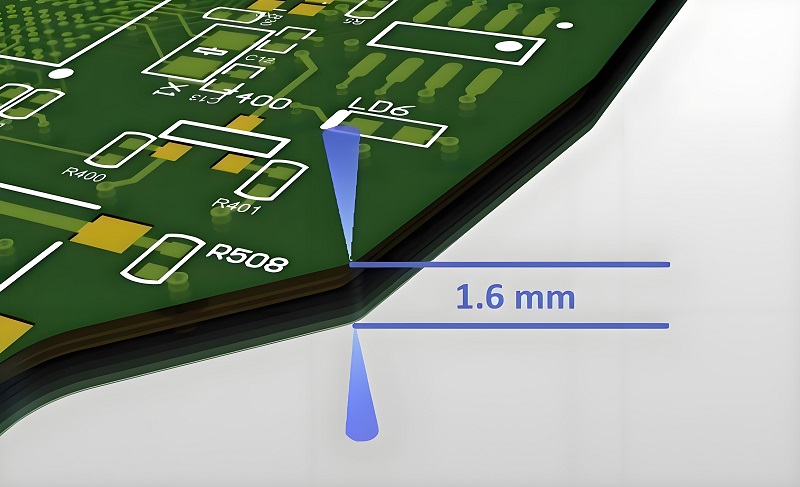
Edge bevel is the process of making a transition edge between two sides of a PCB, usually on the outer edge of the PCB. Bevel is often used for edge connectors to allow for smoother insertion into another circuit board socket. Edge connector pins are often called gold fingers because they are plated with gold and have multiple parallel groups together.

Why do PCB edges need to be beveled?

The main reason why PCB edges need to be beveled is to increase the contact area, reduce contact resistance, and improve the stability of electrical connections.

The bevel process increases the contact area between the gold finger and other connectors by processing the PCB edge into a bevel, thereby reducing the contact resistance and improving the stability and reliability of signal transmission.

Specifically, the bevel process has the following advantages in application:

  • ‌Increase contact area‌: Beveled edges can increase the contact area between the gold finger and the socket, thereby increasing friction and connection stability.
  • ‌Reduce contact resistance‌: The bevel design reduces the pressure concentration at the contact point, thereby reducing the contact resistance and reducing the loss in signal transmission.
  • ‌Adapt to different application scenarios‌: According to the specific application scenarios and equipment requirements, the bevel angle can be adjusted between 15° and 45° to meet different spatial layouts and electrical connection requirements‌.

The use of PCB beveling machines further improves the accuracy and efficiency of the beveling process. This mechanical equipment can accurately control the bevel angle through a high-precision mechanical transmission system and an efficient grinding process to ensure processing quality and production efficiency.

What are the Benefits of PCB Edge Beveling?

The main benefits of PCB edge beveling include enhanced aesthetics, easy installation, improved electrical performance, and reduced mechanical stress. ‌

First, the beveling process can enhance the aesthetics of the circuit board. By cutting the PCB edge at a specific angle, the beveling process makes the appearance of the circuit board more refined and beautiful, which can significantly improve the overall visual effect of the product‌.

Secondly, the beveling process is easy to install. The beveling design can better adapt to the structural design of various electronic devices, making the assembly of PCB boards and other components more convenient and precise, and the design of the beveling angle can better achieve the coordination of PCB boards with other components‌.

What is beveler in pcb?

In addition, the beveling process can also improve electrical performance. Bevel design can increase the contact area and reduce the contact resistance, thereby improving the stability and reliability of signal transmission.

Finally, bevel design can reduce mechanical stress. The design of the beveled rectangle allows the socket to slowly and gradually enter or exit the jack when plugging and unplugging, thereby reducing the mechanical stress during plugging and unplugging and extending the service life of the socket and jack.

What are the limitations of PCB edge beveling?

The main limitations of PCB edge beveling include the design of the bevel angle, the spacing requirements between the components and the board edge, and the requirements for cutting accuracy and speed. ‌

First, the design of the bevel angle needs to be determined according to the specific application scenario and equipment requirements. The common bevel angle range is between 15° and 45°.

In some devices with high requirements for plugging and unplugging force and contact stability, a smaller bevel angle may be selected to increase the contact area and friction between the gold finger and the socket to ensure the stability of signal transmission; while in some occasions with strict restrictions on spatial layout, a larger bevel angle may be used to better realize the assembly of PCB boards and other components. ‌

Finally, cutting accuracy and speed are also important limiting factors. PCB beveling machines need to have high-precision cutting capabilities and be able to accurately cut within the specified size range. The cutting accuracy directly affects the quality and reliability of the circuit board.

How Does PCB Beveling Work?

PCB beveling machines are usually composed of a frame, a transmission system, a grinding system, a positioning fixture, and a protective device.

The transmission system uses high-precision gears or screw drives to ensure processing accuracy. The grinding system consists of a grinding head and a coolant system, etc., which are used to grind PCB boards. The positioning fixture is used to fix the PCB board to ensure the accuracy and stability of the processing, while the protective device is to protect the safety of the operator.

What is beveler in pcb?

During the operation, first check whether the beveling machine is operating normally. If there is a problem, it needs to be repaired. Then, set the beveling angle according to customer needs or the default 45° angle.

Next, adjust the angle of the gong section and the table, adjust the distance of the steel plate according to the thickness of the board, and use a copper plate of the same thickness to test the knife to ensure that the angle of the bevel of the beveled board meets the requirements.

Finally, the grinding process is carried out through the grinding system. The grinding head rotates at a high speed and applies a certain amount of pressure on the PCB board, thereby processing its edge into a bevel.

What are the Applications of PCB Beveling?

The core application of the PCB beveling process is to increase the contact area and reduce the contact resistance, thereby improving the stability and efficiency of the connection. This process is common in the beveling of gold fingers, especially on devices such as computer memory bars and graphics cards. The bevel design of gold fingers can significantly improve the data transmission speed and reliability.

‌Specific application scenarios‌ include:

  • ‌Computer memory bars and graphics cards‌: On these components, the bevel design of gold fingers can not only increase the contact area and reduce the contact resistance, but also prevent oxidation to a certain extent and extend the service life.
What is beveler in pcb?
  • ‌Other communication equipment‌: In addition to computer memory bars and graphics cards, the beveling process of gold fingers is also used in various devices that communicate through digital signals, such as consumer electronics, smartphones, and smart watches.

In short, the beveler in PCB is a tool specifically used to create bevels or chamfers around the edges or holes of PCBs. It has the functions of improving the reliability of PCB, facilitating assembly and improving appearance. When using the bevel, pay attention to the correct operation method and maintenance to ensure its normal operation and service life.

What is the melting point of PCB solder?

October 7th, 2024

PCB solder plays a vital role in the assembly and function of PCBs. Reliable solder joints must remain intact to prevent components from loosening or falling off the PCB. Solder is the material used to connect the various electronic components on the PCB. Its importance is reflected in several key aspects. Solder ensures that electronic components can be firmly attached to the PCB.

What type of solder for PCB?

The commonly used types of solder for PCB include solder paste, tin bar and tin wire. ‌

  • 1. ‌Solder paste‌: Mainly used in reflow soldering process. Solder paste consists of tin powder, flux and other additives. Tin powder is usually an alloy of tin and other metals. According to different melting points, solder paste can be divided into three types: low temperature, medium temperature and high temperature; according to different lead content, it can be divided into lead solder paste and lead-free solder paste. Lead-free solder paste gradually replaces lead solder paste to reduce environmental pollution‌.
What is the melting point of PCB solder?
  • 2. ‌Solder bar‌: Mainly used in wave soldering process. Tin bar (solder bar) has excellent antioxidant ability, good fluidity after melting, suitable for wave soldering process, and is widely used in PCBA processing due to its good fluidity and strong solderability.
  • 3. Tin wire: Mainly used in post-soldering process. Similar to tin bar, tin wire is also a kind of welding material, mainly used for manual welding or other occasions where filament solder is required.

In addition, the selection of welding materials also involves the selection of solder alloys. Eutectic alloys are one of the preferred solder alloys because of their low melting point, low welding temperature, small crystal grains, and dense structure, which are conducive to improving the strength of solder joints.

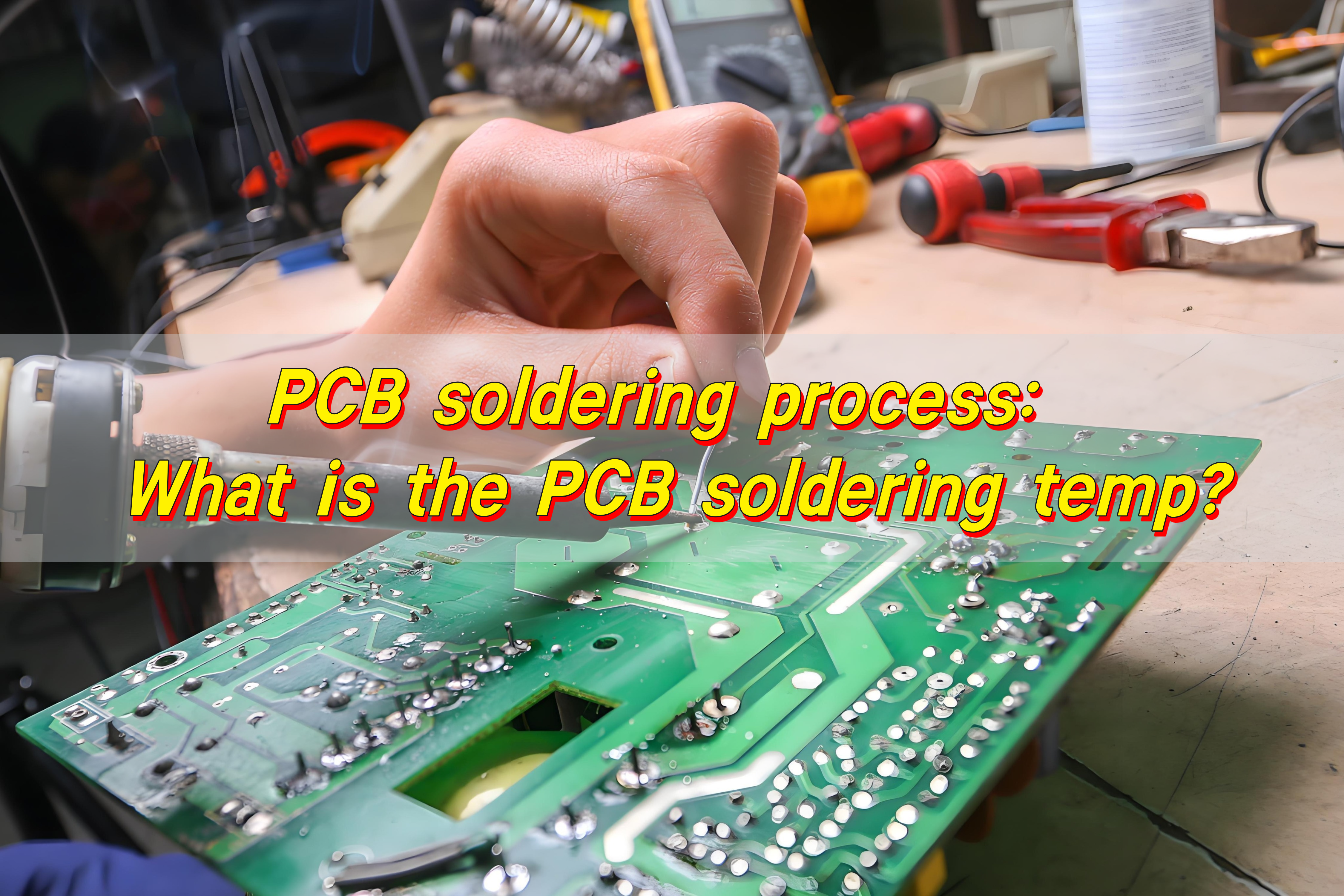
What temperature should solder be for PCB?

The solder temperature of PCB should vary according to different types of components and welding processes. ‌‌

For lead-containing PCB boards, the temperature in the preheating stage is usually controlled at 80~120℃ for 1~3 minutes; the temperature in the insulation stage is 150~180℃ for 30~60 seconds; the temperature in the reflow stage is 210~240℃ for 20~40 seconds; the cooling stage speed should be controlled within the range of 4~6℃ per second. ‌

For lead-free PCB boards, the temperature in the preheating stage is usually controlled at 100~150℃, the insulation stage is 180~220℃, the reflow stage is 240~260℃, and the cooling speed should be controlled within the range of 3~5℃ per second. ‌

What is the best soldering temperature for PCB? ‌

The best soldering temperature range for PCB is usually between 240 and 280 degrees Celsius. This temperature range is suitable for manual soldering and can ensure the best soldering effect and component reliability. ‌

For different types of welding situations, the temperature requirements are different:

  • 1. Wave soldering: The optimal temperature is 280 degrees Celsius, ensuring that the solder joint temperature is 50 degrees Celsius higher than the melting point of the solder to achieve reliable welding results.
  • 2. Small components (such as resistors and capacitors below 1206, and components with an area of ​​less than 5 mm²): The recommended temperature is 250 degrees Celsius to prevent damage to the circuit board.
  • 3. Large components: The soldering iron temperature should be set between 350 and 370 degrees Celsius, and the maximum should not exceed 390 degrees Celsius. The welding time should be kept within a few seconds to prevent damage to the pads on the PCB.
  • 4. SMT processing: The recommended manual soldering temperature range is 240 to 280 degrees Celsius. Try to minimize the gap between the set temperature and the actual working temperature to achieve the best welding effect and component reliability.
What is the melting point of PCB solder?

In addition, the precise management of temperature during the welding process is also required to ensure the quality of the solder joints and circuit performance of the PCB board.

  • The preheating stage is very important to reduce the thermal shock during welding. The preheating temperature is usually controlled between 80 and 120 degrees Celsius for 1 to 3 minutes.
  • The insulation stage is to fully melt the components and solder paste on the PCB board. The temperature is usually controlled between 150 and 180 degrees Celsius for 30 to 60 seconds.
  • The cooling stage is to avoid thermal stress caused by rapid cooling. The cooling rate should be controlled to drop between 4 and 6 degrees Celsius per second.

What temperature does PCB solder melt?

The melting temperature of PCB solder depends on the type of solder. The melting temperature of lead solder ranges from 183°C to 217°C, while the melting temperature of lead-free solder is usually between 217°C and 257°C.

What is the melting point of PCB solder?

Lead solder has a lower melting point, usually between 183°C and 217°C. During the reflow process, the preheating temperature of lead solder is controlled at 80°C to 120°C, the holding temperature is 150°C to 180°C, the reflow temperature is 210°C to 240°C, and the cooling rate decreases by 4°C to 6°C per second.

The melting point of lead-free solder is higher, usually between 217°C and 257°C. During the reflow process, the preheating temperature of lead-free solder is controlled at 100°C to 150°C, the holding temperature is 180°C to 220°C, the reflow temperature is 240°C to 260°C, and the cooling rate decreases by 3°C to 5°C per second.

What is the melting point of PCB material?

The melting point of PCB material depends on its specific composition and type, usually between 1064℃ and 900℃. For PCB substrate materials, such as FR-4, its temperature resistance is measured by the Tg value (glass transition temperature). Ordinary FR-4 sheets have lower heat resistance, while high TG FR-4 sheets have better heat resistance and can withstand higher temperatures.

Different types of PCB materials have different melting points and heat resistance. The long-term working temperature of ordinary FR-4 sheets is generally between 130℃ and 140℃, and the instantaneous temperature resistance can reach 150℃ to 260℃. In contrast, PCBs made of special materials such as polyimide can withstand higher temperatures, even up to 280℃.

In addition, the surface treatment layer material of the PCB will also affect its heat resistance. For example, the melting point of the gold plating layer depends on the composition of the metal material used.

Which solder is best for PCB?

Choosing a solder suitable for PCB requires comprehensive consideration of multiple factors. The following solders have their own advantages and disadvantages:

  • Tin-silver-copper (SAC) alloy: good mechanical and electrical properties, high reliability, suitable for a variety of welding processes, and environmentally friendly. But the cost is high and the welding process requirements are high.
  • Tin-copper (Sn-Cu) alloy: low cost, good solderability, and environmentally friendly. The disadvantage is that the mechanical properties are slightly worse in high-demand scenarios.

What type of solder should not be used with electronics?

Electronic products should not use strong alkali, rosin grease, coconut oil, and neutral flux as flux. ‌

In the soldering process of electronic products, it is very important to choose a suitable flux. The main function of the flux is to remove the oxide film, prevent oxidation, and improve the quality of soldering.

However, some substances are not suitable for use as flux. Strong alkali and rosin grease will corrode the soldering joint and affect the quality of soldering. In addition, the use of acidic flux will also corrode the soldering joint, so acidic flux should be avoided.

In order to ensure the smooth progress of the soldering process and ensure the quality of soldering, some measures can be taken.

First, choose lead-free solder materials that meet ROHS standards to reduce environmental pollution. Second, use high-brightness soldering iron tips, reduce the use of soldering oil and rosin, and reduce smoke generation. Finally, select appropriate welding materials and processes according to specific needs, such as solder wire, solder paste, solder sheet, etc., to ensure the mechanical and electrical performance of welding.

In short, solder is a key element in the PCB assembly process. Its quality is directly related to whether the electronic equipment can operate normally, and the characteristic of solder melting point plays a decisive role in the welding process. I must deeply study and understand the characteristics of solder to ensure that every solder joint can meet the highest standards.

Can you use AC in PCB?

October 7th, 2024

Can you use AC in PCB?AC can be used in PCB boards. PCB boards are designed to support the use of AC, and the functions of AC can be realized through proper circuit design and component selection.

Can you use AC in PCB?

Can you use AC in PCB?

The use of AC in PCB boards requires consideration of the characteristics of AC. The current magnitude and direction of AC change continuously over time, which requires the components and layout on the PCB to adapt to such changes. For example, components such as inductors and capacitors play an important role in AC circuits, and their parameters and layout need to be carefully designed to achieve the desired circuit performance.

Specifically, AC circuit design on PCB boards includes selecting appropriate components, layout, and routing. For example, using test instruments such as LCR digital bridges can measure the parameters of components in AC circuits to ensure that the performance of the circuit meets the design requirements. In addition, reasonable ground routing and layout can reduce signal interference and ensure the stable transmission of AC.

Is the circuit board DC or AC?

Circuit boards can transmit both direct current and alternating current. In modern electronic products, we use alternating current for power supply, so most circuit boards are also designed to transmit alternating current. Of course, in some special application scenarios, some circuit boards also need to transmit direct current. Whether transmitting direct current or alternating current, the circuit board needs to meet the requirements of the transmitted current.

Is the circuit board DC or AC?

What is the PCB in AC?

The alternating current in PCB refers to the current whose direction changes periodically, that is, alternating current (AC). The application of alternating current in PCB is mainly reflected in power conversion and power transmission. PCB power supply usually converts AC into stable direct current (DC) output to meet the demand of electronic equipment for stable power supply. PCB power supply converts AC into the required DC through components such as transformers, rectifiers, filters and voltage regulators, and provides stable power output.

How to calculate the bandwidth of AC in PCB traces

The calculation of AC PCB trace width can be performed by the following formula: W = (I / J) * K, where W represents the trace width, I represents the current, J represents the current density, and K represents a coefficient related to materials and processes. ‌This formula shows that the trace width is related to the current, current density, and material properties‌.

AC in PCB Design Guide

AC in PCB Design Guide

Current Carrying Capacity: The width of a trace directly affects its ability to handle current without exceeding temperature limits or causing excessive voltage drop.
‌Impedance Control: In high-frequency applications, maintaining controlled impedance is critical for signal integrity. Trace width, trace spacing, and dielectric properties affect the characteristic impedance of the transmission line.
‌Heat Dissipation: Adequate trace width helps to effectively dissipate heat, preventing thermal issues such as trace delamination or solder joint failure.
‌Voltage Drop: Narrower traces exhibit higher resistance, resulting in increased voltage drop along the length of the trace. By adjusting the trace width, the voltage drop can be minimized.
‌Manufacturability: The PCB manufacturing process imposes restrictions on the minimum trace width, and designers must balance performance requirements with manufacturability constraints. ‌2.
‌Minimum Trace Width: Most manufacturers have a minimum trace width of 6mil or 0.152mm, and typically use traces of 0.254-0.3mm.
‌Material and Process Deviations: Due to the possibility of material and process deviations in the actual PCB manufacturing process, a certain margin needs to be left when calculating the line width.
‌Signal Integrity Simulation‌: Perform signal integrity simulations to ensure impedance is controlled and signal degradation due to reflections, crosstalk, or transmission line effects is minimized‌

AC in PCB wiring

The current trend is that the power supply voltage is getting lower and lower (especially for highly integrated digital devices), the space occupied is getting smaller and smaller, the weight is getting lighter and lighter, and the efficiency is getting higher and higher, which requires the precise design of the power supply circuit starting from the PCB.

AC in PCB wiring

Safety distance includes electrical clearance (spatial distance), creepage distance (surface distance) and insulation penetration distance…

  1. Electrical clearance: the shortest distance between two adjacent conductors or one conductor and the adjacent motor housing surface measured along the air.
  2. Creepage distance: the shortest distance between two adjacent conductors or one conductor and the adjacent motor housing surface measured along the insulation surface.

Determination of electrical clearance:

The distance can be determined according to the measured working voltage and insulation level

The electrical clearance size requirements of the primary side line are shown in Table 3 and Table 4

The electrical clearance size requirements of the secondary side line are shown in Table 5

But usually: Primary side AC part: L-N ≥ 2.5mm before the fuse, L.N PE (earth) ≥ 2.5mm, no requirements are made after the fuse is installed, but a certain distance should be maintained as much as possible to avoid short circuit damage to the power supply.

Primary side AC to DC part ≥2.0mm

Primary side DC ground to earth ≥2.5mm (primary side floating ground to earth)

Primary side to secondary side ≥4.0mm, components connected between primary and secondary sides

Secondary side gap ≥0.5mm

Secondary side ground to earth ≥1.0mm

Note: Before determining whether it meets the requirements, the internal parts should be applied with a force of 10N and the outer shell with a force of 30N to reduce the distance so that the space distance still meets the requirements under the worst case.

Determination of creepage distance:

Based on the working voltage and insulation level, the creepage distance can be determined by looking up Table 6

But usually: (1), primary side AC part: L-N ≥2.5mm before the fuse, L.N earth ≥2.5mm, no requirement is required after the fuse, but try to keep a certain distance to avoid short circuit damage to the power supply.

(2) Primary side AC to DC part ≥2.0mm

(3) Primary side DC ground to ground ≥4.0mm such as primary side ground to earth

(4) Primary side to secondary side ≥6.4mm, such as optocoupler, Y capacitor and other components, the foot spacing ≤6.4mm needs to be slotted.

(5) Secondary side parts ≥0.5mm

(6) Secondary side ground to earth ≥2.0mm or more

(7) Transformer two-stage ≥8.0mm or more

  1. Insulation penetration distance:

It should meet the following requirements according to the working voltage and insulation application:

  • For working voltage not exceeding 50V (71V AC peak or DC value), there is no thickness requirement;
  • The minimum thickness of additional insulation should be 0.4mm;
  • When the reinforced insulation is not subjected to any mechanical stress that may cause deformation or performance degradation of the insulating material at normal temperature, the minimum thickness of the reinforced insulation should be 0.4mm. If the insulation provided is used in the protective casing of the equipment and will not be bumped or scratched during maintenance by the operator, and any of the following conditions apply, the above requirements do not apply to thin insulating materials regardless of their thickness;
  • For additional insulation, at least two layers of material are used, each of which can pass the dielectric strength test for additional insulation; or:
  • For additional insulation composed of three layers of material, any combination of two layers of material can pass the dielectric strength test for additional insulation; or:
  • For reinforced insulation, at least two layers of material are used, each of which can pass the dielectric strength test for reinforced insulation; or:
  • For reinforced insulation composed of three layers of insulating material, any combination of two layers of material can pass the dielectric strength test for reinforced insulation.
  1. Points to note about wiring process:

Flat components such as capacitors must be flat without glue.

If the distance between two conductors can be shortened by applying a force of 10N, which is less than the safety distance requirement, glue can be used to fix the part to ensure its electrical clearance.

When laying PVC film inside some shell equipment, attention should be paid to ensuring the safety distance (pay attention to the processing technology).

When fixing the parts with glue, be careful not to leave foreign matter such as glue wire on the PCB board.

When processing parts, insulation damage should not be caused.

  1. Requirements for flame-proof materials:

Heat shrink tubing V-1 or VTM-2 or above; PVC tubing V-1 or VTM-2 or above

Teflon tubing V-1 or VTM-2 or above; plastic materials such as silicone sheets, insulating tape V-1 or VTM-2 or above

PCB board 94V-1 or above

  1. Regarding insulation level

(1) Working insulation: insulation required for normal operation of equipment

(2) Basic insulation: insulation that provides basic protection against electric shock

(3) Supplementary insulation: independent insulation applied in addition to basic insulation to protect against electric shock in case of basic insulation failure

(4) Double insulation: insulation consisting of basic insulation plus supplementary insulation

(5) Reinforced insulation: a single insulation structure that provides the same level of protection against electric shock as double insulation under the conditions specified in this standard

The applicable situations of various insulation are as follows:

A. Operational insulation

a. Between parts with different voltages

b. Between ELV circuits (or SELV circuits) and grounded conductive parts.

B. Basic insulation

a. Between parts with dangerous voltages and grounded conductive parts;

b. Between SELV circuits with dangerous voltages and grounding-dependent;

c. Between the primary power conductor and the grounded shield or the core of the main power transformer;

d. As part of double insulation.

C. Supplementary insulation.

a. Generally speaking, between accessible conductive parts and parts that may carry dangerous voltages after basic insulation is damaged, such as:

â… . Between the surface of handles, knobs, handles or similar objects and their ungrounded axis.

â…¡. Between the metal casing of the second category equipment and the outer skin of the power cord passing through this casing.

â…¢. Between the ELV circuit and the ungrounded metal casing.

b. As part of double insulation

D. Double insulation

Double insulation Reinforced insulation

Generally speaking, between the primary circuit and

a. between accessible ungrounded conductive parts, or

b. between floating SELV circuits, or

c. between TNV circuits

Double insulation = basic insulation + supplementary insulation

Note: ELV circuit: extra low voltage circuit

Under normal working conditions, the AC peak value between conductors or between any conductors does not exceed 42.4V or the DC value does not exceed 60V.

SELV circuit: safety extra low voltage circuit.

A properly designed and protected secondary circuit so that under normal conditions or single fault conditions, the voltage between any two accessible parts, and between any accessible parts and the protective grounding terminal of the equipment (only for Class I equipment) will not exceed the safety value.

TNV: communication network voltage circuit

Under normal working conditions, the circuit carrying communication signals

Difference between direct current and alternating current

‌The main differences between DC and AC include direction and polarity, voltage change, current loss, transformer use, and application scenarios.

‌Direction and polarity:

DC: The direction of the current remains unchanged, and the electrons flow from the positive electrode to the negative electrode.

AC: The direction of the current changes periodically, and the electrons flow back and forth between the positive and negative electrodes. ‌
‌Voltage change:

DC: The voltage remains constant and does not change over time.

AC: The voltage magnitude and direction change periodically over time. For example, the mains is an AC with a sine waveform.

‌Current loss:

DC: Fault losses are relatively small.

AC: There is capacitive current, and there is capacitive current in the transmission line. ‌
‌Transformer use:

DC: The voltage cannot be changed using a transformer.

AC: The voltage can be changed using a transformer, which is suitable for boosting voltage to reduce losses during long-distance transportation.

‌Application scenarios:

DC: Suitable for low-voltage electrical appliances and occasions that require stable current.
‌Alternating current‌: Suitable for household and industrial use, using transformers to change voltage to suit different needs.‌

FAQ About AC in PCB

FAQ About AC in PCB

FAQ About AC in PCB

Q: The relationship between PCB current and line width. Is the current divided into AC or DC?
A: The relationship between PCB current and line width is not divided into AC or DC. In terms of the nature of the lines on the PCB, the lines are all made of copper materials, and both AC and DC can pass. However, how much current can pass depends on the cross-sectional area of ​​the line on your PCB. That is, line width x thickness of the copper foil of the line. If the cross-sectional area of ​​the line is small, only small current signals can pass, and if the cross-sectional area is large, large current signals can pass. This signal can be AC ​​or DC.
Not just 1mm, any line width can pass DC or AC signals.

Q: There is a packaged device, and there are 2 pins in the device that need to be connected to the live wire and neutral wire of 220V AC respectively. So how to deal with this power line when drawing the PCB? Are there any size requirements for pads, wires, etc.? Are there any protective measures required? Is it not possible to directly add pads to connect to the pin pads of the device?
A: It is best to mill a groove between the neutral wire and the live wire, and choose the thickness of the wire according to the current. When the current is large, you can put a tin layer on the wire, and the pad should be slightly larger.

Q: The grounding of the PCB circuit board design is also the negative pole. What is the difference between the grounding here and the AC grounding?

A: The concept of the circuit board ground is somewhat different from that of the power supply system. The power supply system refers to the earth, that is, the terminal with the same potential as the earth.

The ground in the circuit board is just a common terminal of a potential, which can be positive or negative, depending on the needs of the designer. It’s just that everyone is used to and assumes that the negative pole is the common terminal, that is, the ground. The circuit board ground is not necessarily connected to the earth.

But it must be connected to the earth when EMI filtering is required.

Q: Should all GNDs on the PCB board be connected? There is a terminal (screw type) with two terminals marked as V1+ and V1- on the PCB schematic. Should V1- be connected to the power supply ground? But I used a multimeter to measure why V3- is not connected to other GNDs on the board?

So how do you connect the ground and 10V of the power supply to the V1+ and V1- ends of the terminal?

A: Not all ground wires on the board are connected together. The ground wires are divided into analog ground and digital ground, just like the ground wire in DC and the ground wire in AC cannot be connected together. That is to say, there is a ground wire that is specifically used for power supply, and there is a ground wire that is specifically used for signals (shielding signal interference). These two ground wires cannot be connected together.
In addition, you mentioned V1+ and V1-, and V1- should not be considered a ground wire. Generally, the signal represented by this method is a differential signal, that is, the V1 signal is differentially divided into V1+ and V1-, which can reduce external interference and transmit farther. Finally, V1+ and V1- are integrated into the V1 signal.
You need to figure out whether the V1+ and V1- of the terminal are used for power supply. If they are used for power supply, then V1+ is the positive pole. V1- is the negative pole. Since you didn’t show us the picture, you can’t just connect it randomly. The circuit board needs to connect not only power but also signals, depending on how your board is made.

What is the thermal conductivity of aluminum?

October 4th, 2024

Aluminum is ubiquitous in all kinds of materials in daily life. The thermal conductivity of aluminum plays a very critical role in the wide application of aluminum materials. Whether it is to help electronic devices dissipate heat or to play the advantages of thermal conduction in fields such as automobiles and buildings, the thermal conductivity of aluminum must be considered.

How good is aluminum at conducting heat?

Aluminum has relatively good thermal conductivity, but its thermal conductivity is not as good as copper. The thermal conductivity of aluminum is about 237 W/m·K, while the thermal conductivity of copper is about 385 W/m·K, which means that under the same conditions, copper can transfer heat more efficiently.

What is the thermal conductivity of aluminum?

The reason why aluminum has good thermal conductivity is that its thermal conductivity is high, and aluminum has a high specific heat capacity. Specific heat capacity refers to the amount of heat that needs to be absorbed or released by a unit mass of a substance to increase or decrease the temperature by 1K. Aluminum’s high specific heat capacity makes it more efficient in absorbing and releasing heat, which is crucial for applications that need to dissipate heat quickly.

What is thermal conductivity?

Thermal conductivity is a physical quantity that represents the ability of a material to conduct heat. The higher the thermal conductivity, the less heat is lost within the material. Thermal conductivity is defined as the amount of heat directly conducted through a material per unit cross-section and length per unit temperature difference and per unit time, and is expressed in Watts per meter Kelvin (W/m-K).

What is the thermal heat conductivity of aluminium?

The thermal conductivity of aluminium is 237W/mK. Thermal conductivity (k) is a measure of the ability of heat to flow through a material.

Thermal conductivity (k) is a measure of the ability of a material to conduct heat, and represents the amount of heat flow through a unit area per unit temperature gradient per unit time. Aluminium, as a common metal material, has a high thermal conductivity and is suitable for applications that require good thermal conductivity.

What is the thermal conductivity of aluminum?

What is the thermal conductivity of aluminium at high temperatures?

The thermal conductivity of aluminium changes as the temperature increases. Generally speaking, as a metal gets hotter, its thermal conductivity decreases slightly. For aluminium, the thermal conductivity decreases as the temperature increases, but it still retains significant thermal conductivity.

As temperatures approach 500°C, the thermal conductivity of aluminum drops to about 160 W/m·K. This drop occurs because increasing temperatures cause increased atomic vibrations within the metal, which interferes with the flow of heat. Despite this drop in thermal conductivity, aluminum still performs well in high-temperature applications, such as engines or high-performance electronics.

What is the weight constant of aluminum?

The weight constant of aluminum is 2.7 g/cm³. Aluminum is a metallic element with a silvery-white appearance and is a lightweight metal.

The density of aluminum can also be expressed as 2.7×10³ kg/m³, which means that there are 2.7×10³ kg per cubic meter of aluminum. 34 In addition, the density of aluminum can also be expressed as 2700 kg/m³, which is another common unit conversion method.

What is the K value of aluminum?

The “K” value is a shorthand term that is often used to refer to the thermal conductivity of a material. The thermal conductivity K value of aluminum is 237 W/mK. Aluminum is a common metal material with a thermal conductivity of 237W/mK in the solid state.

What is the thermal conductivity of aluminum?

Thermal conductivity (thermal conductivity coefficient) is a physical property of a material that indicates the ability of heat to be conducted through a unit area and temperature gradient in a unit time. The greater the thermal conductivity, the better the thermal conductivity of the material. Aluminum, as an excellent thermal conductive material, is widely used in many applications.

What would a high value of K mean thermal conductivity?

A high K value means that the thermal conductivity of the material is high, that is, the material has a strong ability to conduct heat. Thermal conductivity (K value) is an important parameter to measure the rate and ability of a material to conduct heat. Materials with high K values can conduct heat more efficiently and have better thermal conductivity.

What is the thermal conductivity of aluminum?

Specifically, thermal conductivity (K value) is defined as the amount of heat directly conducted by a material of unit cross-section and length under unit temperature difference and unit time. The metric unit is watt/meter Kelvin (W/m·K). If the K value of a material is 1, it means that when the temperature difference between the opposite surfaces is 1 degree, 1 cubic meter of the material will conduct heat at a rate of 1 watt.

Materials with high K values have significant advantages in thermal management. First, they can quickly transfer heat from the heat source to the heat sink, effectively reducing the operating temperature of electronic components, extending the life of the device, and improving system reliability. Second, materials with high K values can significantly reduce the thermal resistance between thermal interfaces and improve the efficiency of heat transfer, especially for high power density devices. Finally, in harsh working environments, materials with high K values can significantly enhance thermal management capabilities, prevent local overheating, and ensure stable system operation.

Is a higher or lower k value better?

Generally speaking, for applications that require effective conduction or heat dissipation, the higher the K value, the better. If the material has a higher K value, it can transfer heat away from hot spots faster, helping to prevent overheating.

In the electronics industry, components can get very hot, so people use materials with high thermal conductivity to make heat sinks. These materials can draw heat away from delicate parts, helping to prevent component damage or failure.

However, in some cases, the lower the thermal conductivity, the better. In insulating materials, you want a lower K value so that heat can’t pass through easily. In these cases, materials such as plastic or fiberglass, which have much lower thermal conductivity than aluminum, are preferred.

Conclusion:

With the continuous advancement of science and technology, the understanding and application of aluminum’s thermal conductivity will continue to expand and deepen. New processing technologies may further optimize aluminum’s thermal conductivity, allowing it to play a unique role in more emerging fields, such as new energy development and high-speed rail transportation.

What is high density interconnect?

October 4th, 2024

High density interconnect (HDI) technology plays a pivotal role in the electronics field, and high-density interconnect boards are the core embodiment of this technology. As a key connection carrier between electronic components, it is an important guarantee for realizing miniaturization, high performance and multi-functionality of electronic equipment.

What are high density interconnects?

High-density interconnect (HDI) is a printed circuit board (PCB) manufactured using higher-density wiring technology. Compared with traditional PCB, HDI board achieves miniaturization, lightweight and higher wiring density of circuit board through smaller aperture, finer line width/spacing and more layers of blind and buried hole technology to adapt to Electronic devices, especially mobile devices, require efficient space utilization and high-performance transmission.

What is high density interconnect?

The core of HDI technology lies in its high-density wiring design. By increasing the number of PCB layers, reducing wire width and spacing, and using micro-hole (such as laser drilling) processes, HDI technology significantly increases circuit complexity and wiring density. This technology is often used in electronic products such as smartphones, tablets, and smart wearable devices, meeting the needs of these devices for efficient space utilization and high-performance transmission.

What is the difference between PCB and HDI?

The main differences between PCB and HDI boards lie in wiring density, manufacturing process, size and cost. HDI boards use high-density interconnection technology, with higher wiring density and more complex circuit layouts, while ordinary PCBs are relatively simple and suitable for some application scenarios that do not require high line density.

What is high density interconnect?

There are significant differences between HDI boards and ordinary PCBs in terms of wiring density, manufacturing process, size and cost. HDI boards use high-density interconnection technology, with higher wiring density and more complex circuit designs, enabling smaller size and lighter design requirements. In comparison, the wiring density of ordinary PCB is low, which is suitable for some application scenarios that do not require high line density.

In terms of manufacturing process, HDI boards use more advanced manufacturing processes, including laser drilling, stacked copper plates and etching technology, to achieve high-density interconnection and complex circuit wiring. In comparison, the manufacturing process of ordinary PCBs is relatively simple, usually using photolithography and etching processes.

Because HDI boards have higher circuit density and complex circuit layouts, their size and thickness are usually smaller, making them suitable for applications that require compact packaging and space constraints. Ordinary PCBs do not have these restrictions and are suitable for more diverse application scenarios.

In terms of cost, since the manufacturing process of HDI boards is more complex and has higher technical requirements, its manufacturing cost is relatively high. In comparison, ordinary PCBs have lower manufacturing costs and are suitable for some application scenarios that do not have high circuit density and technical requirements.

What is the structure of HDI PCB?

The structure of HDI PCB mainly includes inner laminate, outer laminate, gaskets, blind and buried vias and other components. ‌

What is high density interconnect?

The inner laminate is the core part of the HDI circuit board. It is composed of multiple layers of conductive materials and insulating materials alternately stacked. It mainly realizes the transmission and control of circuit signals. The number of layers of the inner laminate can be very high. It uses microporous technology to achieve a high-density circuit layout and has excellent electrical performance and stability‌.

The outer laminate is located on the outside of the inner laminate and is also composed of multiple layers of conductive materials and insulating materials alternately stacked. Its main function is to protect the internal circuit from the influence of the external environment, such as humidity, temperature, mechanical stress, etc. The outer laminate can also provide additional grounding and shielding to improve circuit performance and reliability‌.

The gasket is an insulating material used to connect the inner laminate and the outer laminate. Its main function is to isolate the inner and outer laminates, prevent electrical interference, and provide certain mechanical support to ensure the stability of the circuit board.

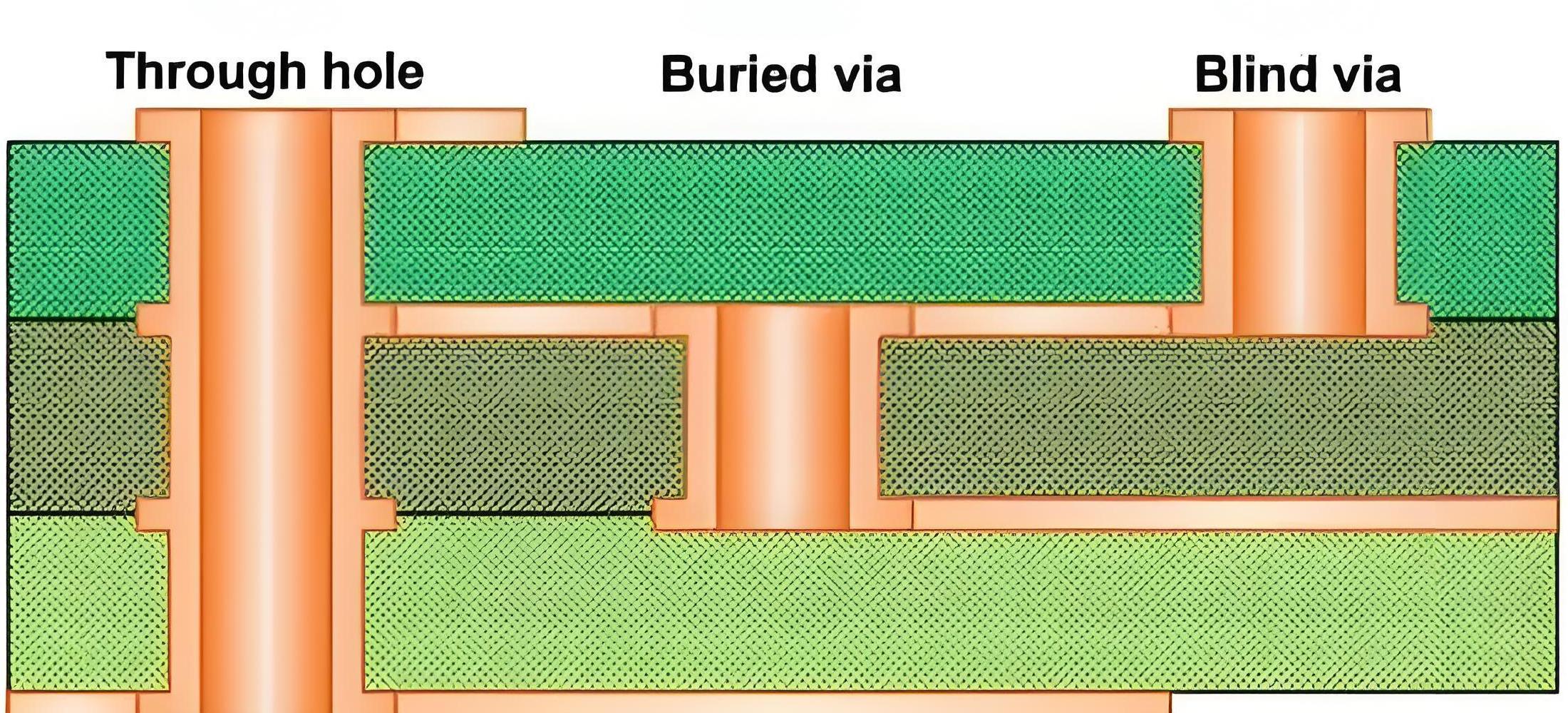
A blind buried via is a non-penetrating through hole located inside the inner laminate. It is not directly connected to the outer laminate and mainly realizes the electrical connection between the inner laminates. Blind and buried vias do not penetrate the entire circuit board, which can effectively reduce the thickness and weight of the circuit board and improve the circuit board’s thermal resistance and mechanical stress resistance.

What are the advantages of HDI PCB?

The main advantages of HDI PCB include high-density interconnection, optimized wiring design, good signal transmission performance, high reliability and stability, smaller size and weight, and higher production efficiency. ‌

First, HDI PCB achieves higher line density by using higher-level packaging technology and smaller apertures. This means that under the same board size, HDI PCB can accommodate more electronic components and complex circuit designs, thereby improving the performance of the product. ‌

Second, the design of HDI PCB is more compact. Through multi-layer wiring and micro-via technology, the size and weight of the circuit board can be greatly reduced, adapting to the trend of modern electronic devices to pursue thinness and shortness.

Finally, the production process of HDI PCB is more efficient, and advanced technologies such as laser opening, thin film transformer, and cover packaging are used to achieve high-efficiency production.

What are the disadvantages of HDI PCB?

  • 1. Difficulty in impedance control: The complexity of pattern transfer and electroplating processes increases production difficulty, which may lead to unstable impedance values.
  • 2. Complex production cost control: The high-density circuit part of HDI PCB has a slow etching speed, which leads to excessive etching of isolation lines and increases production costs.
  • ‌3. Environmental impact‌: During the electroplating and etching process, a large amount of copper ions enter the waste liquid, causing environmental pollution and difficulty in recycling.
  • 4. High difficulty in design and manufacturing: HDI PCB is manufactured using micro-blind buried via technology and built-up method. The technical requirements are high and the process is complex, which increases the difficulty of design and manufacturing.
  • ‌5. High material costs‌: The materials used in HDI PCB, such as PI and other high-performance materials, are more expensive, increasing manufacturing costs‌.
  • 6. Quality issues: HDI PCB is prone to problems such as poor solderability and delamination during the manufacturing process. These problems may require higher process capabilities and quality control to avoid.

What are the applications of HDI PCB?

HDI PCB (High Density Interconnect PCB) can greatly reduce the size and weight without sacrificing performance by using microvias and tiny line widths and spacing, and is particularly suitable for portable electronic devices.

The main application areas of HDI PCB include:

  • ‌Communication field‌: HDI PCB can achieve higher data transmission rates and lower energy consumption by increasing the number of tiny components.
  • ‌Automotive Electronics‌: HDI PCB reduces product volume and production costs in the high integration of automotive electronic products, ensuring the stable operation of automotive electronic products.
  • ‌Medical Equipment‌: HDI PCB is widely used in high-precision and high-stability medical equipment, improving the accuracy, sensitivity and stability of the equipment‌.
  • ‌Mobile Communication‌: HDI PCB supports high-speed data transmission, maintains stable signal transmission, and supports a variety of wireless communication technologies‌.
  • ‌High Performance Computing (HPC)‌: HDI PCB provides efficient interconnection channels, significantly improving computing performance and response speed‌.

In short, high-density interconnection circuit boards, as an important embodiment of high-density interconnection technology, play an irreplaceable role in the development of modern electronic technology. With the continuous advancement of technology, its future development prospects are still very broad, and it will continue to promote the development of electronic devices in the direction of smaller, stronger, and smarter.

How to convert .brd to .hyp file

October 4th, 2024

How to convert .brd to .hyp file?You can try to use HyperLynx’s built-in conversion function to directly convert Allegro’s .brd file, but this method may encounter some problems and cause the conversion to fail. ‌

If the built-in conversion function fails, you can try to convert the .brd file to ODB++ format and then import it into HyperLynx. The specific steps are as follows:

  1. Open the PCB file in Allegro, select “File” -> “Export”, and then select ODB++ format for export.
  2. After the export is successful, open HyperLynx, select “File” -> “Open ODB++”, select the exported ODB file, and wait for the import to complete before performing PCB board-level simulation. ‌1.
    If the above method still cannot solve the problem, you can try to add the system variable CDSROOT to solve the conversion failure problem. The specific steps are as follows:
  3. Add the system variable CDSROOT, and the value is the installation path of Cadence Allegro, such as D:\Cadence\Cadence_SPB_17.2-2016\tools\bin.
  4. After confirming, restart the computer and try the conversion operation again‌

How to convert Cadence17.2’s .brd file to HyperLynx9.4.1’s .hyp file

How to convert Cadence17.2’s .brd file to HyperLynx9.4.1’s .hyp file?Recently, I used Hyperlynx to simulate the signal integrity of PCBs, and I needed to convert various PCB formats into .hyp formats. In the process, I found that the PCB drawn by AD can be directly exported in .hyp format, which is very convenient, but the PCB drawn by Cadence cannot be directly exported. I need to use the built-in PCB converter of Hyperlynx to convert the .brd file of Cadence, as shown below:

How to convert Cadence17.2's .brd file to HyperLynx9.4.1's .hyp file

But the conversion has always failed. I checked the .ERR file and found a line like this: ERROR: Cadance Allegro utility:extracta, so it is a problem with extracta.exe.


The specific solution is to add the system variable CDSROOT, and the value is D:\Cadence\Cadence_SPB_17.2-2016\tools\bin (the location of your extracta.exe). After confirming, restart the computer and the problem is solved.

Tutorial on converting Cadence17.2’s .brd file to HyperLynx9.4.1’s .hyp file

Tutorial on converting Cadence17.2’s .brd file to HyperLynx9.4.1’s .hyp file?Open the PCB file in Allegro, select ODB++inside in file–>export, select Export as ODBV6, click 1, and then click Accept….

  1. HyperLynx’s built-in conversion function can directly convert Allegro’s .brd file for use, but for some reason the following error always occurs. I didn’t find a solution online, so I had to find another way.
Tutorial on converting Cadence17.2's .brd file to HyperLynx9.4.1's .hyp file
  1. Another way to import PCB into HyperLynx is to convert the file to ODB++inside format. This method requires the installation of the ODB++inside plug-in in advance.
Tutorial on converting Cadence17.2's .brd file to HyperLynx9.4.1's .hyp file
  1. After installing the plug-in, you can convert the .brd file.
  2. First open the PCB file in Allegro, select ODB++inside in file–>export, the following figure appears, select Export as ODBV6, click 1, and then click Accept.
Tutorial on converting Cadence17.2's .brd file to HyperLynx9.4.1's .hyp file

Wait for the conversion to succeed.

  1. This file is the converted file
  2. Open HyperLynx9.4.1, select open ODB++ in file, select the odbjob_v6 folder, and click select folder.
Tutorial on converting Cadence17.2's .brd file to HyperLynx9.4.1's .hyp file

Wait to open.

Tutorial on converting Cadence17.2's .brd file to HyperLynx9.4.1's .hyp file

Click ok. .

Tutorial on converting Cadence17.2's .brd file to HyperLynx9.4.1's .hyp file

What is a .hyp file?

.hyp file is a file used to record key information such as boundary conditions, material properties, solver settings, etc. of the analysis. ‌ This file is usually associated with HyperWorks analysis software and is the basis for numerical calculation and analysis.

 HyperWorks analysis software

The specific uses of .hyp files include:

The specific uses of .hyp files include:

‌Geometry model file‌: represents the geometry of the product or structure.
‌Mesh file‌: shows the process of dividing the model into finite elements.
‌Simulation setting file‌: records the key setting information of the analysis.
‌Result file‌: contains the calculated engineering quantities such as strain, stress, displacement, etc.
‌Post-processing file‌: used to visualize and analyze results in tools such as HyperView.
‌Report document‌: usually in PDF or Word format, recording detailed results and conclusions of the analysis‌1.
In terms of use, for example, in PCB tool software, .hyp files can be created and edited through the BroadSim function, including setting line characteristics, editing stacking information, etc., to simulate and analyze circuit boards‌2. In addition, the Hype software also supports exporting to .hyp format files for further analysis and processing.

Board electronics with holes

October 4th, 2024

Board electronics with holes The types of vias in PCB include through holes, blind holes and buried holes, which have different characteristics and requirements in design and manufacturing. The selection of the appropriate via type should consider the number of PCB layers, wiring density, signal frequency, cost budget and production process. The via design should pay attention to avoid affecting the welding quality, preventing electrical short circuits, and saving costs in high-density packaging.

What are the holes in a PCB called?

What are the holes on PCB called? What are the holes in the circuit? The holes on PCB can be roughly divided into 3 types, screw holes (mounting holes), conductive holes (vias), and plug-in holes.

Screw holes: Screw holes are used for fixing.

Conductive holes: Conductive holes (also called vias) are used for conducting electricity just like circuits.

Plug-in holes: Plug-in holes are of course used to plug in various parts, such as diodes, transistors, capacitors, inductors, etc.

What is a through hole

What is a through hole? Through holes, also known as perforations, are holes in a PCB that go all the way through the board. Their main purpose is to provide electrical connections for component pins while allowing soldering on both sides of the board.

1.A via is a special through hole whose wall is metallized to achieve electrical connection between different layers on a circuit board. This type of hole is usually used to connect component pins to internal circuits, or to achieve electrical connection between different layers in a multi-layer PCB. Vias need to be metallized during the PCB manufacturing process, which usually includes drilling, desmearing, chemical copper plating, and electroplating.

What is a through hole

2.Non-conducting holes are the opposite of through holes. Their hole walls are not metallized, so they do not have electrical connection functions. These holes are mainly used for mechanical fixation, heat dissipation or identification purposes. Non-conducting holes are relatively simple in the PCB manufacturing process, and only drilling operations are required.

What is a through hole

What is a blind via?

A blind via is a hole that extends from one side of a PCB to a certain internal layer without penetrating the entire board. The emergence of blind vias is mainly due to the development of HDI technology, which provides circuit designers with greater flexibility and more compact layout. Blind vias are usually used to connect surface mount components (SMD) to internal circuit layers, or to connect circuits between different internal layers.

What is a blind via?

What are buried vias?

Buried vias are holes located inside the PCB that do not penetrate any side of the board. They are completely hidden inside the board and are used to connect circuits between different internal layers. Buried vias are especially useful in HDI boards because they can reduce the overall thickness of the board while maintaining electrical connections between internal circuits.

What is a microvia?

Microvia refers to a hole with a smaller diameter, usually at the micron level. The emergence of microvia technology enables PCB designers to achieve more complex circuit layouts in a smaller space. Microvias are often used in high-density, high-reliability electronic devices such as mobile phones and tablets. The manufacture of microvias requires high-precision drilling equipment and technology to ensure the accuracy and reliability of the holes.

What is a microvia?

What are Mounting holes?

What are Mounting holes?Locking holes are auxiliary holes used in the PCB manufacturing and assembly process to accurately locate and fix the circuit board. They are usually located at the edge or specific position of the PCB to ensure that the circuit board can be accurately aligned and fixed during manufacturing, testing and assembly. The locating holes do not participate in the connection of the circuit, but are essential to ensure the quality and performance of the circuit board.

What are Mounting holes?

What are Mounting holes?

What are thermal vias?

Thermal vias are holes designed specifically for heat dissipation, usually large and can run through the entire PCB or multiple layers. Their role is to reduce heat buildup on the circuit board by increasing surface area and air flow, thereby improving the stability and reliability of the device. Thermal vias are particularly important in high-performance, high-power electronic devices.

What are thermal vias?

FAQ About board electronics with holes

How to solve the contradiction between manual routing and automatic routing of high-speed signals?

Most of the current powerful routing software’s automatic routing tools have set constraints to control the routing method and the number of vias. The routing engine capabilities and constraint setting items of various EDA companies are sometimes very different. For example, whether there are enough constraints to control the winding method of the serpentine, whether the routing spacing of the differential pair can be controlled, etc. This will affect whether the routing method generated by automatic routing can meet the designer’s ideas. In addition, the difficulty of manually adjusting the routing is also related to the capabilities of the routing engine. For example, the pushing ability of the routing, the pushing ability of the via, and even the pushing ability of the routing pair copper. Therefore, choosing a routing tool with strong routing engine capabilities is the solution.

Will adding test points affect the quality of high-speed signals?

As for whether it will affect the signal quality, it depends on the method of adding test points and how fast the signal is. Basically, the additional test points (not using the existing vias (via or DIP pins) as test points) may be added to the line or a small section of wire may be pulled out from the line. The former is equivalent to adding a very small capacitor to the line, while the latter is an additional branch. Both of these situations will have some impact on high-speed signals, and the extent of the impact is related to the frequency speed of the signal and the edge rate of the signal. The magnitude of the impact can be learned through simulation. In principle, the smaller the test point, the better (of course, it must meet the requirements of the test equipment) and the shorter the branch, the better.

Can you introduce some foreign technical books and data on high-speed PCB design?

Now the application of high-speed digital circuits includes communication networks and calculators and other related fields. In the communication network, the operating frequency of PCB boards has reached around GHz, and the number of layers is as many as 40 layers as far as I know. Due to the advancement of chips, the operating frequency of calculator-related applications, whether it is a general PC or server, has reached 400MHz (such as Rambus) or above. In response to the demand for high-speed and high-density routing, the demand for blind/buried vias, mircrovias and build-up process technology is gradually increasing. These design requirements can be mass-produced by manufacturers.

Does the design of rigid-flexible boards require special design software and specifications? Where can I undertake the processing of such circuit boards in China?

Can I use general PCB design software to design flexible printed circuits (Flexible Printed Circuit). The Gerber format is also used for FPC manufacturers to produce. Since the manufacturing process is different from that of general PCBs, each manufacturer will have its own restrictions on line width, line spacing, and aperture (via) based on their manufacturing capabilities. In addition, some copper foil can be laid at the turning point of the flexible circuit board for reinforcement. As for the manufacturer, you can search for “FPC” as a keyword on the Internet and you should be able to find it.

If the size of the circuit board is fixed, if the design needs to accommodate more functions, it is often necessary to increase the routing density of the PCB, but this may lead to increased mutual interference between the routings, and at the same time, the impedance cannot be reduced if the routing is too thin. Please introduce the techniques in the design of high-speed (>100MHz) high-density PCBs?

When designing high-speed and high-density PCBs, crosstalk interference does need to be paid special attention to because it has a great impact on timing and signal integrity. Here are a few things to note:

Control the continuity and matching of the characteristic impedance of the trace.

The size of the trace spacing. The spacing commonly seen is twice the line width. Through simulation, you can know the impact of trace spacing on timing and signal integrity and find the tolerable spacing. The results of different chip signals may be different.

Choose an appropriate termination method.

Avoid the same routing direction of the upper and lower adjacent layers, or even have traces overlapped up and down, because this kind of crosstalk is greater than the case of adjacent traces on the same layer.

Use blind/buried vias to increase the trace area. However, the production cost of the PCB board will increase. It is indeed difficult to achieve complete parallelism and equal length in actual implementation, but it should be done as much as possible.

In addition, differential termination and common mode termination can be reserved to mitigate the impact on timing and signal integrity.

The RF part, IF part, and even the low-frequency circuit part of the outdoor unit are often deployed on the same PCB. What are the material requirements for such PCB? How to prevent interference between RF, IF, and even low-frequency circuits?

Hybrid circuit design is a big problem. It is difficult to have a perfect solution.

Generally, RF circuits are laid out and wired as an independent single board in the system, and there will even be a special shielding cavity. Moreover, RF circuits are generally single-sided or double-sided boards, and the circuits are relatively simple. All of these are to reduce the impact on the distributed parameters of RF circuits and improve the consistency of RF systems. Compared with general FR4 materials, RF circuit boards tend to use high-Q substrates. The dielectric constant of this material is relatively small, the distributed capacitance of the transmission line is small, the impedance is high, and the signal transmission delay is small. In hybrid circuit design, although RF and digital circuits are made on the same PCB, they are generally divided into RF circuit area and digital circuit area, and laid out and wired separately. Shielding is used between ground vias and shielding boxes.