PCB manufacturing PCB manufacturing
Home > Blog

What is Pick and Place File in PCBA?

March 8th, 2025

What is the Pick and Place File for PCB Assembly?

When assembling printed circuit boards, precise component placement matters a lot. That’s where the pick and place file in PCBA comes into play. This file lists each component’s location, orientation, and part number. It acts like a map that guides the machine responsible for placing components on the bare board. Without this data, machines have no clue where to position capacitors, resistors, or ICs.

The pick and place file, often called centroid file or XY data, acts as a bridge between the PCB design and the assembly process. It reduces human error, saves time, and boosts placement accuracy. Whether working on simple boards or complex multi-layer designs, this file makes the whole assembly process smoother and faster.

What is Pick and Place File in PCBA?

Why Does Pick & Place File Matter?

Every part on a PCB must land at the right spot. Even a minor offset can cause failures. The pick and place file ensures every component fits exactly where it belongs. It helps pick and place machines grab components and place them perfectly, following the designer’s plan.

Without this file, assembly teams would have to rely on manual placement or visual aids. That takes time and increases errors. Machines work faster, more consistently, and far more accurately than human hands. With a proper pick and place file, the machine knows the part number, package type, rotation angle, and X-Y coordinates for every single component.

This file also reduces the chances of missing parts or placing them upside down. When assembling hundreds or thousands of boards, even small mistakes add up. A clean, accurate file makes sure the entire batch meets quality standards, which is crucial for reliable products.

What is the Format of Pick and Place Machine File?

Most files use common formats, such as CSV (comma-separated values) or TXT (plain text). These work with nearly all pick and place machines, so manufacturers can share files easily across different platforms. The pick and place file in PCBA follows a simple structure that’s easy for machines and software to read. Though formats may vary slightly across design software, most include the following:

  • Reference Designator – Marks each component, like R1 or U3.
  • Part Number – Shows the specific part used.
  • Package Type – Explains the physical size and shape, like 0402 or QFP.
  • X Coordinate – Tells the machine the horizontal placement.
  • Y Coordinate – Sets the vertical placement.
  • Rotation Angle – Shows how the part should turn to match the footprint.
  • Layer Information – Identifies if the part sits on the top or bottom side.

Pick and Place File Example

Here’s a simple pick and place file example to help visualize what it looks like:

Pick and Place File Example

This is just a small sample, but real files often contain hundreds or thousands of lines depending on the design complexity. Each line defines one component, ensuring machines have clear placement instructions.

How to Make a Pick and Place File?

Creating a pick and place file in PCBA starts in the design software. When laying out components, the software records the exact position, angle, and orientation for each part. Once the layout’s complete, the file can be generated directly from the software.

Steps generally follow this flow:

  1. Place all components and finalize the PCB layout.
  2. Label every part with clear reference designators.
  3. Assign correct part numbers and footprints.
  4. Check for correct orientation and ensure no components overlap.
  5. Export the pick and place file using the software’s built-in tools.

Good design habits, like keeping components aligned and properly spaced, also improve the file’s accuracy and make downstream processes smoother.

How to Generate Pick and Place File in Altium?

In Altium Designer, generating a pick and place file only takes a few steps. Altium makes the process intuitive, so designers don’t need extra plugins or manual tools. Here’s how it works:

  1. Open the PCB layout in Altium.
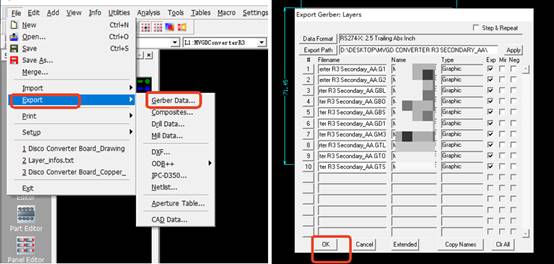
  2. Navigate to File > Assembly Outputs > Generate Pick and Place Files.
  3. Choose the top and bottom layers if needed.
  4. Select the output format (usually CSV or TXT).
  5. Review the preview to check for missing or misaligned parts.
  6. Save the file to the desired location.

Altium gives options to customize column order, units, and decimal precision. Double-checking these settings ensures the file works smoothly with the intended assembly equipment.

How to Export Pick and Place File?

The actual export process varies by software, but the core steps stay similar across most platforms. Here’s a general guide:

1. Open the completed PCB layout file.

2. Confirm all parts have correct designators, footprints, and placements.

3. Open the Output or Export menu (naming varies by software).

How to Export Pick and Place File?

4. Choose Pick and Place File or Centroid File from the list and export.

How to Export Pick and Place File?

5. Select output preferences — file type, units, layers, etc.

How to Export Pick and Place File?

6. Review the file for missing data before saving.

Most tools let designers export top and bottom placements separately or combined. Always double-check orientation and rotation values since errors here cause misaligned parts during assembly.

How to Generate Pick and Place File from Gerber?

Gerber files mainly handle copper, solder mask, and silkscreen layers — they don’t directly hold placement data. However, some design tools can extract placement data if the Gerbers contain embedded component data, which isn’t common.

If placement data isn’t embedded, the best approach is to return to the original PCB design file. Most PCB CAD software (like Altium, KiCad, or Eagle) can regenerate a pick and place file directly. If the original design file is unavailable, creating a new placement file requires manual work — identifying parts from the silkscreen and manually recording coordinates.

What is the Pick and Place Process?

The pick and place process starts after the bare PCB arrives at the assembly line. Machines read the pick and place file to know exactly where each component should go. Here’s a simplified version of the steps:

1. Preparing the PCB

Prepare the bare PCB carefully before the assembly process starts. Full inspection is needed to check for defects, scratches, or contamination. For PCBs stored for a long time, baking is important to remove moisture, which helps avoid soldering issues later. After that, solder paste is applied to the pads where components will sit.

2. Feeding the Components

Next, components get loaded into the machine through feeders. These feeders hold reels, trays, or sticks of parts, all arranged in order. Each component type has its own feeder position, linked to the pick and place file.

3. Picking Up Components

The machine starts by picking up components from the feeders using vacuum nozzles. Each nozzle is designed to handle a specific part size, from tiny resistors to larger ICs. The machine uses gentle suction to grab each component without damaging it.

4. Vision Inspection and Alignment

After picking up each component, the machine checks its orientation using a vision system. High-resolution cameras take images to see if the part is facing the right way. If there’s any slight misalignment, the machine rotates the part to the correct angle before placement.

5. Placing Components on the Board

Once the part is aligned, the machine places it onto the PCB. Each component is placed at the exact coordinates provided in the pick and place file. The machine also adjusts the rotation angle to match the footprint on the board. Parts are placed carefully with the right amount of pressure to avoid damaging delicate parts or shifting the solder paste.

6. Speed and Precision Combined

Pick and place machines combine high speed with extreme precision. Modern machines can place thousands of parts per hour, even at microscopic sizes. While speed matters, accuracy is even more important. Each placed component must sit perfectly on its pad, since even the smallest shift could cause electrical issues after soldering.

7. Handling Different Part Sizes

Pick and place machines handle a wide range of components, from tiny 0201 resistors to large connectors. The machine automatically switches nozzles based on the part size.

8. Real-Time Monitoring

Throughout the process, the machine monitors everything in real time. Sensors track part pick-up, alignment checks, and placements. If a feeder runs empty or a part fails inspection, the machine pauses and alerts the operator.
9. Final Transfer for Soldering

Once all parts are placed, the PCB moves to the next step — reflow soldering. The solder paste melts during this stage, permanently bonding each component to the board. Accurate placement during the pick and place process helps ensure every connection forms correctly, which supports good electrical performance in the final product. Here is a full manufacturing process of PCB assembly:

In short, the pick and place process bridges the gap between PCB design and working hardware. It translates design data into real, physical assemblies — fast, accurately, and reliably. Without it, modern electronics manufacturing wouldn’t be able to meet today’s high standards for quality and volume.

At EBest Circuit (Best Technology), our pick and place process combines high-speed machines, careful file preparation, and experienced operators. Our team knows how important clear placement data is for delivering high-quality PCBs. If you’re looking for reliable PCB assembly services or want help preparing your files, feel free to reach out. We’ll make sure your designs turn into top-quality products, every time.

What are double sided FR1 circuit boards? & FR1 vs FR4

March 7th, 2025

Double Sided FR1 Circuit Boards are a type of printed circuit board (PCB) made of FR1 material with two layers of conductive traces. FR1 is a flame retardant material made of paper base and phenolic resin, with good electrical properties and cost-effectiveness, suitable for a variety of electronic devices.

What are double sided FR1 circuit boards? & FR1 vs FR4

As a PCB manufacturer with more than 18 years of manufacturing experience, BEST Technology has accumulated rich experience and excellent technical strength in the production of double-sided FR1 circuit boards. BEST Technology’s production process uses advanced equipment and a strict quality control system to ensure that each circuit board meets high quality standards.

What are double sided FR1 circuit boards?

A double-sided FR1 PCB is made from Flame Retardant 1 (FR1) material, a paper-based phenolic laminate that serves as the board’s substrate. The defining characteristic of double-sided PCBs is their copper layers on both sides, allowing components to be soldered on both surfaces.

This feature enables denser circuit layouts, making double-sided FR1 PCBs ideal for applications where single-layer boards cannot provide enough space for circuit traces.

However, because FR1 is not as heat-resistant as FR4, it is mainly used in low-power electronic devices that do not generate excessive heat.

What is the difference between FR1 and FR4 PCB?

FR1 and FR4 are two different types of PCB materials, each suited for specific applications. Here’s how they compare:

Material Composition:

  • FR1: Made of phenolic resin and paper-based material.
  • FR4: Constructed from woven fiberglass and epoxy resin, making it more rigid and durable.
What are double sided FR1 circuit boards? & FR1 vs FR4

Thermal Resistance:

  • FR1: Has a lower heat tolerance, making it unsuitable for high-temperature applications.
  • FR4: Withstands higher temperatures, ideal for demanding environments.
Durability & Strength:

  • FR1: More brittle, making it prone to cracking under stress.
  • FR4: Has high mechanical strength, suitable for multilayer PCBs.

Cost:

  • FR1: Cheaper, making it ideal for cost-effective projects.
FR4: More expensive but offers better longevity.

Common Uses:

  • FR1: Found in household electronics, small gadgets, and simple power circuits.
  • FR4: Used in industrial, automotive, and high-performance electronic devices.
What is FR1 FR2 and FR3?

Many PCB materials exist, but FR1, FR2, and FR3 are closely related. All are paper-based but with different properties:

  • FR1: Phenolic resin impregnated kraft paper substrate, with the highest heat resistance (UL 94 V-0/V-1) among the three, used for single-layer boards and basic double-sided boards (lighting equipment, home appliance control boards), with the lowest cost but poor moisture resistance and low dimensional stability.
  • FR2: Phenolic resin paper-based material, with lower heat resistance than FR1 (UL 94 V-2), mainly used for low-cost single-layer PCBs (remote controls, toy circuits), with high flammability and requiring fireproof coating and not suitable for high temperature environments.
  • FR3: Epoxy resin impregnated paper-based material, with significantly improved moisture resistance, suitable for basic consumer electronics circuits (mobile phone chargers, small home appliances), as a compromise between FR2 and FR4, but with limited high temperature resistance.

What is the difference between single-sided and double-sided PCBs?

Single-sided PCB: Copper is only coated on one side (commonly used FR1/FR2 paper-based materials), made by simple etching process, with low manufacturing cost but limited design flexibility, and complex connections require jumper wires.

Double-sided PCB: Copper is coated on both sides and uses via interconnection technology (mostly using FR3/FR4 substrates), supports double-sided layout of components and multi-layer wiring. The manufacturing cost is higher but the reliability is significantly improved.

How to make double sided FR1 circuit boards?

Manufacturing double-sided FR1 PCBs involves several steps:

  • Material preparation: Double-sided copper-clad FR1 phenolic paper substrate is selected. Its heat resistance (UL 94 V-0/V-1) and cost balance characteristics are suitable for basic double-sided board requirements.
What are double sided FR1 circuit boards? & FR1 vs FR4
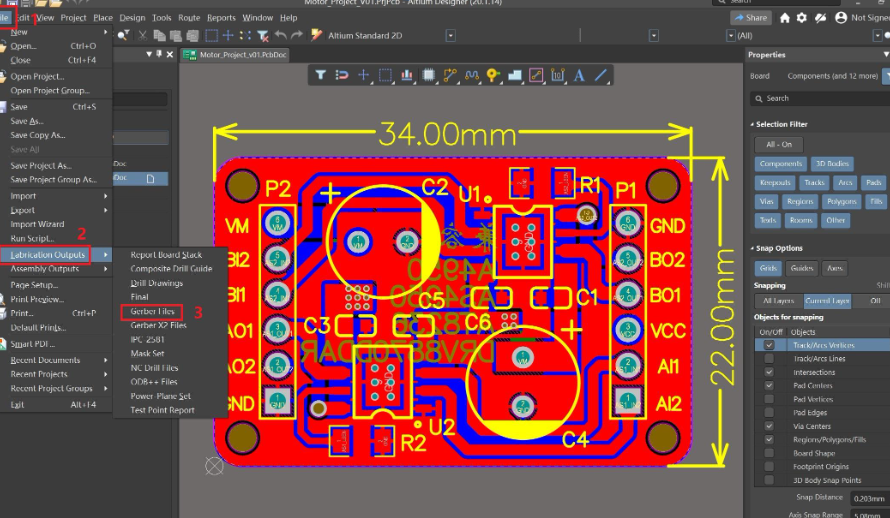
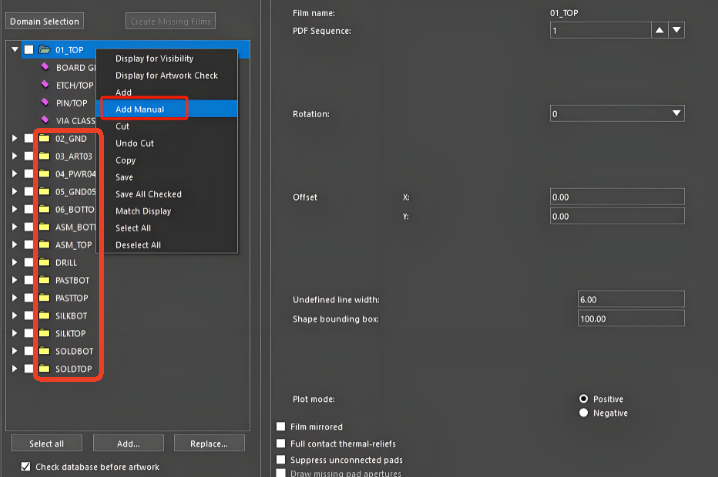
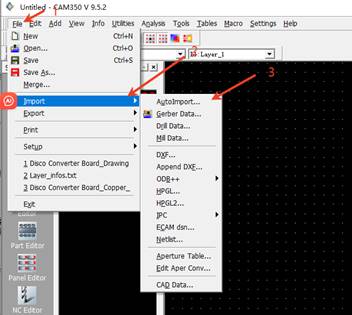
  • Circuit design: Use tools to complete the Gerber file, focus on optimizing the via distribution and copper foil thickness (usually 35μm), and ensure that the mechanical strength of the FR1 substrate is stable during the etching process.
  • Photoresist and etching: Double-sided negative photosensitive dry film is coated, and after exposure and development, a resist pattern is formed, and the circuit is etched out using a solution.
  • Drilling and metallization: CNC drilling machine processes through holes, chemical copper plating combined with electroplating copper achieves double-sided conduction, and the FR1 substrate needs to be pre-impregnated to enhance the bonding strength.
  • Solder mask and silk screen printing: Screen printing thermosetting solder mask ink forms a protective layer, and character logos are printed at the same time.
  • Assembly and testing: Wave soldering or manual soldering of components, ICT testing after flying probe test of conductivity, FR1 board needs to avoid long-term use in high temperature environment.

What are the advantages of double sided FR1 circuit boards?

Double-sided FR1 PCBs offer several benefits:

  • Cost-Effective: One of the most affordable PCB options, making it ideal for budget-sensitive projects.
  • Lightweight: FR1 is lighter than FR4, making it easier to handle.
  • Good Electrical Insulation: The phenolic resin provides stable electrical performance.
  • Efficient for Simple Electronics: Works well in basic circuit designs, power supplies, and consumer electronics.

What are the disadvantages of double sided FR1 circuit boards?

While FR1 PCBs are useful, they have some drawbacks:

  • Lower Heat Resistance: Can degrade in high-temperature environments.
  • Brittle: More fragile than FR4, leading to possible breakage under mechanical stress.
  • Limited Multilayer Capability: Unlike FR4, FR1 does not support complex multilayer stacking.
  • Moisture Absorption: Can absorb moisture over time, affecting durability.

What are the applications of double sided FR1 circuit boards?

Due to its affordability and reliability, double-sided FR1 PCBs are widely used in:

  • Consumer Electronics: Found in TV remote controls, LED drivers, and power strips.
What are double sided FR1 circuit boards? & FR1 vs FR4
  • Power Supplies: Used in low-power voltage regulators and adapters.
  • Automotive Electronics: Found in basic control modules for car accessories.
  • Industrial Control Systems: Used in low-complexity automation circuits.

Conclusion:

Double sided FR1 circuit boards offer an affordable and efficient solution for various electronic applications. Their dual-layer design allows for more compact circuit layouts. While FR1 PCBs may have some limitations, they remain a cost-effective choice for many projects.

At BEST Technology, Whether you need double-sided FR1 PCBs or other custom PCB solutions, we are here to help. Contact us today at sales@bestpcbs.com to discuss your project needs!

RF Ceramic Substrate for Microwave, Ceramic PCB Prototype & Manufacturing

March 6th, 2025

What is RF Ceramic Substrate?

RF ceramic substrate is a key component for RF circuit and microwave circuit, it refers to a specialized ceramic material designed to support high-frequency circuits used in radio frequency systems. Unlike traditional materials, ceramic substrates used for RF circuits offer low signal loss, stable dielectric properties, and strong thermal resistance. It is usually made of alumina (Al₂O) ₃ ceramic material, with good insulation properties, high temperature stability and low dielectric loss characteristics, the dielectric constant is usually between 9-12, dielectric loss Angle is less than 0.0003.

RF Ceramic Substrate for Microwave, Ceramic PCB Prototype & Manufacturing

Types of RF Ceramic Substrate

1. Alumina-Based Substrate

Alumina (Al2O3) is widely used for RF ceramic substrates because it offers high thermal conductivity, good mechanical strength, and stable dielectric behavior at high frequencies. It can handle both RF and microwave signals, making it suitable for communication systems, radar, and aerospace devices.

2. Aluminum Nitride (AlN) Substrate

Aluminum nitride offers both high thermal conductivity and lower dielectric constant compared to alumina. This helps improve signal integrity in high-speed circuits. AlN substrates work well in applications needing both heat dissipation and frequency stability, like power amplifiers and phased array antennas.

3. Beryllium Oxide (BeO) Substrate

BeO substrates provide the highest thermal conductivity among ceramic options. Although used less frequently due to handling concerns, BeO still finds use in specialized high-power RF systems where heat removal is critical.

RF Ceramic Substrate vs. Normal Ceramic Substrate

Not all ceramic substrates perform equally, especially when handling RF signals. Regular ceramic substrates, like those used in standard circuits, mainly focus on mechanical strength and insulation. Electrical performance, especially at high frequencies, often comes second.

RF ceramic substrates, however, prioritize electrical performance. They offer low dielectric loss, controlled dielectric constant, and tight tolerances, all of which ensure signals move smoothly without distortion. In microwave circuits, even minor changes in material properties can cause signal loss or unwanted interference. In addition to this, they are differ from materials composition and applications:

1. Material Composition

  • RF Ceramic Substrates: Typically made from Class I ceramic materials, including alumina (Al₂O₃), aluminum nitride (AlN), and silicon nitride (Si₃N₄). These materials offer good thermal conductivity, high-frequency performance, and excellent high-temperature stability.
  • Normal Ceramic Substrates: Primarily made from inorganic materials like alumina (Al₂O₃) and aluminum nitride (AlN). While these materials perform well at high temperatures, they do not match RF ceramic substrates in terms of high-frequency performance.

2. Application Fields

  • RF Ceramic Substrates: Primarily used in RF and microwave circuits, such as mobile communication base stations, broadcast transmitters, MRI coils, semiconductor RF power supplies, laser equipment, military radios, radar systems, and complete RF microwave devices. They are also used in power amplifiers, LC filters, transceiver modules, and microwave components.
  • Normal Ceramic Substrates: Widely used in high-power LED lighting, high-frequency communication, and railway power systems. They are valued for their excellent heat dissipation and high-temperature stability.

Benefits of RF Ceramic Substrate for Microwave

1. Low Dielectric Loss

RF ceramic substrates minimize signal loss at high frequencies, which helps maintain signal strength even across longer transmission paths.

2. Stable Dielectric Properties

Ceramic substrates keep their dielectric constant stable across wide temperature and frequency ranges.

3. Excellent Thermal Management

Microwave circuits often generate heat, especially at higher power levels. Ceramic substrates, particularly AlN and BeO, offer strong heat dissipation, it helps prevent thermal damage while preserving electrical performance.

4. Environmental Durability

Microwave systems used in aerospace, defense, and satellite applications face harsh environments, including vibration, radiation, and extreme temperatures. Ceramic substrates handle these conditions without losing mechanical or electrical reliability.

5. Precision Manufacturing

Ceramic substrates for RF circuits support fine-line patterns, which allows designers to create high-density circuits without losing signal integrity.

RF Ceramic Substrate for Microwave, Ceramic PCB Prototype & Manufacturing

Ceramic Substrate HS Code

The HS code for ceramic substrates used in electronic circuits generally falls under 8547.10.00. However, for substrates specifically designed for RF or microwave circuits, local customs authorities may apply slight variations depending on composition, thickness, or intended use.

Well-Known RF Ceramic Substrate Brands

When choosing RF ceramic substrates, selecting reliable materials from established brands helps ensure consistent performance. Several companies specialize in developing high-performance ceramic materials specifically for RF and microwave applications. Below are some well-known names trusted across industries like telecom, aerospace, automotive radar, and satellite systems.

  • Rogers Corporation
  • Kyocera Fine Ceramics
  • Coorstek
  • Murata Manufacturing
  • Maruwa
  • NGK Spark Plug Co., Ltd.
  • Heraeus Electronics

At EBest Circuit (Best Technology), we offer customized RF ceramic PCBs for our customers, we have stable supply chain and enough stock in our warehouse. Therefore, we can handle time-sensitive orders and provide expedited service if you are urgent.

RF Ceramic Substrate Uses

  • Wireless communication modules like 5G antennas, RF front-end modules, and satellite communication devices.
  • Radar and sensing systems, including automotive radar, weather radar, and defense radar systems.
  • Aerospace and space electronics, such as satellite payloads, deep-space communication, and onboard electronics.
  • Medical imaging and equipment, including MRI and wireless telemetry devices.
  • Industrial RF Systems, like RF heating systems, test instruments, and high-frequency sensors.

RF Ceramic PCB Design Considerations

Designing RF ceramic PCBs requires a deep understanding of both high-frequency circuit behavior and ceramic material properties. Compared to standard FR4 or other organic substrates, ceramic materials handle RF signals differently, especially at microwave and millimeter-wave frequencies. Below are the key considerations to achieve stable signal transmission, low loss, and reliable performance.

RF Ceramic Substrate for Microwave, Ceramic PCB Prototype & Manufacturing

1. Dielectric Constant and Its Stability

The dielectric constant (Dk) directly affects signal propagation speed and impedance matching. Ceramic substrates, such as Al₂O₃ or AlN, typically have Dk values ranging from 9 to 10 for Al2O3 and 8 to 9 for AlN. It’s not just about Dk itself but also its stability over frequency and temperature changes. For RF circuits, materials with minimal Dk variation across frequencies (up to 40 GHz and beyond) help maintain consistent phase and impedance control, which directly impacts signal integrity.

2. Loss Tangent (Df) and Signal Attenuation

Loss tangent (Df) measures how much energy the substrate material absorbs during signal transmission. Lower Df leads to less signal attenuation, especially at high frequencies.

For comparison, FR4’s Df can exceed 0.015 at 10 GHz, While a reliable data from Murata’s ceramic materials shows Df values around 0.0005 to 0.0010 at 10 GHz, which outperforms many organic substrates.

3. Conductor Surface Roughness

For microwave circuits, copper foil roughness directly affects insertion loss. Rougher copper increases conductor loss, especially above 10 GHz. Ceramic PCBs often use low-profile copper, with surface roughness below 2 µm (Rz), to minimize skin effect losses at high frequencies.

4. Coefficient of Thermal Expansion (CTE) Matching

Alumina substrates typically have a CTE around 6.5 ppm/°C, which aligns reasonably well with copper’s 17 ppm/°C when using proper bonding techniques. For applications like satellite communications, where temperature swings can exceed ±100°C, this balance ensures mechanical reliability.

5. Transmission Line Structures and Impedance Control

To design RF circuits on ceramic substrates, engineers often use microstrip, coplanar waveguide (CPW), or stripline structures. Achieving tight impedance control (±5% or better) requires precise trace width calculation, gap spacing, and accurate Dk data across the operating frequency range. For example, a 50-ohm microstrip line on 99.6% alumina with a 0.635 mm (25 mil) thickness requires a trace width around 1.5 mm, but the exact value shifts slightly based on the operating frequency and whether the substrate uses thin-film or thick-film copper.

6. Thermal Management for High-Power RF Circuits

High-power RF circuits, such as power amplifiers (PAs) or radar transmitters, generate considerable heat. Aluminum nitride (AlN) substrates, with thermal conductivity reaching 170 W/m·K, outperform alumina (20-25 W/m·K) by almost seven times. This high thermal conductivity helps dissipate heat efficiently, reducing thermal gradients that could detune RF circuits.

7. Via and Plating Quality

Plated vias connect RF traces between layers or serve as ground vias to improve EMI shielding. In RF ceramic PCBs, via diameters as small as 100 µm are common, especially in LTCC packages.

For more information about RF ceramic PCB design guide, welcome to contact us at sales@bestpcbs.com. We offer free technical support for any PCB frequent asked questions.

Why Choose EBest Circuit (Best Technology) as Your RF Ceramic PCB Supplier?

At EBest Circuit (Best Technology), we specialize in RF ceramic PCB manufacturing with over 18 years of experience serving global clients. We understand how critical dielectric stability, thermal management, and mechanical precision are for RF and microwave systems. Our in-house testing and quality checks ensure every board meets your performance standards, whether for 5G modules, radar systems, or aerospace electronics. At EBest Circuit (Best Technology), you can enjoy:

  • Products control under ISO13485, IATF16949, AS9100D system
  • Stable supply chain (cover various brands ceramic substrate)
  • Cutting edge technology for ceramic PCB manufacturing
  • Professional ceramic PCB engineer technical support
  • DDU & DDP quotation
  • 2-3Weeks delivery
  • Highest quality
  • Customized RF ceramic PCB design
  • Turn-key service

With custom design support, quick turnaround, and flexible production options, we help clients bring RF innovations to market faster. Contact EBest Circuit (Best Technology) today to see how our RF ceramic PCB solutions can support your next project.

What is a perf board? How to use a perf board?

March 6th, 2025

Perf board is a board used in the field of electronics and PCB. It is a board with grid holes. These holes are used to insert and solder the pins of electronic components and are used to place and solder electronic components. It is similar to a breadboard, but is mainly used in situations where soldering is required, and is suitable for simple circuit design and prototyping.

What is a perf board? How to use a perf board?

What is a Perf Board?

A perf board, short for perforated board, is a flat board with a grid of holes. These holes are plated or non-plated, allowing electronic components to be mounted and soldered.

Unlike a PCB, which has pre-designed traces, a perf board gives complete freedom to create custom wiring connections.

Perf boards are ideal for prototyping and small-scale projects. They serve as an intermediate step between breadboarding and full PCB manufacturing. Many electronics enthusiasts rely on perf boards to refine their designs before moving to mass production.

What Does a Perf Board Do?

A perf board acts as a platform for circuit assembly. It allows components like resistors, capacitors, and integrated circuits (ICs) to be mounted securely. By connecting these components using solder and wires, a functional electronic circuit is created.

What is a perf board? How to use a perf board?

Unlike a breadboard, which is temporary, a perf board provides a permanent and durable solution. Once components are soldered, they remain firmly in place, ensuring a stable connection and reliable performance.

What is the Difference Between a Perf Board and a Breadboard?

Both perf boards and breadboards are used for building circuits, but they serve different purposes.

Breadboards are reusable, allowing circuits to be assembled without soldering. They are great for testing ideas but are not ideal for permanent designs.

Perf boards require soldering but create stronger and more reliable connections. They are used when a project needs to be more durable than a breadboard prototype.

Breadboards have internal metal connections, making wiring easy. Perf boards require manual wiring, offering complete customization.

How Do Perf Boards Work?

A perf board works by providing a physical base for electronic components. Each hole allows component leads to pass through. Solder is used to create permanent electrical connections.

There are different types of perf boards:

Single-sided perf boards have copper pads on one side for easy soldering.

Double-sided perf boards have pads on both sides, enabling more complex connections.

Stripboard perf boards have connected rows of copper, simplifying circuit routing.

Since there are no predefined traces, wiring must be done manually using solder bridges, jumper wires, or thin copper wires. Proper planning helps prevent messy connections and improves circuit performance.

How to use a perf board?

Using a perforated board (also known as a hole board or a universal board) to build a circuit requires welding to connect components. Its operation process is essentially different from that of a breadboard.

First, you need to plan the component layout according to the circuit diagram, insert the component pins into the corresponding holes, pay attention to polarity and spacing, and ensure that components such as integrated circuits, resistors, and capacitors are arranged neatly. When laying out, the wire length should be shortened as much as possible, and the component pins themselves can be used as connection points to simplify welding.

Next, you need to use solder to weld the component pins to the copper foil surface of the perforated board. Before welding, you need to clean the oxide on the surface of the copper foil, and use rosin flux to improve the welding quality.

For jumper wires, you can choose thin enameled wires or tinned copper wires, and weld them along the copper foil routing direction. If necessary, you can use wires to connect different areas on the back of the board. After welding, you need to cut off the excess pins of the component, and use a multimeter to check whether each solder joint is conductive to confirm that there is no short circuit or cold soldering.

To increase the success rate, you can draw a perforated board layout diagram on paper in advance, marking the component positions and routing paths. For complex circuits, modular welding can be used to test functions part by part. Beginners are advised to use a soldering station instead of a soldering iron to control the temperature and prevent damage to components.

In addition, the copper foil surface of the perforated board should be kept clean, and excessive solder accumulation should be avoided during soldering, which may cause short circuits in adjacent copper foils. The completed circuit can be fixed in the housing with screws, which is suitable for making electronic devices that need to be used for a long time.

What is a Perf Board Made Of?

Perf boards are made from different materials, depending on durability and cost requirements.

  • FR4 (Fiberglass): Strong and heat-resistant, commonly used for professional projects.
What is a perf board? How to use a perf board?
  • Phenolic Resin: Cheaper but more fragile, suitable for low-cost applications.
  • Epoxy Boards: Lightweight and flexible, but less durable than FR4.

The copper pads on perf boards can be tin-plated for better solder adhesion. Some high-quality boards have gold-plated pads, offering better conductivity and corrosion resistance.

How to Make a Perf Board?

Creating a perf board from scratch requires precision. The board must have evenly spaced holes and strong material for durability.

Manufacturers follow these steps:

  • Material SelectionFR4, phenolic, or epoxy sheets are chosen based on the application.
  • Hole Drilling – A grid of evenly spaced holes is drilled using CNC machines.
  • Copper Plating (Optional) – Some boards are coated with copper to improve conductivity.
  • Cutting and Finishing – The board is trimmed to standard sizes and inspected for defects.

For DIY projects, modifying an existing board is easier than making one from raw materials.

How to Cut a Perf Board?

Cutting a perf board requires precision to avoid damaging the holes or copper pads. The best methods include:

  • Score and Snap – Using a sharp knife, score the board along a straight line, then snap it carefully.
  • Hacksaw or Rotary Tool – A fine-tooth saw or Dremel cuts through thick boards easily.
  • Shears – Heavy-duty scissors work for thinner boards but may cause rough edges.

After cutting, sanding the edges ensures a smooth finish. It prevents sharp corners from damaging wires or components.

How to Assemble Electronic Components on a Perf Board?

Building a circuit on a perf board follows a structured process:

What is a perf board? How to use a perf board?
  • Plan the Layout – Arrange components logically to minimize wire clutter.
  • Insert Components – Place resistors, capacitors, ICs, and other parts into the holes.
  • Solder the Connections – Secure each component with solder, ensuring strong joints.
  • Add Wires or Solder Bridges – Use insulated wires or solder traces to connect components.
  • Test the Circuit – Check for short circuits or missing connections before finalizing.

Good soldering techniques prevent weak joints and ensure a long-lasting circuit. Proper planning and clean wiring improve circuit performance.

Conclusion:

A perf board is an essential tool for prototyping and DIY electronics. It bridges the gap between temporary breadboards and professional PCBs. For high-quality custom perf boards, contact sales@bestpcbs.com

What is a reflow oven? SMT reflow oven

February 28th, 2025

The reflow oven is a key equipment used in electronic manufacturing, mainly used to solder surface mount components (SMT) to PCBs. It provides a high temperature environment to melt the solder paste pre-coated on the PCB pads, thereby achieving mechanical and electrical connections between component pins and pads.

What is a reflow oven? SMT reflow oven

The working principle of the reflow oven is based on hot air circulation technology, which usually includes four stages: preheating, soaking, reflow and cooling. Each stage has a specific temperature curve to ensure welding quality and avoid component damage.

What is a reflow oven?

A reflow oven is a specialized device used in the soldering process to attach components to a PCB. It is primarily used in Surface Mount Technology (SMT), where electronic components are mounted directly onto the surface of a PCB instead of through holes.

The oven is designed to heat the PCB to a specific temperature, melting solder paste that has been applied to the PCB’s pads. This process forms strong, reliable solder joints, ensuring the components stay in place securely.

The reflow oven uses controlled heat to melt the solder paste, allowing it to flow and bond the component leads to the PCB pads. This technology has become widely used in electronics manufacturing because it allows for precise, high-speed soldering that is highly automated.

How does a reflow oven work?

The operation of a reflow oven can be broken down into a few key steps. First, the PCB with the solder paste applied is fed into the oven. The oven uses carefully controlled temperature zones to heat the board gradually. As the temperature rises, the solder paste starts to melt, creating liquid solder that forms connections between the PCB pads and component leads.

What is a reflow oven? SMT reflow oven

Once the solder paste has melted and the joints are formed, the oven then cools the board in a controlled manner. Cooling too quickly can cause solder joints to form improperly, so a gradual cooling process is essential to avoid damaging the components or the board itself.

Reflow ovens are equipped with multiple heating zones and cooling zones to maintain precise control over the temperature at each stage of the process. This ensures that the reflow soldering process is consistent, high-quality, and free of defects.

How to reflow a circuit board in an oven?

Reflowing a circuit board in an oven involves several steps that require attention to detail. Here’s a general overview:

  • Prepare the PCB: Apply solder paste to the PCB pads where components will be placed.
  • Place the Components: Use a pick-and-place machine or manual methods to place the components onto the PCB, ensuring that they align with the solder paste on the pads.
  • Set the Oven Parameters: Program the reflow oven with the correct temperature profile based on the type of solder paste being used, the components on the board, and the PCB material.
  • Feed the Board into the Oven: Place the PCB into the oven, where it will pass through different heating zones. The oven will gradually heat the board, allowing the solder to melt and form the joints.
  • Cool the PCB: After the solder has melted and cooled slightly, the PCB is moved to the cooling section of the oven, where it will be gradually cooled to solidify the solder joints.

Inspect the Board: Once cooled, inspect the board for proper solder joints. Ensure that all components are securely mounted, and there are no issues like cold solder joints or solder bridges.

What does a reflow oven do?

At its core, a reflow oven melts solder paste to bond components to a PCB. The key benefits of using a reflow oven include:

  • Precision: The oven provides consistent and precise heat to ensure proper solder joint formation.
  • Speed: It allows for quick processing of multiple boards, making it ideal for high-volume manufacturing.
What is a reflow oven? SMT reflow oven
  • Quality: A reflow oven ensures that each joint is uniform and free from defects like cold joints or tombstoning (when a component flips up during soldering).
  • Automation: The process is automated, reducing the need for manual labor and human error.

Overall, a reflow oven is a critical tool in modern electronics manufacturing, offering speed, precision, and reliability for SMT soldering.

How many zones are in a reflow oven?

A reflow oven typically contains three to ten temperature zones. These zones are divided into heating zones, a peak zone, and cooling zones:

  • Heating Zones: These zones gradually heat the board to the appropriate temperature for solder melting. They ensure uniform heating across the PCB.
  • Peak Zone: This is where the temperature reaches the highest point, usually around 230-250°C (446-482°F), allowing the solder paste to fully melt.
  • Cooling Zones: After the peak zone, the board enters the cooling zones, where the temperature is gradually lowered to solidify the solder joints and prevent thermal shock.

The more zones a reflow oven has, the more control you have over the heating and cooling process, which leads to higher-quality solder joints and better overall results.

What is the dwell time for reflow oven?

Dwell time refers to the amount of time the PCB spends in each temperature zone, especially the peak zone where soldering occurs.

Typically, the dwell time should last around 30-90 seconds in the peak zone, depending on the solder paste and component types. Too short a dwell time may lead to incomplete soldering, while too long a dwell time can cause excessive heat exposure, damaging sensitive components.

Why use nitrogen in a reflow oven?

Using nitrogen in a reflow oven can provide several benefits:

What is a reflow oven? SMT reflow oven
  • Reduced Oxidation: Nitrogen creates an inert atmosphere inside the oven, reducing the risk of oxidation on the PCB and components.
  • Improved Soldering: Nitrogen helps the solder paste flow more smoothly and evenly, leading to better wetting and more reliable solder joints.
  • Enhanced Quality: Nitrogen can help achieve consistent, high-quality results, particularly when working with sensitive components or fine-pitch ICs.

Although nitrogen is not strictly necessary for all reflow soldering, using it can significantly improve the overall quality of your soldering process, especially in critical applications.

Why solder balls after reflow?

Solder balls, also known as solder splashes, are small balls of solder that form during the reflow process. They can occur due to a variety of reasons, such as improper paste application, excessive heat, or excessive flux residue.

Solder balls can be problematic because they can short-circuit the PCB, leading to functional issues. To prevent solder balls, it’s essential to optimize the solder paste application, control the oven temperature profile, and ensure that components are placed properly.

Conlusion:

A reflow oven is an indispensable tool in modern electronics manufacturing, ensuring that surface mount components are securely attached to PCBs through a carefully controlled soldering process. With the ability to handle high volumes of boards efficiently and consistently, these ovens play a critical role in producing reliable, high-quality products.

For more details about SMT reflow ovens, PCB reflow oven setups, or reflow soldering solutions, feel free to reach out to us at sales@bestpcbs.com. We’re always happy to assist you in finding the right solutions for your needs.

What Is LED Light PCB? A Complete Guide to LED PCB

February 27th, 2025


LED light PCB has become an essential part of modern lighting technology. Whether you’re designing a sleek LED light strip or a high-powered LED bulb, understanding the structure and functionality of LED PCB is vital. In this blog, EBest Circuit (Best Technology) will dive deep into what makes LED light PCB, and the materials involved, their components, and the different types that suit various applications. By the end, you’ll have a clear understanding of LED PCB design, including how to connect LED to your custom board.

What Is LED Light PCB? A Complete Guide to LED PCB

What Is PCB in LED Light?

A PCB (Printed Circuit Board) in an LED light is the base where all the components of the LED circuit are mounted. This board serves as the electrical pathway that connects the individual LED chips, allowing electricity to flow through the circuit and power the LED. The design of the PCB is crucial for managing heat dissipation, ensuring optimal light output, and maintaining energy efficiency. Aluminum LED light PCB, in particular, offer excellent thermal conductivity, which is essential in preventing overheating and extending the life of LED components.

What Materials Are Used in LED PCB?

LED PCB are made using several materials that work together to ensure optimal performance. The most common materials include:

  • Aluminum: Known for its high thermal conductivity, aluminum is often used in LED PCB to quickly dissipate heat. This is especially important in high-power LED applications.
  • Copper: Copper is used for its excellent electrical conductivity, ensuring that current flows efficiently through the PCB.
  • FR4 (Flame Retardant 4): This is a widely used epoxy resin laminate material that offers a good balance between electrical insulation and mechanical strength.
  • Ceramic: In some high-performance designs, ceramic-based PCB are used, particularly when superior heat resistance is required.
What Is LED Light PCB? A Complete Guide to LED PCB

Each material plays a specific role in enhancing the performance of the LED, from heat management to electrical conductivity.

What Are the Components of LED PCB?

LED PCB typically consist of the following components:

  • LED Chips: These are the tiny light-emitting diodes that convert electrical energy into light. They are usually placed on the surface of the PCB.
  • Copper Traces: These traces act as pathways for the electrical current, connecting the LED chips to each other and the power source.
  • Thermal Management Elements: In high-power applications, components like heat sinks and through-holes are included to help dissipate heat and maintain efficiency.
  • Resistors: These components control the flow of current through the LEDs to ensure they operate within their rated power limits.
  • Capacitors: Capacitors help smooth out fluctuations in voltage, providing stable power to the LED.
What Is LED Light PCB? A Complete Guide to LED PCB

Each component is crucial in ensuring the LED PCB works efficiently and has a long lifespan.

What Are the Different Types of LED PCB?

LED PCB come in several types, each designed to meet the needs of different applications:

  • Aluminum LED PCBAluminum LED PCB: As mentioned earlier, aluminum is widely used for its excellent heat dissipation. This type of PCB is ideal for high-power LED, like those used in lighting and automotive applications.
  • Flexible LED PCB:These PCB are made from flexible materials, allowing them to be bent and shaped for unique or custom designs. Flexible PCB are perfect for applications like LED strips and curved lighting solutions.
  • High-Density Interconnector(HDI PCB):These are used for applications requiring a higher level of integration, such as miniaturized LED systems.
  • Rigid LED PCB: These are made from solid, non-flexible materials and are commonly used in applications where the PCB will remain in a fixed position, such as in LED bulbs or signage.

Each type of LED PCB is designed with specific characteristics in mind, such as flexibility, heat management, and power handling.

How to Make LED PCB?

Making an LED PCB involves several steps, from design to fabrication. Here’s an overview of the process:

1. Design: First, you need to design the layout of your PCB. This includes selecting the components, determining the size and shape of the board, and creating the electrical connections between the components. CAD (Computer-Aided Design) software is typically used to create the design.

2. Material Selection: Based on the design, select the appropriate PCB material (aluminum, copper, FR4, etc.) that meets your thermal, electrical, and mechanical needs.

3. Printing the PCB: The design is transferred onto the PCB material using a photolithography process. This process involves applying a light-sensitive film to the board, exposing it to UV light, and then developing it to create the desired pattern of copper traces.

4. Component Placement and Soldering: After the PCB is created, the LED chips, resistors, capacitors, and other components are placed on the board. Soldering techniques, such as Surface Mount Technology (SMT) or Through-Hole Technology (THT), are used to attach the components securely.

5. Testing: Once the PCB is assembled, it’s tested for functionality. This involves checking the LED performance, ensuring the power distribution is correct, and verifying that the board is free from defects.

How to Connect LED in PCB?

Connecting LED to a PCB involves placing the LED components in the correct positions on the board and ensuring the electrical connections are made properly. Here are the steps to connect LED in a PCB:

1. Design the Circuit: Determine the number of LED you’ll use, their configuration (series or parallel), and the required power. This will dictate the placement and size of the copper traces on the PCB.
2. Place the LED: LED are usually mounted on the PCB using soldering methods. For SMD (Surface-Mounted Device) LED, they are placed directly onto the surface of the PCB, while through-hole LED are placed through the holes of the PCB.
3. Solder the Connections: Soldering is the method used to establish electrical connections between the LED leads and the copper traces. For high-density applications, automated soldering techniques are often used to ensure precision.
4. Ensure Proper Heat Dissipation: Since LED generate heat during operation, it’s important to make sure the PCB design incorporates adequate thermal management, such as through-holes, heat sinks, and the right choice of materials.

Properly connecting LED ensures optimal performance, longevity, and safety for the final product.

Conclusion

LED light PCB are a game-changer in the world of lighting technology. From high-power lighting systems to sleek LED strips, these PCB offer exceptional performance, heat management, and reliability. Whether you’re designing a custom LED PCB or working with a manufacturer, understanding the components, materials, and types of LED PCB is essential to achieving the best results.

By selecting the right PCB type, using quality materials, and ensuring proper design and assembly, you can create LED systems that are efficient, durable, and energy-efficient. If you’re ready to bring your LED projects to life, partnering with a reliable LED PCB manufacturer is the next step toward achieving the perfect lighting solution for your needs.

Call to Action

Ready to design your own LED light PCB? Contact EBest Circuit (Best Technology) at sales@bestpcbs.com today to learn about our custom PCB solutions, from aluminum LED light PCB to flexible LED strips. Let us help you make the prefect pcb with your next project! Looking forward to hearing from you!

What is a Rectifier PCB? What is it Used For?

February 27th, 2025

Rectifier PCB is a circuit board used to convert AC power into DC power. Its core function is to achieve the form conversion of electrical energy through a rectifier circuit (usually composed of components such as diodes). This type of PCB is widely used in power adapters, chargers and various electronic devices to provide stable DC power for the devices.

What is a Rectifier PCB? What is it Used For?

What is a Rectifier PCB?

A rectifier PCB is a specialized type of printed circuit board designed to house rectifier components like diodes, capacitors, and resistors, which together convert AC power into DC power. These PCBs often feature layouts optimized for heat dissipation, component placement, and efficient current flow.

Rectifier PCBs are crucial in devices where AC power needs to be transformed into a stable DC voltage, like in power supplies, battery chargers, and DC motors.

Rectifiers themselves come in several configurations, but the most common are half-wave and full-wave rectifiers. Each type has different designs and methods for conversion, and the PCB layout will vary based on the specific rectifier type being used.

What Does a Rectifier Board Do?

At its core, a rectifier board performs one job: converting AC to DC. But this simple task is essential to countless devices.

In an AC circuit, the current alternates direction periodically, making it unsuitable for devices that require a constant voltage to function, such as LED lights, batteries, and most electronic circuits.

What is a Rectifier PCB? What is it Used For?

Rectifiers use diodes to allow current to flow in only one direction, converting the AC input into a smoother DC output.

Depending on the rectifier configuration, a rectifier PCB can smooth out the power through additional filtering components like capacitors. This results in a cleaner DC output with minimal ripple, which is crucial for sensitive electronic devices that cannot tolerate fluctuations in voltage.

What Are the Types of Rectifier PCB?

There are several types of rectifier PCBs, each designed for different purposes. The main difference between them lies in the configuration of the rectifying diodes and how they handle the AC input signal.

  • Half-Wave Rectifier PCB

A half-wave rectifier PCB is the simplest design. It uses a single diode to convert the positive half of the AC waveform into a DC signal while blocking the negative half. This results in a highly pulsating DC signal with significant ripple, making it less efficient for many applications but suitable for low-power circuits.

  • Full-Wave Rectifier PCB

A full-wave rectifier PCB uses two diodes or a bridge rectifier configuration to convert both halves of the AC waveform into DC. The output is smoother and more consistent than that of a half-wave rectifier. This makes full-wave rectifiers more efficient for medium to high-power applications.

The full wave rectifier PCB layout is more complex than the half-wave design due to the need for more components, but it offers greater efficiency and stability.

  • Bridge Rectifier PCB

A bridge rectifier PCB board uses a bridge of four diodes to convert the AC input into a fully rectified DC output. This configuration is more efficient than a half-wave rectifier and can be used with both single-phase and three-phase AC supplies. It’s commonly used in power supply units and higher-power devices due to its reliability and efficiency.

Each type of rectifier PCB serves different applications depending on the required current, voltage, and ripple tolerance.

Can a Rectifier PCB Convert DC to AC?

Rectifier PCBs are designed to convert AC into DC, not the other way around. This is a fundamental property of rectification — it only works in one direction.

To convert DC to AC, you would need an inverter PCB. Inverters work by using a different set of components, typically transistors, to change the polarity of the current. They play the opposite role of rectifiers by enabling DC devices to run on AC power.

Converting DC to AC requires designing a circuit based on an inverter PCB rather than a rectifier PCB. These two components work together in many power systems but play very different roles.

What is the Difference Between Rectifier PCB and Inverter PCB?

As mentioned, rectifier PCBs and inverter PCBs perform opposite tasks. A rectifier PCB converts alternating current (AC) to direct current (DC), while an inverter PCB does the opposite, converting DC to AC.

  • Rectifier PCBs: These are primarily used when you need to transform AC from a power source (such as the grid) into DC, which is required by most electronic devices. The most common application for rectifier PCBs is in power supplies, where AC from a wall outlet is converted to DC to power devices like computers, LED lights, and mobile phones.
What is a Rectifier PCB? What is it Used For?
  • Inverter PCBs: These are used in renewable energy systems (like solar power) where DC from solar panels needs to be converted into AC to be used in homes or businesses. Inverters are also found in devices that convert battery power (DC) to AC for powering AC appliances.

In short, the key difference lies in the direction of current flow: rectifiers convert AC to DC, and inverters convert DC to AC.

What Are the Applications of Rectifier PCB?

Rectifier PCBs are used in a variety of industries where efficient conversion of AC to DC is required. Some key applications include:

  • Power Supplies: Most electronic devices, including computers, televisions, and mobile phone chargers, rely on rectifiers to convert the AC from wall outlets into usable DC power.
  • LED Lighting: LEDs typically run on DC voltage, and rectifier PCBs ensure that the AC supplied to the lights is converted into a stable DC signal, allowing the lights to function correctly.
  • Battery Chargers: Rectifiers are essential in battery charging circuits. They convert AC from the grid into DC to charge batteries used in a variety of devices, from power tools to electric vehicles.
  • DC Motors: Many motors, especially those in robotics and electric vehicles, require DC voltage to operate. Rectifier PCBs ensure that the AC power from a grid or generator is appropriately converted to DC.

Power Conversion in Industrial Electronics: Rectifier PCBs are used in industrial machines, power equipment, and even some renewable energy applications to convert AC to DC.

Advantages and Disadvantages of Full Wave Rectifier PCB

The full wave rectifier PCB offers several advantages over its half-wave counterpart, but there are also some limitations.

Advantages:

  • Higher Efficiency: Full-wave rectifiers use both halves of the AC signal, making them more efficient in converting AC to DC.
  • Lower Ripple: Because full-wave rectifiers convert both positive and negative halves of the AC signal, they produce a more consistent DC output with less ripple compared to half-wave designs.
  • Better Utilization of Input Signal: Since both halves of the AC waveform are used, the system’s overall efficiency improves, allowing the circuit to perform better with the same input.
What is a Rectifier PCB? What is it Used For?

Disadvantages:

  • Complexity: The full-wave rectifier PCB layout is more complex than the half-wave rectifier, requiring more diodes or a bridge rectifier configuration.
  • Higher Cost: With additional components and a more complicated design, full-wave rectifier PCBs tend to be more expensive than half-wave options.

Conclusion:

Rectifier PCBs are indispensable in today’s electronics, converting AC into DC for use in everything from power supplies to LED lights. Whether you need a simple half-wave rectifier or a more complex full-wave rectifier PCB, choosing the right design can ensure the efficient performance of your devices.

If you’re looking for high-quality rectifier PCB designs and manufacturing services, feel free to contact us at sales@bestpcbs.com

What is standard double sided PCB?

February 26th, 2025

Standard double sided PCB is a printed circuit board with two layers of conductive circuits. Circuit layers are provided on both sides of the PCB and interlayer connections are achieved through conductive holes. It is suitable for a variety of electronic devices. Because of its relatively simple structure and low cost, it is a common basic circuit board type in electronic manufacturing.

What is standard double sided PCB?

What is a double-sided PCB?

A double-sided PCB, also known as a two-layer PCB, features two layers of conductive material, typically copper, on both sides of an insulating substrate. These layers are interconnected using vias, which are small holes drilled into the PCB to allow electrical connections between the two sides.

Double-sided PCBs are used in applications where the complexity of the circuit requires components and connections to be placed on both sides of the board.

The primary advantage of a double-sided PCB is its ability to accommodate more components in a smaller footprint. This feature makes double-sided PCBs ideal for products where space is at a premium, such as smartphones, medical devices, and automotive electronics.

How many layers does a double-sided PCB have?

A standard double-sided PCB has two layers of conductive copper, one on each side of the substrate. These layers are electrically connected using vias, which create conductive paths between the two sides.

The number of layers in a PCB generally refers to the number of copper layers, which is why a double-sided PCB is made of two copper layers and an insulating substrate in between.

What is standard double sided PCB?

In contrast, multi-layer PCBs, which can have more than two layers of copper, are used for more complex circuits that require additional routing and signal pathways. A double-sided PCB is simpler in design and manufacturing compared to multi-layer PCBs but still offers significant flexibility for many applications.

What is the standard PCB layer?

In PCB manufacturing, a standard PCB layer refers to the number of copper layers used to create the circuit board. The standard PCB layer typically refers to the most common configuration in the industry, which is a single-layer PCB or double-sided PCB.

Single-layer PCBs consist of a single layer of copper, typically used for simpler, low-complexity circuits. These are ideal for products like basic household appliances, toys, and low-power applications.

Double-sided PCBs have copper layers on both sides, allowing for more complex circuits. These are used in products requiring more components, such as power supplies, automotive electronics, and communication devices.

While single-layer and double-sided PCBs are common, there are also multi-layer PCBs, which consist of three or more copper layers. These are used for even more intricate and densely packed electronic designs, such as those in high-frequency communication systems, medical equipment, and advanced computing devices.

What is the standard PCB format?

The standard PCB format typically refers to the physical dimensions and layout of the PCB, including the size, shape, and placement of components. In terms of manufacturing, standard PCB format can also refer to the specifications and designs that comply with industry standards for production.

For double-sided PCBs, the layout should allow for efficient placement of components while maintaining electrical connectivity between both sides. The design also needs to ensure the copper traces are properly routed and connected through vias.

What is standard double sided PCB?

For boards that are mass-produced, standardization ensures consistency and compatibility with manufacturing processes, making it easier for designers to source components and for manufacturers to produce the boards at scale.

What is the standard FR-4 PCB?

FR-4 is a widely used material for PCB substrates, and standard FR-4 PCB refers to PCBs made from this material. FR-4 stands for Flame Retardant 4, which is a grade of fiberglass-reinforced epoxy resin. It is the most common material used for both single-layer and double-sided PCBs due to its excellent insulating properties, mechanical strength, and resistance to high temperatures.

The standard FR-4 PCB is durable, easy to fabricate, and provides good electrical insulation, making it suitable for a wide range of applications. It is also cost-effective, which is why it is used in everything from consumer electronics to industrial control systems.

While FR-4 is the most common material for standard PCBs, other materials, such as polyimide or ceramic, may be used in specialized applications that require specific thermal or electrical characteristics.

What are the requirements for a PCB board?

Designing a PCB board requires consideration of several key factors to ensure that the final product meets the desired performance, reliability, and cost-effectiveness.

Electrical Performance: The copper traces must be designed to handle the required voltage and current without overheating or causing signal degradation.

Thermal Management: Components that generate heat should be strategically placed to minimize temperature buildup.

What is standard double sided PCB?

Mechanical Strength: The material selected for the substrate (e.g., FR-4) plays a significant role in this aspect.

Size and Component Placement: A compact design is often required to save space, and the components must be placed optimally to reduce the overall size while maintaining proper functionality.

Meeting these requirements ensures that the final PCB product will be reliable and effective in its intended application.

What is the IPC standard for PCB?

The IPC standard refers to a set of guidelines and certifications established by the Institute of Printed Circuits (IPC), a global trade association for the electronics industry. The IPC standards are used by manufacturers to ensure that PCBs are fabricated to high quality and reliability standards.

For double-sided PCBs, the IPC-2221 standard outlines the design and manufacturing requirements for creating high-quality PCBs. This standard provides guidelines on design documentation, manufacturing processes, materials, and testing procedures to ensure that the PCBs meet the necessary performance, safety, and environmental requirements.

The IPC-610 standard, specifically, focuses on the acceptability of electronic assemblies, providing detailed requirements for the quality and performance of soldering, component placement, and overall PCB integrity.

What is the ISO standard for PCB manufacturing?

ISO standards are internationally recognized guidelines that help ensure consistency and quality in manufacturing. The ISO 9001 standard is the most widely adopted certification for quality management systems in PCB manufacturing. It ensures that manufacturers follow processes that consistently produce high-quality PCBs, including double-sided designs.

ISO certifications, such as ISO 14001 (environmental management) and ISO 13485 (medical devices), also apply to certain industries, ensuring that manufacturers comply with specific quality and safety standards relevant to their product’s end-use.

By adhering to these ISO and IPC standards, PCB manufacturers can ensure their products meet global expectations for quality, performance, and safety.

Conclusion:

Double-sided PCBs are a versatile and widely used type of printed circuit board. By offering components on both sides of the board, they allow for more complex circuits in a smaller, more compact design.

If you’re looking for standard double-sided PCB manufacturing or need assistance with your PCB design, EBest Circuit (Best Technology) can help. Reach out to us at sales@bestpcbs.com

Diode Polarity Symbol, Diagram & Identify Method

February 22nd, 2025

What is Diode Polarity?

Diode polarity refers to the direction in which a diode allows electrical current to flow. Every diode has two terminals: the anode (positive side) and the cathode (negative side). When the anode is connected to a higher voltage than the cathode, the diode is forward biased, allowing current to pass through. However, if the cathode is at a higher voltage than the anode, the diode becomes reverse biased, blocking current flow.

Diodes serve various purposes in circuits, including rectification, voltage regulation, and circuit protection. Their ability to control current flow makes them essential in electronics. Misplacing a diode in a circuit may cause malfunction or even damage components. Recognizing diode polarity ensures correct installation and prevents unnecessary failures.

Diode Polarity Symbol, Diagram & Identify Method

Diode Polarity Diagram

A diode polarity diagram visually represents the direction in which current flows. This is especially useful when assembling circuits, as placing a diode incorrectly can prevent it from functioning as expected.

A diode symbol consists of a triangle pointing toward a vertical bar:

  • The triangle represents the anode.
  • The vertical bar represents the cathode.
  • The arrow direction indicates the forward current flow.

When placed in a circuit, current moves from the anode to the cathode. If the diode is reversed, it blocks the current. Some circuits use multiple diodes to form rectifiers, which convert alternating current (AC) into direct current (DC).

Diode Polarity Symbol, Diagram & Identify Method

Diode Polarity Symbol

The diode polarity symbol is a crucial element in circuit diagrams. It consists of a triangle pointing towards a line, which indicates the anode and cathode, respectively. The direction of the triangle’s tip represents allowed current flow under forward bias conditions.

Different types of diodes have unique symbols:

  • Standard diodes follow the common triangle-line symbol.
Diode Polarity Symbol, Diagram & Identify Method
  • Zener diodes include additional markings to show reverse conduction properties.
Diode Polarity Symbol, Diagram & Identify Method
  • Light-emitting diodes (LEDs) feature arrows pointing outward to indicate light emission.
Diode Polarity Symbol, Diagram & Identify Method
  • Schottky diodes may have a bent line to differentiate them from standard diodes.
Diode Polarity Symbol, Diagram & Identify Method

Recognizing these symbols is essential when reading circuit schematics, as incorrect placement can lead to non-functioning circuits.

Diode Polarity Marking on PCB

Printed circuit boards (PCBs) often include polarity markings to indicate diode orientation. These markings prevent assembly errors and ensure the circuit functions correctly.

Diode Polarity Symbol, Diagram & Identify Method

How to Identify Polarity on a PCB?

Manufacturers use different methods to show diode polarity on PCBs:

  1. Stripe on the Cathode Side – Most diodes have a silver, white, or black stripe near the cathode. This matches the bar in the schematic symbol.
  2. “+” or “-” Symbols – Some PCBs label the anode with a “+” sign and the cathode with a “-“.
  3. Silkscreen Markings – The PCB itself may include a diode symbol, with a triangle and line, showing the correct orientation.

Before soldering a diode, it’s best to check the PCB layout or schematic. Placing a diode backward could cause circuit failure or prevent power from reaching essential components.

How Do You Know the Polarity of a Diode?

There are several ways to determine a diode’s polarity:

  • Look for the Cathode Stripe – Most diodes have a stripe marking the cathode.
  • Check the PCB Markings – The silkscreen design often includes polarity symbols.
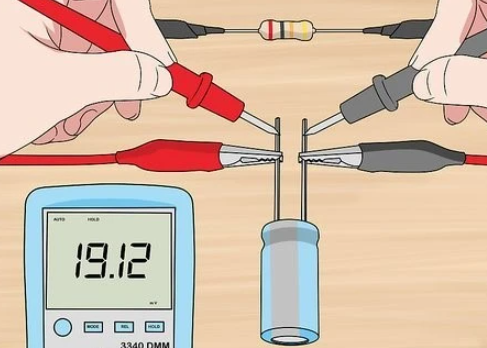
  • Use a Multimeter – Setting a multimeter to diode test mode can quickly confirm polarity. When the positive probe touches the anode, a small voltage drop appears, indicating correct polarity. Reversing the probes results in no reading.

Using these methods helps confirm proper orientation before placing a diode into a circuit.

Does Diode Polarity Matter?

Yes, diode polarity is critical for proper circuit operation. Diodes only allow current to move in one direction, so incorrect placement leads to non-functioning circuits or even damage.

Some applications, like Zener voltage regulators, rely on reverse bias operation. However, in standard circuits, always check the polarity before installation.

What Happens When You Reverse the Polarity of a Diode?

If a diode is accidentally reversed, its effect depends on the circuit:

  1. In Series with a Load – No current flows, and the circuit may not function.
  2. In a Rectifier Circuit – The AC-to-DC conversion fails, possibly causing incorrect voltages.
  3. In a Protection Circuit – Reverse polarity protection diodes conduct and may blow a fuse to prevent damage.

Reversing a diode generally blocks current, but Zener diodes and certain specialized diodes can operate in reverse bias under controlled conditions.

Does a Diode Convert AC to DC?

Yes, diodes are key components in AC-to-DC conversion. This process, called rectification, involves blocking the negative part of an AC signal, allowing only positive current flow.

There are different rectifier configurations:

  • Half-Wave Rectifier – Uses a single diode to remove the negative cycle.
  • Full-Wave Rectifier – Uses four diodes (bridge rectifier) to convert the entire AC waveform to DC.

A rectifier circuit is often combined with capacitors to smooth the output, resulting in stable DC power.

What is the Output if the Diode is Reversed?

If a diode is installed backward, the output depends on the circuit type:

  • In a Power Supply – The circuit may stop working due to lack of current flow.
  • In a Rectifier – AC may pass through without being converted, leading to unstable output.
  • In a Protection Circuit – The reverse diode may conduct, causing a fuse to blow.

Checking orientation before soldering prevents these issues and ensures proper function.

How Do You Protect Reverse Polarity with a Diode?

Reverse polarity protection prevents damage when power is connected incorrectly. There are two common methods using diodes:

  1. Series Diode Protection – A diode is placed in series with the power supply. If polarity is incorrect, the diode blocks current, preventing damage.
  2. Parallel Diode with Fuse – A diode is placed in parallel across the power rails. If polarity is reversed, the diode conducts, causing a fuse to blow and protecting sensitive components.

Both methods are effective, though the series method introduces a slight voltage drop, while the parallel method requires a replaceable fuse.

How to Determine If a Diode is Forward or Reverse Biased?

A diode’s biasing state depends on voltage conditions:

  • Forward Bias – The anode is at a higher voltage than the cathode, allowing current to flow.
  • Reverse Bias – The cathode is more positive than the anode, blocking current.

To check bias, use a multimeter in voltage mode. A forward-biased diode typically shows a voltage drop of:

  • 0.7V for Silicon Diodes
  • 0.3V for Germanium Diodes

Reverse bias shows no voltage drop, indicating no conduction.

Can You Test Polarity with a Multimeter?

Yes, a multimeter in diode mode is the easiest way to test polarity:

  1. Place the red probe on one terminal and the black probe on the other.
  2. Check the reading:
  3. A reading means the red probe is on the anode and the black probe is on the cathode.
  4. No reading means the diode is reversed.
  5. Reverse the probes to confirm. A functional diode only conducts in one direction.

In a word, misplacing a diode can prevent a circuit from working or even cause damage. Learning check polarity markings, using multimeter tests, and understanding circuit symbols ensure correct installation. If you have more questions about diode polarity or diode assembly in PCB, just feel freely to contact us, we are always online!

Annular Ring: What is Annular Ring PCB? How to Calculate it?

February 20th, 2025

Annular rings are small but essential features form part of the vias, helping to create electrical connections between different layers of the PCB. In simple terms, the annular ring is the copper ring that surrounds the hole in a PCB, and its quality can determine the effectiveness of the entire board. If not designed or manufactured correctly, the annular ring can lead to issues such as unreliable connections, potential failure, or even defective PCBs. In this blog, you’ll learn the importance in PCB design and functionality, how to calculate it correctly to avoid common issues occurred during PCB manufacturing.

What is Annular Ring in PCB?

To understand the importance of the annular ring, let’s break down its role in a PCB. A PCB is composed of multiple layers, and the annular rings on a PCB are circular metal rings used for mounting components on the circuit board. Sometimes, it also called PAD. They serve as connection points for the leads of electronic components and are attached to the corresponding positions on the board via soldering or insertion.

Annular Ring: What is Annular Ring PCB? How to Calculate it?

The annular rings are typically made of copper or other conductive materials, forming a connection around the holes to ensure that electrical signals can pass from one layer to another. Without this copper ring, the via would lack the necessary conductive material to transmit electrical signals, leading to potential functionality and reliability issues.

PCB holes usually come in shapes such as circular, square, or oblong. Among these, the circular hole is the most common. These holes are used for mounting components, connecting wires between circuit layers, or linking pads across different layers. When designing a PCB, you can select the appropriate hole shape based on specific needs.

What is an Annular Ring in Physics?

While the concept of the annular ring in PCB manufacturing is straightforward, it’s also rooted in basic physics. In physics, an annular ring is a two-dimensional geometric shape characterized by an outer and inner radius, with the space between the two radii representing the actual “ring.” This geometric shape has applications in a variety of fields, from fluid dynamics to optics.

In the context of PCB design, the annular ring’s geometry ensures that there’s enough copper material around the hole to support electrical connections and mechanical integrity. Essentially, the annular ring in PCB design mirrors this physical concept, providing the necessary structure to allow electrical signals to flow reliably between layers.

What is the Function of an Annular Ring?

The primary function of an annular ring is circuit connection. The annular ring connects with other circuit layers or components via wires or pins, enabling the transmission and interaction of electrical signals. Without this ring, the via would not have any conductive material to establish the necessary connections, rendering it ineffective. Essentially, the annular ring is like a bridge that connects different parts of the PCB. In addition to this, there are some other functions that apply annular rings in a PCB:

Annular Ring: What is Annular Ring PCB? How to Calculate it?

1. Component Mounting

    The annular ring is used to secure and connect electronic components (such as integrated circuit chips (IC), diodes, resistors, etc.) to the PCB through their leads or solder balls.

    2. Soldering Connection

    The metal edge of the annular ring is used for soldering the leads or pads of electronic components, establishing a reliable electrical connection. Through soldering, a physical and electrical bond is created between the component and the PCB.

    3. Vias in Multi-Layer PCBs

    In multi-layer PCBs, the annular ring serves as a via, acting as a conductive channel that connects different circuit layers. Through these vias, signals, power, and ground lines can be transmitted between layers.

    What is the Difference Between Via and Annular Ring?

    While vias and annular rings often work in tandem, they are different components of a PCB.

    Via:

    • A via is a drilled hole in the PCB, gennerally <=0.5mm.
    • It is plated with copper to create an electrical pathway.
    • Vias provide vertical connectivity between PCB layers.
    • They act as the conduits for electrical signals across layers.

    Annular Ring:

    • An annular ring is the copper pad that surrounds the via.
    • It creates a stable landing zone for the via.
    • The annular ring enhances solderability and connection strength.
    • It also supports the mechanical integrity of the PCB.

    Key Differences:

    • A via is the actual hole that allows electrical passage; the annular ring is the copper area around that hole.
    • Vias serve as internal conductive channels, while annular rings ensure a robust link to the board’s traces.
    • Vias are created by drilling and plating; annular rings are defined during the PCB layout design.

    In essence, the via acts as a hole or passage for electrical signals, while the annular ring is the surrounding copper that ensures the electrical signals can flow reliably between the different layers of the PCB. Without the annular ring, the via would have no copper to connect it to the surrounding traces, compromising the integrity of the circuit board.

    How Do You Calculate the Annular Ring Size?

    The annular ring size is determined by the diameter of the via hole and the size of the copper pad around it. To calculate the annular ring size, you need to first measure the diameter of the via hole. Then, you need to determine the size of the copper pad around the hole, keeping in mind that the pad must be large enough to maintain a reliable connection. In general, there are outer annular ring size and inner annular ring size:

    Outer Annular Ring Size (OAR)

    • Calculate Format:

    Outer Annular Ring (OAR) = (Outer pad diameter – Plated hole diameter) / 2

    • Actual Case:

    Plated hole diameter = Finished hole diameter + 0.10mm (for all PTH) + 0.00mm (for all NPTH).

    • Example:

    For a copper pad thickness of 0.60mm and a finished hole diameter of 0.30mm (PTH), the calculation of the OAR is:

    OAR = [0.60mm – (0.30mm + 0.10mm)] / 2 = 0.10mm

    Annular Ring: What is Annular Ring PCB? How to Calculate it?

    Inner Annular Ring Size (IAR)

    • Calculate Format:

    Inner Annular Ring (IAR) = (Inner pad diameter – Electroplated hole diameter) / 2

    • Actual Case:

    Electroplated hole diameter = Finished hole diameter + 0.10mm (for all PTH) + 0.00mm (for all NPTH).

    • Example:

    For a 0.50mm copper pad and a 0.20mm finished hole diameter (PTH), the calculation of the IAR is:

    IAR = [0.50mm – (0.20mm + 0.10mm)] / 2 = 0.10mm

    Annular Ring: What is Annular Ring PCB? How to Calculate it?

    What is the Minimum Annular Ring Size on a PCB?

    The minimum annular ring (AR) on a PCB refers to the minimum amount of copper between the edge of the pad and the electroplated hole. The width of the minimum annular ring should be greater than or equal to the value defined in the PCB design.

    Annular Ring: What is Annular Ring PCB? How to Calculate it?

    When the annular ring is smaller than the specified width, the attachment of components may be affected, and there is a risk of pad cracking. In this case, the circuit may enter the pad, minimizing the current-carrying capacity of the circuit.

    Sometimes, the traces on the PCB need to connect to another layer. In such cases, the trace eventually passes through the pad. The via in the pad helps the trace move through and connect to another layer.

    Annular Ring: What is Annular Ring PCB? How to Calculate it?
    • t1: Minimum outer annular ring, on finished boards, must be >= 0.05mm.
    • t2: Minimum inner annular ring, on finished boards, must be >= 0.01mm.

    Common Annular Ring Issues During PCB Manufacturing

    Despite the importance of annular rings, issues can arise during the manufacturing process that impact their effectiveness. Some common problems include:

    • Undesired Annular Rings

    Undesired annular rings are a common issue that affects many designers when working with standard PCBs. If the pad size is too small, the PCB may not function properly because the hole takes up more space on the pad. To avoid this issue, making a prototype before mass production is necessary. Prototypes can prevent unnecessary annular rings from appearing before large-scale production of the circuit boards.

    • Missing Annular Ring

    A missing annular ring can occur if the design does not include an annular ring around the via, or if the annular ring was not correctly produced during manufacturing. This can lead to poor electrical connections, affecting the performance of the circuit.

    • Broken Annular Ring

    A broken annular ring occurs when drill tolerances cause the via to deviate from the center during manufacturing, leading to the annular ring breakout.

    Annular Ring: What is Annular Ring PCB? How to Calculate it?
    • Annular Ring Tangency

    Annular ring tangency refers to a situation where part of the via touches the edge of the pad, typically caused by the drill bit not being aligned with the markings. This can cause the via to deviate from the center and negatively affect the normal operation of the circuit.

    Annular Ring: What is Annular Ring PCB? How to Calculate it?

    What Can EBest Circuit (Best Technology) Do for You?

    At EBest Circuit (Best Technology), we have over 18 years of experience in PCB manufacturing, and we understand the importance of the annular ring in creating reliable and high-quality PCBs. Our team of experts works closely with clients to ensure that every PCB is designed with the right annular ring specifications, minimizing the risk of defects and improving the overall performance of the circuit board. In additional to this, our sales-assistant will send EQ (engineer question) file and WF (working file for manufacturing) to customer for a final approval before starting production.

    We use state-of-the-art equipment and precision techniques to manufacture PCBs that meet the highest standards. Whether you’re designing a single-layer PCB or a complex multi-layer board, EBest Circuit (Best Technology) has the expertise and experience to deliver high-quality PCBs that meet your needs. We’re here to support your projects and ensure that your PCBs are reliable, efficient, and built to last.

    Let us help you create the perfect PCB with the right annular ring design to ensure seamless electrical connections and superior functionality. Reach out to EBest Circuit (Best Technology) today for your PCB needs!