





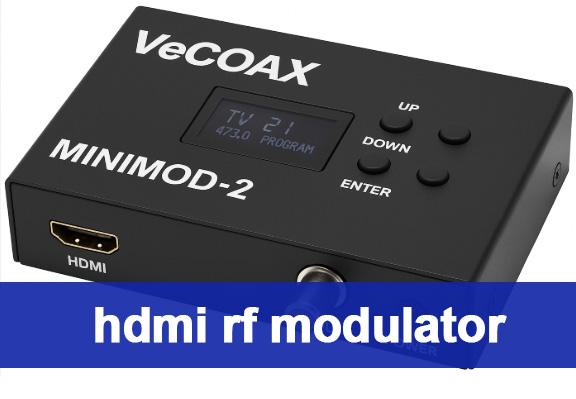
What Is an HDMI RF Modulator and Why Do You Need One?
If you’ve ever struggled to connect a modern streaming stick to an old CRT TV, or wanted to send 4K content from a Blu-ray player to 10+ displays across your restaurant, an HDMI RF modulator is the solution. This device acts as a “translator”—converting digital HDMI signals from sources like Roku, game consoles, or PCs into RF (radio frequency) signals that travel over existing coaxial cables. Unlike HDMI extenders that require new wiring, it reuses your building’s coax infrastructure, cutting installation costs by up to 70%. For businesses, a commercial HDMI RF modulator enables easy digital signage updates: change a happy hour menu on your PC, and the modulator broadcasts it to every TV in your space instantly. For homeowners, it lets you dust off retro game consoles and watch them on new HDTVs without losing signal quality.
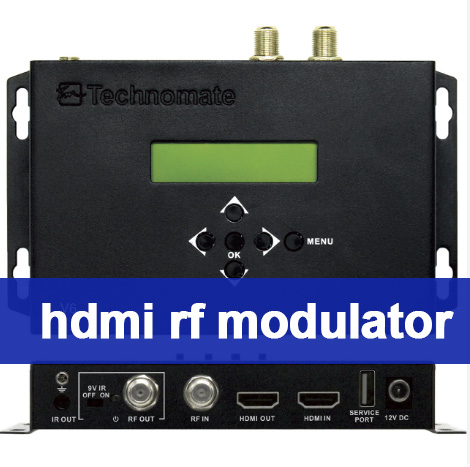
How Does an HDMI RF Modulator Work? (Step-by-Step Breakdown)
The magic of HDMI RF modulators lies in their simple yet powerful workflow—critical to understanding HDMI RF modulator installation later. Here’s exactly what happens when you hit “play”:
1. Digital Input: The device accepts HDMI signals (up to 4K, depending on the model) from your source device.
2. Encoding: It compresses the video using H.264 or H.265 (HEVC) to reduce bandwidth—critical for long-distance transmission.
3. Modulation: The compressed stream is converted to RF using standards like QAM (for cable TV) or ATSC (for North American over-the-air).
4. Distribution: The RF signal exits via an F-type connector and travels over coax to TVs, which pick it up like a regular channel (e.g., 2.1 for menus, 2.2 for specials).
Advanced models like the Thor Broadcast 4-input commercial HDMI RF modulator even let you map multiple programs to one frequency, perfect for businesses with limited channel space.
Key Features to Look for When Buying the Best HDMI RF Modulator 2025
Not all HDMI RF modulators are created equal—if you want to find the best HDMI RF modulator 2025 for your needs, prioritize these features to avoid wasting money:
– Resolution Support: 1080p is standard for home use, but commercial setups need 4K compatibility (check for H.265 encoding).
– Modulation Standards: Ensure it works with your region: ATSC for North America, DVB-T for Europe, or ISDB-T for Japan.
– Number of Inputs: 1-port models suit home use; restaurants or hotels need 4–8 ports (a must for a top commercial HDMI RF modulator).
– Ease of Setup: Look for “plug-and-play” options with web-based configuration—critical for stress-free HDMI RF modulator installation.
– Signal Range: For large spaces, choose a modulator that transmits up to 700 meters over coax (far more than HDMI extenders’ 100m limit).
The Best HDMI RF Modulator 2025 (Home & Commercial Use)
Based on performance, user reviews, and versatility, these models stand out as the best HDMI RF modulator 2025 options:
Best for Home Use – AOE Spy Digital HDMI RF Modulator
This compact device connects Roku/Fire Sticks to old TVs with no HDMI ports. It supports NTSC/PAL formats, has adjustable video brightness, and costs under $50. Users love its “set-it-and-forget-it” design—no drivers or adapters needed, making HDMI RF modulator installation a breeze.
Best for Commercial Use – Thor Broadcast 4-Input HDMI RF Modulator CC
Ideal for hotels or restaurants, this rack-mountable commercial HDMI RF modulator handles 4 HDMI sources, supports Dolby audio, and works worldwide (QAM/ATSC/DVB-T compatible). It even lets you add closed captioning for compliance—why it’s a top pick for the best HDMI RF modulator 2025 in commercial settings.
Best Value – Tangxi HDMI RF Modulator
Great for small businesses, it converts HDMI to RF with 1080p quality and works with both analog and digital TVs. The built-in channel switch avoids interference with existing cable boxes, and it’s budget-friendly for those not ready to invest in a premium commercial HDMI RF modulator.
HDMI RF Modulator Installation in 15 Minutes (No Tech Skills Needed)
Mastering HDMI RF modulator installation is simpler than hanging a TV—follow these steps for home or commercial setups:
1. Gather Tools: You’ll need the modulator, HDMI cable, coax cable, and a power adapter (included with most models).
2. Connect the Source: Plug one end of the HDMI cable into your streaming stick/PC, the other into the modulator’s “HDMI In” port.
3. Link to Coax: Connect a coax cable from the modulator’s “RF Out” to your TV’s coax input (or a splitter for multiple TVs).
4. Power Up: Plug the modulator into an outlet—most models have a LED light to confirm it’s on.
5. Tune the TV: Use your TV’s channel scan function to find the modulator’s signal (check the manual for the default channel, e.g., 3 or 4).
Pro tip for commercial HDMI RF modulator setups: Add a coax amplifier after the splitter to avoid signal drop-off across multiple TVs.
Home vs. Commercial Uses for HDMI RF Modulators
HDMI RF modulators shine in both residential and business environments—here’s how to leverage a commercial HDMI RF modulator vs. a home model:
Home Applications
– Retro Gaming: Play NES/SNES on new HDTVs by converting the console’s analog signal to HDMI (use a combo modulator/converter).
– Multi-Room Streaming: Send Netflix from your living room Fire Stick to bedrooms without WiFi dead zones.
– Legacy TV Compatibility: Watch 4K Blu-rays on an old CRT TV that only has a coax input.
Commercial Applications
A commercial HDMI RF modulator excels here:
– Digital Signage: Update menus, promotions, or safety videos across 50+ TVs in a hotel/hospital with one PC.
– CCTV Distribution: Send security camera feeds to monitors in the lobby and back office via existing coax.
– Event Streaming: Broadcast a wedding or conference to multiple rooms without running new HDMI cables.
HDMI RF Modulator vs HDMI Extender – Which Should You Choose?
Many people confuse modulators with extenders—here’s a clear breakdown of HDMI RF modulator vs HDMI extender to help you decide:
| Feature | HDMI RF Modulator | HDMI Extender |
|---|---|---|
| Transmission Range | Up to 700m (coax) | Up to 100m (Cat6 cable) |
| Number of Displays | 100+ (with splitter/amplifier) | 1 (per extender) |
| Cost | Low (reuses coax) | High (needs new Cat6 wiring) |
| Best For | Multi-display, legacy systems (ideal for commercial HDMI RF modulator use) | Single TV, short distances |
Choose a modulator if you want to save on wiring or use old TVs. Pick an extender only for single-TV setups under 100m—this is the key takeaway from comparing HDMI RF modulator vs HDMI extender.
HDMI RF Modulator Troubleshooting (Fix Common Issues Fast)
Even the best HDMI RF modulator 2025 can hit snags—here’s essential HDMI RF modulator troubleshooting for the most frequent problems:
– No Signal: Check if the HDMI/coax cables are fully plugged in. Try a different HDMI cable (faulty ones are common—even with new commercial HDMI RF modulator models).
– Pixelation: This means the signal is weak. Add a coax amplifier or move the splitter closer to the modulator (a top HDMI RF modulator troubleshooting fix for commercial setups).
– Audio Drop-Out: Ensure the modulator supports your audio format (e.g., Dolby Digital). Update the firmware if available.
– CEC Issues: If your TV won’t turn on the receiver, connect the modulator to a secondary HDMI output on the receiver (avoid the primary one).
Future of HDMI RF Modulators – 4K, 8K, and Beyond
As 4K content becomes standard (and 8K gains traction), the best HDMI RF modulator 2025 models are evolving to keep up. Here’s what to expect by 2030:
– 8K Support: New commercial HDMI RF modulator models will use H.266 (VVC) encoding to compress 8K signals for coax transmission.
– Wireless Integration: Combine RF with WiFi 6E for hybrid setups (coax for long distances, wireless for hard-to-reach rooms).
– AI-Powered Troubleshooting: Modulators will auto-detect signal issues and suggest HDMI RF modulator troubleshooting fixes (e.g., “Add amplifier for room 5”).
– Smart Home Sync: Control modulators via Alexa/Google Home to switch channels or update signage with voice commands.
FAQ: Everything You Need to Know About HDMI RF Modulators
Do all HDMI RF modulators support 4K?
No—entry-level models top out at 1080p. Look for “4K” or “H.265” in the specs if you need ultra HD (a must for the best HDMI RF modulator 2025).
Can I use an HDMI RF modulator with satellite TV?
Yes—connect the satellite box’s HDMI output to the modulator (even a commercial HDMI RF modulator), then distribute the signal to multiple TVs without extra boxes.
Will it work with my region’s TV standard?
Most modern modulators support multiple standards (ATSC/QAM/DVB-T). Check the product page to confirm compatibility—critical for HDMI RF modulator installation success.
Why is my modulator interfering with other channels?
Use the channel switch to pick an unused frequency (e.g., 90 or 110). Avoid channels used by local broadcast TV—this is a common HDMI RF modulator troubleshooting fix.
How many TVs can I connect to one modulator?
With a coax splitter and amplifier, you can connect 100+ TVs (a key benefit of a commercial HDMI RF modulator). The limit depends on the amplifier’s power (aim for 10dB per 20 TVs).
What’s the biggest difference in HDMI RF modulator vs HDMI extender?
Range and scalability: Modulators use coax for 700m transmission to 100+ TVs, while extenders use Cat6 for 100m to one TV—this is why businesses choose a commercial HDMI RF modulator over extenders.
Final Thoughts – Is an HDMI RF Modulator Worth Buying?
If you have old TVs, want to avoid new wiring, or need to distribute content to multiple displays, an HDMI RF modulator (especially a commercial HDMI RF modulator for businesses) is a no-brainer. The best HDMI RF modulator 2025 models solve compatibility and distribution headaches that would cost thousands to fix with rewiring or extenders. Whether you’re tackling HDMI RF modulator installation at home or outfitting a restaurant with digital signage, this device delivers unbeatable value for $50–$500.
Choose the right model (home vs. commercial HDMI RF modulator, 1080p vs. 4K), follow the installation steps, and use our HDMI RF modulator troubleshooting tips—you’ll wonder how you lived without it.