





If you’ve ever walked into a room and had the lights turn on automatically, or relied on a home security system to detect intruders, you’ve experienced the work of PIR (Passive Infrared) sensors. These small but powerful devices are everywhere—from smart homes to industrial settings—thanks to their low power consumption, affordability, and reliable motion detection. But for many people, understanding how PIR sensors work, choosing the right one, and troubleshooting common issues can be a challenge. In this guide, we’ll break down everything you need to know about PIR sensors, from their basic mechanics to advanced applications, so you can use them effectively in your next project or system.
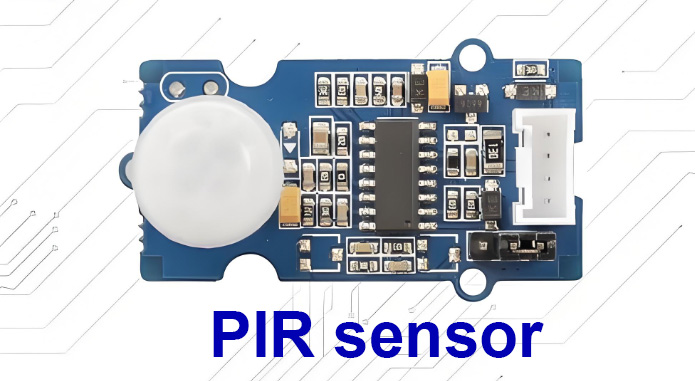
What Is a PIR Sensor? Understanding the Basics
First, let’s clarify what PIR sensors are and why they’re so widely used. PIR stands for Passive Infrared, which means these sensors don’t emit any energy themselves (unlike active sensors like microwave detectors). Instead, they passively detect changes in infrared radiation (heat) in their surrounding environment. All warm-blooded creatures, including humans, emit infrared radiation in the 8-14 µm wavelength range—and PIR sensors are specifically designed to detect this range.
The core component of a PIR sensor is a pyroelectric element, a material that generates an electrical charge when exposed to changes in temperature. Most PIR sensors use a dual-element design, which helps reduce false triggers by comparing radiation levels between two adjacent areas. When a moving heat source (like a person) passes through the sensor’s field of view, it causes a temperature change in one element before the other, generating a signal that the sensor interprets as motion.
How Do PIR Sensors Work? A Step-by-Step Explanation
To fully leverage PIR sensors, it’s important to understand their operating mechanism. Here’s a simplified breakdown of how they detect motion:
The Role of Fresnel Lenses
Nearly all PIR sensors come with a Fresnel lens—a thin, grooved plastic lens that serves two key purposes. First, it focuses infrared radiation onto the pyroelectric element, boosting the sensor’s sensitivity. Second, it divides the sensor’s detection area into multiple “zones” (or fields of view). When a heat source moves from one zone to the next, it creates a pattern of changing temperatures that the sensor can recognize as motion.
Signal Processing and Output
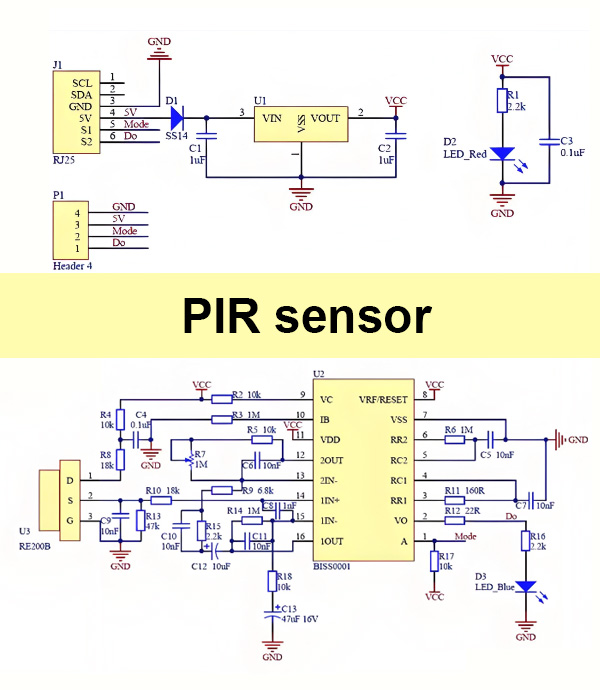
Once the pyroelectric element detects a temperature change, it produces a tiny electrical signal. This signal is sent to an integrated circuit (ASIC) within the sensor module, which amplifies the signal and filters out noise (like small temperature fluctuations from sunlight or wind). If the signal meets the sensor’s pre-set criteria (e.g., sufficient amplitude and duration), the sensor outputs a digital signal (high or low voltage) that can trigger an action—such as turning on a light or activating an alarm.
Key Technical Specifications of PIR Sensors to Consider
When choosing a PIR sensor for your project, understanding its technical specifications is critical to ensuring it meets your needs. Here are the most important specs to look for:
Detection Range and Angle
Detection range refers to the maximum distance at which the sensor can detect motion, typically ranging from 3 meters to 17 meters (or more for industrial models). Detection angle (usually 90° to 120°) describes the width of the area the sensor can cover. Lenses play a big role here—long-distance lenses are ideal for outdoor security, while wide-angle lenses work better for indoor spaces like hallways.
Power Consumption and Voltage
One of PIR sensors’ biggest advantages is their low power consumption, making them perfect for battery-powered devices. Standby current can be as low as 1 µA for ultra-low-power models (like Panasonic’s EKMB series), enabling battery life of up to 10 years. Most PIR modules operate on 3.3V to 20V DC, so be sure to match the sensor’s voltage requirements to your power source.
Response Time and Delay
Response time is how quickly the sensor reacts to motion (usually milliseconds to seconds), while the “time delay” (or “hold time”) is how long the sensor’s output remains active after motion stops. Many PIR modules have adjustable delay settings (from a few seconds to several minutes) to fit different applications.
Common Applications of PIR Sensors Across Industries
PIR sensors are incredibly versatile, with uses spanning residential, commercial, and industrial settings. Here are some of the most popular applications:
Home and Commercial Lighting Control
One of the most common uses of PIR sensors is automatic lighting control. They’re used in hallways, bathrooms, garages, and outdoor spaces to turn lights on when someone enters and off when the area is empty—saving energy and improving convenience.
Security Systems and Intrusion Detection
PIR sensors are a staple in home and business security systems, triggering alarms or activating security cameras when unauthorized motion is detected. Wireless PIR sensors are particularly popular for this application, as they’re easy to install without wiring.
Smart Home and IoT Integration
In smart homes, PIR sensors integrate with IoT devices to create automated scenes—such as turning on the air conditioner when someone enters a room or activating a smart display when motion is detected. They’re also used to monitor room occupancy, helping optimize energy use in smart buildings.
Industrial and Specialized Uses
In industrial settings, PIR sensors detect personnel entering dangerous areas (triggering safety alerts) or monitor equipment status. They’re also used in wildlife trail cameras to capture images when animals pass by, and in pandemic-related applications like activating disinfectant displays.
How to Choose the Right PIR Sensor for Your Project
With so many PIR sensor options available, selecting the right one can be overwhelming. Follow these steps to narrow down your choices:
Define Your Application
Start by clarifying your use case. Are you building a battery-powered security device? You’ll need an ultra-low-power sensor. Do you need to detect motion in a large outdoor area? Look for a long-range sensor with a narrow-angle lens.
Consider the Environment
Indoor sensors don’t need to withstand extreme weather, but outdoor sensors should be weather-resistant and able to handle temperature fluctuations (-20°C to +70°C or wider). Avoid sensors with low temperature thresholds (below 2°C) for cold environments, as they may struggle to detect heat sources.
Evaluate Sensor Quality and Brand
Choose sensors from reputable brands like Panasonic (with their PaPIRs series, which has produced over 100 million units) to ensure reliability. High-quality sensors have better noise immunity and fewer false triggers, saving you time on troubleshooting.
Step-by-Step Guide to Installing a PIR Sensor
Proper installation is key to getting the most out of your PIR sensor. Follow these best practices for optimal performance:
Choose the Right Location
Install the sensor in a location with a clear field of view—avoid obstructions like curtains, plants, or furniture. Keep it away from heat sources (heaters, radiators, direct sunlight) and air vents, as these can cause false triggers. For security applications, mount the sensor at a height of 2-2.5 meters to cover a wider area.
Adjust Sensitivity and Delay
Most PIR modules have potentiometers for adjusting sensitivity and delay. Test the sensor after installation: if it’s triggering too often (e.g., from pets or wind), reduce the sensitivity. If it’s not detecting motion consistently, increase the sensitivity or adjust the angle.
Ensure Proper Wiring (for Wired Sensors)
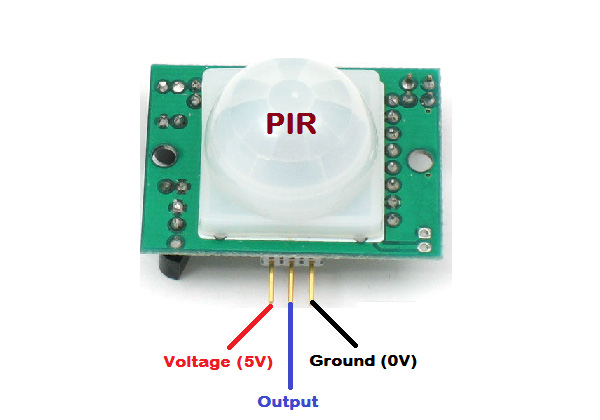
For wired PIR sensors, double-check the wiring: the sensor’s output pin should connect to your microcontroller (e.g., Raspberry Pi) or relay. Use a stable power supply—unstable voltage can cause the sensor to malfunction. If using a battery, choose a high-quality battery to avoid voltage drops.
Top Tips for Optimizing PIR Sensor Performance
Even the best PIR sensor can underperform if not optimized. Here are some expert tips to improve reliability and reduce false triggers:
- Clean the lens regularly: Dust and dirt on the Fresnel lens can block infrared radiation, reducing sensitivity.
- Use hardware filtering: Add an RC low-pass filter to the sensor’s output to reduce high-frequency noise.
- Implement software debouncing: In your microcontroller code, use delay or multiple sampling to confirm motion before triggering an action.
- Allow warm-up time: After powering on, PIR sensors need 30 seconds to 1 minute to calibrate to the environment—avoid testing during this period.
Common PIR Sensor Issues and How to Troubleshoot Them
From false alarms to no detection, PIR sensors can experience a range of issues. Here’s how to diagnose and fix the most common problems:
False Triggers
False triggers are the most common issue with PIR sensors. Possible causes include heat sources (sunlight, heaters), air drafts, RF interference (from Wi-Fi routers or microwaves), or moving objects (curtains, plants). To fix this: move the sensor away from these sources, reduce sensitivity, or use a sensor with better noise immunity.
No Motion Detection
If the sensor isn’t detecting motion, check the following: 1) Wiring: Ensure the output pin is connected correctly (common mistake with Raspberry Pi projects). 2) Lens obstruction: Clean the lens and remove any obstacles. 3) Sensitivity: Increase the sensitivity setting. 4) Power supply: Check for voltage drops or dead batteries.
Sensor Won’t Wake Up (Post-Delay)
Some users report that their PIR sensor doesn’t reactivate after the delay period (e.g., a monitor stays off even when motion is detected). This is often a wiring or code issue. Double-check the sensor pin assignment in your code (e.g., using pin 23 instead of 16 for Raspberry Pi 3 B+) and ensure your power supply is stable.
Inconsistent Detection at Night
Cold nighttime temperatures can affect PIR sensor performance. Choose a sensor with a low temperature threshold (e.g., 2°C for Panasonic’s PaPIRs+ series) and avoid mounting the sensor in areas with extreme temperature fluctuations.
PIR Sensors vs. Other Motion Detection Technologies
How do PIR sensors compare to other motion detection technologies? Here’s a quick overview to help you choose the right option for your project:
PIR vs. Microwave Sensors
Microwave sensors emit microwave radiation and detect reflections from moving objects—they’re more accurate in harsh weather but consume more power and are more expensive than PIR sensors. PIR sensors are better for low-power, cost-sensitive applications.
PIR vs. Ultrasonic Sensors
Ultrasonic sensors use sound waves to detect motion—they work well for detecting small objects but are prone to interference from noise (e.g., pets, wind). PIR sensors are more reliable for human/animal detection and use less power.
PIR vs. Radar Sensors
Radar sensors are highly accurate and can detect motion through walls, but they’re costly and consume more power. PIR sensors are ideal for most residential and light commercial applications where cost and power efficiency are priorities.
Future Trends in PIR Sensor Technology
As IoT and smart home technologies continue to grow, PIR sensors are evolving to meet new demands. Here are some emerging trends to watch:
Enhanced Sensitivity and Versatility
Newer PIR sensors (like Panasonic’s PaPIRs+) offer twice the sensitivity of conventional models, enabling detection of even slight movements at longer distances (up to 17 meters). They also come with a wider range of lens options for customized coverage.
Integration with Sensor-to-Cloud Networks
Low-power wireless PIR sensors are now being integrated into cloud-based IoT networks, allowing for remote monitoring and data collection. This is particularly useful for commercial buildings, where occupancy data can be used to optimize energy use and space planning.
Miniaturization and Battery-Free Designs
Advancements in microelectronics are making PIR sensors smaller and more energy-efficient. Some models now support battery-free operation (using energy harvesting), making them ideal for hard-to-reach locations.
FAQ: Common Questions About PIR Sensors
Q1: Can PIR sensors detect pets?
Yes—many PIR sensors have a “pet immune” design (using dual-element pyroelectric elements) that ignores small animals (up to 20 kg). Be sure to check the sensor’s pet weight rating before purchasing.
Q2: How far can a PIR sensor detect motion?
It depends on the model and lens. Consumer-grade PIR sensors typically have a range of 3-10 meters, while industrial models can detect motion up to 17 meters or more.
Q3: Do PIR sensors work in the dark?
Yes—PIR sensors detect infrared radiation (heat), not visible light, so they work equally well in dark and light conditions. However, extreme cold can reduce sensitivity.
Q4: Can PIR sensors be used outdoors?
Yes, but you need an outdoor-rated PIR sensor that’s weather-resistant (IP65 or higher) and can handle temperature fluctuations. Outdoor sensors also often have longer detection ranges and more robust noise filtering.
Q5: Why is my PIR sensor triggering when there’s no motion?
Common causes include heat sources (sunlight, heaters), air drafts, RF interference, or moving objects (curtains, plants). Move the sensor away from these sources or reduce sensitivity to fix the issue.
Q6: How long do PIR sensor batteries last?
With ultra-low-power PIR sensors (standby current of 1-6 µA), batteries can last up to 10 years (using a single CR2032 coin cell). Battery life depends on usage (how often the sensor triggers) and environmental conditions.
Final Thoughts: Is a PIR Sensor Right for You?
PIR sensors are a versatile, cost-effective, and energy-efficient solution for motion detection. Whether you’re building a smart home project, upgrading your security system, or optimizing energy use in a commercial building, PIR sensors offer reliable performance with minimal maintenance. By understanding their working principle, technical specs, and installation best practices, you can avoid common pitfalls and get the most out of your sensor.
When choosing a PIR sensor, prioritize quality brands (like Panasonic) and select a model that matches your application’s needs (detection range, power consumption, environment). With the right setup and optimization, PIR sensors will provide years of reliable service—making them a smart investment for any motion detection project.