What exactly is a QR code PCB?
A QR code PCB is a printed circuit board that carries a readable QR code directly on its surface. The code can be placed on the silkscreen layer, solder mask opening area, copper-free marking zone, label area, or laser-marked region, depending on the product’s traceability needs and manufacturing method. In practical production, this small square code can connect a circuit board to its batch data, production records, test results, BOM version, inspection history, firmware version, warranty information, or customer-specific tracking system.
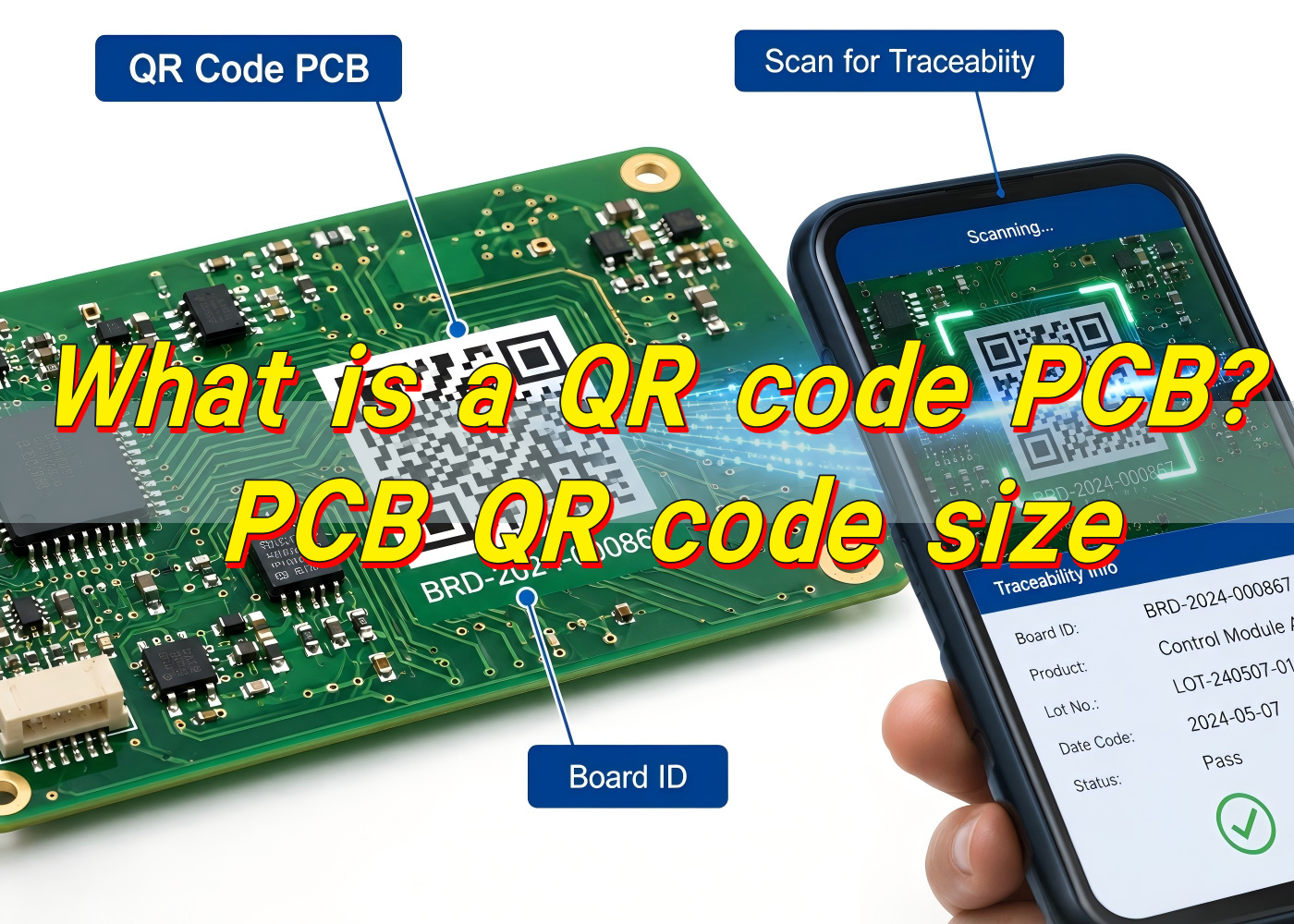
For electronics manufacturers, a QR code on PCB is much more than a visual mark. It acts like a digital identity for the board. When a technician scans it, the system can retrieve useful information within seconds. This is very helpful for PCBA assembly, incoming inspection, quality control, repair, field service, and after-sales analysis.
A PCB QR code can store direct text, a serial number, a URL, a production lot number, or a database reference. In most professional manufacturing systems, the code itself does not need to carry all information. It may only contain a unique ID, while the full data is stored in a factory MES, ERP, quality database, or customer traceability platform. This approach keeps the code compact and easier to scan.
In the PCB industry, QR marking is widely used for industrial electronics, medical electronics, automotive control boards, communication modules, power control boards, smart devices, and OEM assemblies. At EBest Circuit (Best Technology), QR code marking is often treated as part of a broader traceability strategy rather than a simple printing request. The value comes from connecting the physical board to reliable production data, inspection records, and engineering control points.
How is a QR code printed onto a PCB?
A QR code can be applied to a PCB in several ways. The most common methods are silkscreen printing, laser marking, inkjet printing, and label-based marking. Each method has its own strengths. The best option depends on the board material, surface finish, code size, production volume, cost target, operating environment, and scanning distance.
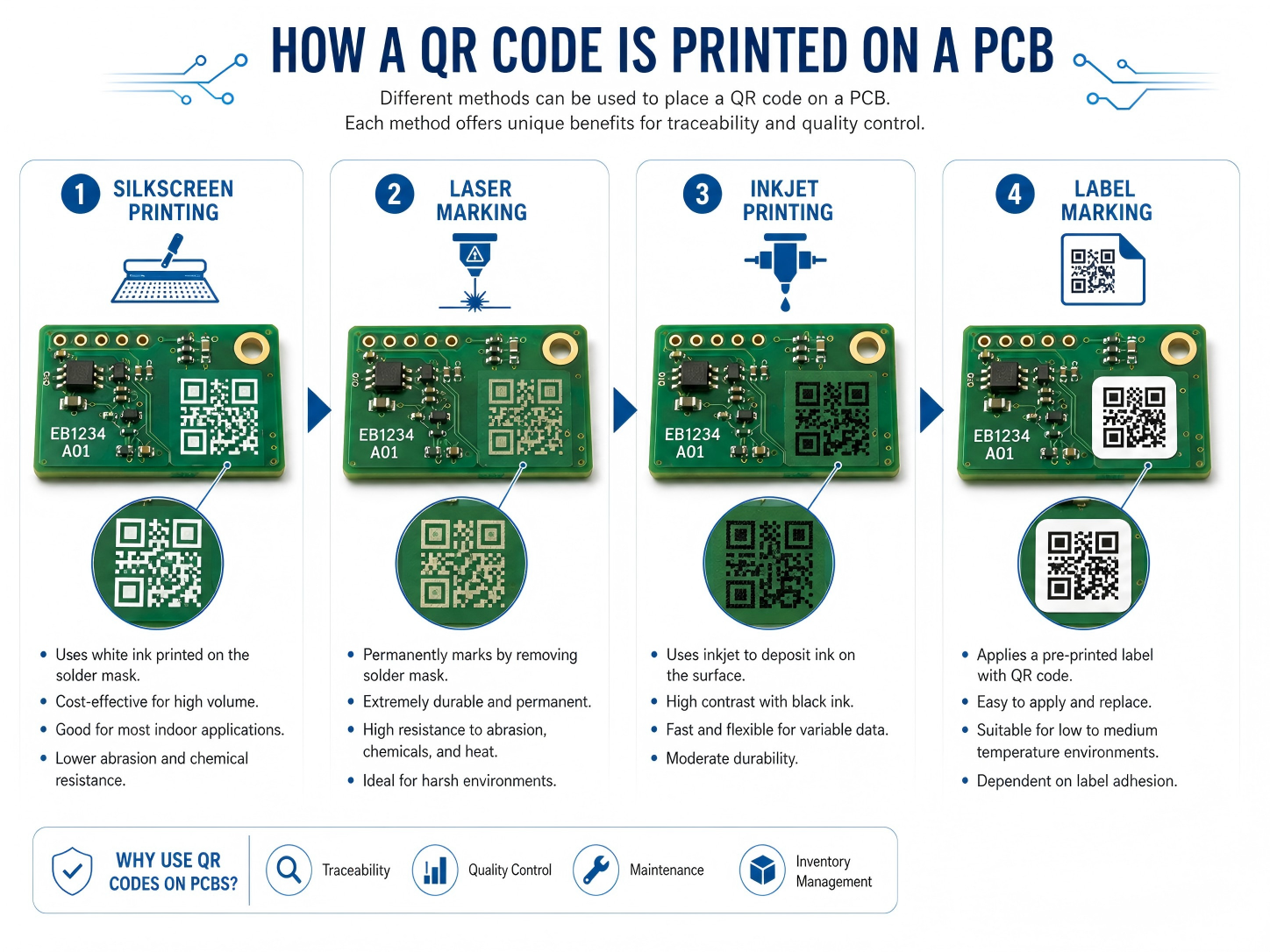
Silkscreen is a familiar choice because most PCBs already include a legend layer. The QR code on PCB can be printed with white, black, or yellow legend ink, depending on the solder mask color and contrast requirement. For standard FR4 boards with enough available surface area, silkscreen can provide a practical and cost-effective solution. It is suitable for product identification, revision marking, internal batch tracking, and general factory scanning.
Laser QR code on PCB is often selected when higher precision, better durability, or smaller marking size is needed. A laser can mark the solder mask, exposed copper, metal surface, ceramic substrate, or certain special materials with excellent edge definition. It is a strong option for compact boards, high-density assemblies, harsh environments, and products that require long-term identification.
Inkjet printing is also used in some production lines, especially when variable data is needed at higher speed. A PCB QR code printer can generate unique codes for each board or panel. This method can work well when linked with automated handling equipment and traceability software. Adhesive labels are another option, but they are usually used when direct marking is impractical or when additional human-readable information must be included.
Before printing or marking, the code data must be generated, verified, and placed in the PCB design or production file. For custom QR code PCB orders, the manufacturer may ask for the encoded content, preferred size, position, marking color, serial number format, and scanning requirements. For volume production, the code may be dynamically generated during manufacturing.
| Method | Brief Description | Best Use Case | Main Advantage |
|---|---|---|---|
| Silkscreen printing | QR code printed with legend ink | Standard PCB identification and batch tracking | Cost-effective and easy to integrate |
| Laser marking | Code engraved or marked with laser energy | Compact boards, durable marking, industrial use | High precision and strong permanence |
| Inkjet printing | Variable code printed during production | Automated serialization and high-volume tracking | Flexible for changing data |
| Adhesive label | Printed label attached to PCB or product | Box build, prototypes, or limited board space | Can include larger text and barcode data |
For stable results, EBest Circuit (Best Technology) usually recommends confirming the marking method during DFM review. This helps avoid placement conflicts with pads, test points, tooling holes, conformal coating zones, and assembly fixtures.
What are the main uses of QR code PCB?
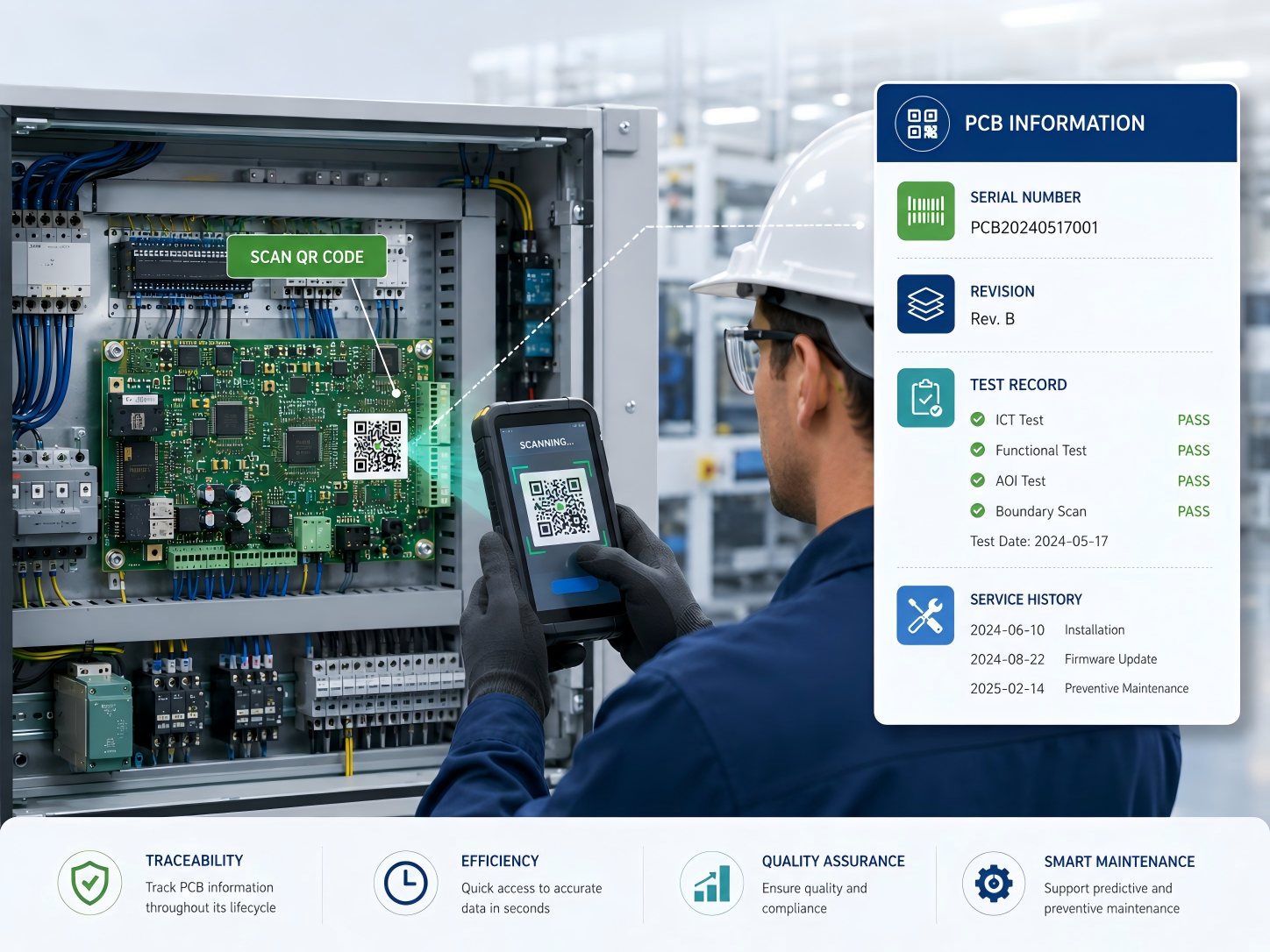
The main use of a QR code PCB is traceability. A well-designed code allows engineers, operators, and quality teams to identify a board quickly and connect it with the right production information. In a modern electronics factory, this supports faster decision-making and cleaner documentation.
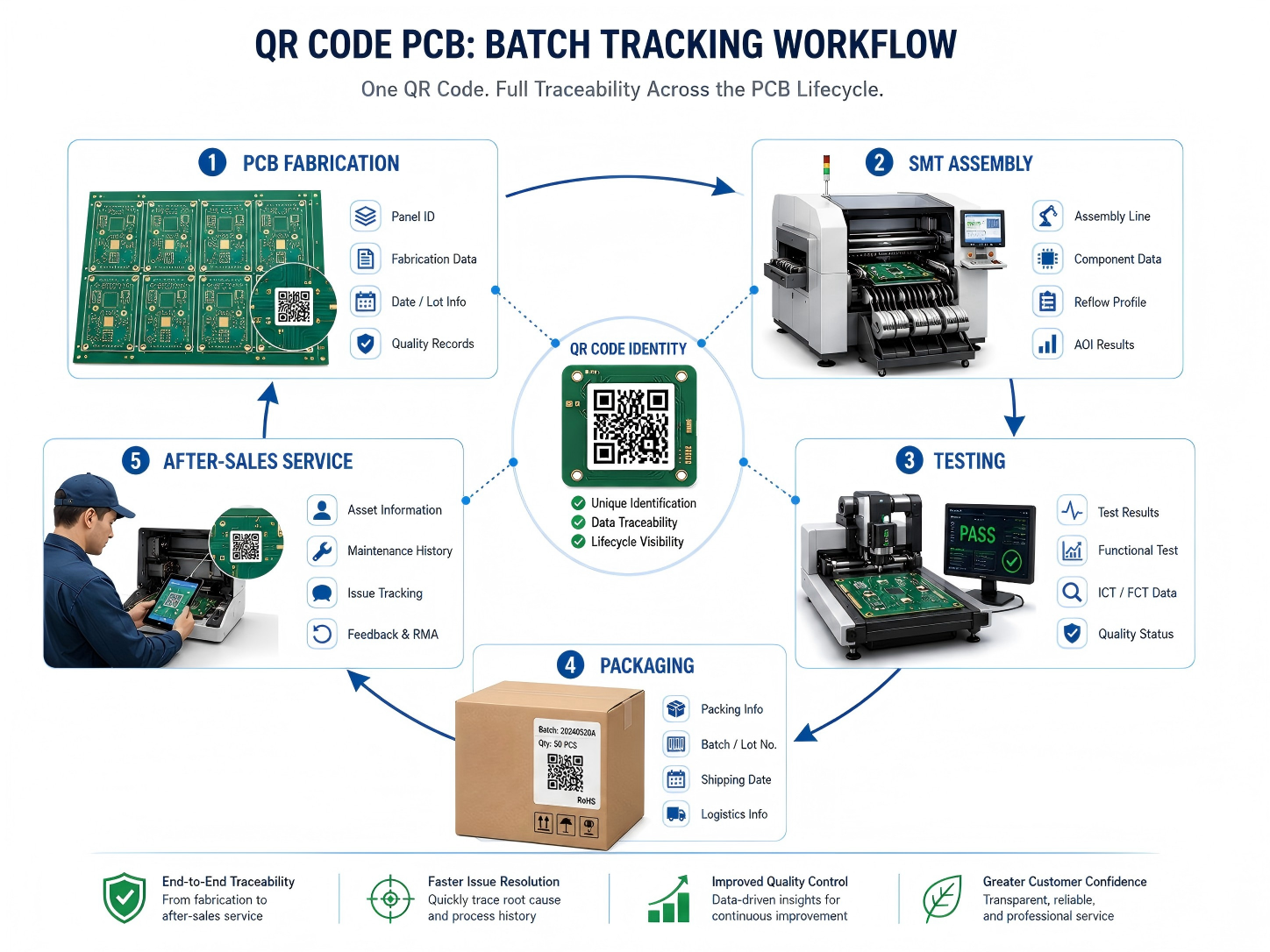
A QR code on circuit board can be used during bare board manufacturing, PCBA assembly, final testing, shipment, repair, and field service. During PCB fabrication, the code may identify the panel number, material batch, surface finish, manufacturing date, and inspection result. During assembly, it may connect to solder paste inspection data, SMT line information, reflow profile, AOI results, X-ray inspection, ICT records, functional test data, and packaging status.
Common uses include:
- Batch tracking for bare PCBs and assembled boards
- Serial number control for each finished unit
- Revision identification for engineering changes
- Production history lookup during quality review
- Test data connection for ICT, FCT, AOI, or burn-in
- Warranty and repair record access
- Anti-mixing control in high-mix assembly lines
- Customer-specific product authentication
Another useful application is internal process control. When a board moves from SMT assembly to DIP assembly, coating, testing, packing, or box build, scanning the code can confirm its route and status. This reduces manual recording work and improves accountability across each stage. For projects with many similar board versions, QR scanning brings welcome clarity.
At EBest Circuit (Best Technology), this type of marking can be integrated with turnkey PCB and PCBA production. For customers who need stronger visibility, the QR code can become part of a larger tracking workflow that includes material sourcing, fabrication, assembly, testing, and shipment documentation.
Can QR code silkscreen PCB support batch tracking?
Yes, a QR code silkscreen PCB can support batch tracking when the code is designed, printed, and managed correctly. In many standard projects, silkscreen marking is enough for batch-level traceability. The code can represent a production lot, order number, customer part number, panel number, or revision code. When scanned, it can connect operators to the related manufacturing record.
For batch tracking, the most important point is data structure. The QR code should follow a clear naming and numbering rule. A simple random code may be readable, but it becomes much more useful when it follows a controlled system. For example, a code may include the customer code, product number, PCB revision, batch date, and production sequence. In automated systems, the code may only store a unique ID, while the database stores the full record.
For batch-level tracking, the same code may appear on every PCB within the same batch. For unit-level serialization, each board needs a different code. Silkscreen can support variable data in some production setups, but laser or inkjet marking is usually more efficient for unique serial numbers. That is why the marking method should match the tracking depth.
| Tracking Type | Description | Suitable Marking Method | Typical Application |
|---|---|---|---|
| Batch tracking | One code represents one production lot | Silkscreen, laser, inkjet | Bare PCB lot control, incoming inspection |
| Panel tracking | One code identifies a manufacturing panel | Silkscreen or laser | Fabrication and assembly workflow |
| Unit serialization | Each board has a unique code | Laser or inkjet preferred | Medical, industrial, automotive, high-value electronics |
| Process tracking | Code updates or links to route status | Laser, inkjet, database-linked code | SMT, testing, repair, final QA |
EBest Circuit (Best Technology) can support different traceability levels based on the customer’s product risk, industry requirements, and production volume. For simple projects, batch tracking is often enough. For high-reliability projects, unit-level control gives stronger confidence and better field analysis.
Does QR code marking on PCB affect circuit performance?
QR code marking on PCB is designed to avoid circuit performance issues when it follows correct layout and manufacturing rules. In most cases, the code is placed in a non-electrical area such as the silkscreen layer, solder mask area, board edge, panel rail, or dedicated marking zone. Since the code does not function as part of the circuit, it should be separated from sensitive copper features, pads, impedance-controlled traces, RF sections, high-voltage spacing, and thermal contact surfaces.
For RF, high-speed, high-voltage, or power boards, placement becomes more critical. A QR code should stay away from antenna areas, controlled impedance lines, creepage paths, heat sink contact zones, and exposed copper regions. If laser marking removes or changes solder mask in a sensitive area, the design team should review the effect before release. Good practice is simple: reserve a clean marking area early in layout rather than placing the code at the last moment.
EBest Circuit (Best Technology) usually handles this through engineering review. The QR code location can be checked together with DFM items such as component clearance, fiducial placement, panelization, tooling holes, solder mask clearance, and test point access. This helps keep the board readable, manufacturable, and electrically reliable.
Is custom QR code PCB available for private design?
Yes, custom QR code PCB is available for private design, OEM projects, and customer-specific traceability systems. A manufacturer can place a code according to the customer’s preferred location, size, content, marking method, and brand requirement. The code may be visible on the finished product, hidden inside an enclosure, placed on a panel rail for production use, or located on the assembled board for field service.
Custom marking is especially useful when a company wants to protect its design data, organize product versions, or connect boards with internal management systems. For private design projects, the QR code can link to secure records rather than public web pages. This means only authorized staff can access the detailed information after scanning. The visible code may look simple, while the database behind it contains a rich production history.
Typical custom content may include:
- Customer part number
- PCB revision
- Production date
- Lot number or serial number
- Assembly version
- Internal item code
- Test record ID
- Warranty or service reference
- Secure URL or database lookup code
Custom QR code PCB orders should be discussed before fabrication files are finalized. The customer can define whether the code should appear in Gerber data, be generated during production, or be added by the manufacturer according to a serialization rule. If the code needs to change per board, the manufacturer needs a controlled data file or a system connection. If the same code applies to all boards, it can be integrated into the normal silkscreen artwork.
EBest Circuit (Best Technology) can support customer-specific marking needs across prototype, small batch, and volume production. For OEM customers, this can be combined with PCB fabrication, component sourcing, PCBA assembly, testing, and final packaging to create a smoother production handoff.
What’s the advantage of PCB with QR code?
The main advantage of a PCB with QR code is fast, reliable access to board-level information. Instead of relying only on paper labels, manual notes, or file names, the physical board carries a digital reference that follows it through production and use.
In electronics manufacturing, small errors can create large delays. A wrong revision, mixed batch, missing test record, or unclear repair history can slow down delivery and increase review time. A scannable code gives operators a direct way to confirm the board identity. When connected to a database, it can show the build status, production route, inspection result, or customer order details.
For quality control, QR marking helps create a stronger evidence chain. If a customer reports a field issue, the manufacturer can trace the affected board back to its production batch, material lot, inspection data, and test result. This supports faster root cause analysis and more confident corrective action. For products used in medical, industrial, automotive, aerospace, or communication equipment, this visibility is a clear operational advantage.
| Advantage | What It Means in Practice | Value for Customer |
|---|---|---|
| Faster identification | Scan the board instead of manually reading long codes | Saves inspection and service time |
| Better traceability | Connects the board to production and test records | Improves quality control |
| Cleaner version control | Confirms revision and product model quickly | Reduces mix-up risk |
| Efficient repair support | Links to previous repair or test history | Speeds up troubleshooting |
| Stronger documentation | Supports batch records and audit review | Helpful for regulated industries |
| Scalable production control | Works with MES, ERP, and warehouse systems | Supports growth and repeat orders |
A QR code on circuit board also helps communication between supplier and customer. When both sides use the same code reference, discussions become clearer. Instead of describing a board by photo, file name, or partial marking, both teams can refer to the same scan data. This is simple but very powerful during engineering changes and after-sales support.
EBest Circuit (Best Technology) sees QR marking as a practical way to strengthen manufacturing discipline. It does not replace good process control, but it makes that control easier to verify. For customers who value dependable production and transparent communication, this small mark can create a big improvement in workflow confidence.
How durable is QR code printing on circuit boards?
The durability of QR code printing on circuit boards depends on the marking method, board surface, operating environment, cleaning process, coating treatment, and handling conditions. A properly designed and manufactured code can remain readable through assembly, testing, shipment, and long-term use. For products that face heat, moisture, solvents, abrasion, or outdoor exposure, the marking method should be selected with extra care.
Silkscreen QR codes are durable enough for many standard electronics. The legend ink is cured onto the solder mask and can withstand normal assembly processes. It works well for indoor electronics, control boards, consumer devices, power supplies, and many industrial products. However, repeated abrasion, aggressive cleaning agents, or heavy conformal coating can reduce readability. Good placement helps protect the code from wear.
Laser marking is often more durable because it changes the surface rather than sitting only as an ink layer. A laser QR code on PCB can resist cleaning, handling, and long service life more effectively. It is often preferred for compact industrial boards, automotive modules, medical electronics, metal substrates, ceramic PCBs, and products that need permanent identification. The exact durability depends on the substrate and laser process settings.
Inkjet marking can be effective when the right ink and curing method are used. It is useful for fast serialization, especially in automated production. The ink must be compatible with solder mask, cleaning chemistry, and operating temperature. Adhesive labels can provide good readability, but their long-term performance depends on adhesive quality, temperature range, humidity, and available bonding surface.
| Marking Method | Durability Level | Suitable Environment | Notes |
|---|---|---|---|
| Silkscreen | Good for standard use | Indoor electronics, general assemblies | Best with good contrast and protected location |
| Laser marking | Very strong for permanent ID | Industrial, medical, automotive, harsh-use products | Excellent for small and precise codes |
| Inkjet printing | Good with correct ink | Automated serialized production | Needs process validation |
| Label marking | Varies by label material | Box build, enclosure, large ID area | Adhesive quality is important |
For harsh environments, it is wise to test scanning after cleaning, reflow, coating, thermal cycling, or aging. EBest Circuit (Best Technology) can review the product environment and suggest a suitable approach. This helps the code remain readable when the board reaches real use, not only when it leaves the production line.
Can QR code PCB be used in industrial electronics?
Yes, QR code PCB can be used very effectively in industrial electronics. In fact, industrial products are one of the strongest use cases for board-level identification. Industrial control boards, power modules, automation equipment, sensors, motor drives, communication gateways, test instruments, and monitoring systems often require long service life, stable documentation, and fast maintenance support. A scannable board identity makes these tasks easier.
Industrial electronics are frequently produced in multiple revisions over several years. A control board may look almost the same from the outside while its firmware, component alternatives, connector choices, or circuit revision changes over time. A QR code on PCB helps maintenance teams identify the exact board version before replacement or repair. This is very useful when equipment downtime is costly.
For factories and equipment makers, QR codes also support spare part management. A technician can scan the board and confirm whether the replacement part matches the machine model. The code may connect to installation instructions, calibration records, test data, or service logs. In large facilities, this improves maintenance speed and reduces the chance of using the wrong board.
In industrial electronics, the QR code should be part of the product design plan, not a late decoration. Designers should reserve enough space, define scanner access, check coating coverage, and confirm the code remains visible after assembly. When the board is installed vertically or inside a narrow housing, scanning angle becomes important. A readable code in CAD may be hard to scan in the finished machine if access is limited.
EBest Circuit (Best Technology) supports industrial customers with PCB fabrication, PCBA assembly, testing, and traceability-oriented manufacturing. For control systems, automation equipment, and durable electronics, QR marking can be combined with inspection records and production data to create a more dependable manufacturing record.
What design rules apply to QR code PCB layout?
QR code PCB layout should focus on readability, contrast, size, location, clearance, and manufacturing tolerance. A code that looks fine on screen may become difficult to scan after printing if the modules are too small or the surrounding area is crowded. The goal is simple: make the code easy for scanners, operators, and service teams to read under real production conditions.
PCB QR code size is one of the most important design points. The minimum size depends on the amount of encoded data, QR version, error correction level, marking method, scanner quality, and required scanning distance. For many PCB silkscreen applications, a practical size may start around 5 mm × 5 mm for very simple data, but 7 mm × 7 mm to 10 mm × 10 mm is often more comfortable for reliable factory scanning. For laser marking, smaller codes may be possible because the edge definition is sharper. For manual handheld scanning, larger is usually better.
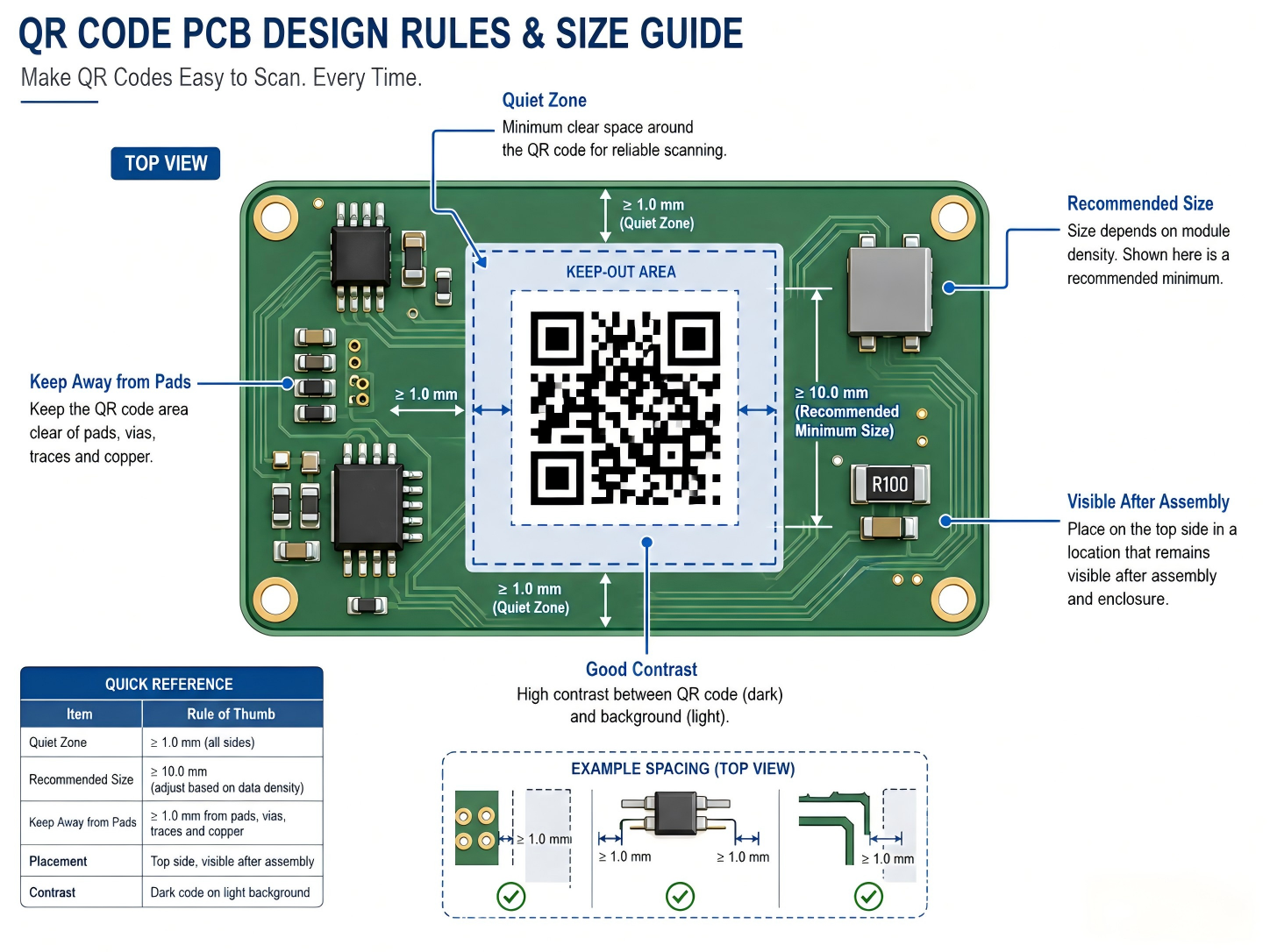
The code should also include a quiet zone. This is the blank margin around the QR pattern. Without enough margin, nearby text, copper, pads, components, or solder mask openings may disturb recognition. A quiet zone of at least four modules is a common QR code principle. On PCB artwork, this means the designer should keep the area around the code clean.
Useful layout rules include:
- Reserve a clean rectangular marking area early in PCB layout.
- Keep the code away from component pads, vias, test points, fiducials, and screw holes.
- Maintain a quiet zone around the QR pattern.
- Avoid placing the code under tall components, shields, heat sinks, or labels.
- Select a size that matches the marking method and scanner distance.
- Use short encoded data when space is limited.
- Confirm readability after soldering, washing, coating, and final assembly.
- Keep codes away from RF antenna zones, high-voltage spacing areas, and thermal contact surfaces.
For PCB QR code size planning, the amount of data matters. A short serial number can use fewer modules and stay readable at a smaller size. A long URL or dense information needs more modules, which requires a larger printed area. In many professional systems, using a short unique ID is better than encoding a long data string. The ID can point to a database where full records are stored.
| Design Factor | Practical Recommendation | Why It Matters |
|---|---|---|
| Code size | Use a comfortable size, often 7–10 mm or larger for silkscreen | Improves scanning reliability |
| Data length | Keep encoded content short when possible | Reduces module density |
| Quiet zone | Leave clean space around the code | Helps scanner detect the pattern |
| Location | Place in a visible, protected area | Supports scanning after assembly |
| Contrast | Use strong color difference | Improves recognition speed |
| Surface | Avoid uneven, reflective, or crowded areas | Keeps edges readable |
| Process | Match design to silkscreen, laser, or inkjet capability | Prevents production mismatch |
For a well-built result, the QR code should be reviewed together with the full PCB stack, surface finish, solder mask color, assembly layout, and end-use environment. This is where cooperation with an experienced manufacturer becomes valuable. EBest Circuit (Best Technology) can help customers check QR code placement, marking method, manufacturability, and traceability needs before production begins.
In summary, a PCB with a scannable QR code gives engineers and manufacturers a practical way to connect a physical circuit board with useful digital information. For custom PCB and PCBA projects that need professional QR marking support, contact sales@bestpcbs.com
You may also like


Tags: laser QR code on PCB, PCB QR code, QR code on PCB, QR code PCB